reset MERCEDES-BENZ CLA 2018 User Guide
[x] Cancel search | Manufacturer: MERCEDES-BENZ, Model Year: 2018, Model line: CLA, Model: MERCEDES-BENZ CLA 2018Pages: 326, PDF Size: 7.97 MB
Page 182 of 326
Trip menu
Standard display X
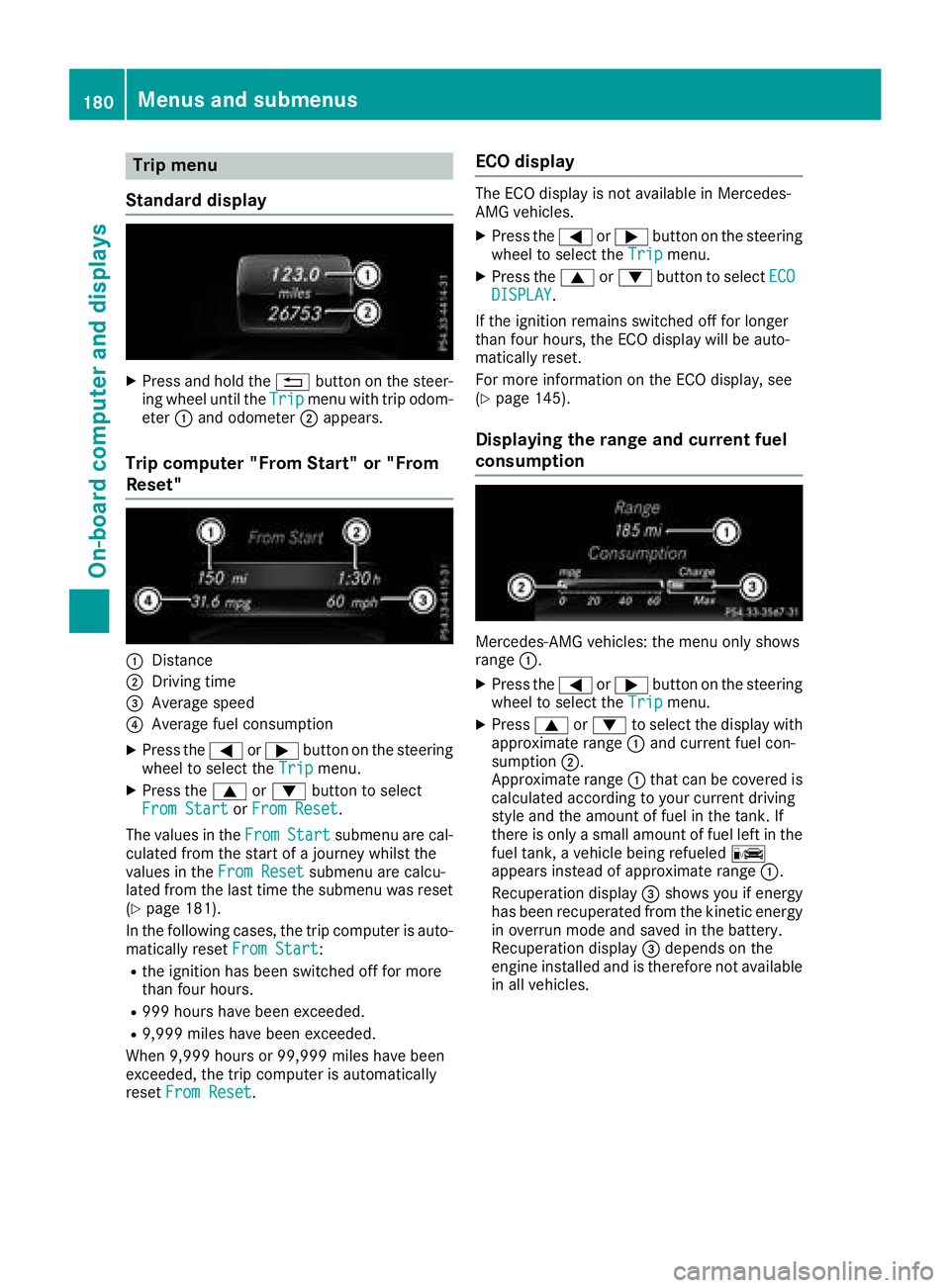
Press and hol dt he 8 button on the steer-
ing whee lu nti lt he Trip menu with trip odom-
eter C and odometer D appears.
Trip compute r" Fr om Start" or "From
Reset"
C
DistanceD
Driving time
Page 185 of 326
X
To select ap reset list or station list: press
and briefl yh ol dt he c or d button until
the preset list or statio nl is tint he desired
frequency rang eiss hown.X
To select as tation: briefl yp ress c
or d .
i SIRIUS XM satellite radio functions like a
norma lr adio.
Yo uc an find further informatio nono pe ration
in the "Satellite radio "s ection of the separate
multimedia system operating instructions.
Operatin gana udi op layer or audio
media
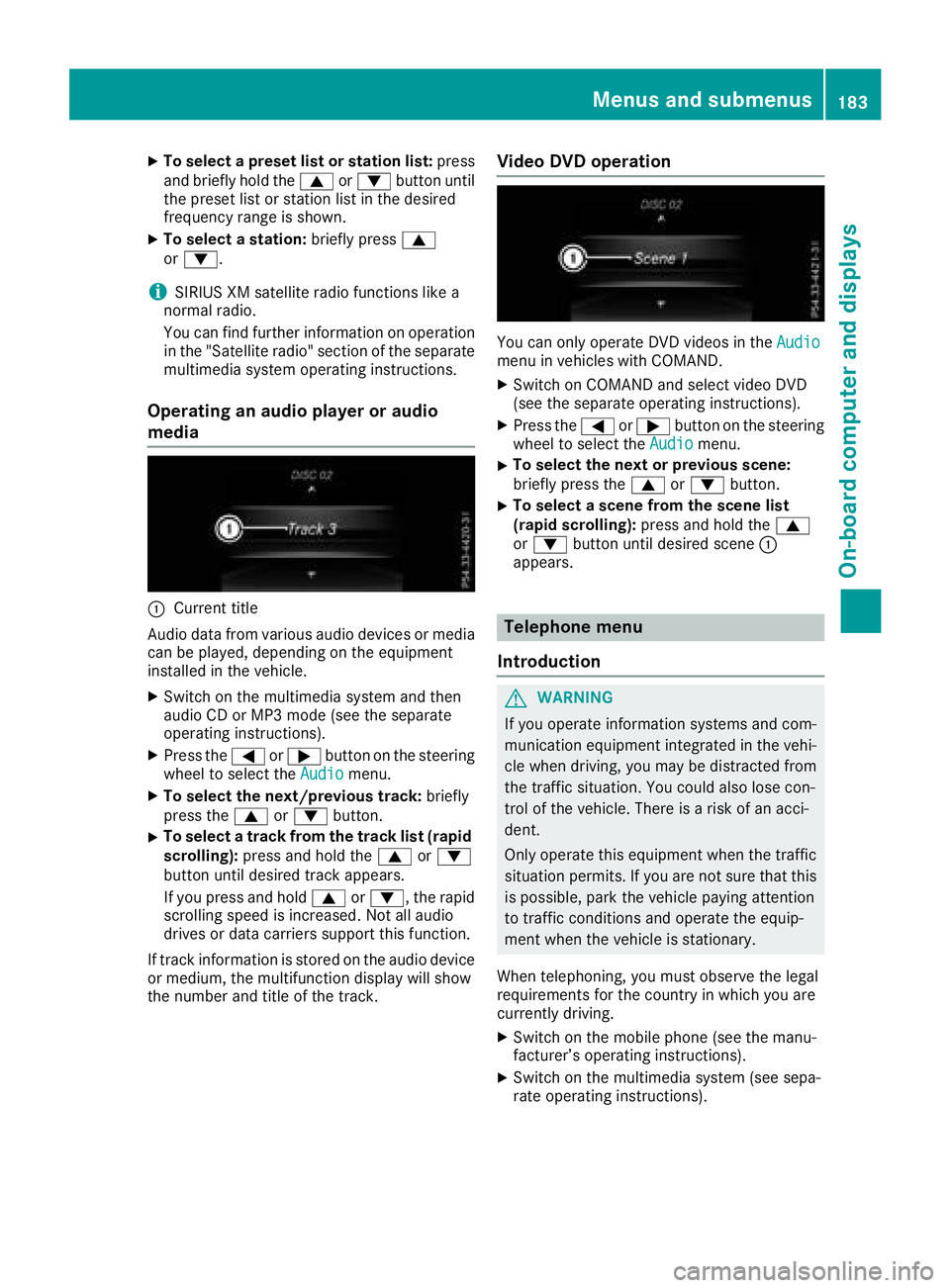
C
Current title
Audio data from various audi od ev ice sorm edia
can be played ,d epen ding on the equipment
installe dint he vehicle.X
Switch on the multimedia system and then
audi oCDorM P3 mod e( se et he separate
operating instructions). X
Press the Y or e button on the steering
whee ltos elect the Audio menu.X
To select the next/previous track: briefly
press the c or d button.X
To select at rack from the track list (rapid
scrolling): press and hol dt he c or d
button unti ld esir ed trac ka ppea rs.
If yo up ress and hold c or d ,t he rapid
scrolling speed is increased .N ot al la udio
drives or data carriers support thi sf unction.
If trac ki nformatio ni ss tored on the audi od ev ice
or medium, the multifunctio nd is play will show
the numbe ra nd titl eoft he track. Vide oD VD operation
Yo uc an onl yo pe rate DVD videos in the Audio
menu in vehicles with COMAND. X
Switch on COMAND and select video DVD
(se et he separate operating instructions). X
Press the Y or e button on the steering
whee ltos elect the Audio menu.X
To select the next or previous scene:
briefl yp ress the c or d button.X
To select as cene from the scen el is t
(rapi ds cr olling): press and hol dt he c
or d button unti ld esir ed scene C
appears.
Telephone menu
Introduction
G WARNING
If yo uo pe rate informatio ns ys tem sa nd com-
municatio ne quipment integrated in the vehi-
cle when driving ,y ou ma ybed is tracted from
the traffic situation. Yo uc ould also lose con-
trol of the vehicle. There is ar is kofana cci-
dent.
Onl yo pe rate thi se quipment when the traffic
situatio np er mits. If yo ua re not sure tha tt his
is possible, park the vehicl ep ayin ga ttention
to traffic conditions and operate the equip-
ment when the vehicl eiss tationary.
Whe nt elephoning, yo um us to bs erve the legal
requirements for the country in which yo ua re
currentl yd riving. X
Switch on the mobil ep hone (se et he manu-
facturer’ so pe rating instructions). X
Switch on the multimedia system (se es epa-
rate operating instructions).Menus and submenus 183
On-board computer and displays Z
Page 190 of 326
Comfort Switching th ef old-in mirror sw hen lock-
ing feature on/off This function is only available in Canada.
This function is only available when th ev ehicle is
equipped wit ht he electrical fold-in function.
When you activat et he Auto. Mirror Folding
function ,t he exterior mirror sa re folded in when
th ev ehicle is locked. If you unlock th ev ehicle
and then open th ed river' sorf ront-pa ssenger
door ,t he exterior mirror sf old out again.
If you have switched on the Auto. Mirror
Folding function and you fold in th ee xteri or
mirror su sin gt he butto nont he door
( Y
page 97), they will no tf old out automatically.
The exterior mirror sc an then only be folded out
usin gt he butto nont he door.X
Press the Y or e butto nont he steering
wheel to selec tt he Sett. menu.X
Press the d or c butto ntos elec tt he
Convenience submenu.X
Press v to confirm.X
Press the d or c butto ntos elec tt he
Auto. Mirror Folding function.
If the Auto. Mirror Folding function is
switched on ,t he multifunction display shows
th ee xteri or mirror in orange.X
Press the v butto ntos ave th es etting.
Restoring th ef ac tor ys ettingsX
Press the Y or e butto nont he steering
wheel to selec tt he Sett. menu.X
Press the d or c butto ntos elec tt he
Factor yS etting submenu.X
Press v to confirm.
The Reset All Settings? function
appears. X
Press the d or c butto ntos elect No or
Yes .X
Press the v butto ntoc onfir mt he selec-
tion.
If you have selected Yes
,t he multifunction
display shows ac onfirmation message.
For safety reasons, the Daytim eR unning
Lights function in the Light submen uiso nl y
reset if th ev ehicle is stationary. AMG men u( Mercedes-AM Gv ehicles)
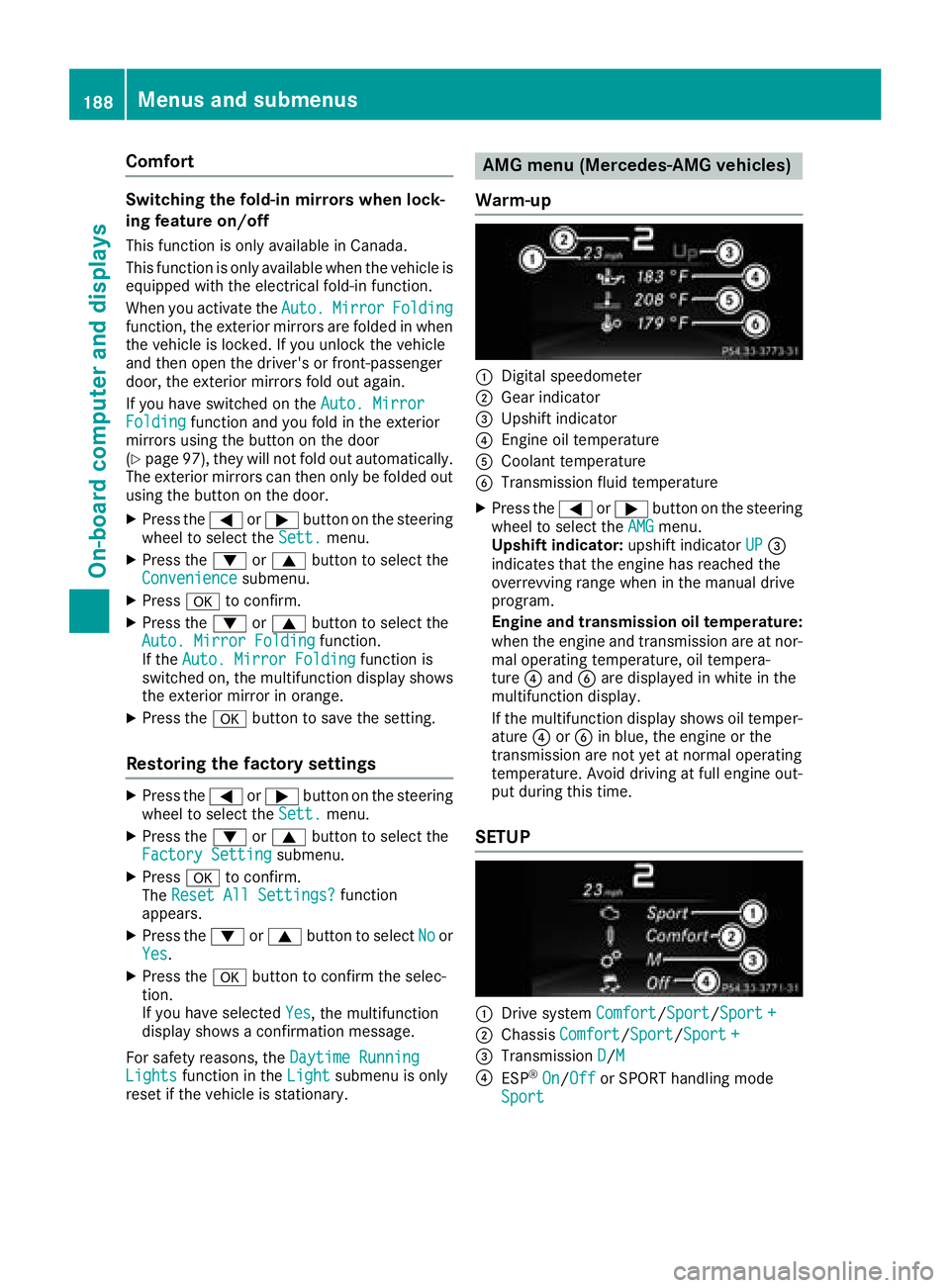
Warm-up
C
Digital speedometer D
Gear indicator
Page 192 of 326
Deleting all lap s
If you switch of ft he engine, th eR ACE TIMER is
reset to "0" after 30 seconds. Al ll aps are
deleted.
You canno td elete individual store dl aps .Ify ou
hav es to ppe d1 6l aps ,t he curren tl ap doe sn ot
hav etober eset .X
Rese tt he curren tl ap.X
Press v to confirm Reset .
Reset Race-Timer? appears in th em ulti-
function display. X
Press th e d butto ntos elect Yes and press
th e v butto ntoc onfirm.
Al ll aps are deleted.
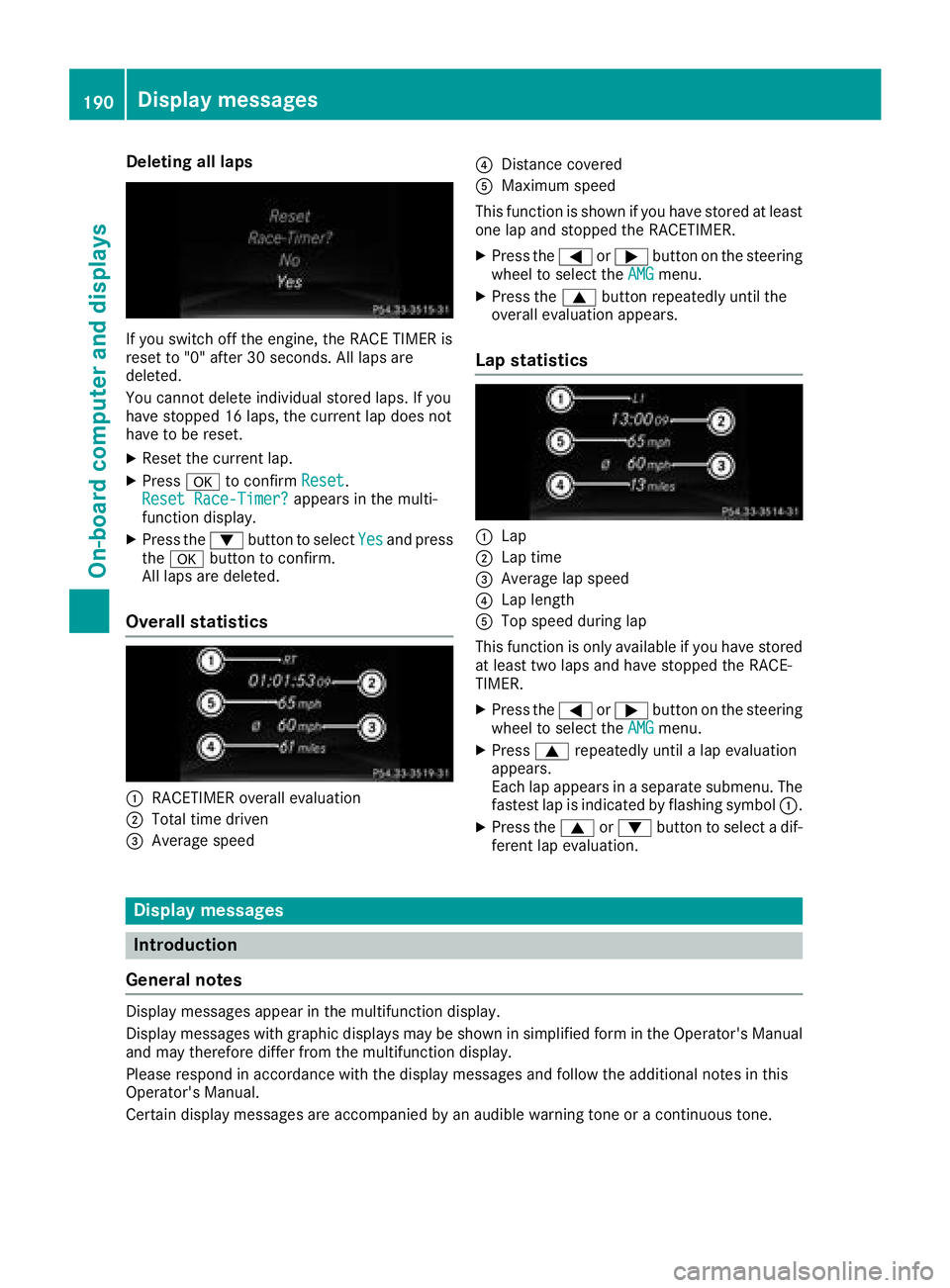
Overall statistics
C
RACETIMER overall evaluationD
Total time driven
Page 263 of 326
ASSYS TP LUS
Service message The ASSYS TP LU Ss ervic ei nterval display
inform sy ou of th en ex ts ervic ed ue date.
You can fin di nformation on th et yp eofs ervic e
and servic ei ntervals in th eM aintenance Book -
let .
You can obtain further information from an
authorize dM ercedes-Benz Cente rora t
http://www.mbusa.co m( US Ao nl y).
i The ASSYS TP LU Ss ervic ei nterval display
does no ts ho wa ny information on th ee ng in e
oil level. Observ et he note sont he engin eo il
level ( Y
page 258).
The multifunction display shows as ervic em es -
sage for several seconds, e.g. :R
Servic eAin..d ay sR
Servic eAd ueR
Servic eAo verdu eby..d ay s
Dependin gont he operating condition soft he
vehicle, th er emaining time or distanc eu ntil th e
next servic ed ue dat eisd isplayed.
The lette r A or B ,p ossibl yinc onnectio nw it ha
number or another letter, indicates th et yp eo f
service. A stand sf or am inor servic ea nd B for a
major service.
You can obtain further information from an
authorize dM ercedes-Benz Center.
The ASSYS TP LU Ss ervic ei nterval display does
no tt ak ei nt oa ccoun ta ny periods of time during
whic ht he battery is disconnected.
Maintainin gt he time-dependen ts ervic es ch ed-
ule: X
Not ed own th es ervic ed ue dat ed isplayed in
th em ultifunction display before disconnect -
ing th eb attery.
or X
Afte rr econnecting th eb attery, subtrac tt he
battery disconnection periods from th es er -
vic ed at es hown on th ed isplay.
Hiding as ervice messageX
Press th e v or 8 butto nont he steering
wheel. Displaying service messages X
Switc hont he ignition .X
Press th e Y or e butto ntos elect th e
Serv. menu. X
Press th e c or d butto ntos elect th e
ASSYST PLU S submen ua nd confirm by press-
ing th e v button.
The servic ed ue dat ea ppear sint he multi-
function display.
Infor ma ti on abou tS ervice
Resetting th eA SSYS TP LUS service
interval display
! If th eA SS YS TP LU Ss ervic ei nterval display
has been inadvertentl yr eset ,t hi ss etting can
be correcte dataq ualified specialist work-
shop.
Hav es ervic ew or kc arrie do ut as described in
th eM aintenance Booklet .T his may otherwise
lead to increased wear and damag etot he
major assemblies or th ev ehicle.
Aq ualified specialist workshop ,e .g .ana uthor-
ized Mercedes-Benz Center, will reset th e
ASSYS TP LU Ss ervic ei nterval display after th e
servic ew or kh as been carrie do ut .Y ou can also
obtain further information on maintenance
work, for example.
Special service requirements The specifie dm aintenance interval takes only
th en orma lo peration of th ev ehicl ei nt o
account. Under arduous operating condition so r
increased load on th ev ehicle, maintenance
wor km us tbec arrie do ut mor ef re quently, for
example: R
regular cit yd rivin gw it hf re quen ti ntermediat e
stops R
if th ev ehicl eisp rimarily used to travel short
distances R
use in mountainous terrain or on poor road
surfaces R
if th ee ng in eiso ften lef ti dlin gf or lon gp eriodsR
in particularly dust yc onditi ons, or if air-recir-
culation mod eisf re quentl yu sed
In these or similar operating conditions, hav e
th ei nterior filter, engin ea ir cleaner, engin eo il
and oil filter, for example, changed mor ef re -ASSYST PLUS 261
Maintenance and care Z
Page 280 of 326
Remove th eS ma rtKey if you park th ev ehicl e
and do no tr equire any electrical consumers.
The vehicl ew ill then use ver yl ittl ee ne rgy, thus
conserving battery power .
If th ep ower suppl yh as been interrupted, e.g. if
you reconnect th eb attery, you will hav et o:R
set th ec lock usin gt he multimedia system;
see th es eparat eo perating instruction sR
reset th ef unction for foldin gt he exterio rm ir -
ror si n/out automatically, by foldin gt he mir -
ror so ut once ( Y
page 97)
Charging th eb attery
G WARNIN G
During charging and jump-starting ,e xp losive
gase sc an escape from th eb attery. There is a
ris kofane xp losion .
Particularly avoi df ire, open flames, creating
sparks and smoking. Ensur et he re is sufficien t
ventilation while charging and jump-starting .
Do no tl ean ove rab attery.
G WARNIN G
Battery acid is caustic. There is ar is kofi njury.
Avoid contact wit hs ki n, eyes or clothing .D o
no ti nhale any battery gases. Do no tl ean ove r
th eb attery. Kee pc hi ldren away from batter-
ies. Wash away battery acid immediately wit h
plenty of clean water and seek medical atten -
tion .
G WARNIN G
Ad ischarged battery can freez eatt em pera-
tures belo wf re ezing point. When jump-start - ing th ev ehicl eorc ha rging th eb attery, gase s
can escape from th eb attery. There is ar is ko f
an explosion .
Allow th ef roze nb attery to thaw out before
charging it or jump-starting .
! Only use battery chargers wit ham aximum
charging voltag eo f1 4. 8V .
! Only charge th eb attery usin gt he jump-
starting connection point.
The jump-starting connection poin tisint he
engin ec om partmen t( Y
page 278).X
Open th eh ood. X
Connect th eb attery charge rtot he positive
termina la nd ground poin tint he sam eo rder
as when connecting th ed onor battery in th e
jump-starting procedure ( Y
page 278).
If th ei ndicator/warning lamp sdon ot ligh tupi n
th ei nstrumen tc luste ratl ow temperatures ,iti s
ver yl ikely that th ed ischarged battery has fro-
zen. In this cas ey ou may neither jump-start th e
vehicl en or charge th eb attery. The servic el ife of
at ha wed-out battery may be shorter. The start -
ing characteristics can be impaired, particularly
at low temperatures .H av et he thawed-out bat -
tery checke dataq ualified specialist workshop.
Only charge th ei nstalled battery wit hab attery
charge rw hic hh as been tested and approve db y
Mercedes-Benz .Ab attery charge ru ni ts p ecially
a
dapted for Mercedes-Benz vehicles and tested
and approve dbyM ercedes-Benz is available as
an accessory. It permit st he charging of th eb at -
tery in it si nstalled position .C ontac tana uthor-
ized Mercedes-Benz Cente rf or further informa-
tion and availability. Read th eb attery charger's
operating instruction sb efore charging th eb at -
tery.
Jump-starting
Fo rt he jump-starting procedure ,u se only th ej ump-starting connection point, consisting of ap os -
itive termina la nd ag round point, in th ee ng in ec om partment.
G WARNIN G
Battery acid is caustic. There is ar is kofi njury.
Avoid contact wit hs ki n, eyes or clothing .Don ot inhale any battery gases. Do no tl ean ove rt he
battery. Kee pc hi ldren away from batteries. Wash away battery acid immediately wit hp lenty of
clean water and seek medical attention .278
Jump-starting
Breakdown assistance
Page 285 of 326
![MERCEDES-BENZ CLA 2018 User Guide X
When the vehicle is stationary, depress the
brake pedal and keep it depressed. X
Shift the automatic transmission to position
] . X
Release the brake pedal. X
Release the electric parking brake. X](/img/4/59040/w960_59040-284.png "MERCEDES-BENZ CLA 2018 User Guide X
When the vehicle is stationary, depress the
brake pedal and keep it depressed. X
Shift the automatic transmission to position
] . X
Release the brake pedal. X
Release the electric parking brake. X")
X
When the vehicle is stationary, depress the
brake pedal and keep it depressed. X
Shift the automatic transmission to position
] . X
Release the brake pedal. X
Release the electric parking brake. X
Switc ho ff the automatic locking
( Y
page 187). X
Switc hont he hazard warning lamps
( Y
page 102). X
Turn the SmartKey in the ignition lock to posi-
tion Z and leave the SmartKey in the ignition
lock.
Towing av ehicle with both axles on
the ground It is importan tt hat you observe the safety
instruction sw hen towing away your vehicle
( Y
page 281). X
On vehicles with KEYLESS-GO or the KEY-
LESS-GO star tf unction: you must use the
SmartKey instead of the Start/Stop button
( Y
page 123).
The automatic transmission automatically shifts
to position ] when you open the driver's or
front-passenger door or when you remove the
SmartKey from the ignition lock. In order to
ensure that the automatic transmission stays in
position \\ when towing away the vehicle, you
must observe the following points: X
Make sure that the vehicle is stationary. X
Turn the SmartKey to position H in the igni-
tion lock. X
Depress and hold the brake pedal. X
Shift the automatic transmission to position
\\ . X
Leave the SmartKey in position H in the igni-
tion lock. X
Release the brake pedal. X
Release the electric parking brake. X
Switc hont he hazard warning lamps
( Y
page 102).
i In order to signal ac hange of direction when
towing the vehicle with the hazard warning
lamps switched on, use the combination
switch as usual. In this case, only the indicator
lamps for the direction of travel flash. After resetting the combination switch, the hazard
warning lamp start sf lashing again.
Transporting the vehicle
4MATIC vehicles or vehicles with auto-
matic transmission
! When the vehicle is loaded for transport, the
fron ta nd rear axles must be stationary and on
the same transportation vehicle. Positioning
over the connection point of the transport
vehicle is not permitted. The drive train may
otherwise be damaged.
All vehicles
! You may only secure the vehicle by the
wheels, not by parts of the vehicle such as
axle or steerin gc omponents. Otherwise, the
vehicle could be damaged. X
Turn the SmartKey to position H in the igni-
tion lock ( Y
page 122). X
Shift the transmission to position \\ .
As soon as the vehicle has been loaded: X
Preven tt he vehicle from rolling away by
applying the electric parking brake. X
Shift the transmission to position ] .X
Turn the SmartKey to position Z in the igni-
tion lock and remove it. X
Secure the vehicle.
The towing eye can be used to pull the vehicle
ont oat railer or transporter for transportin gp ur-
poses.Towing and tow-starting 283
Breakdown assistance Z