keyless MERCEDES-BENZ CLA 2019 User Guide
[x] Cancel search | Manufacturer: MERCEDES-BENZ, Model Year: 2019, Model line: CLA, Model: MERCEDES-BENZ CLA 2019Pages: 330, PDF Size: 23.57 MB
Page 79 of 330
Meanwhile, the fuel filler flap will not be lockedor unlocked.
You cannot unlock the vehicle centrally from theinside if the vehicle has been locked with theSmartKey or KEYLESS-GO.
You can open a door from inside the vehicleeven if it has been locked. You can open the reardoors from inside the vehicle unless they aresecured by the child-proof lock (Ypage 60).
If the vehicle has previously been locked withthe SmartKey from the outside, opening a doorfrom the inside will trigger the anti-theft alarmsystem. Switch off the alarm (Ypage 68).
If a locked door is opened from the inside, theprevious unlock status of the vehicle will betaken into consideration if:
Rthe vehicle was locked using the locking but-ton for the central locking, or
Rif the vehicle was locked automatically
The vehicle will be fully unlocked if it had previ-ously been fully unlocked. If only the driver'sdoor had been previously unlocked, only thedoor which has been opened from the inside isunlocked.
Automatic locking feature
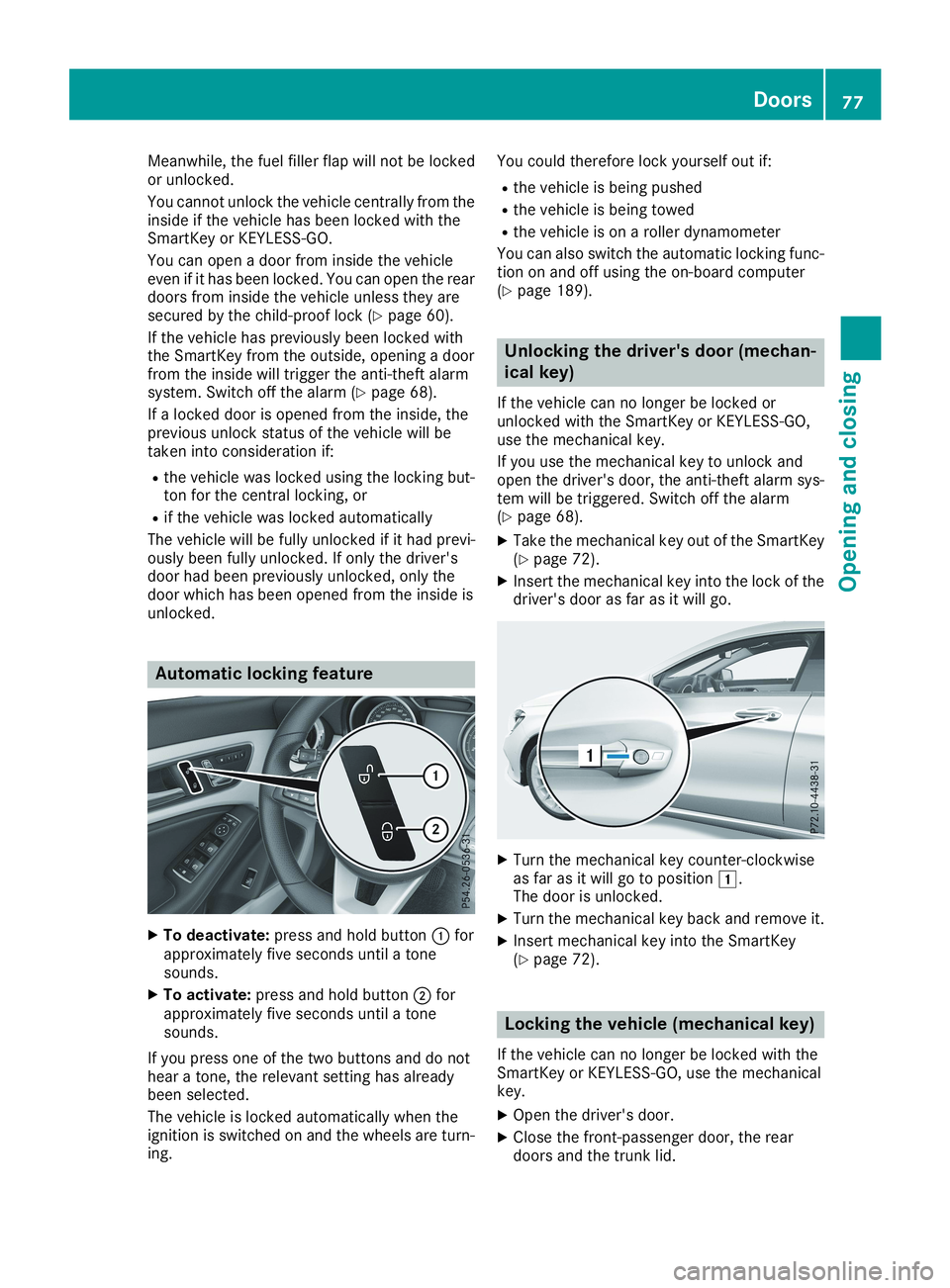
XTo deactivate:press and hold buttonCforapproximately five seconds until a tonesounds.
XTo activate:press and hold buttonDforapproximately five seconds until a tonesounds.
If you press one of the two buttons and do nothear a tone, the relevant setting has alreadybeen selected.
The vehicle is locked automatically when theignition is switched on and the wheels are turn-ing.
You could therefore lock yourself out if:
Rthe vehicle is being pushed
Rthe vehicle is being towed
Rthe vehicle is on a roller dynamometer
You can also switch the automatic locking func-tion on and off using the on-board computer(Ypage 189).
Unlocking the driver's door (mechan-
ical key)
If the vehicle can no longer be locked orunlocked with the SmartKey or KEYLESS-GO,use the mechanical key.
If you use the mechanical key to unlock andopen the driver's door, the anti-theft alarm sys-tem will be triggered. Switch off the alarm(Ypage 68).
XTake the mechanical key out of the SmartKey(Ypage 72).
XInsert the mechanical key into the lock of thedriver's door as far as it will go.
XTurn the mechanical key counter-clockwiseas far as it will go to positionG.The door is unlocked.
XTurn the mechanical key back and remove it.
XInsert mechanical key into the SmartKey(Ypage 72).
Locking the vehicle (mechanical key)
If the vehicle can no longer be locked with theSmartKey or KEYLESS-GO, use the mechanicalkey.
XOpen the driver's door.
XClose the front-passenger door, the reardoors and the trunk lid.
Doors77
Opening and closing
Z
Page 81 of 330
GWARNING
The reversing feature does not respond:
Rto soft, light and thin objects, e.g. fingers
Rover the last 1/3 in (8 mm) of the closing
movement
The reversing feature cannot prevent some-
one from becoming trapped in these situa-
tions in particular. There is a risk of injury.
Make sure that no body parts are in close
proximity during the closing procedure.
If somebody becomes trapped:
Rpress theTbutton on the SmartKey, or
Rpull or press the remote operating switch
on the driver's door or
Rpress the closing button/STOP button in
the tailgate or
Rpull the handle on the tailgate
Vehicles with HANDS-FREE ACCESS:it is alsopossible to stop the closing process by perform-ing a kicking movement under the rear bumper.
Opening/closing from outside
Opening
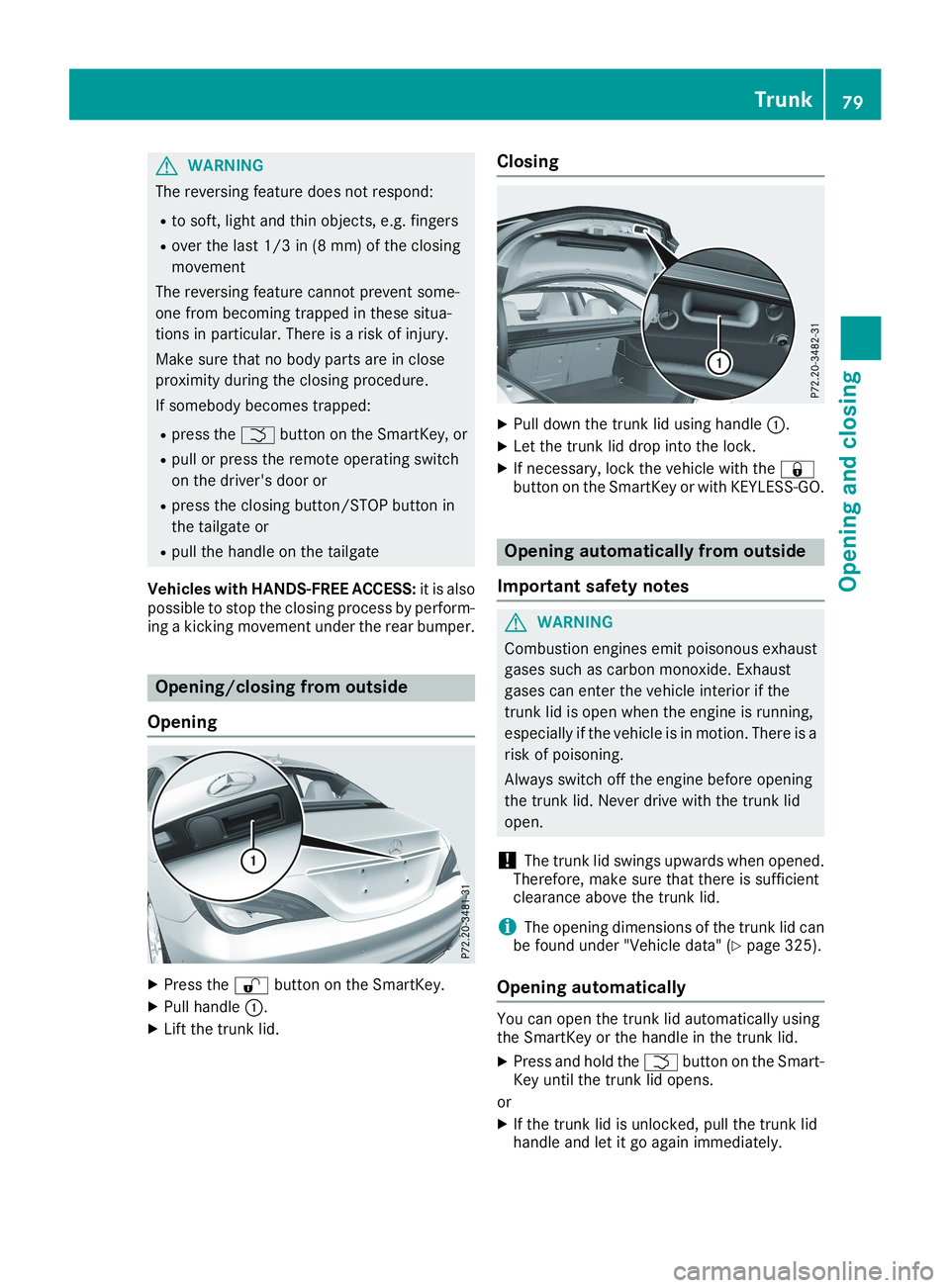
XPress the6button on the SmartKey.
XPull handleC.
XLift the trunk lid.
Closing
XPull down the trunk lid using handleC.
XLet the trunk lid drop into the lock.
XIf necessary, lock the vehicle with the7button on the SmartKey or with KEYLESS-GO.
Opening automatically from outside
Important safety notes
GWARNING
Combustion engines emit poisonous exhaust
gases such as carbon monoxide. Exhaust
gases can enter the vehicle interior if the
trunk lid is open when the engine is running,
especially if the vehicle is in motion. There is a
risk of poisoning.
Always switch off the engine before opening
the trunk lid. Never drive with the trunk lid
open.
!The trunk lid swings upwards when opened.Therefore, make sure that there is sufficientclearance above the trunk lid.
iThe opening dimensions of the trunk lid canbe found under "Vehicle data" (Ypage 325).
Opening automatically
You can open the trunk lid automatically usingthe SmartKey or the handle in the trunk lid.
XPress and hold theTbutton on the Smart-Key until the trunk lid opens.
or
XIf the trunk lid is unlocked, pull the trunk lidhandle and let it go again immediately.
Trunk79
Opening and closing
Z
Page 82 of 330
HANDS-FREE ACCESS
Important safety notes
GWARNING
The vehicle exhaust system can become very
hot. If you use HANDS-FREE ACCESS, you
could burn yourself by touching the exhaust
system. There is a risk of injury. Always
ensure that you make the kicking movement
only within the detection range of the sensors.
!If the SmartKey is within the rear detectionrange of KEYLESS-GO, the following situa-tions, for example, could lead to the uninten-tional opening of the trunk lid:
Rwhen using an automatic car wash
Rwhen using a power washer
Make sure that the SmartKey is at least 10 ft(3 m) away from the vehicle.
iYou can also deactivate KEYLESS-GO. Fur-ther information on deactivating and activat-ing KEYLESS-GO (Ypage 71).
General notes
With KEYLESS-GO and HANDS-FREE ACCESS,you can open the trunk lid without using yourhands. This is useful if you have your hands full.To do this, make a kicking movement under thebumper with your foot.
Observe the following points:
RCarry your KEYLESS-GO key about your per-son. The SmartKey must be at the rear of thevehicle in the detection range of KEYLESS-GO.
RWhen making the kicking movement, makesure that you are standing firmly on theground and that there is sufficient clearanceto the rear of the vehicle. You could otherwiselose your balance, for example on ice.
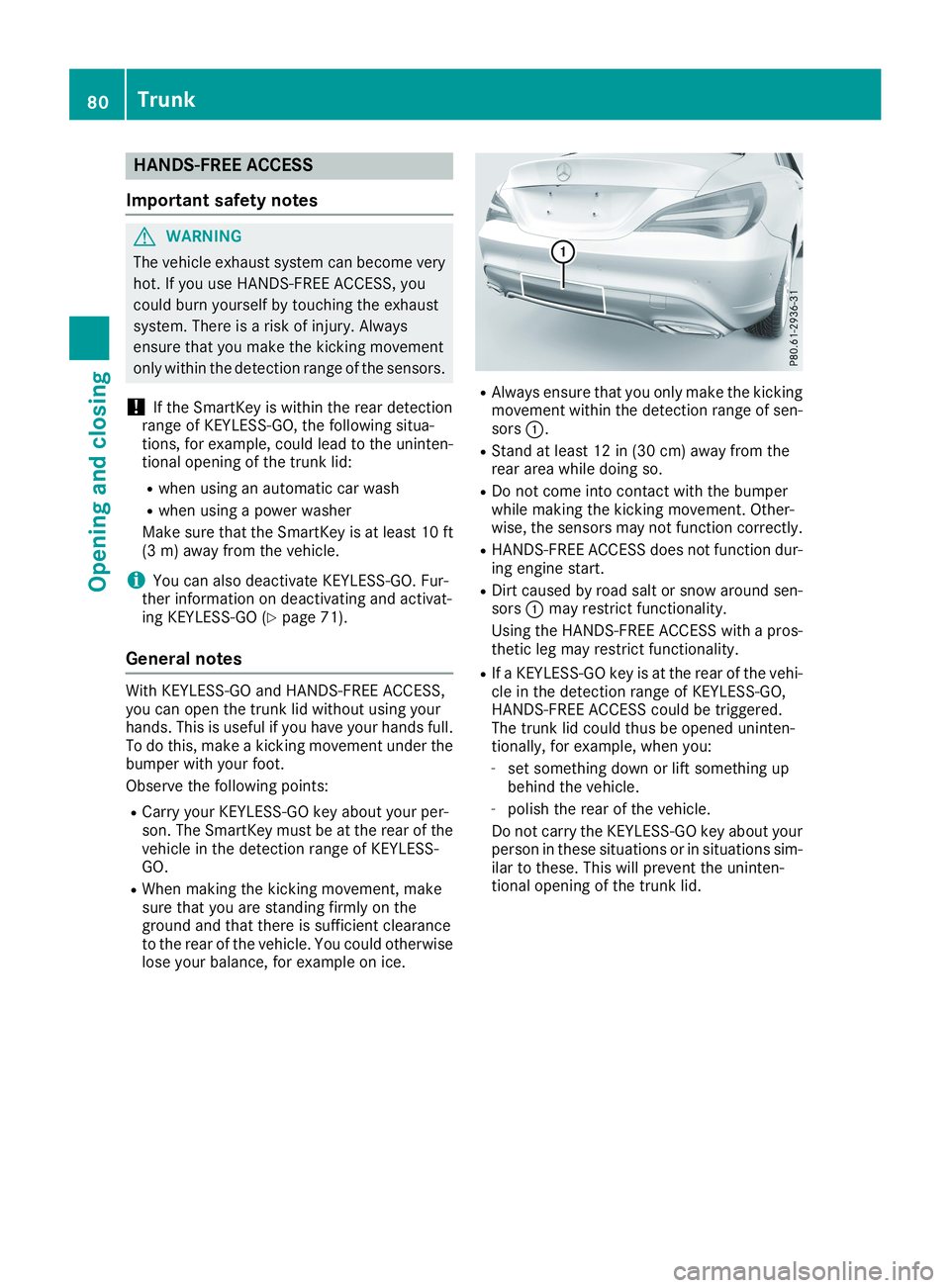
RAlways ensure that you only make the kickingmovement within the detection range of sen-sorsC.
RStand at least 12 in (30 cm) away from therear area while doing so.
RDo not come into contact with the bumperwhile making the kicking movement. Other-wise, the sensors may not function correctly.
RHANDS-FREE ACCESS does not function dur-ing engine start.
RDirt caused by road salt or snow around sen-sorsCmay restrict functionality.
Using the HANDS-FREE ACCESS with a pros-thetic leg may restrict functionality.
RIf a KEYLESS-GO key is at the rear of the vehi-cle in the detection range of KEYLESS-GO,HANDS-FREE ACCESS could be triggered.The trunk lid could thus be opened uninten-tionally, for example, when you:
-set something down or lift something upbehind the vehicle.
-polish the rear of the vehicle.
Do not carry the KEYLESS-GO key about yourperson in these situations or in situations sim-ilar to these. This will prevent the uninten-tional opening of the trunk lid.
80Trunk
Opening and closing
Page 86 of 330
The SmartKey can also be used to carry out thefollowing functions simultaneously:
Runlock the vehicle
Ropen the side windows
Ropen the panorama roof with power tilt/slid-ing panel and the roller sunblind
The convenience opening feature can only beoperated using the SmartKey.
The "convenience opening" feature is also avail-able when the vehicle is unlocked.
XPress and hold the6button until the sidewindows and the panorama sunroof are in thedesired position.If the roller sunblind of the panorama roofwith power tilt/sliding panel is closed, theroller sunblind is opened first.
XPress and hold the6button once moreuntil the panorama roof with power tilt/slid-ing panel reaches the desired position.
XTo interrupt convenience opening:releasethe6button.
Convenience closing feature
Important safety notes
GWARNING
When the convenience closing feature is oper-
ating, parts of the body could become trapped
in the closing area of the side window and the
sliding sunroof. There is a risk of injury.
Observe the complete closing procedure
when the convenience closing feature is oper-
ating. Make sure that no body parts are in
close proximity during the closing procedure.
Vehicles with KEYLESS-GO or KEYLESS-GOstart function:you can do the following at thesame time:
Rlock the vehicle
Rclose the side windows
Rclose the panorama roof with power tilt/slid-ing panel
On vehicles with a panorama roof with powertilt/sliding panel, you can then close the rollersunblind.
iNotes on the automatic reversing featurefor:
RThe side window (Ypage 83)
RThe panorama roof with power tilt/slidingpanel (Ypage 87)
RThe roller sunblind (Ypage 88)
Using the SmartKey
XVehicles with KEYLESS-GO or KEYLESS-GO start function:for the following opera-tions, point the tip of the SmartKey at thehandle on the driver's door. The SmartKeymust be close to the driver's door handle.
iVehicles with KEYLESS-GO or KEYLESS-GO start function:the SmartKey must be inclose proximity to the vehicle.
XPress and hold the7button until the sidewindows and the panorama sliding sunroofare fully closed.
XMake sure that all the side windows and thepanorama roof with power tilt/sliding panelare closed.
On vehicles with a panorama roof with powertilt/sliding panel:
XPress and hold the7button again until theroller sunblind of the panorama sliding sun-roof closes.
XTo interrupt convenience closing:releasethe7button.
Using KEYLESS-GO
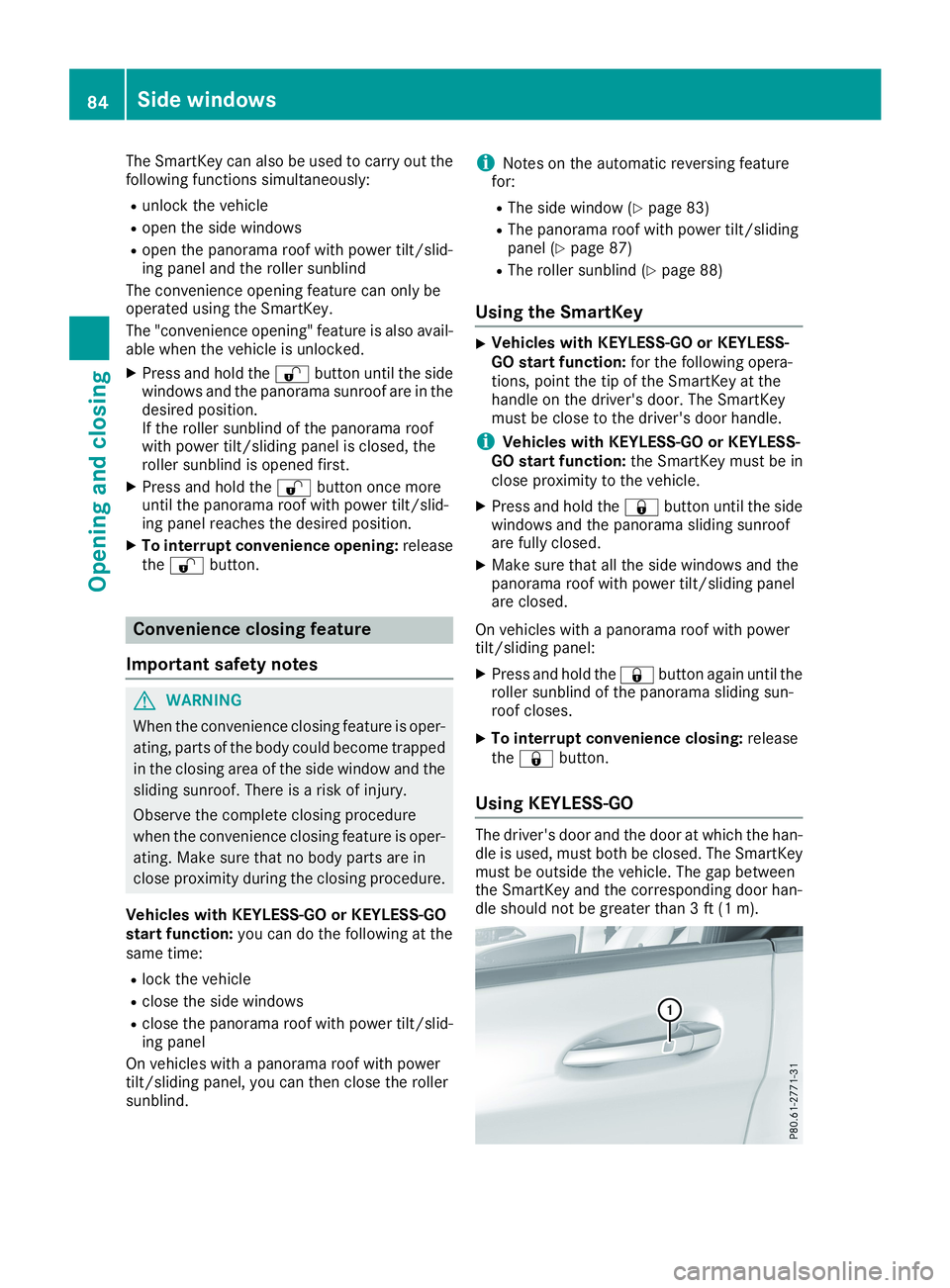
The driver's door and the door at which the han-dle is used, must both be closed. The SmartKeymust be outside the vehicle. The gap betweenthe SmartKey and the corresponding door han-dle should not be greater than 3 ft (1 m).
84Side windows
Opening and closing
Page 111 of 330
Replacing the wiper blades
Important safety notes
GWARNING
If the windshield wipers begin to move while
you are changing the wiper blades, you could
be trapped by the wiper arm. There is a risk of
injury.
Always switch off the windshield wipers and
ignition before changing the wiper blades.
!To avoid damaging the wiper blades, makesure that you touch only the wiper arm of thewiper.
!Never open the hood if a windshield wiperarm has been folded away from the wind-shield.
Never fold a windshield wiper arm without awiper blade back onto the windshield.
Hold the windshield wiper arm firmly whenyou change the wiper blade. If you release thewindshield wiper arm without a wiper bladeand it falls onto the windshield, the windshieldmay be damaged by the force of the impact.
Mercedes-Benz recommends that you havethe wiper blades changed at a qualified spe-cialist workshop.
Changing the windshield wiper blades
Removing the wiper blades
XVehicles without KEYLESS-GO or KEY-LESS-GO start function:remove the Smart-Key from the ignition lock.
XVehicles with KEYLESS-GO or KEYLESS-GO start function:switch off the engine.
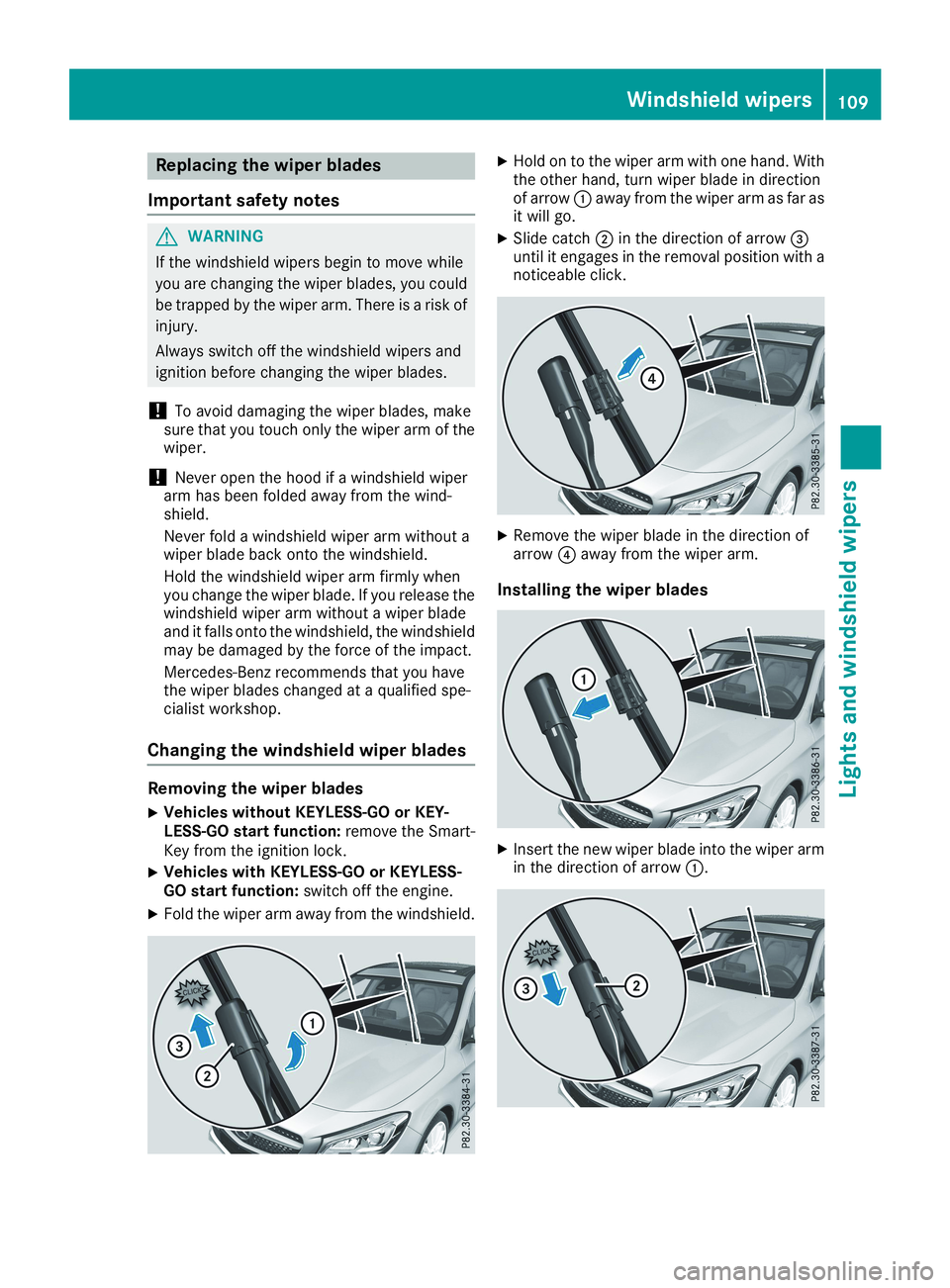
XFold the wiper arm away from the windshield.
XHold on to the wiper arm with one hand. Withthe other hand, turn wiper blade in directionof arrowCaway from the wiper arm as far asit will go.
XSlide catchDin the direction of arrow
Page 125 of 330
!Do not warm up the engine while stationary.Pull away immediately. Avoid high enginespeeds and full throttle until the engine hasreached its operating temperature.
In vehicles with automatic transmission,engage positions P and R only when the vehi-cle is stationary.
Where possible, avoid spinning the drivewheels when pulling away on slippery roads.You could otherwise damage the drive train.
!Mercedes-AMG vehicles:avoid full-loadoperation and engine speeds greater than5000 rpm when the engine is cold. This helpsto protect the engine and avoids uncomfort-able driving.
Key positions
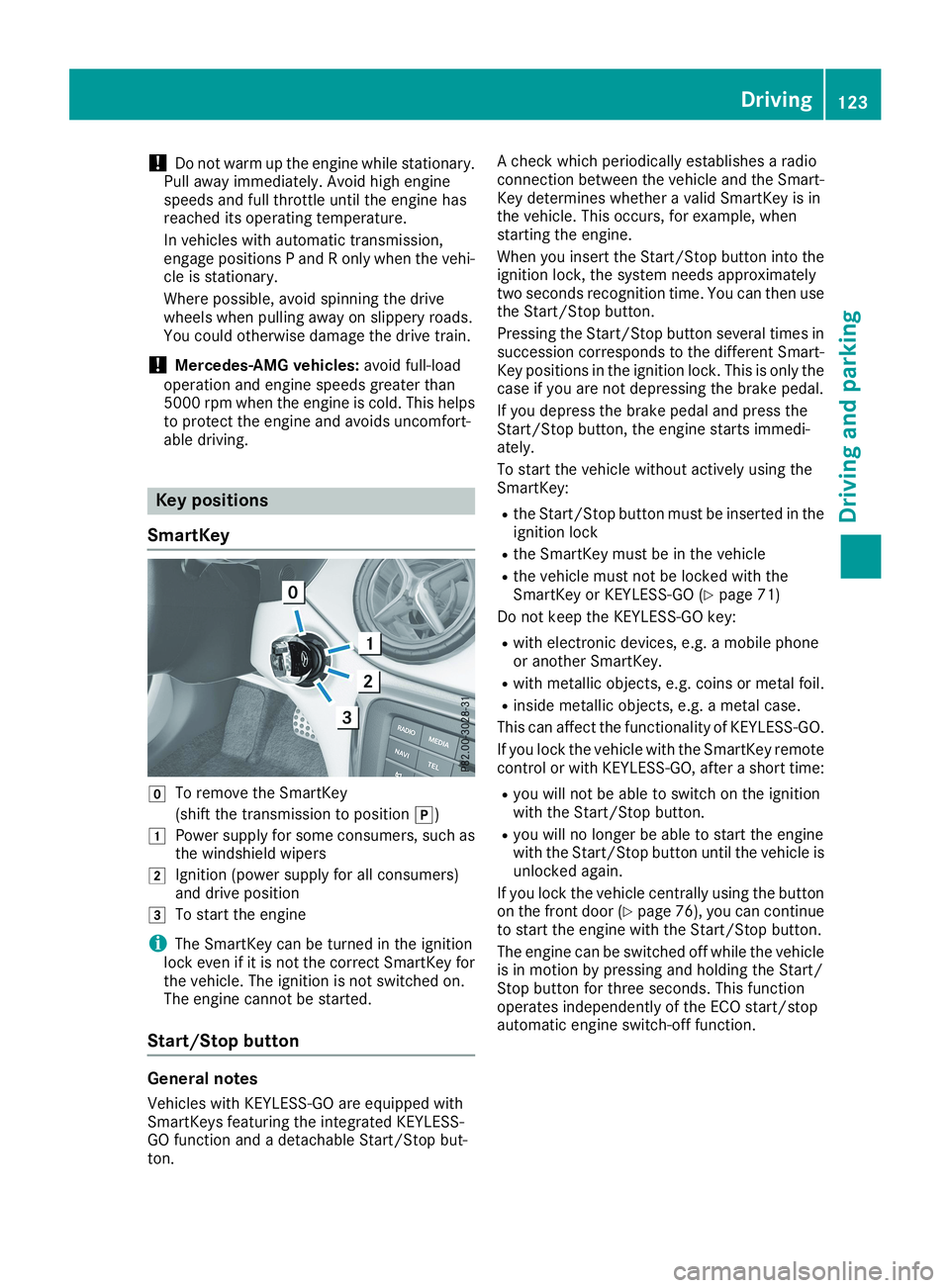
SmartKey
ZTo remove the SmartKey
(shift the transmission to position])
GPower supply for some consumers, such asthe windshield wipers
HIgnition (power supply for all consumers)and drive position
ITo start the engine
iThe SmartKey can be turned in the ignitionlock even if it is not the correct SmartKey forthe vehicle. The ignition is not switched on.The engine cannot be started.
Start/Stop button
General notes
Vehicles with KEYLESS-GO are equipped withSmartKeys featuring the integrated KEYLESS-GO function and a detachable Start/Stop but-ton.
A check which periodically establishes a radioconnection between the vehicle and the Smart-Key determines whether a valid SmartKey is inthe vehicle. This occurs, for example, whenstarting the engine.
When you insert the Start/Stop button into theignition lock, the system needs approximatelytwo seconds recognition time. You can then usethe Start/Stop button.
Pressing the Start/Stop button several times insuccession corresponds to the different Smart-Key positions in the ignition lock. This is only thecase if you are not depressing the brake pedal.
If you depress the brake pedal and press theStart/Stop button, the engine starts immedi-ately.
To start the vehicle without actively using theSmartKey:
Rthe Start/Stop button must be inserted in theignition lock
Rthe SmartKey must be in the vehicle
Rthe vehicle must not be locked with theSmartKey or KEYLESS-GO (Ypage 71)
Do not keep the KEYLESS-GO key:
Rwith electronic devices, e.g. a mobile phoneor another SmartKey.
Rwith metallic objects, e.g. coins or metal foil.
Rinside metallic objects, e.g. a metal case.
This can affect the functionality of KEYLESS-GO.
If you lock the vehicle with the SmartKey remotecontrol or with KEYLESS-GO, after a short time:
Ryou will not be able to switch on the ignitionwith the Start/Stop button.
Ryou will no longer be able to start the enginewith the Start/Stop button until the vehicle isunlocked again.
If you lock the vehicle centrally using the buttonon the front door (Ypage 76), you can continueto start the engine with the Start/Stop button.
The engine can be switched off while the vehicleis in motion by pressing and holding the Start/Stop button for three seconds. This functionoperates independently of the ECO start/stopautomatic engine switch-off function.
Driving123
Driving and parking
Z
Page 144 of 330
Problems with fuel and the fuel tank
ProblemPossible causes/consequences andPPSolutions
Fuel is leaking from thevehicle.The fuel line or the fuel tank is faulty.
GWARNING
Risk of explosion or fire.
XApply the electric parking brake.
XSwitch off the engine.
XRemove the SmartKey from the ignition lock.
or, in vehicles with KEYLESS-GO start-function or KEYLESS‑GO
XOpen the driver's door.The vehicle electronics are now in positionZ. This is the same asthe SmartKey being removed from the ignition.
XDo not restart the engine under any circumstances.
XConsult a qualified specialist workshop.
The fuel filler flap cannotbe opened.The fuel filler flap is not unlocked.
XUnlock the vehicle (Ypage 70).
The SmartKey battery is discharged or nearly discharged.
XUnlock the vehicle using the mechanical key (Ypage 77).
The fuel filler flap is unlocked, but the opening mechanism is jammed.
XConsult a qualified specialist workshop.
Parking
Important safety notes
GWARNING
Flammable material such as leaves, grass or
twigs may ignite if they come into contact with
hot parts of the exhaust system or exhaust
gas flow. There is a risk of fire.
Park the vehicle so that no flammable mate-
rials come into contact with parts of the vehi-
cle which are hot. Take particular care not to
park on dry grassland or harvested grain
fields.
GWARNING
If children are left unsupervised in the vehicle,
they could:
Roperate the vehicle's equipment
Additionally, children could set the vehicle in
motion if, for example, they:
Rrelease the parking brake
Rshift the automatic transmission out of park
position]
Rstart the engine
There is a risk of an accident and injury.
Never leave children or animals unattended in
the vehicle.
When leaving the vehicle, always take the
SmartKey with you and lock the vehicle. This
also applies for the Digital Vehicle Key if the
"Digital Vehicle Key" function is activated via
Mercedes me connect.
!Always secure the vehicle correctly againstrolling away. Otherwise, the vehicle or its driv-etrain could be damaged.
142Parking
Driving and parking
Page 282 of 330
plenty of clean water and seek medical atten-
tion.
HEnvironmental note
Batteries contain pollutants.
It is illegal to dispose of them
with the household rubbish.
They must be collected sep-
arately and disposed of in an
environmentally responsible
recycling system.
Dispose of batteries in an
environmentally responsible
manner. Take discharged
batteries to a qualified spe-
cialist workshop or to a col-
lection point for used batter-
ies.
!Have the battery regularly checked at aqualified specialist workshop.
Comply with the service intervals in the Main-tenance Booklet, or contact a qualified spe-cialist workshop for more information.
!You should have all work involving the bat-tery carried out at a qualified specialist work-shop. In the exceptional case that it is neces-sary for you to disconnect the battery your-self, make sure that:
Rswitch off the engine and remove theSmartKey. On vehicles with KEYLESS-GO,make sure that the ignition is switched off.Check that all the indicator lamps in theinstrument cluster are off. Otherwise, elec-tronic components, such as the alternator,may be damaged.
Ryou first remove the negative terminalclamp and then the positive terminalclamp. Never swap the terminal clamps.Otherwise, the vehicle's electronic systemmay be damaged.
Rin vehicles with automatic transmission,the transmission is locked in position]after the battery is disconnected. The vehi-cle is secured against rolling away. You canthen no longer move the vehicle.
The battery and the cover of the positive ter-minal clamp must be installed securely duringoperation.
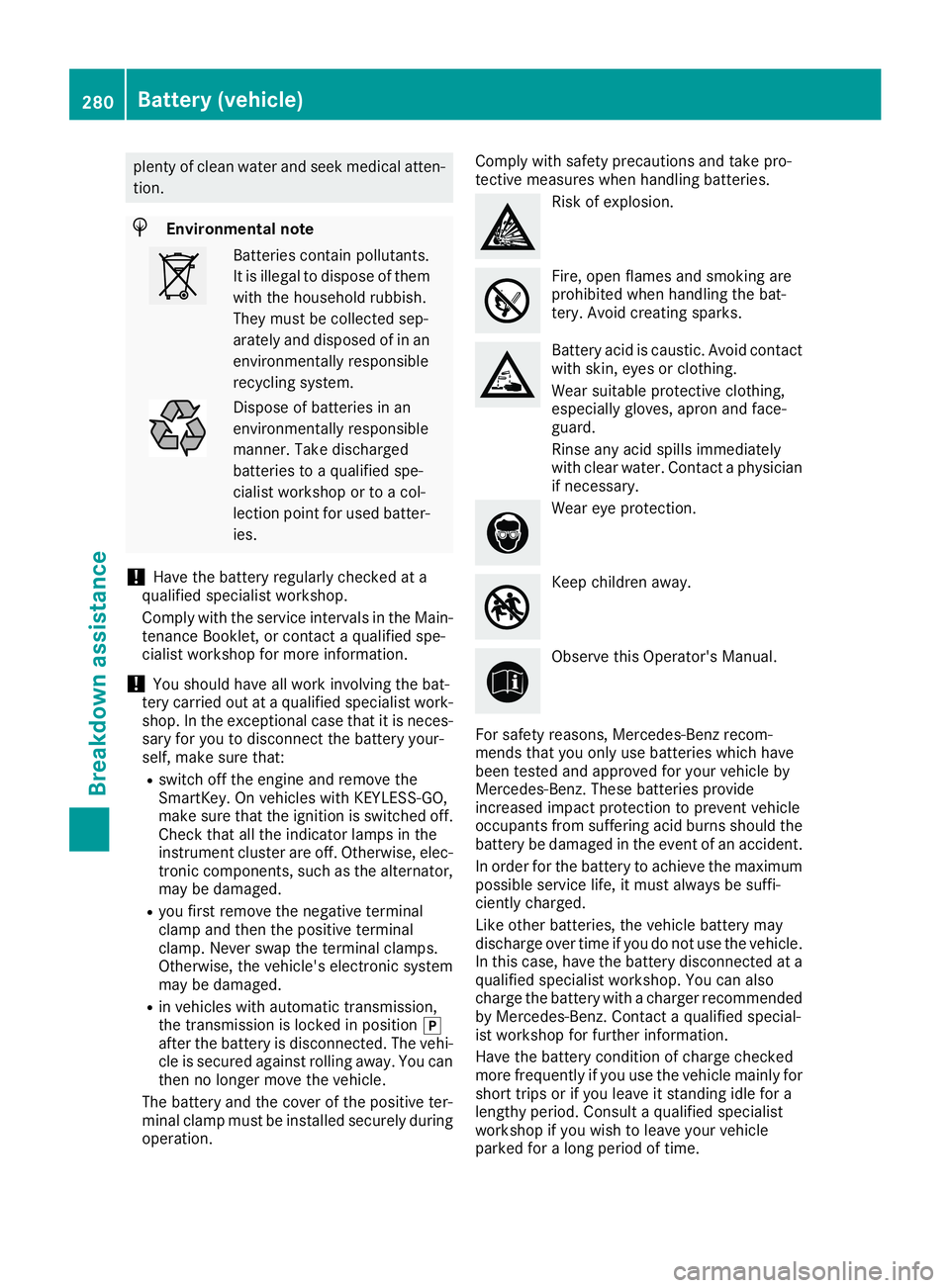
Comply with safety precautions and take pro-tective measures when handling batteries.
Risk of explosion.
Fire, open flames and smoking areprohibited when handling the bat-tery. Avoid creating sparks.
Battery acid is caustic. Avoid contactwith skin, eyes or clothing.
Wear suitable protective clothing,especially gloves, apron and face-guard.
Rinse any acid spills immediatelywith clear water. Contact a physicianif necessary.
Wear eye protection.
Keep children away.
Observe this Operator's Manual.
For safety reasons, Mercedes-Benz recom-mends that you only use batteries which havebeen tested and approved for your vehicle byMercedes-Benz. These batteries provideincreased impact protection to prevent vehicleoccupants from suffering acid burns should thebattery be damaged in the event of an accident.
In order for the battery to achieve the maximumpossible service life, it must always be suffi-ciently charged.
Like other batteries, the vehicle battery maydischarge over time if you do not use the vehicle.In this case, have the battery disconnected at aqualified specialist workshop. You can alsocharge the battery with a charger recommendedby Mercedes-Benz. Contact a qualified special-ist workshop for further information.
Have the battery condition of charge checkedmore frequently if you use the vehicle mainly forshort trips or if you leave it standing idle for alengthy period. Consult a qualified specialistworkshop if you wish to leave your vehicleparked for a long period of time.
280Battery (vehicle)
Breakdown assistance
Page 287 of 330
!When Active Brake Assist, Active DistanceAssist DISTRONIC or the HOLD function isactivated, the vehicle brakes automatically incertain situations.
To avoid damage to the vehicle, deactivatethese systems in the following or similar sit-uations:
Rwhen towing the vehicle
Rin the car wash
!Make sure that the electric parking brake isreleased. If the electric parking brake is faulty,visit a qualified specialist workshop.
!Only secure the tow rope or tow bar at thetowing eyes. Otherwise, the vehicle could bedamaged.
!Do not use the towing eyes for recovery pur-poses as this could damage the vehicle. If indoubt, recover the vehicle with a crane.
!When towing, pull away slowly andsmoothly. If the tractive power is too high, thevehicles could be damaged.
!The vehicle can be towed a maximum of30 miles (50km). The towing speed of 30 mph(50km/h) must not be exceeded.
If the vehicle has to be towed more than30 miles (50km), the front axle must be raisedor the entire vehicle raised and transported.
!Do not tow with sling-type equipment. Thiscould damage the vehicle.
!When towing away vehicles with KEYLESS-GO, use the key instead of the Start/Stopbutton. The automatic transmission may oth-erwise shift to position]when you open thedriver's or front-passenger door, which coulddamage the transmission.
!Vehicles with automatic transmission mustnot be started by tow-starting. This could oth-erwise damage the transmission.
It is better to have the vehicle transported thanto have it towed away.
If the vehicle can no longer be driven because ofan accident or breakdown, you have the follow-ing options:
RTransporting the vehicle.
As a rule, you should have the vehicle trans-ported.
RTowing the vehicle with a tow rope or tow bar.
Only tow the vehicle in exceptional cases.
The battery must be connected and charged.Otherwise, you:
Rcannot turn the SmartKey to positionHinthe ignition lock.
Rcannot release the electric parking brake.
Rcannot shift the transmission to position\\.
The function of the electric parking brake andthe parking lock is dependent on the on-boardvoltage.
If the on-board voltage is low or if there is a sys-tem malfunction:
Rthe electric parking brake may not be appliedin certain circumstances, or
Rit may no longer be possible to shift the trans-mission to position]
Switch off non-essential consumers, e.g. theradio.
Deactivate the automatic locking feature beforethe vehicle is towed (Ypage 189). You couldotherwise be locked out when pushing or towingthe vehicle.
Installing/removing the towing eye
Installing the towing eye
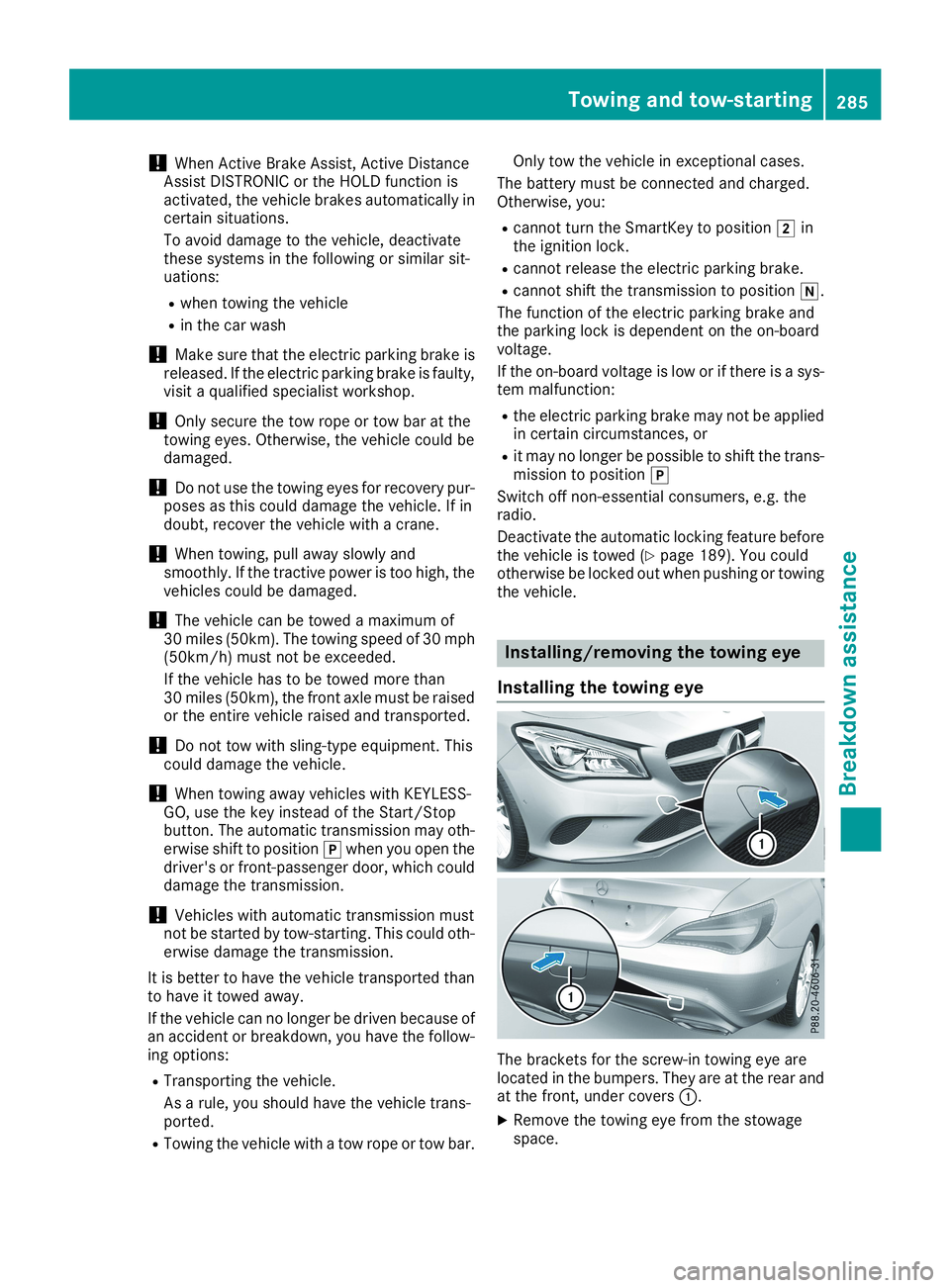
The brackets for the screw-in towing eye arelocated in the bumpers. They are at the rear andat the front, under coversC.
XRemove the towing eye from the stowagespace.
Towing and tow-starting285
Breakdown assistance
Z
Page 288 of 330
The towing eye is located with the vehicle toolkit under the cargo compartment floor(Ypage 274).
Vehicles with the TIREFIT kit: the towing eye isbeneath the tire inflation compressor(Ypage 274).
XPress the mark on coverCinwards in thedirection of the arrow.
XTake coverCoff the opening.
XScrew in the towing eye clockwise to the stop.
Removing the towing eye
XUnscrew and remove the towing eye.
XAttach coverCto the bumper and press untilit engages.
XPlace the towing eye in the stowage wellbeneath the cargo compartment floor in thecargo compartment (Ypage 274).
XVehicles with the TIREFIT kit: put back the tireinflation compressor (Ypage 274).
Towing the vehicle with the front axle
raised
Observe the important safety notes when tow-ing your vehicle with the front axle raised(Ypage 284).
Only vehicles without 4MATIC can be towedwith the front axle raised.
!Vehicles with 4MATIC must not be towedwith either the front or the rear axle raised, asdoing so will damage the transmission.
Vehicles with 4MATIC may either be towed awaywith both axles on the ground or be loaded upand transported.
!The ignition must be switched off if the vehi-cle is being towed with the front axle raised.
Otherwise, ESP®may intervene and damagethe brake system.
XOn vehicles with KEYLESS-GO or the KEY-LESS-GO start function:you must use theSmartKey instead of the Start/Stop button(Ypage 124).
XMake sure that the vehicle is stationary.
XTurn the SmartKey to positionHin the igni-tion lock.
XWhen the vehicle is stationary, depress thebrake pedal and keep it depressed.
XShift the automatic transmission to position].
XRelease the brake pedal.
XRelease the electric parking brake.
XSwitch off the automatic locking(Ypage 189).
XSwitch on the hazard warning lamps(Ypage 103).
XTurn the SmartKey in the ignition lock to posi-tionZand leave the SmartKey in the ignitionlock.
Towing a vehicle with both axles on
the ground
It is important that you observe the safetyinstructions when towing away your vehicle(Ypage 284).
XOn vehicles with KEYLESS-GO or the KEY-LESS-GO start function:you must use theSmartKey instead of the Start/Stop button(Ypage 124).
The automatic transmission automatically shiftsto position]when you open the driver's orfront-passenger door or when you remove theSmartKey from the ignition lock. In order toensure that the automatic transmission stays inposition\\when towing away the vehicle, youmust observe the following points:
XMake sure that the vehicle is stationary.
XTurn the SmartKey to positionHin the igni-tion lock.
XDepress and hold the brake pedal.
XShift the automatic transmission to position\\.
XLeave the SmartKey in positionHin the igni-tion lock.
XRelease the brake pedal.
XRelease the electric parking brake.
XSwitch on the hazard warning lamps(Ypage 103).
iIn order to signal a change of direction whentowing the vehicle with the hazard warninglamps switched on, use the combinationswitch as usual. In this case, only the indicatorlamps for the direction of travel flash. Afterresetting the combination switch, the hazardwarning lamp starts flashing again.
286Towing and tow-starting
Breakdown assistance