sensor MERCEDES-BENZ CLA 2019 Owner's Manual
[x] Cancel search | Manufacturer: MERCEDES-BENZ, Model Year: 2019, Model line: CLA, Model: MERCEDES-BENZ CLA 2019Pages: 330, PDF Size: 23.57 MB
Page 177 of 330
Any unauthorized modification to this devicecould void the user’s authority to operate theequipment.
Radar sensors
The radar sensors for Blind Spot Assist are inte-grated into the rear bumper. Make sure that thebumpers are free from dirt, ice or slush. Thesensors must not be covered, for example bycycle racks or overhanging loads. Following asevere impact or in the event of damage to thebumpers, have the function of the radar sensorschecked at a qualified specialist workshop.Blind Spot Assist may no longer work properly.
Monitoring range of the sensors
In particular, the detection of obstacles can beimpaired if:
Rthere is dirt on the sensors or anything elsecovering the sensors
Rthere is poor visibility, e.g. due to fog, heavyrain or snow
Ra narrow vehicle traveling in front, e.g. amotorbike or bicycle
Rthe road has very wide lanes
Rthe road has narrow lanes
Ryou are not driving in the middle of the lane
Rthere are barriers or other road boundaries
Vehicles in the monitoring range are then notindicated.
Blind Spot Assist monitors the area up to 10 ft(3 m) behind your vehicle and directly next to it.
If the lanes are narrow, vehicles driving in thelane beyond the lane next to your vehicle may beindicated, especially if the vehicles are not driv-ing in the middle of their lane. This may be thecase if the vehicles are driving on the inner sideof their lane.
Due to the nature of the system:
Rwarnings may be issued in error when drivingclose to crash barriers or similar solid laneborders.
Rwarnings may be interrupted when you aredriving alongside particularly long vehicles,such as trucks, for a prolonged time.
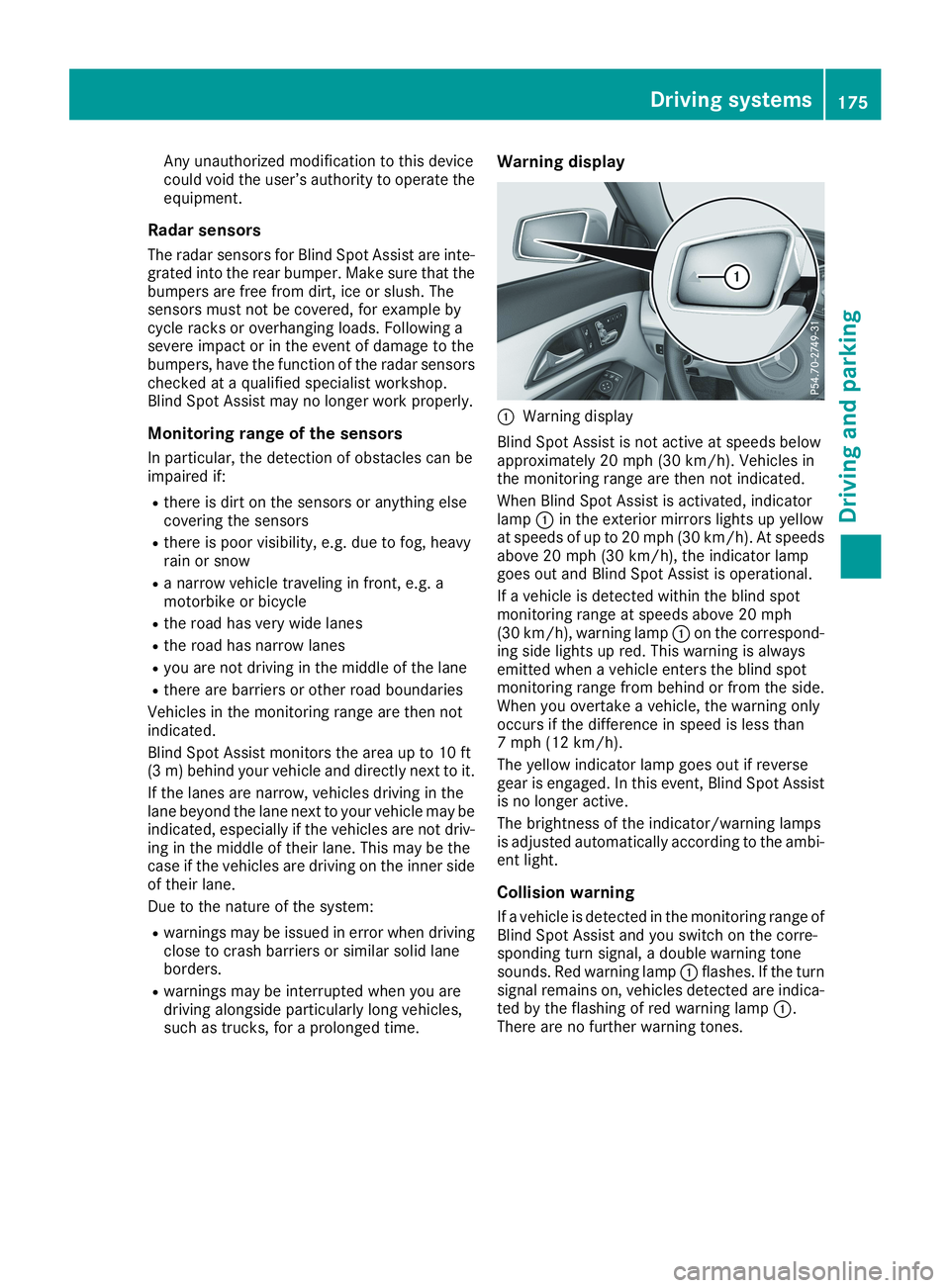
Warning display
CWarning display
Blind Spot Assist is not active at speeds belowapproximately 20 mph (30 km/h). Vehicles inthe monitoring range are then not indicated.
When Blind Spot Assist is activated, indicatorlampCin the exterior mirrors lights up yellowat speeds of up to 20 mph (30 km/h). At speedsabove 20 mph (30 km/h), the indicator lampgoes out and Blind Spot Assist is operational.
If a vehicle is detected within the blind spotmonitoring range at speeds above 20 mph(30 km/h), warning lampCon the correspond-ing side lights up red. This warning is alwaysemitted when a vehicle enters the blind spotmonitoring range from behind or from the side.When you overtake a vehicle, the warning onlyoccurs if the difference in speed is less than7 mph (12 km/h).
The yellow indicator lamp goes out if reversegear is engaged. In this event, Blind Spot Assistis no longer active.
The brightness of the indicator/warning lampsis adjusted automatically according to the ambi-ent light.
Collision warning
If a vehicle is detected in the monitoring range ofBlind Spot Assist and you switch on the corre-sponding turn signal, a double warning tonesounds. Red warning lampCflashes. If the turnsignal remains on, vehicles detected are indica-ted by the flashing of red warning lampC.There are no further warning tones.
Driving systems175
Driving an d parking
Z
Page 180 of 330
Important safety notes
GWARNING
If you operate information systems and com-
munication equipment integrated in the vehi-
cle when driving, you may be distracted from
the traffic situation. You could also lose con-
trol of the vehicle. There is a risk of an acci-
dent.
Only operate this equipment when the traffic
situation permits. If you are not sure that this
is possible, park the vehicle paying attention
to traffic conditions and operate the equip-
ment when the vehicle is stationary.
You must observe the legal requirements for thecountry in which you are currently driving whenoperating the on-board computer.
GWARNING
If the instrument cluster has failed or mal-
functioned, you may not recognize function
restrictions in systems relevant to safety. The
operating safety of your vehicle may be
impaired. There is a risk of an accident.
Drive on carefully. Have the vehicle checked
at a qualified specialist workshop immedi-
ately.
The on-board computer only shows messages orwarnings from certain systems in the multifunc-tion display. You should therefore make sureyour vehicle is operating safely at all times.
If the operating safety of your vehicle isimpaired, pull over as soon as it is safe to do so.Contact a qualified specialist workshop.
For an overview, see the instrument panel illus-tration (Ypage 33).
Displays and operation
Instrument cluster lighting
The light sensor in the instrument cluster auto-matically controls the brightness of the multi-function display. In daylight, the displays in theinstrument cluster are not illuminated.
The lighting in the instrument cluster, in the dis-plays and the controls in the vehicle interior canbe adjusted using the brightness control knob.
The brightness control knob is located on thebottom left of the instrument cluster(Ypage 33).
XTurn the brightness control knob clockwise orcounter-clockwise.If the light switch is set to theX,`orXposition, the brightness is dependentupon the brightness of the ambient light.
Speedometer with segments
The speedometer is only divided into segmentsin vehicles with Active Distance AssistDISTRONIC.
The segments in the speedometer indicatewhich speed range is available.
RActive Distance Assist DISTRONIC activated(Ypage 152):
One or two segments in the set speed rangelight up.
RActive Distance Assist DISTRONIC detects avehicle in front moving more slowly than thestored speed:
The segments between the speed of the vehi-cle in front and the stored speed light up.
Tachometer
!Do not drive in the overrevving range, as thiscould damage the engine.
The red band in the tachometer indicates theengine's overrevving range.
The engine is limited within a range to protectthe engine when the red band is reached.
Outside temperature display
You should pay special attention to road condi-tions when temperatures are around freezingpoint.
Bear in mind that the outside temperature dis-play indicates the temperature measured anddoes not record the road temperature.
The outside temperature display is in the multi-function display (Ypage 181).
178Displays and operation
On-board computer and displays
Page 202 of 330
Display messagesPossible causes/consequences andPPSolutions
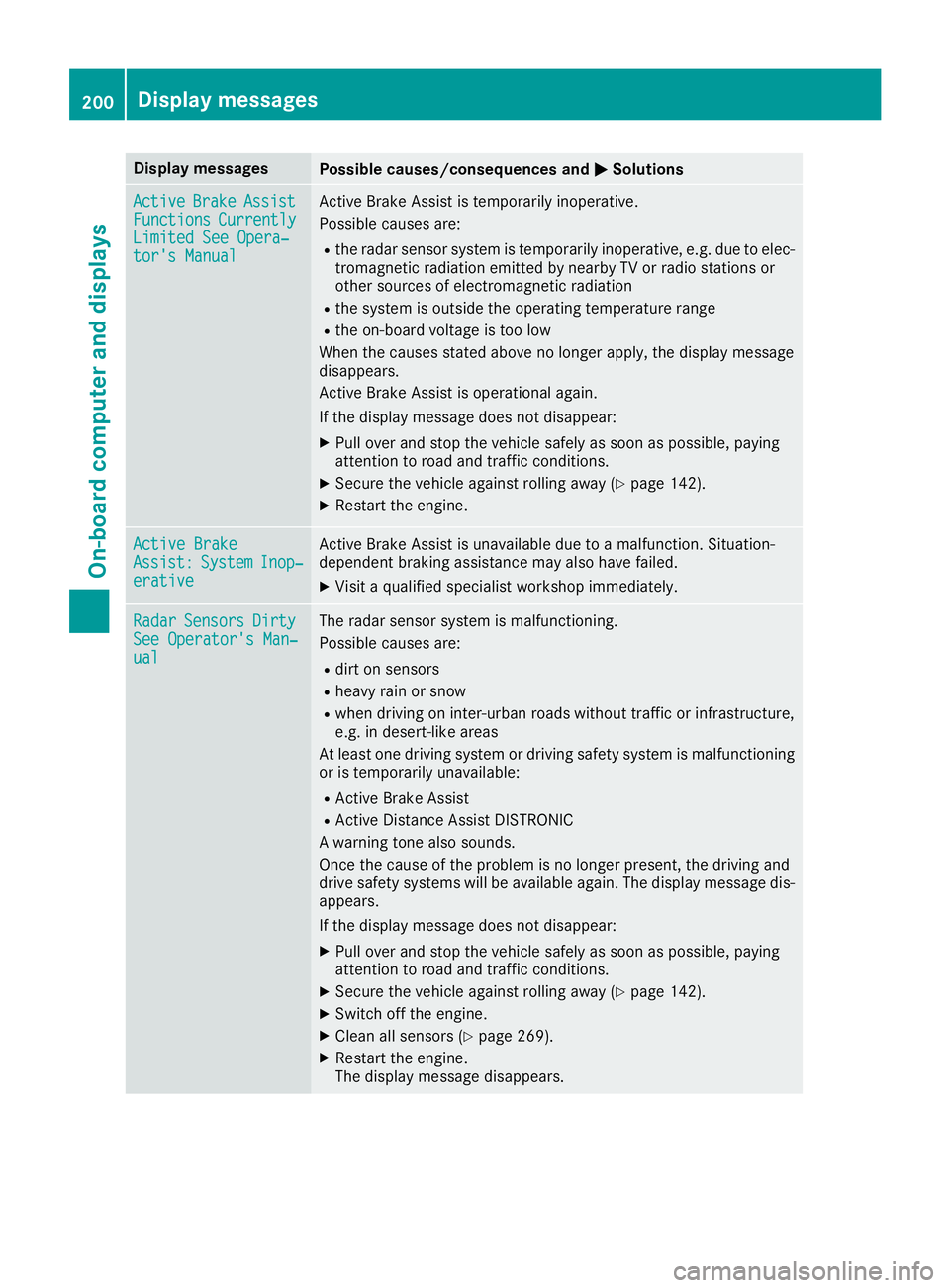
ActiveActiveBrakeBrakeAssistAssistFunctionsFunctionsCurrentlyCurrentlyLimited See Opera‐Limited See Opera‐tor's Manualtor's Manual
Active Brake Assist is temporarily inoperative.
Possible causes are:
Rthe radar sensor system is temporarily inoperative, e.g. due to elec-tromagnetic radiation emitted by nearby TV or radio stations orother sources of electromagnetic radiation
Rthe system is outside the operating temperature range
Rthe on-board voltage is too low
When the causes stated above no longer apply, the display messagedisappears.
Active Brake Assist is operational again.
If the display message does not disappear:
XPull over and stop the vehicle safely as soon as possible, payingattention to road and traffic conditions.
XSecure the vehicle against rolling away (Ypage 142).
XRestart the engine.
Active BrakeActive BrakeAssist:Assist:SystemSystemInop‐Inop‐erativeerative
Active Brake Assist is unavailable due to a malfunction. Situation-dependent braking assistance may also have failed.
XVisit a qualified specialist workshop immediately.
RadarRadarSensorsSensorsDirtyDirtySee Operator's Man‐See Operator's Man‐ualual
The radar sensor system is malfunctioning.
Possible causes are:
Rdirt on sensors
Rheavy rain or snow
Rwhen driving on inter-urban roads without traffic or infrastructure,e.g. in desert-like areas
At least one driving system or driving safety system is malfunctioningor is temporarily unavailable:
RActive Brake Assist
RActive Distance Assist DISTRONIC
A warning tone also sounds.
Once the cause of the problem is no longer present, the driving anddrive safety systems will be available again. The display message dis-appears.
If the display message does not disappear:
XPull over and stop the vehicle safely as soon as possible, payingattention to road and traffic conditions.
XSecure the vehicle against rolling away (Ypage 142).
XSwitch off the engine.
XClean all sensors (Ypage 269).
XRestart the engine.The display message disappears.
200Displaymessages
On-b oard computer and displays
Page 208 of 330
Display messagesPossible causes/consequences andPPSolutions
I
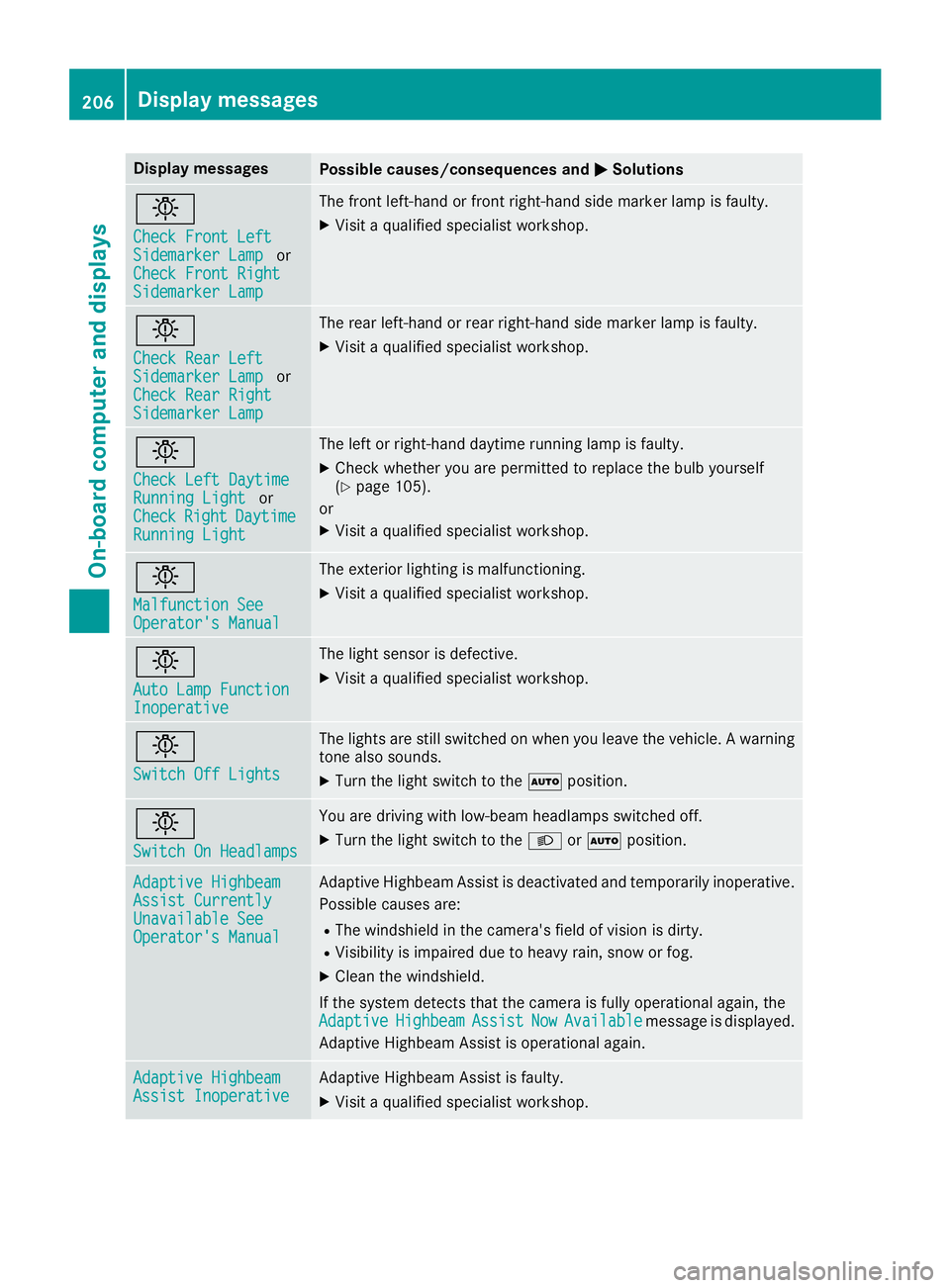
Check Front LeftCheck Front LeftSidemarker LampSidemarker LamporCheck Front RightCheck Front RightSidemarker LampSidemarker Lamp
The front left-hand or front right-hand side marker lamp is faulty.
XVisit a qualified specialist workshop.
I
Check Rear LeftCheck Rear LeftSidemarker LampSidemarker LamporCheck Rear RightCheck Rear RightSidemarker LampSidemarker Lamp
The rear left-hand or rear right-hand side marker lamp is faulty.
XVisit a qualified specialist workshop.
I
Check Left DaytimeCheck Left DaytimeRunning LightRunning LightorCheckCheckRightRightDaytimeDaytimeRunning LightRunning Light
The left or right-hand daytime running lamp is faulty.
XCheck whether you are permitted to replace the bulb yourself(Ypage 105).
or
XVisit a qualified specialist workshop.
I
Malfunction SeeMalfunction SeeOperator's ManualOperator's Manual
The exterior lighting is malfunctioning.
XVisit a qualified specialist workshop.
I
Auto Lamp FunctionAuto Lamp FunctionInoperativeInoperative
The light sensor is defective.
XVisit a qualified specialist workshop.
I
Switch Off LightsSwitch Off Lights
The lights are still switched on when you leave the vehicle. A warningtone also sounds.
XTurn the light switch to theXposition.
I
Switch On HeadlampsSwitch On Headlamps
You are driving with low-beam headlamps switched off.
XTurn the light switch to theXorXposition.
Adaptive HighbeamAdaptive HighbeamAssist CurrentlyAssist CurrentlyUnavailable SeeUnavailable SeeOperator's ManualOperator's Manual
Adaptive Highbeam Assist is deactivated and temporarily inoperative.
Possible causes are:
RThe windshield in the camera's field of vision is dirty.
RVisibility is impaired due to heavy rain, snow or fog.
XClean the windshield.
If the system detects that the camera is fully operational again, theAdaptiveAdaptiveHighbeamHighbeamAssistAssistNowNowAvailableAvailablemessage is displayed.
Adaptive Highbeam Assist is operational again.
Adaptive HighbeamAdaptive HighbeamAssist InoperativeAssist InoperativeAdaptive Highbeam Assist is faulty.
XVisit a qualified specialist workshop.
206Displaymessages
On-b oard computer and displays
Page 212 of 330
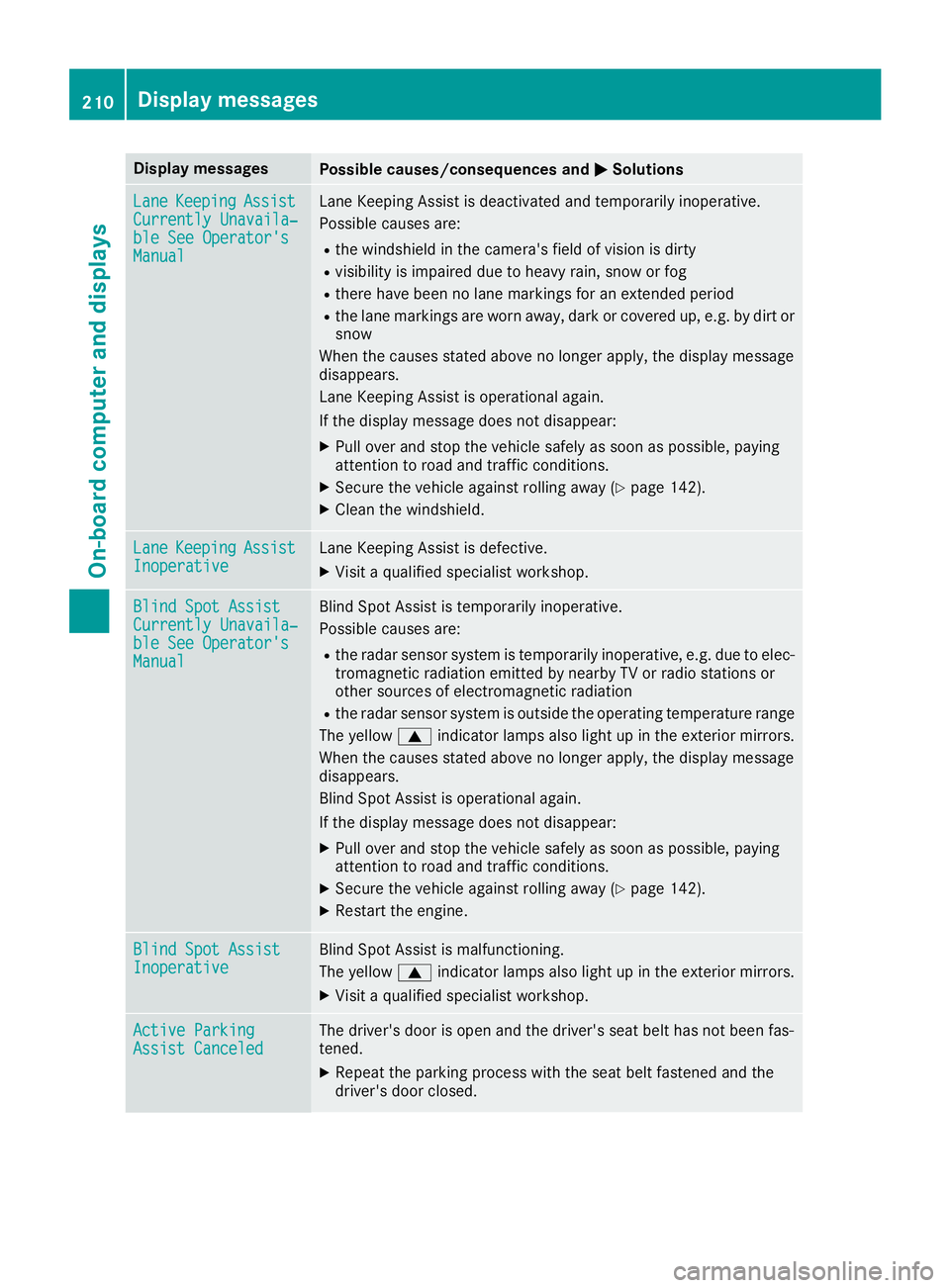
Display messagesPossible causes/consequences andPPSolutions
LaneLaneKeepingKeepingAssistAssistCurrently Unavaila‐Currently Unavaila‐ble See Operator'sble See Operator'sManualManual
Lane Keeping Assist is deactivated and temporarily inoperative.
Possible causes are:
Rthe windshield in the camera's field of vision is dirty
Rvisibility is impaired due to heavy rain, snow or fog
Rthere have been no lane markings for an extended period
Rthe lane markings are worn away, dark or covered up, e.g. by dirt orsnow
When the causes stated above no longer apply, the display messagedisappears.
Lane Keeping Assist is operational again.
If the display message does not disappear:
XPull over and stop the vehicle safely as soon as possible, payingattention to road and traffic conditions.
XSecure the vehicle against rolling away (Ypage 142).
XClean the windshield.
LaneLaneKeepingKeepingAssistAssistInoperativeInoperativeLane Keeping Assist is defective.
XVisit a qualified specialist workshop.
Blind Spot AssistBlind Spot AssistCurrently Unavaila‐Currently Unavaila‐ble See Operator'sble See Operator'sManualManual
Blind Spot Assist is temporarily inoperative.
Possible causes are:
Rthe radar sensor system is temporarily inoperative, e.g. due to elec-tromagnetic radiation emitted by nearby TV or radio stations orother sources of electromagnetic radiation
Rthe radar sensor system is outside the operating temperature range
The yellowcindicator lamps also light up in the exterior mirrors.
When the causes stated above no longer apply, the display messagedisappears.
Blind Spot Assist is operational again.
If the display message does not disappear:
XPull over and stop the vehicle safely as soon as possible, payingattention to road and traffic conditions.
XSecure the vehicle against rolling away (Ypage 142).
XRestart the engine.
Blind Spot AssistBlind Spot AssistInoperativeInoperativeBlind Spot Assist is malfunctioning.
The yellowcindicator lamps also light up in the exterior mirrors.
XVisit a qualified specialist workshop.
Active ParkingActive ParkingAssist CanceledAssist CanceledThe driver's door is open and the driver's seat belt has not been fas-tened.
XRepeat the parking process with the seat belt fastened and thedriver's door closed.
210Displaymessages
On-b oard computer and displays
Page 213 of 330
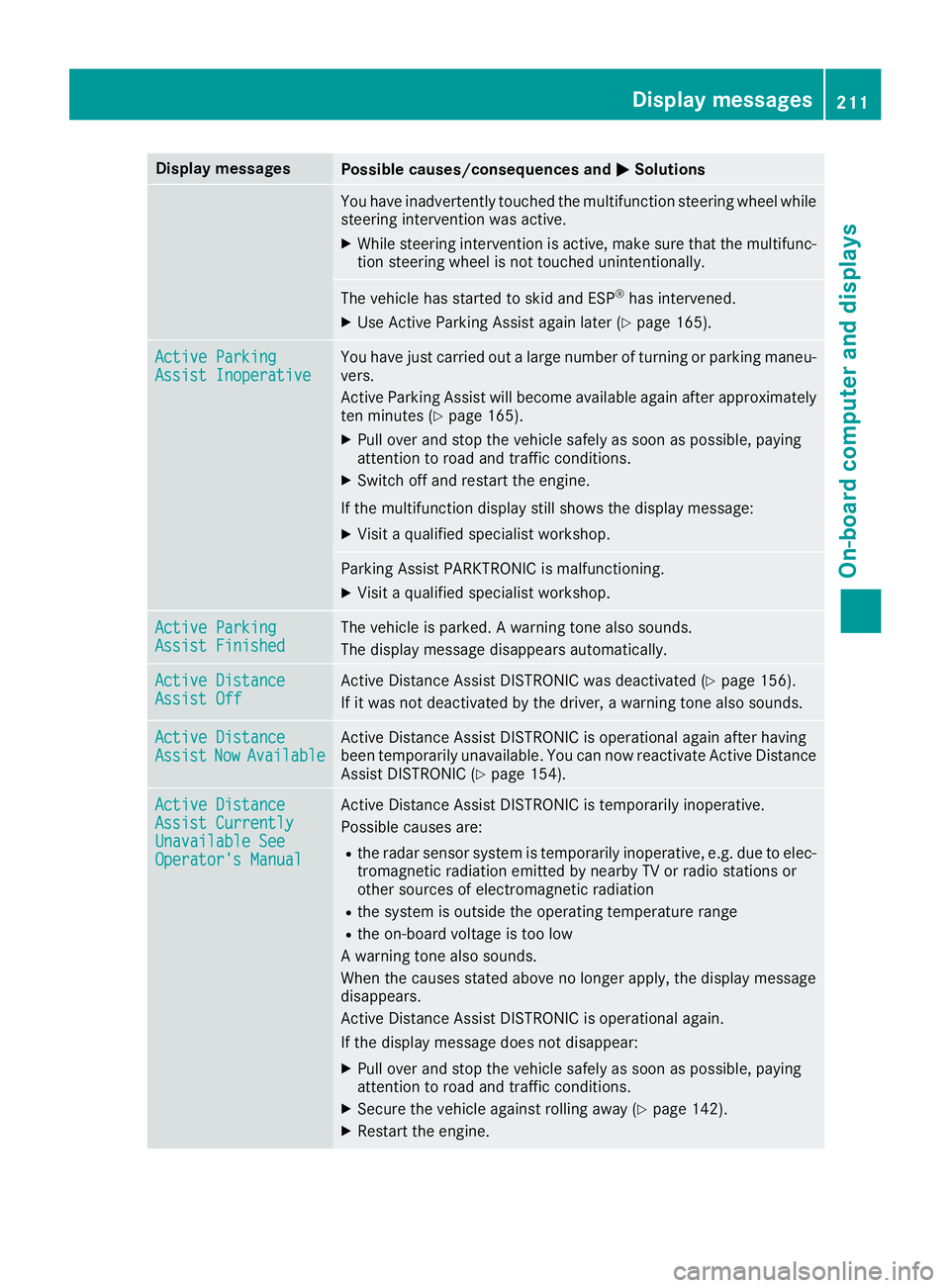
Display messagesPossible causes/consequences andPPSolutions
You have inadvertently touched the multifunction steering wheel whilesteering intervention was active.
XWhile steering intervention is active, make sure that the multifunc-tion steering wheel is not touched unintentionally.
The vehicle has started to skid and ESP®has intervened.
XUse Active Parking Assist again later (Ypage 165).
Active ParkingActive ParkingAssist InoperativeAssist InoperativeYou have just carried out a large number of turning or parking maneu-vers.
Active Parking Assist will become available again after approximatelyten minutes (Ypage 165).
XPull over and stop the vehicle safely as soon as possible, payingattention to road and traffic conditions.
XSwitch off and restart the engine.
If the multifunction display still shows the display message:
XVisit a qualified specialist workshop.
Parking Assist PARKTRONIC is malfunctioning.
XVisit a qualified specialist workshop.
Active ParkingActive ParkingAssist FinishedAssist FinishedThe vehicle is parked. A warning tone also sounds.
The display message disappears automatically.
Active DistanceActive DistanceAssist OffAssist OffActive Distance Assist DISTRONIC was deactivated (Ypage 156).
If it was not deactivated by the driver, a warning tone also sounds.
Active DistanceActive DistanceAssistAssistNowNowAvailableAvailableActive Distance Assist DISTRONIC is operational again after havingbeen temporarily unavailable. You can now reactivate Active DistanceAssist DISTRONIC (Ypage 154).
Active DistanceActive DistanceAssist CurrentlyAssist CurrentlyUnavailable SeeUnavailable SeeOperator's ManualOperator's Manual
Active Distance Assist DISTRONIC is temporarily inoperative.
Possible causes are:
Rthe radar sensor system is temporarily inoperative, e.g. due to elec-tromagnetic radiation emitted by nearby TV or radio stations orother sources of electromagnetic radiation
Rthe system is outside the operating temperature range
Rthe on-board voltage is too low
A warning tone also sounds.
When the causes stated above no longer apply, the display messagedisappears.
Active Distance Assist DISTRONIC is operational again.
If the display message does not disappear:
XPull over and stop the vehicle safely as soon as possible, payingattention to road and traffic conditions.
XSecure the vehicle against rolling away (Ypage 142).
XRestart the engine.
Displaymessages211
On-b oard computer and displays
Z
Page 216 of 330
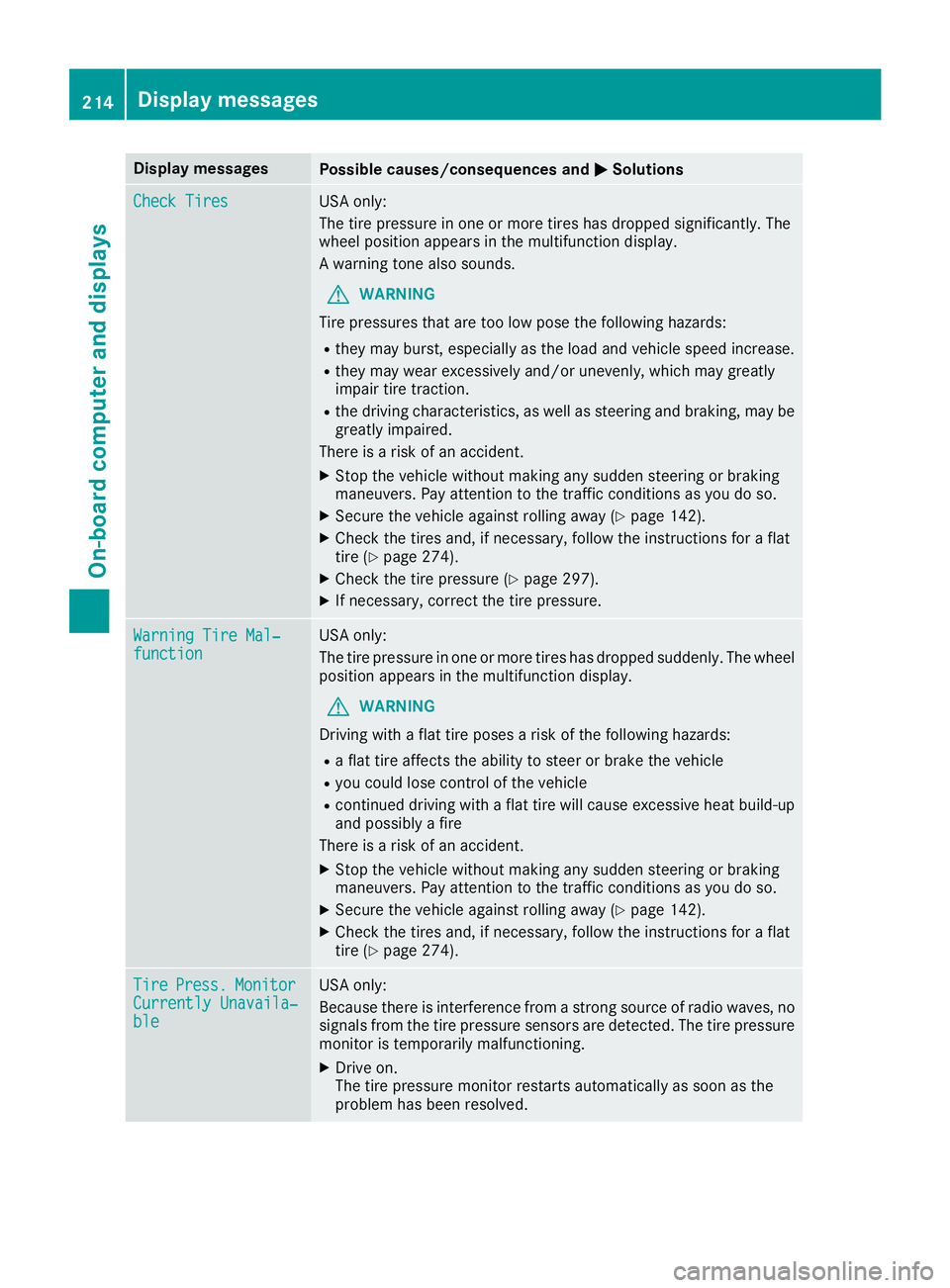
Display messagesPossible causes/consequences andPPSolutions
Check TiresCheck TiresUSA only:
The tire pressure in one or more tires has dropped significantly. Thewheel position appears in the multifunction display.
A warning tone also sounds.
GWARNING
Tire pressures that are too low pose the following hazards:
Rthey may burst, especially as the load and vehicle speed increase.
Rthey may wear excessively and/or unevenly, which may greatlyimpair tire traction.
Rthe driving characteristics, as well as steering and braking, may begreatly impaired.
There is a risk of an accident.
XStop the vehicle without making any sudden steering or brakingmaneuvers. Pay attention to the traffic conditions as you do so.
XSecure the vehicle against rolling away (Ypage 142).
XCheck the tires and, if necessary, follow the instructions for a flattire (Ypage 274).
XCheck the tire pressure (Ypage 297).
XIf necessary, correct the tire pressure.
Warning Tire Mal‐Warning Tire Mal‐functionfunctionUSA only:
The tire pressure in one or more tires has dropped suddenly. The wheelposition appears in the multifunction display.
GWARNING
Driving with a flat tire poses a risk of the following hazards:
Ra flat tire affects the ability to steer or brake the vehicle
Ryou could lose control of the vehicle
Rcontinued driving with a flat tire will cause excessive heat build-upand possibly a fire
There is a risk of an accident.
XStop the vehicle without making any sudden steering or brakingmaneuvers. Pay attention to the traffic conditions as you do so.
XSecure the vehicle against rolling away (Ypage 142).
XCheck the tires and, if necessary, follow the instructions for a flattire (Ypage 274).
TireTirePress.Press.MonitorMonitorCurrently Unavaila‐Currently Unavaila‐bleble
USA only:
Because there is interference from a strong source of radio waves, nosignals from the tire pressure sensors are detected. The tire pressuremonitor is temporarily malfunctioning.
XDrive on.The tire pressure monitor restarts automatically as soon as theproblem has been resolved.
214Displaymessages
On-b oard computer and displays
Page 217 of 330
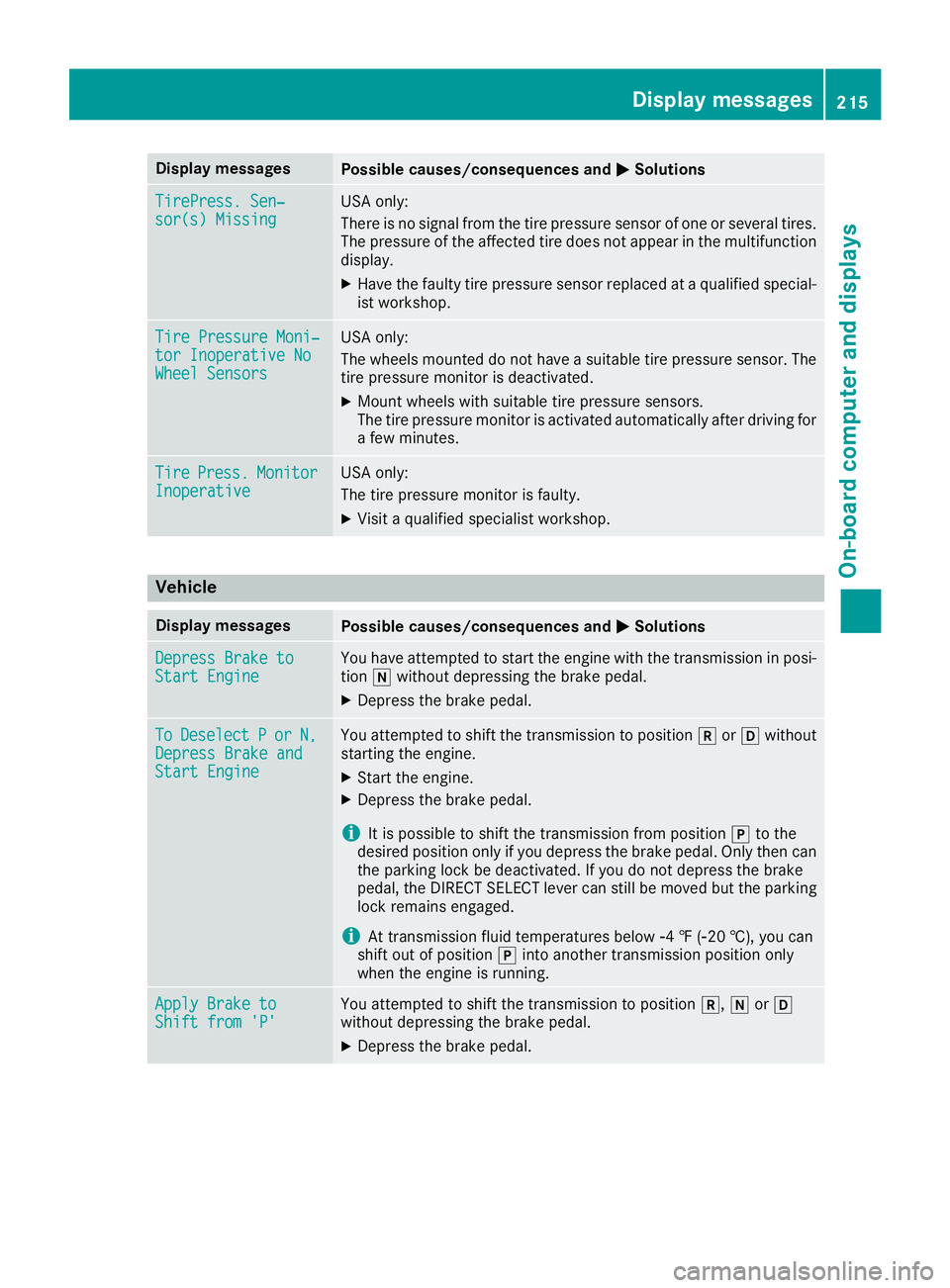
Display messagesPossible causes/consequences andPPSolutions
TirePress. Sen‐TirePress. Sen‐sor(s) Missingsor(s) MissingUSA only:
There is no signal from the tire pressure sensor of one or several tires.The pressure of the affected tire does not appear in the multifunctiondisplay.
XHave the faulty tire pressure sensor replaced at a qualified special-ist workshop.
Tire Pressure Moni‐Tire Pressure Moni‐tor Inoperative Notor Inoperative NoWheel SensorsWheel Sensors
USA only:
The wheels mounted do not have a suitable tire pressure sensor. Thetire pressure monitor is deactivated.
XMount wheels with suitable tire pressure sensors.The tire pressure monitor is activated automatically after driving fora few minutes.
TireTirePress.Press.MonitorMonitorInoperativeInoperativeUSA only:
The tire pressure monitor is faulty.
XVisit a qualified specialist workshop.
Vehicle
Display messagesPossible causes/consequences andPPSolutions
Depress Brake toDepress Brake toStart EngineStart EngineYou have attempted to start the engine with the transmission in posi-tion\\without depressing the brake pedal.
XDepress the brake pedal.
ToToDeselectDeselectPPororN,N,Depress Brake andDepress Brake andStart EngineStart Engine
You attempted to shift the transmission to position^or[withoutstarting the engine.
XStart the engine.
XDepress the brake pedal.
iIt is possible to shift the transmission from position]to thedesired position only if you depress the brake pedal. Only then canthe parking lock be deactivated. If you do not depress the brakepedal, the DIRECT SELECT lever can still be moved but the parkinglock remains engaged.
iAt transmission fluid temperatures below
Page 271 of 330
Cleaning wiper blades
GWARNING
You could become trapped by the windshield
wipers if they start moving while cleaning the
windshield or wiper blades. There is a risk of
injury.
Always switch off the windshield wipers and
the ignition before cleaning the windshield or
wiper blades.
!Only fold the windshield wipers away fromthe windshield when vertical. Otherwise, youwill damage the hood.
!Do not pull the wiper blade. Otherwise, thewiper blade could be damaged.
!Do not clean wiper blades too often and donot rub them too hard. Otherwise, the graph-ite coating could be damaged. This couldcause wiper noise.
!Hold the wiper arm securely when foldingback. The windshield could be damaged if thewiper arm smacks against it suddenly.
XFold the windshield wiper arms away from thewindshield.
XCarefully clean the wiper blades with a dampcloth.
XFold the windshield wiper arms back againbefore switching on the ignition.
Cleaning the exterior lighting
!Only use cleaning agents or cleaning clothswhich are suitable for plastic light lenses.Unsuitable cleaning agents or cleaning clothscould scratch or damage the plastic light len-ses.
XClean the plastic lenses of the exterior lightswith a wet sponge and a mild cleaning agent,e.g. Mercedes-Benz car shampoo or cleaningcloths.
Cleaning the mirror turn signals
!Only use cleaning agents or cleaning clothsthat are suitable for plastic lenses. Unsuitablecleaning agents or cleaning cloths couldscratch or damage the plastic lenses of themirror turn signals.
XClean the plastic lenses of the mirror turn sig-nals in the exterior mirror housing using a wetsponge and mild cleaning agent, e.g.Mercedes-Benz car shampoo or cleaningcloths.
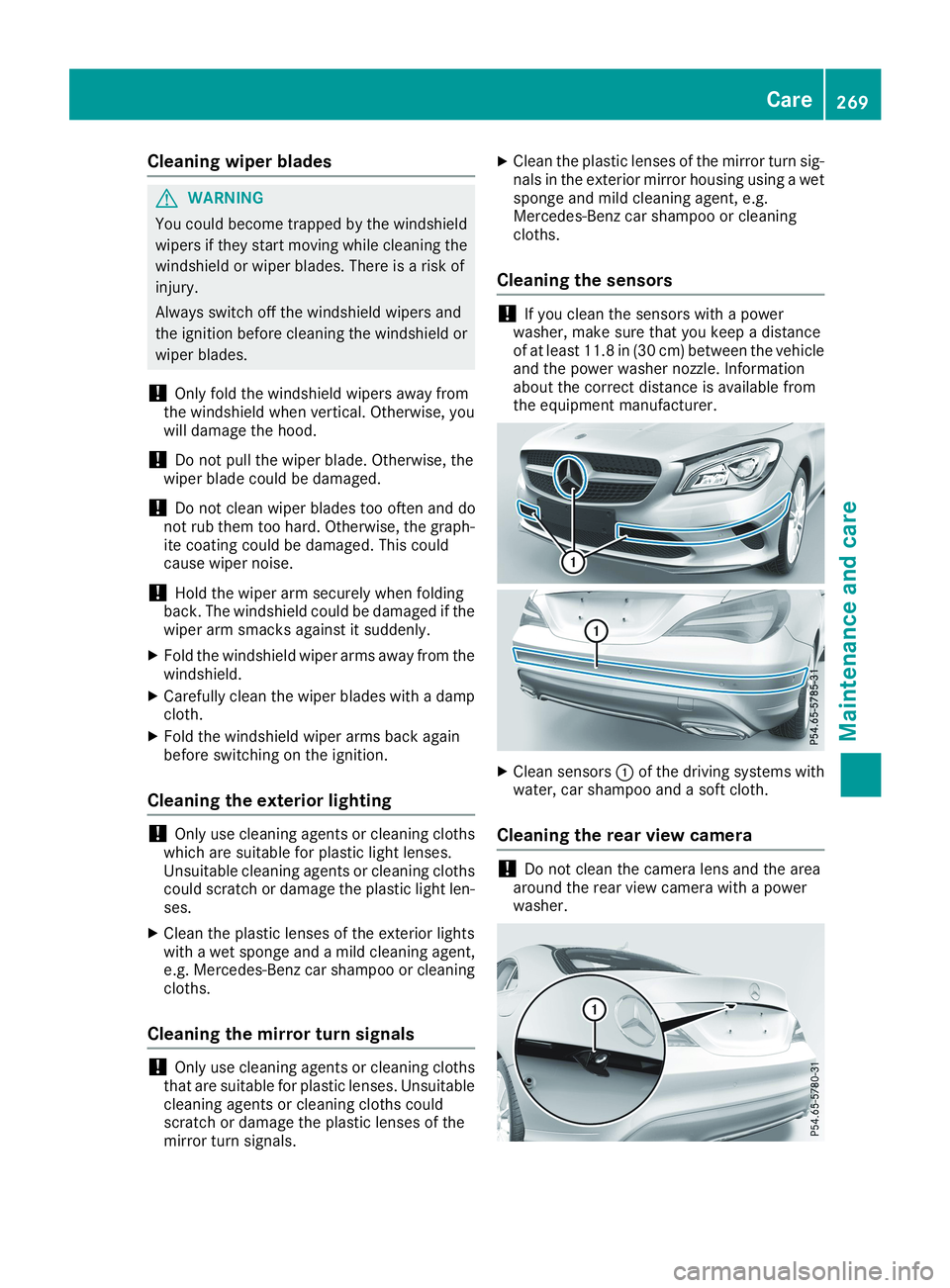
Cleaning the sensors
!If you clean the sensors with a powerwasher, make sure that you keep a distanceof at least 11.8 in(30 cm) between the vehicleand the power washer nozzle. Informationabout the correct distance is available fromthe equipment manufacturer.
XClean sensorsCof the driving systems withwater, car shampoo and a soft cloth.
Cleaning the rear view camera
!Do not clean the camera lens and the areaaround the rear view camera with a powerwasher.
Care269
Maintenance and care
Z
Page 299 of 330
a corresponding warning message will appear inthe multifunction display.
You can recognize the tire pressure loss warningby theRun Flat Indicator Active PressRun Flat Indicator Active Press'OK''OK'totoRestartRestartmessage in the multifunctiondisplay in theServ.Serv.menu. Information on themessage display can be found in the "Restartingthe tire pressure loss warning" section(Ypage 297).
Important safety notes
The tire pressure warning system does not warnyou of an incorrectly set tire pressure. Observethe notes on the recommended tire pressure(Ypage 293).
The tire pressure loss warning does not replacethe need to regularly check the tire pressure. Aneven loss of pressure on several tires at thesame time cannot be detected by the tire pres-sure loss warning system.
The tire pressure monitor is not able to warn youof a sudden loss of pressure, e.g. if the tire ispenetrated by a foreign object. In the event of asudden loss of pressure, bring the vehicle to ahalt by braking carefully. Avoid abrupt steeringmovements.
The function of the tire pressure loss warningsystem is limited or delayed if:
Rsnow chains are mounted on your vehicle'stires.
Rroad conditions are wintry.
Ryou are driving on sand or gravel.
Ryou adopt a very sporty driving style (corner-ing at high speeds or driving with high rates ofacceleration).
Ryou are driving with a heavy load (in the vehi-cle or on the roof)
Restarting the tire pressure loss warn-
ing system
Restart the tire pressure loss warning system ifyou have:
Rchanged the tire pressure
Rchanged the wheels or tires
Rmounted new wheels or tires
XBefore restarting, make sure that the tirepressures are set properly on all four tires forthe respective operating conditions.
The recommended tire pressure can be foundon the Tire and Loading Information placard
on the B-pillar. Additionally, a tire pressuretable is attached to the fuel filler flap. The tirepressure loss warning system can only givereliable warnings if you have set the correcttire pressure. If an incorrect tire pressure isset, these incorrect values will be monitored.
XAlso observe the notes in the section on tirepressures (Ypage 293).
XMake sure that the SmartKey is in positionHin the ignition lock (Ypage 123).
XPressYoreon the steering wheel toselect theServ.Serv.menu.
XPress thecordbutton to selectTire PressureTire Pressure.
XPress thevbutton.TheRun Flat Indicator Active PressRun Flat Indicator Active Press'OK' to Restart'OK' to Restartmessage appears in themultifunction display.
If you wish to confirm the restart:
XPress thevbutton.TheTire Pressure Now OK?Tire Pressure Now OK?messageappears in the multifunction display.
XPress thecordbutton to selectYesYes.
XPress thevbutton.TheRun Flat Indicator RestartedRun Flat Indicator Restartedmes-sage appears in the multifunction display.
After a teach-in period, the tire pressure losswarning system will monitor the set tire pres-sures of all four tires.
If you wish to cancel the restart:
XPress the8button.
or
XIf theTire Pressure Now OK?Tire Pressure Now OK?messageappears, press thecordbutton toselectCancelCancel.
XPress thevbutton.The tire pressure values stored at the lastrestart will continue to be monitored.
Tire pressure monitor (Canada only)
General notes
If a tire pressure monitor is installed, the vehi-cle's wheels have sensors that monitor the tirepressures in all four tires. The tire pressure mon-itor warns you if the pressure drops in one ormore of the tires. The tire pressure monitor onlyfunctions if the corresponding sensors areinstalled in all wheels.
Tire pressure297
Wheels and tires
Z