display MERCEDES-BENZ CLA 2019 Workshop Manual
[x] Cancel search | Manufacturer: MERCEDES-BENZ, Model Year: 2019, Model line: CLA, Model: MERCEDES-BENZ CLA 2019Pages: 330, PDF Size: 23.57 MB
Page 171 of 330
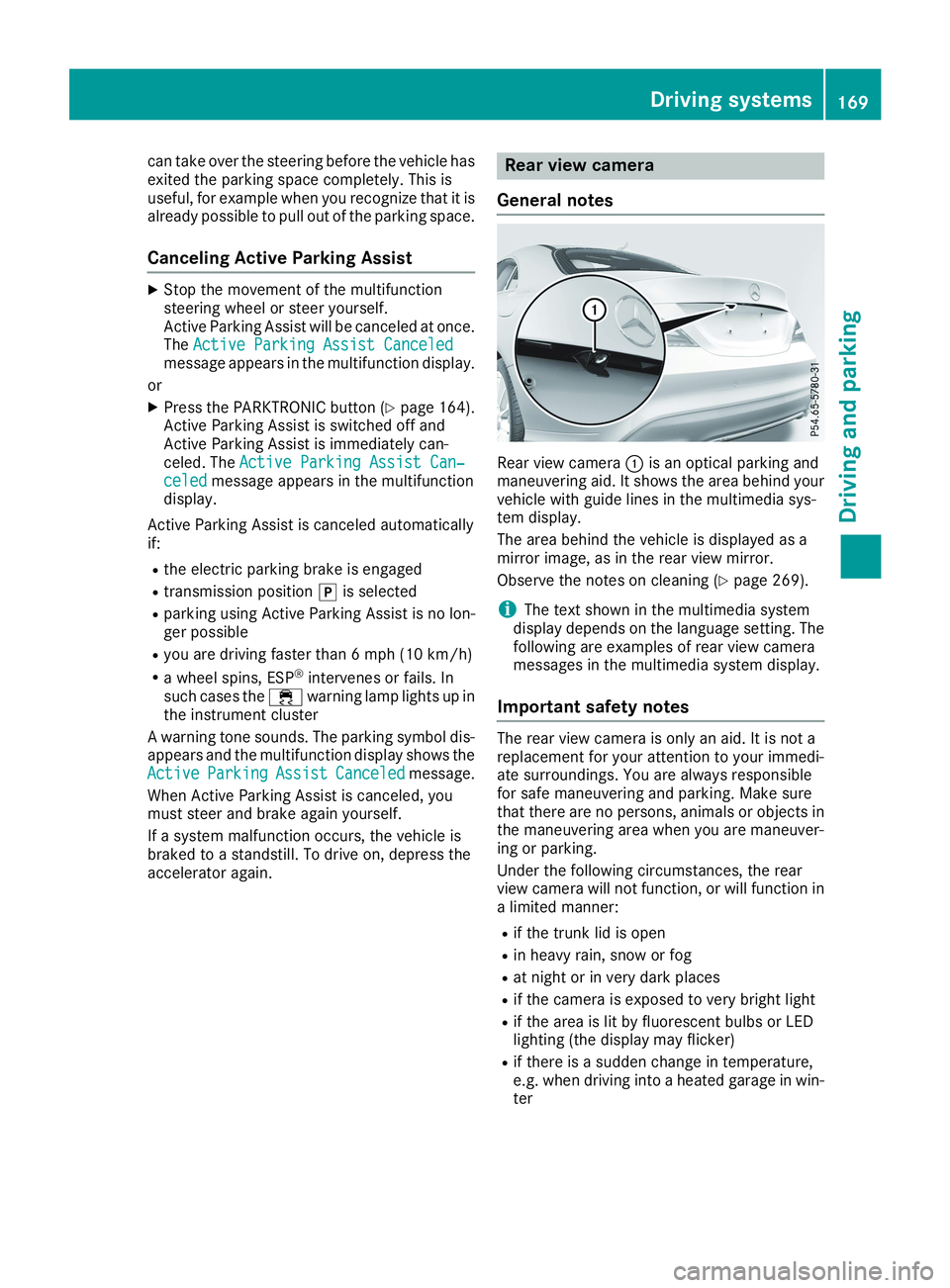
can take over the steering before the vehicle hasexited the parking space completely. This isuseful, for example when you recognize that it isalready possible to pull out of the parking space.
Canceling Active Parking Assist
XStop the movement of the multifunctionsteering wheel or steer yourself.Active Parking Assist will be canceled at once.TheActive Parking Assist CanceledActive Parking Assist Canceledmessage appears in the multifunction display.
or
XPress the PARKTRONIC button (Ypage 164).Active Parking Assist is switched off andActive Parking Assist is immediately can-celed. TheActive Parking Assist Can‐Active Parking Assist Can‐celedceledmessage appears in the multifunctiondisplay.
Active Parking Assist is canceled automaticallyif:
Rthe electric parking brake is engaged
Rtransmission position]is selected
Rparking using Active Parking Assist is no lon-ger possible
Ryou are driving faster than 6 mph (10 km/h)
Ra wheel spins, ESP®intervenes or fails. Insuch cases the
Page 172 of 330
Rif the camera lens is dirty or obstructed.Observe the notes on cleaning(Ypage 269)
Rif the rear of your vehicle is damaged. In thiscase, have the camera position and settingchecked at a qualified specialist workshop.
The field of vision and other functions of the rearview camera may be restricted due to additionalaccessories on the rear of the vehicle (e.g.license plate holder, rear bicycle rack).
iThe contrast of the display may be affectedby the sudden presence of sunlight or otherlight sources, e.g. when exiting a garage. Payparticular attention in this situation.
iIf usability is severely restricted, e.g. due topixel errors, have the display repaired orreplaced.
Activating/deactivating the rear view
camera
XTo activate:make sure that the SmartKey isin positionHin the ignition lock.
XMake sure that theActivation by R gearActivation by R gearfunction is selected in the multimedia system;see the Digital Operator's Manual.
XEngage reverse gear.The area behind the vehicle is shown withguide lines in the multimedia system display.
The image from the rear view camera is avail-able throughout the maneuvering process.
To deactivate:the rear view camera deacti-vates if you shift the transmission to]or afterdriving forwards a short distance.
The inner segments of the warning indicator aredisplayed in red if there is a complete systemfailure. The indicator lamp in the PARKTRONICbutton lights up.
If the system fails at the rear of the vehicle:
Rthe rear segments are shown in red whenbacking up.
Rthe rear segments are hidden when drivingforwards.
Messages in the multimedia system dis-
play
The rear view camera may show a distorted viewof obstacles, show them incorrectly or not at all.The rear view camera does not show objects inthe following positions:
Rvery close to the rear bumper
Runder the rear bumper
Rin close range above the handle on the trunklid
!Objects not at ground level may appear tobe further away than they actually are, e.g.:
Rthe bumper of a parked vehicle
Rthe drawbar of a trailer
Rthe ball coupling of a trailer tow hitch
Rthe rear section of an HGV
Ra slanted post
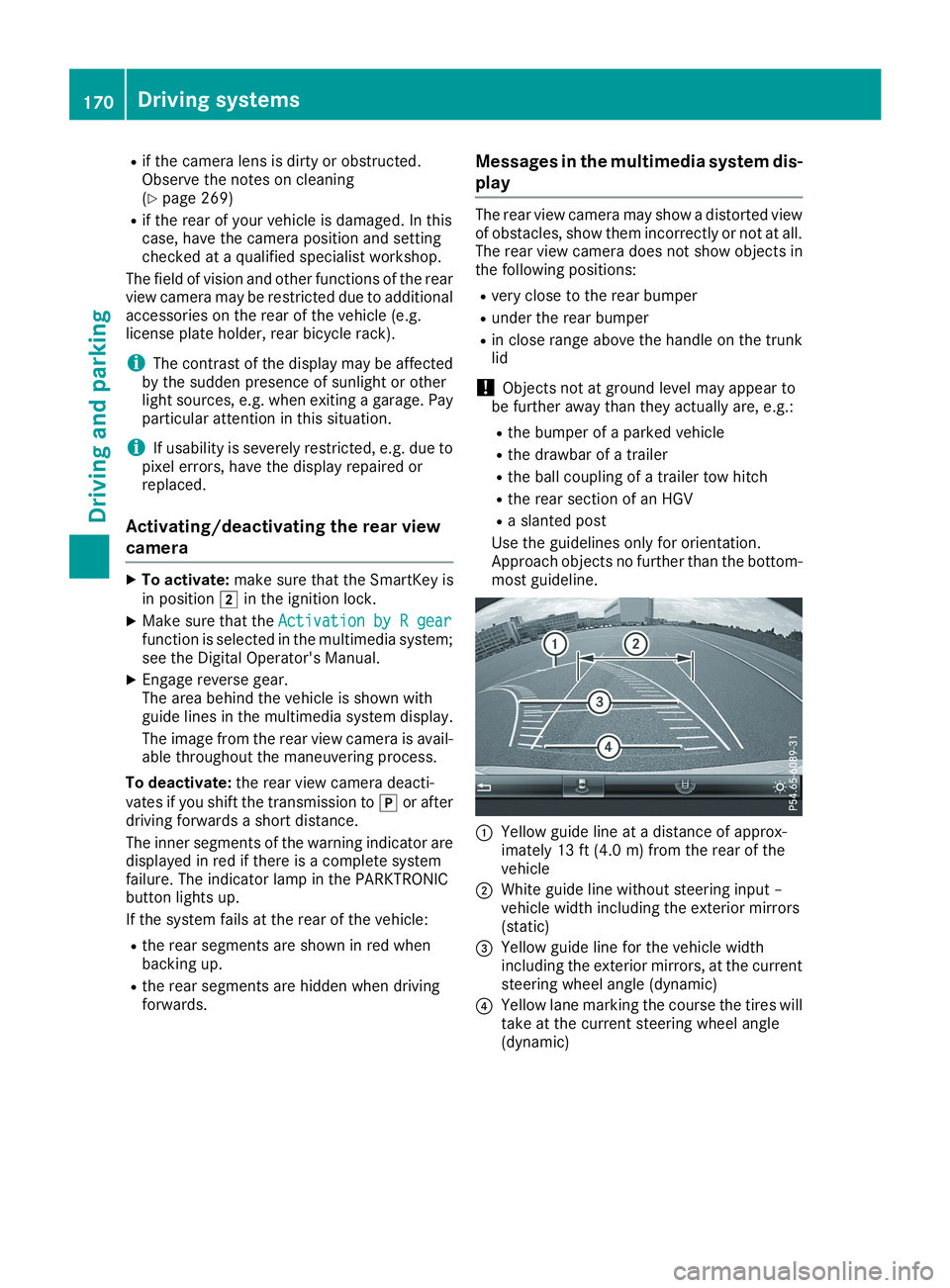
Use the guidelines only for orientation.Approach objects no further than the bottom-most guideline.
CYellow guide line at a distance of approx-imately 13 ft (4.0 m) from the rear of thevehicle
DWhite guide line without steering input –vehicle width including the exterior mirrors(static)
Page 177 of 330
Any unauthorized modification to this devicecould void the user’s authority to operate theequipment.
Radar sensors
The radar sensors for Blind Spot Assist are inte-grated into the rear bumper. Make sure that thebumpers are free from dirt, ice or slush. Thesensors must not be covered, for example bycycle racks or overhanging loads. Following asevere impact or in the event of damage to thebumpers, have the function of the radar sensorschecked at a qualified specialist workshop.Blind Spot Assist may no longer work properly.
Monitoring range of the sensors
In particular, the detection of obstacles can beimpaired if:
Rthere is dirt on the sensors or anything elsecovering the sensors
Rthere is poor visibility, e.g. due to fog, heavyrain or snow
Ra narrow vehicle traveling in front, e.g. amotorbike or bicycle
Rthe road has very wide lanes
Rthe road has narrow lanes
Ryou are not driving in the middle of the lane
Rthere are barriers or other road boundaries
Vehicles in the monitoring range are then notindicated.
Blind Spot Assist monitors the area up to 10 ft(3 m) behind your vehicle and directly next to it.
If the lanes are narrow, vehicles driving in thelane beyond the lane next to your vehicle may beindicated, especially if the vehicles are not driv-ing in the middle of their lane. This may be thecase if the vehicles are driving on the inner sideof their lane.
Due to the nature of the system:
Rwarnings may be issued in error when drivingclose to crash barriers or similar solid laneborders.
Rwarnings may be interrupted when you aredriving alongside particularly long vehicles,such as trucks, for a prolonged time.
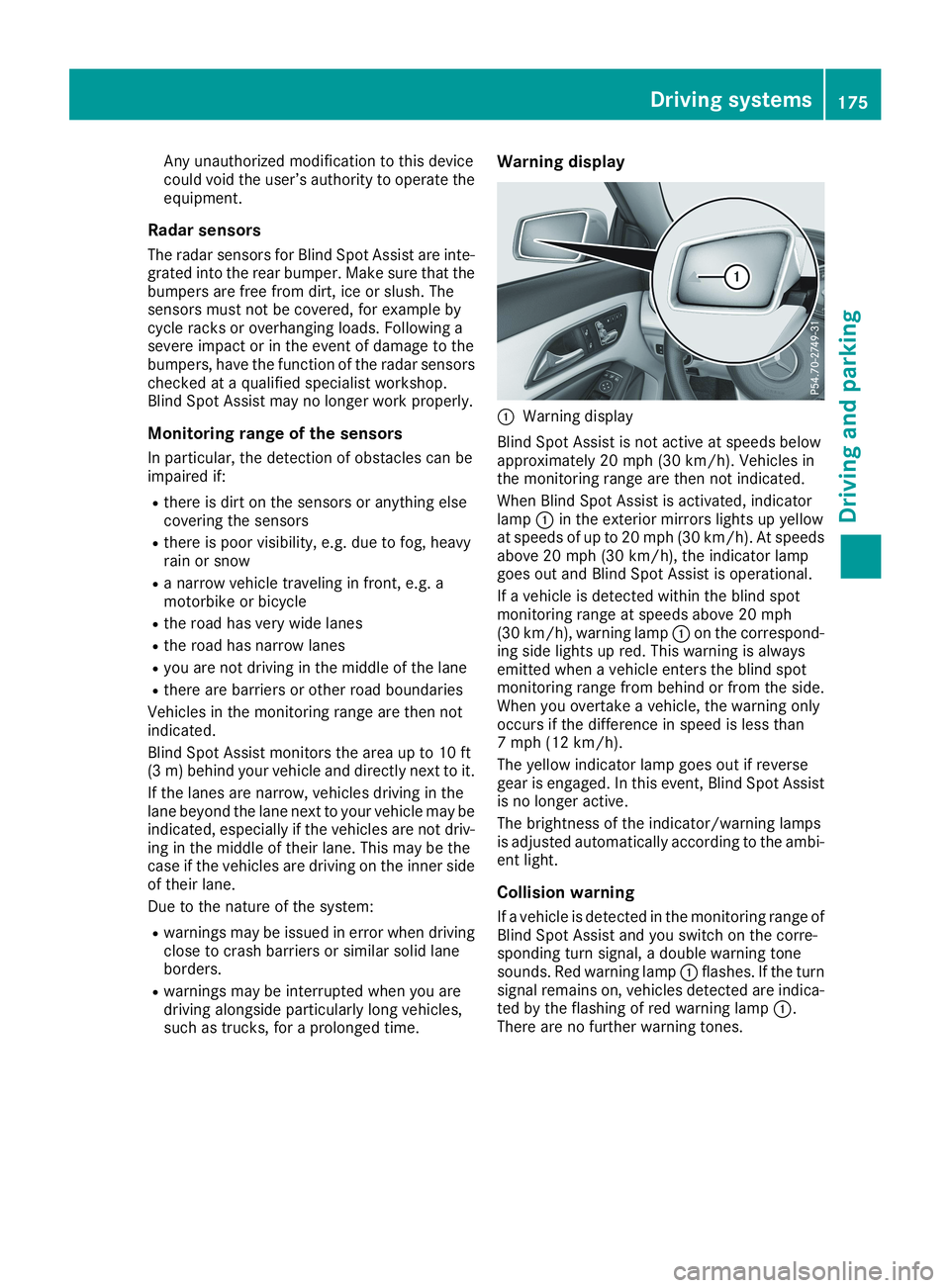
Warning display
CWarning display
Blind Spot Assist is not active at speeds belowapproximately 20 mph (30 km/h). Vehicles inthe monitoring range are then not indicated.
When Blind Spot Assist is activated, indicatorlampCin the exterior mirrors lights up yellowat speeds of up to 20 mph (30 km/h). At speedsabove 20 mph (30 km/h), the indicator lampgoes out and Blind Spot Assist is operational.
If a vehicle is detected within the blind spotmonitoring range at speeds above 20 mph(30 km/h), warning lampCon the correspond-ing side lights up red. This warning is alwaysemitted when a vehicle enters the blind spotmonitoring range from behind or from the side.When you overtake a vehicle, the warning onlyoccurs if the difference in speed is less than7 mph (12 km/h).
The yellow indicator lamp goes out if reversegear is engaged. In this event, Blind Spot Assistis no longer active.
The brightness of the indicator/warning lampsis adjusted automatically according to the ambi-ent light.
Collision warning
If a vehicle is detected in the monitoring range ofBlind Spot Assist and you switch on the corre-sponding turn signal, a double warning tonesounds. Red warning lampCflashes. If the turnsignal remains on, vehicles detected are indica-ted by the flashing of red warning lampC.There are no further warning tones.
Driving systems175
Driving an d parking
Z
Page 180 of 330
Important safety notes
GWARNING
If you operate information systems and com-
munication equipment integrated in the vehi-
cle when driving, you may be distracted from
the traffic situation. You could also lose con-
trol of the vehicle. There is a risk of an acci-
dent.
Only operate this equipment when the traffic
situation permits. If you are not sure that this
is possible, park the vehicle paying attention
to traffic conditions and operate the equip-
ment when the vehicle is stationary.
You must observe the legal requirements for thecountry in which you are currently driving whenoperating the on-board computer.
GWARNING
If the instrument cluster has failed or mal-
functioned, you may not recognize function
restrictions in systems relevant to safety. The
operating safety of your vehicle may be
impaired. There is a risk of an accident.
Drive on carefully. Have the vehicle checked
at a qualified specialist workshop immedi-
ately.
The on-board computer only shows messages orwarnings from certain systems in the multifunc-tion display. You should therefore make sureyour vehicle is operating safely at all times.
If the operating safety of your vehicle isimpaired, pull over as soon as it is safe to do so.Contact a qualified specialist workshop.
For an overview, see the instrument panel illus-tration (Ypage 33).
Displays and operation
Instrument cluster lighting
The light sensor in the instrument cluster auto-matically controls the brightness of the multi-function display. In daylight, the displays in theinstrument cluster are not illuminated.
The lighting in the instrument cluster, in the dis-plays and the controls in the vehicle interior canbe adjusted using the brightness control knob.
The brightness control knob is located on thebottom left of the instrument cluster(Ypage 33).
XTurn the brightness control knob clockwise orcounter-clockwise.If the light switch is set to theX,`orXposition, the brightness is dependentupon the brightness of the ambient light.
Speedometer with segments
The speedometer is only divided into segmentsin vehicles with Active Distance AssistDISTRONIC.
The segments in the speedometer indicatewhich speed range is available.
RActive Distance Assist DISTRONIC activated(Ypage 152):
One or two segments in the set speed rangelight up.
RActive Distance Assist DISTRONIC detects avehicle in front moving more slowly than thestored speed:
The segments between the speed of the vehi-cle in front and the stored speed light up.
Tachometer
!Do not drive in the overrevving range, as thiscould damage the engine.
The red band in the tachometer indicates theengine's overrevving range.
The engine is limited within a range to protectthe engine when the red band is reached.
Outside temperature display
You should pay special attention to road condi-tions when temperatures are around freezingpoint.
Bear in mind that the outside temperature dis-play indicates the temperature measured anddoes not record the road temperature.
The outside temperature display is in the multi-function display (Ypage 181).
178Displays and operation
On-board computer and displays
Page 181 of 330
There is a short delay before a change in outsidetemperature appears in the multifunction dis-play.
Coolant temperature gauge
GWARNING
Opening the hood when the engine is over-
heated or when there is a fire in the engine
compartment could expose you to hot gases
or other service products. There is a risk of
injury.
Let an overheated engine cool down before
opening the hood. If there is a fire in the
engine compartment, keep the hood closed
and contact the fire department.
!A display message is shown if the coolanttemperature is too high.
If the coolant temperature is over 248 ‡(120 †), do not continue driving. The enginewill otherwise be damaged.
The coolant temperature gage is in the instru-ment cluster on the right-hand side (Ypage 33).
TheHmarking in the coolant temperature gaugecorresponds to a coolant temperature ofapproximately 248 ‡ (120 †).
Under normal operating conditions and at thecorrect coolant level, the coolant temperaturegauge may rise to theHmarking.
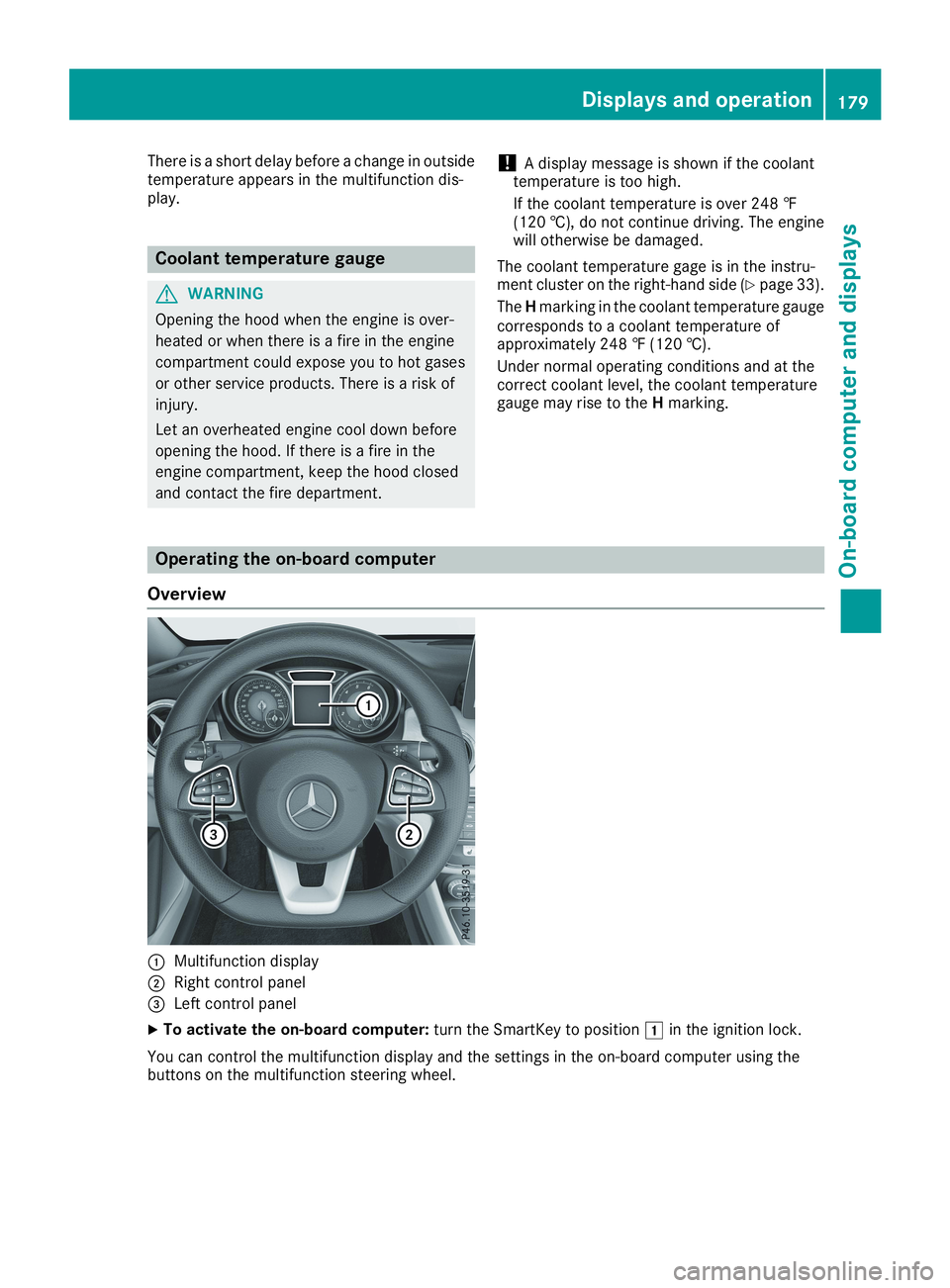
Operating the on-board computer
Overview
CMultifunction display
DRight control panel
Page 182 of 330
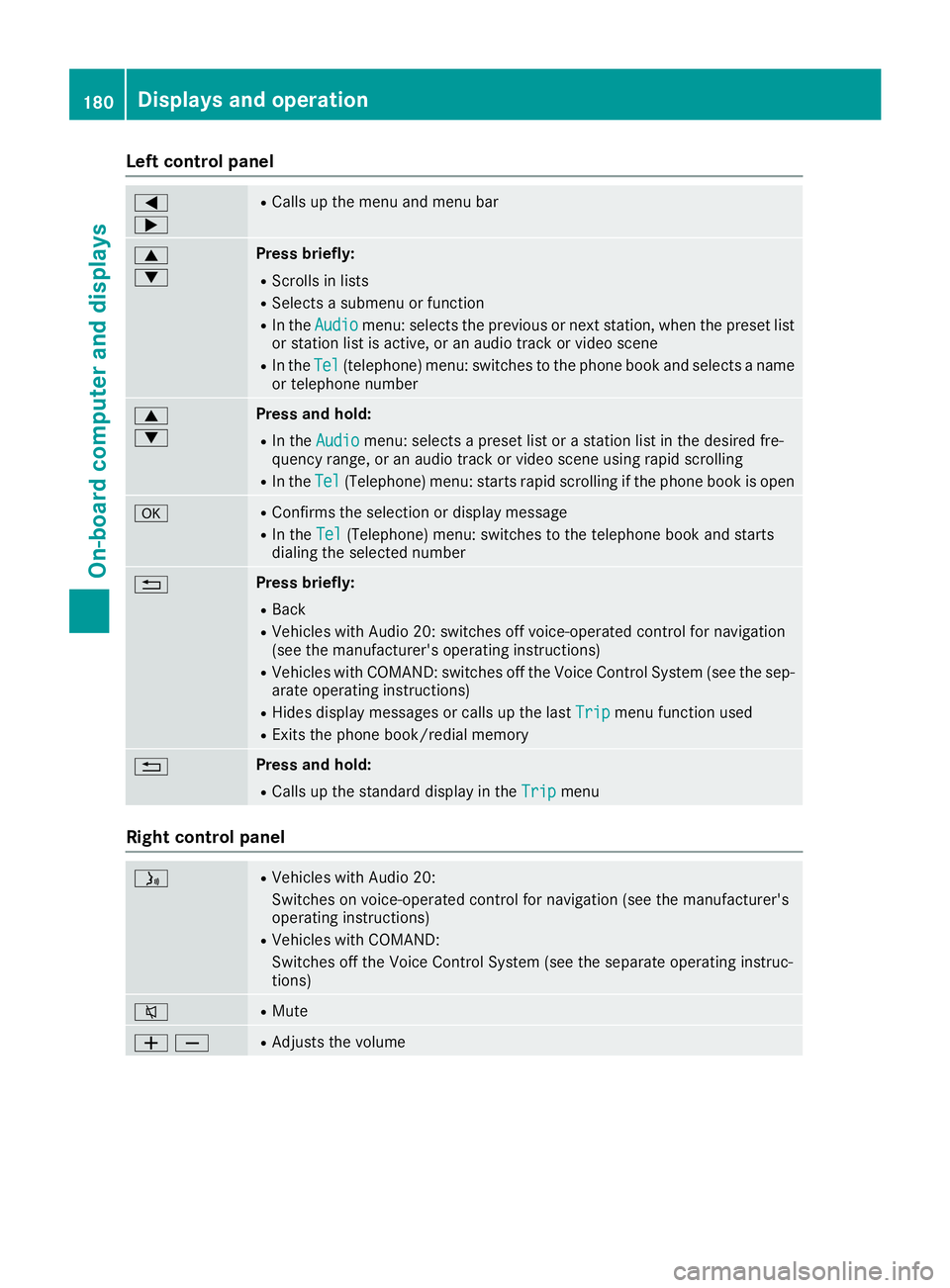
Left control panel
Y
e
RCalls up the menu and menu bar
c
d
Press briefly:
RScrolls in lists
RSelects a submenu or function
RIn theAudioAudiomenu: selects the previous or next station, when the preset listor station list is active, or an audio track or video scene
RIn theTelTel(telephone) menu: switches to the phone book and selects a nameor telephone number
c
d
Press and hold:
RIn theAudioAudiomenu: selects a preset list or a station list in the desired fre-quency range, or an audio track or video scene using rapid scrolling
RIn theTelTel(Telephone) menu: starts rapid scrolling if the phone book is open
vRConfirms the selection or display message
RIn theTelTel(Telephone) menu: switches to the telephone book and startsdialing the selected number
8Press briefly:
RBack
RVehicles with Audio 20: switches off voice-operated control for navigation(see the manufacturer's operating instructions)
RVehicles with COMAND: switches off the Voice Control System (see the sep-arate operating instructions)
RHides display messages or calls up the lastTripTripmenu function used
RExits the phone book/redial memory
8Press and hold:
RCalls up the standard display in theTripTripmenu
Right control panel
Page 183 of 330
vRRejects or ends a call
RExits the phone book/redial memory
aRMakes or accepts a call
RSwitches to the redial memory
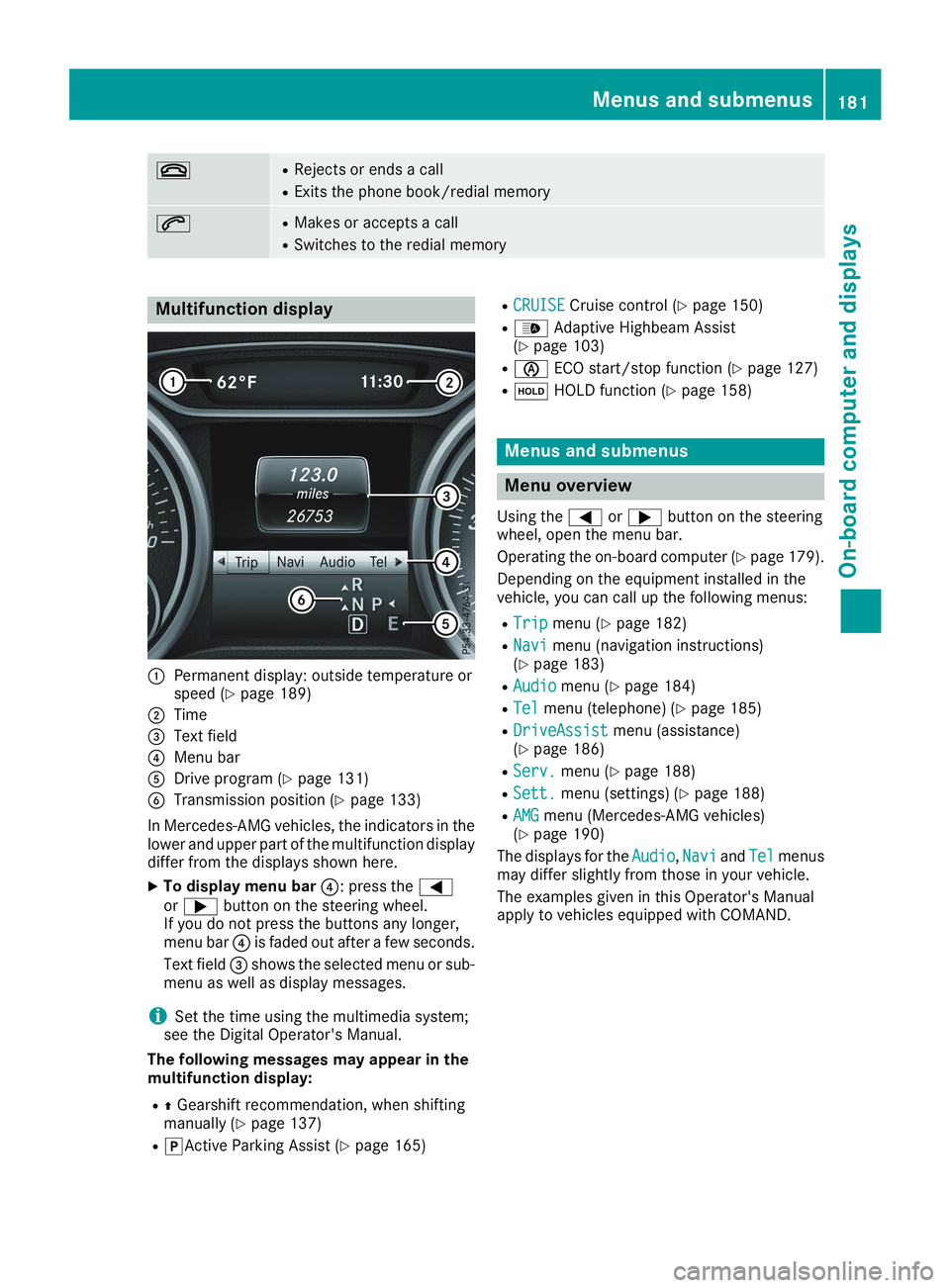
Multifunction display
CPermanent display: outside temperature orspeed (Ypage 189)
DTime
Page 184 of 330
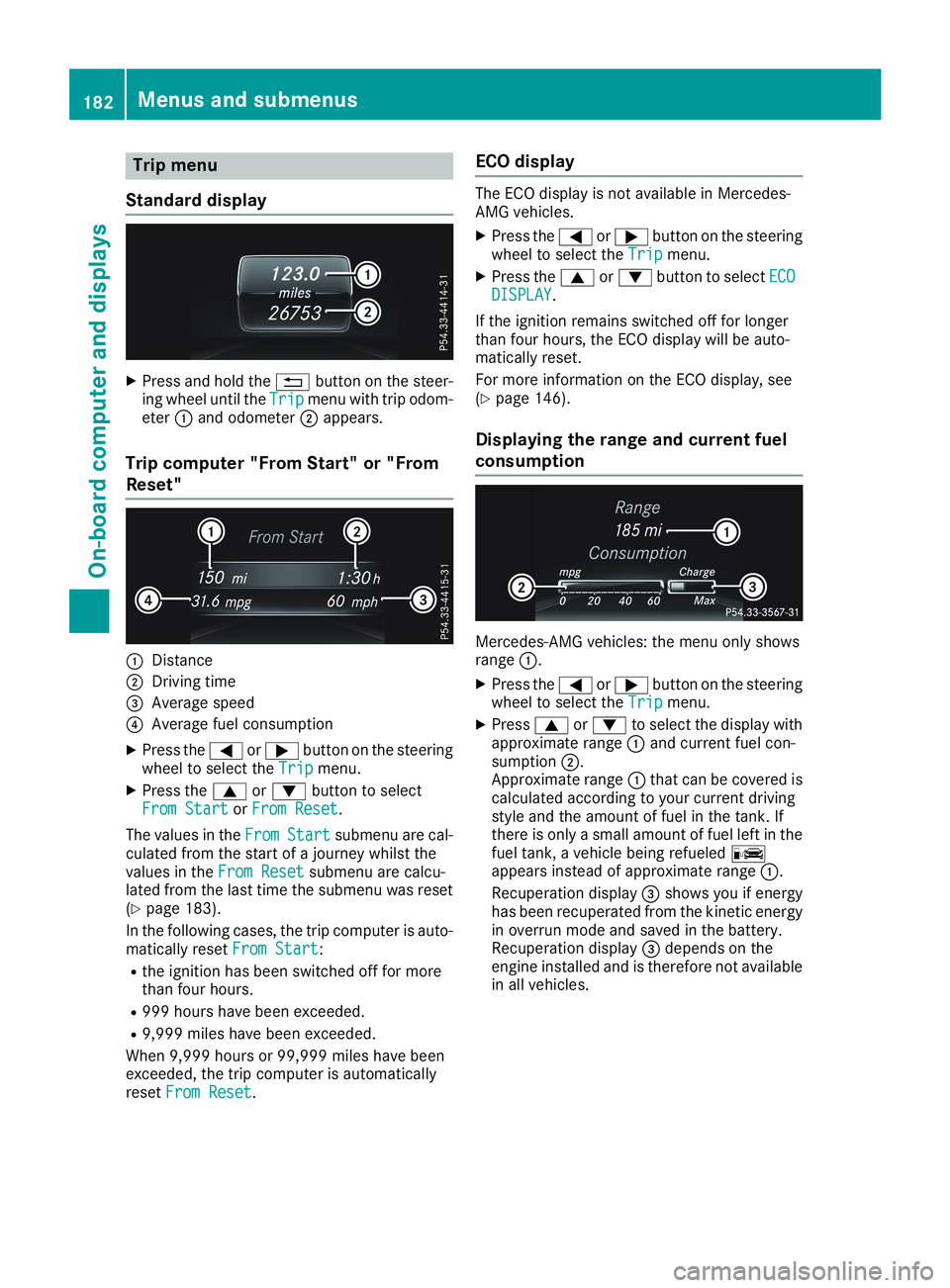
Trip menu
Standard display
XPress and hold the8button on the steer-ing wheel until theTripTripmenu with trip odom-eterCand odometerDappears.
Trip computer "From Start" or "From
Reset"
CDistance
DDriving time
Page 186 of 330
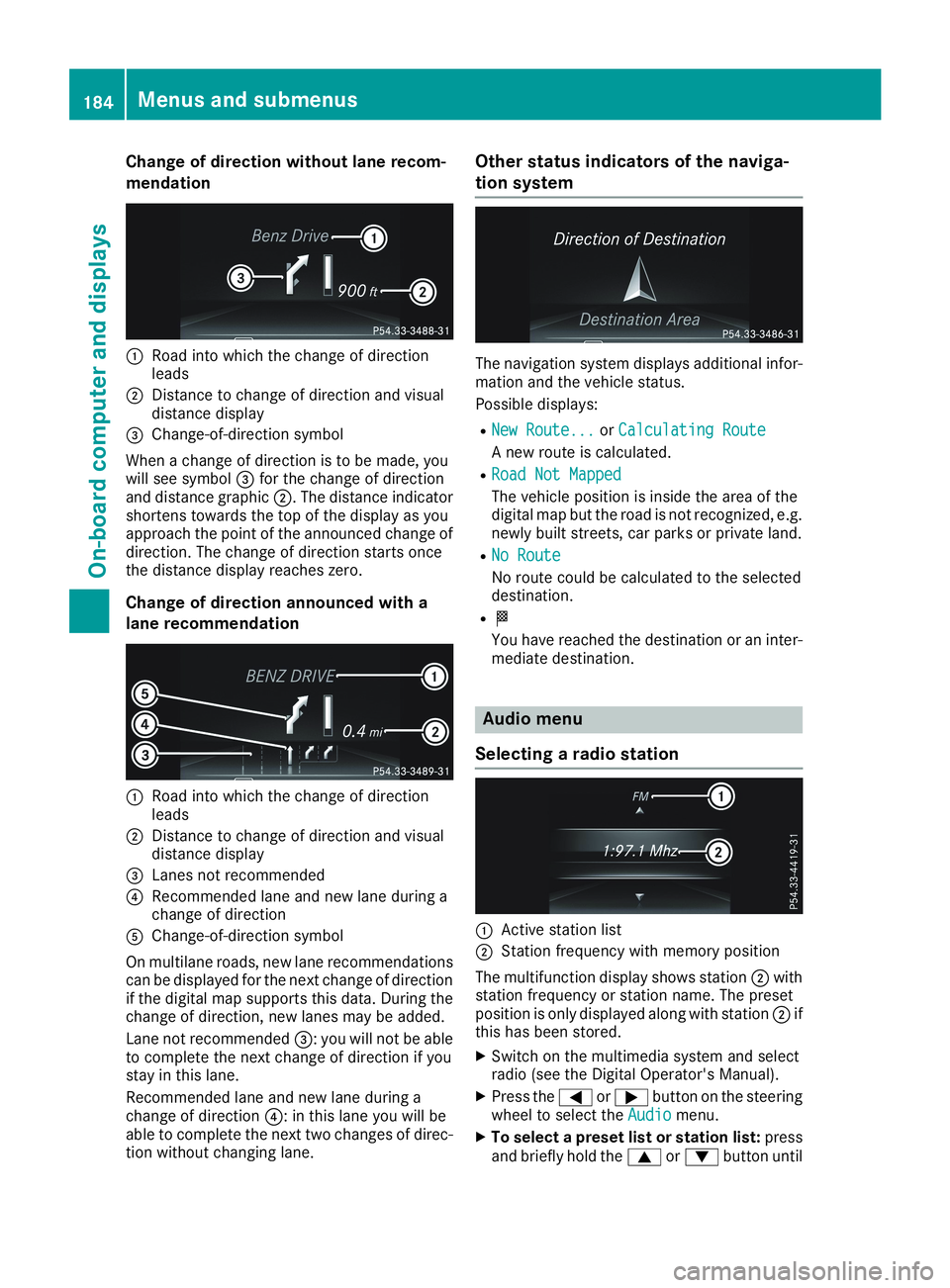
Change of direction without lane recom-
mendation
CRoad into which the change of directionleads
DDistance to change of direction and visualdistance display
Page 187 of 330
the preset list or station list in the desiredfrequency range is shown.
XTo select a station:briefly presscord.
iSIRIUS XM satellite radio functions like anormal radio.
You can find further information on operationin the "Satellite radio" section of the DigitalOperator's Manual for the multimedia sys-tem.
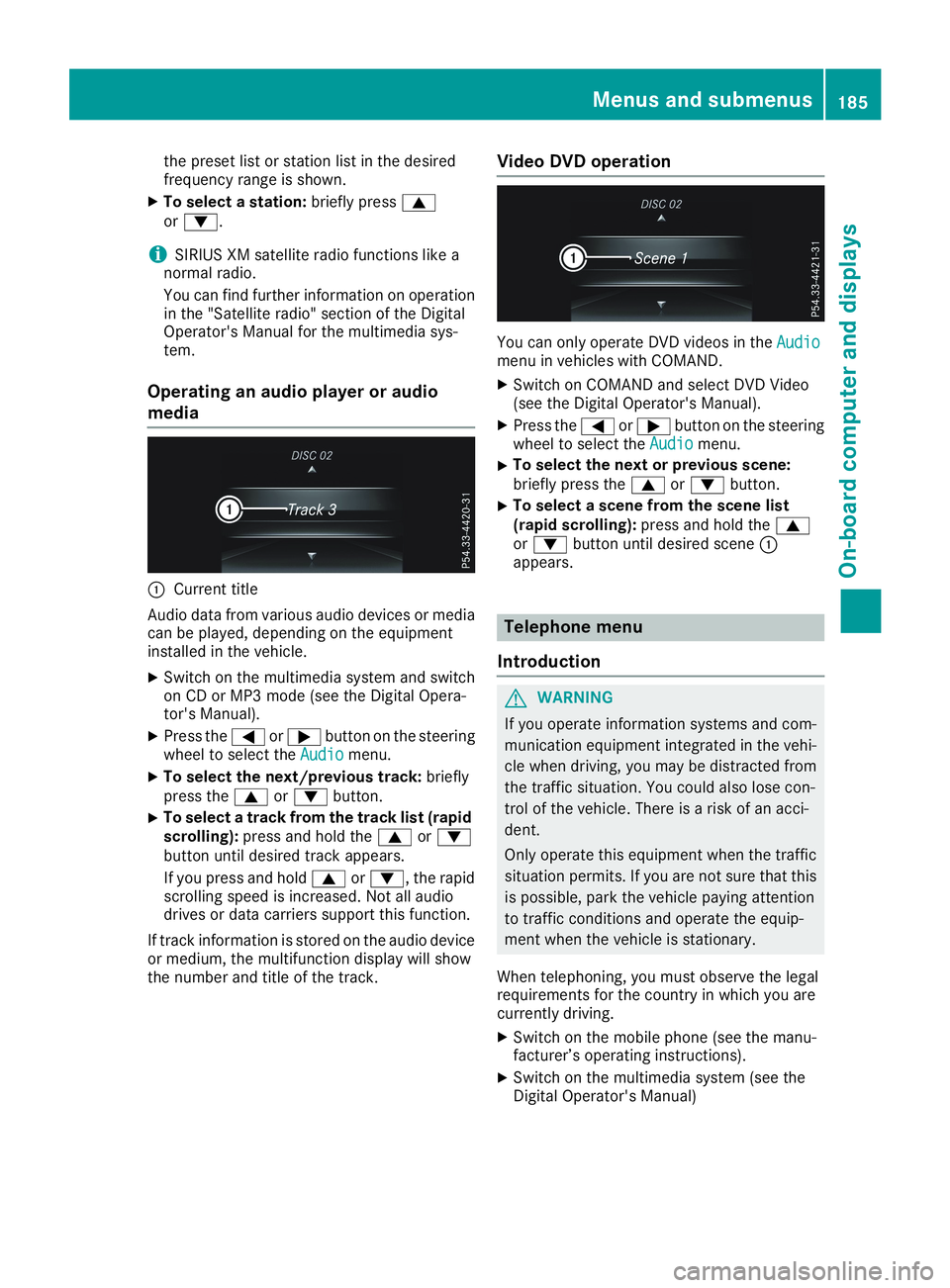
Operating an audio player or audio
media
CCurrent title
Audio data from various audio devices or mediacan be played, depending on the equipmentinstalled in the vehicle.
XSwitch on the multimedia system and switchon CD or MP3 mode (see the Digital Opera-tor's Manual).
XPress theYorebutton on the steeringwheel to select theAudioAudiomenu.
XTo select the next/previous track:brieflypress thecordbutton.
XTo select a track from the track list (rapidscrolling):press and hold thecordbutton until desired track appears.
If you press and holdcord, the rapidscrolling speed is increased. Not all audiodrives or data carriers support this function.
If track information is stored on the audio deviceor medium, the multifunction display will showthe number and title of the track.
Video DVD operation
You can only operate DVD videos in theAudioAudiomenu in vehicles with COMAND.
XSwitch on COMAND and select DVD Video(see the Digital Operator's Manual).
XPress theYorebutton on the steeringwheel to select theAudioAudiomenu.
XTo select the next or previous scene:briefly press thecordbutton.
XTo select a scene from the scene list(rapid scrolling):press and hold thecordbutton until desired sceneCappears.
Telephone menu
Introduction
GWARNING
If you operate information systems and com-
munication equipment integrated in the vehi-
cle when driving, you may be distracted from
the traffic situation. You could also lose con-
trol of the vehicle. There is a risk of an acci-
dent.
Only operate this equipment when the traffic
situation permits. If you are not sure that this
is possible, park the vehicle paying attention
to traffic conditions and operate the equip-
ment when the vehicle is stationary.
When telephoning, you must observe the legalrequirements for the country in which you arecurrently driving.
XSwitch on the mobile phone (see the manu-facturer’s operating instructions).
XSwitch on the multimedia system (see theDigital Operator's Manual)
Menus and submenus185
On-board computer and displays
Z