light MERCEDES-BENZ CLA 2019 Repair Manual
[x] Cancel search | Manufacturer: MERCEDES-BENZ, Model Year: 2019, Model line: CLA, Model: MERCEDES-BENZ CLA 2019Pages: 330, PDF Size: 23.57 MB
Page 172 of 330
Rif the camera lens is dirty or obstructed.Observe the notes on cleaning(Ypage 269)
Rif the rear of your vehicle is damaged. In thiscase, have the camera position and settingchecked at a qualified specialist workshop.
The field of vision and other functions of the rearview camera may be restricted due to additionalaccessories on the rear of the vehicle (e.g.license plate holder, rear bicycle rack).
iThe contrast of the display may be affectedby the sudden presence of sunlight or otherlight sources, e.g. when exiting a garage. Payparticular attention in this situation.
iIf usability is severely restricted, e.g. due topixel errors, have the display repaired orreplaced.
Activating/deactivating the rear view
camera
XTo activate:make sure that the SmartKey isin positionHin the ignition lock.
XMake sure that theActivation by R gearActivation by R gearfunction is selected in the multimedia system;see the Digital Operator's Manual.
XEngage reverse gear.The area behind the vehicle is shown withguide lines in the multimedia system display.
The image from the rear view camera is avail-able throughout the maneuvering process.
To deactivate:the rear view camera deacti-vates if you shift the transmission to]or afterdriving forwards a short distance.
The inner segments of the warning indicator aredisplayed in red if there is a complete systemfailure. The indicator lamp in the PARKTRONICbutton lights up.
If the system fails at the rear of the vehicle:
Rthe rear segments are shown in red whenbacking up.
Rthe rear segments are hidden when drivingforwards.
Messages in the multimedia system dis-
play
The rear view camera may show a distorted viewof obstacles, show them incorrectly or not at all.The rear view camera does not show objects inthe following positions:
Rvery close to the rear bumper
Runder the rear bumper
Rin close range above the handle on the trunklid
!Objects not at ground level may appear tobe further away than they actually are, e.g.:
Rthe bumper of a parked vehicle
Rthe drawbar of a trailer
Rthe ball coupling of a trailer tow hitch
Rthe rear section of an HGV
Ra slanted post
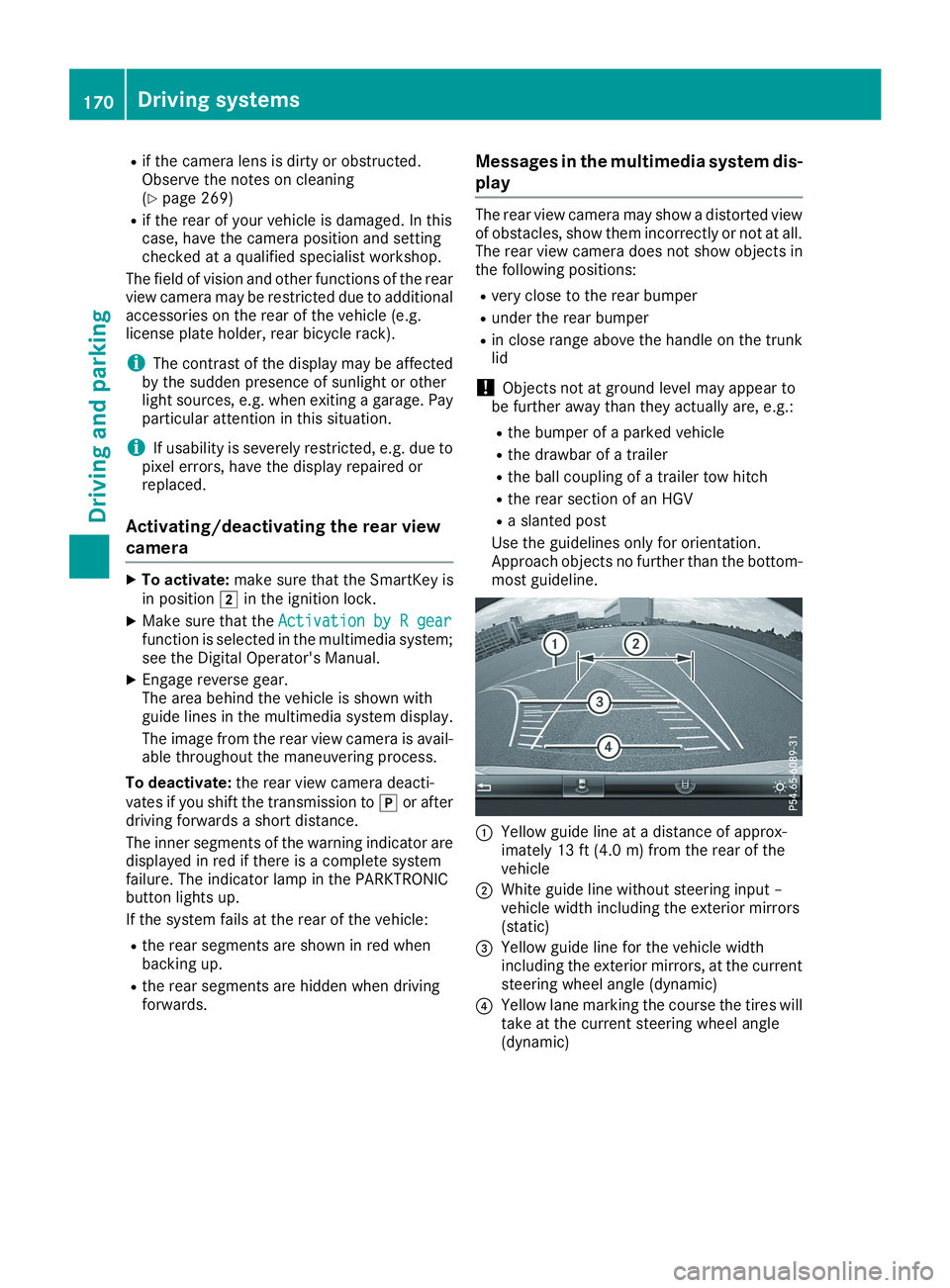
Use the guidelines only for orientation.Approach objects no further than the bottom-most guideline.
CYellow guide line at a distance of approx-imately 13 ft (4.0 m) from the rear of thevehicle
DWhite guide line without steering input –vehicle width including the exterior mirrors(static)
Page 177 of 330
Any unauthorized modification to this devicecould void the user’s authority to operate theequipment.
Radar sensors
The radar sensors for Blind Spot Assist are inte-grated into the rear bumper. Make sure that thebumpers are free from dirt, ice or slush. Thesensors must not be covered, for example bycycle racks or overhanging loads. Following asevere impact or in the event of damage to thebumpers, have the function of the radar sensorschecked at a qualified specialist workshop.Blind Spot Assist may no longer work properly.
Monitoring range of the sensors
In particular, the detection of obstacles can beimpaired if:
Rthere is dirt on the sensors or anything elsecovering the sensors
Rthere is poor visibility, e.g. due to fog, heavyrain or snow
Ra narrow vehicle traveling in front, e.g. amotorbike or bicycle
Rthe road has very wide lanes
Rthe road has narrow lanes
Ryou are not driving in the middle of the lane
Rthere are barriers or other road boundaries
Vehicles in the monitoring range are then notindicated.
Blind Spot Assist monitors the area up to 10 ft(3 m) behind your vehicle and directly next to it.
If the lanes are narrow, vehicles driving in thelane beyond the lane next to your vehicle may beindicated, especially if the vehicles are not driv-ing in the middle of their lane. This may be thecase if the vehicles are driving on the inner sideof their lane.
Due to the nature of the system:
Rwarnings may be issued in error when drivingclose to crash barriers or similar solid laneborders.
Rwarnings may be interrupted when you aredriving alongside particularly long vehicles,such as trucks, for a prolonged time.
Warning display
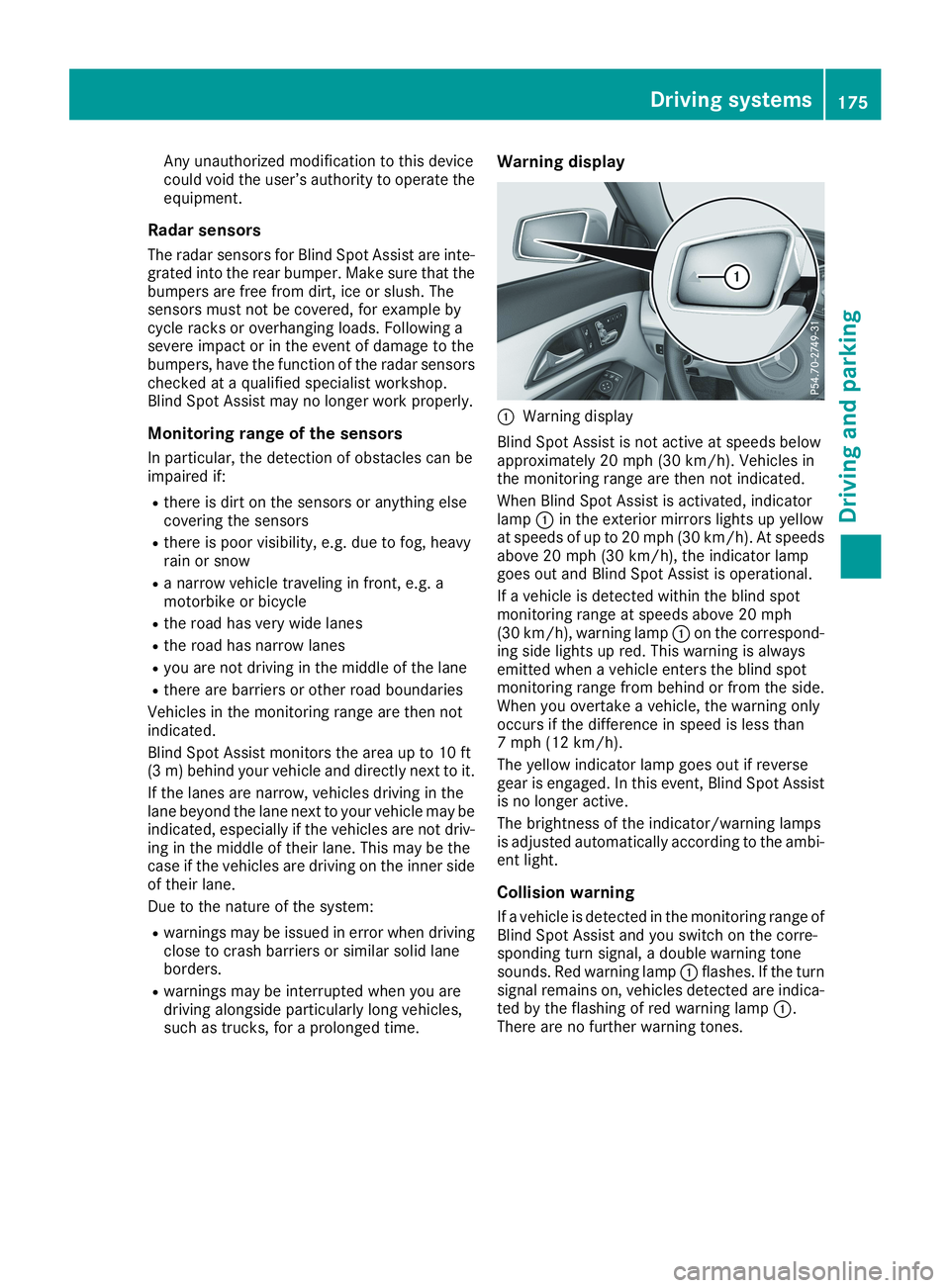
CWarning display
Blind Spot Assist is not active at speeds belowapproximately 20 mph (30 km/h). Vehicles inthe monitoring range are then not indicated.
When Blind Spot Assist is activated, indicatorlampCin the exterior mirrors lights up yellowat speeds of up to 20 mph (30 km/h). At speedsabove 20 mph (30 km/h), the indicator lampgoes out and Blind Spot Assist is operational.
If a vehicle is detected within the blind spotmonitoring range at speeds above 20 mph(30 km/h), warning lampCon the correspond-ing side lights up red. This warning is alwaysemitted when a vehicle enters the blind spotmonitoring range from behind or from the side.When you overtake a vehicle, the warning onlyoccurs if the difference in speed is less than7 mph (12 km/h).
The yellow indicator lamp goes out if reversegear is engaged. In this event, Blind Spot Assistis no longer active.
The brightness of the indicator/warning lampsis adjusted automatically according to the ambi-ent light.
Collision warning
If a vehicle is detected in the monitoring range ofBlind Spot Assist and you switch on the corre-sponding turn signal, a double warning tonesounds. Red warning lampCflashes. If the turnsignal remains on, vehicles detected are indica-ted by the flashing of red warning lampC.There are no further warning tones.
Driving systems175
Driving an d parking
Z
Page 178 of 330
Switching on Blind Spot Assist
XMake sure that Blind Spot Assist is activatedin the on-board computer (Ypage 188).
XTurn the SmartKey to positionHin the igni-tion lock.Warning lampsCin the exterior mirrors lightup red for approximately 1.5 seconds andthen turn yellow.
Lane Keeping Assist
General notes
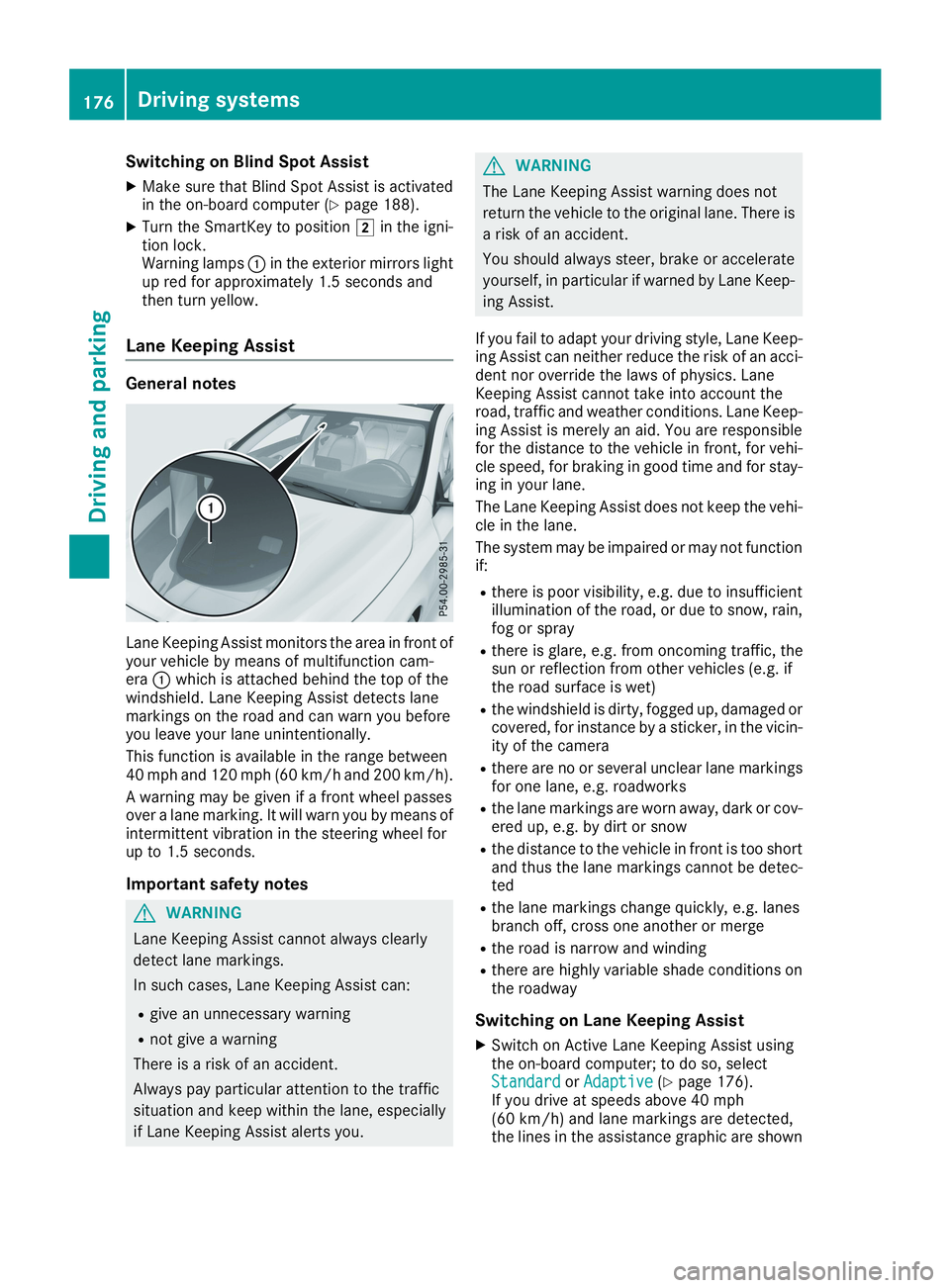
Lane Keeping Assist monitors the area in front ofyour vehicle by means of multifunction cam-eraCwhich is attached behind the top of thewindshield. Lane Keeping Assist detects lanemarkings on the road and can warn you beforeyou leave your lane unintentionally.
This function is available in the range between40 mph and 120 mph (60 km/h and 200 km/h).
A warning may be given if a front wheel passesover a lane marking. It will warn you by means ofintermittent vibration in the steering wheel forup to 1.5 seconds.
Important safety notes
GWARNING
Lane Keeping Assist cannot always clearly
detect lane markings.
In such cases, Lane Keeping Assist can:
Rgive an unnecessary warning
Rnot give a warning
There is a risk of an accident.
Always pay particular attention to the traffic
situation and keep within the lane, especially
if Lane Keeping Assist alerts you.
GWARNING
The Lane Keeping Assist warning does not
return the vehicle to the original lane. There is
a risk of an accident.
You should always steer, brake or accelerate
yourself, in particular if warned by Lane Keep-
ing Assist.
If you fail to adapt your driving style, Lane Keep-ing Assist can neither reduce the risk of an acci-dent nor override the laws of physics. LaneKeeping Assist cannot take into account theroad, traffic and weather conditions. Lane Keep-ing Assist is merely an aid. You are responsiblefor the distance to the vehicle in front, for vehi-cle speed, for braking in good time and for stay-ing in your lane.
The Lane Keeping Assist does not keep the vehi-cle in the lane.
The system may be impaired or may not functionif:
Rthere is poor visibility, e.g. due to insufficientillumination of the road, or due to snow, rain,fog or spray
Rthere is glare, e.g. from oncoming traffic, thesun or reflection from other vehicles (e.g. ifthe road surface is wet)
Rthe windshield is dirty, fogged up, damaged orcovered, for instance by a sticker, in the vicin-ity of the camera
Rthere are no or several unclear lane markingsfor one lane, e.g. roadworks
Rthe lane markings are worn away, dark or cov-ered up, e.g. by dirt or snow
Rthe distance to the vehicle in front is too shortand thus the lane markings cannot be detec-ted
Rthe lane markings change quickly, e.g. lanesbranch off, cross one another or merge
Rthe road is narrow and winding
Rthere are highly variable shade conditions onthe roadway
Switching on Lane Keeping Assist
XSwitch on Active Lane Keeping Assist usingthe on-board computer; to do so, selectStandardStandardorAdaptiveAdaptive(Ypage 176).If you drive at speeds above 40 mph(60 km/h) and lane markings are detected,the lines in the assistance graphic are shown
176Driving systems
Driving and parking
Page 180 of 330
Important safety notes
GWARNING
If you operate information systems and com-
munication equipment integrated in the vehi-
cle when driving, you may be distracted from
the traffic situation. You could also lose con-
trol of the vehicle. There is a risk of an acci-
dent.
Only operate this equipment when the traffic
situation permits. If you are not sure that this
is possible, park the vehicle paying attention
to traffic conditions and operate the equip-
ment when the vehicle is stationary.
You must observe the legal requirements for thecountry in which you are currently driving whenoperating the on-board computer.
GWARNING
If the instrument cluster has failed or mal-
functioned, you may not recognize function
restrictions in systems relevant to safety. The
operating safety of your vehicle may be
impaired. There is a risk of an accident.
Drive on carefully. Have the vehicle checked
at a qualified specialist workshop immedi-
ately.
The on-board computer only shows messages orwarnings from certain systems in the multifunc-tion display. You should therefore make sureyour vehicle is operating safely at all times.
If the operating safety of your vehicle isimpaired, pull over as soon as it is safe to do so.Contact a qualified specialist workshop.
For an overview, see the instrument panel illus-tration (Ypage 33).
Displays and operation
Instrument cluster lighting
The light sensor in the instrument cluster auto-matically controls the brightness of the multi-function display. In daylight, the displays in theinstrument cluster are not illuminated.
The lighting in the instrument cluster, in the dis-plays and the controls in the vehicle interior canbe adjusted using the brightness control knob.
The brightness control knob is located on thebottom left of the instrument cluster(Ypage 33).
XTurn the brightness control knob clockwise orcounter-clockwise.If the light switch is set to theX,`orXposition, the brightness is dependentupon the brightness of the ambient light.
Speedometer with segments
The speedometer is only divided into segmentsin vehicles with Active Distance AssistDISTRONIC.
The segments in the speedometer indicatewhich speed range is available.
RActive Distance Assist DISTRONIC activated(Ypage 152):
One or two segments in the set speed rangelight up.
RActive Distance Assist DISTRONIC detects avehicle in front moving more slowly than thestored speed:
The segments between the speed of the vehi-cle in front and the stored speed light up.
Tachometer
!Do not drive in the overrevving range, as thiscould damage the engine.
The red band in the tachometer indicates theengine's overrevving range.
The engine is limited within a range to protectthe engine when the red band is reached.
Outside temperature display
You should pay special attention to road condi-tions when temperatures are around freezingpoint.
Bear in mind that the outside temperature dis-play indicates the temperature measured anddoes not record the road temperature.
The outside temperature display is in the multi-function display (Ypage 181).
178Displays and operation
On-board computer and displays
Page 191 of 330
RActive Distance Assist DISTRONIC
RASSYST PLUS service interval display
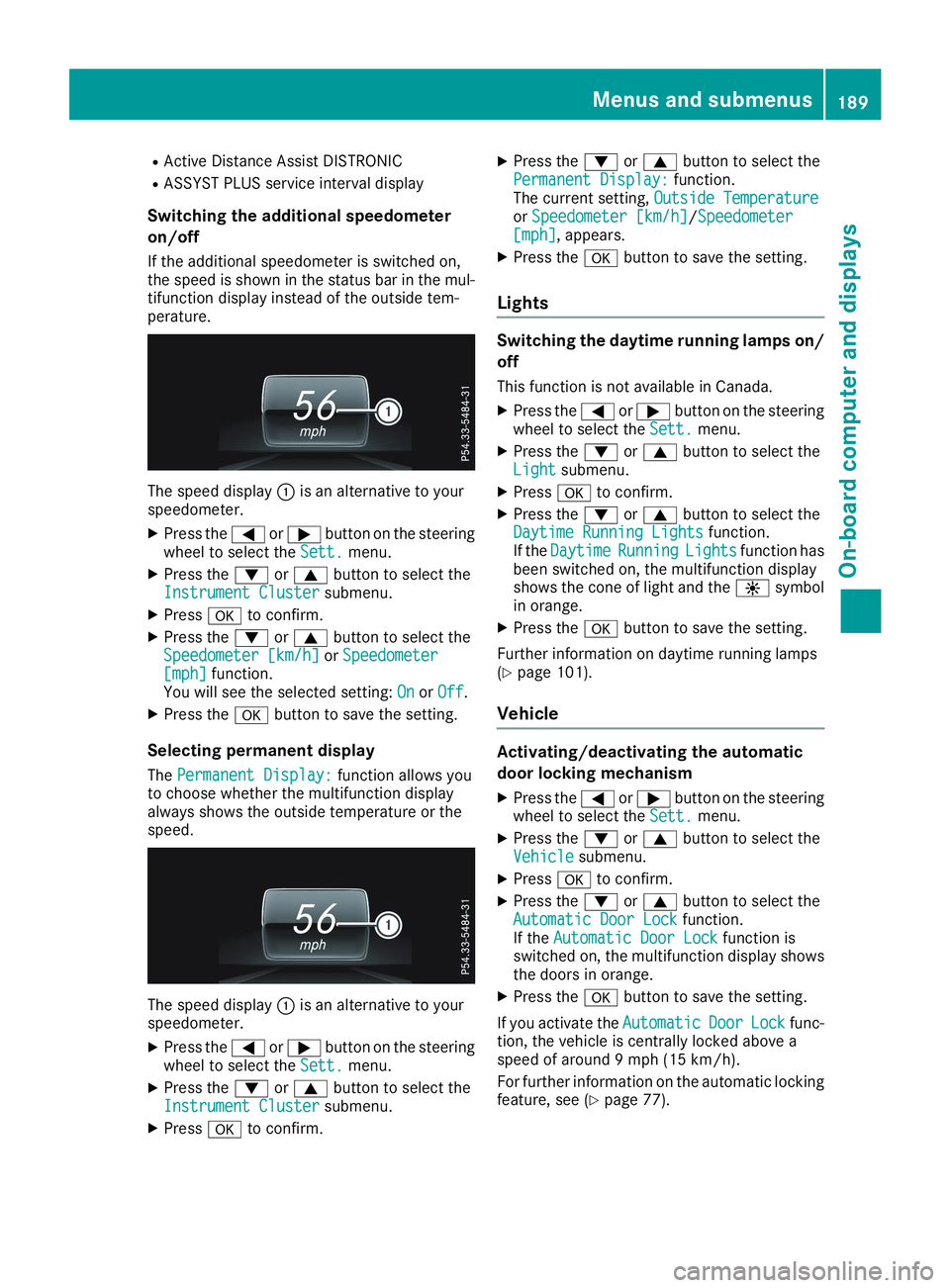
Switching the additional speedometer
on/off
If the additional speedometer is switched on,the speed is shown in the status bar in the mul-tifunction display instead of the outside tem-perature.
The speed displayCis an alternative to yourspeedometer.
XPress theYorebutton on the steeringwheel to select theSett.Sett.menu.
XPress thedorcbutton to select theInstrument ClusterInstrument Clustersubmenu.
XPressvto confirm.
XPress thedorcbutton to select theSpeedometer [km/h]Speedometer [km/h]orSpeedometerSpeedometer[mph][mph]function.You will see the selected setting:OnOnorOffOff.
XPress thevbutton to save the setting.
Selecting permanent display
ThePermanent Display:Permanent Display:function allows youto choose whether the multifunction displayalways shows the outside temperature or thespeed.
The speed displayCis an alternative to yourspeedometer.
XPress theYorebutton on the steeringwheel to select theSett.Sett.menu.
XPress thedorcbutton to select theInstrument ClusterInstrument Clustersubmenu.
XPressvto confirm.
XPress thedorcbutton to select thePermanent Display:Permanent Display:function.The current setting,Outside TemperatureOutside TemperatureorSpeedometer [km/h]Speedometer [km/h]/SpeedometerSpeedometer[mph][mph], appears.
XPress thevbutton to save the setting.
Lights
Switching the daytime running lamps on/
off
This function is not available in Canada.
XPress theYorebutton on the steeringwheel to select theSett.Sett.menu.
XPress thedorcbutton to select theLightLightsubmenu.
XPressvto confirm.
XPress thedorcbutton to select theDaytime Running LightsDaytime Running Lightsfunction.If theDaytimeDaytimeRunningRunningLightsLightsfunction hasbeen switched on, the multifunction displayshows the cone of light and the
Page 192 of 330
Activating/deactivating the acoustic
locking verification signal
If you switch on theAcousticAcousticLockLockfunction, anacoustic signal sounds when you lock the vehi-cle.
XPress theYorebutton on the steeringwheel to select theSett.Sett.menu.
XPress thedorcbutton to select theVehicleVehiclesubmenu.
XPressvto confirm.
XPress thedorcbutton to select theAcoustic LockAcoustic Lockfunction.If theAcoustic LockAcoustic Lockfunction is activated,the multifunction display shows the7symbol in orange.
XPress thevbutton to save the setting.
Comfort
Switching the fold-in mirrors when lock-
ing feature on/off
This function is only available in Canada.
This function is only available when the vehicle isequipped with the electrical fold-in function.
When you activate theAuto.Auto.MirrorMirrorFoldingFoldingfunction, the exterior mirrors are folded in whenthe vehicle is locked. If you unlock the vehicleand then open the driver's or front-passengerdoor, the exterior mirrors fold out again.
If you have switched on theAuto. MirrorAuto. MirrorFoldingFoldingfunction and you fold in the exteriormirrors using the button on the door(Ypage 98), they will not fold out automatically.The exterior mirrors can then only be folded outusing the button on the door.
XPress theYorebutton on the steeringwheel to select theSett.Sett.menu.
XPress thedorcbutton to select theConvenienceConveniencesubmenu.
XPressvto confirm.
XPress thedorcbutton to select theAuto. Mirror FoldingAuto. Mirror Foldingfunction.If theAuto. Mirror FoldingAuto. Mirror Foldingfunction isswitched on, the multifunction display showsthe exterior mirror in orange.
XPress thevbutton to save the setting.
Restoring the factory settings
XPress theYorebutton on the steeringwheel to select theSett.Sett.menu.
XPress thedorcbutton to select theFactory SettingFactory Settingsubmenu.
XPressvto confirm.TheReset All Settings?Reset All Settings?functionappears.
XPress thedorcbutton to selectNoNoorYesYes.
XPress thevbutton to confirm the selec-tion.If you have selectedYesYes, the multifunctiondisplay shows a confirmation message.
For safety reasons, theDaytime RunningDaytime RunningLightsLightsfunction in theLightLightsubmenu is onlyreset if the vehicle is stationary.
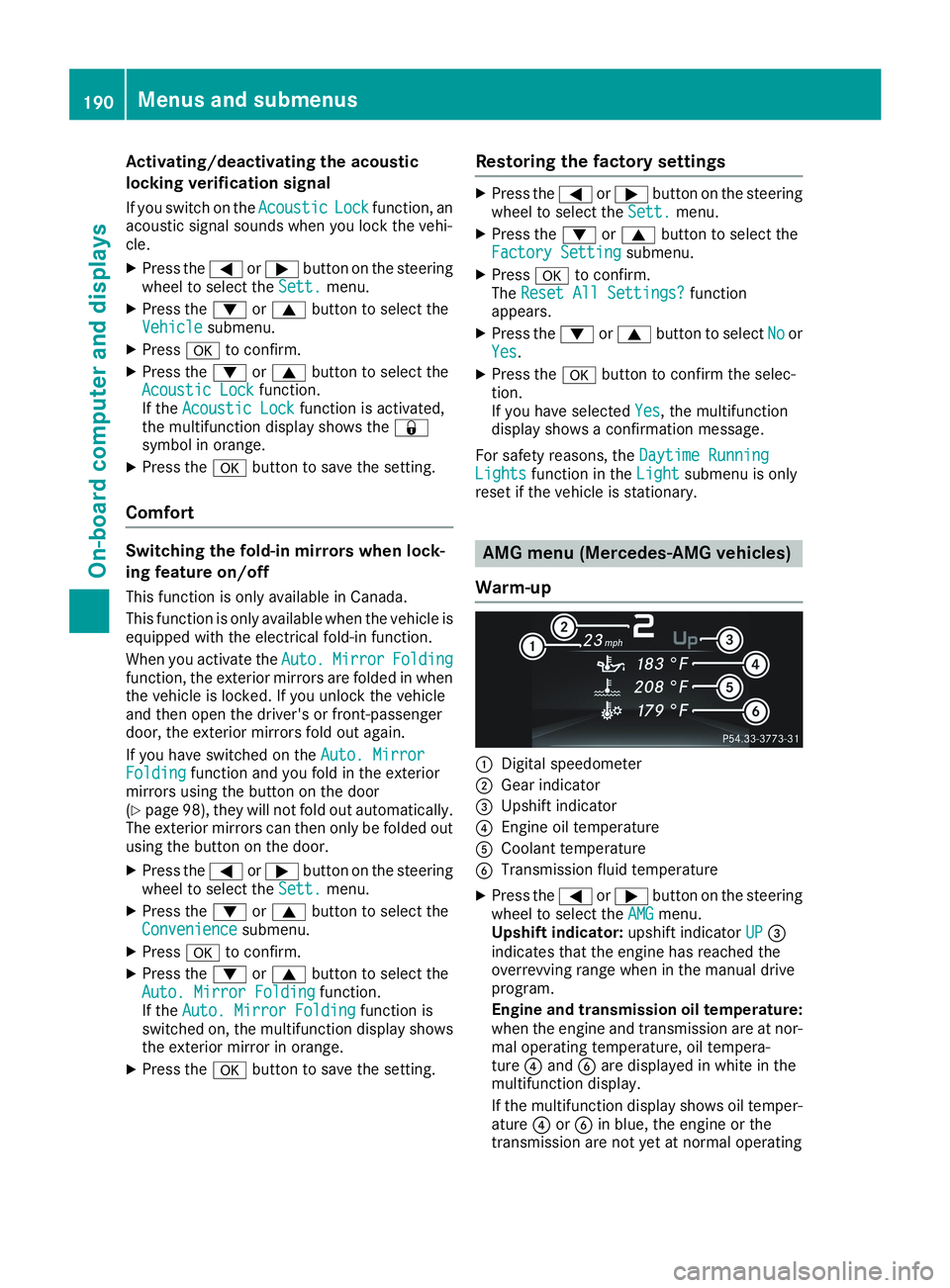
AMG menu (Mercedes-AMG vehicles)
Warm-up
CDigital speedometer
DGear indicator
Page 199 of 330
Display messagesPossible causes/consequences andPPSolutions
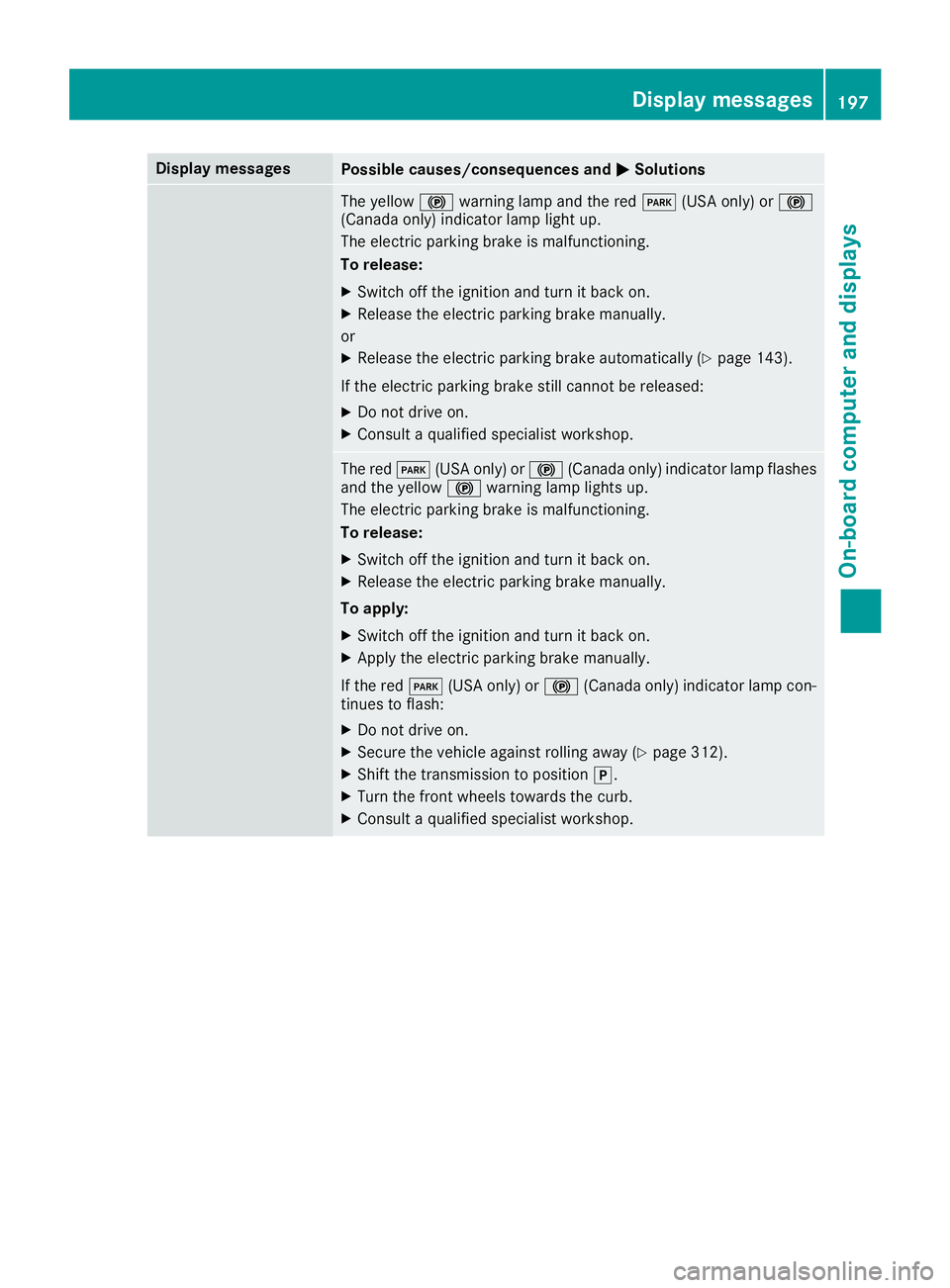
The yellow$warning lamp and the redI(USA only) or$(Canada only) indicator lamp light up.
The electric parking brake is malfunctioning.
To release:
XSwitch off the ignition and turn it back on.
XRelease the electric parking brake manually.
or
XRelease the electric parking brake automatically (Ypage 143).
If the electric parking brake still cannot be released:
XDo not drive on.
XConsult a qualified specialist workshop.
The redI(USA only) or$(Canada only) indicator lamp flashesand the yellow$warning lamp lights up.
The electric parking brake is malfunctioning.
To release:
XSwitch off the ignition and turn it back on.
XRelease the electric parking brake manually.
To apply:
XSwitch off the ignition and turn it back on.
XApply the electric parking brake manually.
If the redI(USA only) or$(Canada only) indicator lamp con-tinues to flash:
XDo not drive on.
XSecure the vehicle against rolling away (Ypage 312).
XShift the transmission to position].
XTurn the front wheels towards the curb.
XConsult a qualified specialist workshop.
Displaymessages197
On-b oard computer and displays
Z
Page 200 of 330
Display messagesPossible causes/consequences andPPSolutions
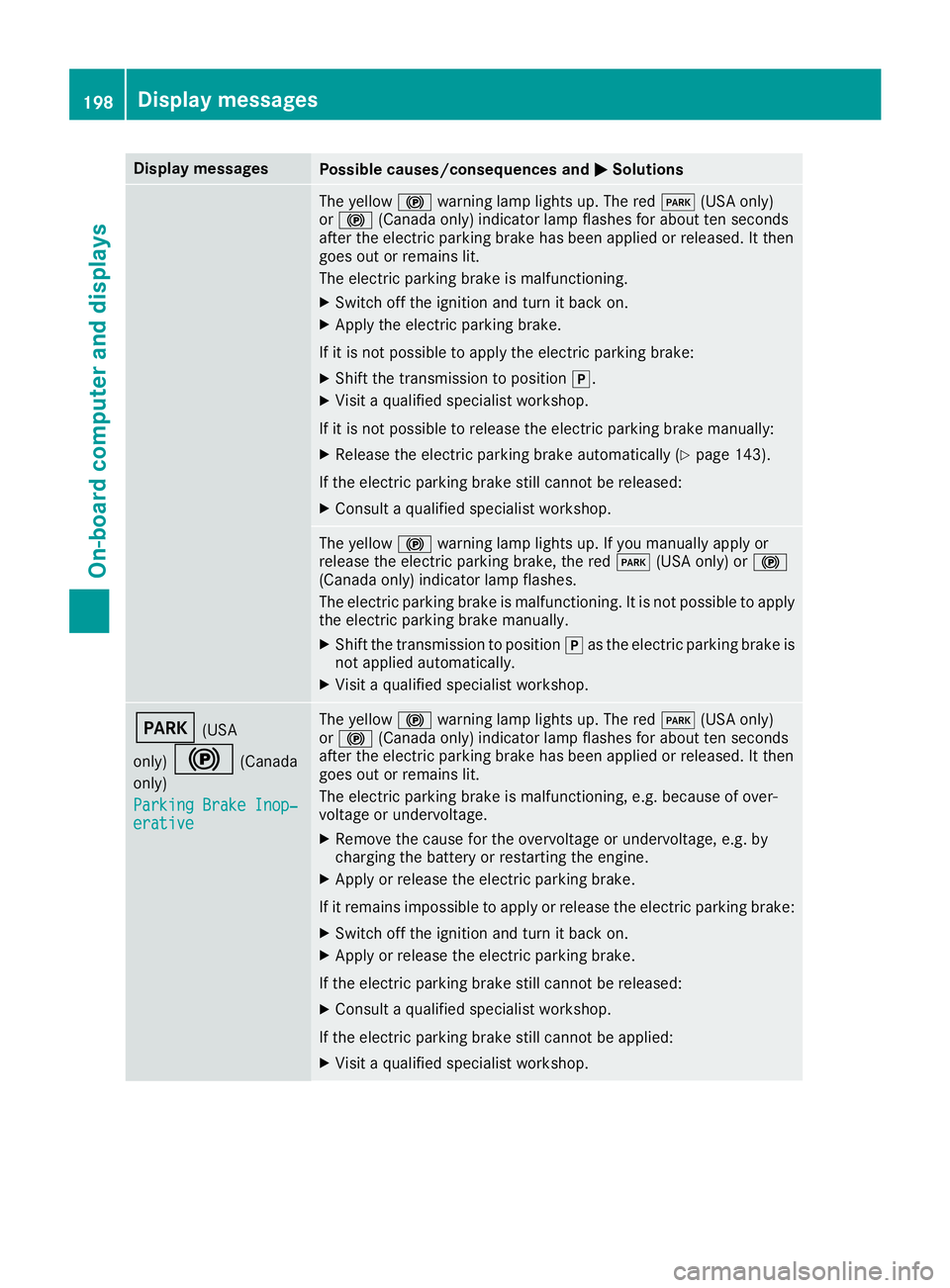
The yellow$warning lamp lights up. The redI(USA only)or$(Canada only) indicator lamp flashes for about ten secondsafter the electric parking brake has been applied or released. It thengoes out or remains lit.
The electric parking brake is malfunctioning.
XSwitch off the ignition and turn it back on.
XApply the electric parking brake.
If it is not possible to apply the electric parking brake:
XShift the transmission to position].
XVisit a qualified specialist workshop.
If it is not possible to release the electric parking brake manually:
XRelease the electric parking brake automatically (Ypage 143).
If the electric parking brake still cannot be released:
XConsult a qualified specialist workshop.
The yellow$warning lamp lights up. If you manually apply orrelease the electric parking brake, the redI(USA only) or$(Canada only) indicator lamp flashes.
The electric parking brake is malfunctioning. It is not possible to applythe electric parking brake manually.
XShift the transmission to position]as the electric parking brake isnot applied automatically.
XVisit a qualified specialist workshop.
I(USA
only)$(Canada
only)
Parking Brake Inop‐Parking Brake Inop‐erativeerative
The yellow$warning lamp lights up. The redI(USA only)or$(Canada only) indicator lamp flashes for about ten secondsafter the electric parking brake has been applied or released. It thengoes out or remains lit.
The electric parking brake is malfunctioning, e.g. because of over-voltage or undervoltage.
XRemove the cause for the overvoltage or undervoltage, e.g. bycharging the battery or restarting the engine.
XApply or release the electric parking brake.
If it remains impossible to apply or release the electric parking brake:
XSwitch off the ignition and turn it back on.
XApply or release the electric parking brake.
If the electric parking brake still cannot be released:
XConsult a qualified specialist workshop.
If the electric parking brake still cannot be applied:
XVisit a qualified specialist workshop.
198Displaymessages
On-b oard computer and displays
Page 201 of 330
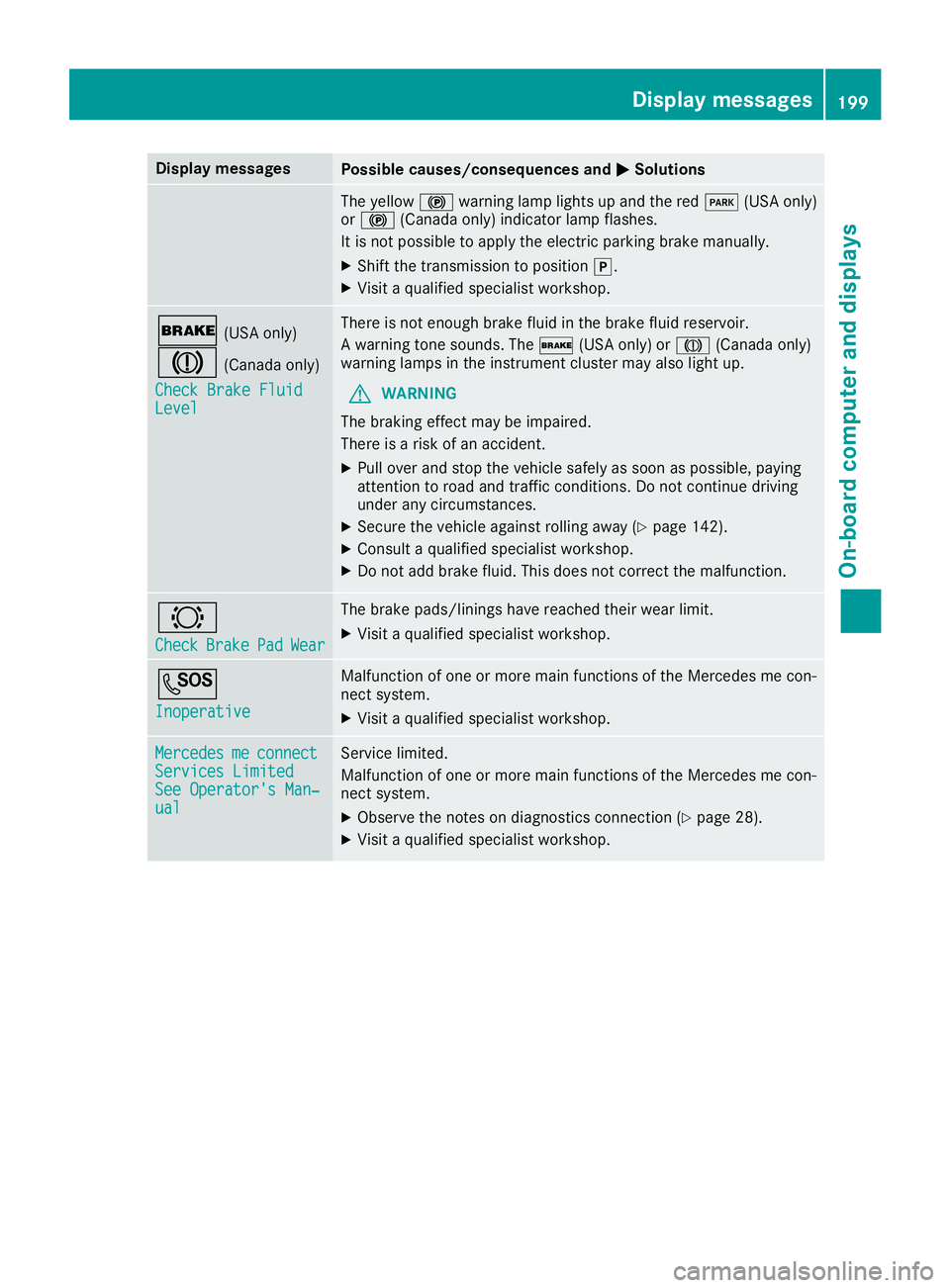
Display messagesPossible causes/consequences andPPSolutions
The yellow$warning lamp lights up and the redI(USA only)or$(Canada only) indicator lamp flashes.
It is not possible to apply the electric parking brake manually.
XShift the transmission to position].
XVisit a qualified specialist workshop.
'(USA only)
M(Canada only)
Check Brake FluidCheck Brake FluidLevelLevel
There is not enough brake fluid in the brake fluid reservoir.
A warning tone sounds. The'(USA only) orM(Canada only)warning lamps in the instrument cluster may also light up.
GWARNING
The braking effect may be impaired.
There is a risk of an accident.
XPull over and stop the vehicle safely as soon as possible, payingattention to road and traffic conditions. Do not continue drivingunder any circumstances.
XSecure the vehicle against rolling away (Ypage 142).
XConsult a qualified specialist workshop.
XDo not add brake fluid. This does not correct the malfunction.
&
CheckCheckBrakeBrakePadPadWearWear
The brake pads/linings have reached their wear limit.
XVisit a qualified specialist workshop.
S
InoperativeInoperative
Malfunction of one or more main functions of the Mercedes me con-nect system.
XVisit a qualified specialist workshop.
MercedesMercedesmemeconnectconnectServices LimitedServices LimitedSee Operator's Man‐See Operator's Man‐ualual
Service limited.
Malfunction of one or more main functions of the Mercedes me con-nect system.
XObserve the notes on diagnostics connection (Ypage 28).
XVisit a qualified specialist workshop.
Displaymessages199
On-b oard computer and displays
Z
Page 203 of 330
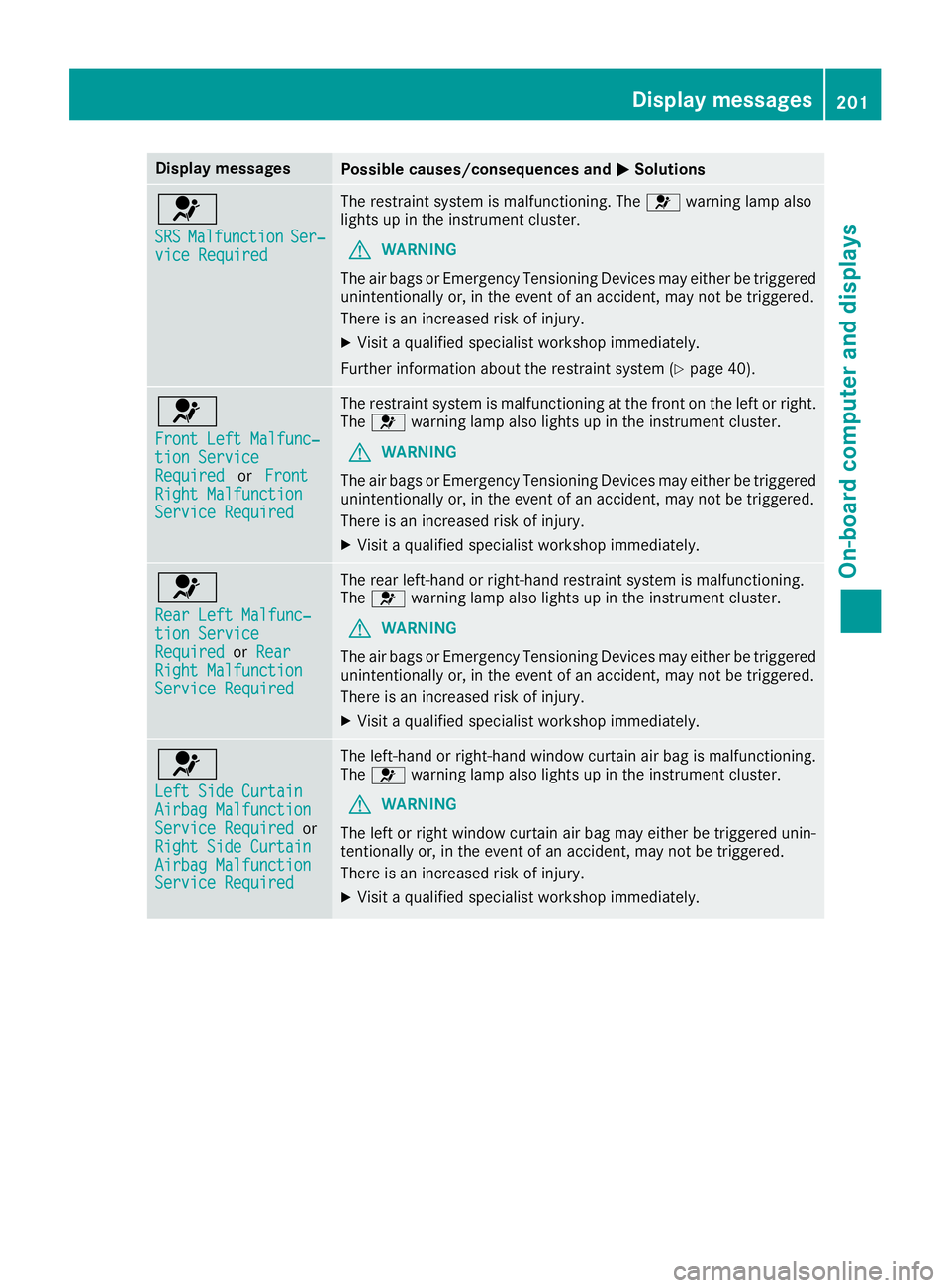
Display messagesPossible causes/consequences andPPSolutions
u
SRSSRSMalfunctionMalfunctionSer‐Ser‐vice Requiredvice Required
The restraint system is malfunctioning. Theuwarning lamp alsolights up in the instrument cluster.
GWARNING
The air bags or Emergency Tensioning Devices may either be triggeredunintentionally or, in the event of an accident, may not be triggered.
There is an increased risk of injury.
XVisit a qualified specialist workshop immediately.
Further information about the restraint system (Ypage 40).
u
Front Left Malfunc‐Front Left Malfunc‐tion Servicetion ServiceRequiredRequiredorFrontFrontRight MalfunctionRight MalfunctionService RequiredService Required
The restraint system is malfunctioning at the front on the left or right.Theuwarning lamp also lights up in the instrument cluster.
GWARNING
The air bags or Emergency Tensioning Devices may either be triggeredunintentionally or, in the event of an accident, may not be triggered.
There is an increased risk of injury.
XVisit a qualified specialist workshop immediately.
u
Rear Left Malfunc‐Rear Left Malfunc‐tion Servicetion ServiceRequiredRequiredorRearRearRight MalfunctionRight MalfunctionService RequiredService Required
The rear left-hand or right-hand restraint system is malfunctioning.Theuwarning lamp also lights up in the instrument cluster.
GWARNING
The air bags or Emergency Tensioning Devices may either be triggeredunintentionally or, in the event of an accident, may not be triggered.
There is an increased risk of injury.
XVisit a qualified specialist workshop immediately.
u
Left Side CurtainLeft Side CurtainAirbag MalfunctionAirbag MalfunctionService RequiredService RequiredorRight Side CurtainRight Side CurtainAirbag MalfunctionAirbag MalfunctionService RequiredService Required
The left-hand or right-hand window curtain air bag is malfunctioning.Theuwarning lamp also lights up in the instrument cluster.
GWARNING
The left or right window curtain air bag may either be triggered unin-tentionally or, in the event of an accident, may not be triggered.
There is an increased risk of injury.
XVisit a qualified specialist workshop immediately.
Displaymessages201
On-b oard computer and displays
Z