ECO mode MERCEDES-BENZ CLA 2020 User Guide
[x] Cancel search | Manufacturer: MERCEDES-BENZ, Model Year: 2020, Model line: CLA, Model: MERCEDES-BENZ CLA 2020Pages: 570, PDF Size: 18.59 MB
Page 147 of 570
#
Todeac tivate: pullst eer ing wheel gearshif t
paddle 2and hold itin place .
The transm issionposit ion005Bappear sin the
multifu nctiondisplay.
Pe rm anen tse tting: #
Cha ngeto drive pr og ram =(/ page14 0). #
Select drive se tting 0063(/ page14 1).
Me rcedes- AMGvehicl es:obse rveth eno tesin
th eSupplement .Ot her wise, youma yfa ilto rec‐
ogni zedangers. Gear
shiftrecomm endation Mer
cedes -AMG vehicl es:obse rveth eno tesin
th eSupplement .Ot her wise, youma yfa ilto rec‐
ogni zedangers.
The gearshif tre comme ndation assists youin
adop tingan eco nomic aldrivin gst yle. #
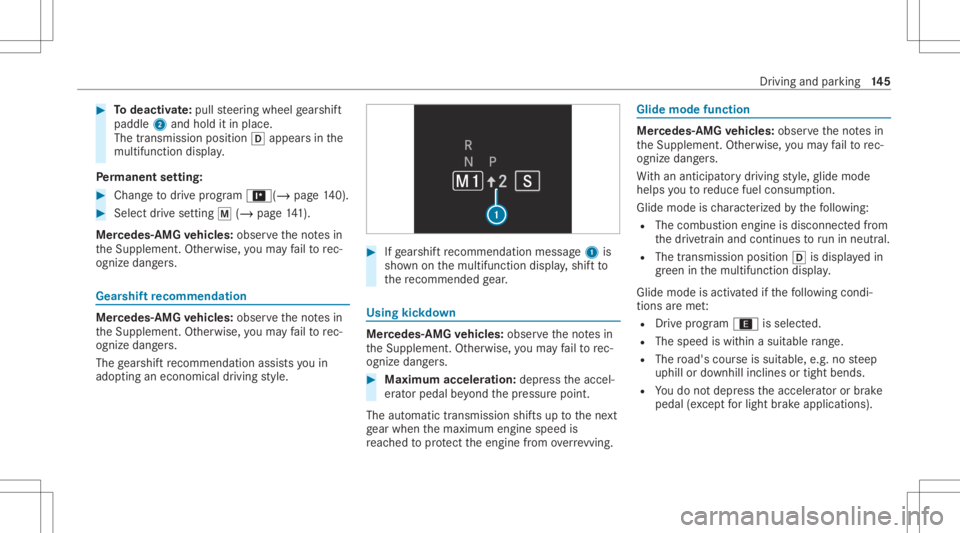
Ifge arshif tre comme ndation mess age1 is
sho wnonthemultifunc tiondispla y,shif tto
th ere comme ndedgear. Using
kickdow n Mer
cede s-AMG vehicl es:obse rveth eno tesin
th eSupplement .Ot her wise, youma yfa ilto rec‐
ogni zedangers. #
Maxi mum acceler atio n:dep ress theaccel‐
er ator pedal beyond thepr essur epoint .
The automatic transmiss ionshiftsup tothene xt
ge ar when themaximum enginespeedis
re ac hed toprotect theengine from overrev ving. Glide
mode functio n Mer
cede s-AMG vehicl es:obse rveth eno tesin
th eSupplement .Ot her wise, youma yfa ilto rec‐
ogni zedangers.
Wi th an ant icip ator ydr ivin gst yle, glide mode
helps youto reduce fuelconsum ption.
Glide mode isch aract erize dby thefo llo wing:
R The com bustion engin eis disco nnect edfrom
th edr ivet ra in and continues torunin neu tral .
R The trans mis sion positio n005B isdispl ayed in
gr een inthemultifunc tiondispla y.
Glide mode isact ivat ed ifth efo llo wing condi‐
tion sar eme t:
R Drive pr og ram ; issele cted.
R The speed iswit hin asui table rang e.
R The road's courseissuit able, e.g.no steep
uphill ordownhill inclinesortight bends.
R Youdo notdepr esstheaccelera toror brak e
peda l(e xc ep tfo rlig ht brak eapp lications). Dr
iving andparking 14
5
Page 148 of 570
%
Glide mode canalso beact ivat ed ifyo uha ve
select edthe"Eco" setting forth edr ive in the
dr ive pr og ram =.
Gli de mode isdea ctivated again ifone ofthe
condi tions isno long erme t.
Ve hicl eswith Activ eDi stance Assist
DI ST RO NIC :wh en ActiveDis tance Assist
DIS TRONI Cis acti ve,th eglide mode function is
no tav ailable.
Glide mode canalso bepreve nted bythefo llo w‐
ing parame ters:
R Incline
R Downhill gradi ent
R Temp eratur e
R Height
R Speed
R Oper ating status oftheengine
R Traf fic situ ation
% Glide mod ecan beende dby pressing a
st eer ing wheel gearshif tpaddle
(/ page14 4). 14
6
Driving and parking
Page 161 of 570
St
andb ymode (ext ens ion ofthe star terbat‐
te ry 's per iod out ofuse) St
andb ymode function
% This function isno tav ailable forall model s.
If standb ymode isact ivat ed, energyloss willbe
min imiz eddur ing ex tende dpe riods ofnon- oper‐
ation.
St andb ymode isch aract erize dby thefo llo wing:
R thest ar terbatt eryis preser ved.
R themaximum non-opera tionaltime appear s
in themedia display.
R thecon nect iontoonline services isint erru p‐
te d.
R theAT A(anti-t heftal ar m system) isno tav ail‐
able.
R theint erior motion sensor andtow- aw ay
alar mfun ction sar eno tav ailable.
R thefunc tion forde tecting damag eon a
pa rked vehicle isno tav ailable. If
th efo llo wing condition sar efulf illed, standb y
mode canbeact ivat ed ordeac tivated usin gth e
multime diasystem:
R theengine isswitc hedoff.
R theignition isswitc hedon.
Ex ceeding theve hicle's displayednon -opera ‐
tion altime maycause inconvenie nce, i.e.it can‐
no tbe guarant eedth at thest ar terbatt erywil l
re liably star tth eengine.
The star terbatt erymus tbe charge dfirs tin the
fo llo wing situat ions:
R The vehicle's non-oper ational timemustbe
ex tende d.
R The Batte ryCh arg eInsu fficie ntfor Stand by
Mod emes sage appear sin themedia display.
% Standb ymode isaut omat icallydeac tivated
when theignition isswitc hedon.
Ac tiv atin g/deac tivatin gst andb ymode (park‐
ing theve hicl efo ran extended period)
Re quirement s:
R The engin eis switc hedoff. Multime
diasystem:
4 © 5
Set ting s5
Vehicle #
Switc hSt andby Modeonoroff.
When youact ivat eth efunc tion,a pr om pt
appear s. #
Select Yes.
St andb ymode isact ivat ed. Dr
iving anddriving safetysy stems Dr
iving systems andyour responsibility Yo
ur vehicle iseq uipped withdr iving systems
whic hassis tyo uin drivin g,par kingand man eu‐
ve ring theve hicle. Thedriving systems areaids
and donotre lie ve youof your responsibili typer‐
ta inin gto road traf fic law. Payatt ention tothe
tr af fic condi tions atalltime sand interve ne
wh en nece ssary.Be awareof thelimit ations
re ga rding thesaf euse ofthese systems. Inf
ormat iononradar and ultrasonic senso rs Some
drivi ng and drivi ng safety systems use
ra dar orultr asonic sensorsto monit orthear ea Dr
iving andparking 15
9
Page 181 of 570
R
Ifth edr iver does notfo llo wthecalcula‐
te dro ute
R Ifmap datais no tup todat eor available
R Inroad con stru ction area s
R Inbadwe ather orroad con dition s
R Ifth eaccelera torpeda lis depr essed
R Intheev ent ofelectr onicall ydispla yed
speed limitations #
Adjus tth espeed tothetraf fic situ ation. Se
tting rout e-base dspee dadap tation Re
quirement s:
R ActiveDis tance AssistDIS TRONI Cis acti va‐
te d. Multimedia
system:
4 © 5
Set ting s5
Assist ance
5 Route-based Speed #
Activateor deacti vate thefunc tion.
When thefunc tion isactiv e,theve hicle
speed isadjus teddependin gon thero ute
eve nts ahead.
% Further information onthero ute-based
spee dadap tatio n(/ page 178). Ac
tiv eSte ering Assis t Fu
nction ofActiv eSte ering Assis t
% The follo wing function iscoun try- dependen t
and onlyav ailable incon junction withth e
Dr iving Assi stanc ePa ckag e.
Ac tiveSt eer ing Assis tis onl yav ailable uptoa
speed of130mp h(210 km/h) .The system helps
yo uto stay inthecent erofthelane bymeans of
moder atesteer ing interve ntio ns.Dep endingon
th espeed driven, ActiveSt eer ing Assis tuses the
ve hicles ahead andlane markings asare fer‐
ence. %
Dependi ngon thecount ry,in thelowe r
speed rang eAc tiveSt eer ing Assis tcan use
th esur round ingtraf fic as are fere nce. Ifnec‐
ess ary, Ac tiveSt eer ing Assis tcan then also
pr ov ide assis tance when drivi ng away from
th ecent erofthelane toform are scue lane,
fo rex am ple.
When thesy stem isactiv elysteer ing, theà
symbol issho wningreen inthemultifunc tion
displa y.
If th ede tection oflane mar kings andvehicles
ahead isim pair ed,ActiveSt eer ing Assis t
switc hestopassiv emode. Thesystem prov ides
no suppor tin this case. During thetra nsit ion
fr om activ eto passiv est atus ,th eà symbol is
sho wnasenlar gedand flashin g.On ce thesy s‐
te m ispass ive, theà symbol issho wnas
gr ay inthemultifunc tiondispla y.
Ste ering and touc hde tection
The driver isrequ ired tokeep their hands onthe
st eer ing wheel atall times andbeable tointer‐
ve ne atanytime tocor rect thecour seofthe
ve hicle andkeep itin lane. Thedriver mus t Dr
iving andparking 17
9
Page 230 of 570
Tr
af fic Sign Assist
Assi stant displa y
5 Toselect these ttings
6 Inde xpoint s
Displa yar eas 2to4 that areno tre qu ired can
be hidden .
% Inaudio mode, thest atio nnam e,trac kor
las tcalls willbesho wntemp orarily when the
audio sourceisbein gact ivel yoperat ed. #
Toselect adispla y:swipe upwards ordown‐
wa rdson thelef t-hand Touc hCon trol. Hea
d-up Disp lay Fu
nction oftheHead -upDispla y The
Head- upDis playpr oje ctsinf ormat ionabove
th ecoc kpit intoth edr iver's field ofvision, e.g.
th espeed oftheve hicle, information from the
na vig ation system ordriver assis tance systems
and some warning mess ages.
Depe ndingon theve hicle's equipment, differe nt
cont entcan besho wnintheth re edispla yar eas
of theHead-up Display(/ page22 7). Displa
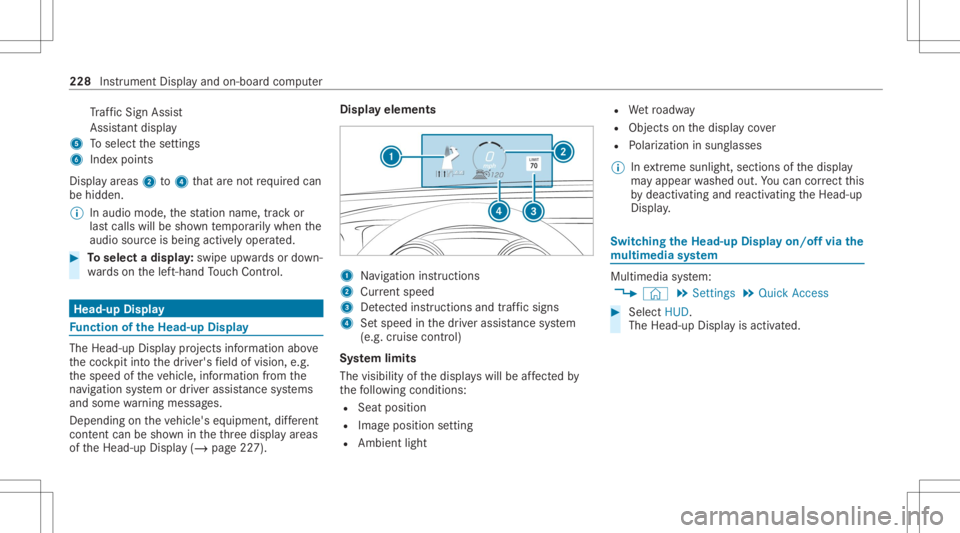
yelements 1
Navig ation instructions
2 Current speed
3 Detected instructi ons and traf fic sig ns
4 Setspe edinthedr iver assis tance system
(e.g. cruise control)
Sy stem limit s
The visib ilityofthedispla yswill beaffect ed by
th efo llo wing condition s:
R Seat position
R Imag eposit ionsetting
R Ambient light R
Wetro adw ay
R Objects onthedispla yco ver
R Polar izat ion insung lasses
% Inextreme sunli ght, sectio nsofthedispla y
ma yappear washed out.Youcan correct this
by deactiv atingandreact ivatin gth eHead-up
Displa y. Switc
hingtheHead -upDispla yon/of fvia the
mu ltim edia system Multi
media system:
4 © 5
Set ting s5
Quick Access #
Select HUD.
The Head-up Displayis activ ated. 228
Instrument Displayand on-boar dcom puter
Page 273 of 570
Callin
gup notificat ions
Open ingtheNo tificatio nsCenter #
On the touc hpad: swipedown withtw ofin‐
ge rs.
or #
On theto uc hscr een:ta pon the3 sym‐
bol forth eNo tification sCent er.
or #
On theTo uc hCon trol and ontheto uc h‐
pad: markth e3 symbol forth eNo tifica‐
tions Center by swiping. #
Press onthecon trol element .
Selecting ano tification #
Swipe upordown. #
Tapor press onthecon trol element .
Calling upold notifications
If no tification sha ve notbe en called up afte rfo ur
hour s,these arestor ed inthear ch ive. #
Swipe upwards and selec tAr chiv e. #
Selec tth eno tification . Closing
theNo tificatio nsCenter #
On the touc hpad: swipeup withtw ofing ers.
Se lecti ng acti onsfo ra no tificatio n
The follo wing option sar eav ailable:
R Select theaction direct lyin an application
af te ra no tificatio nis recei vedand shown.
R Select theaction later afte rcall ing upinthe
No tificati ons Center. #
Anacti onisavailab le:sele cttheaction . #
Severalactions areav ailab le:ifth eno tifi‐
cation isno topen, select theV symbol. #
Select theaction .
The notification isstill available. #
IfAdd ition alinf orm ationis available, select
th eaction .
Ad dition alinf ormation issho wninawindo w
as text, ima geortext and image. #
Toclose thewindo w:select OK.
Editing notifications #
Callup theNo tification sCent er
(/ page27 1). #
Tomak ese ttin gs:se lect Z.
% Ifno setting scan bemade,a mes sage
appear s. #
Select theser vice. #
Switc hth eop tion son oroff.
The follo wing option sar eav ailable:
R Allo wNot ificatio ns
R Display inNot ificatio nCent er
R Show Not ificatio ns
R Acoust icNot ificatio ns
When AllowNot ificatio nsisswit ched on, the
ot her options canno tbe select ed. #
Todel ete: touc hames sageon the
to uc hsc reen and slide tothelef tor right.
or #
Select E. #
Select Delete orDelete All.
Delete deletesa sing leno tification.
Delete Alldele tesall notifications currently
sho wn. #
With 0073 youwill exitdele temode. MBUX
multime diasystem 27
1
Page 312 of 570
ing
onthese ttings fordr iving recomme nda‐
tions ,e.g. "Prepar eto tur nright".
Select navig ation announc ementsfo rdr iving
re comme ndations (/page 303) .
The map appearsin ful l-scr een mode .
The status lineshows:th edir ect ion informa‐
tion orthename ofthero ad whic his to be
tur ned intoand thedis tance tothech ang eof
dir ect ion.
R Announc emen tphase
The mult imed iasystem announ cesthe
upco mingch ang eof dir ect ion depen dingon
th ese ttings fordr iving recomme ndations ,
e.g. byann oun cing"In 600ft (200 m)atthe
end ofthest re et tur nright intoSt atio n
Ro ad".
The displa yis split intotw opar ts.The map is
displa yedon thelef t;on theright, ther eis a
de tailed imag eof theint ersect ionora3D
imag eof theupcoming chang eof dir ect ion.
R Chan ge-of-d irecti onpha se
The multimed iasystem announ cestheimmi‐
nen tch ang eof dir ect ion depen dingon the se
ttin gsfordr iving recomme ndations ,e.g. by
ann oun cing"N ow turnright".
The displa yis split intotw opar ts.
The chang eof dir ect ion take splace whenthe
dis tance tomaneu verpoint 2issho wnwith
0 ft (0 m) and thesymbol forve hicle position
3 has reac hed maneuverpoin t2.
When thech ang eof dir ect ion iscom plete,
th emap appear sin full-scr eenmode.
% Chang esofdir ect ion arealso showninthe
Ins trument Display.
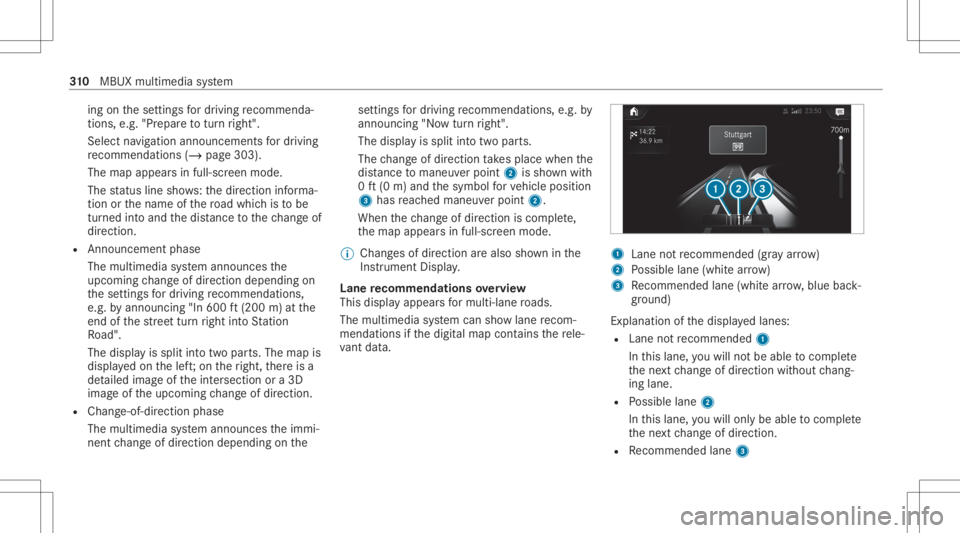
Lane recomm endationsov ervie w
This displa yappear sfo rmulti -lane roads.
The mult imed iasystem can showlane recom‐
mend ations ifth edigit almap contains there le‐
va nt data. 1
Lane notre comme nded(gray arro w)
2 Possible lane(whit ear ro w)
3 Recomme ndedlane (whit ear row ,blue back‐
gr ound)
Ex planation ofthedispla yedlanes:
R Lane notre comme nded1
In this lane, youwill notbe able tocom plet e
th ene xt chang eof dir ect ion without chang ‐
ing lane .
R Possible lane2
In this lane, youwill onlybe able tocom plet e
th ene xt chang eof dir ect ion.
R Recomme ndedlane 3 31
0
MBUX multimedia system
Page 334 of 570
Te
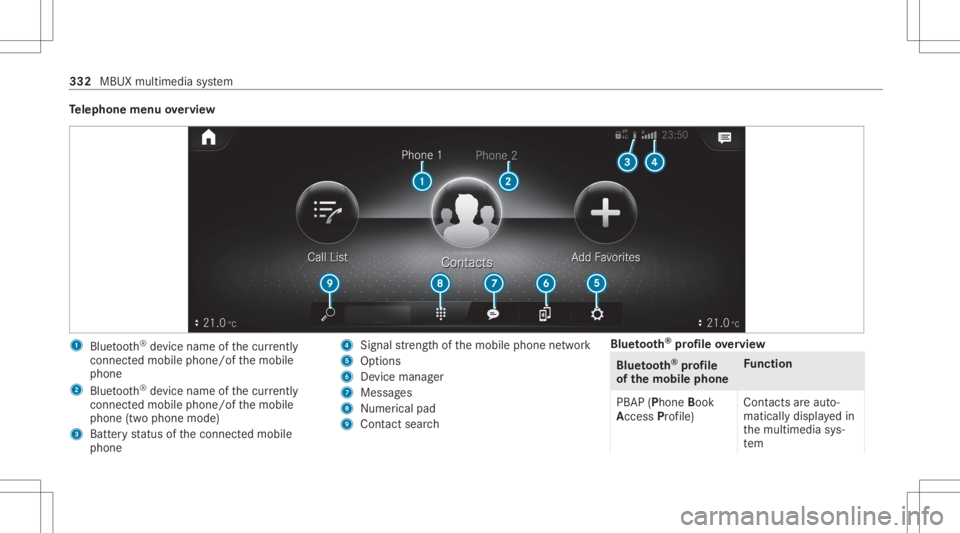
lephone menuoverview 1
Blue tooth®
de vice name ofthecur rently
conne cted mob ile pho ne/o fth emobile
phone
2 Blue tooth®
de vice name ofthecur rently
conne cted mob ile pho ne/o fth emobile
phone (twophone mode)
3 Batt eryst atus ofthecon nect edmobile
phone 4
Signal stre ngt hof themobile phonenetwork
5 Option s
6 Device manag er
7 Messag es
8 Nume rical pad
9 Contact search Blue
tooth®
pr ofile ove rview Blue
tooth®
pr ofile
of the mobi lephon eFu
nction
PB AP (Phone Book
Access Profile) Cont
actsar eaut o‐
matic allydispla yedin
th emultimedia sys‐
te m 332
MBUX multimedia system
Page 335 of 570
Blue
tooth®
pr ofile
of the mobi lephon eFu
nction
MAP (Messag e
Access Profile) Messag
efunc tions
can beused Te
lephon yoper ating mod esove rview
Depen dingonyour equipme nt,th efo llo wing tel‐
ephon yoper atingmodes areav ailable:
R Amobi lephon eis con nectedto themultime‐
dia system viaBlue tooth®
(/ pag e333).
R Twomobile phones areconn ectedwithth e
multime diasystem viaBlue tooth®
(tw o
phone mode) (/page334 ).
- Youcan useallthefunc tionsof themulti‐
media system withth emobile phonein
th efo re grou nd .
- Youcan recei veinc omin gcalls andmes‐
sag eswit hth emobile phoneinthebac k‐
gr ound.
Yo ucan interch ang eth emobile phonein
th efo re grou nd and background anytim e
(/ page33 4). %
Irre spectiv eof this, Blue tooth®
audio func‐
tio nalit ycan byused withan ymob ilephon e
(/ page36 9).
Inf orma tionon telephon y
The follo wing situat ionscanlead tothecall
being discon nectedwhile theve hicle isin
mo tion:
R ther eis insuf ficie ntnetworkco verage inthe
ar ea
R youmo vefrom one transmis sion/reception
st atio nto ano ther and nocomm unication
ch ann elsarefree
R theSIM cardused isno tcom patible withth e
ne tworkav ailable
R amobi lephon ewit h"T winc ard" islogg edinto
th ene tworkwit hth esecon dSIM cardat the
same time
The multimedia system suppor tscalls inHD
Vo ice ®
forim prov ed speec hqu alit y.Arequ ire‐
men tfo rth is isthat themobile phoneandthe
mobil ephone networkpr ov ider oftheper son
yo uar ecalli ngsuppo rtHD Voice ®
. Depe
ndingon thequ alit yof thecon nect ion,the
vo ice qualit yma yfluct uate.
Connect ingamob ilephone
Re quirement s:
R Blue tooth®
is act ivat ed on themobile phone
(see themanuf acturer'soper ating instruc‐
tion s).
R Blue tooth®
is act ivat ed on themultimedia
sy stem (/ page283).
Multimedia system:
4 © 5
Phone
Sear ching fora mob ile pho ne #
Select í. #
Select Connect NewDevice.
Co nnectin gamob ile pho ne(au thor ization
usi ng Secure Sim plePairing) #
Selec ta mobile phone. #
Acode isdispla yedin themultimedia system
and onthemobile phone. #
Ifth ecodes match: con firm thecode on
th emobile phone. MBUX
multimedia system 333
Page 336 of 570
%
Forolde rmobil ephone models,ent eraone
to sixt een-digit numbercodeonthemobile
phone andonthemultimedia system for
aut hor izat ion.
% Upto15 mobil ephones canbeauthor ized
on themultimedia system.
Au thor ized mobile phones arere connect ed
au tomatical ly.
% The conn ectedmobile phonecanalso be
used asBlue tooth®
audio equipme nt
(/ page36 9).
Connect ingasecond mobilephone (two
ph one mod e)
Re quirement s:
R Atleas tone mobile phoneis alr eady connec‐
te dto themultimedia system viaBlue tooth®
.
Multimedia system:
4 © 5
Phone #
Select í. #
Select Connec tNew Devic e. #
Select themobile phone. #
Select Devicename 1+Devic ename 2.
The select edmobile phoneiscon nect edto
th emultimedia system.
Int erch angi ngmobi lephone s(tw ophone
mode)
Mul timedi asy stem:
4 © 5
Phone
Bo th mobil ephones aresho wnindivi duallyin
sepa rate tabs. #
Select theta bwit hth edesir edmobile
phone.
The mobile phoneintheselect edtabis the
mobil ephone inthefo re grou nd .
Wi th theexc eption oftelephon ese ttings ,th e
submenus inthete lephon emen ure lat eto
th emobile phoneinthefo re grou nd .In the
te lephon ese ttings ,se ttings canbemade for
bo th mobil ephones.
Changi ngthefun ction ofamobil eph one
Re quirement s:
R Atleas tone mobile phoneis con nectedto
th emultimedia system viaBlue tooth®
( / pag e333). Multimedia
system:
4 © 5
Phone
Ac tiv atin gafunc tion #
Select theí device manag er. #
Select agr ay symbol intheline ofamobile
phone.
The corresponding functionisactiv ated.
Deactiv atingafunction #
Select theí device manag er. #
One function isactiv e:select thecolor
symbol intheline ofamobile phone.
The mobile phoneisdiscon nectedfrom the
multime diasystem. #
Severalfunct ionsareactiv e:select acolor
symbol intheline ofamobile phone.
The corresponding functionisdeactiv ated.
Re plac ingmobi lephon es
Mu ltimed iasystem:
4 © 5
Phone #
Select í. 33
4
MBUX multimedia system