radio MERCEDES-BENZ CLA 2020 User Guide
[x] Cancel search | Manufacturer: MERCEDES-BENZ, Model Year: 2020, Model line: CLA, Model: MERCEDES-BENZ CLA 2020Pages: 570, PDF Size: 18.59 MB
Page 236 of 570
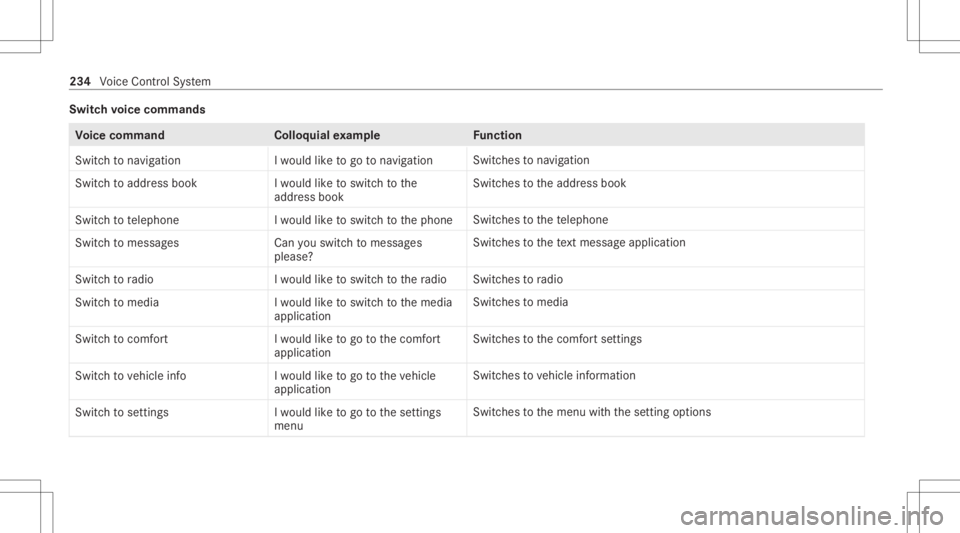
Switc
hvo ice comm ands Vo
ice comm and Colloquialexam ple Function
Switc hto navigation Iwould liketogo tonavigation Switc
hestonavig ation
Swi tch toaddre ssbook Iwo uld like tosw itch tothe
ad dre ssbook Swi
tches totheaddr essbook
Switc hto telephon eI wouldliketoswit chtothephon e Swit
ches tothete lephon e
Swit chtomess ages Canyouswitc hto mess ages
please? Swit
ches tothete xt mes sage applic ation
Swit chtoradio Iwould liketoswit chtotheradio Swit
ches toradio
Switc hto media Iwould liketoswitch tothe media
application Switc
hestomedia
Switch tocomfort Iwou ldlike togo tothe comfort
app lication Switc
hestothecomf ortse ttings
Switc hto vehicle info Iwould liketogo tothe vehicle
application Switc
hestovehicle information
Switch tosettin gs Iwould liketogo tothe settin gs
menu Switc
hestothemenu withth ese tting option s 23
4
Voice Cont rolSy stem
Page 249 of 570
Ov
ervie wand oper ation Ov
ervie wof theMB UX multim edia system &
WARNIN GRisk ofdist ra ction from infor‐
mati onsystems andcomm unication s
eq uipment
If yo uoper ateinf ormat ionand comm unic a‐
tio neq uipme ntintegratedin theve hicle
when driving, youwill bedistract ed from the
tr af fic situ ation. Thiscou ldalso cau seyouto
lose control of theve hicle. #
Onlyoper ateth is eq uipmen twhen the
tr af fic situ ation per mits. #
Ifyo ucan notbe sur eof this, stop the
ve hicle whilstpa ying attention toroad
and traffic condi tions andoperate the
eq uipment withth eve hicle statio nary. Yo
umus tobse rveth eleg alrequ iremen tsforth e
cou ntryin whi chyouar ecur rentl ydr ivi ng when
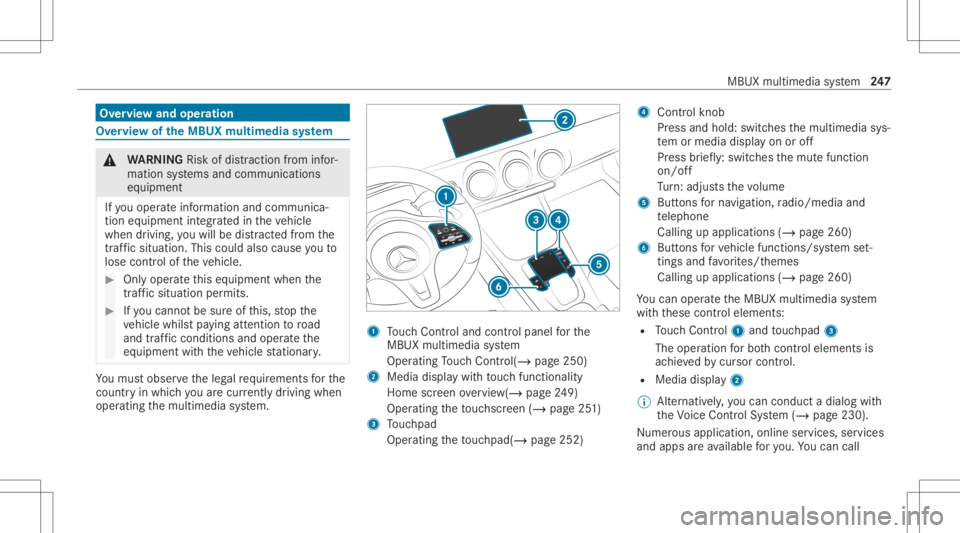
op erati ng themultimedia system. 1
Touc hCon trol and contro lpanel forth e
MBUX multimedia system
Oper ating Touc hCon trol (/ page25 0)
2 Media displaywit hto uc hfun ction alit y
Hom esc reen ove rview(/ page24 9)
Oper ating theto uc hsc reen (/ page25 1)
3 Touc hpad
Operatin gth eto uc hpad( /pag e25 2) 4
Con trol kn ob
Pr ess and hold:swit ches themultimedia sys‐
te m or media display on oroff
Pr ess brief ly:swi tches themut efunc tion
on/ off
Tu rn:ad jus tsthevo lume
5 Buttons forna vig ation, radio/media and
te lephon e
Calling upapplicat ions(/page260)
6 Buttons forve hicle functions/sy stem set‐
ting sand favo rite s/t hemes
Cal ling upappli cations (/page260)
Yo ucan operat eth eMBUX multimedia system
wit hth ese control element s:
R Touc hCon trol 1 and touc hpad 3
The oper ationfo rbo th contr oleleme ntsis
ac hie vedby cur sor contr ol.
R Med iadispl ay2
% Alternati vely,yo ucan cond uct adialog with
th eVo ice Cont rolSy stem (/ page230).
Nu mer ous application, online services, services
and appsar eav ailable foryo u. Youcan call MB
UX mult imed iasystem 24
7
Page 250 of 570
th
ese upusing thehome screen orusing buttons
5 and 6next to theto uc hpad.
Yo ucan convenient lycall upand add favo rite s
usin gth eß rock er switc hon thesteer ing
wheel orusing theß buttonnext to the
to uc hpad. Quick-acc ess inthehome screen and
in theapplications servetoselect functions
mor equ ickl y.
If yo uuse thelear nfunc tion ofthemultimedia
sy stem, youwill recei vesugg estions during oper‐
ation ofthemos tpr obable navig ation destina‐
tion s,radio statio nsand contacts. Theconf igu‐
ra tio nof thesugg estion sta ke splace inyour pro‐
fi le. Youcan comp ileyour profile from various
ve hicle settin gsand settin gsofthemultimedia
sy stem. Youcan creat eth emes forva rious driv‐
ing situations inthehome screen aswellas
using theß rock er switc hor theß but‐
to n.
The Notifica tions Center col lects inco ming notifi‐
cati ons, e.g.ab ou tan available softwareupdat e.
De pen dingon thetype ofnotification itof fers
va rious actions. Youcan calluptheNo tification s
Cent eron thehome screen and intheapplica‐
tion menus. Wi
th theglobal searchintheve hicle youcan
sear chon-boar dacr oss man ycat egor iesaswell
as onlin ein theInt erne t.Yo ucan usetheglobal
sear chinthehome screen and intheno tifica‐
tion s.
Pr otection agains tth eft
This devic eis eq uipped withte ch nica lpr ov ision s
to protect itag ains tth eft. Fu rther information on
pr otect ion agains tth eftcan beobt ained from an
aut hor ized Mercedes- BenzCenter. No
teson themed iadisp lay Obser
vetheno teson car ing forth eint erior
(/ page39 7).
Au tomatic temp eratur e-cont rolled switc h-
of ffe atur e:ifth ete mp eratur eis toohigh, the
br ightn essisinitiall yre duced automatic ally.The
media displayma yth en switc hof fcom pletely for
a while.
% Ifyo uar ewe aring polar izedsun glasses ,it
ma ybe difficul tto read themultimedia sys‐
te m disp lay. 24
8
MBUX multimedia system
Page 255 of 570
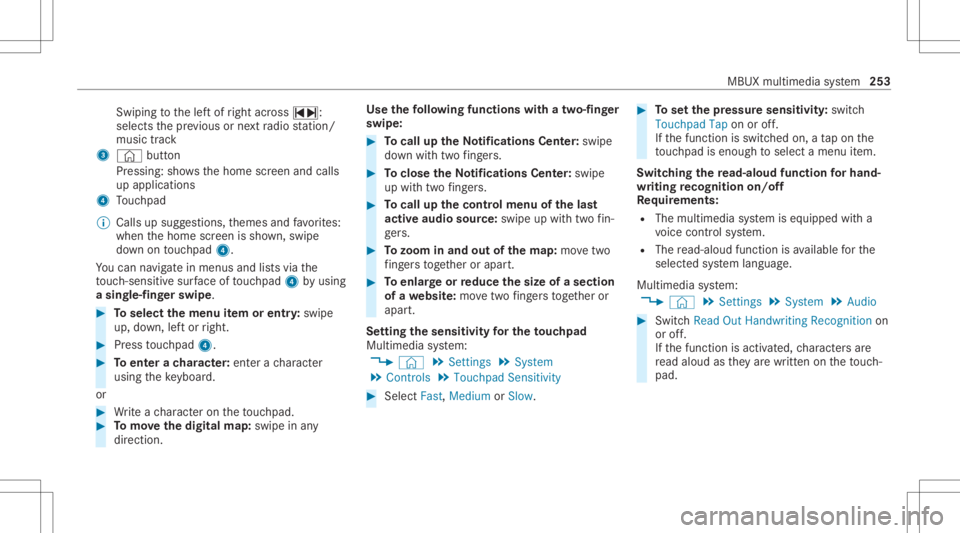
Swi
ping tothelef tof right across ~:
selects thepr ev ious ornext radio statio n/
music track
3 © button
Pr essi ng:sho wsthehome screen and calls
up applications
4 Touc hpad
% Calls upsugg estio ns,th emes andfavo rite s:
when thehome screen issho wn, swipe
do wn ontouc hpad 4.
Yo ucan navig atein men usand lists via the
to uc h-sen sitive sur face oftouc hpad 4byusin g
a sing le-fingerswip e. #
Toselect themenu item orentr y:swipe
up, down, leftor right. #
Press touc hpad 4. #
Toent erach aract er:ent erach aract er
usin gth eke yboar d.
or #
Write ach aract eron theto uc hpad. #
Tomo vethedigita lma p:swipe inany
dir ect ion. Use
thefo llo wing functionswithatw o-f ing er
swipe: #
Tocall uptheNo tificatio nsCenter:sw ipe
do wn with twofing ers. #
Toclose theNo tificatio nsCenter:sw ipe
up with twofing ers. #
Tocall upthecontr olmenu ofthelas t
act ive aud iosour ce:swipe upwithtw ofin‐
ge rs. #
Tozoo minand outofthe map: movetwo
fi ng ersto get her orapar t. #
Toenlar georreduce thesize ofase cti on
of awe bsit e:mo vetwofing ersto get her or
apar t.
Se tting thesensit ivityfo rthe touc hpad
Mul timedi asy stem:
4 © 5
Set ting s5
System
5 Contr ols5
Touchpad Sensitivity #
Select Fast,Medium orSlow . #
Tosetth epr essur esensit ivity:switc h
Touchpad Taponoroff.
If th efunc tion isswitc hedon,ata pon the
to uc hpad isen ough toselect amenu item.
Switc hingthere ad-aloud functionforhan d‐
wr iting recognit ionon/of f
Re quirement s:
R The multim ediasystem iseq uipped witha
vo ice con trol system.
R The read-al oudfunction isavailable forth e
select edsystem languag e.
Multimedia system:
4 © 5
Set ting s5
System 5
Audio #
Switc hRead OutHandwrit ingRecognit ionon
or off.
If th efunc tion isactiv ated, charact ersar e
re ad aloud asthey arewr itten on theto uc h‐
pad. MB
UX mult imed iasystem 253
Page 259 of 570
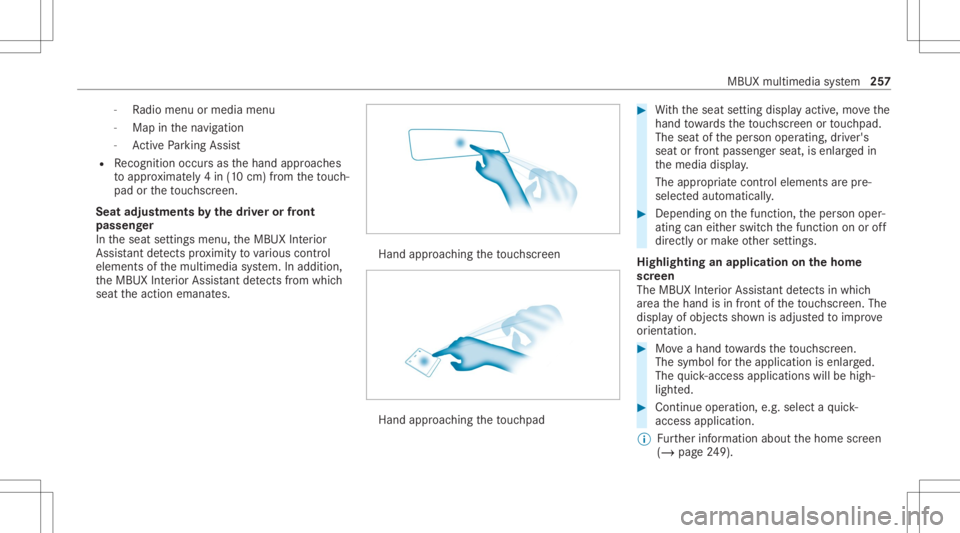
-
Radio menu ormedia menu
- Map inthena vig ation
- ActivePa rking Assist
R Recogni tionoccu rsas thehand approaches
to appr oximat ely4 in (10 cm) from theto uc h‐
pad ortheto uc hsc reen.
Seat adjustm ents bythedr iver or front
pa sseng er
In theseat settings menu, theMBUX Interior
Assis tant detects prox imit yto various cont rol
element sof themultimedia system. Inaddition,
th eMBUX Interior Assis tant detects from which
seat theaction emanat es. Hand
approaching theto uc hsc reen Hand
approaching theto uc hpad #
With theseat setting displa yactiv e,mo vethe
hand towa rdsth eto uc hsc reen ortouc hpad.
The seat oftheper son oper ating, driver's
seat orfront passeng erseat, isenlar gedin
th emedia display.
The appr opriatecont rolelemen tsarepr e-
selec tedaut omatic ally. #
Depen dingonthefunc tion,th eper son oper‐
ating caneither switc hth efunc tion onoroff
dir ect lyor mak eot her settin gs.
Highlighting anapplication onthehom e
scr een
The MBU XInte rior Assis tant detects inwhi ch
ar ea thehand isin front oftheto uc hsc reen. The
displa yof objec tssho wnisadjus tedto improve
or ient ation. #
Moveahan dto wa rdsth eto uc hsc reen.
The symbol forth eapplication isenlar ged.
The quick- acc ess applic ationswill behigh ‐
light ed. #
Con tinue operation ,e.g .selec ta qu ick-
acc ess applic ation.
% Further information aboutthehome screen
(/ page24 9). MBUX
multimedi asy stem 25
7
Page 262 of 570
#
Toswitc hof f:take your han dbac kaw ay
fr om thefront passeng erseat.
The sear chlight isswitc hedoffag ain.
Se ttings forthe MBUX Inte rior Assis tant
Multi media system:
4 © 5
Set ting s5
System
5 Interior Assist ant #
Toswitc hon full functionalit yof the
MB UX Interior Assis tant:selec tOn .
The optio nis act ivat ed 003B. #
Toactiv ateaddition alfuncti onsforre ad‐
ing and sear chlight s:select Including
Reading Light.
When theop tion isswitc hedon,thedispla y
butt onisactiv ated.
The func tionsfo rth ere adin gand search
light sar eact ivat ed inaddition tothepr ox im‐
ity func tions. #
Toswitc hof fth eMB UX Interior Assis‐
tant :selec tOff .
The optio nis act ivat ed 003B. Mai
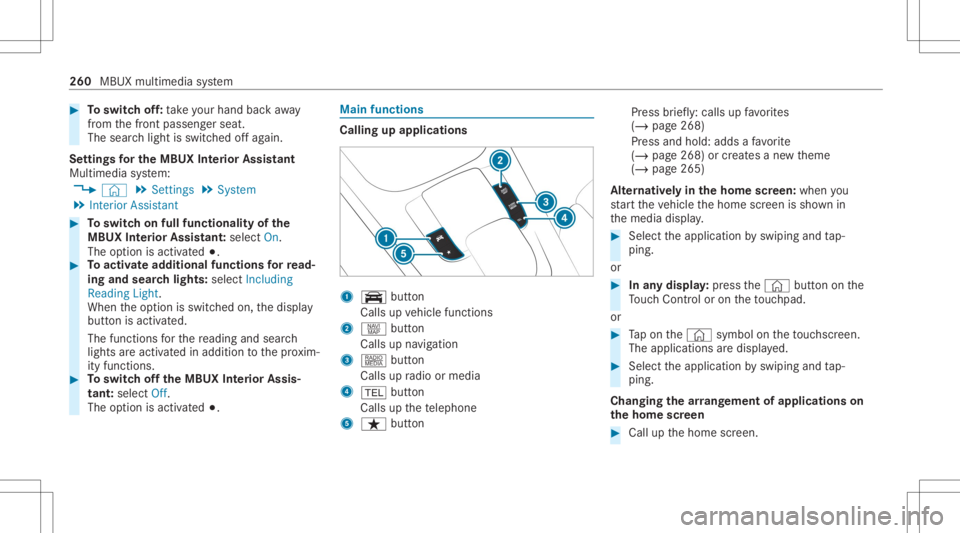
nfun ctions Calling
upapplica tions 1
y button
Calls upvehicle functions
2 z button
Call sup navig ation
3 | button
Call sup radio ormedia
4 002B button
Calls upthete lephon e
5 ß button Pr
ess brief ly:cal lsup favo rite s
( / pag e268)
Pr ess and hold: addsafa vo rite
( / pag e268) orcreat esane wtheme
(/ page265)
Alt ernativ elyin thehom escr een: when you
st ar tth eve hicle thehome screen issho wnin
th emedia display. #
Select theapplication byswiping andtap‐
ping.
or #
Inanydispla y:press the© buttononthe
To uc hCon trol or on theto uc hpad.
or #
Tapon the© symbol ontheto uc hsc reen.
The applications aredispla yed. #
Select theapplication byswiping andtap‐
ping.
Changing thear ra ng ement ofapp lications on
th ehom escr een #
Call upthehome screen. 260
MBUX multimedia system
Page 263 of 570
#
Touc hand hold anapplic ationon the
to uc hsc reen until symbols appear. #
Tapon 0059 or0065 andmovetheapplica‐
tion inthemenu. #
Tapon 00FB. Pr
ofile No
teson profiles &
WARNIN GRisk ofbeco ming trap ped
du ring adjus tment ofthedr iver's seat
af te rcall ing upadr iver profile
Selecting apr ofile ma ytrigg eran adju stment
of thedr iver's seat totheposition save d
und erthepr ofile. Youor other vehicle occu‐
pants couldbeinjur edinthepr ocess. #
Mak esur eth at when theposition of
dr iver's seat isbeing adjustedusing the
multime diasystem, nopeople orbody
par tsarein theseat's rang eof mo ve‐
ment. If
th er eis arisk ofsomeone becoming trap‐
ped, stop theadjus tmentpr ocess immedi‐
at ely: #
a)Tapth ewa rning mess ageon the
media display.
or #
b)Press amemor yposition buttonora
seat adjus tmentswitc hon thedr iver's
door .
The adjus tmentpr ocess isstopped. The
driver's seat iseq uipped withan anti-en trap‐
ment featur e.
If th edr iver's door isopen, thedr iver's seat will
no tbe setaf te rcall ing upthedr iver's profile.
Ov ervie wof profiles
Using themultimedia system uptosevenpr o‐
fi les can becreat edintheve hicle.
Pr ofiles stor eyo ur per son alvehicle settin gsand
se ttin gsforth emultimedia system.
If th eve hicle isused byseveraldr iver s, the
dr iver can select their profile bef oreth ejour ney,
wit hout chang ingthese ttings ofother driver s. Yo
ucan selectthepr ofile:
R When entering (/ page26 4)
R Using thehome screen (/page24 9)
Th epr ofile setting sar eacti vatedas soon asa
pr ofile isselect ed.
% Ifyo ucall upyour profile when drivin gth en
th edr iver's seat position willnotbe adjus‐
te d.
Yo ucan cancelthese tting process withth e
fo llo wing actions :
R Tapon thePosition ingSeat andSteering
Wheel… Pleasetaptocanc el.warning on
th emedia display.
R Press one oftheseat operating buttons
in thedr iver's door .
Pr ofile cont ent
Depen dingontheve hicle equipment, thefo llo w‐
ing settings canbestor ed inyour profile, for
ex am ple:
R Driver' sseat mem ory
R Radio (including statio nlis t) MBU
Xmult imed iasystem 26
1
Page 266 of 570
me
connect whentheignition isswitc hedon
and off.
or #
Select Synchroniz eProfiles Now.
Af tersele cting this op tion ,th epr ofiles inthe
ve hicle aresync hronized withth epr ofiles on
Mer cedes meconnect .
% During sync hroniz ation thepr ofile listand
th epr ofile func tionsar ebloc ked.
% Noteon data protection: ifyo udo notwish
to shar eyo ur dat awit hMer cedesme, make
sur eth at theaut omatic synchroniz ation is
switc hedoffand donotselect Synchroniz e
Profiles Now.
Sho wing thepr ofile selection whenentering
Re quirement s:
R Atleas tone profile has been creat ed.
Multim ediasystem:
4 © 5
f Profiles
If th eop tion isactiv ated, youcan seeapr ofile as
soo nas youget in. #
Selec tGener alSet tings. #
ActivateSho wPro file Sel ecti onWh enGet-
ting In.
Wh entheve hicle isstar ted, themedia dis‐
pla ysho wstheactiv epr ofile. Them
es Ov
ervie wof themes
Yo ucan configur eth eve hicle settin gsaccor ding
to your prefer en ces and save as ath eme. A
th eme canbecalled upanytime viathehome
scr een. Thereis then no need tomak eth e
desir edsettings again.
Ther ear epr e-def inedthemes available, e.g.
Jour ney,Efficie ncy and Lounge.
Ex am ple forthe use ofthemes
Fo rre cur ring drivi ng situa tions, such aslon g
dr ives on thefree wa y,yo ucan save your prefer‐
re dse ttings inath eme intheve hicle.
Yo ucan save thefo llo wing settings inath eme,
fo rex am ple:
R Displays(e.g. navig ation maportach ome ter)
R Prefer redra dio statio n R
Favoreddr ive pr ogr am
These settings aresa ve dunder thename you
wish when setting upath eme (/page265). On
th ene xt free wa yjo ur ne yyo ucan selectthis
th eme andther eb yre stor eyo ur setting s.
Cont entofath eme
Dep endingonvehicle equipment thefo llo wing
se ttings canbesave din ath eme:
R Setting oftheIns trument Display
(/ page21 5)
R Setting oftheHead-up Display(/ page22 7)
R Setting oftheambient lighting(/page11 8)
R Activeau dio sou rce, e.g. radio orUSB
R Startin gsc reen forth emedia display
R Visual style (/ page28 1)
R DYNA MIC SELE CTdrive pr ogr am
(/ page14 0)
R Eco star t/ stop setting (/ page13 8)
R Navig ation system settings
% Atheme contains thecur rently activeset‐
tings intheve hicle. 26
4
MBUX multimedia system
Page 269 of 570
R
From thebeginnin gof usag e,themultimedia
sy stem mus tanalyz eth euser habits. When
suf ficie ntdata iscollec tedth en thesugg es‐
tion sar eav ailable.
If th ere qu iremen tsmen tionedareno tfulf illed, a
pr ev iew wit hadesc ript ion ofthefunc tion
appear sin theSUGGES TIONSmenu.
Yo ucan configur edat are cor ding (/ page 267)
or del eteth esugg estion sre cor ded
(/ page 268).
Call ingupsugg estion s
Re quirement s:
R Apr ofile has been creat edand isselect ed
(/ page263). #
Tapon © inthemedia display.
The home screen issho wn. #
Swipe upuntil theSUGGES TIONSmenuis
sho wn. #
Select ana vig ation destinat ion,amedia
sour ce,ara dio statio nor acon tact.
If ro uteguidan ceisalr eady active, youcan ‐
no tst ar ta ne wrouteguidan ceorsetan int
ermed iatedes tinatio nfo rth eex istin g
ro ute.
Conf iguringsuggestions
Re quirement s:
R Toprotect settings using aPIN: your pro‐
fi le iscon nectedwit hMer cedes meand your
Mer cedesme accoun tis PIN protect ed.
Multimedia system:
4 © 5
f Profiles #
Select ufora pr ofile . #
Select SuggestionSettings . #
Toswitc hsugg estions displa yon/of f:
switc hAllow Destination Suggestion s,Allow
Music Suggestion sand Allow Contact Sug-
gestion son oroff.
If an option isswitc hedon,sugg estions for
na vig ation destinat ions ,media sources, radio
st atio nsorcon tacts aresho wn.
If th eop tion isswitc hedoff,no sugg estion s
ar esho wn. #
Todeac tivatethe lear nfunc tionfo ron e
da y:act ivat e24 hLear ningDe act ..
Fo r24 hour sno newactions willbetrained
and nodat are cor ded forth eactiv epr ofile.
Sugg estion swill continue tobe sho wn. The
re maini ngtime issho wnnext to 24h Learn-
ing Deact. .
Bef oreth etime runs out,ames sage is
sho wnthat themultimedia system will con‐
tinue thelear nfunc tion shor tly.
Ex am ple: ifth eop tion isswitc hedonand a
ro uteto ane wdes tinatio nhas been calcula‐
te d, this des tination would notbe take nint o
acco untforth elear nfunc tion. #
Torese tth esugg estion history:sel ect
Re set Sug gesti on His tory .
% Thispr oce sscanno tbe reve rsed. #
Select Yes. #
Toprotect settings withaPIN: switchon
PIN Protec tion.
If PIN protect ion isswitc hedon,youmus t
en terth eMer cedes mePIN tosetth esug‐
ge stions .This PINwillbesetin theMer cedes MBUX
multimedia system 26
7
Page 271 of 570
Ad
ding afa vo rite from anapplicatio n
Ex am ples ofadd ingfrom anapp lication are:
R Saving acont act.
R Stor ing ara dio statio n.
R Adding amedia source.
R Saving ana vig ation destination.
R Adding anENE RGIZING comfortpr ogr am (if
av ailable). #
Tosave aco ntact asagl obal favo rite :
sel ect acont act(/ page 339) .
The details aredispla yed. #
Press onate lephon enumb erunt ilth e
OPTIONS menuissho wn. #
Select SaveasFavorite.
The cont actisadded asafa vo rite . #
Tosto reara dio station asagl obal favo r‐
it e: seta ra dio statio n(/ page37 4). #
Press onthera dio statio nunt ilth eOPTIONS
menu issho wn. #
Select SaveasFavorit e.
The radio statio nis added asafa vo rite . Re
naming favo rite s #
Tapon © inthemedia display.
The home screen issho wn. #
Swipe upuntil FAVO RITES issho wn. #
Press onafa vo rite unt ilth eOPTIONS menu
is sho wn. #
Select Rename. #
Enterth ename. #
Select OK.
Mo ving favo rite s
Mo ving favo rite sin thefa vo rite smenu #
Tapon © inthemedia display.
The home screen issho wn. #
Swipe upuntil FAVO RITES issho wn. #
Press onafa vo rite unt ilth eOPTIONS menu
is sho wn. #
Select Move. #
Movethefa vo rite to thene wposition . #
Tapon 00FB. Mo
ving thefa vo rite smenu intheper sonali ‐
za tion #
Tapon © inthemedia display.
The home screen issho wn. #
Swipe upuntil SetNew Order issho wn. #
Select SetNew Order. #
MoveFavo rites tothene wposition . #
Tapon 00FB.
Dele ting favo rite s #
Tapon © inthemedia display.
The home screen issho wn. #
Swipe upuntil FAVO RITES issho wn. #
Press onafa vo rite unt ilth eOPTIONS menu
is sho wn. #
Select Delete. #
Select Yes. MBUX
multimedia system 269