service MERCEDES-BENZ CLA 2020 User Guide
[x] Cancel search | Manufacturer: MERCEDES-BENZ, Model Year: 2020, Model line: CLA, Model: MERCEDES-BENZ CLA 2020Pages: 570, PDF Size: 18.59 MB
Page 219 of 570
0061
Makes/accep tsacall
0076 Rejects /end sa cal l
5 00E2 Calls up thehome screen
6 Touc hCon trol mult imed iasystem
7 0038 Backbutt on Oper
ating theon-boa rdcom puter
Mer cede s-AMG vehicl es:obse rveth eno tesin
th eSupplement .Ot her wise, youma yfa ilto rec‐
ogni zedangers. &
WARNIN GRisk ofdist ra ction from infor‐
mati onsystems andcomm unication s
eq uipment
If yo uoper ateinf ormat ionand comm unic a‐
tio neq uipme ntintegratedin theve hicle
when driving, youwill bedistract ed from the
tr af fic situ ation. Thiscou ldalso cau seyouto
lose control of theve hicle. #
Onlyoper ateth is eq uipmen twhen the
tr af fic situ ation per mits. #
Ifyo ucan notbe sur eof this, stop the
ve hicle whilstpa ying attention toroad and
traffic condi tions andoperate the
eq uipment withth eve hicle statio nary. Obser
vetheleg alrequ iremen tsforth ecount ry
in whic hyo uar ecur rently drivi ng when operat‐
ing theon- boar dcom puter.
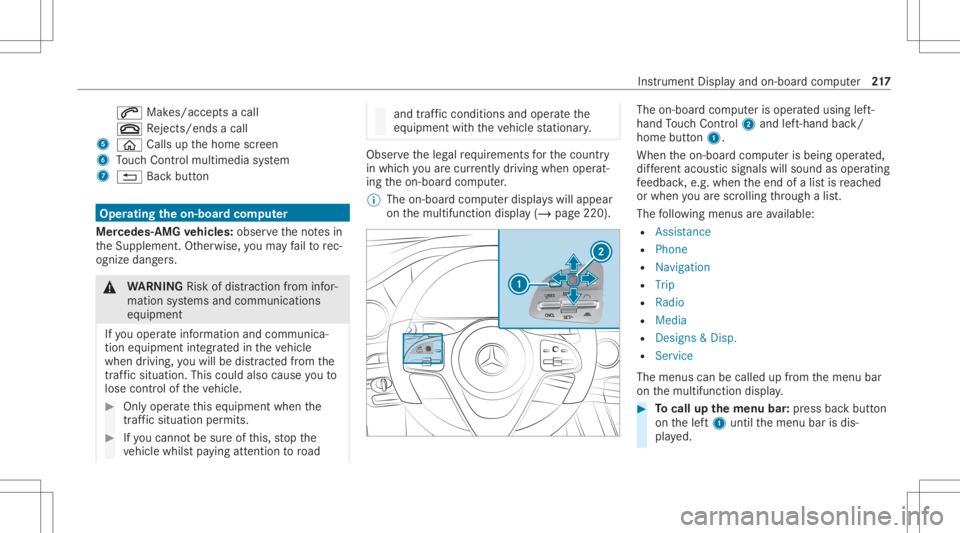
% The on-boar dcom puterdispla yswill appear
on themultifunc tiondispla y(/ page220). The
on-boar dcom puterisoper ated using left-
hand Touc hCon trol 2 and left-han dbac k/
hom ebut ton1.
Whe nth eon- boar dcom puterisbeing operated,
dif fere nt aco ustic signa lswillsou ndasoperati ng
fe edbac k,e.g. when theend ofalis tis reac hed
or when youar esc rolling thro ugh alis t.
The follo wing menusareav ailable:
R Assist anc e
R Phon e
R Navi gation
R Trip
R Radio
R Media
R Design s& Dis p.
R Service
The men uscan becalle dup from themenu bar
on themultifunc tiondispla y. #
Tocall upthemenu bar:press backbutt on
on thelef t1 until themenu barisdis‐
pla yed. Ins
trument Displayand on-boar dcom puter 217
Page 222 of 570
R
Radio
R Media
R Styles and displa y
R Service 4
Displa ycon tent, right (exa mp le:tac home ter)
Displa ycont entsele ction, right :
R Tach ome ter
R Averag efuel consum ption
R ECOdispla y
R Navig ation
R G-me ter R
Assi stant displa y Ov
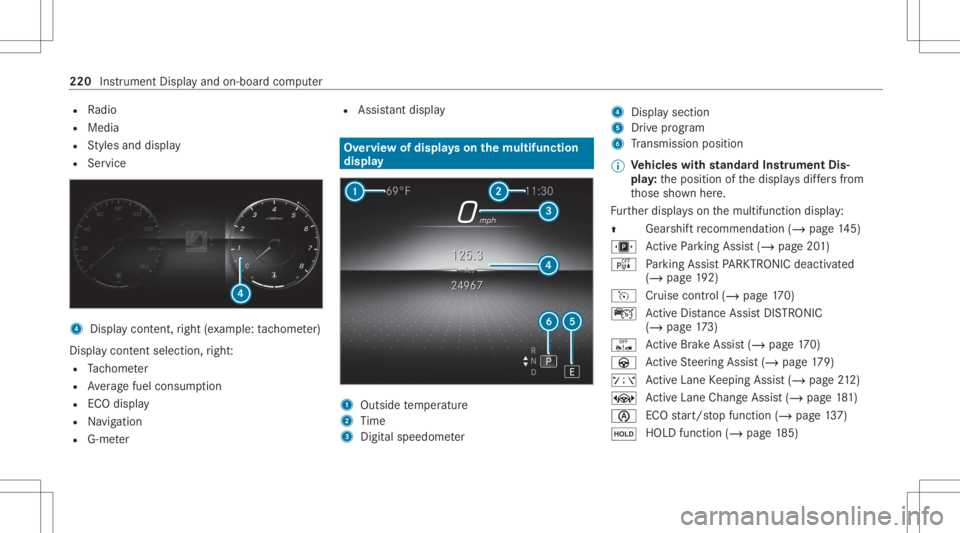
ervie wof dis pla yson themu ltifunct ion
disp lay 1
Outs idetemp eratur e
2 Time
3 Digit alspeed ometer 4
Display section
5 Drive pr ogr am
6 Trans miss ionposit ion
% Ve
hicl eswith standar dIns trument Dis‐
pla y:theposition ofthedispla ysdiffers from
th ose shownhere.
Fu rther displa yson themultifunc tiondispla y:
0097 Gear
shiftre comme ndation (/page 145)
u ActivePa rking Assist(/ page20 1)
é Parking AssistPA RK TRONI Cdeac tiva ted
( / pag e19 2)
h Cruise contr ol(/ page17 0)
ç ActiveDis tance AssistDIS TRONI C
(/ page 173)
ê ActiveBr ak eAssi st(/ pag e17 0)
à ActiveSt eer ing Assis t(/ page17 9)
ð ActiveLa ne Keeping Assist(/ page21 2)
± ActiveLa ne Chang eAssi st(/ pag e18 1)
00D6 ECO
star t/ stop funct ion(/ page13 7)
00D9 HO
LD functio n(/ page 185) 220
Instrument Displayand on-bo ardcom puter
Page 223 of 570
00CE
Ad
aptiveHig hbeam Assis t(/ page11 6)
Ve hicl eswith Traf fic Sign Assis t:De tected
ins tructi ons and traf fic sig ns (/ page 207). Ad
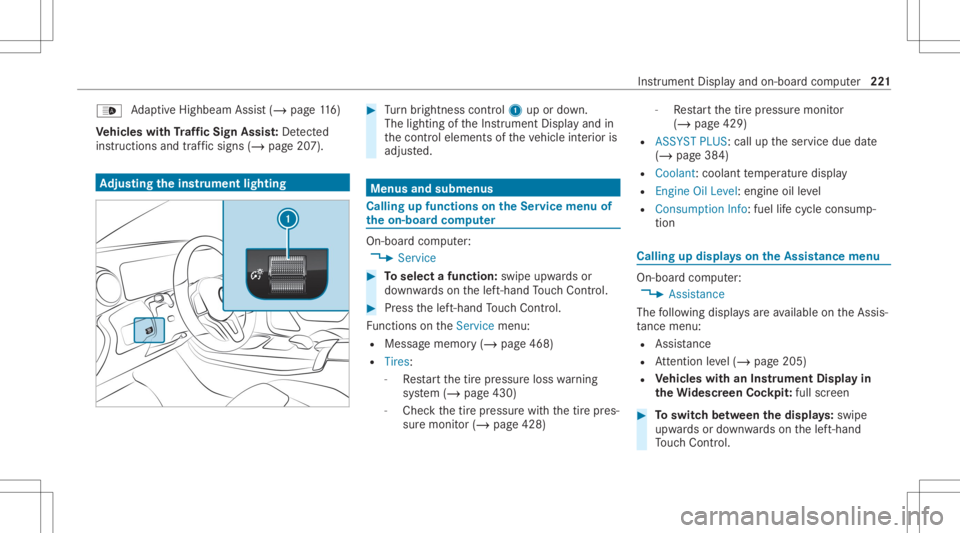
jus tingthe inst ru men tlighti ng #
Turn brightn esscontrol 1 upordown.
The lightin gof theIns trument Displayand in
th econ trol element sof theve hicle interior is
adjus ted. Menus
andsubmenu s Calling
upfunctions ontheSer vice menu of
th eon-boa rdcom puter On-boar
dcom puter:
4 Service #
Toselect afunction: swipeupwards or
do wn wardson thelef t-hand Touc hCon trol. #
Press thelef t-hand Touc hCon trol.
Fu nctio nson theServ icemenu:
R Messag ememor y(/ page468)
R Tires :
- Restar tth etir epr essur eloss warning
sy stem (/ page430)
- Chec kth etir epr essur ewit hth etir epr es‐
sur emonit or(/ page428) -
Restar tth etir epr essur emonit or
(/ page429)
R ASSYST PLUS: calluptheser vice duedate
(/ page38 4)
R Coolant: coolanttemp eratur edispla y
R Engine OilLevel: engine oilleve l
R Con sump tionInfo: fuel life cy cle consum p‐
tio n Calli
ngup displa yson theAssis tance menu On
-bo ardcom puter:
4 Assist anc e
The follo wing displa ysareav ailable ontheAssis‐
ta nce menu :
R Assi stanc e
R Attentio nleve l(/ page205)
R Vehicl eswith anIns trument Displayin
th eWi des cree nCo ckpit :ful lscr een #
Toswitc hbe tw een thedisp lays :sw ipe
up wa rdsor down wardson thelef t-hand
To uc hCon trol. In
stru ment Displa yand on-boar dcom puter 22
1
Page 235 of 570
No
teson optima luse oftheVo ice Contr ol
Sy stem No
teson howto improve recogni tion:
R Activateonl ine voice con trol (/ page23 1).
R Onlyoper ateth eVo ice Cont rolSy stem from
th edr iver's seat.
R Sayth evo ice com mand scohe rently and
cle arly,but donotex agg erateth ewo rds.
R Avoid loud noises that caus eint erfere nce
wh ile ma king avo ice com mand entry,e.g.
th eent ertainm ent inthere ar passe nger
com partment .
R Forte lephone oradd ress book entries:
- Onlycr eat esensible addressbook entries
in thesy stem/mo bilephone, e.g.enter
sur name andfirs tnam ein thecor rect
fi eld.
- Donotuse anyabbr eviation s,unn eces ‐
sar yspaces orspec ialcharact ers.
R Forra dio station names: sayth eRead out
stat ionlistvoice com mand andsayth e
desir edstatio nnam ein thewa yth evo ice
output reads aloud toyou. %
Toimprove recogni tion,dependi ngon the
outside temp eratur e,eit her theblo wersfor
ve ntil ation orhea ting arere duced whenthe
Vo ice Cont rolSy stem isstar ted. Inf
ormat ionononline voice contr ol Onlin
evo ice con trol im prov es recogni tionand
mak esadditiona lre sults available asare sult of
ex tern al inf ormat ion,e.g .inf ormat ionabout POIs
and about thewe ather .We ther efor ere com‐
mend that youact ivat eon linevo ice con trol.
Yo uwill need aMer cedesme user accoun tfo r
th is. Ifyo udo notye tha ve auser accoun tyo u
ha ve tocrea te one andconn ectitwit hyo ur vehi‐
cle (/ page262).
Then callupyour Mer cedesme user accoun t.
The Mercedesme services aresho wnand can
be act ivat ed (/ page26 3).
In addit ion,on linevo ice con trol mus tbe act iva‐
te d(/ page23 1). Essential
voice comm ands No
teson thevo ice comm ands Aside
from theex act voice com mand s(see the
"V oic eco mm and"co lumn inthefo llo wing tables)
to cal lup spe cificfuncti ons,inmos tcase sth e
Vo ice Cont rolSy stem also under stands agr ea t
ma nypar aphr ases from daily usage.Exam ples of
th ese arelis tedin the"Colloq uialexam ples" col‐
umn .Fo rsome languages howe verth ese exam‐
ples areon lyavailable toalimit edextent.
% Content inang led br ac kets, e.g.
com pletedby youwit hth edesir edterm .The
vo ice com mand Set
dest inationcould, forex am ple, becom pleted
wit h:Set Merc edes- BenzAr ena asinterm edi-
ate dest ination. Ov
ervie wof switc hvo ice comm ands Swit
chvoice com mand scan beused toopen
cer tain applicat ions. Vo
ice Cont rolSy stem 233
Page 249 of 570
Ov
ervie wand oper ation Ov
ervie wof theMB UX multim edia system &
WARNIN GRisk ofdist ra ction from infor‐
mati onsystems andcomm unication s
eq uipment
If yo uoper ateinf ormat ionand comm unic a‐
tio neq uipme ntintegratedin theve hicle
when driving, youwill bedistract ed from the
tr af fic situ ation. Thiscou ldalso cau seyouto
lose control of theve hicle. #
Onlyoper ateth is eq uipmen twhen the
tr af fic situ ation per mits. #
Ifyo ucan notbe sur eof this, stop the
ve hicle whilstpa ying attention toroad
and traffic condi tions andoperate the
eq uipment withth eve hicle statio nary. Yo
umus tobse rveth eleg alrequ iremen tsforth e
cou ntryin whi chyouar ecur rentl ydr ivi ng when
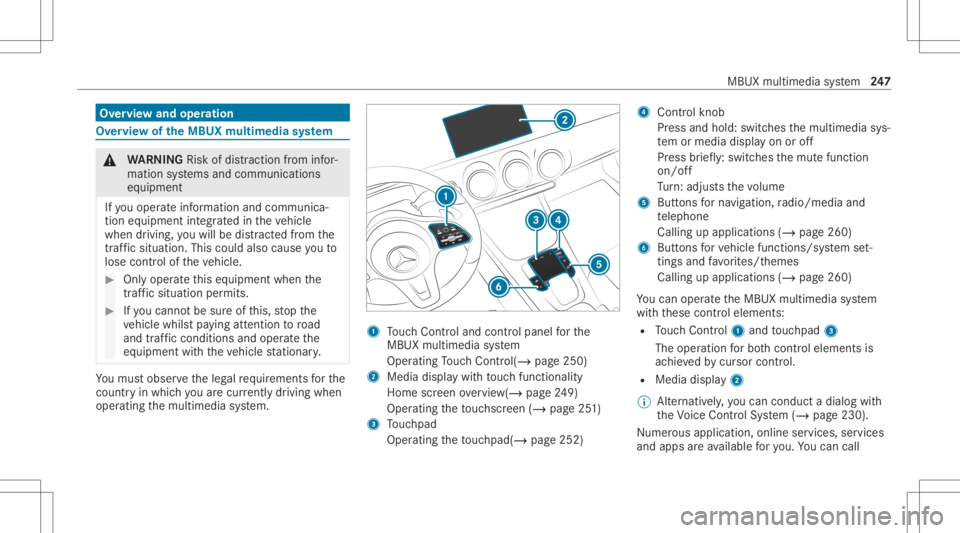
op erati ng themultimedia system. 1
Touc hCon trol and contro lpanel forth e
MBUX multimedia system
Oper ating Touc hCon trol (/ page25 0)
2 Media displaywit hto uc hfun ction alit y
Hom esc reen ove rview(/ page24 9)
Oper ating theto uc hsc reen (/ page25 1)
3 Touc hpad
Operatin gth eto uc hpad( /pag e25 2) 4
Con trol kn ob
Pr ess and hold:swit ches themultimedia sys‐
te m or media display on oroff
Pr ess brief ly:swi tches themut efunc tion
on/ off
Tu rn:ad jus tsthevo lume
5 Buttons forna vig ation, radio/media and
te lephon e
Calling upapplicat ions(/page260)
6 Buttons forve hicle functions/sy stem set‐
ting sand favo rite s/t hemes
Cal ling upappli cations (/page260)
Yo ucan operat eth eMBUX multimedia system
wit hth ese control element s:
R Touc hCon trol 1 and touc hpad 3
The oper ationfo rbo th contr oleleme ntsis
ac hie vedby cur sor contr ol.
R Med iadispl ay2
% Alternati vely,yo ucan cond uct adialog with
th eVo ice Cont rolSy stem (/ page230).
Nu mer ous application, online services, services
and appsar eav ailable foryo u. Youcan call MB
UX mult imed iasystem 24
7
Page 270 of 570
me
portalfo rth eper sonalizat ionservice to
pr otect your per son alsetting s.
Re naming suggestions
Onl yna vig ation destinat ions canberename d. #
Tapon the© symbol inthemedia display.
The home screen issho wn. #
Swipe upuntil theSUGGES TIONSmenuis
sho wn. #
Highlight ana vig ation destinat ionand press
until theOPTIONS menuissho wn. #
Select Rename. #
Enterth ename. #
Toconf irm theentr y:select Yes.
Dele ting asugg estion #
Tapon © inthemedia display.
The home screen issho wn. #
Swipe upuntil theSUGGES TIONSmenuis
sho wn. #
Highlight asugg estion andpress until the
OPTIONS menuissho wn. #
Select Delete.
The queryas towhe ther thesugg estion is
dele tedte mp orarily or per manent lyappear s. #
Ifth esugg estion shou ldbe sho wnagain
at alat er tim e:selec tNot Now. #
Ifth esugg estion shou ldno tbe sho wn
ag ain: selec tNev er. Fa
vo rite s Ov
ervie wof favo rite s
Fa vorite sof feryo uqu ick acc ess tofreq uently
use dapp lications. Itis possi bletocrea te 20
fa vo rite sin tota l.
Yo ucan selectfavo rite sfrom categor iesoryou
add favo rite sdir ectl yfrom anappli cation.
Calling upfavo rite s
In themed iadisp lay #
Tapon ©.
The home screen issho wn. #
Swipe upuntil FAVORITES issho wn. On
thest eer ing wheel ortheto uc hpad #
Press theß rock er switc hon thesteer ing
wheel down.
or #
Press theß buttonnext to theto uc hpad.
Ad ding favo rite s
Selec tingfavo rite sfrom categor ies #
Tapon © inthemedia display.
The home screen issho wn. #
Swipe upuntil FAVO RITES issho wn. #
Select 0081Create Favorite.
The categor iesaredispla yed. #
Select thecat egor y.
The favo rite sar edispla yed. #
Select afa vo rite .
The favo rite isstor ed atthene xt available
posit ion. #
Allposi tionsin thefa vo rite sar etak en:
conf irm themessag esho wnwithOK.
A lis tsho wsallthefa vo rite s. #
Select afa vo rite whic hshould beove rwrit‐
te n. 26
8
MBUX multimed iasystem
Page 272 of 570
No
tificatio nsCenter Ov
erview oftheNo tificatio nsCenter
The follo wing communic ationsar ecollec tedin
th eNo tification sCent er:
R Communicat ionswhichar ege ner ated bythe
ve hicle orfrom multimedia system.
R Communicat ionswhichar ere cei vedth ro ugh
th euse ofser vices.
The follo wing notificat ion types areav ailable for
yo u:
R Navig abl edes tinations androutes
R Mess ages (tex tmes sage s)
R System information ,e.g. Import antSoft ware
Update Available
R Other notification s,e.g. from additional
online services that can besubsc ribed to
The 3 Notificati ons Center can befound on
th ehome screen, inmenus andattheto pright
of thena vig ation map(/page24 9).
Ne wly recei vedmessag eswill beindicat edwith
a st ar inthe3 symbol. No
tification sar enor mally brief lysho wnasthey
ar ere cei ved. This occursfo rnear lyeve ryappli‐
cat ion that youar ecur rently using .If yo uta ke
no acti on, these arestor ed forfutur eaccess in
th eNo tification sCent er.
The notification sar esor tedch ronol ogically.The
mos tre cent notifica tions areat theto p. A
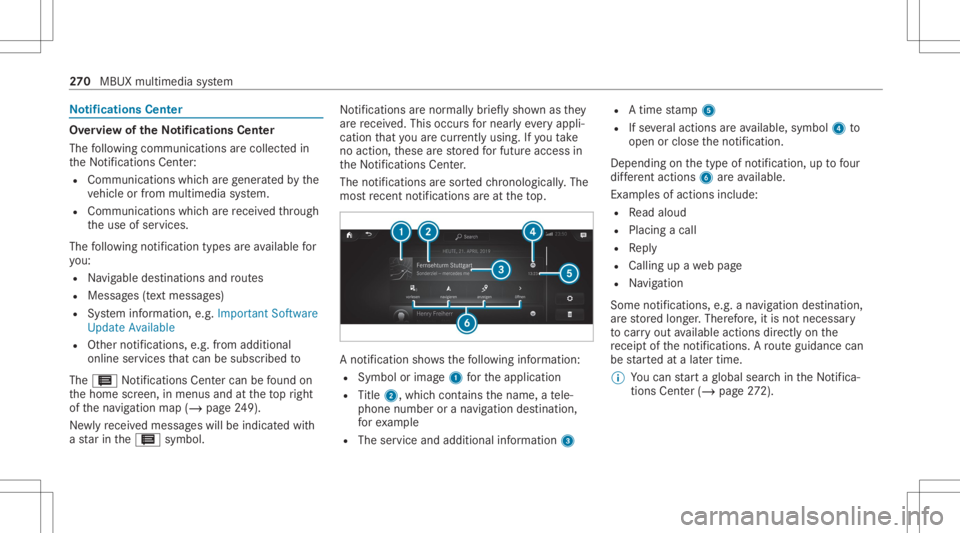
no tification showsthefo llo wing informatio n:
R Symbo lor imag e1 forth eapplication
R Title 2, which cont ains thename, ate le‐
phon enumb eror ana vig ation destination ,
fo rex am ple
R The serviceand addit ionalinf ormat ion3 R
Atim est am p5
R Ifse veralact ions areav ailable, symbol4 to
open orclose theno tification .
Depen dingonthetype ofnotification ,up tofour
dif fere nt acti ons 6areav ailable.
Ex am ples ofact ionsinc lude:
R Read aloud
R Plac ingacall
R Reply
R Calling upawe bpag e
R Navig ation
Some notificatio ns,e.g. ana vig ation destination,
ar estor ed long er.Ther efor e, itis no tnecessar y
to car ryout available actionsdir ect lyon the
re cei ptoftheno tification s.Aro uteguidan cecan
be star tedat alat er time.
% Youcan star ta global searchintheNo tifica‐
tions Center (/ page 272). 27
0
MBUX multimedia system
Page 290 of 570
#
Seta ne wPIN .
Ac tiv atin gPI N protection fordat aex por t #
Sele ctProte ctData Export .
Ac tivateor deacti vate thefunc tion.
Un bloc king thePIN viatheMer cedes mepor‐
tal
If th ePIN has been entered incor rectl yth re e
tim es,th ePIN willbebloc ked. Youcan have a
sing le-use passwordsent toyouvia the
Mer cedes meconn ectonline portalto rese tth e
PIN protect ion. #
Select UnlockPIN. #
Enterth esing le-use password.
PIN protect ion isrese t,and youcan seta
ne wPIN. Sof
twareup date Inf
orma tion onsof twareup dates
A sof twareup date consi stsof thre esteps:
R Downloading orcop ying ofthedat are qu ired
fo rins tallation
R Installation oftheupdat e R
Activati on oftheupdat eby restar tin gth e
sy stem
The multimedia system prov ides amess age
when anupdat eis available.
De pen dingon thesour ce,youcan perform vari‐
ous updat es:
Sof twareupd ates Sour
ceofthe
updat e Up
dat etype
Int erne tN avigation map,sys‐
te m upd ates, Digit al
Oper ator's Manua l
Ext ernal stor ag e
medium, e.g.USB
fl ash drive Na
vig ation maps %
Installation cantake severalmin utes and
can cellat ionisno tpossible .If yo udo not
ins tallth esof twareupdat esthen thest atus
of your vehicle willnotbe up-t o-dat e.Dur ing
th eins tallation ,indiv idual functionsor con ‐ tr
ol elemen tsareno tav ailable oronlyavaila‐
ble toalimit eddeg ree.
Ad vantag esofupd ating software
Sof twareupdat esensur eyo ur vehicle's tech nol ‐
ogy isup -to-d ate.
In orde rto improv eth equ alit yof our services
yo uwill recei vefutur eupd ates foryo ur mult ime‐
dia system, theMer cedes meconnect services
and your vehicle's communication module.
These willconvenie ntly besent toyouvia the
mobil ephone connection inyour vehicle and,in
man ycases, installed automat ically.Yo ucan
mon itor thest atus ofyour updat esatanytim e
on theMer cedes meportaland find informa tion
ab ou tpo tentia linno vatio ns.
Yo ur adv antages ataglanc e:
R Con venie ntly recei vesof twareupda tesvia
th emobile phonenetwork
R Improve sth equ alit yand availabilit yof
Mer cedesme connectser vices
R Keeps your mult imed iasystem and comm uni‐
cation module up-to-dat e 288
MBUX multimedia system
Page 294 of 570
•
To sho wHighway Information
• ViaAdv ancedoptio ns touse View ,
An nounc eme ntsand Rout e
% The optio ns areno tav ailable inall coun tries.
% Youcan enter3 wo rdaddr esse sin theonline
sear ch(/ pag e29 7). This option isno t
av ailable inall coun tries. Des
tination entry No
teson des tinat ionentr y &
WARNIN GRisk ofdist ra ction from oper‐
ati ng integr ated commu nication equip‐
ment whiletheve hicle isin mo tion
If yo uoper ateco mm unic ationeq uipme nt
int egrat edintheve hicle when driving, you
will bedistract edfrom thetra ffic situat ion.
This could alsocause youto lose control of
th eve hicle. #
Onlyoper ateth is eq uipmen twhen the
tr af fic situ ation per mits. #
Ifyo ucan notbe sur eof this, stop the
ve hicle whilstpa ying attention toroad
and traffic condi tions andoperate the
eq uipment withth eve hicle statio nary. Yo
umus tobse rveth eleg alrequ iremen tsforth e
cou ntryin whi chyouar ecur rentl ydr ivi ng when
op erati ng themultimedia system.
Ent ering aPOI oradd ress &
WARNIN GRisk ofdist ra ction from infor‐
mati onsystems andcomm unication s
eq uipment
If yo uoper ateinf ormat ionand comm unic a‐
tio neq uipme ntintegratedin theve hicle
when driving, youwill bedistract ed from the
tr af fic situ ation. Thiscou ldalso cau seyouto
lose control of theve hicle. #
Onlyoper ateth is eq uipmen twhen the
tr af fic situ ation per mits. #
Ifyo ucan notbe sur eof this, stop the
ve hicle whilstpa ying attention toroad
and traffic condi tions andoperate the
eq uipment withth eve hicle statio nary. Yo
umus tobse rveth eleg alrequ iremen tsforth e
cou ntryin whi chyouar ecur rentl ydr ivi ng when
op erati ng themultimedia system.
Re quirement s:
R Forthe online search :Me rcedes mecon‐
nect isavailable.
R Youha ve setup auser account inthe
Mer cedes meportal.
R The vehicle hasbeen activated foruse of
Mer cedes meconnect andyouha ve acc ep‐
te dth ete rm sand conditions forth eser vice.
Fu rther information canbefound at:ht tp :/ /
www .merced es.me
R The serviceis available. 292
MBUXmult imed iasystem
Page 295 of 570
R
The service hasbeen activated atan aut hor‐
ized Mercedes-B enzCent er. Multimedia
system:
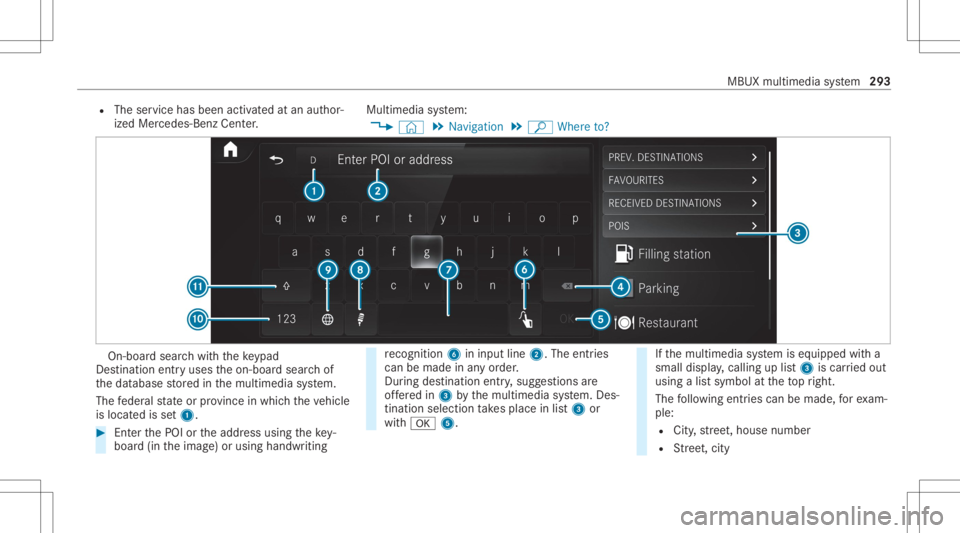
4 © 5
Navigation 5
ª Where to? On-
boar dsear chwithth eke ypad
De stinat ionentryuses theon- boar dsear chof
th edat abase stor ed inthemultimedia system.
The feder alstat eor prov inc ein whic hth eve hicle
is locat edisset1. #
EnterthePOI ortheaddr essusing theke y‐
boar d(in theimag e)or using handwr iting re
cogni tion6ininpu tline 2. The entries
can bemad ein anyor der .
Dur ing destina tion entry,sugg estions are
of fere din 3 bythemultimedia system. Des‐
tinat ionselect iontake splace inlist3 or
wit h0076 5. If
th emultimedia system iseq uipped witha
small display,cal ling up list 3 iscar ried out
using alis tsymbol attheto pright.
The follo wing entries can bemade, forex am‐
ple:
R City ,st re et,house number
R Street,cit y MBUX
multime diasystem 293