ignition MERCEDES-BENZ CLA 2020 Owner's Manual
[x] Cancel search | Manufacturer: MERCEDES-BENZ, Model Year: 2020, Model line: CLA, Model: MERCEDES-BENZ CLA 2020Pages: 570, PDF Size: 18.59 MB
Page 161 of 570
St
andb ymode (ext ens ion ofthe star terbat‐
te ry 's per iod out ofuse) St
andb ymode function
% This function isno tav ailable forall model s.
If standb ymode isact ivat ed, energyloss willbe
min imiz eddur ing ex tende dpe riods ofnon- oper‐
ation.
St andb ymode isch aract erize dby thefo llo wing:
R thest ar terbatt eryis preser ved.
R themaximum non-opera tionaltime appear s
in themedia display.
R thecon nect iontoonline services isint erru p‐
te d.
R theAT A(anti-t heftal ar m system) isno tav ail‐
able.
R theint erior motion sensor andtow- aw ay
alar mfun ction sar eno tav ailable.
R thefunc tion forde tecting damag eon a
pa rked vehicle isno tav ailable. If
th efo llo wing condition sar efulf illed, standb y
mode canbeact ivat ed ordeac tivated usin gth e
multime diasystem:
R theengine isswitc hedoff.
R theignition isswitc hedon.
Ex ceeding theve hicle's displayednon -opera ‐
tion altime maycause inconvenie nce, i.e.it can‐
no tbe guarant eedth at thest ar terbatt erywil l
re liably star tth eengine.
The star terbatt erymus tbe charge dfirs tin the
fo llo wing situat ions:
R The vehicle's non-oper ational timemustbe
ex tende d.
R The Batte ryCh arg eInsu fficie ntfor Stand by
Mod emes sage appear sin themedia display.
% Standb ymode isaut omat icallydeac tivated
when theignition isswitc hedon.
Ac tiv atin g/deac tivatin gst andb ymode (park‐
ing theve hicl efo ran extended period)
Re quirement s:
R The engin eis switc hedoff. Multime
diasystem:
4 © 5
Set ting s5
Vehicle #
Switc hSt andby Modeonoroff.
When youact ivat eth efunc tion,a pr om pt
appear s. #
Select Yes.
St andb ymode isact ivat ed. Dr
iving anddriving safetysy stems Dr
iving systems andyour responsibility Yo
ur vehicle iseq uipped withdr iving systems
whic hassis tyo uin drivin g,par kingand man eu‐
ve ring theve hicle. Thedriving systems areaids
and donotre lie ve youof your responsibili typer‐
ta inin gto road traf fic law. Payatt ention tothe
tr af fic condi tions atalltime sand interve ne
wh en nece ssary.Be awareof thelimit ations
re ga rding thesaf euse ofthese systems. Inf
ormat iononradar and ultrasonic senso rs Some
drivi ng and drivi ng safety systems use
ra dar orultr asonic sensorsto monit orthear ea Dr
iving andparking 15
9
Page 171 of 570
R
Activati on byan abr uptst eer ing movement
dur ing asw erving maneu ver.
R Assi stanc edur ing swervin gand stra ight enin g
of theve hicle.
R React ion from aspee dof appr oximat ely
12 mp h(20 km/h) uptoaspee dof appr ox‐
imat ely43 mph(70 km/h).
Yo ucan preve nttheassis tance atanytime by
act ivel yst eer ing. &
WARNIN GRisk ofan acci dent despite
Ev asive St eer ing Assis t
Ev asiv eSt eer ing Assis tcann otalw aysclear ly
ident ifyobje ctsand complextraf fic situ a‐
tions .
In addition, thesteer ing suppor tof Evasiv e
St eer ing Assis tis ge ner ally no tsu fficien tto
av oid acollision.
In suc hcases Evasiv eSt eer ing Assis tcan:
R givean unnec essarywa rning orprov ide
assis tance R
notgi ve awa rning ornotpr ov ide assis‐
ta nce #
Alw ayspa ycar eful attention tothetra f‐
fi c situ ation; donotre ly on Evasiv e
St eer ing Assis talone. #
Beready tobrak eand take evasiv e
act ion ifnec essar y. #
Preve nttheassis tance byact ivel y
st eer ing innon -critical driving situa‐
tion s. #
Drive at an appr opriatespeed ifpedes‐
tr ians areclose tothepat hof your vehi‐
cle. Sy
stem limit s
Fu llsy stem perform anc eis no tav ailable fora
fe w sec ond saf te rswitc hingontheignition or
af te rdr iving off.
The system maybe impair edorma yno tfunc tion
in thefo llo wing situat ions:
R Insno w,rain, fog, hea vyspr ay,if th er eis
gl ar e, indir ect sunlight oringrea tly varying
ambien tlight . R
Ifth esensor sar edir ty,fo gg ed up, damag ed
or covered.
R Ifth esensor sar eim pair eddue tointerfer‐
ence from other radar sour ces, e.g.stro ng
ra dar reflect ions inpar king garage s.
R Ifaloss oftirepr essur eor afa ulty tirehas
been detected and displ aye d.
R Incom plextraf fic situ ations whereobject s
cann otalw aysbe clear lyidentif ied.
R Ifpedes trians orvehicles movequickl yint o
th esensor detection rang e.
R Ifpe destrians arehidde nby other objects .
R Ifth etypical outline ofapedes trian cann ot
be distinguished from thebac kground.
R Ifapedes trian isno tde tected assuch ,e.g.
due tospecial clothing orother object s.
R Onbends withatight radius.
% The ActiveBr ak eAssi stsensor sadjus taut o‐
matically whileacer tain dis tance isbe ing
dr iven afte rth eve hicle hasbeen delivered.
Ac tiveBr ak eAssi stisuna vailable oronl y
par tiall yav ailable during this teac h-in per iod. Dr
ivin gand parking16
9
Page 212 of 570
cle
sand areno subs titu teforatt entiv edr iving.
Alw aysensur eth at ther eis suf ficie ntdist anc eto
th eside forot her road user sand obstacle s.
Exi twa rning
The exitwa rning isan addition alfunc tion of
Blin dSpo tAss istand canwarnvehicle occu‐
pants about approaching vehicles whenleaving
th eve hicle when statio nary. &
WARNIN GRisk ofacci dent despite exit
wa rning
The exitwa rning react snei ther tostatio nary
obj ect sno rto vehicles approaching youat a
gr eat lydif fere nt spe ed.
As are sult, theex itwa rning cannotwa rn
dr iver sin these situation s. #
Alw ayspa ypar ticular attention tothe
tr af fic situ ation whe nope ning thedoor s
and makesur eth er eis suf ficie ntcle ar‐
ance . If
th er eis ave hicle inthemonit oring rang e, this
is indic ated intheoutside mirror.If ave hicle
occupant opensthedoor ontheside withth e wa
rning, awa rning tone sou nds and thewa rning
lam pin theoutside mirrorst ar ts to flash.
This addit ionalfun ction ison lyavailable when
Blin dSpo tAs sis tis act ivat ed and uptoamax i‐
mum ofthre eminut esafte rth eignition has
been switchedoff.The exitwa rning isno long er
av ailable once thewa rning lam pin theoutside
mir rorflashes thre etimes.
The exitwa rning isonl yan aid and nota subs ti‐
tut efo rth eatt ent ion ofvehicle occupants. The
re sponsibili tyforopening andclosi ngthedoor s
and forlea ving theve hicle remains withth eve hi‐
cle occupants.
Sy stem limit s
Blin dSpo tAs sis tand ActiveBli nd Spo tAssi st
ma ybe limi tedin thefo llo wing situat ions:
R Ifth er eis dir ton thesensor sor thesensor s
ar eobscur ed
R Inpoor visibility ,e.g. due tofog, hea vyrain or
sno w
R Ifth er ear enar row vehicles, e.g.bicycles or
mo torbik es
R Ifth ero ad has very wide ornar row lanes R
Ifve hicles areno tdr iving inthemiddle of
th eir lane
Wa rnings maybe issued inerro rwhen driving
close tocrash barrier sor similar solidlanebor‐
der s.Alw aysmak esur eth at ther eis suf ficie nt
di st anc eto theside forot her traf fic or obs ta‐
cle s.
Wa rnings maybe interru pte dwhen driving along‐
side long vehicles, forex am ple truc ks,fo ra pr o‐
long edtime.
Blind SpotAssis tis no toper ationa lwhen reve rse
ge ar iseng aged.
The exitwa rning maybe limit edinthefo llo wing
situat ions:
R When thesensor sar eco veredby adjac ent
ve hicles innar row par kingspac es
R When people approachth eve hicle
R Intheev ent ofstatio naryor slo wlymo ving
obj ect s 21
0
Driving and parking
Page 232 of 570
R
Ifyo uuse thevo ice con trol system inan
emer gency your voice can chang eand your
te lephon ecall, e.g.anemer gency call,can
th er eb ybe unnec essarilydela yed.
R Famili arize yourself withth evo ice con trol
sy stem func tionsbef orest ar tin gth ejour ney.
R Com plywit hth eloading guidelines
(/ page99). Oper
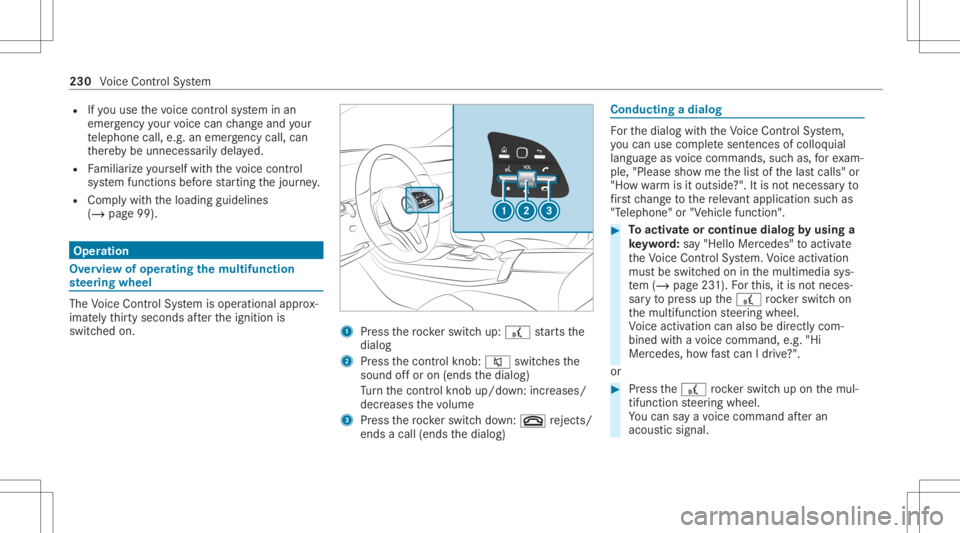
ation Ov
ervie wof oper ating themu ltifunct ion
st eer ing wheel The
Voice Cont rolSy stem isoper ational approx‐
imat elyth irty seco ndsafte rth eignition is
switc hedon. 1
Press thero ck er switc hup: £ star ts the
dialog
2 Press thecon trol kn ob: 0063 switchesthe
sound offor on (ends thedialog)
Tu rn thecon trol kn ob up/do wn:increases/
decr eases thevo lume
3 Press thero ck er switc hdo wn: 0076 rejects /
end sa cal l(e nds thedialog) Conducting
adialog Fo
rth edialog withth eVo ice Cont rolSy stem,
yo ucan usecomp lete sent ences ofcolloq uial
langua geasvoice com mand s,suc has, forex am‐
ple, "Please showme thelis tof thelas tcalls" or
"Ho wwa rm isitouts ide?". Itis no tnec essar yto
fi rs tch ang eto there leva nt applica tionsu ch as
"T eleph one" or"Vehic lefun ction ". #
Toactiv ateor continue dialogby using a
ke yw ord: say"Hello Mercedes" toact ivat e
th eVo ice Cont rolSy stem. Voice activation
mus tbe switc hedoninthemultimedia sys‐
te m (/ page23 1). Forth is, itis no tnec es‐
sar yto press upthe£ rock er switc hon
th emultifunc tionsteer ing wheel.
Vo ice activation canalso bedirect lycom ‐
bined withavo ice com mand ,e.g. "Hi
Mer cedes ,ho wfast can Idr ive?" .
or #
Press the£ rock er switc hup on themul‐
tifun ction steer ing wheel.
Yo ucan saya vo ice com mand afte ran
acou stic sign al. 230
Voice Cont rolSy stem
Page 266 of 570
me
connect whentheignition isswitc hedon
and off.
or #
Select Synchroniz eProfiles Now.
Af tersele cting this op tion ,th epr ofiles inthe
ve hicle aresync hronized withth epr ofiles on
Mer cedes meconnect .
% During sync hroniz ation thepr ofile listand
th epr ofile func tionsar ebloc ked.
% Noteon data protection: ifyo udo notwish
to shar eyo ur dat awit hMer cedesme, make
sur eth at theaut omatic synchroniz ation is
switc hedoffand donotselect Synchroniz e
Profiles Now.
Sho wing thepr ofile selection whenentering
Re quirement s:
R Atleas tone profile has been creat ed.
Multim ediasystem:
4 © 5
f Profiles
If th eop tion isactiv ated, youcan seeapr ofile as
soo nas youget in. #
Selec tGener alSet tings. #
ActivateSho wPro file Sel ecti onWh enGet-
ting In.
Wh entheve hicle isstar ted, themedia dis‐
pla ysho wstheactiv epr ofile. Them
es Ov
ervie wof themes
Yo ucan configur eth eve hicle settin gsaccor ding
to your prefer en ces and save as ath eme. A
th eme canbecalled upanytime viathehome
scr een. Thereis then no need tomak eth e
desir edsettings again.
Ther ear epr e-def inedthemes available, e.g.
Jour ney,Efficie ncy and Lounge.
Ex am ple forthe use ofthemes
Fo rre cur ring drivi ng situa tions, such aslon g
dr ives on thefree wa y,yo ucan save your prefer‐
re dse ttings inath eme intheve hicle.
Yo ucan save thefo llo wing settings inath eme,
fo rex am ple:
R Displays(e.g. navig ation maportach ome ter)
R Prefer redra dio statio n R
Favoreddr ive pr ogr am
These settings aresa ve dunder thename you
wish when setting upath eme (/page265). On
th ene xt free wa yjo ur ne yyo ucan selectthis
th eme andther eb yre stor eyo ur setting s.
Cont entofath eme
Dep endingonvehicle equipment thefo llo wing
se ttings canbesave din ath eme:
R Setting oftheIns trument Display
(/ page21 5)
R Setting oftheHead-up Display(/ page22 7)
R Setting oftheambient lighting(/page11 8)
R Activeau dio sou rce, e.g. radio orUSB
R Startin gsc reen forth emedia display
R Visual style (/ page28 1)
R DYNA MIC SELE CTdrive pr ogr am
(/ page14 0)
R Eco star t/ stop setting (/ page13 8)
R Navig ation system settings
% Atheme contains thecur rently activeset‐
tings intheve hicle. 26
4
MBUX multimedia system
Page 289 of 570
Im
por ting/e xportin gda ta
* NO
TELos sof data due toprematur e
re mo val #
Donotre mo vethedat ast or ag e
medium whendatais being expor ted.
Mer cedes- Benzis no tliable foran yloss of
dat a. Re
quirement s:
R The vehicle isstatio nary.
R The ignition isswitc hedon.
R AUSB device isconn ected.
Multimedia system:
4 © 5
Set ting s5
System
5 System Backup #
Select Import DataorExport Data.
Im por ting #
Select adat ast or ag emedium.
A pr om ptappear sask ing whe ther youre all y
wish tooverwr ite th ecur rent data.If da ta or
iginat esfrom another vehicle, this isrecog‐
nized during data readin g. #
Con firm thepr om pt.
The files areim por ted. The multimedia system is
re star tedonc eth edat ahas been impor ted.
% Current vehicle settin gscan beedit edafte r
th eim por t.
Expor ting
If PIN protect ion isactiv ated, your PIN isrequ es‐
te d. #
Enterth efo ur -di git PIN. #
Select adat ast or ag emedium.
A pr om ptappear sask ing whe ther youre all y
wish tocar ryout theex por t. #
Conf irm thepr om pt.
The datais ex por ted. The dataex por tma y
ta ke severalmin utes.
% Aftersuccessfu lex por t,th edat ais save din
th e"MyMer cedesBac kup" direct orywhic h
can befound onthestor ag emedium. Ac
tiv atin g/deac tivatin gPI N protection Re
quirement s:
R Tounlo ckthePIN: ther eis an Interne tcon ‐
nect ion.
R AMer cedes meaccoun tex ists at htt p:/ /
www .mercedes.me .
R Anindividual userprofile isactiv e
(/ page263).
Multimedia system:
4 © 5
Set ting s5
System
5 PIN Protec tion
Se tting thePIN #
Sele ctSet PIN. #
Entera fo ur -di git PIN. #
Enterth efo ur -di git PIN again.
If bo th PINs match,PIN protect ion isactiv e.
Changing thePIN #
Sele ctChang eSet tings. #
Enterth ecur rent PIN . #
Select Chang ePIN . MBUX
multimed iasystem 28
7
Page 291 of 570
Fu
rther information aboutsoftwareupdat escan
be found athttp s:// me. mer cedes-ben z.co m
Pe rfor min gasof twareup date
Re quirement s:
R Foron line updat es:an Interne tconne ction
is es tablished (/page358).
R Foraut omat icon line updat es:yo ur vehicle
has aper manent lyins talled com munic ation
module.
Multim ediasystem:
4 © 5
Set ting s5
System
5 Soft ware Update
Au tomatic ally #
ActivateAuto matic Onl ine Update.
The updateswill bedownloaded andinstalled
aut omat ically.
The current status oftheupdat esisdis‐
pla yed.
Manu ally #
Switc hof fAuto matic OnlineUpdate. #
Select anupdat efrom thelis tand star tth e
updat e.
Ac tiv atin gthe softwa reupdat e #
Restar tth esy stem.
The modif ication sfrom thesof twareupdat e
will beactiv e.
Fu nction ofimpor tant system updates
Im por tant system updat esma ybe neces saryfo r
th esecur ityofyour mult imed iasystem's data.
Ins tallth ese updat es,orelse thesecur ityofyour
mult imed iasystem cann otbe ensur ed.
% Ifaut omatic softwareupdat esareactiv ated,
th esy stem updat eswill bedownloaded auto‐
maticall y(/ page289).
As soon asan updat eis available fordo wnloa d,
a cor responding messageappea rson themedia
displa y.
Yo uha ve thefo llo wing selectionoption s:
R Accept andInstall
The updat ewill bedownloaded inthebac k‐
gr ound.
R Information Inf
ormation aboutthepending system
updat eis displa yed.
R Later
The updat ecan bedownloaded manuallyata
lat er time (/page289) .
Deep system updates
Dee psy stem updat esaccess vehicle orsystem
se ttings andcanther efor eonl ybe car ried out
when theve hicle isstatio naryand theignition is
switc hedoff.
If th edo wnload ofadeep system updat eis com‐
ple tedand theupdat eis ready forins tallation ,
yo uwill beinformed ofthis afte rth ene xt igni‐
tion cycle, forex am ple.
% Park theve hicle safely inasuit able location
bef orest ar tin gth eins tallation .
Re quiremen tsforth eins tallation :
R The ignit ionisswitc hedoff.
R Notesand warnings have been read and
acc epted.
R The elect ric pa rking brak eis applied. MBU
Xmultim ediasystem 289
Page 320 of 570
Ac
tiv atin gIn ciden ts,Free Flo wand Dela y #
Sele ctAdv anced. #
Sele ctView. #
Sele ctMap Elements. #
IntheTRAFF ICcat egor y,act ivat eth eTraffic
Inc idents, FreeFlowing TrafficandDelay
ent ries.
The displa ybutt ons areactiv ated.
If tra ffic inf ormatio nhas been recei ved, then
tra ffic inc ident ssuc has roadw orks ,ro ad
bloc ks,local area repor ts(e.g. fog) and warn‐
ing mess ages aredispla yed.
The traffic dela yis displa yedfo rth ecur rent
ro ute. Traf fic del ayslas ting oneminut eor
long erareta ke nint oconsi deratio n.
Sho wing loca lar ea mes sages
Mu ltimed iasystem:
4 © 5
Navigation 5
¡ 5
Traffic #
Select AreaAlerts.
Local area messag esaresho wn, forex am ple
fo gor hea vyrain. #
Selec ta local area mess age.
The details aredispla yed. Car
-to-X -Comm unication Car
-to-X -Comm unication overview
The follo wing requ iremen tsappl yfo rusi ng Car-
to -X-C ommu nication:
R The vehicle iseq uipped withamultimedia
sy stem featur ingnavig atio nand acom mun i‐
cat ion modul ewit han act ivat ed, integrated
SIM card.
R Car-to -X-C ommu nicationis acti vated.
% Car-to-X-Commun icationisavailable in
selec tedcount ries.
The comm unication moduleautomaticall yes tab‐
lishes anInterne tcon nection onceth eignition is
switc hedon.Ifth er ear ean yhazar dwa rnings ,
th ey will beprov ided shortly th er eaf ter.Dep end‐
ing onthemobile phoneconnect ion,thepr ov i‐
sion take splace from within asecond upto
about amin ute. Ben
efits ofCar -to- X- Comm unication:
R Haz ards arere cogni zedautomatical lyin the
bac kground bytheve hicle orma ybe repor‐
te dby thedr iver .These areth en sent tovehi‐
cles withCar -to-X-Communicat ioninthe
immed iatevicin ity.
R Ifav ailable, current details relatin gto hazar d
spo tsnear theve hicle's current positio nar e
re cei ved.
This gives yousuf ficie nttime toadap tyo ur
dr ivin gst yle to thetraf fic condi tions.
The useof Ca r-to -X-C ommu nicationre qu ires the
re gular transmission ofvehicle datato Dai mle r
AG .The data isthen immediat elypseudon y‐
mized byDai mle rAG .The vehicle datais dele ted
af te ran app ropr iat eamount oftime haselapsed
(se veralwe eks) and isno tst or ed per manent ly.
% Datawhic hser vesas identif ication is
re placed during thepseudon ymization proc‐
ess. Inthis wa y,yo ur iden tityis protect ed
ag ains taccess byunaut horizedth ird par ties . 31
8
MBUX multimedia system
Page 331 of 570
fo
rth ecor responding responsibili tiesand we
will notta ke responsibili tyforan ymisu seof
th eDashc am. #
Obser vethecount ry-spe cificregula‐
tions. The
dashcam isavailable inthena vig ation sys‐
te m incombinati onwithth eaugment edrealit y
fun ction .
Select ingaUSB device fora video recor ding
wit hth eda shca m
Re quirement s:
R Atleas tone USB device iscon nectedwit h
th emultimedia system (/ page369).
Multimedia system:
4 © 5
Mercedes me&Apps
5 Dashc am #
Select theUSB device.
St arting/ stopping videore cor dingwit hth e
da shcam
Re quirement s: R
AUSB device iscon nectedwit hth emultime‐
dia system (/ page369).
R The ignition isswitc hedon.
Multimedia system:
4 © 5
Mercedes me&Apps
5 Dashc am #
Ifse veralUSB device sar econ nectedwit h
th emultimedia system, select theUSB
de vice (/page329). #
Select theIndividual Recording orLoop
Recording recor ding mod e.
If Indi vidualRe cord ingissel ect edand the
memor yis full there cor ding stops. Anindi‐
vidual recor ding isau tomatical lyprotect ed
ag ains tbeing overwritt en.
If Loo pRe cord inghasbe en select ed ,se veral
shor tvideo files arere cor ded .Whe nth e
memor ylimi tis reac hed, theoldes tvideo file
is dele tedand recor ding iscontinu edauto‐
matical ly. #
Tostar t:select StartRecording .
The lengt hof there cor ding issho wn. The
Ple ase donot remo vethe stora gemed ium. mess
ageap pea rs.The video file isstor ed on
th eUSB device. #
Toend: selectEn dRecor ding.
A repor tma yappear inthefo llo wing cases :
R Forth eIndividual Recording recor ding mod e:
th ememor yis full orther ear eonl ya fe w
minut esrecor ding time available. Thevideo
re cor ding stops orwill bestopped immi‐
nent ly.
Chan getheUSB device ordele teavide ofile.
R Ifavideo recor ding hasst ar tedand a
nation albor der isde tected, theNation alBor-
der Crossed. Pleaseobserve thecount ry-
specific regulations onvideo recording. mes‐
sag eappear s.
This function isno tav ailable inall coun tries.
R The cam erais no tfun ction al,theCamera
Unavailable messageappear s.
Ha ve thecamer ach eckedat an aut hor ized
Mer cedes- BenzCent er.
Dele ting adash camvideo recor ding
Re quirement s: MBUX
multim ediasystem 329
Page 354 of 570
Yo
ucan find informa tionon thefo llo wing topics:
R Activati on ofMe rcedes meconnect
R Oper ating theve hicle
R Near estaut hor ized Mercedes-Ben zCent er
R Other products andservices from Mer cedes-
Benz
Dat ais transf erreddur ing thecon nect iontothe
Mer cedes-Ben zCus tomer Cent er(/ page352).
Call ingtheMer cedes- BenzCustomer Center
usi ng the multi mediasy stem
Re quirement s:
R Access toaGSM networkis available.
R The contract partner' sGSM networkco ver‐
ag eis available inthere spectiv ere gion.
R The ignition mustbe switc hedonsothat
ve hicle datacan betransf erredaut omati‐
cally . Multimedia
system:
4 © 5
Phone 5
g #
Call Mercedes meconnect.
Af terconf irmation, themultimedia system
sends there qu ired vehicle data.The data
tr ansf erissho wninthemedia display.
Then, youcan selectaser viceand beconn ect ed
to aspec ialistat theMer cedes- BenzCustomer
Cent er.
Fu rther information onMer cedes meconn ect,
th epr ov ided service scopeand opera tionare
av ailable at:ht tp :/ /m anuals .daimler .com/ baix/
car s/con nectme/e n_GB/ index.html
Ar ranging aser vice appointment viaa
Mer cedes mecall
If yo uha ve act ivat ed themaint enanc emanag e‐
ment service, releva nt vehicle datais transf erred
aut omat icallyto theMer cedes- BenzCustomer
Cent er.Yo uwill then recei veindiv idual recom‐
mend ations rega rding themaint enanc eof your
ve hicle.
Re gardless ofwhe ther youha ve conse nted to
th emaint enanc emanag ement service, themulti‐ media
system reminds youaf te ra cer tain
amount oftim eth at aser viceis due. Apr om pt
appear sask ing ifyo uwo uld liketo mak ean
app ointment. #
Toarra ng easer vice appointment :select
Call .
Af teryo ur agr eem entth eve hicle datais sent
and aMer cedes-Ben zCus tomer Cent er
em ployeedeals withyo ur appoin tment.The
inf ormat ionisthen sent toyour desir ed
ser viceout let.
This willcontact youto conf irm theappoint‐
ment andifneces sarycon sult about the
de tails.
% Ifyo usele ctLat erafte rth eser vice messag e
appear s,themessag eis hidden andreap‐
pear saf te ra cer tain per iod oftim e.
Tr ansf erre ddata during aMer cedes mecall
The data trans ferred dur ing aMer cedes mecall
depends onwhic hser vice isselect edinthe
vo ice con trol system and whether Mer cedes me
con nect services areactiv ated. 352
MBUX multimedia system