display MERCEDES-BENZ CLA-CLASS 2013 Owners Manual
[x] Cancel search | Manufacturer: MERCEDES-BENZ, Model Year: 2013, Model line: CLA-CLASS, Model: MERCEDES-BENZ CLA-CLASS 2013Pages: 352, PDF Size: 5.64 MB
Page 265 of 352
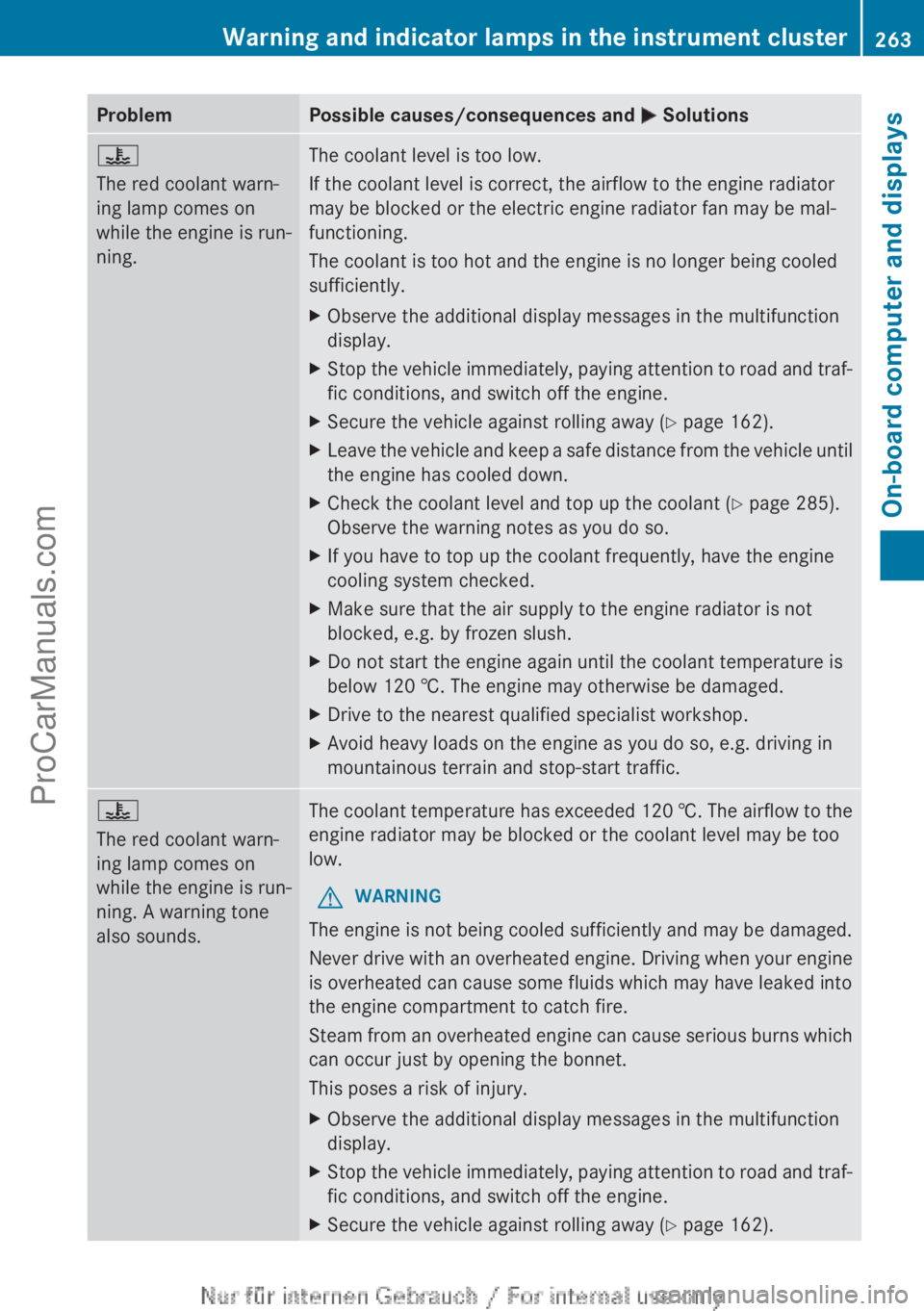
ProblemPossible causes/consequences and M Solutions?
The red coolant warn-
ing lamp comes on
while the engine is run-
ning.The coolant level is too low.
If the coolant level is correct, the airflow to the engine radiator
may be blocked or the electric engine radiator fan may be mal-
functioning.
The coolant is too hot and the engine is no longer being cooled
sufficiently.XObserve the additional display messages in the multifunction
display.XStop the vehicle immediately, paying attention to road and traf-
fic conditions, and switch off the engine.XSecure the vehicle against rolling away ( Y page 162).XLeave the vehicle and keep a safe distance from the vehicle until
the engine has cooled down.XCheck the coolant level and top up the coolant ( Y page 285).
Observe the warning notes as you do so.XIf you have to top up the coolant frequently, have the engine
cooling system checked.XMake sure that the air supply to the engine radiator is not
blocked, e.g. by frozen slush.XDo not start the engine again until the coolant temperature is
below 120 †. The engine may otherwise be damaged.XDrive to the nearest qualified specialist workshop.XAvoid heavy loads on the engine as you do so, e.g. driving in
mountainous terrain and stop-start traffic.?
The red coolant warn-
ing lamp comes on
while the engine is run-
ning. A warning tone
also sounds.The coolant temperature has exceeded 120 †. The airflow to the
engine radiator may be blocked or the coolant level may be too
low.GWARNING
The engine is not being cooled sufficiently and may be damaged.
Never drive with an overheated engine. Driving when your engine
is overheated can cause some fluids which may have leaked into
the engine compartment to catch fire.
Steam from an overheated engine can cause serious burns which
can occur just by opening the bonnet.
This poses a risk of injury.
XObserve the additional display messages in the multifunction
display.XStop the vehicle immediately, paying attention to road and traf-
fic conditions, and switch off the engine.XSecure the vehicle against rolling away ( Y page 162).Warning and indicator lamps in the instrument cluster263On-board computer and displaysZProCarManuals.com
Page 266 of 352
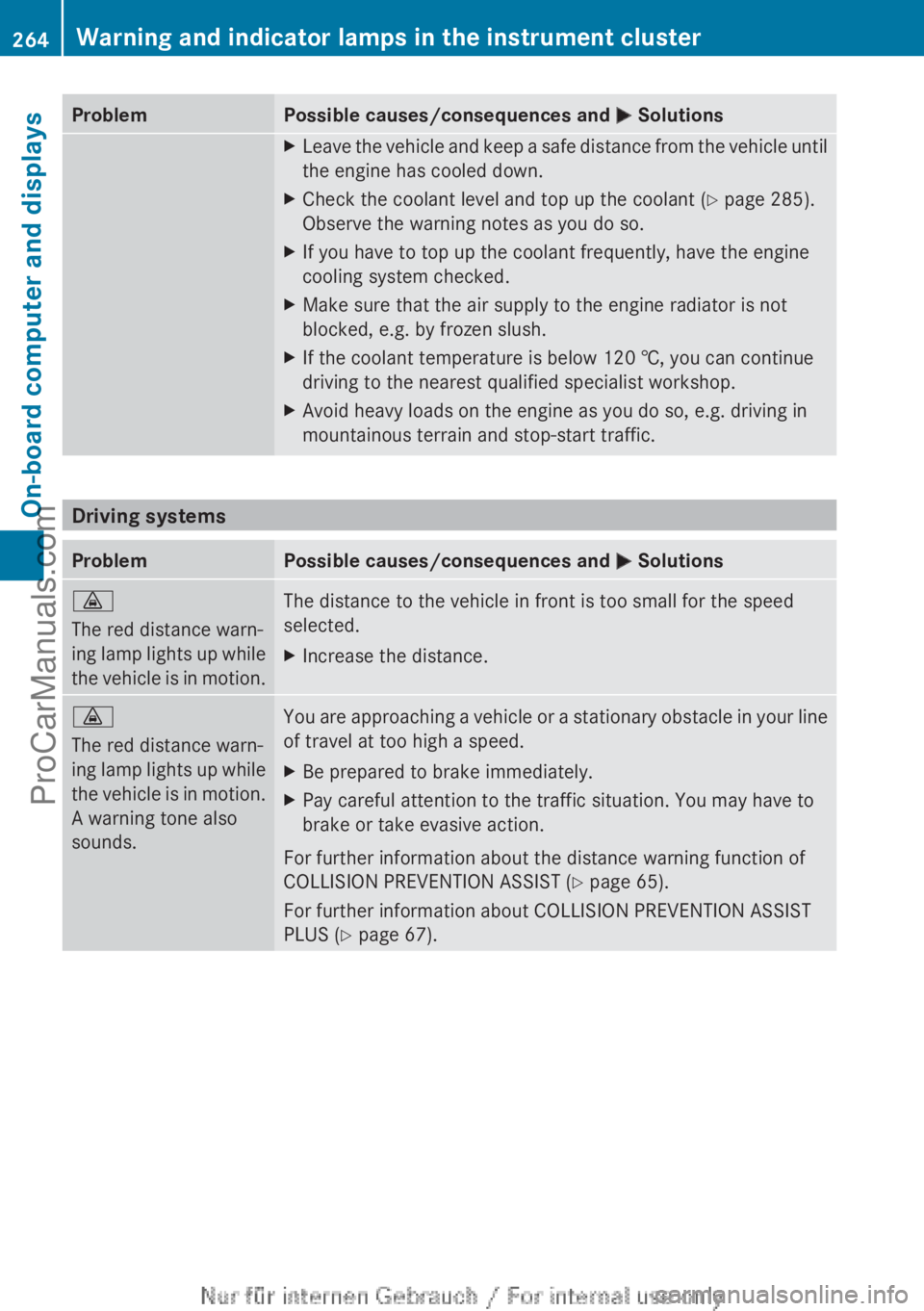
ProblemPossible causes/consequences and M SolutionsXLeave the vehicle and keep a safe distance from the vehicle until
the engine has cooled down.XCheck the coolant level and top up the coolant ( Y page 285).
Observe the warning notes as you do so.XIf you have to top up the coolant frequently, have the engine
cooling system checked.XMake sure that the air supply to the engine radiator is not
blocked, e.g. by frozen slush.XIf the coolant temperature is below 120 †, you can continue
driving to the nearest qualified specialist workshop.XAvoid heavy loads on the engine as you do so, e.g. driving in
mountainous terrain and stop-start traffic.
Driving systems
ProblemPossible causes/consequences and M Solutions·
The red distance warn-
ing lamp lights up while
the vehicle is in motion.The distance to the vehicle in front is too small for the speed
selected.XIncrease the distance.·
The red distance warn-
ing lamp lights up while
the vehicle is in motion.
A warning tone also
sounds.You are approaching a vehicle or a stationary obstacle in your line
of travel at too high a speed.XBe prepared to brake immediately.XPay careful attention to the traffic situation. You may have to
brake or take evasive action.
For further information about the distance warning function of
COLLISION PREVENTION ASSIST ( Y page 65).
For further information about COLLISION PREVENTION ASSIST
PLUS ( Y page 67).
264Warning and indicator lamps in the instrument clusterOn-board computer and displays
ProCarManuals.com
Page 267 of 352
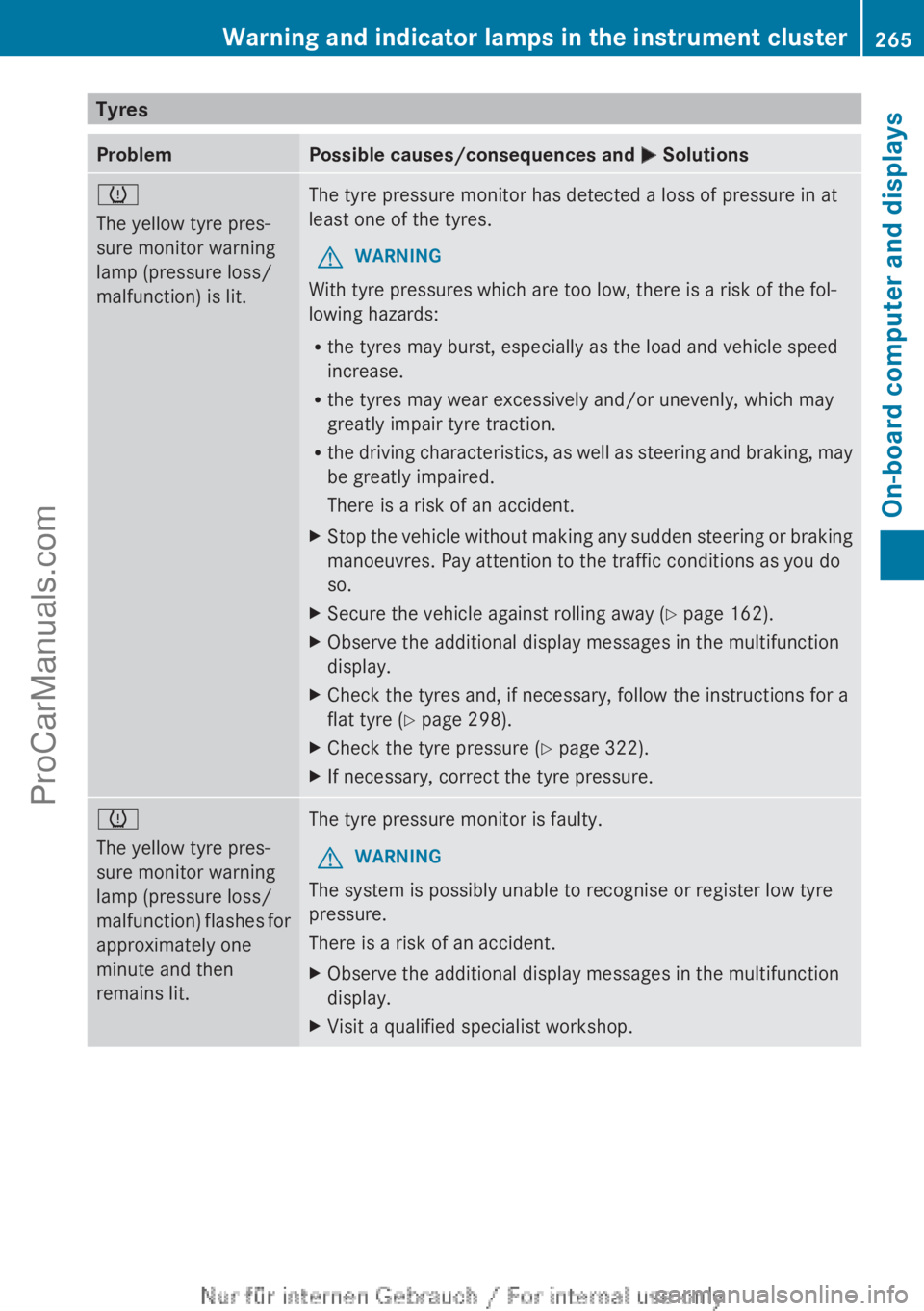
TyresProblemPossible causes/consequences and M Solutionsh
The yellow tyre pres-
sure monitor warning
lamp (pressure loss/
malfunction) is lit.The tyre pressure monitor has detected a loss of pressure in at
least one of the tyres.GWARNING
With tyre pressures which are too low, there is a risk of the fol-
lowing hazards:
R the tyres may burst, especially as the load and vehicle speed
increase.
R the tyres may wear excessively and/or unevenly, which may
greatly impair tyre traction.
R the driving characteristics, as well as steering and braking, may
be greatly impaired.
There is a risk of an accident.
XStop the vehicle without making any sudden steering or braking
manoeuvres. Pay attention to the traffic conditions as you do
so.XSecure the vehicle against rolling away ( Y page 162).XObserve the additional display messages in the multifunction
display.XCheck the tyres and, if necessary, follow the instructions for a
flat tyre ( Y page 298).XCheck the tyre pressure ( Y page 322).XIf necessary, correct the tyre pressure.h
The yellow tyre pres-
sure monitor warning
lamp (pressure loss/
malfunction) flashes for
approximately one
minute and then
remains lit.The tyre pressure monitor is faulty.GWARNING
The system is possibly unable to recognise or register low tyre
pressure.
There is a risk of an accident.
XObserve the additional display messages in the multifunction
display.XVisit a qualified specialist workshop.Warning and indicator lamps in the instrument cluster265On-board computer and displaysZProCarManuals.com
Page 288 of 352
Checking the coolant level when the cool-
ant temperature is over 40 † can lead to
damage to the engine or engine cooling
system.
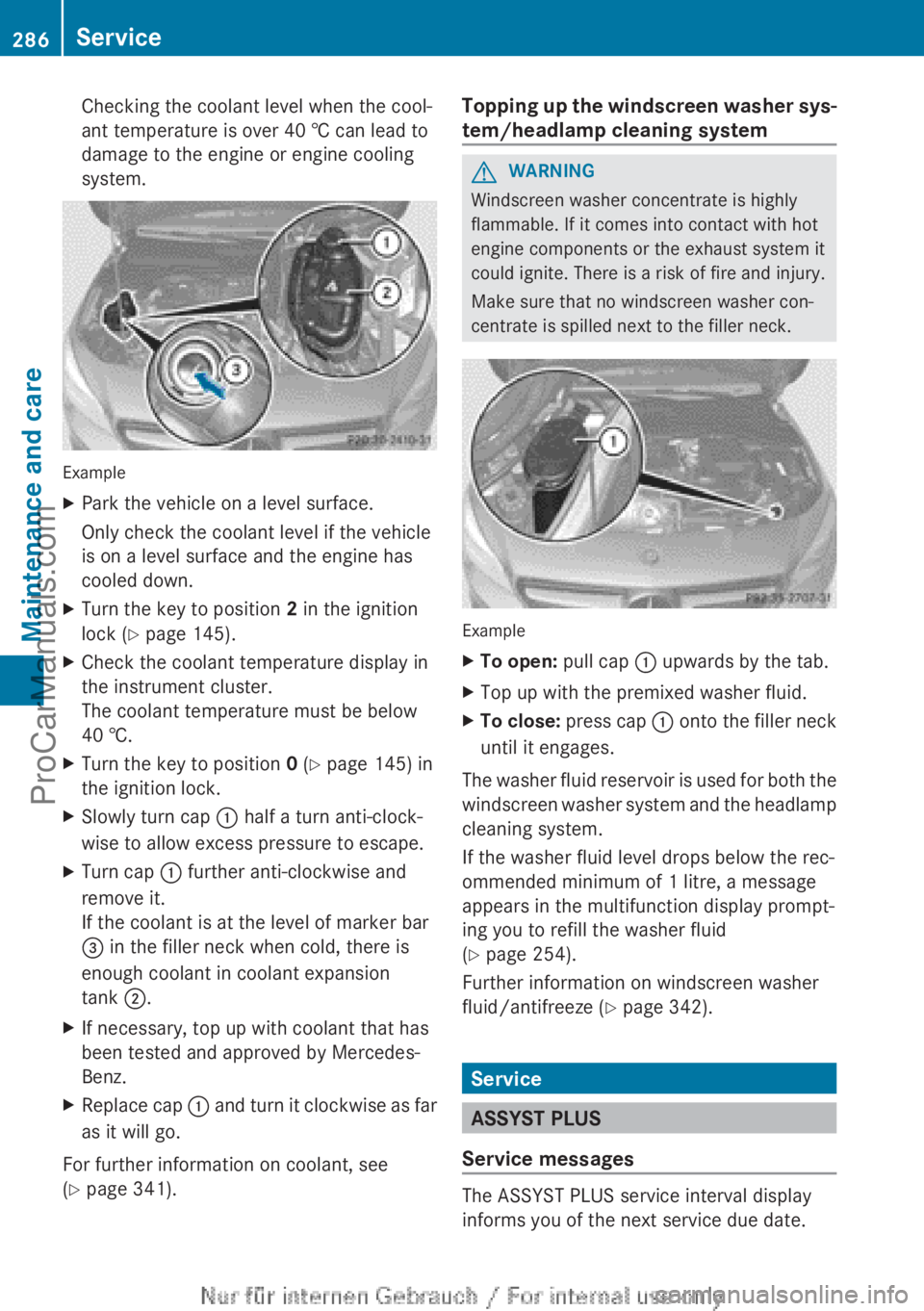
Example
XPark the vehicle on a level surface.
Only check the coolant level if the vehicle
is on a level surface and the engine has
cooled down.XTurn the key to position 2 in the ignition
lock ( Y page 145).XCheck the coolant temperature display in
the instrument cluster.
The coolant temperature must be below
40 †.XTurn the key to position 0 (Y page 145) in
the ignition lock.XSlowly turn cap : half a turn anti-clock-
wise to allow excess pressure to escape.XTurn cap : further anti-clockwise and
remove it.
If the coolant is at the level of marker bar
= in the filler neck when cold, there is
enough coolant in coolant expansion
tank ;.XIf necessary, top up with coolant that has
been tested and approved by Mercedes-
Benz.XReplace cap : and turn it clockwise as far
as it will go.
For further information on coolant, see
( Y page 341).
Topping up the windscreen washer sys-
tem/headlamp cleaning systemGWARNING
Windscreen washer concentrate is highly
flammable. If it comes into contact with hot
engine components or the exhaust system it
could ignite. There is a risk of fire and injury.
Make sure that no windscreen washer con-
centrate is spilled next to the filler neck.
Example
XTo open: pull cap : upwards by the tab.XTop up with the premixed washer fluid.XTo close: press cap : onto the filler neck
until it engages.
The washer fluid reservoir is used for both the
windscreen washer system and the headlamp
cleaning system.
If the washer fluid level drops below the rec-
ommended minimum of 1 litre, a message
appears in the multifunction display prompt-
ing you to refill the washer fluid
( Y page 254).
Further information on windscreen washer
fluid/antifreeze ( Y page 342).
Service
ASSYST PLUS
Service messages
The ASSYST PLUS service interval display
informs you of the next service due date.
286ServiceMaintenance and care
ProCarManuals.com
Page 289 of 352
Information on the type of service and service
intervals (see separate Service Booklet).
You can obtain further information from any
Mercedes-Benz Service Centre.
i The ASSYST PLUS service interval display
does not show any information on the
engine oil level. Observe the notes on the
engine oil level ( Y page 284).
The multifunction display shows a service
message for a few seconds, e.g.:
R Service A in .. days
R Service A due
R Service A overdue by .. days
Depending on the operating conditions of the
vehicle, the remaining time or distance until
the next service due date is displayed.
The letter indicates which service is due. A
stands for a minor service and B for a major
service. A number or another letter may be
displayed after the letter. This figure indicates
any necessary additional maintenance work
to be performed.
If you notify a qualified specialist workshop of
this display, you will receive a statement on
the associated costs.
The ASSYST PLUS service interval display
does not take into account any periods of
time during which the battery is disconnec-
ted.
Maintaining the time-dependent service
schedule:XNote down the service due date displayed
in the multifunction display before discon-
necting the battery.
or
XAfter reconnecting the battery, subtract
the battery disconnection periods from the
service date shown on the display.
Hiding a service message
XPress % or a .Displaying service messagesXSwitch the ignition on.XUsing = or ; , select the Service
menu.XPress 9 or : to select the ASSYST
PLUS submenu and press a to confirm.
The service due date appears in the multi-
function display.
Information about Service
Resetting the ASSYST PLUS service inter-
val display
! If the ASSYST PLUS service interval dis-
play has been inadvertently reset, this set-
ting can be corrected at a qualified special-
ist workshop.
Have service work carried out as described
in the Service Booklet. This may otherwise
lead to increased wear and damage to the
major assemblies or the vehicle.
A qualified specialist workshop, e.g. a
Mercedes-Benz Service Centre, will reset the
ASSYST PLUS service interval display after
the service work has been carried out. You
can also obtain further information on main-
tenance work, for example.
Special service requirements
The prescribed service interval is based on
normal operation of the vehicle. Service work
will need to be performed more often if the
vehicle is operated under arduous conditions
or increased loads, for example:
R regular city driving with frequent intermedi-
ate stops
R if the vehicle is primarily used to travel
short distances
R for frequent operation in mountainous ter-
rain or on poor road surfaces
R if the engine is often left idling for long peri-
ods
In these or similar operating conditions, have
the air filter, engine oil and oil filter, for exam-
ple, changed more frequently. The tyres must
Service287Maintenance and careZProCarManuals.com
Page 294 of 352
XMake sure that the vehicle is stationary and
that the key is in position 2 in the ignition
lock.XTo open the cover of the reversing cam-
era: with the audio system/COMAND
Online activated, press the W button.XSelect System by turning cVd the audio
system/COMAND controller and press W
to confirm.XSelect Rear view camera and press W to
confirm.XSelect Open camera cover and confirm
with W.
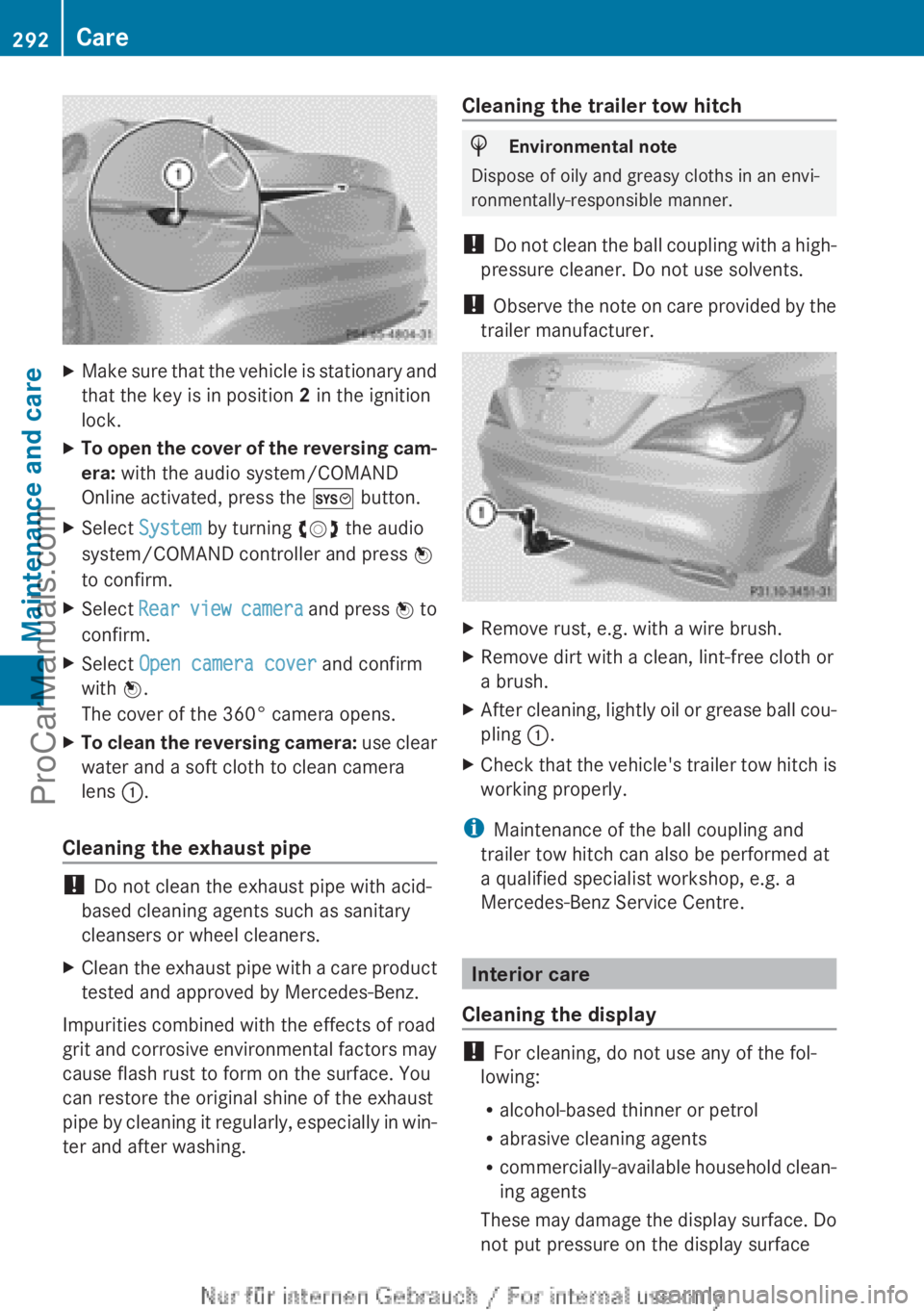
The cover of the 360° camera opens.XTo clean the reversing camera: use clear
water and a soft cloth to clean camera
lens :.
Cleaning the exhaust pipe
!
Do not clean the exhaust pipe with acid-
based cleaning agents such as sanitary
cleansers or wheel cleaners.
XClean the exhaust pipe with a care product
tested and approved by Mercedes-Benz.
Impurities combined with the effects of road
grit and corrosive environmental factors may
cause flash rust to form on the surface. You
can restore the original shine of the exhaust
pipe by cleaning it regularly, especially in win-
ter and after washing.
Cleaning the trailer tow hitchHEnvironmental note
Dispose of oily and greasy cloths in an envi-
ronmentally-responsible manner.
! Do not clean the ball coupling with a high-
pressure cleaner. Do not use solvents.
! Observe the note on care provided by the
trailer manufacturer.
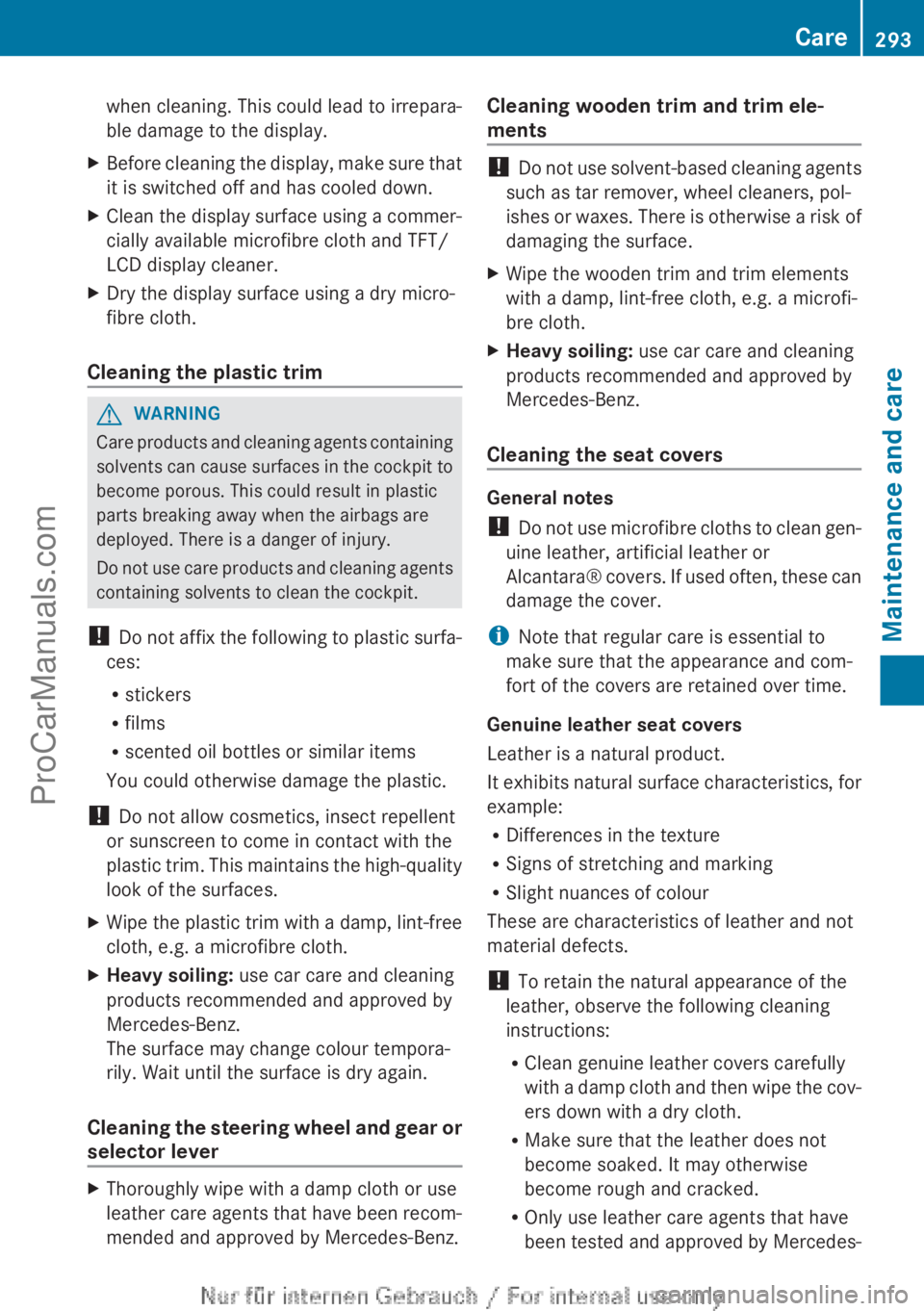
XRemove rust, e.g. with a wire brush.XRemove dirt with a clean, lint-free cloth or
a brush.XAfter cleaning, lightly oil or grease ball cou-
pling :.XCheck that the vehicle's trailer tow hitch is
working properly.
i Maintenance of the ball coupling and
trailer tow hitch can also be performed at
a qualified specialist workshop, e.g. a
Mercedes-Benz Service Centre.
Interior care
Cleaning the display
! For cleaning, do not use any of the fol-
lowing:
R alcohol-based thinner or petrol
R abrasive cleaning agents
R commercially-available household clean-
ing agents
These may damage the display surface. Do
not put pressure on the display surface
292CareMaintenance and care
ProCarManuals.com
Page 295 of 352
when cleaning. This could lead to irrepara-
ble damage to the display.XBefore cleaning the display, make sure that
it is switched off and has cooled down.XClean the display surface using a commer-
cially available microfibre cloth and TFT/
LCD display cleaner.XDry the display surface using a dry micro-
fibre cloth.
Cleaning the plastic trim
GWARNING
Care products and cleaning agents containing
solvents can cause surfaces in the cockpit to
become porous. This could result in plastic
parts breaking away when the airbags are
deployed. There is a danger of injury.
Do not use care products and cleaning agents
containing solvents to clean the cockpit.
! Do not affix the following to plastic surfa-
ces:
R stickers
R films
R scented oil bottles or similar items
You could otherwise damage the plastic.
! Do not allow cosmetics, insect repellent
or sunscreen to come in contact with the
plastic trim. This maintains the high-quality
look of the surfaces.
XWipe the plastic trim with a damp, lint-free
cloth, e.g. a microfibre cloth.XHeavy soiling: use car care and cleaning
products recommended and approved by
Mercedes-Benz.
The surface may change colour tempora-
rily. Wait until the surface is dry again.
Cleaning the steering wheel and gear or
selector lever
XThoroughly wipe with a damp cloth or use
leather care agents that have been recom-
mended and approved by Mercedes-Benz.Cleaning wooden trim and trim ele-
ments
! Do not use solvent-based cleaning agents
such as tar remover, wheel cleaners, pol-
ishes or waxes. There is otherwise a risk of
damaging the surface.
XWipe the wooden trim and trim elements
with a damp, lint-free cloth, e.g. a microfi-
bre cloth.XHeavy soiling: use car care and cleaning
products recommended and approved by
Mercedes-Benz.
Cleaning the seat covers
General notes
! Do not use microfibre cloths to clean gen-
uine leather, artificial leather or
Alcantara® covers. If used often, these can
damage the cover.
i Note that regular care is essential to
make sure that the appearance and com-
fort of the covers are retained over time.
Genuine leather seat covers
Leather is a natural product.
It exhibits natural surface characteristics, for
example:
R Differences in the texture
R Signs of stretching and marking
R Slight nuances of colour
These are characteristics of leather and not
material defects.
! To retain the natural appearance of the
leather, observe the following cleaning
instructions:
R Clean genuine leather covers carefully
with a damp cloth and then wipe the cov-
ers down with a dry cloth.
R Make sure that the leather does not
become soaked. It may otherwise
become rough and cracked.
R Only use leather care agents that have
been tested and approved by Mercedes-
Care293Maintenance and careZProCarManuals.com
Page 300 of 352
Flat tyre
Preparing the vehicle
Your vehicle may be equipped with:
R MOExtended tyres (tyres with run-flat char-
acteristics) ( Y page 298)
Vehicle preparation is not necessary on
vehicles with MOExtended tyres.
R a TIREFIT kit ( Y page 297)
R an emergency spare wheel (only for certain
countries)
Information on changing/fitting a wheel
( Y page 325).
XStop the vehicle as far away as possible
from traffic on solid, non-slippery and level
ground.XSwitch on the hazard warning lamps.XSecure the vehicle against rolling away
( Y page 162).XIf possible, bring the front wheels into the
straight-ahead position.XSwitch off the engine.XRemove the key from the ignition lock.XAll occupants must get out of the vehicle.
Make sure that they are not endangered as
they do so.XMake sure that no one is near the danger
area while a wheel is being changed. Any-
one who is not directly assisting in the
wheel change should, for example, stand
behind the barrier.XGet out of the vehicle. Pay attention to traf-
fic conditions when doing so.XClose the driver's door.XPlace the warning triangle a suitable dis-
tance away ( Y page 296). Observe legal
requirements.
i Vehicles with MOExtended tyres are not
equipped with a TIREFIT kit at the factory.
It is therefore recommended that you addi-
tionally equip your vehicle with a TIREFIT kit
if you fit tyres that do not feature run-flat
characteristics, e.g. winter tyres. A TIREFIT
kit can be obtained from a qualified spe-
cialist workshop.
MOExtended tyres (tyres with run-flat
characteristics)
General notes
With MOExtended tyres (tyres with run-flat
characteristics), you can continue to drive
your vehicle even if there is a total loss of
pressure in one or more tyres. The affected
tyre must not show any clearly visible dam-
age.
You can recognise MOExtended tyres by the
MOExtended marking which appears on the
tyre wall. You will find this marking next to the
tyre size designation, the load-bearing capa-
city and the speed index.
MOExtended tyres may only be used in con-
junction with an active tyre pressure loss
warning system.
If the pressure loss warning message
appears in the multifunction display:
R Observe the instructions in the display
messages ( Y page 248).
R Check the tyre for damage.
R If driving on, observe the following notes.
The maximum driving distance is approx-
imately 80 km when the vehicle is partially
laden and approximately 30 km when the
vehicle is fully laden.
In addition to the vehicle load, the driving dis-
tance possible depends upon:
R speed
R road condition
R outside temperature
The driving distance possible in run-flat mode
may be reduced by extreme driving condi-
tions/manoeuvres, or it can be increased
through a moderate style of driving.
The maximum permissible distance which
can be driven in run-flat mode is counted from
the moment the tyre pressure loss warning
appears in the multifunction display.
298Flat tyreBreakdown assistance
ProCarManuals.com
Page 323 of 352
iThe tyre pressure values given for low
loads are minimum values which offer you
good ride comfort characteristics.
However, you can also use the values given
for higher loads. These are permissible and
will not adversely affect the running of the
vehicle.
Tyre pressure loss warning system
General notes
While the vehicle is in motion, the tyre pres-
sure loss warning system monitors the set
tyre pressure using the rotational speed of
the wheels. This enables the system to detect
significant pressure loss in a tyre. If the speed
of rotation of a wheel changes as a result of
a loss of pressure, a corresponding warning
message will appear in the multifunction dis-
play.
You can recognise the tyre pressure loss
warning by the Run Flat Indicator
active Restart with OK message which
appears in the Service menu of the multi-
function display. Further information on the
message display can be found under "Restart-
ing the tyre pressure loss warning system"
( Y page 321).
Important safety notes
The tyre pressure warning system does not
warn you of an incorrectly set tyre pressure.
Observe the notes on the recommended tyre
pressure ( Y page 319).
The tyre pressure loss warning does not
replace the need to regularly check the tyre
pressures. An even loss of pressure on sev-
eral tyres at the same time cannot be detec-
ted by the tyre pressure loss warning system.
The tyre pressure monitor is not able to warn
you of a sudden loss of pressure, e.g. if the
tyre is penetrated by a foreign object. In the
event of a sudden loss of pressure, bring the
vehicle to a halt by braking carefully. Avoid
abrupt steering manoeuvres.
The function of the tyre pressure loss warning
system is limited or delayed if:
R snow chains are fitted to your vehicle's
tyres.
R road conditions are wintry.
R you are driving on sand or gravel.
R you adopt a very sporty driving style (cor-
nering at high speeds or driving with high
rates of acceleration).
R you are towing a very heavy or large trailer.
R you are driving with a heavy load (in the
vehicle or on the roof).
Restarting the tyre pressure loss warn-
ing system
Restart the tyre pressure loss warning system
if you have:
R changed the tyre pressure
R changed the wheels or tyres
R fitted new wheels or tyres
XBefore restarting, make sure that the tyre
pressures are set properly on all four tyres
for the respective operating conditions.
The recommended tyre pressures can be
found in the table on the fuel filler flap.
The tyre pressure loss warning system can
only give reliable warnings if you have set
the correct tyre pressure. If an incorrect
tyre pressure is set, these incorrect values
will be monitored.XObserve the notes in the section on tyre
pressures ( Y page 319).XMake sure that the key is in position 2 in
the ignition lock ( Y page 145).XPress = or ; on the steering wheel
to select the Service menu.XPress the 9 or : button to select
Tyre press. .XPress the a button.
The Run Flat Indicator active
Restart with OK message appears in the
multifunction display.Tyre pressure321Wheels and tyresZProCarManuals.com
Page 324 of 352
If you wish to confirm the restart:XPress the a button.
The Tyre press. now OK? message
appears in the multifunction display.XPress the 9 or : button to select
Yes .XPress the a button.
The Run Flat Indicator restarted
message appears in the multifunction dis-
play.
After a teach-in period, the tyre pressure
loss warning system will monitor the set
tyre pressures of all four tyres.
If you wish to cancel the restart:
XPress the % button.
or
XWhen the Tyre press. now OK? message
appears, press the 9 or : button to
select Cancel .XPress the a button.
The tyre pressure values stored at the last
restart will continue to be monitored.
Tyre pressure monitor
General notes
If a tyre pressure monitor system is fitted, the
vehicle's wheels have sensors fitted that
monitor the tyre pressures in all four tyres.
The tyre pressure monitor warns you if the
pressure drops in one or more of the tyres.
The tyre pressure monitor only functions if
the corresponding sensors are fitted to all
wheels.
Information on tyre pressures is shown in the
multifunction display. After a few minutes of
driving, the current tyre pressure of each tyre
is shown in the Service menu of the multi-
function display. For further information on
displaying this message, refer to the "Check-
ing the tyre pressure electronically" section
( Y page 323).
Important safety notes
It is the driver's responsibility to set the tyre
pressure to the recommended cold tyre pres-
sure suitable for the operating situation
( Y page 319). Note that the correct tyre pres-
sure for the current operating situation must
first be taught-in to the tyre pressure monitor.
If there is a substantial loss of pressure, the
warning threshold for the warning message is
aligned to the reference values taught-in.
Restart the tyre pressure monitor after
adjusting to the cold tyre pressure
( Y page 324). The current pressures are
saved as new reference values. This will
ensure that a warning message will only
appear if the tyre pressure drops significantly.
The tyre pressure monitor does not warn you
of an incorrectly set tyre pressure. Observe
the notes on the recommended tyre pressure
( Y page 319).
The tyre pressure monitor is not able to warn
you of a sudden loss of pressure, e.g. if the
tyre is penetrated by a foreign object. In the
event of a sudden loss of pressure, bring the
vehicle to a halt by braking carefully. Avoid
abrupt steering manoeuvres.
The tyre pressure monitor has a yellow warn-
ing lamp in the instrument cluster for indicat-
ing a pressure loss or malfunction. Depending
on how the warning lamp flashes or lights up,
a tyre pressure that is too low or a malfunc-
tion in the tyre pressure monitor is indicated:
R if the warning lamp is lit continuously, the
tyre pressure on one or more tyres is sig-
nificantly too low. The tyre pressure moni-
tor is not malfunctioning.
R if the warning lamp flashes for around a
minute and then remains lit constantly, the
tyre pressure monitor is malfunctioning.
i In addition to the warning lamp, a mes-
sage appears in the multifunction display.
Further information can be found on
( Y page 248).
If the tyre pressure monitor is malfunctioning,
it may take more than ten minutes for the tyre
322Tyre pressureWheels and tyres
ProCarManuals.com