airbag MERCEDES-BENZ CLA-CLASS 2013 Owner's Manual
[x] Cancel search | Manufacturer: MERCEDES-BENZ, Model Year: 2013, Model line: CLA-CLASS, Model: MERCEDES-BENZ CLA-CLASS 2013Pages: 352, PDF Size: 5.64 MB
Page 112 of 352
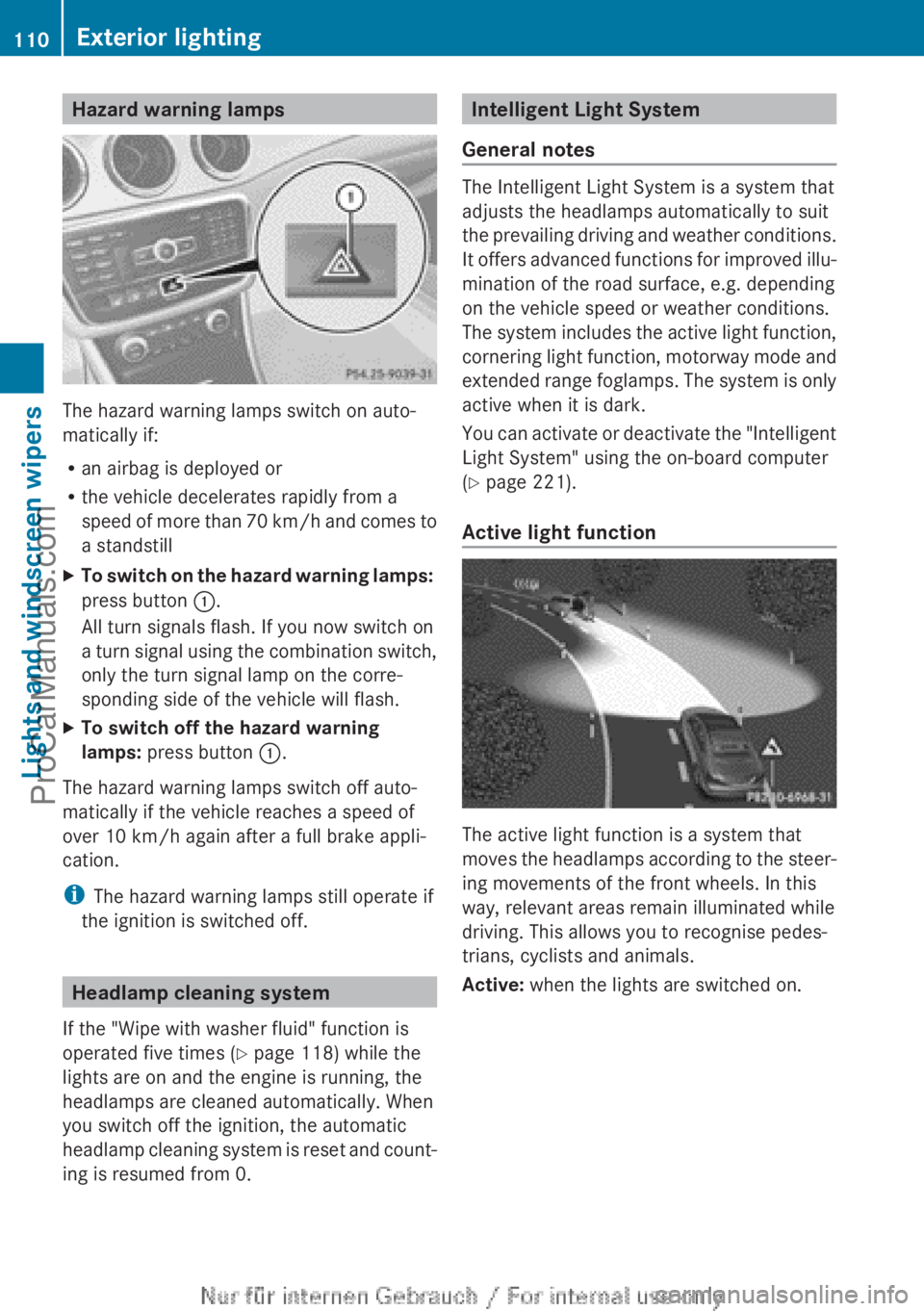
Hazard warning lamps
The hazard warning lamps switch on auto-
matically if:
R an airbag is deployed or
R the vehicle decelerates rapidly from a
speed of more than 70 km/h and comes to
a standstill
XTo switch on the hazard warning lamps:
press button :.
All turn signals flash. If you now switch on
a turn signal using the combination switch,
only the turn signal lamp on the corre-
sponding side of the vehicle will flash.XTo switch off the hazard warning
lamps: press button :.
The hazard warning lamps switch off auto-
matically if the vehicle reaches a speed of
over 10 km/h again after a full brake appli-
cation.
i The hazard warning lamps still operate if
the ignition is switched off.
Headlamp cleaning system
If the "Wipe with washer fluid" function is
operated five times ( Y page 118) while the
lights are on and the engine is running, the
headlamps are cleaned automatically. When
you switch off the ignition, the automatic
headlamp cleaning system is reset and count-
ing is resumed from 0.
Intelligent Light System
General notes
The Intelligent Light System is a system that
adjusts the headlamps automatically to suit
the prevailing driving and weather conditions.
It offers advanced functions for improved illu-
mination of the road surface, e.g. depending
on the vehicle speed or weather conditions.
The system includes the active light function,
cornering light function, motorway mode and
extended range foglamps. The system is only
active when it is dark.
You can activate or deactivate the "Intelligent
Light System" using the on-board computer
( Y page 221).
Active light function
The active light function is a system that
moves the headlamps according to the steer-
ing movements of the front wheels. In this
way, relevant areas remain illuminated while
driving. This allows you to recognise pedes-
trians, cyclists and animals.
Active: when the lights are switched on.
110Exterior lightingLights and windscreen wipers
ProCarManuals.com
Page 235 of 352
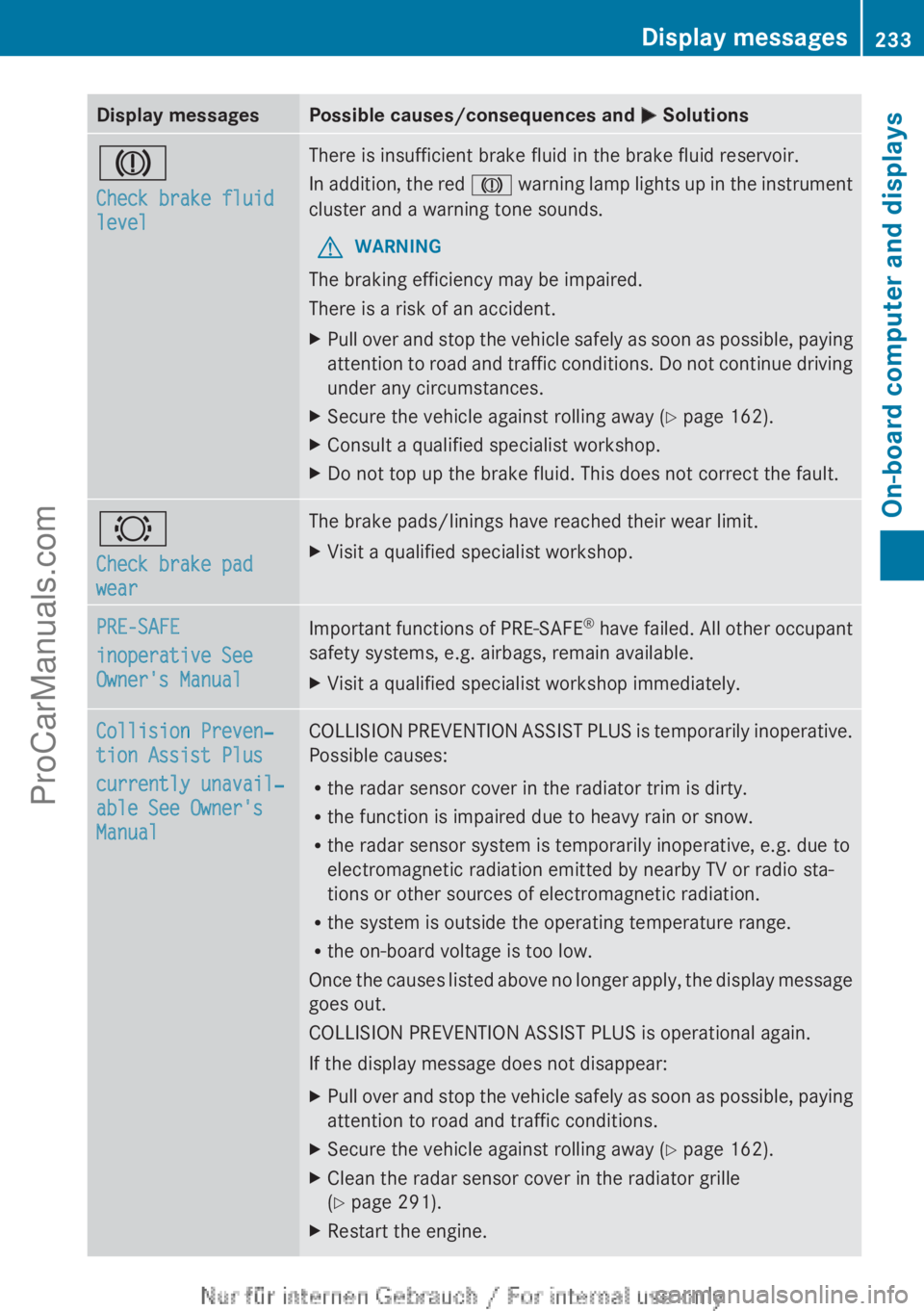
Display messagesPossible causes/consequences and M SolutionsJ
Check brake fluid
levelThere is insufficient brake fluid in the brake fluid reservoir.
In addition, the red J warning lamp lights up in the instrument
cluster and a warning tone sounds.GWARNING
The braking efficiency may be impaired.
There is a risk of an accident.
XPull over and stop the vehicle safely as soon as possible, paying
attention to road and traffic conditions. Do not continue driving
under any circumstances.XSecure the vehicle against rolling away ( Y page 162).XConsult a qualified specialist workshop.XDo not top up the brake fluid. This does not correct the fault.#
Check brake pad
wearThe brake pads/linings have reached their wear limit.XVisit a qualified specialist workshop.PRE-SAFE
inoperative See
Owner's ManualImportant functions of PRE-SAFE ®
have failed. All other occupant
safety systems, e.g. airbags, remain available.XVisit a qualified specialist workshop immediately.Collision Preven‐
tion Assist Plus
currently unavail‐
able See Owner's
ManualCOLLISION PREVENTION ASSIST PLUS is temporarily inoperative.
Possible causes:
R the radar sensor cover in the radiator trim is dirty.
R the function is impaired due to heavy rain or snow.
R the radar sensor system is temporarily inoperative, e.g. due to
electromagnetic radiation emitted by nearby TV or radio sta-
tions or other sources of electromagnetic radiation.
R the system is outside the operating temperature range.
R the on-board voltage is too low.
Once the causes listed above no longer apply, the display message
goes out.
COLLISION PREVENTION ASSIST PLUS is operational again.
If the display message does not disappear:XPull over and stop the vehicle safely as soon as possible, paying
attention to road and traffic conditions.XSecure the vehicle against rolling away ( Y page 162).XClean the radar sensor cover in the radiator grille
( Y page 291).XRestart the engine.Display messages233On-board computer and displaysZProCarManuals.com
Page 237 of 352
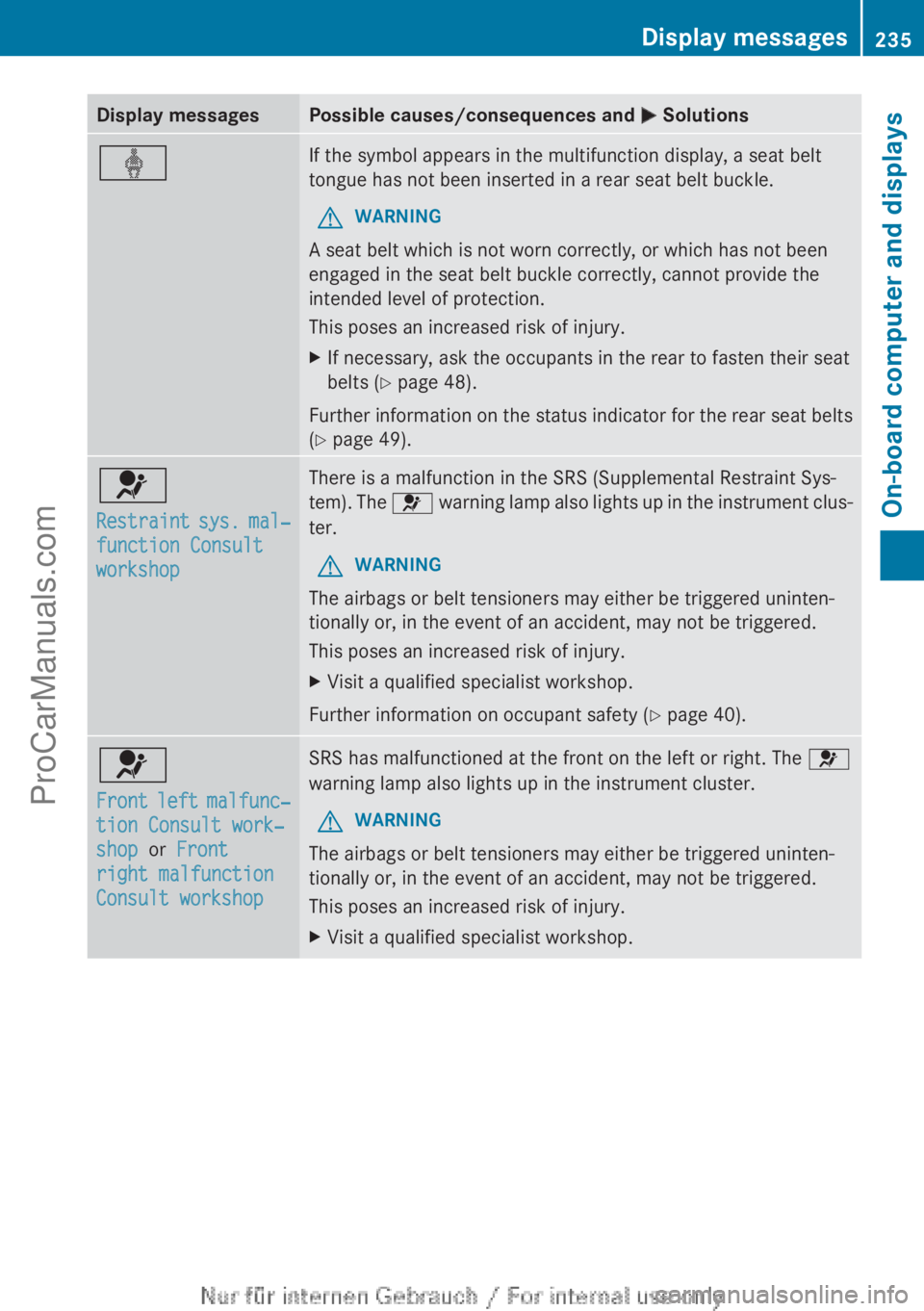
Display messagesPossible causes/consequences and M SolutionsýIf the symbol appears in the multifunction display, a seat belt
tongue has not been inserted in a rear seat belt buckle.GWARNING
A seat belt which is not worn correctly, or which has not been
engaged in the seat belt buckle correctly, cannot provide the
intended level of protection.
This poses an increased risk of injury.
XIf necessary, ask the occupants in the rear to fasten their seat
belts ( Y page 48).
Further information on the status indicator for the rear seat belts
( Y page 49).
6
Restraint sys. mal‐
function Consult
workshopThere is a malfunction in the SRS (Supplemental Restraint Sys-
tem). The 6 warning lamp also lights up in the instrument clus-
ter.GWARNING
The airbags or belt tensioners may either be triggered uninten-
tionally or, in the event of an accident, may not be triggered.
This poses an increased risk of injury.
XVisit a qualified specialist workshop.
Further information on occupant safety ( Y page 40).
6
Front left malfunc‐
tion Consult work‐
shop or Front
right malfunction
Consult workshopSRS has malfunctioned at the front on the left or right. The 6
warning lamp also lights up in the instrument cluster.GWARNING
The airbags or belt tensioners may either be triggered uninten-
tionally or, in the event of an accident, may not be triggered.
This poses an increased risk of injury.
XVisit a qualified specialist workshop.Display messages235On-board computer and displaysZProCarManuals.com
Page 238 of 352
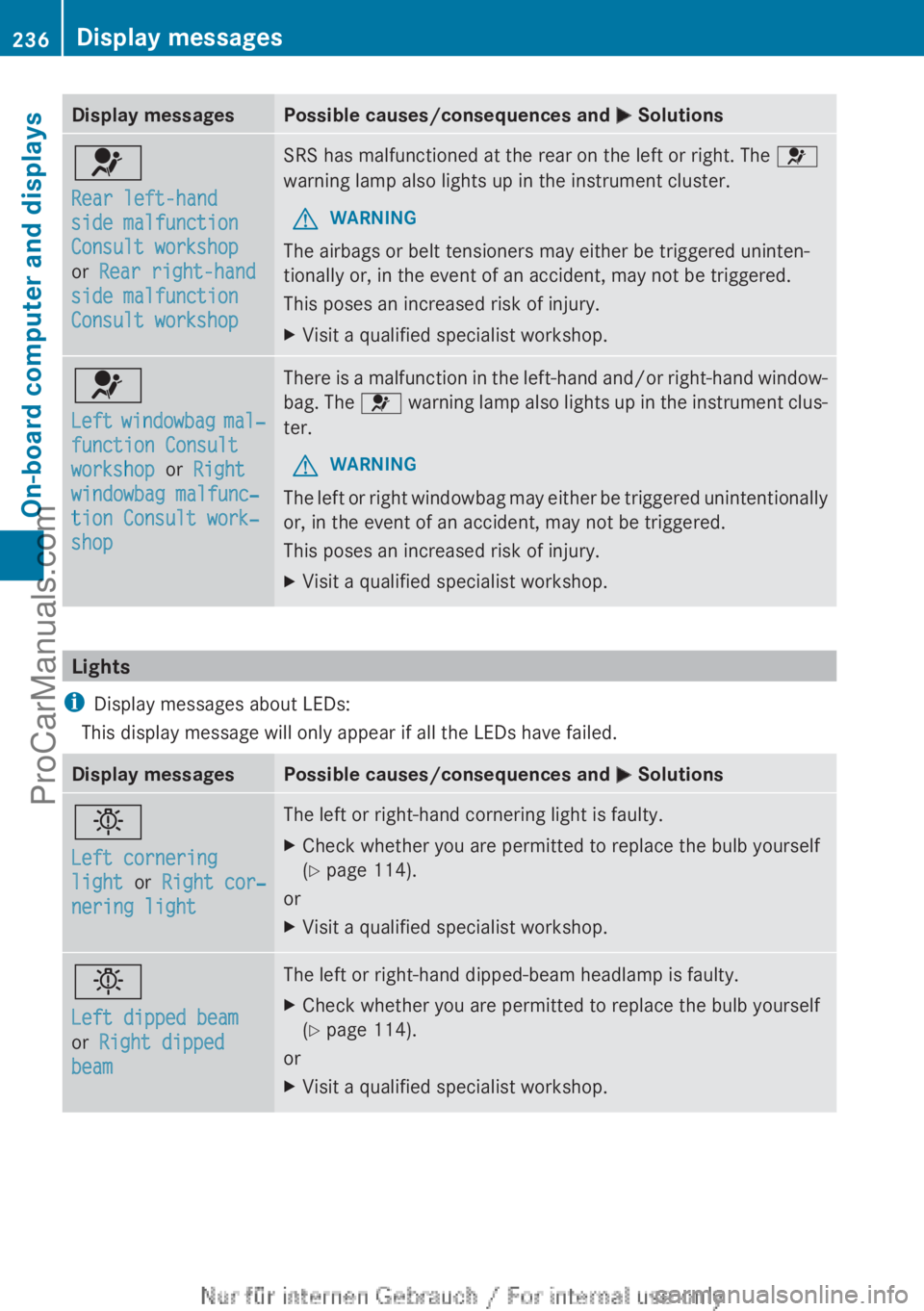
Display messagesPossible causes/consequences and M Solutions6
Rear left-hand
side malfunction
Consult workshop
or Rear right-hand
side malfunction
Consult workshopSRS has malfunctioned at the rear on the left or right. The 6
warning lamp also lights up in the instrument cluster.GWARNING
The airbags or belt tensioners may either be triggered uninten-
tionally or, in the event of an accident, may not be triggered.
This poses an increased risk of injury.
XVisit a qualified specialist workshop.6
Left windowbag mal‐
function Consult
workshop or Right
windowbag malfunc‐
tion Consult work‐
shopThere is a malfunction in the left-hand and/or right-hand window-
bag. The 6 warning lamp also lights up in the instrument clus-
ter.GWARNING
The left or right windowbag may either be triggered unintentionally
or, in the event of an accident, may not be triggered.
This poses an increased risk of injury.
XVisit a qualified specialist workshop.
Lights
i Display messages about LEDs:
This display message will only appear if all the LEDs have failed.
Display messagesPossible causes/consequences and M Solutionsb
Left cornering
light or Right cor‐
nering lightThe left or right-hand cornering light is faulty.XCheck whether you are permitted to replace the bulb yourself
( Y page 114).
or
XVisit a qualified specialist workshop.b
Left dipped beam
or Right dipped
beamThe left or right-hand dipped-beam headlamp is faulty.XCheck whether you are permitted to replace the bulb yourself
( Y page 114).
or
XVisit a qualified specialist workshop.236Display messagesOn-board computer and displays
ProCarManuals.com
Page 263 of 352
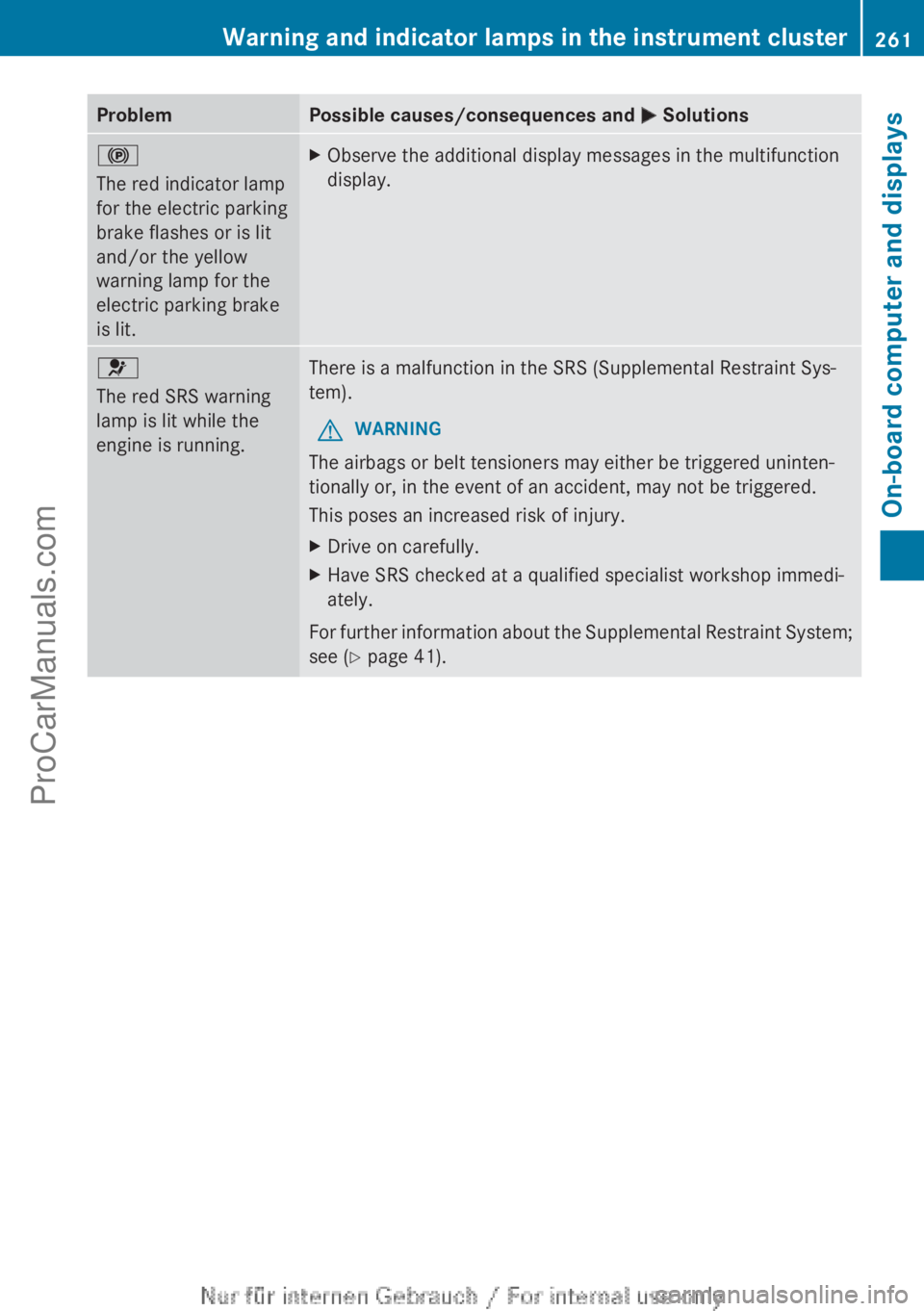
ProblemPossible causes/consequences and M Solutions!
The red indicator lamp
for the electric parking
brake flashes or is lit
and/or the yellow
warning lamp for the
electric parking brake
is lit.XObserve the additional display messages in the multifunction
display.6
The red SRS warning
lamp is lit while the
engine is running.There is a malfunction in the SRS (Supplemental Restraint Sys-
tem).GWARNING
The airbags or belt tensioners may either be triggered uninten-
tionally or, in the event of an accident, may not be triggered.
This poses an increased risk of injury.
XDrive on carefully.XHave SRS checked at a qualified specialist workshop immedi-
ately.
For further information about the Supplemental Restraint System;
see ( Y page 41).
Warning and indicator lamps in the instrument cluster261On-board computer and displaysZProCarManuals.com
Page 295 of 352
when cleaning. This could lead to irrepara-
ble damage to the display.XBefore cleaning the display, make sure that
it is switched off and has cooled down.XClean the display surface using a commer-
cially available microfibre cloth and TFT/
LCD display cleaner.XDry the display surface using a dry micro-
fibre cloth.
Cleaning the plastic trim
GWARNING
Care products and cleaning agents containing
solvents can cause surfaces in the cockpit to
become porous. This could result in plastic
parts breaking away when the airbags are
deployed. There is a danger of injury.
Do not use care products and cleaning agents
containing solvents to clean the cockpit.
! Do not affix the following to plastic surfa-
ces:
R stickers
R films
R scented oil bottles or similar items
You could otherwise damage the plastic.
! Do not allow cosmetics, insect repellent
or sunscreen to come in contact with the
plastic trim. This maintains the high-quality
look of the surfaces.
XWipe the plastic trim with a damp, lint-free
cloth, e.g. a microfibre cloth.XHeavy soiling: use car care and cleaning
products recommended and approved by
Mercedes-Benz.
The surface may change colour tempora-
rily. Wait until the surface is dry again.
Cleaning the steering wheel and gear or
selector lever
XThoroughly wipe with a damp cloth or use
leather care agents that have been recom-
mended and approved by Mercedes-Benz.Cleaning wooden trim and trim ele-
ments
! Do not use solvent-based cleaning agents
such as tar remover, wheel cleaners, pol-
ishes or waxes. There is otherwise a risk of
damaging the surface.
XWipe the wooden trim and trim elements
with a damp, lint-free cloth, e.g. a microfi-
bre cloth.XHeavy soiling: use car care and cleaning
products recommended and approved by
Mercedes-Benz.
Cleaning the seat covers
General notes
! Do not use microfibre cloths to clean gen-
uine leather, artificial leather or
Alcantara® covers. If used often, these can
damage the cover.
i Note that regular care is essential to
make sure that the appearance and com-
fort of the covers are retained over time.
Genuine leather seat covers
Leather is a natural product.
It exhibits natural surface characteristics, for
example:
R Differences in the texture
R Signs of stretching and marking
R Slight nuances of colour
These are characteristics of leather and not
material defects.
! To retain the natural appearance of the
leather, observe the following cleaning
instructions:
R Clean genuine leather covers carefully
with a damp cloth and then wipe the cov-
ers down with a dry cloth.
R Make sure that the leather does not
become soaked. It may otherwise
become rough and cracked.
R Only use leather care agents that have
been tested and approved by Mercedes-
Care293Maintenance and careZProCarManuals.com