display MERCEDES-BENZ CLA-CLASS 2013 Service Manual
[x] Cancel search | Manufacturer: MERCEDES-BENZ, Model Year: 2013, Model line: CLA-CLASS, Model: MERCEDES-BENZ CLA-CLASS 2013Pages: 352, PDF Size: 5.64 MB
Page 150 of 352
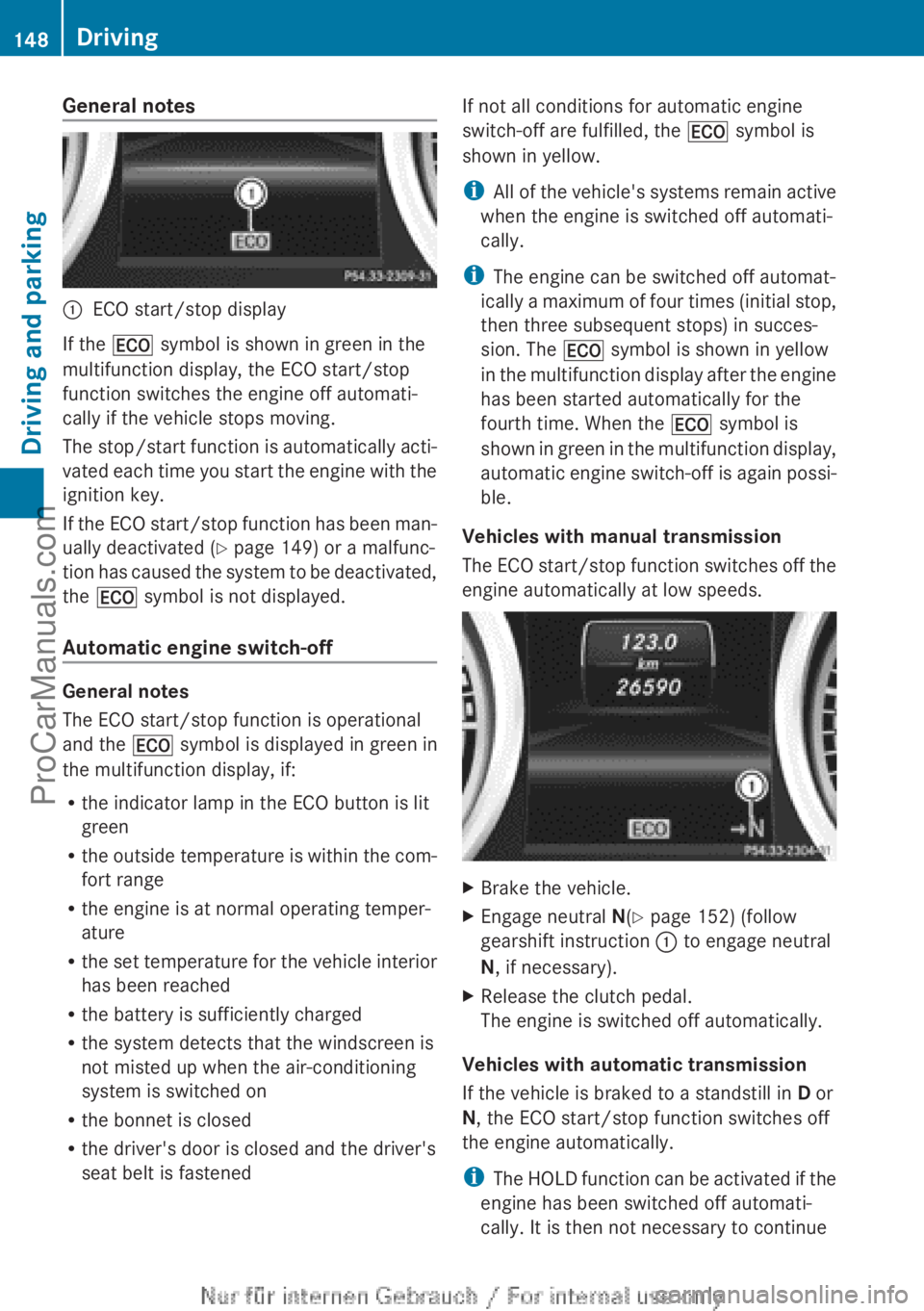
General notes:ECO start/stop display
If the ¤ symbol is shown in green in the
multifunction display, the ECO start/stop
function switches the engine off automati-
cally if the vehicle stops moving.
The stop/start function is automatically acti-
vated each time you start the engine with the
ignition key.
If the ECO start/stop function has been man-
ually deactivated ( Y page 149) or a malfunc-
tion has caused the system to be deactivated,
the ¤ symbol is not displayed.
Automatic engine switch-off
General notes
The ECO start/stop function is operational
and the ¤ symbol is displayed in green in
the multifunction display, if:
R the indicator lamp in the ECO button is lit
green
R the outside temperature is within the com-
fort range
R the engine is at normal operating temper-
ature
R the set temperature for the vehicle interior
has been reached
R the battery is sufficiently charged
R the system detects that the windscreen is
not misted up when the air-conditioning
system is switched on
R the bonnet is closed
R the driver's door is closed and the driver's
seat belt is fastened
If not all conditions for automatic engine
switch-off are fulfilled, the ¤ symbol is
shown in yellow.
i All of the vehicle's systems remain active
when the engine is switched off automati-
cally.
i The engine can be switched off automat-
ically a maximum of four times (initial stop,
then three subsequent stops) in succes-
sion. The ¤ symbol is shown in yellow
in the multifunction display after the engine
has been started automatically for the
fourth time. When the ¤ symbol is
shown in green in the multifunction display,
automatic engine switch-off is again possi-
ble.
Vehicles with manual transmission
The ECO start/stop function switches off the
engine automatically at low speeds.XBrake the vehicle.XEngage neutral N(Y page 152) (follow
gearshift instruction : to engage neutral
N , if necessary).XRelease the clutch pedal.
The engine is switched off automatically.
Vehicles with automatic transmission
If the vehicle is braked to a standstill in D or
N , the ECO start/stop function switches off
the engine automatically.
i The HOLD function can be activated if the
engine has been switched off automati-
cally. It is then not necessary to continue
148DrivingDriving and parking
ProCarManuals.com
Page 151 of 352
applying the brakes during the automatic
stop phase. When you depress the accel-
erator pedal, the engine starts automati-
cally and the braking effect of the HOLD
function is deactivated.
Automatic engine start
General notes
The engine is started automatically if:
R you switch off the ECO start/stop function
by pressing the ECO button
R you engage reverse gear R
R the vehicle starts to roll
R the brake system requires this
R the temperature in the vehicle interior devi-
ates from the set range
R the system detects moisture on the wind-
screen when the air-conditioning system is
switched on
R the battery's charge status is too low
R the driver's seat belt is released or the driv-
er's door is opened
Vehicles with manual transmission
! Only engage gear when the clutch pedal
is depressed.
The engine is started automatically if you:
R depress the clutch pedal fully
R depress the accelerator pedal
Vehicles with automatic transmission
The engine is started automatically if you:
R release the brake pedal when HOLD is not
activated and the transmission is in posi-
tion D or N
R depress the accelerator pedal
R move the transmission out of position P
i Shifting the transmission to position P
does not start the engine.
i If you shift the transmission from R to D,
the ECO start/stop function is available
again once the ¤ symbol reappears in
green in the multifunction display.
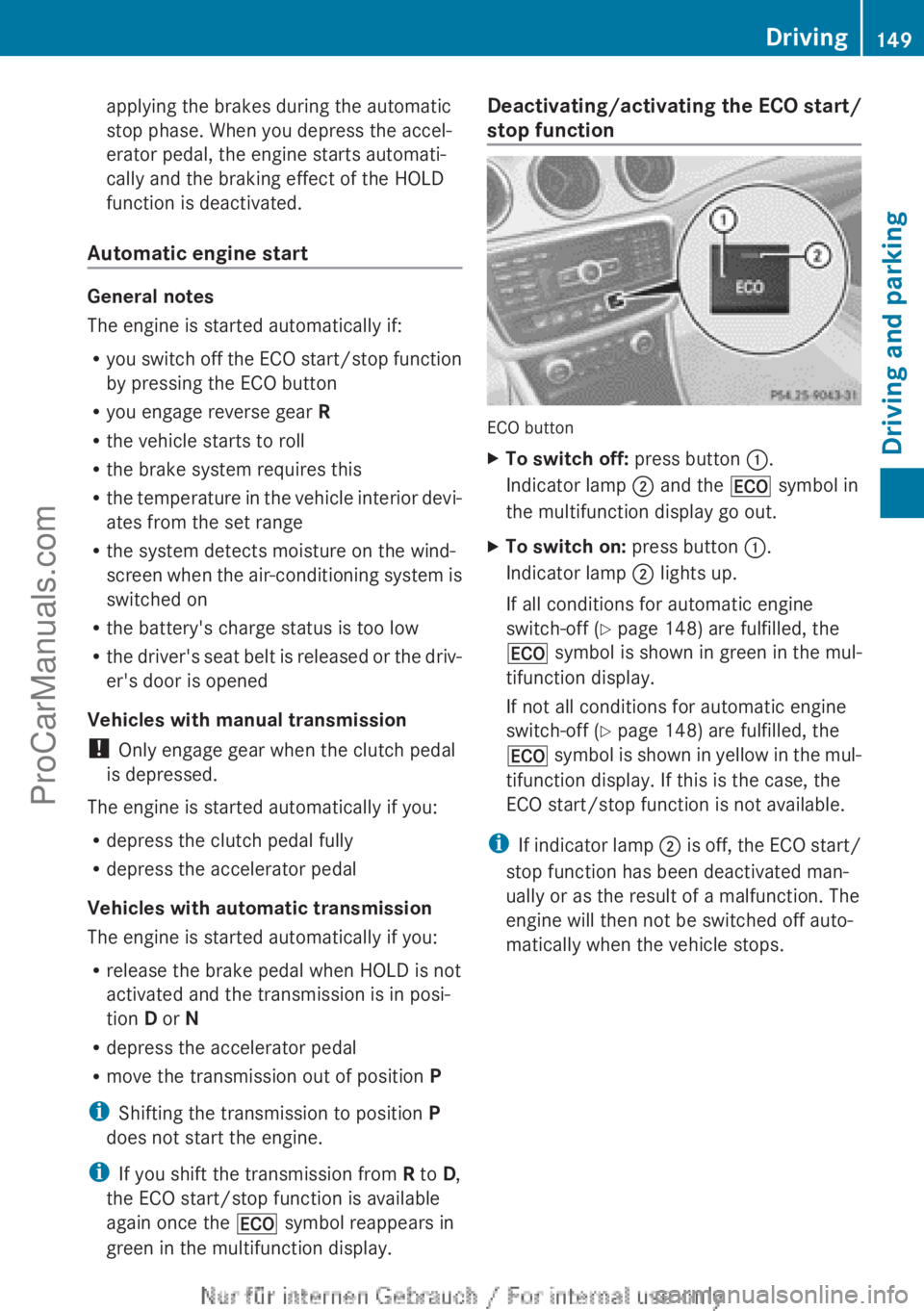
Deactivating/activating the ECO start/
stop function
ECO button
XTo switch off: press button :.
Indicator lamp ; and the ¤ symbol in
the multifunction display go out.XTo switch on: press button :.
Indicator lamp ; lights up.
If all conditions for automatic engine
switch-off ( Y page 148) are fulfilled, the
¤ symbol is shown in green in the mul-
tifunction display.
If not all conditions for automatic engine
switch-off ( Y page 148) are fulfilled, the
¤ symbol is shown in yellow in the mul-
tifunction display. If this is the case, the
ECO start/stop function is not available.
i If indicator lamp ; is off, the ECO start/
stop function has been deactivated man-
ually or as the result of a malfunction. The
engine will then not be switched off auto-
matically when the vehicle stops.
Driving149Driving and parkingZProCarManuals.com
Page 152 of 352
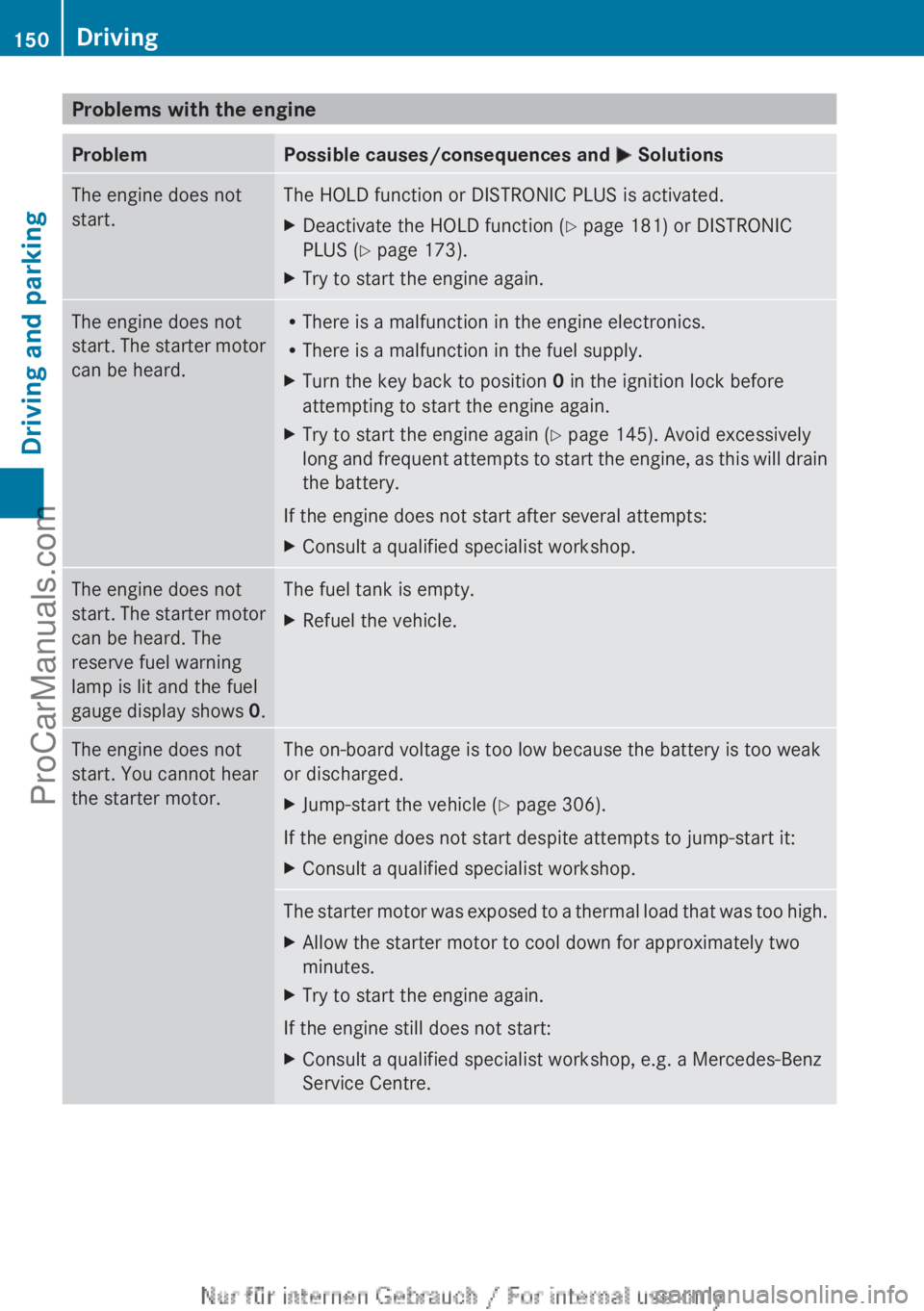
Problems with the engineProblemPossible causes/consequences and M SolutionsThe engine does not
start.The HOLD function or DISTRONIC PLUS is activated.XDeactivate the HOLD function ( Y page 181) or DISTRONIC
PLUS ( Y page 173).XTry to start the engine again.The engine does not
start. The starter motor
can be heard.R There is a malfunction in the engine electronics.
R There is a malfunction in the fuel supply.XTurn the key back to position 0 in the ignition lock before
attempting to start the engine again.XTry to start the engine again ( Y page 145). Avoid excessively
long and frequent attempts to start the engine, as this will drain
the battery.
If the engine does not start after several attempts:
XConsult a qualified specialist workshop.The engine does not
start. The starter motor
can be heard. The
reserve fuel warning
lamp is lit and the fuel
gauge display shows 0.The fuel tank is empty.XRefuel the vehicle.The engine does not
start. You cannot hear
the starter motor.The on-board voltage is too low because the battery is too weak
or discharged.XJump-start the vehicle ( Y page 306).
If the engine does not start despite attempts to jump-start it:
XConsult a qualified specialist workshop.The starter motor was exposed to a thermal load that was too high.XAllow the starter motor to cool down for approximately two
minutes.XTry to start the engine again.
If the engine still does not start:
XConsult a qualified specialist workshop, e.g. a Mercedes-Benz
Service Centre.150DrivingDriving and parking
ProCarManuals.com
Page 153 of 352
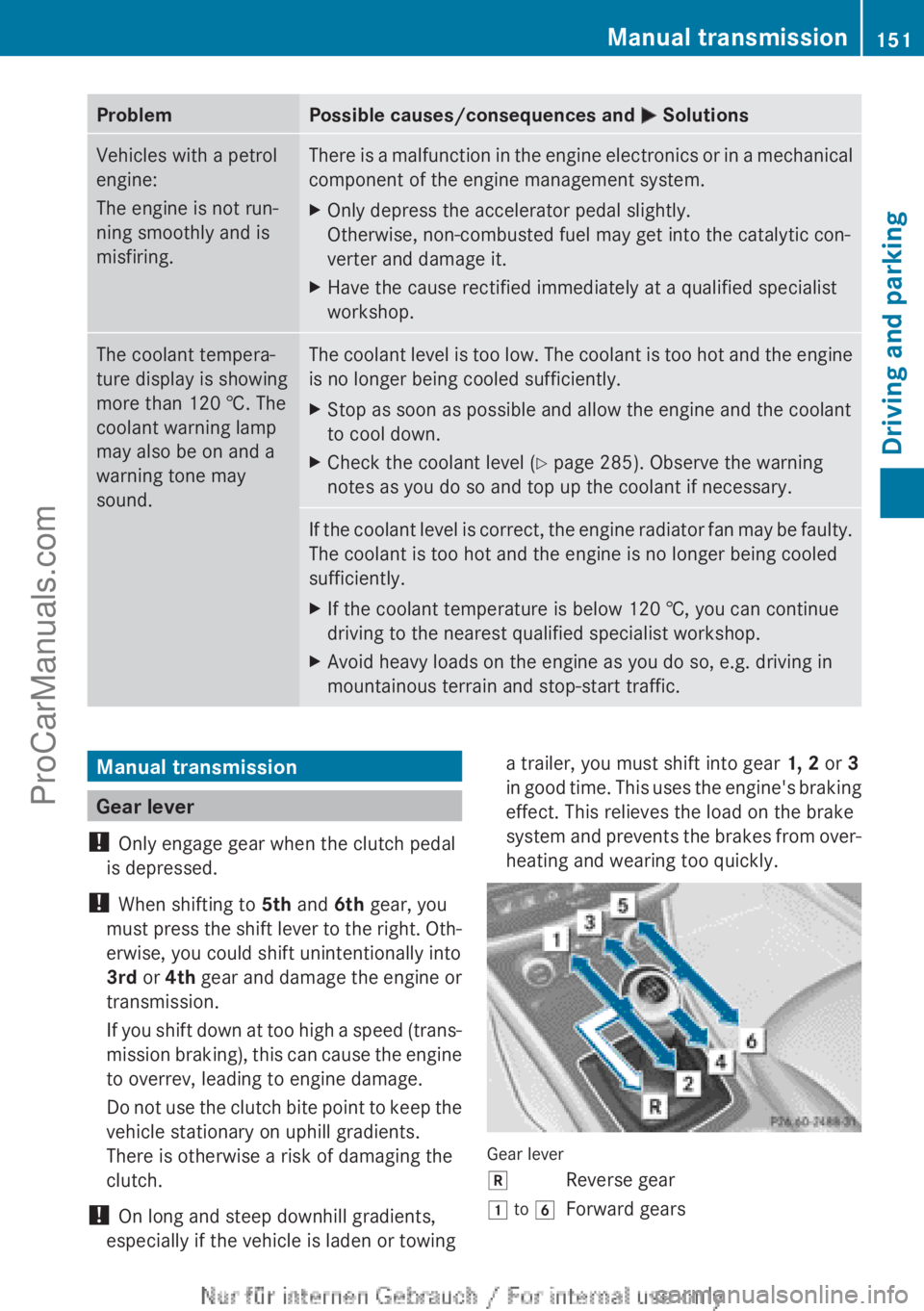
ProblemPossible causes/consequences and M SolutionsVehicles with a petrol
engine:
The engine is not run-
ning smoothly and is
misfiring.There is a malfunction in the engine electronics or in a mechanical
component of the engine management system.XOnly depress the accelerator pedal slightly.
Otherwise, non-combusted fuel may get into the catalytic con-
verter and damage it.XHave the cause rectified immediately at a qualified specialist
workshop.The coolant tempera-
ture display is showing
more than 120 †. The
coolant warning lamp
may also be on and a
warning tone may
sound.The coolant level is too low. The coolant is too hot and the engine
is no longer being cooled sufficiently.XStop as soon as possible and allow the engine and the coolant
to cool down.XCheck the coolant level ( Y page 285). Observe the warning
notes as you do so and top up the coolant if necessary.If the coolant level is correct, the engine radiator fan may be faulty.
The coolant is too hot and the engine is no longer being cooled
sufficiently.XIf the coolant temperature is below 120 †, you can continue
driving to the nearest qualified specialist workshop.XAvoid heavy loads on the engine as you do so, e.g. driving in
mountainous terrain and stop-start traffic.Manual transmission
Gear lever
! Only engage gear when the clutch pedal
is depressed.
! When shifting to 5th and 6th gear, you
must press the shift lever to the right. Oth-
erwise, you could shift unintentionally into
3rd or 4th gear and damage the engine or
transmission.
If you shift down at too high a speed (trans-
mission braking), this can cause the engine
to overrev, leading to engine damage.
Do not use the clutch bite point to keep the
vehicle stationary on uphill gradients.
There is otherwise a risk of damaging the
clutch.
! On long and steep downhill gradients,
especially if the vehicle is laden or towing
a trailer, you must shift into gear 1, 2 or 3
in good time. This uses the engine's braking
effect. This relieves the load on the brake
system and prevents the brakes from over-
heating and wearing too quickly.
Gear lever
kReverse gear1 to 6Forward gearsManual transmission151Driving and parkingZProCarManuals.com
Page 154 of 352
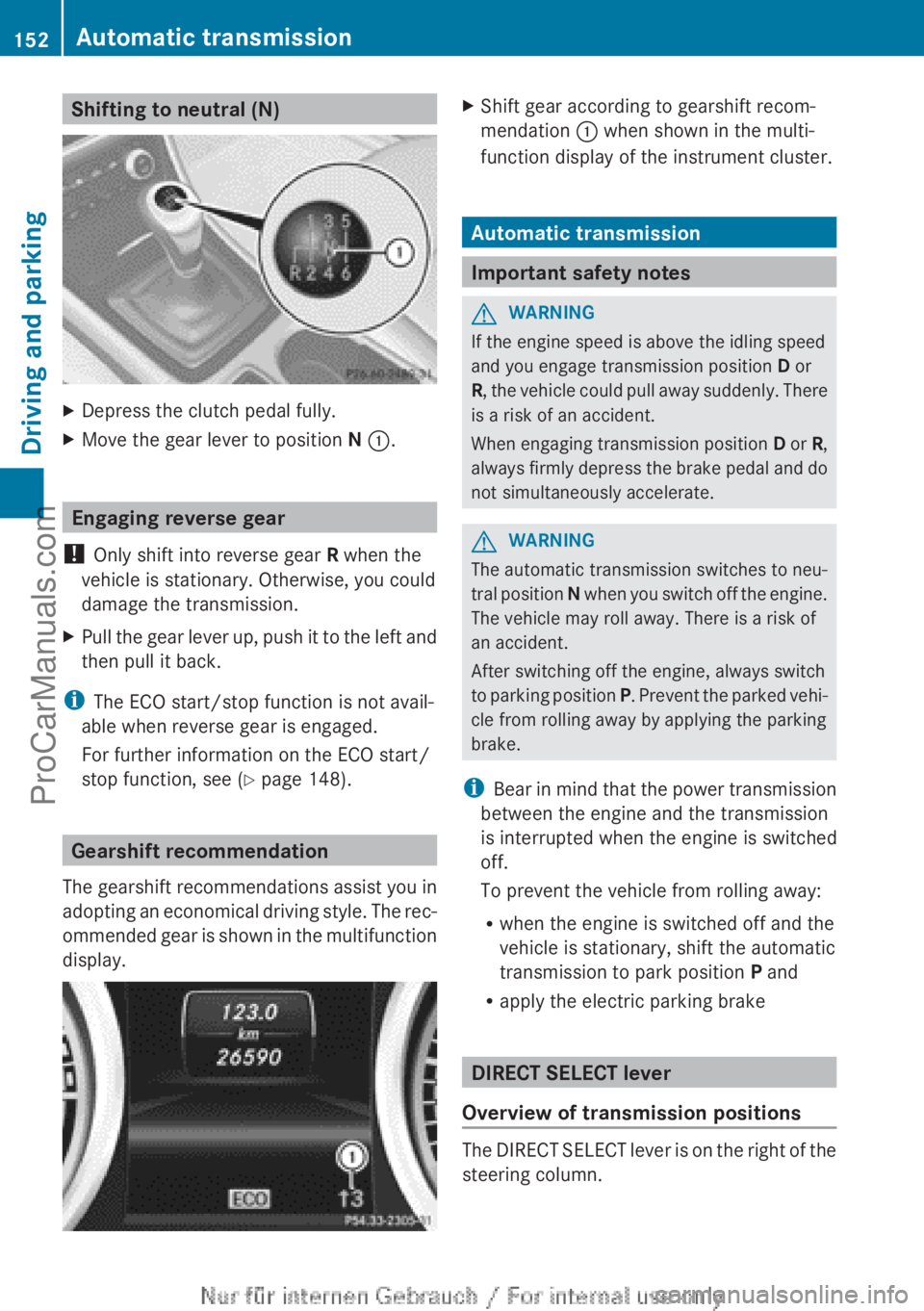
Shifting to neutral (N)XDepress the clutch pedal fully.XMove the gear lever to position N : .
Engaging reverse gear
! Only shift into reverse gear R when the
vehicle is stationary. Otherwise, you could
damage the transmission.
XPull the gear lever up, push it to the left and
then pull it back.
i The ECO start/stop function is not avail-
able when reverse gear is engaged.
For further information on the ECO start/
stop function, see ( Y page 148).
Gearshift recommendation
The gearshift recommendations assist you in
adopting an economical driving style. The rec-
ommended gear is shown in the multifunction
display.
XShift gear according to gearshift recom-
mendation : when shown in the multi-
function display of the instrument cluster.
Automatic transmission
Important safety notes
GWARNING
If the engine speed is above the idling speed
and you engage transmission position D or
R , the vehicle could pull away suddenly. There
is a risk of an accident.
When engaging transmission position D or R,
always firmly depress the brake pedal and do
not simultaneously accelerate.
GWARNING
The automatic transmission switches to neu-
tral position N when you switch off the engine.
The vehicle may roll away. There is a risk of
an accident.
After switching off the engine, always switch
to parking position P. Prevent the parked vehi-
cle from rolling away by applying the parking
brake.
i Bear in mind that the power transmission
between the engine and the transmission
is interrupted when the engine is switched
off.
To prevent the vehicle from rolling away:
R when the engine is switched off and the
vehicle is stationary, shift the automatic
transmission to park position P and
R apply the electric parking brake
DIRECT SELECT lever
Overview of transmission positions
The DIRECT SELECT lever is on the right of the
steering column.
152Automatic transmissionDriving and parking
ProCarManuals.com
Page 155 of 352
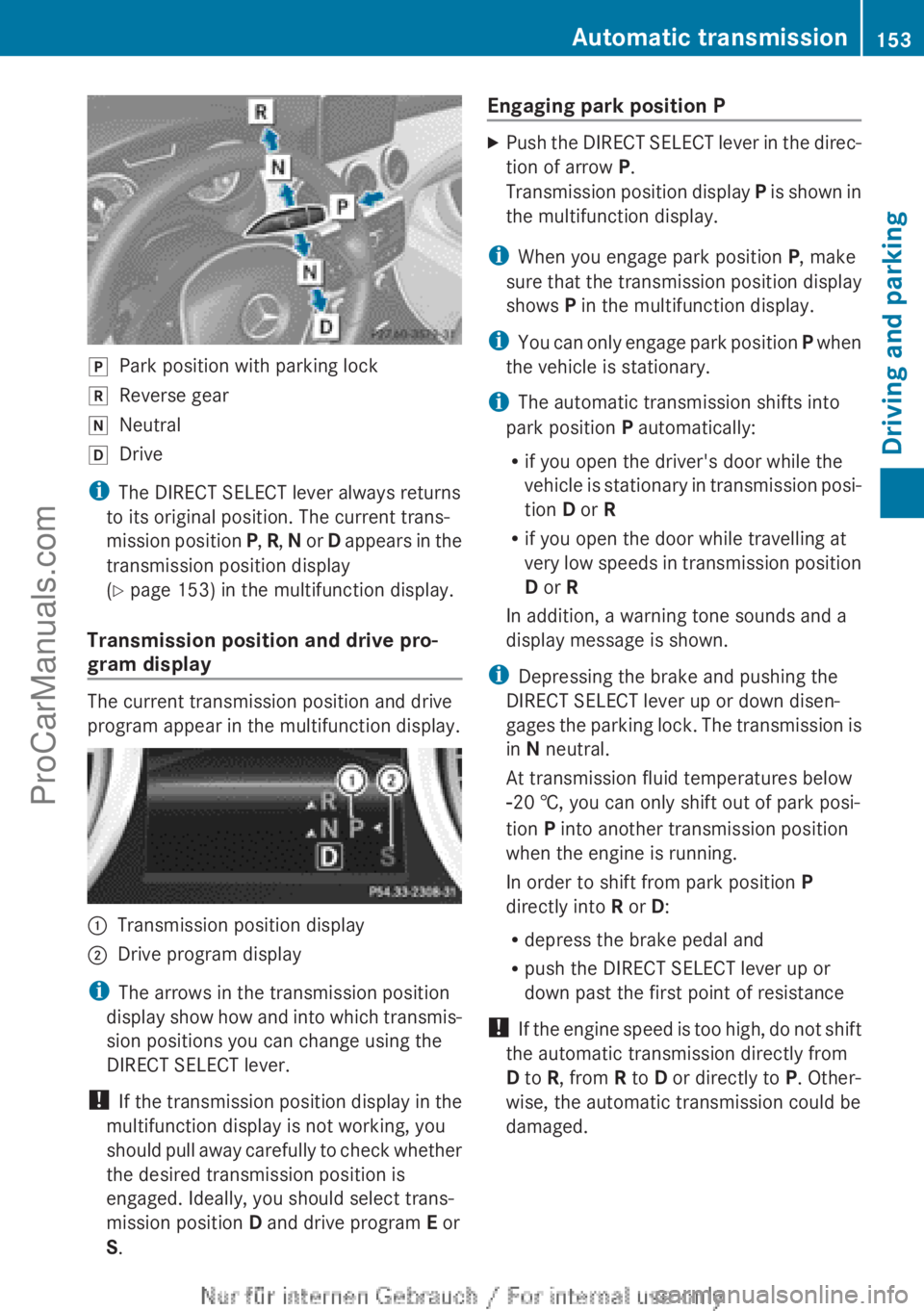
jPark position with parking lockkReverse geariNeutralhDrive
iThe DIRECT SELECT lever always returns
to its original position. The current trans-
mission position P, R , N or D appears in the
transmission position display
( Y page 153) in the multifunction display.
Transmission position and drive pro-
gram display
The current transmission position and drive
program appear in the multifunction display.
:Transmission position display;Drive program display
i The arrows in the transmission position
display show how and into which transmis-
sion positions you can change using the
DIRECT SELECT lever.
! If the transmission position display in the
multifunction display is not working, you
should pull away carefully to check whether
the desired transmission position is
engaged. Ideally, you should select trans-
mission position D and drive program E or
S .
Engaging park position PXPush the DIRECT SELECT lever in the direc-
tion of arrow P.
Transmission position display P is shown in
the multifunction display.
i When you engage park position P, make
sure that the transmission position display
shows P in the multifunction display.
i You can only engage park position P when
the vehicle is stationary.
i The automatic transmission shifts into
park position P automatically:
R if you open the driver's door while the
vehicle is stationary in transmission posi-
tion D or R
R if you open the door while travelling at
very low speeds in transmission position
D or R
In addition, a warning tone sounds and a
display message is shown.
i Depressing the brake and pushing the
DIRECT SELECT lever up or down disen-
gages the parking lock. The transmission is
in N neutral.
At transmission fluid temperatures below
Ò 20 †, you can only shift out of park posi-
tion P into another transmission position
when the engine is running.
In order to shift from park position P
directly into R or D:
R depress the brake pedal and
R push the DIRECT SELECT lever up or
down past the first point of resistance
! If the engine speed is too high, do not shift
the automatic transmission directly from
D to R, from R to D or directly to P. Other-
wise, the automatic transmission could be
damaged.
Automatic transmission153Driving and parkingZProCarManuals.com
Page 157 of 352
This interrupts the power transmission. The
vehicle may, for example, roll backwards on
gradients. There is a risk of an accident.
Never hold the vehicle stationary on uphill
gradients by depressing the accelerator.
The clutch may overheat if you hold the vehi-
cle stationary on uphill gradients by depress-
ing the accelerator pedal. If the clutch over-
heats, a warning tone sounds. The Stop
vehicle Shift to P Leave engine run‐
ning display message appears in the multi-
function display. You will only be able to con-
tinue you journey once the clutch has cooled
down and the display message in the multi-
function display has disappeared.
Never hold the vehicle stationary on uphill
gradients by depressing the accelerator.
Instead, only ever hold the vehicle stationary
on uphill gradients by:
R depressing the brake pedal
R activating the HOLD function
R engaging the electric parking brake
Kickdown
Use kickdown for maximum acceleration:
XDepress the accelerator pedal beyond the
pressure point.
The transmission shifts to a lower gear
depending on the engine speed.XEase off the accelerator pedal once the
desired speed is reached.
The automatic transmission shifts back up.
Towing a trailer
XDrive in the middle of the engine speed
range on uphill gradients.XDepending on the uphill or downhill gradi-
ent, select a lower gear (Y page 166), even
if cruise control, DISTRONIC PLUS, or
SPEEDTRONIC are activated.Program selector button
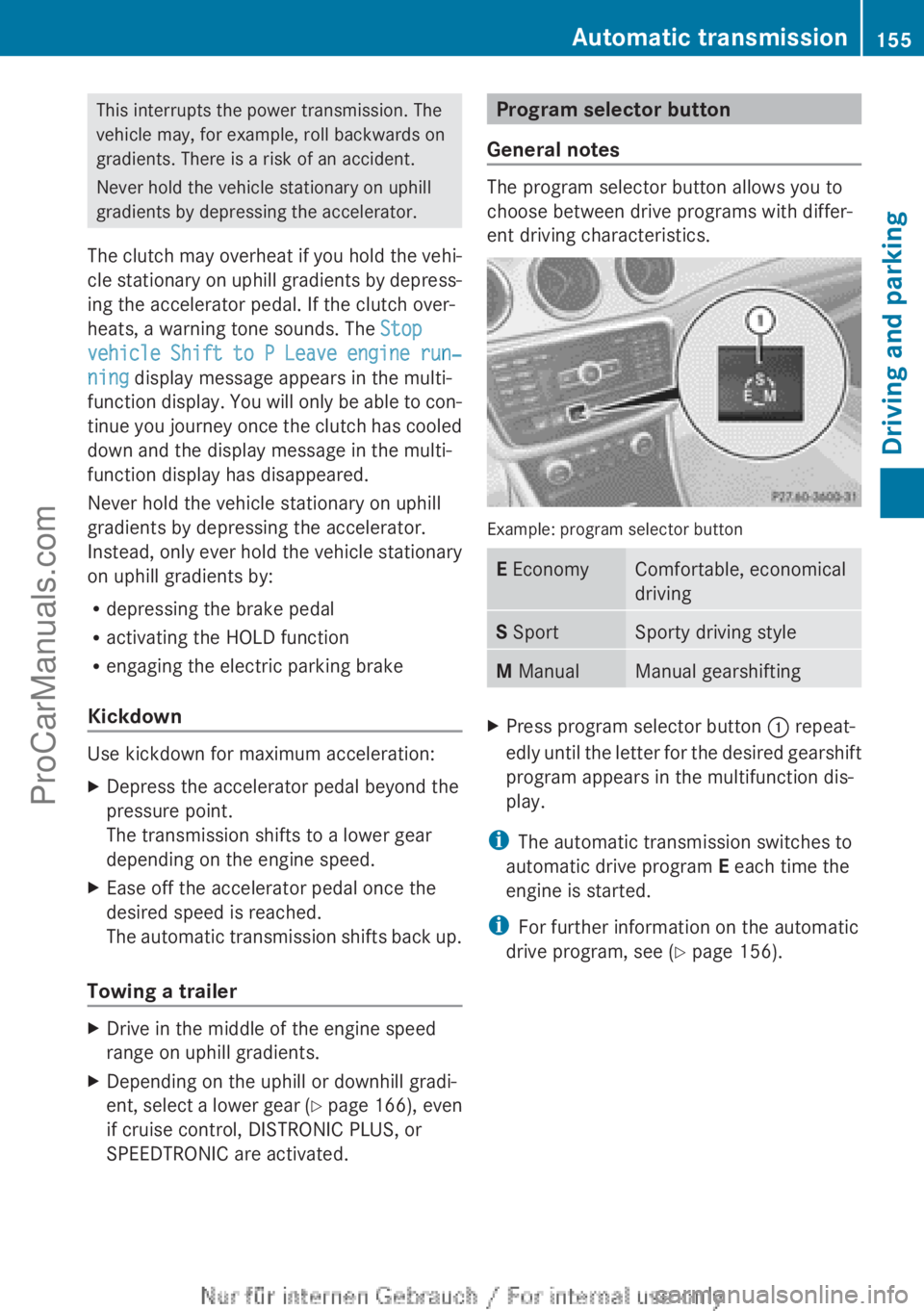
General notes
The program selector button allows you to
choose between drive programs with differ-
ent driving characteristics.
Example: program selector button
E EconomyComfortable, economical
drivingS SportSporty driving styleM ManualManual gearshiftingXPress program selector button : repeat-
edly until the letter for the desired gearshift
program appears in the multifunction dis-
play.
i The automatic transmission switches to
automatic drive program E each time the
engine is started.
i For further information on the automatic
drive program, see ( Y page 156).
Automatic transmission155Driving and parkingZProCarManuals.com
Page 158 of 352
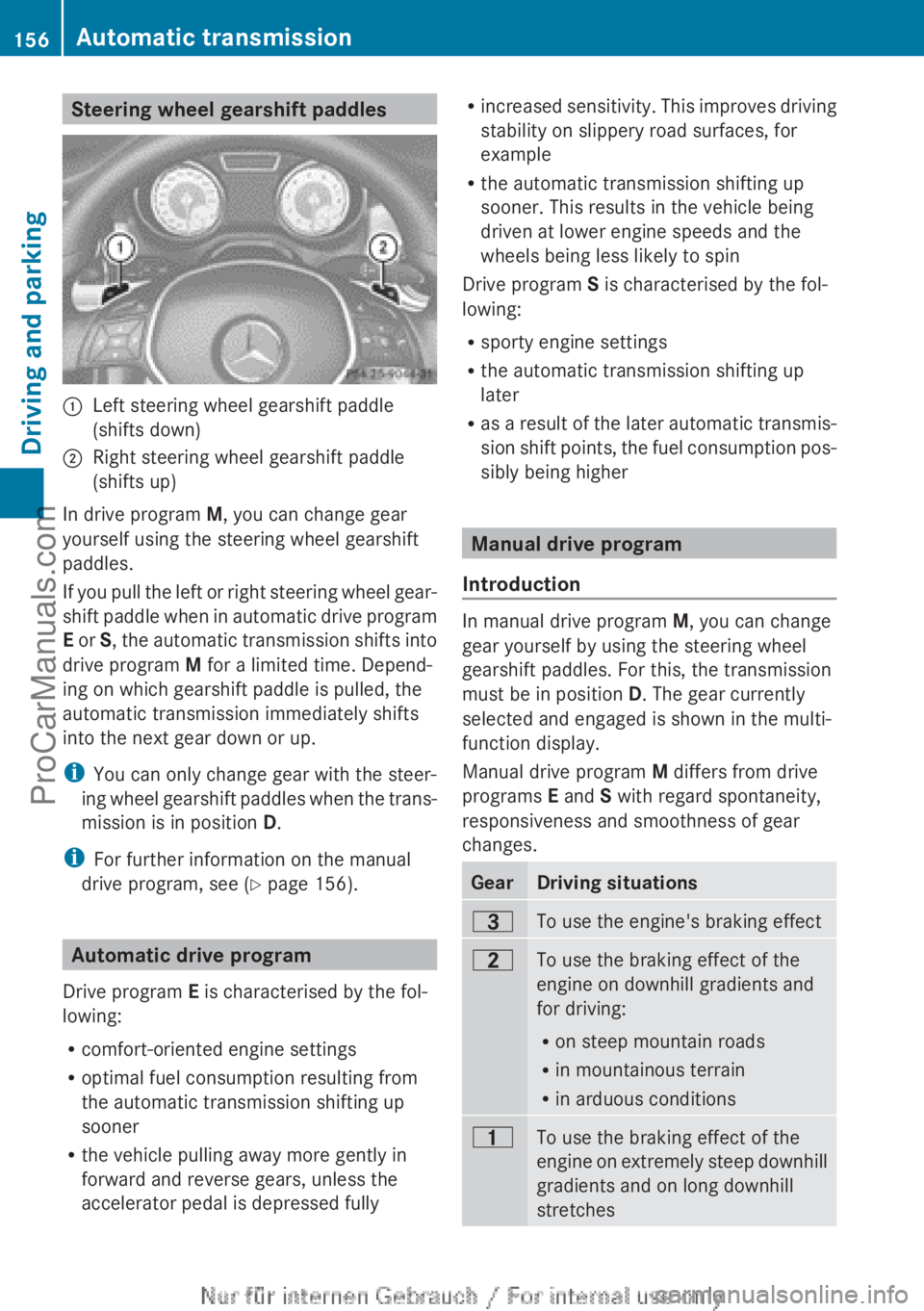
Steering wheel gearshift paddles:Left steering wheel gearshift paddle
(shifts down);Right steering wheel gearshift paddle
(shifts up)
In drive program M, you can change gear
yourself using the steering wheel gearshift
paddles.
If you pull the left or right steering wheel gear-
shift paddle when in automatic drive program
E or S, the automatic transmission shifts into
drive program M for a limited time. Depend-
ing on which gearshift paddle is pulled, the
automatic transmission immediately shifts
into the next gear down or up.
i You can only change gear with the steer-
ing wheel gearshift paddles when the trans-
mission is in position D.
i For further information on the manual
drive program, see ( Y page 156).
Automatic drive program
Drive program E is characterised by the fol-
lowing:
R comfort-oriented engine settings
R optimal fuel consumption resulting from
the automatic transmission shifting up
sooner
R the vehicle pulling away more gently in
forward and reverse gears, unless the
accelerator pedal is depressed fully
R increased sensitivity. This improves driving
stability on slippery road surfaces, for
example
R the automatic transmission shifting up
sooner. This results in the vehicle being
driven at lower engine speeds and the
wheels being less likely to spin
Drive program S is characterised by the fol-
lowing:
R sporty engine settings
R the automatic transmission shifting up
later
R as a result of the later automatic transmis-
sion shift points, the fuel consumption pos-
sibly being higher
Manual drive program
Introduction
In manual drive program M, you can change
gear yourself by using the steering wheel
gearshift paddles. For this, the transmission
must be in position D. The gear currently
selected and engaged is shown in the multi-
function display.
Manual drive program M differs from drive
programs E and S with regard spontaneity,
responsiveness and smoothness of gear
changes.
GearDriving situations=To use the engine's braking effect5To use the braking effect of the
engine on downhill gradients and
for driving:
R on steep mountain roads
R in mountainous terrain
R in arduous conditions4To use the braking effect of the
engine on extremely steep downhill
gradients and on long downhill
stretches156Automatic transmissionDriving and parking
ProCarManuals.com
Page 159 of 352
Activating the manual drive program
Activating permanently
XPress the program selector button
( Y page 155) repeatedly until M appears in
the multifunction display.
Manual drive program M remains active
until drive program E or S is engaged.
Activating temporarily
XPull the right or left steering wheel gearshift
paddle ( Y page 156).
M is shown in the multifunction display.
Manual drive program M is temporarily
active. Depending on which gearshift pad-
dle is pulled, the automatic transmission
immediately shifts into the next gear down
or up.
i When manual drive program M is activa-
ted via the steering wheel gearshift pad-
dles, the temporarily active manual drive
program M will be deactivated automati-
cally after a limited time, if the driving sit-
uation permits. In this case, the automatic
transmission shifts into the automatic drive
program that was last engaged, i.e. E or S.
When driving on downhill gradients, the
temporarily active manual drive program
M will only be deactivated if the accelerator
pedal is depressed while the vehicle is roll-
ing downhill.
Upshifting
XPull the right-hand steering wheel gearshift
paddle ( Y page 156).
The automatic transmission shifts up to the
next gear.
i In order to prevent engine damage, the
automatic transmission automatically
shifts up if:
R the maximum engine speed for the cur-
rently engaged gear is reached and
R you continue to accelerate.
DownshiftingXPull the left-hand steering wheel gearshift
paddle ( Y page 156).
The automatic transmission shifts down to
the next gear.
i If you slow down or stop without shifting
down, the automatic transmission auto-
matically shifts down.
i For maximum acceleration, pull the left-
hand steering wheel gearshift paddle until
the transmission selects the optimum gear
for the current speed.
i If the engine exceeds the maximum
engine speed when shifting down, the auto-
matic transmission protects against engine
damage by not shifting down.
Kickdown
You can also use kickdown for maximum
acceleration in manual drive program M.
XDepress the accelerator pedal beyond the
pressure point.
The transmission shifts to a lower gear
depending on the engine speed.XShift back up once the desired speed is
reached.
i During kickdown, you cannot shift gears
using the steering wheel gearshift paddles.
i If you apply full throttle, the automatic
transmission shifts up to the next gear
when the maximum engine speed is
reached. This prevents the engine from
overrevving.
Switching off the manual drive program
XPress the program selector button
( Y page 155) repeatedly until E or S
appears in the multifunction display.Automatic transmission157Driving and parkingZProCarManuals.com
Page 162 of 352
on the ignition if you accidentally refuel
with the wrong fuel. Otherwise, the fuel will
enter the fuel system. Even small amounts
of the wrong fuel could result in damage to
the fuel system and the engine. The repair
costs are high. Notify a qualified specialist
workshop and have the fuel tank and fuel
lines drained completely.
! Overfilling the fuel tank could damage the
fuel system.
! Take care not to spill any fuel on painted
surfaces. You could otherwise damage the
paintwork.
! Use a filter when adding fuel from a fuel
can. The fuel lines and/or the diesel injec-
tion system could otherwise be blocked by
particles from the fuel can.
Do not get into the vehicle again during the
refuelling process. Otherwise, electrostatic
charge could build up again.
If you overfill the fuel tank, some fuel may
spray out when you remove the fuel pump
nozzle.
For further information on fuel and fuel quality
( Y page 337).
Refuelling
Opening/closing the fuel filler flap
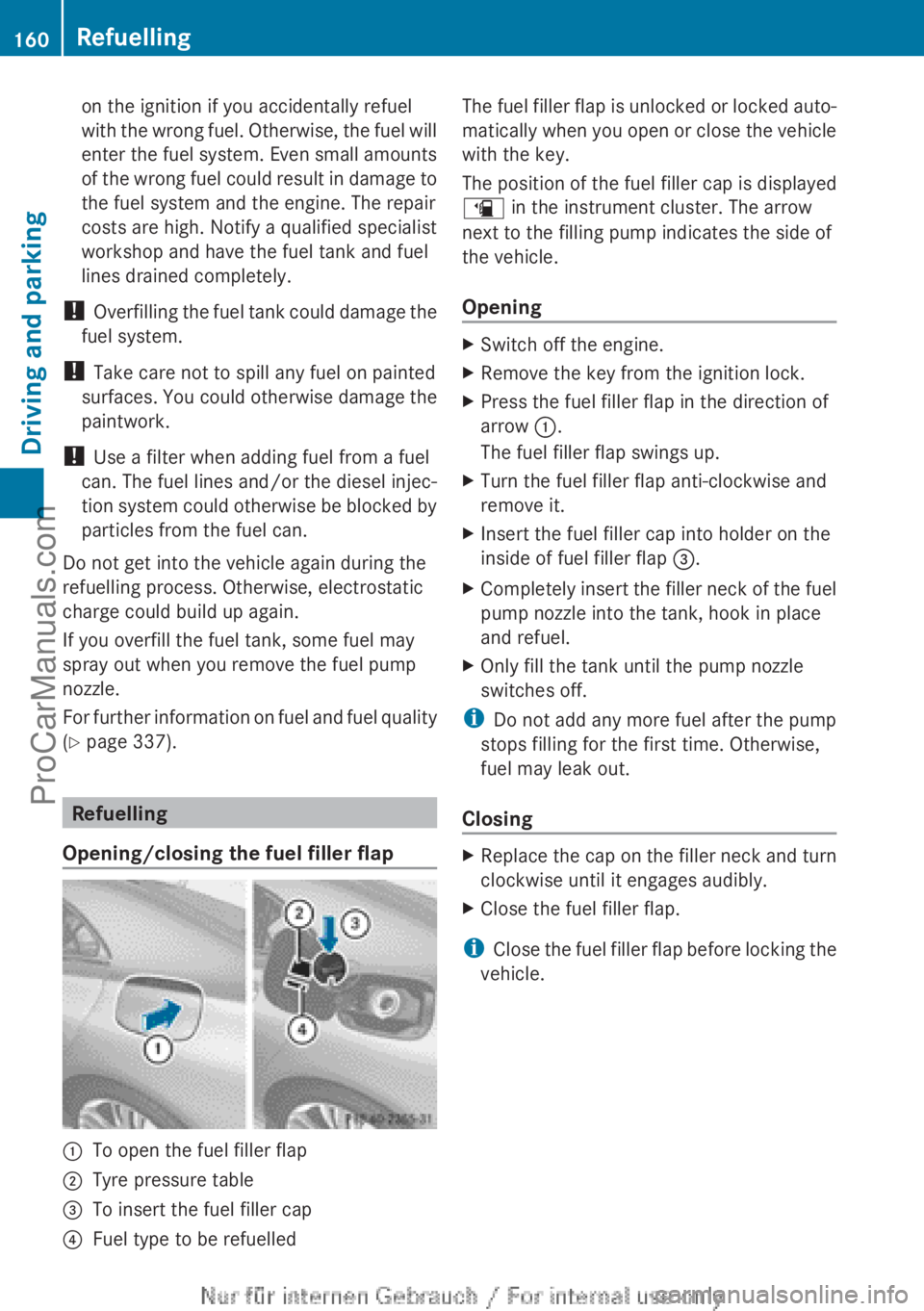
:To open the fuel filler flap;Tyre pressure table=To insert the fuel filler cap?Fuel type to be refuelledThe fuel filler flap is unlocked or locked auto-
matically when you open or close the vehicle
with the key.
The position of the fuel filler cap is displayed
æ in the instrument cluster. The arrow
next to the filling pump indicates the side of
the vehicle.
OpeningXSwitch off the engine.XRemove the key from the ignition lock.XPress the fuel filler flap in the direction of
arrow :.
The fuel filler flap swings up.XTurn the fuel filler flap anti-clockwise and
remove it.XInsert the fuel filler cap into holder on the
inside of fuel filler flap =.XCompletely insert the filler neck of the fuel
pump nozzle into the tank, hook in place
and refuel.XOnly fill the tank until the pump nozzle
switches off.
i Do not add any more fuel after the pump
stops filling for the first time. Otherwise,
fuel may leak out.
Closing
XReplace the cap on the filler neck and turn
clockwise until it engages audibly.XClose the fuel filler flap.
i Close the fuel filler flap before locking the
vehicle.
160RefuellingDriving and parking
ProCarManuals.com