AUX MERCEDES-BENZ CLA-Class 2014 C117 Comand Manual
[x] Cancel search | Manufacturer: MERCEDES-BENZ, Model Year: 2014, Model line: CLA-Class, Model: MERCEDES-BENZ CLA-Class 2014 C117Pages: 270, PDF Size: 5.76 MB
Page 206 of 270
Switching to the MUSIC REGISTER
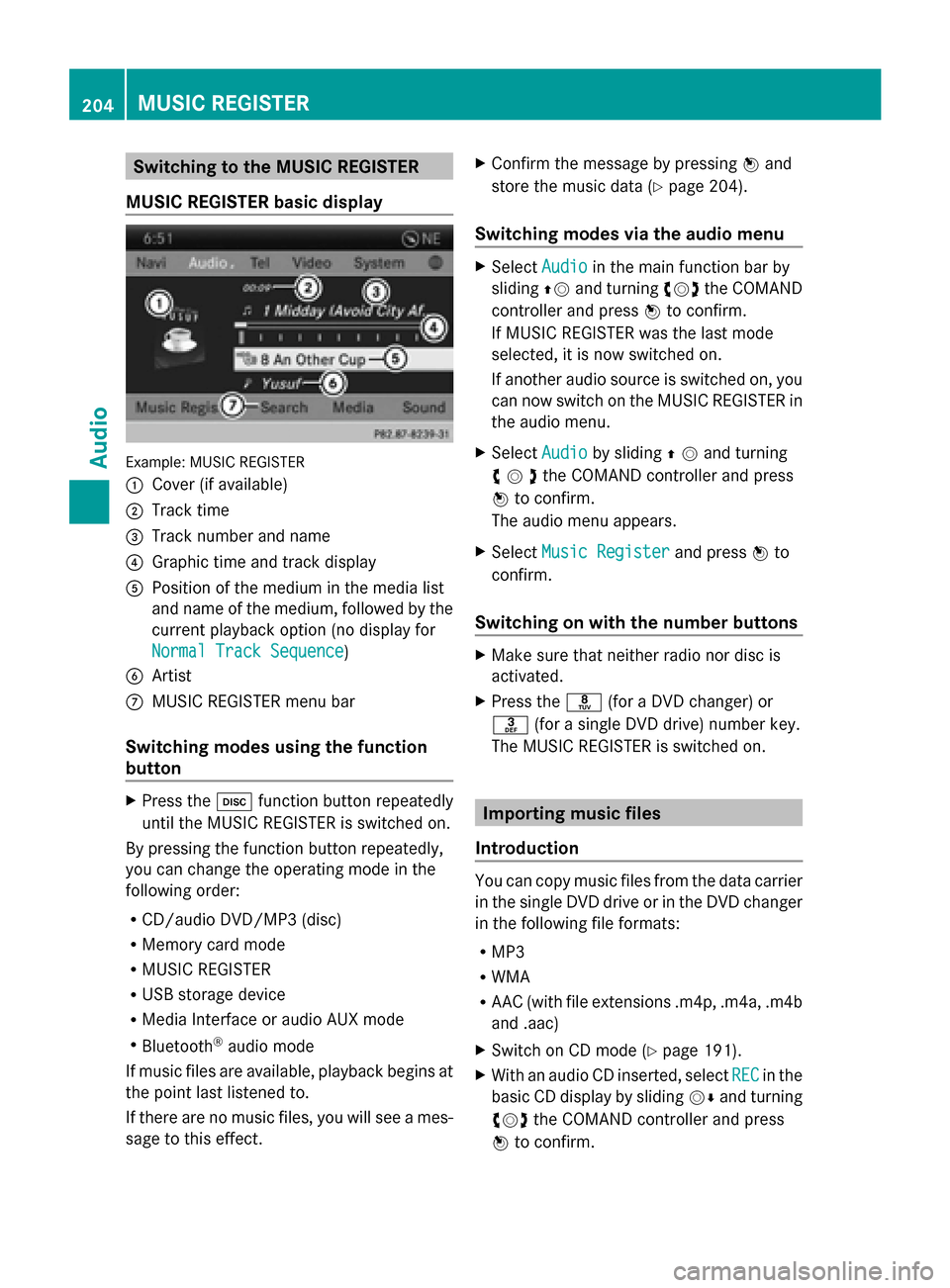
MUSIC REGISTER basic display Example: MUSIC REGISTER
0043
Cover (if available)
0044 Track time
0087 Track number and name
0085 Graphic time and track display
0083 Position of the medium in the media list
and name of the medium, followed by the
current playback option (no display for
Normal Track Sequence
Normal Track Sequence)
0084 Artist
006B MUSIC REGISTER menu bar
Switching modes using the function
button X
Press the 003Afunction button repeatedly
until the MUSIC REGISTER is switched on.
By pressing the function button repeatedly,
you can change the operating mode in the
following order:
R CD/audio DVD/MP3 (disc)
R Memory card mode
R MUSIC REGISTER
R USB storage device
R Media Interface or audio AUX mode
R Bluetooth ®
audio mode
If music files are available, playback begins at
the point last listened to.
If there are no music files, you will see a mes-
sage to this effect. X
Confirm the message by pressing 0098and
store the music data (Y page 204).
Switching modes via the audio menu X
Select Audio Audioin the main function bar by
sliding 00970052and turning 00790052007Athe COMAND
controller and press 0098to confirm.
If MUSIC REGISTER was the last mode
selected, it is now switched on.
If another audio source is switched on, you
can now switch on the MUSIC REGISTER in
the audio menu.
X Select Audio Audioby sliding 00970052and turning
00790052007Athe COMAND controller and press
0098 to confirm.
The audio menu appears.
X Select Music Register Music Register and press0098to
confirm.
Switching on with the number buttons X
Make sure that neither radio nor disc is
activated.
X Press the 0088(for a DVD changer) or
0083 (for a single DVD drive) number key.
The MUSIC REGISTER is switched on. Importing music files
Introduction You can copy music files from the data carrier
in the single DVD drive or in the DVD changer
in the following file formats:
R
MP3
R WMA
R AAC (with file extensions .m4p, .m4a, .m4b
and .aac)
X Switch on CD mode (Y page 191).
X With an audio CD inserted, select REC RECin the
basic CD display by sliding 00520064and turning
00790052007A the COMAND controller and press
0098 to confirm. 204
MUSIC REGISTERAudio
Page 214 of 270
Using the function button
X
Press the 003Afunction button one or more
times.
By pressing the function button repeatedly,
you can change the operating mode in the
following order:
R CD/audio DVD/MP3 (disc)
R Memory card mode
R MUSIC REGISTER
R USB storage device
R Media Interface or audio AUX mode
R Bluetooth ®
audio mode
Using the media list X
Select Bluetooth Audio Bluetooth Audio in the media list
by turning 00790052007Athe COMAND controller
and press 0098to confirm (Y page 193).
COMAND activates the connected device.
You will see a message to this effect. The
basic display then appears. Starting/stopping playback
X To start playback: select00D0by sliding
00520064 and turning 00790052007Athe COMAND con-
troller and press 0098to confirm.
Playback starts. 00DBis selected.
X To stop playback: select00DBby turning
00790052007A the COMAND controller and press
0098 to confirm.
A message appears. 00D0is selected.
X To continue playback: select00D0by
turning 00790052007Athe COMAND controller and
press 0098to confirm.
A message appears. 00DBis selected. Restarting playback after stopping
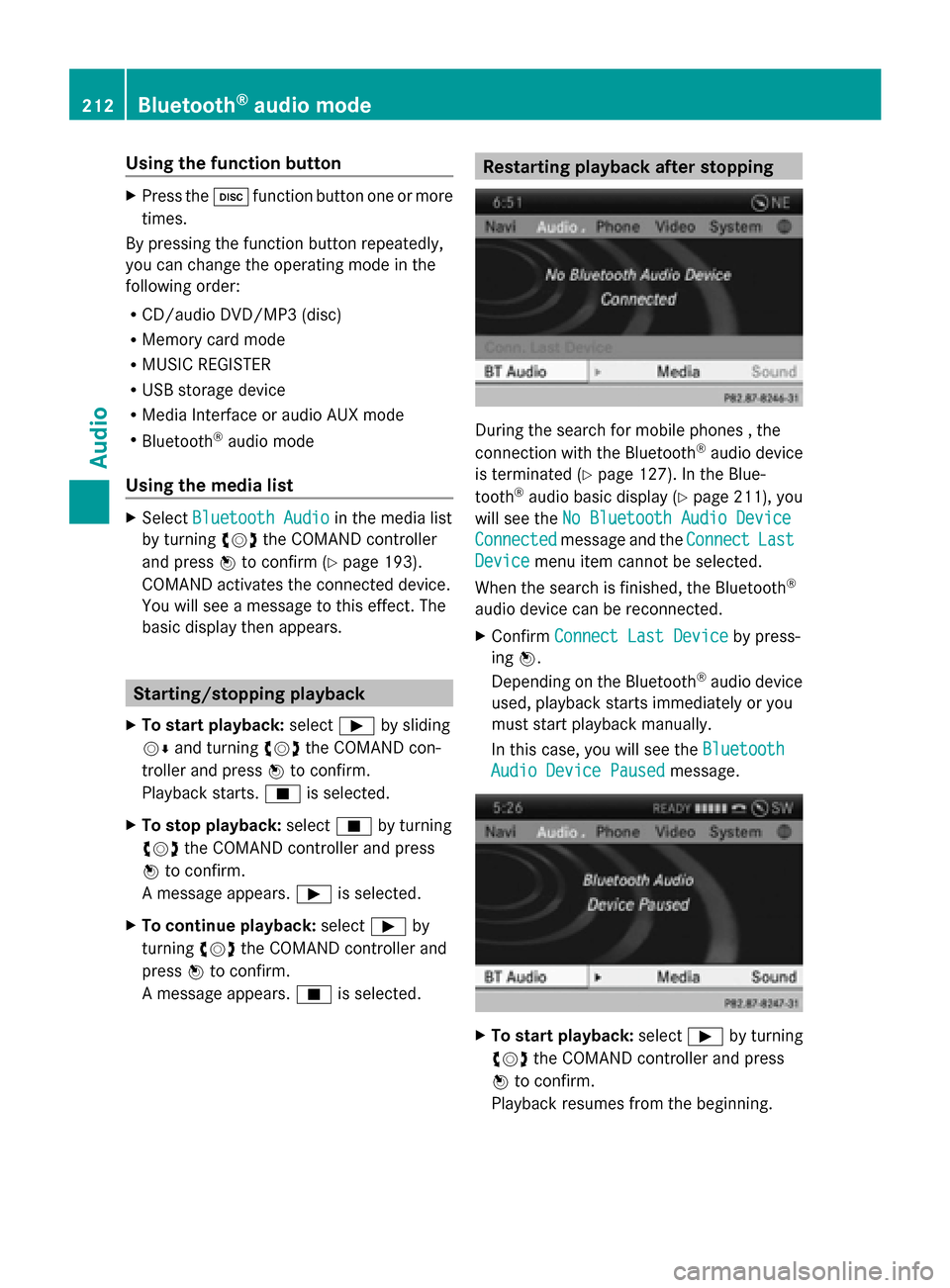
During the search for mobile phones , the
connection with the Bluetooth
®
audio device
is terminated (Y page 127). In the Blue-
tooth ®
audio basic display (Y page 211), you
will see the No Bluetooth Audio Device
No Bluetooth Audio Device
Connected Connected message and the Connect
ConnectLast
Last
Device
Device menu item cannot be selected.
When the search is finished, the Bluetooth ®
audio device can be reconnected.
X Confirm Connect Last Device
Connect Last Device by press-
ing 0098.
Depending on the Bluetooth ®
audio device
used, playback starts immediately or you
must start playback manually.
In this case, you will see the Bluetooth Bluetooth
Audio Device Paused
Audio Device Paused message. X
To start playback: select00D0by turning
00790052007A the COMAND controller and press
0098 to confirm.
Playback resumes from the beginning. 212
Bluetooth ®
audio modeAudio
Page 215 of 270
Selecting a track
The function is not supported by all Blue-
tooth ®
audio devices.
X To skip forward or back to a track: press
the 0048 or0049 button on COMAND.
or
X Press the 0063or0064 button briefly on
the multifunction steering wheel.
X Rapid scroll: press and hold the 0063
or 0064 button on the multifunction steer-
ing wheel until the desired track is reached.
If you press and hold the 0063or0064 but-
ton, the rapid scrolling speed is increased. Selecting playback options
If the Bluetooth ®
audio device supports the
corresponding function, the following options
are available:
R Normal Track Sequence Normal Track Sequence
The tracks are played in the normal order
(e.g. track 1, 2, 3, etc.).
Audio data playback is determined by the
order in which the tracks are written to the
data carrier. Alphabetical order is the most
common. Once all the tracks in a folder
have been played, the tracks in the next
folder are played.
R Random Tracks
Random Tracks
All the tracks on the medium are played in
random order (e.g. track 3, 8, 5 etc.).
X Select BT BTAudio
Audio by sliding 00520064and turning
00790052007A the COMAND controller and press
0098 to confirm.
The 003Bdot indicates the option selected.
X Select the option by turning 00790052007Athe
COMAND controller and press 0098to con-
firm.
If you select Random Tracks
Random Tracks, you will see
a corresponding symbol in the display/
selection window. Increasing the volume on COMAND
X
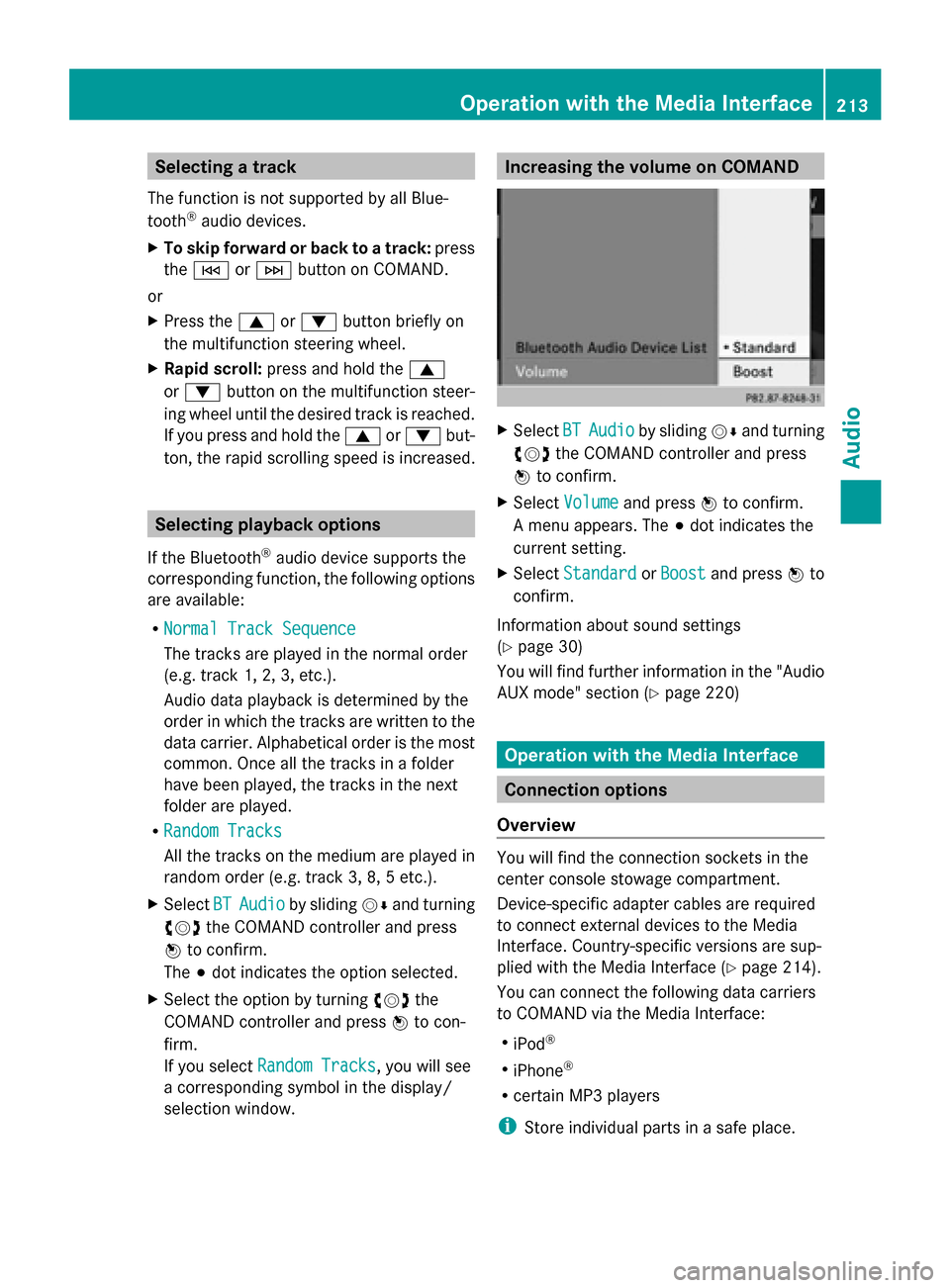
Select BT
BT Audio Audio by sliding 00520064and turning
00790052007A the COMAND controller and press
0098 to confirm.
X Select Volume
Volume and press 0098to confirm.
A menu appears. The 003Bdot indicates the
current setting.
X Select Standard
Standard orBoost
Boost and press 0098to
confirm.
Information about sound settings
(Y page 30)
You will find further information in the "Audio
AUX mode" section (Y page 220) Operation with the Media Interface
Connection options
Overview You will find the connection sockets in the
center console stowage compartment.
Device-specific adapter cables are required
to connect external devices to the Media
Interface. Country-specific versions are sup-
plied with the Media Interface (Y
page 214).
You can connect the following data carriers
to COMAND via the Media Interface:
R iPod ®
R iPhone ®
R certain MP3 players
i Store individual parts in a safe place. Operation with the Media Interface
213Audio Z
Page 217 of 270
R
the Media Interface connection is faulty.
R a mass storage device (e.g. a USB memory
stick or USB hard drive) is connected to the
Media Interface.
In this case the Please connect the
Please connect the
device to the other USB port
device to the other USB port mes-
sage appears.
i The separate USB connection ensures
quick access and expanded media content
options.
i Consult an authorized Mercedes-Benz
Center if you have further questions.
Disconnecting an iPod ®
X Press the release buttons on iPod ®
plug 0044and pull the iPod ®
cable from the
iPod ®
, see the separate cable kit instruc-
tions. Switching to Media Interface mode
General notes In extreme cases, starting up individual func-
tions can take up to several minutes – this
depends on the external device and its con-
tent (e.g. video podcasts).
Only use the original software to save files on
iPods ®
or MP3 players. Otherwise, some or
all functions may not be available.
Switching on automatically X
Connect an external device (Y page 214).
COMAND activates the device (if con-
nected via the iPod ®
connector or USB
socket). The basic display then appears.
Switching modes using the function
button The external device is connected to the Media
Interface.
X Press the 003Afunction button one or more
times. By pressing the function button repeatedly,
you can change the operating mode in the
following order:
R
CD/audio DVD/MP3 (disc)
R Memory card mode
R MUSIC REGISTER
R USB storage device
R Media Interface or audio AUX mode
R Bluetooth ®
audio mode
Switching on using a number key X
Press the 007Fnumber key (for a DVD
changer) or the 0085number key (for a
single DVD drive).
This selects the connected external audio
device directly.
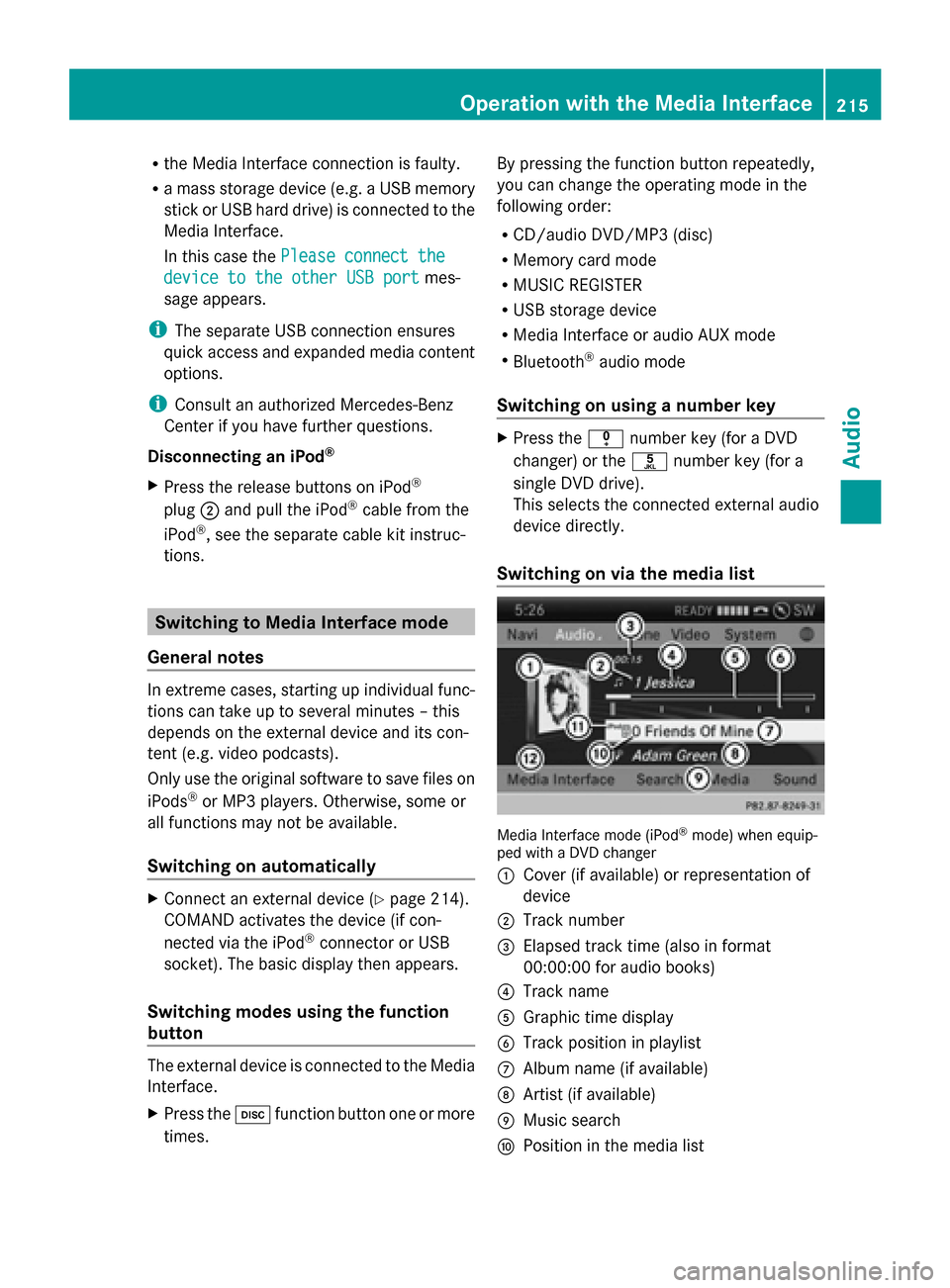
Switching on via the media list Media Interface mode (iPod
®
mode) when equip-
ped with a DVD changer
0043 Cover (if available) or representation of
device
0044 Track number
0087 Elapsed track time (also in format
00:00:00 for audio books)
0085 Track name
0083 Graphic time display
0084 Track position in playlist
006B Album name (if available)
006C Artist (if available)
006D Music search
006E Position in the media list Operation
withthe Media Interface
215Audio Z
Page 222 of 270
Audio AUX mode
Notes on audio AUX mode
External audio sources may have different
volumes, which can mean that system mes-
sages such as traffic announcements and
navigation system announcements are much
louder. If necessary, deactivate the system
messages or adjust their volume manually.
You can connect an external audio source
(AUX) to COMAND.
Depending on the vehicle model series the
connection is made via a jack in the storage
compartment in the center console or via the
USB port (Y page 191).
If COMAND is equipped with the Media Inter-
face, external audio sources are connected
using the cable set provided. An AUX socket
is not provided. The connections for the
Media Interface are located in the stowage
compartment in the center console.
i You will find further information online at
http://www.mbusa-mobile.com. Or call
the Mercedes-Benz Customer Assistance
Center at 1-800-FOR-MERCedes
(1-800-367-6372 )(for the USA) or Cus-
tomer Relations at 1-800-387-010 0(for
Canada). Switching to audio AUX mode
Switching modes using the function
button The external device is connected to the audio
AUX in.
X Press the 003Afunction button one or more
times.
By pressing the function button repeatedly,
you can change the operating mode in the
following order:
R CD/audio DVD/MP3 (disc)
R Memory card mode
R MUSIC REGISTER
R USB storage device R
Media Interface or audio AUX mode
R Bluetooth ®
audio mode
Switching modes via the audio menu When you connect an external audio source,
audio AUX is not selected automatically.
X
Select Audio
Audio in the main function bar by
sliding 00970052and turning 00790052007Athe COMAND
controller and press 0098to confirm.
If AUX mode was the last mode selected, it
will now be active.
If another audio source is switched on, you
can now switch to audio AUX mode in the
audio menu.
X Select Audio Audiousing00970052and press 0098to
confirm.
The audio menu appears.
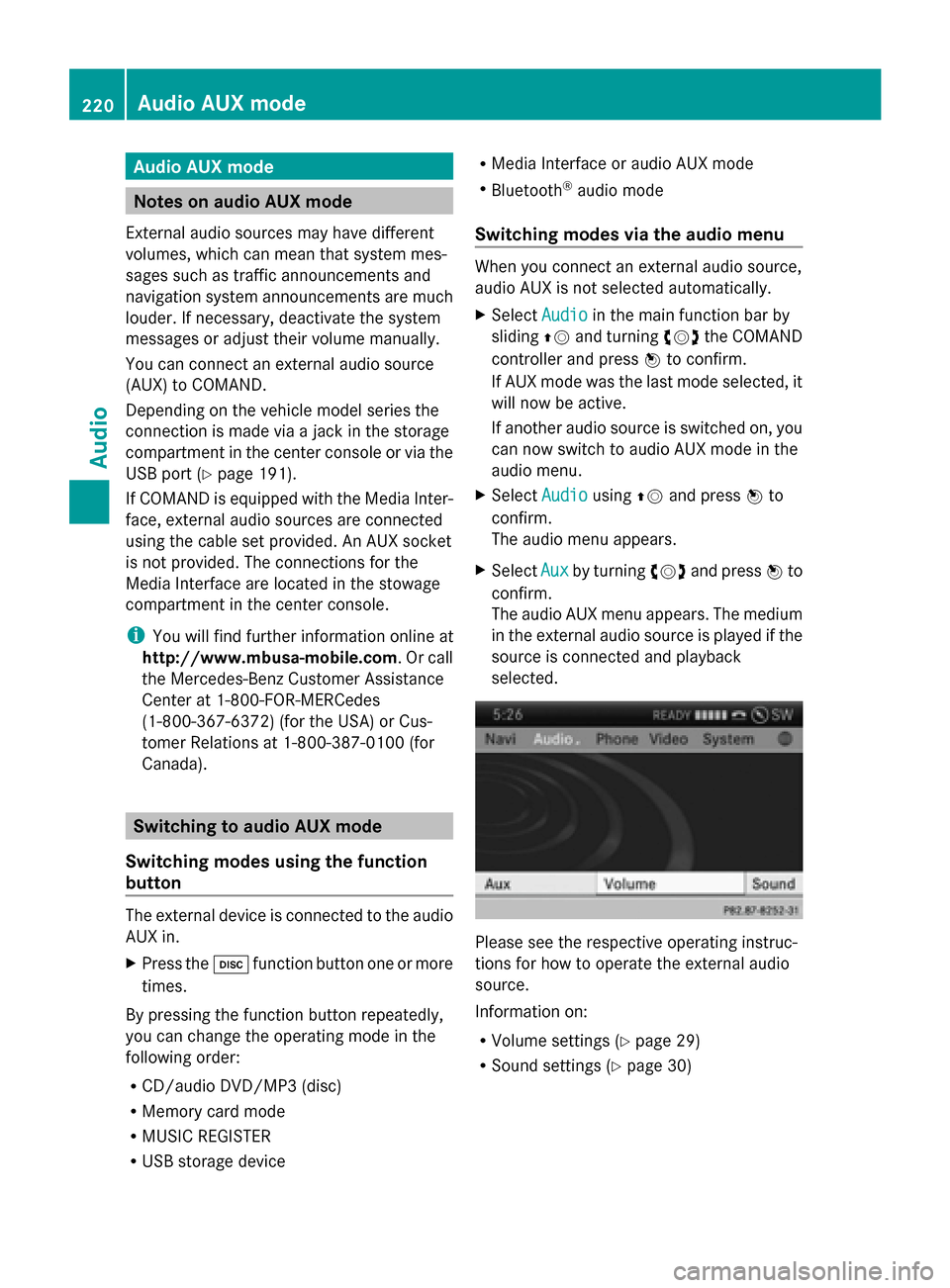
X Select Aux Auxby turning 00790052007Aand press 0098to
confirm.
The audio AUX menu appears. The medium
in the external audio source is played if the
source is connected and playback
selected. Please see the respective operating instruc-
tions for how to operate the external audio
source.
Information on:
R
Volume settings (Y page 29)
R Sound settings (Y page 30)220
Audio AUX modeAudio
Page 223 of 270

Increasing the volume on COMAND
X
Select Volume
Volume in the AUX display by turning
00790052007A the COMAND controller and press
0098 to confirm.
A menu appears. The 003Bdot indicates the
current setting.
X Select Standard
Standard orBoost
Boost and press 0098to
confirm.
Standard Standard: the volume of the external audio
source is adjusted to a standard value.
Boost
Boost: the volume of the external audio
source is raised by approximately 10 dB.
A device which is connected as an external
audio source may seem quieter or louder in
the vehicle, or the usual maximum volume
cannot be achieved. On some devices, it is
possible to adjust the volume separately. In
this case, start at a medium volume and
increase it gradually. This enables you to
determine whether the system is able to play
the music at high volume without distorting
it. Audio AUX mode
221Audio Z
Page 225 of 270
Your COMAND equipment
................224
General information .........................224
Basic settings .................................... 224
Video DVD mode ............................... 224
AUX video mode ................................ 230
Picture viewer ................................... 231 223Video
Page 226 of 270
Your COMAND equipment
These operating instructions describe all the
standard and optional equipment for your
COMAND system, as available at the time of
going to print. Country-specific differences
are possible. Please note that your
COMAND system may not be equipped with
all the features described. General information
Automatic picture shutoff
The video image is only displayed for the
driver when the transmission lever is in posi-
tion P.
SPLITVIEW allows the front passenger to view
the video image (Y page 38).
When the transmission lever is disengaged
from position P, the following message
appears in the display: In order not to
In order not to
distract
distract you youfrom
from the
thetraffic
traffic situa‐
situa‐
tion,
tion, the
thepicture
picture is
isfaded
faded out
outwhile
while
the vehicle is in motion.
the vehicle is in motion.
As soon as the selector lever of the transmis-
sion is returned to position P, the video image
is shown. Basic settings
Adjusting the brightness, contrast or
color
X In video DVD or video AUX mode, press the
0098 COMAND Controller.
The menu is shown.
X Select DVD-Video
DVD-Video orAux Aux by turning 00790052
the COMAND controller and press 0098to
confirm.
A menu appears. X
Select Brightness
Brightness ,Contrast Contrast orColor
Color by
turning 00790052the COMAND controller and
press 0098to confirm.
X Set the value between - 5 and + 5 and press
0098 to confirm. Changing the picture format
X Press 0098the COMAND controller.
The menu is shown.
X Select DVD-Video DVD-Video by sliding00520064and turn-
ing 00790052 the COMAND controller and press
0098 to confirm.
A menu appears.
X Select 16:9 Optimized
16:9 Optimized, 4:3
4:3orWide‐
Wide‐
screen
screen and press 0098to confirm.
The dot in front of the entry indicates the
currently selected format.
X Select a setting by turning 00790052the
COMAND controller and press 0098to con-
firm. Video DVD mode
Important safety notes
G
WARNING
The CD/DVD drive is a class 1 laser product.
If you open the CD/DVD drive housing, you
could be exposed to invisible laser radiation.
This laser radiation could damage your retina.
There is a risk of injury.
Never open the housing. Always have main-
tenance and repair work carried out at a quali-
fied specialist workshop. G
WARNING
Handling discs while driving may distract you
from traffic conditions. You could also lose
control of the vehicle. There is a risk of an
accident.
Handle discs only when the vehicle is station-
ary. 224
Video DVD
modeVideo
Page 228 of 270
Switching modes using the function
button
X
Press the 003Afunction button.
COMAND switches to the previous disc
operating mode.
By pressing the function button repeatedly,
you can change the operating mode in the
following order:
R Video DVD/CD/audio DVD/MP3 in the
DVD changer or DVD single drive (disc
mode)
R Memory card mode
R MUSIC REGISTER
R USB storage device
R Media Interface or audio AUX mode
R Bluetooth ®
audio mode
X DVD changer: selectMedia
Media by sliding
00520064 and turning 00790052007Athe COMAND con-
troller and press 0098to confirm.
Single DVD drive: selectMedia Media by sliding
00520064 and turning 00790052007Athe COMAND con-
troller and press 0098to confirm.
X Select a ývideo DVD from the media list
(Y page 228).
Switching on with the video menu X
Select Video
Videoin the main function bar by
sliding 00970052and turning 00790052007Athe COMAND
controller and press 0098to confirm.
Video DVD mode is switched on. Showing/hiding the control menu
X To show: in DVD video mode, slide 009700520064
the COMAND controller.
X To hide: slide009700520064 the COMAND control-
ler.
or
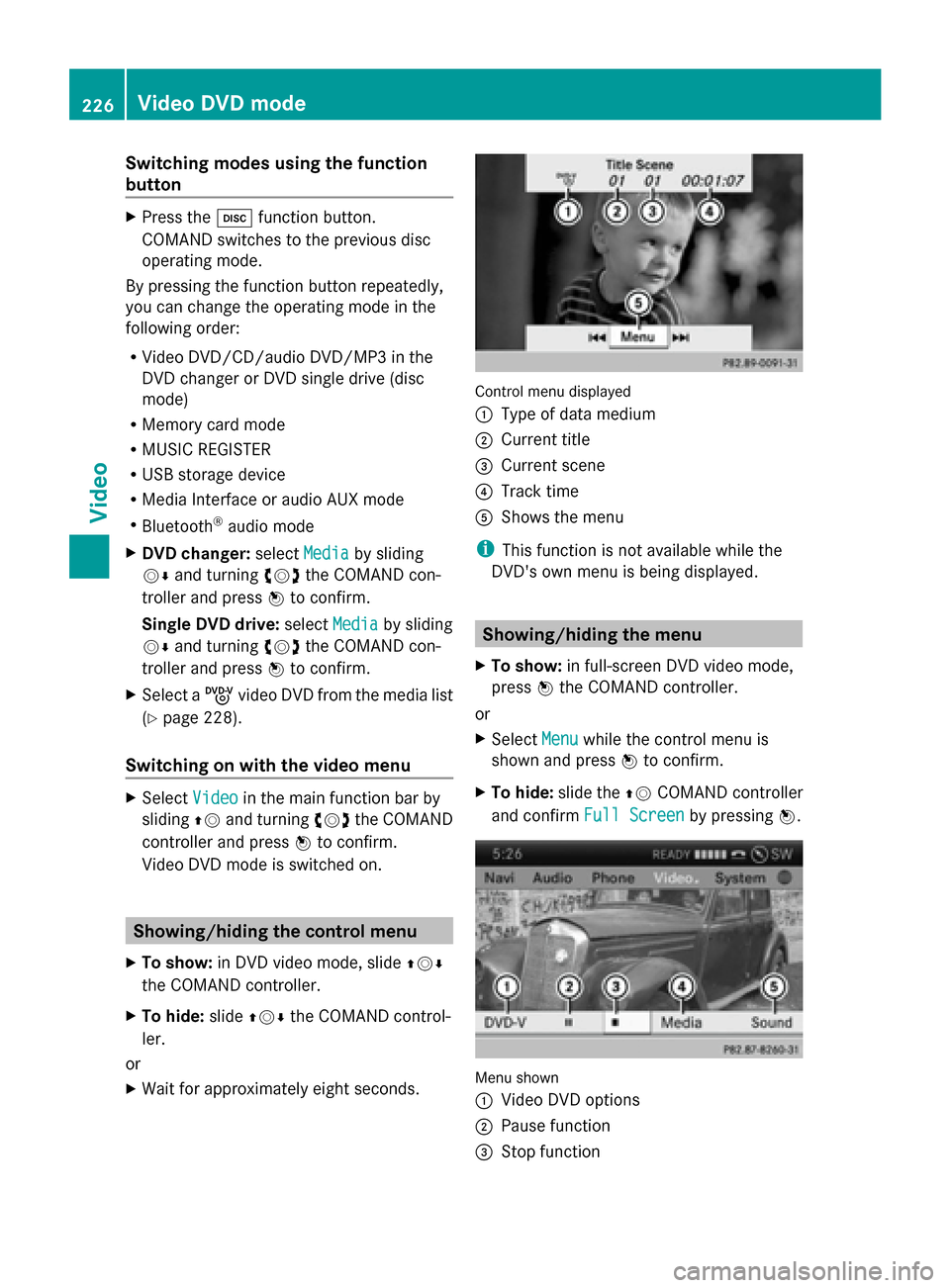
X Wait for approximately eight seconds. Control menu displayed
0043
Type of data medium
0044 Current title
0087 Current scene
0085 Track time
0083 Shows the menu
i This function is not available while the
DVD's own menu is being displayed. Showing/hiding the menu
X To show: in full-screen DVD video mode,
press 0098the COMAND controller.
or
X Select Menu Menuwhile the control menu is
shown and press 0098to confirm.
X To hide: slide the 00970052COMAND controller
and confirm Full Screen
Full Screen by pressing0098. Menu shown
0043
Video DVD options
0044 Pause function
0087 Stop function 226
Video DVD modeVideo
Page 232 of 270
you may be able to influence events by select-
ing and triggering actions. The type and num-
ber of actions depend on the DVD.
X Select an action by sliding 009700520064or009500520096 the
COMAND controller and press 0098to exe-
cute it.
A menu appears and the first entry,
Select
Select , is highlighted.
X Press 0098the COMAND controller. AUX video mode
Connecting external video sources
External video sources may have different
volumes, which can mean that system mes-
sages such as traffic announcements and
navigation system announcements are much
louder. If necessary, deactivate the system
messages or adjust their volume manually.
If your vehicle is equipped with Media Inter-
face, you can connect an external video
source (AUX video) ( Ypage 213).
The 1/8 inch audio/video jacks are in the
center console stowage compartment.
i In vehicles with a rear view camera, the
AUX video jack cannot be used for external
video sources. Switching to AUX video mode
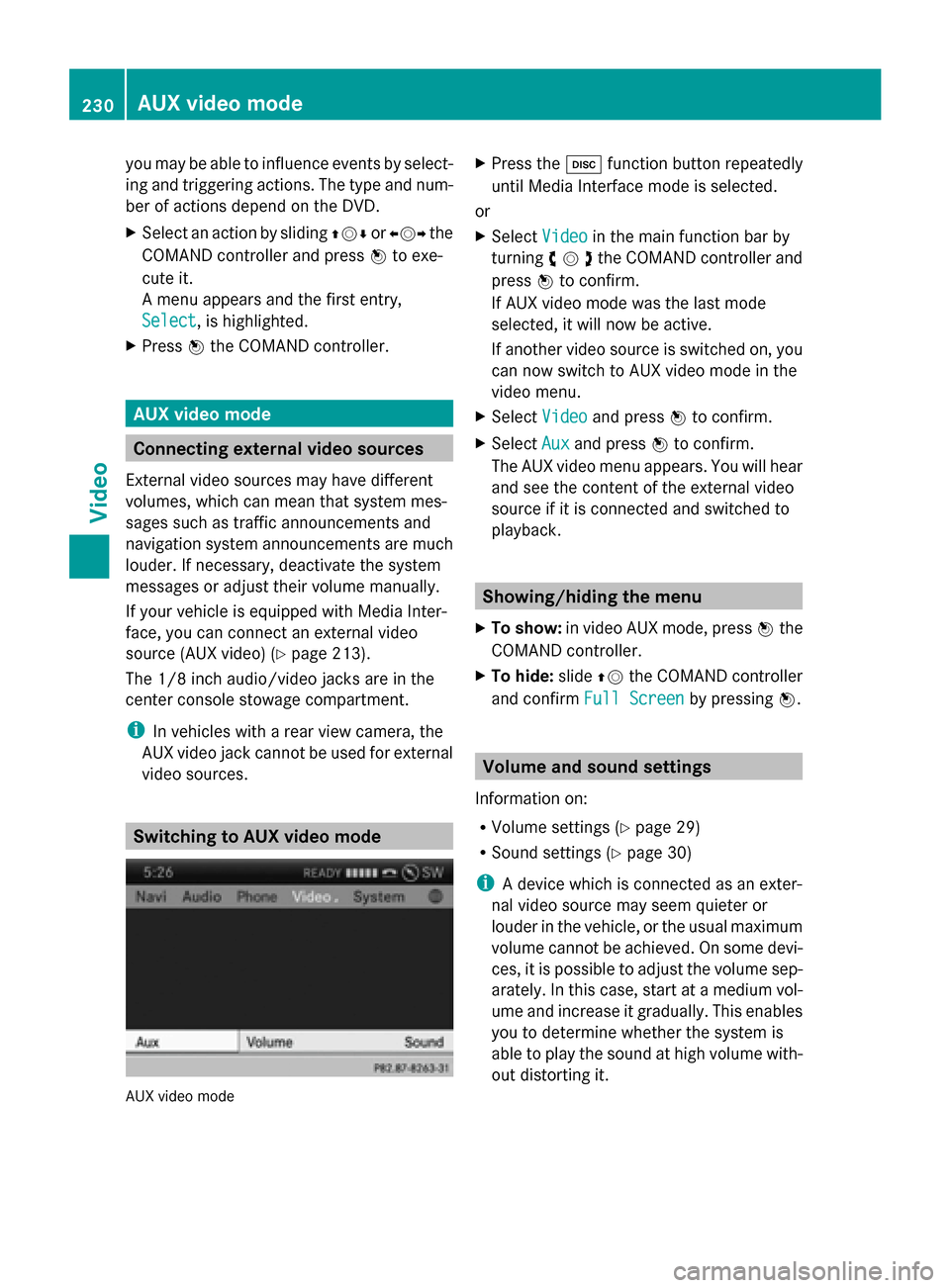
AUX video mode X
Press the 003Afunction button repeatedly
until Media Interface mode is selected.
or
X Select Video
Video in the main function bar by
turning 00790052007Athe COMAND controller and
press 0098to confirm.
If AUX video mode was the last mode
selected, it will now be active.
If another video source is switched on, you
can now switch to AUX video mode in the
video menu.
X Select Video Videoand press 0098to confirm.
X Select Aux
Auxand press 0098to confirm.
The AUX video menu appears. You will hear
and see the content of the external video
source if it is connected and switched to
playback. Showing/hiding the menu
X To show: in video AUX mode, press 0098the
COMAND controller.
X To hide: slide00970052the COMAND controller
and confirm Full Screen Full Screen by pressing0098. Volume and sound settings
Information on:
R Volume settings (Y page 29)
R Sound settings ( Ypage 30)
i A device which is connected as an exter-
nal video source may seem quieter or
louder in the vehicle, or the usual maximum
volume cannot be achieved. On some devi-
ces, it is possible to adjust the volume sep-
arately. In this case, start at a medium vol-
ume and increase it gradually. This enables
you to determine whether the system is
able to play the sound at high volume with-
out distorting it. 230
AUX video modeVideo