windshield MERCEDES-BENZ CLA-Class 2014 C117 Owner's Guide
[x] Cancel search | Manufacturer: MERCEDES-BENZ, Model Year: 2014, Model line: CLA-Class, Model: MERCEDES-BENZ CLA-Class 2014 C117Pages: 358, PDF Size: 6.6 MB
Page 127 of 358
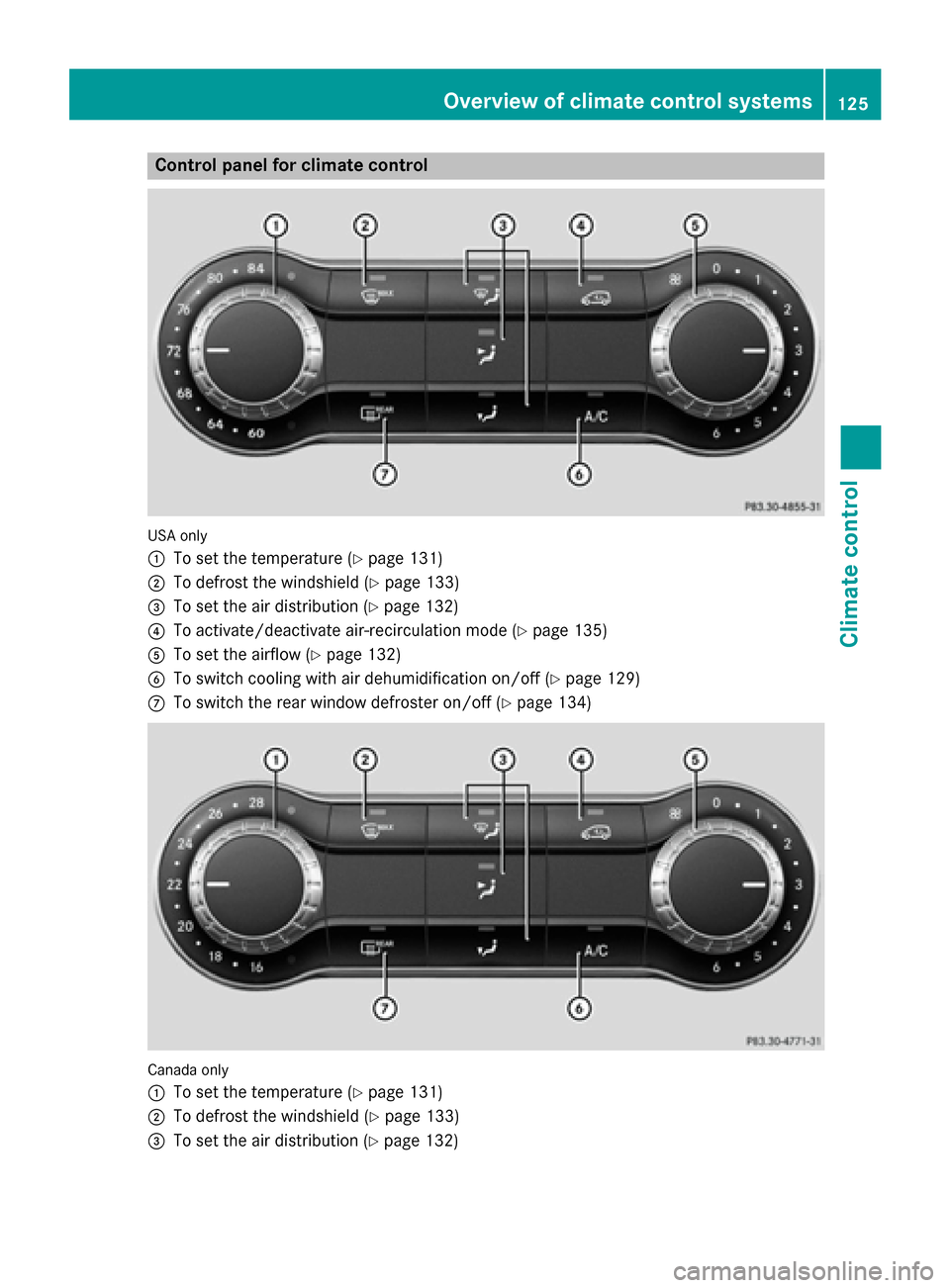
Control panel for climate control
USA only
0043
To set the temperature (Y page 131)
0044 To defrost the windshield (Y page 133)
0087 To set the air distribution (Y page 132)
0085 To activate/deactivate air-recirculation mode (Y page 135)
0083 To set the airflow (Y page 132)
0084 To switch cooling with air dehumidification on/off (Y page 129)
006B To switch the rear window defroster on/off (Y page 134)Canada only
0043
To set the temperature (Y page 131)
0044 To defrost the windshield (Y page 133)
0087 To set the air distribution (Y page 132) Overview of climate control systems
125Climate control
Page 128 of 358
0085
To activate/deactivate air-recirculation mode (Y page 135)
0083 To set the airflow (Y page 132)
0084 To switch cooling with air dehumidification on/off (Y page 129)
006B To switch the rear window defroster on/off (Y page 134)Optimum use of climate control
Automatic climate control The following contains notes and recommen-
dations on optimum use of climate control.
R Switch on the air-conditioning system by
turning control knob 0083clockwise to the
desired position (except position 0).
R Set the temperature to 72 ‡ (22 †).
R Recommendation for avoiding misted
windows at low exterior temperatures
or in rain: switch on the 005Acooling with
dehumidification function (Y page 129).
Set air distribution to 0061and if possible
switch off 009Cand009B (Ypage 132).
In air-recirculation mode, switch 008Aoff
(Y page 135).
Set airflow control 0083to a setting between
3 and 6(Y page 132).
R Recommendation for rapid cooling or
heating of the vehicle interior: briefly set
airflow control 0083to a setting between 3
and 6(Y page 132).
R Recommendation for a constant vehi-
cle interior temperature: set airflow con-
trol 0083to a setting between 1and 3
(Y page 132).
R Recommendation for air distribution in
the winter: set009B and0061
(Y page 132).
Recommendation for air distribution in
the summer: set009C or009C and0061
(Y page 132).
R Only use the "Windshield defrosting" func-
tion briefly until the windshield is clear
again.
R Only use air-recirculation mode briefly, e.g.
if there are unpleasant outside odors or when in a tunnel. The windows could oth-
erwise fog up, since no fresh air is drawn
into the vehicle in air-recirculation mode.
R Vehicles with COMAND: if you change the
settings of the climate control system, the
climate status display appears for three
seconds at the bottom of the screen in the
COMAND display. See also the separate
COMAND operating instructions. You will
see the current settings of the various cli-
mate control functions.
ECO start/stop function During automatic engine switch-off, the cli-
mate control system only operates at a
reduced capacity. If you require the full cli-
mate control output, you can switch off the
ECO start/stop function by pressing the ECO
button (Y page 144). 126
Overview of climate control systemsClimate control
Page 129 of 358
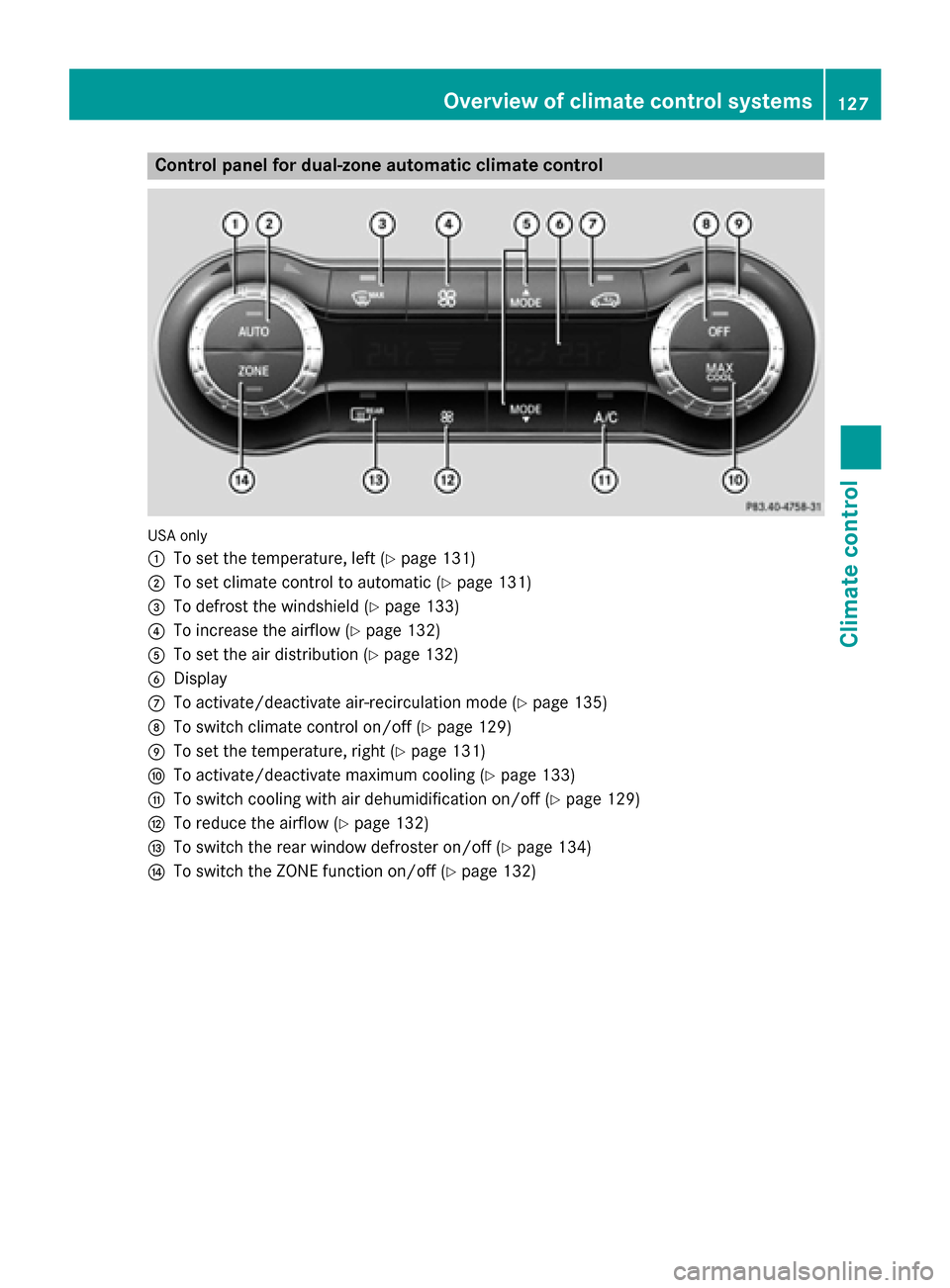
Control panel for dual-zone automatic climate control
USA only
0043
To set the temperature, left (Y page 131)
0044 To set climate control to automatic (Y page 131)
0087 To defrost the windshield (Y page 133)
0085 To increase the airflow (Y page 132)
0083 To set the air distribution (Y page 132)
0084 Display
006B To activate/deactivate air-recirculation mode (Y page 135)
006C To switch climate control on/off (Y page 129)
006D To set the temperature, right (Y page 131)
006E To activate/deactivate maximum cooling (Y page 133)
006F To switch cooling with air dehumidification on/off (Y page 129)
0070 To reduce the airflow (Y page 132)
0071 To switch the rear window defroster on/off (Y page 134)
0072 To switch the ZONE function on/off (Y page 132) Overview of climate control systems
127Climate control
Page 130 of 358
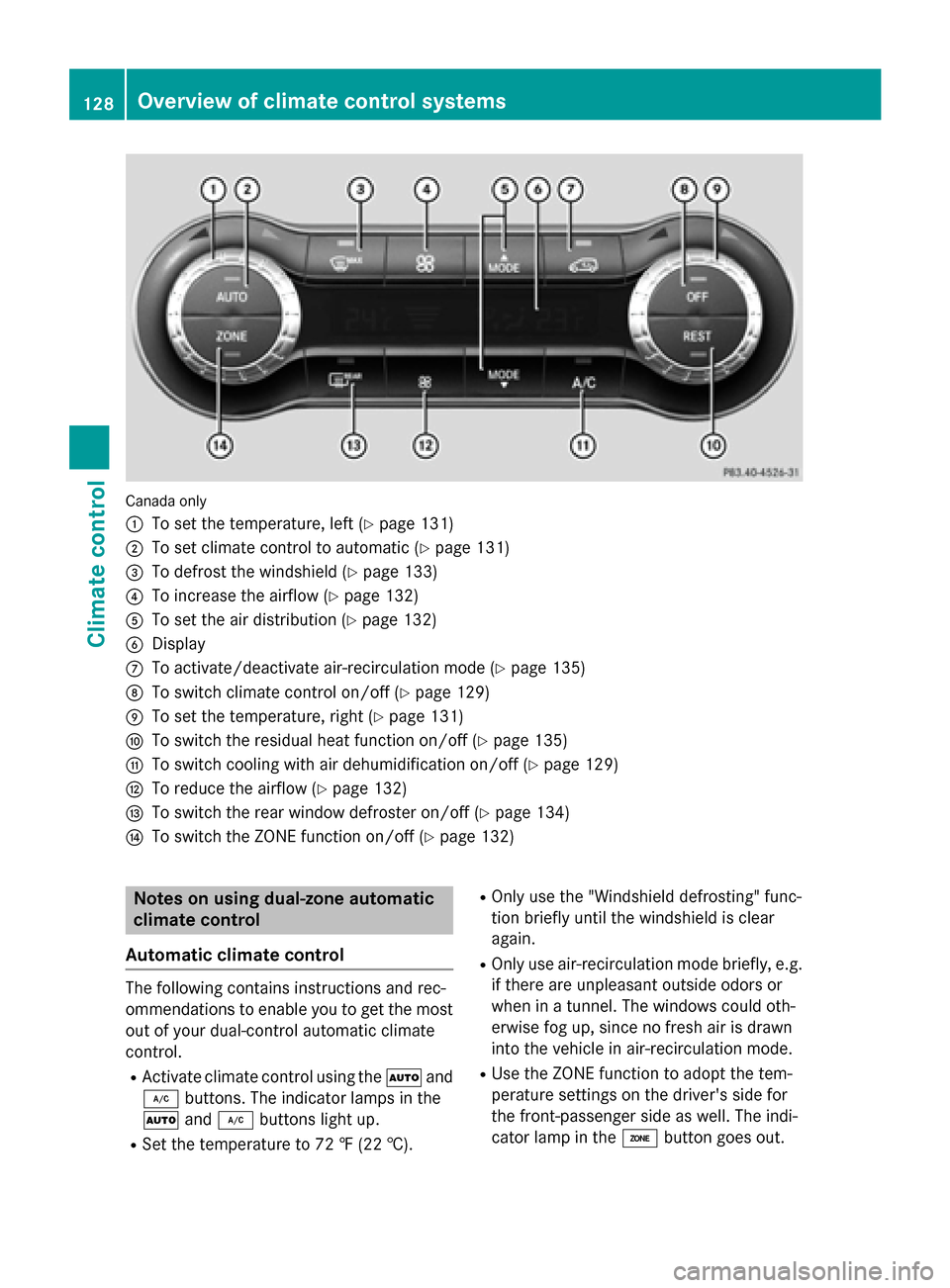
Canada only
0043
To set the temperature, left (Y page 131)
0044 To set climate control to automatic (Y page 131)
0087 To defrost the windshield (Y page 133)
0085 To increase the airflow (Y page 132)
0083 To set the air distribution (Y page 132)
0084 Display
006B To activate/deactivate air-recirculation mode (Y page 135)
006C To switch climate control on/off (Y page 129)
006D To set the temperature, right (Y page 131)
006E To switch the residual heat function on/off (Y page 135)
006F To switch cooling with air dehumidification on/off (Y page 129)
0070 To reduce the airflow (Y page 132)
0071 To switch the rear window defroster on/off (Y page 134)
0072 To switch the ZONE function on/off (Y page 132)Notes on using dual-zone automatic
climate control
Automatic climate control The following contains instructions and rec-
ommendations to enable you to get the most
out of your dual-control automatic climate
control.
R Activate climate control using the 0058and
005A buttons. The indicator lamps in the
0058 and005A buttons light up.
R Set the temperature to 72 ‡ (22 †). R
Only use the "Windshield defrosting" func-
tion briefly until the windshield is clear
again.
R Only use air-recirculation mode briefly, e.g.
if there are unpleasant outside odors or
when in a tunnel. The windows could oth-
erwise fog up, since no fresh air is drawn
into the vehicle in air-recirculation mode.
R Use the ZONE function to adopt the tem-
perature settings on the driver's side for
the front-passenger side as well. The indi-
cator lamp in the 00D6button goes out. 128
Overview of climate control systemsClimate control
Page 135 of 358
Defrosting the windshield
You can use this function to defrost the wind-
shield or to defrost the inside of the wind-
shield and the side windows.
i You should only select the "Windshield
defrosting" function until the windshield is
clear again.
X Turn the SmartKey to position 2in the igni-
tion lock (Y page 141).
X To activate: press the0064button.
The indicator lamp in the 0064button lights
up.
The climate control system switches to the
following functions:
R high airflow
R high temperature
R air distribution to the windshield and
front side windows
R air-recirculation mode off
i The "Windshield defrosting" function
automatically sets the blower output to the optimum defrosting effect. As a result, the
airflow may increase or decrease automat-
ically after the button is pressed.
i You can adjust the blower output man-
ually while the "Windshield defrosting"
function is in operation:
R Climate control: turn airflow control 0083
clockwise or counter-clockwise
(Y page 125).
R Dual-zone automatic climate control:
press the 00F2or00F3 button.
X To deactivate: press the0064button.
The indicator lamp in the 0064button goes
out. The previously selected settings are
restored. Air-recirculation mode remains
deactivated.
or
X Dual-zone automatic climate control: press
the 0058 button.
The indicator lamp in the 0064button goes
out. Airflow and air distribution are set to
automatic mode. or
X Climate control: turn temperature con-
trol 0043clockwise or counter-clockwise
(Y page 125).
Dual-zone automatic climate control: turn
temperature control 0043or006D clockwise or
counter-clockwise (Y page 127). MAX COOL maximum cooling
The MAX COOL function is only available in
vehicles for the USA.
MAX COOL is only operational when the
engine is running. X To activate: press the00C9button.
The indicator lamp in the button lights up.
X To deactivate: press the00C9button
again.
The indicator lamp goes out. The previously selected settings are restored.
When you activate MAX COOL, climate con-
trol switches to the following functions:
R maximum cooling
R maximum airflow
R air-recirculation mode on Defrosting the windows
Windows fogged up on the inside Climate control
X Activate the 005A"Cooling with air dehu-
midification" function.
X If the windows continue to fog up, activate
the 0064 "Windshield defrosting" function.
i You should only select this setting until
the windshield is clear again. Operating the climate cont
rol systems
133Climate control
Page 136 of 358
Dual-zone automatic climate control
X Activate the 005A"Cooling with air dehu-
midification" function.
X Activate automatic mode 0058.
X If the windows continue to fog up, activate
the 0064 "Windshield defrosting" function.
i You should only select this setting until
the windshield is clear again.
Windows fogged up on the outside X
Activate the windshield wipers.
X Set the air distribution to 009Cor009B.
i You should only select this setting until
the windshield is clear again. Rear window defroster
General notes The rear window defroster has a high current
draw. You should therefore switch it off as
soon as the rear window is clear. Otherwise,
the rear window defroster switches off auto-
matically after several minutes.
If the battery voltage is too low, the rear win-
dow defroster may switch off.
Activating/deactivating X
Turn the SmartKey to position 2in the igni-
tion lock (Y page 141).
X Press the 006Cbutton.
The indicator lamp in the 006Cbutton lights
up or goes out. 134
Operating the climate cont
rol systemsClimate control
Page 138 of 358
i
You cannot use the ventilation to cool the
vehicle interior to a temperature lower than the outside temperature.
Activating/deactivating X
Turn the SmartKey to position 0in the igni-
tion lock or remove it (Y page 141).
X To activate: press the004Bbutton.
The indicator lamp in the 004Bbutton lights
up.
X To deactivate: press the004Bbutton.
The indicator lamp in the 004Bbutton goes
out.
i Residual heat is deactivated automati-
cally:
R after approximately 30 minutes
R when the ignition is switched on
R if the battery voltage drops Setting the air vents
Important safety notes
G
WARNING
Very hot or very cold air can flow from the air vents. This could result in burns or frostbite in the immediate vicinity of the air vents. There
is a risk of injury.
Make sure that all vehicle occupants always
maintain a sufficient distance to the air out-
lets. If necessary, redirect the airflow to
another area of the vehicle interior.
In order to ensure the direct flow of fresh air
through the air vents into the vehicle interior,
please observe the following notes:
R keep the air inlet between the windshield
and the hood free of blockages, such as ice, snow or leaves.
R never cover the air vents or air intake grilles
in the vehicle interior.
i You can move the adjusters for the air
vents vertically or horizontally to set the
direction of the airflow. i
For optimal climate control in the vehicle,
open the air vents completely and set the
adjusters to the central position. Setting the center air vents
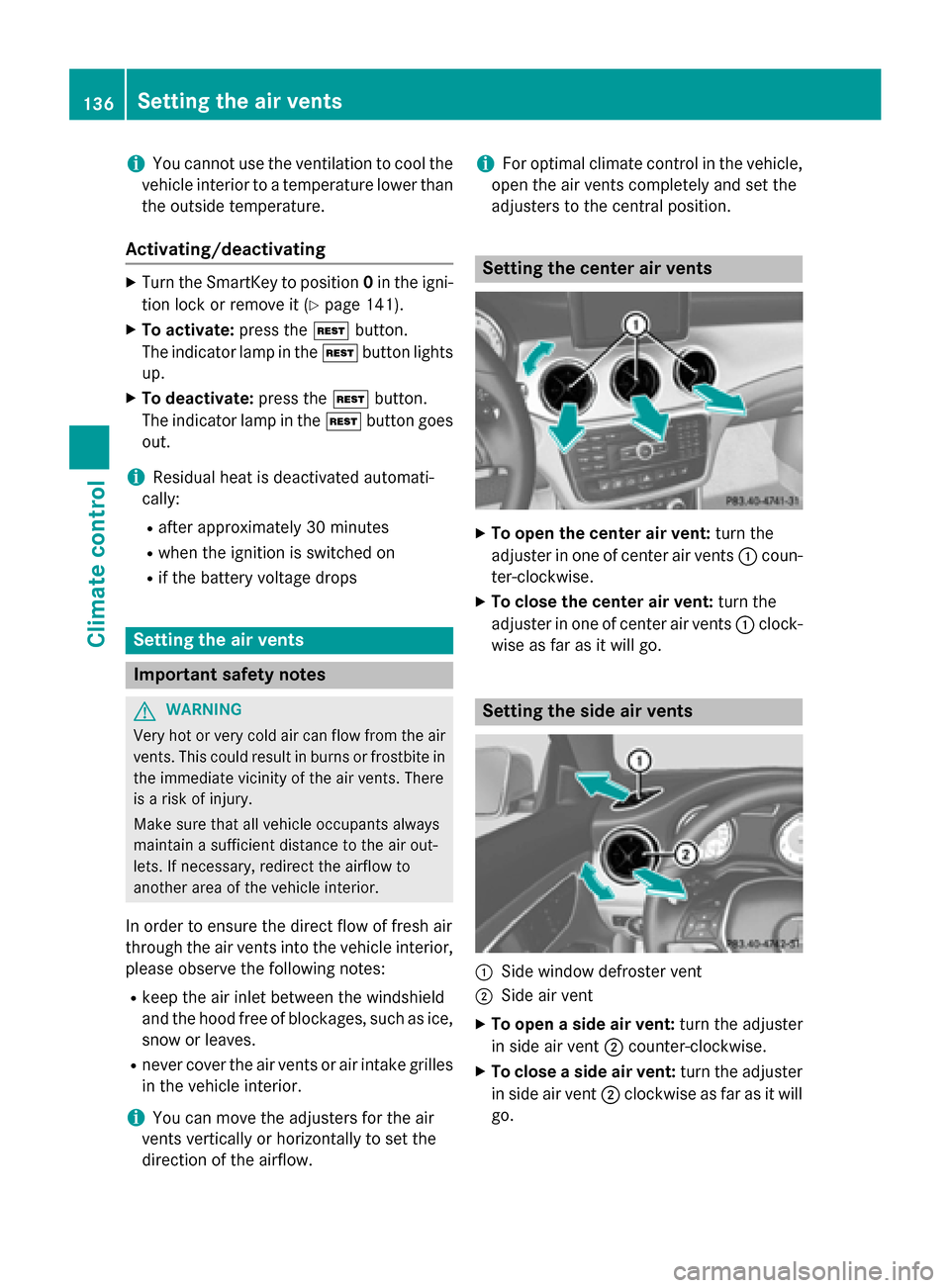
X
To open the center air vent: turn the
adjuster in one of center air vents 0043coun-
ter-clockwise.
X To close the center air vent: turn the
adjuster in one of center air vents 0043clock-
wise as far as it will go. Setting the side air vents
0043
Side window defroster vent
0044 Side air vent
X To open a side air vent: turn the adjuster
in side air vent 0044counter-clockwise.
X To close a side air vent: turn the adjuster
in side air vent 0044clockwise as far as it will
go. 136
Setting the air ventsClimate control
Page 143 of 358
G
WARNING
Unsuitable footwear can hinder correct usage of the pedals, e.g.:
R shoes with thick soles
R shoes with high heels
R slippers
There is a risk of an accident.
Wear suitable footwear to ensure correct
usage of the pedals. G
WARNING
If you switch off the ignition while driving,
safety-relevant functions are only available
with limitations, or not at all. This could affect, for example, the power steering and the brake
boosting effect. You will require considerably
more effort to steer and brake. There is a risk of an accident.
Do not switch off the ignition while driving. G
WARNING
If the parking brake has not been fully
released when driving, the parking brake can:
R overheat and cause a fire
R lose its hold function.
There is a risk of fire and an accident. Release
the parking brake fully before driving off.
! Warm up the engine quickly. Do not use
the engine's full performance until it has
reached operating temperature.
Only shift the automatic transmission to
the desired drive position when the vehicle
is stationary.
Where possible, avoid spinning the drive
wheels when pulling away on slippery
roads. You could otherwise damage the
drive train.
! AMG vehicles:
avoid full-load operation
and engine speeds greater than 5000 rpm
when the engine is cold. This helps to pro-
tect the engine and avoids uncomfortable
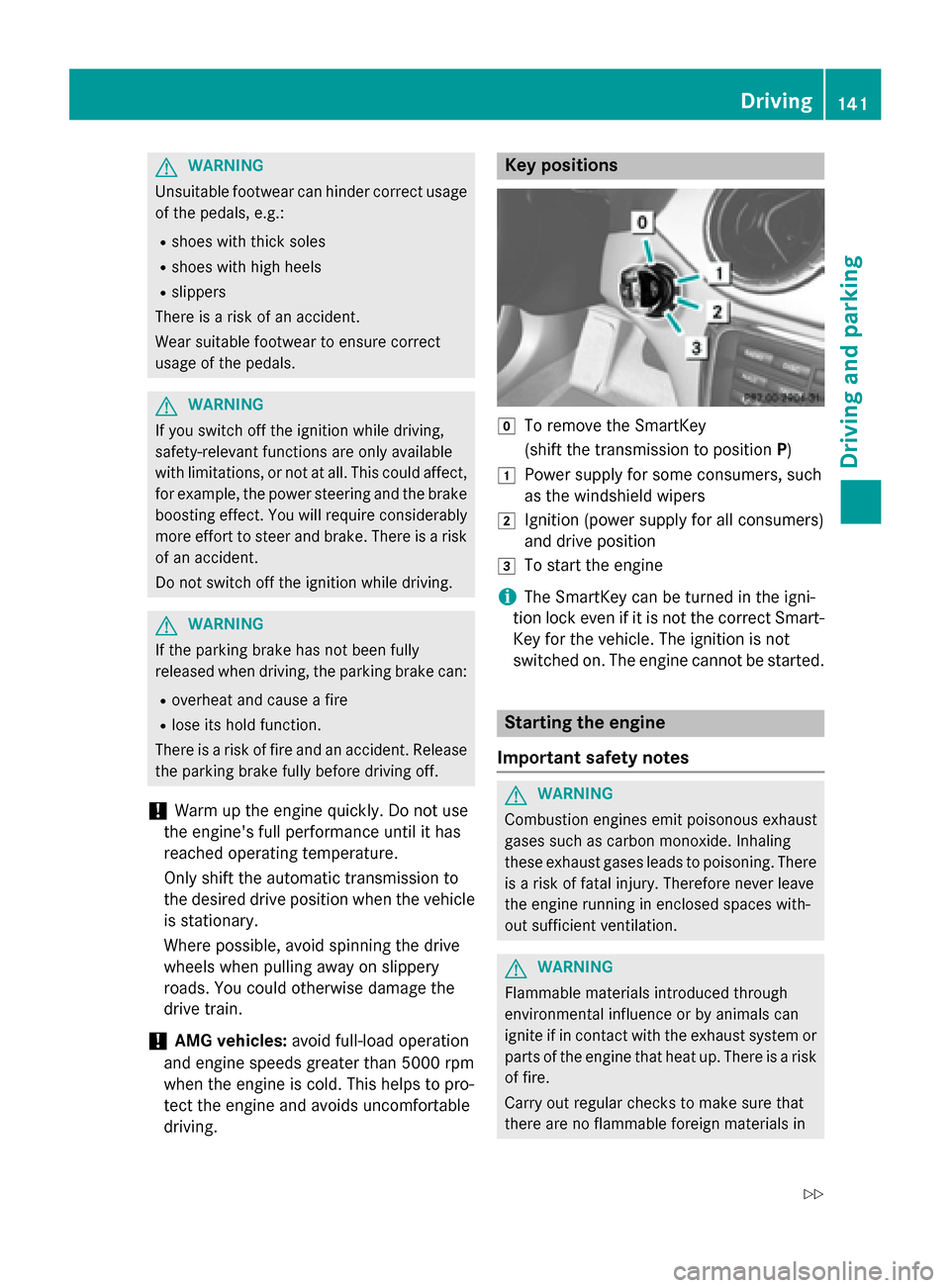
driving. Key positions
005A
To remove the SmartKey
(shift the transmission to position P)
0047 Power supply for some consumers, such
as the windshield wipers
0048 Ignition (power supply for all consumers)
and drive position
0049 To start the engine
i The SmartKey can be turned in the igni-
tion lock even if it is not the correct Smart- Key for the vehicle. The ignition is not
switched on. The engine cannot be started. Starting the engine
Important safety notes G
WARNING
Combustion engines emit poisonous exhaust
gases such as carbon monoxide. Inhaling
these exhaust gases leads to poisoning. There is a risk of fatal injury. Therefore never leave
the engine running in enclosed spaces with-
out sufficient ventilation. G
WARNING
Flammable materials introduced through
environmental influence or by animals can
ignite if in contact with the exhaust system or parts of the engine that heat up. There is a risk
of fire.
Carry out regular checks to make sure that
there are no flammable foreign materials in Driving
141Driving and parking
Z
Page 145 of 358
Hill start assist is not active if:
R you are pulling away on a level road or on a
downhill gradient.
R the transmission is in position N.
R the electric parking brake is applied.
R ESP ®
is malfunctioning.
Further information on holding the vehicle
stationary on uphill gradients (Y page 149).ECO start/stop function
Introduction The ECO start/stop function switches the
engine off automatically if the vehicle is stop- ped under certain conditions.
The engine starts automatically when the
driver wants to pull away again. The ECO
start/stop function thereby helps you to
reduce the fuel consumption and emissions
of your vehicle.
Important safety notes G
WARNING
If the engine is switched off automatically and you exit the vehicle, the engine is restarted
automatically. The vehicle may begin moving. There is a risk of accident and injury.
If you wish to exit the vehicle, always turn off
the ignition and secure the vehicle against
rolling away.
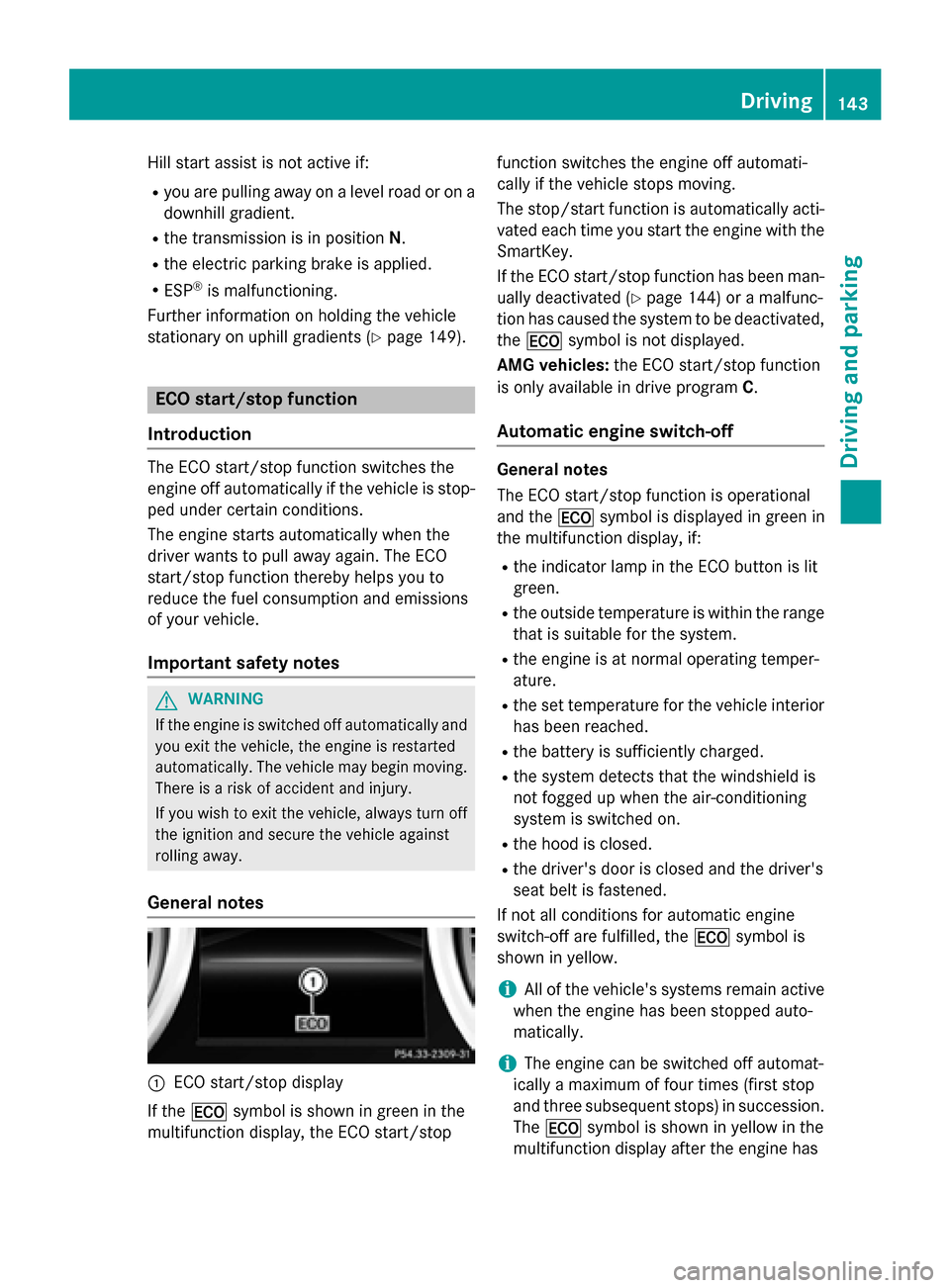
General notes 0043
ECO start/stop display
If the 00A7 symbol is shown in green in the
multifunction display, the ECO start/stop function switches the engine off automati-
cally if the vehicle stops moving.
The stop/start function is automatically acti-
vated each time you start the engine with the SmartKey.
If the ECO start/stop function has been man- ually deactivated (Y page 144) or a malfunc-
tion has caused the system to be deactivated, the 00A7 symbol is not displayed.
AMG vehicles: the ECO start/stop function
is only available in drive program C.
Automatic engine switch-off General notes
The ECO start/stop function is operational
and the
00A7symbol is displayed in green in
the multifunction display, if:
R the indicator lamp in the ECO button is lit
green.
R the outside temperature is within the range
that is suitable for the system.
R the engine is at normal operating temper-
ature.
R the set temperature for the vehicle interior
has been reached.
R the battery is sufficiently charged.
R the system detects that the windshield is
not fogged up when the air-conditioning
system is switched on.
R the hood is closed.
R the driver's door is closed and the driver's
seat belt is fastened.
If not all conditions for automatic engine
switch-off are fulfilled, the 00A7symbol is
shown in yellow.
i All of the vehicle's systems remain active
when the engine has been stopped auto-
matically.
i The engine can be switched off automat-
ically a maximum of four times (first stop
and three subsequent stops) in succession.
The 00A7 symbol is shown in yellow in the
multifunction display after the engine has Driving
143Driving and parking Z
Page 192 of 358
Warning and display messages in the
multifunction display X
Activate ATTENTION ASSIST using the on-
board computer (Y page 206).
If ATTENTION ASSIST is active, you will be
warned no sooner than 20 minutes after
your journey has begun. You then hear an
intermittent warning tone twice and the
Attention Assist: Take a Break!
Attention Assist: Take a Break!
message appears in the multifunction dis-
play.
X If necessary, take a break.
X Press the 0076or0038 button to confirm
the message.
On long journeys, take regular breaks in good time to allow yourself to rest properly. If you
do not take a break, you will be warned again
after 15 minutes at the earliest. The precon-
dition for this is that ATTENTION ASSIST still
detects typical indicators of fatigue or
increasing lapses in concentration.
ATTENTION ASSIST is reset when you con-
tinue your journey and starts assessing your
tiredness again if:
R you switch off the engine.
R you take off your seat belt and open the
driver's door, e.g. for a change of drivers or
to take a break.
When ATTENTION ASSIST is deactivated, the 00D7 symbol appears in the multifunction
display in the assistance graphic display. Speed Limit Assist
General notes Speed Limit Assist shows you detected speed
limits in the multifunction display. Data from
the navigation system is also used for this
purpose. If a traffic sign indicating a speed
limit or the end of a speed limit is detected, it
is shown in the multifunction display. If Speed
Limit Assist does not detect any traffic signs, the speed limit from the digital road map is
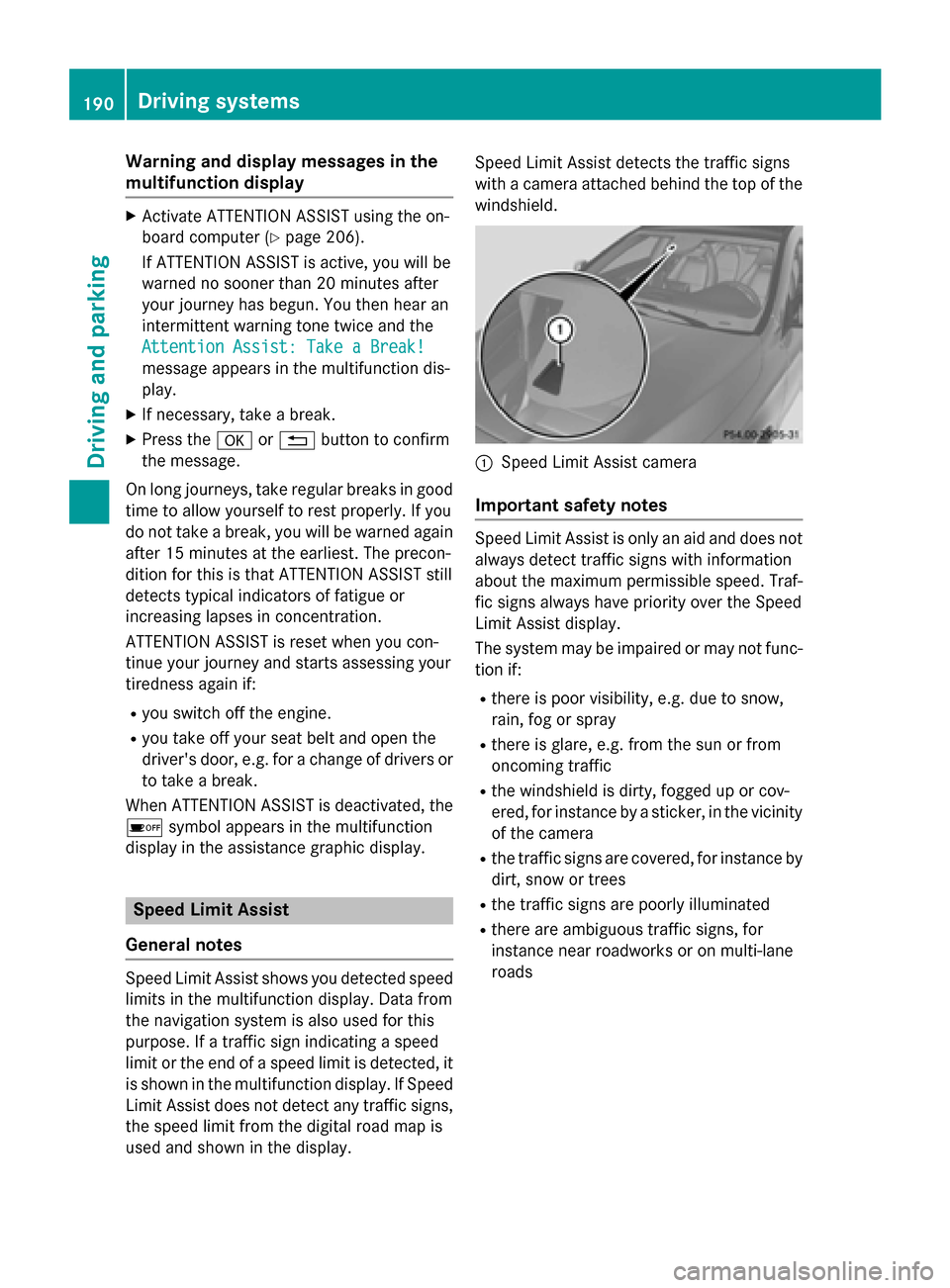
used and shown in the display. Speed Limit Assist detects the traffic signs
with a camera attached behind the top of the
windshield. 0043
Speed Limit Assist camera
Important safety notes Speed Limit Assist is only an aid and does not
always detect traffic signs with information
about the maximum permissible speed. Traf-
fic signs always have priority over the Speed
Limit Assist display.
The system may be impaired or may not func-
tion if:
R there is poor visibility, e.g. due to snow,
rain, fog or spray
R there is glare, e.g. from the sun or from
oncoming traffic
R the windshield is dirty, fogged up or cov-
ered, for instance by a sticker, in the vicinity
of the camera
R the traffic signs are covered, for instance by
dirt, snow or trees
R the traffic signs are poorly illuminated
R there are ambiguous traffic signs, for
instance near roadworks or on multi-lane
roads 190
Driving systemsDriving and parking