ECU MERCEDES-BENZ CLA-Class 2015 C117 Owner's Manual
[x] Cancel search | Manufacturer: MERCEDES-BENZ, Model Year: 2015, Model line: CLA-Class, Model: MERCEDES-BENZ CLA-Class 2015 C117Pages: 362, PDF Size: 6.93 MB
Page 14 of 362
M
M+S tires ............................................ 320
Malfunction message
see Display messages
Matte finish (cleaning instruc-
tions) .................................................. 294
mbrace
Call priority ................................... .275
Display message ............................ 224
Downloading destinations
(COMAND) ..................................... 276
Downloading routes ....................... 279
Emergency call .............................. 273
General notes ................................ 272
Geo fencing ................................... 279
Locating a stolen vehicle .............. .278
MB info call button ........................ 275
Remote fault diagnosis .................. 278
Remote vehicle locking .................. 277
Roadside Assistance button .......... 274
Search & Send ............................... 276
Self-test ......................................... 272
Speed alert ................................... .279
System .......................................... 272
Triggering the vehicle alarm ........... 279
Vehicle remote unlocking .............. 277
Mechanical key
Function/notes ................................ 76
Inserting .......................................... 77
Locking vehicle ................................ 83
Removing ......................................... 77
Unlocking the driver's door .............. 83
Memory card (audio) ......................... 207
Memory function ............................... 106
Message memory (on-board com-
puter) ................................................. .217
Messages
see Display messages
Mirror turn signal
Cleaning ......................................... 295
Mirrors
see Exterior mirrors
see Rear-view mirror
see Vanity mirror (in the sun visor)
Mobile phone
Menu (on-board computer) ............ 208 Modifying the programming
(SmartKey)
.......................................... .76
MOExtended tires .............................. 301
Mounting wheels
Lowering the vehicle ...................... 345
Mounting a new wheel ................... 344
Preparing the vehicle .................... .341
Raising the vehicle ......................... 342
Removing a wheel .......................... 344
Securing the vehicle against roll-
ing away ........................................ 342
MP3
Operation ....................................... 207
Multifunction display
Function/notes ............................ .203
Permanent display ......................... 212
Multifunction steering wheel
Operating the on-board computer .. 201Overview .......................................... 33 N
Navigation Menu (on-board computer) ............ 205
Notes on breaking-in a new vehi-
cle ....................................................... 140 O
Occupant Classification System
(OCS) Conditions ....................................... 49
Faults ............................................... 53
Operation ......................................... 49
System self-test ............................... 51
Occupant safety
Automatic measures after an acci-
dent ................................................. 56
Children in the vehicle ..................... 56
Important safety notes .................... 41
Introduction to the restraint sys-
tem ................................................. .40
Occupant Classification System
(OCS) ............................................... 49
PASSENGER AIR BAG indicator
lamps ............................................... 41
Pets in the vehicle ........................... 62
Restraint system warning lamp ........ 41 12
Index
Page 16 of 362
Program selector button
.................. 153
Protection against theft
ATA (Anti-Theft Alarm system) ......... 71
Immobilizer ...................................... 71
Protection of the environment
General notes ..................................20
Pulling away
Automatic transmission ................. 144
Hill start assist ...............................1 45Q
QR code Mercedes-Benz Guide App ................. 1
Rescue card ..................................... 26
Qualified specialist workshop ........... 24R
RACE START Important safety notes .................. 180
RACE START (AMG vehicles) ............. 180
RACETIMER (on-board computer) .... 214
Radio
Selecting a station ......................... 207
see separate operating instructions
Radio-wave reception/transmis-
sion in the vehicle
Declaration of conformity ................ 24
Rain closing feature (panorama
roof with power tilt/sliding panel) .... 92
Reading lamp ..................................... 115
Rear compartment
Setting the air vents ..................... .137
Rear fog lamp
Changing bulbs .............................. 119
Display message ............................ 231
Switching on/off ........................... 111
Rear lamps
see Lights
Rear seats
Folding the backrest forwards/
back ............................................... 266
Rear view camera
Cleaning instructions ..................... 296
Displays in the Audio displa y......... 189
Displays in the COMAND display ... 189
Function/note s............................. 189 Switching on/of
f........................... 189
Rear window defroster
Problem (malfunction) ................... 135
Switching on/of f........................... 134
Rear-view mirror
Anti-glare (manual) ........................ 103
Dipping (automatic) ....................... 104
Recuperation display ........................ 204
Refrigerant (air-conditioning sys-
tem)
Important safety notes .................. 358
Refueling
Fuel gauge ....................................... 31
Important safety notes .................. 158
Notes for AMG vehicles ................. 355
Refueling process .......................... 159
see Fuel
Remote control
Garage door opener ....................... 279
Programming (garage door
opener) .......................................... 280
Replacing bulbs
Important safety notes .................. 116
Overview of bulb types .................. 117
Removing/replacing the cover
(front wheel arch) .......................... 118
Reporting safety defects .................... 25
Rescue card ......................................... 26
Reserve (fuel tank)
see Fuel
Reserve fuel
Display message ............................ 234
Warning lamp ................................. 256
see Fuel
Residual heat (climate control) ........ 135
Restraint system
Display message ............................ 225
Introduction ..................................... 40
Warning lamp ................................. 255
Warning lamp (function) ................... 41
Reverse gear (selector lever) ........... 151
Reversing feature
Panorama sliding sunroof ................ 91
Roller sunblind ................................. 92
Side windows ................................... 86
Roadside Assistance (breakdown) .... 2214
Index
Page 17 of 362
Roller sunblind
Opening/closing .............................. 93
Panorama roof with power tilt/
sliding panel ..................................... 92
Roof carrier ........................................ 267
Roof lining and carpets (cleaning
guidelines) ......................................... 298
Roof load (maximum) ........................ 359S
Safety Children in the vehicle ..................... 56
Seat
Adjusting (Performance Seat) ........ 100
Seat belts
Adjusting the height ......................... 44
Cleaning ......................................... 298
Correct usage .................................. 44
Fastening ......................................... 44
Important safety guidelines ............. 42
Introduction ..................................... 42
Releasing ......................................... 45
Warning lamp ................................. 247
Warning lamp (function) ................... 45
Seats
Adjusting (electrically) ..................... 98
Adjusting (manually) ........................ 98
Adjusting the 4-way lumbar sup-
port ................................................ 100
Adjusting the head restraint ............ 98
Cleaning the cover ......................... 297
Correct driver's seat position ........... 96
Folding the backrest (rear com-
partment) forwards/back .............. 266
Important safety notes .................... 97
Seat heating problem .................... 102
Storing settings (memory func-
tion) ............................................... 106
Switching seat heating on/off ....... 100
Securing cargo .................................. 266
Selector lever
Cleaning ......................................... 297
Sensors (cleaning instructions) ....... 295
Service menu (on-board com-
puter) .................................................. 211
Service message
see ASSYST PLUS Service products
Brake fluid ..................................... 357
Coolant (engine) ............................ 357
Engine oil ....................................... 356
Fuel ................................................ 353
Important safety notes .................. 353
Refrigerant (air-conditioning sys-
tem) ............................................... 358
Washer fluid ................................... 358
Setting the air distribution ............... 132
Setting the airflow ............................ 132
Settings
Factory (on-board computer) ......... 213
On-board compute r....................... 211
SETUP (on-board computer) ............. 214
Side impact air bag ............................. 48
Side marker lamp (display mes-
sage) ................................................... 231
Side windows
Cleaning ......................................... 294
Convenience closing feature ............ 88
Convenience opening feature .......... 87
Important safety information ........... 86
Opening/closing .............................. 87
Problem (malfunction) ..................... 90
Resetting ......................................... 89
Reversing feature ............................. 86
Sliding sunroof
see Panorama roof with power
tilt/sliding panel
SmartKey
Changing the battery ....................... 78
Changing the programming ............. 76
Checking the battery ....................... 77
Convenience closing feature ............ 88
Convenience opening feature .......... 87
Display message ............................ 246
Door central locking/unlocking ....... 74
Important safety notes .................... 74
KEYLESS-GO start function .............. 76
Loss ................................................. 79
Mechanical key ................................ 76
Positions (ignition lock) ................. 141
Problem (malfunction) ..................... 79
Starting the engine ........................ 144
SmartKey positions (ignition lock) .. 141
Snow chains ...................................... 321 Index
15
Page 20 of 362
Tire tread (definition) ..................... 340
Total load limit (definition )............. 341
Traction ......................................... 334
Traction (definition) ....................... 340
Tread wear ..................................... 334
Uniform Tire Quality Grading
Standards ...................................... 333
Uniform Tire Quality Grading
Standards (definition) .................... 339
Wear indicator (definition) ............. 340
Wheel and tire combination ........... 347
Wheel rim (definition) .................... 339
see Flat tire
Top Tether ............................................ 59
Tow-starting
Emergency engine starting ............ 314
Important safety notes .................. 311
Installing the towing eye ................ 312
Removing the towing eye ............... 313
Towing a trailer
ESP ®
(Electronic Stability Pro-
gram) ............................................... 70
Towing away
Important safety guidelines ........... 311
Installing the towing eye ................ 312
Notes for 4MATIC vehicles ............ 314
Removing the towing eye ............... 313
Transporting the vehicle ................ 314
With both axles on the ground ....... 313
With front axle raised ..................... 313
Towing eye ......................................... 300
Transmission
see Automatic transmission
Transmission position display
(DIRECT SELECT lever) ...................... 149
Transporting the vehicle .................. 314
Trim pieces (cleaning instruc-
tions) .................................................. 297
Trip computer (on-board com-
puter) .................................................. 204
Trip odometer
Calling up ....................................... 203
Resetting (on-board computer) ...... 205
Trunk
Emergency release .......................... 85
Emergency release button ............... 86
Important safety notes .................... 83 Opening (automatically from out-
side) ................................................. 84
Opening automatically from
inside ............................................... 85
Opening/closing (manually from
outside) ............................................ 84
Trunk emergency release button ....... 86
Trunk lid
Display message ............................ 244
Opening dimensions ...................... 359
Trunk load (maximum) ...................... 359
Turn signals
Changing bulbs (front) ................... 119
Changing bulbs (rear) .................... 119
Display message ............................ 230
Switching on/of f........................... 112
Type identification plate
see Vehicle identification plate U
Unlocking Emergency unlocking ....................... 83
From inside the vehicle (central
unlocking button) ............................. 82
Upshift indicator (on-board com-
puter, AMG vehicles) ......................... 214 V
Vanity mirror (in the sun visor) ........ 269
Vehicle
Correct use ...................................... 25
Data acquisition ............................... 26
Display message ............................ 242
Equipment ....................................... 21
Individual settings .......................... 211
Limited Warranty ............................. 25
Loading .......................................... 329
Locking (in an emergency) ............... 83
Locking (SmartKey ).......................... 74
Lowering ........................................ 345
Maintenance .................................... 22
Parking for a long period ................ 163
Pulling away ................................... 144
Raising ........................................... 342
Reporting problems ......................... 25
Securing from rolling away ............ 342 18
Index
Page 26 of 362
In situations like this, the body, the under-
carriage, chassis parts, wheels or tires
could be damaged without the damage
being visible. Components damaged in this way can unexpectedly fail or, in the case of
an accident, no longer withstand the strain
they are designed to.
If the underbody paneling is damaged,
combustible materials such as leaves,
grass or twigs can gather between the
underbody and the underbody paneling. If
these materials come in contact with hot
parts of the exhaust system, they can catch fire.
In such situations, have the vehicle
checked and repaired immediately at a
qualified specialist workshop. If on con-
tinuing your journey you notice that driving
safety is impaired, pull over and stop the
vehicle immediately, paying attention to
road and traffic conditions. In such cases,
consult a qualified specialist workshop. Declarations of conformity
Vehicle components which receive
and/or transmit radio waves USA:
"The wireless devices of this vehicle
comply with Part 15 of the FCC Rules. Oper-
ation is subject to the following two condi-
tions: 1) These devices may not cause harm-
ful interference, and 2) These devices must
accept any interference received, including
interference that may cause undesired oper-
ation. Changes or modifications not expressly approved by the party responsible for com-
pliance could void the user’s authority to
operate the equipment."
Canada: "The wireless devices of this vehicle
comply with Industry Canada license-exempt RSS standard(s). Operation is subject to the
following two conditions: (1) These devices
may not cause interference, and (2) These
devices must accept any interference, includ-
ing interference that may cause undesired
operation of the device." Diagnostics connection
The diagnostics connection is only intended
for the connection of diagnostic equipment at
a qualified specialist workshop. G
WARNING
If you connect equipment to the diagnostics
connection in the vehicle, it may affect the
operation of the vehicle systems. As a result, the operating safety of the vehicle could be
affected. There is a risk of an accident.
Do not connect any equipment to a diagnos-
tics connection in the vehicle. G
WARNING
Objects in the driver's footwell can restrict the pedal travel or obstruct a depressed pedal.
The operating and road safety of the vehicle is
jeopardized. There is a risk of an accident.
Make sure that all objects in the vehicle are
stowed correctly, and that they cannot enter
the driver's footwell. Install the floormats
securely and as specified in order to ensure
sufficient clearance for the pedals. Do not use loose floormats and do not place floormats on
top of one another.
! If the engine is switched off and equip-
ment on the diagnostics connection is
used, the starter battery may discharge.
Connecting equipment to the diagnostics
connection can lead to emissions monitoring information being reset, for example. This
may lead to the vehicle failing to meet the
requirements of the next emissions test dur-
ing the main inspection. Qualified specialist workshop
An authorized Mercedes-Benz Center is a
qualified specialist workshop. It has the nec-
essary specialist knowledge, tools and quali-
fications to correctly carry out the work
required on your vehicle. This is especially the case for work relevant to safety. 24
Introduction
Page 28 of 362
QR codes for the rescue card
The QR codes are secured in the fuel filler flap
and on the opposite side on the B-pillar. In the event of an accident, rescue services can use
the QR code to quickly find the appropriate
rescue card for your vehicle. The current res- cue card contains the most important infor-
mation about your vehicle in a compact form, e.g. the routing of the electric cables.
You can find more information under https://
portal.aftersales.i.daimler.com/public/
content/asportal/en/communication/
informationen_fuer/QRCode.html. Data stored in the vehicle
Data recording
This vehicle is capable of recording diagnostic information relating to vehicle operation, mal-
functions, and user settings. This may include information about the performance or status
of various systems, including but not limited
to, engine, throttle, steering or brake sys-
tems, that is stored and can be read out with
suitable devices, particularly when the vehi-
cle is serviced. The data obtained is used to
properly diagnose and service your vehicle or to further optimize and develop vehicle func-
tions. COMAND/mbrace (Canada: TELEAID)
If the vehicle is equipped with COMAND or
mbrace, additional data about the vehicle’s
operation, the use of the vehicle in certain
situations, and the location of the vehicle may be compiled through COMAND or the mbrace
system.
For additional information please refer to the COMAND User Manual and/or the mbrace
Terms and Conditions. Event data recorders
This vehicle is equipped with an event data
recorder (EDR). The main purpose of an EDR
is to record data that will assist in under-
standing how a vehicle’s systems performed
in certain crash or near crash-like situations,
such as during air bag deployment or when
hitting a road obstacle. The EDR is designed
to record data related to vehicle dynamics
and safety systems for a short period of time, typically 30 seconds or less.
The EDR in this vehicle is designed to record
such data as:
R how various systems in your vehicle are
operating
R whether or not the driver and passenger
seat belts are fastened
R how far (if at all) the driver is depressing the
accelerator and/or brake pedal and
R how fast the vehicle is traveling
This data can help provide a better under-
standing of the circumstances in which
crashes and injuries occur. NOTE: EDR data is
recorded by your vehicle only if a non-trivial
crash situation occurs; no data is recorded by the EDR under normal driving conditions andno personal data (e.g., name, gender, age,
and crash location) are recorded. However,
other parties, such as law enforcement, can
combine the EDR data with the type of per-
sonal identification data routinely acquired
during a crash investigation.
To read data recorded by an EDR, special
equipment is required, and access to the vehi-
cle or the EDR is needed. In addition to the
vehicle manufacturer, other parties that have
the special equipment, such as law enforce-
ment, can read the information by accessing
the vehicle or the EDR.
EDR data may be used in civil and criminal
matters as a tool in accident reconstruction,
accident claims, and vehicle safety. Since the Crash Data Retrieval CDR tool that is used to extract data from the EDR is commercially
available, Mercedes-Benz USA, LLC 26
Introduction
Page 42 of 362
Useful information
i This Operator's Manual describes all
models and all standard and optional equip- ment of your vehicle available at the time of
publication of the Operator's Manual.
Country-specific differences are possible.
Please note that your vehicle may not be
equipped with all features described. This
also applies to safety-related systems and
functions.
i Read the information on qualified special-
ist workshops (Y page 24). Panic alarm
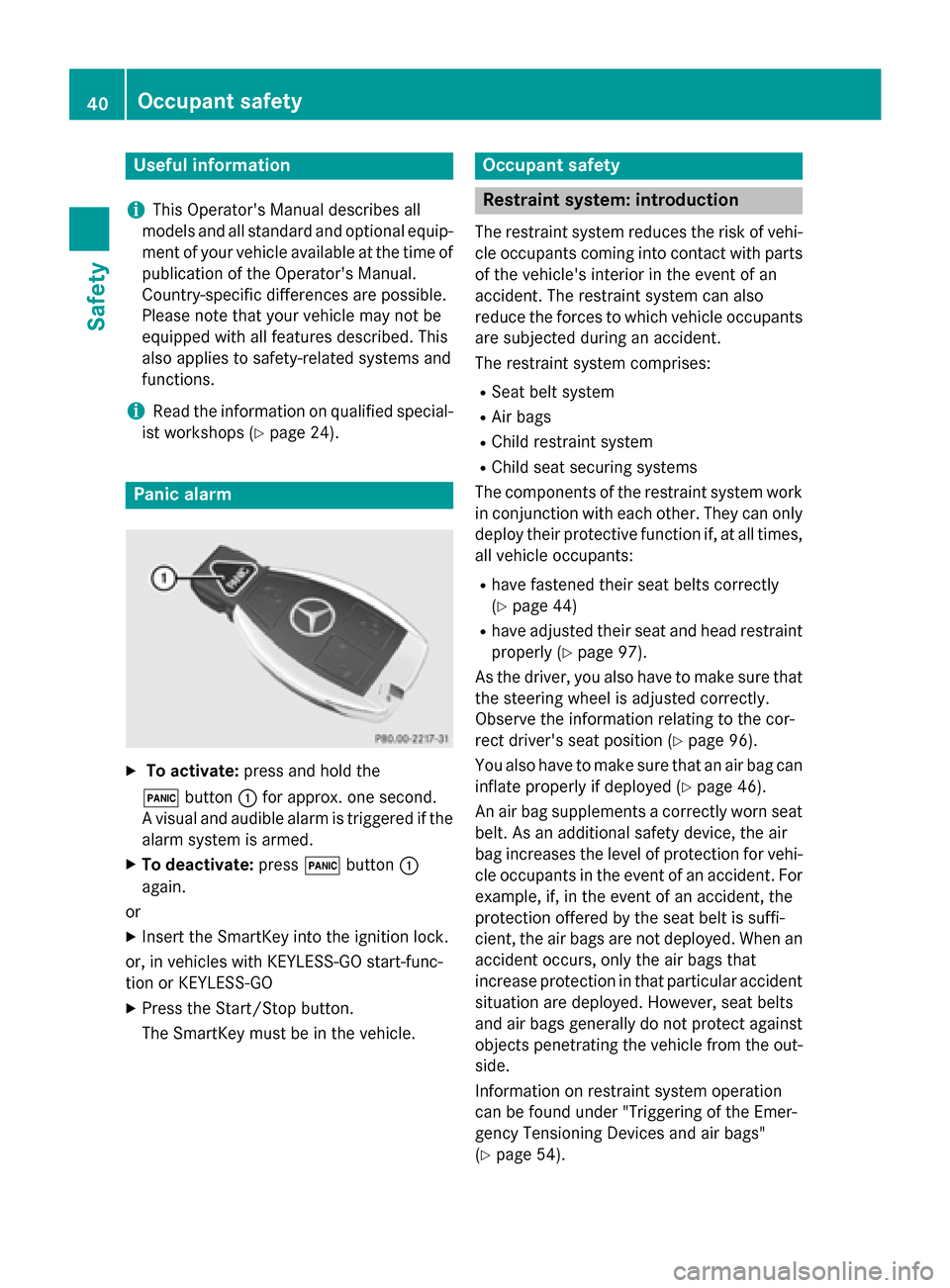
X
To activate: press and hold the
! button :for approx. one second.
A visual and audible alarm is triggered if the alarm system is armed.
X To deactivate: press!button :
again.
or
X Insert the SmartKey into the ignition lock.
or, in vehicles with KEYLESS-GO start-func-
tion or KEYLESS ‑GO
X Press the Start/Stop button.
The SmartKey must be in the vehicle. Occupant safety
Restraint system: introduction
The restraint system reduces the risk of vehi-
cle occupants coming into contact with parts of the vehicle's interior in the event of an
accident. The restraint system can also
reduce the forces to which vehicle occupants
are subjected during an accident.
The restraint system comprises:
R Seat belt system
R Air bags
R Child restraint system
R Child seat securing systems
The components of the restraint system work
in conjunction with each other. They can only deploy their protective function if, at all times,
all vehicle occupants:
R have fastened their seat belts correctly
(Y page 44)
R have adjusted their seat and head restraint
properly (Y page 97).
As the driver, you also have to make sure that
the steering wheel is adjusted correctly.
Observe the information relating to the cor-
rect driver's seat position (Y page 96).
You also have to make sure that an air bag can inflate properly if deployed (Y page 46).
An air bag supplements a correctly worn seat
belt. As an additional safety device, the air
bag increases the level of protection for vehi-
cle occupants in the event of an accident. For example, if, in the event of an accident, the
protection offered by the seat belt is suffi-
cient, the air bags are not deployed. When an
accident occurs, only the air bags that
increase protection in that particular accident
situation are deployed. However, seat belts
and air bags generally do not protect against objects penetrating the vehicle from the out-
side.
Information on restraint system operation
can be found under "Triggering of the Emer-
gency Tensioning Devices and air bags"
(Y page 54). 40
Occupant safetySafety
Page 45 of 362
tion. This poses an increased risk of injury or
even fatal injury.
Make sure that all vehicle occupants are
seated properly with a correctly fastened seat belt. G
WARNING
The seat belt does not offer the intended level of protection if you have not moved the back-
rest to an almost vertical position. When brak-
ing or in the event of an accident, you could
slide underneath the seat belt and sustain
abdomen or neck injuries, for example. This
poses an increased risk of injury or even fatal injury.
Adjust the seat properly before beginning
your journey. Always ensure that the backrest
is in an almost vertical position and that the
shoulder section of your seat belt is routed
across the center of your shoulder. G
WARNING
Persons under 5 ft (1.50 m) in heightcannot
fasten the seat belt correctly without an addi- tional suitable restraint system. If the seat
belt is incorrectly fastened, it cannot protect
as intended. Furthermore, an incorrectly fas-
tened seat belt can cause additional injury, for
example, in an accident, during braking or an
abrupt change of direction. This poses an
increased risk of injury or even fatal injury.
For this reason, always secure persons under
5 ft (1.50 m) in height in suitable restraint
systems.
If a child younger than 12 years and under 5 ft
(1.50 m) in height is traveling in the vehicle:
R always secure the child in a child restraint
system suitable for this Mercedes-Benz
vehicle. The child restraint system must be appropriate to the age, weight and size of
the child
R always observe the instructions and safety
notes in the "Children in the vehicle" sec-
tion of this Operator's Manual
(Y page 56) in addition to the child restraint system manufacturer's installa-
tion instructions
R be sure to observe the instructions and
safety notes on the "Occupant classifica-
tion system (OCS)" (Y page 49) G
WARNING
The seat belts may not perform their intended protective function if:
R they are damaged, modified, extremely
dirty, bleach or dyed
R the seat belt buckle is damaged or
extremely dirty
R the Emergency Tensioning Devices, belt
anchorages or inertia reels have been modi-
fied
Seat belts may sustain non-visible damage in an accident, e.g. due to glass splinters. Modi-
fied or damaged seat belts may tear or fail,
e.g. in an accident. Modified Emergency Ten-
sioning Devices could accidentally trigger or
fail to deploy when necessary. This poses an
increased risk of injury or even fatal injury.
Never modify the seat belts, Emergency Ten-
sioning Devices, belt anchorages or inertia
reels. Make sure that the seat belts are
undamaged, not worn out and clean. Follow-
ing an accident, have the seat belts checked
immediately at a qualified specialist work-
shop.
Only use seat belts that have been approved
for your vehicle by Mercedes-Benz. Any such
modifications could invalidate the vehicle's
general operating permit.
Vehicles with a sports seat or AMG Per-
formance seat: these seats are designed for
the standard three-point seat belt. If you
install another multi-point seat belt, e.g. sport or racing seat belts, the restraint system can-
not provide the best level of protection. G
WARNING
If you feed seat belts through the opening in
the seat backrest, the seat backrest may be
damaged or may even break in the event of an Occupant safety
43Safety
Z
Page 46 of 362
accident. This poses an increased risk of
injury or even fatal injury.
Only use the standard three-point seat belt.
Never modify the seat belt system.
Proper use of the seat belts Observe the safety notes on the seat belt
(Y page 42).
All vehicle occupants must be wearing the
seat belt correctly before beginning the jour-
ney. Also make sure that all vehicle occu-
pants are always wearing the seat belt cor-
rectly while the vehicle is in motion.
When fastening the seat belt, always make
sure that:
R the seat belt tongue is only inserted to the
belt buckle belonging to that seat.
R the seat belt is tight across your body.
Avoid wearing bulky clothing, e.g. a winter
coat.
R the seat belt is not twisted.
Only then can the forces which occur be
distributed over the area of the belt.
R the shoulder section of the belt is always
routed across the center of your shoulder.
The shoulder section of the belt must not
come into contact with your neck or be
routed under your arm. Where possible,
adjust the seat belt to the appropriate
height.
R the lap belt passes tightly and as low down
as possible across your lap.
The lap belt must always be routed across
your hip joints and not across your abdo-
men. This applies particularly to pregnant
women. If necessary, push the lap belt
down to your hip joint and pull it tight using the shoulder section of the belt.
R the seat belt is not routed across sharp,
pointed or fragile objects.
If you have such items located on or in your
clothing, e.g. pens, keys or eyeglasses,
store these in a suitable place. R
only one person is using a seat belt at a
time.
Infants and children must never travel sit-
ting on the lap of a vehicle occupant. In the
event of an accident, they could be crushed between the vehicle occupant and seat
belt.
R objects are never secured with a seat belt if
the seat belt is also being used by one of the
vehicle's occupants.
Seat belts are only intended to secure and
restrain vehicle occupants. Always observe
the "Loading guidelines" for securing objects,
luggage or loads (Y page 262).
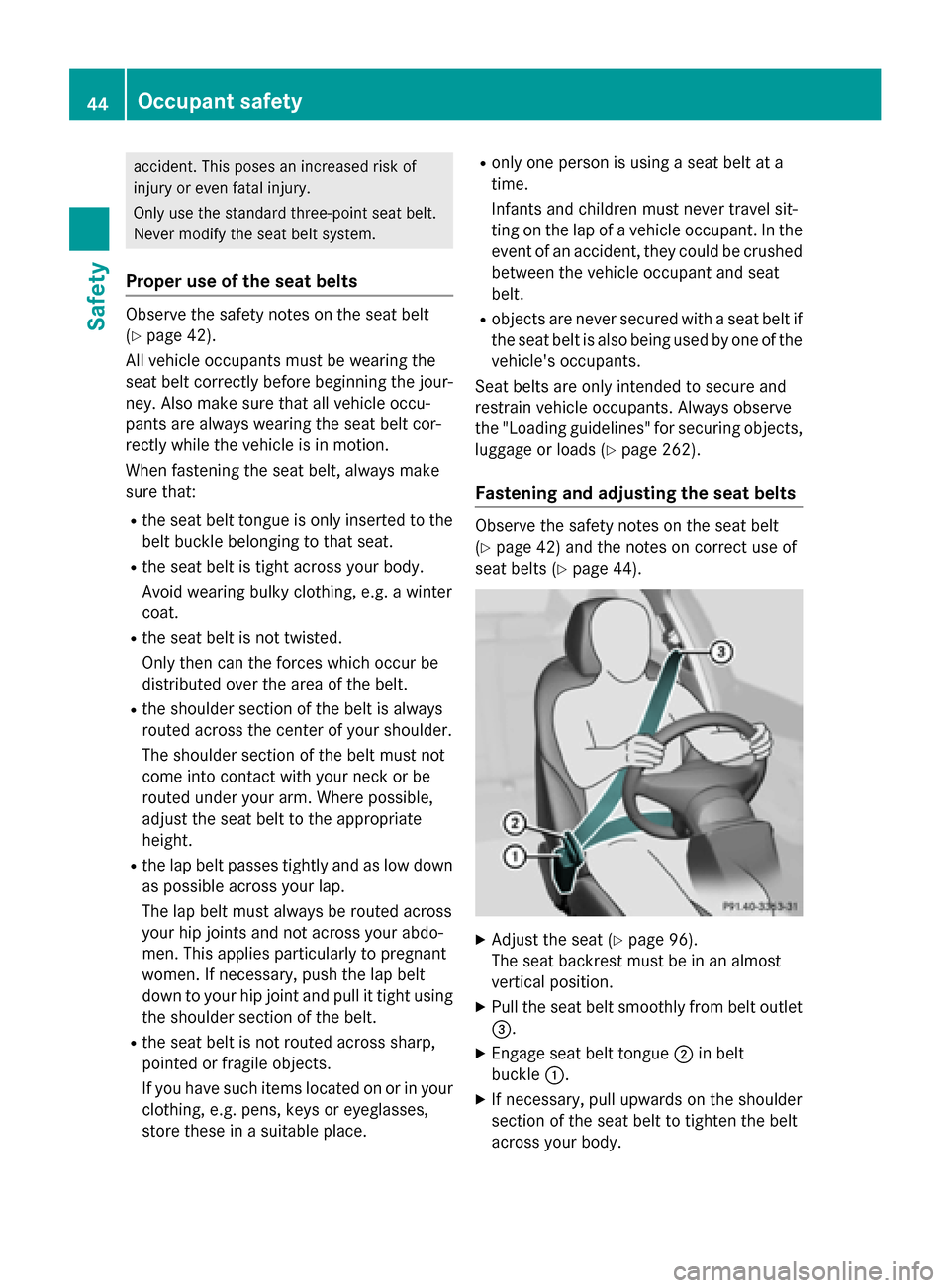
Fastening and adjusting the seat belts Observe the safety notes on the seat belt
(Y
page 42) and the notes on correct use of
seat belts (Y page 44). X
Adjust the seat (Y page 96).
The seat backrest must be in an almost
vertical position.
X Pull the seat belt smoothly from belt outlet
=.
X Engage seat belt tongue ;in belt
buckle :.
X If necessary, pull upwards on the shoulder
section of the seat belt to tighten the belt
across your body. 44
Occupant safetySafety
Page 47 of 362
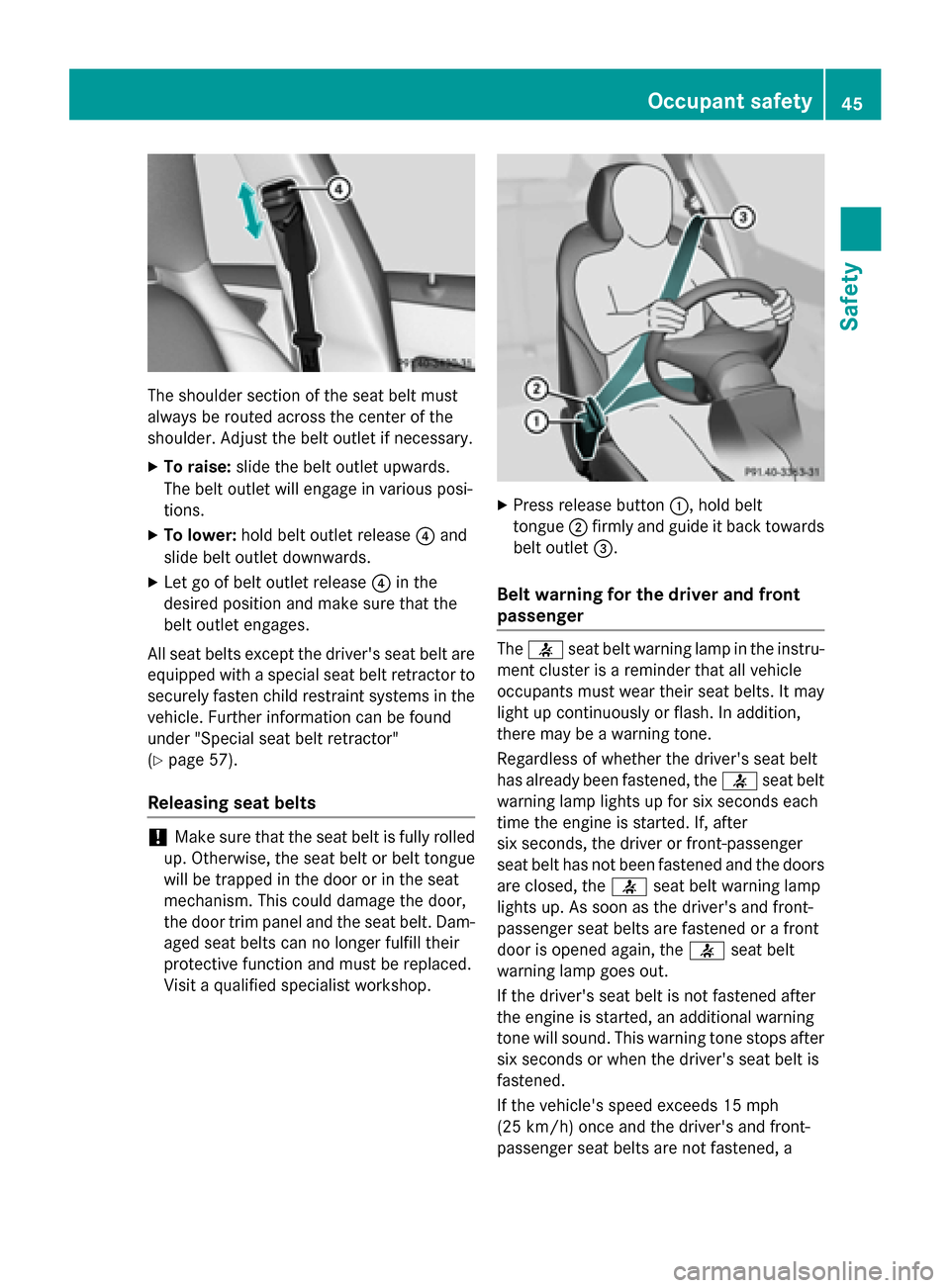
The shoulder section of the seat belt must
always be routed across the center of the
shoulder. Adjust the belt outlet if necessary.
X To raise: slide the belt outlet upwards.
The belt outlet will engage in various posi-
tions.
X To lower: hold belt outlet release ?and
slide belt outlet downwards.
X Let go of belt outlet release ?in the
desired position and make sure that the
belt outlet engages.
All seat belts except the driver's seat belt are equipped with a special seat belt retractor tosecurely fasten child restraint systems in the
vehicle. Further information can be found
under "Special seat belt retractor"
(Y page 57).
Releasing seat belts !
Make sure that the seat belt is fully rolled
up. Otherwise, the seat belt or belt tongue
will be trapped in the door or in the seat
mechanism. This could damage the door,
the door trim panel and the seat belt. Dam- aged seat belts can no longer fulfill their
protective function and must be replaced.
Visit a qualified specialist workshop. X
Press release button :, hold belt
tongue ;firmly and guide it back towards
belt outlet =.
Belt warning for the driver and front
passenger The
7 seat belt warning lamp in the instru-
ment cluster is a reminder that all vehicle
occupants must wear their seat belts. It may
light up continuously or flash. In addition,
there may be a warning tone.
Regardless of whether the driver's seat belt
has already been fastened, the 7seat belt
warning lamp lights up for six seconds each
time the engine is started. If, after
six seconds, the driver or front-passenger
seat belt has not been fastened and the doors are closed, the 7seat belt warning lamp
lights up. As soon as the driver's and front-
passenger seat belts are fastened or a front
door is opened again, the 7seat belt
warning lamp goes out.
If the driver's seat belt is not fastened after
the engine is started, an additional warning
tone will sound. This warning tone stops after six seconds or when the driver's seat belt is
fastened.
If the vehicle's speed exceeds 15 mph
(25 km/h) once and the driver's and front-
passenger seat belts are not fastened, a Occupant safety
45Safety Z