brake sensor MERCEDES-BENZ CLA-Class 2015 C117 Owner's Manual
[x] Cancel search | Manufacturer: MERCEDES-BENZ, Model Year: 2015, Model line: CLA-Class, Model: MERCEDES-BENZ CLA-Class 2015 C117Pages: 362, PDF Size: 6.93 MB
Page 8 of 362
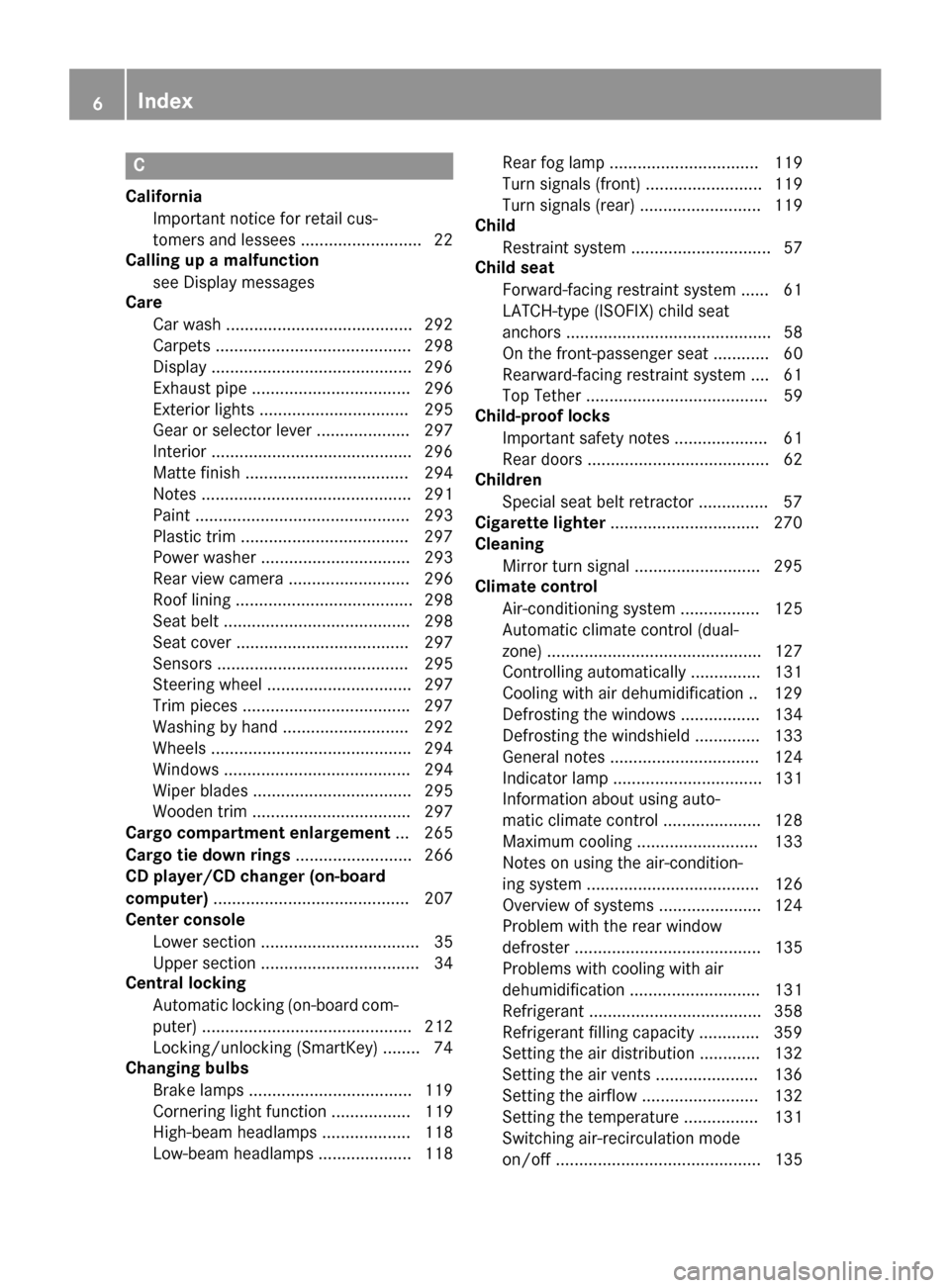
C
California Important notice for retail cus-
tomers and lessees .......................... 22
Calling up a malfunction
see Display messages
Care
Car wash ........................................ 292
Carpets .......................................... 298
Display .......................................... .296
Exhaust pipe .................................. 296
Exterior lights ................................ 295
Gear or selector lever .................... 297
Interior .......................................... .296
Matte finish ................................... 294
Notes ............................................. 291
Paint .............................................. 293
Plastic trim ................................... .297
Power washer ................................ 293
Rear view camera .......................... 296
Roof lining ...................................... 298
Seat belt ........................................ 298
Seat cover ..................................... 297
Sensors ......................................... 295
Steering wheel ............................... 297
Trim pieces ................................... .297
Washing by hand ........................... 292
Wheels .......................................... .294
Windows ........................................ 294
Wiper blades .................................. 295
Wooden trim .................................. 297
Cargo compartment enlargement ... 265
Cargo tie down rings ......................... 266
CD player/CD changer (on-board
computer) .......................................... 207
Center console
Lower section .................................. 35
Upper section .................................. 34
Central locking
Automatic locking (on-board com-puter) ............................................. 212
Locking/unlocking (SmartKey) ....... .74
Changing bulbs
Brake lamps .................................. .119
Cornering light function ................. 119
High-beam headlamps ................... 118
Low-beam headlamps .................... 118 Rear fog lamp ................................ 119
Turn signals (front) ......................... 119
Turn signals (rear) .......................... 119
Child
Restraint system .............................. 57
Child seat
Forward-facing restraint system ...... 61
LATCH-type (ISOFIX) child seat
anchors ............................................ 58
On the front-passenger seat ............ 60
Rearward-facing restraint system .... 61
Top Tether ....................................... 59
Child-proof locks
Important safety notes .................... 61
Rear doors ....................................... 62
Children
Special seat belt retractor .............. .57
Cigarette lighter ................................ 270
Cleaning
Mirror turn signal .......................... .295
Climate control
Air-conditioning system ................. 125
Automatic climate control (dual-
zone) .............................................. 127
Controlling automatically .............. .131
Cooling with air dehumidification .. 129
Defrosting the windows ................. 134
Defrosting the windshield .............. 133
General notes ................................ 124
Indicator lamp ................................ 131
Information about using auto-
matic climate control ..................... 128
Maximum cooling .......................... 133
Notes on using the air-condition-
ing system ..................................... 126
Overview of systems ..................... .124
Problem with the rear window
defroster ........................................ 135
Problems with cooling with air
dehumidification ............................ 131
Refrigerant ..................................... 358
Refrigerant filling capacity ............. 359
Setting the air distribution ............. 132
Setting the air vents ..................... .136
Setting the airflow ......................... 132
Setting the temperature ................ 131
Switching air-recirculation mode
on/off ............................................ 135 6
Index
Page 15 of 362
Seat belt .......................................... 42
OCS
Conditions ....................................... 49
Faults ............................................... 53
Operation ......................................... 49
System self-test ............................... 51
Odometer ........................................... 203
On-board computer
AMG menu ..................................... 214
Assistance graphic menu ............... 209
Assistance menu ........................... 209
Audio menu ................................... 207
Convenience submenu .................. 213
Display messages .......................... 217
Displaying a service message ........ 291
DISTRONIC PLUS ........................... 176
Factory settings ............................. 213
Important safety notes .................. 200
Instrument cluster submenu .......... 211
Lighting submenu .......................... 212
Menu overview .............................. 203
Message memory .......................... 217
Navigation menu ............................ 205
Operation ....................................... 201
RACETIMER ................................... 214
Service menu ................................. 211
Settings menu ............................... 211
Standard display ............................ 203
Telephone menu ............................ 208
Trip menu ...................................... 203
Vehicle submenu ........................... 212
Video DVD operation ..................... 207
Opening and closing the side trim
panels ................................................. 119
Operating safety
Declaration of conformity ................ 24
Important safety notes .................... 23
Operating system
see On-board computer
Operator's Manual
Vehicle equipment ........................... 21
Outside temperature display ........... 201
Overhead control panel ...................... 37
Override feature
Rear side window s........................... 62 P
Paint code number ............................ 352
Paintwork (cleaning instructions) ... 293
Panic alarm .......................................... 40
Panorama roof with power tilt/
sliding panel
Important safety notes .................... 90
Operating ......................................... 91
Problem (malfunction) ..................... 94
Parking
Important safety notes .................. 160
Parking brake ................................ 162
Position of exterior mirror, front-
passenger side ............................... 105
Rear view camera .......................... 189
see Active Parking Assist
see PARKTRONIC
Parking aid
Active Parking Assist ..................... 184
see Exterior mirrors
see PARKTRONIC
Parking brake
Display message ............................ 221
Electric parking brake .................... 162
Warning lamp ................................. 255
Parking lamps
Switching on/of f........................... 112
PARKTRONIC
Deactivating/activating ................. 183
Driving system ............................... 181
Function/note s............................. 181
Important safety notes .................. 181
Problem (malfunction) ................... 184
Range of the sensors ..................... 181
Warning display ............................. 182
PASSENGER AIR BAG
Display message ............................ 228
PASSENGER AIR BAG OFF
Indicator lamp .................................. 41
PASSENGER AIRBAG
Problems (malfunction) .................. 228
Pets in the vehicle ............................... 62
Plastic trim (cleaning instruc-
tions) .................................................. 297
Power washers .................................. 293
Power windows
see Side windows Index
13
Page 17 of 362
Roller sunblind
Opening/closing .............................. 93
Panorama roof with power tilt/
sliding panel ..................................... 92
Roof carrier ........................................ 267
Roof lining and carpets (cleaning
guidelines) ......................................... 298
Roof load (maximum) ........................ 359S
Safety Children in the vehicle ..................... 56
Seat
Adjusting (Performance Seat) ........ 100
Seat belts
Adjusting the height ......................... 44
Cleaning ......................................... 298
Correct usage .................................. 44
Fastening ......................................... 44
Important safety guidelines ............. 42
Introduction ..................................... 42
Releasing ......................................... 45
Warning lamp ................................. 247
Warning lamp (function) ................... 45
Seats
Adjusting (electrically) ..................... 98
Adjusting (manually) ........................ 98
Adjusting the 4-way lumbar sup-
port ................................................ 100
Adjusting the head restraint ............ 98
Cleaning the cover ......................... 297
Correct driver's seat position ........... 96
Folding the backrest (rear com-
partment) forwards/back .............. 266
Important safety notes .................... 97
Seat heating problem .................... 102
Storing settings (memory func-
tion) ............................................... 106
Switching seat heating on/off ....... 100
Securing cargo .................................. 266
Selector lever
Cleaning ......................................... 297
Sensors (cleaning instructions) ....... 295
Service menu (on-board com-
puter) .................................................. 211
Service message
see ASSYST PLUS Service products
Brake fluid ..................................... 357
Coolant (engine) ............................ 357
Engine oil ....................................... 356
Fuel ................................................ 353
Important safety notes .................. 353
Refrigerant (air-conditioning sys-
tem) ............................................... 358
Washer fluid ................................... 358
Setting the air distribution ............... 132
Setting the airflow ............................ 132
Settings
Factory (on-board computer) ......... 213
On-board compute r....................... 211
SETUP (on-board computer) ............. 214
Side impact air bag ............................. 48
Side marker lamp (display mes-
sage) ................................................... 231
Side windows
Cleaning ......................................... 294
Convenience closing feature ............ 88
Convenience opening feature .......... 87
Important safety information ........... 86
Opening/closing .............................. 87
Problem (malfunction) ..................... 90
Resetting ......................................... 89
Reversing feature ............................. 86
Sliding sunroof
see Panorama roof with power
tilt/sliding panel
SmartKey
Changing the battery ....................... 78
Changing the programming ............. 76
Checking the battery ....................... 77
Convenience closing feature ............ 88
Convenience opening feature .......... 87
Display message ............................ 246
Door central locking/unlocking ....... 74
Important safety notes .................... 74
KEYLESS-GO start function .............. 76
Loss ................................................. 79
Mechanical key ................................ 76
Positions (ignition lock) ................. 141
Problem (malfunction) ..................... 79
Starting the engine ........................ 144
SmartKey positions (ignition lock) .. 141
Snow chains ...................................... 321 Index
15
Page 22 of 362
Protection of the environment
General notes
H
Environmental note
Daimler's declared policy is one of compre-
hensive environmental protection.
The objectives are for the natural resources
that form the basis of our existence on this
planet to be used sparingly and in a manner
that takes the requirements of both nature
and humanity into account.
You too can help to protect the environment
by operating your vehicle in an environmen-
tally responsible manner.
Fuel consumption and the rate of engine,
transmission, brake and tire wear are affected by these factors:
R operating conditions of your vehicle
R your personal driving style
You can influence both factors. You should
bear the following in mind:
Operating conditions:
R avoid short trips as these increase fuel con-
sumption.
R always make sure that the tire pressures
are correct.
R do not carry any unnecessary weight.
R remove roof racks once you no longer need
them.
R a regularly serviced vehicle will contribute
to environmental protection. You should
therefore adhere to the service intervals.
R always have service work carried out at a
qualified specialist workshop.
Personal driving style:
R do not depress the accelerator pedal when
starting the engine.
R do not warm up the engine when the vehicle
is stationary.
R drive carefully and maintain a safe distance
from the vehicle in front.
R avoid frequent, sudden acceleration and
braking. R
change gear in good time and use each gear
only up to Ôof its maximum engine speed.
R switch off the engine in stationary traffic.
R keep an eye on the vehicle's fuel consump-
tion. Environmental concerns and recom-
mendations
Wherever the operating instructions require
you to dispose of materials, first try to regen-
erate or re-use them. Observe the relevant
environmental rules and regulations when
disposing of materials. In this way you will
help to protect the environment. Genuine Mercedes-Benz parts
H
Environmental note
Daimler AG also supplies reconditioned major
assemblies and parts which are of the same
quality as new parts. They are covered by the same Limited Warranty entitlements as new
parts.
! Air bags and Emergency Tensioning Devi-
ces, as well as control units and sensors for these restraint systems, may be installed inthe following areas of your vehicle:
R doors
R door pillars
R door sills
R seats
R cockpit
R instrument cluster
R center console
Do not install accessories such as audio
systems in these areas. Do not carry out
repairs or welding. You could impair the
operating efficiency of the restraint sys-
tems.
Have aftermarket accessories installed at a qualified specialist workshop. 20
Introduction
Page 66 of 362
The pulsating brake pedal can be an indica-
tion of hazardous road conditions, and func-
tions as a reminder to take extra care while
driving. BAS (Brake Assist System)
General information BAS operates in emergency braking situa-
tions. If you depress the brake pedal quickly,
BAS automatically boosts the braking force,
thus shortening the stopping distance.
Important safety notes i
Observe the "Important safety notes" sec-
tion (Y page 63). G
WARNING
If BAS is malfunctioning, the braking distance
in an emergency braking situation is
increased. There is a risk of an accident.
In an emergency braking situation, depress
the brake pedal with full force. ABS prevents
the wheels from locking.
Braking X
Keep the brake pedal firmly depressed until
the emergency braking situation is over.
ABS prevents the wheels from locking.
The brakes will function as usual once you
release the brake pedal. BAS is deactivated. COLLISION PREVENTION ASSIST
PLUS
General information COLLISION PREVENTION ASSIST PLUS con-
sists of a distance warning function with an
autonomous emergency braking function and
adaptive Brake Assist.
COLLISION PREVENTION ASSIST PLUS can
help you to minimize the risk of a front-end collision with a vehicle ahead or reduce the
effects of such a collision.
If COLLISION PREVENTION ASSIST PLUS
detects that there is a risk of a collision, you
will be warned visually and acoustically. If you
do not react to the visual and audible collision
warning, autonomous braking can be initiated in critical situations. If you apply the brake
yourself in a critical situation, the COLLISION PREVENTION ASSIST PLUS adaptive Brake
Assist assists you.
Important safety notes In particular, the detection of obstacles can
be impaired if:
R there is dirt on the sensors or anything else
covering the sensors
R there is snow or heavy rain
R there is interference by other radar sources
R there are strong radar reflections, for
example in parking garages
R a narrow vehicle traveling in front, e.g. a
motorbike
R a vehicle traveling in front on a different line
R new vehicles or after a service on the COL-
LISION PREVENTION ASSIST PLUS system
Observe the notes in the section on break- ing-in (Y page 140).
Following damage to the front end of the vehi- cle, have the configuration and operation of
the radar sensor checked at a qualified spe-
cialist workshop. This also applies to colli-
sions at low speeds where there is no visible
damage to the front of the vehicle.
Distance warning function Important safety notes
i Observe the "Important safety notes" sec-
tion for driving safety systems (Y page 63).64
Driving safety systemsSafety
Page 67 of 362
G
WARNING
The distance warning function does not react:
R to people or animals
R to oncoming vehicles
R to crossing traffic
R when cornering
Thus, the distance warning function cannot
provide a warning in all critical situations.
There is a risk of an accident.
Always pay careful attention to the traffic sit-
uation and be ready to brake. G
WARNING
The distance warning function cannot always
clearly identify objects and complex traffic
situations.
In such cases, the distance warning function
may:
R give an unnecessary warning
R not give a warning
There is a risk of an accident.
Always pay careful attention to the traffic sit-
uation and do not rely solely on the distance
warning function.
Function X To activate/deactivate: activate or deac-
tivate the distance warning function in the
on-board computer (Y page 210).
If the distance warning function is not activa-
ted, the æsymbol appears in the assis-
tance graphics display.
The distance warning function can help you to minimize the risk of a front-end collision with
a vehicle ahead or reduce the effects of such
a collision. If the distance warning function
detects that there is a risk of a collision, you
will be warned visually and acoustically.
Starting at a speed of around 4 mph (7 km/h),
the distance warning function warns you if
you rapidly approach a vehicle in front. An
intermittent warning tone will then sound,
and the ·distance warning lamp will light
up in the instrument cluster. X
Brake immediately in order to increase the
distance from the vehicle in front.
or
X Take evasive action, provided it is safe to do
so.
Due to the nature of the system, particularly
complicated but non-critical driving condi-
tions may also cause the system to display a
warning.
With the help of the radar sensor system, the
distance warning function can detect obsta-
cles that are in the path of your vehicle for an extended period of time.
Up to a speed of around 44 mph (70 km/h),
the distance warning function can also react
to stationary obstacles, such as stopped or
parked vehicles.
If you approach an obstacle and the distance
warning function detects a risk of a collision,
the system will initially alert you both visually
and acoustically.
Autonomous braking function If the driver does not react to the distance
warning signal in a critical situation, COLLI-
SION PREVENTION ASSIST PLUS can assist
with the autonomous braking function.
The autonomous braking function:
R gives the driver more time to react to criti-
cal driving situations
R can help the driver to avoid an accident or
R reduces the effects of an accident
Vehicles without DISTRONIC PLUS: the
autonomous braking function is available in
the following speed ranges:
R 5 - 65 mph (7 - 105 km/h) for moving
objects
R 5 - 31 mph (7 - 50 km/h) for stationary
objects Driving safety systems
65Safety Z
Page 68 of 362
Vehicles with DISTRONIC PLUS:
the auton-
omous braking function is available in the fol- lowing speed ranges:
R 5 - 124 mph (7 - 200 km/h) for moving
objects
R 5 - 31 mph (7 - 50 km/h) for stationary
objects
If the autonomous braking function requires a particularly high braking force, preventative
passenger protection measures (PRE-SAFE ®
)
are activated simultaneously.
Adaptive Brake Assist i
Observe the "Important safety notes" sec-
tion (Y page 63).
Adaptive Brake Assist provides braking assis- tance in hazardous situations at speeds
above 4 mph (7 km/h). It uses radar sensor
technology to assess the traffic situation. G
WARNING
Adaptive Brake Assist cannot always clearly
identify objects and complex traffic situa-
tions.
In such cases, Adaptive Brake Assist can:
R intervene unnecessarily
R not intervene
There is a risk of an accident.
Always pay careful attention to the traffic sit- uation and be ready to brake. Terminate the
intervention in a non-critical driving situation. G
WARNING
Adaptive Brake Assist does not react:
R to people or animals
R to oncoming vehicles
R to crossing traffic
R when cornering
As a result, the Adaptive Brake Assist may not intervene in all critical conditions. There is a
risk of an accident.
Always pay careful attention to the traffic sit- uation and be ready to brake. Due to the nature of the system, particularly
complicated but non-critical driving condi-
tions may also cause Brake Assist to inter-
vene.
If adaptive Brake Assist is not available due to a malfunction in the radar sensor system, thebrake system remains available with full
brake boosting effect and BAS.
With the help of adaptive Brake Assist, the
distance warning signal can detect obstacles
that are in the path of your vehicle for an
extended period of time.
If adaptive Brake Assist detects a risk of col-
lision with the vehicle in front, it calculates
the braking force necessary to avoid a colli-
sion. If you apply the brakes forcefully, adap-
tive Brake Assist will automatically increase
the braking force to a level suitable for the
traffic conditions.
X Keep the brake pedal depressed until the
emergency braking situation is over.
ABS prevents the wheels from locking.
The brakes will work normally again if:
R you release the brake pedal.
R there is no longer any danger of a collision.
R no obstacle is detected in front of your
vehicle.
Adaptive Brake Assist is then deactivated.
If adaptive Brake Assist demands particularly
high braking force, preventative passenger
protection measures (PRE-SAFE ®
) are activa-
ted simultaneously.
Up to a speed of approximately 155 mph
(250 km/h), adaptive Brake Assist is capable
of reacting to moving objects that have
already been detected as such at least once
over the period of observation.
Up to a speed of approximately 44 mph
(70 km/h), adaptive Brake Assist reacts to
stationary obstacles. 66
Driving safety systemsSafety
Page 122 of 362
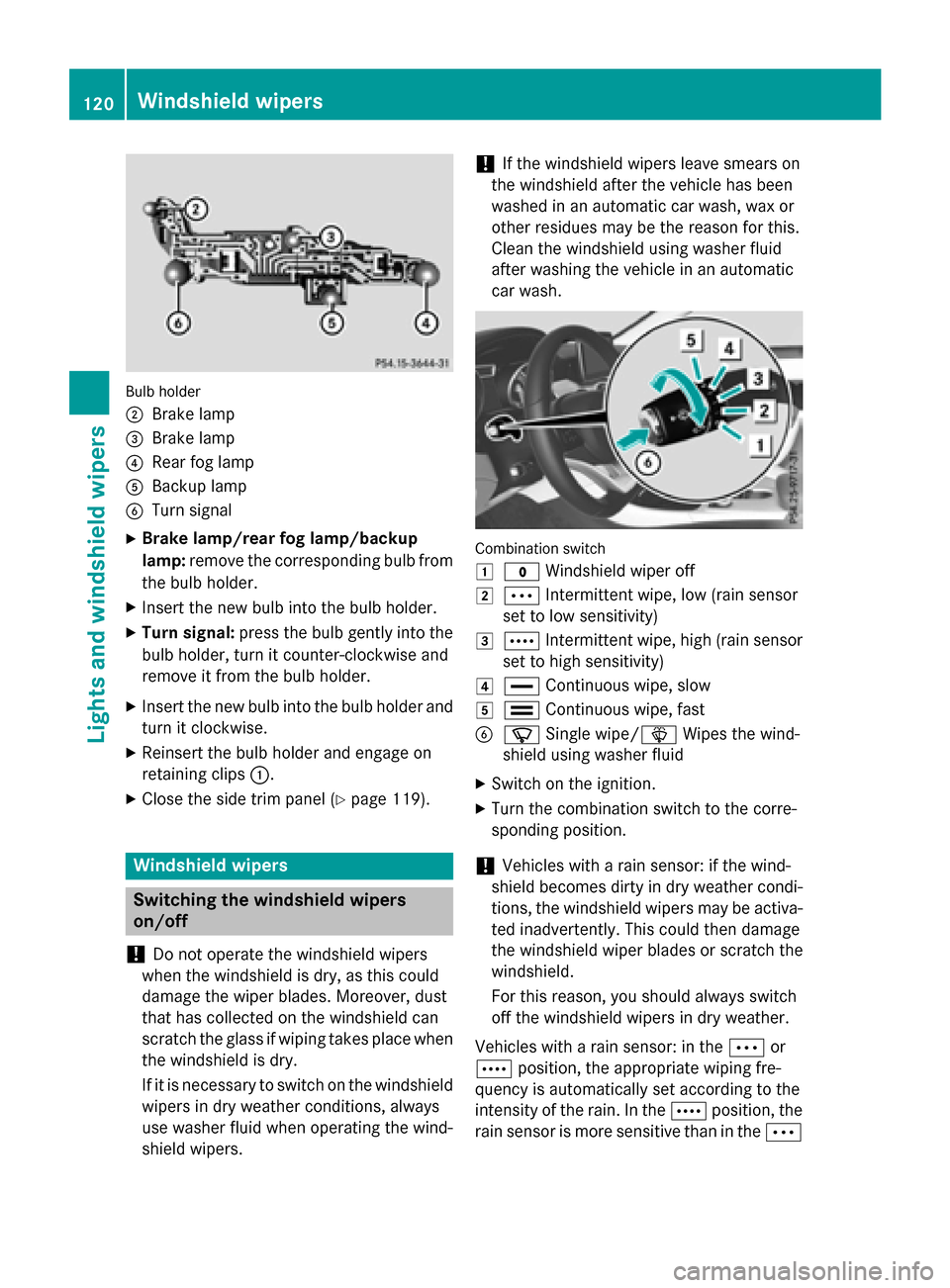
Bulb holder
;
Brake lamp
= Brake lamp
? Rear fog lamp
A Backup lamp
B Turn signal
X Brake lamp/rear fog lamp/backup
lamp: remove the corresponding bulb from
the bulb holder.
X Insert the new bulb into the bulb holder.
X Turn signal: press the bulb gently into the
bulb holder, turn it counter-clockwise and
remove it from the bulb holder.
X Insert the new bulb into the bulb holder and
turn it clockwise.
X Reinsert the bulb holder and engage on
retaining clips :.
X Close the side trim panel (Y page 119).Windshield wipers
Switching the windshield wipers
on/off
! Do not operate the windshield wipers
when the windshield is dry, as this could
damage the wiper blades. Moreover, dust
that has collected on the windshield can
scratch the glass if wiping takes place when the windshield is dry.
If it is necessary to switch on the windshield wipers in dry weather conditions, always
use washer fluid when operating the wind-
shield wipers. !
If the windshield wipers leave smears on
the windshield after the vehicle has been
washed in an automatic car wash, wax or
other residues may be the reason for this.
Clean the windshield using washer fluid
after washing the vehicle in an automatic
car wash. Combination switch
1
$ Windshield wiper off
2 Ä Intermittent wipe, low (rain sensor
set to low sensitivity)
3 Å Intermittent wipe, high (rain sensor
set to high sensitivity)
4 ° Continuous wipe, slow
5 ¯ Continuous wipe, fast
B í Single wipe/î Wipes the wind-
shield using washer fluid
X Switch on the ignition.
X Turn the combination switch to the corre-
sponding position.
! Vehicles with a rain sensor: if the wind-
shield becomes dirty in dry weather condi-
tions, the windshield wipers may be activa-
ted inadvertently. This could then damage
the windshield wiper blades or scratch the
windshield.
For this reason, you should always switch
off the windshield wipers in dry weather.
Vehicles with a rain sensor: in the Äor
Å position, the appropriate wiping fre-
quency is automatically set according to the
intensity of the rain. In the Åposition, the
rain sensor is more sensitive than in the Ä120
Windshield wipersLights and windshield wipers
Page 142 of 362
Useful information
i This Operator's Manual describes all
models and all standard and optional equip- ment of your vehicle available at the time of
publication of the Operator's Manual.
Country-specific differences are possible.
Please note that your vehicle may not be
equipped with all features described. This
also applies to safety-related systems and
functions.
i Read the information on qualified special-
ist workshops (Y page 24). Notes on breaking-in a new vehicle
Important safety notes
The sensor system of some driving and driv-
ing safety systems adjusts automatically
while a certain distance is being driven after
the vehicle has been delivered or after
repairs. Full system effectiveness is not
reached until the end of this teach-in proce-
dure.
New and replaced brake pads and discs only
reach their optimum braking effect after sev-
eral hundred kilometers of driving. Compen-
sate for this by applying greater force to the
brake pedal. The first 1000 miles (1500 km)
The more you look after the engine when it is
new, the more satisfied you will be with its
performance in the future.
R You should therefore drive at varying vehi-
cle and engine speeds for the first
1000 miles (1500 km).
R Avoid heavy loads, e.g. driving at full throt-
tle, during this period.
R Change gear in good time, before the tach-
ometer needle is Ôof the way to the red
area of the tachometer. R
Do not manually shift to a lower gear to
brake the vehicle.
R Try to avoid depressing the accelerator
pedal beyond the point of resistance (kick-
down).
R Ideally, for the first 1000 miles (1500 km),
drive in program E.
After 1,000 miles (1,500 km), you can
increase the engine speed gradually and bring the vehicle to full speed.
Additional breaking-in notes for AMG vehi-
cles:
R Do not drive faster than 85 mph
(140 km/h) for the first 1,000 miles
(1,500 km).
R Only allow the engine to reach a maximum
engine speed of 4,500 rpm briefly.
R Change gear in good time.
You should also observe these notes on
breaking-in if the engine or parts of the drive
train on your vehicle have been replaced.
Always observe the respective speed limits. Driving
Important safety notes
G
WARNING
Objects in the driver's footwell can restrict the pedal travel or obstruct a depressed pedal.
The operating and road safety of the vehicle is
jeopardized. There is a risk of an accident.
Make sure that all objects in the vehicle are
stowed correctly, and that they cannot enter
the driver's footwell. Install the floormats
securely and as specified in order to ensure
sufficient clearance for the pedals. Do not use loose floormats and do not place floormats on
top of one another. 140
DrivingDriving and parking
Page 173 of 362
press the cruise control lever up
:or
down ?to the pressure point.
The last stored speed increases or decrea- ses in 5 mph (10 km/h) increments.
i Cruise control is not deactivated if you
depress the accelerator pedal. For exam-
ple, if you accelerate briefly to overtake,
cruise control adjusts the vehicle's speed
to the last speed stored after you have fin- ished overtaking.
Deactivating cruise control There are several ways to deactivate cruise
control:
X Briefly press the cruise control lever for-
wards =.
or
X Brake.
Cruise control is automatically deactivated if: R the vehicle is secured with the electric
parking brake
R you are driving at less than 20 mph
(30 km/h)
R ESP ®
intervenes or you deactivate ESP ®
R you shift the transmission to position N
while driving
If cruise control is deactivated, you will hear a warning tone. You will see the Cruise Con‐
Cruise Con‐
trol Off trol Off message in the multifunction dis-
play for approximately five seconds.
i When you switch off the engine, the last
speed stored is cleared. DISTRONIC PLUS
General notes DISTRONIC PLUS regulates the speed and
automatically helps you maintain the dis-
tance to the vehicle detected in front. Vehi-
cles are detected with the aid of the radar
sensor system. DISTRONIC PLUS brakes
automatically to avoid exceeding the set speed or to maintain the designated distance
from the vehicle in front.
Change into a lower gear in good time on long
and steep downhill gradients. This is espe-
cially important if the vehicle is laden. By
doing so, you will make use of the braking
effect of the engine. This relieves the load on
the brake system and prevents the brakes
from overheating and wearing too quickly.
If DISTRONIC PLUS detects that there is a risk of a collision, you will be warned visually and
acoustically. DISTRONIC PLUS cannot pre-
vent a collision without your intervention. An
intermittent warning tone will then sound and the distance warning lamp will light up in the
instrument cluster. Brake immediately in
order to increase the distance to the vehicle
in front or take evasive action provided it is
safe to do so.
DISTRONIC PLUS operates in range between 0 mph (0 km/h) and 120 mph (200 km/h).
Do not use DISTRONIC PLUS while driving onroads with steep gradients.
Important safety notes G
WARNING
DISTRONIC PLUS does not react to:
R people or animals
R stationary obstacles on the road, e.g. stop-
ped or parked vehicles
R oncoming and crossing traffic
As a result, DISTRONIC PLUS may neither give
warnings nor intervene in such situations.
There is a risk of an accident.
Always pay careful attention to the traffic sit- uation and be ready to brake. G
WARNING
DISTRONIC PLUS cannot always clearly iden- tify other road users and complex traffic sit-
uations. Driving systems
171Driving and parking
Z