garage door opener MERCEDES-BENZ CLA-Class 2015 C117 Owner's Manual
[x] Cancel search | Manufacturer: MERCEDES-BENZ, Model Year: 2015, Model line: CLA-Class, Model: MERCEDES-BENZ CLA-Class 2015 C117Pages: 362, PDF Size: 6.93 MB
Page 12 of 362
Preparing the vehicle ..................... 300
TIREFIT kit ...................................... 302
Floormats ...........................................2 84
Fog lamps
Switching on/off ........................... 111
Front fog lamps
Display message ............................ 231
Switching on/off ........................... 111
Fuel
Additives ........................................ 355
Consumption information .............. 355
Consumption statistics .................. 204
Displaying the current consump-
tion ................................................ 204
Displaying the range ..................... .204
Driving tips ................................... .164
E10 ................................................ 354
Fuel gauge ....................................... 31
Grade (gasoline) ............................ 354
Important safety notes .................. 354
Notes for AMG vehicles ................. 355
Problem (malfunction) ................... 160
Refueling ........................................ 158
Tank content/reserve fuel ............. 354
Fuel filler flap
Opening ......................................... 159
Fuel level
Calling up the range (on-board
computer) ...................................... 204
Fuel tank
Capacity ........................................ 354
Problem (malfunction) ................... 160
Fuses
Allocation chart ............................ .316
Before changing ............................ .315
Fuse box in the engine compart-
ment .............................................. 315
Fuse box in the front-passenger
footwell .......................................... 316
Important safety notes .................. 314 G
Garage door opener Clearing the memory ..................... 282
General notes ................................ 279
Important safety notes .................. 280
Opening/closing the garage door .. 282 Programming (button in the rear-
view mirror) ................................... 280
Synchronizing the rolling code ....... 281
Gasoline ............................................. 354
Gear indicator (on-board com-
puter, AMG vehicles) ......................... 214
Genuine parts ...................................... 20
Glove box .......................................... .263 H
Hazard warning lamps Display message ............................ 245
Switching on/off ........................... 113
Head restraints
Adjusting ......................................... 98
Adjusting (manually) ........................ 99
Adjusting (rear) ................................ 99
Headlamps
Fogging up ..................................... 115
see Automatic headlamp mode
Heating
see Climate control
High beam flasher .............................113
High-beam headlamps
Adaptive Highbeam Assist ............. 114
Changing bulbs .............................. 118
Display message ............................ 230
Switching on/off ........................... 112
Hill start assist .................................. 145
HOLD function
Activating ....................................... 179
Deactivating ................................... 179
Display message ............................ 235
Function/notes ............................ .178
Hood
Closing .......................................... .287
Display message ............................ 244
Important safety notes .................. 286
Opening ......................................... 286
Horn ...................................................... 30
Hydroplaning ..................................... 168 I
Ignition lock see Key positions
Immobilizer .......................................... 7110
Index
Page 16 of 362
Program selector button
.................. 153
Protection against theft
ATA (Anti-Theft Alarm system) ......... 71
Immobilizer ...................................... 71
Protection of the environment
General notes ..................................20
Pulling away
Automatic transmission ................. 144
Hill start assist ...............................1 45Q
QR code Mercedes-Benz Guide App ................. 1
Rescue card ..................................... 26
Qualified specialist workshop ........... 24R
RACE START Important safety notes .................. 180
RACE START (AMG vehicles) ............. 180
RACETIMER (on-board computer) .... 214
Radio
Selecting a station ......................... 207
see separate operating instructions
Radio-wave reception/transmis-
sion in the vehicle
Declaration of conformity ................ 24
Rain closing feature (panorama
roof with power tilt/sliding panel) .... 92
Reading lamp ..................................... 115
Rear compartment
Setting the air vents ..................... .137
Rear fog lamp
Changing bulbs .............................. 119
Display message ............................ 231
Switching on/off ........................... 111
Rear lamps
see Lights
Rear seats
Folding the backrest forwards/
back ............................................... 266
Rear view camera
Cleaning instructions ..................... 296
Displays in the Audio displa y......... 189
Displays in the COMAND display ... 189
Function/note s............................. 189 Switching on/of
f........................... 189
Rear window defroster
Problem (malfunction) ................... 135
Switching on/of f........................... 134
Rear-view mirror
Anti-glare (manual) ........................ 103
Dipping (automatic) ....................... 104
Recuperation display ........................ 204
Refrigerant (air-conditioning sys-
tem)
Important safety notes .................. 358
Refueling
Fuel gauge ....................................... 31
Important safety notes .................. 158
Notes for AMG vehicles ................. 355
Refueling process .......................... 159
see Fuel
Remote control
Garage door opener ....................... 279
Programming (garage door
opener) .......................................... 280
Replacing bulbs
Important safety notes .................. 116
Overview of bulb types .................. 117
Removing/replacing the cover
(front wheel arch) .......................... 118
Reporting safety defects .................... 25
Rescue card ......................................... 26
Reserve (fuel tank)
see Fuel
Reserve fuel
Display message ............................ 234
Warning lamp ................................. 256
see Fuel
Residual heat (climate control) ........ 135
Restraint system
Display message ............................ 225
Introduction ..................................... 40
Warning lamp ................................. 255
Warning lamp (function) ................... 41
Reverse gear (selector lever) ........... 151
Reversing feature
Panorama sliding sunroof ................ 91
Roller sunblind ................................. 92
Side windows ................................... 86
Roadside Assistance (breakdown) .... 2214
Index
Page 39 of 362
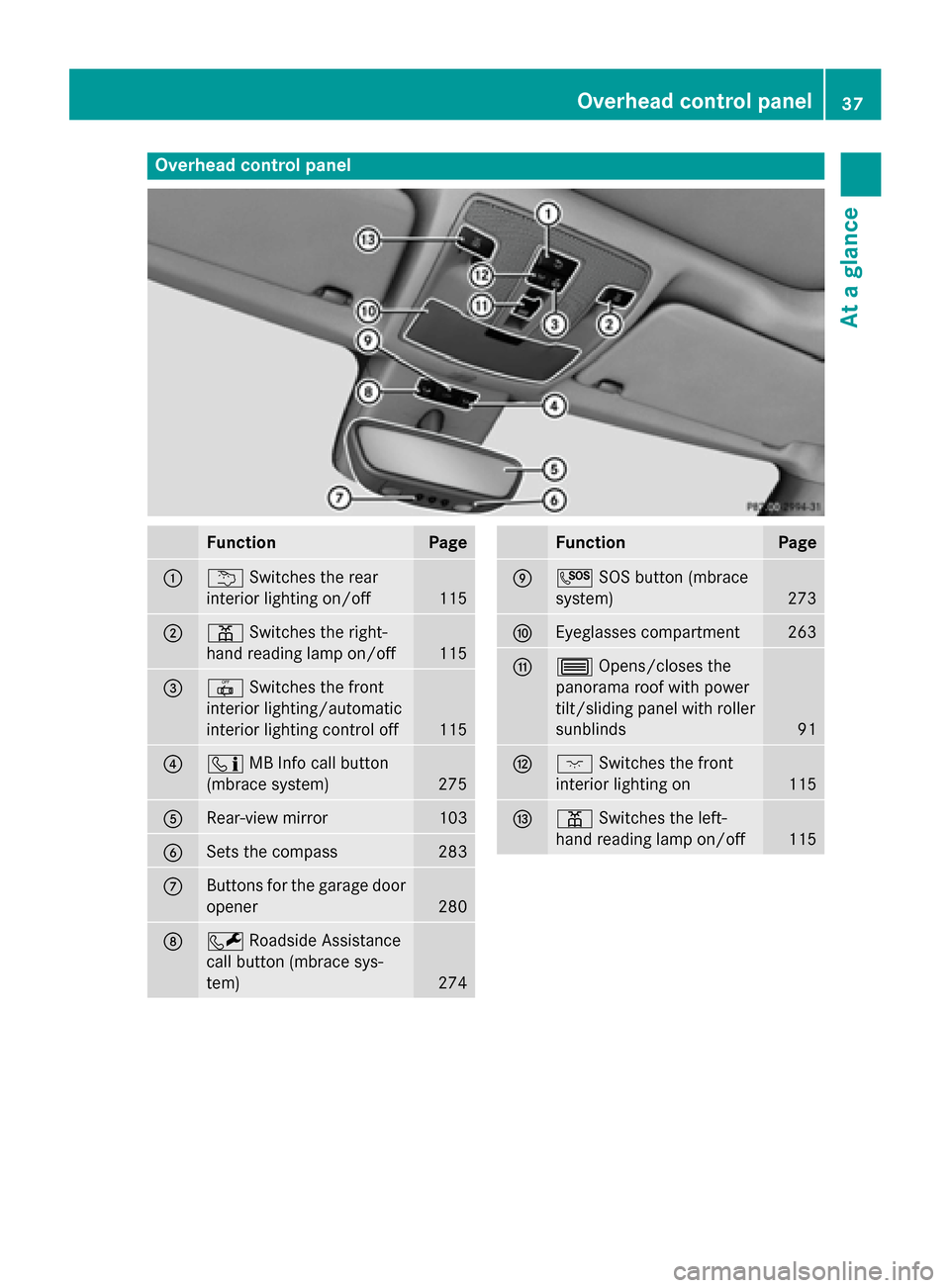
Overhead control panel
Function Page
:
u
Switches the rear
interior lighting on/off 115
;
p
Switches the right-
hand reading lamp on/off 115
=
|
Switches the front
interior lighting/automatic
interior lighting control off 115
?
ï
MB Info call button
(mbrace system) 275
A
Rear-view mirror 103
B
Sets the compass 283
C
Buttons for the garage door
opener 280
D
F
Roadside Assistance
call button (mbrace sys-
tem) 274 Function Page
E
G
SOS button (mbrace
system) 273
F
Eyeglasses compartment 263
G
3
Opens/closes the
panorama roof with power
tilt/sliding panel with roller sunblinds 91
H
c
Switches the front
interior lighting on 115
I
p
Switches the left-
hand reading lamp on/off 115Overhead control panel
37At a glance
Page 281 of 362
Information on the data stored in the vehicle
(Y page 26).
Information on Roadside Assistance
(Y page 22).
Downloading routes Downloading routes allows you to transfer
and save predefined routes in the navigation
system.
A route can be prepared and sent by either a
customer service representative or under
"Owners Online" at http://www.mbusa.com.
Each route can include up to four way points. The route is saved.
X To start route guidance: selectYes Yes.
An overview of the route is shown in the
display.
If you select No
No the saved route can be
called up later in the navigation menu.
X Select Start Start.
Route guidance starts.
Downloaded and saved routes can be called
up again.
Speed alert You can define the upper speed limit, which
must not be exceeded by the vehicle.
If this selected speed is exceeded by the vehi- cle, a message will be sent to the Customer
Assistance Center. The Customer Assistance
Center then forwards this information to you.
You can select the way in which you receive
this information beforehand. Possible options include text message, e-mail or an automated
call.
The data you receive contains the following
information:
R the location where the speed limit was
exceeded
R the time at which the speed limit was
exceeded
R the selected speed limit which was excee-
ded Geo fencing Geo fencing allows you to select areas which
the vehicle should not enter or leave. You will be informed if the vehicle crosses the boun-
daries of the selected areas. You can select
the way in which you receive this information
beforehand. Possible options include text
message, e-mail or an automated call.
The area can be determined as either a circle
or a polygon with a maximum of ten corners. You can specify up to ten areas simultane-
ously. Different settings are possible for each
area.
These settings can be called up under "Own-
ers Online" at http://www.mbusa.com.
Alternatively, you can trigger an MB Info call
and inform the customer service representa-
tive that you wish to activate geo fencing.
Currently inactive areas can be activated by
text message.
Triggering the vehicle alarm With this function, you can trigger the vehi-
cle's panic alarm via text message. An alarm
sounds and the exterior lighting flashes.
Depending on the setting, the panic alarm
lasts five or ten seconds. Afterwards, the
alarm switches off.
Garage door opener
General notes The HomeLink
®
garage door opener integra-
ted in the rear-view mirror allows you to oper-
ate up to three different door and gate sys-
tems.
Use the integrated garage door opener only
on garage doors that:
R have safety stop and reverse features and
R meet current U.S. federal safety standards
Once programed, the integrated garage door opener in the rear-view mirror will assume the
function of the garage door system's remote Features
279Stowage and features Z
Page 282 of 362
control. Please also read the operating
instructions for the garage door system.
When programming a garage door opener,
park the vehicle outside the garage. Do not
run the engine while programming.
Certain garage door drives are incompatible
with the integrated garage door opener. If you have difficulty programing the integrated
garage door opener, contact an authorized
Mercedes-Benz Center.
Alternatively, you can call the following tele-
phone assistance services:
R USA: Mercedes-Benz Customer Assistance
Center at 1-800-FOR-MERCedes
R Canada: Customer Service at
1-800-387-0100
R HomeLink ®
hotline 1-800-355-3515 (free
of charge)
More information on HomeLink ®
and/or
compatible products is also available online
at http://www.homelink.com.
Notes on the declaration of conformity
(Y page 24).
USA: FCC ID: CB2HMIHL4
Canada: IC: 279B-HMIHL4
Important safety notes G
WARNING
When you operate or program the garage door with the integrated garage door opener, per-
sons in the range of movement of the garage
door can become trapped or struck by the
garage door. There is a risk of injury.
When using the integrated garage door
opener, always make sure that nobody is
within the range of movement of the garage
door. G
WARNING
Combustion engines emit poisonous exhaust
gases such as carbon monoxide. Inhaling
these exhaust gases leads to poisoning. There is a risk of fatal injury. Therefore never leave the engine running in enclosed spaces with-
out sufficient ventilation.
Programming Programming buttons
Pay attention to the "Important safety notes"
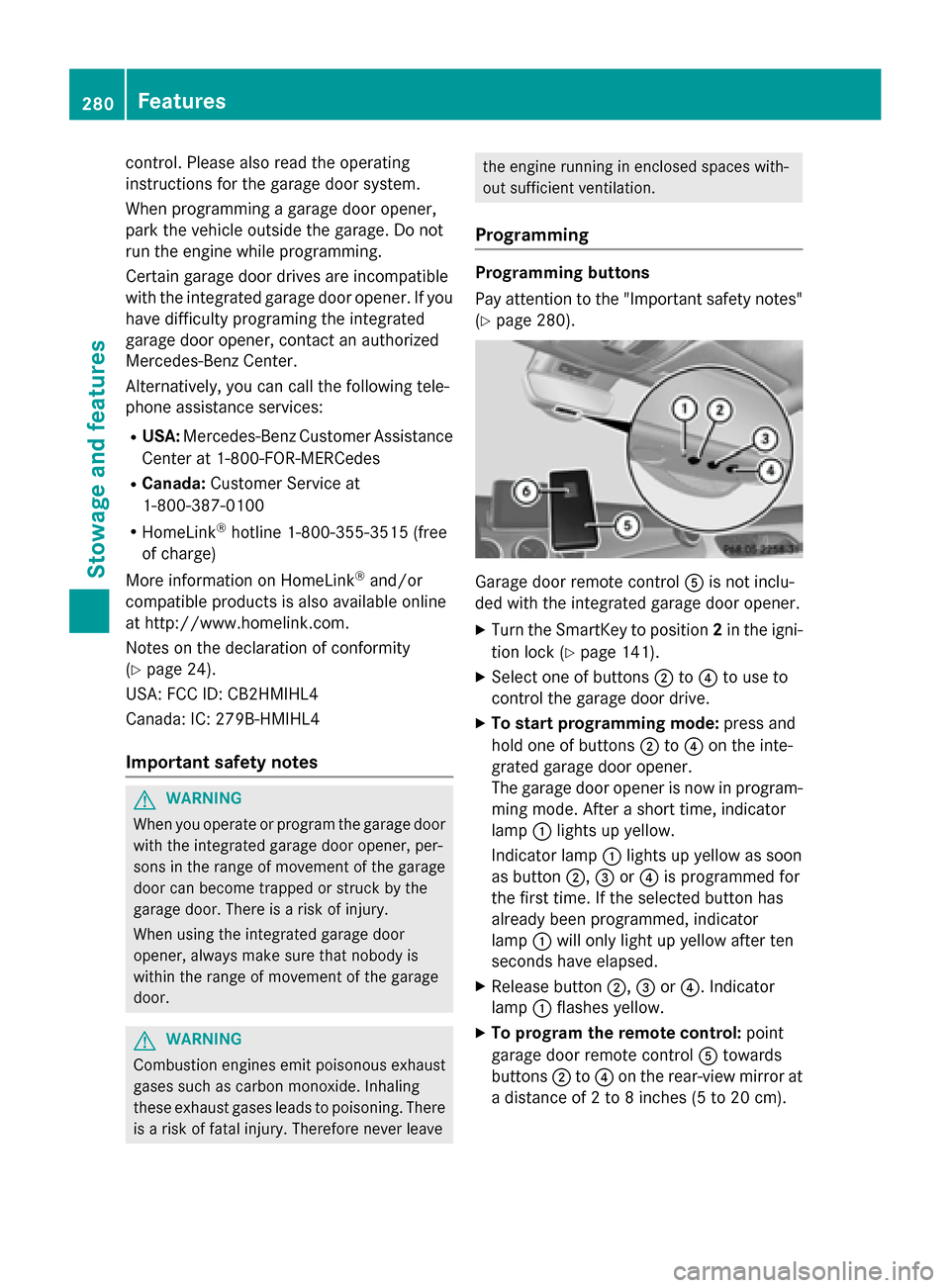
(Y page 280). Garage door remote control
Ais not inclu-
ded with the integrated garage door opener.
X Turn the SmartKey to position 2in the igni-
tion lock (Y page 141).
X Select one of buttons ;to? to use to
control the garage door drive.
X To start programming mode: press and
hold one of buttons ;to? on the inte-
grated garage door opener.
The garage door opener is now in program-
ming mode. After a short time, indicator
lamp :lights up yellow.
Indicator lamp :lights up yellow as soon
as button ;,=or? is programmed for
the first time. If the selected button has
already been programmed, indicator
lamp :will only light up yellow after ten
seconds have elapsed.
X Release button ;,=or?. Indicator
lamp :flashes yellow.
X To program the remote control: point
garage door remote control Atowards
buttons ;to? on the rear-view mirror at
a distance of 2 to 8 inche s (5to 20 cm). 280
FeaturesSto
wage an d features
Page 283 of 362
X
Press and hold button Bon remote control
A until indicator lamp :lights up green.
When indicator lamp :lights up green:
programming is finished.
When indicator lamp :flashes green: pro-
gramming was successful. The next step is to synchronize the rolling code
(Y page 281).
X Release button Bon remote control Afor
the garage door drive system.
If indicator lamp :lights up red: repeat the
programing procedure for the correspond-
ing button on the rear-view mirror. When
doing so, vary the distance between remote control Aand the rear-view mirror.
The required distance between remote
control Aand the integrated garage door
opener depends on the garage door drive
system. Several attempts might be neces-
sary. You should test every position for at
least 25 seconds before trying another
position.
Synchronizing the rolling code
Pay attention to the "Important safety notes"
(Y page 280).
If the garage door system uses a rolling code, you will also have to synchronize the garage
door system with the integrated garage door
opener in the rear-view mirror. To do this you
will need to use the programming button on
the door drive control panel. The program-
ming button may be positioned at different
locations depending on the manufacturer. It
is usually located on the door drive unit on the
garage ceiling.
Familiarize yourself with the garage door
drive operating instructions, e.g. under "Pro-
gramming of additional remote controls",
before carrying out the following steps.
Your vehicle must be within reach of the
garage door or gate opener drive. Make sure
that neither your vehicle nor any persons/
objects are present within the sweep of the
door or gate. X
Turn the SmartKey to position 2in the igni-
tion lock (Y page 141).
X Get out of the vehicle.
X Press the programming button on the door
drive unit.
Usually, you now have 30 seconds to ini-
tiate the next step.
X Get into the vehicle.
X Press previously programmed button ;,
= or? on the integrated garage door
opener until the door closes.
The rolling code synchronization is then
complete.
Notes on programming the remote con-
trol
Canadian radio frequency laws require a
"break" (or interruption) of the transmission
signals after broadcasting for a few seconds. Therefore, these signals may not last long
enough for the integrated garage door
opener. The signal is not recognized during
programming. Comparable with Canadian
law, some U.S. garage door openers also fea-
ture a "break".
Proceed as follows:
R if you live in Canada
R if you have difficulties programming the
garage door opener (regardless of where
you live) when using the programming
steps
X Press and hold one of buttons ;to? on
the integrated garage door opener.
After a short time, indicator lamp :lights
up yellow.
X Release the button.
Indicator lamp :flashes yellow.
X Press button Bof garage door remote
control Afor two seconds, then release it
for two seconds.
X Press button Bagain for two seconds. Features
281Stowage and features Z
Page 284 of 362
X
Repeat this sequence on button Bof
remote control Auntil indicator lamp :
lights up green.
When indicator lamp :lights up green:
programming is finished.
When indicator lamp :flashes green: pro-
gramming was successful. The next step is to synchronize the rolling code.
X Release button Bof remote control Aof
the garage door drive.
If indicator lamp :lights up red: repeat the
programming process for the correspond-
ing button on the rear-view mirror. When
doing so, vary the distance between remote control Aand the rear-view mirror.
The required distance between remote
control Aand the integrated garage door
opener depends on the garage door drive
system. Several attempts might be neces-
sary. You should test every position for at
least 25 seconds before trying another
position.
Problems when programming
If you are experiencing problems programing
the integrated garage door opener on the
rear-view mirror, take note of the following
instructions:
R Check the transmitter frequency used by
garage door drive remote control Aand
whether it is supported. The transmitter
frequency can usually be found on the back
of the garage door drive remote control.
The integrated garage door opener is com-
patible with devices that have units which
operate in the frequency range of 280 to
433 MH z.
R Replace the batteries in garage door
remote control A. This increases the like-
lihood that garage door remote control A
will transmit a strong and precise signal to the integrated garage door opener.
R When programming, hold remote control
A at varying distances and angles from the
button which you are programming. Try var- ious angles at a distance between 2and 12 inches (5to 30 cm) or at the same angle
but at varying distances.
R If another remote control is available for the
same garage door drive, repeat the same
programming steps with this remote con-
trol. Before performing these steps, make
sure that new batteries have been installed in garage door drive remote control A.
R Note that some remote controls only trans-
mit for a limited amount of time (the indi-
cator lamp on the remote control goes out).
Press button Bon remote control Aagain
before transmission ends.
R Align the antenna cable of the garage door
opener unit. This can improve signal recep-tion/transmission.
Opening/closing the garage door After it has been programmed, the integrated
garage door opener performs the function of
the garage door system remote control.
Please also read the operating instructions
for the garage door system.
X Turn the SmartKey to position 2in the igni-
tion lock (Y page 141).
X Press button ;,=or? which you have
programmed to operate the garage door.
Garage door system with a fixed code: indi-
cator lamp :lights up green.
Garage door system with a rolling code:
indicator lamp :flashes green.
The transmitter will transmit a signal as
long as the button is pressed. The trans-
mission is halted after a maximum of ten
seconds and indicator lamp :lights up
yellow.
X Press button ;,=or? again if neces-
sary.
Clearing the memory Make sure that you clear the memory of the
integrated garage door opener before selling
the vehicle. 282
FeaturesStowage and fea
tures
Page 285 of 362
X
Turn the SmartKey to position 2in the igni-
tion lock (Y page 141).
X Press and hold buttons ;and ?.
The indicator lamp initially lights up yellow
and then green.
X Release buttons ;and ?.
The memory of the integrated garage door
opener in the rear-view mirror is cleared. Compass
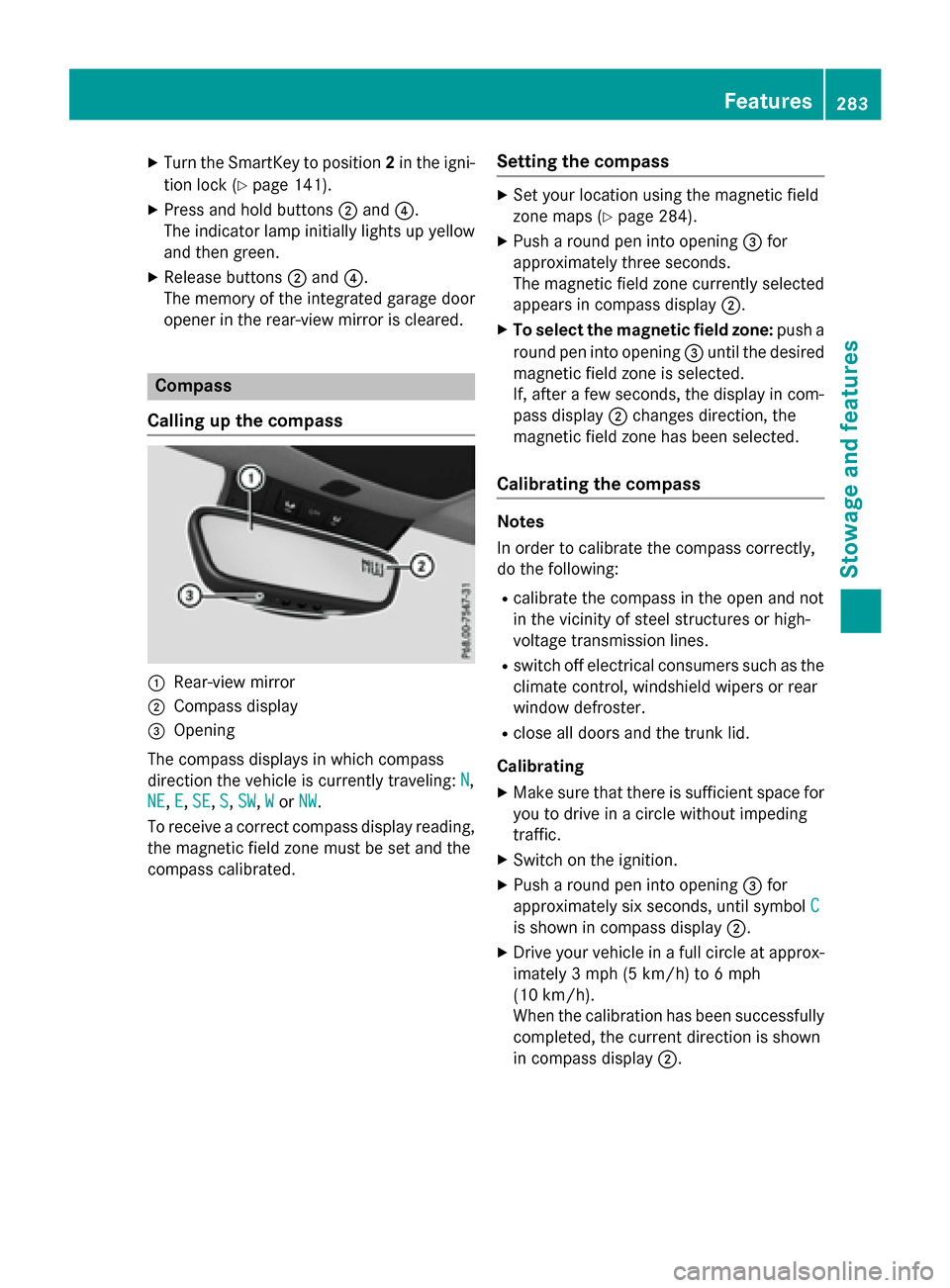
Calling up the compass :
Rear-view mirror
; Compass display
= Opening
The compass displays in which compass
direction the vehicle is currently traveling: N N,
NE
NE, E
E,SE
SE, S
S,SW
SW, W
Wor NW
NW.
To receive a correct compass display reading, the magnetic field zone must be set and the
compass calibrated. Setting the compass X
Set your location using the magnetic field
zone maps (Y page 284).
X Push a round pen into opening =for
approximately three seconds.
The magnetic field zone currently selected
appears in compass display ;.
X To select the magnetic field zone: push a
round pen into opening =until the desired
magnetic field zone is selected.
If, after a few seconds, the display in com-
pass display ;changes direction, the
magnetic field zone has been selected.
Calibrating the compass Notes
In order to calibrate the compass correctly,
do the following:
R calibrate the compass in the open and not
in the vicinity of steel structures or high-
voltage transmission lines.
R switch off electrical consumers such as the
climate control, windshield wipers or rear
window defroster.
R close all doors and the trunk lid.
Calibrating
X Make sure that there is sufficient space for
you to drive in a circle without impeding
traffic.
X Switch on the ignition.
X Push a round pen into opening =for
approximately six seconds, until symbol C
C
is shown in compass display ;.
X Drive your vehicle in a full circle at approx-
imately 3 mph (5 km/h) to 6 mph
(10 km/h).
When the calibration has been successfully
completed, the current direction is shown
in compass display ;. Features
283Stowage and features Z