hood open MERCEDES-BENZ CLA-Class 2015 C117 Owner's Manual
[x] Cancel search | Manufacturer: MERCEDES-BENZ, Model Year: 2015, Model line: CLA-Class, Model: MERCEDES-BENZ CLA-Class 2015 C117Pages: 362, PDF Size: 6.93 MB
Page 12 of 362
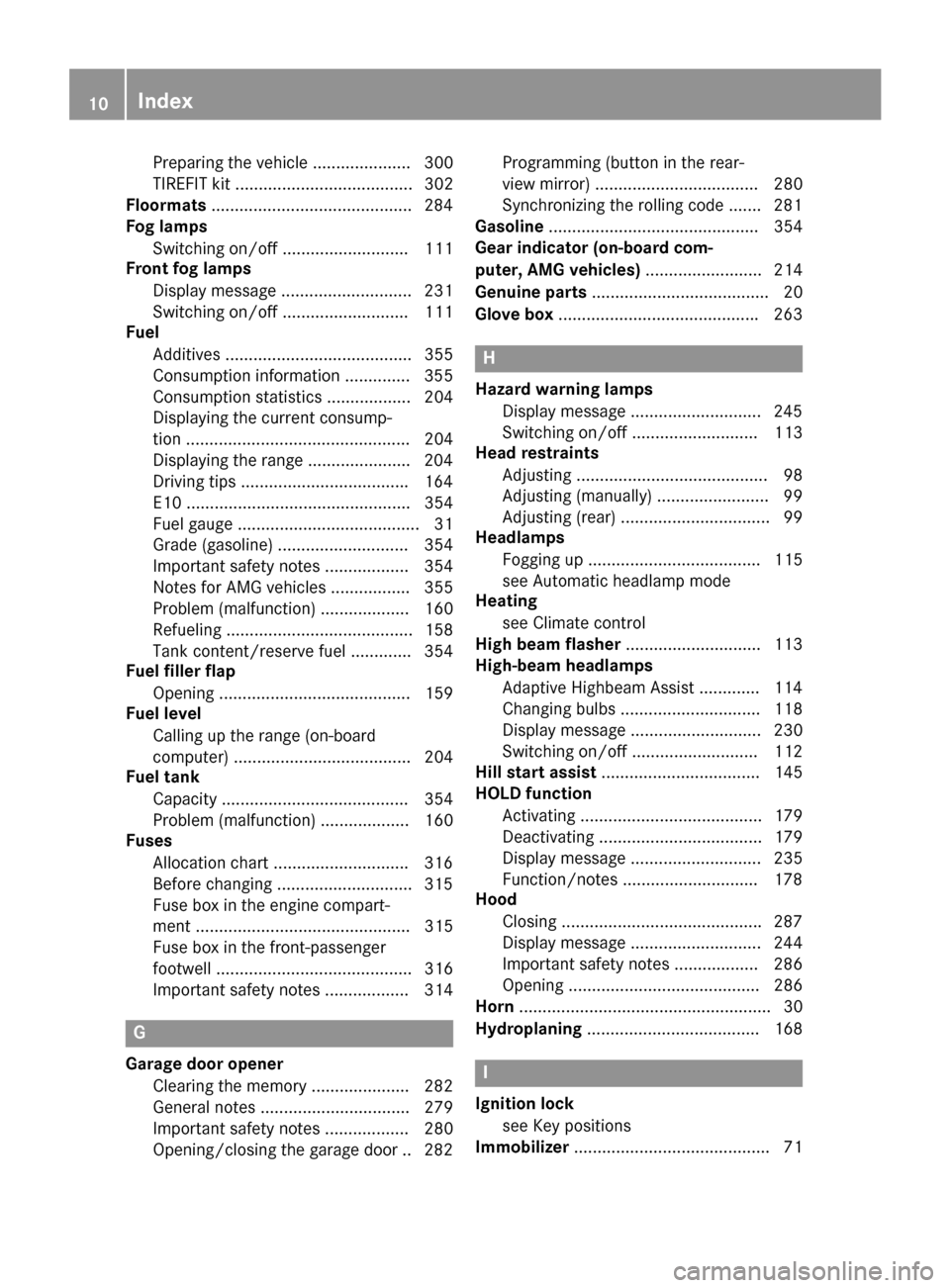
Preparing the vehicle ..................... 300
TIREFIT kit ...................................... 302
Floormats ...........................................2 84
Fog lamps
Switching on/off ........................... 111
Front fog lamps
Display message ............................ 231
Switching on/off ........................... 111
Fuel
Additives ........................................ 355
Consumption information .............. 355
Consumption statistics .................. 204
Displaying the current consump-
tion ................................................ 204
Displaying the range ..................... .204
Driving tips ................................... .164
E10 ................................................ 354
Fuel gauge ....................................... 31
Grade (gasoline) ............................ 354
Important safety notes .................. 354
Notes for AMG vehicles ................. 355
Problem (malfunction) ................... 160
Refueling ........................................ 158
Tank content/reserve fuel ............. 354
Fuel filler flap
Opening ......................................... 159
Fuel level
Calling up the range (on-board
computer) ...................................... 204
Fuel tank
Capacity ........................................ 354
Problem (malfunction) ................... 160
Fuses
Allocation chart ............................ .316
Before changing ............................ .315
Fuse box in the engine compart-
ment .............................................. 315
Fuse box in the front-passenger
footwell .......................................... 316
Important safety notes .................. 314 G
Garage door opener Clearing the memory ..................... 282
General notes ................................ 279
Important safety notes .................. 280
Opening/closing the garage door .. 282 Programming (button in the rear-
view mirror) ................................... 280
Synchronizing the rolling code ....... 281
Gasoline ............................................. 354
Gear indicator (on-board com-
puter, AMG vehicles) ......................... 214
Genuine parts ...................................... 20
Glove box .......................................... .263 H
Hazard warning lamps Display message ............................ 245
Switching on/off ........................... 113
Head restraints
Adjusting ......................................... 98
Adjusting (manually) ........................ 99
Adjusting (rear) ................................ 99
Headlamps
Fogging up ..................................... 115
see Automatic headlamp mode
Heating
see Climate control
High beam flasher .............................113
High-beam headlamps
Adaptive Highbeam Assist ............. 114
Changing bulbs .............................. 118
Display message ............................ 230
Switching on/off ........................... 112
Hill start assist .................................. 145
HOLD function
Activating ....................................... 179
Deactivating ................................... 179
Display message ............................ 235
Function/notes ............................ .178
Hood
Closing .......................................... .287
Display message ............................ 244
Important safety notes .................. 286
Opening ......................................... 286
Horn ...................................................... 30
Hydroplaning ..................................... 168 I
Ignition lock see Key positions
Immobilizer .......................................... 7110
Index
Page 32 of 362
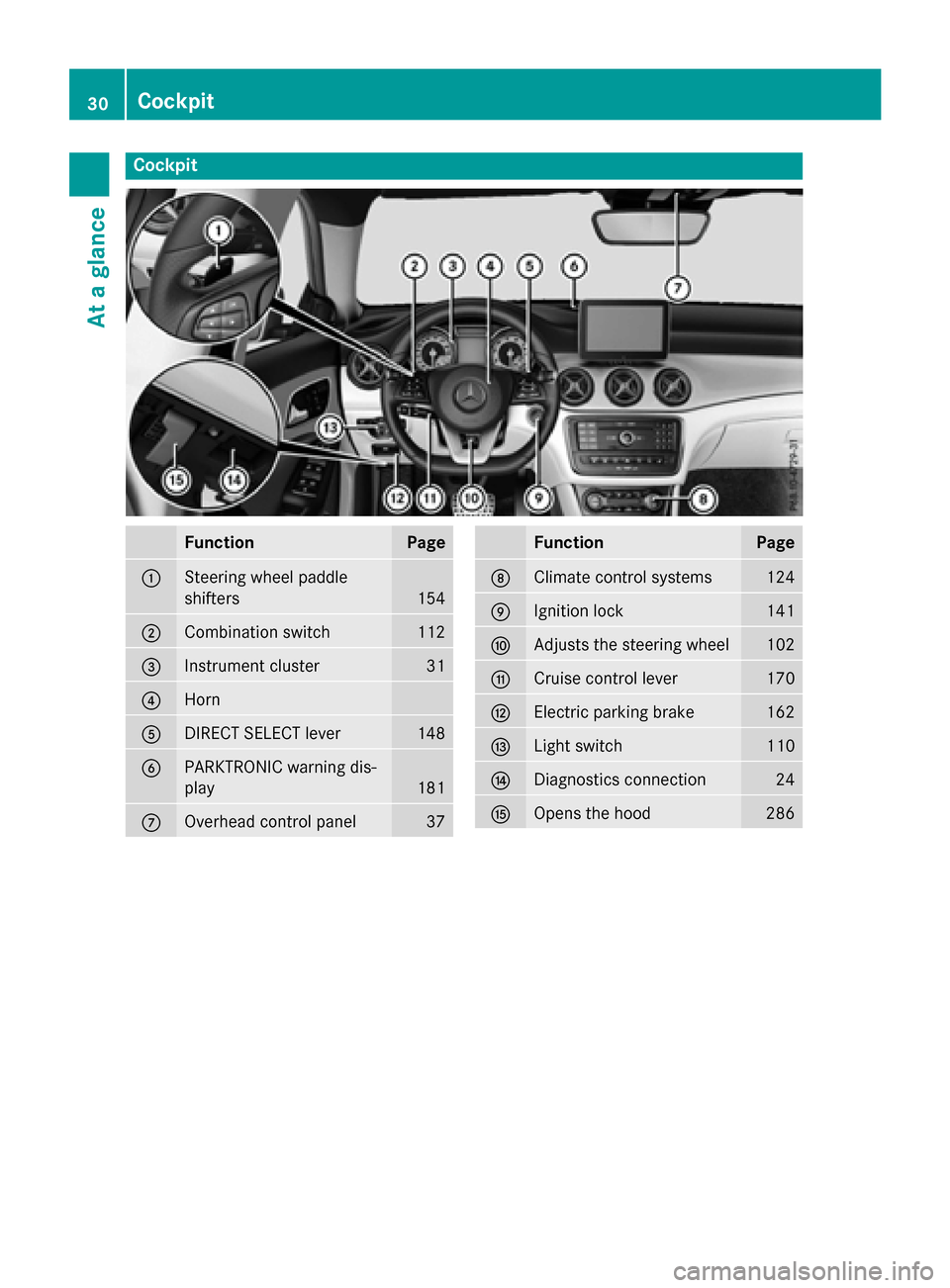
Cockpit
Function Page
:
Steering wheel paddle
shifters
154
;
Combination switch 112
=
Instrument cluster 31
?
Horn
A
DIRECT SELECT lever 148
B
PARKTRONIC warning dis-
play
181
C
Overhead control panel 37 Function Page
D
Climate control systems 124
E
Ignition lock 141
F
Adjusts the steering wheel 102
G
Cruise control lever 170
H
Electric parking brake 162
I
Light switch 110
J
Diagnostics connection 24
K
Opens the hood 28630
CockpitAt a glance
Page 73 of 362
This steering assistance is provided in partic-
ular if:
R both right wheels or both left wheels are on
a wet or slippery road surface when you
brake.
R the vehicle starts to skid.
Important safety notes i
Observe the "Important safety notes" sec-
tion (Y page 63).
No steering assistance is provided from
STEER CONTROL, if:
R ESP ®
is malfunctioning.
R the lighting is faulty.
If ESP ®
is malfunctioning, you will be assisted
further by the electrical power steering. Protection against theft
Immobilizer
The immobilizer prevents your vehicle from
being started without the correct SmartKey.
X To activate with the SmartKey: remove
the SmartKey from the ignition lock.
X To activate with KEYLESS-GO start-
function or KEYLESS-GO: switch the igni-
tion off and open the driver's door.
X To deactivate: switch on the ignition.
When leaving the vehicle, always take the
SmartKey with you and lock the vehicle. Any-
one can start the engine if a valid SmartKey
has been left inside the vehicle.
i The immobilizer is always deactivated
when you start the engine.
In the event that the engine cannot be star- ted (yet the vehicle's battery is charged),
the system is not operational. Contact an
authorized Mercedes-Benz Center or call
1-800-FOR-MERCedes (in the USA) or
1-800-387-0100 (in Canada). ATA (anti-theft alarm system)
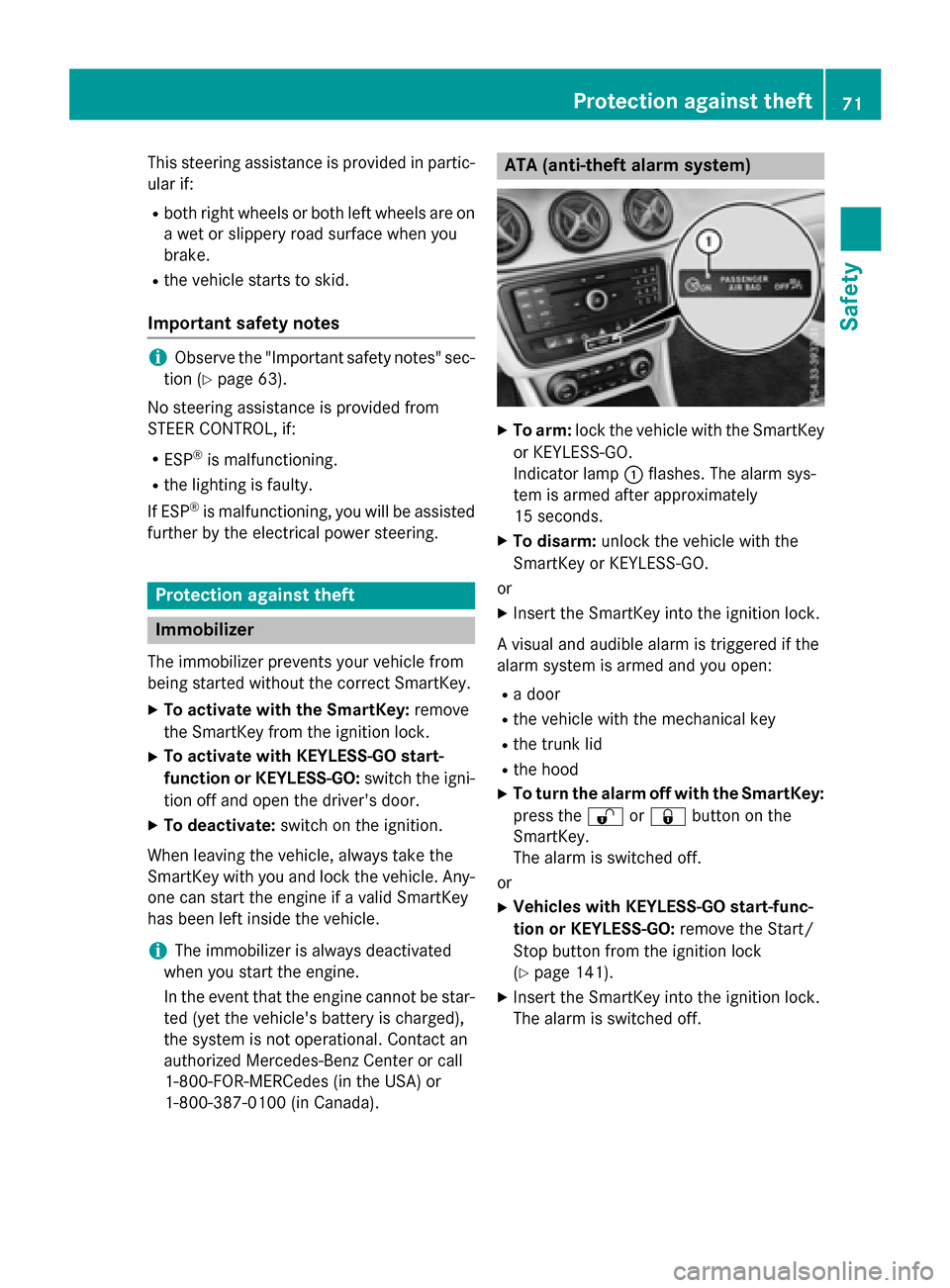
X
To arm: lock the vehicle with the SmartKey
or KEYLESS-GO.
Indicator lamp :flashes. The alarm sys-
tem is armed after approximately
15 seconds.
X To disarm: unlock the vehicle with the
SmartKey or KEYLESS-GO.
or X Insert the SmartKey into the ignition lock.
A visual and audible alarm is triggered if the
alarm system is armed and you open:
R a door
R the vehicle with the mechanical key
R the trunk lid
R the hood
X To turn the alarm off with the SmartKey:
press the %or& button on the
SmartKey.
The alarm is switched off.
or
X Vehicles with KEYLESS-GO start-func-
tion or KEYLESS-GO: remove the Start/
Stop button from the ignition lock
(Y page 141).
X Insert the SmartKey into the ignition lock.
The alarm is switched off. Protection against theft
71Safety Z
Page 120 of 362
Changing the front bulbs
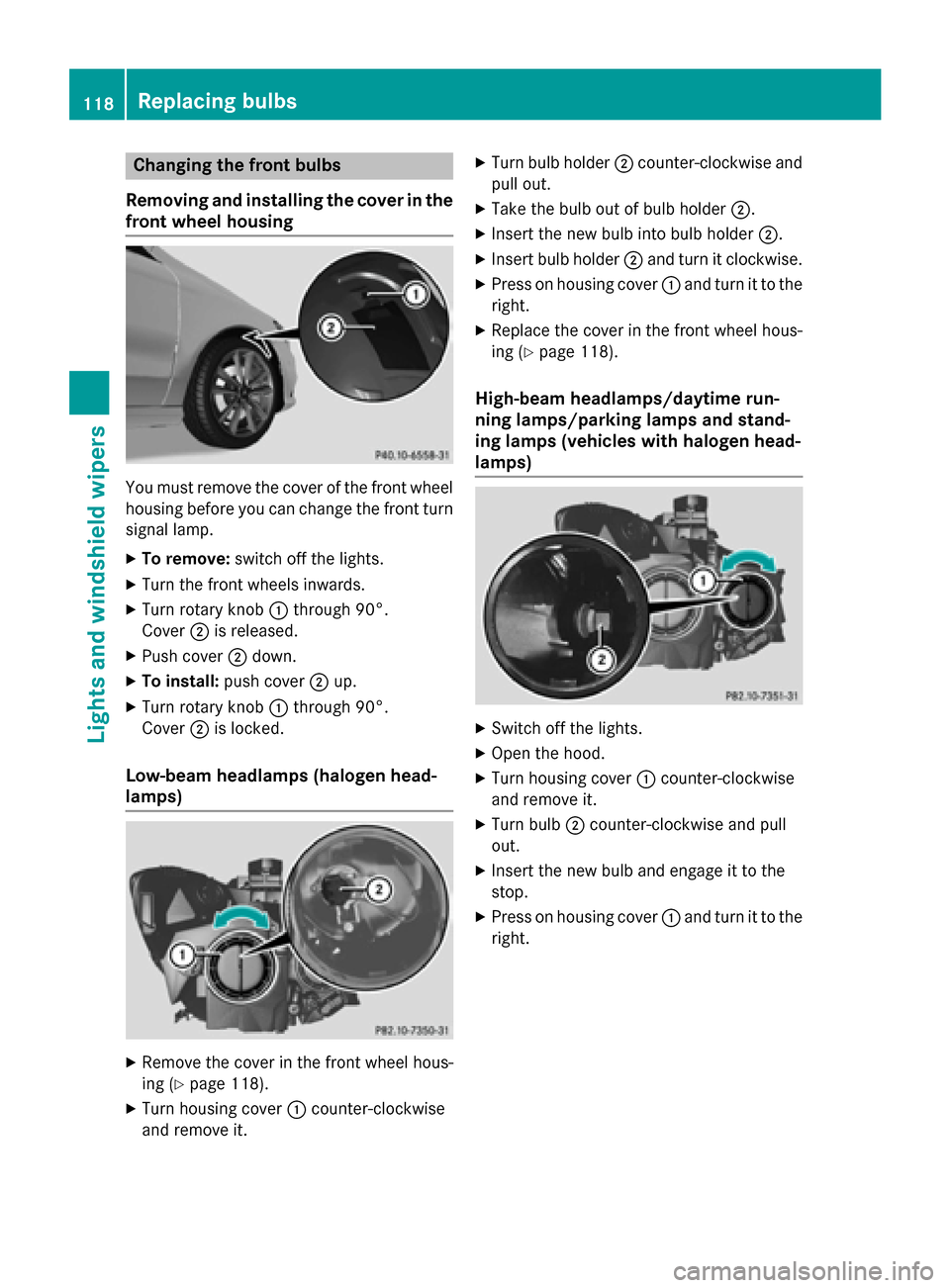
Removing and installing the cover in the
front wheel housing You must remove the cover of the front wheel
housing before you can change the front turn signal lamp.
X To remove: switch off the lights.
X Turn the front wheels inwards.
X Turn rotary knob :through 90°.
Cover ;is released.
X Push cover ;down.
X To install: push cover ;up.
X Turn rotary knob :through 90°.
Cover ;is locked.
Low-beam headlamps (halogen head-
lamps) X
Remove the cover in the front wheel hous-
ing (Y page 118).
X Turn housing cover :counter-clockwise
and remove it. X
Turn bulb holder ;counter-clockwise and
pull out.
X Take the bulb out of bulb holder ;.
X Insert the new bulb into bulb holder ;.
X Insert bulb holder ;and turn it clockwise.
X Press on housing cover :and turn it to the
right.
X Replace the cover in the front wheel hous-
ing (Y page 118).
High-beam headlamps/daytime run-
ning lamps/parking lamps and stand-
ing lamps (vehicles with halogen head-
lamps) X
Switch off the lights.
X Open the hood.
X Turn housing cover :counter-clockwise
and remove it.
X Turn bulb ;counter-clockwise and pull
out.
X Insert the new bulb and engage it to the
stop.
X Press on housing cover :and turn it to the
right. 118
Replacing bulbsLights and windshield wipers
Page 121 of 362
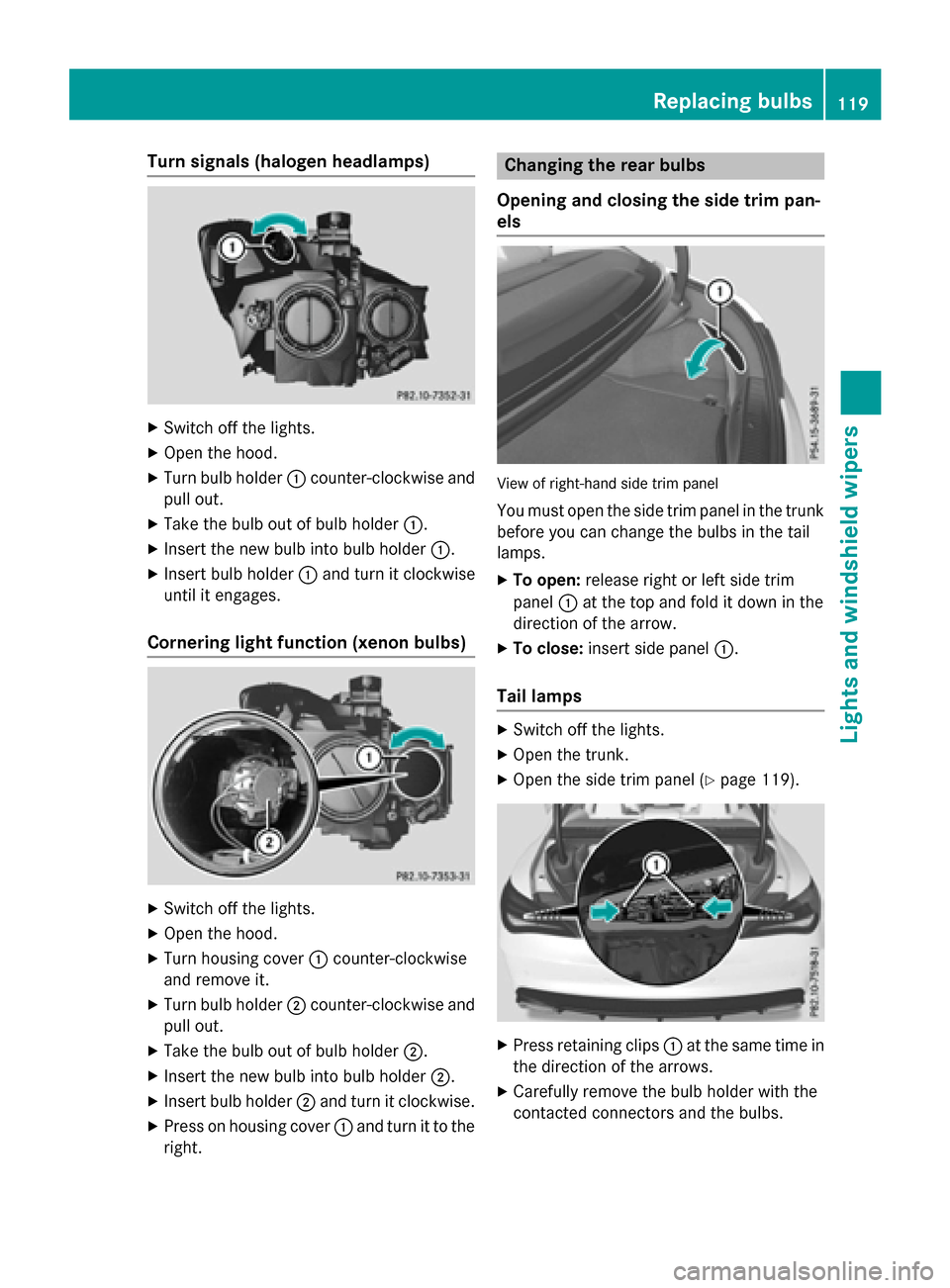
Turn signals (halogen headlamps)
X
Switch off the lights.
X Open the hood.
X Turn bulb holder :counter-clockwise and
pull out.
X Take the bulb out of bulb holder :.
X Insert the new bulb into bulb holder :.
X Insert bulb holder :and turn it clockwise
until it engages.
Cornering light function (xenon bulbs) X
Switch off the lights.
X Open the hood.
X Turn housing cover :counter-clockwise
and remove it.
X Turn bulb holder ;counter-clockwise and
pull out.
X Take the bulb out of bulb holder ;.
X Insert the new bulb into bulb holder ;.
X Insert bulb holder ;and turn it clockwise.
X Press on housing cover :and turn it to the
right. Changing the rear bulbs
Opening and closing the side trim pan-
els View of right-hand side trim panel
You must open the side trim panel in the trunk
before you can change the bulbs in the tail
lamps.
X To open: release right or left side trim
panel :at the top and fold it down in the
direction of the arrow.
X To close: insert side panel :.
Tail lamps X
Switch off the lights.
X Open the trunk.
X Open the side trim panel (Y page 119). X
Press retaining clips :at the same time in
the direction of the arrows.
X Carefully remove the bulb holder with the
contacted connectors and the bulbs. Replacing bulbs
119Lights andwindshield wipers Z
Page 123 of 362
position, causing the windshield wiper to wipe
more frequently.
If the wiper blades are worn, the windshield
will no longer be wiped properly. This could
prevent you from observing the traffic condi-
tions. Replacing the wiper blades
Important safety notes G
WARNING
If the windshield wipers begin to move while
you are changing the wiper blades, you could be trapped by the wiper arm. There is a risk of
injury.
Always switch off the windshield wipers and
ignition before changing the wiper blades.
! To avoid damaging the wiper blades,
make sure that you touch only the wiper
arm of the wiper.
! Never open the hood if a windshield wiper
arm has been folded away from the wind-
shield.
Never fold a windshield wiper arm without a
wiper blade back onto the windshield.
Hold the windshield wiper arm firmly when you change the wiper blade. If you release
the windshield wiper arm without a wiper
blade and it falls onto the windshield, the
windshield may be damaged by the force of
the impact.
Mercedes-Benz recommends that you have the wiper blades changed at a qualified
specialist workshop.
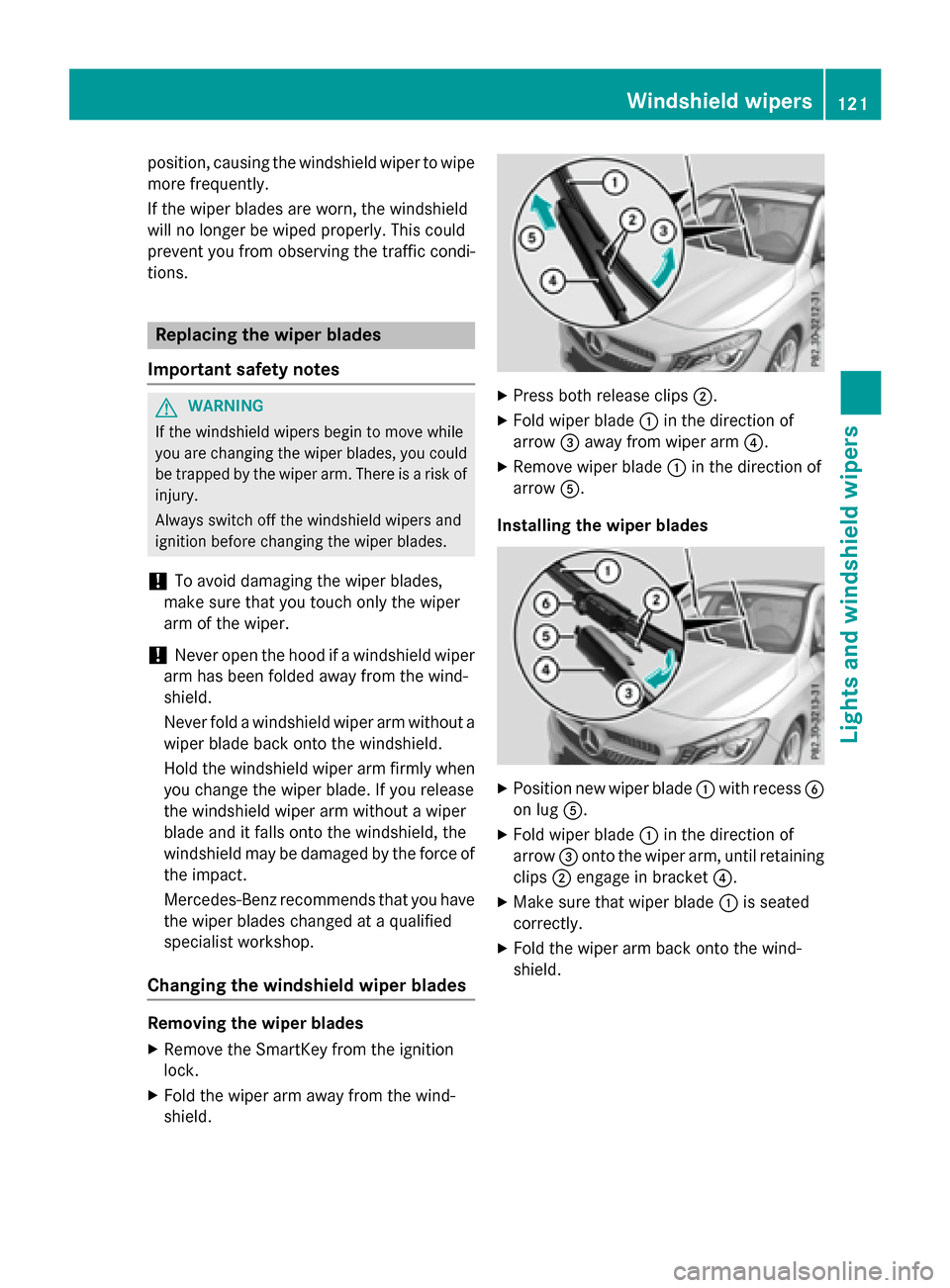
Changing the windshield wiper blades Removing the wiper blades
X Remove the SmartKey from the ignition
lock.
X Fold the wiper arm away from the wind-
shield. X
Press both release clips ;.
X Fold wiper blade :in the direction of
arrow =away from wiper arm ?.
X Remove wiper blade :in the direction of
arrow A.
Installing the wiper blades X
Position new wiper blade :with recess B
on lug A.
X Fold wiper blade :in the direction of
arrow =onto the wiper arm, until retaining
clips ;engage in bracket ?.
X Make sure that wiper blade :is seated
correctly.
X Fold the wiper arm back onto the wind-
shield. Windshield wipers
121Lights and windshield wipers Z
Page 138 of 362
i
You cannot use the ventilation to cool the
vehicle interior to a temperature lower than the outside temperature.
Switching on/off X
Turn the key to position 0in the ignition
lock or remove it (Y page 141).
X To activate: press theÌbutton.
The indicator lamp in the Ìbutton lights
up.
X To deactivate: press theÌbutton.
The indicator lamp in the Ìbutton goes
out.
i Residual heat is deactivated automati-
cally:
R after approximately 30 minutes
R when the ignition is switched on
R if the battery voltage drops Air vents
Important safety notes
G
WARNING
Very hot or very cold air can flow from the air vents. This could result in burns or frostbite in the immediate vicinity of the air vents. There
is a risk of injury.
Make sure that all vehicle occupants always
maintain a sufficient distance to the air out-
lets. If necessary, redirect the airflow to
another area of the vehicle interior.
In order to ensure the direct flow of fresh air
through the air vents into the vehicle interior,
please observe the following notes:
R keep the air inlet between the windshield
and the hood free of blockages, such as ice, snow or leaves.
R never cover the air vents or air intake grilles
in the vehicle interior.
i You can move the adjusters for the air
vents vertically or horizontally to set the
direction of the airflow. i
For optimal climate control in the vehicle,
open the air vents completely and set the
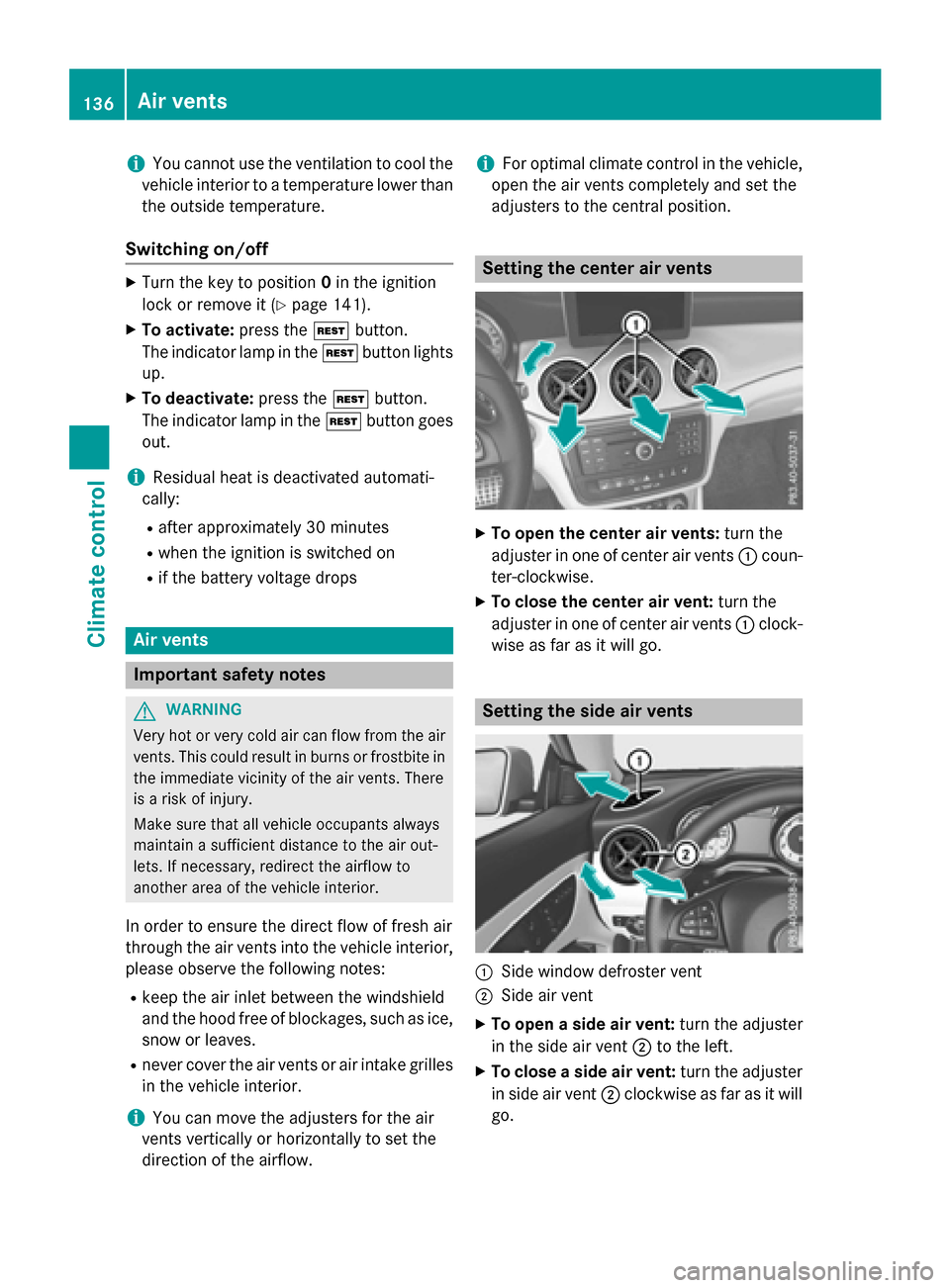
adjusters to the central position. Setting the center air vents
X
To open the center air vents: turn the
adjuster in one of center air vents :coun-
ter-clockwise.
X To close the center air vent: turn the
adjuster in one of center air vents :clock-
wise as far as it will go. Setting the side air vents
:
Side window defroster vent
; Side air vent
X To open a side air vent: turn the adjuster
in the side air vent ;to the left.
X To close a side air vent: turn the adjuster
in side air vent ;clockwise as far as it will
go. 136
Air ventsClimate control
Page 148 of 362
R
the hood is closed.
R the driver's door is closed and the driver's
seat belt is fastened.
All of the vehicle's systems remain active
when the engine is stopped automatically.
The HOLD function can also be activated if the
engine has been switched off automatically. It is then not necessary to continue applying the brakes during the automatic stop phase.
When you depress the accelerator pedal, the
engine starts automatically and the braking
effect of the HOLD function is deactivated.
The engine can be switched off automatically
a maximum of four times (first stop and three subsequent stops) in succession.
Automatic engine start The engine starts automatically if:
R you switch off the ECO start/stop function
by pressing the ECO button
R in transmission position Dor Nthe brake
pedal is released and the HOLD function is not active
R you depress the accelerator pedal
R you engage reverse gear R
R you move the transmission out of position
P
R you unfasten your seat belt or open the
driver's door
R the vehicle starts to roll
R the brake system requires this
R the temperature in the vehicle interior devi-
ates from the set range
R the system detects moisture on the wind-
shield when the air-conditioning system is
switched on
R the battery's condition of charge is too low
Shifting the transmission to position Pdoes
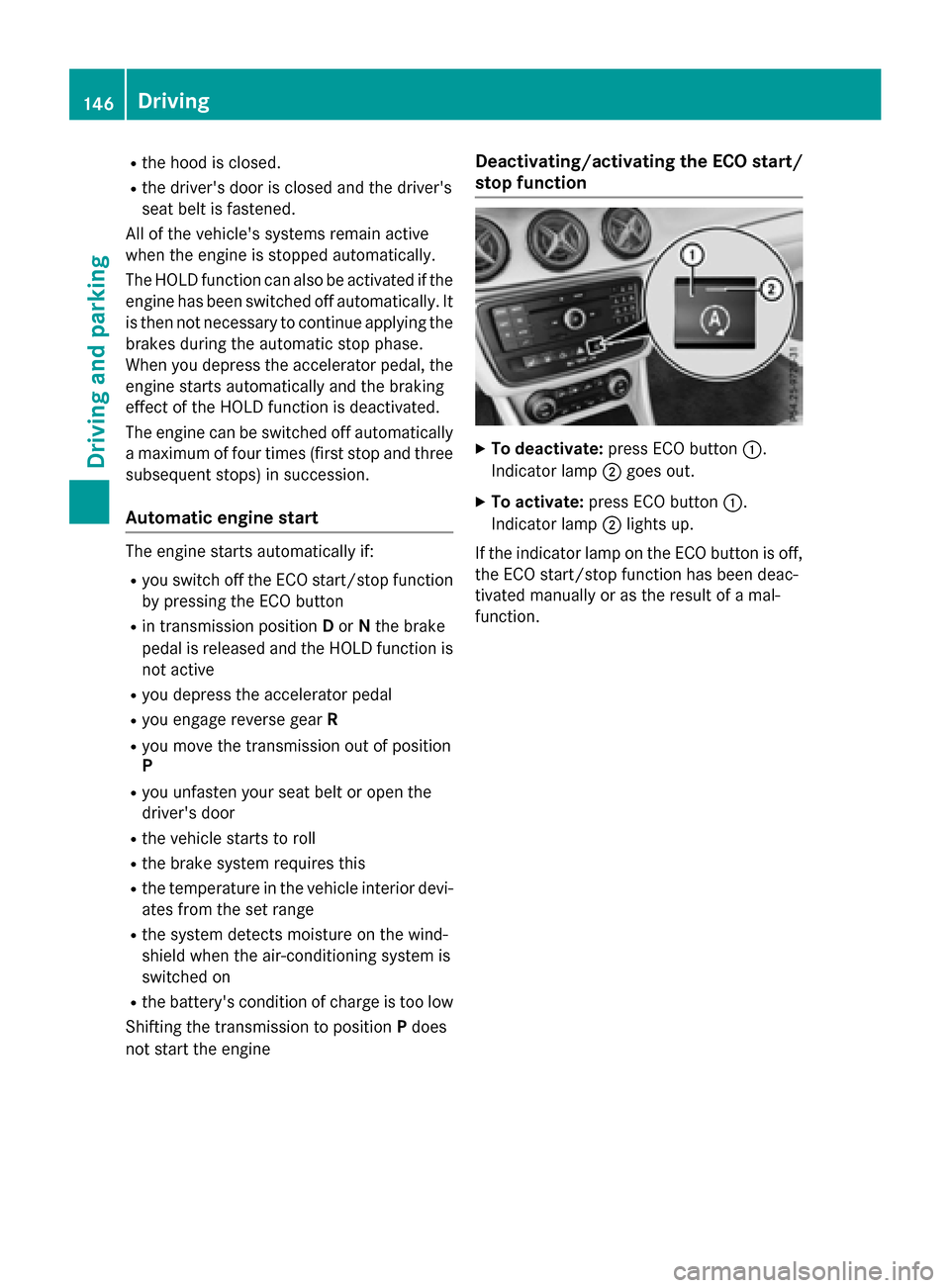
not start the engine Deactivating/activating the ECO start/
stop function
X
To deactivate: press ECO button :.
Indicator lamp ;goes out.
X To activate: press ECO button :.
Indicator lamp ;lights up.
If the indicator lamp on the ECO button is off, the ECO start/stop function has been deac-
tivated manually or as the result of a mal-
function. 146
DrivingDriving an
d parking
Page 202 of 362
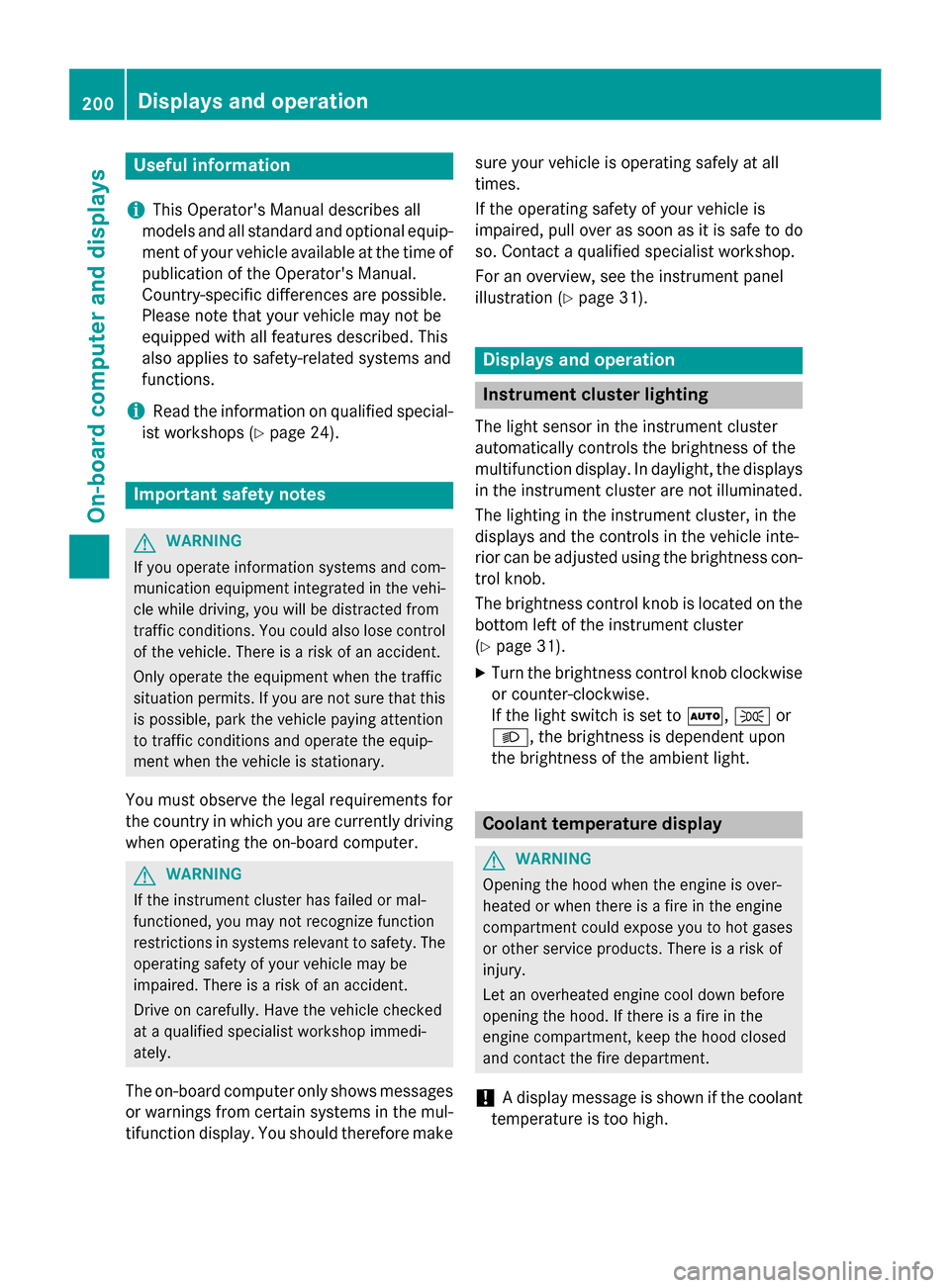
Useful information
i This Operator's Manual describes all
models and all standard and optional equip- ment of your vehicle available at the time of
publication of the Operator's Manual.
Country-specific differences are possible.
Please note that your vehicle may not be
equipped with all features described. This
also applies to safety-related systems and
functions.
i Read the information on qualified special-
ist workshops (Y page 24). Important safety notes
G
WARNING
If you operate information systems and com-
munication equipment integrated in the vehi- cle while driving, you will be distracted from
traffic conditions. You could also lose control of the vehicle. There is a risk of an accident.
Only operate the equipment when the traffic
situation permits. If you are not sure that this
is possible, park the vehicle paying attention
to traffic conditions and operate the equip-
ment when the vehicle is stationary.
You must observe the legal requirements for
the country in which you are currently driving when operating the on-board computer. G
WARNING
If the instrument cluster has failed or mal-
functioned, you may not recognize function
restrictions in systems relevant to safety. The operating safety of your vehicle may be
impaired. There is a risk of an accident.
Drive on carefully. Have the vehicle checked
at a qualified specialist workshop immedi-
ately.
The on-board computer only shows messages
or warnings from certain systems in the mul- tifunction display. You should therefore make sure your vehicle is operating safely at all
times.
If the operating safety of your vehicle is
impaired, pull over as soon as it is safe to do
so. Contact a qualified specialist workshop.
For an overview, see the instrument panel
illustration (Y page 31). Displays and operation
Instrument cluster lighting
The light sensor in the instrument cluster
automatically controls the brightness of the
multifunction display. In daylight, the displays
in the instrument cluster are not illuminated.
The lighting in the instrument cluster, in the
displays and the controls in the vehicle inte-
rior can be adjusted using the brightness con- trol knob.
The brightness control knob is located on the
bottom left of the instrument cluster
(Y page 31).
X Turn the brightness control knob clockwise
or counter-clockwise.
If the light switch is set to Ã,Tor
L, the brightness is dependent upon
the brightness of the ambient light. Coolant temperature display
G
WARNING
Opening the hood when the engine is over-
heated or when there is a fire in the engine
compartment could expose you to hot gases
or other service products. There is a risk of
injury.
Let an overheated engine cool down before
opening the hood. If there is a fire in the
engine compartment, keep the hood closed
and contact the fire department.
! A display message is shown if the coolant
temperature is too high. 200
Displays and operationOn-board computer and displays
Page 235 of 362
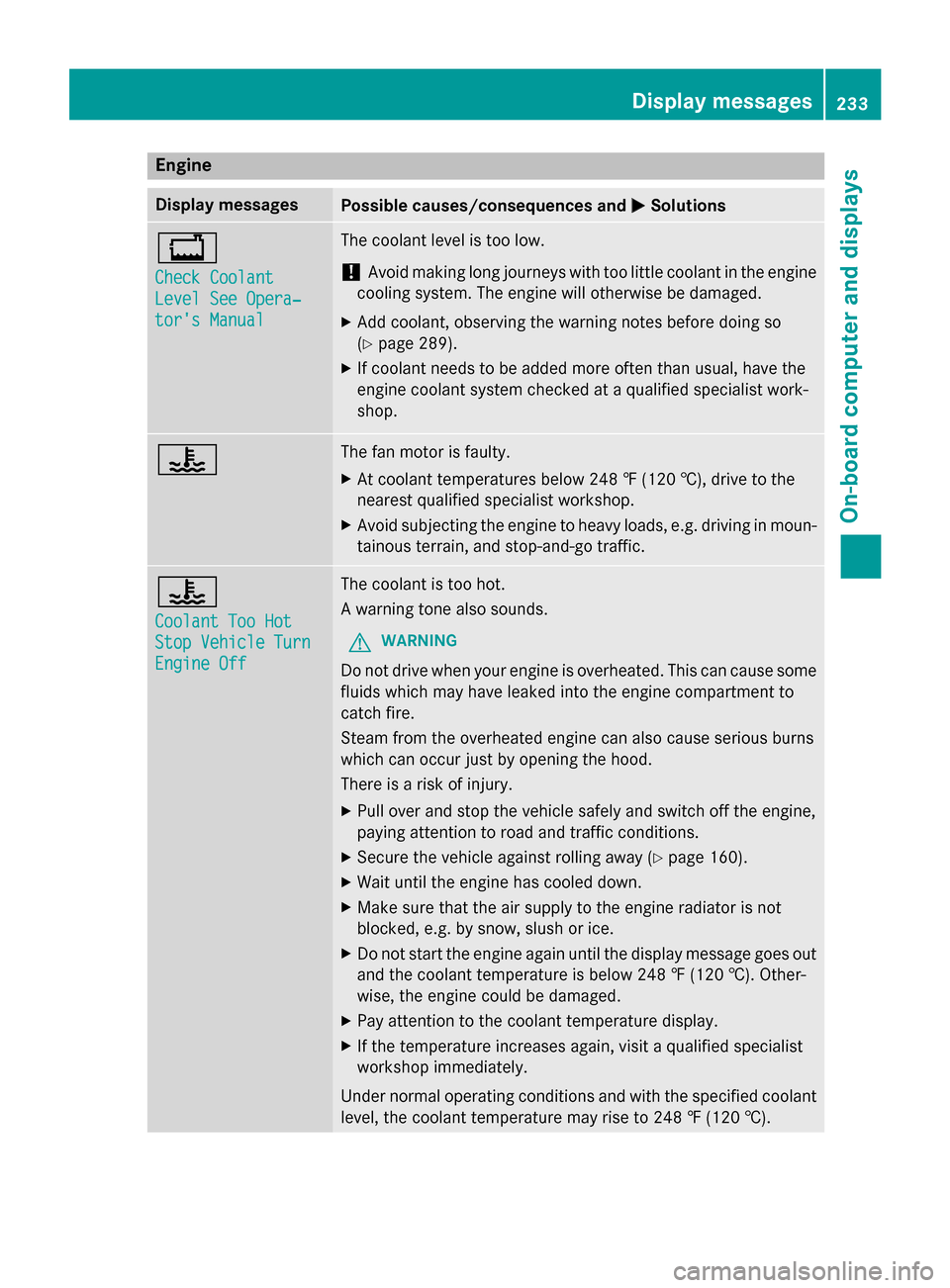
Engine
Display messages
Possible causes/consequences and
M
MSolutions +
Check Coolant Check Coolant
Level See Opera‐ Level See Opera‐
tor's Manual tor's Manual The coolant level is too low.
! Avoid making long journeys with too little coolant in the engine
cooling system. The engine will otherwise be damaged.
X Add coolant, observing the warning notes before doing so
(Y page 289).
X If coolant needs to be added more often than usual, have the
engine coolant system checked at a qualified specialist work-
shop. ? The fan motor is faulty.
X At coolant temperatures below 248 ‡ (120 †), drive to the
nearest qualified specialist workshop.
X Avoid subjecting the engine to heavy loads, e.g. driving in moun-
tainous terrain, and stop-and-go traffic. ?
Coolant Too Hot Coolant Too Hot
Stop Vehicle Turn Stop Vehicle Turn
Engine Off Engine Off The coolant is too hot.
A warning tone also sounds.
G WARNING
Do not drive when your engine is overheated. This can cause some
fluids which may have leaked into the engine compartment to
catch fire.
Steam from the overheated engine can also cause serious burns
which can occur just by opening the hood.
There is a risk of injury.
X Pull over and stop the vehicle safely and switch off the engine,
paying attention to road and traffic conditions.
X Secure the vehicle against rolling away (Y page 160).
X Wait until the engine has cooled down.
X Make sure that the air supply to the engine radiator is not
blocked, e.g. by snow, slush or ice.
X Do not start the engine again until the display message goes out
and the coolant temperature is below 248 ‡ (120 †). Other-
wise, the engine could be damaged.
X Pay attention to the coolant temperature display.
X If the temperature increases again, visit a qualified specialist
workshop immediately.
Under normal operating conditions and with the specified coolant
level, the coolant temperature may rise to 248 ‡ (120 †). Display messages
233On-board computer and displays Z