trunk MERCEDES-BENZ CLA-Class 2015 C117 Owner's Manual
[x] Cancel search | Manufacturer: MERCEDES-BENZ, Model Year: 2015, Model line: CLA-Class, Model: MERCEDES-BENZ CLA-Class 2015 C117Pages: 362, PDF Size: 6.93 MB
Page 11 of 362
On-board computer ....................... 204
ECO start/stop function
Automatic engine start .................. 146
Automatic engine switch-off ..........1 45
Deactivating/activating ................. 146
General information ....................... 145
Important safety notes .................. 145
Introduction ................................... 145
Emergency
Automatic measures after an acci-
dent ................................................. 56
Emergency release
Driver's door ................................... .83
Trunk ............................................... 85
Vehicle ............................................. 83
Emergency Tensioning Devices
Activation ......................................... 54
Emissions control
Service and warranty information ....21
Engine
Check Engine warning lamp .......... .256
Display message ............................ 233
ECO start/stop function ................ 145
Engine number ............................... 353
Irregular running ............................ 147
Jump-starting ................................. 309
Starting problems .......................... 147
Starting the engine with the
SmartKey ....................................... 144
Starting with the Start/Stop but-
ton ................................................. 144
Switching off .................................. 161
Tow-starting (vehicle) ..................... 314
Engine electronics
Problem (malfunction) ................... 147
Engine oil
Adding .......................................... .288
Additives ........................................ 356
Checking the oil level ..................... 287
Checking the oil level using the
dipstick .......................................... 288
Display message ............................ 234
Filling capacity ............................... 356
Notes about oil grades ................... 356
Notes on oil level/consumption .... 287
Temperature (on-board computer, AMG vehicles) ................................ 214
Viscosity ........................................ 356 ESP
®
(Electronic Stability Pro-
gram)
Activating/deactivating (except
AMG vehicles) .................................. 68
Activating/deactivating (on-
board computer, except AMG
vehicles) ........................................ 210
AMG menu (on-board computer) ... 214
Characteristics ................................. 67
Deactivating/activating (button
in AMG vehicles) .............................. 68
Display message ............................ 218
ETS/4ETS ........................................ 67
Function/notes ................................ 67
General notes .................................. 67
Important safety information ........... 67
Trailer stabilization ........................... 70
Warning lamp ................................. 252
ETS/4ETS (Electronic Traction Sys-
tem) ...................................................... 67
Exhaust
see Exhaust pipe
Exhaust check ................................... 164
Exhaust pipe
Cleaning ......................................... 296
Exterior lighting
Cleaning ......................................... 295
see Lights
Exterior mirrors
Adjusting ....................................... 103
Dipping (automatic) ....................... 104
Folding in when locking (on-boardcomputer) ...................................... 213
Folding in/out (automatically) ....... 104
Folding in/out (electrically) ........... 103
Out of position (troubleshooting) ... 104
Setting ........................................... 104
Storing settings (memory func-
tion) ............................................... 106
Storing the parking position .......... 105
Eyeglasses compartment ................. 263 F
Filler cap see Fuel filler flap
Flat tire
MOExtended tire s.......................... 301 Index
9
Page 18 of 362
Sockets
Center console .............................. 271
General notes ................................ 271
Rear compartment .........................2 71
Trunk ............................................. 271
Special seat belt retractor .................. 57
Specialist workshop ............................ 24
Speed, controlling
see Cruise control
Speedometer
Activating/deactivating the addi-
tional speedometer ........................ 212
Digital ............................................ 205
In the Instrument cluster ................. 31
Segments ...................................... 201
Selecting the unit of measure-
ment .............................................. 211
SPORT handling mode
Activating/deactivating (AMG
vehicles) .......................................... 68
Warning lamp ................................. 253
Standing lamps
Display message ............................ 231
Switching on/off ........................... 112
Start/Stop button
Removing ....................................... 143
Starting the engine ........................ 144
Start/stop function
see ECO start/stop function
Starting (engine) ................................ 143
STEER CONTROL .................................. 70
Steering (display message) .............. 245
Steering assistant STEER CON-
TROL
see STEER CONTROL
Steering wheel
Adjusting (manually) ...................... 102
Button overview ............................... 33
Buttons (on-board computer) ......... 201
Cleaning ......................................... 297
Important safety notes .................. 102
Paddle shifters ............................... 154
Steering wheel paddle shifters ........ 154
Stopwatch (RACETIMER) ................... 214
Stowage compartments
Armrest (front) ............................... 264
Armrest (under) ............................. 264 Center console .............................. 263
Center console (rear) ..................... 264
Cup holders ................................... 268
Eyeglasses compartment ............... 263
Glove box ....................................... 263
Important safety information ......... 263
Map pockets .................................. 265
Stowage net ................................... 265
Under driver's seat/front-
passenger sea t.............................. 264
Stowage net ....................................... 265
Stowage well beneath the trunk
floor .................................................... 267
Summer tires ..................................... 320
Sun visor ............................................ 269
Switching air-recirculation mode
on/off ................................................. 135 T
Tachometer ........................................ 201
Tail lamps
Display message ............................ 230
see Lights
Tank content
Fuel gauge ....................................... 31
Technical data
Capacities ...................................... 353
Information .................................... 352
Tires/wheels ................................. 345
Vehicle data ................................... 359
Telephone
Accepting a call (multifunction
steering wheel) .............................. 208
Display message ............................ 245
Introduction ................................... 208
Menu (on-board computer) ............ 208
Number from the phone book ........ 208
Redialing ........................................ 209
Rejecting/ending a call ................. 208
Temperature
Coolant .......................................... 200
Coolant (on-board computer,
AMG vehicles) ................................ 214
Engine oil (on-board computer,
AMG vehicles) ................................ 214
Outside temperature ...................... 201
Setting (climate control )................ 131 16
Index
Page 20 of 362
Tire tread (definition) ..................... 340
Total load limit (definition )............. 341
Traction ......................................... 334
Traction (definition) ....................... 340
Tread wear ..................................... 334
Uniform Tire Quality Grading
Standards ...................................... 333
Uniform Tire Quality Grading
Standards (definition) .................... 339
Wear indicator (definition) ............. 340
Wheel and tire combination ........... 347
Wheel rim (definition) .................... 339
see Flat tire
Top Tether ............................................ 59
Tow-starting
Emergency engine starting ............ 314
Important safety notes .................. 311
Installing the towing eye ................ 312
Removing the towing eye ............... 313
Towing a trailer
ESP ®
(Electronic Stability Pro-
gram) ............................................... 70
Towing away
Important safety guidelines ........... 311
Installing the towing eye ................ 312
Notes for 4MATIC vehicles ............ 314
Removing the towing eye ............... 313
Transporting the vehicle ................ 314
With both axles on the ground ....... 313
With front axle raised ..................... 313
Towing eye ......................................... 300
Transmission
see Automatic transmission
Transmission position display
(DIRECT SELECT lever) ...................... 149
Transporting the vehicle .................. 314
Trim pieces (cleaning instruc-
tions) .................................................. 297
Trip computer (on-board com-
puter) .................................................. 204
Trip odometer
Calling up ....................................... 203
Resetting (on-board computer) ...... 205
Trunk
Emergency release .......................... 85
Emergency release button ............... 86
Important safety notes .................... 83 Opening (automatically from out-
side) ................................................. 84
Opening automatically from
inside ............................................... 85
Opening/closing (manually from
outside) ............................................ 84
Trunk emergency release button ....... 86
Trunk lid
Display message ............................ 244
Opening dimensions ...................... 359
Trunk load (maximum) ...................... 359
Turn signals
Changing bulbs (front) ................... 119
Changing bulbs (rear) .................... 119
Display message ............................ 230
Switching on/of f........................... 112
Type identification plate
see Vehicle identification plate U
Unlocking Emergency unlocking ....................... 83
From inside the vehicle (central
unlocking button) ............................. 82
Upshift indicator (on-board com-
puter, AMG vehicles) ......................... 214 V
Vanity mirror (in the sun visor) ........ 269
Vehicle
Correct use ...................................... 25
Data acquisition ............................... 26
Display message ............................ 242
Equipment ....................................... 21
Individual settings .......................... 211
Limited Warranty ............................. 25
Loading .......................................... 329
Locking (in an emergency) ............... 83
Locking (SmartKey ).......................... 74
Lowering ........................................ 345
Maintenance .................................... 22
Parking for a long period ................ 163
Pulling away ................................... 144
Raising ........................................... 342
Reporting problems ......................... 25
Securing from rolling away ............ 342 18
Index
Page 21 of 362
Transporting ..................................3
14
Unlocking (in an emergency) ........... 83
Unlocking (SmartKey) ..................... .74
Vehicle data ................................... 359
Vehicle data
Roof load (maximum) .....................3 59
Trunk load (maximum) ................... 359
Vehicle dimensions ........................... 359
Vehicle emergency locking ................ 83
Vehicle identification number
see VIN
Vehicle identification plate .............. 352
Vehicle tool kit .................................. 300
Ventilation
Setting the vents ........................... 136
Video
Operating the DVD ......................... 207
VIN ...................................................... 352 W
Warning and indicator lamps ABS ................................................ 250
Brakes .......................................... .249
Check Engine ................................. 256
Coolant .......................................... 256
Distance warning ........................... 258
ESP ®
.............................................. 252
ESP ®
OFF ....................................... 253
LIM (DISTRONIC PLUS) .................. 173
Overview .......................................... 32
PASSENGER AIR BAG OFF .............. .41
Reserve fuel .................................. .256
Restraint system ............................ 255
Seat belt ........................................ 247
SPORT handling mode ................... 253
Tire pressure monitor .................... 259
Warranty .............................................. 21
Washer fluid
Display message ............................ 245
Wheel and tire combination
see Tires
Wheel bolt tightening torque ........... 345
Wheel chock ...................................... 342
Wheels
Changing a wheel .......................... 341
Checking ........................................ 319
Cleaning ......................................... 294 General notes ................................ 345
Important safety notes .................. 318
Information on driving .................... 318
Interchanging/changing ................ 341
Mounting a new wheel ................... 344
Removing a wheel .......................... 344
Storing .......................................... .341
Tightening torque ........................... 345
Wheel size/tire size ....................... 345
Window curtain air bag
Display message ............................ 226
Operation ......................................... 48
Windows
see Side windows
Windshield
Defrosting ...................................... 133
Windshield washer system
Adding washer fluid ....................... 290
Notes ............................................. 358
Windshield wipers
Display message ............................ 245
Problem (malfunction) ................... 122
Replacing the wiper blades ............ 121
Switching on/off ........................... 120
Winter driving
Slippery road surfaces ................... 168
Snow chains .................................. 321
Winter operation
General notes ................................ 320
Winter tires
M+S tires ....................................... 320
Wiper blades
Cleaning ......................................... 295
Important safety notes .................. 121
Replacing (windshield )................... 121
Wooden trim (cleaning instruc-
tions) .................................................. 297 Z
ZONE function Switching on/of f........................... 132 Index
19
Page 38 of 362

Door control panel
Function Page
:
Opens the door 81
;
%&Unlocks/locks
the vehicle 82
=
r45=
Saves
the seat and exterior mirror settings 106
?
Adjusts the seats electri-
cally
98
A
7
Zö\
Adjusts and folds the exte-
rior mirrors in/out electri-
cally 103 Function Page
B
W
Opens/closes the
side windows 87
C
n
Activates/deacti-
vates the override feature
for the side windows in the
rear compartment 62
D
q
Opens the trunk 8536
Door control panelAt a glance
Page 73 of 362
This steering assistance is provided in partic-
ular if:
R both right wheels or both left wheels are on
a wet or slippery road surface when you
brake.
R the vehicle starts to skid.
Important safety notes i
Observe the "Important safety notes" sec-
tion (Y page 63).
No steering assistance is provided from
STEER CONTROL, if:
R ESP ®
is malfunctioning.
R the lighting is faulty.
If ESP ®
is malfunctioning, you will be assisted
further by the electrical power steering. Protection against theft
Immobilizer
The immobilizer prevents your vehicle from
being started without the correct SmartKey.
X To activate with the SmartKey: remove
the SmartKey from the ignition lock.
X To activate with KEYLESS-GO start-
function or KEYLESS-GO: switch the igni-
tion off and open the driver's door.
X To deactivate: switch on the ignition.
When leaving the vehicle, always take the
SmartKey with you and lock the vehicle. Any-
one can start the engine if a valid SmartKey
has been left inside the vehicle.
i The immobilizer is always deactivated
when you start the engine.
In the event that the engine cannot be star- ted (yet the vehicle's battery is charged),
the system is not operational. Contact an
authorized Mercedes-Benz Center or call
1-800-FOR-MERCedes (in the USA) or
1-800-387-0100 (in Canada). ATA (anti-theft alarm system)
X
To arm: lock the vehicle with the SmartKey
or KEYLESS-GO.
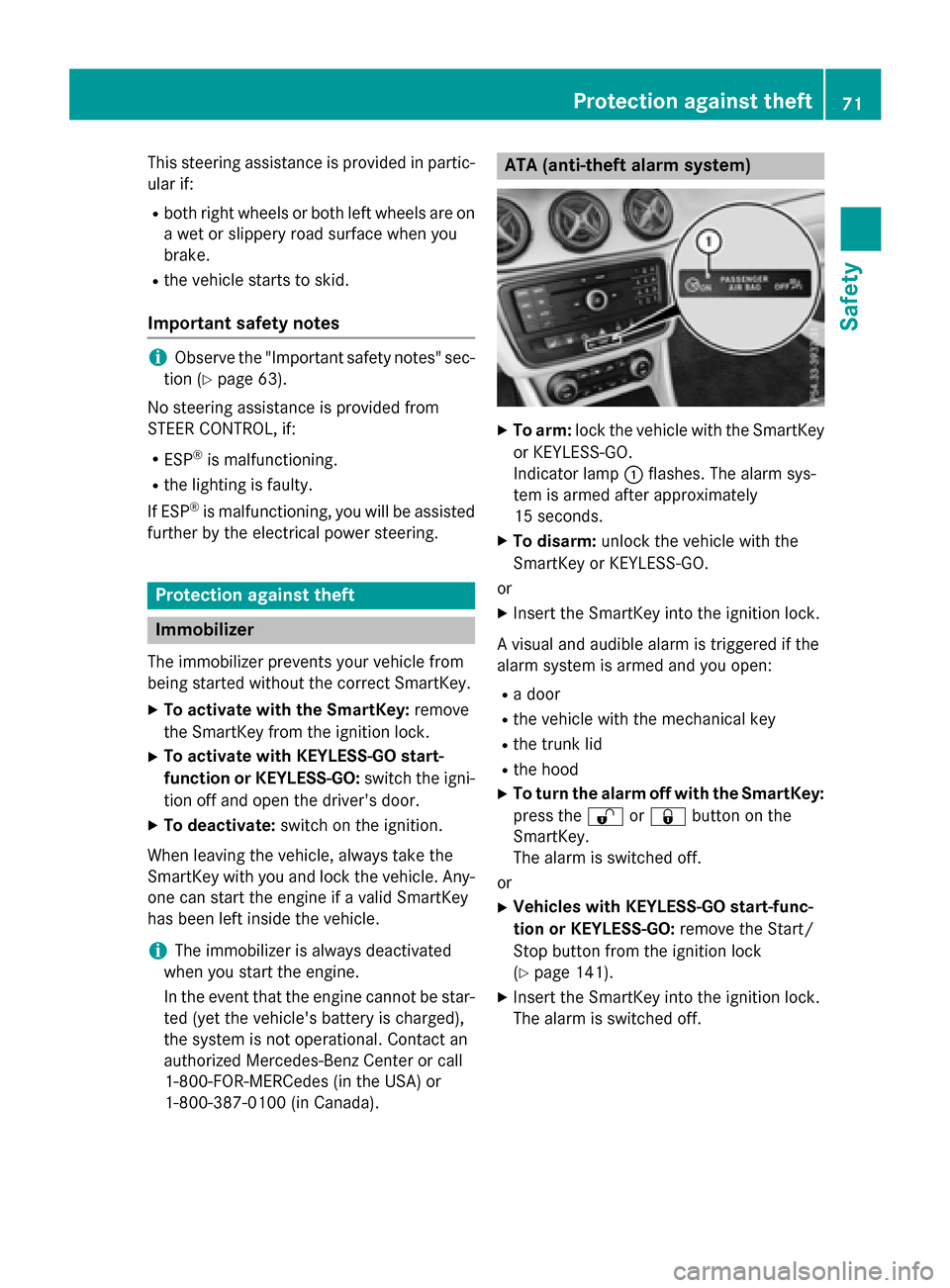
Indicator lamp :flashes. The alarm sys-
tem is armed after approximately
15 seconds.
X To disarm: unlock the vehicle with the
SmartKey or KEYLESS-GO.
or X Insert the SmartKey into the ignition lock.
A visual and audible alarm is triggered if the
alarm system is armed and you open:
R a door
R the vehicle with the mechanical key
R the trunk lid
R the hood
X To turn the alarm off with the SmartKey:
press the %or& button on the
SmartKey.
The alarm is switched off.
or
X Vehicles with KEYLESS-GO start-func-
tion or KEYLESS-GO: remove the Start/
Stop button from the ignition lock
(Y page 141).
X Insert the SmartKey into the ignition lock.
The alarm is switched off. Protection against theft
71Safety Z
Page 75 of 362
Useful information
..............................74
SmartKey ............................................. 74
Doors .................................................... 81
Trunk .................................................... 83
Side windows ...................................... 86
Panorama roof with power tilt/
sliding panel ........................................ 90 73Opening and closing
Page 76 of 362
Useful information
i This Operator's Manual describes all
models and all standard and optional equip- ment of your vehicle available at the time of
publication of the Operator's Manual.
Country-specific differences are possible.
Please note that your vehicle may not be
equipped with all features described. This
also applies to safety-related systems and
functions.
i Read the information on qualified special-
ist workshops (Y page 24). SmartKey
Important safety notes
G
WARNING
If children are left unsupervised in the vehicle, they could:
R open the doors, thus endangering other
people or road users.
R get out and disrupt traffic.
R operate the vehicle's equipment.
Additionally, children could set the vehicle in
motion if, for example, they:
R release the parking brake.
R shifting the automatic transmission out of
park position P
R Start the engine.
There is a risk of an accident and injury.
When leaving the vehicle, always take the
SmartKey with you and lock the vehicle. Never
leave children or animals unattended in the
vehicle. Always keep the SmartKey out of
reach of children. G
WARNING
If you attach heavy or large objects to the
SmartKey, the SmartKey could be uninten-
tionally turned in the ignition lock. This could
cause the engine to be switched off. There is a risk of an accident. Do not attach any heavy or large objects to the
SmartKey. Remove any bulky key rings before
inserting the SmartKey into the ignition lock.
! Keep the SmartKey away from strong
magnetic fields. Otherwise, the remote
control function could be affected.
Strong magnetic fields can occur in the
vicinity of powerful electrical installations.
Do not keep the SmartKey: R with electronic devices, e.g. a mobile
phone or another SmartKey.
R with metallic objects, e.g. coins or metal
foil.
R inside metallic objects, e.g. a metal case.
Vehicles with KEYLESS-GO start function: do not keep the SmartKey in the cargo com-
partment. Otherwise, the SmartKey may not
be detected, e.g. when starting the engine
using the Start/Stop button. SmartKey functions
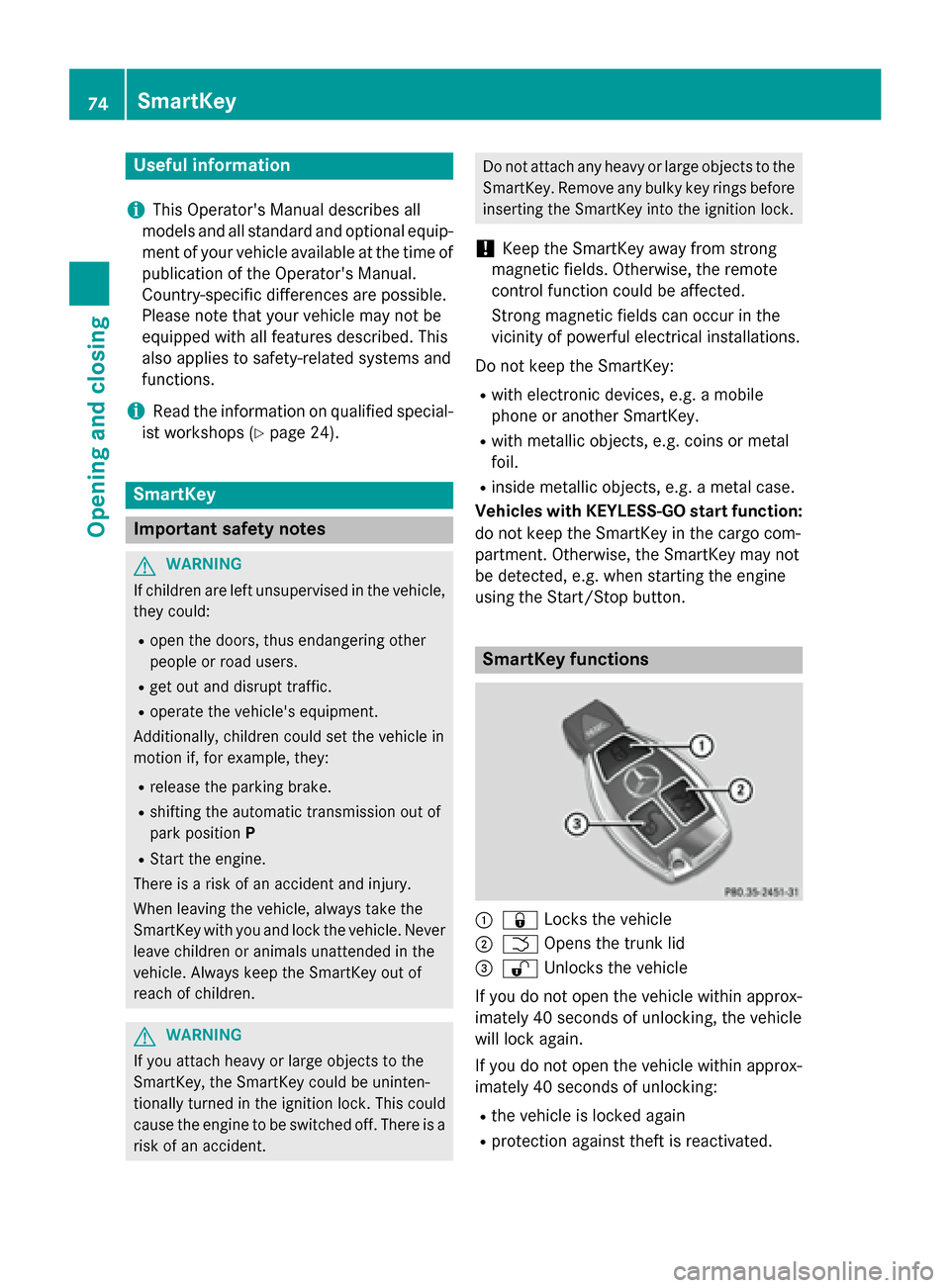
:
& Locks the vehicle
; F Opens the trunk lid
= % Unlocks the vehicle
If you do not open the vehicle within approx-
imately 40 seconds of unlocking, the vehicle
will lock again.
If you do not open the vehicle within approx-
imately 40 seconds of unlocking:
R the vehicle is locked again
R protection against theft is reactivated. 74
SmartKeyOpening and closing
Page 77 of 362
X
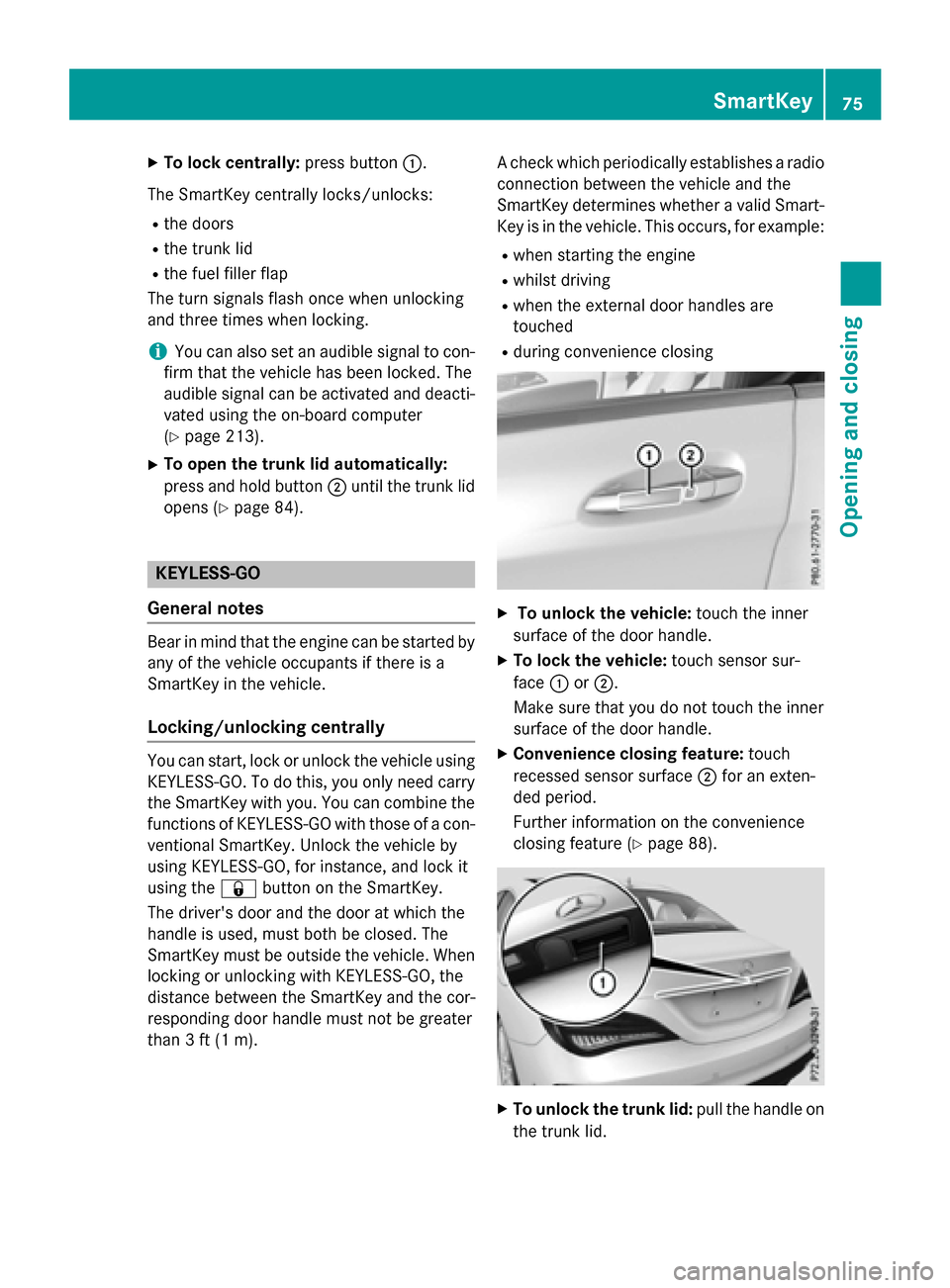
To lock centrally: press button:.
The SmartKey centrally locks/unlocks: R the doors
R the trunk lid
R the fuel filler flap
The turn signals flash once when unlocking
and three times when locking.
i You can also set an audible signal to con-
firm that the vehicle has been locked. The
audible signal can be activated and deacti-
vated using the on-board computer
(Y page 213).
X To open the trunk lid automatically:
press and hold button ;until the trunk lid
opens (Y page 84). KEYLESS-GO
General notes Bear in mind that the engine can be started by
any of the vehicle occupants if there is a
SmartKey in the vehicle.
Locking/unlocking centrally You can start, lock or unlock the vehicle using
KEYLESS-GO. To do this, you only need carry
the SmartKey with you. You can combine the
functions of KEYLESS-GO with those of a con- ventional SmartKey. Unlock the vehicle by
using KEYLESS-GO, for instance, and lock it
using the &button on the SmartKey.
The driver's door and the door at which the
handle is used, must both be closed. The
SmartKey must be outside the vehicle. When
locking or unlocking with KEYLESS-GO, the
distance between the SmartKey and the cor-
responding door handle must not be greater
than 3 ft (1 m). A check which periodically establishes a radio
connection between the vehicle and the
SmartKey determines whether a valid Smart- Key is in the vehicle. This occurs, for example:
R when starting the engine
R whilst driving
R when the external door handles are
touched
R during convenience closing X
To unlock the vehicle: touch the inner
surface of the door handle.
X To lock the vehicle: touch sensor sur-
face :or;.
Make sure that you do not touch the inner
surface of the door handle.
X Convenience closing feature: touch
recessed sensor surface ;for an exten-
ded period.
Further information on the convenience
closing feature (Y page 88). X
To unlock the trunk lid: pull the handle on
the trunk lid. SmartKey
75Opening and closing Z
Page 78 of 362
Deactivating and activating
If you do not intend to use the vehicle for a
longer period of time, you can deactivate KEY-
LESS-GO. The SmartKey will then use very lit- tle power, thereby conserving battery power.
For the purposes of activation/deactivation,
the vehicle must not be nearby.
X To deactivate: press the&button on
the SmartKey twice in rapid succession.
The battery check lamp of the SmartKey
(Y page 77) lights up twice briefly and
KEYLESS-GO is deactivated.
X To activate: press any button on the
SmartKey or insert the SmartKey into the
ignition lock.
KEYLESS-GO and all of its associated fea-
tures are available again. KEYLESS-GO start function
Bear in mind that the engine can be started by any of the vehicle occupants if there is a
SmartKey in the vehicle. Changing the settings of the locking
system
You can change the settings of the locking
system. This means that only the driver's door and the fuel filler flap are unlocked when the
vehicle is unlocked. This is useful if you fre-
quently travel on your own.
X To change the setting: simultaneously
press the %and& buttons for
approximately 6 seconds until the battery
check lamp (Y page 77) flashes twice.
i If the setting of the locking system is
changed within the signal range of the vehi- cle, pressing the &or% button:
R locks or
R unlocks the vehicle The SmartKey now functions as follows:
X To unlock the driver's door: press the
% button once.
X To unlock centrally: press the%but-
ton twice.
X To lock centrally: press the&button.
The KEYLESS-GO function is changed as fol-
lows:
X To unlock the driver's door: touch the
inner surface of the door handle on the
driver's door.
X To unlock centrally: touch the inner sur-
face of the door handle on the front-
passenger door or the rear door.
X To lock centrally: touch the outer sensor
surface on one of the door handles.
X To restore the factory settings: simulta-
neously press the %and& buttons
for approximately 6 seconds until the bat-
tery check lamp flashes twice
(Y page 77). Mechanical key
General notes If the vehicle can no longer be locked or
unlocked with the SmartKey or KEYLESS-GO, use the mechanical key.
If you use the mechanical key to unlock and
open the driver's door or the trunk lid, the
anti-theft alarm system will be triggered
(Y page 71).
There are several ways to turn off the alarm:
X To turn the alarm off with the SmartKey:
press the %or& button on the
SmartKey.
or X Insert the SmartKey into the ignition lock.
or
X To deactivate the alarm with KEYLESS-
GO: press the Start/Stop button in the igni- 76
SmartKeyOpening and closing