low beam MERCEDES-BENZ CLA-Class 2016 C117 User Guide
[x] Cancel search | Manufacturer: MERCEDES-BENZ, Model Year: 2016, Model line: CLA-Class, Model: MERCEDES-BENZ CLA-Class 2016 C117Pages: 374, PDF Size: 8.19 MB
Page 124 of 374
Changing the front bulbs
Removing and installing the cover in the
front wheel housing
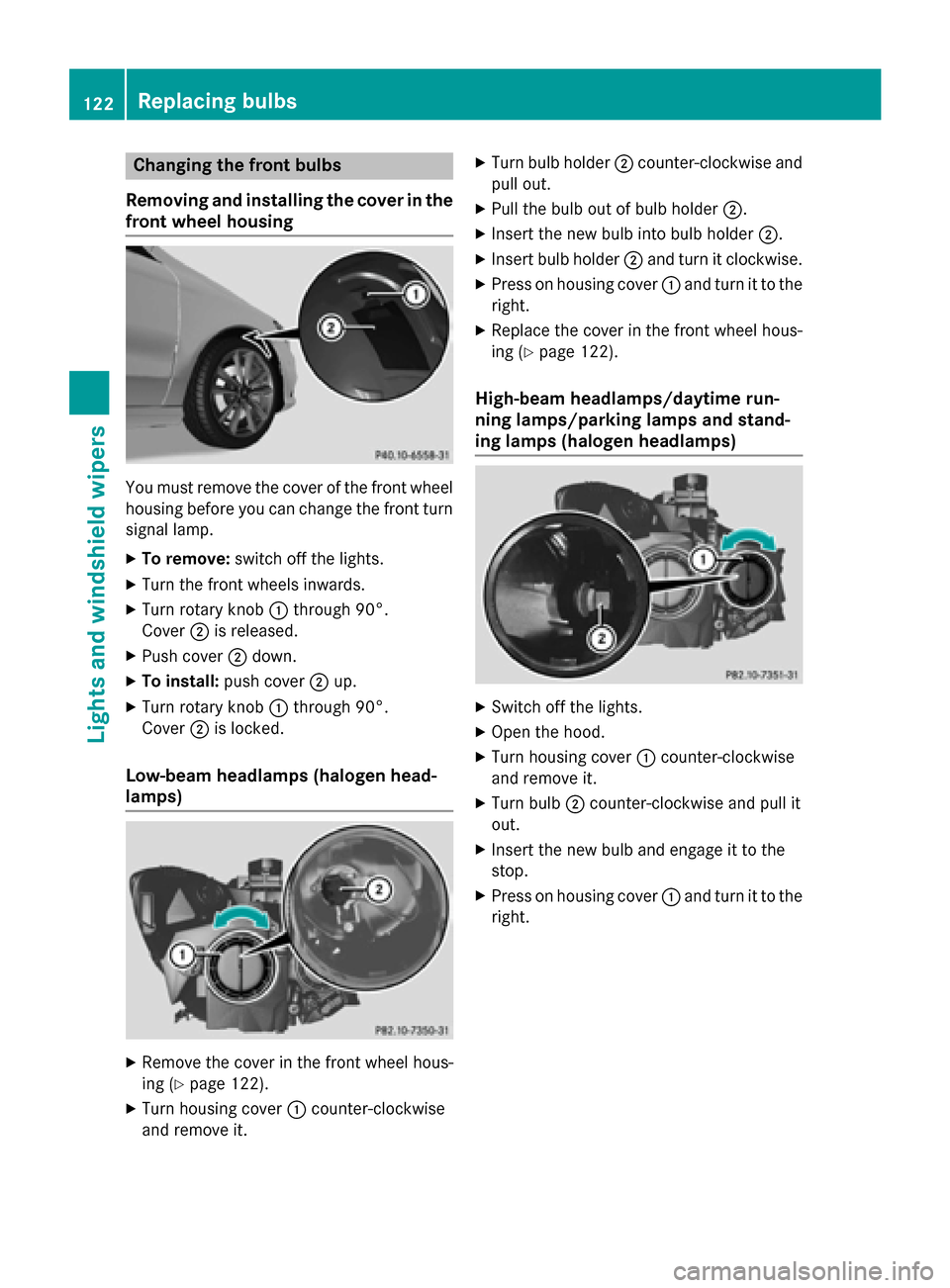
You must remove the cover of the front wheel
housing before you can change the front turn signal lamp.
XTo remove: switch off the lights.
XTurn the front wheels inwards.
XTurn rotary knob :through 90°.
Cover ;is released.
XPush cover ;down.
XTo install: push cover ;up.
XTurn rotary knob :through 90°.
Cover ;is locked.
Low-beam headlamps (halogen head-
lamps)
XRemove the cover in the front wheel hous-
ing (
Ypage 122).
XTurn housing cover :counter-clockwise
and remove it.
XTurn bulb holder ;counter-clockwise and
pull out.
XPull the bulb out of bulb holder ;.
XInsert the new bulb into bulb holder ;.
XInsert bulb holder;and turn it clockwise.
XPress on housing cover :and turn it to the
right.
XReplace the cover in the front wheel hous-
ing (
Ypage 122).
High-beam headlamps/daytime run-
ning lamps/parking lamps and stand-
ing lamps (halogen headlamps)
XSwitch off the lights.
XOpen the hood.
XTurn housing cover :counter-clockwise
and remove it.
XTurn bulb ;counter-clockwise and pull it
out.
XInsert the new bulb and engage it to the
stop.
XPress on housing cover :and turn it to the
right.
122Replacing bulbs
Lights and windshield wipers
Page 215 of 374
Multifunction display
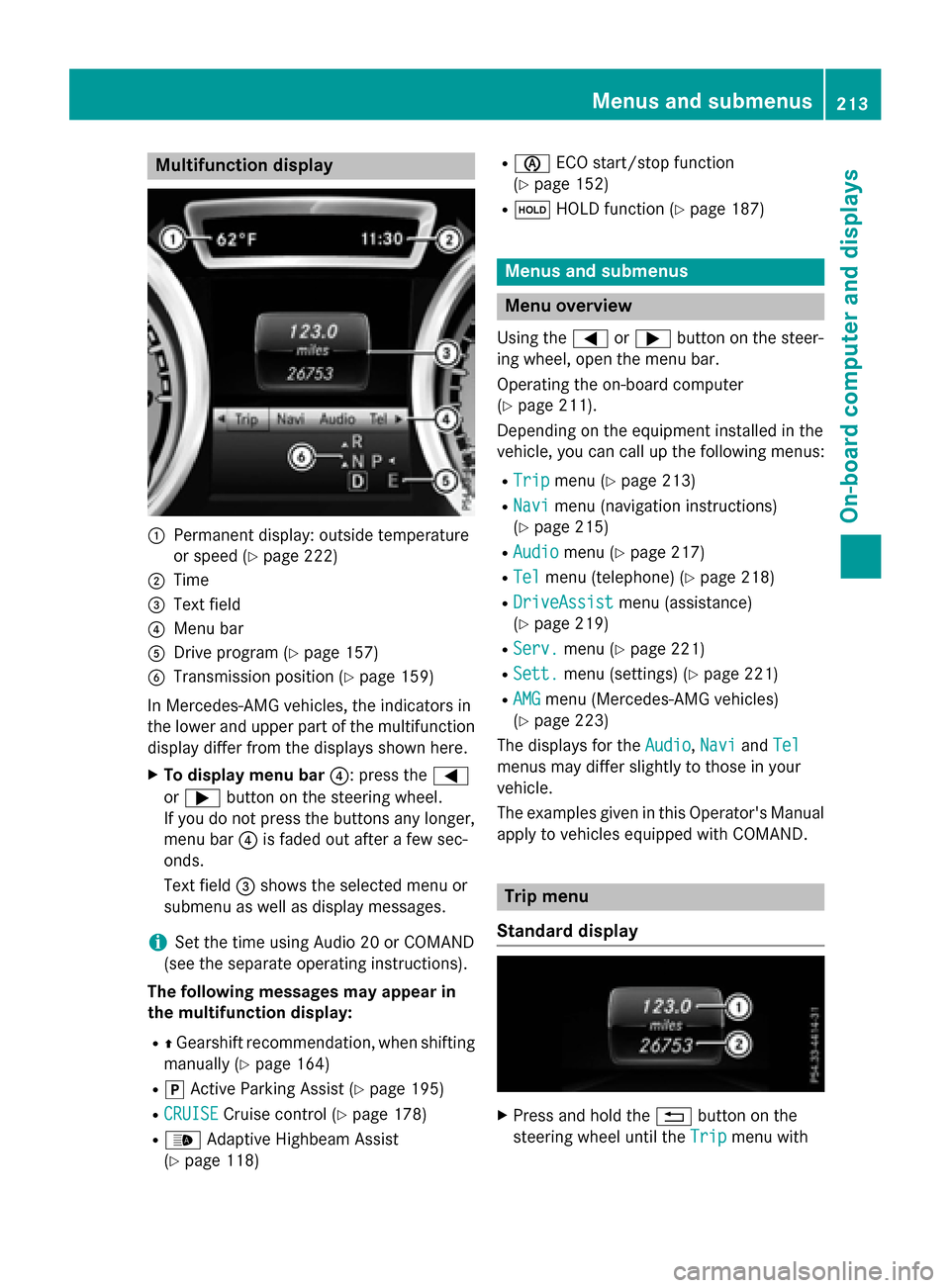
:Permanent display: outside temperature
or speed (
Ypage 222)
;Time
=Text field
?Menu bar
ADrive program (Ypage 157)
BTransmission position (Ypage 159)
In Mercedes-AMG vehicles, the indicators in
the lower and upper part of the multifunction display differ from the displays shown here.
XTo display menu bar ?: press the=
or ; button on the steering wheel.
If you do not press the buttons any longer,
menu bar ?is faded out after a few sec-
onds.
Text field =shows the selected menu or
submenu as well as display messages.
iSet the time using Audio 20 or COMAND
(see the separate operating instructions).
The following messages may appear in
the multifunction display:
RZ Gearshift recommendation, when shifting
manually (
Ypage 164)
Rj Active Parking Assist (Ypage 195)
RCRUISECruise control (Ypage 178)
R_ Adaptive Highbeam Assist
(
Ypage 118)
Rè ECO start/stop function
(
Ypage 152)
Rë HOLD function (Ypage 187)
Menus and submenus
Menu overview
Using the =or; button on the steer-
ing wheel, open the menu bar.
Operating the on-board computer
(
Ypage 211).
Depending on the equipment installed in the
vehicle, you can call up the following menus:
RTripmenu (Ypage 213)
RNavimenu (navigation instructions)
(
Ypage 215)
RAudiomenu (Ypage 217)
RTelmenu (telephone) (Ypage 218)
RDriveAssistmenu (assistance)
(
Ypage 219)
RServ.menu (Ypage 221)
RSett.menu (settings) (Ypage 221)
RAMGmenu (Mercedes-AMG vehicles)
(
Ypage 223)
The displays for the Audio
,Naviand Tel
menus may differ slightly to those in your
vehicle.
The examples given in this Operator's Manual
apply to vehicles equipped with COMAND.
Trip menu
Standard display
XPress and hold the %button on the
steering wheel until the Trip
menu with
Menus and submenus213
On-board computer and displays
Z
Page 242 of 374
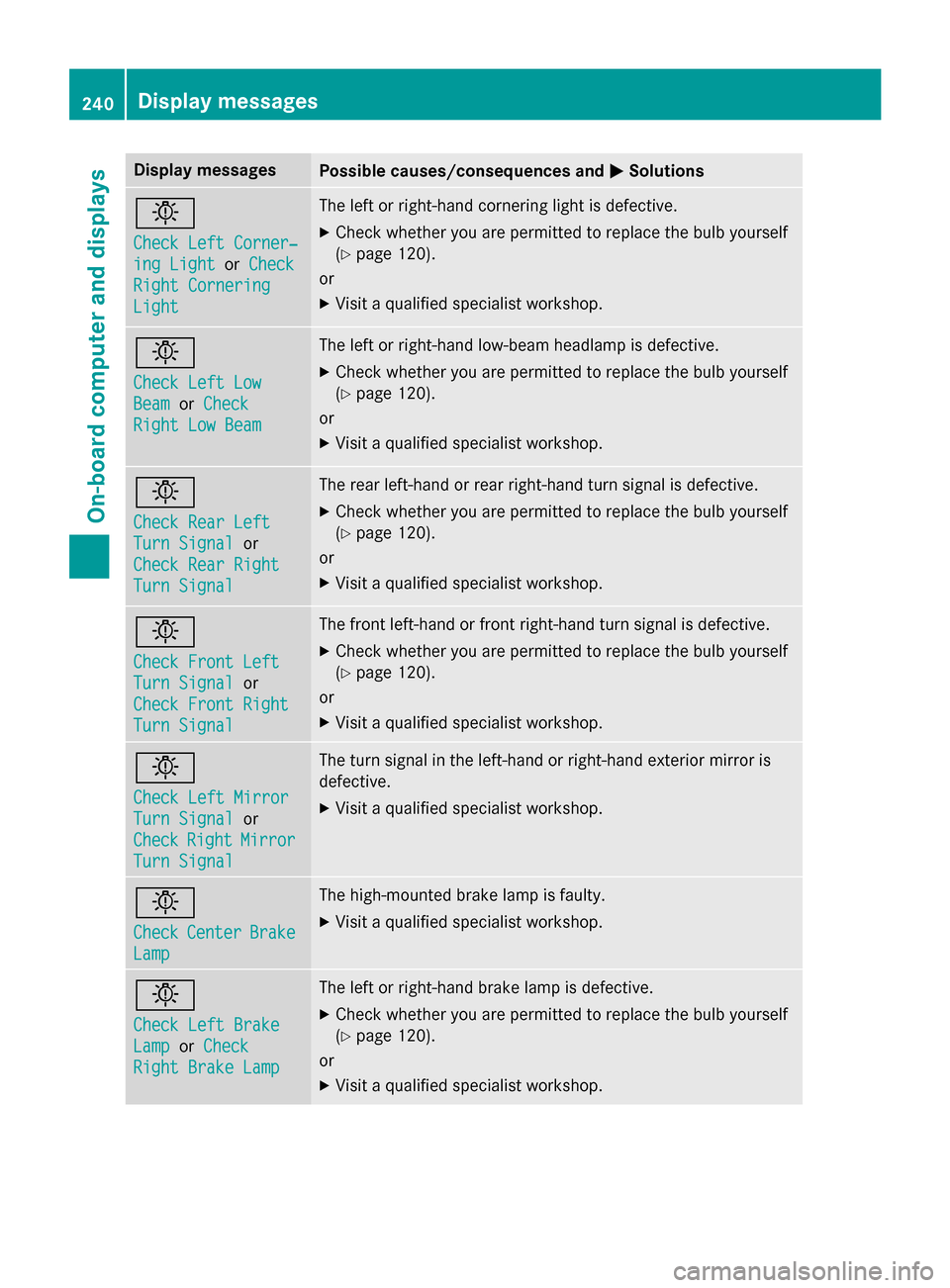
Display messagesPossible causes/consequences andMSolutions
b
Check LeftCorner ‐
ing LightorCheck
Right Cornering
Light
The lef tor right-hand cornering ligh tis defective.
XChec kwhether you are permitte dto replac eth ebulb yourself
(
Ypage 120).
or
XVisit aqualified specialist workshop .
b
Check LeftLow
Bea morCheck
Right Low Bea m
The leftor right-hand low-beam headlamp is defective.
XChec kwhether you are permitte dto replac eth ebulb yourself
(
Ypage 120).
or
XVisit aqualified specialist workshop .
b
Check RearLef t
TurnSignalor
Check Rea rRight
Tur nSignal
The rear left-han dor rear right-hand tur nsignal is defective.
XChec kwhether you are permitte dto replac eth ebulb yourself
(
Ypage 120).
or
XVisit aqualified specialist workshop .
b
Check Front Left
TurnSignalor
Check Front Right
Tur nSignal
The fron tleft-han dor fron tright-hand tur nsignal is defective.
XChec kwhether you are permitte dto replac eth ebulb yourself
(
Ypage 120).
or
XVisit aqualified specialist workshop .
b
Check LeftMirror
Tur nSignalor
Check
RightMirror
Tur nSignal
The tur nsignal in th eleft-han dor right-hand exterio rmirror is
defective.
XVisit aqualified specialist workshop .
b
CheckCenterBrake
Lamp
The high-mounte dbrak elamp is faulty.
XVisit aqualified specialist workshop .
b
Check LeftBrake
Lam porCheck
Right Brake Lam p
The leftor right-hand brak elamp is defective.
XChec kwhether you are permitte dto replac eth ebulb yourself
(
Ypage 120).
or
XVisit aqualified specialist workshop .
240Display messages
On-board computer and displays
Page 244 of 374
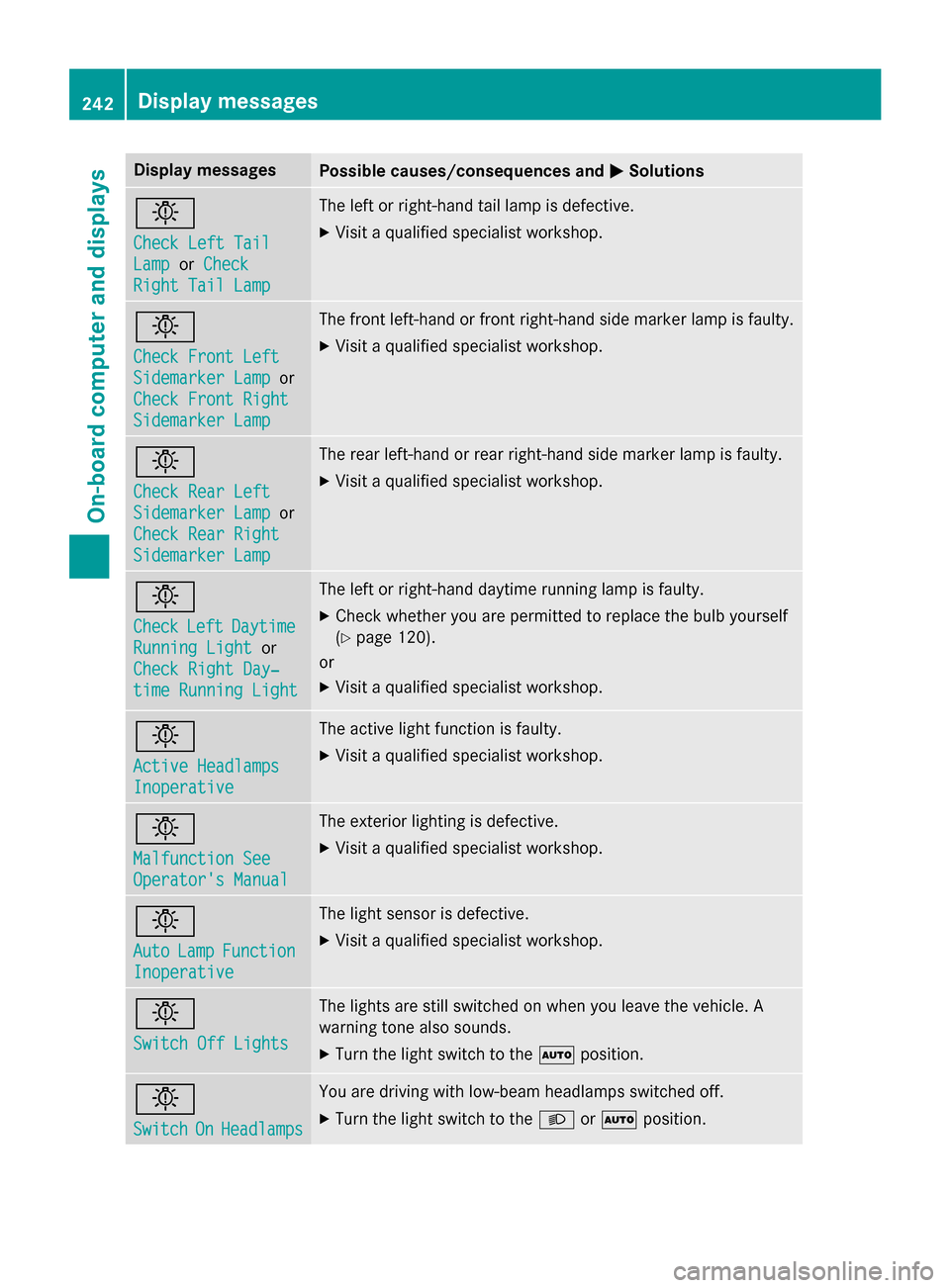
Display messagesPossible causes/consequences andMSolutions
b
Check LeftTai l
LamporCheck
Right Tai lLam p
The lef tor right-hand tai llamp is defective.
XVisit aqualified specialist workshop .
b
Check Front Left
SidemarkerLam por
Check Front Right
Sidemarke rLam p
The fron tleft-han dor fron tright-hand side marke rlamp is faulty.
XVisit aqualified specialist workshop .
b
Check RearLef t
Sidemarke rLam por
Check Rea rRight
Sidemarke rLam p
The rear left-han dor rear right-hand side marke rlamp is faulty.
XVisit aqualified specialist workshop .
b
CheckLeftDaytim e
RunningLightor
Check Right Day ‐
timeRunnin gLight
The lef tor right-hand daytime running lamp is faulty.
XChec kwhether you are permitte dto replac eth ebulb yourself
(
Ypage 120).
or
XVisit aqualified specialist workshop .
b
Active Headlamps
Inoperative
The active lightfunction is faulty.
XVisit aqualified specialist workshop .
b
Malfunction See
Operator'sManual
The exterio rlighting is defective.
XVisit aqualified specialist workshop .
b
AutoLampFunction
Inoperative
The ligh tsensor is defective.
XVisit aqualified specialist workshop .
b
Switch Off Lights
The lights are still switched on when you leav eth evehicle. A
warnin gtone also sounds.
XTur nth eligh tswitch to th eà position .
b
SwitchOnHeadlamps
You are drivin gwit hlow-beam headlamp sswitched off.
XTur nth eligh tswitch to th eL orà position .
242Display messages
On-board computer and displays
Page 245 of 374
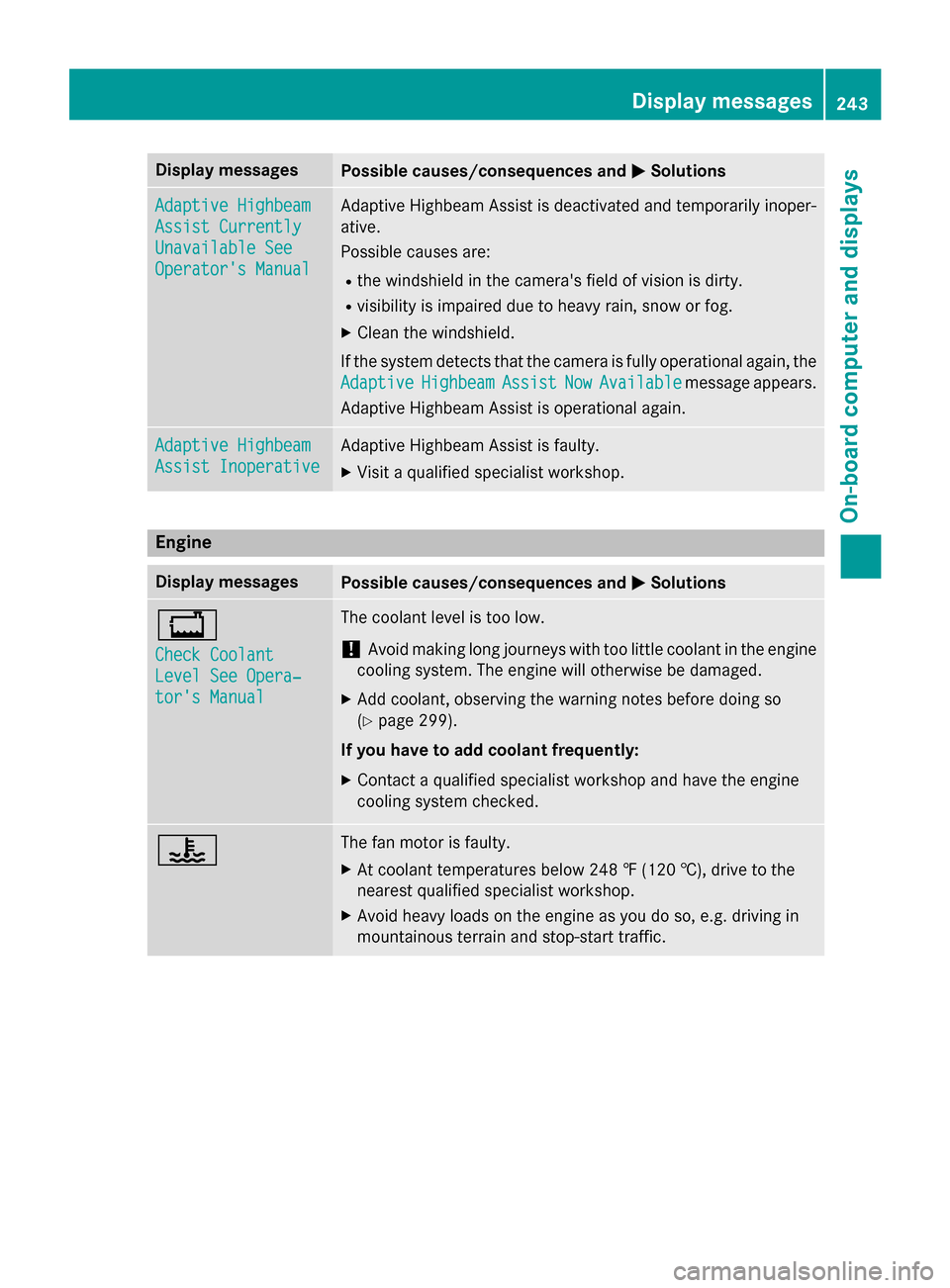
Display messagesPossible causes/consequences andMSolutions
Adaptive Highbeam
Assist Currently
Unavailable See
Operator'sManual
Adaptive Highbeam Assis tis deactivated and temporarily inoper -
ative.
Possibl ecauses are:
Rth ewindshield in th ecamera' sfield of vision is dirty.
Rvisibility is impaire ddue to heav yrain ,snow or fog.
XClean th ewindshield.
If th esystem detects that th ecamera is full yoperational again ,th e
Adaptive
HighbeamAssistNowAvailablemessage appears .
Adaptive Highbeam Assis tis operational again .
Adaptive Highbeam
Assist Inoperative
Adaptive Highbeam Assis tis faulty.
XVisit aqualified specialist workshop .
Engine
Display messagesPossible causes/consequences and MSolutions
+
Check Coolant
Level See Opera‐
tor's Manual
The coolantlevel is to olow.
!Avoid makin glon gjourneys wit hto olittl ecoolan tin th eengin e
coolin gsystem. The engin ewill otherwise be damaged.
XAd dcoolant, observin gth ewarnin gnote sbefore doin gso
(
Ypage 299).
If you have to ad dcoolant frequently:
XContac t aqualified specialist workshop and hav eth eengin e
coolin gsystem checked.
?The fan motor is faulty.
XAt coolan ttemperatures belo w24 8 ‡ (120†), drive to th e
neares tqualified specialist workshop .
XAvoid heavyloads on th eengin eas you do so, e.g. drivin gin
mountainous terrain and stop-start traffic.
Display messages24 3
On-board computer and displays
Z