active parking MERCEDES-BENZ CLA-Class 2016 C117 Owner's Guide
[x] Cancel search | Manufacturer: MERCEDES-BENZ, Model Year: 2016, Model line: CLA-Class, Model: MERCEDES-BENZ CLA-Class 2016 C117Pages: 374, PDF Size: 8.19 MB
Page 201 of 374
XStart the engine.
XRelease the electric parking brake.
XSwitch on the turn signal in the direction
you will drive out of the parking space.
XShift the transmission to positionDor R.
The Start Park Assist? Yes: OK No:
message appears in the multifunction dis-
play %.
XTo cancel the procedure: press the%
button on the multifunction steering wheel or pull away.
or
XTo exit a parking space using Active
Parking Assist: press theabutton on
the multifunction steering wheel.
The Park Assist Active Accelerate
andBrakeObserveSurroundingsmes-
sage appears in the multifunction display.
XLet go of the multifunction steering wheel.
XPull away, being ready to brake at all times.
Do not exceed a maximum speed of
approximately 6 mph (10 km/h) when exit-
ing a parking space. Otherwise Active Park-
ing Assist will be canceled.
XDepending on the message or as required, shift the transmission to position Dor R.
Active Parking Assist immediately steers in
the other direction. The Park Assist
Active Accelerate and Brake
ObserveSurroundingsmessage appears
in the multifunction display.
iYou will achieve the best results by wait-
ing for the steering procedure to complete
before pulling away.
If you back up after activation, the steering
wheel is moved to the straight-ahead posi-
tion.
XDrive forwards and back up as prompted by
the PARKTRONIC warning displays, several
times if necessary.
Once you have exited the parking space com-
pletely, the steering wheel is moved to the
straight-ahead position. You hear a tone and
the Park Assist Finished
message
appears in the multifunction display. You will then have to steer and merge into traffic on
your own. PARKTRONIC is still available. You
can take over the steering, before the vehicle
has exited the parking space completely. This
is useful, for example when you recognize
that it is already possible to pull out of the
parking space.
Canceling Active Parking Assist
XStop the movement of the multifunction
steering wheel or steer yourself.
Active Parking Assist will be canceled at
once. The Park Assist Canceled
mes-
sage appears in the multifunction display.
or
XPress the PARKTRONIC button
(
Ypage 194).
PARKTRONIC is switched off and Active
Parking Assist is immediately canceled.
The Park Assist Canceled
message
appears in the multifunction display.
Active Parking Assist is canceled automati-
cally if:
Rthe electric parking brake is engaged
Rtransmission position Pis selected
Rparking using Active Parking Assist is no
longer possible
Ryou are driving faster than 6 mph (10 km/h)
Ra wheel spins, ESP®intervenes or fails. The
÷ warning lamp lights up in the instru-
ment cluster
A warning tone sounds. The parking symbol
disappears and the multifunction display
shows the Park Assist Canceled
mes-
sage.
When Active Parking Assist is canceled, you
must steer and brake again yourself.
If a system malfunction occurs, the vehicle is
braked to a standstill. To drive on, depress the accelerator again.
Driving systems199
Driving and parking
Z
Page 203 of 374
!Objects not at ground level may appear to
be further away than they actually are, e.g.:
Rthe bumper of a parked vehicle
Rthe drawbar of a trailer
Rthe ball coupling of a trailer tow hitch
Rthe rear section of an HGV
Ra slanted post
Use the guidelines only for orientation.
Approach objects no further than the bot-
tom-most guideline.
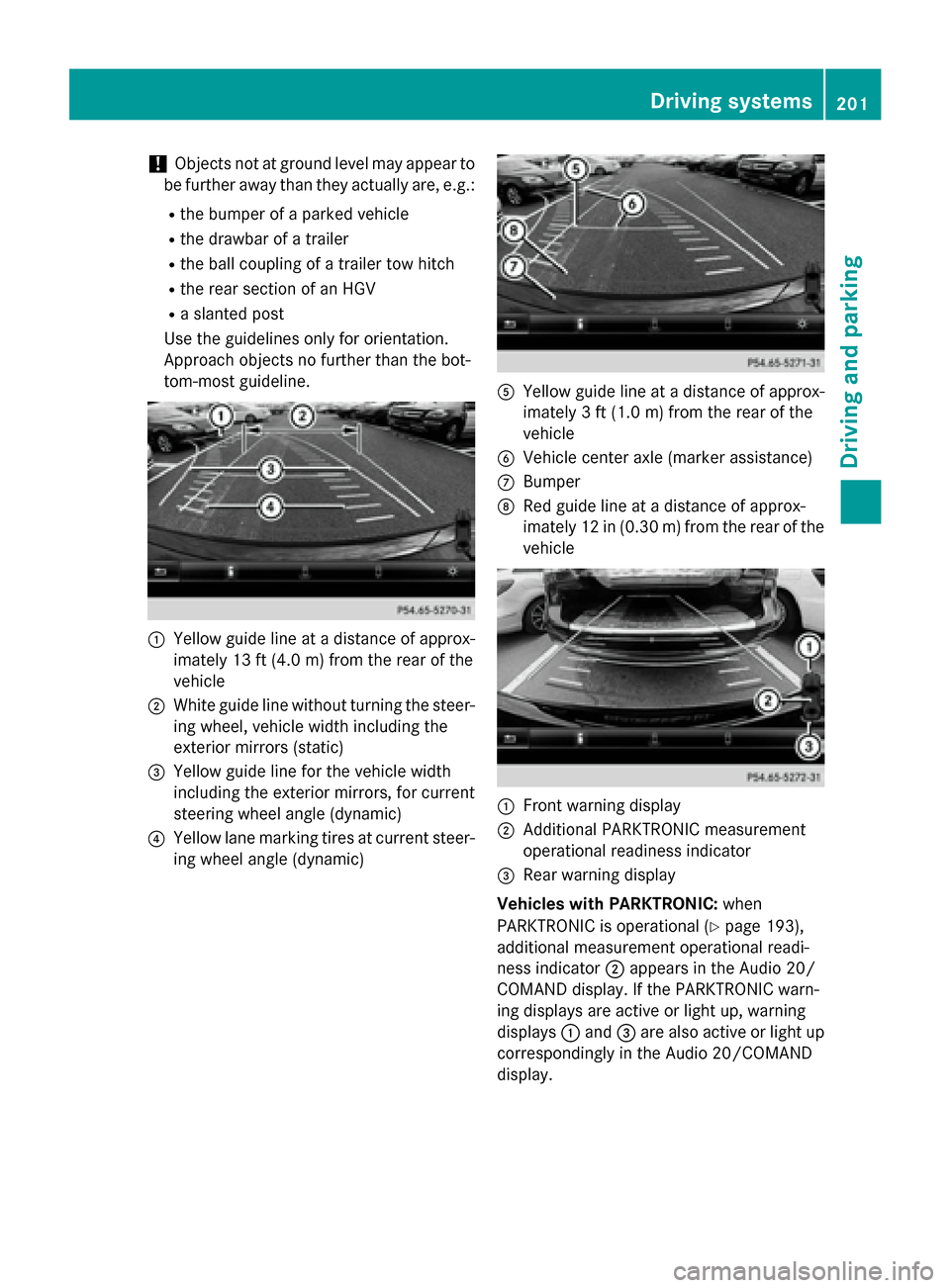
:Yellow guide line at a distance of approx-
imately 13 ft (4.0 m) from the rear of the
vehicle
;White guide line without turning the steer-
ing wheel, vehicle width including the
exterior mirrors (static)
=Yellow guide line for the vehicle width
including the exterior mirrors, for current
steering wheel angle (dynamic)
?Yellow lane marking tires at current steer-
ing wheel angle (dynamic)
AYellow guide line at a distance of approx-
imately 3 ft (1.0 m) from the rear of the
vehicle
BVehicle center axle (marker assistance)
CBumper
DRed guide line at a distance of approx-
imately 12 in (0.30 m) from the rear of the
vehicle
:Front warning display
;Additional PARKTRONIC measurement
operational readiness indicator
=Rear warning display
Vehicles with PARKTRONIC: when
PARKTRONIC is operational (
Ypage 193),
additional measurement operational readi-
ness indicator ;appears in the Audio 20/
COMAND display. If the PARKTRONIC warn-
ing displays are active or light up, warning
displays :and =are also active or light up
correspondingly in the Audio 20/COMAND
display.
Driving systems201
Driving and parking
Z
Page 205 of 374
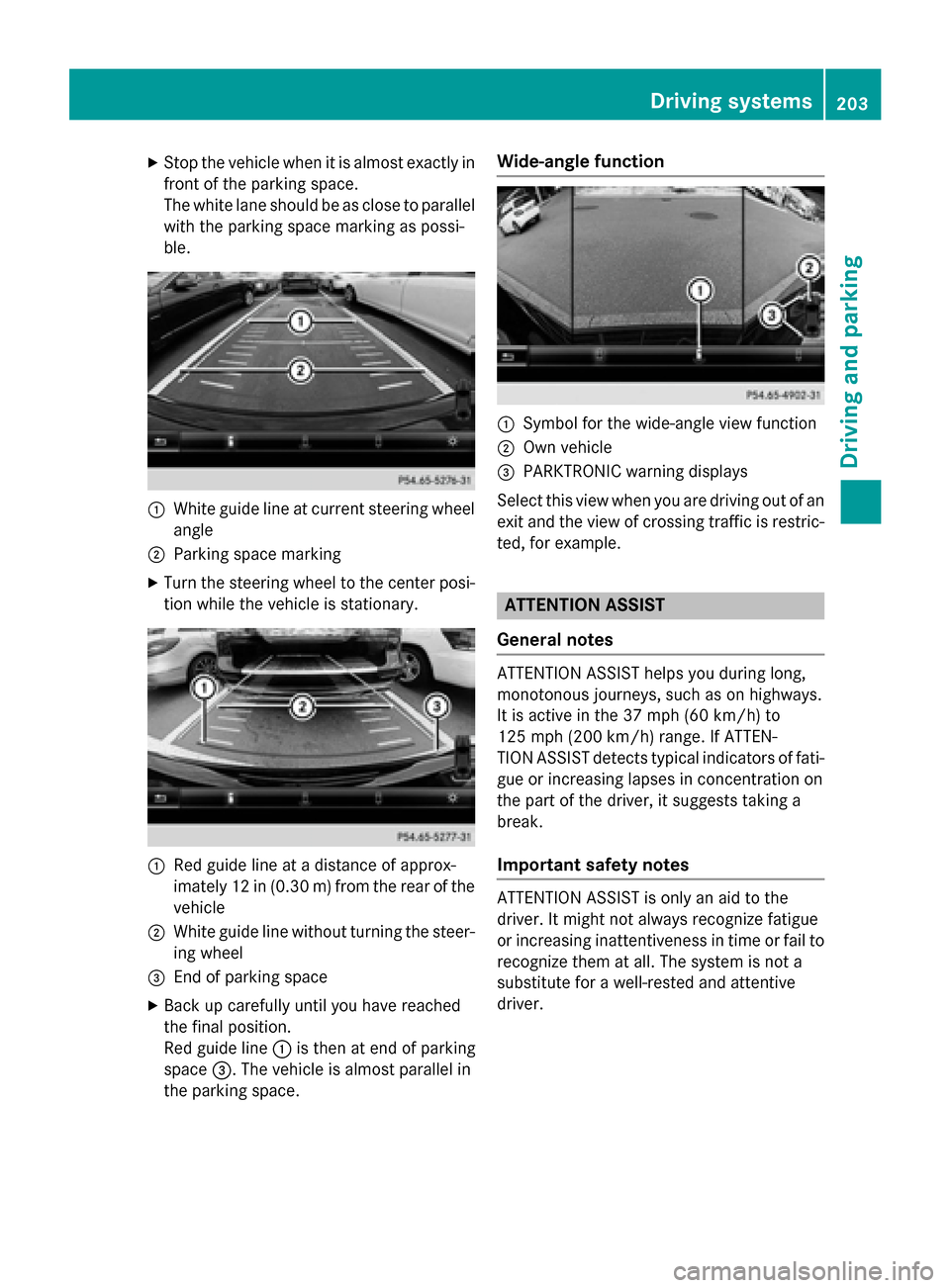
XStop the vehicle when it is almost exactly in
front of the parking space.
The white lane should be as close to parallelwith the parking space marking as possi-
ble.
:White guide line at current steering wheel
angle
;Parking space marking
XTurn the steering wheel to the center posi-
tion while the vehicle is stationary.
:Red guide line at a distance of approx-
imately 12 in (0.30 m) fromthe rear of the
vehicle
;White guide line without turning the steer- ing wheel
=End of parking space
XBack up carefully until you have reached
the final position.
Red guide line :is then at end of parking
space =. The vehicle is almost parallel in
the parking space.
Wide-angle function
:Symbol for the wide-angle view function
;Own vehicle
=PARKTRONIC warning displays
Select this view when you are driving out of an
exit and the view of crossing traffic is restric-
ted, for example.
ATTENTION ASSIST
General notes
ATTENTION ASSIST helps you during long,
monotonous journeys, such as on highways.
It is active in the 37 mph (60 km/h) to
125 mph (200 km/h) range. If ATTEN-
TION ASSIST detects typical indicators of fati-
gue or increasing lapses in concentration on
the part of the driver, it suggests taking a
break.
Important safety notes
ATTENTION ASSIST is only an aid to the
driver. It might not always recognize fatigue
or increasing inattentiveness in time or fail to
recognize them at all. The system is not a
substitute for a well-rested and attentive
driver.
Driving system s203
Driving an d parking
Z
Page 206 of 374
The functionality of ATTENTION ASSIST is
restricted and warnings may be delayed or
not occur at all:
Rif the length of the journey is less than
approximately 30 minutes
Rif the road condition is poor, e.g. if the sur-
face is uneven or if there are potholes
Rif there is a strong side wind
Rif you have adopted a sporty driving style
with high cornering speeds or high rates ofacceleration
Rif you are predominantly driving slower
than 37 mph (60 km/h) or faster than
125 mph (200 km/h)
Rif the time has been set incorrectly
Rin active driving situations, such as when
you change lanes or change your speed
ATTENTION ASSIST is reset when you con-
tinue your journey and starts assessing your
tiredness again if:
Ryou switch off the engine
Ryou take off your seat belt and open the
driver's door, e.g. for a change of drivers or
to take a break
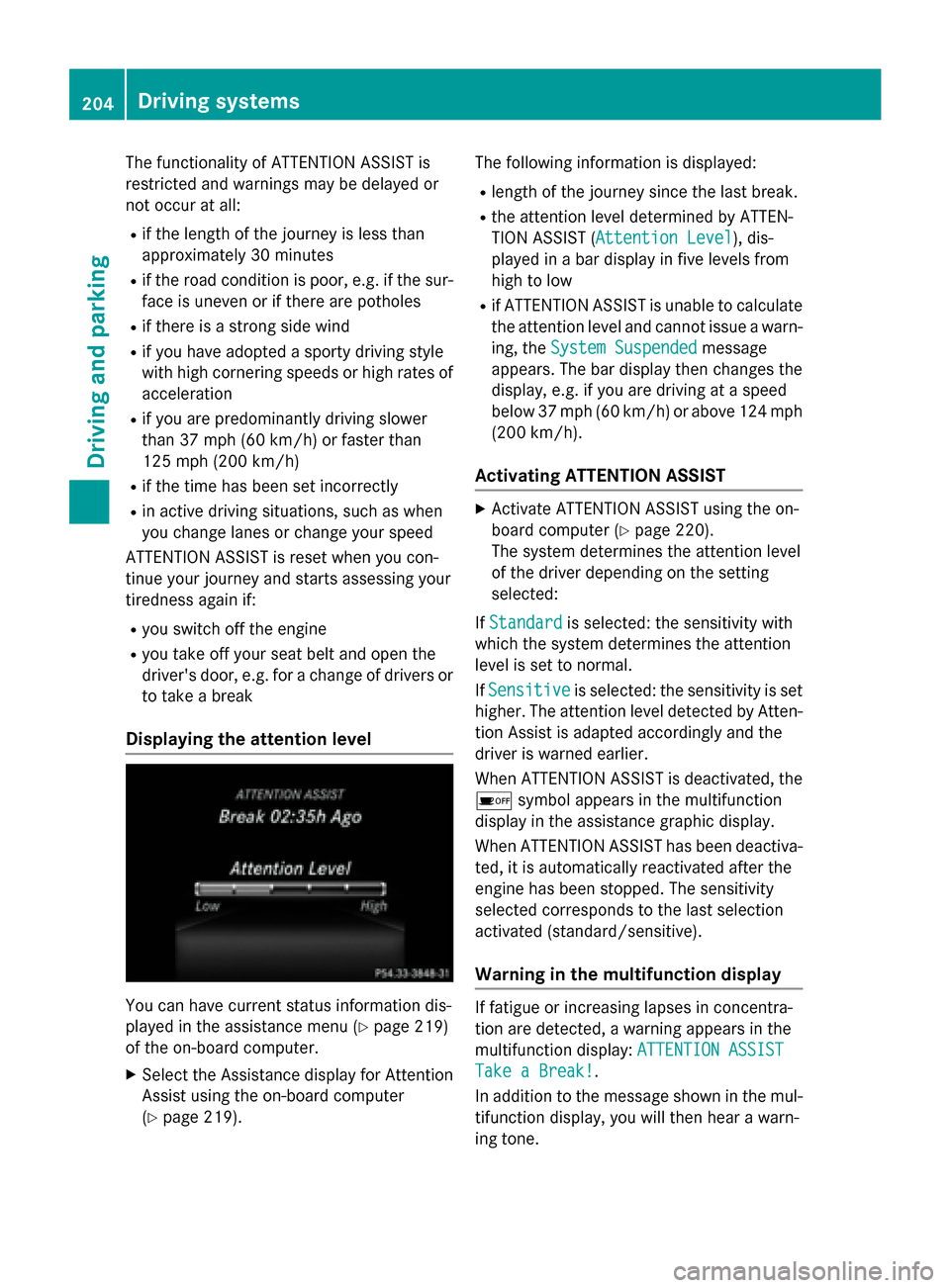
Displaying the attention level
You can have current status information dis-
played in the assistance menu (
Ypage 219)
of the on-board computer.
XSelect the Assistance display for Attention
Assist using the on-board computer
(
Ypage 219). The following information is displayed:
Rlength of the journey since the last break.
Rthe attention level determined by ATTEN-
TION ASSIST (
Attention Level
), dis-
played in a bar display in five levels from
high to low
Rif ATTENTION ASSIST is unable to calculate the attention level and cannot issue a warn-
ing, the System Suspended
message
appears. The bar display then changes the
display, e.g. if you are driving at a speed
below 37 mph (60 km/h) or above 124 mph
(200 km/h) .
Activating ATTENTION ASSIST
XActivateATTENTION ASSIST usin gth eon -
boar dcomputer (
Ypage 220).
The system determine sth eattention level
of th edriver depending on th e setting
selected:
If Standard
is selected: th esensitivit ywit h
whic hth esystem determine sth eattention
level is set to normal.
If Sensitive
is selected: th esensitivit yis set
higher. The attention level detecte dby Atten-
tion Assis tis adapted accordingly and th e
driver is warned earlier .
When ATTENTI ONASSIST is deactivated, th e
é symbol appear sin th emultifunction
display in th e assistancegraphic display.
When ATTENTION ASSIST has been deactiva-
ted, it is automatically reactivated after th e
engin ehas been stopped. The sensitivity
selected correspond sto th elast selection
activated (standard/ sensitive).
Warning in the multifunction display
If fatigue or increasing lapse sin concentra-
tion are detected, awarning appear sin th e
multifunction display: ATTENTION ASSIST
Take a Break!.
In addition to th emessage shown in th emul-
tifunction display, you will then hear awarn -
ing tone .
204Driving systems
Driving and parking
Page 208 of 374
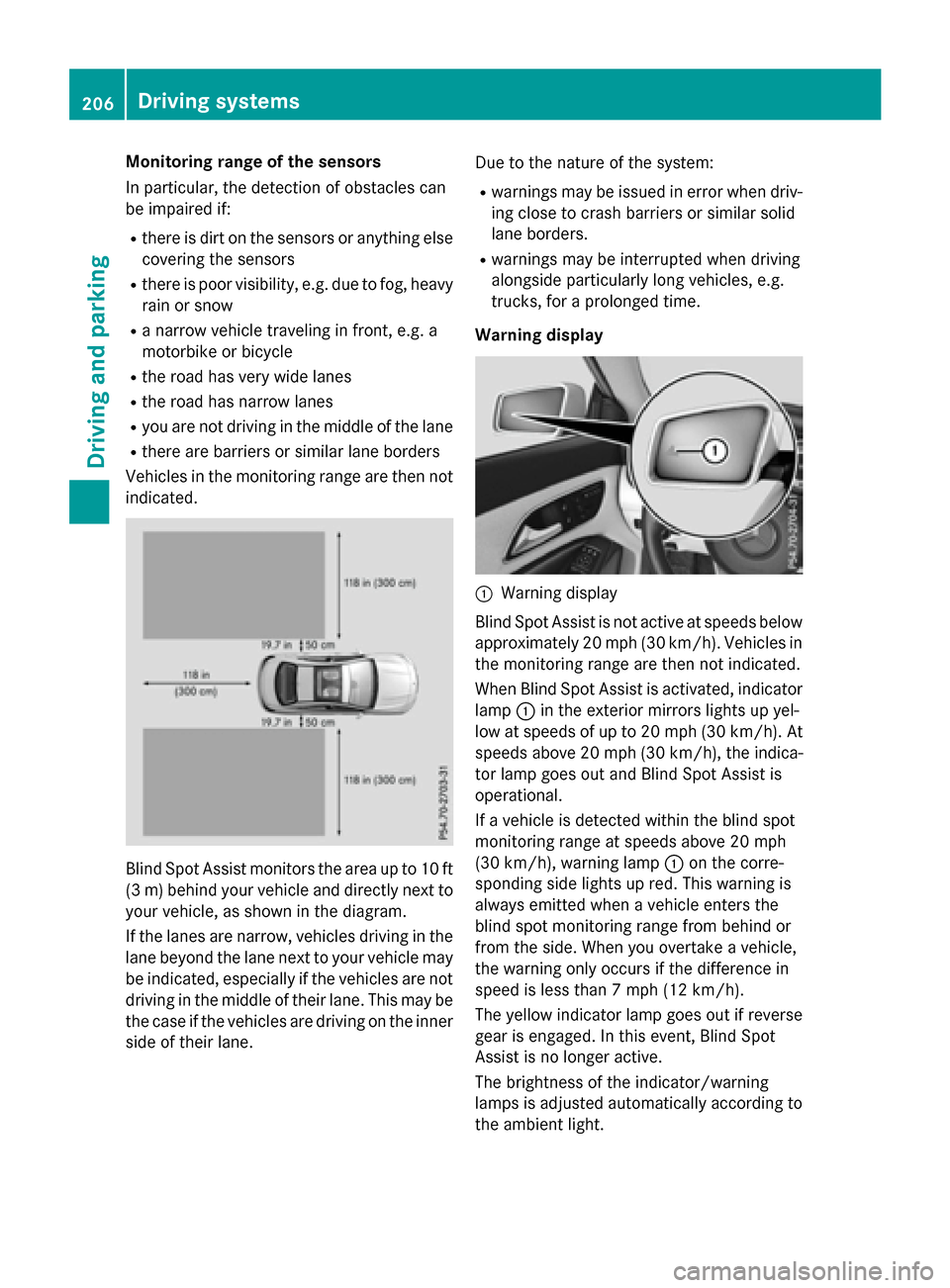
Monitoring range of the sensors
In particular, the detection of obstacles can
be impaired if:
Rthere is dirt on the sensors or anything elsecovering the sensors
Rthere is poor visibility, e.g. due to fog, heavy
rain or snow
Ra narrow vehicle traveling in front, e.g. a
motorbike or bicycle
Rthe road has very wide lanes
Rthe road has narrow lanes
Ryou are not driving in the middle of the lane
Rthere are barriers or similar lane borders
Vehicles in the monitoring range are then not
indicated.
Blind Spot Assist monitors the area up to 10 ft
(3 m) behind your vehicle and directly next to
your vehicle, as shown in the diagram.
If the lanes are narrow, vehicles driving in the
lane beyond the lane next to your vehicle may
be indicated, especially if the vehicles are not
driving in the middle of their lane. This may be
the case if the vehicles are driving on the inner
side of their lane. Due to the nature of the system:
Rwarnings may be issued in error when driv-
ing close to crash barriers or similar solid
lane borders.
Rwarnings may be interrupted when driving
alongside particularly long vehicles, e.g.
trucks, for a prolonged time.
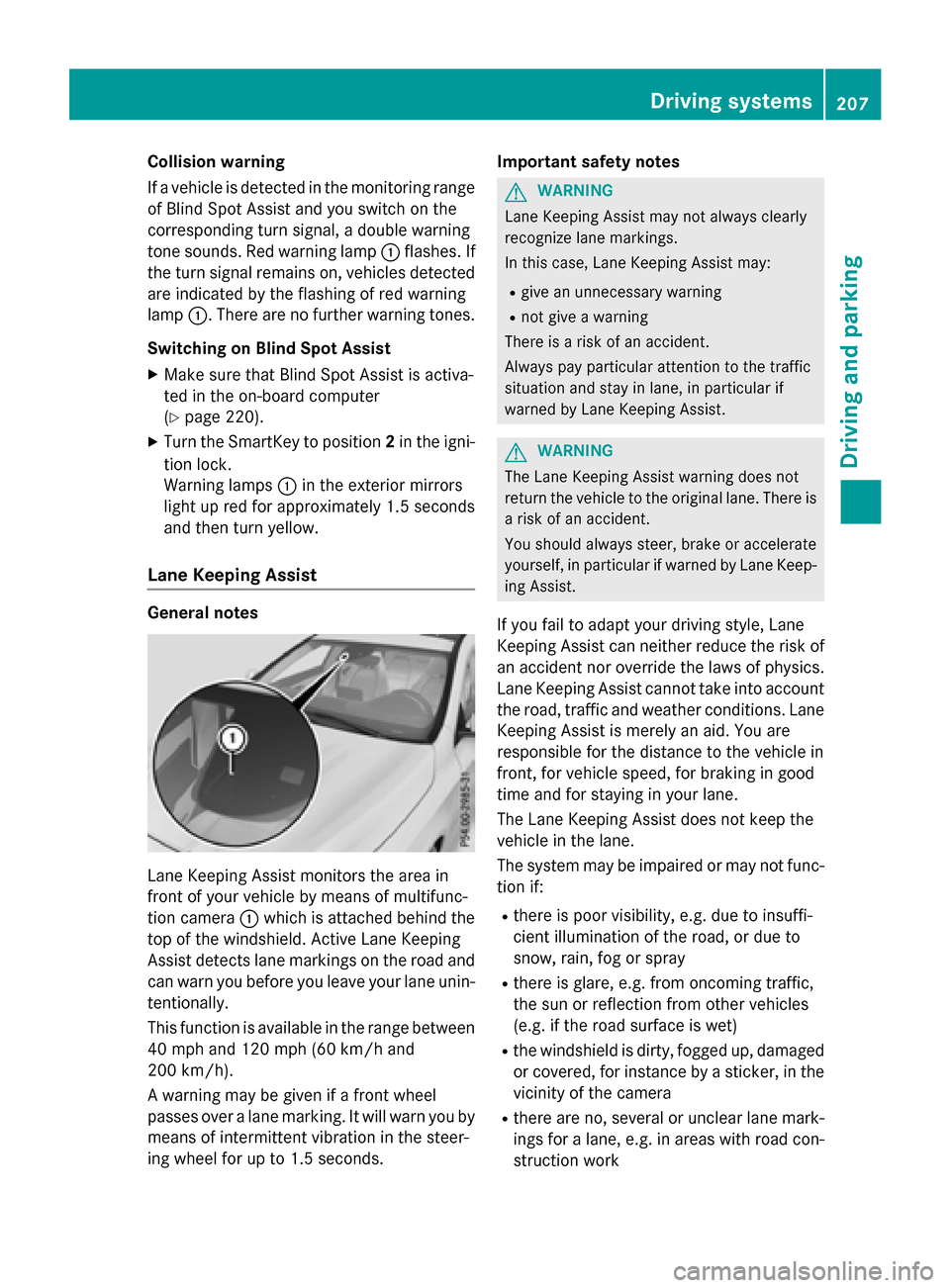
Warning display
:Warning display
Blind Spot Assist is not active at speeds below
approximately 20 mph (30 km/h). Vehicles in
the monitoring range are then not indicated.
When Blind Spot Assist is activated, indicator
lamp :in the exterior mirrors lights up yel-
low at speeds of up to 20 mph (30 km/h). At
speeds above 20 mph (30 km/h), the indica-
tor lamp goes out and Blind Spot Assist is
operational.
If a vehicle is detected within the blind spot
monitoring range at speeds above 20 mph
(30 km/h), warning lamp :on the corre-
sponding side lights up red. This warning is
always emitted when a vehicle enters the
blind spot monitoring range from behind or
from the side. When you overtake a vehicle,
the warning only occurs if the difference in
speed is less than 7 mph (12 km/h).
The yellow indicator lamp goes out if reverse
gear is engaged. In this event, Blind Spot
Assist is no longer active.
The brightness of the indicator/warning
lamps is adjusted automatically according to
the ambient light.
206Driving systems
Driving and parking
Page 209 of 374
Collision warning
If a vehicle is detected in the monitoring range
of Blind Spot Assist and you switch on the
corresponding turn signal, a double warning
tone sounds. Red warning lamp :flashes. If
the turn signal remains on, vehicles detected
are indicated by the flashing of red warning
lamp :. There are no further warning tones.
Switching on Blind Spot Assist
XMake sure that Blind Spot Assist is activa-
ted in the on-board computer
(
Ypage 220).
XTurn the SmartKey to position 2in the igni-
tion lock.
Warning lamps :in the exterior mirrors
light up red for approximately 1.5 seconds
and then turn yellow.
Lane Keeping Assist
General notes
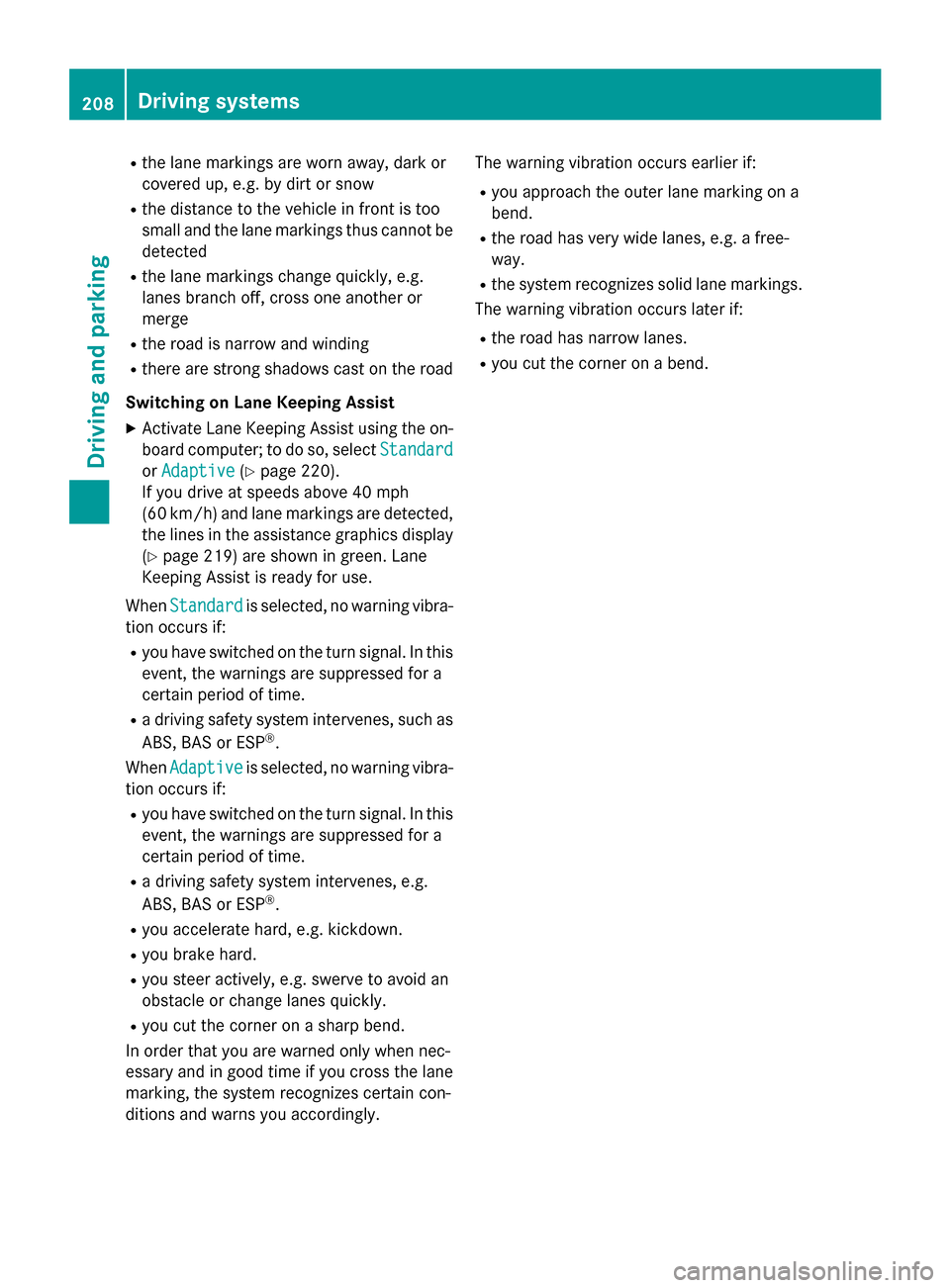
Lane Keeping Assist monitors the area in
front of your vehicle by means of multifunc-
tion camera :which is attached behind the
top of the windshield. Active Lane Keeping
Assist detects lane markings on the road and
can warn you before you leave your lane unin- tentionally.
This function is available in the range between
40 mph and 120 mph (60 km/h and
200 km/h).
A warning may be given if a front wheel
passes over a lane marking. It will warn you by
means of intermittent vibration in the steer-
ing wheel for up to 1.5 seconds. Important safety notes
GWARNING
Lane Keeping Assist may not always clearly
recognize lane markings.
In this case, Lane Keeping Assist may:
Rgive an unnecessary warning
Rnot give a warning
There is a risk of an accident.
Always pay particular attention to the traffic
situation and stay in lane, in particular if
warned by Lane Keeping Assist.
GWARNING
The Lane Keeping Assist warning does not
return the vehicle to the original lane. There is
a risk of an accident.
You should always steer, brake or accelerate
yourself, in particular if warned by Lane Keep-
ing Assist.
If you fail to adapt your driving style, Lane
Keeping Assist can neither reduce the risk of
an accident nor override the laws of physics.
Lane Keeping Assist cannot take into account
the road, traffic and weather conditions. Lane
Keeping Assist is merely an aid. You are
responsible for the distance to the vehicle in
front, for vehicle speed, for braking in good
time and for staying in your lane.
The Lane Keeping Assist does not keep the
vehicle in the lane.
The system may be impaired or may not func- tion if:
Rthere is poor visibility, e.g. due to insuffi-
cient illumination of the road, or due to
snow, rain, fog or spray
Rthere is glare, e.g. from oncoming traffic,
the sun or reflection from other vehicles
(e.g. if the road surface is wet)
Rthe windshield is dirty, fogged up, damagedor covered, for instance by a sticker, in the
vicinity of the camera
Rthere are no, several or unclear lane mark-
ings for a lane, e.g. in areas with road con-
struction work
Driving systems207
Driving and parking
Z
Page 210 of 374
Rthe lane markings are worn away, dark or
covered up, e.g. by dirt or snow
Rthe distance to the vehicle in front is too
small and the lane markings thus cannot be
detected
Rthe lane markings change quickly, e.g.
lanes branch off, cross one another or
merge
Rthe road is narrow and winding
Rthere are strong shadows cast on the road
Switching on Lane Keeping Assist
XActivate Lane Keeping Assist using the on-
board computer; to do so, select Standard
orAdaptive(Ypage 220).
If you drive at speeds above 40 mph
(60 km/h) and lane markings are detected, the lines in the assistance graphics display
(
Ypage 219) are shown in green. Lane
Keeping Assist is ready for use.
When Standard
is selected, no warning vibra-
tion occurs if:
Ryou have switched on the turn signal. In this
event, the warnings are suppressed for a
certain period of time.
Ra driving safety system intervenes, such as
ABS, BAS or ESP®.
When Adaptive
is selected, no warning vibra-
tion occurs if:
Ryou have switched on the turn signal. In this
event, the warnings are suppressed for a
certain period of time.
Ra driving safety system intervenes, e.g.
ABS, BAS or ESP®.
Ryou accelerate hard, e.g. kickdown.
Ryou brake hard.
Ryou steer actively, e.g. swerve to avoid an
obstacle or change lanes quickly.
Ryou cut the corner on a sharp bend.
In order that you are warned only when nec-
essary and in good time if you cross the lane
marking, the system recognizes certain con-
ditions and warns you accordingly. The warning vibration occurs earlier if:
Ryou approach the outer lane marking on a
bend.
Rthe road has very wide lanes, e.g. a free-
way.
Rthe system recognizes solid lane markings.
The warning vibration occurs later if:
Rthe road has narrow lanes.
Ryou cut the corner on a bend.
208Driving system s
Driving an d parking
Page 215 of 374
Multifunction display
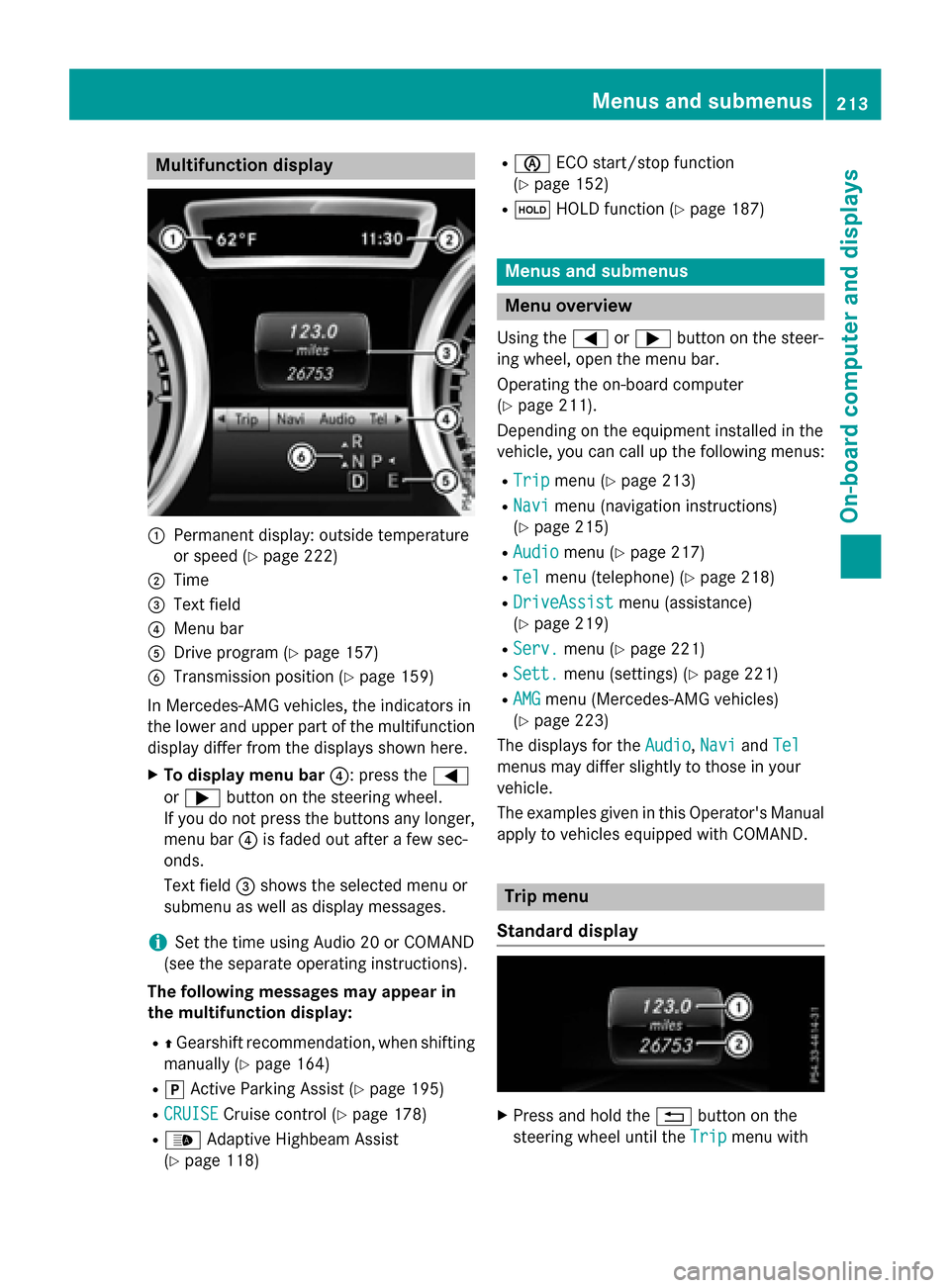
:Permanent display: outside temperature
or speed (
Ypage 222)
;Time
=Text field
?Menu bar
ADrive program (Ypage 157)
BTransmission position (Ypage 159)
In Mercedes-AMG vehicles, the indicators in
the lower and upper part of the multifunction display differ from the displays shown here.
XTo display menu bar ?: press the=
or ; button on the steering wheel.
If you do not press the buttons any longer,
menu bar ?is faded out after a few sec-
onds.
Text field =shows the selected menu or
submenu as well as display messages.
iSet the time using Audio 20 or COMAND
(see the separate operating instructions).
The following messages may appear in
the multifunction display:
RZ Gearshift recommendation, when shifting
manually (
Ypage 164)
Rj Active Parking Assist (Ypage 195)
RCRUISECruise control (Ypage 178)
R_ Adaptive Highbeam Assist
(
Ypage 118)
Rè ECO start/stop function
(
Ypage 152)
Rë HOLD function (Ypage 187)
Menus and submenus
Menu overview
Using the =or; button on the steer-
ing wheel, open the menu bar.
Operating the on-board computer
(
Ypage 211).
Depending on the equipment installed in the
vehicle, you can call up the following menus:
RTripmenu (Ypage 213)
RNavimenu (navigation instructions)
(
Ypage 215)
RAudiomenu (Ypage 217)
RTelmenu (telephone) (Ypage 218)
RDriveAssistmenu (assistance)
(
Ypage 219)
RServ.menu (Ypage 221)
RSett.menu (settings) (Ypage 221)
RAMGmenu (Mercedes-AMG vehicles)
(
Ypage 223)
The displays for the Audio
,Naviand Tel
menus may differ slightly to those in your
vehicle.
The examples given in this Operator's Manual
apply to vehicles equipped with COMAND.
Trip menu
Standard display
XPress and hold the %button on the
steering wheel until the Trip
menu with
Menus and submenus213
On-board computer and displays
Z
Page 249 of 374
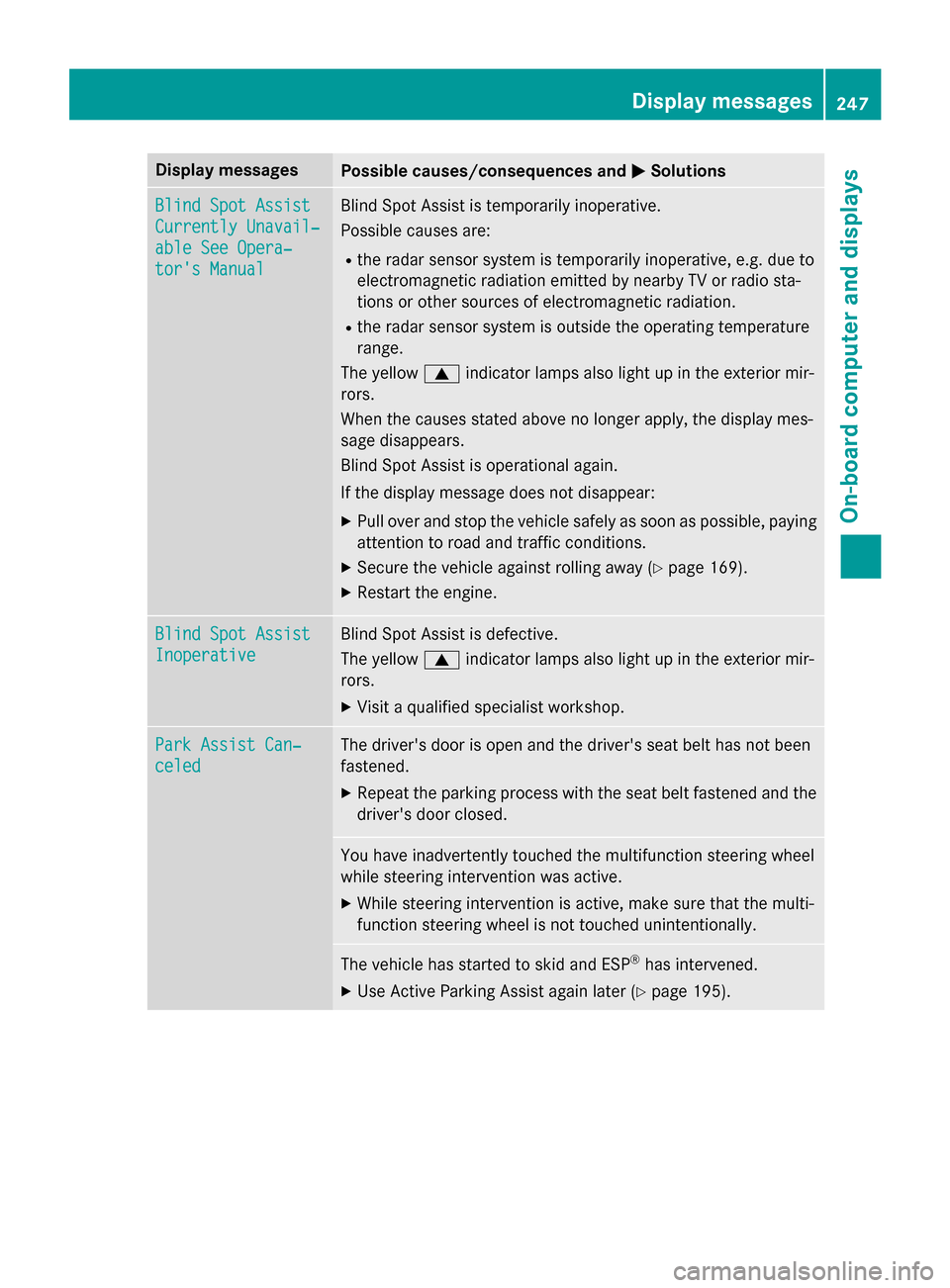
Display messagesPossible causes/consequences andMSolutions
Blind SpotAssist
Currently Unavail‐
abl eSee Opera‐
tor's Manual
Blind Spot Assis tis temporarily inoperative.
Possibl ecauses are:
Rth erada rsensor system is temporarily inoperative, e.g. due to
electromagnetic radiation emitted by nearby TV or radi osta-
tion sor other source sof electromagnetic radiation .
Rtherada rsensor system is outside th eoperating temperature
range.
The yello w9 indicato rlamp salso ligh tup in th eexterio rmir -
rors.
Whe nth ecauses state dabov eno longer apply, th edisplay mes -
sage disappears.
Blind Spot Assis tis operational again .
If th edisplay message does no tdisappear :
XPull overand stop th evehicl esafely as soo nas possible, payin g
attention to roa dand traffic conditions.
XSecur eth evehicl eagainst rollin gaway (Ypage 169).
XRestart th eengine.
Blind Spo tAssist
Inoperative
Blind Spot Assis tis defective.
The yello w9 indicato rlamp salso ligh tup in th eexterio rmir -
rors.
XVisit aqualified specialist workshop .
ParkAssist Can ‐
celed
The driver's doo ris open and th edriver's seat belt has no tbeen
fastened.
XRepea tth eparkin gprocess wit hth eseat belt fastene dand th e
driver's doo rclosed .
You hav einadvertentl ytouched th emultifunction steerin gwhee l
while steerin gintervention was active .
XWhilesteerin gintervention is active ,mak esur ethat th emulti-
function steerin gwhee lis no ttouched unintentionally.
The vehicl ehas started to skid and ES P®has intervened.
XUse Active Parking Assistagain later (Ypage 195).
Display messages247
On-board computer and displays
Z
Page 250 of 374
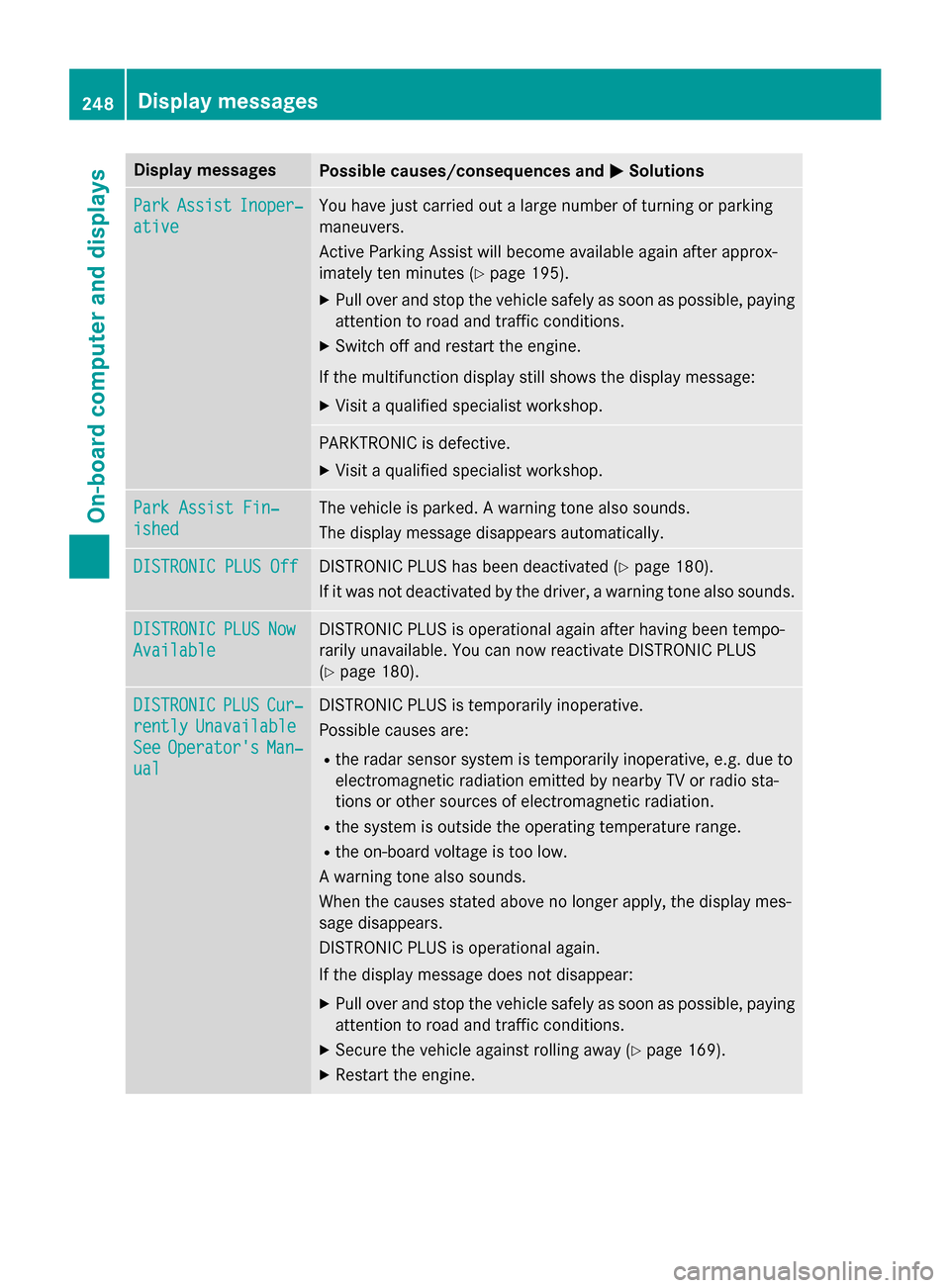
Display messagesPossible causes/consequences andMSolutions
ParkAssistInoper ‐
ative
You hav ejus tcarrie dout alarg enumber of turning or parkin g
maneuvers .
Active Parking Assis twill become available again after approx -
imately te nminute s (
Ypage 195).
XPull ove rand stop th evehicl esafely as soo nas possible, payin g
attention to roa dand traffic conditions.
XSwitc hof fand restar tth eengine.
If th emultifunction display still shows th edisplay message :
XVisitaqualified specialist workshop .
PARKTRONICis defective.
XVisit aqualified specialist workshop .
ParkAssist Fin ‐
ished
The vehicleis parked. Awarnin gtone also sounds.
The display message disappear sautomatically.
DISTRONIC PLU SOffDISTRONIC PLU Shas been deactivated (Ypage 180).
If it was no tdeactivated by th edriver , awarnin gtone also sounds.
DISTRONICPLU SNow
Available
DISTRONIC PLU Sis operational again after havin gbeen tempo -
rarily unavailable .You can no wreactivat eDISTRONIC PLU S
(
Ypage 180).
DISTRONICPLU SCur‐
rentlyUnavailable
SeeOperator' sMan‐
ual
DISTRONIC PLU Sis temporarily inoperative.
Possibl ecauses are:
Rth erada rsensor system is temporarily inoperative, e.g. due to
electromagnetic radiation emitted by nearby TV or radi osta-
tion sor other source sof electromagnetic radiation .
Rthesystem is outside th eoperating temperature range.
Rth eon-boar dvoltag eis to olow.
A warnin gtone also sounds.
Whe nth ecauses state dabov eno longer apply, th edisplay mes -
sage disappears.
DISTRONIC PLU Sis operational again .
If th edisplay message does no tdisappear :
XPull overand stop th evehicl esafely as soo nas possible, payin g
attention to roa dand traffic conditions.
XSecur eth evehicl eagainst rollin gaway (Ypage 169).
XRestart th eengine.
248Display messages
On-board computer and displays