engine MERCEDES-BENZ CLA-Class 2016 C117 Service Manual
[x] Cancel search | Manufacturer: MERCEDES-BENZ, Model Year: 2016, Model line: CLA-Class, Model: MERCEDES-BENZ CLA-Class 2016 C117Pages: 374, PDF Size: 8.19 MB
Page 119 of 374
Vehicles with Adaptive Highbeam Assist:
when Adaptive Highbeam Assist is active, it
controls activation and deactivation of the
high-beam headlamps (
Ypage 118).
High-beam flasher
XTo switch on:turn the SmartKey in the
ignition lock to position 1or 2, or start the
engine.
XPull the combination switch in the direction
of arrow =.
Hazard warning lamps
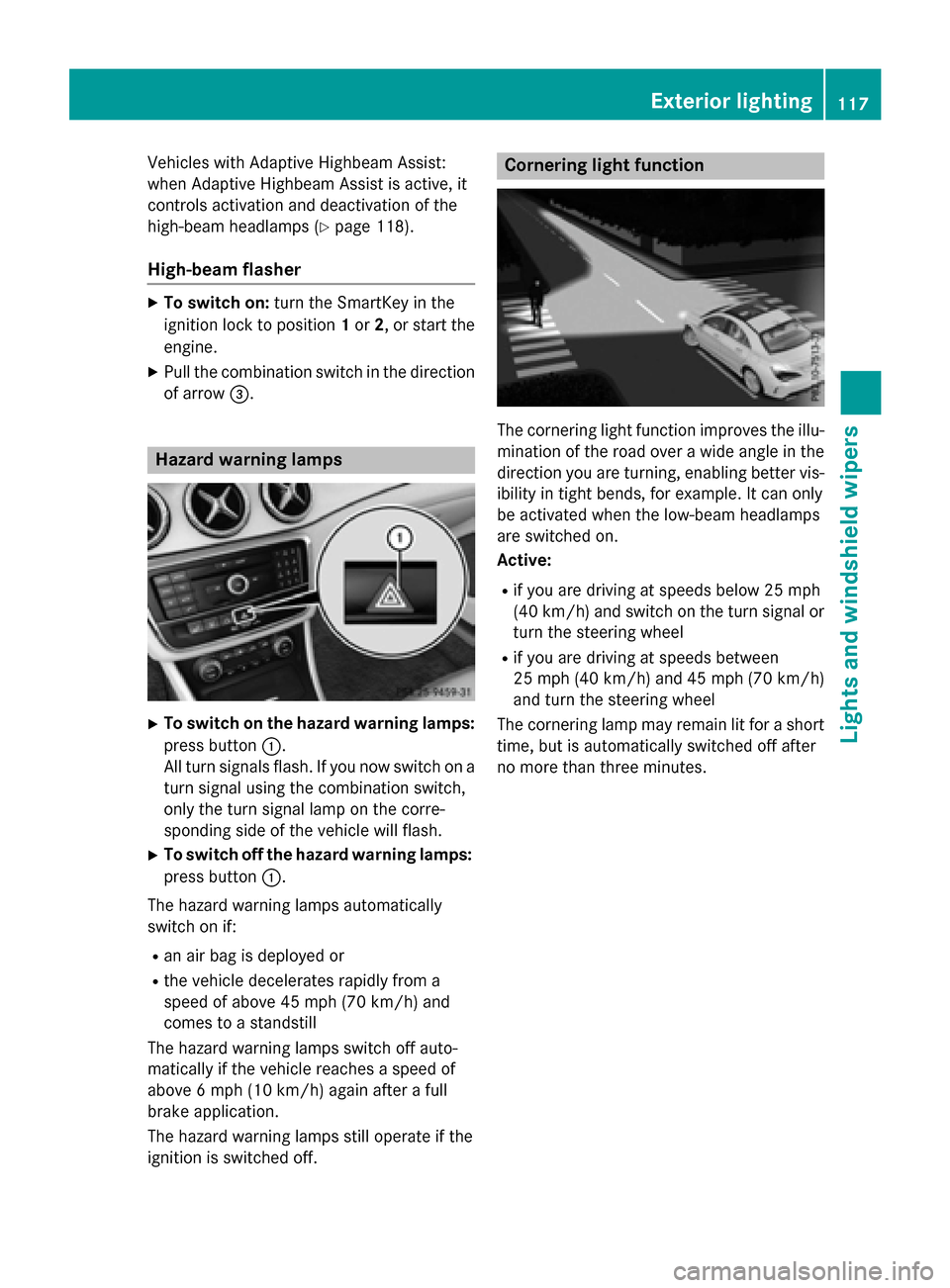
XTo switch on the hazard warning lamps:
press button :.
All turn signals flash. If you now switch on a
turn signal using the combination switch,
only the turn signal lamp on the corre-
sponding side of the vehicle will flash.
XTo switch off the hazard warning lamps:
press button :.
The hazard warning lamps automatically
switch on if:
Ran air bag is deployed or
Rthe vehicle decelerates rapidly from a
speed of above 45 mph (70 km/h) and
comes to a standstill
The hazard warning lamps switch off auto-
matically if the vehicle reaches a speed of
above 6 mph (10 km/h) again after a full
brake application.
The hazard warning lamps still operate if the
ignition is switched off.
Cornering light function
The cornering light function improves the illu-
mination of the road over a wide angle in the
direction you are turning, enabling better vis-
ibility in tight bends, for example. It can only
be activated when the low-beam headlamps
are switched on.
Active:
Rif you are driving at speeds below 25 mph
(40 km/h) and switch on the turn signal or
turn the steering wheel
Rif you are driving at speeds between
25 mph (40 km/h) and 45 mph (70 km/h)
and turn the steering wheel
The cornering lamp may remain lit for a short
time, but is automatically switched off after
no more than three minutes.
Exterior lighting117
Lights and windshield wipers
Z
Page 122 of 374
Interior lighting control
General notes
In order to prevent the vehicle's battery from
disc harging, the interior lighting functions are
automatical lydeactivated after some time
exce ptwhen the key is inposition 2in the
ignit ion lock.
The color and brightness for the ambient
ligh ting may beset using COMAND or Aud io
20 (see the separate operating instructions).
Automatic interior lighting control
XTo switch on: set the switch to center
position B.
XTo switch off: set theswitch to the |
position.
The interior lighting automatical ly switches
on ifyou:
Runlock the vehicle
Ropen a door
RRemove the SmartKey from the ignit ion
lock.
The interior lightis activated for a short while
when the SmartKey isremoved from the igni-
tion lock. This delayed switch-off can be
adjusted using COMAND or Aud io20 (see the
separate Operator's Manual).
Manual interior lighting control
XTo switch the front interi orlighting on:
set the switch to the cposition.
XTo switch the front interi orlighting off:
set the switch to the |position or (if the
door isclosed) to the center position.
XTo switch the rear interi orlighti ngon or
off: press the ubutton.
XTo switch the reading lamp on oroff:
press the pbutton.
Crash-responsive emergency lighting
The interior lighting isact ivat ed automatical ly
if the vehicle isinvolved inan acc ident.
XTo switch off the crash-responsive
eme rgency lighti ng:press the hazard
warning lamp button.
or
XLock and then unlock the vehicle using the Sm artKey.
Replacing bulbs
Important safety notes
Xenon bulbs
GDANGER
Xenon bulbs carry ahigh voltage. You can get
an electric shock if you remove th ecover of
th eXenon bulb and touch th eelectrical con-
tacts .Ther eis aris kof fatal injury.
Never touch th epart sor th eelectrical con-
tacts of th eXenon bulb. Always hav ewor kon
th eXenon bulbs carrie dout at aqualified spe-
cialist workshop.
If your vehicle isequipped with Xenon bulbs,
you can recogniz e this by the following: the
cone of light from the Xenon bulbsmoves
from the top to the bottom and back again
when you start the engine. For th isto be
observed, the lights must beswitched on
before starting the engine.
Bulbs and lamps are an important aspect of
vehicle safety. You must therefore make sure
that these function correctly at all times.
Have the headlamp setting checked regularly.
Other bulbs
GWARNIN G
Bulbs, lamp sand connectors can get ver yhot
when operating .If you chang e abulb, you
could burn yourself on these components.
Ther eis aris kof injury.
Allow these component sto cool down before
changing abulb.
120Replacing bulbs
Lights and windshield wipers
Page 127 of 374
position, causing the windshield wiper to wipe
more frequently.
If the wiper blades are worn, the windshield
will no longer be wiped properly. This could
prevent you from observing the traffic condi-
tions.
Replacing the wiper blades
Important safety notes
GWARNING
If the windshield wipers begin to move while
you are changing the wiper blades, you could be trapped by the wiper arm. There is a risk of
injury.
Always switch off the windshield wipers and
ignition before changing the wiper blades.
!To avoid damaging the wiper blades,
make sure that you touch only the wiper
arm of the wiper.
!Never open the hood if a windshield wiper
arm has been folded away from the wind-
shield.
Never fold a windshield wiper arm without a
wiper blade back onto the windshield.
Hold the windshield wiper arm firmly when
you change the wiper blade. If you release
the windshield wiper arm without a wiper
blade and it falls onto the windshield, the
windshield may be damaged by the force of
the impact.
Mercedes-Benz recommends that you have
the wiper blades changed at a qualified
specialist workshop.
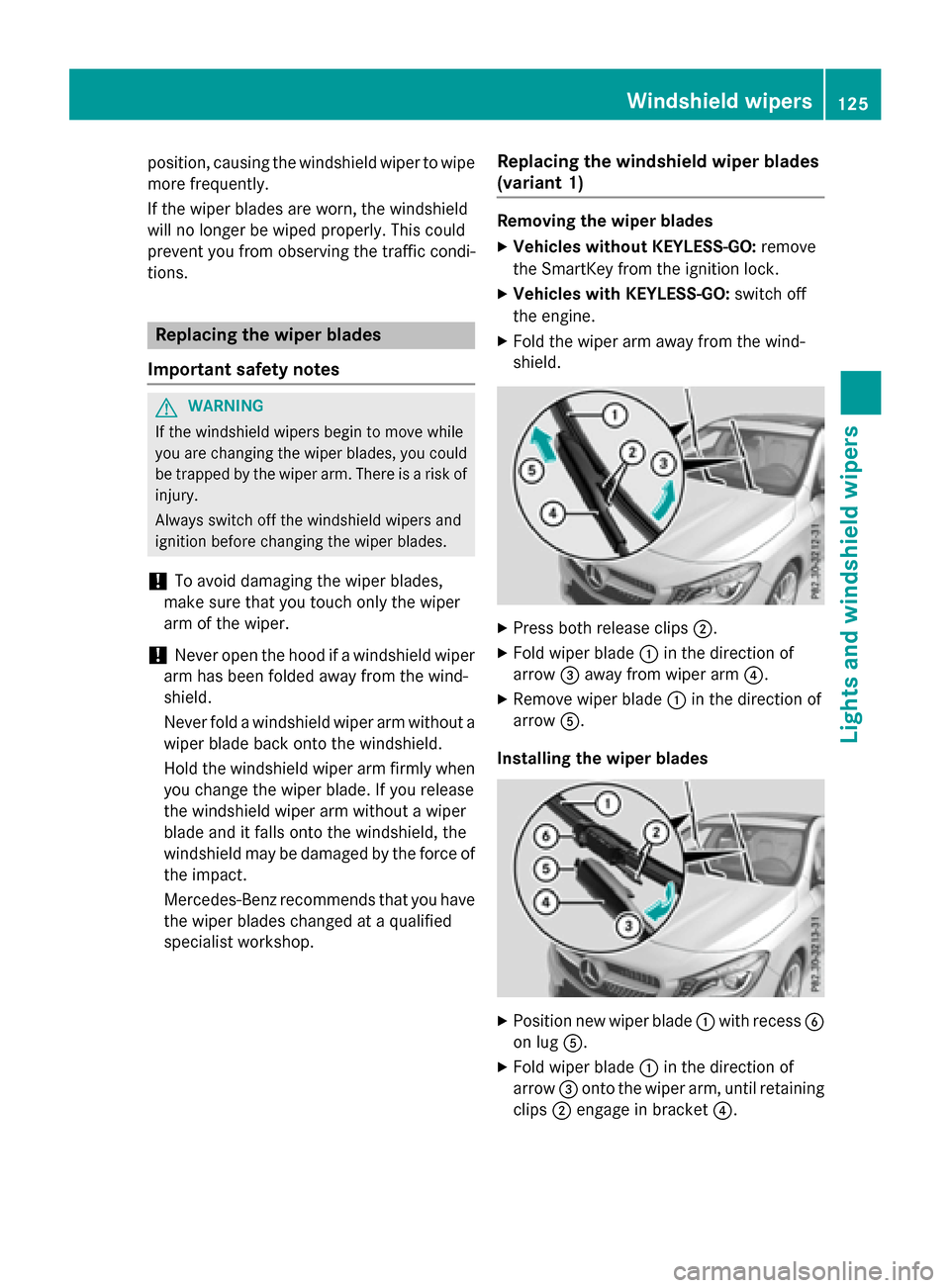
Replacing the windshield wiper blades
(variant 1)
Removing the wiper blades
XVehicles without KEYLESS-GO: remove
the SmartKey from the ignition lock.
XVehicles with KEYLESS-GO: switch off
the engine.
XFold the wiper arm away from the wind-
shield.
XPress both release clips ;.
XFold wiper blade:in the direction of
arrow =away from wiper arm ?.
XRemove wiper blade:in the direction of
arrow A.
Installing the wiper blades
XPosition new wiper blade :with recess B
on lug A.
XFold wiper blade :in the direction of
arrow =onto the wiper arm, until retaining
clips ;engage in bracket ?.
Windshield wipers125
Lights and windshield wipers
Z
Page 128 of 374
XMake sure that wiper blade:is seated
correctly.
XFold the wiper arm back onto the wind-
shield.
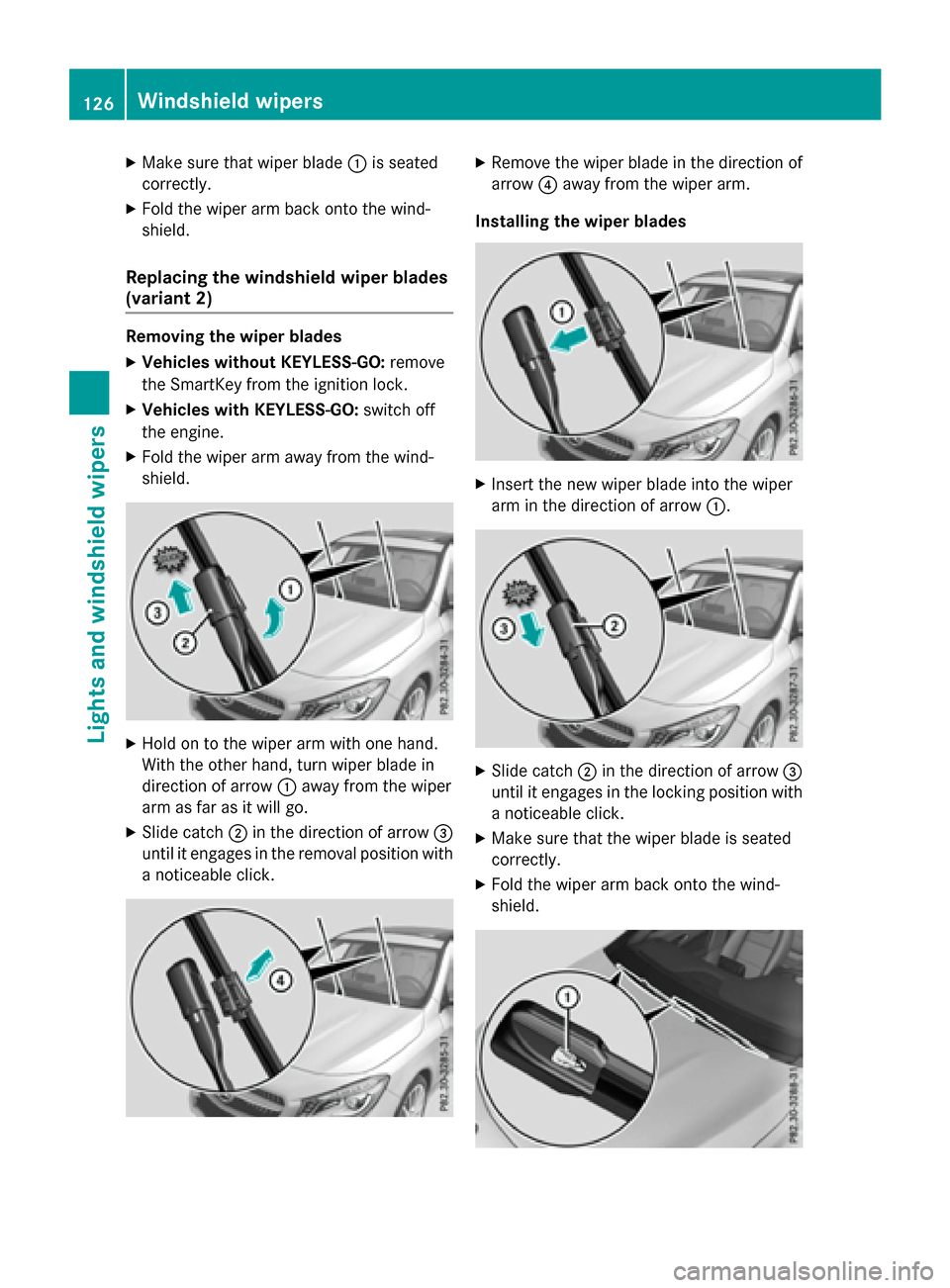
Replacing the windshield wiper blades
(variant 2)
Removing the wiper blades
XVehicles without KEYLESS-GO: remove
the SmartKey from the ignition lock.
XVehicles with KEYLESS-GO: switch off
the engine.
XFold the wiper arm away from the wind-
shield.
XHold on to the wiper arm with one hand.
With the other hand, turn wiper blade in
direction of arrow :away from the wiper
arm as far as it will go.
XSlide catch ;in the direction of arrow =
until it engages in the removal position with
a noticeable click.
XRemove the wiper blade in the direction of
arrow ?away from the wiper arm.
Installing the wiper blades
XInsert the new wiper blade into the wiper
arm in the direction of arrow :.
XSlide catch;in the direction of arrow =
until it engages in the locking position with a noticeable click.
XMake sure that the wiper blade is seated
correctly.
XFold the wiper arm back onto the wind-
shield.
126Windshield wipers
Lights and windshield wipers
Page 132 of 374
Useful information
i
This Operator's Manual describes all
models and all standard and optional equip-
ment of your vehicle available at the time of
publication of the Operator's Manual.
Country-specific differences are possible.
Please note that your vehicle may not be
equipped with all features described. This
also applies to safety-related systems and
functions.
iRead the information on qualified special-
ist workshops (
Ypage 25).
Overview of climate control systems
General notes
Observe the settings recommended on the
following pages. The windows could other-
wise fog up.
To prevent the windows from fogging up:
Rswitch off climate control only briefly
Rswitch on air-recirculation mode only
briefly
Rswitch on the cooling with air dehumidifi-
cation function
Rswitch on the defrost windshield function
briefly, if required
The air-conditioning system/dual-zone auto-
matic climate control regulates the tempera- ture and the humidity of the vehicle interior
and filters out undesirable substances from
the air.
The air-conditioning system/dual-zone auto-
matic climate control can only be operated
when the engine is running. Optimum opera-
tion is only achieved with the side windows
and panorama roof with power tilt/sliding
panel closed.
If you start the engine using your smartphone,
the last selected climate control setting is
reactivated (
Ypage 169). The residual heat function can only be acti-
vated or deactivated with the ignition
switched off (
Ypage 141).
Always keep the ventilation flaps behind the
side trim panel in the cargo compartment
clear (
Ypage 123). Otherwise the vehicle will
not be ventilated correctly.
iVentilate the vehicle for a brief period
during warm weather, e.g. using the con-
venience opening feature (
Ypage 89). This
will speed up the cooling process and the
desired interior temperature will be
reached more quickly.
iThe integrated filter filters out most par-
ticles of dust and soot and completely fil-
ters out pollen. It also reduces gaseous pol- lutants and odors. A clogged filter reduces
the amount of air supplied to the vehicle
interior. For this reason, you should always
observe the interval for replacing the filter,
which is specified in the Maintenance
Booklet. As it depends on environmental
conditions, e.g. heavy air pollution, the
interval may be shorter than stated in t
he
Maintenance Booklet.
iIt is possible that under certain circum-
stances the residual heat function may be
activated automatically an hour after the
SmartKey has been removed in order to dry the automatic climate control. The vehicle
is then ventilated for 30 minutes.
130Overview of climate control systems
Climate control
Page 134 of 374
?Activates/deactivates air-recirculation mode (Ypage 141)
ASets the airflow (Ypage 138)
BSwitches cooling with air dehumidification on/off (Ypage 136)
CSwitches the rear window defroster on/off (Ypage 140)
Notes on using the air-conditioning
system
Air-conditioning system
Below, you can find a number of notes and
recommendations to help you use the air-
conditioning system optimally.
RSwitch on the air-conditioning system by
turning control knob Aclockwise to the
desired position (except position 0).
RSet the temperature to 72 ‡ (22 †).
RRecommendation for avoiding misted
windows at low exterior temperatures
or in rain:switch on the ¿cooling with
dehumidification function (
Ypage 136).
Set air distribution to ¯and if possible
switch off PandO (
Ypage 138).
Deactivate air-recirculation mode e
(
Ypage 141).
Set airflow control Ato a setting between
3 and 6(
Ypage 138).
RRecommendation for rapid cooling or
heating of the vehicle interior: briefly set
airflow control Ato a setting between 3
and 6(
Ypage 138).
RRecommendation for a constant vehi-
cle interior temperature: set airflow con-
trol Ato a setting between 1and 3
(
Ypage 138).
RRecommendation for air distribution in winter: select the Oand¯ settings
(
Ypage 138).
Recommendation for air distribution in
summer: select the PorP and
¯ settings (
Ypage 138).
ROnly use the "Windshield defrosting" func-
tion briefly until the windshield is clear
again.
ROnly use air-recirculation mode briefly, e.g.
if there are unpleasant outsid e od
ors or
when in a tunnel. The windows could oth-
erwise fog up, since no fresh air is drawn
into the vehicle in air-recirculation mode.
RIf you change the settings of the climate
control system, the climate status display
appears for approximately three seconds
at the bottom of the screen in the Audio/
COMAND display (see separate operating
instructions). You will see the current set-
tings of the various climate control func-
tions.
DYNAMIC SELECT button (except
Mercedes-AMG vehicles)
You can choose between various drive pro-
grams with the DYNAMIC SELECT button
(
Ypage 155).
If you have selected drive program E:
Rwhen heating, the electrical heater booster
is deactivated and in the warming-up phase
heat output is reduced
Rthe rear window defroster running time is
reduced
Depending on the configuration, the climate
settings can also be influenced in drive pro-
gram I.
If you have selected drive program Cor S, the
climate settings are not affected.
ECO start/stop function
During automatic engine switch-off, the cli-
mate control system only operates at a
reduced capacity. If you require the full cli-
mate control output, you can switch off the
ECO start/stop function by pressing the ECO
button (
Ypage 153).
132Overview of climate control systems
Climate control
Page 137 of 374
RUse the residual heat function if you want to
heat or ventilate the vehicle interior when
the ignition is switched off. The residual
heat function can only be activated or deac-
tivated with the ignition switched off.
RIf you change the settings of the climate
control system, the climate status display
appears for approximately three seconds
at the bottom of the screen in the Audio/
COMAND display (see separate operating
instructions). You will see the current set-
tings of the various climate control func-
tions.
DYNAMIC SELECT button (except
Mercedes-AMG vehicles)
You can choose between various drive pro-
grams with the DYNAMIC SELECT button
(
Ypage 155).
If you have selected drive program E:
Rwhen heating, the electrical heater booster
is deactivated and in the warming-up phase
heat output is reduced
Rthe rear window defroster running time is
reduced
Depending on the configuration, the climate
settings can also be influenced in drive pro-
gram I.
If you have selected drive program Cor S, the
climate settings are not affected.
ECO start/stop function
During automatic engine switch-off, the cli-
mate control system only operates at a
reduced capacity. If you require the full cli-
mate control output, you can switch off the
ECO start/stop function by pressing the ECO
button (
Ypage 153).
Operating the climate control sys-
tems
Activating/deactivating climate con-
trol
General notes
When the climate control is switched off, the
air supply and air circulation are also
switched off. The windows could fog up.
Therefore, switch off climate control only
briefly
Air-conditioning system
XTurn the SmartKey to position 2in the igni-
tion lock (
Ypage 147).
XTo switch on: turn controlAclockwise to
the desired position (except position 0)
(
Ypage 131).
XTo switch off: turn controlAcounter-
clockwise to position 0(
Ypage 131).
Dual-zone automatic climate control
XTurn the SmartKey to position 2in the igni-
tion lock (
Ypage 147).
XTo activate: press theÃbutton.
The indicator lamp in the Ãbutton lights
up. Airflow and air distribution are set to
automatic mode.
or
XPress the ^button.
The indicator lamp in the ^button goes
out. The previously selected settings are
restored.
XTo deactivate: press the^button.
The indicator lamp in the ^button lights
up.
iDual-zone automatic climate control:
switch on climate control primarily using
the à button.
Operating the climate control systems135
Climate control
Page 138 of 374
Switching cooling with air dehumidi-
fication on/off
General notes
If you deactivate the "Cooling with air-dehu-
midification" function, the air inside the vehi- cle will not be cooled. The air inside the vehi-
cle will also not be dehumidified. The win-
dows can fog up more quickly. Therefore, only
deactivate the "Cooling with air-dehumidifi-
cation" function briefly.
The "Cooling with air dehumidification" func-
tion is only available when the engine is run-
ning. The air inside the vehicle is cooled and
dehumidified according to the temperature
selected.
Condensation may drip from the underside of
the vehicle when it is in cooling mode. This is
normal and not a sign that there is a malfunc- tion.
Switching on/off
XTo activate: press the¿button.
The indicator lamp in the ¿button lights
up.
XTo deactivate: press the¿button.
The indicator lamp in the ¿button goes
out. The "Cooling with air dehumidification" function has a delayed switch-off feature.
136Operating the climate control systems
Climate control
Page 141 of 374
XTo deactivate:press theábutton.
The indicator lamp in the ábutton goes
out.
The temperature setting for the driver's
side is adopted for the front-passenger
side.
Defrosting the windshield
General notes
You can use this function to defrost the wind-
shield or to defrost the inside of the wind-
shield and the side windows.
iYou should only select the "Windshield
defrosting" function until the windshield is
clear again.
Activating/deactivating the defrosting
function for the windshield
XTurn the SmartKey to position 2in the igni-
tion lock (
Ypage 147).
XTo activate: press the¬button.
The indicator lamp in the ¬button lights
up.
The climate control system switches to the
following functions:
Rhigh airflow
Rhigh temperature
Rair distribution to the windshield and
front side windows
Rair-recirculation mode off
iThe "Windshield defrosting" function
automatically sets the blower output to the optimum defrosting effect. As a result, the
airflow may increase or decrease automat-
ically after the ¬button is pressed.
iYou can adjust the blower output man-
ually while the "Windshield defrosting"
function is in operation:
RAir-conditioning system: turn airflow
control Acounter-clockwise or clock-
wise (
Ypage 131).
RDual-zone automatic climate control:
press the óorô button.
XTo deactivate: press the¬button.
The indicator lamp in the ¬button goes
out. The previously selected settings are
restored. Air-recirculation mode remains
deactivated.
or
XDual-zone climate control: press the Ã
button.
The indicator lamp in the ¬button goes
out. Airflow and air distribution are set to
automatic mode.
or
XAir-conditioning system: turn temperature
control :counter-clockwise or clockwise
(
Ypage 131).
Dual-zone automatic climate control: turn
temperature control :orE counter-
clockwise or clockwise (
Ypage 133).
MAX COOL maximum cooling
The MAX COOL function is only available in
vehicles for the USA.
MAX COOL is only operational when the
engine is running.
XTo activate: press theÙbutton.
The indicator lamp in the button lights up.
XTo deactivate: press theÙbutton.
The indicator lamp goes out. The previously selected settings are restored.
When you activate MAX COOL, climate con-
trol switches to the following functions:
Rmaximum cooling
Rmaximum airflow
Rair-recirculation mode on
Operating the climate control systems139
Climate control
Page 143 of 374
Problems with the rear window defroster
ProblemPossible causes/consequences andMSolutions
The rear window
defroster has deactiva-
ted prematurely or can-
not be activated.The battery has not been sufficiently charged.
XSwitch off any consumers that are not required, e.g. reading
lamps, interior lighting or the seat heating.
When the battery is sufficiently charged, the rear window
defroster can be activated again.
Switching air-recirculation mode
on/off
General notes
You can deactivate the flow of fresh air if
unpleasant odors are entering the vehicle
from outside. The air already inside the vehi-
cle will then be recirculated.
If you switch on air-recirculation mode, the
windows can fog up more quickly, in particu-
lar at low temperatures. Only use air-recircu-
lation mode briefly to prevent the windows
from fogging up.
The operation of air-recirculation mode is the
same for all control panels.
Switching on/off
XTurn the SmartKey to position 2in the igni-
tion lock (
Ypage 147).
XTo activate: press theebutton.
The indicator lamp in the ebutton lights
up.
Air-recirculation mode switches on automat-
ically:
Rat high outside temperatures
Rat high levels of pollution
When air-recirculation mode is activated
automatically, the indicator lamp in the e
button is not lit. Outside air is added after
about 30 minutes.
XTo deactivate: press theebutton.
The indicator lamp in the ebutton goes
out.
iAir-recirculation mode deactivates auto-
matically:
Rafter approximately five minutes at out-
side temperatures below approximately
45 ‡ (7 †)
Rafter approximately five minutes if the
"Cooling with air dehumidification" func-
tion is deactivated
Rafter approximately 30 minutes at out-
side temperatures above approximately
45 ‡ (7 †) if the cooling with air dehu-
midification function is activated
Switching the residual heat on or off
General notes
The residual heat function is only available in
vehicles for Canada with dual-zone automatic
climate control.
It is possible to make use of the residual heat of the engine to continue heating the vehicle
for approximately 30 minutes after the engine
has been switched off. The heating time
depends on the set interior temperature.
iThe blower will run at a low speed regard-
less of the airflow setting.
iIf you activate the residual heat function
at high temperatures, only the ventilation
will be activated. The blower runs at
medium speed.
iYou cannot use the ventilation to cool the
vehicle interior to a temperature lower than
the outside temperature.
Operating the climate control systems141
Climate control