wheel MERCEDES-BENZ CLA-Class 2016 C117 Service Manual
[x] Cancel search | Manufacturer: MERCEDES-BENZ, Model Year: 2016, Model line: CLA-Class, Model: MERCEDES-BENZ CLA-Class 2016 C117Pages: 374, PDF Size: 8.19 MB
Page 124 of 374
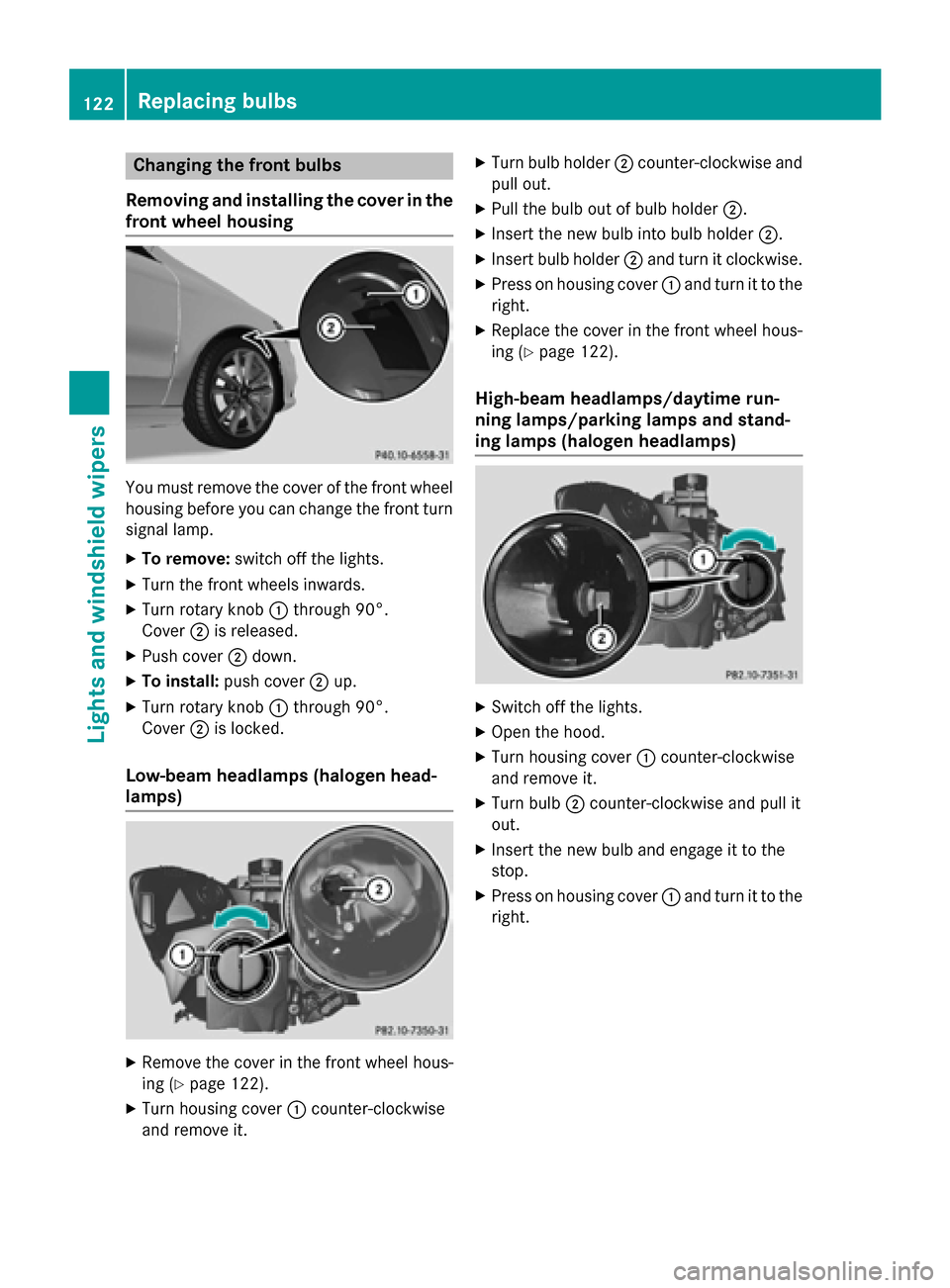
Changing the front bulbs
Removing and installing the cover in the
front wheel housing
You must remove the cover of the front wheel
housing before you can change the front turn signal lamp.
XTo remove: switch off the lights.
XTurn the front wheels inwards.
XTurn rotary knob :through 90°.
Cover ;is released.
XPush cover ;down.
XTo install: push cover ;up.
XTurn rotary knob :through 90°.
Cover ;is locked.
Low-beam headlamps (halogen head-
lamps)
XRemove the cover in the front wheel hous-
ing (
Ypage 122).
XTurn housing cover :counter-clockwise
and remove it.
XTurn bulb holder ;counter-clockwise and
pull out.
XPull the bulb out of bulb holder ;.
XInsert the new bulb into bulb holder ;.
XInsert bulb holder;and turn it clockwise.
XPress on housing cover :and turn it to the
right.
XReplace the cover in the front wheel hous-
ing (
Ypage 122).
High-beam headlamps/daytime run-
ning lamps/parking lamps and stand-
ing lamps (halogen headlamps)
XSwitch off the lights.
XOpen the hood.
XTurn housing cover :counter-clockwise
and remove it.
XTurn bulb ;counter-clockwise and pull it
out.
XInsert the new bulb and engage it to the
stop.
XPress on housing cover :and turn it to the
right.
122Replacing bulbs
Lights and windshield wipers
Page 139 of 374
Problems with the "Cooling with air dehumidification" function
ProblemPossible causes/consequences andMSolutions
The indicator lamp in
the¿ button
flashes three times or
remains off. The "Cool-
ing with air dehumidifi-
cation" function cannot
be switched on.Cooling with air dehumidification has been deactivated due to a
malfunction.
XVisit a qualified specialist workshop.
Setting climate control to automatic
General notes
The automatic function is only available in
conjunction with dual-zone automatic climate
control.
In automatic mode, the set temperature is
maintained automatically at a constant level.
The system automatically regulates the tem-
perature of the dispensed air, the airflow and
the air distribution.
The automatic mode functions optimally
when the "Cooling with air dehumidification"
function is activated. If necessary, cooling
with air dehumidification can be deactivated.
If you deactivate the "Cooling with air-dehu-
midification" function, the air inside the vehi-
cle will not be cooled. The air inside the vehi-
cle will also not be dehumidified. The win-
dows can fog up more quickly. Therefore, only
deactivate the "Cooling with air-dehumidifi-
cation" function briefly.
Setting climate control to automatic
XTurn the SmartKey to position 2in the igni-
tion lock (
Ypage 147).
XSet the desired temperature.
XTo activate: press theÃbutton.
The indicator lamp in the Ãbutton lights
up. Automatic air distribution and airflow
are activated.
XTo switch to manual mode: press the
É orË button.
or
XPress the KorI button.
The indicator lamp in the Ãbutton goes
out. Automatic air distribution and airflow
are deactivated.
Setting the temperature
Air-conditioning system
You can set the temperature for the entire
vehicle. The set temperature is automatically
maintained at a constant level.
XTurn the SmartKey to position 2in the igni-
tion lock (
Ypage 147).
XTo increase/reduce: turn control:
clockwise or counter-clockwise
(
Ypage 131). Only change the temperature
setting in small increments. Start at 72 ‡
(22 †).
Dual-zone automatic climate control
Different temperatures can be set for the
driver's and front-passenger sides. The set
temperature is automatically maintained at a
constant level.
XTurn the SmartKey to position 2in the igni-
tion lock (
Ypage 147).
XTo increase/reduce: turn thumbwheel:
or E to the left or right (
Ypage 133). Only
Operating the climate control systems137
Climate control
Page 145 of 374
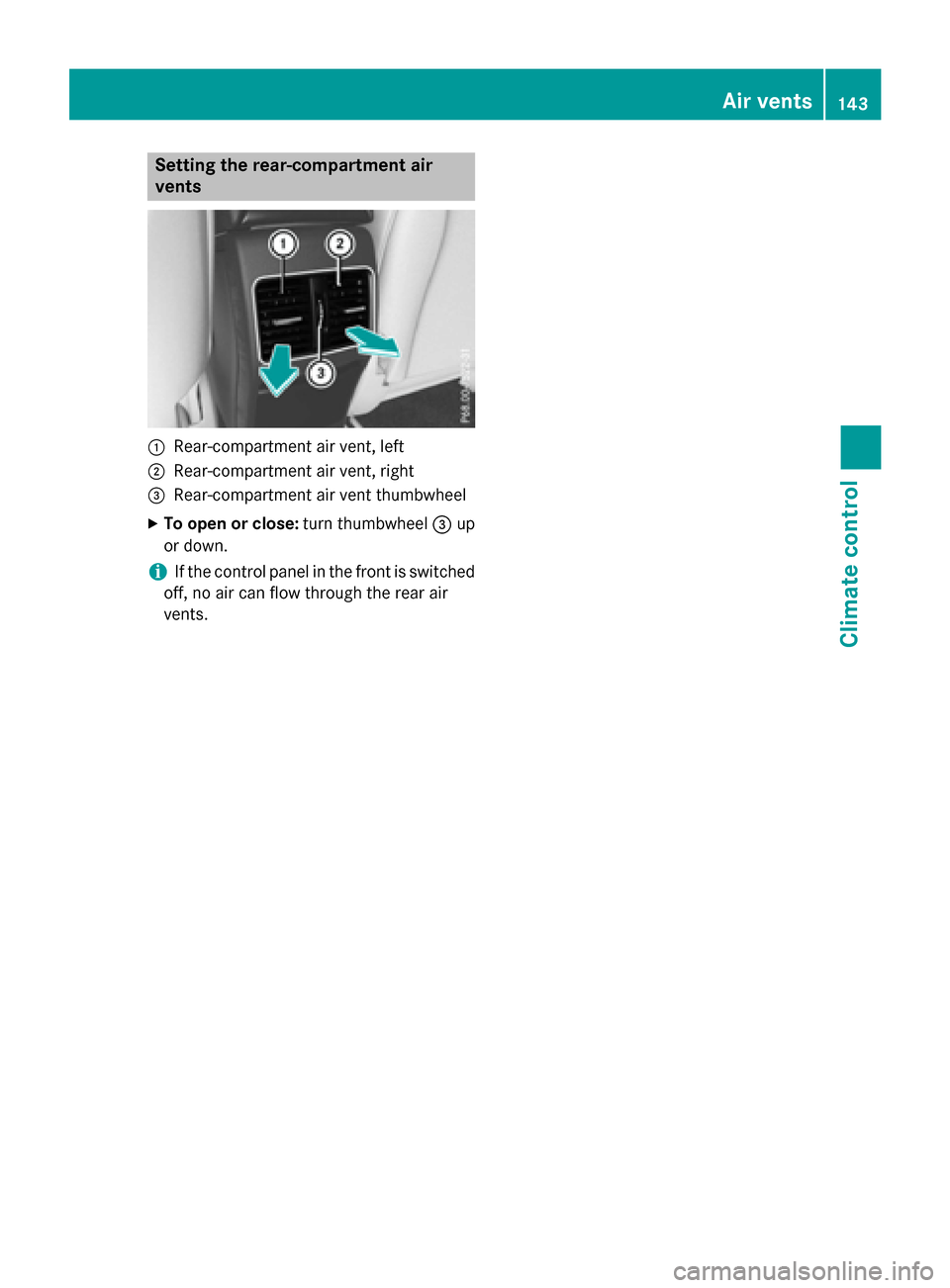
Setting the rear-compartment air
vents
:Rear-compartment air vent, left
;Rear-compartment air vent, right
=Rear-compartment air vent thumbwheel
XTo open or close:turn thumbwheel=up
or down.
iIf the control panel in the front is switched
off, no air can flow through the rear air
vents.
Air vents143
Climate control
Z
Page 149 of 374
GWARNING
Unsuitable footwear can hinder correct usage of the pedals, e.g.:
Rshoes with thick soles
Rshoes with high heels
Rslippers
There is a risk of an accident.
Wear suitable footwear to ensure correct
usage of the pedals.
GWARNING
If you switch off the ignition while driving,
safety-relevant functions are only available
with limitations, or not at all. This could affect, for example, the power steering and the brake
boosting effect. You will require considerably
more effort to steer and brake. There is a risk
of an accident.
Do not switch off the ignition while driving.
GWARNING
If the parking brake has not been fully
released when driving, the parking brake can:
Roverheat and cause a fire
Rlose its hold function.
There is a risk of fire and an accident. Release
the parking brake fully before driving off.
!Do not warm up the engine with the vehi-
cle stationary. Drive off immediately. Avoid
high engine speeds and driving at full throt-
tle until the engine has reached its operat-
ing temperature.
Only shift the automatic transmission to
the desired drive position when the vehicle
is stationary.
Where possible, avoid spinning the drive
wheels when pulling away on slippery
roads. You could otherwise damage the
drive train.
!Mercedes-AMG vehicles: avoid full-load
operation and engine speeds greater than
5000 rpm when the engine is cold. This helps to protect the engine and avoids
uncomfortable driving.
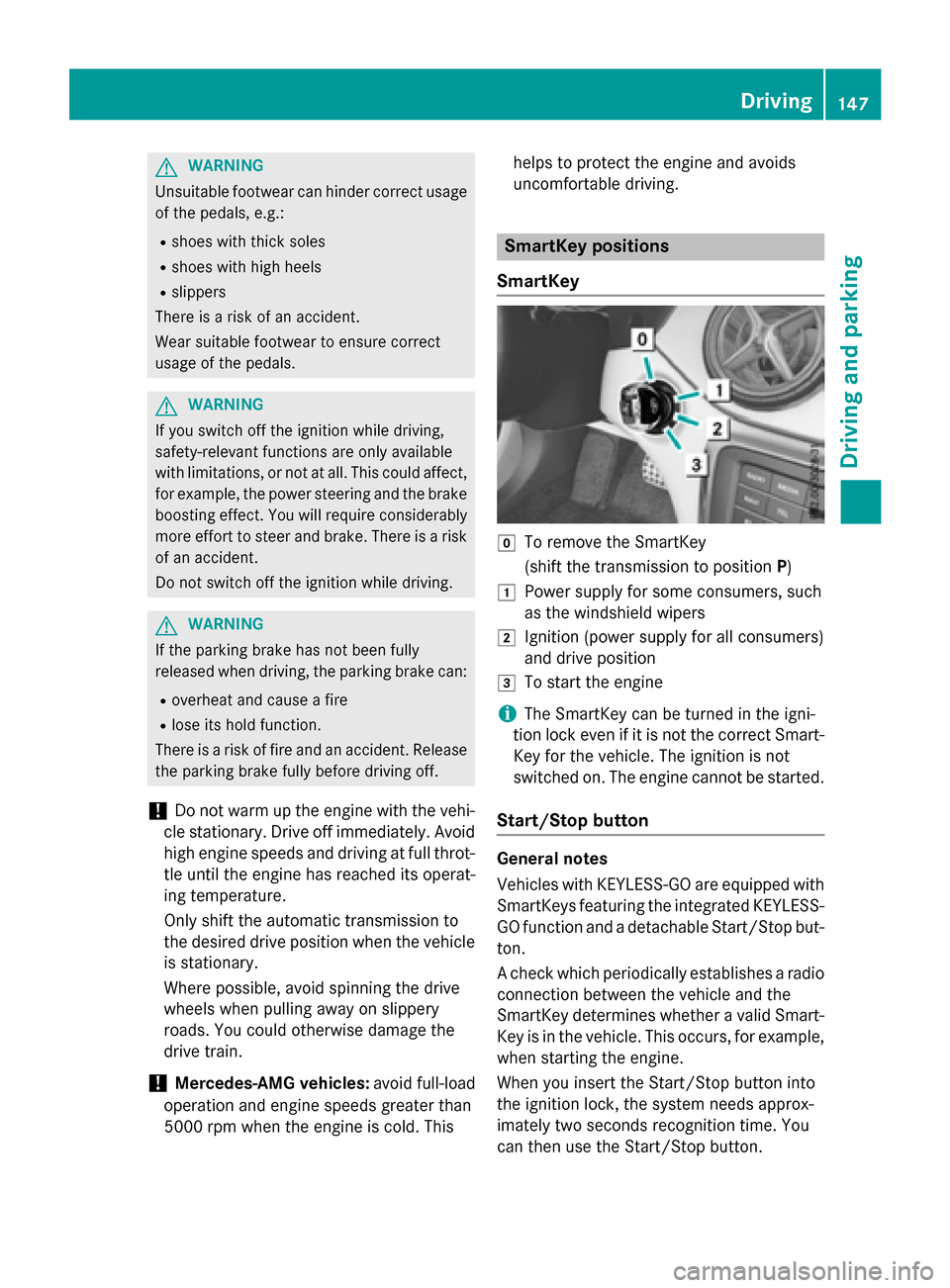
SmartKey positions
SmartKey
gTo remove the SmartKey
(shift the transmission to position P)
1Power supply for some consumers, such
as the windshield wipers
2Ignition (power supply for all consumers)
and drive position
3To start the engine
iThe SmartKey can be turned in the igni-
tion lock even if it is not the correct Smart- Key for the vehicle. The ignition is not
switched on. The engine cannot be started.
Start/Stop button
General notes
Vehicles with KEYLESS-GO are equipped with
SmartKeys featuring the integrated KEYLESS-
GO function and a detachable Start/Stop but-
ton.
A check which periodically establishes a radioconnection between the vehicle and the
SmartKey determines whether a valid Smart-
Key is in the vehicle. This occurs, for example,
when starting the engine.
When you insert the Start/Stop button into
the ignition lock, the system needs approx-
imately two seconds recognition time. You
can then use the Start/Stop button.
Driving147
Driving and parking
Z
Page 158 of 374
Available drive programs:
CComfortComfortable and econom-
ical driving characteristics
SSpo rtSporty driving character-
istics
IIndivi dualIndividual settings
E EconomyParticularly economical
driving characteristics
Ad ditional information for drive programs
(
Ypage 162).
You can also change gear yourself using the
steering wheel paddleshifters. For further
information on the manual drive program
(
Ypage 164).
DYNAMIC SELECT controller
(Mercedes-AMG vehicles)
Use the DYNAMIC SELECT controller to
change the drive program. Depending on the
driv e program selected the following vehicle
characteristics will change:
Rthe drive
Rthe transmission management
RESP®
Rthe suspension (vehicles with AMG adap-
tive sport suspension system)
Rthe availab ility of the ECO start /stop func-
tion
Rthe availab ility of gliding mode
Each time you start the engine with the
Sm artKey or the Start /S top button, drive pro-
gram Cis activated. For further information
about starting the engine, see (
Ypage 149).
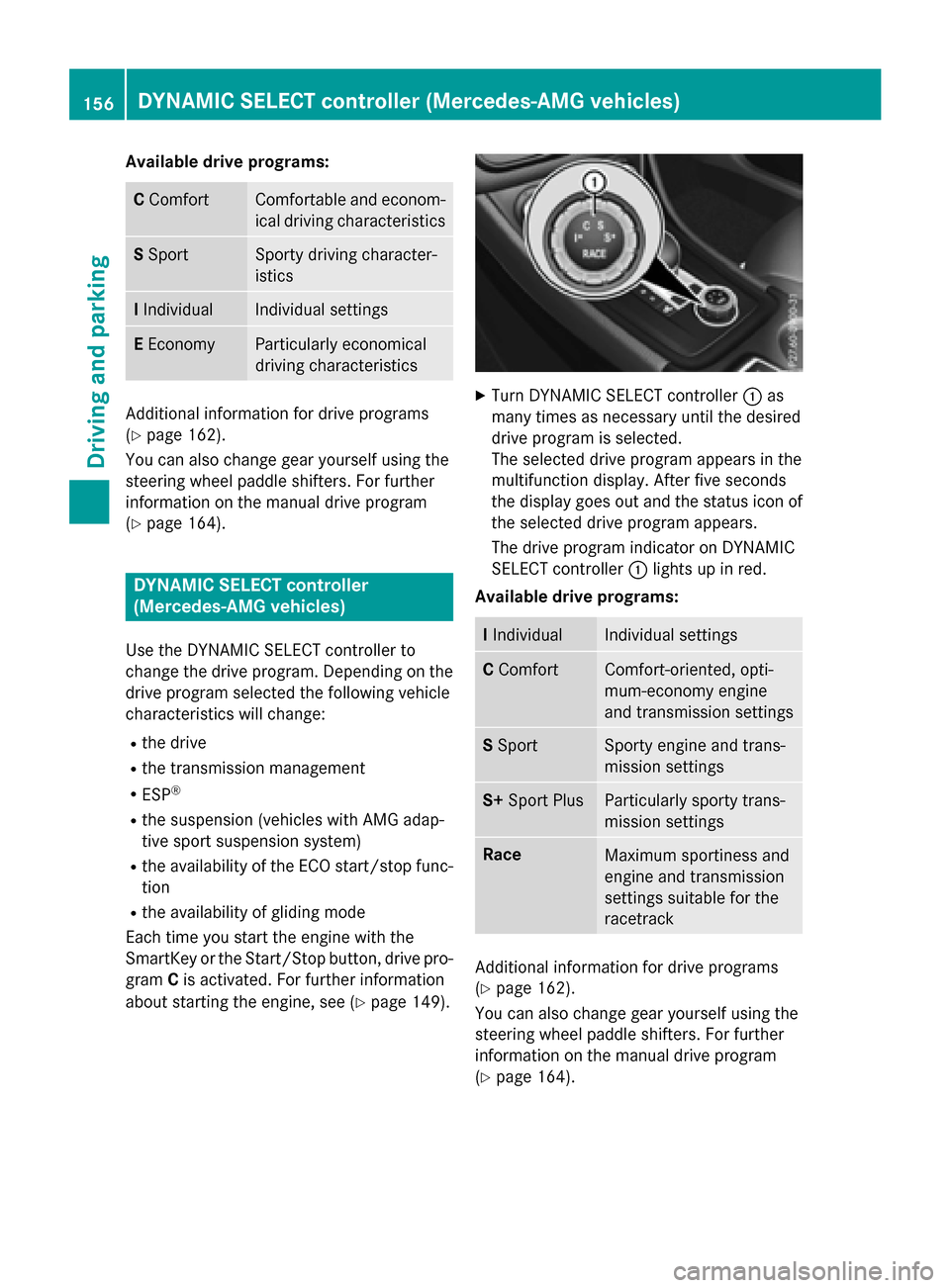
XTurn DYNAMIC SELECT controller :as
many times as necessary unt ilthe desired
driv e program isselected.
The selected drive program appears inthe
multifunction display. After five seconds
the disp lay goes out and the status icon of
the selected drive program appears.
The drive program indicator on DYNAMIC
SE LECT controller :lights up inred.
Available drive programs:
I Indivi dualIndividual settings
CComfortComfort-oriente d,opti-
mum-economy engine
and transmission settings
S Spo rtSporty engine and trans-
mission settings
S+ Sport PlusParticularly sporty trans-
mission settings
RaceMaximum sportiness and
engine and transmission
settings suitable for the
racetrack
Additional information for drive programs
(
Ypage 162).
You can also change gear yourself using the
steering wheel paddleshifters. For further
information on the manual drive program
(
Ypage 164).
156DYNAMIC SELECT controller (Mercedes-AMG vehicles)
Driving and parking
Page 163 of 374
ANeutral
Do not shift the transmission toN
while driving. Otherwise, the auto-
matic transmission could be dam-
aged.
No power is transmitted from the
engine to the drive wheels.
Releasing the brakes will allow you
to move the vehicle freely, e.g. to
push it or tow it.
If ESP
®is deactivated or faulty:
shift the transmission to position N
if the vehicle is in danger of skid-
ding, e.g. on icy roads.
If you switch the engine off with the
transmission in position Ror D, the
automatic transmission shifts to N
automatically.
!Rolling in neutral Ncan damage
the drive train.
7Drive
The automatic transmission
changes gear automatically. All
forward gears are available.
Driving tips
Changing gear
The automatic transmission shifts to the indi-
vidual gears automatically when it is in trans-
mission position D. This automatic gear shift-
ing behavior is determined by:
Rthe selected drive program
Rthe position of the accelerator pedal
Rthe road speed
Accelerator pedal position
Your style of driving influences how the auto- matic transmission shifts gear:
Rlittle throttle: early upshifts
Rmore throttle: late upshifts
Holding the vehicle stationary on uphill
gradients
GWARNING
If the clutch overheats, the electronic man-
agement system is automatically deactivated. This interrupts the power transmission. The
vehicle may, for example, roll backwards on
gradients. There is a risk of an accident.
Never hold the vehicle stationary on uphill
gradients by depressing the accelerator.
The clutch may overheat if you hold the vehi-
cle stationary on uphill gradients by depress-ing the accelerator pedal. If the clutch over-
heats, a warning tone sounds.
All vehicles (except Mercedes-AMG vehi-
cles): theStop Vehicle Shift to P
Leave Engine Runningdisplay message
appears in the multifunction display. You will
only be able to continue your journey once the
clutch has cooled down and the display mes-
sage in the multifunction display has disap-
peared.
Mercedes-AMG vehicles: theTrans. Oil
Overheated Drive on with Caredisplay
message appears in the multifunction dis-
play.
Do not hold the vehicle stationary on uphill
gradients by depressing the accelerator
pedal. Instead, only ever hold the vehicle sta-
tionary on uphill gradients by:
Rdepressing the brake pedal
Ractivating the HOLD function
Rengaging the electric parking brake
Kickdown
Use kickdown for maximum acceleration.
XDepress the accelerator pedal beyond the
pressure point.
The automatic transmission shifts to a
lower gear depending on the engine speed.
XEase off the accelerator pedal once the
desired speed is reached.
The automatic transmission shifts back up.
Automatic transmission161
Driving an d parking
Z
Page 164 of 374
Mercedes-AMG vehicles:it is only possible
to use kickdown in the automatic drive pro-
gram and the temporary manual drive pro-
gram M. When manual drive program Mis
permanently activated, kickdown is not pos-
sible.
For further information on kickdown in man-
ual drive program M(
Ypage 166).
Rocking the vehicle free
Shifting the transmission repeatedly between
gears Dand Rmay help to free the vehicle if it
has become stuck in slush or snow. The vehi-
cle's engine management system limits the
speed to a maximum of 5 mph (9 km/h) when
shifting back and forth. To shift back and forth
between transmission positions Dand R,
move the DIRECT SELECT lever up and down
past the point of resistance.
Drive programs
All vehicles (except Mercedes-AMG
vehicles)
Drive program C (Comfort)
Drive program Cis characterized by the fol-
lowing:
Rthe vehicle delivers comfortable, economi-
cal handling characteristics.
Rthe vehicle pulling away more gently in
forward and reverse gears, unless the
accelerator pedal is depressed fully.
Rthe vehicle having improved driving stabil-
ity, for example on slippery road surfaces.
Roptimal fuel consumption resulting from
the automatic transmission shifting up
sooner. The vehicle is driven in the low
engine speed range and the wheels are less
likely to spin. Drive program S (Sport)
Drive program
Sis characterized by the fol-
lowing:
Rsporty engine settings.
Rthe automatic transmission shifting up
later. the fuel consumption possibly being
higher as a result of the later automatic
transmission shift points.
Drive program I (Individual)
In drive program Ithe following properties of
the drive program can be selected:
Rthe drive (engine and transmission man-
agement)
Rthe suspension (vehicles with damping sys-
tem or AMG RIDE CONTROL)
Rthe steering
Rthe availability of the ECO start/stop func-
tion
Rthe climate control:
Information about the configuration of drive
program Iwith COMAND or Audio 20 can be
found in the Digital Operator's Manual.
iTo permanently select the gears in drive
program Iusing the steering wheel paddle
shifters, select the M(manual) setting for
the drive.
Drive program E (Economy)
Drive program Eis characterized by the fol-
lowing:
Rcomfort-oriented engine settings.
Roptimal fuel consumption resulting from
the automatic transmission shifting up
sooner.
Rthe vehicle pulling away more gently in
forward and reverse gears, unless the
accelerator pedal is depressed fully.
Rthe vehicle having improved driving stabil-
ity, for example on slippery road surfaces.
Rthe automatic transmission shifting up
sooner. This results in the vehicle being
162Automatic transmission
Driving and parking
Page 165 of 374
driven at lower engine speeds and the
wheels being less likely to spin.
Rgliding mode is activated automatically
when engine-internal conditions are fulfil-
led and the accelerator is not depressed. At
the same time the transmission’s clutch
opens and the vehicle rolls freely using its
kinetic energy. As a result great distances
can be completed without the engine brake
and fuel consumption reduced.
Mercedes-AMG vehicles
Drive program I (Individual)
In drive programIthe following properties of
the drive program can be selected:
Rthe drive (engine management)
Rthe transmission management
Rthe suspension (vehicles with AMG RIDE
CONTROL)
RESP®
Information about the configuration of drive
program Iwith COMAND or Audio 20 can be
found in the Digital Operator's Manual.
Drive program C (Comfort)
Drive program Cis characterized by the fol-
lowing:
Rthe vehicle delivers comfortable, economi-
cal handling characteristics.
Rthe vehicle pulling away more gently in
forward and reverse gears, unless the
accelerator pedal is depressed fully.
Rthe vehicle having improved driving stabil-
ity, for example on slippery road surfaces.
Roptimal fuel consumption resulting from
the automatic transmission shifting up
sooner. The vehicle is driven in the low
engine speed range and the wheels are less
likely to spin.
Rgliding mode is available.
Rthe ECO start/stop function is available. Drive program S (Sport)
Drive program
Sis characterized by the fol-
lowing:
Rthe vehicle exhibits sporty driving charac-
teristics.
Rthe automatic transmission shifting up
later. the fuel consumption possibly being
higher as a result of the later automatic
transmission shift points.
Rthe suspension exhibits stiff springing and
damping settings (vehicles with AIR RIDE
CONTROL).
Rgliding mode is not available.
Rthe ECO start/stop function is not availa-
ble.
Drive program S+ (Sport Plus)
Drive program S+is characterized by the fol-
lowing:
Rthe vehicle exhibits particularly sporty driv-
ing characteristics.
Rthe automatic transmission shifting up
later.
Rthe fuel consumption possibly being higher
as a result of the later automatic transmis-
sion shift points.
Rthe suspension exhibits particularly stiff
springing and damping settings (vehicles
with AMG adaptive sport suspension sys-
tem).
Rgliding mode is not available.
Rthe ECO start/stop function is not availa-
ble.
Drive program RACE (vehicles with AMG
RIDE CONTROL)
The RACE drive program is characteriz
ed by
the following:
Rthe vehicle exhibits driving characteristics
suitable for the racetrack.
Rall vehicle systems are set for maximum
sportiness.
Rthe automatic transmission shifting up
later.
Automatic transmission163
Driving and parking
Z
Page 166 of 374
Rthe fuel consumption possibly being higher
as a result of the later automatic transmis-
sion shift points.
Rthe suspension exhibits particularly stiff
springing and damping settings (vehicles
with AMG adaptive sport suspension sys-
tem).
Rgliding mode is not available.
Rthe ECO start/stop function is not availa-
ble.
Manual gear shifting
General notes
You can change gear yourself using the steer-
ing wheel paddle shifters. The transmission
must be in position D.
Depending on which paddle shifter is pulled,
the automatic transmission immediately
shifts into the next gear down or up, if per-
mitted.
Mercedes-AMG vehicles: to use manual
shifting, you have two options:
Rtemporary setting
Rpermanent setting
If you activate manual gearshifting, the mul-
tifunction display will show the current gear
instead of transmission position D.
If manual gearshifting is deactivated, the
gears will be selected automatically.
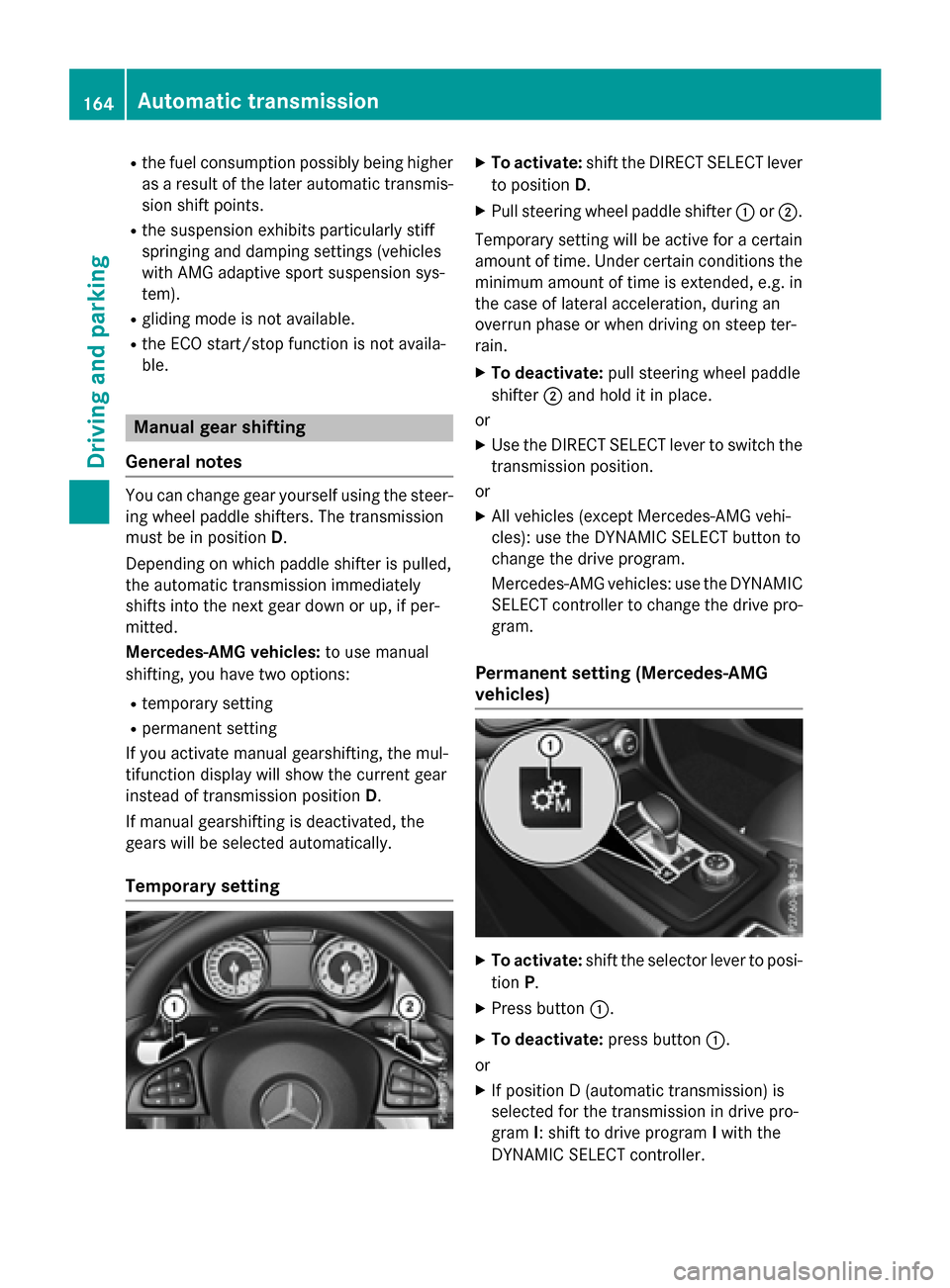
Temporary setting
XTo activate: shift the DIRECT SELECT lever
to position D.
XPull steering wheel paddle shifter :or;.
Temporary setting will be active for a certain
amount of time. Under certain conditions the
minimum amount of time is extended, e.g. in
the case of lateral acceleration, during an
overrun phase or when driving on steep ter-
rain.
XTo deactivate: pull steering wheel paddle
shifter ;and hold it in place.
or
XUse the DIRECT SELECT lever to switch the
transmission position.
or
XAll vehicles (except Mercedes-AMG vehi-
cles): use the DYNAMIC SELECT button to
change the drive program.
Mercedes-AMG vehicles: use the DYNAMIC
SELECT controller to change the drive pro-
gram.
Permanent setting (Mercedes-AMG
vehicles)
XTo activate: shift the selector lever to posi-
tion P.
XPress button :.
XTo deactivate: press button:.
or
XIf position D (automatic transmission) is
selected for the transmission in drive pro-
gram I: shift to drive program Iwith the
DYNAMIC SELECT controller.
164Automatic transmission
Driving an d parking
Page 167 of 374
Shifting gears
!Mercedes-AMG vehicles:the automatic
transmission does not shift up automati-
cally even when the engine limiting speed
for the current gear is reached. When the
engine limiting speed is reached, the fuel
supply is cut to prevent the engine from
overrevving. Always make sure that the
engine speed does not reach the red area of
the tachometer. There is otherwise a risk of
engine damage.
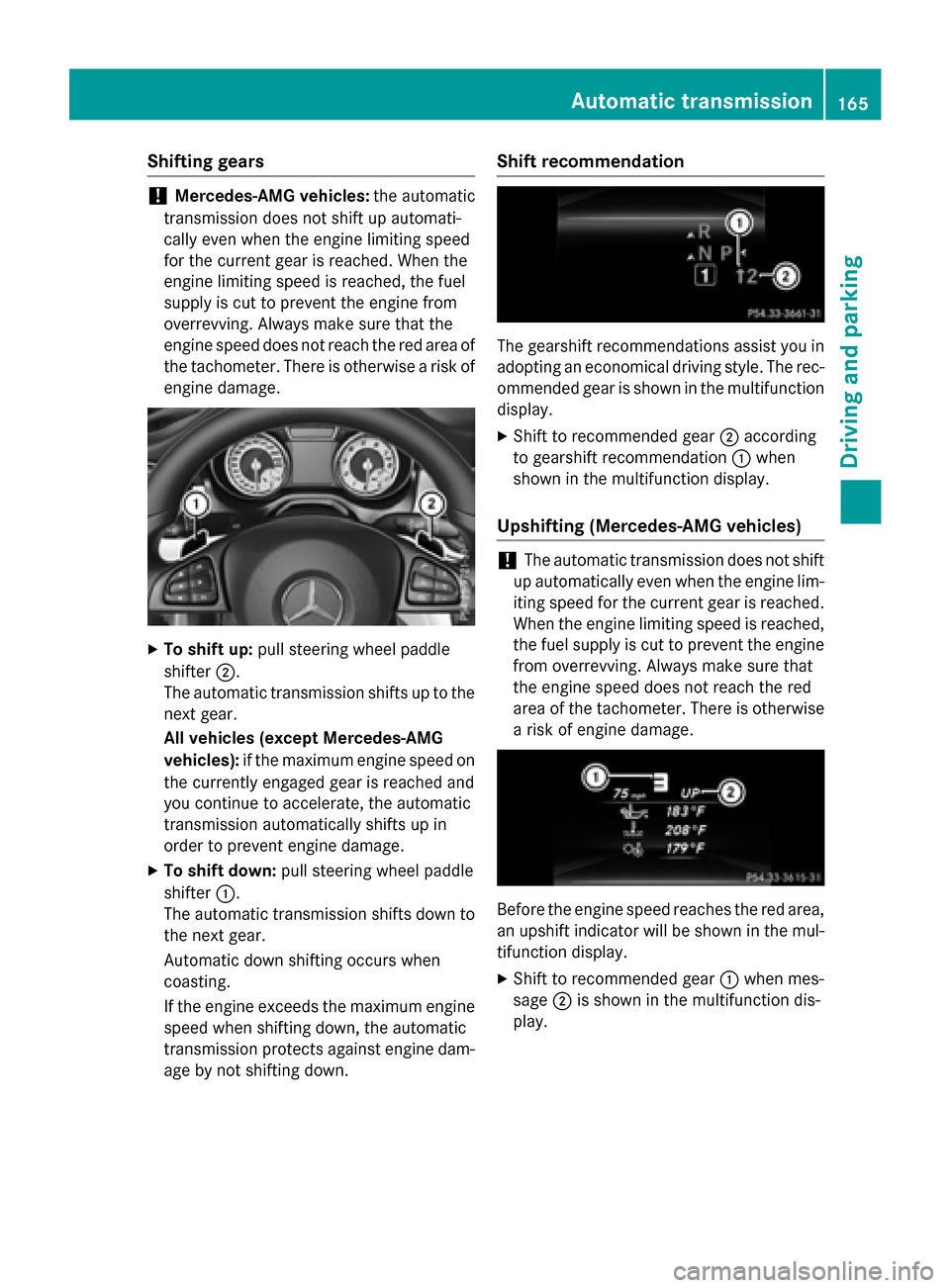
XTo shift up: pull steering wheel paddle
shifter ;.
The automatic transmission shifts up to the next gear.
All vehicles (except Mercedes-AMG
vehicles): if the maximum engine speed on
the currently engaged gear is reached and
you continue to accelerate, the automatic
transmission automatically shifts up in
order to prevent engine damage.
XTo shift down: pull steering wheel paddle
shifter :.
The automatic transmission shifts down to
the next gear.
Automatic down shifting occurs when
coasting.
If the engine exceeds the maximum engine
speed when shifting down, the automatic
transmission protects against engine dam-
age by not shifting down.
Shift recommendation
The gearshift recommendations assist you in
adopting an economical driving style. The rec-
ommended gear is shown in the multifunction
display.
XShift to recommended gear ;according
to gearshift recommendation :when
shown in the multifunction display.
Upshifting (Mercedes-AMG vehicles)
!The automatic transmission does not shift
up automatically even when the engine lim-
iting speed for the current gear is reached.
When the engine limiting speed is reached,
the fuel supply is cut to prevent the engine
from overrevving. Always make sure that
the engine speed does not reach the red
area of the tachometer. There is otherwise
a risk of engine damage.
Before the engine speed reaches the red area,
an upshift indicator will be shown in the mul-
tifunction display.
XShift to recommended gear :when mes-
sage ;is shown in the multifunction dis-
play.
Automatic transmission165
Driving and parking
Z