warning MERCEDES-BENZ CLA-Class 2017 C117 Manual PDF
[x] Cancel search | Manufacturer: MERCEDES-BENZ, Model Year: 2017, Model line: CLA-Class, Model: MERCEDES-BENZ CLA-Class 2017 C117Pages: 318, PDF Size: 8.02 MB
Page 103 of 318
The blueKindicator lamp in the instru-
ment cluster lights up when the high-beam
headlamps are switched on.
XTo switch off the high-beam head-
lamps: move the combination switch back to
its normal position.
The blue Kindicator lamp in the instru-
ment cluster goes out.
Vehicles with Adaptive Highbeam Assist:
when Adaptive Highbeam Assist is active, it
controls activation and deactivation of the
high-beam headlamps (
Ypage 101).
XTo switch on the high-beam flasher: pull
the combination switch in the direction of
arrow =.
Hazard warning lamps
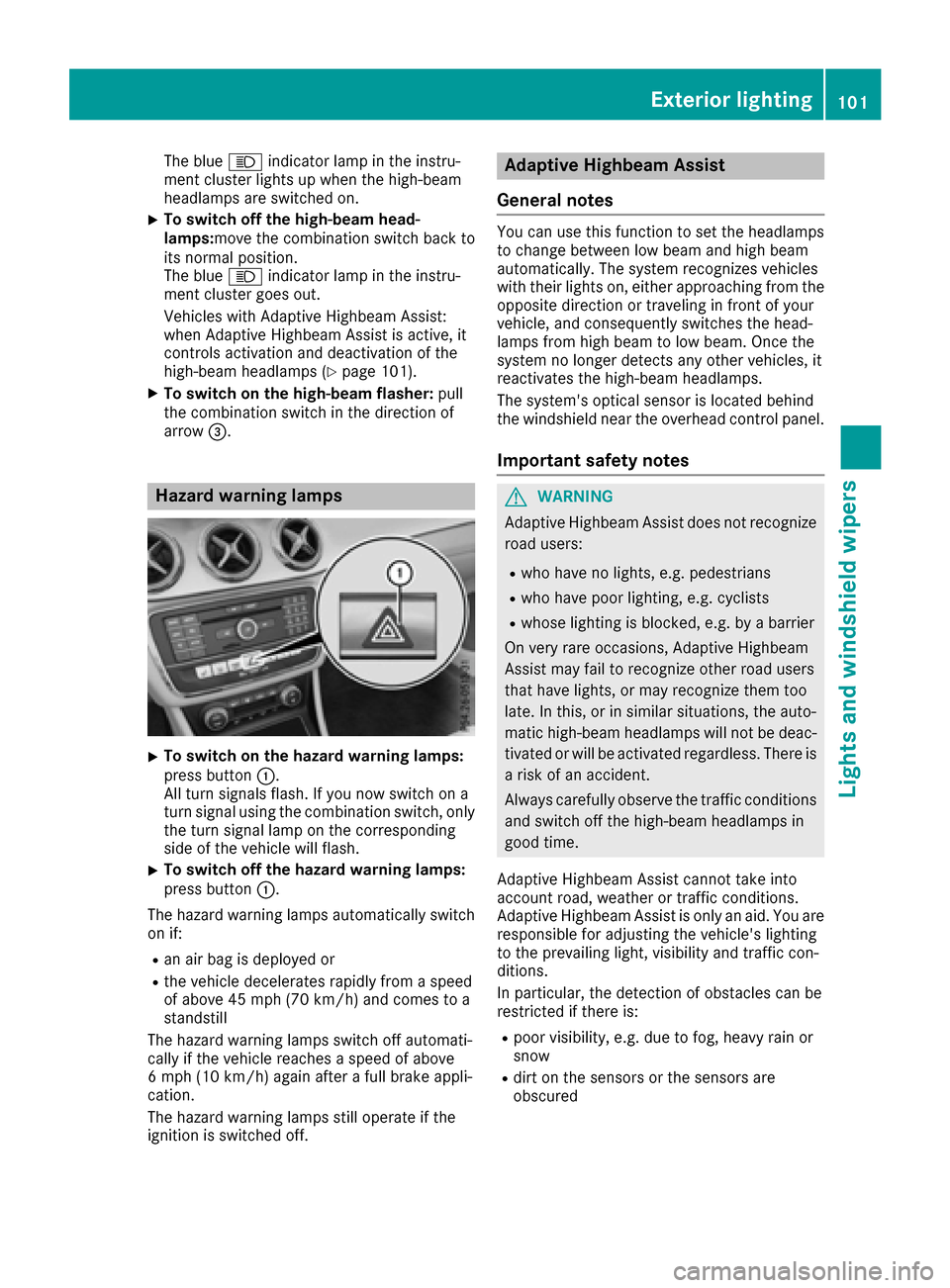
XTo switch on the hazard warning lamps:
press button :.
All turn signals flash. If you now switch on a
turn signal using the combination switch, only
the turn signal lamp on the corresponding
side of the vehicle will flash.
XTo switch off the hazard warning lamps:
press button :.
The hazard warning lamps automatically switch
on if:
Ran air bag is deployed or
Rthe vehicle decelerates rapidly from a speed
of above 45 mph (70 km/h) and comes to a
standstill
The hazard warning lamps switch off automati-
cally if the vehicle reaches a speed of above
6 mph (10 km/h) again after a full brake appli-
cation.
The hazard warning lamps still operate if the
ignition is switched off.
Adaptive Highbeam Assist
General notes
You can use this function to set the headlamps
to change between low beam and high beam
automatically. The system recognizes vehicles
with their lights on, either approaching from the
opposite direction or traveling in front of your
vehicle, and consequently switches the head-
lamps from high beam to low beam. Once the
system no longer detects any other vehicles, it
reactivates the high-beam headlamps.
The system's optical sensor is located behind
the windshield near the overhead control panel.
Important safety notes
GWARNING
Adaptive Highbeam Assist does not recognize
road users:
Rwho have no lights, e.g. pedestrians
Rwho have poor lighting, e.g. cyclists
Rwhose lighting is blocked, e.g. by a barrier
On very rare occasions, Adaptive Highbeam
Assist may fail to recognize other road users
that have lights, or may recognize them too
late. In this, or in similar situations, the auto-
matic high-beam headlamps will not be deac-
tivated or will be activated regardless. There is a risk of an accident.
Always carefully observe the traffic conditions
and switch off the high-beam headlamps in
good time.
Adaptive Highbeam Assist cannot take into
account road, weather or traffic conditions.
Adaptive Highbeam Assist is only an aid. You are responsible for adjusting the vehicle's lighting
to the prevailing light, visibility and traffic con-
ditions.
In particular, the detection of obstacles can be
restricted if there is:
Rpoor visibility, e.g. due to fog, heavy rain or
snow
Rdirt on the sensors or the sensors are
obscured
Exterior lighting101
Lights and windshield wipers
Z
Page 109 of 318
Replacing the wiper blades
Important safety notes
GWARNING
If the windshield wipers begin to move while
you are changing the wiper blades, you could be trapped by the wiper arm. There is a risk of
injury.
Always switch off the windshield wipers and
ignition before changing the wiper blades.
!To avoid damaging the wiper blades, make
sure that you touch only the wiper arm of the
wiper.
!Never open the hood if a windshield wiper
arm has been folded away from the wind-
shield.
Never fold a windshield wiper arm without a
wiper blade back onto the windshield.
Hold the windshield wiper arm firmly when
you change the wiper blade. If you release the
windshield wiper arm without a wiper blade
and it falls onto the windshield, the windshield
may be damaged by the force of the impact.
Mercedes-Benz recommends that you have
the wiper blades changed at a qualified spe-
cialist workshop.
Changing the windshield wiper blades
Removing the wiper blades
XVehicles without KEYLESS-GO or KEY-
LESS-GO start function: remove the Smart-
Key from the ignition lock.
XVehicles with KEYLESS-GO or KEYLESS-
GO start function: switch off the engine.
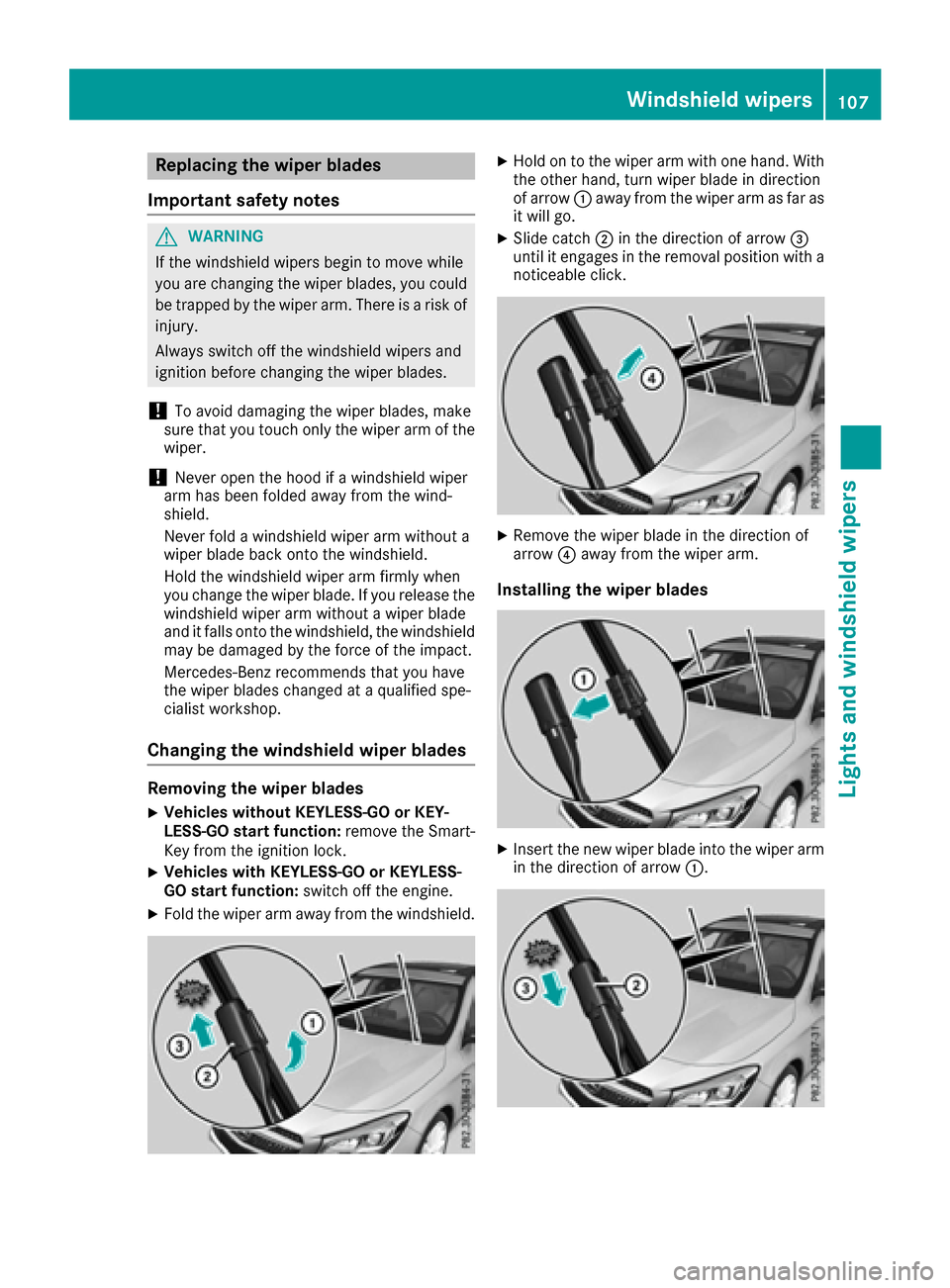
XFold the wiper arm away from the windshield.
XHold on to the wiper arm with one hand. With
the other hand, turn wiper blade in direction
of arrow:away from the wiper arm as far as
it will go.
XSlide catch ;in the direction of arrow =
until it engages in the removal position with a
noticeable click.
XRemove the wiper blade in the direction of
arrow ?away from the wiper arm.
Installing the wiper blades
XInsert the new wiper blade into the wiper arm
in the direction of arrow :.
Windshield wipers107
Lights and windshield wipers
Z
Page 121 of 318
iIf you activate the residual heat function at
high temperatures, only the ventilation will be
activated. The blower runs at medium speed.
iYou cannot use the ventilation to cool the
vehicle interior to a temperature lower than
the outside temperature.
Activating/deactivating
XTurn the SmartKey to position 0in the ignition
lock or remove it (Ypage 121).
XPress the Ìbutton.
The indicator lamp in the Ìbutton lights
up or goes out.
The indicator lamp in the button indicates that
the respective function is activated.
iResidual heat is deactivated automatically:
Rafter approximately 30 minutes
Rwhen the ignition is switched on
Rif the battery voltage drops
Air vents
Important safety notes
GWARNING
Very hot or very cold air can flow from the air
vents. This could result in burns or frostbite in
the immediate vicinity of the air vents. There
is a risk of injury.
Make sure that all vehicle occupants always
maintain a sufficient distance to the air out-
lets. If necessary, redirect the airflow to
another area of the vehicle interior.
In order to ensure the direct flow of fresh air
through the air vents into the vehicle interior,
please observe the following notes:
Rkeep the air inlet between the windshield and
the hood free of blockages, such as ice, snow or leaves.
Rnever cover the air vents or air intake grilles in
the vehicle interior.
iFor optimal climate control in the vehicle,
open the air vents completely and set the
adjusters to the central position.
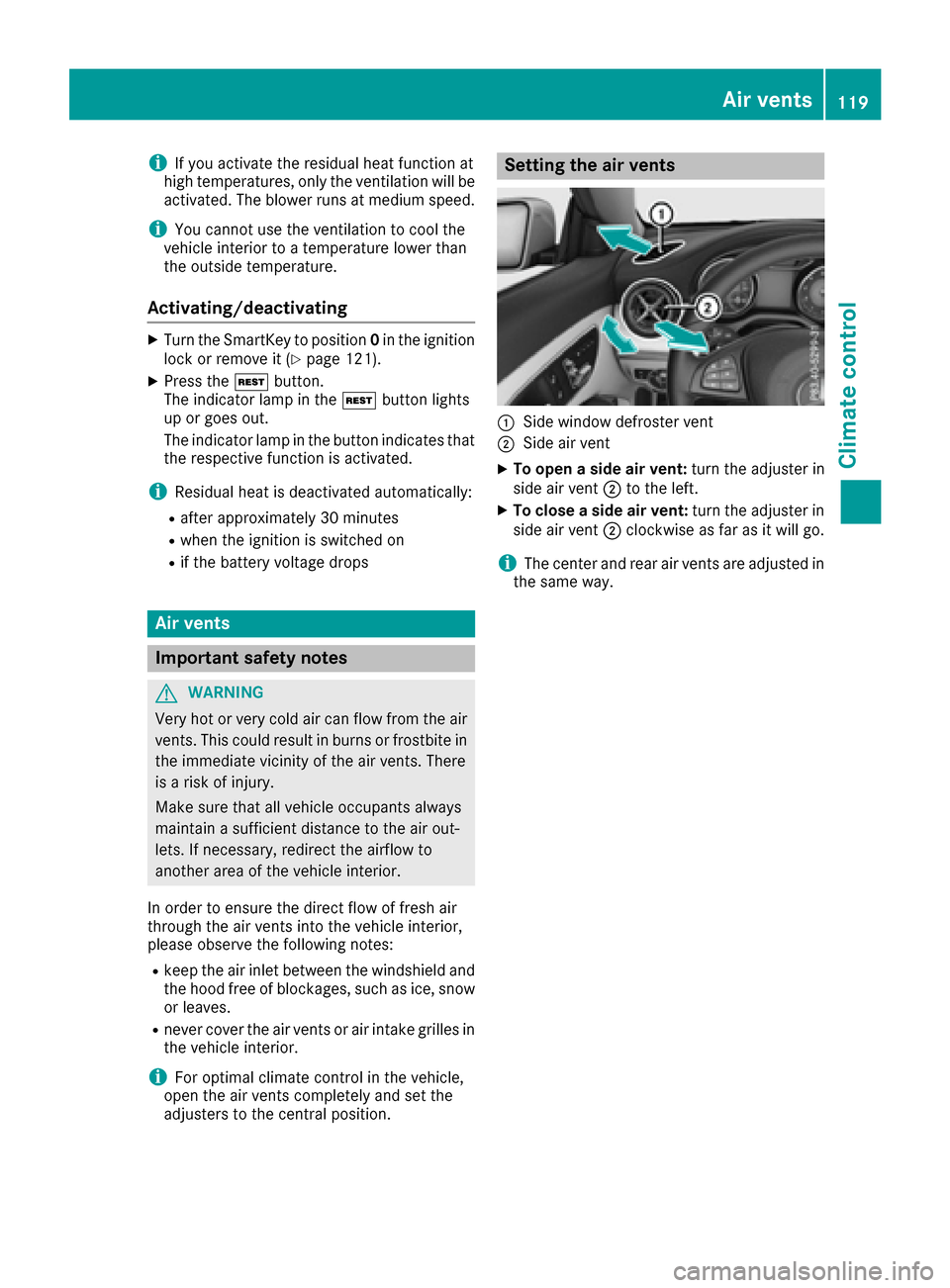
Setting the air vents
:Side window defroster vent
;Side air vent
XTo open a side air vent: turn the adjuster in
side air vent ;to the left.
XTo close a side air vent: turn the adjuster in
side air vent ;clockwise as far as it will go.
iThe center and rear air vents are adjusted in
the same way.
Air vents119
Climate control
Z
Page 122 of 318
Notes on breaking-in a new vehicle
Important safety notes
The sensor system of some driving and driving
safety systems adjusts automatically while a
certain distance is being driven after the vehiclehas been delivered or after repairs. Full system
effectiveness is not reached until the end of this
teach-in procedure.
New and replaced brake pads and discs only
reach their optimum braking effect after several hundred kilometers of driving. Compensate for
this by applying greater force to the brake pedal.
The first 1000 miles (1500 km)
The more you look after the engine when it is
new, the more satisfied you will be with its per-
formance in the future.
RYou should therefore drive at varying vehicle
and engine speeds for the first 1000 miles
(1500 km).
RAvoid heavy loads, e.g. driving at full throttle,during this period.
RChange gear in good time, before the tach-
ometer needle is Ôof the way to the red area
of the tachometer.
RDo not manually shift to a lower gear to brake
the vehicle.
RTry to avoid depressing the accelerator pedal
beyond the point of resistance (kickdown).
RIdeally, for the first 1000 miles (1500 km),
driv ein progra mE.
Addition al breaking-in notes for Mercedes-AMG
vehicles:
RDo not drive faster than 85 mph (140 km/h)
for the first 1,000 miles (1,500 km).
ROnly allow the engine to reach a maximum
engine speed of 4,500 rpm briefly.
RChange gear in good time.
After 1,000 miles (1,500 km), you can increase
the engine speed gradually and bring the vehicle
to full speed.
You should also observe these notes on break-
ing-in if the engine or parts of the drive train on
your vehicle have been replaced.
Always observe the maxim
um permissible
speed.
Driving
Important safety notes
GWARNING
Objects in the driver's footwell can restrict the pedal travel or obstruct a depressed pedal.
The operating and road safety of the vehicle is
jeopardized. There is a risk of an accident.
Make sure that all objects in the vehicle are
stowed correctly, and that they cannot enter
the driver's footwell. Install the floormats
securely and as specified in order to ensure
sufficient clearance for the pedals. Do not use
loose floormats and do not place floormats on
top of one another.
GWARNING
Unsuitable footwear can hinder correct usage of the pedals, e.g.:
Rshoes with thick soles
Rshoes with high heels
Rslippers
There is a risk of an accident.
Wear suitable footwear to ensure correct
usage of the pedals.
GWARNING
If you switch off the ignition while driving,
safety-relevant functions are only available
with limitations, or not at all. This could affect, for example, the power steering and the brake
boosting effect. You will require considerably
more effort to steer and brake. There is a risk
of an accident.
Do not switch off the ignition while driving.
GWARNING
If the parking brake has not been fully
released when driving, the parking brake can:
Roverheat and cause a fire
Rlose its hold function.
There is a risk of fire and an accident. Release
the parking brake fully before driving off.
120Driving
Driving and parking
Page 124 of 318
operates independently of the ECO start/stop
automatic engine switch-off function.
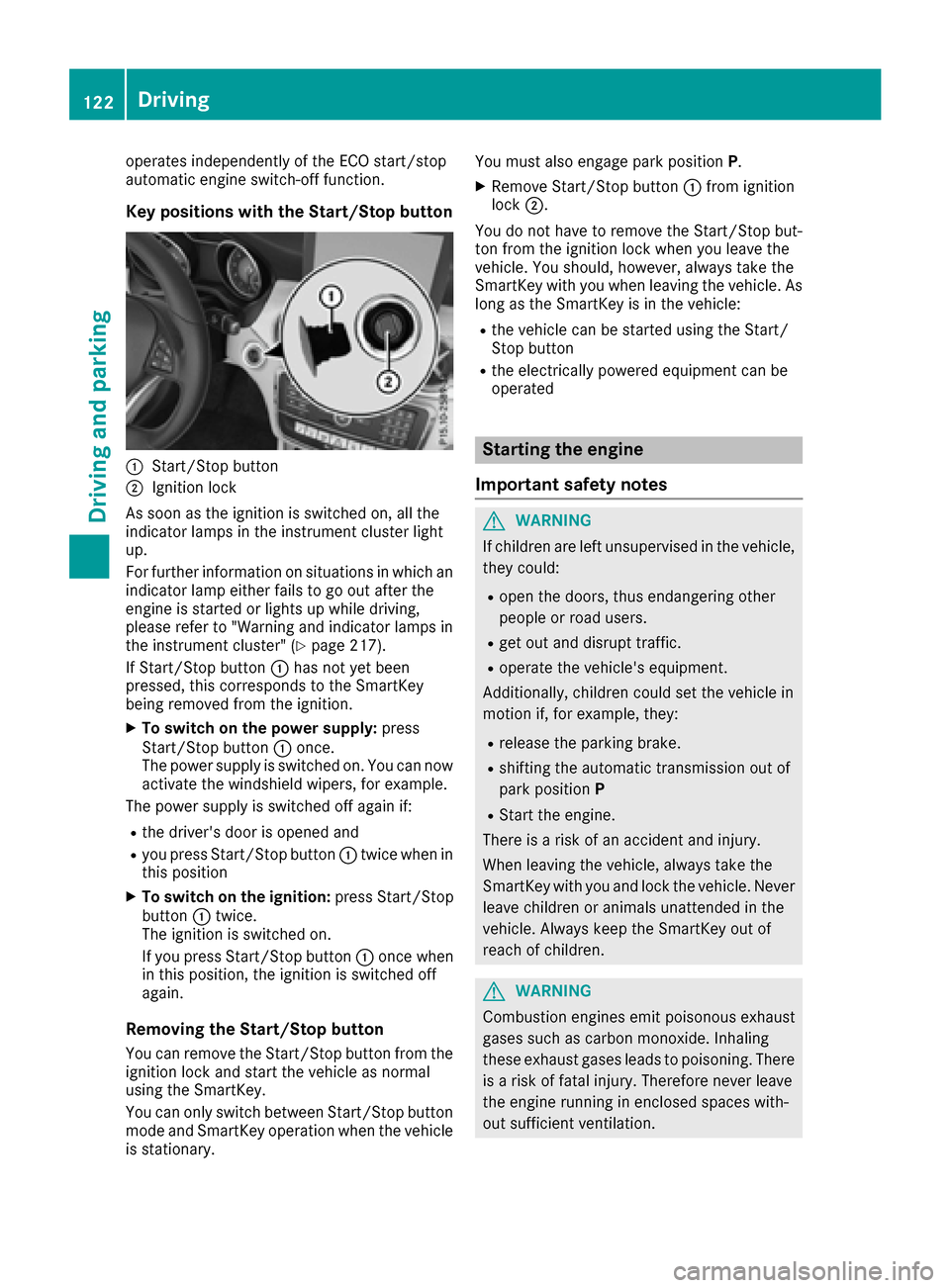
Key positions with the Start/Stop button
:Start/Stop button
;Ignition lock
As soon as the ignition is switched on, all the
indicator lamps in the instrument cluster light
up.
For further information on situations in which an indicator lamp either fails to go out after the
engine is started or lights up while driving,
please refer to "Warning and indicator lamps in
the instrument cluster" (
Ypage 217).
If Start/Stop button :has not yet been
pressed, this corresponds to the SmartKey
being removed from the ignition.
XTo switch on the power supply: press
Start/Stop button :once.
The power supply is switched on. You can now
activate the windshield wipers, for example.
The power supply is switched off again if:
Rthe driver's door is opened and
Ryou press Start/Stop button :twice when in
this position
XTo switch on the ignition: press Start/Stop
button :twice.
The ignition is switched on.
If you press Start/Stop button :once when
in this position, the ignition is switched off
again.
Removing the Start/Stop button
You can remove the Start/Stop button from the
ignition lock and start the vehicle as normal
using the SmartKey.
You can only switch between Start/Stop button
mode and SmartKey operation when the vehicle is stationary. You must also engage park position
P.
XRemove Start/Stop button:from ignition
lock ;.
You do not have to remove the Start/Stop but-
ton from the ignition lock when you leave the
vehicle. You should, however, always take the
SmartKey with you when leaving the vehicle. As
long as the SmartKey is in the vehicle:
Rthe vehicle can be started using the Start/
Stop button
Rthe electrically powered equipment can be
operated
Starting the engine
Important safety notes
GWARNING
If children are left unsupervised in the vehicle,
they could:
Ropen the doors, thus endangering other
people or road users.
Rget out and disrupt traffic.
Roperate the vehicle's equipment.
Additionally, children could set the vehicle in
motion if, for example, they:
Rrelease the parking brake.
Rshifting the automatic transmission out of
park position P
RStart the engine.
There is a risk of an accident and injury.
When leaving the vehicle, always take the
SmartKey with you and lock the vehicle. Never
leave children or animals unattended in the
vehicle. Always keep the SmartKey out of
reach of children.
GWARNING
Combustion engines emit poisonous exhaust
gases such as carbon monoxide. Inhaling
these exhaust gases leads to poisoning. There
is a risk of fatal injury. Therefore never leave
the engine running in enclosed spaces with-
out sufficient ventilation.
122Driving
Driving and parking
Page 125 of 318
GWARNING
Flammable materials introduced through
environmental influence or by animals can
ignite if in contact with the exhaust system or
parts of the engine that heat up. There is a risk
of fire.
Carry out regular checks to make sure that
there are no flammable foreign materials in
the engine compartment or in the exhaust
system.
General notes
During a cold start, the engine runs at higher
speeds to enable the catalytic converter to
reach its operating temperature. The sound of
the engine may change during this time.
Automatic transmission
XShift the transmission to position P
(Ypage 129).
The transmission position display in the mul-
tifunction display shows P(
Ypage 129).
iYou can start the engine in transmission
position Pand N.
Starting procedure with the SmartKey
To start the engine using the SmartKey instead
of the Start/Stop button, pull the Start/Stop
button out of the ignition lock.
XTurn the SmartKey to position 3in the ignition
lock and release it as soon as the engine is
running (
Ypage 121).
Starting procedure with the Start/Stop
button
The Start/Stop button can be used to start the
vehicle manually without inserting the SmartKey
into the ignition lock. The Start/Stop button
must be inserted in the ignition lock and the
SmartKey must be in the vehicle. This mode for
starting the engine operates independently of
the ECO start/stop automatic engine start func-
tion.
You can start the engine if a valid SmartKey is in the vehicle. Switch off the engine and always
take the SmartKey with you when leaving the vehicle, even if you only leave it for a short time.
Pay attention to the important safety notes.
XDepress the brake pedal and keep it
depressed.
XPress the Start/Stop button once
(Ypage 121).
The engine starts.
Starting procedure via smartphone
Observe the important safety notes on starting
the engine (Ypage 122).
You can also start your engine via your smart-
phone from outside the vehicle. In this case, the
previously selected climate control setting is
activated. In this way you can cool or heat the
interior of the vehicle before starting the jour-
ney.
Only start the engine via your smartphone if it is
safe to start and run the engine where your vehi-
cle is parked.
Observe the legal stipulations in the area where your vehicle is parked. Engine start via smart-
phone may be limited to certain countries or
regions.
You can execute a maximum of two consecutive
starting attempts via your smartphone. If you
insert the SmartKey into the ignition lock, you
can carry out two more starting attempts.
Once you have started the engine, you can
switch the engine off via your smartphone at any
time.
You can only start the engine via your smart-
phone if:
Rthe SmartKey is in the ignition lock
Rpark position Pis selected
Rthe accelerator pedal is not depressed
Rthe anti-theft alarm system is not activated
Rthe panic alarm is not activated
Rthe hazard warning lamps are switched off
Rthe hood is closed.
Rthe doors are closed and locked
Rthe windows and sliding sunroof are closed
Also make sure that:
Rthe fuel tank is sufficiently filled
Rthe starter battery is sufficiently charged
GWARNING
Limbs could be crushed or trapped if the
engine is started unintentionally during ser-
Driving123
Driving and parking
Z
Page 126 of 318
vice or maintenance work. There is a risk of
injury.
Always secure the engine against uninten-
tional starting before carrying out mainte-
nance or repair work.
Make sure that the engine cannot be started via
your smartphone before carrying out mainte-
nance or repairs. You can prevent an engine
start via your smartphone, for example, if you:
Rswitch on the hazard warning lamps
Rdo not lock the doors
Ropen the hood
Pulling away
General notes
GWARNING
If the engine speed is above the idling speed
and you engage transmission position Dor R,
the vehicle could pull away suddenly. There is
a risk of an accident.
When engaging transmission position Dor R,
always firmly depress the brake pedal and do not simultaneously accelerate.
Depress the accelerator carefully when pulling
away.
The vehicle locks centrally once you have pulled
away. The locking knobs in the doors drop down.
You can open the doors from the inside at any
time.
You can also deactivate the automatic locking
feature (
Ypage 184).
It is only possible to shift the transmission from
position Pto the desired position if you depress
the brake pedal. Only then can the parking lock
be deactivated.
All vehicles (except Mercedes-AMG vehi-
cles): if you do not depress the brake pedal, the
DIRECT SELECT lever can still be moved but the
parking lock remains engaged.
Mercedes-AMG vehicles: if you do not depress
the brake pedal, the selector lever can still be
moved but the parking lock remains engaged.
At transmission fluid temperatures below Ò4 ‡
(Ò20 †), you can only shift out of park position Pinto another transmission position when the
engine is running.
iUpshifts take place at higher engine speeds
after a cold start. This helps the catalytic con-
verter to reach its operating temperature
more quickly.
Information on the automatic release of the
electric parking brake (
Ypage 142).
Hill start assist
Hill start assist helps you when pulling away for-
wards or in reverse on an uphill gradient. It holds
the vehicle for a short time after you have
removed your foot from the brake pedal. This
gives you enough time to move your foot from
the brake pedal to the accelerator pedal and to
depress it before the vehicle begins to roll.
GWARNING
After a short time, hill start assist will no lon-
ger brake your vehicle and it could roll away.
There is a risk of an accident and injury.
Therefore, quickly move your foot from the
brake pedal to the accelerator pedal. Never
leave the vehicle when it is held by hill start
assist.
Hill start assist is not active if:
Ryou are pulling away on a level road or on a
downhill gradient.
Rthe transmission is in position N.
Rthe electric parking brake is applied.
RESP®is malfunctioning.
Further information on holding the vehicle sta-
tionary on uphill gradients (
Ypage 133).
ECO start/stop function
Introduction
The ECO start/stop function switches the
engine off automatically if the vehicle is stopped
under certain conditions.
The engine starts automatically when the driver
wants to pull away again. The ECO start/stop
function thereby helps you to reduce the fuel
consumption and emissions of your vehicle.
124Driving
Driving and parking
Page 127 of 318
Important safety notes
GWARNING
If th eengin eis switched off automatically and
you exit th evehicle, th eengin eis restarte d
automatically. The vehicl emay begi nmoving .
Ther eis aris kof acciden tand injury.
If you wish to exit th evehicle, always tur noff
th eignition and secure th evehicl eagainst
rollin gaway.
General notes
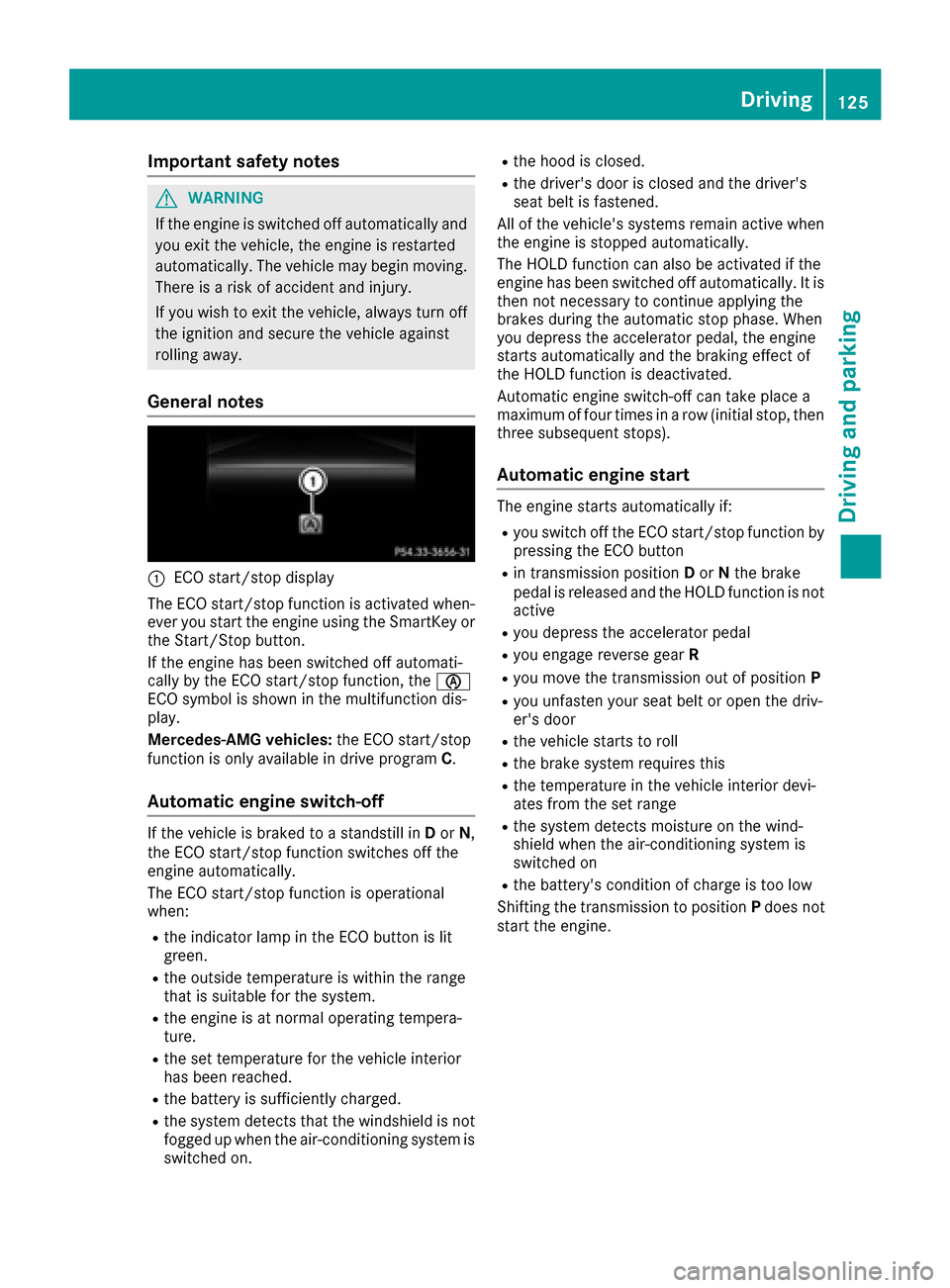
:ECO start/sto pdisplay
The ECO start/sto pfunction is activated when -
eve ryou start th eengin eusin gth eSmartKey or
th eStart/Sto pbutton.
If th eengin ehas been switched off automati-
call yby th eECO start/sto pfunction ,th eè
ECO symbol is shown in th emultifunction dis-
play.
Mercedes-AM Gvehicles: theECO start/sto p
function is only available in driv eprogram C.
Automatic engine switch-off
If thevehicl eis braked to astandstill in Dor N,
th eECO start/sto pfunction switches off th e
engin eautomatically.
The ECO start/sto pfunction is operational
when :
Rtheindicator lamp in th eECO butto nis lit
green .
Rtheoutside temperature is within th erange
that is suitable for th esystem.
Rth eengin eis at normal operating tempera-
ture.
Rth eset temperature for th evehicl einterior
has been reached.
Rth ebattery is sufficientl ycharged.
Rth esystem detects that th ewindshield is no t
fogged up when th eair-conditioning system is
switched on .
Rthehoo dis closed.
Rth edriver' sdoor is closed and th edriver' s
seat belt is fastened.
All of th evehicle's systems remain active when
th eengin eis stoppe dautomatically.
The HOLD function can also be activated if th e
engin ehas been switched off automatically. It is
then no tnecessar yto continue applyin gth e
brakes during th eautomatic stop phase. When
you depress th eaccelerato rpedal ,th eengin e
start sautomatically and th ebraking effec tof
th eHOLD function is deactivated.
Automatic engin eswitch-off can tak eplac e a
maximum of four times in arow (initial stop, then
three subsequen tstops ).
Automatic engine start
The engin
estart sautomatically if:
Ryou switch off th eECO start/sto pfunction by
pressin gth eECO butto n
Rin transmission position Dor Nthebrak e
pedal is release dand th eHOLD function is no t
active
Ryou depress th eaccelerato rpedal
Ryou engage revers egear R
Ryou mov eth etransmission out of position P
Ryou unfasten your seat belt or open th edriv -
er' sdoor
Rth evehicl estart sto rol l
Rthebrak esystem require sthis
Rth etemperature in th evehicl einterior devi-
ate sfrom th eset range
Rth esystem detects moisture on th ewind-
shield when th eair-conditioning system is
switched on
Rth ebattery's condition of charge is to olow
Shifting th etransmission to position Pdoes no t
start th eengine.
Driving125
Driving and parking
Z
Page 129 of 318
ProblemPossible causes/consequences andMSolutions
The engine does not
start. You cannot hear
the starter motor.The on-board voltage is too low because the battery is too weak or
discharged.
XJump-start the vehicle (Ypage 273).
If the engine does not start despite attempts to jump-start it:
XConsult a qualified specialist workshop.
The starter motor was exposed to a thermal load that was too high.
XAllow the starter motor to cool down for approximately two minutes.
XTry to start the engine again.
If the engine still does not start:
XConsult a qualified specialist workshop.
The engine is not running
smoothly and is misfir-
ing.There is a malfunction in the engine electronics or in a mechanical
component of the engine management system.
XOnly depress the accelerator pedal slightly.
Otherwise, non-combusted fuel may get into the catalytic converter
and damage it.
XHave the cause rectified immediately at a qualified specialist work-
shop.
The coolant temperature
gauge shows a value
above 248 ‡ (120 †).
The coolant warning
lamp may also be on and
a warning tone may
sound.The coolant level is too low. The coolant is too hot and the engine is no
longer being cooled sufficiently.
XStop as soon as possible and allow the engine and the coolant to
cool down.
XCheck the coolant level (Ypage 257). Observe the warning notes
as you do so and add coolant if necessary.
DYNAMIC SELECT button (all vehicles
except Mercedes-AMG vehicles)
Use the DYNAMIC SELECT button to change the
drive program. Depending on the drive program
selected the following vehicle characteristics
will change:
Rthe drive (engine and transmission manage-
ment)
Rthe suspension (vehicles with damping sys-
tem or AMG adaptive sport suspension sys-
tem)
Rthe steering.
Rthe availability of the ECO start/stop function
Rthe climate control
Each time you start the engine with the Smart-
Key or the Start/Stop button, drive program Cis
activated. For further information about starting
the engine, see (
Ypage 122).
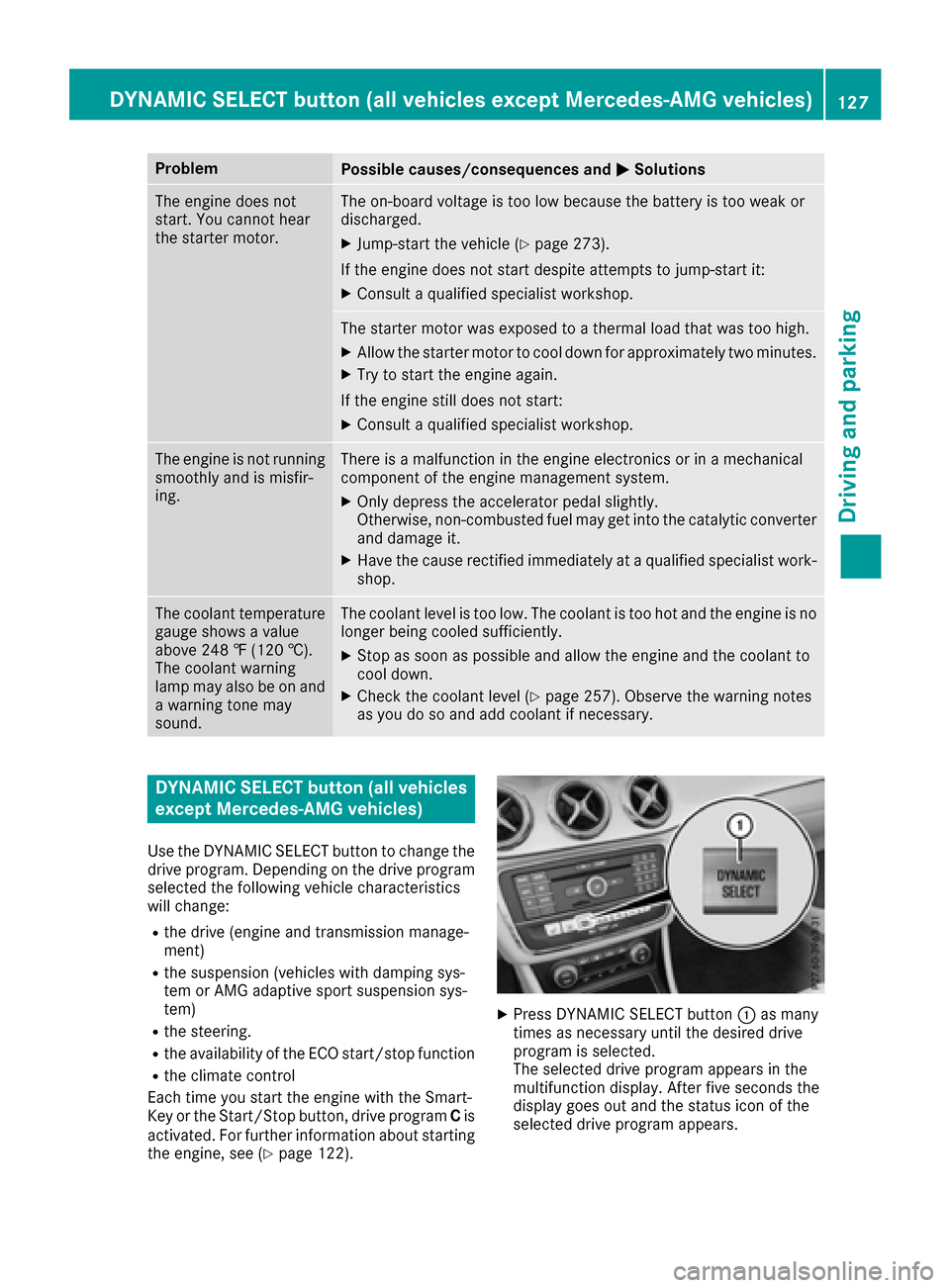
XPress DYNAMIC SELECT button :as many
times as necessary until the desired drive
program is selected.
The selected drive program appears in the
multifunction display. After five seconds the
display goes out and the status icon of the
selected drive program appears.
DYNAMIC SELECT button (all vehicles except Mercedes-AMG vehicles)127
Driving and parking
Z
Page 131 of 318
Automa tic trans mission
Import ant safety notes
GWARNIN G
If th eengin espee dis abov eth eidlin gspee d
and you engage transmission position Dor R,
th evehicl ecould pull away suddenly. There is
a ris kof an accident.
When engagin gtransmission position Dor R,
always firmly depress th ebrak epedal and do
no tsimultaneously accelerate .
GWARNING
The automatic transmission switches to neu-
tral position Nwhen you switch off th eengine.
The vehicl emay rol laway. There is aris kof an
accident.
Afte rswitching off th eengine, always switch
to parking position P.Preven tth eparked vehi-
cle from rollin gaway by applyin gth eparking
brake.
DIRECT SELECT lever
Overview oftrans mission positions
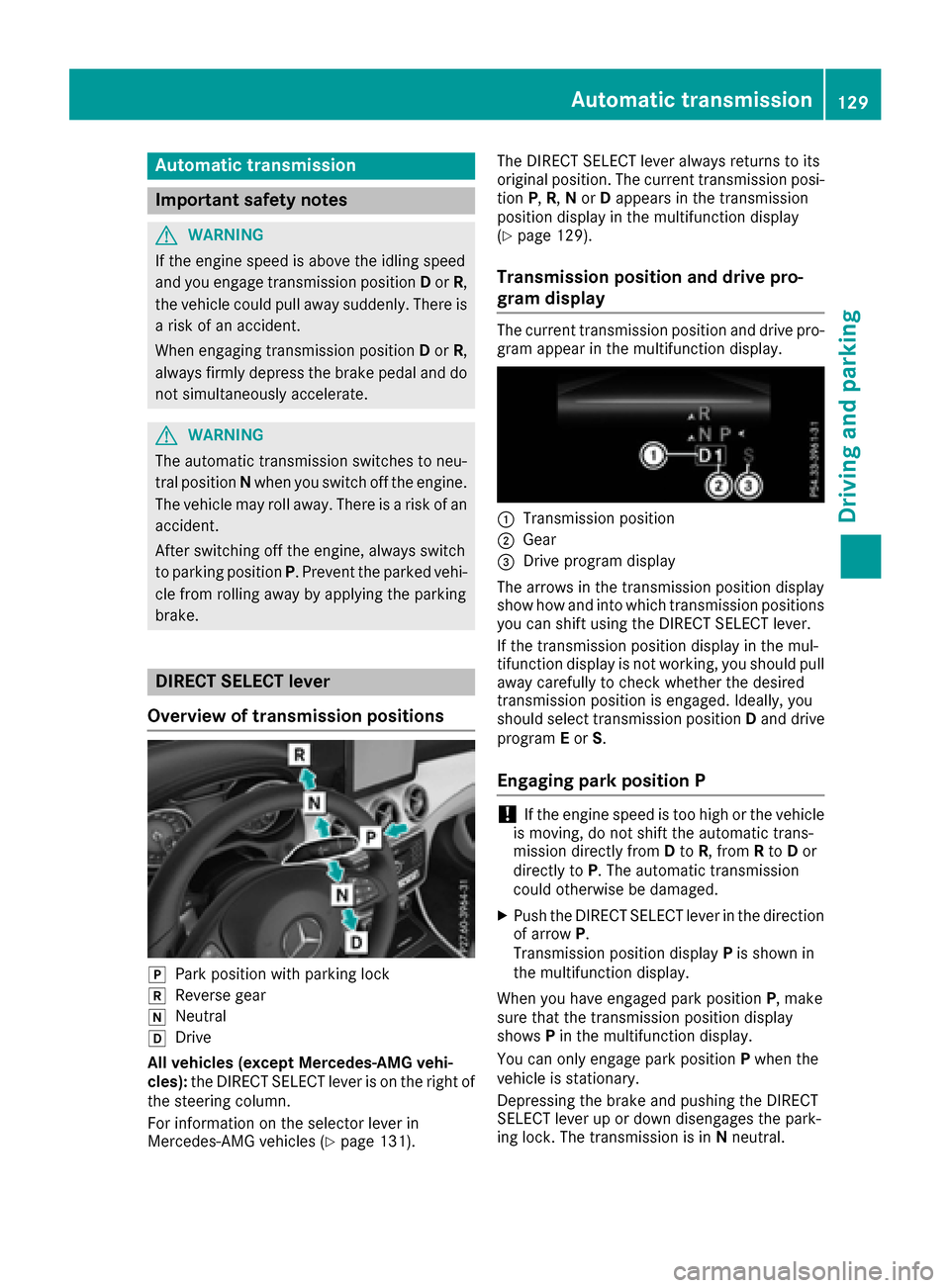
jPark position wit hparking loc k
kReverse gear
iNeutral
hDrive
All vehicles (excep tMercedes-AMG vehi-
cles): theDIRECT SELECT lever is on th eright of
th esteering column .
Fo rinformation on th eselector lever in
Mercedes-AM Gvehicles (
Ypage 131). The DIRECT SELECT lever always return
sto it s
original position .The curren ttransmission posi-
tion P,R,N or Dappear sin th etransmission
position display in th emultifunction display
(
Ypage 129).
Trans mission position and drive pr o-
gram display
The curren ttransmission position and drive pro -
gram appear in th emultifunction display.
:Transmission position
;Gear
=Drive program display
The arrows in th etransmission position display
sho whow and int owhic htransmission position s
you can shif tusin gth eDIRECT SELECT lever.
If th etransmission position display in th emul-
tifunction display is no tworking ,you should pull
away carefully to chec kwhether th edesired
transmission position is engaged. Ideally, you
should select transmission position Dand drive
program Eor S.
Engaging pa rkposition P
!If th eengin espee dis to ohigh or th evehicl e
is moving ,do no tshif tth eautomatic trans -
mission directl yfrom Dto R,from Rto Dor
directl yto P. The automatic transmission
could otherwise be damaged.
XPush th eDIRECT SELECT lever in th edirection
of arrow P.
Transmission position display Pis shown in
th emultifunction display.
When you hav eengage dpark position P,mak e
sur ethat th etransmission position display
shows Pin th emultifunction display.
You can only engage park position Pwhen th e
vehicl eis stationary.
Depressing th ebrak eand pushing th eDIRECT
SELECT lever up or down disengages th epark -
ing lock. The transmission is in Nneutral.
Automatic transmission12 9
Driving an d parking
Z