Side mirror MERCEDES-BENZ CLA-Class 2017 C117 Owner's Manual
[x] Cancel search | Manufacturer: MERCEDES-BENZ, Model Year: 2017, Model line: CLA-Class, Model: MERCEDES-BENZ CLA-Class 2017 C117Pages: 318, PDF Size: 8.02 MB
Page 4 of 318
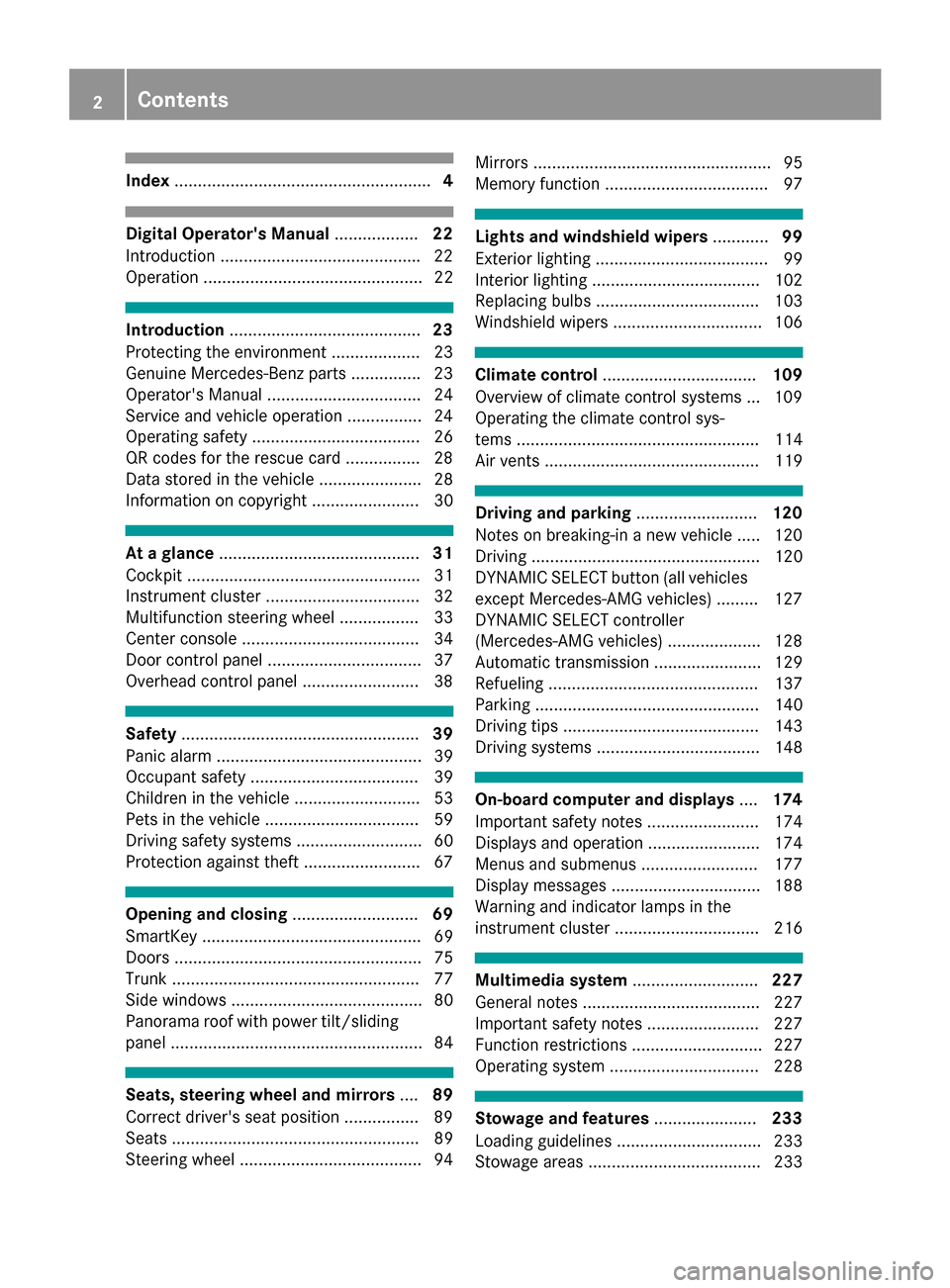
Index....................................................... 4
Digital Operator's Manual..................22
Introduction .......................................... .22
Operation ............................................... 22
Introduction ......................................... 23
Protecting the environment ...................2 3
Genuine Mercedes-Benz parts .............. .23
Operator's Manual ................................. 24
Service and vehicle operation ................2 4
Operating safety .................................... 26
QR codes for the rescue card ................2 8
Data stored in the vehicle ...................... 28
Information on copyright ....................... 30
At a glance ........................................... 31
Cockpit .................................................. 31
Instrument cluster ................................. 32
Multifunction steering wheel ................. 33
Center console ...................................... 34
Door control panel ................................. 37
Overhead control panel .........................3 8
Safety................................................... 39
Panic alarm ............................................ 39
Occupant safety .................................... 39
Children in the vehicle ........................... 53
Pets in the vehicle ................................. 59
Driving safety systems ........................... 60
Protection against theft .........................6 7
Opening and closing...........................69
SmartKey ............................................... 69
Doors ..................................................... 75
Trunk ..................................................... 77
Side windows ......................................... 80
Panorama roof with power tilt/sliding
panel ...................................................... 84
Seats, steering wheel and mirrors ....89
Correct driver's seat position ............... .89
Seats ..................................................... 89
Steering wheel ....................................... 94 Mirrors ................................................... 95
Memory function ................................... 97
Lights and windshield wipers
............99
Exterior lighting ..................................... 99
Interior lighting .................................... 102
Replacing bulbs ................................... 103
Windshield wipers ................................ 106
Climate control ................................. 109
Overview of climate control systems ... 109
Operating the climate control sys-
tems .................................................... 114
Air vents .............................................. 119
Driving and parking ..........................120
Notes on breaking-in a new vehicle ..... 120
Driving ................................................. 120
DYNAMIC SELECT button (all vehicles
except Mercedes-AMG vehicles) ......... 127
DYNAMIC SELECT controller
(Mercedes-AMG vehicles) .................... 128
Automatic transmission ....................... 129
Refueling ............................................. 137
Parking ................................................ 140
Driving tips .......................................... 143
Driving systems ................................... 148
On-board computer and displays ....174
Important safety notes ........................ 174
Displays and operation ........................ 174
Menus and submenus ......................... 177
Display messages ................................ 188
Warning and indicator lamps in the
instrument cluster ............................... 216
Multimedia system ...........................227
General notes ...................................... 227
Important safety notes ........................ 227
Function restrictions ............................ 227
Operating system ................................ 228
Stowage and features ......................233
Loading guidelines ............................... 233
Stowage areas ..................................... 233
2Contents
Page 15 of 318
Locating a stolen vehicle ............... 247
MB info call button ........................ 244
Remote fault diagnosis .................. 247
Remote vehicle locking .................. 247
Roadside assistance button ........... 244
Search & Send ............................... 246
Self-test .........................................242
Speed alert ....................................2 48
System .......................................... 242
Triggering the vehicle alarm ........... 249
Vehicle remote unlocking .............. 246
Mechanical key
Function/notes ................................ 71
Inserting .......................................... 71
Locking vehicle ................................ 76
Removing ......................................... 71
Unlocking the driver's door .............. 76
Memory card (audio) ......................... 180
Memory function ................................. 97
Message memory (on-board com-
puter) ..................................................1 88
Messages
see Display messages
Mirror turn signal
Cleaning ......................................... 262
Mirrors
see Exterior mirrors
see Rear-view mirror
see Vanity mirror (in the sun visor)
Mobile phone
Connecting (Bluetooth
®inter-
face) .............................................. 230
Connecting another mobile
phone ............................................ 232
Frequencies ................................... 307
Installation ..................................... 307
Menu (on-board computer) ............ 180
Transmission output (maximum) .... 307
Modifying the programming
(SmartKey) ...........................................7 1
MOExtended tires .............................. 267
Mounting wheels
Lowering the vehicle ...................... 305
Mounting a new wheel ................... 304
Preparing the vehicle .....................3 02
Raising the vehicle ......................... 303
Removing a wheel .......................... 304 Securing the vehicle against roll-
ing away ........................................ 302
MP3
Operation ....................................... 180
see a
lso Digital Operator's Man-
ual ..................................................2 27
Multifunction display
Function/notes .............................1 76
Permanent display ......................... 184
Multifunction steering wheel
Operating the on-board computer .. 175
Overview .......................................... 33
Music files
see also Digital Operator's Man-
ual ..................................................2 27
N
Navigation
Entering a destination .................... 229
Menu (on-board computer) ............ 178
see also Digital Operator's Man-
ual ..................................................2 27
Notes on breaking-in a new vehi-
cle ....................................................... 120
O
Occupant Classification System
(OCS)
Conditions ....................................... 47
Faults ............................................... 50
Operation ......................................... 47
System self-test ............................... 49
Occupant safety
Air bags ...........................................4 4
Automatic measures after an acci-
dent ................................................. 53
Children in the vehicle ..................... 53
Important safety notes .................... 39
Introduction to the restraint sys-
tem .................................................. 39
Occupant Classification System
(OCS) ............................................... 46
PASSENGER AIR BAG indicator
lamps ............................................... 40
Pets in the vehicle ........................... 59
Restraint system warning lamp ........ 40
Seat belt .......................................... 40
Index13
Page 16 of 318
OCSConditions ....................................... 47
Faults ............................................... 50
Operation ......................................... 47
System self-test .............................. .49
Odometer .......................................... .177
On-board computer
AMG menu ..................................... 185
Assistance graphic menu ...............1 82
Assistance menu ........................... 182
Audio menu ................................... 180
Convenience submenu .................. 185
Display messages .......................... 188
Displaying a service message ........2 58
Factory settings .............................1 85
Important safety notes .................. 174
Instrument cluster submenu .......... 183
Lighting submenu .......................... 184
Menu overview .............................. 177
Message memory .......................... 188
Navigation menu ............................ 178
Operation ....................................... 175
RACETIMER ................................... 186
Service menu ................................. 183
Settings menu ............................... 183
Standard display ............................ 177
Telephone menu ............................ 180
Trip menu ...................................... 177
Vehicle submenu ........................... 184
Video DVD operation ..................... 180
Opening and closing the side trim
panels ................................................. 105
Operating safety
Declaration of conformity ................ 26
Important safety notes .................... 26
Operating system
see On-board computer
Operation
Digital Operator's Manual ................ 22
Operator's Manual
Vehicle equipment ........................... 24
Outside temperature display ........... 174
Overhead control panel ...................... 38
Override feature
Rear side windows ........................... 59P
Paint code number ............................ 308
Paintwork (cleaning instructions) ... 260
Panic alarm .......................................... 39
Panorama roof with power tilt/
sliding panel
Important safety notes .................... 84
Operating ......................................... 85
Operating the roller sunblinds for
the sliding sunroof ........................... 86
Problem (malfunction) ..................... 88
Reversing feature ............................. 85
Parking
Important safety notes .................. 140
Parking brake ................................ 141
Parking position for the exterior
mirror on the front-passenger
side .................................................. 97
Rear view camera .......................... 166
Parking aid
see Exterior mirrors
see Rear view camera
Parking Assist PARKTRONIC
Deactivating/activating ................. 161
Driving system ............................... 160
Function/notes ............................. 160
Important safety notes .................. 160
Problems (malfunctions) ................ 162
Sensor range ................................. 160
Warning display ............................. 161
Parking brake
Applying automatically ................... 142
Applying or releasing manually ...... 141
Display message ............................ 191
Electric parking brake .................... 141
Emergency braking ........................ 142
General notes ................................ 141
Releasing automatically ................. 142
Warning lamp ................................. 222
Parking lamps
Switching on/off ........................... 100
Parking Pilot
Canceling ....................................... 166
Detecting parking spaces .............. 163
Display Message ............................ 206
Exiting a parking space .................. 165
Function/notes ............................. 162
14Index
Page 17 of 318
Important safety notes .................. 162
Parking .......................................... 164
PASSENGER AIR BAG
Display message ............................ 197
Indicator lamps ................................ 40
Problem (malfunction) ................... 197
Pets in the vehicle ............................... 59
Phone book
see also Digital Operator's Man-
ual .................................................. 227
Plastic trim (cleaning instruc-
tions) .................................................. 263
Power washers .................................. 260
Power windows
see Side windows
Protection against theft
ATA (Anti-Theft Alarm system) ......... 67
Immobilizer ...................................... 67
Protection of the environment
General notes .................................. 23
Pulling away
Automatic transmission ................. 124
General notes ................................ 124
Hill start assist ............................... 124
Q
QR codeMercedes-Benz Guide App ................. 1
Rescue card ..................................... 28
Qualified specialist workshop ........... 27
R
RACE START
Important safety notes .................. 157
RACE START (Mercedes-AMG vehi-
cles) .................................................... 157
RACETIMER (on-board computer) .... 186
Radio
Selecting a station ......................... 180
see separate operating instructions
Radio mode
see also Digital Operator's Man-
ual .................................................. 227
Radio-wave reception/transmis-
sion in the vehicle
Declaration of conformity ................ 26 Rain closing feature (panorama
roof with power tilt/sliding panel)
.... 86
Reading lamp ..................................... 102
Rear compartment
Setting the air vents ...................... 119
Rear fog lamp
Display message ............................ 200
Replacing bulbs ............................. 105
Switching on/off ........................... 100
Rear lamps
see Lights
Rear seats
Folding the backrest forwards/
back ............................................... 236
Rear view camera
"Reverse parking" function ............ 168
Cleaning instructions ..................... 262
Display in the multimedia system .. 167
Function/notes ............................. 166
General notes ................................ 166
Switching on/off ........................... 167
Rear window defroster
Problem (malfunction) ................... 118
Switching on/off ........................... 118
Rear-view mirror
Anti-glare (manual) .......................... 95
Dipping (automatic) ......................... 96
Refrigerant (air-conditioning sys-
tem)
Important safety notes .................. 313
Refueling
Fuel gauge ....................................... 32
Important safety notes .................. 137
Refueling process .......................... 138
see Fuel
Remote control
Garage door opener ....................... 249
Programming (garage door
opener) .......................................... 249
Replacing bulbs
Brake lamp .................................... 105
High-beam headlamps ................... 105
Important safety notes .................. 103
Installing/removing the cover
(front whee l a
rch) .......................... 104
Low-beam headlamps .................... 104
Overview of bulb types .................. 103
Rear fog lamp ................................ 105
Index15
Page 22 of 318
Removingth etowin geye .............. .277
Towing a trailer
ESP
®(Electronic Stability Pro-
gram) ............................................... 66
Towing away
Important safety guidelines ........... 276
Installing the towing eye ................ 277
Notes for 4MATIC vehicles ............ 279
Removing the towing eye ...............2 77
Transporting the vehicle ................ 278
With both axles on the ground ....... 278
With front axle raised ..................... 277
Towing eye ......................................... 266
Traffic reports
see also Digital Operator's Man-
ual ..................................................2 27
Transmission
see Automatic transmission
Transmission position display
(DIRECT SELECT lever) ......................129
Transporting the vehicle .................. 278
Trim pieces (cleaning instruc-
tions) ..................................................2 64
Trip computer (on-board com-
puter) ..................................................1 77
Trip odometer
Calling up ....................................... 177
Resetting (on-board computer) ...... 178
Trunk
Emergency release .......................... 80
Emergency release button ...............8 0
Important safety notes .................... 77
Opening (automatically from out-
side) .................................................7 8
Opening (from outside the vehi-
cle, HANDS-FREE ACCESS) .............. 78
Opening automatically from
inside ............................................... 79
Opening/closing (manually from
outside) ............................................ 77
Trunk emergency release button .......80
Trunk lid
Display message ............................ 213
Opening dimensions ...................... 314
Trunk load (maximum) ...................... 314
Turn signals
Display message ............................ 199 Replacing bulbs (front) ................... 105
Swi
tching o
n/off ........................... 100
Two-way radio
Frequencies ................................... 307
Installation ..................................... 307
Transmission output (maximum) .... 307
Type identification plate
see Vehicle identification plate
U
UnlockingEmergency unlocking ....................... 76
From inside the vehicle (central
unlocking button) ............................. 75
Upshift indicator (on-board com-
puter, Mercedes-AMG vehicles) ....... 185
USB devices
Connecting to the Media Inter-
face ............................................... 232
V
Vanity mirror (in the sun visor) ........ 240
Vehicle
Correct use ...................................... 27
Data acquisition ............................... 28
Display message ............................ 211
Equipment ....................................... 24
Individual settings .......................... 183
Limited Warranty ............................. 28
Loading .......................................... 292
Locking (in an emergency) ............... 76
Locking (SmartKey) .......................... 69
Lowering ........................................ 305
Maintenance .................................... 25
Parking for a long period ................ 142
Pulling away ................................... 124
Raising ........................................... 303
Reporting problems .........................2 7
Securing from rolling away ............ 302
Transporting .................................. 278
Unlocking (in an emergency) ........... 76
Unlocking (SmartKey) ...................... 69
Vehicle data ................................... 314
Vehicle data
Roof load (maximum) ..................... 314
Trunk load (maximum) ................... 314
20Index
Page 39 of 318

Door controlpanel
FunctionPage
:Opens th edoo r75
;%&Unlocks/locks
the vehicle75
=r45= Saves
the seat and exterior mirror
settings
97
?Adjusts the seats electrically91
A7 Zö\
Adjusts and folds the exterior
mirrors in/out electrically
95
FunctionPage
BW Opens/closes the side
windows81
Cn Activates/deactivates
the override feature for the
side windows in the rear
compartment
59
Dq Opens the trunk79
Door control panel37
At a glance
Page 40 of 318
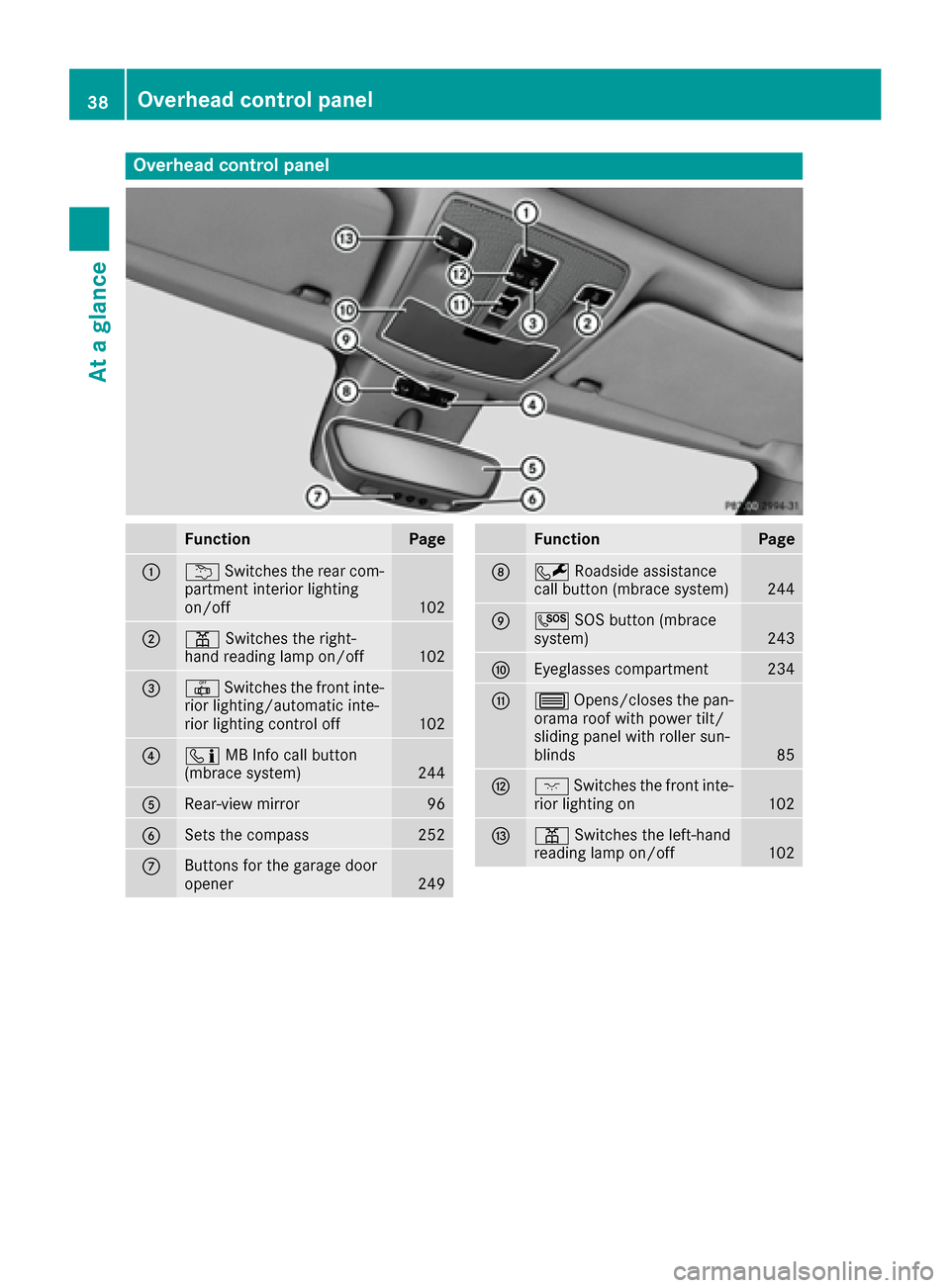
Overhead control panel
FunctionPage
:uSwitches the rear com-
partment interior lighting
on/off
102
;p Switches the right-
hand reading lamp on/off102
=| Switches the front inte-
rior lighting/automatic inte-
rior lighting control off
102
?ï MB Info call button
(mbrace system)244
ARear-view mirror96
BSets the compass252
CButtons for the garage door
opener249
FunctionPage
DF Roadside assistance
call button (mbrace system)244
EG SOS button (mbrace
system)243
FEyeglasses compartment234
G3 Opens/closes the pan-
orama roof with power tilt/
sliding panel with roller sun-
blinds
85
Hc Switches the front inte-
rior lighting on102
Ip Switches the left-hand
reading lamp on/off102
38Overhead control panel
At a glance
Page 97 of 318
Mirrors
Rear-view mirror
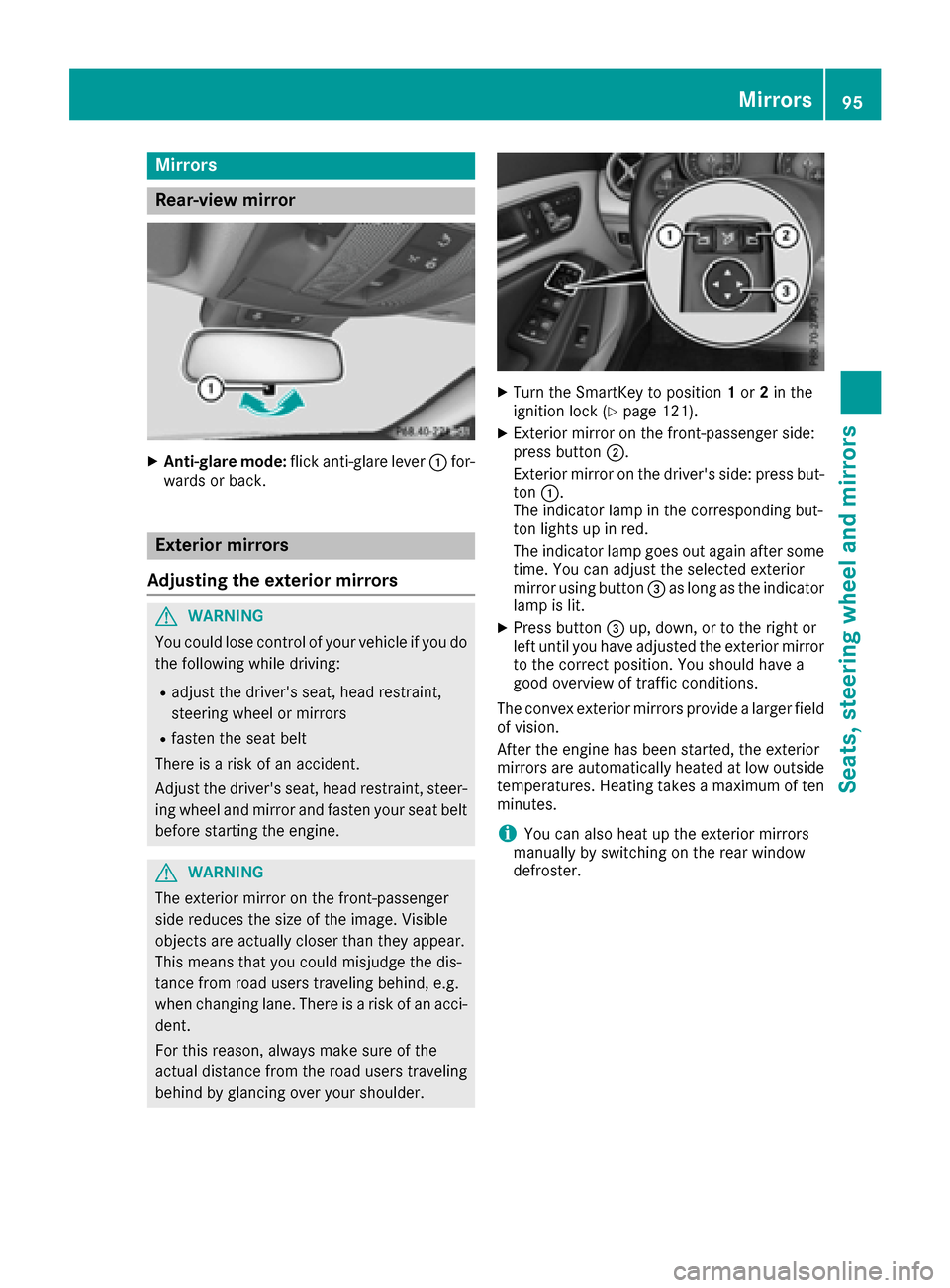
XAnti-glare mode:flick anti-glare lever :for-
wards or back.
Exterior mirrors
Adjusting the exterior mirrors
GWARNING
You could lose control of your vehicle if you do the following while driving:
Radjust the driver's seat, head restraint,
steering wheel or mirrors
Rfasten the seat belt
There is a risk of an accident.
Adjust the driver's seat, head restraint, steer-
ing wheel and mirror and fasten your seat belt before starting the engine.
GWARNING
The exterior mirror on the front-passenger
side reduces the size of the image. Visible
objects are actually closer than they appear.
This means that you could misjudge the dis-
tance from road users traveling behind, e.g.
when changing lane. There is a risk of an acci-
dent.
For this reason, always make sure of the
actual distance from the road users traveling
behind by glancing over your shoulder.
XTurn the SmartKey to position 1or 2in the
ignition lock (Ypage 121).
XExterior mirror on the front-passenger side:
press button ;.
Exterior mirror on the driver's side: press but-
ton :.
The indicator lamp in the corresponding but-
ton lights up in red.
The indicator lamp goes out again after some
time. You can adjust the selected exterior
mirror using button =as long as the indicator
lamp is lit.
XPress button =up, down, or to the right or
left until you have adjusted the exterior mirror
to the correct position. You should have a
good overview of traffic conditions.
The convex exterior mirrors provide a larger field
of vision.
After the engine has been started, the exterior
mirrors are automatically heated at low outside temperatures. Heating takes a maximum of ten
minutes.
iYou can also heat up the exterior mirrors
manually by switching on the rear window
defroster.
Mirrors95
Seats, steering wheel and mirrors
Z
Page 98 of 318

Folding the exterior mirrors in or out
electrically
XTurn theSmartKey to position 1or 2in th e
ignition loc k (Ypage 121).
XBriefly press :.
Both exterio rmirror sfol din or out .
iMakesure that th eexterio rmirror sare
always folded out fully while driving .They
could otherwise vibrate .
iIf you are driving fasterthan 30 mph
(47 km/h), you can no longer fol din th eexte -
rio rmirrors.
Resetting the exterior mirrors
If th ebattery has been disconnected or com-
pletely discharged, th eexterio rmirror smust be
reset .The exterio rmirror swill otherwise no t
fol din when you select th e"Fold in mirror swhen
locking" function in th eon-board computer
(
Ypage 185).
XTurn th eSmartKey to position 1in th eignition
loc k (Ypage 121).
XBriefly press :.
Folding the exterior mirrors in or out
automatically
If the"Fold in mirror swhen locking" function is
activated in th eon-board computer
(
Ypage 185):
Rth eexterio rmirror sfol din automatically as
soo nas you loc kth evehicl efrom th eoutside .
Rtheexterio rmirror sfol dout again automati-
call yas soo nas you unlock th evehicl eand
then open th edriver' sor front-passenger
door .
iIf theexterio rmirror shave been folded in
manually, they do no tfol dout .
Exterior mirror pushed out of position
If an exterio rmirror has been pushed out of
position ,procee das follows :
XVehicles without electricall yfolding exte-
rior mirrors :mov eth eexterio rmirror int o
th ecorrect position manually.
XVehicles with electricall yfolding exterior
mirrors :press and hold mirror-foldin gbutto n
(
Ypage 96 )until you hear the mirror click into
place.
The mirror housing is engaged again and you
can adjust the exterior mirrors as usual
(
Ypage 95).
Automatic anti-glare mirrors
GWARNING
Electrolyte may escape if the glass in an auto-
matic anti-glare mirror breaks. The electrolyte
is harmful and causes irritation. It must not
come into contact with your skin, eyes, res-
piratory organs or clothing or be swallowed.
There is a risk of injury.
If you come into contact with the electrolyte,
observe the following:
RRinse off the electrolyte from your skin
immediately with water.
RImmediately rinse the electrolyte out of
your eyes thoroughly with clean water.
RIf the electrolyte is swallowed, immediately
rinse your mouth out thoroughly. Do not
induce vomiting.
RIf electrolyte comes into contact with your
skin or hair or is swallowed, seek medical
attention immediately.
RImmediately change out of clothing which
has come into contact with electrolyte.
RIf an allergic reaction occurs, seek medical
attention immediately.
The "Automatic anti-glare mirrors" function is
only available if the vehicle is equipped with the
"Mirrors package".
96Mirrors
Seats, steering wheel and mirrors
Page 99 of 318
The rear-view mirror and the exterior mirror on
the driver's side automatically go into anti-glare
mode if:
Rthe ignition is switched on and
Rincident light from headlamps strikes the sen-
sor in the rear-view mirror
The mirrors do not go into anti-glare mode if
reverse gear is engaged or if the interior lighting
is switched on.
Parking position for the exterior mir-
ror on the front-passenger side
Setting and storing the parking position
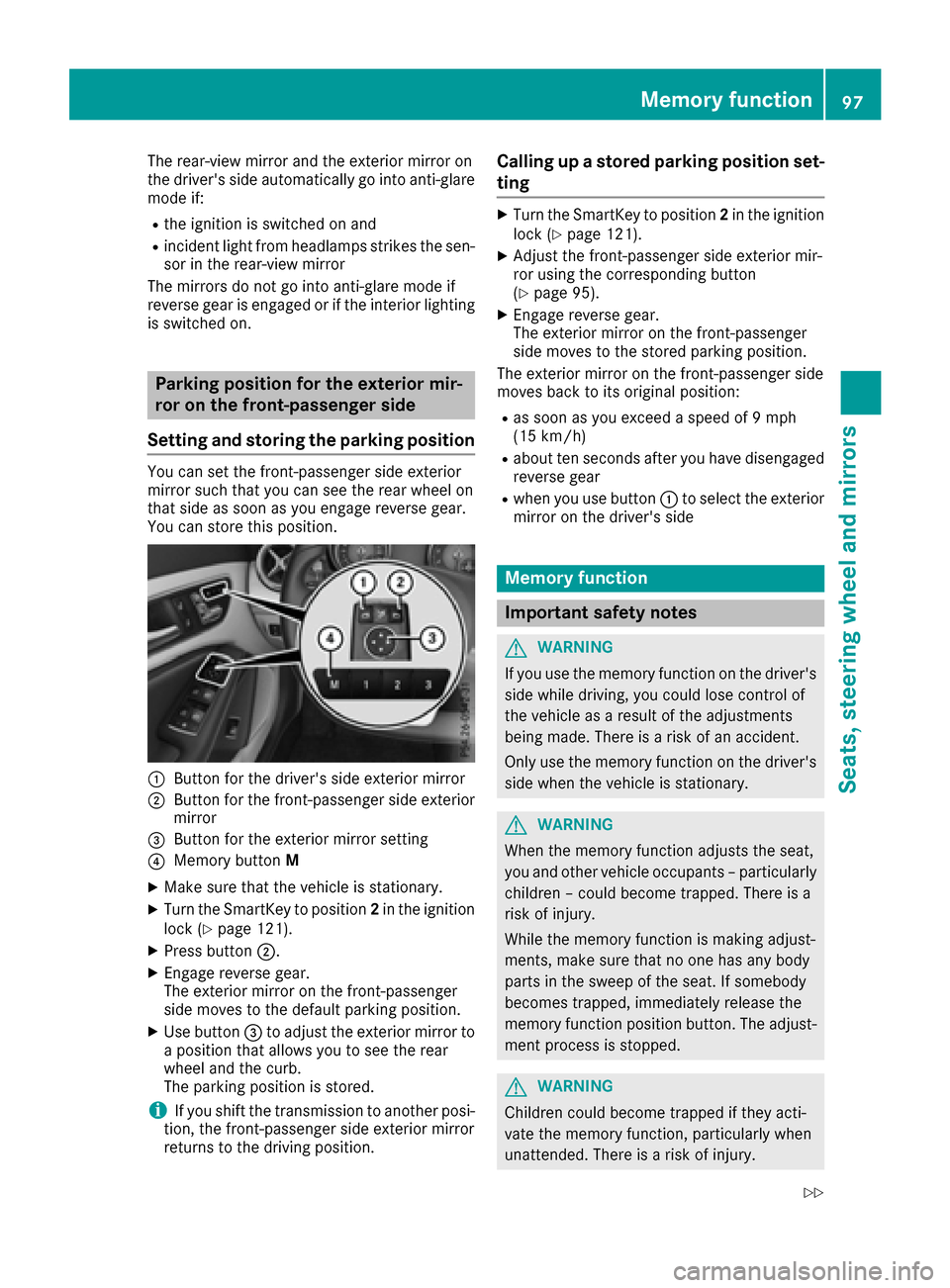
You can set the front-passenger side exterior
mirror such that you can see the rear wheel on
that side as soon as you engage reverse gear.
You can store this position.
:Button for the driver's side exterior mirror
;Button for the front-passenger side exterior
mirror
=Button for the exterior mirror setting
?Memory button M
XMake sure that the vehicle is stationary.
XTurn the SmartKey to position 2in the ignition
lock (Ypage 121).
XPress button ;.
XEngage reverse gear.
The exterior mirror on the front-passenger
side moves to the default parking position.
XUse button=to adjust the exterior mirror to
a position that allows you to see the rear
wheel and the curb.
The parking position is stored.
iIf you shift the transmission to another posi-
tion, the front-passenger side exterior mirror
returns to the driving position.
Calling up a stored parking position set-
ting
XTurn the SmartKey to position 2in the ignition
lock (Ypage 121).
XAdjust the front-passenger side exterior mir-
ror using the corresponding button
(
Ypage 95).
XEngage reverse gear.
The exterior mirror on the front-passenger
side moves to the stored parking position.
The exterior mirror on the front-passenger side
moves back to its original position:
Ras soon as you exceed a speed of 9 mph
(15 km/h)
Rabout ten seconds after you have disengaged
reverse gear
Rwhen you use button :to select the exterior
mirror on the driver's side
Memory function
Important safety notes
GWARNING
If you use the memory function on the driver's side while driving, you could lose control of
the vehicle as a result of the adjustments
being made. There is a risk of an accident.
Only use the memory function on the driver's
side when the vehicle is stationary.
GWARNING
When the memory function adjusts the seat,
you and other vehicle occupants – particularly
children – could become trapped. There is a
risk of injury.
While the memory function is making adjust-
ments, make sure that no one has any body
parts in the sweep of the seat. If somebody
becomes trapped, immediately release the
memory function position button. The adjust-
ment process is stopped.
GWARNING
Children could become trapped if they acti-
vate the memory function, particularly when
unattended. There is a risk of injury.
Memory function97
Seats, steering wheel and mirrors
Z