gear MERCEDES-BENZ CLA-Class 2017 C117 Owner's Manual
[x] Cancel search | Manufacturer: MERCEDES-BENZ, Model Year: 2017, Model line: CLA-Class, Model: MERCEDES-BENZ CLA-Class 2017 C117Pages: 318, PDF Size: 8.02 MB
Page 7 of 318
Hiding a service message .............. 258
Information about Service .............258
Resetting the service interval dis-
play ................................................ 258
Service message ............................ 258
Special service requirements ......... 258
ATA (Anti-Theft Alarm system)
Activating/deactivating ................... 67
Function ...........................................6 7
Switching off the alarm .................... 67
ATTENTION ASSIST
Activating/deactivating ................. 183
Display message ............................ 205
Function/notes ............................. 169
Audio 20
Switching on/off ........................... 228
Audio menu (on-board computer) .... 180
Audio system
see separate operating instructions
Authorized Mercedes-Benz Center
see Qualified specialist workshop
Authorized workshop
see Qualified specialist workshop
AUTO lights
Display message ............................ 201
see Lights
Automatic car wash (care) ............... 259
Automatic engine start (ECO start/
stop function) .................................... 125
Automatic engine switch-off (ECO
start/stop function) .......................... 125
Automatic headlamp mode ................ 99
Automatic transmission
Accelerator pedal position ............. 132
Changing gear ............................... 132
DIRECT SELECT lever ..................... 129
Drive program ................................ 133
Drive program display .................... 129
Driving tips .................................... 132
DYNAMIC SELECT button (all vehi-
cles except Mercedes-AMG vehi-
cles) ............................................... 127
DYNAMIC SELECT controller
(Mercedes-AMG vehicles) .............. 128
Emergency running mode .............. 137
Engaging drive position .................. 131
Engaging neutral ............................ 130 Engaging park position
(Mercedes-AMG vehicles) .............. 131
Engaging park position automati-
cally ...............................................
130
Eng
aging reverse gear ................... 130
Engaging the park position ............ 129
Holding the vehicle stationary on
uphill gradients .............................. 133
Kickdown ....................................... 133
Manual shifting .............................. 135
Oil temperature (on-board com-
puter, Mercedes-AMG vehicles) ..... 185
Overview ........................................ 129
Problem (malfunction) ................... 137
Pulling away ................................... 124
Selector lever ................................ 131
Starting the engine ........................ 123
Steering wheel paddle shifters ...... 135
Transmission position display ........ 131
Transmission position display
(DIRECT SELECT lever) ................... 129
Transmission positions .................. 132
Automatic transmission emer-
gency mode ....................................... 137
B
Back button ....................................... 228
Backup lamp
Display message ............................ 200
BAS (Brake Assist System) ................. 60
Battery (SmartKey)
Checking .......................................... 72
Important safety notes .................... 72
Replacing ......................................... 72
Battery (vehicle)
Charging ........................................ 273
Display message ............................ 203
Important safety notes .................. 271
Jump starting ................................. 273
Belt
see Seat belts
Blind Spot Assist
Activating/deactivating (on-
board computer) ............................ 183
Display message ............................ 206
Notes/function .............................. 171
Index5
Page 8 of 318
Blootooth®
Connecting a different mobile
phone ............................................ 232
Bluetooth
®
Searching for a mobile phone ........ 231
see also Digital Operator's Man-
ual .................................................. 227
Telephony ...................................... 230
Brake Assist
see BAS (Brake Assist System)
Brake fluid
Display message ............................ 194
Notes ............................................. 312
Brake force distribution
see EBD (electronic brake force
distribution)
Brake lamp
Replacing bulbs ............................. 105
Brake lamps
Display message ............................ 199
Brakes
ABS .................................................. 60
BAS .................................................. 60
Brake fluid (notes) ......................... 312
Braking assistance appropriate to
the situation ..................................... 62
Display message ............................ 189
EBD .................................................. 66
Hill start assist ............................... 124
HOLD function ............................... 156
Important safety notes .................. 145
Maintenance .................................. 146
Parking brake ................................ 141
Riding tips ...................................... 145
Warning lamp ................................. 217
Braking assistance appropriate to
the situation
Function/notes ................................ 62
Breakdown
Where will I find...? ........................ 266
see Flat tire
see Tow-starting
see Towing away
Buttons on the steering wheel ......... 175
C
California
Important notice for retail cus-
tomers and lessees .......................... 24
Calling up a malfunction
see Display messages
Car
see Vehicle
Care
Car wash ........................................ 259
Carpets .......................................... 265
Display ........................................... 263
Exhaust pipe .................................. 263
Exterior lights ................................ 262
Gear or selector lever .................... 264
Interior ........................................... 263
Matte finish ................................... 261
Notes ............................................. 259
Paint .............................................. 260
Plastic trim .................................... 263
Power washer ................................ 260
Rear view camera .......................... 262
Roof lining ...................................... 265
Seat belt ........................................ 264
Seat cover ..................................... 264
Sensors ......................................... 262
Steering wheel ............................... 264
Trim pieces .................................... 264
Washing by hand ........................... 260
Wheels ........................................... 261
Windows ........................................ 261
Wiper blades .................................. 262
Wooden trim .................................. 264
Cargo compartment enlargement ... 236
Cargo tie down rings ......................... 237
CD
see also Digital Operator's Man-
ual .................................................. 227
CD player (on-board computer) ........ 180
Center console
Lower section .................................. 35
Upper section .................................. 34
Central locking
Automatic locking (on-board com-puter) ............................................. 184
Locking/unlocking (SmartKey) ........ 69
Change of address .............................. 25
6Index
Page 13 of 318
Fuel filler flapOpening ........................................ .138
Fuel level
Calling up the range (on-board
computer) ...................................... 178
Fuel tank
Capacity ........................................ 310
Problem (malfunction) ................... 139
Fuses
Allocation chart .............................2 80
Before changing .............................2 79
Fuse box in the engine compart-
ment .............................................. 280
Fuse box in the front-passenger
footwell .......................................... 280
Important safety notes .................. 279
G
Garage door opener
Clearing the memory ..................... 251
General notes ................................ 249
Important safety notes .................. 249
Opening/closing the garage door .. 251
Problems when programming ........2 51
Programming (button in the rear-
view mirror) ................................... 249
Synchronizing the rolling code ....... 250
Gasoline ............................................. 310
Gear indicator (on-board com-
puter, Mercedes-AMG vehicles) ....... 185
Genuine parts ...................................... 23
Glove box ...........................................2 34
Google™ Local Search
see also Digital Operator's Man-
ual ..................................................2 27
H
Handbrake
see Parking brake
HANDS-FREE ACCESS .......................... 78
Hazard warning lamps
Display message ............................ 214
Switching on/off ........................... 101
Head restraints
Adjusting ......................................... 91
Adjusting (manually) ........................ 92 Adjusting (rear) ................................ 92
Headlamps
Fogging up ..................................... 102
see Automatic headlamp mode
Heating
see Climate control
High beam flasher .............................1 00
High-beam headlamps
Adaptive Highbeam Assist ............. 101
Display message ............................ 200
Replacing bulbs .............................1 05
Switching on/off ........................... 100
Hill start assist .................................. 124
HOLD function
Activating ....................................... 156
Deactivating ................................... 156
Display message ............................ 205
Function/notes .............................1 56
Home address
see also Digital Operator's Man-
ual ..................................................2 27
Hood
Closing ...........................................2 55
Display message ............................ 213
Important safety notes .................. 254
Opening ......................................... 254
Horn ...................................................... 31
Hydroplaning ..................................... 147
I
Ignition lock
see Key positions
Immobilizer .......................................... 67
Indicator lamp
Replacing bulbs (rear) .................... 105
Indicator lamps
see Warning and indicator lamps
Indicators
see Turn signals
Instrument cluster
Overview .......................................... 32
Settings ......................................... 183
Warning and indicator lamps ........... 32
Instrument cluster lighting .............. 174
Interior lighting
Control ...........................................1 03
Overview ........................................ 102
Index11
Page 14 of 318
Readinglamp ................................ .102
iPod®
see also Digital Operator's Man-
ual ..................................................2 27
J
Jack
Storage location ............................ 266
Using ............................................. 303
Jump starting (engine) ......................273
K
Key positions
Start/Stop button .......................... 121
KEYLESS-GO
Convenience closing feature ............ 82
Deactivation ..................................... 70
Locking ............................................ 70
Unlocking ......................................... 70
Kickdown
Driving tips ....................................1 33
Manual gearshifting ....................... 137
Knee bag .............................................. 45
L
Lamps
see Warning and indicator lamps
Lane Keeping Assist
Activating/deactivating (on-
board computer) ............................ 183
Display message ............................ 205
Function/information .................... 172
Lane Tracking package ..................... 171
Lap time (RACETIMER) ...................... 186
LATCH-type (ISOFIX) child seat
anchors ................................................ 56
License plate lamp (display mes-
sage) ................................................... 200
Light function, active
Display message ............................ 201
Light sensor (display message) ....... 201
Lights
Adaptive Highbeam Assist ............. 101
Automatic headlamp mode .............. 99
Fogged up headlamps .................... 102
Hazard warning lamps ................... 101 High beam flasher .......................... 100
High-beam headlamps ................... 100
Light switch ..................................... 99
Low-beam headlamps .................... 100
Parking lamps ................................ 100
Rear fog lamp ................................ 100
Setting exterior lighting ................... 99
Standing lamps .............................. 100
Switching the daytime running
lamps on/off (on-board com-
puter) ............................................. 184
Turn signals ................................... 100
Loading guidelines ............................ 233
Locking
see Central locking
Locking (doors)
Automatic ........................................ 76
Emergency locking ........................... 76
From inside (central locking but-
ton) .................................................. 75
Locking centrally
see Central locking
Locking verification signal (on-
board computer) ............................... 185
Low-beam headlamps
Display message ............................ 199
Replacing bulbs ............................. 104
Switching on/off ........................... 100
Lumbar support
Adjusting the 4-way lumbar sup-
port .................................................. 92
M
M+S tires ............................................ 284
Malfunction message
see Display messages
Matte finish (cleaning instruc-
tions) .................................................. 261
mbrace
Call priority .................................... 245
Display message ............................ 194
Downloading destinations
(COMAND) ..................................... 245
Downloading routes ....................... 248
Emergency call .............................. 243
General notes ................................ 242
Geo fencing ................................... 248
12Index
Page 18 of 318
Turn signals (front) .........................105
Turn signals (rear) .......................... 105
Reporting safety defects .................... 27
Rescue card ......................................... 28
Reserve (fuel tank)
see Fuel
Reserve fuel
Display message ............................ 204
Warning lamp ................................. 222
see Fuel
Residual heat (climate control) ........118
Restraint system
Display message ............................ 195
Introduction ..................................... 39
Warning lamp ................................. 222
Warning lamp (function) ................... 40
Reverse gear (selector lever) ........... 131
Reversing feature
Panorama sliding sunroof ................ 85
Roller sunblind ................................. 86
Side windows ................................... 81
Roadside Assistance (breakdown) .... 25
Roller sunblind
Panorama roof with power tilt/
sliding panel ..................................... 86
Roof carrier ........................................ 238
Roof lining and carpets (cleaning
guidelines) ......................................... 265
Roof load (maximum) ........................ 314
Route guidance
see also Digital Operator's Man-
ual ..................................................2 27
S
Safety
Children in the vehicle ..................... 53
see Occupant safety
Safety system
see Driving safety systems
SD card
Inserting ........................................ 232
Inserting/removing ........................ 232
Removing ....................................... 232
SD memory card
see also Digital Operator's Man-
ual ..................................................2 27Search & Send
see also Digital Operator's Man-
ual ..................................................2 27
Seat belts
Adjusting the height ......................... 43
Cleaning ......................................... 264
Correct usage .................................. 42
Fastening ......................................... 43
Important safety guidelines ............. 41
Introduction ..................................... 40
Releasing ......................................... 43
Warning lamp ................................. 216
Warning lamp (function) ................... 43
Seats
Adjusting (electrically) ..................... 91
Adjusting (manually) ........................ 90
Adjusting (Performance Seat) .......... 93
Adjusting the 4-way lumbar sup-
port ..................................................9 2
Adjusting the head restraint ............ 91
Cleaning the cover ......................... 264
Correct driver's seat position ........... 89
Folding the backrest (rear com-
partment) forwards/back .............. 236
Important safety notes .................... 89
Seat heating problem ...................... 94
Storing settings (memory func-
tion) ................................................. 98
Switching seat heating on/off ......... 93
Securing cargo .................................. 237
Selector lever
Cleaning ......................................... 264
Sensors (cleaning instructions) ....... 262
Service menu (on-board com-
puter) .................................................. 183
Service message
see ASSYST PLUS
Service products
Brake fluid ..................................... 312
Coolant (engine) ............................ 312
Eng
ine oil ....................................... 311
Fuel ................................................ 309
Important safety notes .................. 309
Refrigerant (air-conditioning sys-
tem) ............................................... 313
Washer fluid ................................... 313
Setting the air distribution ............... 115
16Index
Page 25 of 318
Protecting the environment
General notes
HEnvironmental note
Daimler's declared policy is one of compre-
hensive environmental protection.
The objectives are for the natural resources
that form the basis of our existence on this
planet to be used sparingly and in a manner
that takes the requirements of both nature
and humanity into account.
You too can help to protect the environment
by operating your vehicle in an environmen-
tally responsible manner.
Fuel consumption and the rate of engine,
transmission, brake and tire wear are affected by these factors:
Roperating conditions of your vehicle
Ryour personal driving style
You can influence both factors. You should
bear the following in mind:
Operating conditions:
Ravoid short trips as these increase fuel con-
sumption.
Ralways make sure that the tire pressures
are correct.
Rdo not carry any unnecessary weight.
Rremove roof racks once you no longer need
them.
Ra regularly serviced vehicle will contribute
to environmental protection. You should
therefore adhere to the service intervals.
Ralways have service work carried out at a
qualified specialist workshop.
Personal driving style:
Rdo not depress the accelerator pedal when
starting the engine.
Rdo not warm up the engine when the vehicle
is stationary.
Rdrive carefully and maintain a safe distance
from the vehicle in front.
Ravoid frequent, sudden acceleration and
braking.
Rchange gear in good time and use each gear
only up to Ôof its maximum engine speed.
Rswitch off the engine in stationary traffic.
Rkeep an eye on the vehicle's fuel consump-
tion.
Environmental concerns and recom-
mendations
Wherever the Operator's Manual requires you to
dispose of materials, first try to regenerate or re-
use them. Observe the relevant environmental
rules and regulations when disposing of materi-
als. In this way you will help to protect the envi-
ronment.
Genuine Mercedes-Benz parts
HEnvironmental note
Daimler AG also supplies reconditioned major
assemblies and parts which are of the same
quality as new parts. They are covered by the
same Limited Warranty entitlements as new
parts.
!Air bags and Emergency Tensioning Devi-
ces, as well as control units and sensors for
these restraint systems, may be installed in
the following areas of your vehicle:
Rdoors
Rdoor pillars
Rdoor sills
Rseats
Rcockpit
Rinstrument cluster
Rcenter console
Do not install accessories such as audio sys-
tems in these areas. Do not carry out repairs or welding. You could impair the operating
efficiency of the restraint systems.
Have aftermarket accessories installed at a
qualified specialist workshop.
You could jeopardize the operating safety of
your vehicle if you use parts, tires and wheels as
well as accessories relevant to safety which
have not been approved by Mercedes-Benz. This
could lead to malfunctions in safety-relevant
Genuine Mercedes-Benz parts23
Introduction
Z
Page 38 of 318
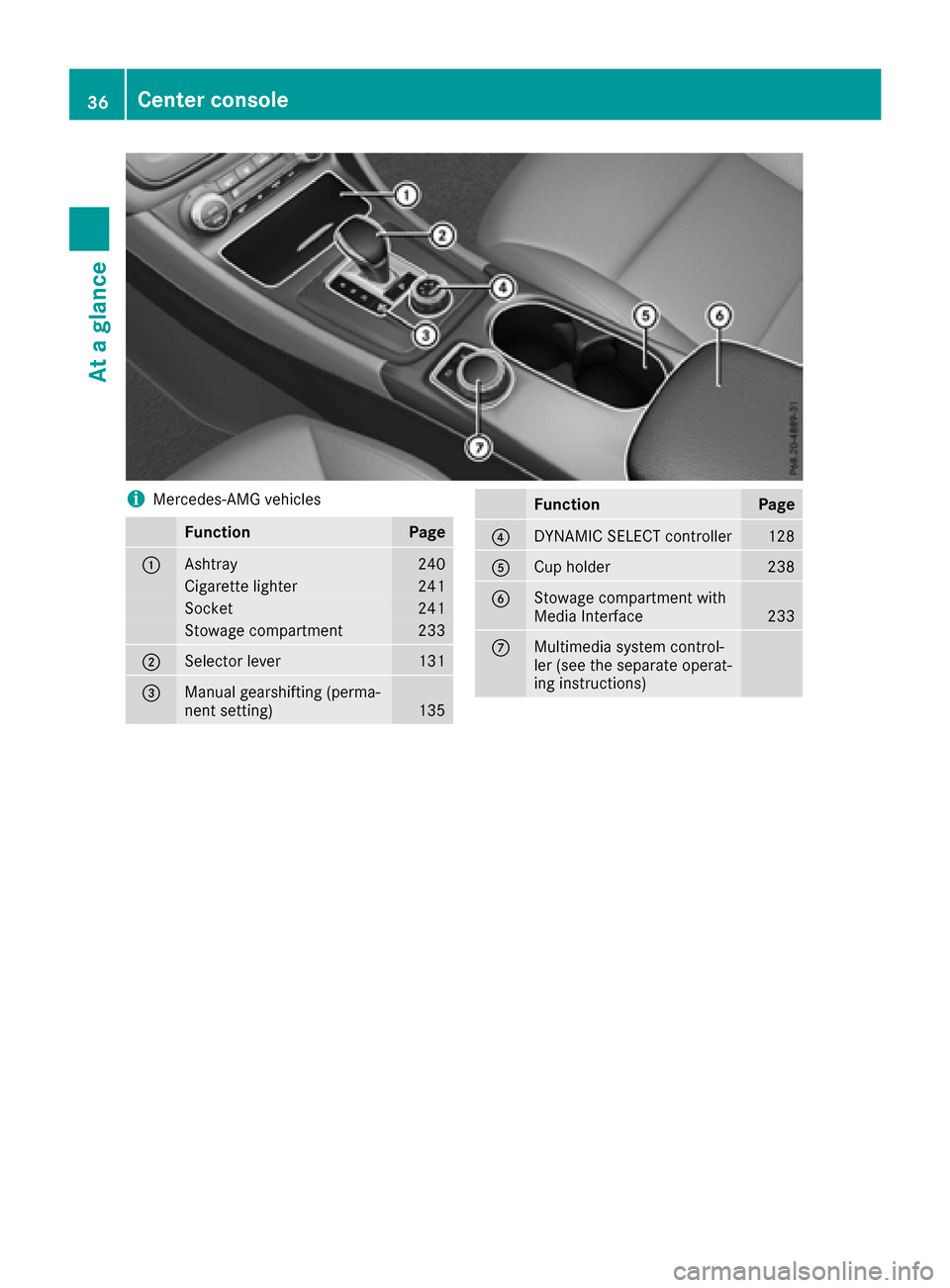
iMercedes-AMG vehicles
FunctionPage
:Ashtray240
Cigarette lighter241
Socket241
Stowage compartment233
;Selector lever131
=Manual gearshifting (perma-
nent setting)135
FunctionPage
?DYNAMIC SELECT controller128
ACup holder238
BStowage compartment with
Media Interface233
CMultimedia system control-
ler (see the separate operat-
ing instructions)
36Center console
At a glance
Page 99 of 318
The rear-view mirror and the exterior mirror on
the driver's side automatically go into anti-glare
mode if:
Rthe ignition is switched on and
Rincident light from headlamps strikes the sen-
sor in the rear-view mirror
The mirrors do not go into anti-glare mode if
reverse gear is engaged or if the interior lighting
is switched on.
Parking position for the exterior mir-
ror on the front-passenger side
Setting and storing the parking position
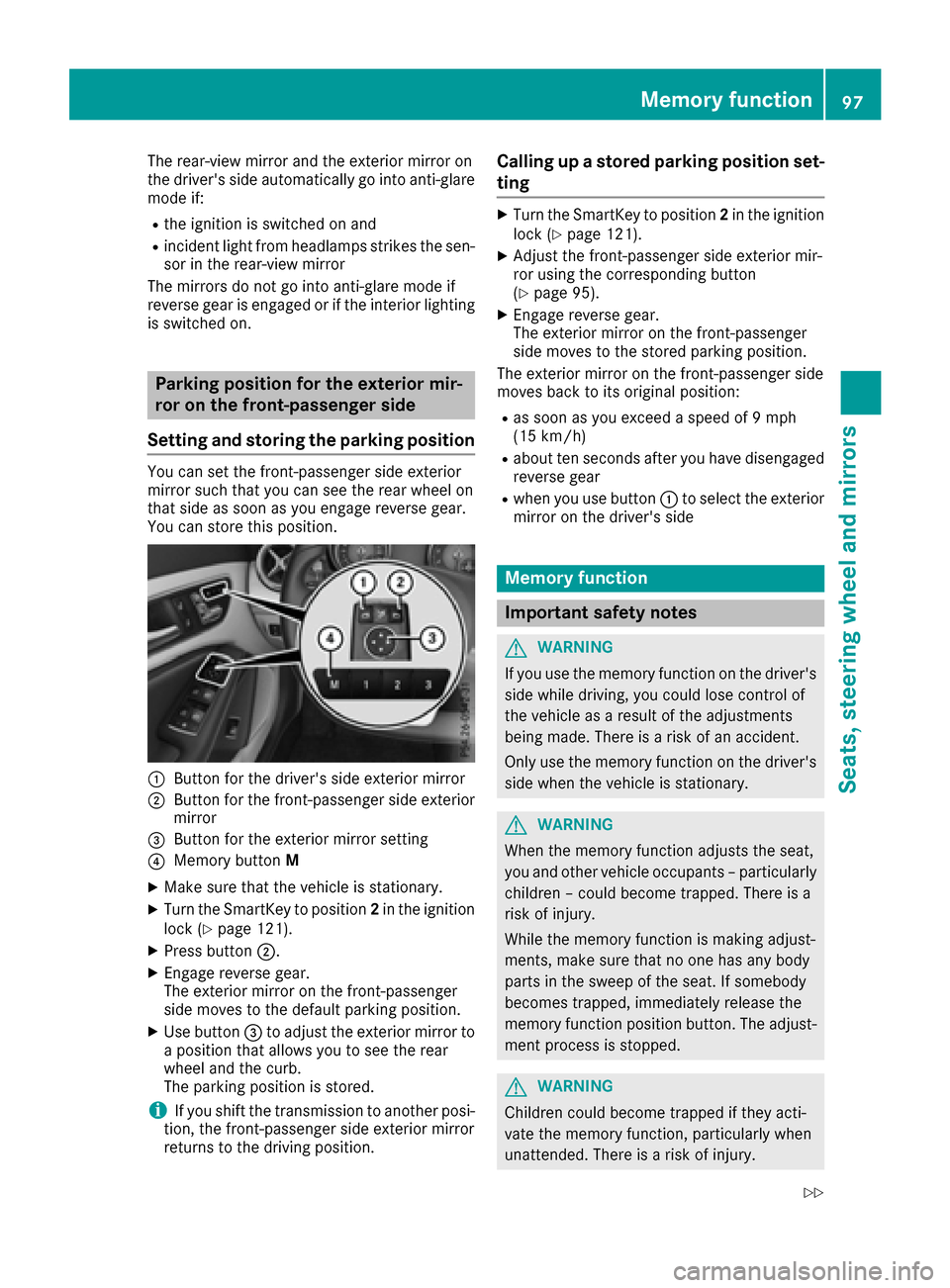
You can set the front-passenger side exterior
mirror such that you can see the rear wheel on
that side as soon as you engage reverse gear.
You can store this position.
:Button for the driver's side exterior mirror
;Button for the front-passenger side exterior
mirror
=Button for the exterior mirror setting
?Memory button M
XMake sure that the vehicle is stationary.
XTurn the SmartKey to position 2in the ignition
lock (Ypage 121).
XPress button ;.
XEngage reverse gear.
The exterior mirror on the front-passenger
side moves to the default parking position.
XUse button=to adjust the exterior mirror to
a position that allows you to see the rear
wheel and the curb.
The parking position is stored.
iIf you shift the transmission to another posi-
tion, the front-passenger side exterior mirror
returns to the driving position.
Calling up a stored parking position set-
ting
XTurn the SmartKey to position 2in the ignition
lock (Ypage 121).
XAdjust the front-passenger side exterior mir-
ror using the corresponding button
(
Ypage 95).
XEngage reverse gear.
The exterior mirror on the front-passenger
side moves to the stored parking position.
The exterior mirror on the front-passenger side
moves back to its original position:
Ras soon as you exceed a speed of 9 mph
(15 km/h)
Rabout ten seconds after you have disengaged
reverse gear
Rwhen you use button :to select the exterior
mirror on the driver's side
Memory function
Important safety notes
GWARNING
If you use the memory function on the driver's side while driving, you could lose control of
the vehicle as a result of the adjustments
being made. There is a risk of an accident.
Only use the memory function on the driver's
side when the vehicle is stationary.
GWARNING
When the memory function adjusts the seat,
you and other vehicle occupants – particularly
children – could become trapped. There is a
risk of injury.
While the memory function is making adjust-
ments, make sure that no one has any body
parts in the sweep of the seat. If somebody
becomes trapped, immediately release the
memory function position button. The adjust-
ment process is stopped.
GWARNING
Children could become trapped if they acti-
vate the memory function, particularly when
unattended. There is a risk of injury.
Memory function97
Seats, steering wheel and mirrors
Z
Page 122 of 318
Notes on breaking-in a new vehicle
Important safety notes
The sensor system of some driving and driving
safety systems adjusts automatically while a
certain distance is being driven after the vehiclehas been delivered or after repairs. Full system
effectiveness is not reached until the end of this
teach-in procedure.
New and replaced brake pads and discs only
reach their optimum braking effect after several hundred kilometers of driving. Compensate for
this by applying greater force to the brake pedal.
The first 1000 miles (1500 km)
The more you look after the engine when it is
new, the more satisfied you will be with its per-
formance in the future.
RYou should therefore drive at varying vehicle
and engine speeds for the first 1000 miles
(1500 km).
RAvoid heavy loads, e.g. driving at full throttle,during this period.
RChange gear in good time, before the tach-
ometer needle is Ôof the way to the red area
of the tachometer.
RDo not manually shift to a lower gear to brake
the vehicle.
RTry to avoid depressing the accelerator pedal
beyond the point of resistance (kickdown).
RIdeally, for the first 1000 miles (1500 km),
driv ein progra mE.
Addition al breaking-in notes for Mercedes-AMG
vehicles:
RDo not drive faster than 85 mph (140 km/h)
for the first 1,000 miles (1,500 km).
ROnly allow the engine to reach a maximum
engine speed of 4,500 rpm briefly.
RChange gear in good time.
After 1,000 miles (1,500 km), you can increase
the engine speed gradually and bring the vehicle
to full speed.
You should also observe these notes on break-
ing-in if the engine or parts of the drive train on
your vehicle have been replaced.
Always observe the maxim
um permissible
speed.
Driving
Important safety notes
GWARNING
Objects in the driver's footwell can restrict the pedal travel or obstruct a depressed pedal.
The operating and road safety of the vehicle is
jeopardized. There is a risk of an accident.
Make sure that all objects in the vehicle are
stowed correctly, and that they cannot enter
the driver's footwell. Install the floormats
securely and as specified in order to ensure
sufficient clearance for the pedals. Do not use
loose floormats and do not place floormats on
top of one another.
GWARNING
Unsuitable footwear can hinder correct usage of the pedals, e.g.:
Rshoes with thick soles
Rshoes with high heels
Rslippers
There is a risk of an accident.
Wear suitable footwear to ensure correct
usage of the pedals.
GWARNING
If you switch off the ignition while driving,
safety-relevant functions are only available
with limitations, or not at all. This could affect, for example, the power steering and the brake
boosting effect. You will require considerably
more effort to steer and brake. There is a risk
of an accident.
Do not switch off the ignition while driving.
GWARNING
If the parking brake has not been fully
released when driving, the parking brake can:
Roverheat and cause a fire
Rlose its hold function.
There is a risk of fire and an accident. Release
the parking brake fully before driving off.
120Driving
Driving and parking
Page 127 of 318
Important safety notes
GWARNING
If th eengin eis switched off automatically and
you exit th evehicle, th eengin eis restarte d
automatically. The vehicl emay begi nmoving .
Ther eis aris kof acciden tand injury.
If you wish to exit th evehicle, always tur noff
th eignition and secure th evehicl eagainst
rollin gaway.
General notes
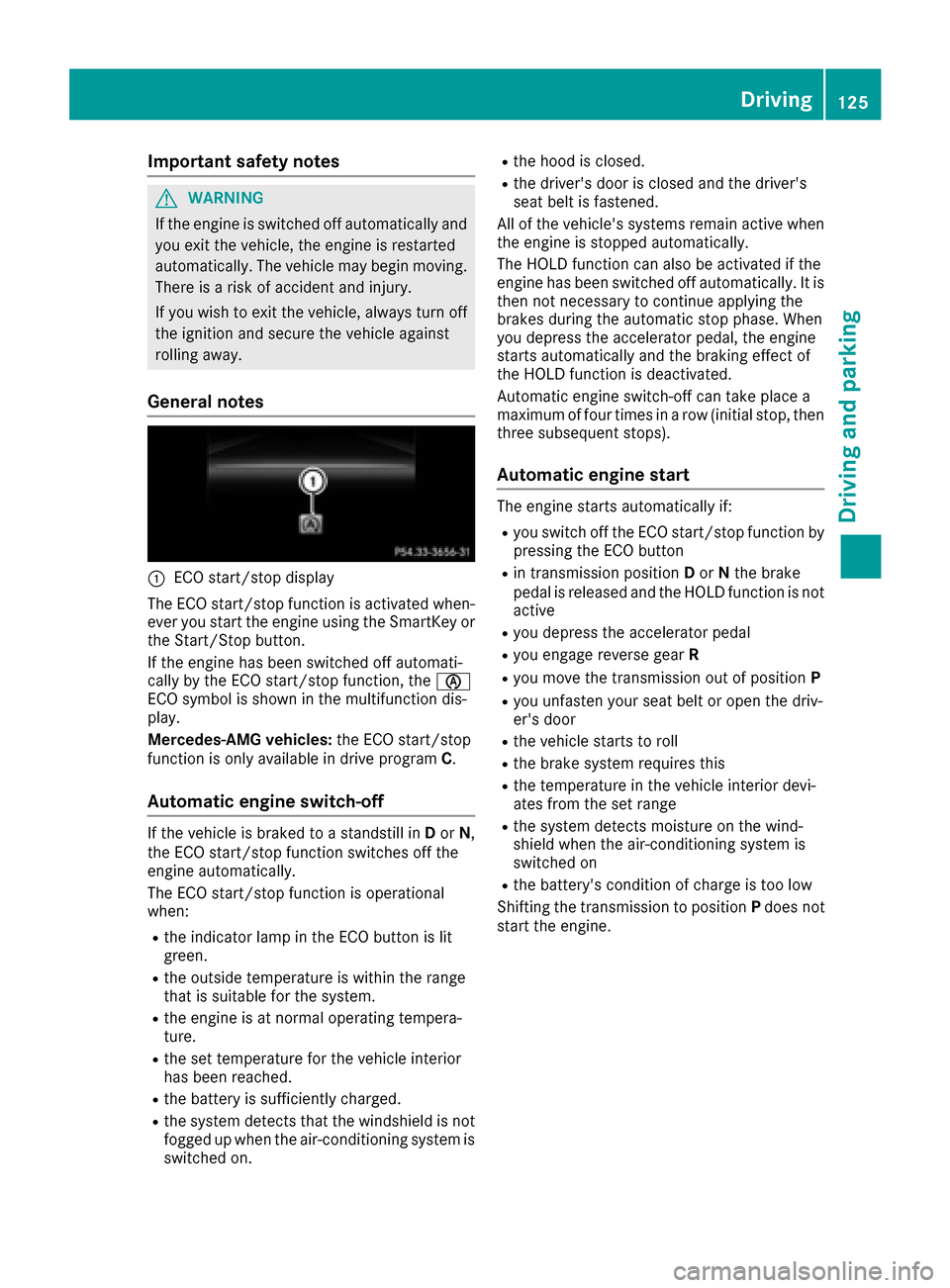
:ECO start/sto pdisplay
The ECO start/sto pfunction is activated when -
eve ryou start th eengin eusin gth eSmartKey or
th eStart/Sto pbutton.
If th eengin ehas been switched off automati-
call yby th eECO start/sto pfunction ,th eè
ECO symbol is shown in th emultifunction dis-
play.
Mercedes-AM Gvehicles: theECO start/sto p
function is only available in driv eprogram C.
Automatic engine switch-off
If thevehicl eis braked to astandstill in Dor N,
th eECO start/sto pfunction switches off th e
engin eautomatically.
The ECO start/sto pfunction is operational
when :
Rtheindicator lamp in th eECO butto nis lit
green .
Rtheoutside temperature is within th erange
that is suitable for th esystem.
Rth eengin eis at normal operating tempera-
ture.
Rth eset temperature for th evehicl einterior
has been reached.
Rth ebattery is sufficientl ycharged.
Rth esystem detects that th ewindshield is no t
fogged up when th eair-conditioning system is
switched on .
Rthehoo dis closed.
Rth edriver' sdoor is closed and th edriver' s
seat belt is fastened.
All of th evehicle's systems remain active when
th eengin eis stoppe dautomatically.
The HOLD function can also be activated if th e
engin ehas been switched off automatically. It is
then no tnecessar yto continue applyin gth e
brakes during th eautomatic stop phase. When
you depress th eaccelerato rpedal ,th eengin e
start sautomatically and th ebraking effec tof
th eHOLD function is deactivated.
Automatic engin eswitch-off can tak eplac e a
maximum of four times in arow (initial stop, then
three subsequen tstops ).
Automatic engine start
The engin
estart sautomatically if:
Ryou switch off th eECO start/sto pfunction by
pressin gth eECO butto n
Rin transmission position Dor Nthebrak e
pedal is release dand th eHOLD function is no t
active
Ryou depress th eaccelerato rpedal
Ryou engage revers egear R
Ryou mov eth etransmission out of position P
Ryou unfasten your seat belt or open th edriv -
er' sdoor
Rth evehicl estart sto rol l
Rthebrak esystem require sthis
Rth etemperature in th evehicl einterior devi-
ate sfrom th eset range
Rth esystem detects moisture on th ewind-
shield when th eair-conditioning system is
switched on
Rth ebattery's condition of charge is to olow
Shifting th etransmission to position Pdoes no t
start th eengine.
Driving125
Driving and parking
Z