phone MERCEDES-BENZ CLA COUPE 2013 Owners Manual
[x] Cancel search | Manufacturer: MERCEDES-BENZ, Model Year: 2013, Model line: CLA COUPE, Model: MERCEDES-BENZ CLA COUPE 2013Pages: 373, PDF Size: 11.47 MB
Page 4 of 373
Thank you for buying Mercedes-Benz
Before you first drive off, read this Owner's
Manual carefully and familiarise yourself with
your vehicle. For your own safety and a longer
vehicle life, follow the instructions and warn-
ing notices in this manual. Disregarding them may lead to damage to the vehicle or personal
injury.
The equipment or model designation of your
vehicle may vary according to:
R Model
R Order
R Country variant
R Availability
The illustrations in this manual show a left-
hand-drive vehicle. On right-hand-drive vehi-
cles, the layout of components and controls
differs accordingly.
Mercedes-Benz is constantly updating its
vehicles to the state of the art.
Mercedes-Benz therefore reserves the right
to introduce changes in the following areas:
R design
R equipment
R technical features
The equipment in your vehicle may therefore
differ from that shown in the descriptions and
illustrations.
The following are integral components of the vehicle:
R Owner's Manual
R Service Booklet
R Equipment-dependent supplements
Keep these documents in the vehicle at all
times. If you sell the vehicle, always pass all
documents on to the new owner.
i You can get to know the important fea-
tures of your vehicle in the interactive Own- er's Manual on the Internet at:
http://www.mercedes-benz.de/
betriebsanleitung
You can also use the CLA Guide smartphone
App: Apple
®
iOS Android™
Please note that the Mercedes-Benz Guides
App may not yet be available in your country.
The technical documentation team at
Daimler AG wishes you safe and pleasant
motoring.
1175843200Z102 É1175843200Z102^ËÍ
Page 14 of 373
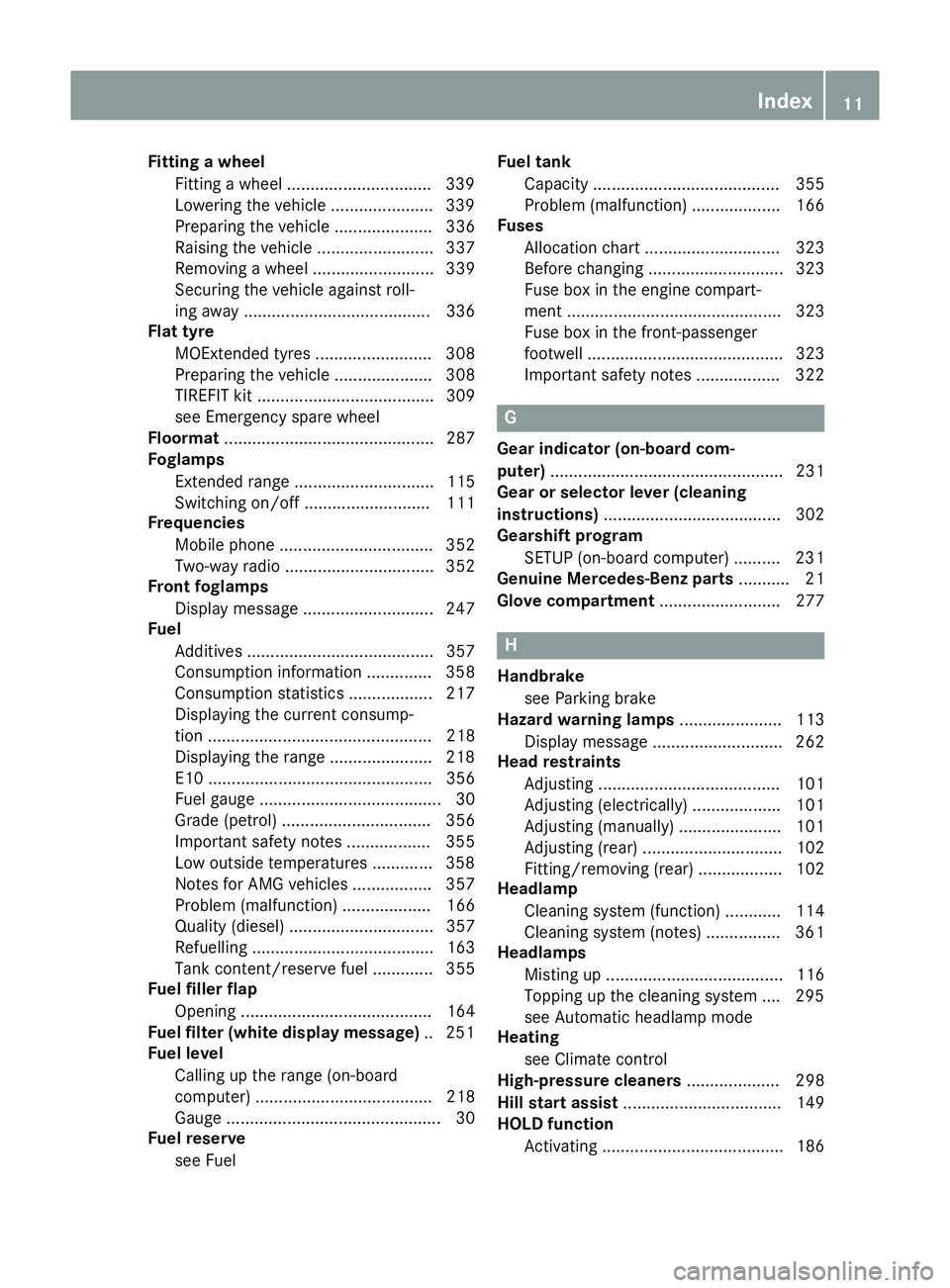
Fitting a wheel
Fitting a wheel .............................. .339
Lowering the vehicle ..................... .339
Preparing the vehicle ..................... 336
Raising the vehicle ......................... 337
Removing a wheel .......................... 339
Securing the vehicle against roll-
ing away ........................................ 336
Flat tyre
MOExtended tyres ......................... 308
Preparing the vehicle ..................... 308
TIREFIT kit ...................................... 309
see Emergency spare wheel
Floormat ............................................. 287
Foglamps
Extended range .............................. 115
Switching on/off ........................... 111
Frequencies
Mobile phone ................................. 352
Two-way radio ................................ 352
Front foglamps
Display message ............................ 247
Fuel
Additives ........................................ 357
Consumption information .............. 358
Consumption statistics .................. 217
Displaying the current consump-
tion ................................................ 218
Displaying the range ..................... .218
E10 ................................................ 356
Fuel gauge ....................................... 30
Grade (petrol) ................................ 356
Important safety notes .................. 355
Low outside temperatures ............. 358
Notes for AMG vehicles ................. 357
Problem (malfunction) ................... 166
Quality (diesel )............................... 357
Refuelling ....................................... 163
Tank content/reserve fue l............. 355
Fuel filler flap
Opening ......................................... 164
Fuel filter (white display message) .. 251
Fuel level
Calling up the range (on-board
computer) ...................................... 218
Gaug e.............................................. 30
Fuel reserve
see Fuel Fuel tank
Capacity ........................................ 355
Problem (malfunction) ................... 166
Fuses
Allocation chart ............................. 323
Before changing ............................. 323
Fuse box in the engine compart-
ment .............................................. 323
Fuse box in the front-passenger
footwell .......................................... 323
Important safety notes .................. 322 G
Gear indicator (on-board com-
puter) .................................................. 231
Gear or selector lever (cleaning
instructions) ...................................... 302
Gearshift program
SETUP (on-board computer) .......... 231
Genuine Mercedes-Benz parts ........... 21
Glove compartment .......................... 277 H
Handbrake see Parking brake
Hazard warning lamps ...................... 113
Display message ............................ 262
Head restraints
Adjusting ....................................... 101
Adjusting (electrically) ................... 101
Adjusting (manually) ...................... 101
Adjusting (rear) .............................. 102
Fitting/removing (rear) .................. 102
Headlamp
Cleaning system (function) ............ 114
Cleaning system (notes) ................ 361
Headlamps
Misting up ...................................... 116
Topping up the cleaning system .... 295
see Automatic headlamp mode
Heating
see Climate control
High-pressure cleaners .................... 298
Hill start assist .................................. 149
HOLD function
Activating ....................................... 186 Index
11
Page 16 of 373
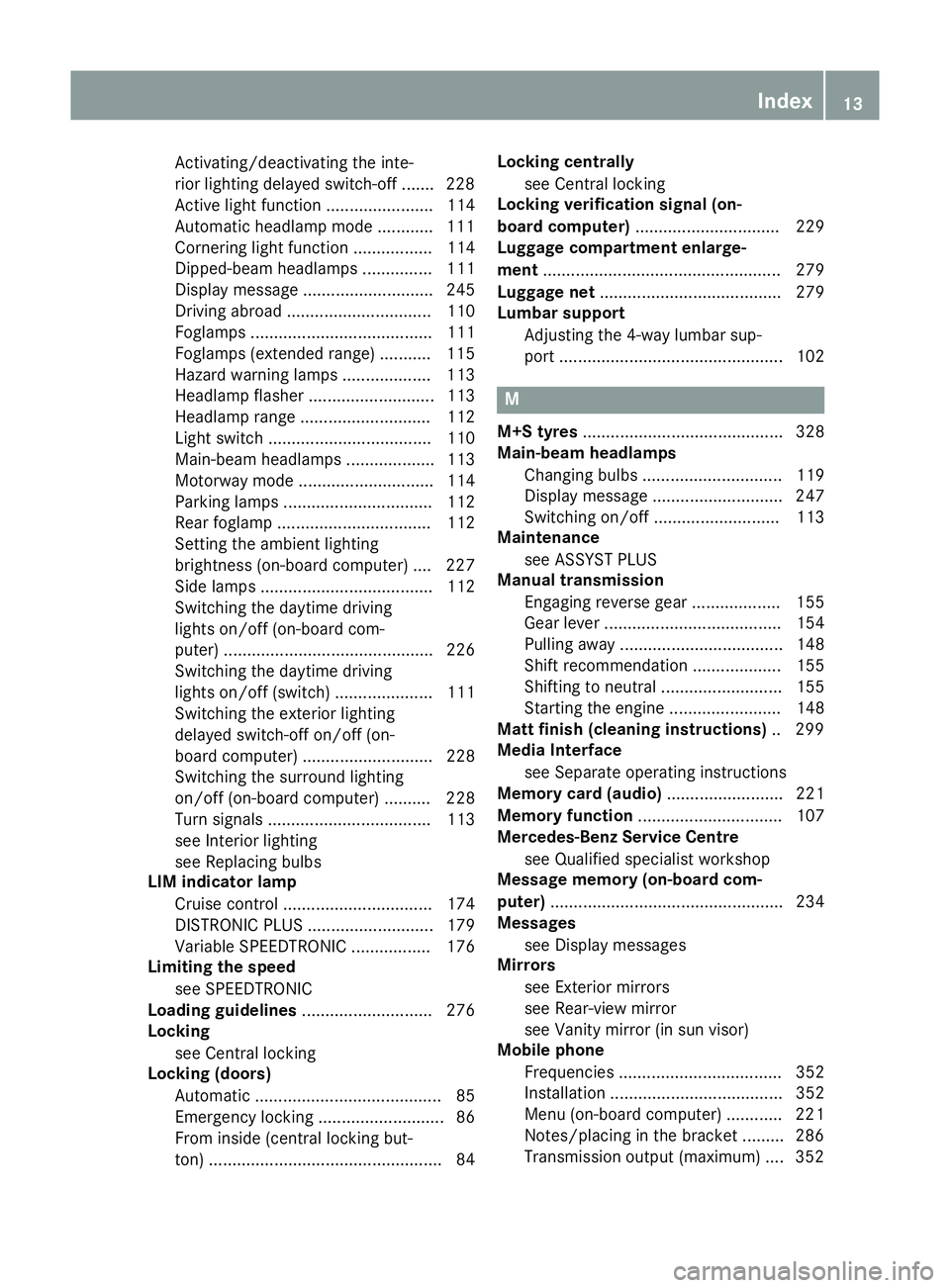
Activating/deactivating the inte-
rior lighting delayed switch-off ....... 228
Active light functio n....................... 114
Automatic headlamp mode ............ 111
Cornering light function ................. 114
Dipped-beam headlamp s............... 111
Display message ............................ 245
Driving abroad ............................... 110
Foglamps ....................................... 111
Foglamps (extended range) ........... 115
Hazard warning lamps ................... 113
Headlamp flashe r........................... 113
Headlamp range ............................ 112
Light switch ................................... 110
Main-beam headlamp s................... 113
Motorway mode ............................. 114
Parking lamps ................................ 112
Rear foglamp ................................. 112
Setting the ambient lighting
brightness (on-board computer) .... 227
Side lamps ..................................... 112
Switching the daytime driving
lights on/off (on-board com-
puter) ............................................. 226
Switching the daytime driving
lights on/off (switch) ..................... 111
Switching the exterior lighting
delayed switch-off on/off (on-
board computer) ............................ 228
Switching the surround lighting
on/off (on-board computer) .......... 228
Turn signals ................................... 113
see Interior lighting
see Replacing bulbs
LIM indicator lamp
Cruise control ................................ 174
DISTRONIC PLUS ........................... 179
Variable SPEEDTRONIC ................. 176
Limiting the speed
see SPEEDTRONIC
Loading guidelines ............................ 276
Locking
see Central locking
Locking (doors)
Automatic ........................................ 85
Emergency locking ........................... 86
From inside (central locking but-
ton) .................................................. 84 Locking centrally
see Central locking
Locking verification signal (on-
board computer) ............................... 229
Luggage compartment enlarge-
ment ................................................... 279
Luggage net ....................................... 279
Lumbar support
Adjusting the 4-way lumbar sup-
port ................................................ 102 M
M+S tyres ........................................... 328
Main-beam headlamps
Changing bulb s.............................. 119
Display message ............................ 247
Switching on/of f........................... 113
Maintenance
see ASSYST PLUS
Manual transmission
Engaging reverse gear ................... 155
Gear lever ...................................... 154
Pulling away ................................... 148
Shift recommendation ................... 155
Shifting to neutral .......................... 155
Starting the engine ........................ 148
Matt finish (cleaning instructions) .. 299
Media Interface
see Separate operating instructions
Memory card (audio) ......................... 221
Memory function ............................... 107
Mercedes-Benz Service Centre
see Qualified specialist workshop
Message memory (on-board com-
puter) .................................................. 234
Messages
see Display messages
Mirrors
see Exterior mirrors
see Rear-view mirror
see Vanity mirror (in sun visor)
Mobile phone
Frequencies ................................... 352
Installation ..................................... 352
Menu (on-board computer) ............ 221
Notes/placing in the bracket ......... 286
Transmission output (maximum) .... 352 Index
13
Page 17 of 373
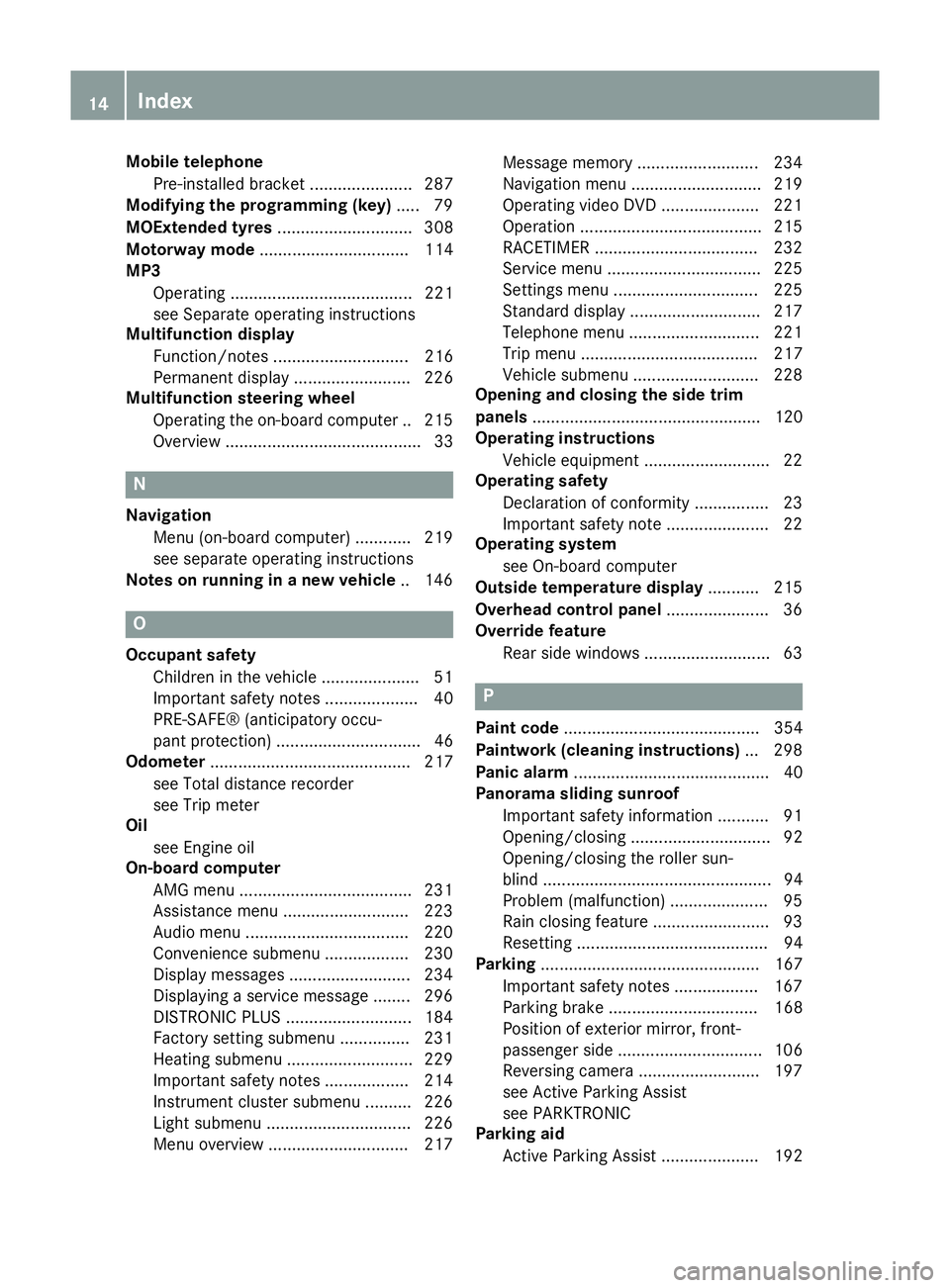
Mobile telephone
Pre-installed bracket ...................... 287
Modifying the programming (key) ..... 79
MOExtended tyres ............................. 308
Motorway mode ................................ 114
MP3
Operating ....................................... 221
see Separate operating instructions
Multifunction display
Function/notes ............................. 216
Permanent display ......................... 226
Multifunction steering wheel
Operating the on-board computer .. 215
Overview .......................................... 33 N
Navigation Menu (on-board computer) ............ 219
see separate operating instructions
Notes on running in a new vehicle .. 146O
Occupant safety Children in the vehicle .................... .51
Important safety notes .................... 40
PRE-SAFE® (anticipatory occu-
pant protection) ............................... 46
Odometer ........................................... 217
see Total distance recorder
see Trip meter
Oil
see Engine oil
On-board computer
AMG menu .....................................2 31
Assistance menu ........................... 223
Audio menu ................................... 220
Convenience submenu .................. 230
Display messages .......................... 234
Displaying a service message ....... .296
DISTRONIC PLUS ........................... 184
Factory setting submenu .............. .231
Heating submenu ........................... 229
Important safety notes .................. 214
Instrument cluster submenu .......... 226
Light submenu ............................... 226
Menu overview .............................. 217 Message memory .......................... 234
Navigation menu ............................ 219
Operating video DVD ..................... 221
Operation ....................................... 215
RACETIMER ................................... 232
Service menu ................................. 225
Settings menu ............................... 225
Standard displa y............................ 217
Telephone menu ............................ 221
Trip menu ...................................... 217
Vehicle submenu ........................... 228
Opening and closing the side trim
panels ................................................. 120
Operating instructions
Vehicle equipment ........................... 22
Operating safety
Declaration of conformity ................ 23
Important safety note ...................... 22
Operating system
see On-board computer
Outside temperature display ........... 215
Overhead control panel ...................... 36
Override feature
Rear side window s........................... 63 P
Paint code .......................................... 354
Paintwork (cleaning instructions) ... 298
Panic alarm .......................................... 40
Panorama sliding sunroof
Important safety information ........... 91
Opening/closing .............................. 92
Opening/closing the roller sun-
blind ................................................. 94
Problem (malfunction) ..................... 95
Rain closing feature ......................... 93
Resetting ......................................... 94
Parking ............................................... 167
Important safety notes .................. 167
Parking brake ................................ 168
Position of exterior mirror, front-
passenger side ............................... 106
Reversing camera .......................... 197
see Active Parking Assist
see PARKTRONIC
Parking aid
Active Parking Assist ..................... 192 14
Index
Page 21 of 373
Stowage well beneath the boot
floor
....................................................2 81
Summer tyres ................................... .328
Sun visor ............................................ 283
Supplemental restraint system
see SRS (Supplemental Restraint
System)
Surround lighting (on-board com-
puter) ................................................. .228 T
Tail lamps Display message ............................ 246
see Lights
Tank
see Fuel tank
Technical data
Emergency spare wheel ................. 350
Information ................................... .352
Trailer loads ................................... 364
Tyres/wheels ................................. 340
Vehicle data ................................... 362
Telephone
Accepting a call ............................ .222
Display message ............................ 262
Menu (on-board computer) ............ 221
Number from the phone book ....... .222
Redialling ....................................... 222
Rejecting/ending a call ................. 222
Telephone compartment ................ 278
Temperature
Coolant .......................................... 214
Coolant (on-board computer) ......... 231
Engine oil (on-board computer) ...... 231
Outside temperature ..................... .215
Setting (climate control) ................ 132
TEMPOMAT
Function/notes ............................ .173
Theft-deterrent system
ATA (Anti-Theft Alarm system) ......... 73
Immobiliser ...................................... 72
Through-loading ................................ 279
Through-loading feature ................... 279
Time
see Separate Owner's manual
Timing (RACETIMER) ......................... 232
TIREFIT kit .......................................... 309 Top Tether
............................................ 55
Tow-away protection
Activating ......................................... 73
Deactivating ..................................... 73
Function .......................................... .73
Tow-starting
Emergency engine starting ............ 322
Fitting the towing ey e.................... 320
Important safety notes .................. 318
Removing the towing eye ............... 320
Towing
Important safety notes .................. 318
Notes for 4MATIC vehicles ............ 321
Towing a trailer
Active Parking Assist ..................... 197
Axle load, permissibl e.................... 364
Bulb failure indicator for LED
lamps ............................................. 212
ESP® (Electronic Stability Pro-
gram) ............................................... 71
Pulling away with a traile r.............. 149
Trailer tow hitch display message .. 261
Towing away
Fitting the towing ey e.................... 320
Removing the towing eye ............... 320
With both axles on the ground ....... 321
With front axle raised ..................... 320
Trailer coupling
see Towing a trailer
Trailer towing
7-pin connecto r............................. 212
Blind Spot Assist ............................ 205
Cleaning the trailer tow hitch ......... 301
Coupling up a traile r...................... 210
Decoupling a trailer ....................... 210
Driving tip s.................................... 207
Folding in the ball coupling ............ 211
Folding out the ball coupling .......... 209
Important safety notes .................. 207
Lights display message .................. 245
Mounting dimensions .................... 363
Parktroni c...................................... 191
Power supply ................................. 211
Trailer load s................................... 364
Transmission
see Automatic transmission
see Manual transmission 18
Index
Page 36 of 373
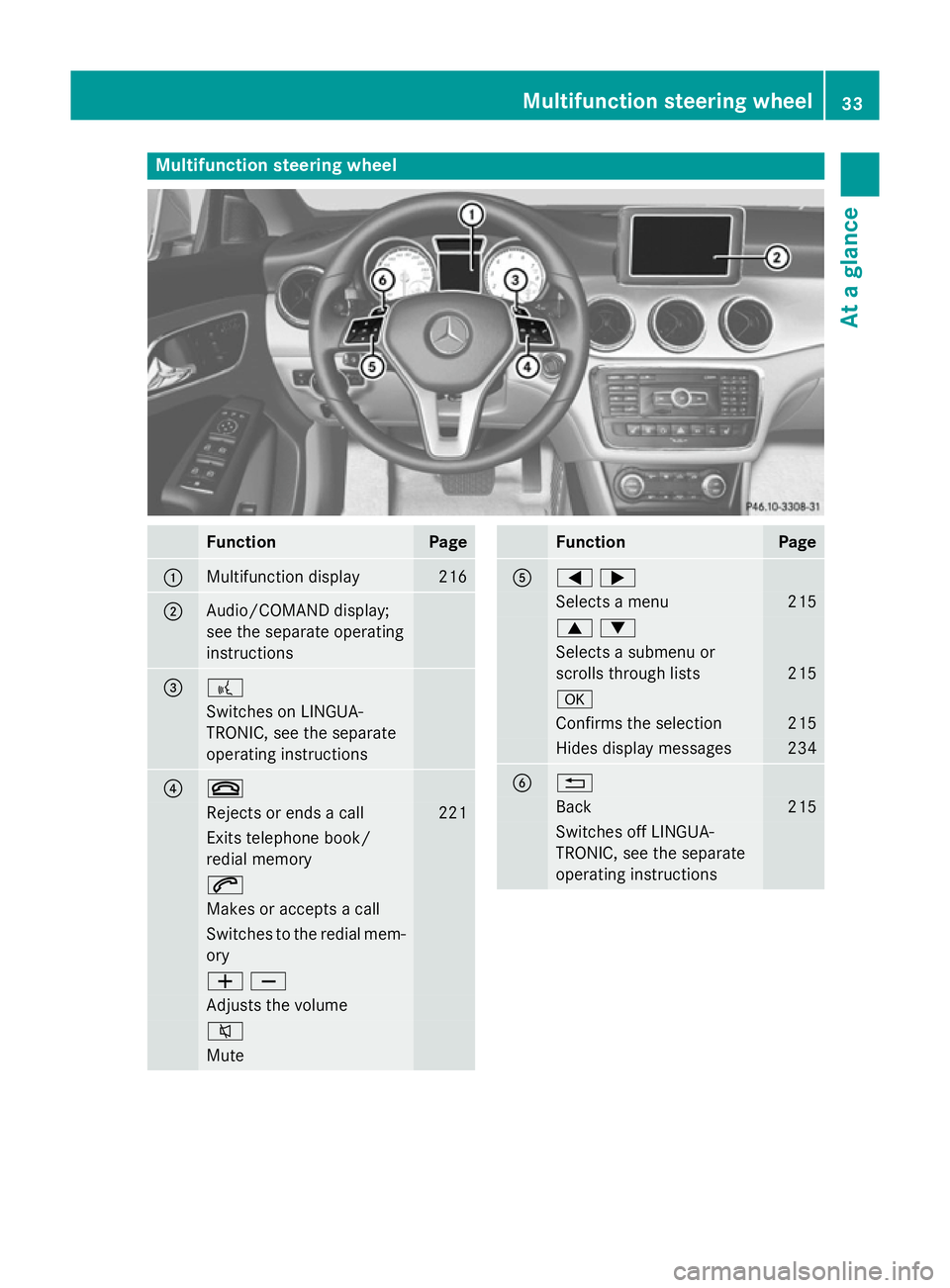
Multifunction steering wheel
Function Page
:
Multifunction display 216
;
Audio/COMAND display;
see the separate operating
instructions = ?
Switches on LINGUA-
TRONIC, see the separate
operating instructions ? ~
Rejects or ends a call 221
Exits telephone book/
redial memory
6
Makes or accepts a call
Switches to the redial mem-
ory WX
Adjusts the volume
8
Mute Function Page
A
=;
Selects a menu 215
9:
Selects a submenu or
scrolls through lists
215
a
Confirms the selection 215
Hides display messages 234
B %
Back 215
Switches off LINGUA-
TRONIC, see the separate
operating instructions Multifunction steering wheel
33At a glance
Page 57 of 373
G
WARNING
Electronic devices on the front-passenger
seat can affect the function of the automatic
child seat recognition, for example:
R laptop
R mobile phone
R transponder cards such as ski passes or
access passes
The front-passenger front airbag could deploy unintentionally or not function as intended
during an accident. This poses an increased
risk of injury or even fatal injury.
Do not place any of the devices mentioned
above or similar devices on the front-
passenger seat. If the front-passenger seat of your vehicle is
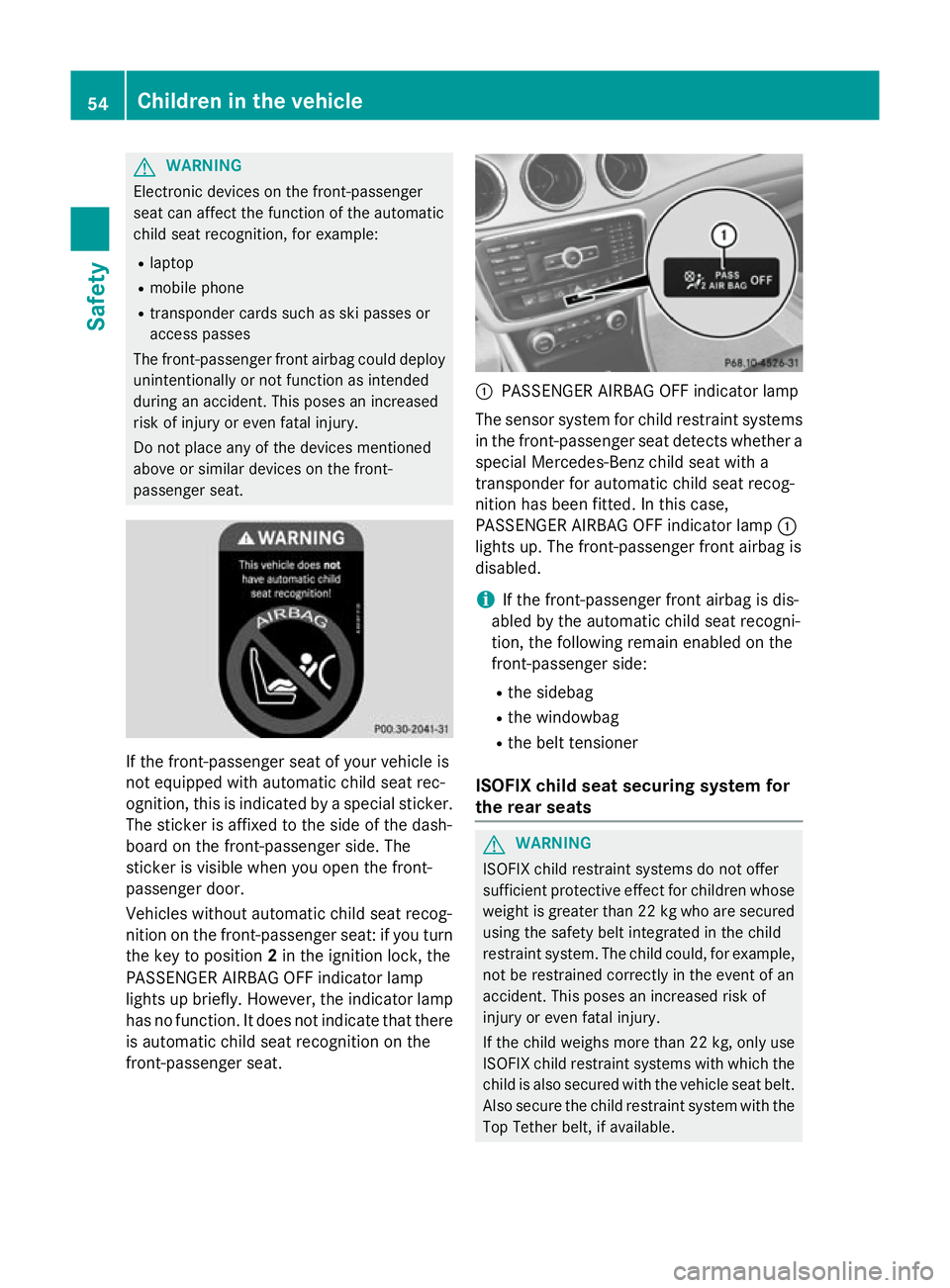
not equipped with automatic child seat rec-
ognition, this is indicated by a special sticker. The sticker is affixed to the side of the dash-
board on the front-passenger side. The
sticker is visible when you open the front-
passenger door.
Vehicles without automatic child seat recog-
nition on the front-passenger seat: if you turn
the key to position 2in the ignition lock, the
PASSENGER AIRBAG OFF indicator lamp
lights up briefly. However, the indicator lamp
has no function. It does not indicate that there is automatic child seat recognition on the
front-passenger seat. :
PASSENGER AIRBAG OFF indicator lamp
The sensor system for child restraint systems
in the front-passenger seat detects whether a special Mercedes-Benz child seat with a
transponder for automatic child seat recog-
nition has been fitted. In this case,
PASSENGER AIRBAG OFF indicator lamp :
lights up. The front-passenger front airbag is
disabled.
i If the front-passenger front airbag is dis-
abled by the automatic child seat recogni-
tion, the following remain enabled on the
front-passenger side:
R the sidebag
R the windowbag
R the belt tensioner
ISOFIX child seat securing system for
the rear seats G
WARNING
ISOFIX child restraint systems do not offer
sufficient protective effect for children whose weight is greater than 22 kg who are securedusing the safety belt integrated in the child
restraint system. The child could, for example,not be restrained correctly in the event of an
accident. This poses an increased risk of
injury or even fatal injury.
If the child weighs more than 22 kg, only use
ISOFIX child restraint systems with which the child is also secured with the vehicle seat belt. Also secure the child restraint system with the
Top Tether belt, if available. 54
Children in the vehicleSafety
Page 65 of 373
Problems with automatic child seat recognition
Problem
Possible causes/consequences and
M
MSolutions The PASSENGER AIR-
BAG OFF indicator
lamp on the centre con-
sole is lit. A special Mercedes-Benz child restraint system with a trans-
ponder for automatic child seat recognition has been fitted to the
front-passenger seat. The front-passenger front airbag has there- fore been disabled as desired. The PASSENGER AIR-
BAG OFF indicator
lamp on the centre con-
sole is lit.
or
The 6 SRS warning
lamp lights up and/or
the PASSENGER AIR-
BAG OFF indicator
lamp does not light up
briefly when you switch the ignition on. G
WARNING
There is no child restraint system fitted to the front-passenger
seat. Automatic child seat recognition is malfunctioning.
There is a risk of injury. X Remove electronic equipment from the front-passenger seat,
e.g.:
R laptop
R mobile phone
R cards with transponders, such as ski passes or access cards
If the PASSENGER AIRBAG OFF indicator lamp is still lit:
X Visit a qualified specialist workshop. Child-proof locks
Important safety notes G
WARNING
If children are left unsupervised in the vehicle, they could:
R open the doors, thus endangering other
people or road users.
R get out and disrupt traffic.
R operate the vehicle's equipment.
Additionally, children could set the vehicle in
motion if, for example, they:
R release the parking brake.
R shift the automatic transmission out of
parking position P.
R shift the manual transmission into neutral.
R start the engine.
There is a risk of an accident and injury.
When leaving the vehicle, always take the key with you and lock the vehicle. Never leave children or animals unattended in the vehicle.
Always keep the key out of reach of children. G
WARNING
If persons (particularly children) are exposed
to heat or cold for a prolonged period, there is a risk of serious or even fatal injuries. Never
leave persons (particularly children) unatten-
ded in the vehicle. G
WARNING
If children are travelling in the vehicle, they
could:
R open doors, thus endangering other people
or road users
R exit the vehicle and be caught by oncoming
traffic
R operate vehicle equipment and become
trapped, for example
There is a risk of an accident and injury.
Always activate the child-proof locks and
override feature if children are travelling in the 62
Children in the vehicleSafety
Page 81 of 373
Useful information
i This Owner's Manual describes all mod-
els, series and optional equipment for your
vehicle that were available at the time of
going to press. National variations are pos- sible. Note that your vehicle may not be
equipped with all of the functions descri-
bed. This is also the case for systems and
functions relevant to safety.
i Read the information on qualified special-
ist workshops: (Y page 24). Key
Important safety notes
G
WARNING
If children are left unsupervised in the vehicle, they could:
R open doors, thereby endangering other per-
sons or road users
R get out and be struck by oncoming traffic
R operate vehicle equipment and become
trapped, for example
In addition, the children could also set the
vehicle in motion, for example, if they:
R release the parking brake
R shift the automatic transmission out of park
position P or shift manual transmission into
neutral
R start the engine
There is a risk of an accident and injury.
When leaving the vehicle, always take the key with you and lock the vehicle. Never leave
children and animals unattended in the vehi-
cle. Keep the keys out of the reach of children. G
WARNING
If persons (particularly children) are exposed
to heat or cold for a prolonged period, there is a risk of serious or even fatal injuries. Never
leave persons (particularly children) unatten-
ded in the vehicle. G
WARNING
If you attach heavy or large objects to the key, the key could be unintentionally turned in the
ignition lock. This could cause the engine to
be switched off. There is a risk of an accident.
Do not attach any heavy or large objects to the
key. Remove any bulky keyrings before insert-
ing the key into the ignition lock.
! Keep the key away from strong magnetic
fields. Otherwise, the remote control func-
tion could be affected.
Strong magnetic fields can occur in the
vicinity of powerful electrical installations.
Do not keep the key: R with electronic devices, e.g. a mobile
phone or another key
R with metallic objects, e.g. coins or metal
film
R inside metallic objects, e.g. a metal case
United Kingdom only: G
WARNING
When the double locks are activated, the
doors can no longer be opened from the
inside. People in the vehicle can no longer get out, e.g. in hazardous situations. There is a
risk of injury.
Therefore, do not leave any people unsuper-
vised in the vehicle, particularly children, eld-
erly people or people in need of special assis-
tance. Do not activate the double lock when
people are in the vehicle.
If the vehicle has been locked with the key,
the double lock function is activated as stand-
ard. It is then not possible to open the doors
from inside the vehicle. You can deactivate
the double lock function by deactivating the
interior motion sensor (Y page 74). The doors
can then be opened from the inside after the vehicle has been locked from the outside. You
can open the rear doors from inside the vehi-
cle if they are not secured by the child-proof
locks (Y page 63). The anti-theft alarm system 78
KeyOpening and closing
Page 205 of 373
R
if you have adopted a sporty driving style
with high cornering speeds or high rates of
acceleration
R if you are predominantly driving slower
than 80 km/h or faster than 180 km/h
R if you are currently using COMAND Online
or making a telephone call with COMAND
Online
R if the time has been set incorrectly
R in active driving situations, such as when
you change lanes or change your speed
Warning and display messages in the
multifunction display X
Activate ATTENTION ASSIST using the on-
board computer (Y page 225).
If ATTENTION ASSIST is active, you will be
warned no sooner than 20 minutes after
your journey has begun. You then hear an
intermittent warning tone twice and the
Attention Assist: Take a break!
Attention Assist: Take a break!
message appears in the multifunction dis-
play.
X If necessary, take a break.
X Press the aor% button to confirm
the message.
On long journeys, take regular breaks in good time to allow yourself to rest properly. If you
do not take a break, you will be warned again
after 15 minutes at the earliest. This will only
happen if ATTENTION ASSIST still detects
typical indicators of fatigue or increasing lap-
ses in concentration.
ATTENTION ASSIST is reset and starts
assessing your tiredness again when you con- tinue your journey if:
R you switch off the engine
R you take off your seat belt and open the
driver's door, e.g. for a change of drivers or
to take a break
When ATTENTION ASSIST is deactivated, the é symbol appears in the multifunction
display in the assistance graphic display. Speed Limit Assist
General notes Speed Limit Assist shows you detected speed
limits in the multifunction display. Data from
the navigation system is also used for this
purpose. If a traffic sign indicating a speed
limit or the end of a speed limit is detected, it
is shown in the multifunction display. If Speed
Limit Assist does not detect any traffic signs, the speed limit from the digital road map is
taken and shown in the display.
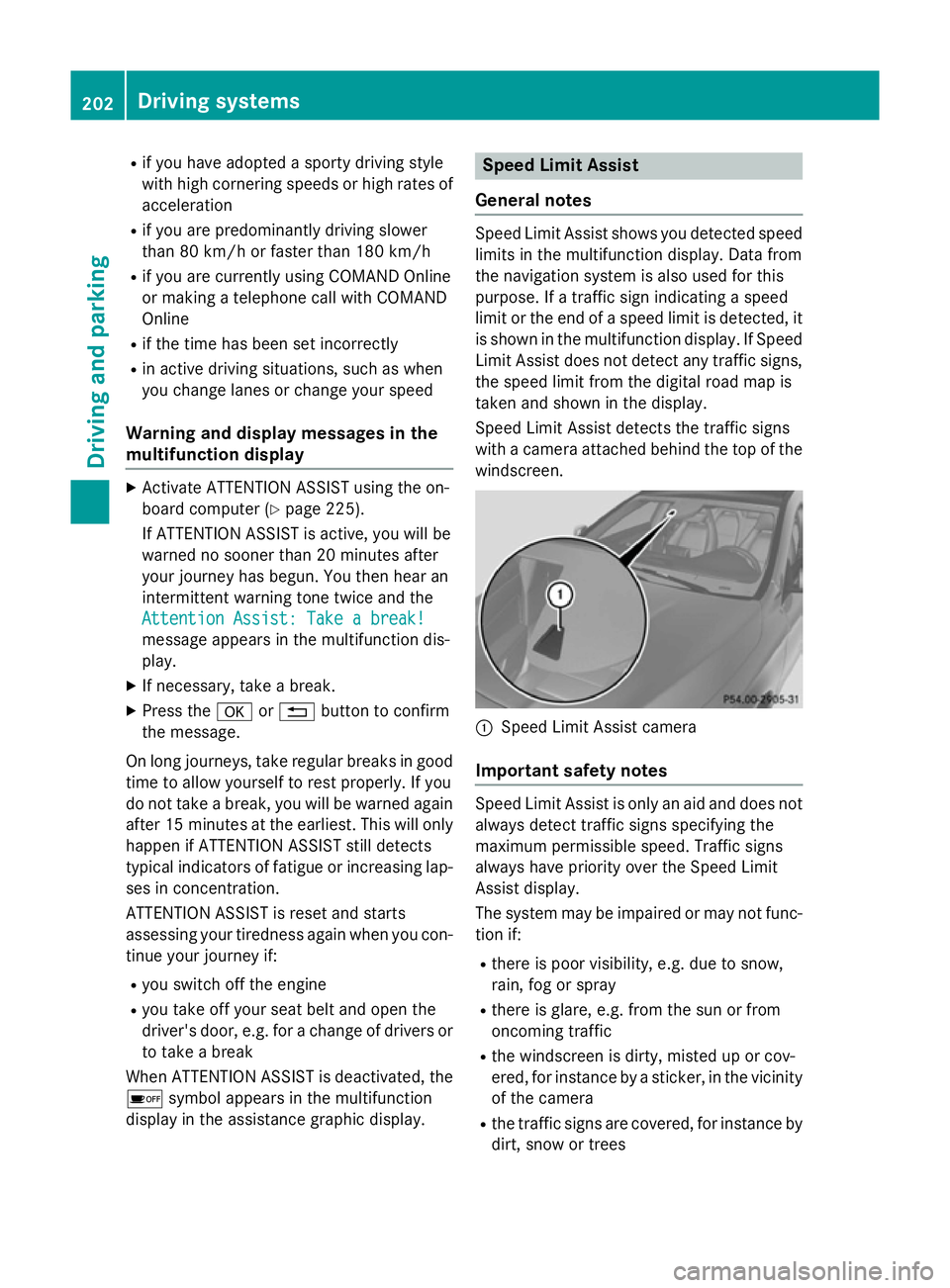
Speed Limit Assist detects the traffic signs
with a camera attached behind the top of the
windscreen. :
Speed Limit Assist camera
Important safety notes Speed Limit Assist is only an aid and does not
always detect traffic signs specifying the
maximum permissible speed. Traffic signs
always have priority over the Speed Limit
Assist display.
The system may be impaired or may not func-
tion if:
R there is poor visibility, e.g. due to snow,
rain, fog or spray
R there is glare, e.g. from the sun or from
oncoming traffic
R the windscreen is dirty, misted up or cov-
ered, for instance by a sticker, in the vicinity
of the camera
R the traffic signs are covered, for instance by
dirt, snow or trees 202
Driving systemsDriving and parking