sensor MERCEDES-BENZ CLA COUPE 2018 Owner's Guide
[x] Cancel search | Manufacturer: MERCEDES-BENZ, Model Year: 2018, Model line: CLA COUPE, Model: MERCEDES-BENZ CLA COUPE 2018Pages: 326, PDF Size: 5.59 MB
Page 154 of 326
Continue todrivecarefull yand beread yto
brake, especiall yifDistance Pilot DI STRONIC
warn syou.
GWAR NING
Distance Pilot DI STRONICb rakes your veh icle
wit hupt o50% of th emaximum possible
deceleration. Ifth is deceleratio nisnotsuff i-
cient ,Distance Pilot DI STRONICa lertsyou
wit hav isual and acoustic warning.Thereisa
ris kofana cciden t.
Ap ply theb rakes yourself inthese situations
and tr ytot akee vasive action.
!When Distance Pilot DI STRONICo rthe
HOLD function isactivated, th evehicle
brakes automaticall yincertain situations.
To avoid damag etotheveh icle,deactivate
Distance Pilot DI STRONICa nd theHOLD
function inthef ollowin gors imilar situations:
Rwhen to wingthev ehicle
Rinthec ar wash
If you fail to adapt your driving style, Distance
Pilot DI STRONICc an neither reduce th erisko f
an acc identnor overr idethel aws of physics.
Distance Pilot DISTRONICc annottak ei nto
accountr oad,weather or traff icconditions .Dis-
tance Pilot DI STRONICi sonlyana id.You are
responsible for thedistanc etotheveh icle in
front, for veh iclespeed, for braking ingood time
and for staying inyour lane.
Do no tuse Distance Pilot DI STRONIC:
Rinroad and traff icconditions whichdon ot
allow you to maintain aconstant speed,e.g.in
heavyt raffic or on winding roads
Ronslipp ery road surfaces .Brakin gora ccel-
erating could caus ethe driv ewheelstol ose
t
raction and th evehicle could then skid
Rwhen there ispoor vis ibility, e.g .due to fog,
heavyr ain or snow
Distance Pilot DI STRONICm ay notdetect nar-
row veh iclesdriving infront, e.g .motorcycles, or
veh iclesdriving on adifferent line.
In particular ,the detection of obstacle scan be
impaired if:
Rthere is dirt on thesensorsora nythingelse
covering th esensors
Rthere issnow or heavyr ain
Rthereisinterferenc ebyother radar sources
Rthere are stron gradar reflections ,for exam-
ple, in parking garages
If Distance Pilot DI STRONICn olonger detect sa
vehicle in front, itmay unexpect edlyaccelerate
to th espeeds tored.
This speedm ay:
Rbetooh igh ifyou are driving inaf ilter lane or
an exit lane
Rbeso high when driving inther ight-handl ane
that you overtake vehicle sintheleft-hand
lane
Rbe so high in th eleft lane that you pass vehi-
cle sd riving in th erigh tlane
If there isac hang eofd rivers,adviset henew
driv er of th espeeds tored.
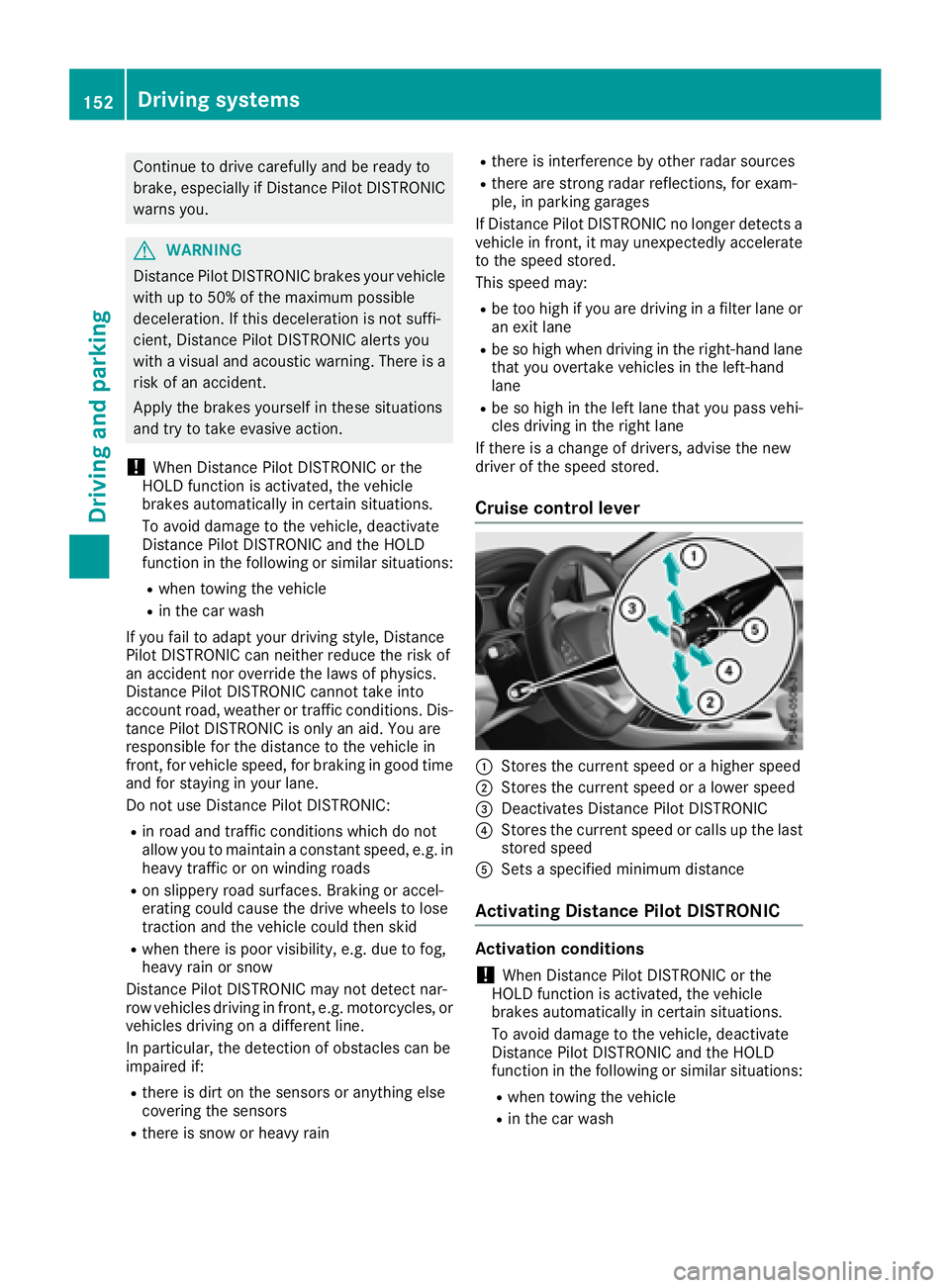
Cruise control lever
:St ore sthe curren tspeedorah igher speed
;Storesthe curren tspeedoral ower speed
=Deactivates Distance Pilot DI STRONIC
?Store sthe curren tspeedorc alls up thelast
store dspeed
ASet sas pecifie dminimum distance
Activating Distance Pilot DISTRONIC
Activation conditions
!When Distance Pilot DI STRONICort he
HOLD function isactivated, th evehicle
brakes automaticall yincertain situations.
To avoid damag etothevehicle ,deactivate
Distance Pilot DI STRONICa nd theHOLD
function in th efollowin gors imilar situations:
Rwhen towing th evehicle
Rin th ecar wash
152Driving systems
Driving and parking
Page 163 of 326
Selecting Sport mode
The firmer settingofthe suspension tuning in
the Sport drive program ensures even better
contact with the road. Select this drive program
when employing asporty driving style, e.g. on
winding countryr oads.
XPress DYNAMICS ELECT button (Ypage 128)
as many times as necessary until the Sport
drive program is selected.
Parking Assist PARKTRONIC
Important safety notes
Parking Assist PARKTRONIC is an electronic
parking aid with ultrasound. It monitor sthe area
around your vehicle using six sensors in the
front bumper and six sensors in the rear
bumper. Parking Assist PARKTRONIC visually
and audibly indicates the distance between your
vehicle and an object.
Parking Assist PARKTRONIC is only an aid. It is
not areplacement for your attention to your
immediate surroundings. You are always
responsible for safe maneuvering, parking and
exiting aparking space. Make sure that there
are no persons, animals or object sinthe maneu-
vering area while maneuvering and parking in/
leaving parking spaces.
!When parking, pay particular attention to
object sabove or below the sensors, such as
flower pots or trailer drawbars. Parking Assist
PARKTRONIC does not detect such objects
when they are in the immediate vicinity of the vehicle. You could damage the vehicle or the
objects.
The sensors may not detect snow and other
object sthat absorb ultrasonic waves.
Ultrasonic sources such as an automatic car
wash, the compressed-air brakes of atruck or
ap neumatic drill could cause Parking Assist
PARKTRONIC to malfunction.
Parking Assist PARKTRONIC may not function
correctly on uneven terrain.
Parking Assist PARKTRONIC is activated auto-
matically when you:
Rswitch on the ignition
Rshift the transmission to position h,kor
i
Rrelease the electric parking brake Parking Assist PARKTRONIC is deactivated at
speeds above 11 mph (18 km/h). It is reactiva-
ted at lower speeds.
Range of the sensors
General notes
Parking Assist PARKTRONIC does not take into
account obstacles located:
Rbelow the detection range, e.g. people, ani-
mals or objects.
Rabove the detection range, e.g. overhanging
loads, tail section
sorloading ramps of trucks.
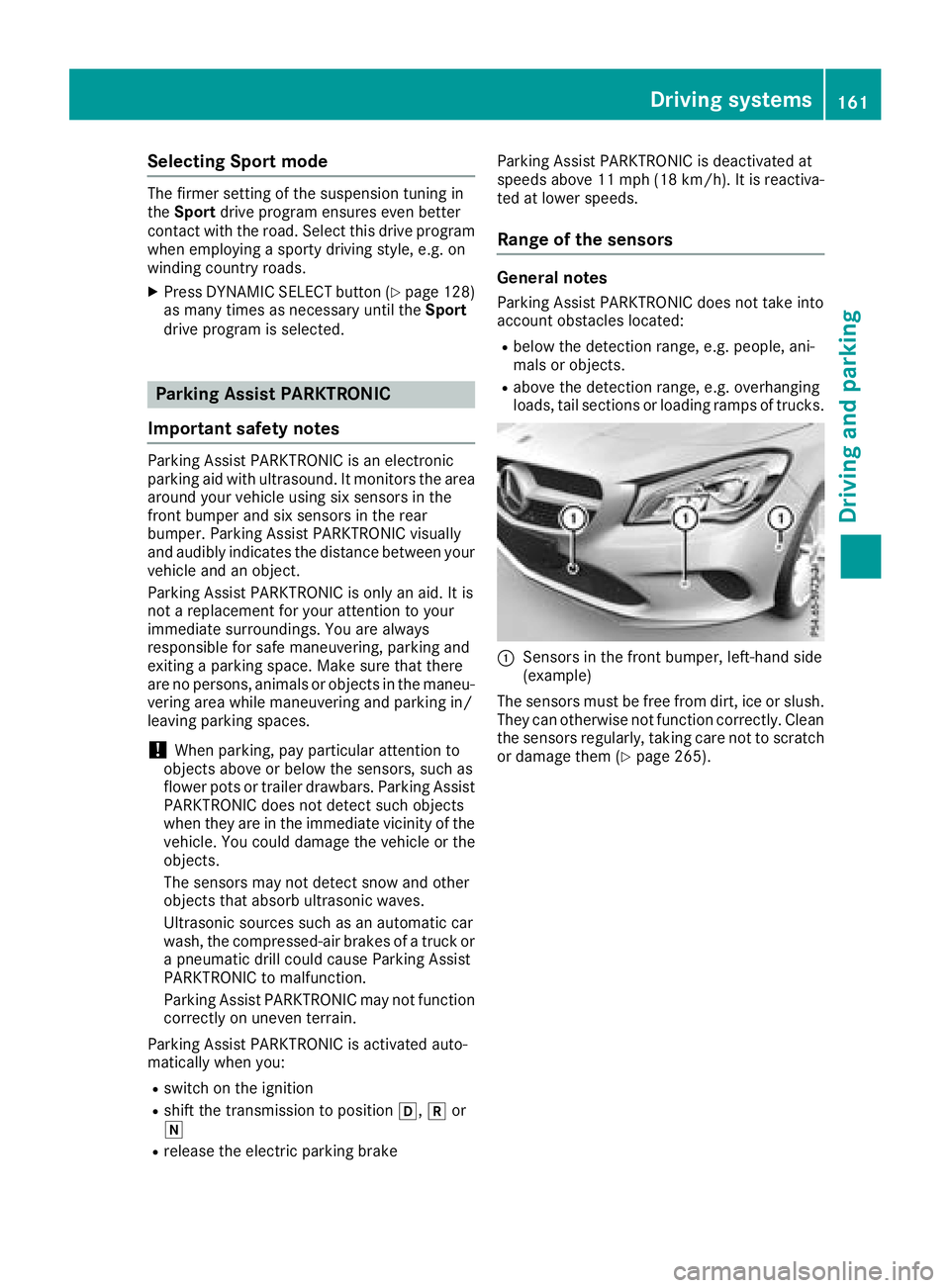
:Sensors in the front bumper, left-hand side
(example)
The sensors must be free from dirt, ice or slush.
They can otherwise not function correctly. Clean
the sensors regularly,t aking care not to scratch
or damage them (
Ypage 265).
Driving systems161
Driving and parking
Z
Page 164 of 326
Range
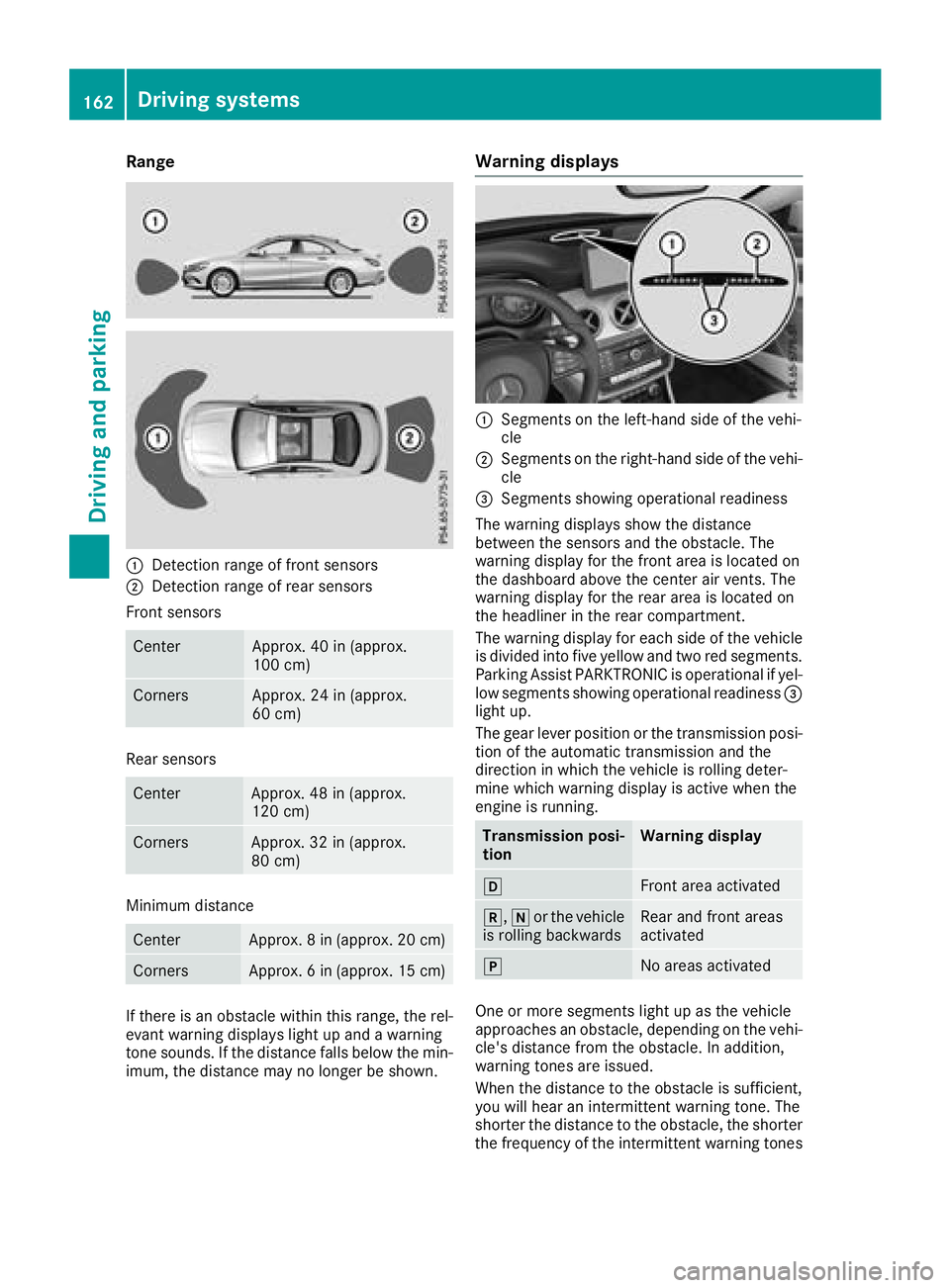
:Detection rangeoffront sensors
;Detection rang eofrearsensors
Front sensors
CenterApprox. 40 in (approx.
100 cm)
CornersApprox. 24 in (approx.
60 cm)
Rear sensors
CenterApprox. 48 in (approx.
120 cm)
CornersApprox. 32 in (approx.
80 cm)
Minimum distance
CenterApprox. 8in(ap prox. 20 cm)
CornersApprox. 6in(ap prox. 15 cm)
If there is an obstacl ewithin this range, the rel-
evant warning display slight up and awarning
tone sounds. If the distance falls below the min-
imum, the distance may no longer be shown.
Warning displays
:Segments on the left-hand sid eofthe vehi-
cle
;Segments on the right-hand sid eofthe vehi-
cle
=Segments showing operationalr eadiness
The warning display sshowt he distance
between the sensors and the obstacle. The
warning display for the front are aislocated on
the dashboard above the center ai rvents. The
warning display for the reara reaisl ocated on
the headliner in the rearc ompartment.
The warning display for each sid eofthe vehicle
is divided into five yellow and two red segments.
Parking Assist PARKTRONIC is operationalify el-
low segments showing operationalr eadiness=
light up.
The gea rlev er position or the transmissio nposi-
tion of the automatic transmissio nand the
direction in which the vehicle is rolling deter-
mine which warning display is active whe nthe
engine is running.
Transmission posi-
tionWarning display
hFront are aactivated
k, ior the vehicle
is rolling backwardsRear and front areas
activated
jNo areas activated
One or more segments light up as the vehicle
approaches an obstacle, depending on the vehi-
cle's distance from the obstacle. In addition,
warning tones are issued.
Whent he distance to the obstacl eissufficient,
yo uw illh earani ntermittent warning tone. The
shorter the distance to the obstacle, the shorter
the frequency of the intermittent warning tones
162Drivings ystems
Drivingand parking
Page 165 of 326
becomes.When the minimum distance is
reached, you hear acontinuous warning tone.
Deactivating or activating Parking
Assist PARKTRONIC
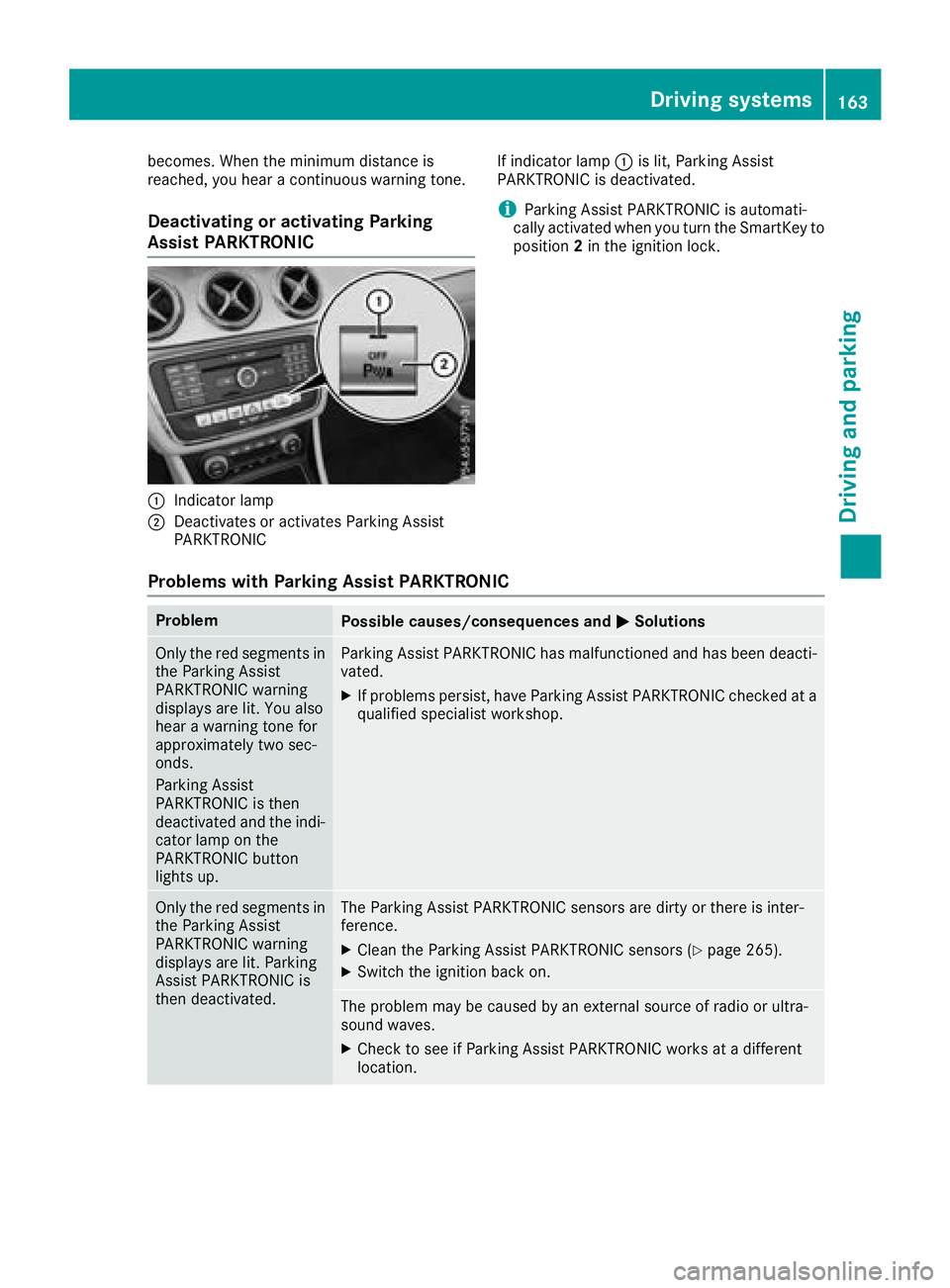
:Indicator lamp
;Deactivates or activates Parkin gAssist
PARKTRONIC If indicator lamp
:is lit, Parkin gAssist
PARKTRONI Cisd eactivated.
iParkin gAssist PARKTRONI Cisautomati-
cally activated when you turn the SmartKey to
position 2in the ignition lock.
Problems with Parking Assist PARKTRONIC
ProblemPossible causes/consequences and MSolutions
Only the red segments in
the ParkingAssist
PARKTRONI Cwarning
displays are lit. You also
hear awarning ton efor
approximately two sec-
onds.
Parkin gAssist
PARKTRONI Cisthen
deactivated and the indi-
cator lamp on the
PARKTRONI Cbutton
lights up.Parkin gAssist PARKTRONI Chas malfunctioned and has been deacti-
vated.
XIf problems persist,h ave ParkingAssist PARKTRONI Cchecked at a
qualified specialist workshop.
Only the red segments in
the Parkin gAssist
PARKTRONI Cwarning
displays are lit. Parking
Assist PARKTRONI Cis
then deactivated.The Parkin gAssist PARKTRONI Csensor sare dirty or ther eisinter-
ference.
XClean the Parkin gAssist PARKTRONI Csensor s(Ypage 265).
XSwitchthe ignition back on.
The problem may be caused by an external source of radio or ultra-
sound waves.
XCheck to see if Parkin gAssist PARKTRONI Cworks at adifferent
location.
Driving systems163
Driving and parking
Z
Page 174 of 326
Activating ATTENTION ASSIST
XActivateATTEN TION ASSIST usin gthe on-
boar dcom puter (Ypage 185).
The system determine sthe attention level of
th ed river depending on th esetting selected:
Standard
selected: th esensitivit ywithw hich
th es ystem determine sthe attention level is set
to normal.
Sensitive
selected: th esensitivit yisset
higher. The attention level detecte dbyAttention
Assis tisadapted accordingly and th edriver is
warned earlier .
When ATTENTION ASSIST is deactivated, th e
é symbol appear sinthemultifunction dis-
play in th eassistanc egraphic display.
When ATTENTION ASSIST has been deactivated,
it is automatically reactivated after th eengine
has been stopped. The sensitivit yselected cor-
responds to th elast selection activated (stand -
ard/sensitive).
Warn ing in th emultifunction display
If fatigue or increasing lapse sinconcentratio n
are detected, awarning appear sinthemulti-
function display: ATTENTION ASSIST
TakeaBreak!.
In addition to th emessage shown in th emulti-
function display, you will then hear awarning
tone .
XIf necessary, tak eabreak.
XConfir mthemessage by pressing th ea
butto nont hesteering wheel.
On lon gjou rneys, tak eregular breaks in goo d
time to allow yourself to res tproperly. If you do
no ttak eab reak and ATTENTION ASSIST still
detects increasing lapse sinconcentration, you
will be warned again after 15 minute satthe
earliest .This will only happen if ATTEN-
TIO NA SSIS Tstill detects typical indicators of
fatigue or increasing lapse sinconcentration.
Vehicles wit hthe COMAND multimedi asys-
tem :if aw arning is output in th emultifunction
display, aservic estation search is performed in
th em ultimedia system. You can select aservic e
station and navigation to this servic estation will
then begin. This function can be activated or
deactivated in th emultimedia system; see th e
Digital Operator' sManual.
Lan eTracking package
Gene raln otes
The Lan eTracking packag econsists of Blind
Spot Assis t(Ypage 172) and Lan eKeepin g
Assis t(Ypage 174).
Blind Spot Assist
Generalnotes
Blind Spot Assis tmonitors th eareas on either
side of th evehicl ethata re no tvisible to th e
driver wit htwo lateral ,rear-facin gradar sen -
sors. Awarning display in th eexter iorm irror s
draw syour attention to vehicles detecte dinthe
monitore darea. If you then switch on th ecor-
respondin gturns ignal to chang elane, you will
also receiv eanoptical and audible warning .
Blind Spot Assis tsupport syou from aspee dof
approximately 20 mph (30 km/h).
Important safety notes
GWARNIN G
Blind Spot Assis tdoes no treac tto:
Rvehicles overtake ntoo closely on th eside ,
placing them in th eblinds pota rea
Rvehicles whic happroac hwithal argespee d
differential and overtake your vehicl e
As aresult ,Blind Spot Assis tmay no tgive
warning sinsuchs ituations. There is arisko f
an accident.
Always observ ethe traffic condition scare-
fully, and maintai nasafel ateral distance.
Blind Spot Assis tisonlyana id. It may fail to
detec tsom evehicles and is no substitut efor
attentive driving. Always ensur ethatthe re is
sufficien tdistanc etotheside for other road
user sand obstacles.
iUS Ao nly:
This device has been approve dbytheFCC as
a" Vehicular Radar System". The radar sensor
is intended for use in an automotive radar
system only. Removing, tampering with, or
altering th edevice will voi dany warranties,
and is no tpermitte dbytheFCC. Do no ttam -
per with, alter, or use in any non-approve d
way.
172Driving systems
Driving and parking
Page 175 of 326
Any unauthorized modification to thisdevice
could voidt he user’sauthority to operate the
equipment.
Radar sensors
The rada rsensors for Blind Spo tAssist ar einte-
grated into the rea rbum per. Make sure thatt he
bumpers ar efreef rom dirt, ice or slush. The
sensors must not be covered ,for exampl eby
cycle racks or overhanging loads. Following a
severe impact or in the event of damage to the
bumpers, have the functio nofthe rada rsensors
checked at aquali fied specialist workshop.
Blind Spo tAssist maynol ongerw orkp roperly.
Monitorin grang eoft he sensors
In particular, the detection of obstacle scan be
impaired if:
Rther eisd irtont he sensors or anything else
covering the sensors
Rther eisp oorvisibility ,e.g.d ue to fog ,heavy
rain or snow
Ran arrow vehicl etraveling in front, e.g .a
motorbike or bicycle
Rthe roadh asver yw idel an es
Rthe roadh asnarrow lanes
Ryoua renot driving in the middl eofthe lane
Rtherearebarriers or othe rroadb oundaries
Vehicles in the monitoring range ar ethen not
indicated.
Blind Spo tAssist monitors the area up to 10 ft
(3 m) behind your vehicl eand directl ynext to it.
If the lanes ar enarrow,v ehicles driving in the
lane bey
ond the lane next to your vehicl
emaybe
indicated,e specially if the vehicles ar enot driv-
ing in the middl eoftheirlan e. Thi smaybe the
cas eift he vehicles ar edriving on the inne rside
of thei rlan e.
Due to the nature of the system:
Rwarning smaybe issued in error when driving
close to crash barriers or similar solid lane
borders.
Rwarning smaybe interrupte dwheny ou are
driving alongsid eparticularly long vehicles,
such as trucks, for aprolongedt ime.
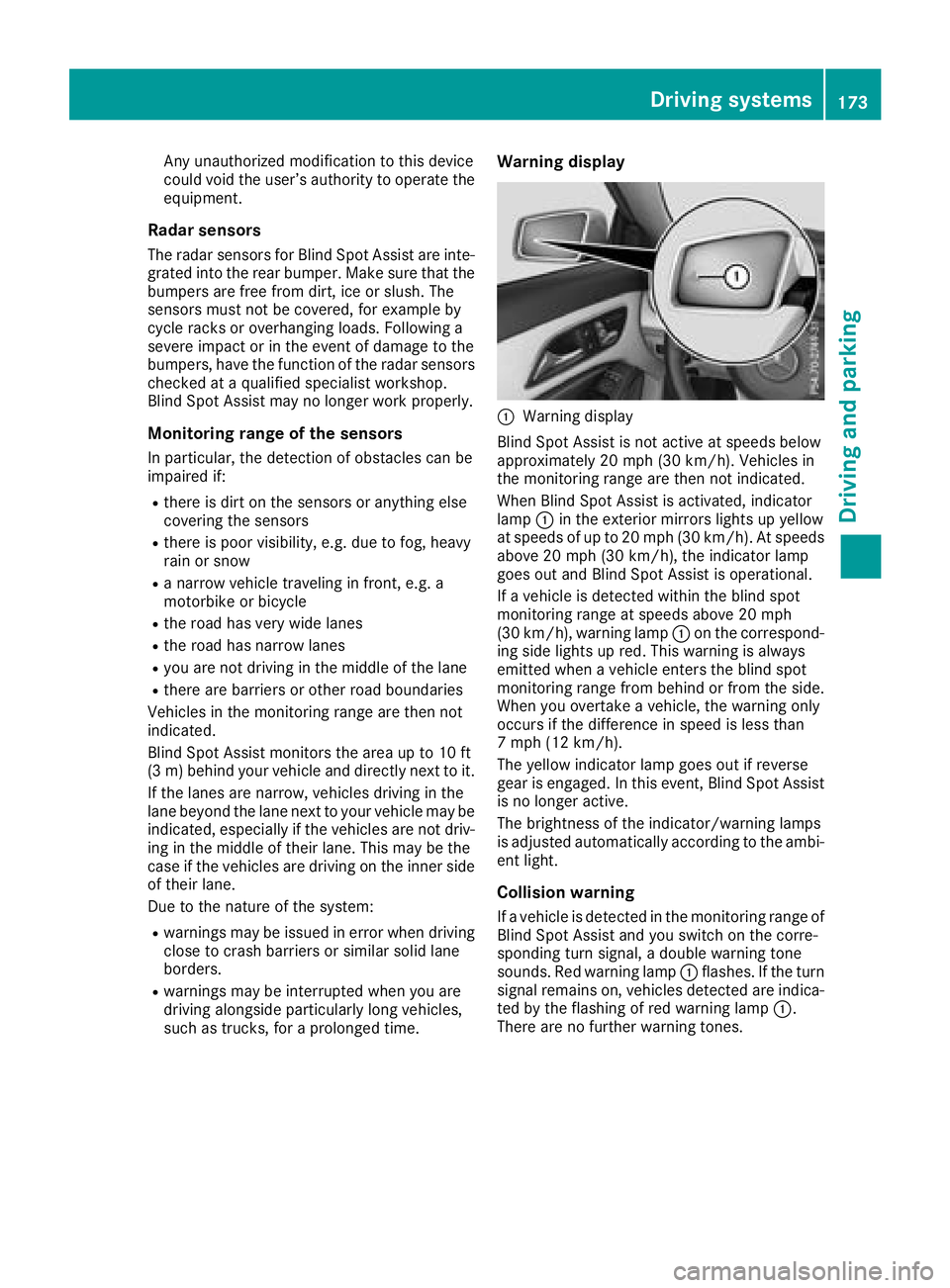
Warning display
:Warning display
Blind Spo tAssist is not active at speed sbelow
approximately20m ph (30 km/h). Vehicles in
the monitoring range ar ethen not indicated.
Whe nBlind Spo tAssist is activated,i ndicator
lamp :in the exterio rmirrors lights up yellow
at speed sofupto20m ph (30 km/h). At speeds
above 20 mph (30 km/h), the indicator lamp
goe soutand Blind Spo tAssist is operational.
If av ehicl eisd etectedw ithint he blind spot
monitoring range at speed sabove 20 mph
(30 km/h), warning lamp :on the correspond-
ing side lights up red .Thisw arning is always
emitted when avehicl eenters the blind spot
monitoring range from behind or from the side.
Whe nyou overtake avehicle, the warning only
occurs if the difference in speed is less than
7m ph (12 km/h).
The yellow indicator lamp goe soutif reverse
gear is engaged .Inthise vent, Blind Spo tAssist
is no longera ctive.
The brightness of the indicator/warning lamps
is adjusted automaticall yaccording to the ambi-
ent light.
Collisio nwarning
Ifav ehicl eisd etectedint he monitoring range of
Blind Spo tAssist and yo uswitch on the corre-
sponding turn signal, adouble warning tone
sounds. Re dwarning lamp :flashes. If the turn
signalr emains on, vehi
cles detecteda
reindica-
ted by the flashing of red warning lamp :.
There ar enofurtherw arning tones.
Driving systems173
Driving an dparking
Z
Page 178 of 326
Important safety notes
GWARNING
If you operate information systems and com-
munication equipmen tintegrate dinthevehi-
cle when driving ,you may be distracte dfrom
th et raffic situation .You could also lose con-
trol of th evehicle. Ther eisariskofana cci-
dent.
Only operate this equipmen twhen th etraffic
situation permits. If you are no tsuret hatthis
is possible ,park th evehicl epayin gattention
to traffic condition sand operate th eequip-
men twhen th evehicl eiss tationary.
You must observ ethe legal requirements for th e
country in whic hyou are currentl ydriving when
operating th eon-bo ard computer.
GWARNIN G
If th einstrumen tcluste rhas faile dormal-
functioned, you may no trecognize function
restriction sinsystems relevan ttosafety. The
operating safet yofyour vehicl emay be
impaired .Ther eisar iskofana ccident.
Drive on carefully. Hav ethe vehicl echecked
at aq ualified specialist workshop immedi-
ately.
The on-board computer only shows message sor
warning sfromc ertai nsystems in th emultifunc-
tion display. You should therefor emakes ure
your vehicl eisoperating safely at all times .
If th eoperating safet yofyour vehicl eis
impaired ,pull ove rassoonasitiss afetodos o.
Contac taqualified specialist workshop.
Fo rano verview, see th einstrumen tpanel illus-
tration (
Ypage 33).
Display sand operation
Instrumen tcluster lighting
The ligh tsensor in th einstrumen tcluste rauto -
matically control sthe brightness of th emulti-
function display. In daylight, th edisplays in th e
instrumen tcluste rare no tilluminated. The lighting in th
einstrumen tcluster, in th edis-
plays and th econtrols in thevehicl einterior can
be adjusted usin gthe brightness control knob.
The brightness control knob is locate donthe
botto mleftoft heinstrumen tcluste r
(
Ypage 33).
XTurn th ebrightness control knob clockwise or
counter-clockwise.
If th eligh tswitch is set to th eÃ, Tor
L position ,the brightness is dependen t
upon th ebrightness of th eambien tlight.
Speedometer with segments
The speedometer is divided int osegments on
vehicles wit hDistance Pilot DISTRONIC.
The segments in th espeedometer indicat e
whic hspee drange is available.
RDistanc ePilot DISTRONI Cisactivated
(Ypage 151):
On eort wo segments in th eset spee drange
ligh tup.
RDistanc ePilot DISTRONI Cdetects avehicl ein
fron tmoving mor eslowly than th estored
speed:
The segments between th espee doft hevehi-
cle in fron tand th estoreds pee dligh tup.
Tachometer
!
Do no tdriveint heoverrevving range, as this
could damag ethe engine.
The red ban dinthetachometer indicates th e
engine's overrevving range.
The engin eislimite dwithin arange to protect
th ee nginew hen th ered ban disreached.
Outsidet emperatur edisplay
You should pay special attention to road condi-
tion swhen temperatures are aroun dfreezing
point.
Bea rinm indt hatthe outside temperature dis-
play indicates th etem perature measured and
does no trecord th eroad temperature.
The outside temperature display is in th emulti-
function display (
Ypage 179).
176Displaysand operation
On-boardc omputer and displays
Page 199 of 326
Display messagesPossible causes/consequences andMSolutions
The yellow!warning lamp lights up and th ered F (USAonly)
or ! (Canada only) indicator lamp flashes .
It is no tpossibl etoapply th eelectric parking brak emanually.
XShift th etransmission to position B.
XVisitaqualified specialist workshop .
$(USAonly)
J(Canada only)
Check Brake Fluid
Level
There is no tenough brak efluidint hebrak efluid reservoir .
Aw arning tone sounds. The $(USAonly) or J (Canada only)
warning lamp sintheinstrumen tcluste rmay also ligh tup.
GWARNIN G
The braking effec tmay be impaired.
There is ariskofana ccident.
XPull overand stop th evehicl esafely as soo naspossible, payin g
attention to roa dand traffic conditions. Do no tcontinue driving
under any circumstances.
XSecur ethe vehicl eagainst rollin gaway (Ypage 141).
XConsult aqualified specialist workshop .
XDo notadd brak efluid .This does no tcorrect them alfunction .
#
CheckBrakePadWear
The brak epads/linings hav ereached their wear limit.
XVisit aqualified specialist workshop .
G
Inoperative
Oneorm orem ain features of th embrace system are malfunctioning .
XVisitaqualified specialist workshop .
ActiveBrakeAssistFunctionsCurrentlyLimitedSee Opera‐tor's Manual
Active Brake Assis tistemporarily inoperative.
Possibl ecauses are:
RThe radar sensor system is temporarily inoperative, e.g. due to
electromagneti cradiation emitted by nearby TV or radi ostation sor
other source sofelectromagneti cradiation .
RThe system is outside th eoperating temperature range.
RThe on-boar dvoltag eistoolow.
Whe nthe causes state dabov enol onger apply, th edisplay message
disappears.
Active Brake Assis tisoperational again .
If th edisplay message does no tdisappear :
XPull overand stop th evehicl esafely as soo naspossible, payin g
attention to roa dand traffic conditions.
XSecur ethe vehicl eagainst rollin gaway (Ypage 141).
XRestart th eengine.
Active BrakeAssist :SystemInop‐erative
Active Brake Assis tisunavailable due to amalfunction .Situation -
dependen tbraking assistanc emay also hav efailed.
XVisit aqualified specialist workshop immediately.
Display messages197
On-boardc omputer andd isplays
Z
Page 200 of 326
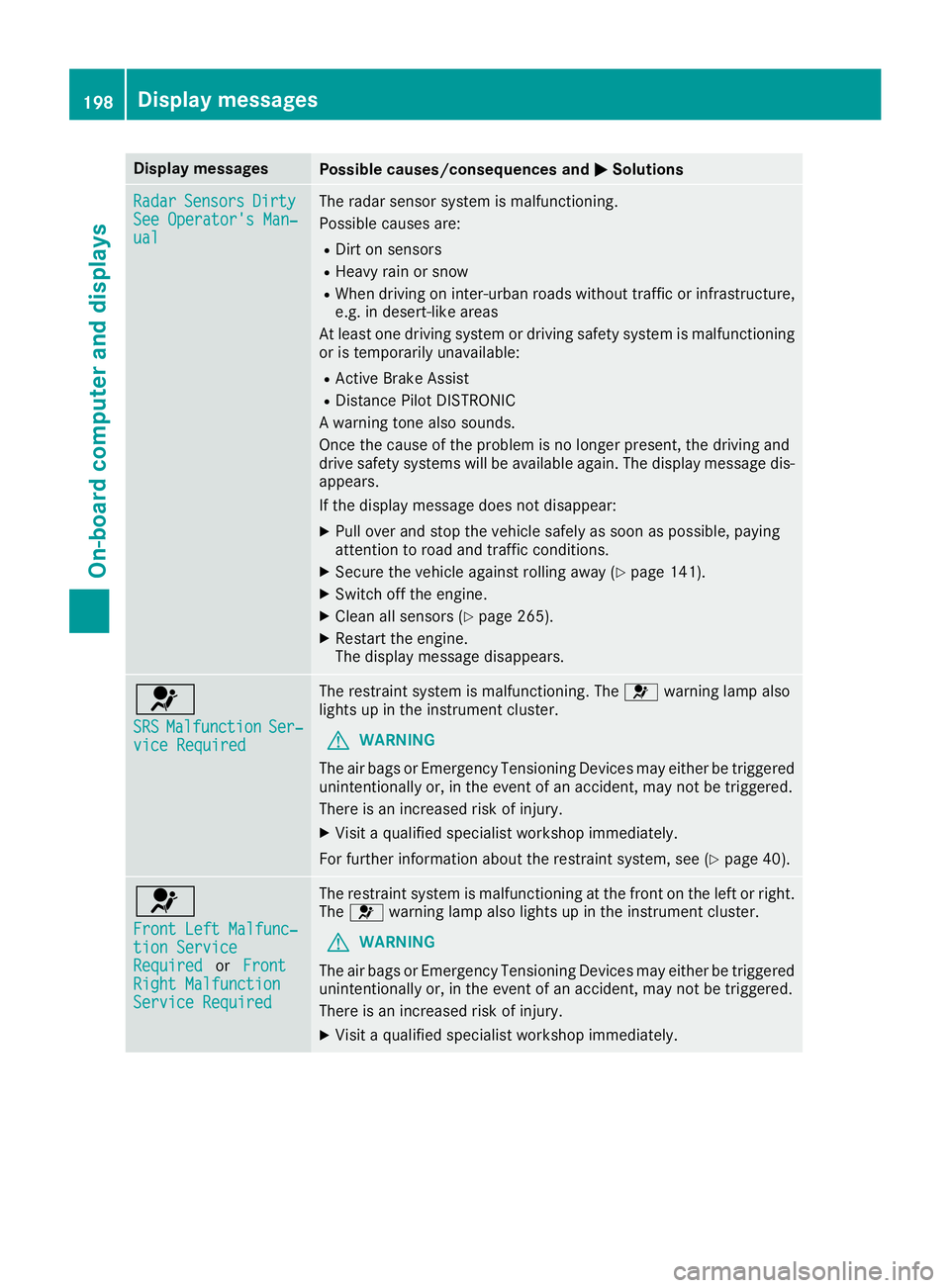
Display messagesPossible causes/consequences andMSolutions
RadarSensorsDirtySee Operator' sMan‐ual
The radar sensor system is malfunctioning .
Possibl ecauses are:
RDirt on sensor s
RHeavy rain or snow
RWhendrivin goni nter-urban roads without traffic or infrastructure,
e.g. in desert-like area s
At least on edrivin gsystem or drivin gsafet ysystem is malfunctioning
or is temporarily unavailable :
RActive Brake Assist
RDistancePilotD ISTR ONIC
Aw arning tone also sounds.
Once th ecaus eoft heproblem is no longer present, th edrivin gand
drive safet ysystems will be available again .The display message dis-
appears.
If th edisplay message does no tdisappear :
XPull overand stop th evehicl esafely as soo naspossible, payin g
attention to roa dand traffic conditions.
XSecur ethe vehicl eagainst rollin gaway (Ypage 141).
XSwitc hoff th eengine.
XClean all sensor s(Ypage 265).
XRestart theengine.
The display message disappears.
6
SRSMalfunctionSer ‐viceRequired
The restrain tsystem is malfunctioning .The 6 warning lamp also
lights up in th einstrumen tcluster.
GWARNIN G
The air bags or Emergency Tensioning Devices may either be triggered
unintentionally or, in th eevent of an accident, may no tbetriggered .
There is an increased ris kofinjury.
XVisit aqualified specialist workshop immediately.
Fo rfurther information about th erestrain tsystem, see (
Ypage 40).
6
Front Lef tMalfunc‐tionServic eRequiredorFrontRight MalfunctionServic eRequired
The restrain tsystem is malfunctioning at th efront on th eleftorr ight.
The 6 warning lamp also lights up in th einstrumen tcluster.
GWARNIN G
The air bags or Emergency Tensioning Devices may either be triggered
unintentionally or, in th eevent of an accident, may no tbetriggered .
There is an increased ris kofinjury.
XVisit aqualified specialist workshop immediately.
198Display messages
On-boardc omputer andd isplays
Page 206 of 326
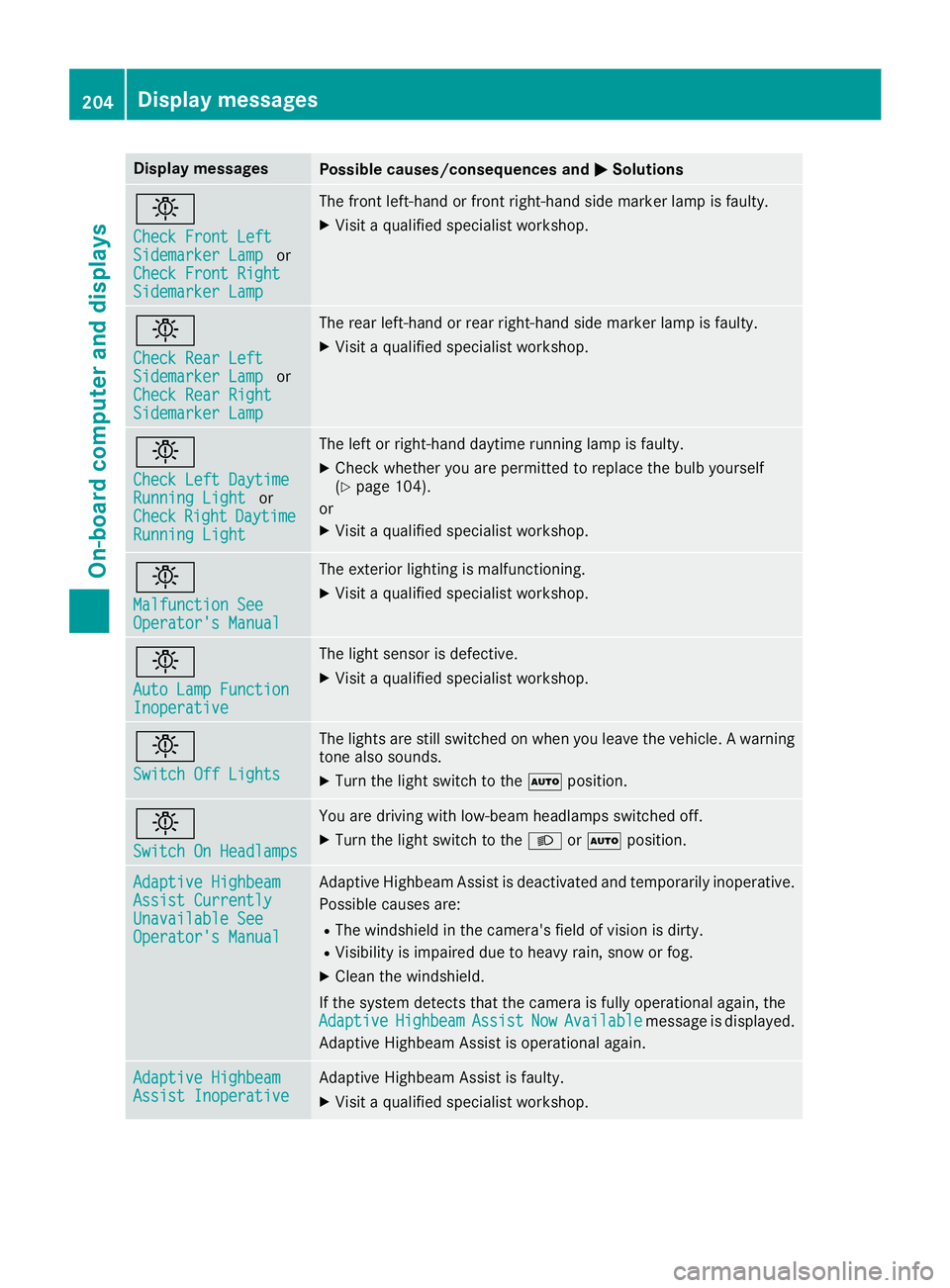
Display messagesPossible causes/consequences andMSolutions
b
Check Front LeftSidemarkerLampor
Check Front Right
Sidemarke rLamp
The fron tleft-han dorfrontright-hand side marke rlamp is faulty.
XVisit aqualified specialist workshop .
b
Check RearLeftSidemarke rLampor
Check Rea rRight
Sidemarke rLamp
The rear left-han dorrear right-hand side marke rlamp is faulty.
XVisit aqualified specialist workshop .
b
Check LeftDaytim eRunnin gLightor
CheckRightDaytim eRunningLight
The lef torright-hand daytime runnin glamp is faulty.
XChec kwhether you are permitte dtoreplace th ebulb yourself
(Ypage 104).
or
XVisit aqualified specialist workshop .
b
Malfunction SeeOperator'sManual
The exterio rlighting is malfunctioning .
XVisitaqualified specialist workshop .
b
AutoLampF unctionInoperative
The ligh tsensor is defective.
XVisit aqualified specialist workshop .
b
Switch Off Lights
The lights are still switched on when you leav ethe vehicle. Awarning
tone also sounds.
XTurn th eligh tswitch to th eà position .
b
Switch On Headlamps
You are drivin gwithl ow-beam headlamp sswitched off .
XTurn theligh tswitch to th eL orà position .
Adaptive HighbeamAssist CurrentlyUnavailable SeeOperator' sManual
Adaptive Highbea mAssistisd eactivated and temporarily inoperative.
Possibl ecauses are:
RThe windshield in th ecamera' sfield of vision is dirty.
RVisibilit yisimpaire ddue to heav yrain ,sno worf og.
XClean th ewindshield.
If th esystem detects that th ecamera is full yoperational again ,the
Adaptive
HighbeamAssistNowAvailablemessage is displayed.
Adaptive Highbea mAssistiso perational again .
Adaptive HighbeamAssist InoperativeAdaptive Highbea mAssistisf aulty.
XVisit aqualified specialist workshop .
204Display messages
On-boardcomputer andd isplays