display MERCEDES-BENZ CLA COUPE 2019 Service Manual
[x] Cancel search | Manufacturer: MERCEDES-BENZ, Model Year: 2019, Model line: CLA COUPE, Model: MERCEDES-BENZ CLA COUPE 2019Pages: 330, PDF Size: 52.4 MB
Page 169 of 330
R
tha tar epa rallel to the directi onoftra vel and
at leas t39.5 in(1.0 m)long erthan yourvehi-
cle
R at right angles tothe direc tionoftravel andat
least 39.5in (1.0 m) wider thanyourvehic le
When drivingat speeds below19mph
(30 km/h),you willsee park ingsymbol 0044asa
stat usindic atorinthe instrumen tclust er.When
a park ingspace hasbeen detected, anarrow
towar dsthe right orthe left also appears. By
default ,Ac tivePark ingAss istonly displays park-
ing spaces onthe front-pass engerside. Parking
spaces onthe drive r'sside aredisplayed as
soon asthe turn signalon the drive r'sside is
act ivate d.When parkingonthe drive r'sside,
this must remain activate dunt ilyou confirm the
use ofActivePark ingAssistbypress ingthe
0076 buttonon the multif unction steerin g
wheel. Thesystemautom atically dete rmin es
wheth erthe park ingspace isparallel oratright -
angles tothe direc tionoftravel.
A park ingspace isdisplayed whileyouaredriv-
ing past it,and untilyou areapprox imately50 ft
(15 m)away fromit.
Par king G
WARN
ING
If you leave thedrive r'sseat when thevehic le
is only being brakedbythe Park ingPack age
with rearview camer a,itcould rollaway:
R ifthe reisamalfun ction inthe syst emorin
the voltage supply
R ifthe elect ricalsysteminthe engin ecom -
part men t,the batt eryorthe fuses aretam-
pered with
R ifthe batt eryisdisco nnect ed
R ifthe vehic leisacc elerat ed,e.g. byavehi-
cle occ upant
There isarisk ofan acc ident .
Bef ore leavin gthe vehic le,always secureit
against rollingaway.
i If
Ac tivePark ingAssistdete ctsobst acles,
Ac tivePark ingAssistbrak esautom atically
while thevehic leispark ing.You arerespo n-
sible forbrak ingingood time. X
Stop the vehic lewhen thepark ingspace sym-
bol shows thedesire dpark ingspace inthe
inst rumen tclust er.
X Shif tthe transm ission toposit ion005E.
The Star tPark ingAssist? Star
tPark ingAssist?Yes: OK Yes:
OKNo: No:
0038 messageappears onthe multif unction
display.
X To cancel thepr ocedur e:press the0038
butt ononthe multif unction steerin gwheel or
pull away.
or X To park using Active Parking Assist: press
the 0076 buttononthe multif unction steerin g
wheel.
The Park ing Park
ingAssi st Assi
stActi ve Acti
veAcce lerate Acce
lerate
and Brake and
BrakeObse rveSurroundings Obse
rveSurroundings mes-
sage appears onthe multif unction display.
X Let goofthe multif unction steerin gwheel.
X Bac kup the vehic le,being ready tobrak eat all
tim es. When backingup, drive ataspeed
below approx imately6mph (10km/h).Oth -
erwise, ActivePark ingAss istwill becan celed.
Ac tivePark ingAssistbrak esthe vehic leto a
stan dstillwhen thevehic leapproac hesthe
rear border ofthe park ingspace.
Maneuv eringmay berequire din tigh tpark ing
spaces .
The Park ingAssistActi veSele ct Park
ingAssistActi veSele ct
D DObs
erve Obse
rveSurr oundings Surr
oundings messageappears on
the multif unction display.
X Shif tthe transm ission toposit ion005Bwhile
the vehic leisstat ionar y.
Ac tivePark ingAssistimmed iatelysteers in
the otherdirec tion.
The Park ing Park
ingAssi st Assi
stActi ve Acti
veAcce lerate Acce
lerate
and Brake and
BrakeObse rveSurroundings Obse
rveSurroundings mes-
sage appears onthe multif unction display.
i You
willachiev ethe best result sby waitin g
for the steerin gproc edure tocom plete before
pulling away.
X Dr ive forwards andbeready tobrak eat all
tim es.
Ac tivePark ingAssistbrak esthe vehic leto a
stan dstillwhen thevehic leapproac hesthe
fro ntborder ofthe park ingspace.
Maneuv eringmay berequire din tigh tpark ing
spaces .
The Park ingAssistActi veSele ctR Park
ingAssistActi veSele ctR
Obse rveSurroundings Obse
rveSurroundings messageappears on
the multif unction display. Driving
systems
167Driving andparking Z
Page 172 of 330
R
ifthe camer alens isdirt yor obst ructed.
Obser vethe noteson clean ing
(Y page 269)
R ifthe rear ofyour vehic leisdamaged. Inthis
case, havethecamer aposit ionand setting
chec kedataqualified specialist workshop.
The field ofvision andotherfunc tionsof the rear
view camer amay berest ricteddue toaddition al
acc essor iesonthe rear ofthe vehic le(e.g.
licen seplate holder ,rear bicyc lerack ).
i The
contrast ofthe display maybeaffec ted
by the sudden presenceof sunligh tor oth er
light sourc es,e.g. when exitingagarage. Pay
part icular attent ion inthis situat ion.
i If
usability issever elyrest ricted, e.g. due to
pixel errors,have thedisplay repairedor
replac ed.
Activa ting/d eactivating therea rview
cam era X
To acti vate:make surethattheSmar tKey is
in posit ion0048inthe ignit ionlock .
X Make surethattheActi vationbyRgear Acti
vationbyRgear
func tionisselec tedinthe multim ediasystem;
see theDigit alOperat or'sManual.
X En gage reversegear.
The area behin dthe vehic leisshown with
guide linesinthe multim ediasystemdisplay.
The image fromthe rear view camer ais avail-
able throughout themane uverin gproc ess.
To deact ivate:the rear view camer adeact i-
vate sif you shift thetransm ission to005D oraft er
drivin gfor wards ashor tdist ance.
The innersegme ntsof the warnin gindic atorare
displayed inred ifthe reisacom plete system
failure. Theindic atorlamp inthe PARK TRONIC
butt onlight sup.
If the syst emfails atthe rear ofthe vehic le:
R the rear segme ntsare shown inred when
back ingup.
R the rear segme ntsare hidden whendriving
for wards. Messa
gesinthemu ltim edia systemdis-
pla y The
rear view camer amay show adist orted view
of obst acles, showtheminc orre ctly or not atall.
The rear view camer adoes notshow objectsin
the followin gposit ions:
R very closeto the rear bumper
R under therear bumper
R in clos erang eabove thehandle onthe trunk
lid
! Obj
ectsnot atgroun dlevel mayappear to
be furt her away thantheyact ually are,e.g.:
R the bumper ofapark edvehic le
R the drawbar ofatrailer
R the ball couplin gof atrailer towhitch
R the rear sectionofan HGV
R aslant edpost
Use theguideline sonly fororien tation.
Appr oach objectsno furt her than thebott om-
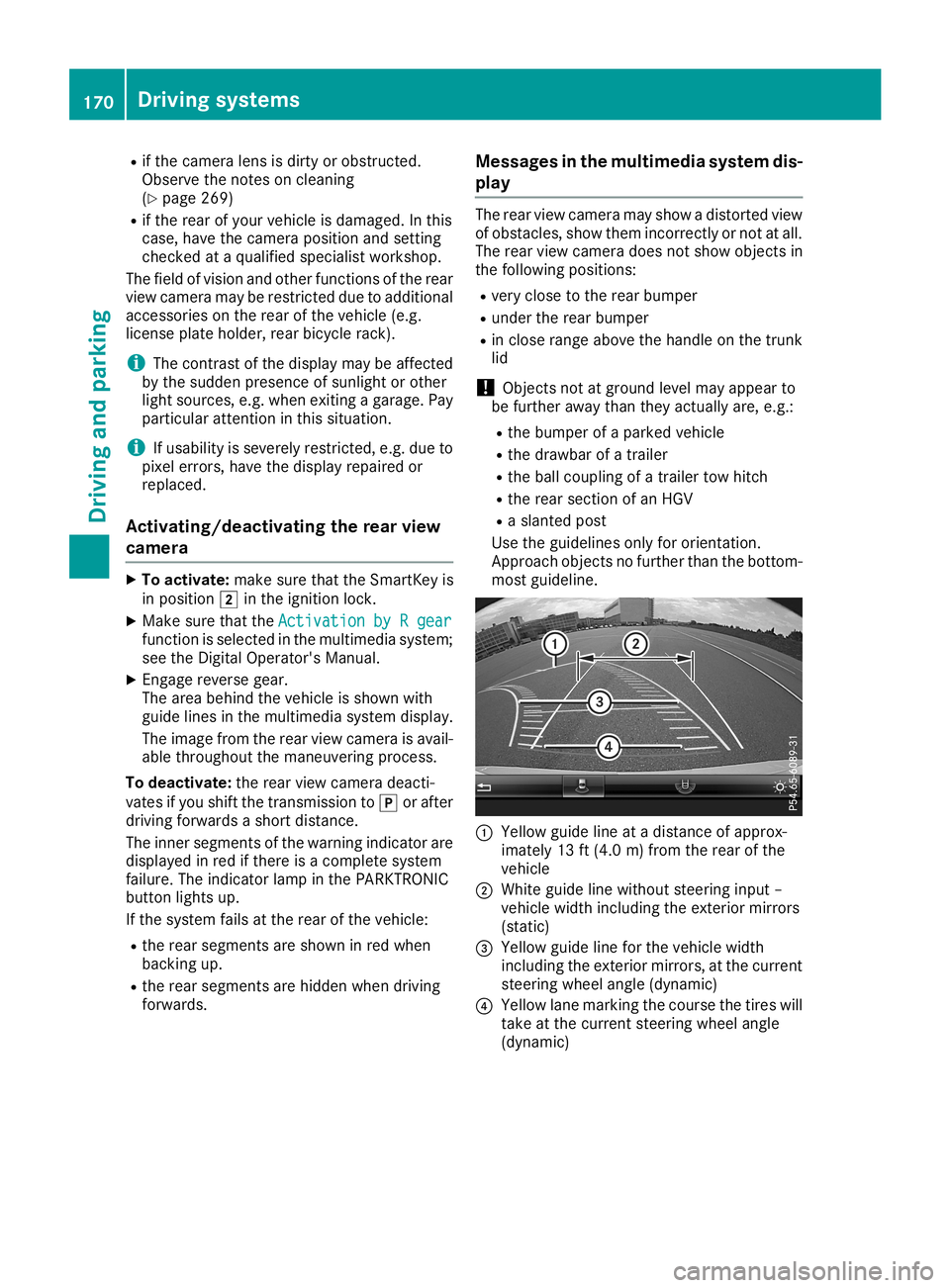
most guideline . 0043
Yellow guidelineatadist anceof approx -
imate ly13 ft(4. 0m) fromthe rear ofthe
vehic le
0044 Whit eguide linewitho utste erin ginput –
vehic lewidth including theexterior mirrors
(st atic )
0087 Yellow guidelineforthe vehic lewidth
inc luding theexterior mirrors, atthe curr ent
ste erin gwheel angle(dynamic )
0085 Yellow lanemark ingthe cour sethe tires will
tak eat the curr entsteerin gwheel angle
(dynamic ) 170
Driving
systemsDriving andparking
Page 173 of 330
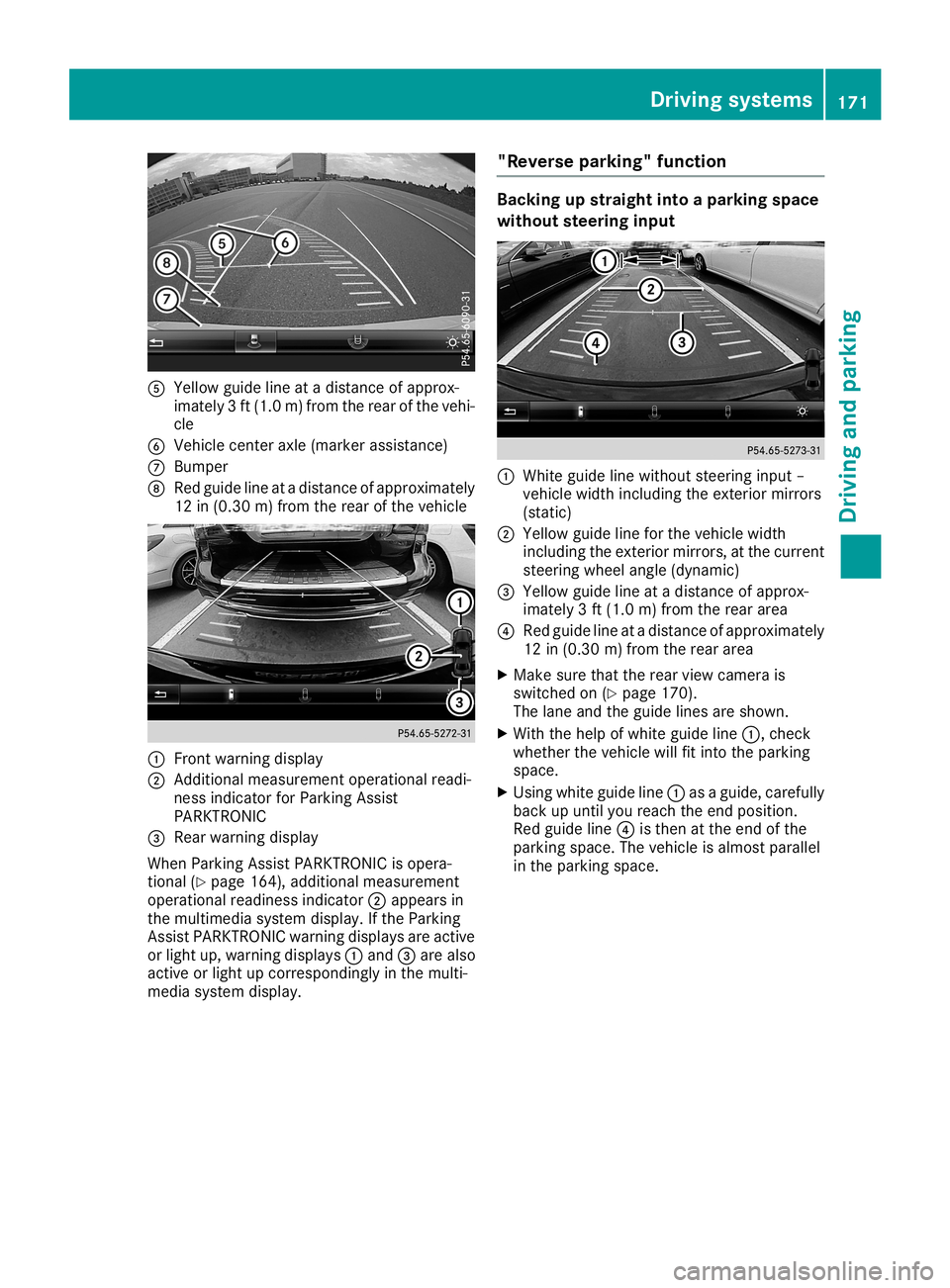
0083
Yellow guidelineatadistan ceofapprox -
imate ly3ft (1. 0m) from therear ofthe vehi-
cle
0084 Vehic lecen teraxle (mark erassist ance)
006B Bumper
006C Red guide lineatadistan ceofapprox imately
12 in(0.30m) from therear ofthe vehic le 0043
Frontwarnin gdisplay
0044 Addit ional measurem entoperat ionalreadi-
ness indicatorforPark ingAssist
PARKT RONIC
0087 Rear warnin gdisplay
When ParkingAssistPARKT RONIC isopera-
tion al(Y page 164),addition almeasurem ent
operat ionalreadin essindic ator0044appears in
the multim ediasyste mdisplay. Ifthe Park ing
Ass istPARKT RONIC warningdisplays areactive
or light up,warnin gdisplays 0043and 0087are also
act ive orlight upcor respon dinglyinthe multi-
media systemdisplay. "Rever
separking" funct ion Ba
cking upstraight intoapa rking space
withou tsteer inginpu t 0043
Whit eguide linewithout steerin ginput –
vehic lewidth including theexterior mirrors
(stat ic)
0044 Yellow guidelineforthe vehic lewidth
inc luding theexterior mirrors, atthe curr ent
ste erin gwheel angle(dynamic )
0087 Yellow guidelineatadistan ceofapprox -
imate ly3ft (1. 0m) from therear area
0085 Red guide lineatadistan ceofapprox imately
12 in(0. 30 m)from therear area
X Make surethattherear view camer ais
switc hedon(Ypage 170).
The lane andtheguide linesareshown .
X With thehelp ofwhite guide line0043,chec k
wheth erthe vehic lewill fitintothe park ing
space.
X Usin gwhite guide line0043asaguide, carefully
back upunt ilyou reach theend posit ion.
Red guide line0085isthe nat the end ofthe
park ingspace. Thevehic leisalmost parallel
in the park ingspace. Driving
systems
171Driving andparking Z
Page 175 of 330
Wide-ang
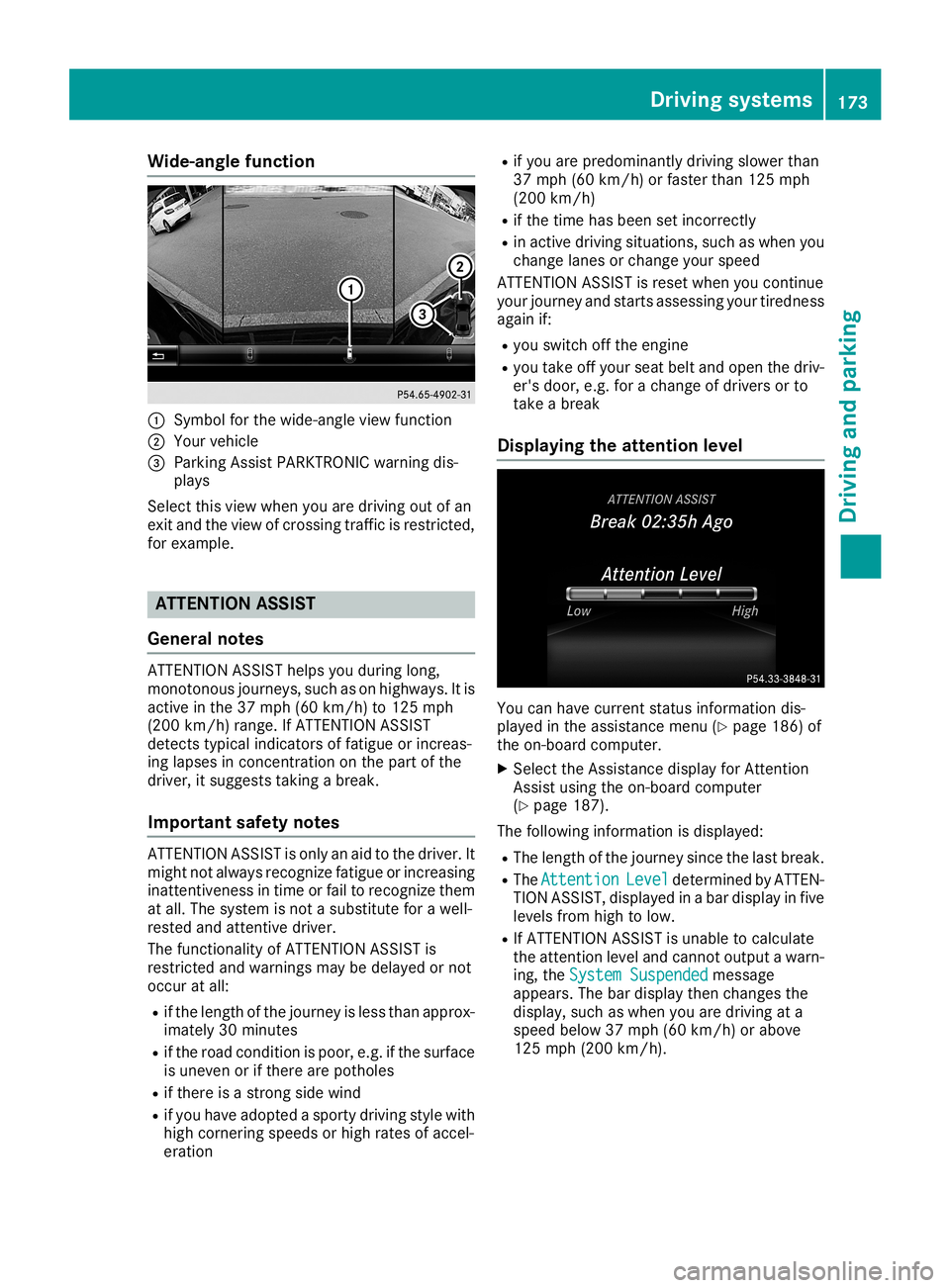
lefuncti on 0043
Symbo lfor the wide-angl eview function
0044 You rvehicl e
0087 Parki ngAssist PARKTR ONICwarning dis-
pla ys
Select thisview when youaredrivi ngout ofan
exit and theview ofcrossing trafficisrestricted,
for examp le. ATTENTION
ASSIST
Gene ralnote s ATTENTION
ASSISThelpsyou duringlong,
monotonous journeys,such ason high ways. Itis
active inthe 37mph (60km/h) to125 mph
(200 km/h) range.IfATTENTION ASSIST
detects typicalindica torsoffatigu eor increas -
ing lapses inconcentration onthe part ofthe
drive r,itsugg ests taking abrea k.
Important safetynotes ATTENTION
ASSISTisonly anaid tothe drive r.It
might notalwaysrecognize fatigueor increas ing
inattentivenes sin time orfail torecognize them
at all.The syste misnot asub stitute forawel l-
rested andattentive driver.
The functional ityofATTENTION ASSISTis
restricted andwarnings maybedelayed ornot
occur atall:
R ifthe length ofthe journey isless than approx-
ima tely 30minutes
R ifthe road conditio nis poor, e.g.ifthe surfa ce
is uneven orifthere arepothol es
R ifthere isastrong sidewind
R ifyou have adopted asporty drivingstyle with
high cornering speedsorhigh rates ofaccel -
erati on R
ifyou arepred omina ntlydrivingslow erthan
37 mph (60km/h) orfaster than125mph
(200 km/h )
R ifthe time hasbeen setincorrectly
R in active drivingsitua tions, suchaswhe nyou
change lanesor change yourspee d
ATTENTION ASSISTisreset whenyou continue
you rjourney andstarts assessing yourtirednes s
aga inif:
R you switch offthe engine
R you take offyou rsea tbel tand open thedriv-
er's door, e.g.forachange ofdrive rsor to
take abrea k
Di splayi ngthe attention level You
canhave current statusinforma tiondis-
pla yed inthe assi stance menu(Ypag e186) of
the on-board computer.
X Select theAssista ncedisplayforAttention
Assist using the on-board computer
(Y pag e187).
The followi nginforma tionisdisp layed:
R The length ofthe journey sincethelastbrea k.
R The Attenti on Attenti
onLevel Level
determi nedbyATTEN-
TION ASSIST, displayed inabar disp layinfive
leve lsfrom hightolow .
R IfATTENTION ASSISTisunab leto calcu late
the attention leveland cannot outputa wa rn-
ing, theSystem Suspended System
Suspendedmessa ge
app ears .The bardisp laythen changes the
disp lay,such aswhe nyou aredrivi ngata
spee dbel ow 37mph (60km/h )or abo ve
125 mph (200 km/h ). Driv
ingsyste ms
173Drivingand parking Z
Page 177 of 330
Any
unauthorized mod ificati ontothisde vice
cou ldvoi dthe user’ sau thor itytoopera tethe
eq uipme nt.
Radar sens ors
The rada rsens orsforBlind Spo tAssi stareinte -
gra ted into therearbu mpe r.Ma kesure tha tthe
bu mpe rsarefre efrom dirt, ice orslus h. The
sens orsmustnot becove red,for exa mpl eby
cyc leracks orove rhanging load s.Fol lowi ng a
sev ere impact orinthe eventofdama getothe
bu mpe rs,have the functio nof the rada rsens ors
che cked ataqu alifi ed spe cialist wo rksh op.
Bli nd Spo tAssi stma yno longe rwo rkpro perly.
Mon itorin grang eof the sens ors
In particu lar, the detecti onofobsta clescan be
imp aired if:
R ther eis dirt on the sens orsorany thing else
cove ringthesens ors
R ther eis po or vis ibility ,e.g .du eto fog ,hea vy
ra in or snow
R anar row vehicletrav eling infront, e.g.a
moto rbike orbicyc le
R the roadha sver ywi de lanes
R the roadha snar row lanes
R youar enot driving inthe middle of the lane
R ther ear eba rriers orothe rroa dbo und aries
Veh icles inthe moni toringrange arethen not
ind icated .
Bli nd Spo tAssi stmoni torsthearea up to10 ft
(3 m) behind your veh icleand directl ynext toit.
If the lanes arenar row ,veh icles driving inthe
la ne beyond the lane next toyour veh iclema ybe
ind icated ,esp ecially ifthe vehicles arenot driv-
ing inthe middle of thei rla ne. Thisma ybe the
cas eif the vehicles aredri ving onthe inne rsi de
of thei rla ne.
Due tothe natu reofthe system :
R wa rning sma ybe issu ed inerr orwh en driving
clo setocra shbarriers orsimil arsol idlane
bo rde rs.
R wa rning sma ybe inte rrupte dwh en youar e
dri ving alongs ide pa rticu larly long veh icles,
su ch astruc ks,forapro longe dtime . Warni
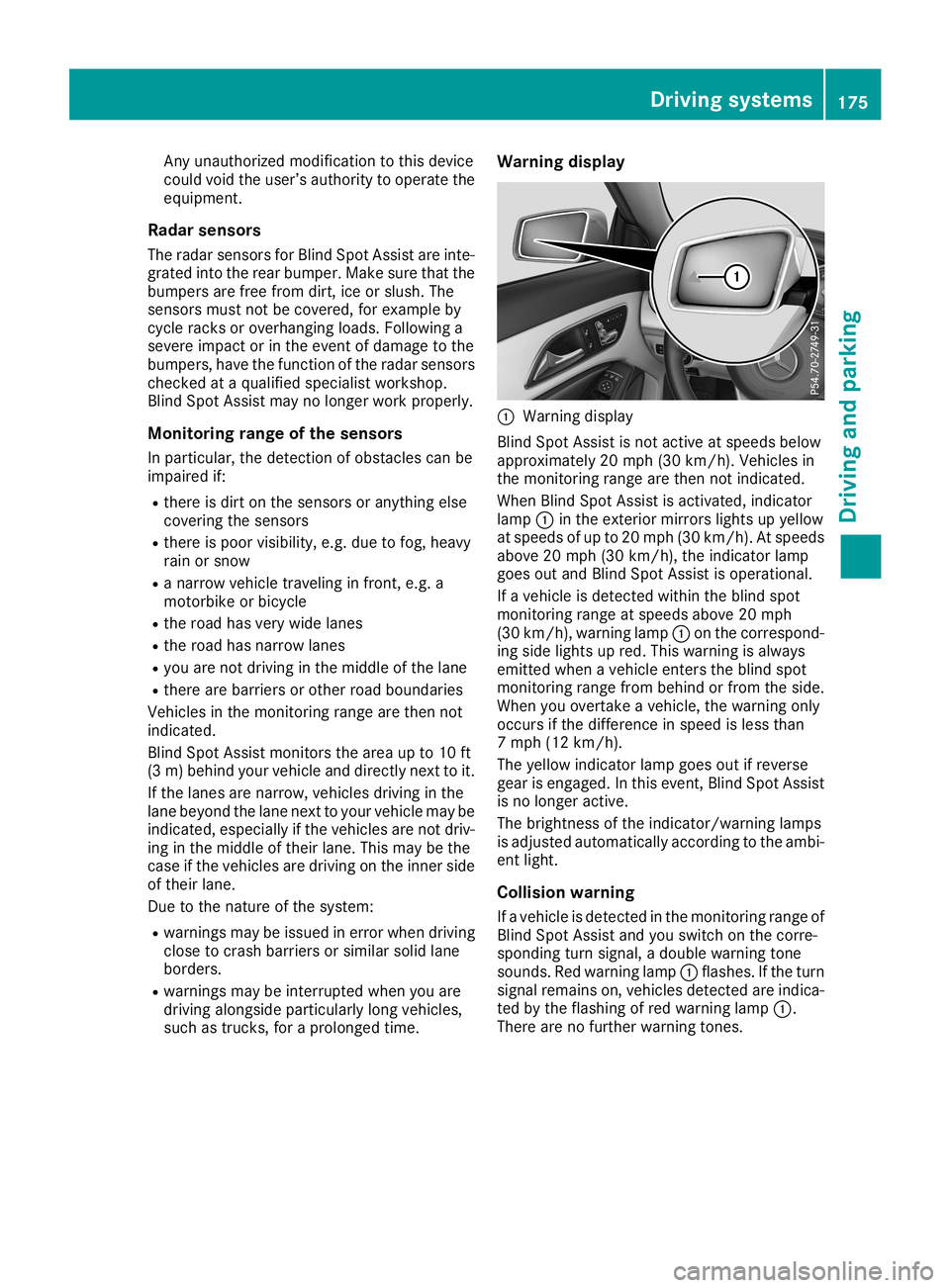
ngdisplay 0043
Warning displ ay
Bli nd Spo tAssi stisnot activeatspe edsbe low
ap pro xima tely20 mph (30km/h ).Veh icles in
the moni toringrange arethen notindicated .
Whe nBli nd Spo tAssi stisacti vated ,ind icator
la mp 0043inthe exte riormir rors lights upyellow
at spe edsof up to20 mph (30km/h ).At spe eds
ab ove 20mph (30km/h ),the indicator lamp
goe sou tand Blind Spo tAssi stisop era tional .
If aveh icleis de tecte dwi thi nthe blind spot
moni toringrange atspe edsab ove 20mph
(30 km/h ),wa rning lamp 0043onthe corr espond -
ing side lights upred .Thi swa rning isalwa ys
emi tted when aveh icleente rsthe blind spot
moni toringrange from behind orfrom theside .
Whe nyo uove rtake aveh icle, the warning only
occu rsifthe differ ence inspe edisless tha n
7 mph (12km/h ).
The yellow indicator lamp goesou tif rev ers e
ge ar iseng aged .In thi seve nt,Blind Spo tAssi st
is no longe racti ve.
The brightne ssofthe indicator/w arning lamps
is ad jus ted automa tically acco rding tothe ambi-
ent light.
Co llis io n wa rning
If aveh icleis de tecte din the moni toringrange of
Bli nd Spo tAssi stand yousw itch onthe corr e-
spo nding turn signa l,a do ublewa rning tone
sou nds. Redwa rning lamp 0043flashe s.Ifthe turn
si gna lrem ains on, vehicles detecte dar eind ica-
ted bythe flashi ng ofred warning lamp 0043.
The reareno furthe rwa rning tones. Dri
ving sys tems
175Dr ivi ng andparki ng Z
Page 181 of 330
There
isashort delay before achange inoutside
temperat ureappears inthe multifunct iondis-
play. Coolant
temperaturegauge G
WARNIN
G
Opening thehood when theengine isover-
heated orwhen thereisafire inthe engine
compart mentcould expose youtohot gases
or other service products. Thereisarisk of
injury.
Let anoverheated enginecooldown before
opening thehood. Ifthere isafire inthe
engine compart ment,keep thehood closed
and cont actthe fire department . !
A
display message isshown ifthe coolant
temperat ureistoo high.
If the coolant temperat ureisover 248‡
(120 †),donot cont inue driving. Theengine
will otherwise bedamaged.
The coolant temperat uregage isin the instr u-
ment cluster onthe right- hand side(Ypage 33).
The Hmarking inthe coolant temperat uregauge
correspon dstoacoolant temperat ureof
approximately 248‡(120 †).
Under normal operating conditionsandatthe
correc tcoolant level,thecoolant temperat ure
gauge mayrisetothe Hmarking. Opera
tingtheon-board computer
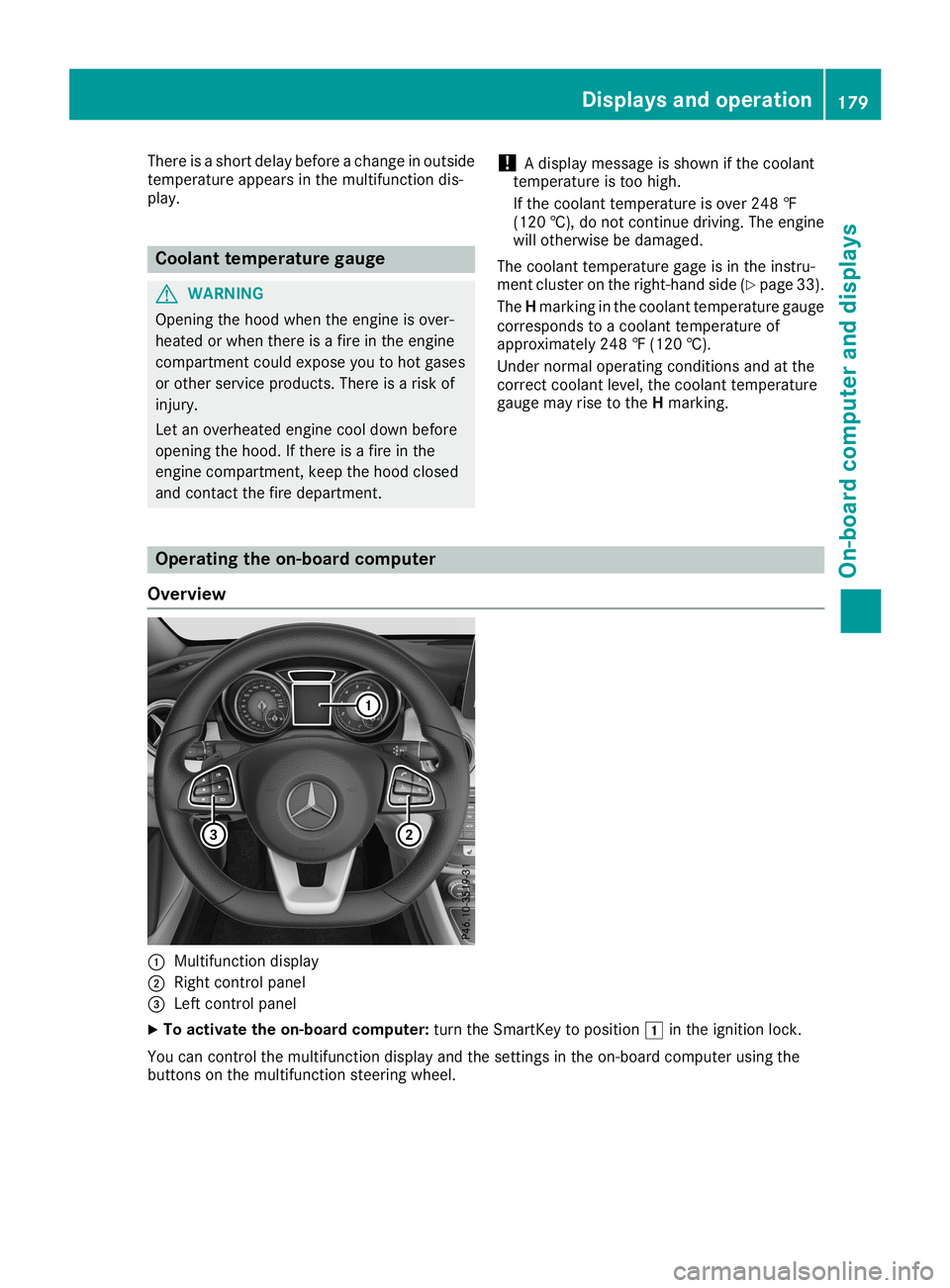
Overview 0043
Multifunct iondisplay
0044 Right controlpanel
0087 Left controlpanel
X To activat ethe on-board computer:turn theSmart Keytoposition 0047inthe ignition lock.
You cancont rolthe multifunct iondisplay andthesettings inthe on-board computer usingthe
button son the multifunct ionsteerin gwheel. Displays
andoperat ion
179On-board computerand display s Z
Page 182 of 330
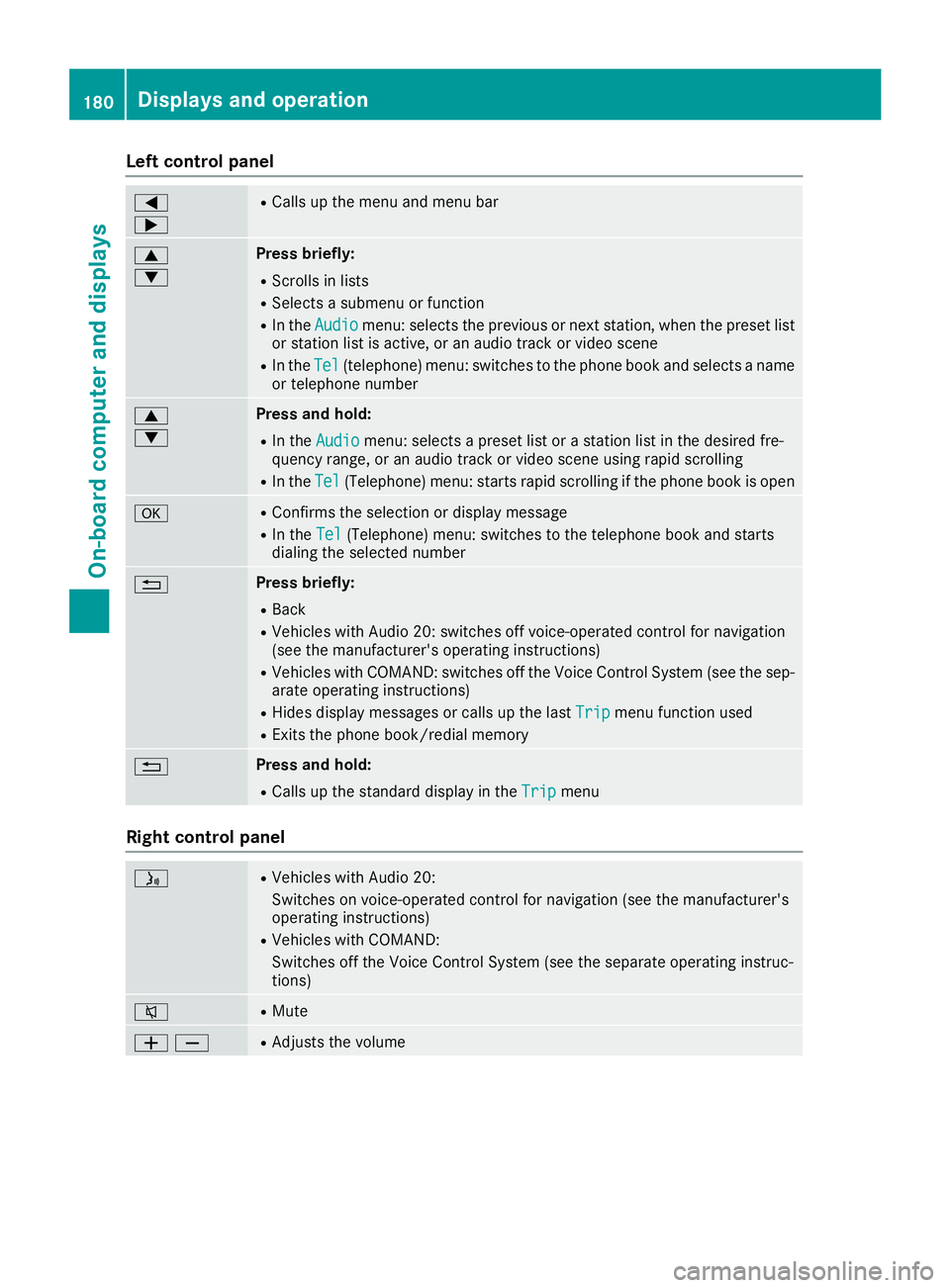
Left
contr olpa nel 0059
0065 R
Calls upthemen uand men ubar 0063
0064 Pr
ess briefly:
R Sc rolls inlist s
R Sele ctsa subme nuorfun ction
R In theAud io Aud
iomen u:selec tstheprev ious ornex tst atio n,when thepres etlist
or statio nlist isact ive, oran audio track orvideo scene
R IntheTel Tel
(telepho ne)men u:swit chesto thephon ebook andselec tsanam e
or telephon enum ber 0063
0064 Pr
ess and hold :
R In theAud io Aud
iomen u:selec tsapres etlist orast atio nlist inthedesir edfre-
quen cyran ge, oran audio track orvideo sceneusin grapid scrollin g
R In theTel Tel
(Telep hone)men u:start srapid scrollin gif th ephon ebook isopen 0076 R
Conf irmsth eselec tionor display message
R In theTel Tel
(Telep hone)men u:swit chesto thetel ephon ebook andstart s
dialin gth eselec tednum ber 0038 Pr
ess briefly:
R Bac k
R Vehic leswith Audio 20:swit chesoff voic e-operat edcon trol for nav igat ion
(see theman ufacturer'soper atingins truct ions)
R Vehic leswith COMA ND:swit chesoff theVoic eCont rolSyst em(see thesep-
arat eoper atingins truct ions)
R Hide sdisplay messages orcalls upthelast Trip Tri
pmen ufun ction used
R Exits thephon ebook /redial memory 0038 Pr
ess and hold :
R Calls upthest andar ddisplay intheTri p Tri
pmen u Righ
tcontr olpa nel 00E3 R
Vehic leswith Audio 20:
Swit cheson voic e-operat edcon trol for nav igat ion(see theman ufacturer's
oper atingins truct ions)
R Vehic leswith COMA ND:
Swit chesoff theVoic eCont rolSyst em(see thesepar ateoper atingins truc-
tio ns) 0063 R
Mut e 00810082 R
Adju ststhe volum e 18
0 Di
spl ays and operatio nOn-bo ard computer anddisplay s
Page 184 of 330
Trip
menu
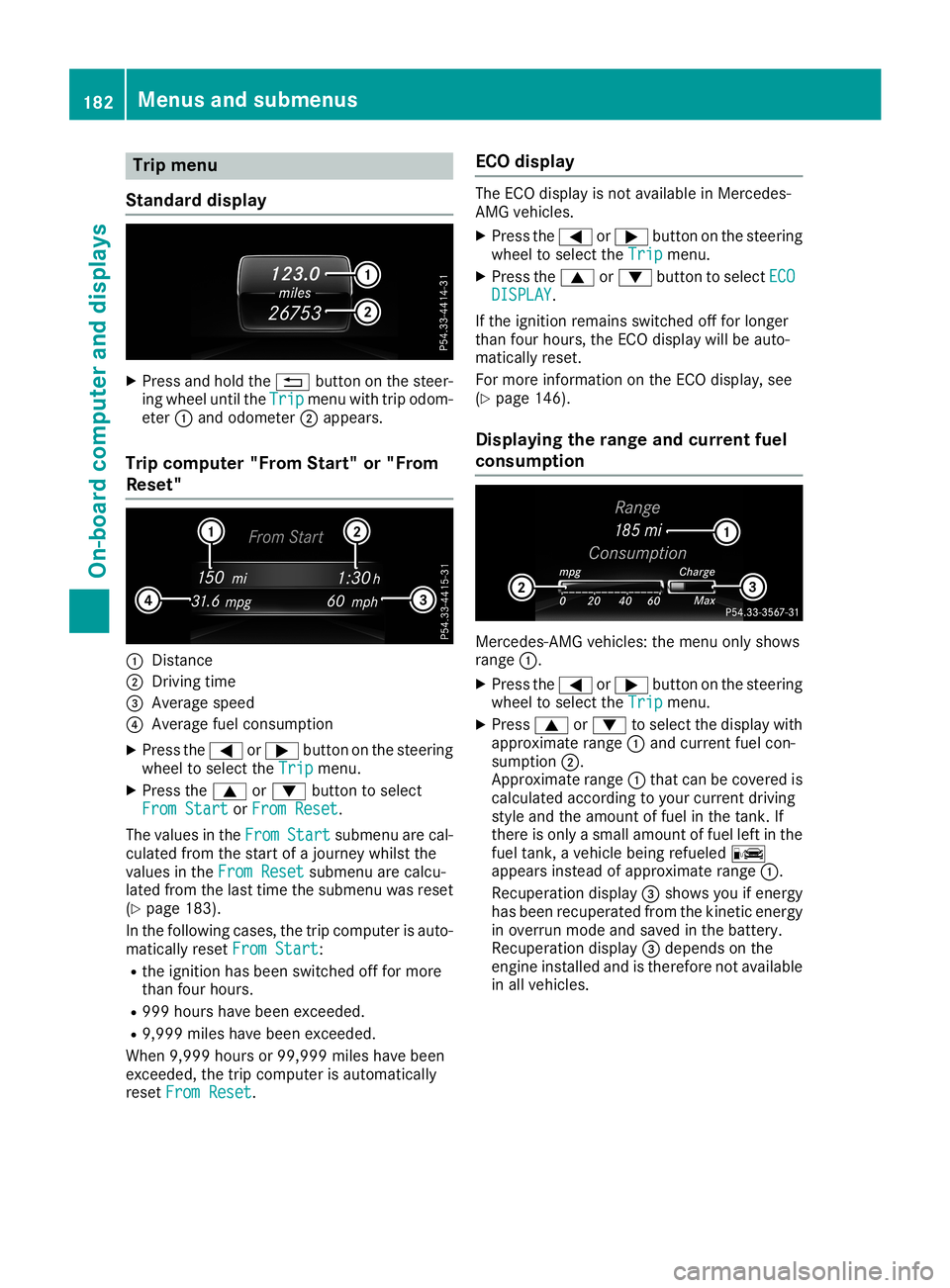
Stan dard display X
Pre ssand holdthe 0038 button onthe stee r-
ing wheelunti lthe Tri p Tri
pmenu with trip odom-
ete r0043 and odome ter0044appe ars.
Trip compute r"F rom Start" or"From
Res et" 0043
Distance
0044 Driv ingtime
0087 Aver agesp ee d
0085 Aver agefu el cons umption
X Pre ssthe 0059 or0065 button onthe stee ring
wh eelto sel ect the Trip Tri
pmenu .
X Pre ssthe 0063 or0064 button tosel ect
Fro mSta rt Fro
mSta rtorFro mRes et Fro
mRes et.
The values inthe From Fro
mSta rt Sta
rtsubme nuarecal -
cul ate dfro mthe startof ajou rney whilst the
va lues inthe FromRes et Fro
mRes etsubme nuarecal cu-
la ted fromthe last time thesubme nuwasres et
(Y page 183 ).
In the followi ng cas es,the trip comp uteris au to-
ma tica lly res etFro mSta rt Fro
mSta rt:
R the igniti onhasbe en switch edoff for mor e
tha nfou rhou rs.
R 999 hourshave been exce eded.
R 9,9 99 mileshave been exce eded.
Wh en9,9 99 hou rsor 99, 999 mileshave been
exce eded,the trip comp uteris au toma tically
res etFro mRes et Fro
mRes et. EC
Odis play The
ECO disp layis not availa bl e in Me rced es-
AMG vehicles.
X Pre ssthe 0059 or0065 button onthe stee ring
wh eelto sel ect the Trip Tri
pmenu .
X Pre ssthe 0063 or0064 button tosel ect ECO ECO
DIS PLAY DIS
PLAY.
If the igniti onrem ains switch edoff for longe r
tha nfou rhou rs,the ECO disp laywi llbe auto-
ma tica lly res et.
For mor einfo rma tionon the ECO disp lay, see
(Y page 146 ).
Di spl aying the rang eand curren tfue l
co ns umptio n Me
rced es-AMG vehicles: the menu onlysho ws
ra nge 0043.
X Pre ssthe 0059 or0065 button onthe stee ring
wh eelto sel ect the Trip Tri
pmenu .
X Pre ss0063 or0064 tosel ect the disp laywi th
ap pro xim ate range 0043and current fuel con-
su mpti on0044.
App roximaterange 0043thatcan becove redis
cal cul ate dacc ording toyour cur rent drivin g
sty leand theamount offuel in the tank. If
the reisonl ya sma llam ount offuel left in the
fu el tank, aveh iclebe ing refueled 00A8
ap pe arsins tea dof appro xim ate range 0043.
Re cup erationdisp lay0087 sho wsyouif ene rgy
ha sbe en recu perated fromthe kine ticene rgy
in ove rrunmod eand saved inthe battery .
Re cup erationdisp lay0087 depends onthe
eng ineinstalledand isthe refore not availa bl e
in allveh icles. 18
2 Me
nus and submen usOn-bo ard computer anddisplay s
Page 185 of 330
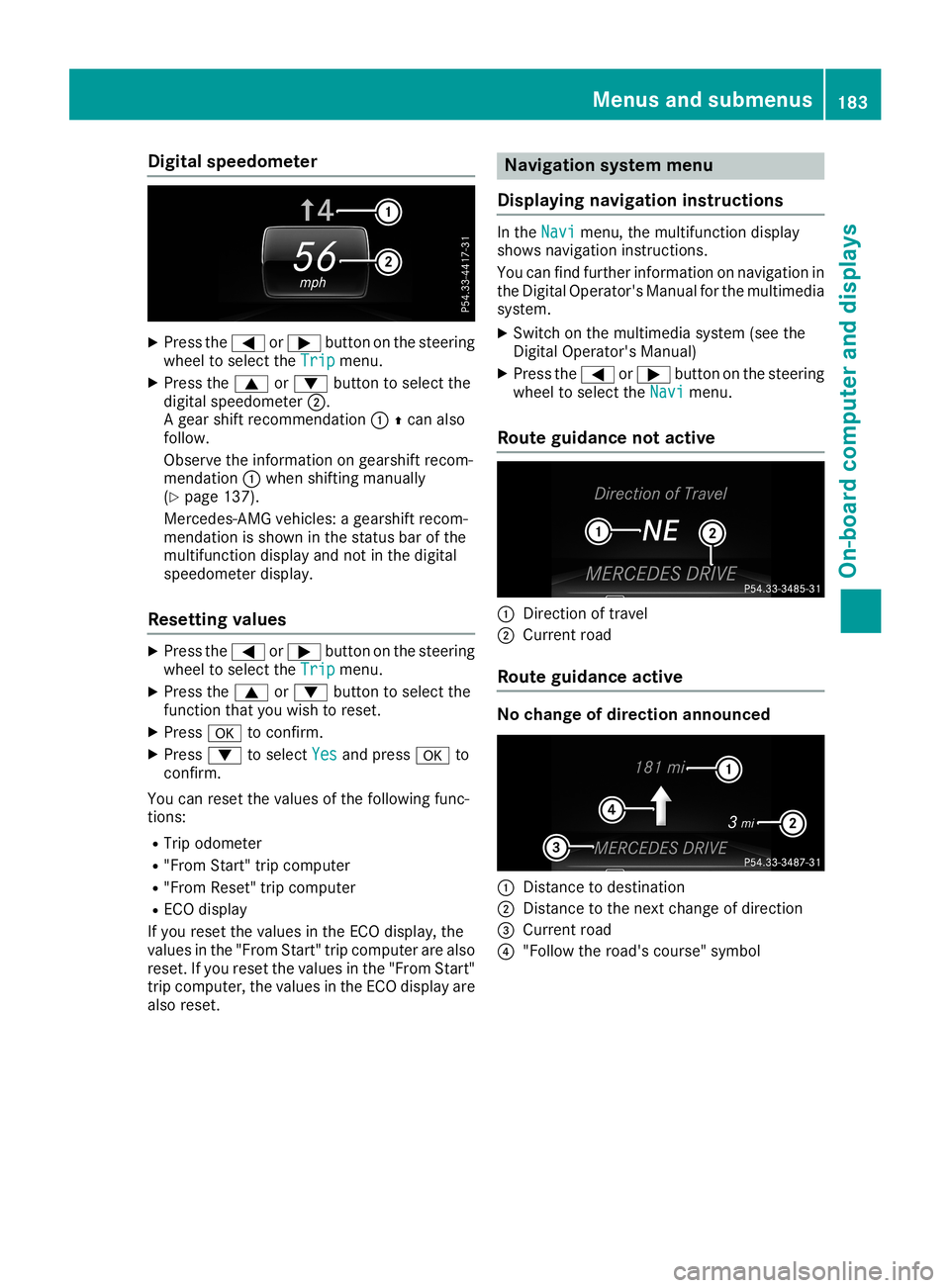
Digit
alsp eed ometer X
Press the0059 or0065 buttonon thest eer ing
whee lto sel ectth eTri p Tri
pmen u.
X Press the0063 or0064 buttonto sel ectth e
digi talspe edo met er0044.
A gear shiftrec ommen dation 00430097can also
fo llow .
Obs erveth einfo rm ation ongear shiftrec om-
men dation 0043when shiftin g man ually
(Y page 137).
Mer cedes -AMG vehicles :a gear shiftrec om-
men dation issho wninthest at us bar ofthe
mult ifunction display andnotin thedigi tal
spe edo met erdis play.
Res etting value s X
Press the0059 or0065 buttonon thest eer ing
whee lto sel ectth eTri p Tri
pmen u.
X Press the0063 or0064 buttonto sel ectth e
fun ction that you wish tores et.
X Press 0076 toconfirm .
X Press 0064 tosel ectYes Yes
andpress0076 to
co nfirm .
You canresetthevalu esofthefo llow ing fun c-
ti on s:
R Trip odo met er
R "Fr om Start "tr ip compu ter
R "Fr om Rese t"trip compu ter
R EC Odis play
If you resetthevalu esintheEC Odis play, the
valu esinthe"Fr om Start "tr ip co mpu terare also
res et.If you resetthevalu esinthe"Fr om Start "
tr ip co mpu ter,th evalu esintheEC Odis play are
also reset. Na
viga tion sys tem me nu
Disp laying naviga tion inst ructi ons In
theNav i Nav
imen u,themult ifunction display
sho wsnav igat ioninst ruc tion s.
You canfindfur ther info rm ation onnav igat ionin
th eDi git alOpe rator's Man ualforth emult imedia
sys tem.
X Swi tchon themult imediasyst em(seeth e
Di git alOpe rator's Man ual)
X Press the0059 or0065 buttonon thest eer ing
whee lto sel ectth eNav i Nav
imen u.
Rou tegui dance notactive 0043
Direc tion oftrave l
0044 Curr entro ad
Rou tegui dance active No
cha nge ofdire cti on annou nced 0043
Distanc eto des tinat ion
0044 Distanc eto thene xt chang eof dir ection
0087 Curr entro ad
0085 "Follow thero ad's cours e"sym bol Men
usandsu bm enu s
183On- boa rdcom puteran ddis pla ys Z
Page 186 of 330
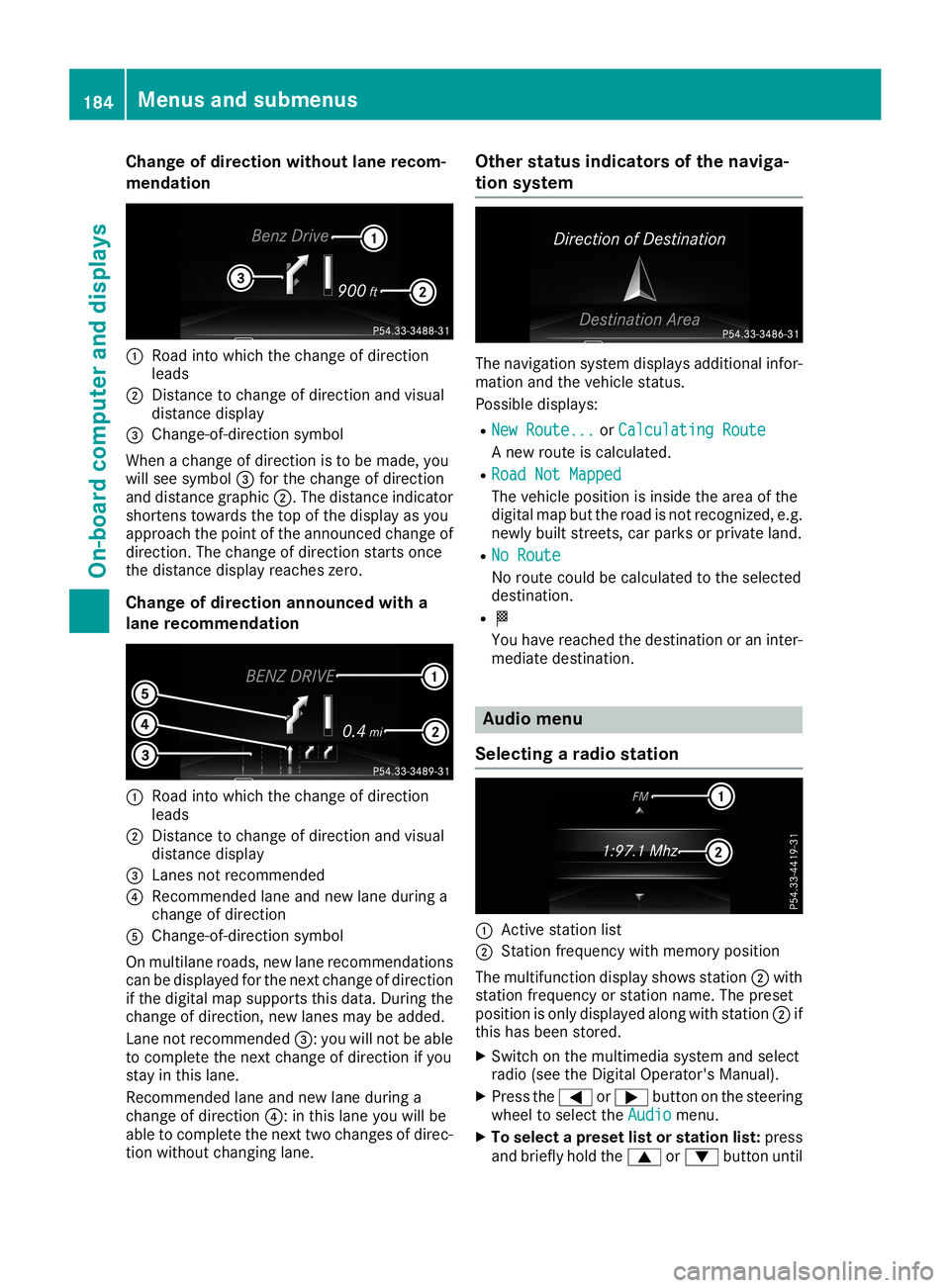
Cha
nge ofdir ection withoutlane recom -
men dation 0043
Road intowhic hth echan geofdire ction
leads
0044 Distan cetochan geofdire ction and visual
dist ancedisplay
0087 Chan ge-of-dire ction symbo l
When achan geofdire ction isto be made, you
will see symbo l0087 for thechan geofdire ction
and distancegraph ic0044. The distanceind icat or
shor tens towards theto pof thedisplay asyou
appro achthepoin tof theann oun ced chan geof
dire ction .The chan geofdire ction start son ce
th edist ancedisplay reacheszero.
Cha nge ofdir ection announced witha
lane recom mendation 0043
Road intowhic hth echan geofdire ction
leads
0044 Distan cetochan geofdire ction and visual
dist ancedisplay
0087 Lanesnotrec omm ended
0085 Reco mmendedlane andnew lane durin ga
chan geofdire ction
0083 Chan ge-of-dire ction symbo l
On mult ilane roads ,new lane recomm endatio ns
can bedisplaye dfor thenex tchan geofdire ction
if th edigit almap suppo rts th is dat a.Dur ingthe
chan geofdire ction ,new lanesmay beadded.
Lan eno trec omm ended0087: you willnotbe able
to com pleteth enex tchan geofdire ction ifyou
st ay inthis lane .
Reco mmendedlane andnew lane durin ga
chan geofdire ction 0085: inthis lane youwillbe
able tocom pleteth enex ttwo chan gesofdire c-
tio nwith outchan ginglane . Ot
her stat us ind icat ors ofthenav iga-
tion system The
navigat ionsyst emdisplays additionalinf or-
mat ionand theveh icle status .
Poss ibledisplays :
R New Route... New
Route...orCal culatingRoute Cal
culatingRoute
A new routeis calc ulate d.
R Roa dNot Mapped Roa
dNot Mapped
The vehicle posit ionisins ide thearea ofthe
digit almap buttheroad isno trec ogn ized,e.g .
new lybuilt street s,car park sor priv ate land .
R No Rou te No
Rou te
No rout ecoul dbe calc ulate dto theselec ted
dest ination.
R 004B
You have reachedthedest inationoran inter-
medi atedest ination. Aud
iomen u
Select ingara dio stat ion 0043
Activest atio nlist
0044 Statio nfrequen cywith mem oryposit ion
The mult ifunction display showsst atio n0044 with
st atio nfrequen cyorstatio nnam e.The pres et
posit ionison lydisplaye dalon gwith statio n0044 if
th is has been store d.
X Swit chon themult imed iasyst emand selec t
radio (seetheDig ital Oper ator'sMan ual).
X Pres sth e0059 or0065 buttononthest eeri ng
wheel toselec tth eAud io Aud
iomen u.
X To select apr eset listorstat ion list:pres s
and brieflyhold the0063 or0064 buttonunt il 184
Menu
sand subm enusOn-boar dcomp uter and displa ys