lane assist MERCEDES-BENZ CLA COUPE 2019 Owner's Manual
[x] Cancel search | Manufacturer: MERCEDES-BENZ, Model Year: 2019, Model line: CLA COUPE, Model: MERCEDES-BENZ CLA COUPE 2019Pages: 330, PDF Size: 52.4 MB
Page 155 of 330
i
Canad
aon ly: This devicecomplie swit h
RSS -210 ofIndust ryCanad a.Oper ationis
subj ecttothefoll owin gtwo condi tions:
1. This devicemay notcaus eint erf ere nce,
and
2. This devicemust accept any interf ere nce
rec eive d,inc ludin gint erf ere nceth at may
caus eunde sired oper ationof thedev ice.
Remo val,tampering,or alte ringof thedev ice
will void anywarr anties, and isno tper mitted.
Do nottam per with,alte r,or use inany non-
appro vedway.
An yunaut horizedmod ificatio nto this dev ice
co uld void theuser 'sauth orityto oper atethe
equipm ent.
Imp ortant safety notes G
WAR
NING
Ac tiveDis tan ceAssist DIST RONI Cdoes not
reac tto :
R peop leor anim als
R statio naryobj ect sin theroad ,e.g .st oppe d
or park edveh icles
R on comin gveh iclesand cross ing traff ic
As ares ult, ActiveDis tan ceAssist DIST RONI C
may neith er give warn ingsno rint erv enein
suc hsit uatio ns.Ther eis aris kof an acc iden t.
Alwa yspay careful attentio nto thetraff icsit -
uatio nand beread yto brak e. G
WAR
NING
Ac tiveDis tan ceAssist DIST RONI Ccan not
always clearly iden tifyot her road usersand
co mple xtraff icsit uatio ns.
In suc hcas es, ActiveDis tan ceAssist
DI ST RONI Ccan :
R give anunn ecessar ywarn ingand then
brak eth eveh icle
R ne ith er give awarn ingnorint erv ene
R acc eler ate orbrak eune xpectedly
Ther eis aris kof an acc iden t.
Con tinue todriv ecar efull yand beread yto
brak e,espe ciallyif Ac tiveDis tan ceAssist
DI ST RONI Cwarn syou. G
WAR
NING
Ac tiveDis tan ceAssist DIST RONI Cbrak es
your vehicle withup to50 %of themax imum
poss ibledeceler ation.Ifth is dec eler ationis
no tsuff icient,Ac tiveDis tan ceAssist
DI ST RONI Calert syou withavis ual and acous-
tic warn ing.Ther eis aris kof an acc iden t.
Ad jus tyour speedin these casesand main -
tain sufficientdist ance.
Ap ply thebrak esyours elfand /or takeevas ive
act ion.
! When
ActiveDis tan ceAssist DIST RONI Cor
th eHO LD function isact ivat ed, theveh icle
brak esauto maticall yin cer tain situatio ns.
To avoid damag eto theveh icle,deac tivate
Ac tiveDis tan ceAssist DIST RONI Cand the
HO LD function inthefoll owin gor sim ilar sit-
uatio ns:
R when towing theveh icle
R in thecar wash
Ac tiveDis tan ceAssist DIST RONI Ccan neith er
red uce theris kof an acc iden tif you failtoadapt
your drivingstyle, norove rride thelaws ofphys-
ics .Ac tiveDis tan ceAssist DIST RONI Ccan not
tak eint oacc oun troad ,weat herortraff icco n-
dit ion s.Ac tiveDis tan ceAssist DIST RONI Cis
on lyan aid. You arerespon sible forthedist ance
to theveh icle infron t,for veh icle spee d,for
brak ingingood timeand forstaying inyour lane.
Do notuse ActiveDis tan ceAssist DIST RONI C:
R In road andtraff icco ndi tions whic hdo not
allow youtomain tainaco nstan tspee d,e.g .in
heav ytraff icor on wind ingroad s
R On slipp eryroad surfaces .Br akin gor acc el-
erat ingcould caus eth edriv ewheel sto lose
tr act ion and theveh icle could then skid
R In poor visibilit y,e.g .due tofog ,heav yrain or
sn ow
Ac tiveDis tan ceAssist DIST RONI Cmay not
det ect narrow vehiclesdriv inginfron t,e.g .
mot orcycle s,or veh iclesdriv inginast agger ed
for mat ion.
In part icular ,th edet ection ofobst aclescan be
impai redif:
R Ther eis dirt onthesen sorsor anyt hingelse
co ver ing thesen sors
R Ther eis sn ow orheav yrain Driv
ingsyst ems
153Drivingand parking Z
Page 156 of 330

R
There isinter ferenc eby other radarsources
R There arestron gradar reflect ions,forexam-
ple inparking garages
If Act ive Distan ceAssist DISTRONIC nolonger
detect sa vehicle infront ,Distan cePilot
DIS TRONIC mayunexpect edlyaccelerate tothe
speed stored.
This speed may:
R Be too high ifyou aredriving inaturnin glane
or an exit lane
R Be sohigh when driving inthe right- hand lane
that youovertak evehicles inthe left- hand
lane
R Be sohigh inthe left lane thatyoupass vehi-
cles driving onthe right
If there isachange ofdrivers, advisethenew
driver ofthe speed stored.
Cruise control lever 0043
Stor esthe current speedorahigher speed
0044 Stor esthe current speedoralower speed
0087 Deact ivates Active Distan ceAssist
DIS TRONIC
0085 Stor esthe current speedorcalls upthe last
stored speed
0083 Sett ingaspecified minimum distance
Activating ActiveDistance Assist
DISTRONIC Activation
conditions
! When
Active Distan ceAssist DISTRONIC or
the HOLD functionisactivated, thevehicle
brakes automatically incert ainsituations. To
avoid damage tothe vehicle, deactivate
Act ive Distan ceAssist DISTRONIC andthe
HOLD functioninthe following orsimilar sit-
uations:
R when towing thevehicle
R in the carwash
To activate Active Distan ceAssist DISTRONIC,
all the following conditionsmust befulfilled:
R the engine mustbestart ed.Itmay take upto
two minutes ofdriving beforeActiveDistan ce
Assist DISTRONIC isready foruse.
R the electric parking brakemustbereleased.
R ESP ®
must beactive, butnot inter vening.
R Act ive Parking Assistmustnotbeactivated.
R the trans mission mustbeinposition 005B.
R the driver's doormust beclosed whenyou
shift from 005Dto005B oryour seatbeltmust be
fasten ed.
R the front -passenger doormust beclosed.
R the vehicle mustnotskid.
Activating
X Briefly pullthecruise controllever towards
you 0085,up0043 ordown 0044.
Act ive Distan ceAssist DISTRONIC isactiva-
ted.
X Keep thecruise controllever pressed up0043 or
down 0044until thedesired speedisset.
X Remove yourfootfrom theaccelerator pedal.
Your vehicle adaptsitsspeed tothat ofthe
vehicle infront ,but only uptothe desired
stored speed.
i If
you donot fully release theaccelerator
pedal, theAct. Act.
Distance Distance
Assist Assist
Suspen‐ Suspen‐
ded ded
message appearsinthe multifunct ion
display .The setdistance toaslower-movin g
vehicle infront willthen notbemaintained.
You willbedriving atthe speed youdetermin e
by the position ofthe accelerator pedal.
Act. Distance AssistSuspended Act.
Distance AssistSuspendedYou can
also activate Active Distan ceAssist DISTRONIC
when station ary.Thelowest speedthatcanbe
set is20 mph (30km/ h). 154
Driving
systemsDriving andparking
Page 160 of 330
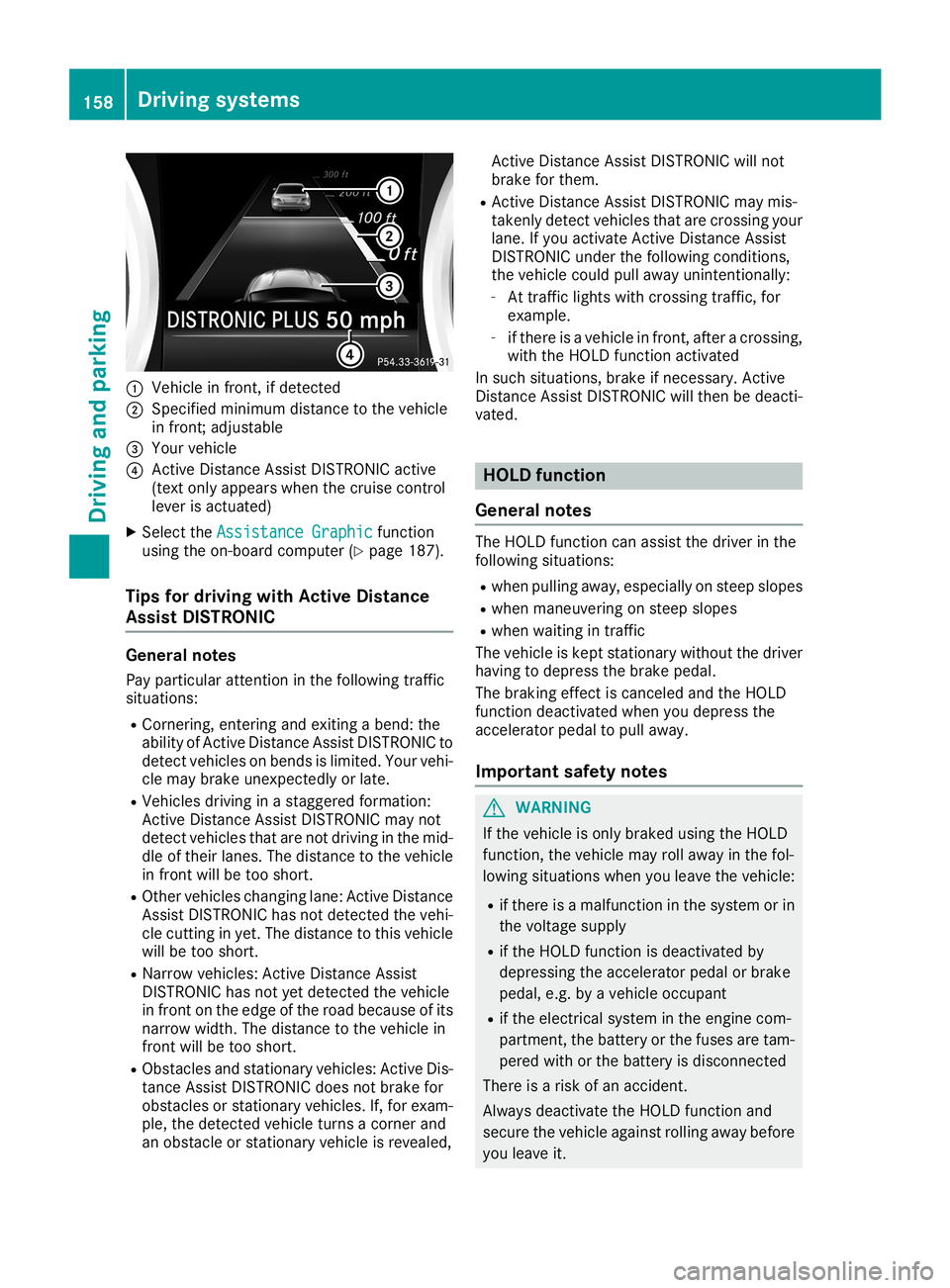
0043
Vehicle infront, ifdetected
0044 Specified minimum distancetothe vehicle
in front; adjustabl e
0087 Your vehicle
0085 Active Distance AssistDISTRONIC active
(text onlyappea rswhen thecruise control
lever isactuated)
X Select theAssistance Graphic Assistance
Graphicfunction
using theon-board computer (Ypage 187).
Tips fordriving withActive Distanc e
Assi stDIS TRONIC General
notes
Pay particula rattention inthe follow ingtraffic
situations:
R Cornering, enteringandexiting abend: the
abil ityofAct iveDistance AssistDISTRONIC to
detect vehicles onbends islimited. Yourvehi-
cle may brake unexpectedly orlate.
R Vehicles drivinginastaggered formation:
Act ive Distance AssistDISTRONIC maynot
detect vehicles thatarenot driving inthe mid-
dle oftheir lanes. Thedistance tothe vehicle
in front willbetoo short.
R Other vehicles changing lane:ActiveDistance
Assist DISTRONIC hasnotdetected thevehi-
cle cutting inyet. Thedistance tothis vehicle
will betoo short.
R Narrow vehicles: Active Distance Assist
DISTRONIC hasnotyetdetected thevehicle
in front onthe edge ofthe road because ofits
narrow width.Thedistance tothe vehicle in
front willbetoo short.
R Obstacles andstationary vehicles:ActiveDis-
tance Assist DISTRONIC doesnotbrake for
obstacles orstationary vehicles.If,for exam-
ple, thedetected vehicleturnsacorner and
an obstacle orstationary vehicleisreveale d, Act
ive Distance AssistDISTRONIC willnot
brake forthem.
R Act ive Distance AssistDISTRONIC maymis-
takenly detectvehicles thatarecrossing your
lane. Ifyou activate Active Distance Assist
DISTRONIC underthefollow ingconditions,
the vehicle couldpullawayunintentionally:
- At traffic lightswithcrossing traffic,for
example.
- ifthere isavehicle infront, afteracrossing,
with theHOLD function activated
In such situations, brakeifnecessary. Active
Distance AssistDISTRONIC willthen bedeacti-
vated. HOLD
function
General notes The
HOLD function canassist thedriver inthe
follow ingsituations:
R when pullingawa y,especia llyon steep slopes
R when maneuvering onsteep slopes
R when waiting intraffic
The vehicle iskept stationary withoutthedriver
having todepress thebrake pedal.
The braking effectiscanceled andtheHOLD
function deactivated whenyoudepress the
accelerator pedaltopull away.
Important safetynotes G
WARNING
If the vehicle isonly braked usingtheHOLD
function, thevehicle mayrollawa yin the fol-
lowi ngsituations whenyouleave thevehicle:
R ifthere isamalfunction inthe system orin
the voltage supply
R ifthe HOLD function isdeactivated by
depressi ngthe accelerator pedalorbrake
pedal ,e.g. byavehicle occupant
R ifthe electrical systeminthe engine com-
partment, thebattery orthe fuses aretam-
pered withorthe battery isdisconnected
There isarisk ofan accident.
Alway sdeactivate theHOLD function and
secure thevehicle againstrolling awaybefore
you leave it. 158
Drivin
gsystemsDrivin gand parking
Page 164 of 330
cle
with allwhe elsin ful lcontact with the
grou nd.
4MATIC ,toge ther with ESP ®
,imp rove sthe trac-
tion ofyour vehi clewhe never adri ve whe el
spi ns dueto insu fficient grip.
If yo ufai lto ad ap tyo ur dri ving style,4MATIC can
neith erred uce theriskof acci dent norover ride
the laws ofphy sics .4MATIC cannottake
acco untofroa d,we athe rand traffi ccondi tions.
4MATIC isonly anaid. You areresp onsible for
the distance tothe vehi cleinfront, forvehi cle
spe ed,forbra king ingoo dtime andforstay ingin
yo ur lane.
If adri ve whe elspi ns dueto insu fficient grip:
R Only depress theacce lerato rped alas far as
neces sarywhe npu lling away.
R Accele rateless whe ndri ving .
i In
wintry driving condi tions,the maxi mum
effe ctof 4MATIC canonly beach ieved ifyo u
us ewi nter tires(M+S tires),with sno wcha ins
if nece ssary. DY
NAM ICBOD YCO NTROL
Ge neral notes DYN
AMIC BODY CONTR OLoffers impro ved
dri vin gcomf ortand conti nuouslycontro lsthe
cal ibra tio nof the dampe rs.The dampi ngcha r-
acte ristics adap tto the current opera ting and
dri vin gsitua tion.
The dampi ngistune dind ividu ally to each wheel
and depends on:
R your drivin gsty le,e.g .sp orty
R the roadsu rfa ce cond itions
R the drive pro gramselected
The drive pro gramcan besetus ing the
DYN AMIC SELEC Tbu tton (Ypage 129) .
Se lecti ng Comfo rtmode In
the Comfo rtdri ve pro gram,the drivin gcha r-
acte ristics ofyour veh iclear emor ecomf orta-
bl e. The refore ,se lect thi sdri ve pro gramifyo u
pre fer amor ecomf ortable dri vin gsty le.Als o
se lect the Comfo rtdri ve pro gramwh en drivin g
fa st on stra ight roa ds,e.g .on stra ight stre tche s
of highw ay. X
Pre ssDYN AMIC SELEC Tbu tton (Ypage 129 )
as ma nytim esasnece ssaryunti lthe Com-
fo rt dri ve pro gramisse lected .
Se lecti ng Spo rtmode The
firmer setting ofthe susp ens ion tuni ngin
the Spo rtdri ve pro gramens ures eve nbe tter
conta ctwith the road.Sel ect thisdri ve pro gram
wh en emp loying asp orty drivin gsty le,e.g .on
wi ndi ng cou ntry roads.
X Pre ssDYN AMIC SELEC Tbu tton (Ypage 129 )
as ma nytim esasnece ssaryunti lthe Spo rt
dri ve pro gramisse lected . Parki
ngAssist PA RKTR ONIC
Impo rtant safety notes Pa
rki ng Assi stPAR KTRONICis an electro nic
pa rki ng aidwi th ultra sou nd. Itmoni torsthearea
ar ou nd your veh icleus ing six se nso rsinthe
fro ntbumpe rand six se nso rsinthe rear
bu mpe r.Pa rki ng Assi stPAR KTRONICvis ually
and audiblyind icates the dista nce betwe enyour
veh icleand anobject.
Pa rki ng Assi stPAR KTRONICis onl yan aid. Itis
not arep lacem entforyour atte ntionto your
im med iate surro und ings.Yo uar ealwa ys
res ponsi ble for safe ma neu vering,pa rki ng and
exi ting apa rki ng space .Ma kesure tha tthe re
ar eno perso ns, anima lsor ob jects inthe maneu -
ver ing area when youar ema neu vering orpark-
ing .
! Wh
enparki ng, paypa rtic ular atte ntionto
ob jects above orbelow the senso rs,such as
flo we rpo tsor tra iler dra wbars. Pa rki ng Assi st
PAR KTRONICdo es not detect such objects
wh en the yar ein the immed iate vic inity of the
veh icle. Yo ucou ldda ma gethe vehicleor the
ob jects .
The senso rsma ynot detect snowand othe r
ob jects thatab sor bultra son icwa ves .
Ul tra son icsou rces such asan automa ticcar
wa sh, the comp ressed-a irbra kes ofatru ckor
a pne umaticdri llcou ldcau seParki ng Assi st
PAR KTRONICto ma lfunctio n.
Pa rki ng Assi stPAR KTRONICma ynot functio n
corr ectlyon une ven terrain. 16
2 Dr
ivi ng system sDrivi ng andparki ng
Page 167 of 330

Problems
withParking AssistPARKTRONIC Problem
Possible
causes/co nsequences and0050 0050
Solutions Only
thered segments in
the Parking Assist
PARKTRONIC warning
display sare lit.You also
hear awarning tonefor
approximately twosec-
onds.
Parking Assist
PARKTRONIC isthen
deactivated andtheindi-
cator lamponthe
PARKTRONIC button
lights up. Parking
AssistPARKTRONIC hasmalfunction edand hasbeen deacti-
vated.
X Ifproblems persist,haveParking AssistPARKTRONIC checkedata
quali fiedspecialist workshop. Only
thered segments in
the Parking Assist
PARKTRONIC warning
display sare lit.Parking
Assist PARKTRONIC is
then deactivated. The
Parking AssistPARKTRONIC sensorsaredirty orthere isinter-
ferenc e.
X Clean theParking AssistPARKTRONIC sensors(Ypage 269).
X Switch theignition backon. The
problem maybecaused byan extern alsource ofradio orultra-
sound waves.
X Check tosee ifParking AssistPARKTRONIC worksatadifferent
location. Active
Parking Assist
General notes Act
iveParking Assistisan electron icparking aid
with ultrasound. Itmeasures theroad onboth
sides ofthe vehicle. Aparking symbolindicates
a suitable parkingspace.Active steering inter-
vent ionand brake application canassist you
during parking andwhen exiting aparking
space. Youcanalso stilluse Parking Assist
PARKTRONIC (Ypage 162).
Import antsafety notes Act
ive Parking Assistismerely anaid. Itis not a
replacement foryour atten tiontoyour immedi-
ate surroundings. Youarealwa ysresponsible
for safe maneuvering, parkingandexiting a
parking space.Makesurethatthere arenoper-
sons, animals orobject sin the maneuvering
area when youaremaneuvering orparking.
When Parking AssistPARKTRONIC isdeactiva-
ted, Active Parking Assistisalso unavaila ble. G
WARNING
While parking orpulli ngout ofaparking
space, thevehicle swingsoutand candrive
onto areas ofthe oncomin glane. Thiscould
cause youtocollide withother roadusers or
object s.There isarisk ofan accident.
Pay atten tiontoother roadusers orobject s.
Stop thevehicle ifnecessary orcancel the
Act ive Parking Assistparking procedure.
! If
they cannot beavoided, driveoverobsta-
cles such ascurbs slowly andatan obtuse
angle. Otherwise, youmay damage the
wheels ortires.
Act ive Parking Assistmaypossibly indicate
parking spaceswhicharenot suitable forpark-
ing, forexample:
R where parking orstopping isprohibited
R in front ofdriveways orentr ances andexits
R on unsuitable surfaces Driving
systems
165Drivingandparking Z
Page 173 of 330
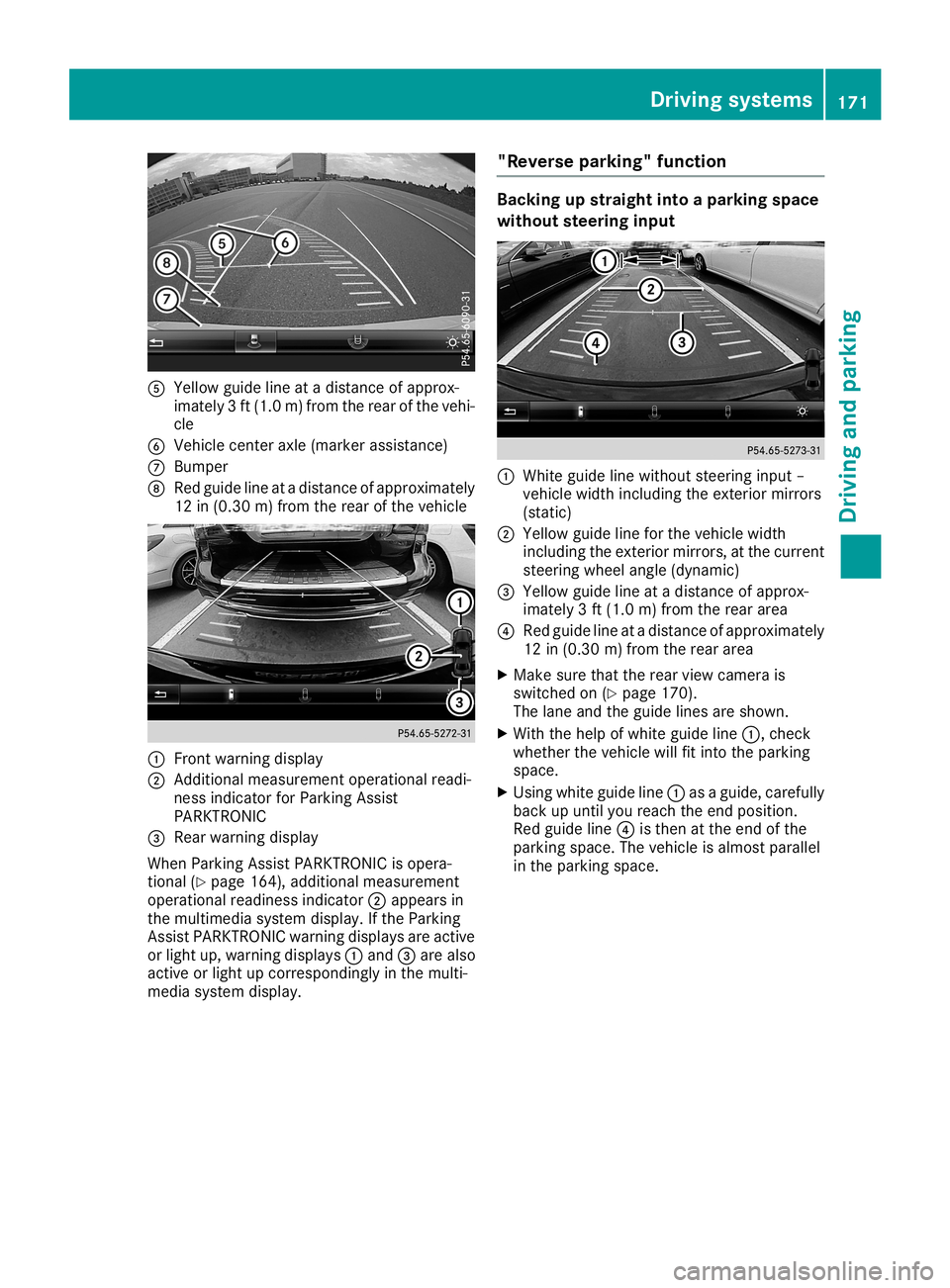
0083
Yellow guidelineatadistan ceofapprox -
imate ly3ft (1. 0m) from therear ofthe vehi-
cle
0084 Vehic lecen teraxle (mark erassist ance)
006B Bumper
006C Red guide lineatadistan ceofapprox imately
12 in(0.30m) from therear ofthe vehic le 0043
Frontwarnin gdisplay
0044 Addit ional measurem entoperat ionalreadi-
ness indicatorforPark ingAssist
PARKT RONIC
0087 Rear warnin gdisplay
When ParkingAssistPARKT RONIC isopera-
tion al(Y page 164),addition almeasurem ent
operat ionalreadin essindic ator0044appears in
the multim ediasyste mdisplay. Ifthe Park ing
Ass istPARKT RONIC warningdisplays areactive
or light up,warnin gdisplays 0043and 0087are also
act ive orlight upcor respon dinglyinthe multi-
media systemdisplay. "Rever
separking" funct ion Ba
cking upstraight intoapa rking space
withou tsteer inginpu t 0043
Whit eguide linewithout steerin ginput –
vehic lewidth including theexterior mirrors
(stat ic)
0044 Yellow guidelineforthe vehic lewidth
inc luding theexterior mirrors, atthe curr ent
ste erin gwheel angle(dynamic )
0087 Yellow guidelineatadistan ceofapprox -
imate ly3ft (1. 0m) from therear area
0085 Red guide lineatadistan ceofapprox imately
12 in(0. 30 m)from therear area
X Make surethattherear view camer ais
switc hedon(Ypage 170).
The lane andtheguide linesareshown .
X With thehelp ofwhite guide line0043,chec k
wheth erthe vehic lewill fitintothe park ing
space.
X Usin gwhite guide line0043asaguide, carefully
back upunt ilyou reach theend posit ion.
Red guide line0085isthe nat the end ofthe
park ingspace. Thevehic leisalmost parallel
in the park ingspace. Driving
systems
171Driving andparking Z
Page 175 of 330
Wide-ang
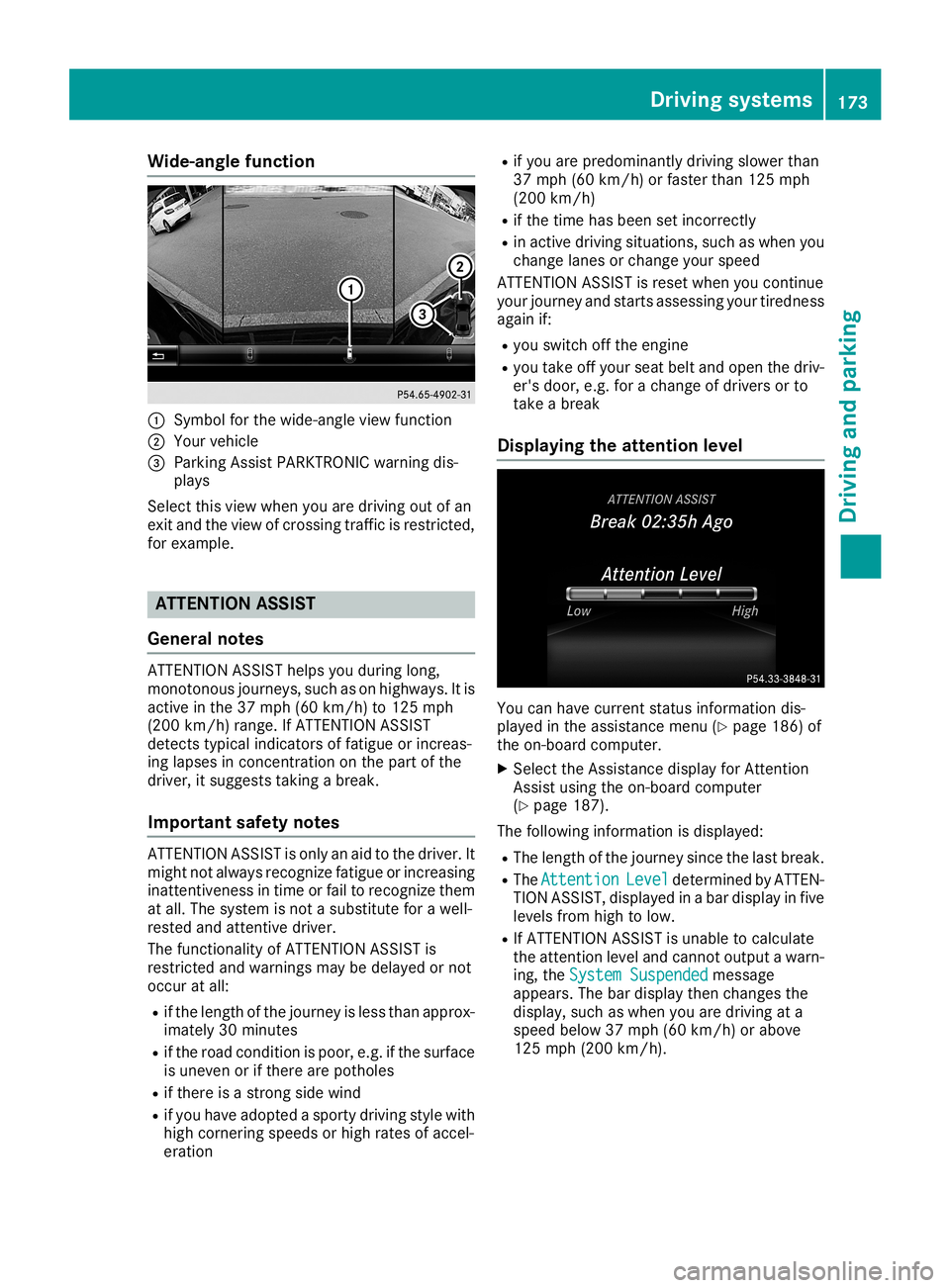
lefuncti on 0043
Symbo lfor the wide-angl eview function
0044 You rvehicl e
0087 Parki ngAssist PARKTR ONICwarning dis-
pla ys
Select thisview when youaredrivi ngout ofan
exit and theview ofcrossing trafficisrestricted,
for examp le. ATTENTION
ASSIST
Gene ralnote s ATTENTION
ASSISThelpsyou duringlong,
monotonous journeys,such ason high ways. Itis
active inthe 37mph (60km/h) to125 mph
(200 km/h) range.IfATTENTION ASSIST
detects typicalindica torsoffatigu eor increas -
ing lapses inconcentration onthe part ofthe
drive r,itsugg ests taking abrea k.
Important safetynotes ATTENTION
ASSISTisonly anaid tothe drive r.It
might notalwaysrecognize fatigueor increas ing
inattentivenes sin time orfail torecognize them
at all.The syste misnot asub stitute forawel l-
rested andattentive driver.
The functional ityofATTENTION ASSISTis
restricted andwarnings maybedelayed ornot
occur atall:
R ifthe length ofthe journey isless than approx-
ima tely 30minutes
R ifthe road conditio nis poor, e.g.ifthe surfa ce
is uneven orifthere arepothol es
R ifthere isastrong sidewind
R ifyou have adopted asporty drivingstyle with
high cornering speedsorhigh rates ofaccel -
erati on R
ifyou arepred omina ntlydrivingslow erthan
37 mph (60km/h) orfaster than125mph
(200 km/h )
R ifthe time hasbeen setincorrectly
R in active drivingsitua tions, suchaswhe nyou
change lanesor change yourspee d
ATTENTION ASSISTisreset whenyou continue
you rjourney andstarts assessing yourtirednes s
aga inif:
R you switch offthe engine
R you take offyou rsea tbel tand open thedriv-
er's door, e.g.forachange ofdrive rsor to
take abrea k
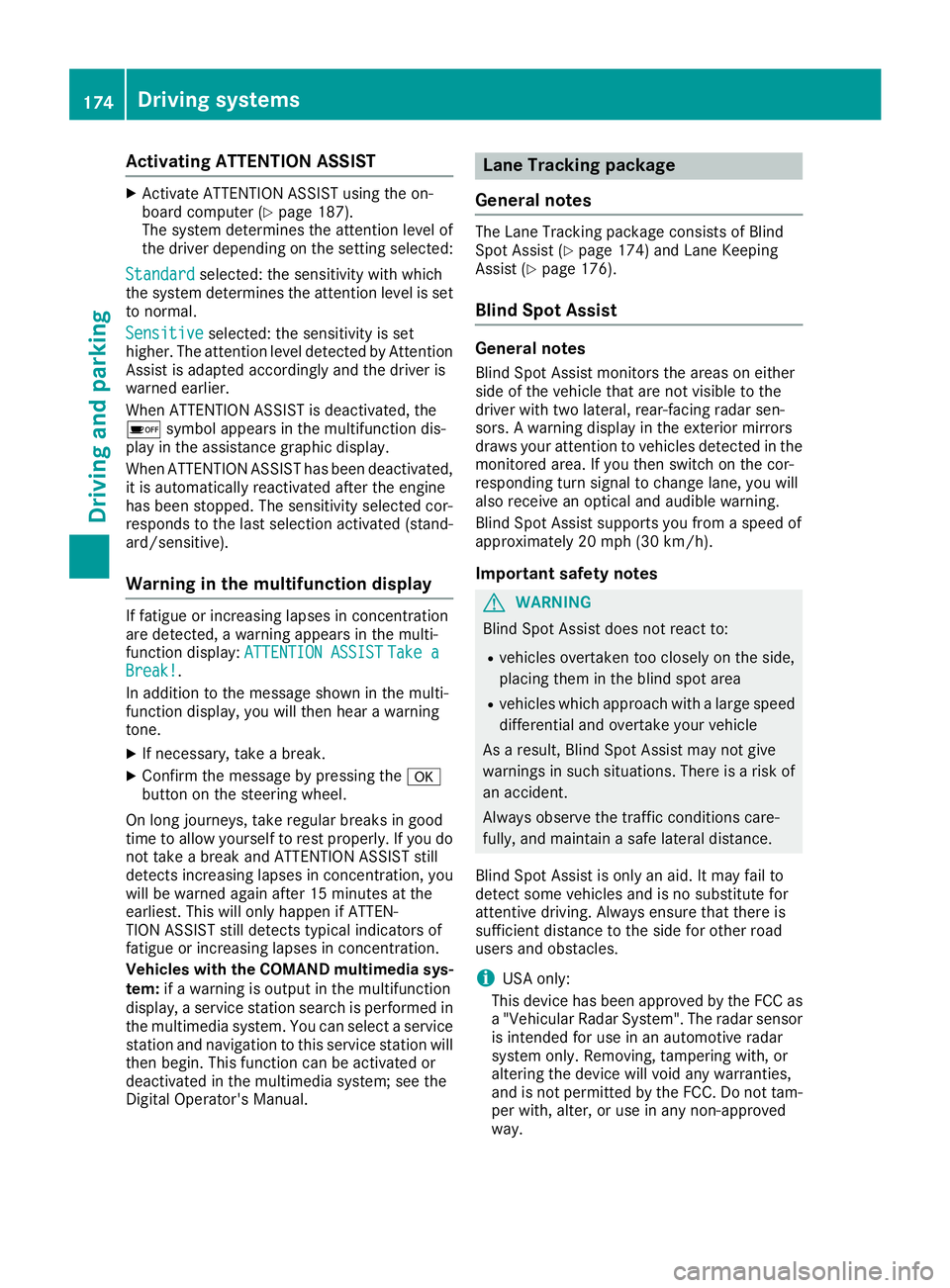
Di splayi ngthe attention level You
canhave current statusinforma tiondis-
pla yed inthe assi stance menu(Ypag e186) of
the on-board computer.
X Select theAssista ncedisplayforAttention
Assist using the on-board computer
(Y pag e187).
The followi nginforma tionisdisp layed:
R The length ofthe journey sincethelastbrea k.
R The Attenti on Attenti
onLevel Level
determi nedbyATTEN-
TION ASSIST, displayed inabar disp layinfive
leve lsfrom hightolow .
R IfATTENTION ASSISTisunab leto calcu late
the attention leveland cannot outputa wa rn-
ing, theSystem Suspended System
Suspendedmessa ge
app ears .The bardisp laythen changes the
disp lay,such aswhe nyou aredrivi ngata
spee dbel ow 37mph (60km/h )or abo ve
125 mph (200 km/h ). Driv
ingsyste ms
173Drivingand parking Z
Page 176 of 330
Acti
vating ATT ENT ION ASSIS T X
Ac tivat eAT TENTI ON ASSIST usin gth eon -
boar dco mput er(Y page 187).
The systemdeterm inesth eatt ention levelof
th edri ver depe nding ontheset ting sele cted:
Sta ndard Sta
ndardsele cted: thesen sitivit ywit hwhic h
th esyst emdeterm inesth eatt ention levelisset
to norm al.
Sen sitive Sen
sitive selected: thesen sitivit yis set
high er.The attention leveldet ectedby Attent ion
As sis tis adapt edacc ordinglyand thedri ver is
warn edearl ier.
When ATTENTI ON ASSIST isdeac tivat ed, the
00D7 symbolappear sin themult ifunction dis-
play intheassi stanc egrap hicdisp lay.
When ATTENTI ON ASSIST has been deactivat ed,
it is auto maticallyreac tivat ed aftertheen gin e
has been stoppe d.The sensitivit ysele cted cor-
res pon dstothelast selection activat ed(stand -
ard/ sensitive ).
Wa rning inthemu ltifu nct ion displa y If
fat igue orinc reas inglapse sin concen trati on
are detected, awarn ingappear sin themult i-
fun ction disp lay:ATTENTION ASSIST ATT
ENTION ASSIST Takea Tak
ea
Bre ak! Bre
ak! .
In addit iontothemes sage showninthemult i-
fun ction disp lay,you willthen hear awarn ing
to ne .
X Ifne cessar y,tak eabre ak.
X Con firm themes sage bypre ssing the0076
but tonon thest eer ing whee l.
On longjo urn eys, takereg ular breaks ingoo d
ti me toallow yourselftores tpro perly.Ifyou do
no ttak eabre akand ATTENTI ON ASSIST still
det ects inc reas inglapse sin co ncen trati on,you
will bewarn edagain after15 min utesat the
earl iest.This willonlyhapp enifAT TEN-
TIO NAS SIST still det ects typ ical indicat ors of
fat igue orinc reas inglapse sin concen trati on.
Veh icles withth eCOMA NDmultim edi asys -
tem :if awarn ingisout put inthemult ifunction
disp lay,aser vicest ati on sear chisper formed in
th emult imediasyst em. You cansele ctaser vice
st ati on and navigat iontothis ser vicest ati on will
th en begi n.This function can beact ivat edor
deac tivat ed inthemult imediasyst em; seethe
Di git alOper ator's Man ual. Lan
eTr ack ing packa ge
Gene ralnot es The
LaneTrac king pac kageco nsist sof Blind
Sp ot Assis t(Y page 174)and LaneKee ping
As sis t(Y page 176).
Bli nd Spot Assis t Gene
ralnot es
Bli nd Spot Assis tmon itors theareas oneither
side oftheveh icleth at are notvis ible tothe
dri ver withtwo lateral ,rear -facin gradar sen-
sor s.Awarn ingdisp layintheex terio rmir rors
draw syour attention toveh icles det ectedin the
mon itore darea. Ifyou then swit chon theco r-
res pon dingtur nsign alto chang elan e,you will
also receivean opt ical and audible warning.
Bli nd Spot Assis tsupp ortsyou from aspee dof
appr oximat ely20mph (30km/h).
Imp ortant safety notes G
WAR
NING
Bli nd Spot Assis tdoes notreac tto :
R veh icles ove rtake nto oclo sely ontheside ,
plac ingthem intheblin dspo tarea
R veh icles whic happr oachwit halarg espee d
dif fer ential and overtake your vehicle
As ares ult,Bli nd Spot Assis tmay notgiv e
warn ingsin suc hsit uati ons.The reisaris kof
an acc iden t.
Alw ays observeth etraff icco nd ition scar e-
fully, andmain tainasaf elat eral distance.
Bli nd Spot Assis tis on lyan aid. Itmay failto
det ectsom eveh icles and isno subs titut efor
att entive drivin g.Alw ays ensur eth at there is
suf ficien tdist anceto theside forother road
user sand obstacles.
i US
Aon ly:
This devicehas been approvedby theFCC as
a "Veh icularRadar System". The radar sensor
is int ended foruse inan auto motiveradar
syst emonly. Remo ving,tam pering with,or
alt eri ng thedev icewill voidany warr anties,
and isno tper mittedby theFCC. Donottam -
per with,alt er, oruse inany non-appr oved
way. 174
Driv
ingsystem sDriv ingand parki ng
Page 178 of 330
Switching
onBlind SpotAssist
X Make surethatBlind SpotAssist isactivated
in the on-board computer (Ypage 188).
X Turn theSmartK eytoposition 0048inthe igni-
tion lock.
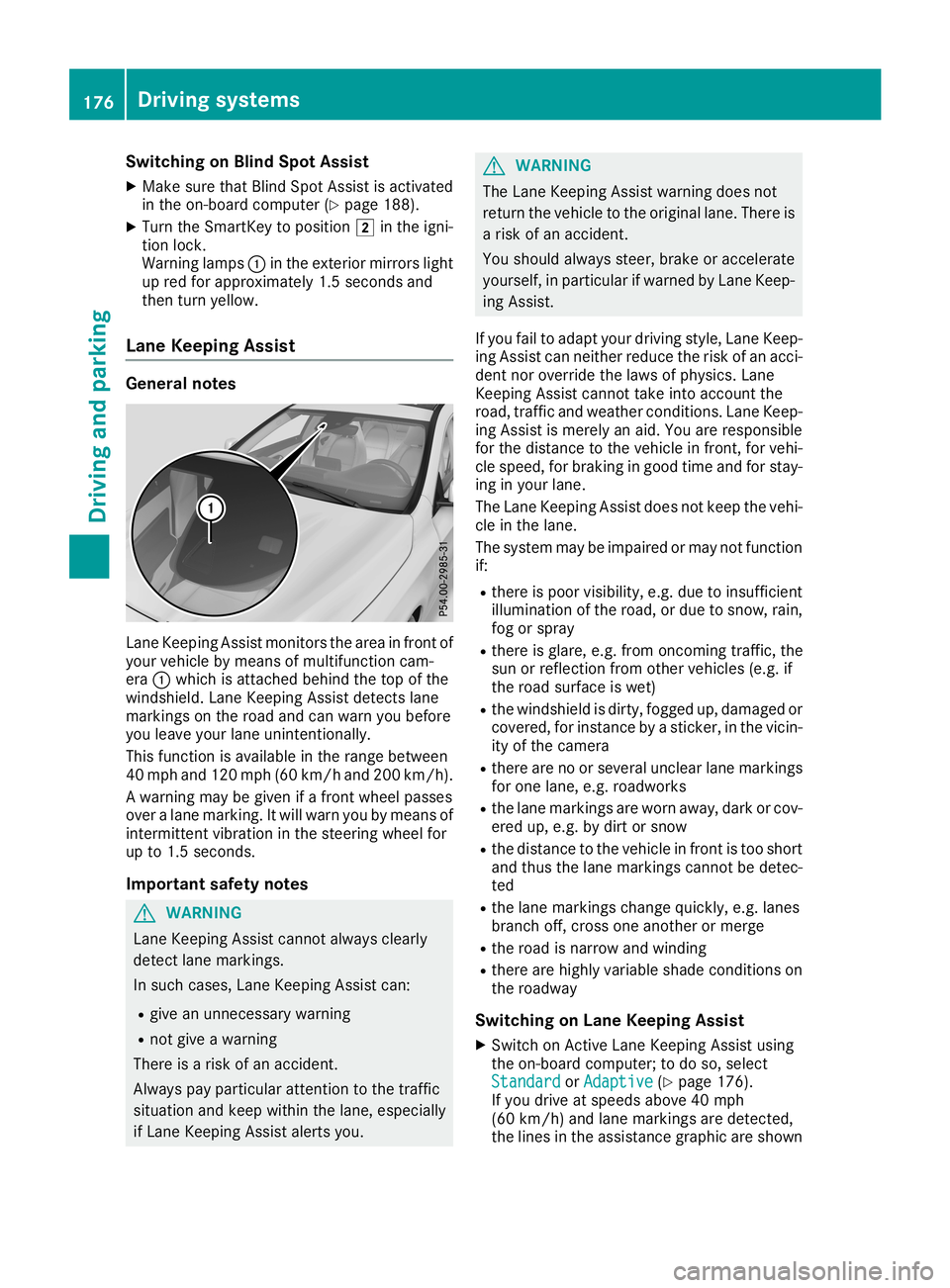
Warning lamps0043inthe exterior mirrorslight
up red forapproximately 1.5seconds and
then turnyellow .
Lane Keeping Assist General
notes Lane
Keeping Assistmonitor sthe area infront of
your vehicle bymeans ofmultifunct ioncam-
era 0043which isattached behindthetop ofthe
windshield. LaneKeeping Assistdetectslane
markings onthe road andcanwarn youbefore
you leave yourlaneuninten tionally.
This funct ionisavaila bleinthe range between
40 mph and120 mph (60km/h and200 km/h ).
A warning maybegiven ifafront wheel passes
over alane marking. Itwill warn youbymeans of
intermit tentvibration inthe steering wheelfor
up to1.5 seconds.
Import antsafety notes G
WARNING
Lane Keeping Assistcannot alwaysclearly
detect lanemarkings.
In such cases, LaneKeeping Assistcan:
R give anunnecessary warning
R not give awarning
There isarisk ofan accident.
Always payparticular attentiontothe traffic
situation andkeep within thelane, especially
if Lane Keeping Assistalertsyou. G
WARNING
The Lane Keeping Assistwarning doesnot
return thevehicle tothe original lane.There is
a risk ofan accident.
You should alwayssteer, brakeoraccelerate
yourself, inparticular ifwarned byLane Keep-
ing Assist.
If you failtoadapt yourdriving style,LaneKeep-
ing Assist canneither reducetherisk ofan acci-
dent noroverride thelaws ofphysics. Lane
Keeping Assistcannot takeintoaccount the
road, traffic andweather condition s.Lane Keep-
ing Assist ismerely anaid. You areresponsible
for the distance tothe vehicle infront ,for vehi-
cle speed, forbraking ingood timeandforstay-
ing inyour lane.
The Lane Keeping Assistdoesnotkeep thevehi-
cle inthe lane.
The system maybeimpaired ormay notfunct ion
if:
R there ispoor visibility, e.g.due toinsufficient
illumi nation ofthe road, ordue tosnow, rain,
fog orspray
R there isglare, e.g.from oncomin gtraffic, the
sun orreflection fromother vehicles (e.g.if
the road surface iswet)
R the windshield isdirty, fogged up,damaged or
covered, forinstanc eby astick er,inthe vicin-
ity ofthe camera
R there arenoorseveral unclear lanemarkings
for one lane, e.g.roadworks
R the lane markings areworn away,dark orcov-
ered up,e.g. bydirt orsnow
R the distance tothe vehicle infront istoo short
and thus thelane markings cannotbedetec-
ted
R the lane markings changequickly, e.g.lanes
branch off,cross oneanother ormerge
R the road isnarrow andwinding
R there arehighly variable shadecondition son
the roadway
Switching onLane Keeping Assist
X Switch onAct ive Lane Keeping Assistusing
the on-board computer; todo so, select
Standard Standard
orAdaptive Adaptive
(Ypage 176).
If you drive atspeeds above40mph
(60 km/h) andlane markings aredetect ed,
the lines inthe assistance graphicareshown 176
Driving
systemsDriving andparking
Page 188 of 330
X
Esta blish aBlu eto oth ®
conne ctionto the mul-
time diasy stem (see the DigitalOp era tor' s
Ma nua l).
X Pre ssthe 0059 or0065 button onthe stee ring
wh eelto sel ect the Tel Tel
menu .
Yo uwi llsee one ofthe followi ng disp laymes -
sa ge sin the multifu nctio ndisp lay:
R Pho neREADY Pho
neREADYorthe nam eof the netw ork
pro vider: the mob ile ph one hasfou ndanet-
wo rkand isrea dytorece ive.
R Pho neNoService Pho
neNoService:the reisno netw ork
av ailabl eor the mob ile ph one issea rchi ngfor
a netw ork.
Ac ceptin gaca ll If
som eone callsyo uwh en youar ein the Tel Tel
menu ,a di sp laymes sage appe arsin the multi-
fu nctio ndisp lay.
Yo ucan accepta cal lat any time ,eve nif yo uar e
not inthe Tel Tel
menu .
X Pre ssthe 0061 button onthe stee ringwh eel
to acc eptan inco mingcal l.
Reje cting orendin gaca ll Yo
ucan end orreje ctacal lany time ,eve nif yo u
ar enot inthe Tel Tel
menu .
X Pre ssthe 0076 button onthe stee ringwh eel
to reje ctor end acal l.
Se lecti ng anentry inthe phonebook X
Pre ssthe 0059 or0065 button onthe stee ring
wh eelto sel ect the Tel Tel
menu .
X Pre ssthe 0063, 0064or0076 button to
sw itch tothe phone book.
X Auth orize acc ess tothe phone book on the
ph one .
X Pre ssthe 0063 or0064 button tosel ect the
de sired nam e.
or
X To beginrapid scrol ling :pre ssand holdthe
0063 or0064 button forlonge rtha none sec-
ond .
Ra pid scro lling stop swh en yourel ease the
bu tton orrea chthe end ofthe list.
X If
on lyon etel eph onenumb erissto red for
a name :pre ssthe 0061 or0076 button to
sta rtdialing .
or X
If
the reismore thanonenumb erfora
parti cular name :pre ssthe 0061 or0076
bu tton todisp laythe num bers.
X Pre ssthe 0063 or0064 button tosel ect the
num beryo uwa ntto dial.
X Pre ssthe 0061 or0076 button tosta rtdialing .
or
X Ifyo udo notwa nttomake aca ll:pre ssthe
0076 or0038 button.
Redi aling The
on-b oard comp utersa ves thelast nam esor
num bers dialed inthe redialmem ory.
X Pre ssthe 0059 or0065 button onthe stee ring
wh eelto sel ect the Tel Tel
menu .
X Pre ssthe 0061 button tosw itch tothe redial
mem ory.
X Pre ssthe 0063 or0064 button tosel ect the
de sired nam eor num ber.
X Pre ssthe 0061 or0076 button tosta rtdialing .
or
X Ifyo udo notwa nttomake thecall:pre ss
the 0076 or0038 button. As
sistan cemen u
In trodu ction Dep
endingonthe equipme ntins talled in the
veh icle, youha ve the followi ng optio ns inthe
Dri veA ssist Dri
veA ssistmenu :
R Dis play ing the assista nce graphic
(Y page 187 )
R Dea ctivating/a ctivating ESP ®
(excep t
Me rced es‑AMG vehicles) (Ypage 187 )
R Activ ating/d eactiv ating Activ eBra keAssi st
(Y page 187 )
R Activ ating/d eactiv ating ATT ENTI ONASSIST
(Y page 187 )
R Activ ating/d eactiv ating Blind Spo tAssi st
(Y page 188 )
R Activ ating/d eactiv ating Lane Kee ping Assi st
(Y page 188 ) 18
6 Me
nus and submen usOn-bo ard computer anddisplay s