language MERCEDES-BENZ CLA COUPE 2019 Owner's Manual
[x] Cancel search | Manufacturer: MERCEDES-BENZ, Model Year: 2019, Model line: CLA COUPE, Model: MERCEDES-BENZ CLA COUPE 2019Pages: 645, PDF Size: 10.94 MB
Page 421 of 645
Tr
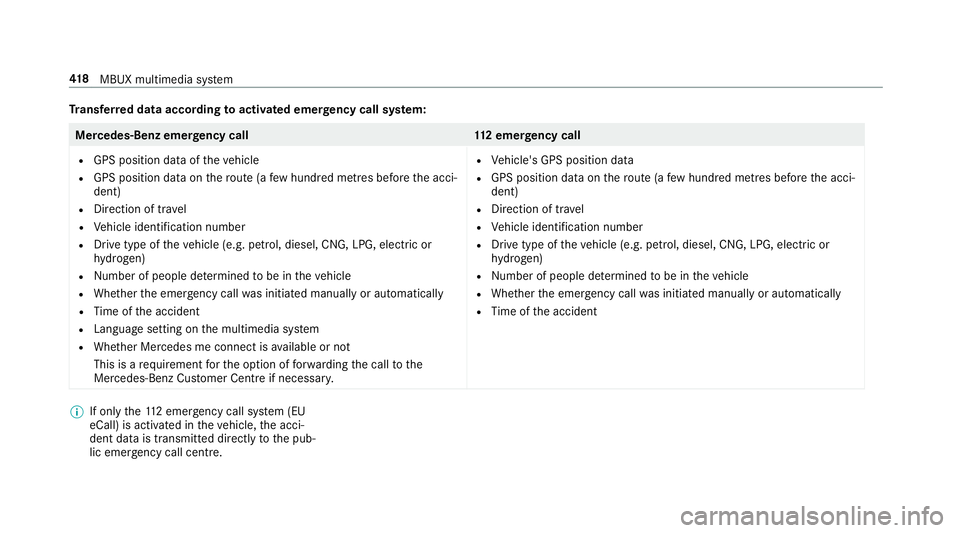
ansfer red data according toactivated emer gency call sy stem: Mercedes-Benz emer
gency call 112 emer gency call
R GPS position data of theve hicle
R GPS position data on thero ute (a few hund red metres before the acci‐
dent)
R Direction of tr avel
R Vehicle identification number
R Drive type of theve hicle (e.g. petrol, diesel, CNG, LPG, electric or
hy drogen)
R Number of people de term ined tobe in theve hicle
R Whe ther the emer gency call was initiated manually or automatically
R Time of the accident
R Language setting on the multimedia sy stem
R Whe ther Mercedes me connect is available or not
This is a requ irement forth e option of forw arding the call tothe
Mercedes-Benz Cus tomer Centre if necessar y. R
Vehicle's GPS position data
R GPS position data on thero ute (a few hund red metres before the acci‐
dent)
R Direction of tra vel
R Vehicle identification number
R Drive type of theve hicle (e.g. petrol, diesel, CNG, LPG, electric or
hy drogen)
R Numb er of people de term ined tobe in theve hicle
R Whe ther the emer gency call was initiated manually or automatically
R Time of the accident %
If only the11 2 emer gency call sy stem (EU
eCall) is activated in theve hicle, the acci‐
dent data is transmit ted directly tothe pub‐
lic emer gency call centre. 41 8
MBUX multimedia sy stem
Page 422 of 645
Fo
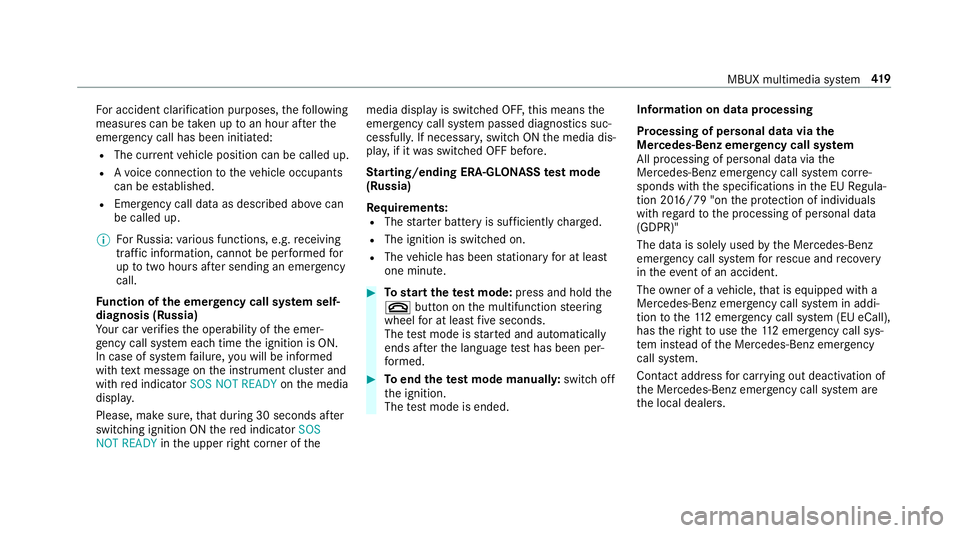
r accident clarification purposes, thefo llowing
measures can be take n up toan hour af terthe
emer gency call has been initia ted:
R The cur rent vehicle position can be called up.
R Avo ice connection totheve hicle occupants
can be es tablished.
R Emer gency call da taas desc ribed abo vecan
be called up.
% ForRu ssia: various functions, e.g. receiving
traf fic information, cannot be per form ed for
up totwo hou rsafte r sending an emer gency
call.
Fu nction of the emer gency call sy stem self-
diagnosis (Russia)
Yo ur car verifies the operability of the emer‐
ge ncy call sy stem each time the ignition is ON.
In case of sy stem failure, you will be informed
with text messa geon the instrument clus ter and
with red indicator SOS NOT READY onthe media
displa y.
Please, make sure, that during 30 seconds af ter
switching ignition ON there d indicator SOS
NOT READY inthe upper right corner of themedia display is switched OFF,
this means the
emer gency call sy stem passed diagnostics suc‐
cessfully. If necessar y,switch ON the media dis‐
pla y,if it was switched OFF before.
St arting/ending ERA-GLONASS test mode
(Russia)
Re quirements:
R The star ter battery is suf ficiently charge d.
R The ignition is switched on.
R The vehicle has been stationary for at least
one minute. #
Tostart thete st mode: press and hold the
~ button on the multifunction steering
wheel for at least five seconds.
The test mode is star ted and automatically
ends af terth e language test has been per‐
fo rm ed. #
Toend thete st mode manuall y:switch off
th e ignition.
The test mode is ended. Information on data processing
Processing of personal data via
the
Mercedes-Benz emer gency call sy stem
All processing of personal data via the
Mercedes-Benz emer gency call sy stem cor re‐
sponds with the specifications in the EU Regula‐
tion 20 16/79 "on the pr otection of individuals
with rega rd tothe processing of personal data
(GDPR)"
The data is solely used bythe Mercedes-Benz
emer gency call sy stem forre scue and reco very
in theeve nt of an accident.
The owner of a vehicle, that is equipped with a
Mercedes-Benz emer gency call sy stem in addi‐
tion tothe11 2 emer gency call sy stem (EU eCall),
has theright touse the11 2 emer gency call sys‐
te m ins tead of the Mercedes-Benz emer gency
call sy stem.
Contact address for car rying out deactivation of
th e Mercedes-Benz emer gency call sy stem are
th e local dealers. MBUX multimedia sy
stem 419
Page 620 of 645
Language
................................................ .332
No tes .................................................. 332
Setting .................................................3 32
LED light see Intelligent Light Sy stem
Light switch Overview ............................................. 12 8
Lighting see In terior lighting
see Lights
Lights ........................................................ 12 8
Ac tive headla mps ................................ 131
Ad aptive Highbeam Assist .................. .133
Ad aptive Highbeam Assist Plus .......... .134
Ad justing the instrument lighting ........ 264
Au tomatic driving lights ....................... 12 9
Changing bulbs .................................... 137
City lighting ........................................ .132
Combination switch ............................ .130
Cornering light ..................................... 13 2
Driving ab road (symm etrical dipped
beam) .................................................. 12 8
Haza rdwa rning lights .......................... 131
Headla mpflasher ................................ 13 0Headla
mprange .................................. 12 9
High beam ........................................... 13 0
Intellige nt Light Sy stem ....................... 131
Light switch .........................................1 28
Low beam ............................................ 12 8
Mo torw ay mode ................................... 13 2
Pa rking lights ...................................... .128
Re ar fog light ....................................... 12 8
Re sponsibility for lighting sy stems .......1 28
Setting the dipped beam ..................... 13 5
Setting theex terior lighting switch-
off delay time ...................................... 13 5
St anding lights .................................... .128
Switching the sur round lighting
on/off ................................................ .136
Tu rn signal lights ................................. 13 0
Limiter ...................................................... 204
Ac tivating ............................................ 205
Buttons ................................................ 205
Calling up a speed ............................... 205
Deactivating ........................................ 205
Fu nction .............................................. 204
Pa ssive mode ...................................... 204
Pe rm anent setting .............................. .207
Re quirements: .................................... .205 Selecting ............................................. 205
Setting a speed ................................... 205
St oring a speed ................................... 205
Sy stem limitations ...............................2 04
Limiting speed see Limi ter
LINGU ATRO NIC ........................................ 272
Au dible help functions .........................2 75
Impr oving speech quality .................... .275
Langua gesetting ................................. 274
Media pla yervo ice commands ............ 283
Message voice commands .................. 285
Multifunction steering wheel (operat‐
ing) ...................................................... 272
Na vigation voice commands ................ 278
No tes on thevo ice commands ............ 276
Online voice control ............................ .276
Operable functions .............................. 274
Operating saf ety .................................. 272
Setting (multimedia sy stem) ................2 74
Switch voice commands ...................... 276
Te lephone voice controls .................... .281
Te xt messa gevoice commands .......... .285
Ve hicle voice commands .................... .287
Vo ice prom pting .................................. 273 Index
617
Page 634 of 645
Sy
stem settings
see Blue tooth®
see Data import/export
see Language
see MBUX Touch
see So ftwa reupdate
see Wi-Fi T
Ta ilpipes (Care) ........................................ 458
Ta ke -back of end-of-life vehicles .............. 21
Pr otection of the environment ............... 21
Ta nk content
Ad Blue ®
............................................... 519
Fu el ...................................................... 51 8
Re ser ve(fuel) .......................................5 18
Te ch nical data
Axle load (trailer operation) ................. 526
Fa stening points (trailer hitch) .............5 24
Information ..........................................5 10
Mounting dimensions (trailer hitch) ..... 524
No tes (trailer hitch) ............................. 524
Overhang dimension (trailer hitch) ...... 524
To ngue weight .................................... .526 To
wing capacity (trailer operation) ...... 525
Ty re pressure monitoring sy stem ........ 490
Ve hicle identification plate ...................5 12
Te lephone ........................................ 269, 387
Ac tivating functions du ring a call ........ 393
Changing a function ............................ 390
Connecting a mobile phone (Near
Field Communication (NFC)) ................ 391
Connecting a mobile phone (Pass‐
ke y) .................................................... .388
Connecting a mobile phone (Secu re
Simple Pairing) .................................... 388
Disconnecting a mobile phone ............ 390
Importing con tacts .............................. 395
Importing contacts (o verview) ............ .395
Incoming call during an existing call .... 393
Information .......................................... 388
Inter changing mobile phones .............. 389
Locking theve hicle (mobile phone) .......81
Menu (on-board computer) .................. 269
Mobile phone voice recognition .......... 392
No tes .................................................. 386
Operating modes ................................. 388
Re ception and transmission volume .... 392
Re placing mobile phones .................... 390 Setting
theringtone ............................ 392
St arting theve hicle (mobile phone) ..... 15 8
Switching mobile phones (Near Field
Communication (NFC)) ........................ 391
Te lephone menu overview .................. .387
Te lephone operation ............................ 392
Unlocking theve hicle (mobile phone) ....81
Using Near Field Communication
(NFC) ................................................... 391
Vo ice commands (LINGU ATRO NIC) ...... 281
Wi reless charging (mobile phone) ........ 12 6
Te lephone
see Second telephone
Te lephone number
Dialling (on-board computer) .............. .269
Te lephone operation
see Calls
Te lephony operating modes
Blue tooth ®
Te lephony .......................... 388
Te lephony operating modes
see Second telephone
Te mp erature ............................................ 14 6 Index
631