lock MERCEDES-BENZ CLA COUPE 2019 Manual PDF
[x] Cancel search | Manufacturer: MERCEDES-BENZ, Model Year: 2019, Model line: CLA COUPE, Model: MERCEDES-BENZ CLA COUPE 2019Pages: 645, PDF Size: 10.94 MB
Page 565 of 645
Display messages
Possible causes/consequences and M
MSolutions #
Let the transmission cool down. #
Ifth e display message still appears following a restart, consult a qualified specialist workshop.
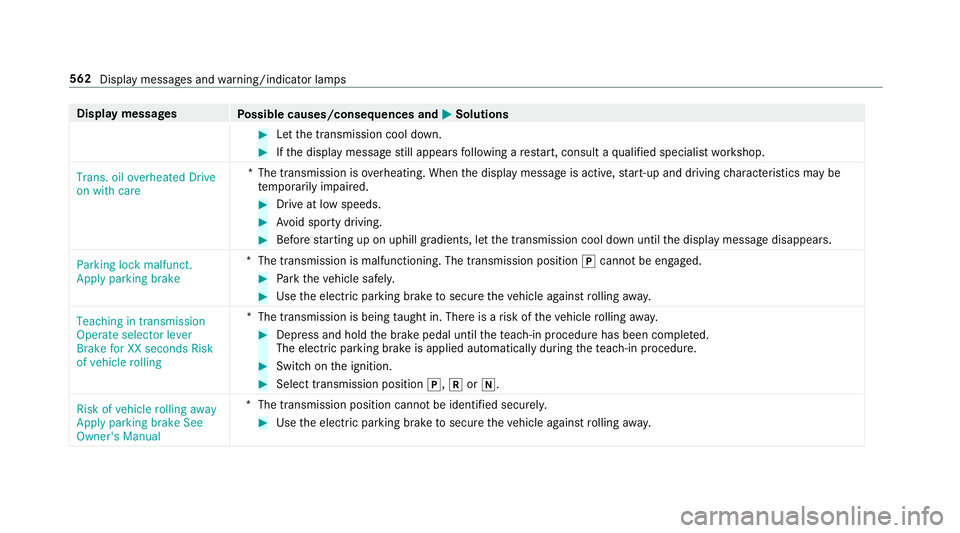
Trans. oil overheated Drive
on with care *T
he transmission is overheating. When the display message is active, start-up and driving characteristics may be
te mp orarily impaired. #
Drive at low speeds. #
Avoid sporty driving. #
Before starting up on uphill gradients, let the transmission cool down until the display message disappears.
Parking lock malfunct.
Apply parking brake *
The transmission is malfunctioning. The transmission position jcann otbe engaged. #
Park theve hicle safely. #
Use the electric parking brake tosecure theve hicle against rolling away.
Teaching in transmission
Operate selector lever
Brake for XX seconds Risk
of vehicle rolling *T
he transmission is being taught in. There is a risk of theve hicle rolling away. #
Dep ress and hold the brake pedal until thete ach-in procedure has been comple ted.
The elect ric pa rking brake is applied automatically during thete ach-in procedure. #
Swit chon the ignition. #
Select transmission position j,kori.
Risk of vehicle rolling away
Apply parking brake See
Owner's Manual *T
he transmission position cannot be identified securel y.#
Use the electric parking brake tosecure theve hicle against rolling away. 562
Display messages and warning/indicator lamps
Page 566 of 645
Display messages
Possible causes/consequences and M
MSolutions
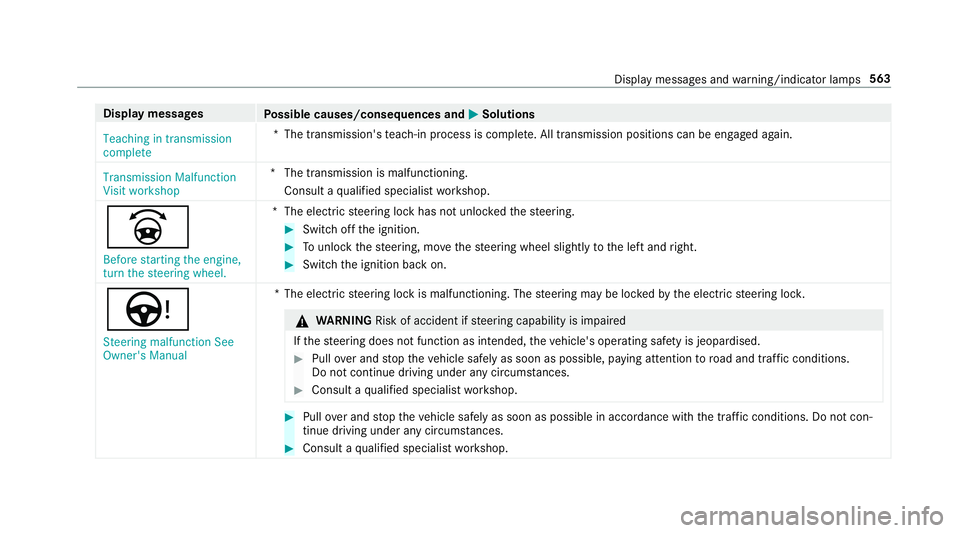
Teaching in transmission
complete *T
he transmission's teach-in process is comple te. All transmission positions can be engaged again.
Transmission Malfunction
Visit workshop *T
he transmission is malfunctioning.
Consult a qualified specialist workshop.
_
Before starting the engine,
turn the steering wheel. *T
he electric steering lock has not unloc kedth esteering. #
Switch off the ignition. #
Tounlo ckthesteering, mo vethesteering wheel slightly tothe left and right. #
Switch the ignition back on.
Ù Steering malfunction See
Owner's Manual *T
he electric steering lock is malfunctioning. The steering may be loc kedby the electric steering loc k. &
WARNING Risk of accident if steering capability is impaired
If th esteering does not function as intended, theve hicle's operating saf ety is jeopardised. #
Pull over and stop theve hicle safely as soon as possible, paying attention toroad and traf fic conditions.
Do not continue driving under any circums tances. #
Consult a qualified specialist workshop. #
Pull over and stop theve hicle safely as soon as possible in accordance with the tra ffic conditions. Do not con‐
tinue driving under any circums tances. #
Consult a qualified specialist workshop. Display messages and
warning/indicator lamps 563
Page 574 of 645
Display messages
Possible causes/consequences and M
MSolutions
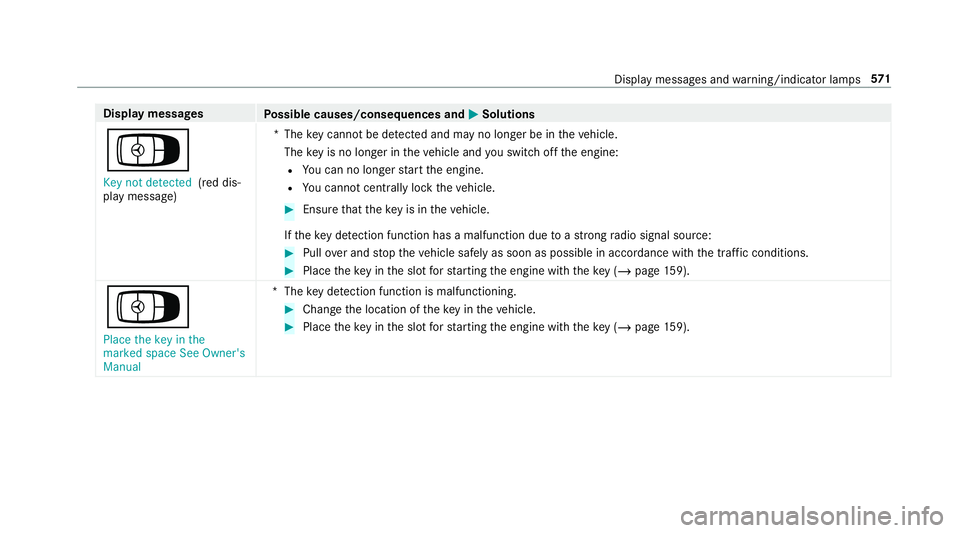
Á Key not detected (red dis‐
play message) *T
hekey cannot be de tected and may no longer be in theve hicle.
The key is no lon ger in theve hicle and you swit choff the engine:
R You can no lon gerst art the engine.
R You cannot centrally lock theve hicle. #
Ensure that theke y is in theve hicle.
If th eke y de tection function has a malfunction due toast ro ng radio signal source: #
Pull over and stop theve hicle safely as soon as possible in accordance with the tra ffic conditions. #
Place theke y in the slot forst arting the engine with theke y (/ page159).
Á
Place the key in the
marked space See Owner's
Manual *T
hekey de tection function is malfunctioning. #
Change the location of theke y in theve hicle. #
Place theke y in the slot forst arting the engine with theke y (/ page159). Displ
aymessa ges and warning/indicator lamps 571
Page 575 of 645
Ve
hicle Display messages
Possible causes/consequences and M
MSolutions
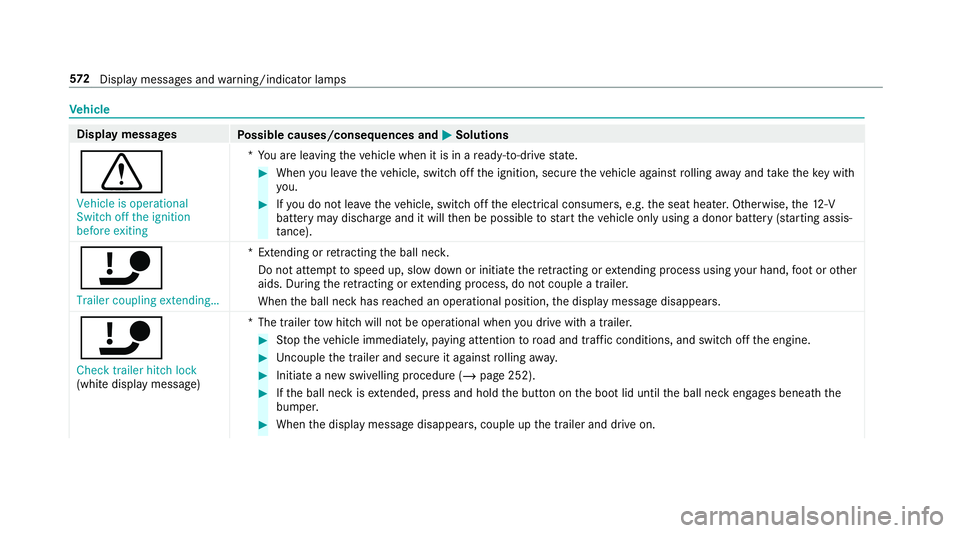
d Vehicle is operational
Switch off the ignition
before exiting *Y
ou are leaving theve hicle when it is in a ready-to-drive state. #
When you lea vetheve hicle, switch off the ignition, secure theve hicle against rolling away and take theke y with
yo u. #
Ifyo u do not lea vetheve hicle, switch off the electrical consumers, e.g. the seat heater. Otherwise, the12 ‑V
battery may discharge and it will then be possible tostart theve hicle only using a donor battery (s tarting assis‐
ta nce).
ï Trailer coupling extending… *E
xtending or retracting the ball nec k.
Do not attem pttospeed up, slow down or initiate there tracting or extending process using your hand, foot or other
aids. During there tracting or extending process, do not couple a traile r.
When the ball neck has reached an operational position, the display message disappears.
ï Check trailer hitch lock
(white display message) *T
he trailer tow hit chwill not be operational when you drive with a trailer. #
Stop theve hicle immediately, paying attention toroad and traf fic conditions, and switch off the engine. #
Uncouple the trailer and secure it against rolling away. #
Initiate a new swivelling procedure (/ page 252). #
Ifth e ball neck is extended, press and hold the button on the boot lid until the ball neck engages beneath the
bumper. #
When the display message disappears, couple up the trailer and drive on. 572
Displaymessa ges and warning/indicator lamps
Page 579 of 645
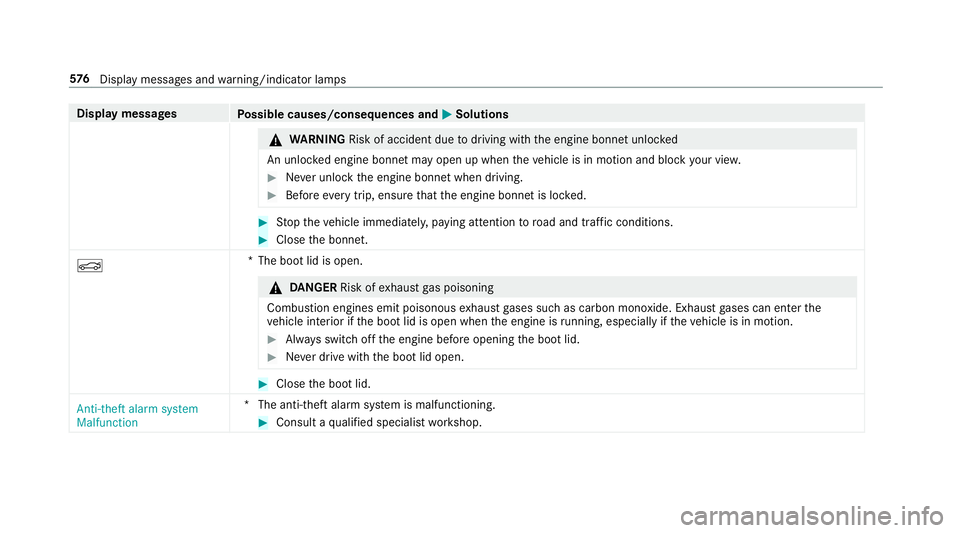
Display messages
Possible causes/consequences and M
MSolutions &
WARNING Risk of accident due todriving with the engine bonn etunlo cked
An unloc ked engine bonn etmay open up when theve hicle is in motion and block your vie w. #
Never unlock the engine bonn etwhen driving. #
Before every trip, ensure that the engine bonn etis loc ked. #
Stop theve hicle immediately, paying attention toroad and traf fic conditions. #
Close the bonn et.
N *T
he boot lid is open. &
DANG ER Risk of exhaust gas poisoning
Combustion engines emit poisonous exhaust gases such as carbon monoxide. Exhaust gases can enter the
ve hicle interior if the boot lid is open when the engine is running, especially if theve hicle is in motion. #
Alw ays switch off the engine before opening the boot lid. #
Never drive with the boot lid open. #
Close the boot lid.
Anti-theft alarm system
Malfunction *T
he anti-theft alarm sy stem is malfunctioning. #
Consult a qualified specialist workshop. 576
Displaymessa ges and warning/indicator lamps
Page 586 of 645
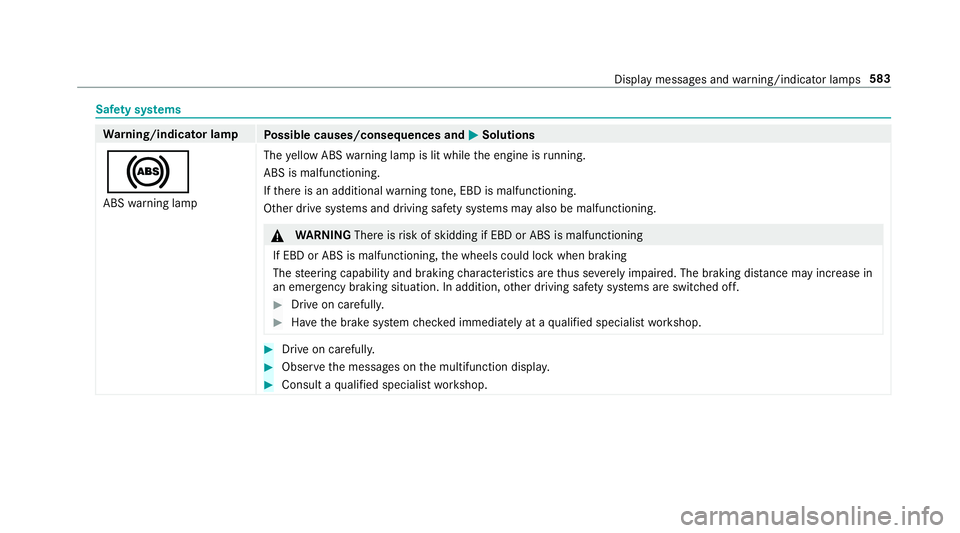
Saf
ety sy stems Wa
rning/indicator lamp
Possible causes/consequences and M
MSolutions
! ABS warning lamp The
yellow ABS warning lamp is lit while the engine is running.
ABS is malfunctioning.
If th ere is an additional warning tone, EBD is malfunctioning.
Other drive sy stems and driving saf ety sy stems may also be malfunctioning. &
WARNING Thereisrisk of skidding if EBD or ABS is malfunctioning
If EBD or ABS is malfunctioning, the wheels could lock when braking
The steering capability and braking characteristics are thus se verely impaired. The br aking distance may increase in
an eme rgency braking situation. In addition, other driving saf ety sy stems are switched off. #
Drive on carefull y. #
Have the brake sy stem checked immediately at a qualified specialist workshop. #
Drive on carefully. #
Obser vethe messages on the multifunction displa y. #
Consult a qualified specialist workshop. Display messages and
warning/indicator lamps 583
Page 599 of 645
1,
2, 3 ...
4MATIC ..................................................... 175
Fu nction ............................................... 175
12 V battery
see Battery (vehicle)
12 V so cket
see Soc ket (12 V)
11 5 V soc ket
see Soc ket (1 15 V)
230 V soc ket
see Soc ket (230 V)
360° Camera ........................................... 230
Ca re .................................................... 458
Fu nction .............................................. 230
Opening the camera co ver (r eve rsing
camera) .............................................. .234
Selecting a view .................................. 233
Setting favo urites ................................ 234
Swit ching automatic operation
on/off (r eversing camera) .................. .233 A
A/C function Activating/deactivating (multimedia
sy stem) ................................................ 14 8
Switching on/off (control panel) .......... 147
ABS (Anti-lock Braking Sy stem) ............ .192
Ac celeration
see Kickdown
Ac cess data
Setting (Blue tooth®
) ............................ 422
Ac cident and breakdown manage‐
ment
Mercedes me connect .......................... 411
Ac oustic locking verification signal
Ac tivating/deactivating ......................... 77
Ac tivating/deactivating automatic
vo lume adjustment
Ad vanced sound sy stem ......................4 44
Burmes ter®
sur round sound sy stem ... 442
Ac tive Blind Spot Assi st.......................... 24 6
Ac tivating/deactivating ...................... .249
Brake application ................................. 24 8
Fu nction .............................................. 24 6Sy
stem limitations ...............................2 46
Tr ailer operation .................................. 24 8
Ac tive bonn et(pedestrian pr otection) ..446
Operation ............................................ 446
Re setting ............................................. 446
Ac tive Brake Assi st
Fu nction/no tes .................................... 197
Setting ................................................. 202
Ac tive Di stance Assist DISTRO NIC........ 207
Ac tive Emergency Stop Assist .............. 217
Ac tive Lane Change Assi st................... 215
Calling up a speed .............................. .209
Displ ays in the instrument display .......2 17
Fu nction .............................................. 207
Increasing/decreasing speed .............. 209
Re quirements: .................................... .209
Ro ute-based speed adap tation ........... .212
Selecting ............................................. 209
St eering wheel buttons ....................... 209
St oring a speed ................................... 209
Switching off/deactivating .................. 209
Switching on/activating ......................2 09
Sy stem limitations ...............................2 07
Ac tive Eme rgency Stop Assist ................ 217 596
Index
Page 601 of 645
Ad
justing treble, mid- range and bass
settings
Adva nced sound sy stem ......................4 44
Burmes ter®
sur round sound sy stem ... 442
Ad vanced sound sy stem
Ac tivating/deactivating au tomatic
vo lume adjustment .............................. 444
Ad justing the balance/fader ............... 444
Ad justing treble, mid-range and bass
settings ............................................... 444
Calling up the sound menu .................. 443
Information .......................................... 443
Af ter-sales service centre
see ASS YST PLUS
Air conditioning menu Calling up ............................................ 14 8
Air conditioning sy stem
see Climate control
Air distribution Setting ................................................ .146
Setting (multimedia sy stem) ................1 48
Air inl et
see Air-water duct Air pressure
see Tyre pressure
Air vents ................................................... 154
Ad justing (front) .................................. 154
Ad justing (rear) .................................... 15 5
Air vents
see Air vents
Ai r-re circulation mode ............................ 14 9
Air-water duct .......................................... 452
Ke eping free ........................................4 52
Airbag ........................................................ .41
Ac tivation .............................................. 35
Fr ont airbag (driver, front passenger) ..... 41
Ins tallation locations .............................. 41
Knee airbag ............................................ 41
Overview ................................................ 41
PA SSENGER AIR BAG indicator lamp .... .46
Pr otection ..............................................42
Re duced pr otection ...............................43
Side impact airbag ................................. 41
Wi ndow airbag ....................................... 41
Airflow Setting ................................................ .146 Alarm sy
stem
see ATA (anti-theft alarm sy stem)
All-wheel drive see 4MATIC
Alternative route
see Route
Ambient lighting Setting (multimedia sy stem) ................1 36
Android Auto ............................................ 407
Connecting a mobile phone ................. 408
Ending ................................................. 409
Information .......................................... 408
Overview ............................................. 407
Sound settings .................................... 408
Tr ans ferred vehicle data ......................4 09
Android Auto™
Control using the application buttons
.............................................................4 09
Animals Pets in theve hicle ................................. 75
Anti-lock braking sy stem
see ABS (Anti-lock Braking Sy stem) 598
Index
Page 602 of 645
Anti-skid
chains
see Snow chains
Anti-theft ala rmsystem
see ATA (anti-theft alarm sy stem)
Anti-theft pr otection
Ad ditional door lock .............................. 80
Immobiliser ............................................ 97
Anti-theft pr otection
see ATA (anti-theft alarm sy stem)
Anticipatory occupant pr otection
see PRE- SAFE®
(anticipatory occu‐
pant pr otection)
see PRE-SAFE ®
PLUS (anticipatory
occupant pr otection plus)
Apple CarPlay™ ....................................... 405
Connecting an iPhone ®
....................... 406
Control using the application buttons
.............................................................4 07
Ending ................................................ .407
No tes .................................................. 406
Overview ............................................. 405
Sound settings .................................... 407
Tr ans ferred vehicle data ......................4 09Ashtr
ay
Using ................................................... 12 0
Assistance sy stems
see Driving saf ety sy stem
Assistant display Menu (on-board computer) .................. 265
ASS YST PLUS ........................................... 445
Battery disconnection periods ............ 446
Displ aying the service due date ..........4 45
Fu nction/no tes ................................... 445
Re gular maintenance work .................. 445
Special service requ irements .............. 445
ATA (anti-theft ala rmsystem) .................. .97
Deactivating the alarm .......................... 98
Fu nction ................................................ 97
Fu nction of interior pr otection ............... 99
Priming/deactivating interior pr otec‐
tion ........................................................ 99
Priming/deactivating tow- aw ay pro‐
te ction ................................................... 99
To w- aw ay protection function ................98
AT TENTION ASSI ST.......................... 240, 24 2
Fu nction .............................................. 24 0
Setting ................................................. 24 2Sy
stem limitations ...............................2 40
At tention assistant
see ATTENTION ASSIST
Au gmented reality
see Route guidance with augmented reality
Au thorised workshop
see Qualified specialist workshop
Au tomatic car wash mode
Ac tivating ............................................ 453
Au tomatic distance control
see Active Dis tance Assi stDISTRONIC
Au tomatic driving lights .........................12 9
Au tomatic engine start (ECO start/
sto p function) .......................................... 16 3
Au tomatic engine stop (ECO start/
sto p function) .......................................... 16 3
Au tomatic front passen ger front air‐
bag deacti vation sy stem
see Automatic front passenger front
airbag shutoff Index
599
Page 604 of 645
Brake Assi
stSystem
see BAS (Brake Assi stSystem)
Brake fluid
No tes ................................................... 521
Brake forc e distribution
EBD (Elect ronic Brake forc e Distribu‐
tion) ..................................................... 19 6
Brakes ABS (Anti-lock Braking Sy stem) ........... 19 2
Ac tive Brake Assi st.............................. 197
Ad aptive brake lights .......................... .203
BA S (Brake Assi stSystem) .................. 19 2
Driving tips ........................................... 161
EBD (Electronic Brake forc e Distribu‐
tion) ..................................................... 19 6
HOLD function .................................... .219
Limited braking ef fect (salt-trea ted
ro ads) .................................................. .161
New/replaced brakepads/brake
discs .................................................... 161
Ru nning-in no tes ..................................1 61
Braking assistance see BAS (Brake Assi stSystem) Breakdown
Overview of the help functions .............. 18
To w- starting ........................................ .481
To wing away ........................................ 477
Tr ansporting theve hicle ......................4 79
Wheel change ...................................... 500
Breakdown see Flat tyre
Bu rm ester ®
sur round sound sy stem .....4 42
Ad justing the balance/fader ............... 443
Ad justing the sound focus ................... 443
Ad justing treble, mid-range and bass
settings ............................................... 442
Au tomatic volume adjustment ............ .442
Calling up the sound menu .................. 442
Information ..........................................4 42
Selecting the sound profile ................. 443
Buttons Steering wheel .................................... 259 C
Call list Deleting ............................................... 398
Making a call ....................................... 397 Overview ............................................. 397
Selecting options ................................. 397
Selecting options for suggestions ........ 398
Calling up the sound menu
Adva nced sound sy stem ......................4 43
Burmes ter®
sur round sound sy stem ... 442
Calls .......................................................... 392
Ac cepting ............................................ 392
Ac tivating functions du ring a call ........ 393
Calls wi thseveral participants ............ .393
Declining ............................................. 392
Ending a call ........................................ 392
In-Car Of fice ........................................ 401
Incoming call du ring an existing call .... 393
Making ................................................ 392
Mercedes me connect .......................... 411
Camera see 360° Camera
see Reversing camera
Car key
see Key
Car wash
see Care
Car wash (care) ....................................... 452 Index
601