navigation MERCEDES-BENZ CLA COUPE 2019 Manual PDF
[x] Cancel search | Manufacturer: MERCEDES-BENZ, Model Year: 2019, Model line: CLA COUPE, Model: MERCEDES-BENZ CLA COUPE 2019Pages: 645, PDF Size: 10.94 MB
Page 397 of 645
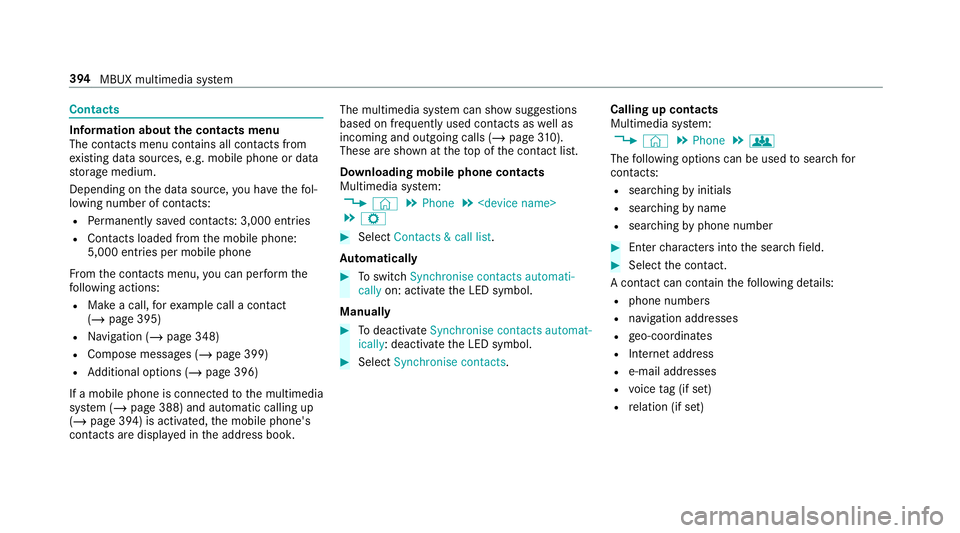
Contacts
Information about
the contacts menu
The con tacts menu contains all contacts from
ex isting data sources, e.g. mobile phone or data
st orage medium.
Depending on the data source, you ha vethefo l‐
lowing number of con tacts:
R Perm anently sa ved con tacts: 3,000 entries
R Contacts loaded from the mobile phone:
5,000 entri es per mobile phone
Fr om the conta cts menu, you can per form the
fo llowing actions:
R Make a call, forex ample call a con tact
(/ page 395)
R Navigation (/ page 348)
R Compose messa ges (/ page 399)
R Additional options (/ page 396)
If a mobile phone is connec tedto the multimedia
sy stem (/ page 388) and automatic calling up
(/ page 394) is activated, the mobile phone's
contac ts are displa yed in the address book. The multimedia sy
stem can show suggestions
based on frequently used conta cts aswell as
incoming and outgoing calls (/ page310).
These are sh own at theto p of the conta ct list.
Downloading mobile phone contacts
Multimedia sy stem:
4 © 5
Phone 5
5 Z #
Select Contacts & call list.
Au tomatically #
Toswitch Synchronise contacts automati-
cally on: activate the LED symbol.
Manually #
Todeactivate Synchronise contacts automat-
ically : deactivate the LED symbol. #
Select Synchronise contacts .Calling up contacts
Multimedia sy
stem:
4 © 5
Phone 5
g
The following options can be used tosear chfor
contacts:
R searching byinitials
R sear ching byname
R searching byphone number #
Ente rch aracters into the sear chfield. #
Select the conta ct.
A contact can contain thefo llowing de tails:
R phone numbers
R navigation addresses
R geo-coordinates
R Internet address
R e-mail addresses
R voice tag (if set)
R relation (if set) 394
MBUX multimedia sy stem
Page 403 of 645
Fo
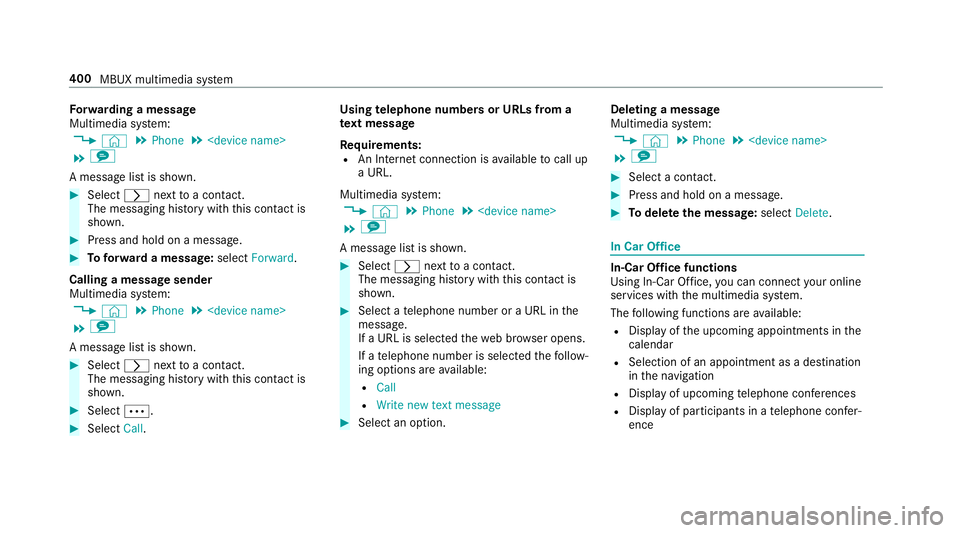
rw arding a message
Multimedia sy stem:
4 © 5
Phone 5
5 l
A message list is shown. #
Select rnexttoa con tact.
The messaging his tory with this con tact is
shown. #
Press and hold on a message. #
Toforw ard a message: selectForward.
Calling a message sender
Multimedia sy stem:
4 © 5
Phone 5
5 l
A message list is shown. #
Select rnexttoa con tact.
The messaging his tory with this con tact is
shown. #
Select Ä. #
Select Call. Using
telephone numbers or URLs from a
te xt message
Re quirements:
R An Internet connection is available tocall up
a URL.
Multimedia sy stem:
4 © 5
Phone 5
5 l
A message list is shown. #
Select rnexttoa con tact.
The messaging his tory with this con tact is
shown. #
Select a telephone number or a URL in the
messa ge.
If a URL is selected thewe b br ows er opens.
If a telephone number is selec tedth efo llow‐
ing options are available:
R Call
R Write new text message #
Select an option. Deleting a message
Multimedia sy
stem:
4 © 5
Phone 5
5 l #
Select a conta ct. #
Press and hold on a message. #
Todel eteth e message: selectDelete. In Car Of
fice In-Car Of
fice functions
Using In-Car Of fice, you can connect your online
services with the multimedia sy stem.
The following functions are available:
R Display of the upcoming appointments in the
calendar
R Selection of an appointment as a destination
inthe navigation
R Display of upcoming telephone con fere nces
R Display of pa rticipants in a telephone con fer‐
ence 400
MBUX multimedia sy stem
Page 412 of 645
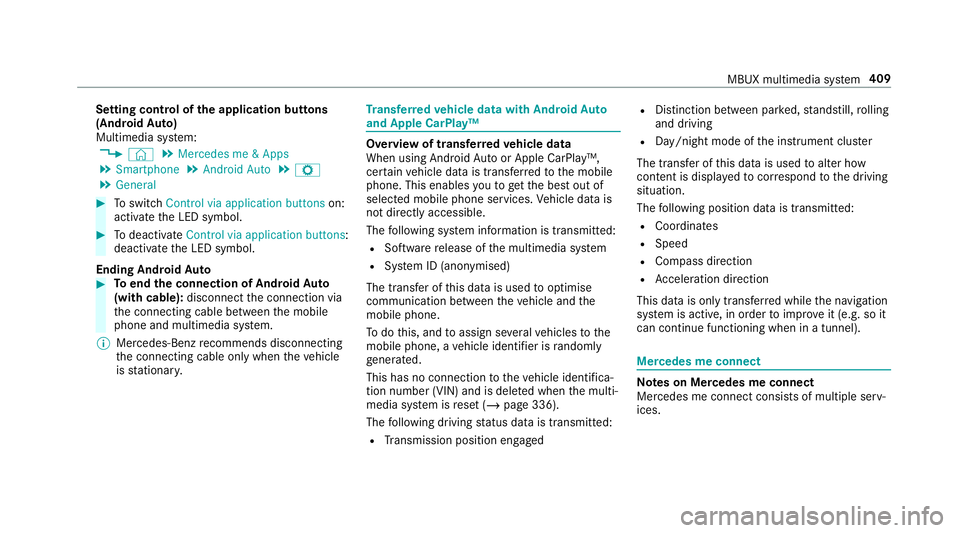
Setting control of
the application but tons
(Android Auto)
Multimedia sy stem:
4 © 5
Mercedes me & Apps
5 Smartphone 5
Android Auto 5
Z
5 General #
Toswitch Control via application buttons on:
activate the LED symbol. #
Todeactivate Control via application buttons :
deactivate the LED symbol.
Ending Android Auto #
Toend the connection of Android Auto
(with cable): disconnectthe connection via
th e connecting cable between the mobile
phone and multimedia sy stem.
% Mercedes-Benz recommends disconnecting
th e connecting cable only when theve hicle
is stationar y. Tr
ansfer redve hicle data with Android Auto
and Apple CarPlay™ Overview of transfer
redve hicle data
When using Android Autoor Apple CarPlay™,
cer tain vehicle data is transfer redto the mobile
phone. This enables youto getth e best out of
selected mobile phone services. Vehicle data is
not directly accessible.
The following sy stem information is transmit ted:
R Software release of the multimedia sy stem
R System ID (anonymised)
The transfer of this data is used tooptimise
communication between theve hicle and the
mobile phone.
To do this, and toassign se veralve hicles tothe
mobile phone, a vehicle identifier is randomly
ge nerated.
This has no connection totheve hicle identifica‐
tion number (VIN) and is dele ted when the multi‐
media sy stem is reset (/ page 336).
The following driving status data is transmitted:
R Transmission position engaged R
Distinction between par ked, standstill, rolling
and driving
R Day/night mode of the instrument clus ter
The transfer of this data is used toalter how
con tent is displ ayed tocor respond tothe driving
situation.
The following position data is transmitte d:
R Coordinates
R Speed
R Compass direction
R Acceleration di rection
This da tais only transfer red while the navigation
sy stem is active, in order toimpr oveit (e.g. so it
can continue functioning when in a tunnel). Mercedes me connect
Note
s on Mercedes me connect
Mercedes me connect consists of multiple serv‐
ices. MBUX multimedia sy
stem 409
Page 444 of 645
include logos, album co
vers, music trac ks, pro‐
grammes, ne wsor service information, forex am‐
ple. #
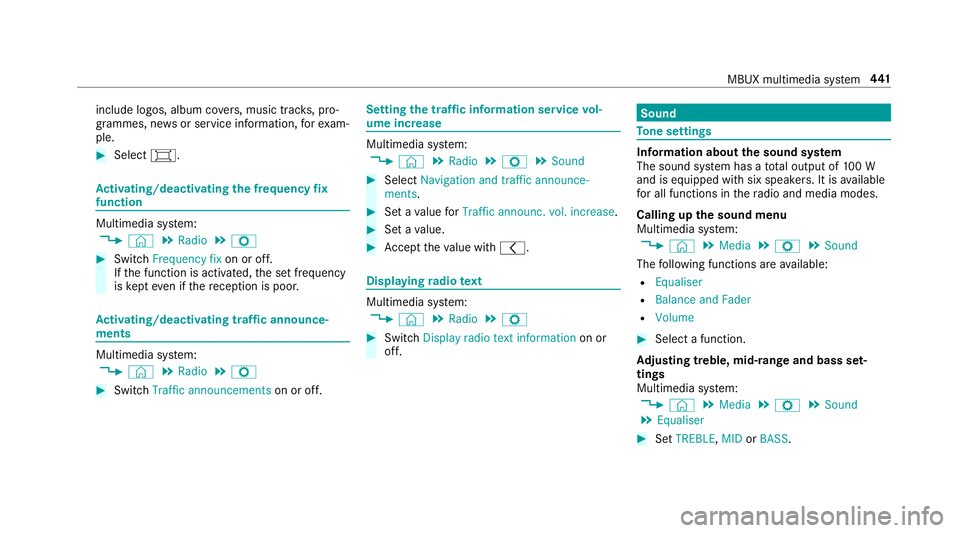
Select #. Ac
tivating/deactivating the frequency fix
function Multimedia sy
stem:
4 © 5
Radio 5
Z #
Switch Frequency fix on or off.
If th e function is activated, the set frequency
is ke pt eve n ifthere ception is poo r. Ac
tivating/deactivating traf fic announce‐
ments Multimedia sy
stem:
4 © 5
Radio 5
Z #
Switch Traffic announcements on or off. Setting
the traf fic information service vol‐
ume increase Multimedia sy
stem:
4 © 5
Radio 5
Z 5
Sound #
Select Navigation and traffic announce-
ments. #
Set a value forTraffic announc. vol. increase . #
Set a value. #
Accept theva lue with q. Displaying
radio text Multimedia sy
stem:
4 © 5
Radio 5
Z #
Switch Display radio text information on or
off. Sound
To
ne settings Information about
the sound sy stem
The sound sy stem has a total output of 100 W
and is equipped with six spea kers. It is available
fo r all functions in thera dio and media modes.
Calling up the sound menu
Multimedia sy stem:
4 © 5
Media 5
Z 5
Sound
The following functions are available:
R Equaliser
R Balance and Fader
R Volume #
Select a function.
Ad justing treble, mid- range and bass set‐
tings
Multimedia sy stem:
4 © 5
Media 5
Z 5
Sound
5 Equaliser #
Set TREBLE, MIDorBASS . MBUX multimedia sy
stem 441