key battery MERCEDES-BENZ CLK-CLASS 2000 User Guide
[x] Cancel search | Manufacturer: MERCEDES-BENZ, Model Year: 2000, Model line: CLK-CLASS, Model: MERCEDES-BENZ CLK-CLASS 2000Pages: 299, PDF Size: 7.58 MB
Page 131 of 299
Audio system
Te ch n ica l
data Instruments
and controlsOperationDrivingInstrument
cluster displayPractical hints Car care Index Cassette mode
Note:
Vehicles equipped with the COMAND system do not
come with a factory installed cassette mechanism.
A standard 1/8” stereo phono plug for auxiliary audio
input (located in glove box) is provided for connection of
a portable battery operated cassette player or any other
portable device which uses a headphone output. Please
refer to the COMAND operating manual for information
concerning the activation of the audio input.
Playing cassettes
Press the “TAPE” button. When the eject (EJ) key is
pressed, the display folds down and the cassette slot
becomes visible. Push the cassette into the slot until it
engages. The cassette will be pulled in automatically.
Note:
Do not press directly on the radio display face.
Return the display panel to its normal position by
folding it back up and pressing gently on the display
frame to lock in place. Important!
If the display is in the down position for more than
20 seconds, 2 successive beeps will be heard. This will
continue at 5 second intervals until the display is
returned to its normal position.
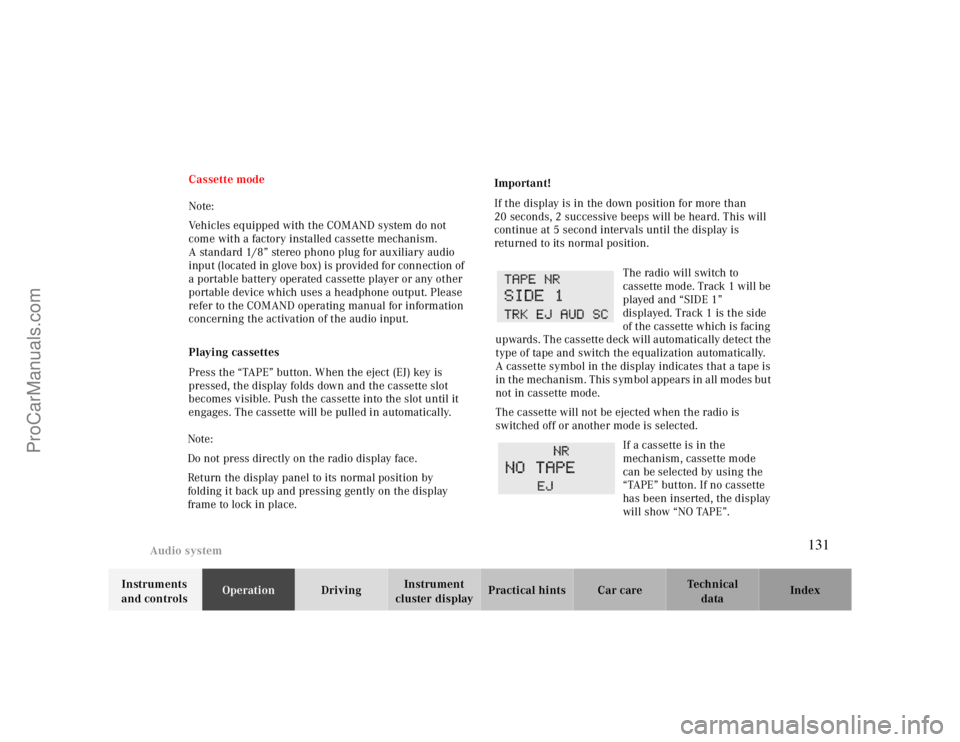
The radio will switch to
cassette mode. Track 1 will be
played and “SIDE 1”
displayed. Track 1 is the side
of the cassette which is facing
upwards. The cassette deck will automatically detect the
type of tape and switch the equalization automatically.
A cassette symbol in the display indicates that a tape is
in the mechanism. This symbol appears in all modes but
not in cassette mode.
The cassette will not be ejected when the radio is
switched off or another mode is selected.
If a cassette is in the
mechanism, cassette mode
can be selected by using the
“TAPE” button. If no cassette
has been inserted, the display
will show “NO TAPE”.
131
ProCarManuals.com
Page 142 of 299
Interior equipment
Te ch n ica l
data Instruments
and controlsOperationDrivingInstrument
cluster displayPractical hints Car care Index Express opening and closing of front door windows
Press switch k or j past resistance point and
release — window opens or closes completely.
To interrupt procedure, briefly press k or j.
If the upward movement of the window is blocked
during the closing procedure, the window will stop
during the last few inches before closure and open
slightly.
When pressing and holding the switch j to close the
window, and upward movement of the window is
blocked during the last few inches before closure, it will
stop but not
open slightly.Note:
The power windows can also be closed with the infrared
remote control while locking the vehicle doors or trunk,
see page30.
Synchronizing power windows
If the power supply was interrupted (battery
disconnected or low), the windows cannot be opened by
the express feature.
To resynchronize the express feature, press j side of
power window switch until the window is completely
closed and hold for additional 2 seconds. Repeat
procedure for each window.
The automatic full opening procedure of the windows
should now be restored.
Warning!
When leaving the vehicle, always remove the
electronic key from the steering lock and lock the
vehicle. Do not leave children unattended in the
vehicle, or with access to an unlocked vehicle.
Unsupervised use of vehicle equipment can cause
serious personal injury.
142
ProCarManuals.com
Page 144 of 299
Interior equipment
Te ch n ica l
data Instruments
and controlsOperationDrivingInstrument
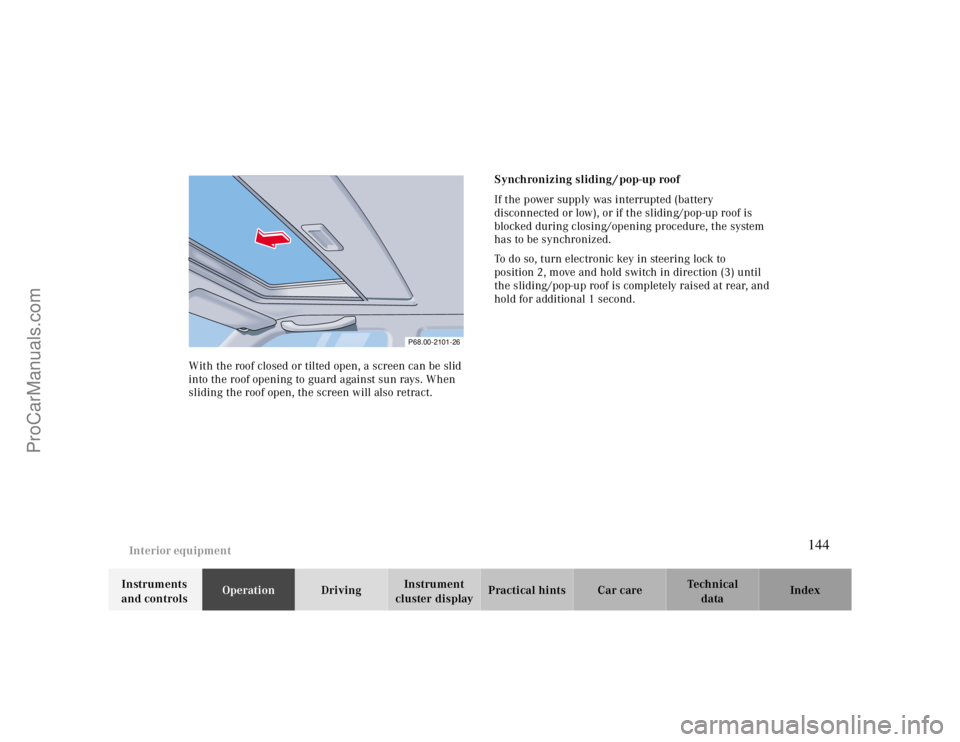
cluster displayPractical hints Car care Index With the roof closed or tilted open, a screen can be slid
into the roof opening to guard against sun rays. When
sliding the roof open, the screen will also retract.Synchronizing sliding / pop-up roof
If the power supply was interrupted (battery
disconnected or low), or if the sliding/pop-up roof is
blocked during closing/opening procedure, the system
has to be synchronized.
To do so, turn electronic key in steering lock to
position 2, move and hold switch in direction (3) until
the sliding/pop-up roof is completely raised at rear, and
hold for additional 1 second.
P68.00-2101-26
144
ProCarManuals.com
Page 145 of 299
Interior equipment
Te ch n ica l
data Instruments
and controlsOperationDrivingInstrument
cluster displayPractical hints Car care Index
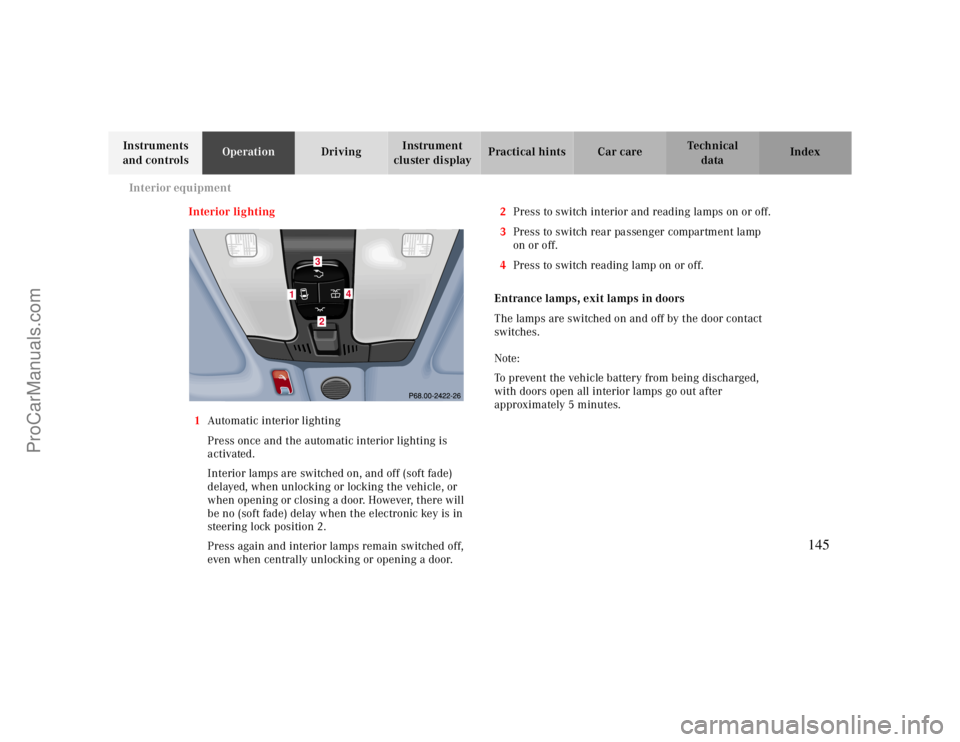
Interior lighting
1Automatic interior lighting
Press once and the automatic interior lighting is
activated.
Interior lamps are switched on, and off (soft fade)
delayed, when unlocking or locking the vehicle, or
when opening or closing a door. However, there will
be no (soft fade) delay when the electronic key is in
steering lock position 2.
Press again and interior lamps remain switched off,
even when centrally unlocking or opening a door.2Press to switch interior and reading lamps on or off.
3Press to switch rear passenger compartment lamp
on or off.
4Press to switch reading lamp on or off.
Entrance lamps, exit lamps in doors
The lamps are switched on and off by the door contact
switches.
Note:
To prevent the vehicle battery from being discharged,
with doors open all interior lamps go out after
approximately 5 minutes.
1
4
32
145
ProCarManuals.com
Page 171 of 299

Tele Aid
Te ch n ica l
data Instruments
and controlsOperationDrivingInstrument
cluster displayPractical hints Car care Index
Vehicle location serviceShould you wish to locate your vehicle, contact the Emergency Response Center at 1-800-756-9018.You will be asked to provide your personal identifier witch you selected as part of your customer subscriber
agreement.
The Center will then attempt to covertly contact the vehicle’ s Tele Aid system. The electronic key in the steering lock
must be in position 1 or 2 and the cellular and GPS signals must be available. The Center will attempt to contact the
vehicle until located, up to a maximum of 14 day until the vehicle location incident report is cancelled by you.Caution !The Tele Aid system cannot initiate a call if there is insufficient voltage (if the battery is disconnected, damaged or
deeply discharged). Should this occur, assistance must be summoned by other means.Important!Tele Aid utilizes the cellular network for communication and the GPS (Global Positioning System) satellites for
vehicle location. If either of these signals are unavailable, the Tele Aid system may not function and if this occurs,
assistance must be summoned by other means.
171
ProCarManuals.com
Page 173 of 299

Steering lock
Te ch n ica l
data Instruments
and controlsOperationDrivingInstrument
cluster displayPractical hints Car care Index Important!
If the electronic key is left in the steering lock position 0
for an extended period of time, it can no longer be
turned in the lock. In this case, remove electronic key
from steering lock and reinsert.
Caution!
To prevent accelerated battery discharge and a possible
dead battery, always remove the electronic key from the
steering lock. Do not leave the electronic key in steering
lock position 0.Notes:
A warning sounds when the driver’s door is opened
while the electronic key is in steering lock position 1
or 0.
With the engine at idle speed, the charging rate of the
alternator (output) is limited.
It is therefore recommended that you turn off
unnecessary electrical consumers while driving in stop-
and-go traffic. This precaution helps to avoid draining of
the battery.
Unnecessary strain on the battery and charging system
may be minimized by turning off the following power
consumers, for example: Heated seats, rear window
defroster. In addition, the automatic climate air volume
control should be set to the lowest position.
The steering lock can only be unlocked with the vehicle
battery properly charged and connected.
173
ProCarManuals.com
Page 227 of 299

Practical hints
Spare wheel 241
Changing wheels 242
First aid kit 228 Tire inflation pressure 247
Shelf below rear window 228 Battery 249
Stowing things in the vehicle 228 Jump starting 251
Spare wheel, vehicle tools, storage Towing the vehicle 253
compartment 229 Transmission selector lever,
Vehicle jack 230 manually unlocking 255
Fuses 231 Bulbs 256
Hood 233 Adjusting headlamp aim 261
Checking engine oil level 234 Changing batteries in the
Automatic transmission fluid level 236 electronic main key 264
Coolant level 236 Synchronizing remote control 266
Adding coolant 237 Emergency operation of
Windshield washer / headlamp
clean.system 238sliding/pop-up roof 267
Windshield and headlamp washer fluid
mixing ratio 238Manual release for fuel filler flap
268
Wheels 239 Replacing wiper blade insert 268
Tire replacement 239 Trunk lamp 270
Rotating wheels 240 Roof rack 270
227
ProCarManuals.com
Page 249 of 299
Battery
Te ch n ica l
data Instruments
and controlsOperation DrivingInstrument
cluster displayPractical hintsCar care Index
Battery
Important!
Battery replacement information:
The maintenance-free battery is located in the trunk
under the trunk floor.
The service life of the battery is dependent on its
condition of charge. The battery should always be kept
sufficiently charged, in order to last an optimum length
of time.
Wa r n i n g !
Failure to follow these instructions can result in
severe injury or death.Never lean over batteries while connecting, you
might get injured.Battery fluid contains sulfuric acid. Do not allow
this fluid to come in contact with eyes, skin or
clothing. In case it does, immediately flush affected
area with water and seek medical help if necessary.A battery will also produce hydrogen gas, which is
flammable and explosive. Keep flames or sparks
away from battery, avoid improper connection of
jumper cables, smoking etc..Therefore, we strongly recommend that you have the
battery charge checked frequently, and corrected if
necessary, especially if you use the vehicle less than
approximately 200 miles (300 km) per month,
mostly for short distance trips, or if it is not used for
long periods of time.
Only charge a battery with a battery charger after the
battery has been disconnected from the vehicle’s
electrical circuit.
Always disconnect the battery negative lead first and
connect last.
When removing and connecting the battery, always
make sure that all electrical consumers are off and the
electronic key is in steering lock position 0. The battery
and its filler caps must always be securely installed
when the vehicle is in operation. During removal and
installation always protect the disconnected battery
positive (+) terminal with the cover attached to the
battery.
While the engine is running the battery terminal clamps
must not be loosened or detached, otherwise the
generator and other electronic components would be
damaged.
249
ProCarManuals.com
Page 264 of 299
Electronic main key
Te ch n ica l
data Instruments
and controlsOperation DrivingInstrument
cluster displayPractical hintsCar care Index
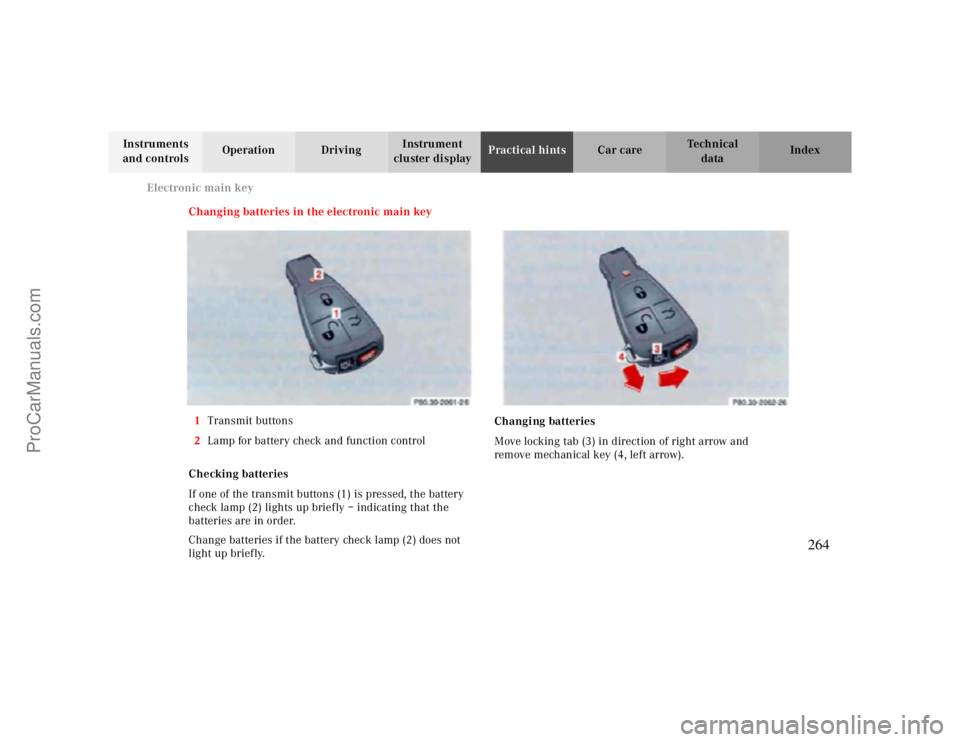
Changing batteries in the electronic main key
1Transmit buttons
2Lamp for battery check and function control
Checking batteries
If one of the transmit buttons (1) is pressed, the battery
check lamp (2) lights up briefly – indicating that the
batteries are in order.
Change batteries if the battery check lamp (2) does not
light up briefly.Changing batteries
Move locking tab (3) in direction of right arrow and
remove mechanical key (4, left arrow).
264
ProCarManuals.com
Page 265 of 299
Electronic main key
Te ch n ica l
data Instruments
and controlsOperation DrivingInstrument
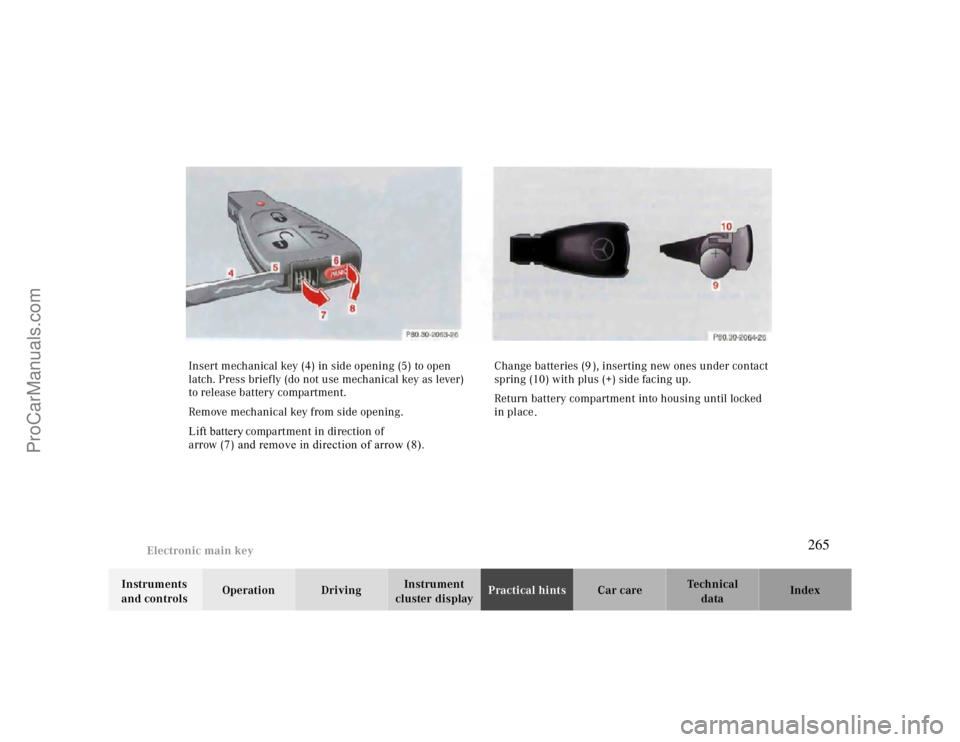
cluster displayPractical hintsCar care Index Insert mechanical key (4) in side opening (5) to open
latch. Press briefly (do not use mechanical key as lever)
to release battery compartment.
Rem ove mechanical key from side opening.
Lift battery compartment in direction of
arrow (7) and remove in direction of arrow (8).Change batteries (9), inserting new ones under contact
spring (10) with plus (+) side facing up.
Return battery compartment into housing until locked
in place
.
265
ProCarManuals.com