reset MERCEDES-BENZ CLK-CLASS 2000 User Guide
[x] Cancel search | Manufacturer: MERCEDES-BENZ, Model Year: 2000, Model line: CLK-CLASS, Model: MERCEDES-BENZ CLK-CLASS 2000Pages: 299, PDF Size: 7.58 MB
Page 98 of 299
Multifunction steering wheel, multifunction display
Te ch n ica l
data Instruments
and controlsOperationDrivingInstrument
cluster displayPractical hints Car care Index
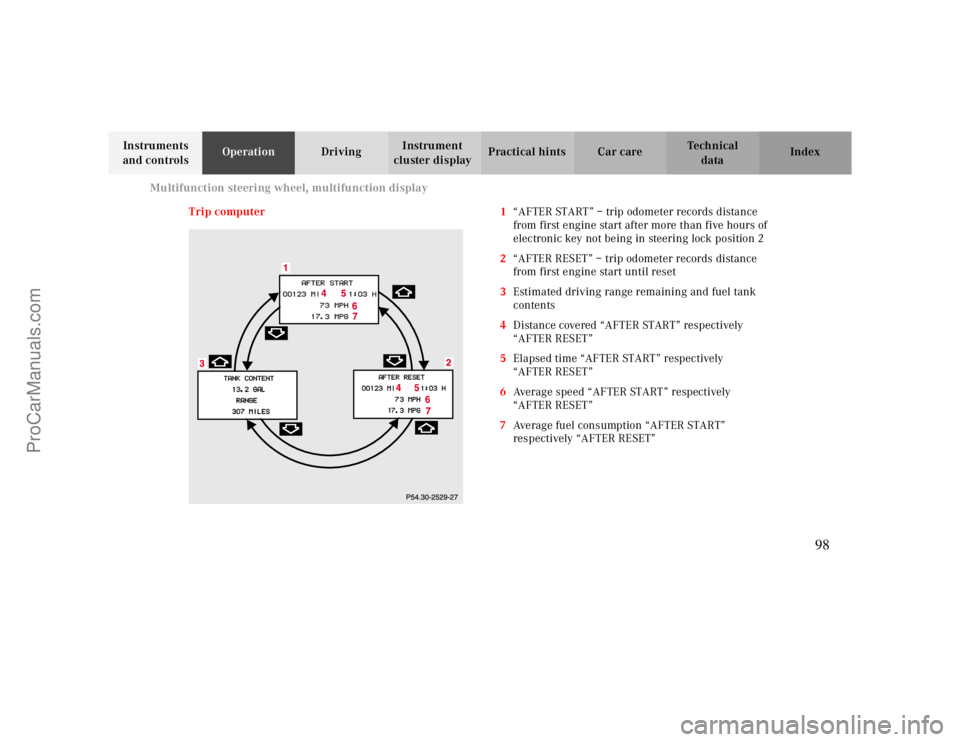
Trip computer 1“AFTER START” – trip odometer records distance
from first engine start after more than five hours of
electronic key not being in steering lock position 2
2“AFTER RESET” – trip odometer records distance
from first engine start until reset
3Estimated driving range remaining and fuel tank
contents
4Distance covered “AFTER START” respectively
“AFTER RESET”
5Elapsed time “AFTER START” respectively
“AFTER RESET”
6Average speed “AFTER START” respectively
“AFTER RESET”
7Average fuel consumption “AFTER START”
respectively “AFTER RESET”
98
ProCarManuals.com
Page 99 of 299
Multifunction steering wheel, multifunction display
Te ch n ica l
data Instruments
and controlsOperationDrivingInstrument
cluster displayPractical hints Car care Index Press the button è or ÿ repeatedly until the
display (1) appears.
Press the j or k button until the display for trip
odometer memory “AFTER START” (1) and
“AFTER RESET” (2), or the display (3) for estimated
driving range remaining and fuel tank contents
appears.
Pressing the è or ÿ button displays the next or
previous system.
Note:
The “AFTER START” display (1) always appears when
the trip computer is called up.To reset the “AFTER START” (1) or “AFTER RESET” (2)
odometer memory at any time:
Call up the relevant display (1 or 2) using the j or
k button and press the Jbutton in the instrument
cluster until the values are reset to “0”.
The “AFTER START” trip odometer reading is
automatically reset after four hours of electronic key not
being in steering lock position 2.
99
ProCarManuals.com
Page 103 of 299
Multifunction steering wheel, multifunction display
Te ch n ica l
data Instruments
and controlsOperationDrivingInstrument
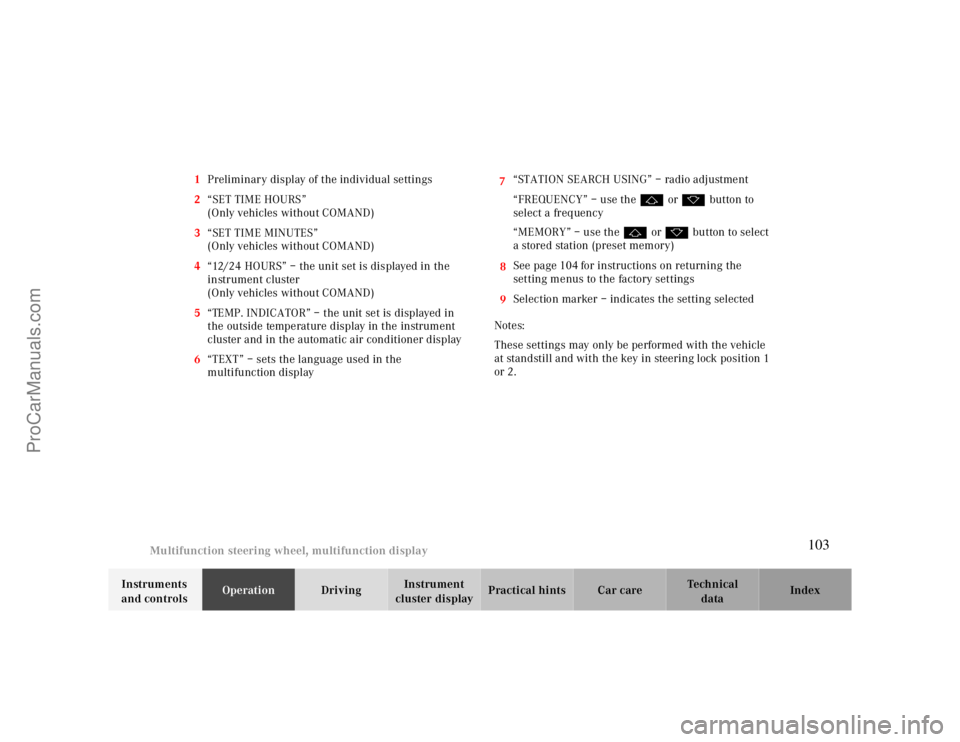
cluster displayPractical hints Car care Index 1Preliminary display of the individual settings
2“SET TIME HOURS”
(Only vehicles without COMAND)
3“SET TIME MINUTES”
(Only vehicles without COMAND)
4“12/24 HOURS” – the unit set is displayed in the
instrument cluster
(Only vehicles without COMAND)
5“TEMP. INDICATOR” – the unit set is displayed in
the outside temperature display in the instrument
cluster and in the automatic air conditioner display
67
“TEXT” – sets the language used in the
multifunction display8“STATION SEARCH USING” – radio adjustment
“FREQUENCY” – use the j or k button to
select a frequency
“MEMORY” – use the j or k button to select
a stored station (preset memory)
9See page104for instructions on returning the
setting menus to the factory settings
Selection marker – indicates the setting selected
Notes:
These settings may only be performed with the vehicle
at standstill and with the key in steering lock position 1
or 2.
103
ProCarManuals.com
Page 104 of 299
Multifunction steering wheel, multifunction display
Te ch n ica l
data Instruments
and controlsOperationDrivingInstrument
cluster displayPractical hints Car care Index
Press the è or ÿ button repeatedly until the
individual setting preliminary display (1) appear.
Press the j or k button until the required setting
menu (2 to 8) is displayed.
Pressing the æ or ç button sets the time in
setting menus (2, 3) and controls the selection marker
in setting menus (4 to 8).
The settings made are stored and applied immediately.
The individual setting preliminary display (1) will
appear again after you have run through all the setting
menus.
Pressing the è or ÿ button displays the next or
previous system.
Notes:
Settings can only be selected with the vehicle stationary
or moving slowly.
The individual setting preliminary display (1) will
appear if you speed up.
The setting menu previously called up will reappear
when the vehicle stops or slows down, providing no
other system has been called up in the meantime.To return setting menus (4 to 8) to their factory settings:
•Call up the individual setting preliminary
display (1).
•Press the J button in the instrument cluster for
approximately 3 seconds. Display (9) will appear.
•Press the J button once more, the message
“RESET TO FACTORY SETTINGS” appears in the
display.
The individual setting preliminary display (1) will
appear if you do not press the J button within
about 5 seconds. The setting menus will not be
reset.
Setting the audio volume
You can only adjust the volume of the system currently
in use. The volume setting for each system (audio,
telephone, navigation and voice recognition system) is
sto red sep arately.
Setting button:
æ increases the volume.
ç reduces the volume.
104
ProCarManuals.com
Page 107 of 299
Flexible service system
Te ch n ica l
data Instruments
and controlsOperationDrivingInstrument
cluster displayPractical hints Car care Index Following a completed A or B service the
Mercedes-Benz Center sets the counter mileage to
10 000 miles (Canada: 15 000 km) and 365 days.
The counter can also be set by any individual. To do so:
Turn the electronic key in steering lock to position 2.
To call up the trip odometer and main odometer, press
button è or ÿ on the multifunction steering
wheel until the display appears. See page90.
Press button j or k until the FSS indicator
appears.
Press button Jon the instrument cluster for
approximately 2 seconds.The multifunction display will show the question:
“DO YOU WANT TO RESET SERVICE INTERVAL? –
CONFIRM BY PRESSING R”
Press button J on the instrument cluster again, and
hold until a signal sounds. The message “SERVICE
INTERVAL HAS BEEN RESET” appears in the
multifunction display.
The new service indicator is displayed with the reset
distance of 10 000 miles (Canada 15 000 km).
If the FSS counter was inadvertently reset, have a
Mercedes-Benz Center correct it.
However you choose to set your reference numbers, the
scheduled services as posted in the Service Booklet
must be followed to properly care for your vehicle.
107
ProCarManuals.com
Page 130 of 299

Audio system
Te ch n ica l
data Instruments
and controlsOperationDrivingInstrument
cluster displayPractical hints Car care Index
Scan tuning
Press the SC key. Each strong
receivable station on the band
selected will be tuned in for
8 seconds. The first scan will
tune only the stations with a
high signal strength. The second scan will tune every
receivable station. By pressing either the , ,
or buttons, or the “SC” key the scan mode
can be cancelled.
Station memory
Ten stations can be stored in
the AM and FM bands via the
alpha-numeric keypad. The
“0” button corresponds to
location 10. Weatherband
(WB) channels 1 to 7 can be retrieved via the alpha-
numeric keypad and are preset at the factory.Storing stations
Hold the number button down for approximately
2 seconds. The currently displayed frequency is stored
on the selected station button. The storage procedure is
confirmed by a short signal tone.
Retrieving a station from memory
Press the desired station button.
Direct frequency input (AM and FM only)
Select the band. Press the
“ button and enter the
desired frequency using the
alpha-numeric keypad.
Frequencies outside of the
frequency ranges (frequencies specified on page
129
)
will not be accepted. The frequency input mode is
cancelled if no button is pressed within 4 seconds.
130
ProCarManuals.com
Page 135 of 299
Audio system
Te ch n ica l
data Instruments
and controlsOperationDrivingInstrument
cluster displayPractical hints Car care Index
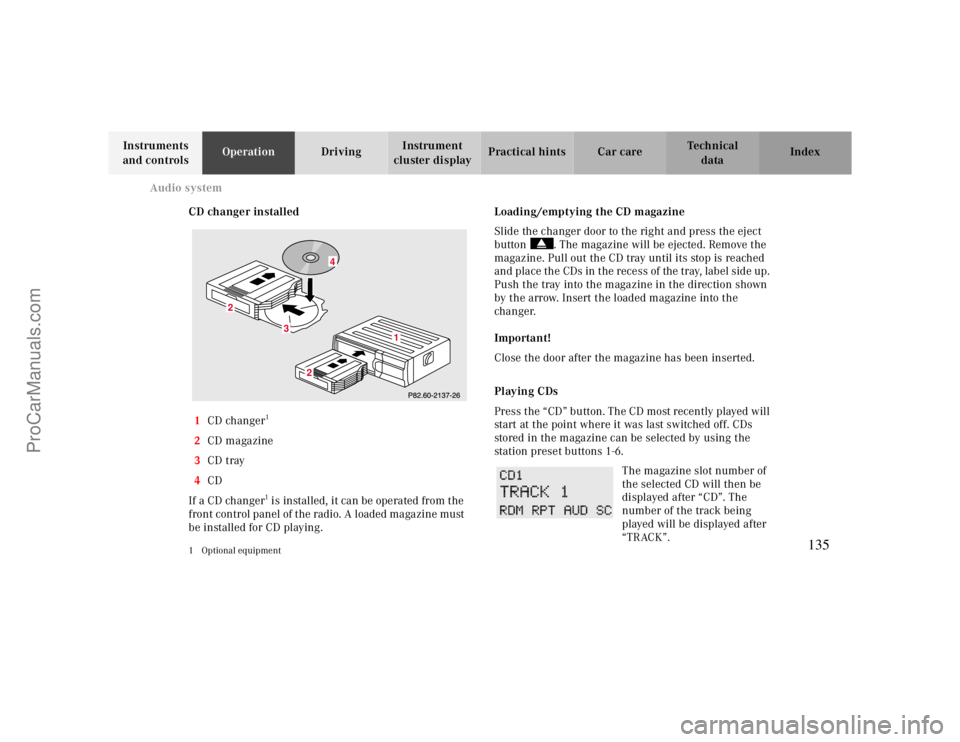
CD changer installed
1CD changer
1
2CD magazine
3CD tray
4CD
If a CD changer1 is installed, it can be operated from the
front control panel of the radio. A loaded magazine must
be installed for CD playing.
1 Optional equipment
Loading/emptying the CD magazine
Slide the changer door to the right and press the eject
button . The magazine will be ejected. Remove the
magazine. Pull out the CD tray until its stop is reached
and place the CDs in the recess of the tray, label side up.
Push the tray into the magazine in the direction shown
by the arrow. Insert the loaded magazine into the
changer.
Important!
Close the door after the magazine has been inserted.
Playing CDs
Press the “CD” button. The CD most recently played will
start at the point where it was last switched off. CDs
stored in the magazine can be selected by using the
station preset buttons 1-6.
The magazine slot number of
the selected CD will then be
displayed after “CD”. The
number of the track being
played will be displayed after
“TRACK”.
3
2
2
1
4
135
ProCarManuals.com
Page 170 of 299
Tele Aid
Te ch n ica l
data Instruments
and controlsOperationDrivingInstrument
cluster displayPractical hints Car care Index
Should a higher priority call be initiated while you are
connected, an upgrade (alternating) tone will be heard,
and the appropriate indicator lamp will flash. If certain
information such as vehicle identification number or
client information is not available, the operator may
need to retransmit. During this time you will hear a
chirp and voice contact will be interrupted. Voice
contact will resume once the retransmission is
completed. Once a call is concluded, a chirp will be
heard and the appropriate indicator lamp will stop
flashing. The COMAND system operation will resume
(only vehicles with COMAND).
Important!
If the indicator lamp continues to flash or the system
does not reset, contact the Response Center at
1-800-756-9018 (in the USA) or 1-888-923-8367 (in
Canada), or Mercedes-Benz Client Assistance at
1-800-FOR-MERCedes (1-800-367-6372) in the USA or
Customer Service at 1-800-387-0100 in Canada.Notes:
The indicator lamp in the respective button f lashes until
the call is concluded. Calls can only be terminated by a
Response Center or Client Assistance Center
representative
.
When a Tele Aid call has been initiated, the audio
system or the COMAND system audio (only vehicles
with COMAND) is muted and the selected mode (radio,
tape or CD) pauses. The optional cellular phone (if
installed) switches off. If you must use this phone, the
vehicle must be parked. Disconnect the coiled cord and
place the call. The navigation system (if engaged) will
continue to run. The display in the instrument cluster is
available for use and spoken commands are only
available by pressing the RPT button on the COMAND
unit. A pop-up window will appear in the COMAND
display to indicate that a Tele Aid call is in progress.
170
ProCarManuals.com
Page 194 of 299
Driving systems
Te ch n ica l
data Instruments
and controlsOperationDrivingInstrument
cluster displayPractical hints Car care Index 3Canceling
To cancel the cruise control, briefly push lever to
position 3.
When you step on the brake pedal or the vehicle
speed drops below approx. 25 mph (40 km/h), for
example when driving upgrade, the cruise control
will be canceled.
If the cruise control cancels by itself and remains
inoperative until the engine is restarted, have the
system checked at your authorized Mercedes-Benz
Center as soon as possible.
4Resume
If the lever is briefly pushed to position 4 when
driving at a speed exceeding approx. 25 mph
(40 km/h), the vehicle resumes the speed which
was set prior to the cancellation of the cruise
control. The last memorized speed is canceled when
the electronic key in the steering lock is turned to
position 1 or 0.Important!
Moving gear selector lever to position “N” switches the
cruise control off.
Wa r n i n g !
Only use the cruise control if the traffic and
weather conditions make it advisable to travel at a
steady speed.• The use of cruise control can be dangerous on
winding roads or in heavy traffic because
conditions do not allow safe driving at a steady
speed.
• The use of cruise control can be dangerous on
slippery roads. Rapid changes in tire adhesion
can result in wheel spin and loss of control.The “Resume” function should only be operated if
the driver is fully aware of the previously set speed
and wishes to resume this particular preset speed.
194
ProCarManuals.com
Page 270 of 299
Trunk lamp
Te ch n ica l
data Instruments
and controlsOperation DrivingInstrument
cluster displayPractical hintsCar care Index Trunk lamp
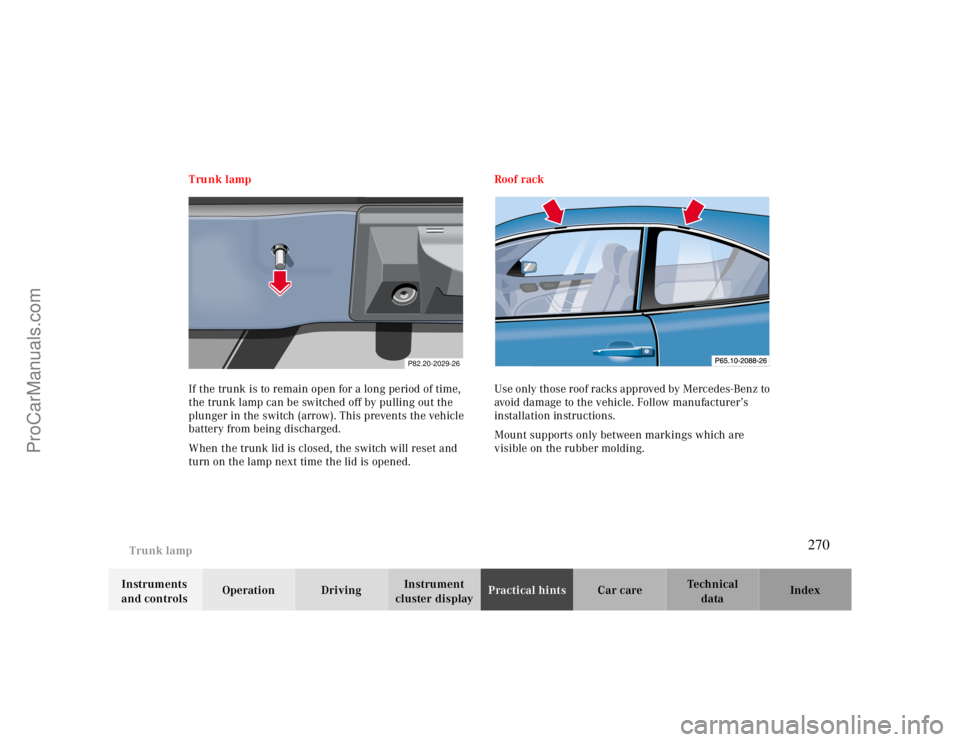
If the trunk is to remain open for a long period of time,
the trunk lamp can be switched off by pulling out the
plunger in the switch (arrow). This prevents the vehicle
battery from being discharged.
When the trunk lid is closed, the switch will reset and
turn on the lamp next time the lid is opened.Roof rack
Use only those roof racks approved by Mercedes-Benz to
avoid damage to the vehicle. Follow manufacturer’s
installation instructions.
Mount supports only between markings which are
visible on the rubber molding.
P82.20-2029-26
270
ProCarManuals.com