Light MERCEDES-BENZ CLK-CLASS 2003 Owner's Manual
[x] Cancel search | Manufacturer: MERCEDES-BENZ, Model Year: 2003, Model line: CLK-CLASS, Model: MERCEDES-BENZ CLK-CLASS 2003Pages: 330, PDF Size: 15.73 MB
Page 143 of 330
140 Audio system
Technical
data Instruments
and controlsOperationDrivingInstrument
cluster displayPractical hints Car care Index
CD mode
General notes on CD mode
Should excessive temperatures occur while in CD mode,
“TEMP HIGH” will appear in the display and muting
will take place. The unit will then switch back to radio
mode until the temperature has decreased to a safe
operating level.
Should temperatures occur while in CD mode which are
too low, “TEMP LOW” will be displayed, but the CD will
play. It will be sensitive to skipping if you are driving
over rough roads.
Handle CDs carefully to prevent interference during
playback.
Avoid fingerprints and dust on CDs. Do not write on the
CDs or apply any label to the CDs.
Clean CDs from time to time with a commercially
available cleaning cloth. No solvents, anti-static sprays,
etc. should be used.
Replace the CD in its container after use. Protect CDs
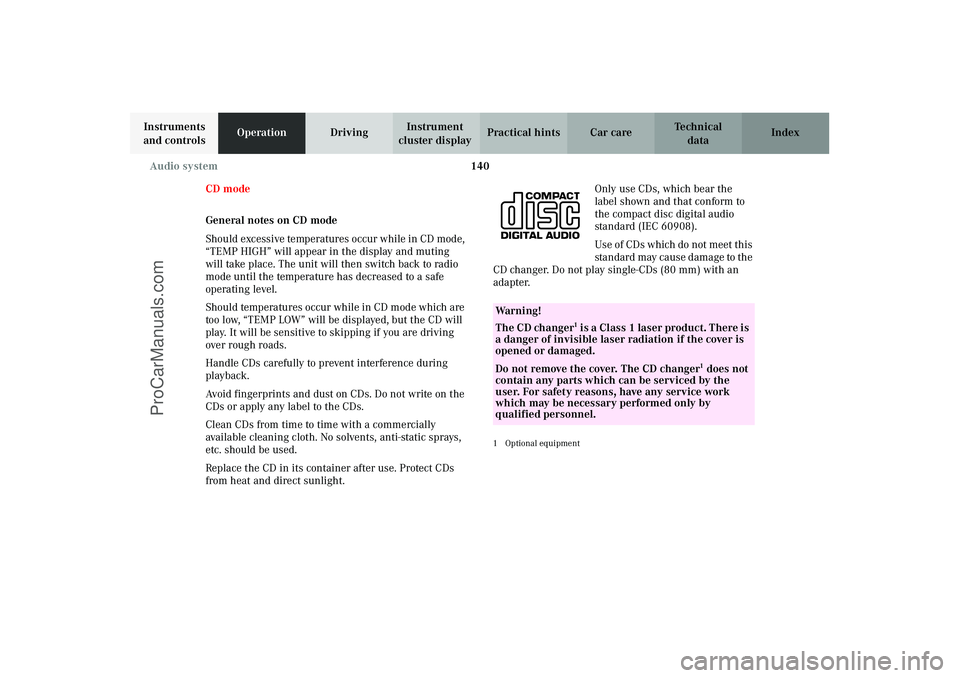
from heat and direct sunlight.Only use CDs, which bear the
label shown and that conform to
the compact disc digital audio
standard (IEC 60908).
Use of CDs which do not meet this
stan dard may cause d am age to t he
CD changer. Do not play single-CDs (80 mm) with an
adapter.
1Optional equipmentWa r n i n g !
The CD changer
1 is a Class 1 laser product. There is
a danger of invisible laser radiation if the cover is
opened or damaged.
Do not remove the cover. The CD changer
1 does not
contain any parts which can be serviced by the
user. For safety reasons, have any service work
which may be necessary performed only by
qualified personnel.
J_C208_II.book Seite 140 Donnerstag, 31. Mai 2001 10:13 10
ProCarManuals.com
Page 151 of 330
148 Interior equipment
Technical
data Instruments
and controlsOperationDrivingInstrument
cluster displayPractical hints Car care Index
Express opening and closing of front door windows
Press switch k or j past resistance point and
release — window opens or closes completely.
To interrupt procedure, briefly press k or j.
If the upward movement of the window is blocked
during the closing procedure, the window will stop
during the last few inches before closure and open
slightly.
When pressing and holding the switch j to close the
window, and upward movement of the window is
blocked during the last few inches before closure, it will
stop but not
open slightly.Note:
The power windows can also be opened or closed with
the infrared remote control while unlocking or locking
the vehicle doors or trunk, see page 31.
If the express closing function of the door windows is
interrupted, press and hold the switch j to close the
window completely.
The automatic full closing procedure of the window
should now be reactivated.
Synchronizing power windows
If the power supply was interrupted (battery
disconnected or low), the windows cannot be opened or
closed by the express feature.
To resynchronize the express feature, press j si de of
power window switch until the window is completely
closed and hold for additional 2 seconds. Repeat
procedure for each window.
The automatic full opening and closing procedure of the
windows should now be restored.
Wa r n i n g !
When leaving the vehicle, always remove the
electronic key from the steering lock and lock the
vehicle. Do not leave children unattended in the
vehicle, or with access to an unlocked vehicle.
Unsupervised use of vehicle equipment can cause
serious personal injury.
J_C208_II.book Seite 148 Donnerstag, 31. Mai 2001 10:13 10
ProCarManuals.com
Page 154 of 330
151 Interior equipment
Technical
data Instruments
and controlsOperationDrivingInstrument
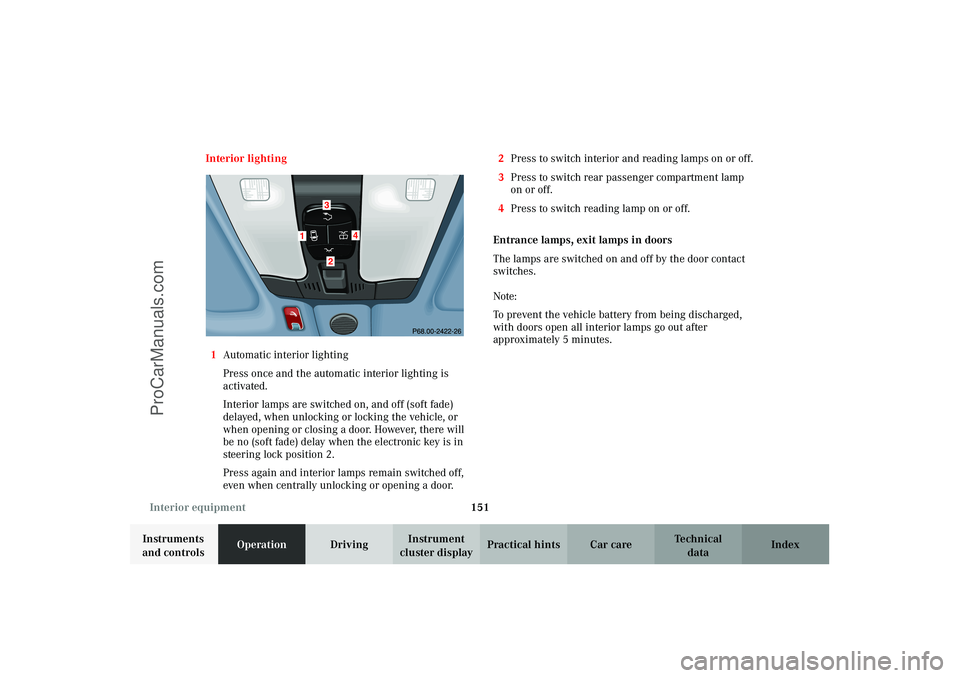
cluster displayPractical hints Car care Index Interior lighting
1Automatic interior lighting
Press once and the automatic interior lighting is
activated.
Interior lamps are switched on, and off (soft fade)
delayed, when unlocking or locking the vehicle, or
when opening or closing a door. However, there will
be no (soft fade) delay when the electronic key is in
steering lock position 2.
Press again and interior lamps remain switched off,
even when centrally unlocking or opening a door.2Press to switch interior and reading lamps on or off.
3Press to switch rear passenger compartment lamp
on or off.
4Press to switch reading lamp on or off.
Entrance lamps, exit lamps in doors
The lamps are switched on and off by the door contact
switches.
Note:
To prevent the vehicle battery from being discharged,
with doors open all interior lamps go out after
approximately 5 minutes.
1
4
32
J_C208_II.book Seite 151 Donnerstag, 31. Mai 2001 10:13 10
ProCarManuals.com
Page 155 of 330
152 Interior equipment
Technical
data Instruments
and controlsOperationDrivingInstrument
cluster displayPractical hints Car care Index
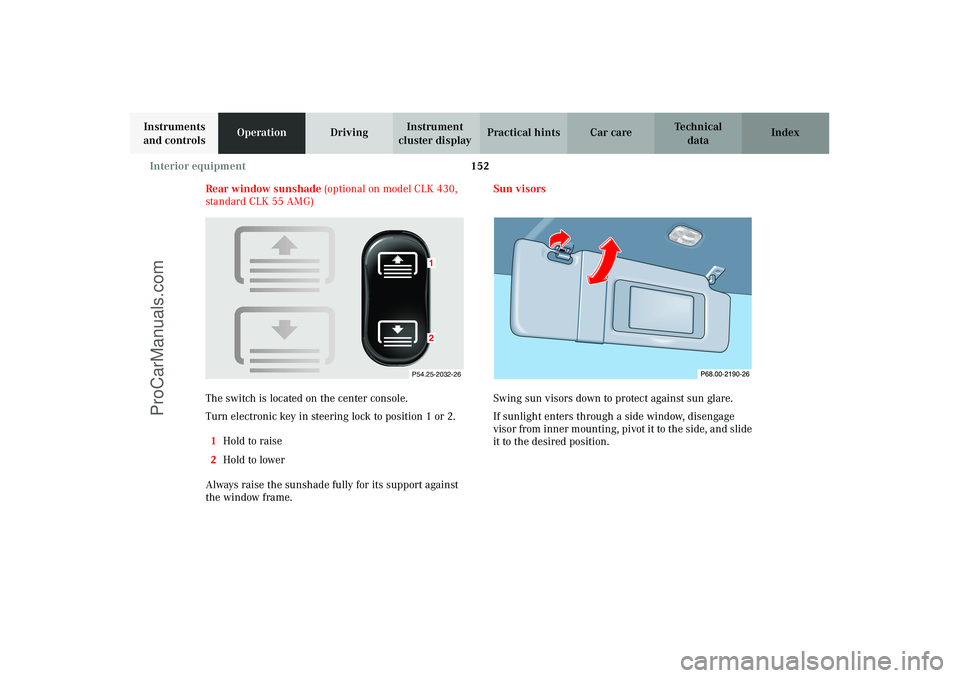
Rear window sunshade (optional on model CLK 430,
standard CLK 55 AMG)
The switch is located on the center console.
Turn electronic key in steering lock to position 1 or 2.
1Hold to raise
2Hold to lower
Always raise the sunshade fully for its support against
the window frame.Sun visors
Swing sun visors down to protect against sun glare.
If sunlight enters through a side window, disengage
visor from inner mounting, pivot it to the side, and slide
it to the desired position.
P54.25-2032-26
12
J_C208_II.book Seite 152 Donnerstag, 31. Mai 2001 10:13 10
ProCarManuals.com
Page 157 of 330
154 Interior equipment
Technical
data Instruments
and controlsOperationDrivingInstrument
cluster displayPractical hints Car care Index
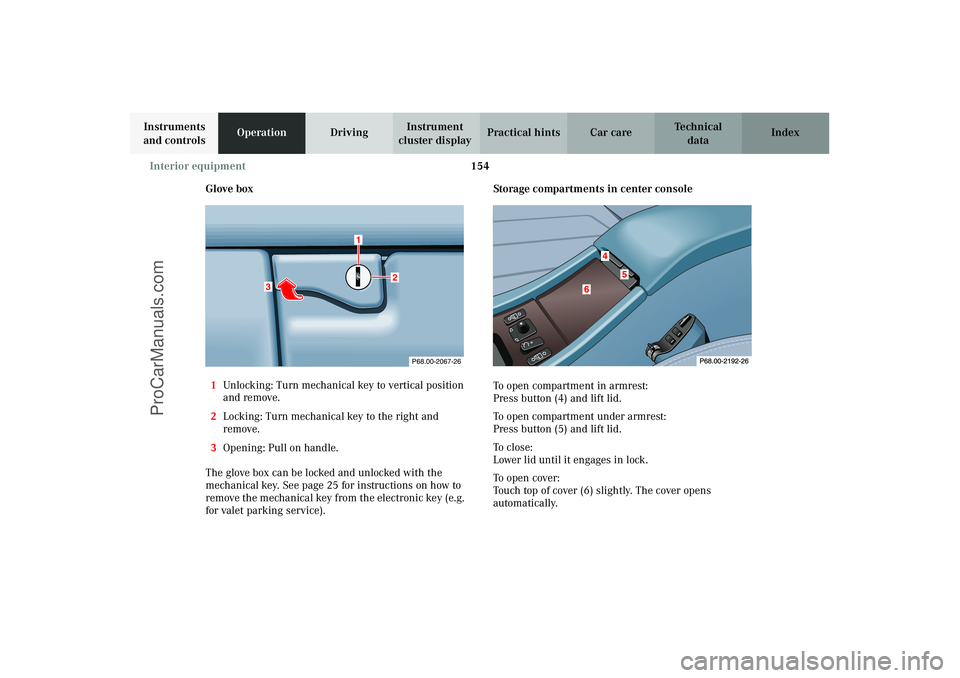
Glove box
1Unlocking: Turn mechanical key to vertical position
and remove.
2Locking: Turn mechanical key to the right and
remove.
3Opening: Pull on handle.
The glove box can be locked and unlocked with the
mechanical key. See page 25 for instructions on how to
remove the mechanical key from the electronic key (e.g.
for valet parking service).Storage compartments in center console
To open compartment in armrest:
Press button (4) and lift lid.
To open compartment under armrest:
Press button (5) and lift lid.
To c l o s e :
Lower lid until it engages in lock.
To o p e n c ove r :
Touch top of cover (6) slightly. The cover opens
automatically.
P68.00-2067-26
3
1
2
J_C208_II.book Seite 154 Donnerstag, 31. Mai 2001 10:13 10
ProCarManuals.com
Page 160 of 330
157 Interior equipment
Technical
data Instruments
and controlsOperationDrivingInstrument
cluster displayPractical hints Car care Index Ashtrays
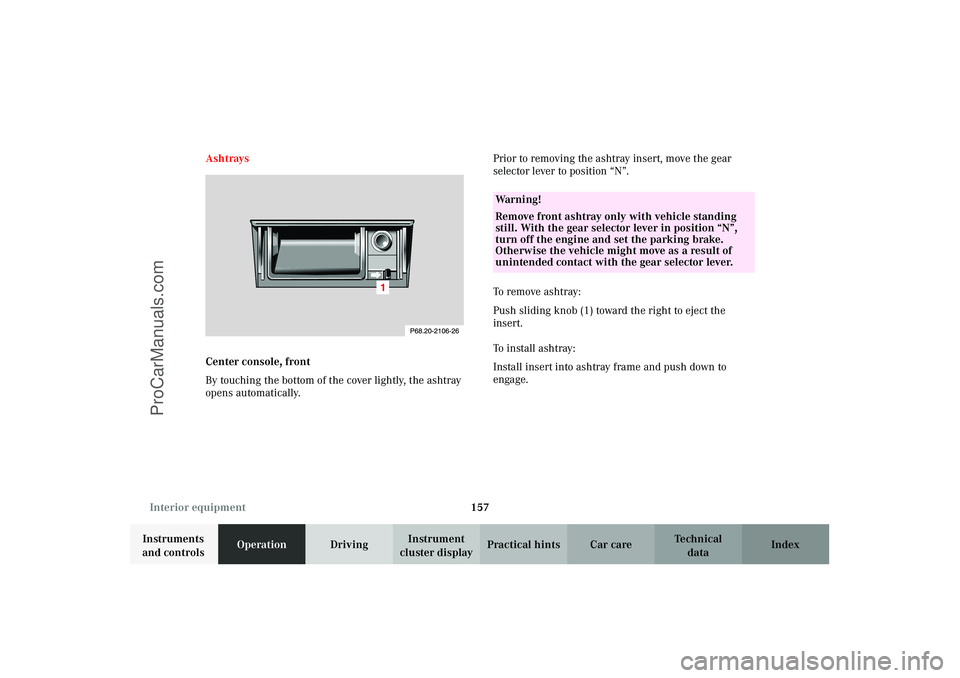
Center console, front
By touching the bottom of the cover lightly, the ashtray
opens automatically.Prior to removing the ashtray insert, move the gear
selector lever to position “N”.
To r e m ove as ht r ay :
Push sliding knob (1) toward the right to eject the
insert.
To install ashtray:
Install insert into ashtray frame and push down to
engage.
Wa r n i n g !
Remove front ashtray only with vehicle standing
still. With the gear selector lever in position “N”,
turn off the engine and set the parking brake.
Otherwise the vehicle might move as a result of
unintended contact with the gear selector lever.
J_C208_II.book Seite 157 Donnerstag, 31. Mai 2001 10:13 10
ProCarManuals.com
Page 162 of 330
159 Interior equipment
Technical
data Instruments
and controlsOperationDrivingInstrument
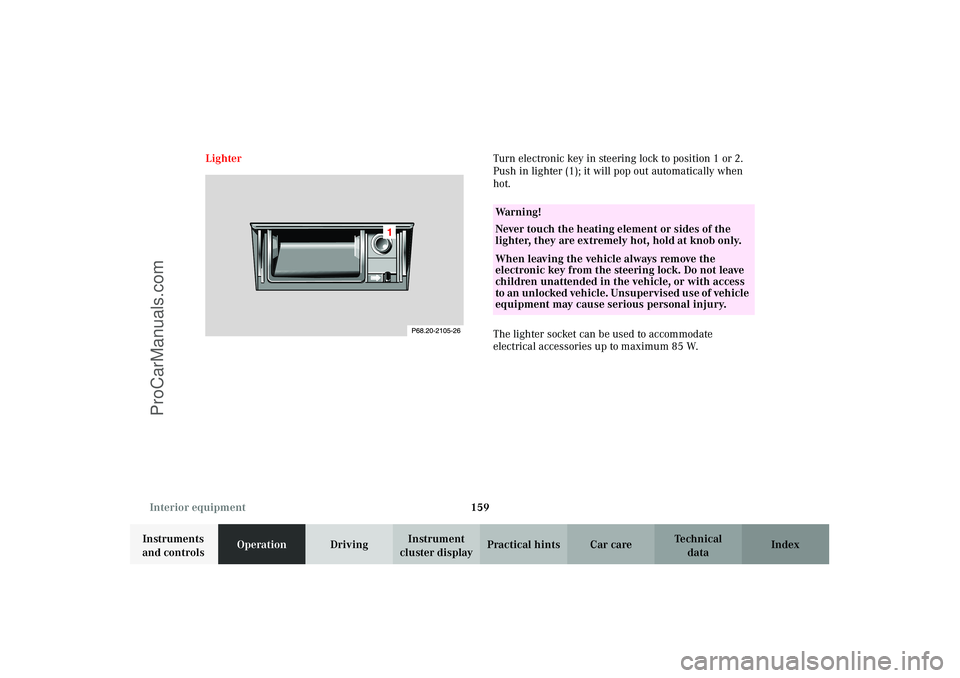
cluster displayPractical hints Car care Index LighterTurn electronic key in steering lock to position 1 or 2.
Push in lighter (1); it will pop out automatically when
hot.
The lighter socket can be used to accommodate
electrical accessories up to maximum 85 W.
Wa r n i n g !
Never touch the heating element or sides of the
lighter, they are extremely hot, hold at knob only.When leaving the vehicle always remove the
electronic key from the steering lock. Do not leave
children unattended in the vehicle, or with access
to an unl ocked vehic l e. Uns upervi s ed us e of vehi cl e
equipment may cause serious personal injury.
J_C208_II.book Seite 159 Donnerstag, 31. Mai 2001 10:13 10
ProCarManuals.com
Page 167 of 330
164 Telephone
Technical
data Instruments
and controlsOperationDrivingInstrument
cluster displayPractical hints Car care Index
Parcel net in front passenger footwell
A small convenience parcel net is located in the front
passenger footwell. It is for small and light items, such
as road maps, mail, etc..
Note:
With large objects stored in the parcel net do not slide
the seat fully forward, it could damage them.Telephone, general
Wa r n i n g !
Do not place heavy or fragile objects, or objects
having sharp edges, in the parcel net.In an accident, during hard braking or sudden
maneuvers, they could be thrown around inside
the vehicle, and cause injury to vehicle occupants.
Wa r n i n g !
A driver’s attention to the road must always be his/
her primary focus when driving. For your safety
and the safety of others, we recommend that you
pull over to a safe location and stop before placing
or taking a telephone call. If you choose to use the
telephone while driving, please use the hands-free
device and only use the telephone when road and
traffic conditions permit.Some jurisdictions prohibit the driver from using a
cellular telephone while driving a vehicle.Bear in mind that at a speed of just 30 mph
(approximately 50 km/h), your vehicle is covering
a distance of approximately 50 feet (approximately
14 m) every second. Never operate radio transmitters equipped with a
built-in or attached antenna (i.e. without being
connected to an external antenna) from inside the
vehicle while the engine is running. Doing so could
lead to a malfunction of the vehicle’s electronic
system, possibly resulting in an accident and
personal injury.
J_C208_II.book Seite 164 Donnerstag, 31. Mai 2001 10:13 10
ProCarManuals.com
Page 171 of 330
168 Garage door opener
Technical
data Instruments
and controlsOperationDrivingInstrument
cluster displayPractical hints Car care Index
Rolling code programming:
To train a garage door opener (or other rolling code
devices) with the rolling code feature, follow these
instructions after completing the “Programming”
portion of this text. (A second person may make the
following training procedures quicker and easier.)
1. Locate training button on the garage door opener
motor head unit. Exact location and color of the
button may vary by garage door opener brand. If
there is difficulty locating the transmitting button,
reference to garage door opener operator’s manual.
2. Press “training” button on the garage door opener
motor head unit (which activated the “training
light”).
Note:
Following step 2, there are 30 seconds to initiate
step 3.3. Firmly press and release the programmed
integrated remote control transmit button. Press
and release same button a second time to complete
the training process. (Some garage door openers
may require you to do this procedure a third time to
complete the training.)
4. Confirm the garage door operation by pressing the
programmed button on the integrated remote
control transmitter.
Canadian programming:
During programming, your hand-held transmitter may
automatically stop transmitting. Continue to press and
hold the integrated remote control transmitter button
(note steps 2 through 4 in the “Programming” portion)
while you press and re-press (“cycle”) your hand-held
transmitter every two seconds until the frequency
signal has been learned. The indicator lamp will flash
slowly and then rapidly after several seconds upon
successful training.
J_C208_II.book Seite 168 Donnerstag, 31. Mai 2001 10:13 10
ProCarManuals.com
Page 187 of 330
184 Tele Aid
Technical
data Instruments
and controlsOperationDrivingInstrument
cluster displayPractical hints Car care Index
Roadside Assistance button
Located below the center armrest cover is the Roadside
Assistance button. Pressing and holding the
button (for longer than 2 seconds) will initiate a call to a
Mercedes-Benz Roadside Assistance dispatcher. The
button will flash while the call is in progress. The
message “ROADSIDE ASSISTANCE – CONNECTING
CALL” will appear in the multifunction display. When
the connection is established, the message “ROADSIDE
ASSISTANCE – CALL CONNECTED” appears in the
multifunction display. The Tele Aid system will transmit
data generating the vehicle identification number,
model, color and location (subject to availability of
cellular and GPS signals).
A voice connection between the Roadside Assistance
dispatcher and the occupants of the vehicle will be
established. When a voice connection is established the
audio system mutes and the message “TELE AID –
ROADSIDE ASSISTANCE CALL ACTIVE” appears in the
multifunction display. The nature of the need for
assistance can then be described. The Mercedes-Benz
Roadside assistance dispatcher will either dispatch a
qualified Mercedes-Benz technician or arrange to tow
your vehicle to the nearest Mercedes-Benz Center. For services such as labor and/or towing charges may apply.
Refer to the Roadside Assistance manual for more
information.
These programs are only available in the USA:
•S ign an d Drive s erv ices : Ser vi ces such as jump start,
a few gallons of fuel or the replacement of a flat tire
with the vehicle spare tire are obtainable,
•Remote Vehicle Diagnostics: This function permits
the Mercedes-Benz Roadside Assistance dispatcher
to download malfunction codes and actual vehicle
data.
Notes:
The indicator lamp in the Roadside Assistance
button remains illuminated in red for approx.
10 seconds during the system self-check after turning
electronic key in starter switch to position 2 (together
with the “SOS” button and the Information
button¡).
See system self-check on page 180 when the indicator
lamp does not light up in red or stays on longer than
approximately 10 seconds.
J_C208_II.book Seite 184 Donnerstag, 31. Mai 2001 10:13 10
ProCarManuals.com