display MERCEDES-BENZ CLS 2010 Owners Manual
[x] Cancel search | Manufacturer: MERCEDES-BENZ, Model Year: 2010, Model line: CLS, Model: MERCEDES-BENZ CLS 2010Pages: 308, PDF Size: 5.71 MB
Page 235 of 308
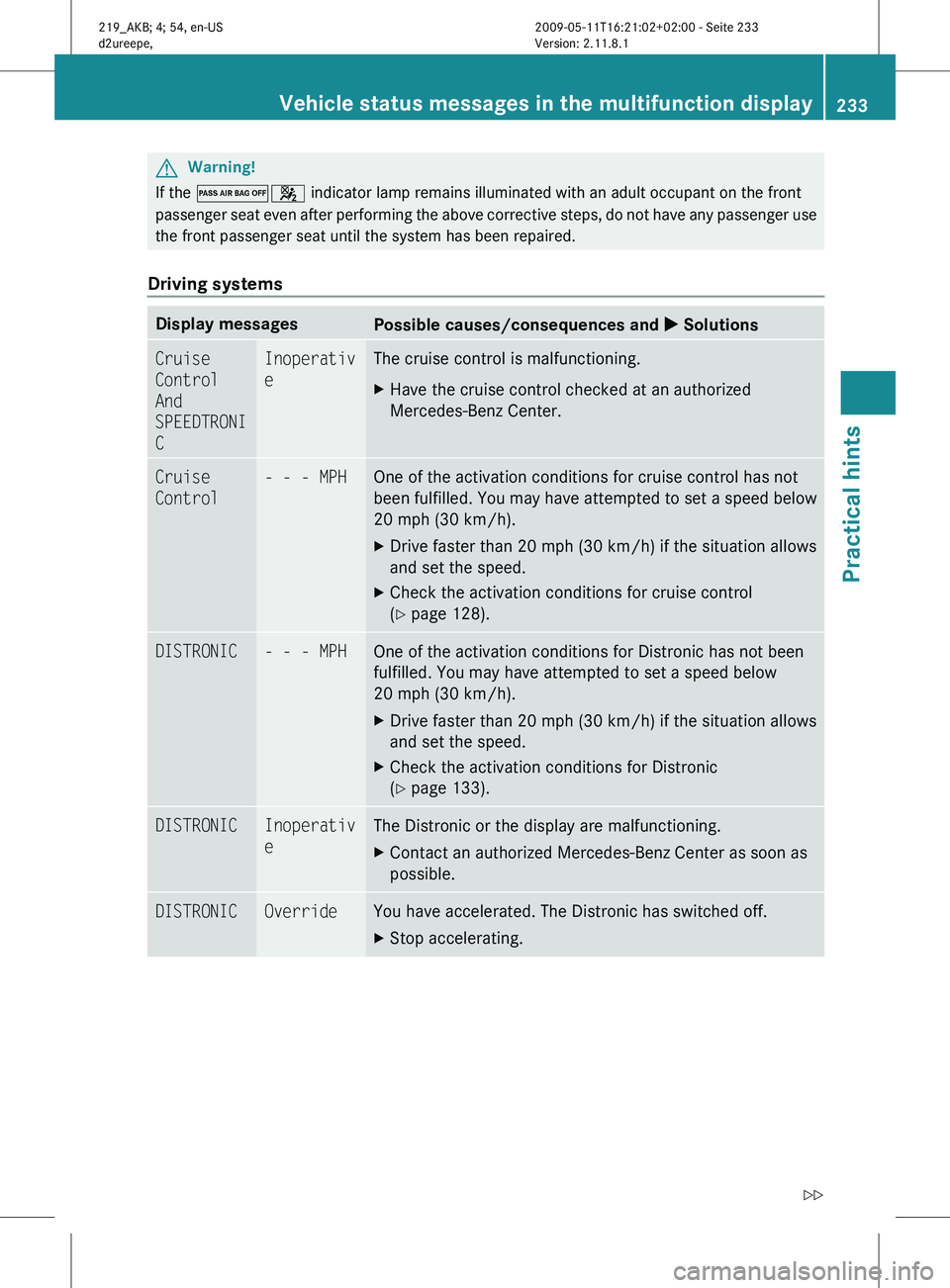
G
Warning!
If the 04 indicator lamp remains illuminated with an adult occupant on the front
passenger seat even after performing the above corrective steps, do not have any passenger use
the front passenger seat until the system has been repaired.
Driving systems Display messages
Possible causes/consequences and
X SolutionsCruise
Control
And
SPEEDTRONI
C Inoperativ
e The cruise control is malfunctioning.
X
Have the cruise control checked at an authorized
Mercedes-Benz Center. Cruise
Control - - - MPH One of the activation conditions for cruise control has not
been
fulfilled. You may have attempted to set a speed below
20 mph (30 km/h).
X Drive faster than 20 mph (30 km/h) if the situation allows
and set the speed.
X Check the activation conditions for cruise control
(Y page 128). DISTRONIC - - - MPH One of the activation conditions for Distronic has not been
fulfilled. You may have attempted to set a speed below
20 mph (30 km/h)
.
X Drive faster than 20 mph (30 km/h) if the situation allows
and set the speed.
X Check the activation conditions for Distronic
(Y page 133). DISTRONIC Inoperativ
e The Distronic or the display are malfunctioning.
X
Contact an authorized Mercedes-Benz Center as soon as
possible. DISTRONIC Override You have accelerated. The Distronic has switched off.
X
Stop accelerating. Vehicle status messages in the multifunction display
233
Practical hints
219_AKB; 4; 54, en-US
d2ureepe,Version: 2.11.8.1 2009-05-11T16:21:02+02:00 - Seite 233 Z
Page 236 of 308
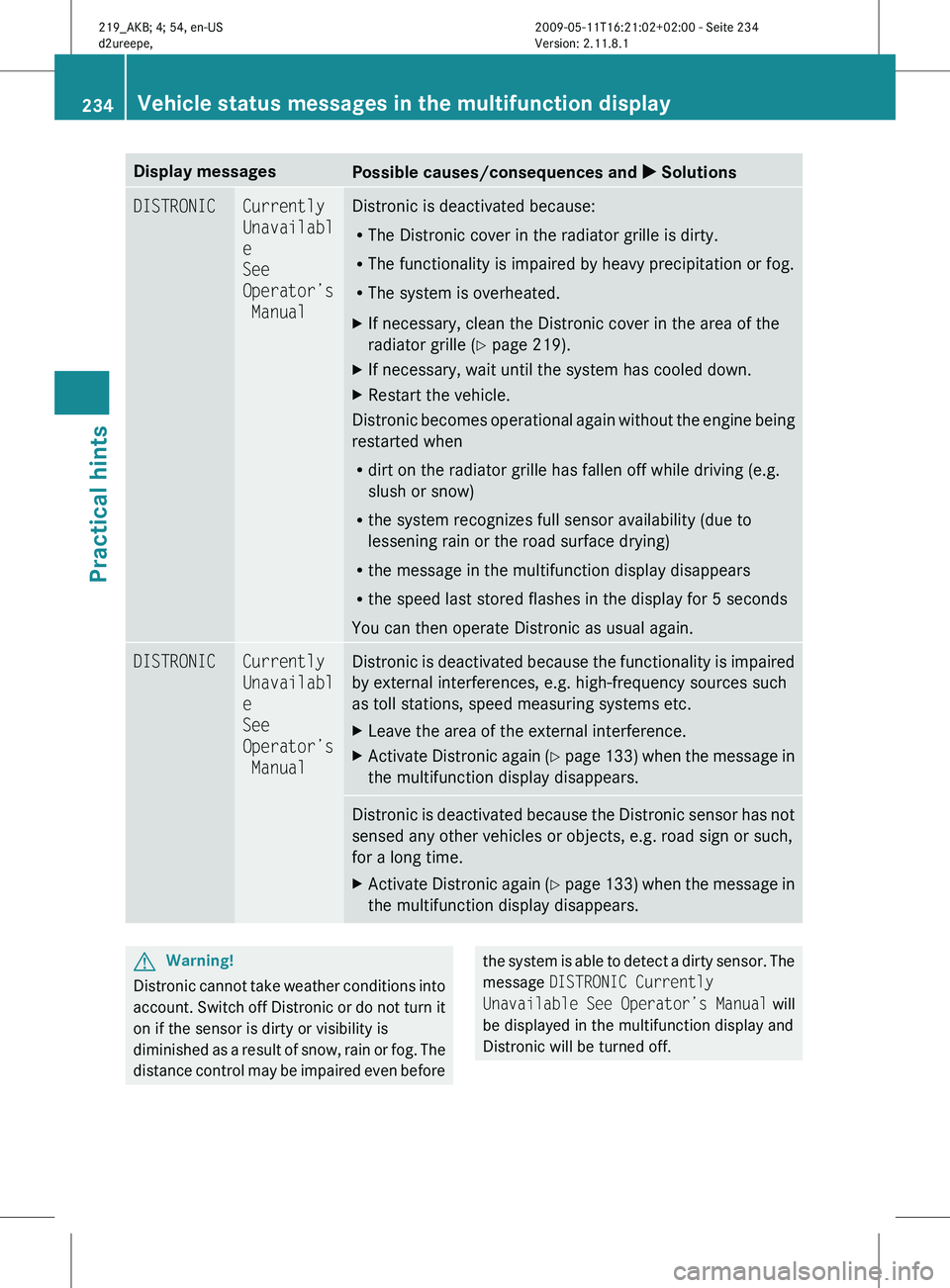
Display messages
Possible causes/consequences and
X SolutionsDISTRONIC Currently
Unavailabl
e
See
Operator’s
Manual Distronic is deactivated because:
R
The Distronic cover in the radiator grille is dirty.
R The functionality is impaired by heavy precipitation or fog.
R The system is overheated.
X If necessary, clean the Distronic cover in the area of the
radiator grille
(Y page 219).
X If necessary, wait until the system has cooled down.
X Restart the vehicle.
Distronic becomes operational again without the engine being
restarted when
R dirt on the radiator grille has fallen off while driving (e.g.
slush or snow)
R the system recognizes full sensor availability (due to
lessening rain or the road surface drying)
R the message in the multifunction display disappears
R the speed last stored flashes in the display for 5 seconds
You can then operate Distronic as usual again. DISTRONIC Currently
Unavailabl
e
See
Operator’s
Manual Distronic is deactivated because the functionality is impaired
by external interferences, e.g. high-frequency sources such
as toll stations, speed measuring systems etc.
X
Leave the area of the external interference.
X Activate Distronic again (Y
page 133) when the message in
the multifunction display disappears. Distronic is deactivated because the Distronic sensor has not
sensed any other vehicles or objects, e.g. road sign or such,
for a long time.
X
Activate Distronic again (Y
page 133) when the message in
the multifunction display disappears. G
Warning!
Distronic cannot take weather conditions into
account.
Switch off Distronic or do not turn it
on if the sensor is dirty or visibility is
diminished as a result of snow, rain or fog. The
distance control may be impaired even before the system is able to detect a dirty sensor. The
message
DISTRONIC Currently
Unavailable
See Operator’s Manual will
be displayed in the multifunction display and
Distronic will be turned off. 234
Vehicle status messages in the multifunction display
Practical hints
219_AKB; 4; 54, en-US
d2ureepe,
Version: 2.11.8.1 2009-05-11T16:21:02+02:00 - Seite 234
Page 237 of 308
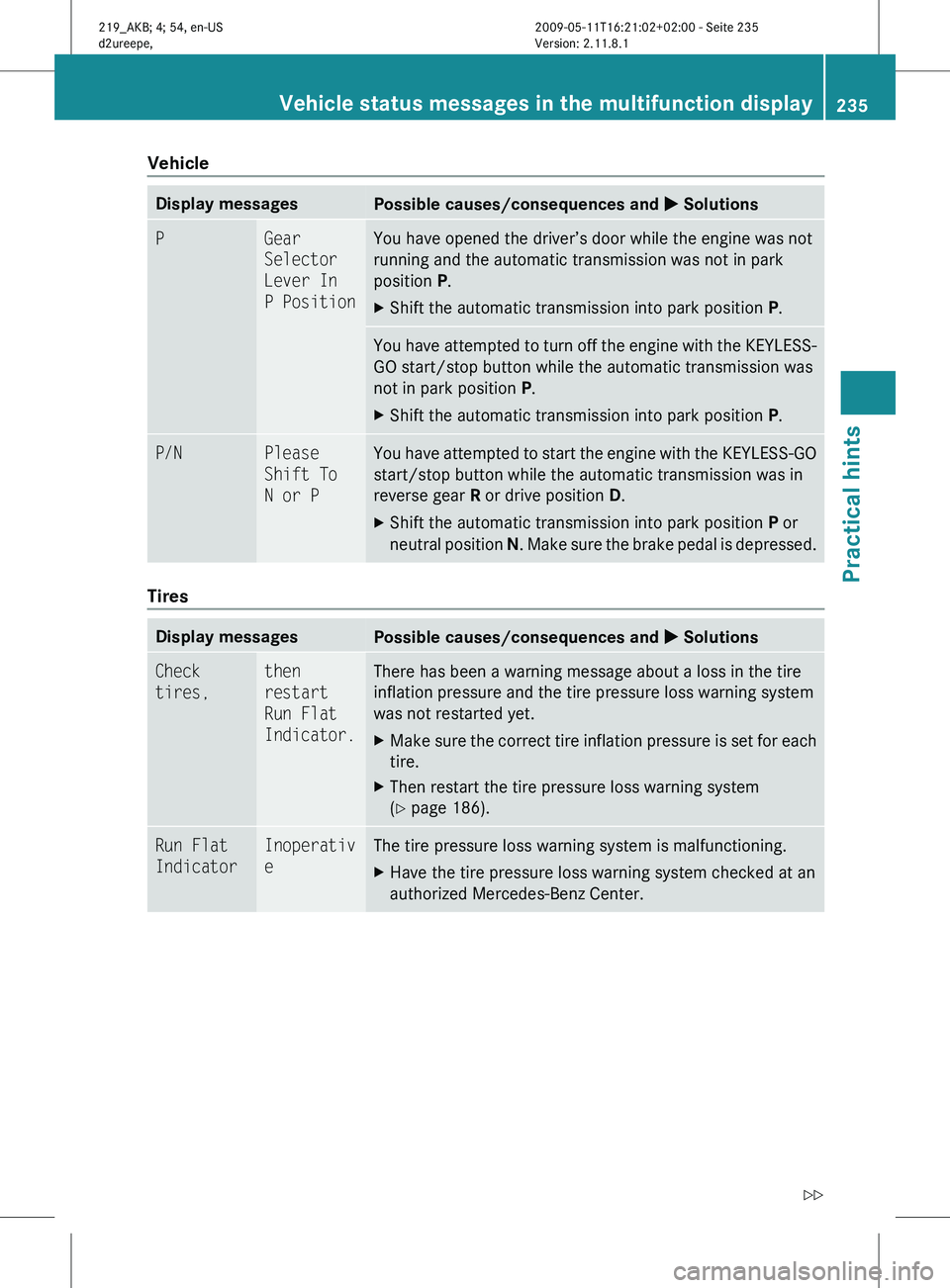
Vehicle
Display messages
Possible causes/consequences and
X SolutionsP Gear
Selector
Lever In
P Position You have opened the driver’s door while the engine was not
running and the automatic transmission was not in park
position P.
X
Shift the automatic transmission into park position P.You have attempted to turn off the engine with the KEYLESS-
GO start/stop button while the automatic transmission was
not in park position
P.
X Shift the automatic transmission into park position P.P/N Please
Shift To
N or P You have attempted to start the engine with the KEYLESS-GO
start/stop button while the automatic transmission was in
reverse gear
R or drive position D.
X Shift the automatic transmission into park position P or
neutral position N. Make sure the brake pedal is depressed. Tires
Display messages
Possible causes/consequences and
X SolutionsCheck
tires, then
restart
Run Flat
Indicator. There has been a warning message about a loss in the tire
inflation pressure and the tire pressure loss warning system
was not restarted yet.
X
Make sure the correct tire inflation pressure is set for each
tire.
X Then restart the tire pressure loss warning system
(Y page 186). Run Flat
Indicator Inoperativ
e The tire pressure loss warning system is malfunctioning.
X
Have the tire pressure loss warning system checked at an
authorized Mercedes-Benz Center. Vehicle status messages in the multifunction display
235
Practical hints
219_AKB; 4; 54, en-US
d2ureepe,Version: 2.11.8.1 2009-05-11T16:21:02+02:00 - Seite 235 Z
Page 238 of 308
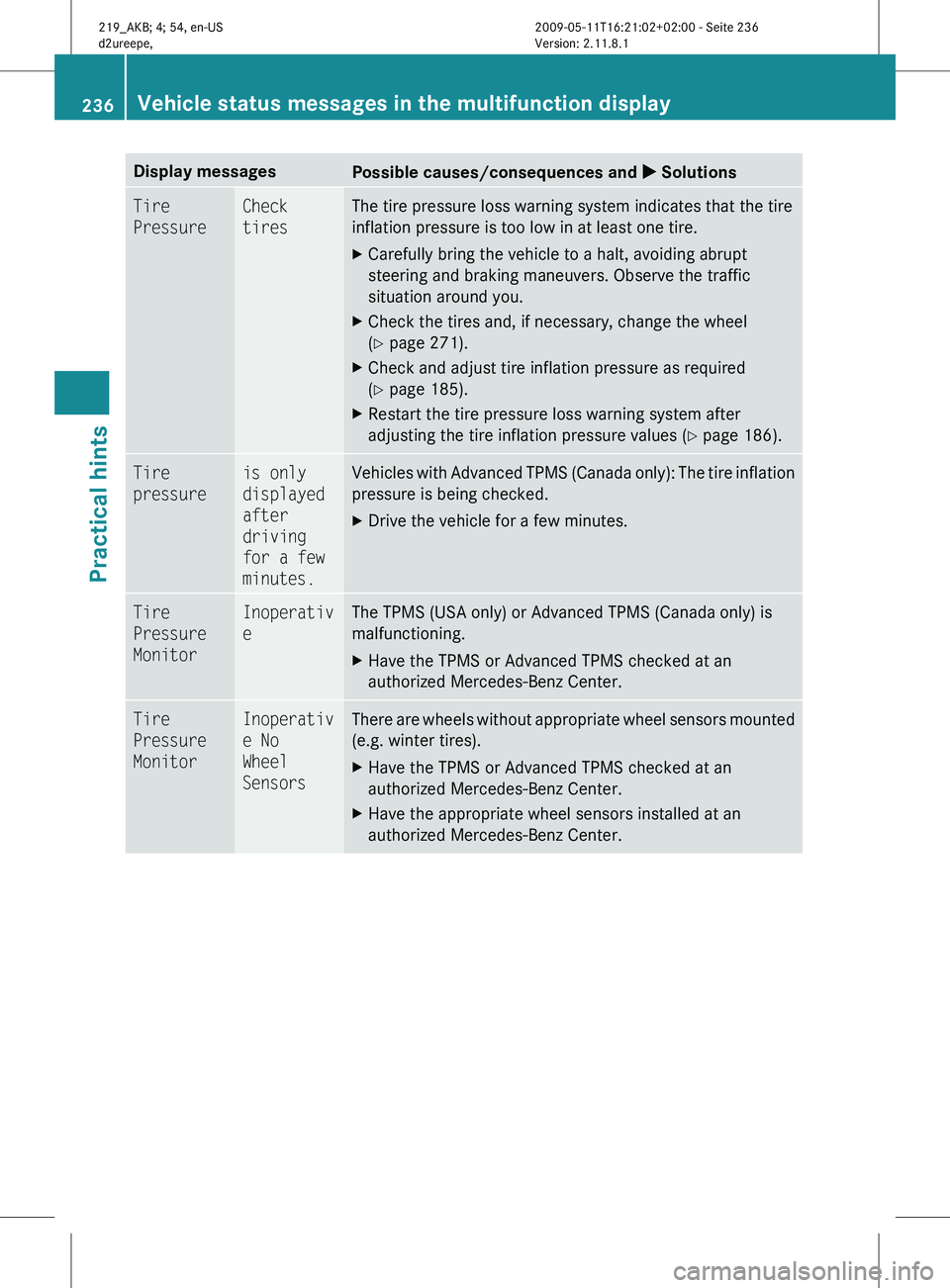
Display messages
Possible causes/consequences and
X SolutionsTire
Pressure Check
tires The tire pressure loss warning system indicates that the tire
inflation pressure is too low in at least one tire.
X
Carefully bring the vehicle to a halt, avoiding abrupt
steering and braking maneuvers. Observe the traffic
situation around you.
X Check the tires and, if necessary, change the wheel
(Y page 271).
X Check and adjust tire inflation pressure as required
(Y page 185).
X Restart the tire pressure loss warning system after
adjusting the tire inflation pressure values
(Y page 186). Tire
pressure is only
displayed
after
driving
for a few
minutes. Vehicles with Advanced TPMS (Canada only): The tire inflation
pressure is being checked.
X
Drive the vehicle for a few minutes. Tire
Pressure
Monitor Inoperativ
e The TPMS (USA only) or Advanced TPMS (Canada only) is
malfunctioning.
X
Have the TPMS or Advanced TPMS checked at an
authorized Mercedes-Benz Center. Tire
Pressure
Monitor Inoperativ
e No
Wheel
Sensors There are wheels without appropriate wheel sensors mounted
(e.g. winter tires).
X
Have the TPMS or Advanced TPMS checked at an
authorized Mercedes-Benz Center.
X Have the appropriate wheel sensors installed at an
authorized Mercedes-Benz Center. 236
Vehicle status messages in the multifunction display
Practical hints
219_AKB; 4; 54, en-US
d2ureepe,
Version: 2.11.8.1 2009-05-11T16:21:02+02:00 - Seite 236
Page 239 of 308
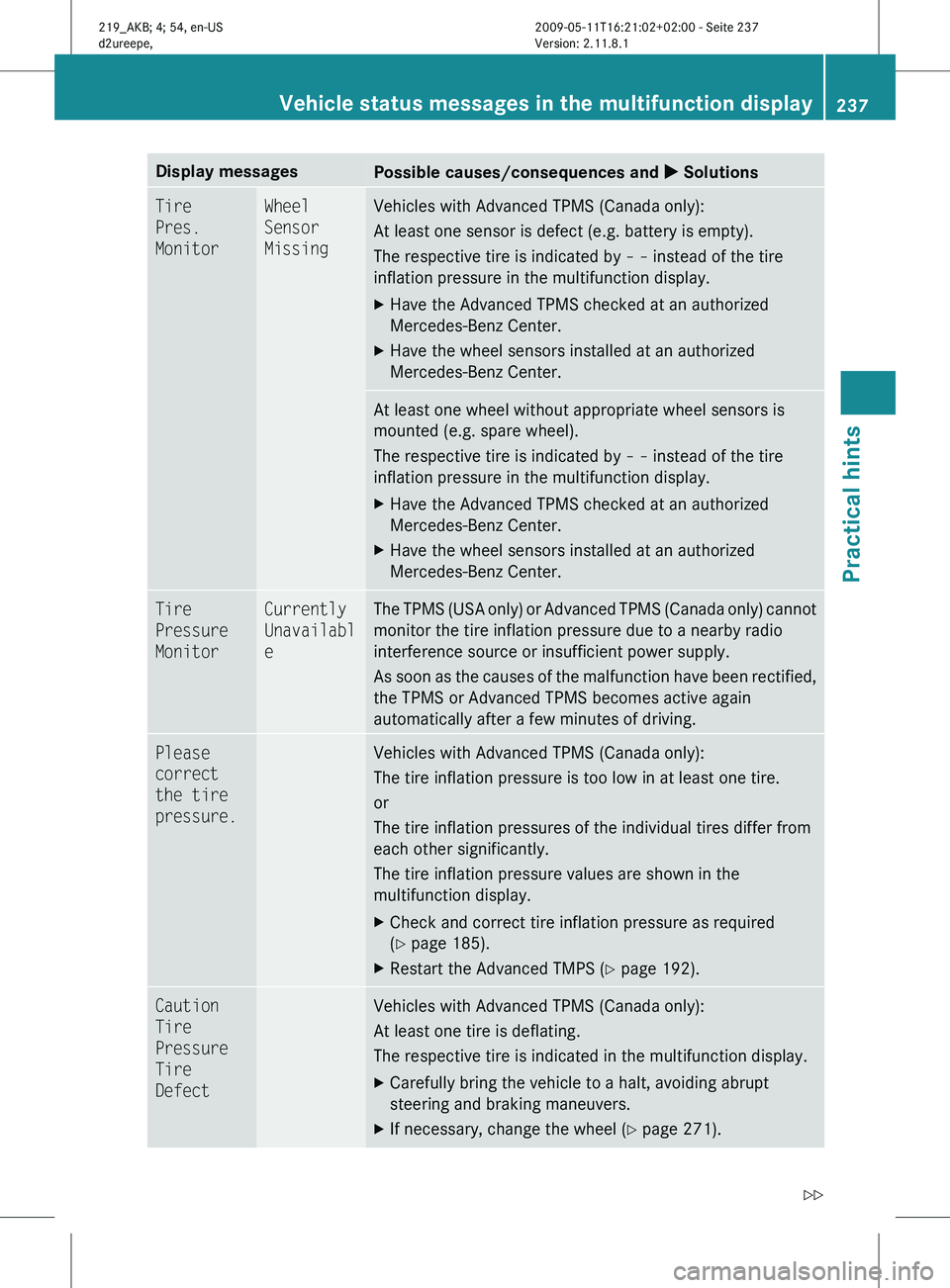
Display messages
Possible causes/consequences and
X SolutionsTire
Pres.
Monitor Wheel
Sensor
Missing Vehicles with Advanced TPMS (Canada only):
At least one sensor is defect (e.g. battery is empty).
The respective tire is indicated by
– – instead of the tire
inflation pressure in the multifunction display.
X Have the Advanced TPMS checked at an authorized
Mercedes-Benz Center.
X Have the wheel sensors installed at an authorized
Mercedes-Benz Center. At least one wheel without appropriate wheel sensors is
mounted (e.g. spare wheel).
The respective tire is indicated by
– – instead of the tire
inflation pressure in the multifunction display.
X Have the Advanced TPMS checked at an authorized
Mercedes-Benz Center.
X Have the wheel sensors installed at an authorized
Mercedes-Benz Center. Tire
Pressure
Monitor Currently
Unavailabl
e The TPMS (USA only) or Advanced TPMS (Canada only) cannot
monitor the tire inflation pressure due to a nearby radio
interference source or insufficient power supply.
As
soon as the causes of the malfunction have been rectified,
the TPMS or Advanced TPMS becomes active again
automatically after a few minutes of driving. Please
correct
the tire
pressure. Vehicles with Advanced TPMS (Canada only):
The tire inflation pressure is too low in at least one tire.
or
The tire inflation pressures of the individual tires differ from
each other significantly.
The tire inflation pressure values are shown in the
multifunction display.
X
Check and correct tire inflation pressure as required
(Y page 185).
X Restart the Advanced TMPS ( Y page 192).Caution
Tire
Pressure
Tire
Defect Vehicles with Advanced TPMS (Canada only):
At least one tire is deflating.
The respective tire is indicated in the multifunction display.
X
Carefully bring the vehicle to a halt, avoiding abrupt
steering and braking maneuvers.
X If necessary, change the wheel (Y page 271). Vehicle status messages in the multifunction display
237
Practical hints
219_AKB; 4; 54, en-US
d2ureepe,Version: 2.11.8.1 2009-05-11T16:21:02+02:00 - Seite 237 Z
Page 240 of 308
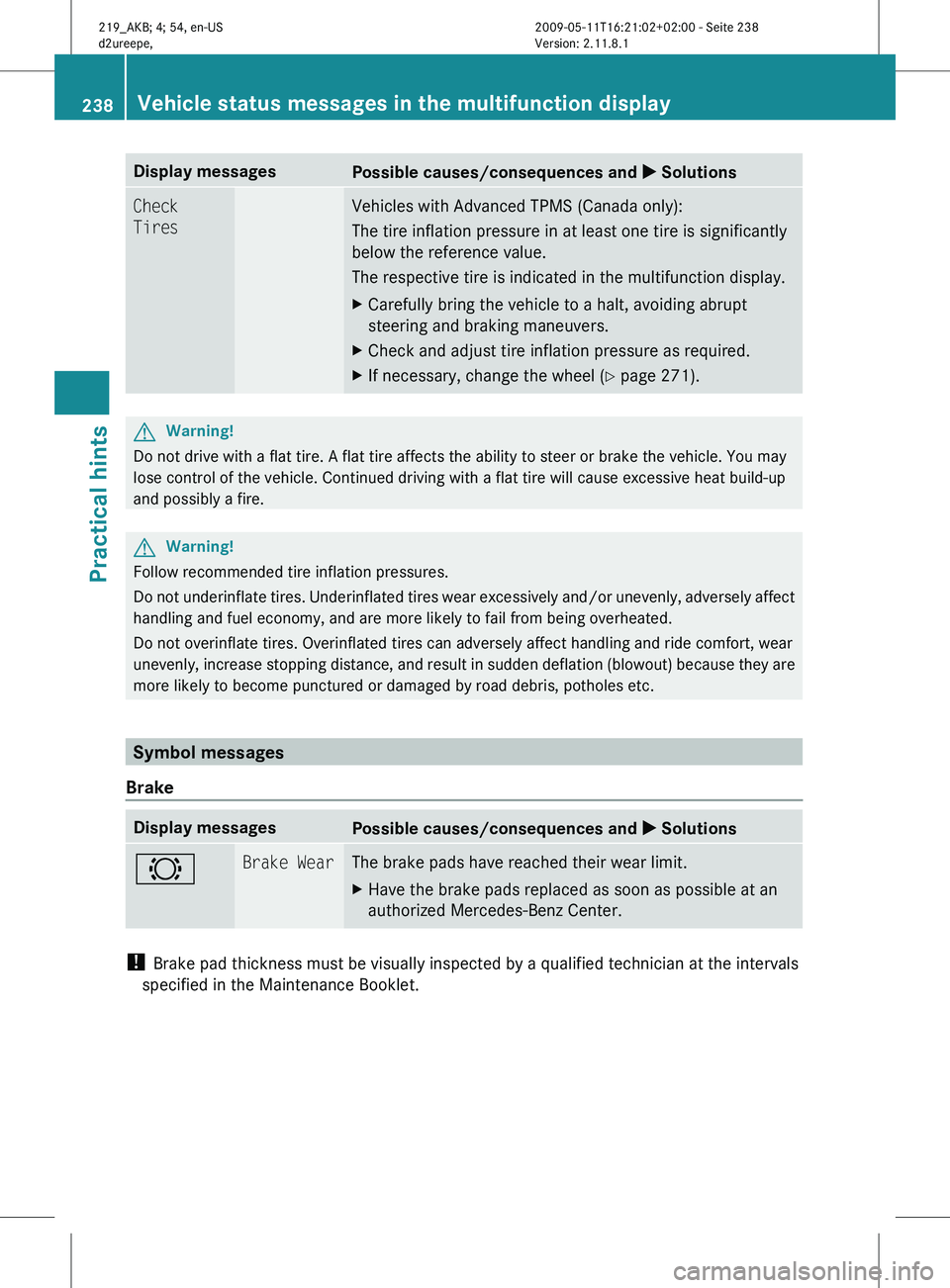
Display messages
Possible causes/consequences and
X SolutionsCheck
Tires Vehicles with Advanced TPMS (Canada only):
The tire inflation pressure in at least one tire is significantly
below the reference value.
The respective tire is indicated in the multifunction display.
X
Carefully bring the vehicle to a halt, avoiding abrupt
steering and braking maneuvers.
X Check and adjust tire inflation pressure as required.
X If necessary, change the wheel (Y page 271). G
Warning!
Do not drive with a flat tire. A flat tire affects the ability to steer or brake the vehicle. You may
lose control of the vehicle. Continued driving with a flat tire will cause excessive heat build-up
and possibly a fire. G
Warning!
Follow recommended tire inflation pressures.
Do not underinflate tires. Underinflated tires wear excessively and/or unevenly, adversely affect
handling and fuel economy, and are more likely to fail from being overheated.
Do not overinflate tires. Overinflated tires can adversely affect handling and ride comfort, wear
unevenly, increase stopping distance, and result in sudden deflation (blowout) because they are
more likely to become punctured or damaged by road debris, potholes etc. Symbol messages
Brake Display messages
Possible causes/consequences and
X Solutions# Brake Wear The brake pads have reached their wear limit.
X
Have the brake pads replaced as soon as possible at an
authorized Mercedes-Benz Center. !
Brake pad thickness must be visually inspected by a qualified technician at the intervals
specified in the Maintenance Booklet. 238
Vehicle status messages in the multifunction displayPractical hints
219_AKB; 4; 54, en-US
d2ureepe,
Version: 2.11.8.1 2009-05-11T16:21:02+02:00 - Seite 238
Page 241 of 308
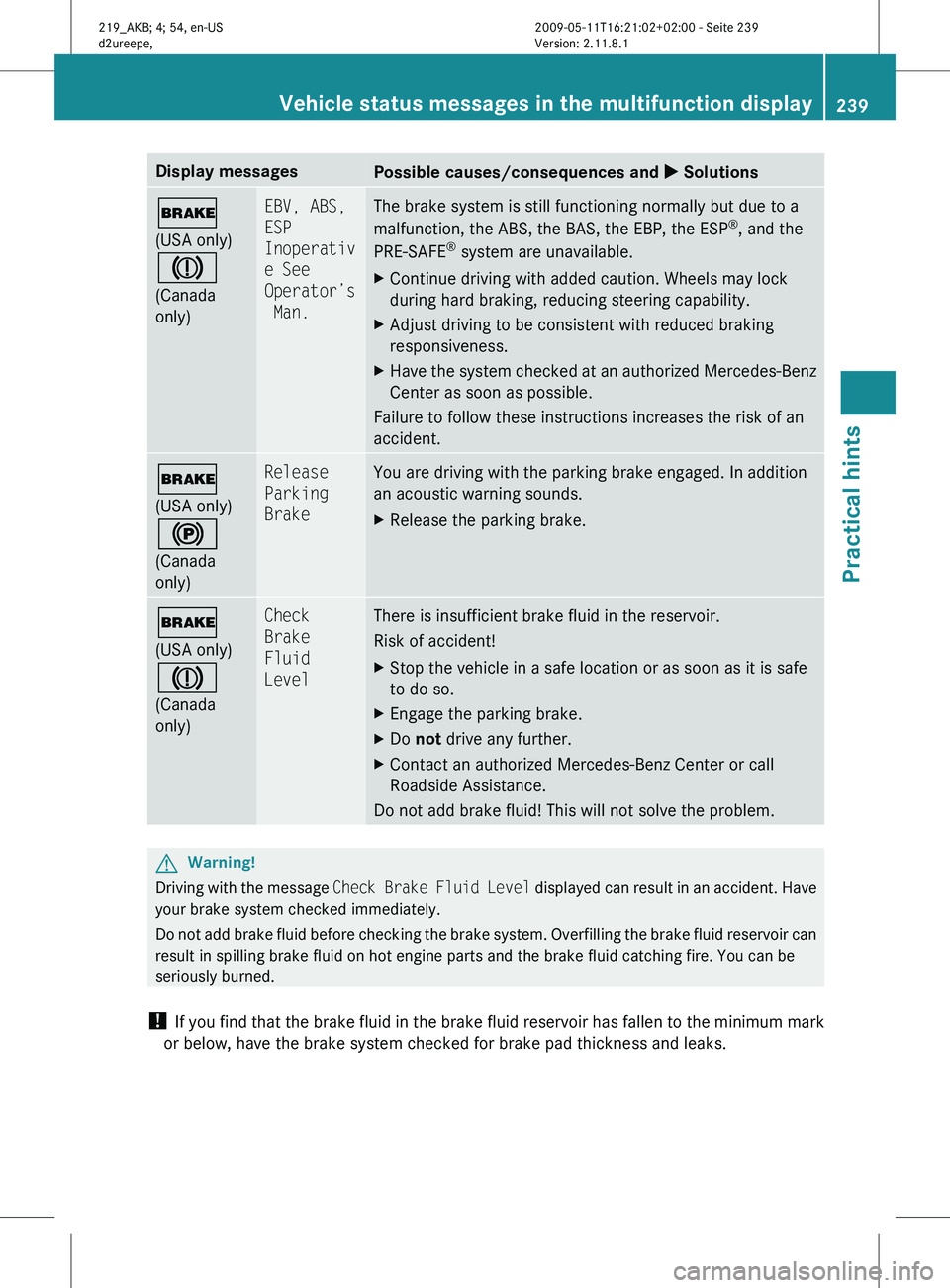
Display messages
Possible causes/consequences and
X Solutions$
(USA only)
J
(Canada
only) EBV, ABS,
ESP
Inoperativ
e See
Operator’s
Man. The brake system is still functioning normally but due to a
malfunction, the ABS, the BAS, the EBP, the ESP
®
, and the
PRE-SAFE ®
system are unavailable.
X Continue driving with added caution. Wheels may lock
during hard braking, reducing steering capability.
X Adjust driving to be consistent with reduced braking
responsiveness.
X Have the system checked at an authorized Mercedes-Benz
Center as soon as possible.
Failure to follow these instructions increases the risk of an
accident. $
(USA only)
!
(Canada
only) Release
Parking
Brake You are driving with the parking brake engaged. In addition
an acoustic warning sounds.
X
Release the parking brake. $
(USA only)
J
(Canada
only) Check
Brake
Fluid
Level There is insufficient brake fluid in the reservoir.
Risk of accident!
X
Stop the vehicle in a safe location or as soon as it is safe
to do so.
X Engage the parking brake.
X Do not drive any further.
X Contact an authorized Mercedes-Benz Center or call
Roadside Assistance.
Do not add brake fluid! This will not solve the problem. G
Warning!
Driving with the message Check Brake Fluid Level displayed can result in an accident. Have
your brake system checked immediately.
Do not add brake fluid before checking the brake system. Overfilling the brake fluid reservoir can
result in spilling brake fluid on hot engine parts and the brake fluid catching fire. You can be
seriously burned.
! If you find that the brake fluid in the brake fluid reservoir has fallen to the minimum mark
or below, have the brake system checked for brake pad thickness and leaks. Vehicle status messages in the multifunction display
239
Practical hints
219_AKB; 4; 54, en-US
d2ureepe,Version: 2.11.8.1 2009-05-11T16:21:02+02:00 - Seite 239 Z
Page 242 of 308
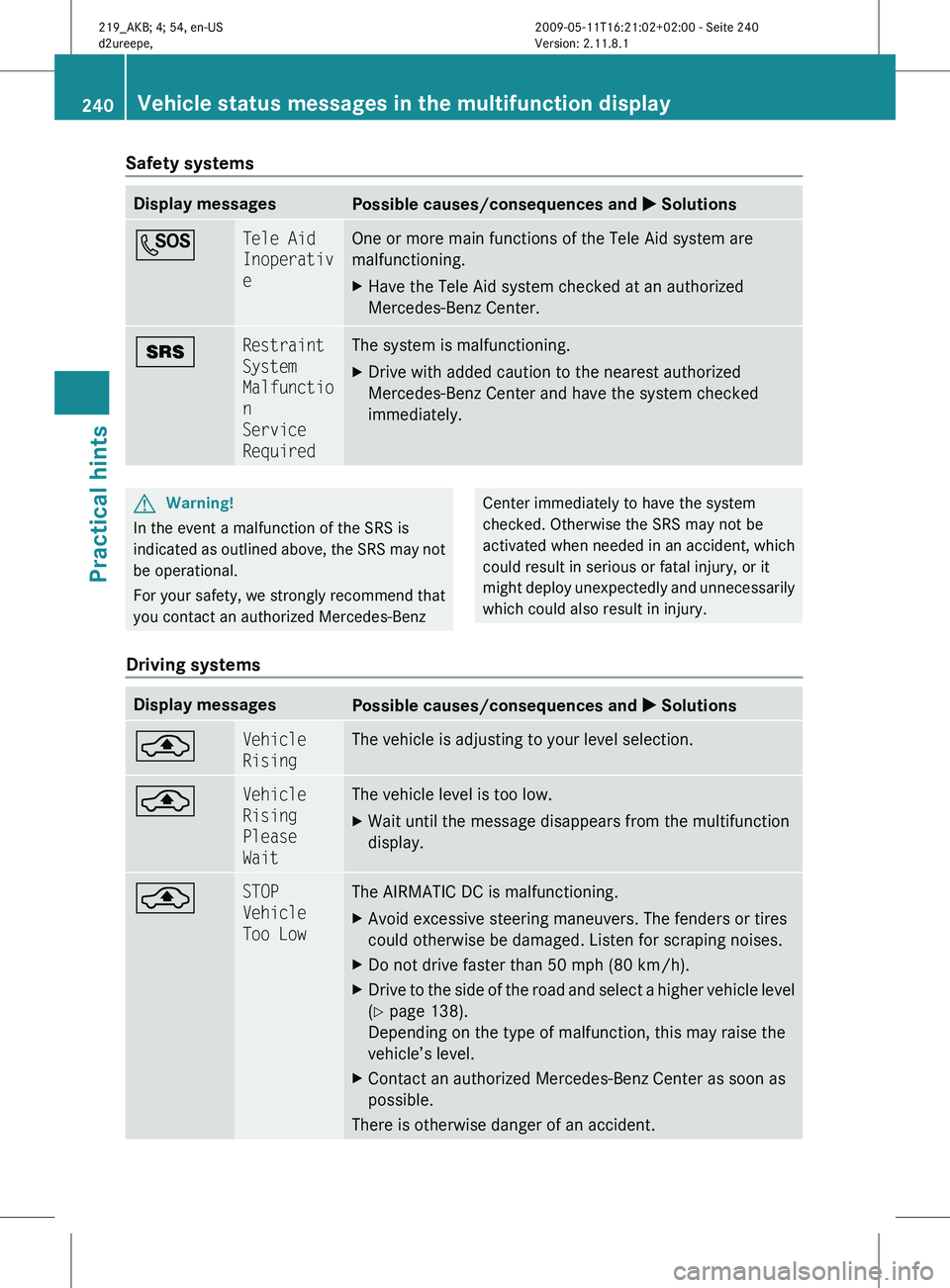
Safety systems
Display messages
Possible causes/consequences and
X SolutionsG Tele Aid
Inoperativ
e One or more main functions of the Tele Aid system are
malfunctioning.
X
Have the Tele Aid system checked at an authorized
Mercedes-Benz Center. + Restraint
System
Malfunctio
n
Service
Required The system is malfunctioning.
X
Drive with added caution to the nearest authorized
Mercedes-Benz Center and have the system checked
immediately. G
Warning!
In the event a malfunction of the SRS is
indicated as outlined above, the SRS may not
be operational.
For your safety, we strongly recommend that
you contact an authorized Mercedes-Benz Center immediately to have the system
checked. Otherwise the SRS may not be
activated
when needed in an accident, which
could result in serious or fatal injury, or it
might deploy unexpectedly and unnecessarily
which could also result in injury.
Driving systems Display messages
Possible causes/consequences and
X Solutions¨ Vehicle
Rising The vehicle is adjusting to your level selection.
¨ Vehicle
Rising
Please
Wait The vehicle level is too low.
X
Wait until the message disappears from the multifunction
display. ¨ STOP
Vehicle
Too Low The AIRMATIC DC is malfunctioning.
X
Avoid excessive steering maneuvers. The fenders or tires
could otherwise be damaged. Listen for scraping noises.
X Do not drive faster than 50 mph (80 km/h).
X Drive to the side of the road and select a higher vehicle level
(Y page 138).
Depending on the type of malfunction, this may raise the
vehicle’s level.
X Contact an authorized Mercedes-Benz Center as soon as
possible.
There is otherwise danger of an accident. 240
Vehicle status messages in the multifunction display
Practical hints
219_AKB; 4; 54, en-US
d2ureepe,
Version: 2.11.8.1 2009-05-11T16:21:02+02:00 - Seite 240
Page 243 of 308
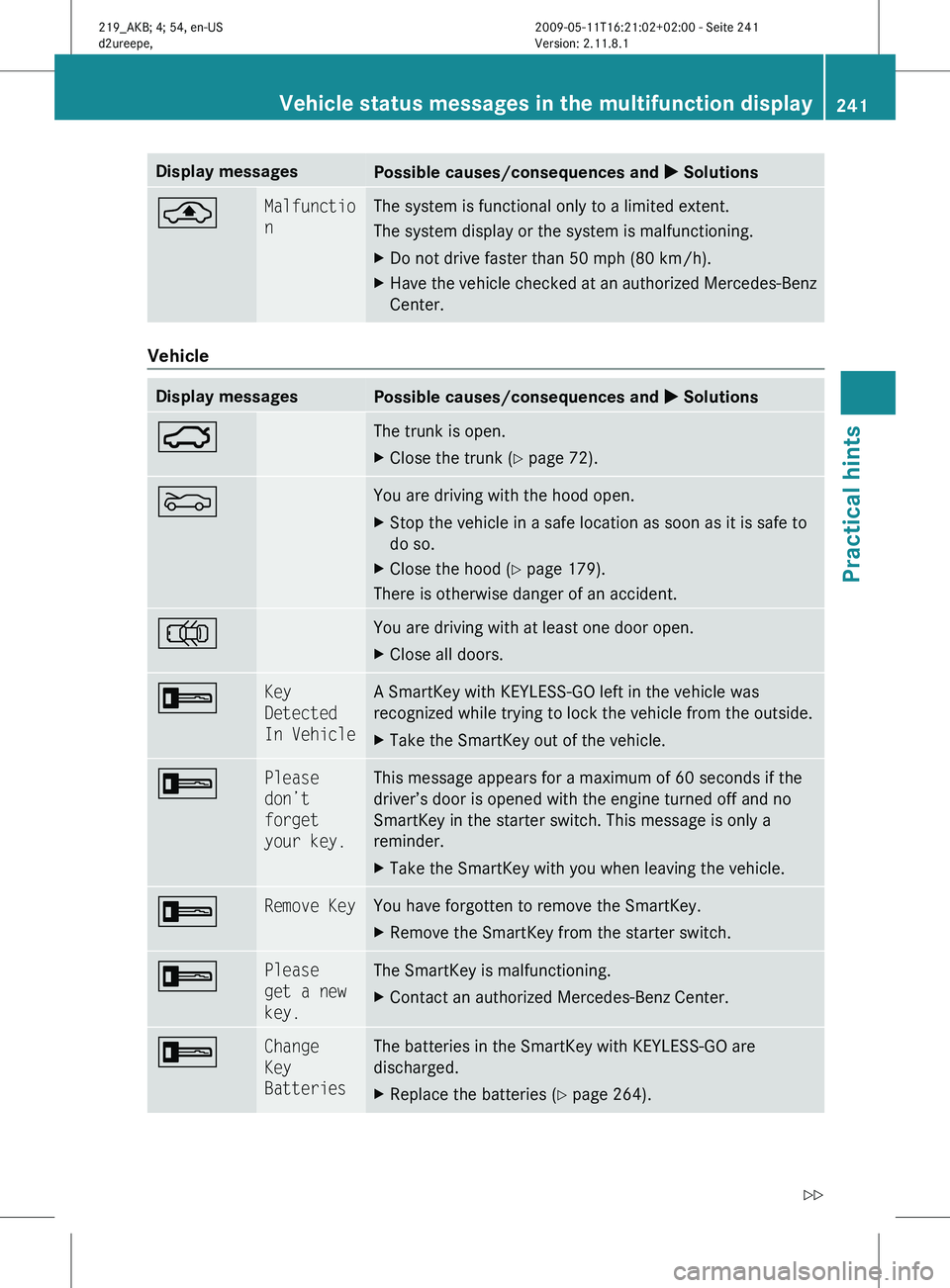
Display messages
Possible causes/consequences and
X Solutions¨ Malfunctio
n The system is functional only to a limited extent.
The system display or the system is malfunctioning.
X
Do not drive faster than 50 mph (80 km/h).
X Have the vehicle checked at an authorized Mercedes-Benz
Center. Vehicle
Display messages
Possible causes/consequences and
X Solutions: The trunk is open.
X
Close the trunk (Y page 72). M You are driving with the hood open.
X
Stop the vehicle in a safe location as soon as it is safe to
do so.
X Close the hood ( Y page 179).
There is otherwise danger of an accident. ; You are driving with at least one door open.
X
Close all doors. + Key
Detected
In Vehicle A SmartKey with KEYLESS-GO left in the vehicle was
recognized while trying to lock the vehicle from the outside.
X
Take the SmartKey out of the vehicle. + Please
don’t
forget
your key. This message appears for a maximum of 60 seconds if the
driver’s door is opened with the engine turned off and no
SmartKey in the starter switch. This message is only a
reminder.
X
Take the SmartKey with you when leaving the vehicle. + Remove Key You have forgotten to remove the SmartKey.
X
Remove the SmartKey from the starter switch. + Please
get a new
key. The SmartKey is malfunctioning.
X
Contact an authorized Mercedes-Benz Center. + Change
Key
Batteries The batteries in the SmartKey with KEYLESS-GO are
discharged.
X
Replace the batteries ( Y page 264). Vehicle status messages in the multifunction display
241Practical hints
219_AKB; 4; 54, en-US
d2ureepe,Version: 2.11.8.1 2009-05-11T16:21:02+02:00 - Seite 241 Z
Page 244 of 308
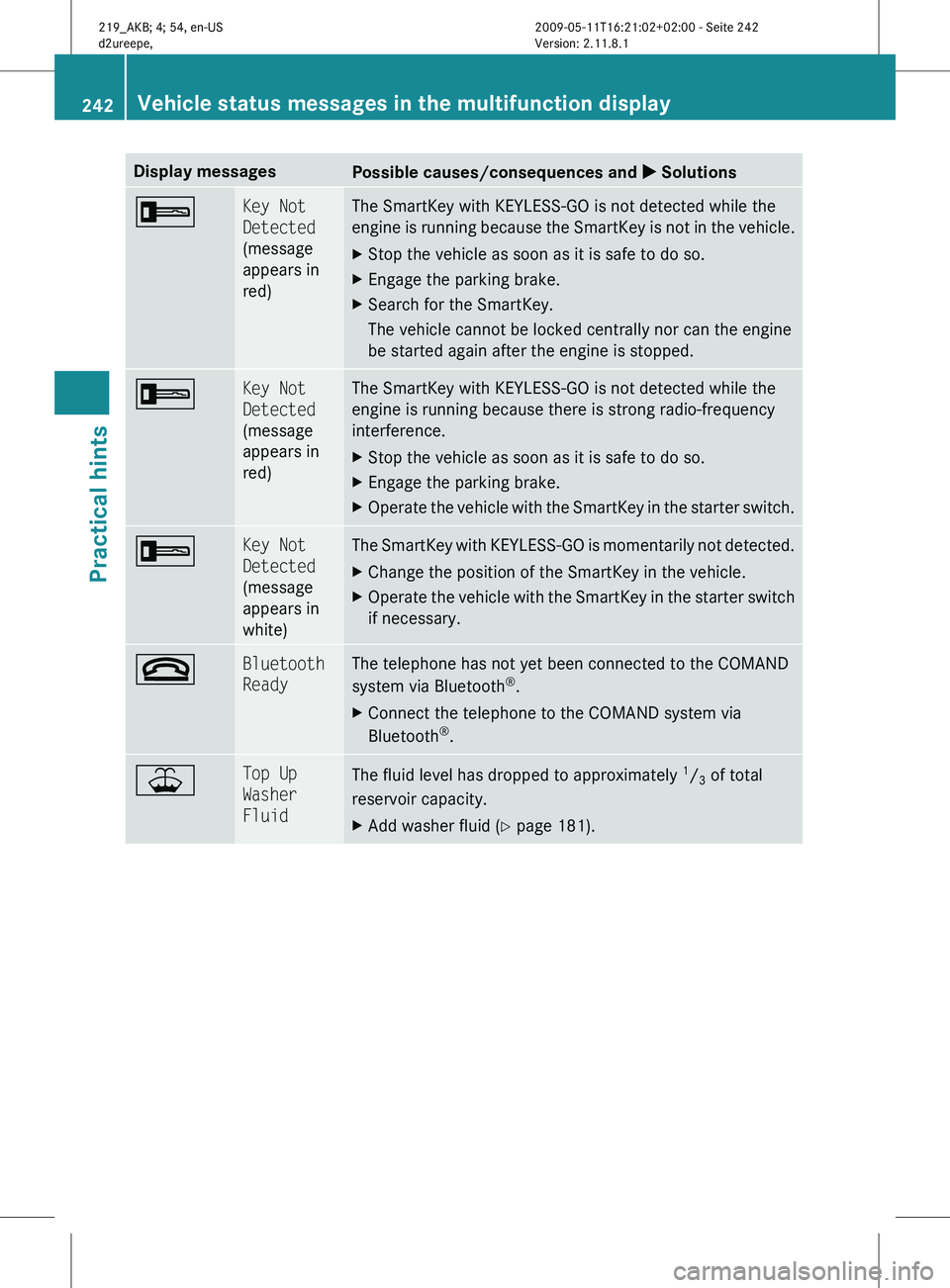
Display messages
Possible causes/consequences and
X Solutions+ Key Not
Detected
(message
appears in
red) The SmartKey with KEYLESS-GO is not detected while the
engine
is running because the SmartKey is not in the vehicle.
X Stop the vehicle as soon as it is safe to do so.
X Engage the parking brake.
X Search for the SmartKey.
The vehicle cannot be locked centrally nor can the engine
be started again after the engine is stopped. + Key Not
Detected
(message
appears in
red) The SmartKey with KEYLESS-GO is not detected while the
engine is running because there is strong radio-frequency
interference.
X
Stop the vehicle as soon as it is safe to do so.
X Engage the parking brake.
X Operate the vehicle with the SmartKey in the starter switch. + Key Not
Detected
(message
appears in
white) The SmartKey with KEYLESS-GO is momentarily not detected.
X
Change the position of the SmartKey in the vehicle.
X Operate the vehicle with the SmartKey in the starter switch
if necessary. ~ Bluetooth
Ready The telephone has not yet been connected to the COMAND
system via Bluetooth
®
.
X Connect the telephone to the COMAND system via
Bluetooth ®
. ¥ Top Up
Washer
Fluid
The fluid level has dropped to approximately
1
/ 3 of total
reservoir capacity.
X Add washer fluid ( Y page 181).242
Vehicle status messages in the multifunction display
Practical hints
219_AKB; 4; 54, en-US
d2ureepe,
Version: 2.11.8.1 2009-05-11T16:21:02+02:00 - Seite 242