cruise control MERCEDES-BENZ CLS 2010 User Guide
[x] Cancel search | Manufacturer: MERCEDES-BENZ, Model Year: 2010, Model line: CLS, Model: MERCEDES-BENZ CLS 2010Pages: 308, PDF Size: 5.71 MB
Page 132 of 308
G
Warning!
The Distronic is a convenience system. Its
speed adjustment reduction capability is
intended to make cruise control more
effective
and usable when traffic speeds vary.
It is not however, intended to, nor does it,
replace the need for extreme care.
The responsibility for the vehicle’s speed,
distance to the preceding vehicle and, most
importantly, brake operation to ensure a safe
stopping distance, always remains with the
driver.
The Distronic cannot take street and traffic
conditions into account. Complex driving
situations are not always fully recognized by
the Distronic. This could result in wrong or
missing distance warnings. G
Warning!
The Distronic adaptive cruise control is not a
substitute for active driving involvement. It
does
not react to pedestrians or on stationary
objects, nor does it recognize or predict the
lane curvature or the movement of preceding
vehicles.
The Distronic can only apply 20% of the
maximum braking power of the vehicle.
It is the driver’s responsibility at all times to
be attentive to the road, weather and traffic
conditions. Additionally, the driver must
provide the steering, braking and other driving
inputs necessary to remain in control of the
vehicle.
High-frequency sources such as toll stations,
speed measuring systems etc. can cause the
Distronic system to malfunction. G
Warning!
The Distronic cannot take road and traffic
conditions into account. Only use the
Distronic if the road, weather and traffic
conditions make it advisable to travel at a
constant speed. G
Warning!
Use of the Distronic can be dangerous on
slippery roads. Rapid changes in tire traction
can result in wheel spin and loss of control.
The Distronic does not function in adverse
sight
and distance conditions. Do not use the
Distronic during conditions of fog, heavy rain,
snow or sleet. G
Warning!
The Distronic cannot take weather conditions
into account. Switch off the Distronic or do
not switch it on if:
R roads
are slippery or covered with snow or
ice. The wheels could lose traction while
braking or accelerating, and the vehicle
could skid.
R the Distronic system sensor cover is dirty
or visibility is diminished due to snow, rain
or fog, for example. The distance control
system functionality could be impaired.
Always pay attention to surrounding traffic
conditions even while the Distronic is
switched on. Otherwise, you may not be able
to recognize dangerous situations until it is
too late. This could cause an accident in which
you and/or others could be injured. G
Warning!
The “Resume” function should only be
operated if the driver is fully aware of the
previously set speed and wishes to resume
this particular preset speed. G
Warning!
Close attention to road and traffic conditions
is imperative at all times, regardless of
whether or not the Distronic is activated.
Use of the Distronic can be dangerous on
winding roads or in heavy traffic because
conditions do not allow safe driving at a
constant speed.
The Distronic will not react to stationary
objects
in the roadway (e.g. a stopped vehicle
in a traffic jam or a disabled vehicle). The 130
Driving systems
Controls in detail
219_AKB; 4; 54, en-US
d2ureepe,
Version: 2.11.8.1 2009-05-11T16:21:02+02:00 - Seite 130
Page 133 of 308
Distronic will also not respond to oncoming
vehicles.
Switch off the Distronic
R
when changing from the left to the right
lane if vehicles are moving more slowly in
the left lane
R when entering a turn lane or highway off
ramp
R in complex driving situations, such as in
highway construction zones
In these situations, the Distronic will continue
to maintain the set speed unless deactivated.
The Distronic is designed and intended only
to maintain a set speed and keep a set
distance from moving objects in front of it.
i USA only:
This device has been approved by the FCC
as a “Vehicular Radar System”. The radar
sensor is intended for use in an automotive
radar system only. Removal, tampering, or
altering of the device will void any
warranties, and is not permitted by the
FCC. Do not tamper with, alter, or use in
any non-approved way.
Any unauthorized modification to this
device could void the user’s authority to
operate the equipment.
i Canada only:
This device complies with RSS-210 of
Industry Canada. Operation is subject to
the following two conditions:
1. This device may not cause interference, and
2. this device must accept any interference received, including
interference that may cause undesired
operation of the device.
Removal, tampering, or altering of the
device will void any warranties, and is not
permitted. Do not tamper with, alter, or use
in any non-approved way. Any unauthorized modification to this
device could void the user’s authority to
operate the equipment.
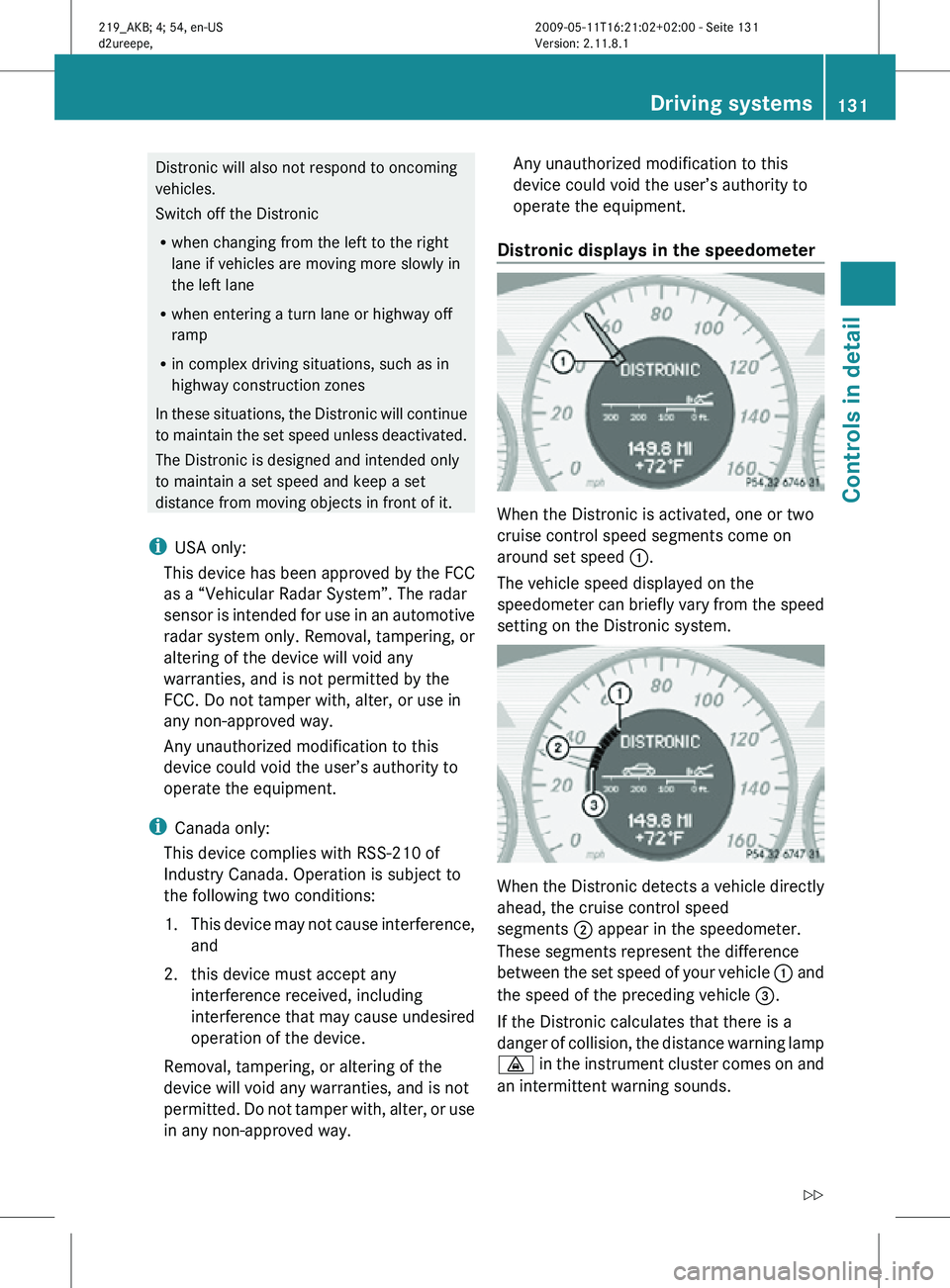
Distronic displays in the speedometer When the Distronic is activated, one or two
cruise control speed segments come on
around set speed
:.
The vehicle speed displayed on the
speedometer can briefly vary from the speed
setting on the Distronic system. When the Distronic detects a vehicle directly
ahead, the cruise control speed
segments
; appear in the speedometer.
These segments represent the difference
between the set speed of your vehicle : and
the speed of the preceding vehicle =.
If the Distronic calculates that there is a
danger of collision, the distance warning lamp
· in the instrument cluster comes on and
an intermittent warning sounds. Driving systems
131Controls in detail
219_AKB; 4; 54, en-US
d2ureepe, Version: 2.11.8.1 2009-05-11T16:21:02+02:00 - Seite 131 Z
Page 135 of 308
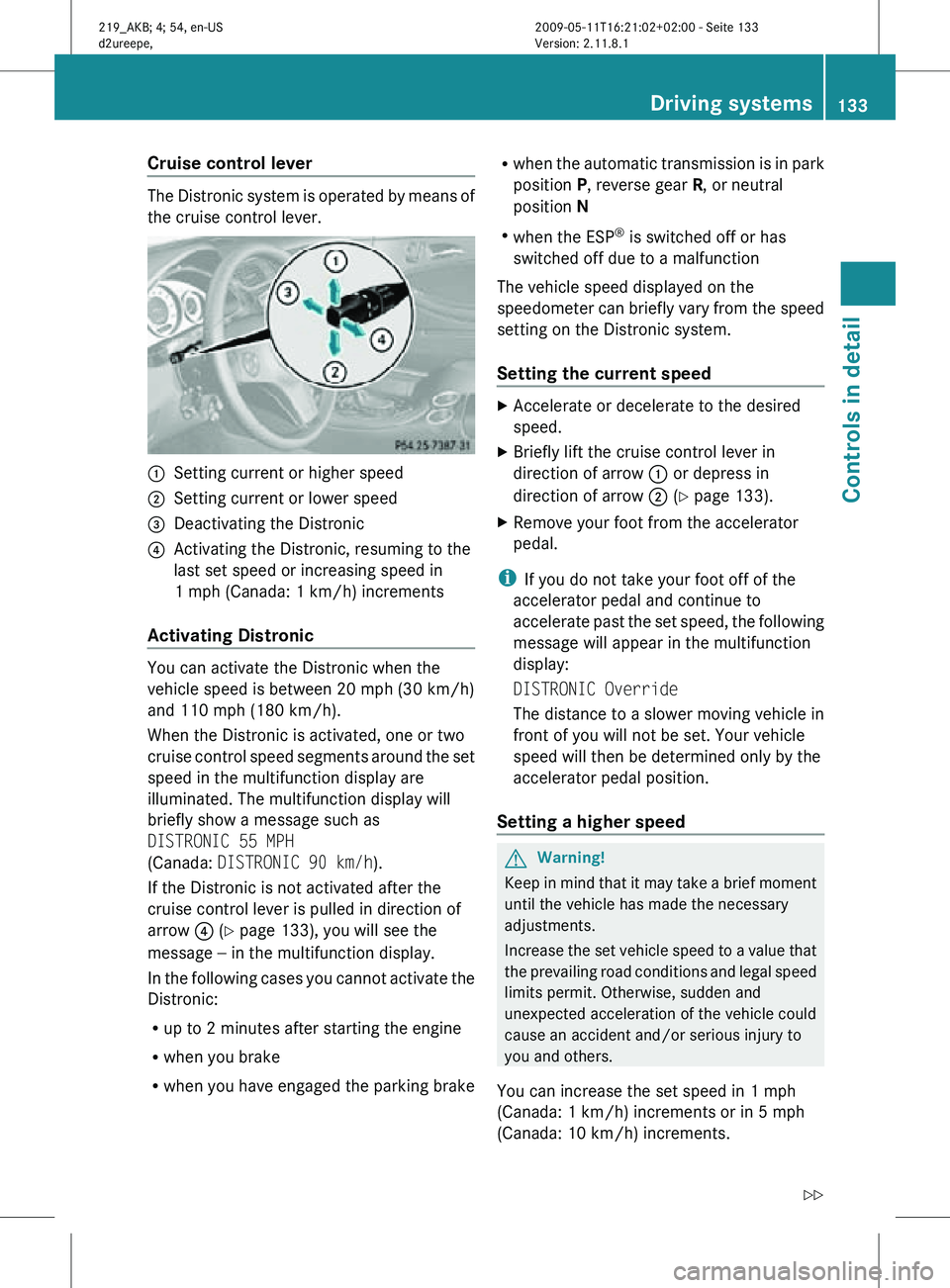
Cruise control lever
The Distronic system is operated by means of
the cruise control lever.
:
Setting current or higher speed
; Setting current or lower speed
= Deactivating the Distronic
? Activating the Distronic, resuming to the
last set speed or increasing speed in
1 mph (Canada: 1 km/h) increments
Activating Distronic You can activate the Distronic when the
vehicle speed is between 20 mph (30 km/h)
and 110 mph (180 km/h).
When the Distronic is activated, one or two
cruise control speed segments around the set
speed in the multifunction display are
illuminated. The multifunction display will
briefly show a message such as
DISTRONIC 55 MPH
(Canada: DISTRONIC 90 km/h).
If the Distronic is not activated after the
cruise control lever is pulled in direction of
arrow
? (Y page 133), you will see the
message — in the multifunction display.
In the following cases you cannot activate the
Distronic:
R up to 2 minutes after starting the engine
R when you brake
R when you have engaged the parking brake R
when the automatic transmission is in park
position P, reverse gear R, or neutral
position N
R when the ESP ®
is switched off or has
switched off due to a malfunction
The vehicle speed displayed on the
speedometer can briefly vary from the speed
setting on the Distronic system.
Setting the current speed X
Accelerate or decelerate to the desired
speed.
X Briefly lift the cruise control lever in
direction of arrow : or depress in
direction of arrow ; (Y page 133).
X Remove your foot from the accelerator
pedal.
i If you do not take your foot off of the
accelerator pedal and continue to
accelerate past the set speed, the following
message will appear in the multifunction
display:
DISTRONIC Override
The distance to a slower moving vehicle in
front of you will not be set. Your vehicle
speed will then be determined only by the
accelerator pedal position.
Setting a higher speed G
Warning!
Keep in mind that it may take a brief moment
until the vehicle has made the necessary
adjustments.
Increase the set vehicle speed to a value that
the prevailing road conditions and legal speed
limits permit. Otherwise, sudden and
unexpected acceleration of the vehicle could
cause an accident and/or serious injury to
you and others.
You can increase the set speed in 1 mph
(Canada: 1 km/h) increments or in 5 mph
(Canada: 10 km/h) increments. Driving systems
133Controls in detail
219_AKB; 4; 54, en-US
d2ureepe, Version: 2.11.8.1 2009-05-11T16:21:02+02:00 - Seite 133 Z
Page 136 of 308
Adjustment in 5 mph (Canada:
10 km/h) increments
X
Briefly lift the cruise control lever up in
direction of arrow : (Y page 133).
The new speed is set and the vehicle will
accelerate.
Keep in mind that it may take a
brief moment until the vehicle has reached
the set speed.
Fine adjustment in 1 mph (Canada:
1 km/h) increments
X Briefly pull the cruise control lever in
direction of arrow ? (Y page 133).
Setting a lower speed G
Warning!
Keep in mind that it may take a brief moment
until the vehicle has made the necessary
adjustments.
Decrease
the set vehicle speed to a value that
the prevailing road conditions and legal speed
limits permit. Otherwise, sudden and
unexpected deceleration of the vehicle could
cause an accident and/or serious injury to
you and others.
i When you use the cruise control lever to
decelerate, the brake system will
automatically brake the vehicle if the
engine’s braking power does not brake the
vehicle sufficiently.
Adjustment in 5 mph (Canada:
10 km/h) increments
X Briefly press the cruise control lever down
in direction of arrow ; (Y page 133).
The new speed is set and the vehicle will
decelerate.
Keep in mind that it may take a
brief moment until the vehicle has reached
the set speed. Setting stored speed (Resume function) G
Warning!
The set speed stored in memory should only
be set again if prevailing road conditions and
legal speed limits permit. Possible
acceleration or deceleration differences
arising from returning to the preset speed
could
cause an accident and/or serious injury
to you and others.
X Briefly pull the cruise control lever in
direction of arrow ? (Y page 133).
If no speed is stored, the current speed is
set and stored.
X Remove your foot from the accelerator
pedal.
Deactivating Distronic X
Depress the brake pedal.
or
X Briefly push the cruise control lever in
direction of arrow = (Y page 133).
The cruise control speed segments in the
multifunction display will go out and the
following message appears briefly in the
multifunction display: DISTRONIC Off
The last set speed is stored for later use.
The last stored speed is deleted from memory
when the engine is turned off.
The Distronic switches off automatically
when you depress the brake pedal or you
engage the parking brake. In this case, the
cruise control speed segments in the
multifunction display will go out.
The
Distronic also switches off automatically
when
R the vehicle speed falls below 20 mph
(30 km/h)
R the ESP ®
is in operation
R the ESP ®
is switched off with the ESP ®
switch 134
Driving systems
Controls in detail
219_AKB; 4; 54, en-US
d2ureepe,
Version: 2.11.8.1 2009-05-11T16:21:02+02:00 - Seite 134
Page 137 of 308
R
the ESP ®
has switched off due to a
malfunction
R you shift the automatic transmission into
neutral position N while driving
The cruise control speed segments in the
multifunction display goes out and an
acoustic warning will sound. Observe
additional messages in the multifunction
display that may appear. G
Warning!
Distronic switches off and releases the brakes
when the vehicle decelerates below the
minimum speed of 20 mph (30 km/h) by
operation of the system. At that time the
driver must apply the brakes in order to
reduce vehicle speed further or bring it to a
stop.
Depressing the accelerator pedal does not
deactivate the Distronic. After a brief
acceleration (e.g. for passing), the Distronic
will resume the last set speed.
Setting the following distance in
Distronic You can set the specified following distance
for Distronic by varying the time setting
between 1.0 and 2.0 seconds. Using this time
setting and the current speed of your vehicle,
Distronic calculates and sets the required
following distance to the preceding vehicle.
The set distance will be shown in the
multifunction display.
G
Warning!
It is up to the driver to exercise discretion to
select the appropriate setting given road
conditions, traffic, driver’s preferred driving
style and applicable laws and driving
recommendations for safe following distance. X
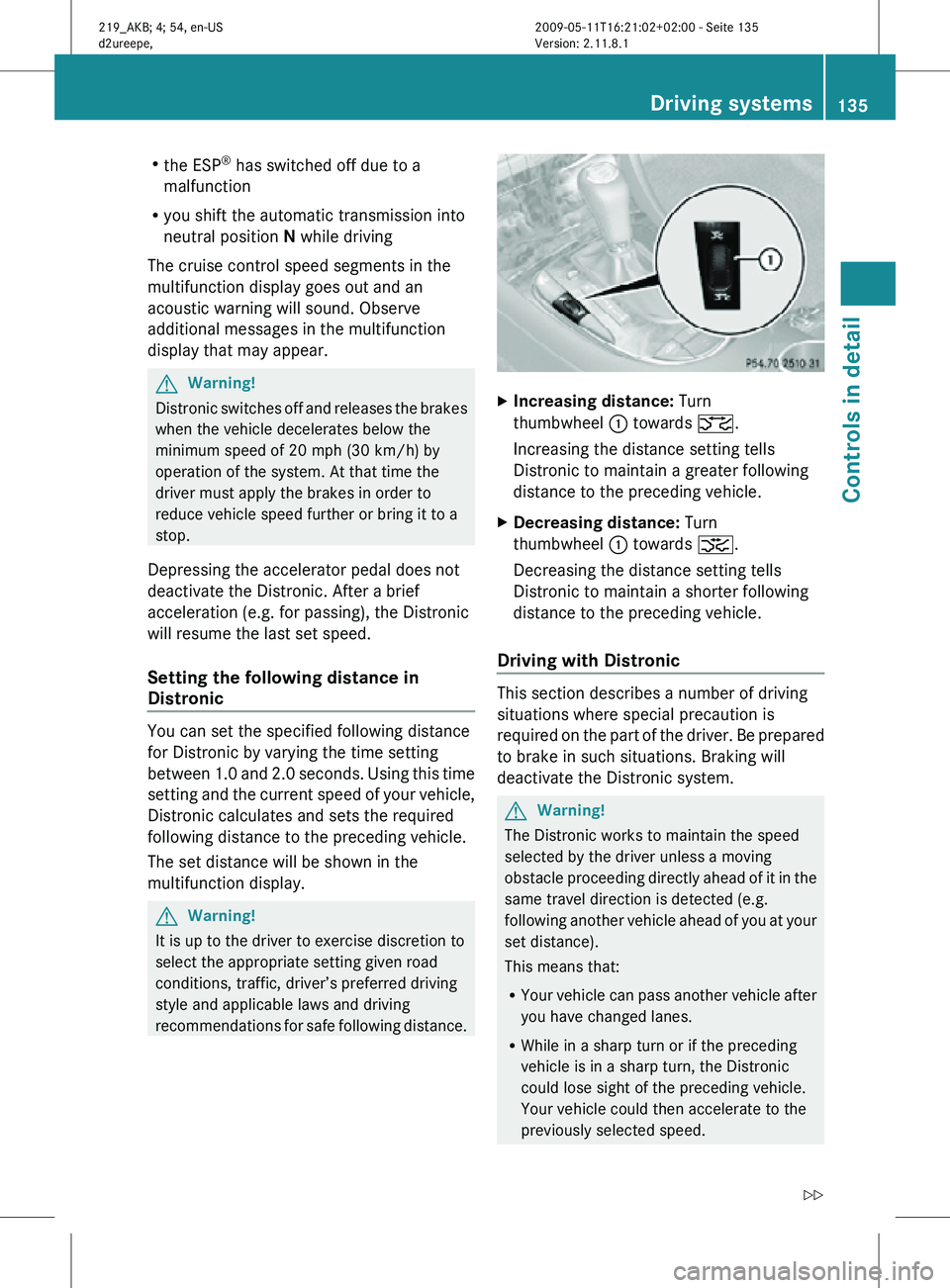
Increasing distance: Turn
thumbwheel : towards ª.
Increasing the distance setting tells
Distronic to maintain a greater following
distance to the preceding vehicle.
X Decreasing distance: Turn
thumbwheel : towards ¥.
Decreasing the distance setting tells
Distronic to maintain a shorter following
distance to the preceding vehicle.
Driving with Distronic This section describes a number of driving
situations where special precaution is
required on the part of the driver. Be prepared
to brake in such situations. Braking will
deactivate the Distronic system.
G
Warning!
The Distronic works to maintain the speed
selected by the driver unless a moving
obstacle proceeding directly ahead of it in the
same travel direction is detected (e.g.
following another vehicle ahead of you at your
set distance).
This means that:
R Your vehicle can pass another vehicle after
you have changed lanes.
R While in a sharp turn or if the preceding
vehicle is in a sharp turn, the Distronic
could lose sight of the preceding vehicle.
Your vehicle could then accelerate to the
previously selected speed. Driving systems
135Controls in detail
219_AKB; 4; 54, en-US
d2ureepe, Version: 2.11.8.1 2009-05-11T16:21:02+02:00 - Seite 135 Z
Page 211 of 308
Observe the following guidelines when using
snow chains:
R
Use
of snow chains is not permissible with
all wheel/tire combinations ( Y page 291).
R Use snow chains in pairs and on rear
wheels only. Follow the manufacturer’s
mounting instructions.
! If snow chains are mounted to the front
wheels, they may scrape against the body
or axle components. The tires or the vehicle
could be damaged as a result.
R Only use snow chains that are approved by
Mercedes-Benz. Any authorized Mercedes-
Benz Center will be glad to advise you on
this subject.
R Use of snow chains may be prohibited
depending on location. Always check local
and state laws before installing snow
chains.
R Do not use snow chains on the spare wheel.
i When driving with snow chains, you may
wish to switch off the ESP ®
(Y page 59)
before setting the vehicle in motion. This
will improve the vehicle’s traction. Winter driving instructions
G
Warning!
If the vehicle becomes stuck in snow, make
sure snow is kept clear of the exhaust pipe
and from around the vehicle with the engine
running. Otherwise, deadly carbon monoxide
(CO) gases may enter vehicle interior
resulting in unconsciousness and death.
To
assure sufficient fresh air ventilation, open
a window slightly on the side of the vehicle
not facing the wind. G
Warning!
The outside temperature indicator is not
designed to serve as an ice-warning device
and is therefore unsuitable for that purpose. Indicated temperatures just above the
freezing
point do not guarantee that the road
surface is free of ice. The road may still be icy,
especially in wooded areas or on bridges. G
Warning!
On slippery road surfaces, never downshift in
order to obtain braking action. This could
result
in drive wheel slip and reduced vehicle
control. Your vehicle’s ABS will not prevent
this type of loss of control.
The most important rule for slippery or icy
roads is to drive sensibly and to avoid abrupt
acceleration, braking and steering
maneuvers. Do not use the cruise control
system under such conditions.
When the vehicle is in danger of skidding, shift
the automatic transmission to neutral
position N. Try to keep the vehicle under
control by corrective steering action.
i For information on driving with snow
chains, see “Snow chains” ( Y page 208).
Road salts and chemicals can adversely
affect braking efficiency. Increased pedal
force may become necessary to produce the
normal brake effect.
Depressing the brake pedal periodically when
traveling at length on salt-strewn roads can
bring road-salt-impaired braking efficiency
back to normal.
If the vehicle is parked after being driven on
salt-treated roads, the braking efficiency
should be tested as soon as possible after
driving is resumed. G
Warning!
Make sure not to endanger any other road
users when carrying out these braking
maneuvers. Winter driving
209
Operation
219_AKB; 4; 54, en-US
d2ureepe, Version: 2.11.8.1 2009-05-11T16:21:02+02:00 - Seite 209 Z
Page 235 of 308
G
Warning!
If the 04 indicator lamp remains illuminated with an adult occupant on the front
passenger seat even after performing the above corrective steps, do not have any passenger use
the front passenger seat until the system has been repaired.
Driving systems Display messages
Possible causes/consequences and
X SolutionsCruise
Control
And
SPEEDTRONI
C Inoperativ
e The cruise control is malfunctioning.
X
Have the cruise control checked at an authorized
Mercedes-Benz Center. Cruise
Control - - - MPH One of the activation conditions for cruise control has not
been
fulfilled. You may have attempted to set a speed below
20 mph (30 km/h).
X Drive faster than 20 mph (30 km/h) if the situation allows
and set the speed.
X Check the activation conditions for cruise control
(Y page 128). DISTRONIC - - - MPH One of the activation conditions for Distronic has not been
fulfilled. You may have attempted to set a speed below
20 mph (30 km/h)
.
X Drive faster than 20 mph (30 km/h) if the situation allows
and set the speed.
X Check the activation conditions for Distronic
(Y page 133). DISTRONIC Inoperativ
e The Distronic or the display are malfunctioning.
X
Contact an authorized Mercedes-Benz Center as soon as
possible. DISTRONIC Override You have accelerated. The Distronic has switched off.
X
Stop accelerating. Vehicle status messages in the multifunction display
233
Practical hints
219_AKB; 4; 54, en-US
d2ureepe,Version: 2.11.8.1 2009-05-11T16:21:02+02:00 - Seite 233 Z