battery MERCEDES-BENZ CLS 2011 Owner's Manual
[x] Cancel search | Manufacturer: MERCEDES-BENZ, Model Year: 2011, Model line: CLS, Model: MERCEDES-BENZ CLS 2011Pages: 308, PDF Size: 5.71 MB
Page 174 of 308
Erasing the integrated remote control
memory
i
If you sell your vehicle, erase the codes of
all three channels.
X Switch on the ignition.
X Simultaneously press and hold outer signal
transmitter buttons ; and ?, for
approximately 20 seconds, until indicator
lamp : flashes rapidly. Do not hold for
longer than 30 seconds.
The
codes of all three channels are erased.
Programming tips If you are having difficulty programming the
integrated remote control, here are some
helpful tips:
R
Check the frequency of hand-held remote
control A
(typically located on the reverse
side of the remote). The integrated remote
control is compatible with radio-frequency
devices operating between 280-390 MHz.
R Put a new battery in hand-held remote
control A. This will increase the likelihood
of the hand-held remote control sending a
stronger and more accurate signal to the
integrated remote control.
R While performing step 3, hold hand-held
remote control A at different lengths and
angles from the signal transmitter button
(;, = or ?) you are programming.
Attempt varying angles at the distance of 2
to 12 inches (5 to 30 cm) away or the same
angle at varying distances.
R If another hand-held remote control is
available for the same device, try the
programming steps again using that other
hand-held remote control. Make sure new
batteries are in the hand-held remote
control before beginning the procedure.
R Straighten the antenna wire from the
garage door opener assembly. This may
help improve transmitting and/or receiving
signals. i
Certain
types of garage door openers are
incompatible with the integrated remote
control. If you should experience further
difficulties with programming the
integrated remote control, contact an
authorized Mercedes-Benz Center, or call
the Mercedes-Benz Customer Assistance
Center (USA only) at
1-800-FOR-MERCedes, or the HomeLink ®
Hotline (USA only) at 1-800-355-3515, or
the Customer Service (Canada only) at
1-800-387-0100.
i USA only:
This device complies with Part 15 of the
FCC Rules. Operation is subject to the
following two conditions:
1. This device may not cause harmful interference, and
2. this device must accept any interference received, including
interference that may cause undesired
operation.
Any unauthorized modification to this
device could void the user’s authority to
operate the equipment.
i Canada only:
This device complies with RSS-210 of
Industry Canada. Operation is subject to
the following two conditions:
1. This device may not cause interference, and
2. this device must accept any interference received, including
interference that may cause undesired
operation of the device.
Any unauthorized modification to this
device could void the user’s authority to
operate the equipment. 172
Useful features
Controls in detail
219_AKB; 4; 54, en-US
d2ureepe,
Version: 2.11.8.1 2009-05-11T16:21:02+02:00 - Seite 172
Page 209 of 308
Maximum permissible tire inflation
pressure
This number is the greatest amount of air
pressure that should ever be put in the tire.
Normal occupant weight
The number of occupants the vehicle is
designed to seat, multiplied by 68 kilograms
(150 lb).
Occupant distribution
The distribution of occupants in a vehicle at
their designated seating positions.
Production options weight
The combined weight of those installed
regular production options weighing over
5 lbs (2.3 kilograms) in excess of those
standard items which they replace, not
previously considered in curb weight or
accessory weight, including heavy duty
brakes, ride levelers, roof rack, heavy duty
battery, and special trim.
PSI (Pounds per square inch)
A standard unit of measure for air pressure.
Recommended tire inflation pressure
The recommended tire inflation pressure for
normal
driving conditions is listed on the Tire
and Loading Information placard located on
the driver’s door B-pillar. It provides best
handling, tread life and riding comfort.
Supplemental information pertaining to
special driving situations can be found on the
tire inflation pressure label on the inside of
the fuel filler flap.
Rim A metal support for a tire or a tire and tube
assembly upon which the tire beads are
seated. Sidewall The portion of a tire between the tread and
the bead.
TIN (Tire Identification Number)
Unique identifier which facilitates efforts by
tire manufacturers to notify purchasers in
recall situations or other safety matters
concerning tires and gives purchasers the
means
to easily identify such tires. The TIN is
comprised of “Manufacturer’s identification
mark”, “Tire size”, “Tire type code” and “Date
of manufacture”.
Tire ply composition and material used This indicates the number of plies or the
number of layers of rubber-coated fabric in
the tire tread and sidewall. Tire
manufacturers also must indicate the ply
materials in the tire and sidewall, which
include steel, nylon, polyester, and others.
Tire speed rating
Part of tire designation (speed symbol);
indicates the speed range for which a tire is
approved.
Total load limit
Rated cargo and luggage load plus
68 kilograms (150 lb) times the vehicle’s
designated seating capacity.
Traction
The adhesive friction of a tire on a surface on
which
it moves. The amount of grip provided.
Tread The portion of a tire that comes into contact
with the road. Tires and wheels
207
Operation
219_AKB; 4; 54, en-US
d2ureepe, Version: 2.11.8.1 2009-05-11T16:21:02+02:00 - Seite 207 Z
Page 217 of 308
Maintenance service term exceeded
If you have exceeded the suggested
maintenance service term, you will see the
following message in the multifunction
display:
Service A Exceeded By XXXXX Miles
(Km)
Service A Exceeded By XXX Days
Service A Exceeded By X Day
In addition, a signal sounds when the
message appears.
Any authorized Mercedes-Benz Center will
reset the maintenance service indicator
following a completed maintenance service.
Calling up the maintenance service
indicator display
i The menu overview can be found on
(Y page 112).
You can call up the maintenance service
indicator display at any time to check when
the next maintenance service is required.
X Switch on the ignition.
X Press button V or U on the
multifunction steering wheel repeatedly
until the standard display
(Y page 112)
appears in the multifunction display.
X Press button * or & on the
multifunction steering wheel until the
maintenance
service indicator display with
the service symbol ¯ and the
maintenance service deadline appears in
the multifunction display.
i If
the battery was disconnected, the days
of disconnection will not be included in the
count shown by the maintenance service
indicator. To arrive at the true maintenance
service deadline, you will need to subtract
these days from the days shown in the
maintenance service indicator message or
maintenance service indicator display. Do not confuse the maintenance service
indicator
with the engine oil level indicator
4. Resetting the maintenance service
indicator
In
the event that the maintenance service on
your vehicle is not carried out at an authorized
Mercedes-Benz Center, you can have the
maintenance service indicator reset.
The automotive maintenance facility carrying
out the maintenance service will find the
information for resetting the maintenance
service indicator in the maintenance-relevant
literature for your vehicle.
Such literature is available at any authorized
Mercedes-Benz Center or directly from
Mercedes-Benz.
! If the maintenance service indicator was
reset inadvertently, have an authorized
Mercedes-Benz Center correct it.
Only reset the maintenance service
indicator if the proper maintenance service
has been performed. Not following the
proper maintenance service as described
in the Maintenance Booklet will result in
engine damage and/or other vehicle
damage not covered by the Mercedes-Benz
Limited Warranty. Vehicle care
Cleaning and care of the vehicle
Notes Regular and proper care will help to maintain
the value of your vehicle.
G
Warning!
Many cleaning products can be hazardous.
Some are poisonous, others are flammable.
Always follow the instructions on the
particular container. Always open your Vehicle care
215
Operation
219_AKB; 4; 54, en-US
d2ureepe, Version: 2.11.8.1 2009-05-11T16:21:02+02:00 - Seite 215 Z
Page 225 of 308
Vehicle equipment ............................
224
Where will I find ...? .......................... 224
Vehicle status messages in the
multifunction display ....................... 228
What to do if … .................................. 251
Unlocking/locking manually ...........261
Resetting activated NECK-PRO
active front head restraints .............264
Replacing SmartKey batteries ......... 264
Replacing bulbs ................................. 266
Replacing wiper blades ....................270
Flat tire .............................................. 271
Battery ............................................... 278
Jump starting .................................... 280
Towing the vehicle ............................281
Fuses .................................................. 284 223Practical hints
219_AKB; 4; 54, en-US
d2ureepe,
Version: 2.11.8.1 2009-05-11T16:21:02+02:00 - Seite 223
Page 239 of 308
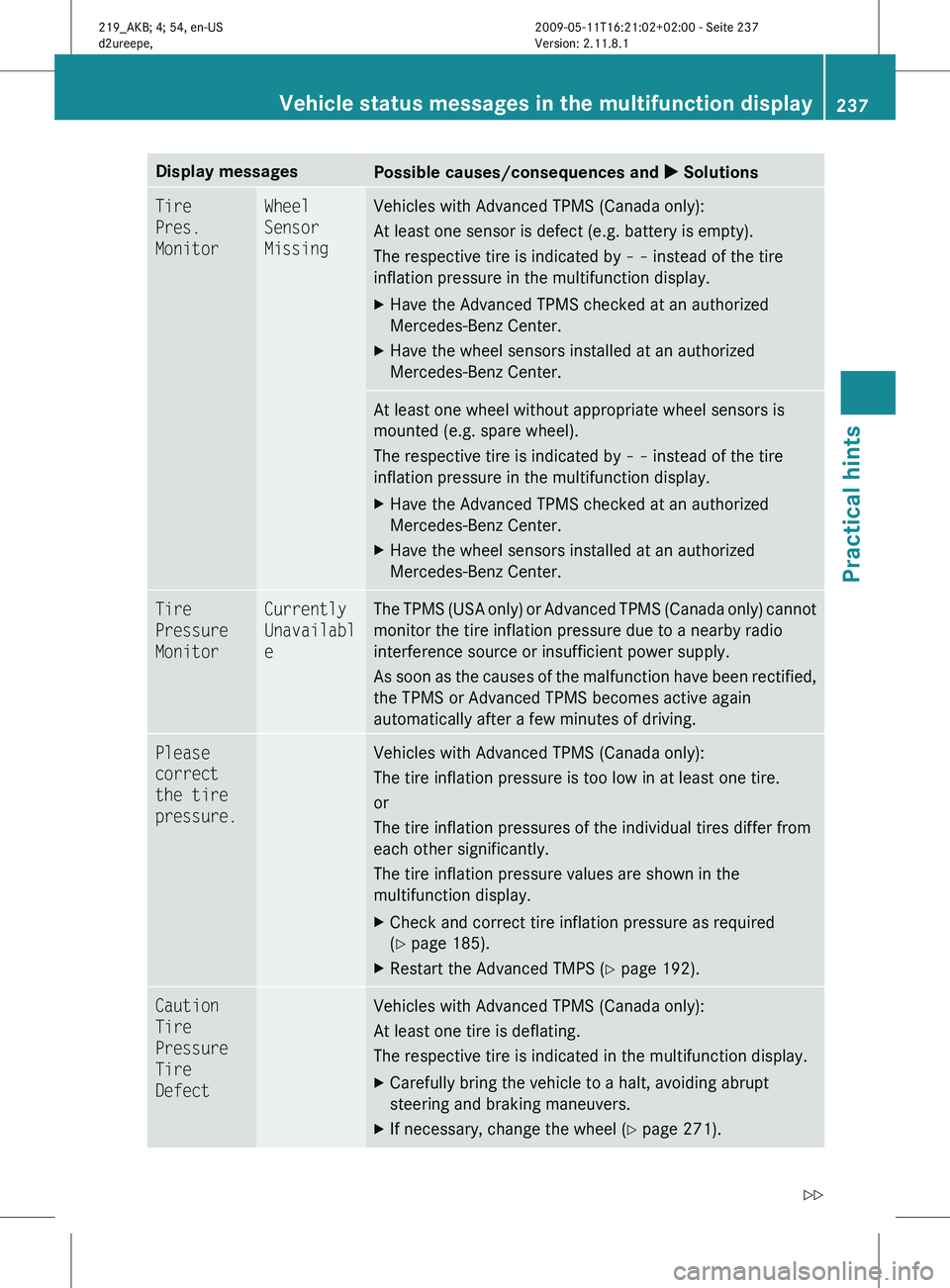
Display messages
Possible causes/consequences and
X SolutionsTire
Pres.
Monitor Wheel
Sensor
Missing Vehicles with Advanced TPMS (Canada only):
At least one sensor is defect (e.g. battery is empty).
The respective tire is indicated by
– – instead of the tire
inflation pressure in the multifunction display.
X Have the Advanced TPMS checked at an authorized
Mercedes-Benz Center.
X Have the wheel sensors installed at an authorized
Mercedes-Benz Center. At least one wheel without appropriate wheel sensors is
mounted (e.g. spare wheel).
The respective tire is indicated by
– – instead of the tire
inflation pressure in the multifunction display.
X Have the Advanced TPMS checked at an authorized
Mercedes-Benz Center.
X Have the wheel sensors installed at an authorized
Mercedes-Benz Center. Tire
Pressure
Monitor Currently
Unavailabl
e The TPMS (USA only) or Advanced TPMS (Canada only) cannot
monitor the tire inflation pressure due to a nearby radio
interference source or insufficient power supply.
As
soon as the causes of the malfunction have been rectified,
the TPMS or Advanced TPMS becomes active again
automatically after a few minutes of driving. Please
correct
the tire
pressure. Vehicles with Advanced TPMS (Canada only):
The tire inflation pressure is too low in at least one tire.
or
The tire inflation pressures of the individual tires differ from
each other significantly.
The tire inflation pressure values are shown in the
multifunction display.
X
Check and correct tire inflation pressure as required
(Y page 185).
X Restart the Advanced TMPS ( Y page 192).Caution
Tire
Pressure
Tire
Defect Vehicles with Advanced TPMS (Canada only):
At least one tire is deflating.
The respective tire is indicated in the multifunction display.
X
Carefully bring the vehicle to a halt, avoiding abrupt
steering and braking maneuvers.
X If necessary, change the wheel (Y page 271). Vehicle status messages in the multifunction display
237
Practical hints
219_AKB; 4; 54, en-US
d2ureepe,Version: 2.11.8.1 2009-05-11T16:21:02+02:00 - Seite 237 Z
Page 247 of 308
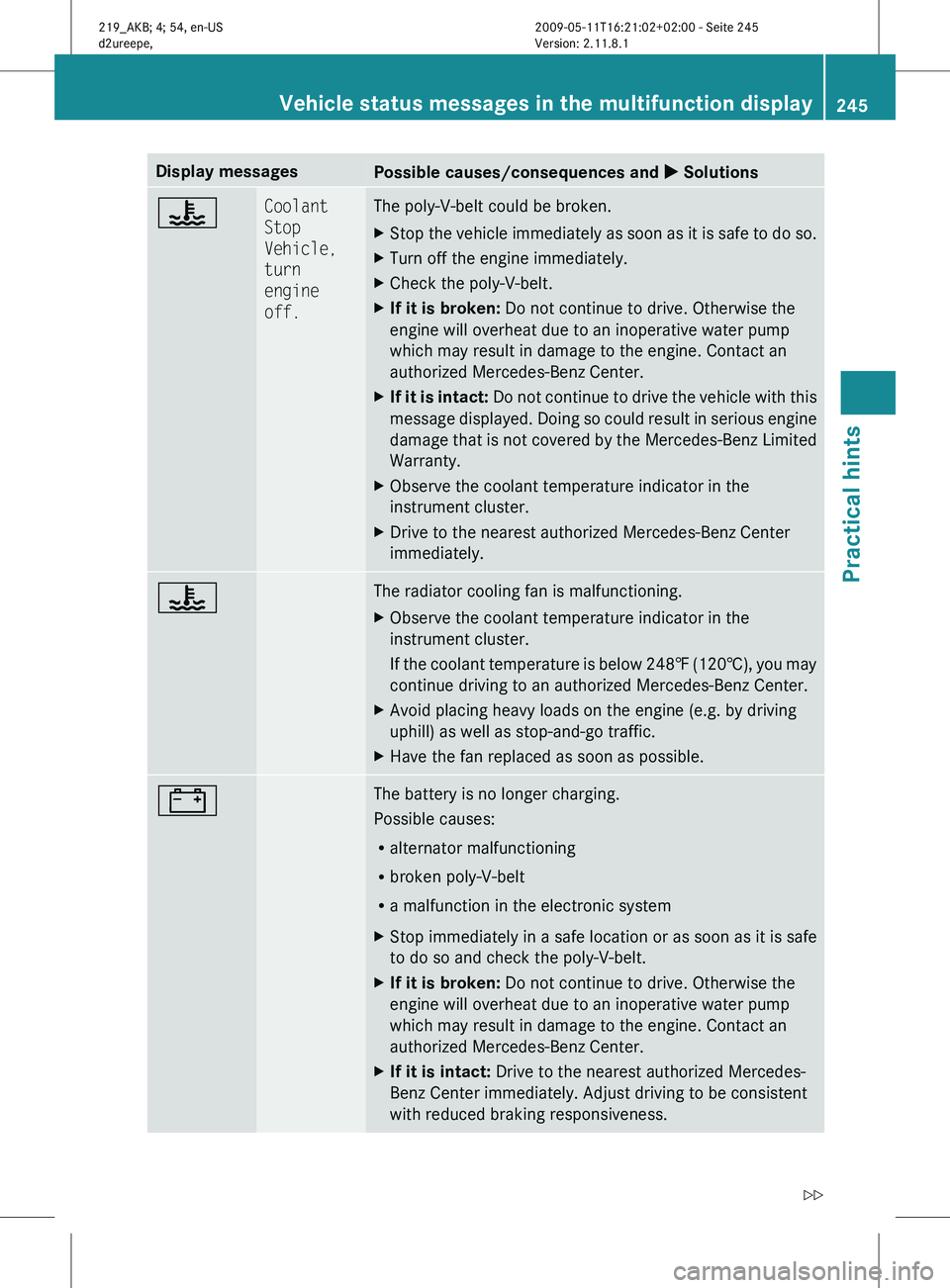
Display messages
Possible causes/consequences and
X Solutions? Coolant
Stop
Vehicle,
turn
engine
off. The poly-V-belt could be broken.
X
Stop the vehicle immediately as soon as it is safe to do so.
X Turn off the engine immediately.
X Check the poly-V-belt.
X If it is broken: Do not continue to drive. Otherwise the
engine will overheat due to an inoperative water pump
which may result in damage to the engine. Contact an
authorized Mercedes-Benz Center.
X If it is intact: Do not continue to drive the vehicle with this
message displayed. Doing so could result in serious engine
damage that is not covered by the Mercedes-Benz Limited
Warranty.
X Observe the coolant temperature indicator in the
instrument cluster.
X Drive to the nearest authorized Mercedes-Benz Center
immediately. ? The radiator cooling fan is malfunctioning.
X
Observe the coolant temperature indicator in the
instrument cluster.
If
the coolant temperature is below 248‡ (120†), you may
continue driving to an authorized Mercedes-Benz Center.
X Avoid placing heavy loads on the engine (e.g. by driving
uphill) as well as stop-and-go traffic.
X Have the fan replaced as soon as possible. # The battery is no longer charging.
Possible causes:
R
alternator malfunctioning
R broken poly-V-belt
R a malfunction in the electronic system
X Stop immediately in a safe location or as soon as it is safe
to do so and check the poly-V-belt.
X If it is broken: Do not continue to drive. Otherwise the
engine will overheat due to an inoperative water pump
which may result in damage to the engine. Contact an
authorized Mercedes-Benz Center.
X If it is intact: Drive to the nearest authorized Mercedes-
Benz Center immediately. Adjust driving to be consistent
with reduced braking responsiveness. Vehicle status messages in the multifunction display
245
Practical hints
219_AKB; 4; 54, en-US
d2ureepe,Version: 2.11.8.1 2009-05-11T16:21:02+02:00 - Seite 245 Z
Page 248 of 308
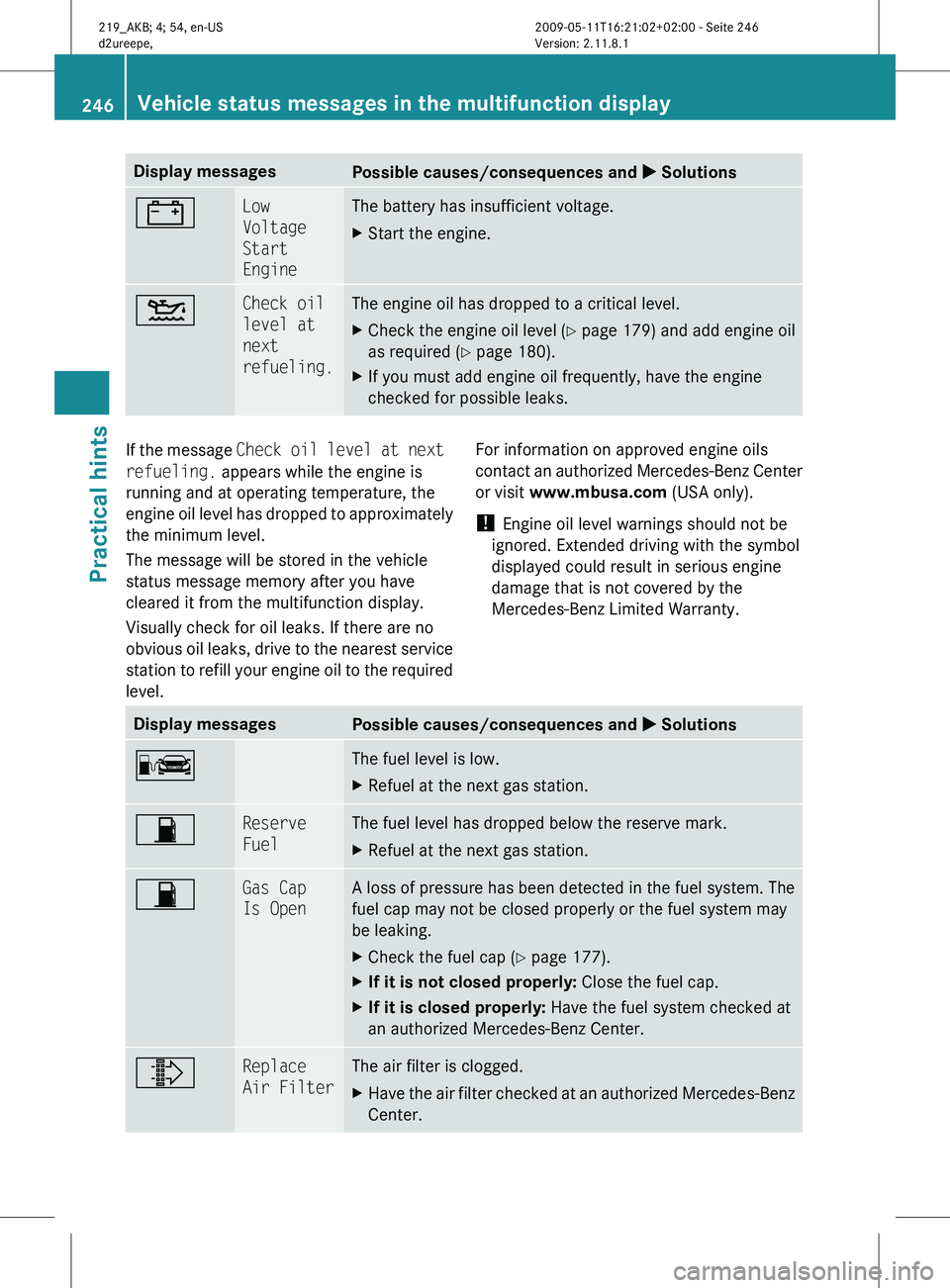
Display messages
Possible causes/consequences and
X Solutions# Low
Voltage
Start
Engine The battery has insufficient voltage.
X
Start the engine. 4 Check oil
level at
next
refueling. The engine oil has dropped to a critical level.
X
Check the engine oil level ( Y page 179) and add engine oil
as required ( Y page 180).
X If you must add engine oil frequently, have the engine
checked for possible leaks. If the message
Check
oil level at next
refueling. appears while the engine is
running and at operating temperature, the
engine oil level has dropped to approximately
the minimum level.
The message will be stored in the vehicle
status message memory after you have
cleared it from the multifunction display.
Visually check for oil leaks. If there are no
obvious oil leaks, drive to the nearest service
station to refill your engine oil to the required
level. For information on approved engine oils
contact
an authorized Mercedes-Benz Center
or visit www.mbusa.com (USA only).
! Engine oil level warnings should not be
ignored. Extended driving with the symbol
displayed could result in serious engine
damage that is not covered by the
Mercedes-Benz Limited Warranty. Display messages
Possible causes/consequences and
X SolutionsC The fuel level is low.
X
Refuel at the next gas station. 7 Reserve
Fuel The fuel level has dropped below the reserve mark.
X
Refuel at the next gas station. 7 Gas Cap
Is Open A loss of pressure has been detected in the fuel system. The
fuel cap may not be closed properly or the fuel system may
be leaking.
X
Check the fuel cap ( Y page 177).
X If it is not closed properly: Close the fuel cap.
X If it is closed properly: Have the fuel system checked at
an authorized Mercedes-Benz Center. ¸ Replace
Air Filter The air filter is clogged.
X
Have the air filter checked at an authorized Mercedes-Benz
Center. 246
Vehicle status messages in the multifunction display
Practical hints
219_AKB; 4; 54, en-US
d2ureepe,
Version: 2.11.8.1 2009-05-11T16:21:02+02:00 - Seite 246
Page 254 of 308
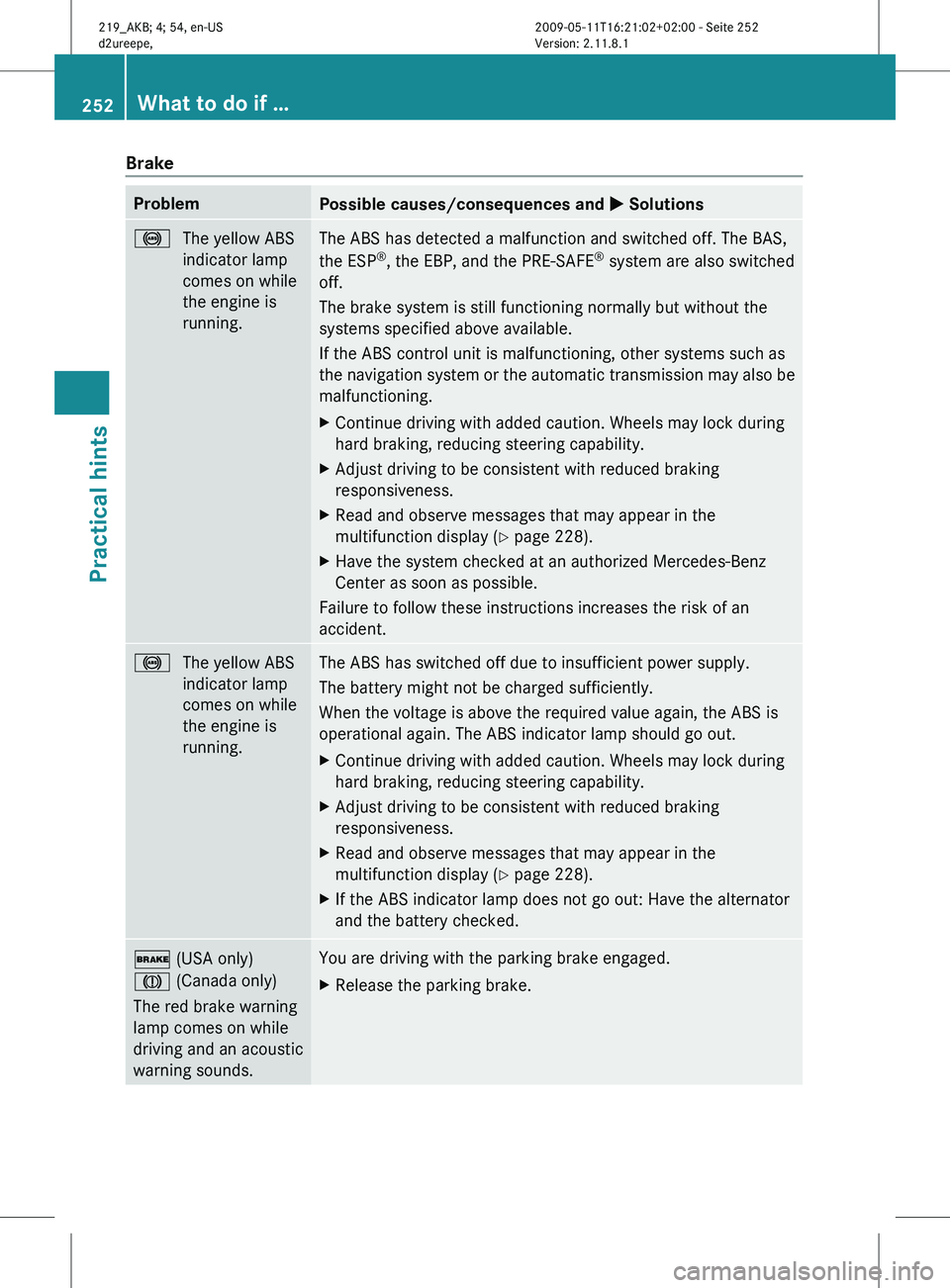
Brake
Problem
Possible causes/consequences and
X Solutions!
The yellow ABS
indicator lamp
comes on while
the engine is
running. The ABS has detected a malfunction and switched off. The BAS,
the ESP
®
, the EBP, and the PRE-SAFE ®
system are also switched
off.
The brake system is still functioning normally but without the
systems specified above available.
If the ABS control unit is malfunctioning, other systems such as
the
navigation system or the automatic transmission may also be
malfunctioning.
X Continue driving with added caution. Wheels may lock during
hard braking, reducing steering capability.
X Adjust driving to be consistent with reduced braking
responsiveness.
X Read and observe messages that may appear in the
multifunction display
(Y page 228).
X Have the system checked at an authorized Mercedes-Benz
Center as soon as possible.
Failure to follow these instructions increases the risk of an
accident. !
The yellow ABS
indicator lamp
comes on while
the engine is
running. The ABS has switched off due to insufficient power supply.
The battery might not be charged sufficiently.
When the voltage is above the required value again, the ABS is
operational again. The ABS indicator lamp should go out.
X
Continue driving with added caution. Wheels may lock during
hard braking, reducing steering capability.
X Adjust driving to be consistent with reduced braking
responsiveness.
X Read and observe messages that may appear in the
multifunction display
(Y page 228).
X If the ABS indicator lamp does not go out: Have the alternator
and the battery checked. $ (USA only)
J (Canada only)
The red brake warning
lamp comes on while
driving and an acoustic
warning sounds. You are driving with the parking brake engaged.
X
Release the parking brake. 252
What to do if …
Practical hints
219_AKB; 4; 54, en-US
d2ureepe,
Version: 2.11.8.1 2009-05-11T16:21:02+02:00 - Seite 252
Page 267 of 308

G
Warning!
Batteries contain poisonous and corrosive
substances. Therefore, keep the batteries out
of reach of children.
If a battery is swallowed, seek medical help
immediately. G
Warning!
SmartKey batteries contain perchlorate
material, which may require special handling
and regard for the environment. Check with
your local government’s disposal guidelines.
California residents, see www.dtsc.ca.gov/
HazardousWaste/Perchlorate/
index.cfm.
Batteries contain materials that can harm the
environment if disposed of improperly.
Recycling of batteries is the preferred method
of disposal. Many states (USA only) or
provinces (Canada only) require sellers of
batteries to accept old batteries for recycling.
When inserting the batteries, make sure they
are clean and free of lint.
When replacing batteries, always replace
both batteries.
i The required replacement batteries are
available at any authorized Mercedes-Benz
Center.
Replacement batteries: Lithium, type
CR 2025 or equivalent.
X Remove the mechanical key from the
SmartKey (Y page 261). SmartKey
X
Press mechanical key ; into the SmartKey
opening until battery compartment
cover : opens. Do not keep the cover
shut. X
Remove the battery compartment cover.
X Pat the SmartKey against the palm of your
hand until battery = falls out.
X Insert the new battery with the positive
terminal (+) facing up. Use a lint-free cloth.
X Insert the tabs of the battery compartment
cover into the housing and press the cover
closed.
X Slide mechanical key : back into the
SmartKey.
X Check the operation of the SmartKey. Replacing SmartKey batteries
265Practical hints
219_AKB; 4; 54, en-US
d2ureepe, Version: 2.11.8.1 2009-05-11T16:21:02+02:00 - Seite 265 Z
Page 268 of 308
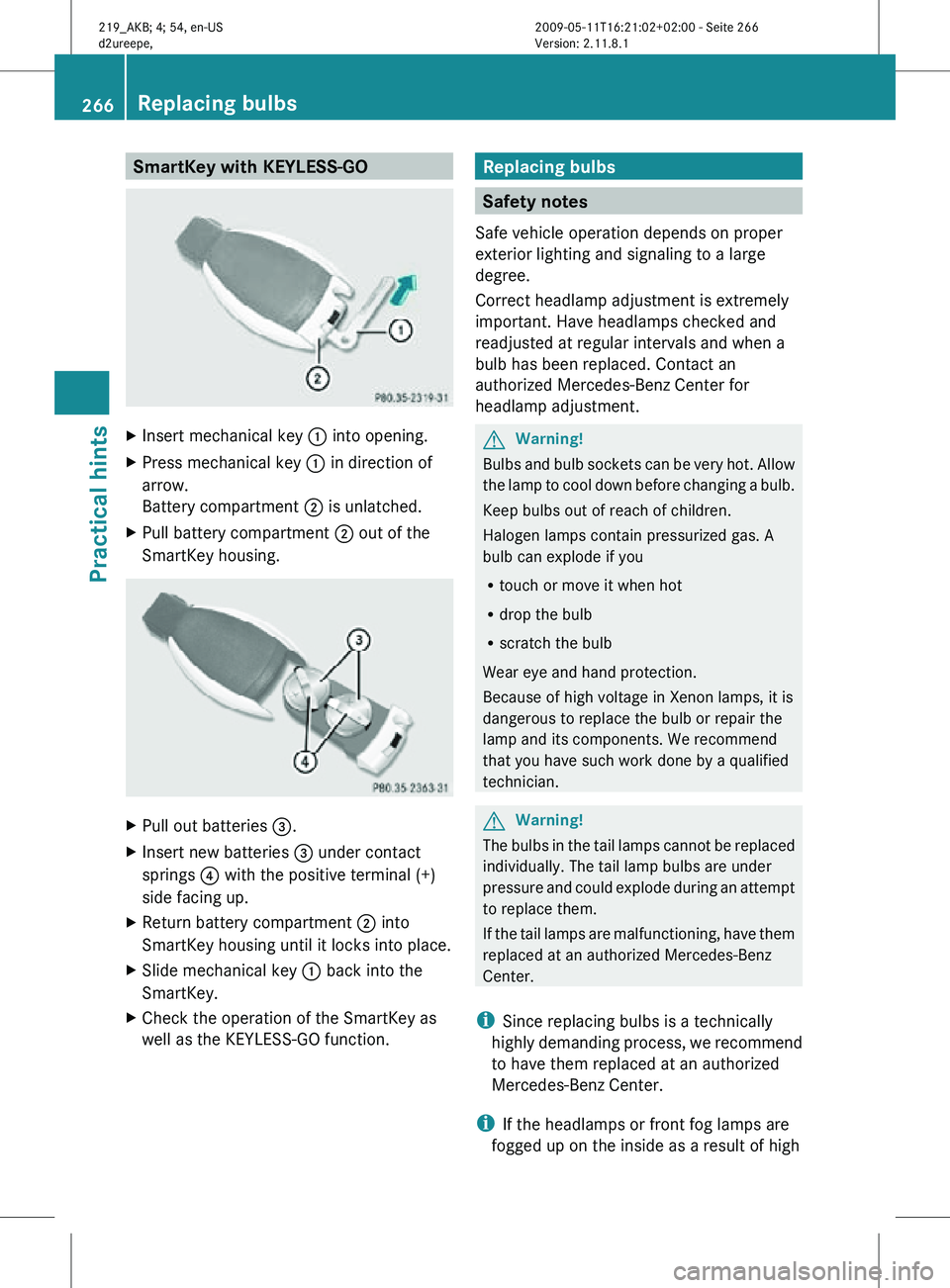
SmartKey with KEYLESS-GO
X
Insert mechanical key : into opening.
X Press mechanical key : in direction of
arrow.
Battery compartment ; is unlatched.
X Pull battery compartment ; out of the
SmartKey housing. X
Pull out batteries =.
X Insert new batteries = under contact
springs ? with the positive terminal (+)
side facing up.
X Return battery compartment ; into
SmartKey housing until it locks into place.
X Slide mechanical key : back into the
SmartKey.
X Check the operation of the SmartKey as
well as the KEYLESS-GO function. Replacing bulbs
Safety notes
Safe vehicle operation depends on proper
exterior lighting and signaling to a large
degree.
Correct headlamp adjustment is extremely
important. Have headlamps checked and
readjusted at regular intervals and when a
bulb has been replaced. Contact an
authorized Mercedes-Benz Center for
headlamp adjustment. G
Warning!
Bulbs and bulb sockets can be very hot. Allow
the lamp to cool down before changing a bulb.
Keep bulbs out of reach of children.
Halogen lamps contain pressurized gas. A
bulb can explode if you
R touch or move it when hot
R drop the bulb
R scratch the bulb
Wear eye and hand protection.
Because of high voltage in Xenon lamps, it is
dangerous to replace the bulb or repair the
lamp and its components. We recommend
that you have such work done by a qualified
technician. G
Warning!
The bulbs in the tail lamps cannot be replaced
individually. The tail lamp bulbs are under
pressure and could explode during an attempt
to replace them.
If the tail lamps are malfunctioning, have them
replaced at an authorized Mercedes-Benz
Center.
i Since replacing bulbs is a technically
highly demanding process, we recommend
to have them replaced at an authorized
Mercedes-Benz Center.
i If the headlamps or front fog lamps are
fogged up on the inside as a result of high 266
Replacing bulbsPractical hints
219_AKB; 4; 54, en-US
d2ureepe,
Version: 2.11.8.1 2009-05-11T16:21:02+02:00 - Seite 266