service indicator MERCEDES-BENZ CLS 2016 Owners Manual
[x] Cancel search | Manufacturer: MERCEDES-BENZ, Model Year: 2016, Model line: CLS, Model: MERCEDES-BENZ CLS 2016Pages: 342, PDF Size: 10.12 MB
Page 16 of 342
OOccupant Classification System
(OCS)
Conditions ....................................... 49
Faults ............................................... 53
Operation ......................................... 49
System self-test .............................. .5 1
Occupant safety
Air bags .......................................... .4 6
Automatic measures after an acci-
dent ................................................. 58
Children in the vehicle ..................... 58
Important safety notes .................... 41
Introduction to the restraint sys-
tem .................................................. 41
Occupant Classification System
(OCS) ............................................... 49
PASSENGER AIR BAG indicator
lamps ............................................... 42
Pets in the vehicle ........................... 63
PRE-SAFE ®
(anticipatory occu-
pant protection) ............................... 56
PRE-SAFE ®
PLUS (anticipatory
occupant protection PLUS) .............. 57
Restraint system warning lamp ........ 41
OCS
Conditions ....................................... 49
Faults ............................................... 53
Operation ......................................... 49
System self-test ............................... 51
Odometer ........................................... 198
Oil
see Engine oil
On-board computer
AMG menu ..................................... 209
Assistance menu ........................... 203
Audio menu ................................... 201
Convenience submenu .................. 208
Display messages .......................... 212
Displaying a service message ........ 278
DISTRONIC PLUS ........................... 160
Factory settings submenu ............. 209
Important safety notes .................. 196
Instrument cluster submenu .......... 205
Lighting submenu .......................... 206
Menu overview .............................. 198
Message memory .......................... 212 Navigation menu ............................ 200
Operation ....................................... 197
RACETIMER ................................... 210
Service menu ................................. 205
Settings menu ............................... 205
Standard display ............................ 198
Telephone menu ............................ 202
Trip menu ...................................... 198
Vehicl e su bmenu ........................... 207
Vi deo DVD operation ..................... 202
Operating safety
Declaration of conformity ................ 28
Important safety notes .................... 28
Operating system
see On-board computer
Operation
Digital Operator's Manual ................ 23
Operator's Manual
Vehicle equipment ........................... 26
Outside temperature display ........... 196
Overhead control panel ...................... 39
Override feature
Rear side windows ........................... 63
P
Paint code number ............................ 330
Paintwork (cleaning instructions) ... 280
Panic alarm .......................................... 41
Parking
Important safety notes .................. 146
Parking brake ................................ 147
Position of exterior mirror, front-
passenger side ............................... 105
Rear view camera .......................... 177
see PARKTRONIC
Parking aid
Active Parking Assist ..................... 173
see Exterior mirrors
see PARKTRONIC
Parking assistance
see PARKTRONIC
Parking brake
Display message ............................ 214
Notes/function .............................. 147
Warning lamp ................................. 237
Parking lamps
Switching on/off ........................... 10814
Index
Page 77 of 342
X
To activate with the SmartKey: remove the
SmartKey from the ignition lock. X
To activate with KEYLESS-GO: switch the
ignition off and open the driver's door. X
To deactivate: switch on the ignition.
When leaving the vehicle, always take the
SmartKey with you and lock the vehicle. Anyone
can start the engine if a valid SmartKey has been
left inside the vehicle.
i The immobilizer is always deactivated when
you start the engine.
In the event that the engine cannot be started
(yet the vehicle's battery is charged), the sys-
tem is not operational. Contact an authorized
Mercedes-Benz Center or call
1-800-FOR-MERCedes (in the USA) or
1-800-387-0100 (in Canada).
ATA (anti-theft alarm system)
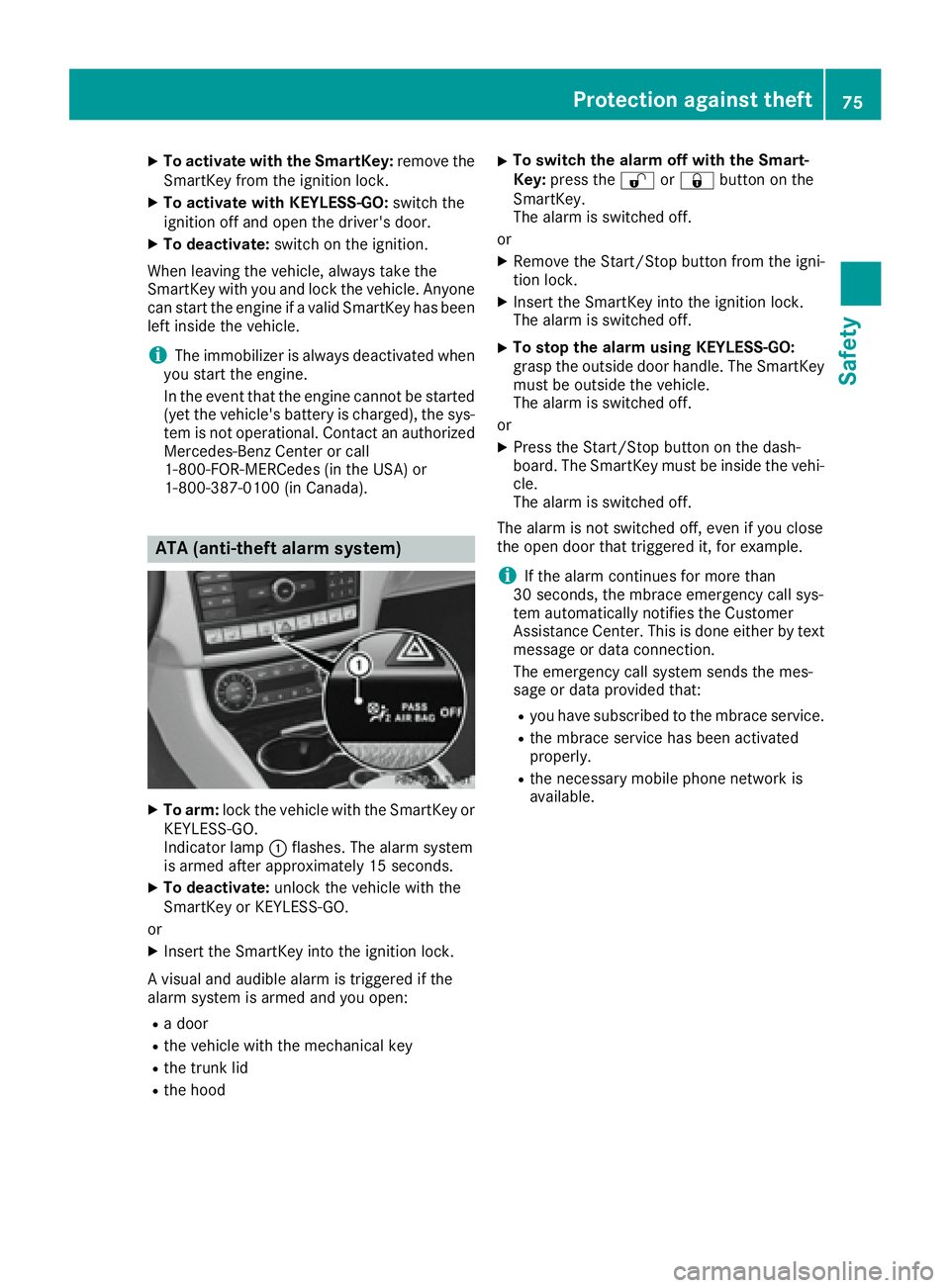
X
To arm: lock the vehicle with the SmartKey or
KEYLESS-GO.
Indicator lamp C flashes. The alarm system
is armed after approximately 15 seconds. X
To deactivate: unlock the vehicle with the
SmartKey or KEYLESS-GO.
or X
Insert the SmartKey into the ignition lock.
A visual and audible alarm is triggered if the
alarm system is armed and you open: R
a door R
the vehicle with the mechanical key R
the trunk lid R
the hood X
To switch the alarm off with the Smart-
Key: press the 6 or 7 button on the
SmartKey.
The alarm is switched off.
or X
Remove the Start/Stop button from the igni-
tion lock. X
Insert the SmartKey into the ignition lock.
The alarm is switched off. X
To stop the alarm using KEYLESS-GO:
grasp the outside door handle. The SmartKey
must be outside the vehicle.
The alarm is switched off.
or X
Press the Start/Stop button on the dash-
board. The SmartKey must be inside the vehi-
cle.
The alarm is switched off.
The alarm is not switched off, even if you close
the open door that triggered it, for example.
i If the alarm continues for more than
30 seconds, the mbrace emergency call sys-
tem automatically notifies the Customer
Assistance Center. This is done either by text
message or data connection.
The emergency call system sends the mes-
sage or data provi ded that: R
you have subscribed to the mbrace service. R
the mbrace service has been activated
properly. R
the necessary mobile phone network is
available.Protection against theft 75
Safety Z
Page 149 of 342
To ensure that the vehicle is secured against
rolling away unintentionally: R
the parking brake must be applied. R
the transmission must be in position P and the
Smartkey must be removed from the ignition
lock. R
the front wheels must be turned towards the
curb on steep uphill or downhill gradients.
Switching off the engine
Important safety notes
G WARNING
The automatic transmission switches to neu-
tral position N when you switch off the engine.
The vehicle may roll away. There is a risk of an
accident.
After switching off the engine, always switch
to parking position P . Prevent the parked vehi-
cle from rolling away by applying the parking
brake.
Vehicles with automatic transmission X
Apply the parking brake firmly. X
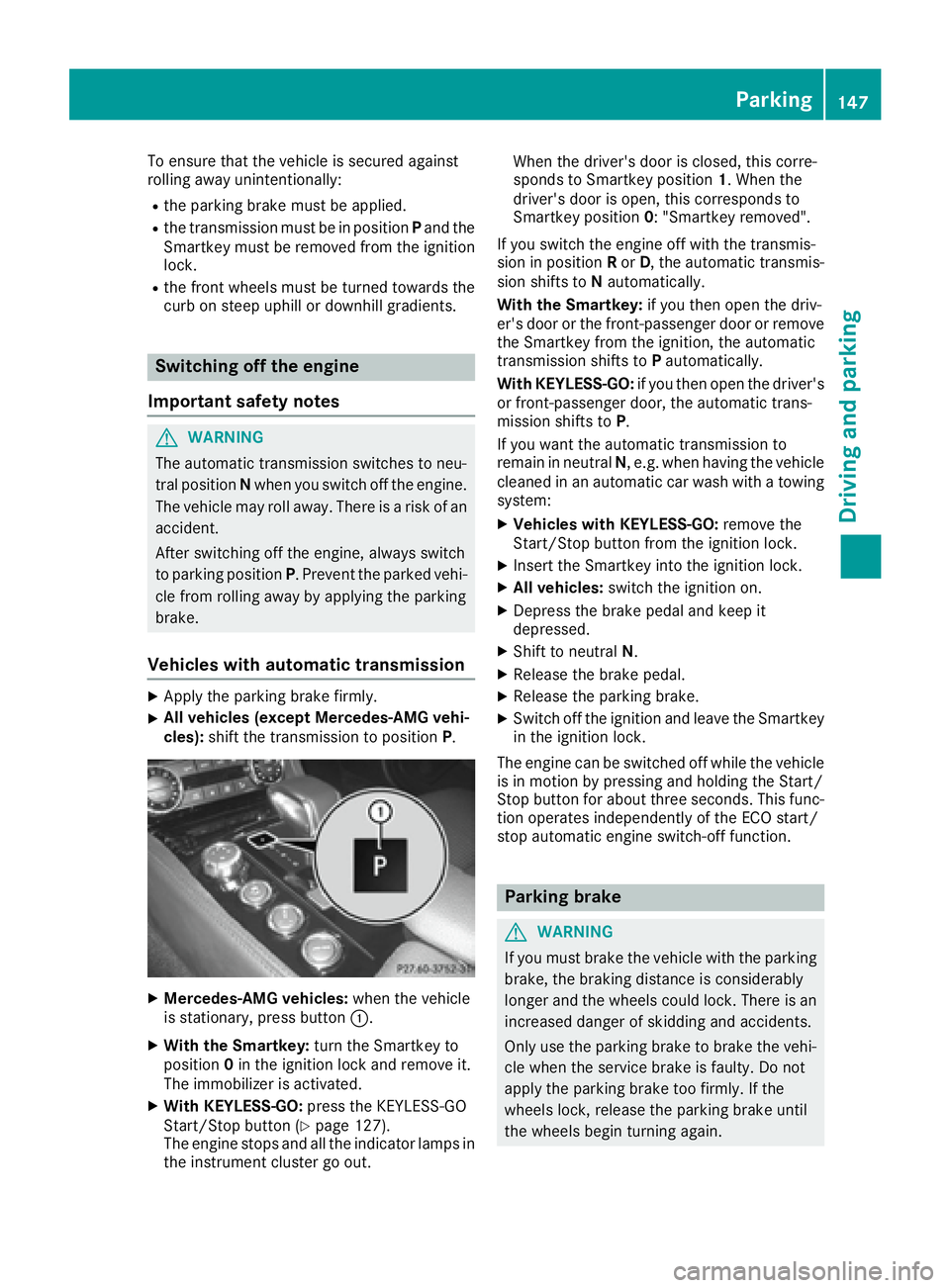
All vehicles (except Mercedes-AMG vehi-
cles): shift the transmission to position P .
X
Mercedes-AMG vehicles: when the vehicle
is stationary, press button C .X
With the Smartkey: turn the Smartkey to
position 0 in the ignition lock and remove it.
The immobilizer is activated. X
With KEYLESS-GO: press the KEYLESS-GO
Start/Stop button ( Y
page 127).
The engine stops and all the indicator lamps in
the instrument cluster go out. When the driver's door is closed, this corre-
sponds to Smartkey position 1 . When the
driver's door is open, this corresponds to
Smartkey position 0 : "Smartkey removed".
If you switch the engine off with the transmis-
sion in position R or D , the automatic transmis-
sion shifts to N automatically.
With the Smartkey: if you then open the driv-
er's door or the front-passenger door or remove
the Smartkey from the ignition, the automatic
transmission shifts to P automatically.
With KEYLESS-GO: if you then open the driver's
or front-passenger door, the automatic trans-
mission shifts to P .
If you want the automatic transmission to
remain in neutral N , e.g. when having the vehicle
cleaned in an automatic car wash with a towing
system: X
Vehicles with KEYLESS-GO: remove the
Start/Stop button from the ignition lock. X
Insert the Smartkey into the ignition lock. X
All vehicles: switch the ignition on. X
Depress the brake pedal and keep it
depressed. X
Shift to neutral N . X
Release the brake pedal. X
Release the parking brake. X
Switch off the ignition and leave the Smartkey
in the ignition lock.
The engine can be switched off while the vehicle
is in motion by pressing and holding the Start/
Stop button for about three seconds. This func-
tion operates independently of the ECO start/
stop automatic engine switch-off function.
Parking brake
G WARNING
If you must brake the vehicle with the parking
brake, the braking distance is considerably
longer and the wheels could lock. There is an
increased danger of skidding and accidents.
Only use the parking brake to brake the vehi-
cle when the service brake is faulty. Do not
apply the parking brake too firmly. If the
wheels lock, release the parking brake until
the wheels begin turning again. Parking 147
Driving and parking Z
Page 266 of 342
event of an emergency, help will have to be
summoned by other means.
Have the system checked at the nearest author-
ized Mercedes-Benz Center or contact the fol-
lowing service hotlines:
Mercedes-Benz Customer Assistance Center at
1-800-FOR-MERCedes (1-800-367-6372) or
1-866-990-9007
Emergency call Important safety notes
G WARNING
It can be dangerous to remain in the vehicle,
even if you have pressed the SOS button in an
emergency if: R
you see smoke inside or outside of the vehi-
cle, e.g. if there is a fire after an accident R
the vehicle is on a dangerous section of
road R
the vehicle is not visible or cannot easily be
seen by other road users, particularly when
dark or in poor visibility conditions
There is a risk of an accident and injury.
Leave the vehicle immediately in this or simi-
lar situations as soon as it is safe to do so.
Move to a safe location along with other vehi-
cle occupants. In such situations, secure the
vehicle in accordance with national regula-
tions, e. g. with a warning triangle.
General notes
Observe the notes on system activation
( Y
page 263).
An emergency call is dialed automatically if an
air bag or Emergency Tensioning Device is trig-
gered. You cannot end an automatically trig-
gered emergency call yourself.
An emergency call can also be initiated man-
ually.
As soon as the emergency call has been initi-
ated, the indicator lamp in the SOS button
flashes. The Connecting Call message
appears in the multifunction display.
The audio output is muted.
Once the connection has been made, the Call
Connected message appears in the multifunc-
tion display. All important information on the emergency is
transmitted, for example: R
current location of the vehicle (as determined
by the GPS system) R
vehicle identification number R
information on the severity of the accident
Shortly after the emergency call has been initi-
ated, a voice connection is automatically estab-
lished between the Customer Assistance Center
and the vehicle occupants. R
If the vehicle occupants respond, the
Mercedes-Benz Customer Assistance Center
attempts to get more information on the
emergency. R
If there is no response from the vehicle occu-
pants, an ambulance is immediately sent to
the vehicle.
If no voice connection can be established to the
Mercedes-Benz Customer Assistance Center,
the system has been unable to initiate an emer-
gency call.
This can occur, for example, if the relevant
mobile phone network is not available. The indi-
cator lamp in the SOS button flashes continu-
ously.
The Call Failed message appears in the mul-
tifunction display and must be confirmed.
In this case, summon assistance by other
means.
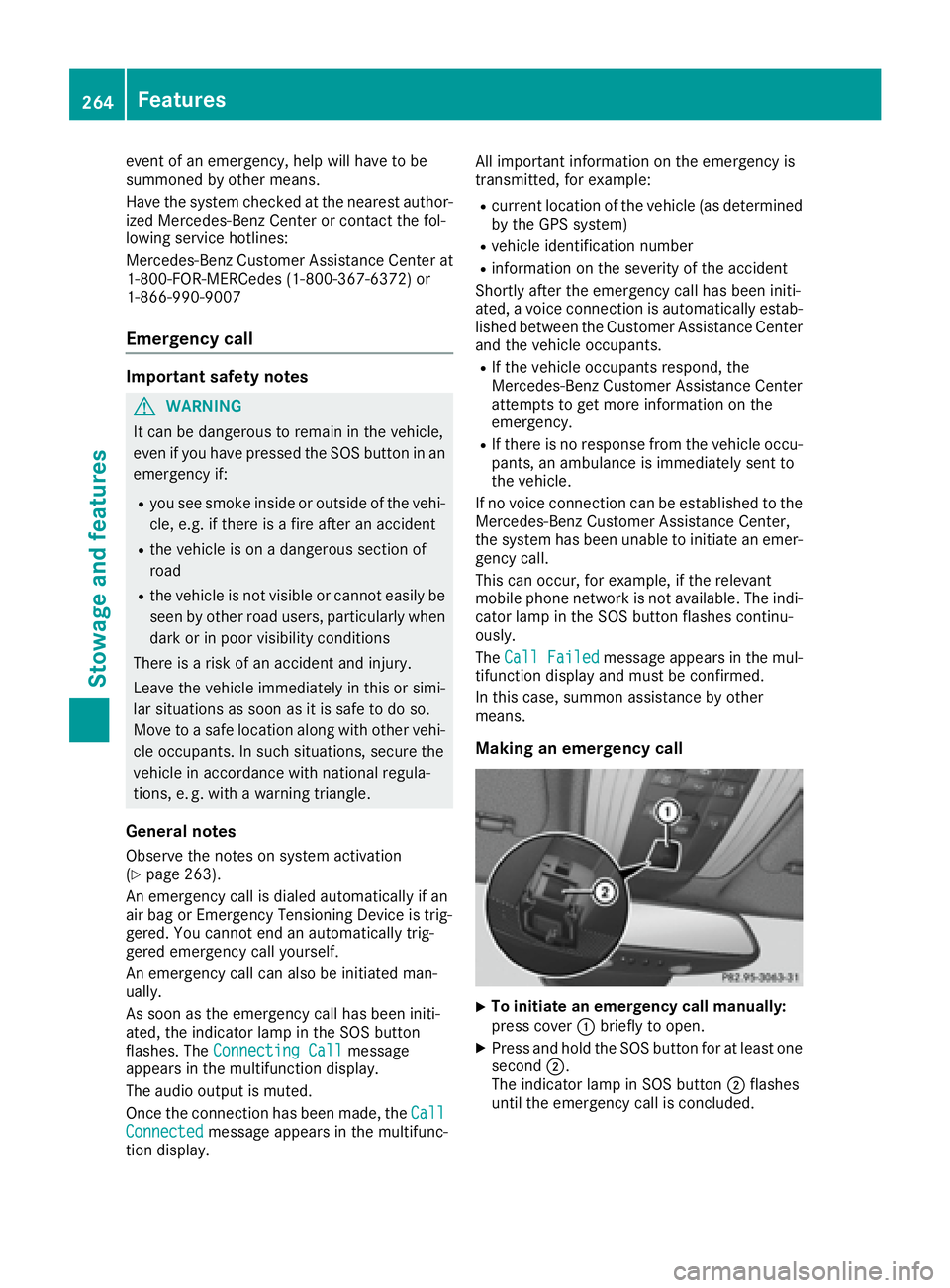
Making an emergency call
X
To initiate an emergency call manually:
press cover C briefly to open. X
Press and hold the SOS button for at least one
second D .
The indicator lamp in SOS button D flashes
until the emergency call is concluded.264
Features
Stowage and features
Page 267 of 342
X
Wait for a voice connection to the Mercedes-
Benz Customer Assistance Center. X
After the emergency call, close cover C .
If the mobile phone network is unavailable,
mbrace will not be able to make the emergency
call. If you leave the vehicle immediately after
pressing the SOS button, you will not know
whether mbrace placed the emergency call. In
this case, always summon assistance by other
means.
Roadside Assistance button X
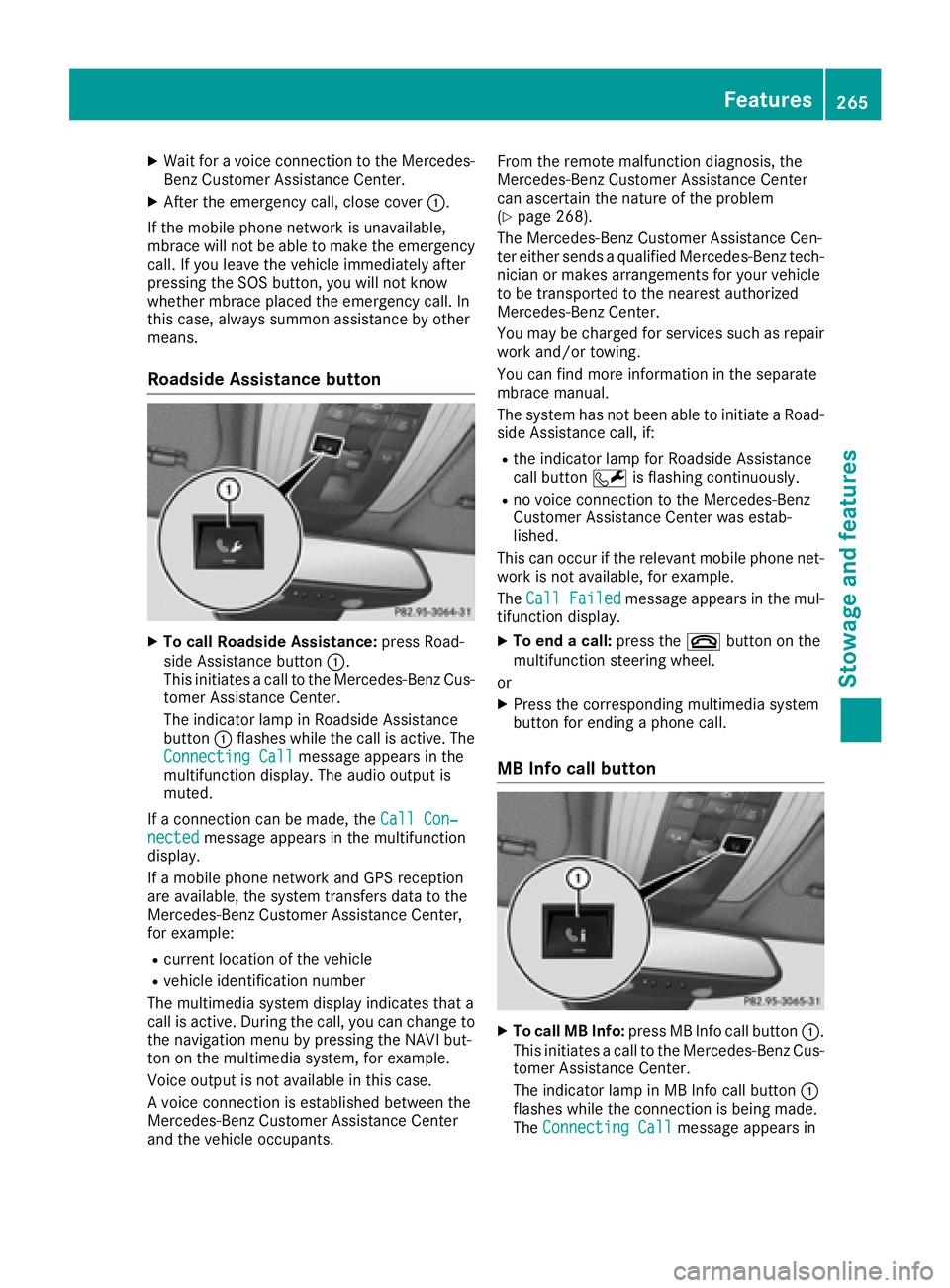
To call Roadside Assistance: press Road-
side Assistance button C .
This initiates a call to the Mercedes-Benz Cus-
tomer Assistance Center.
The indicator lamp in Roadside Assistance
button C flashes while the call is active. The
Connecting Call message appears in the
multifunction display. The audio output is
muted.
If a connection can be made, the Call Con‐
nected message appears in the multifunction
display.
If a mobile phone network and GPS reception
are available, the system transfers data to the
Mercedes-Benz Customer Assistance Center,
for example: R
current location of the vehicle R
vehicle identification number
The multimedia system display indicates that a
call is active. During the call, you can change to
the navigation menu by pressing the NAVI but-
ton on the multimedia system, for example.
Voice output is not available in this case.
A voice connection is established between the
Mercedes-Benz Customer Assistance Center
and the vehicle occupants. From the remote malfunction diagnosis, the
Mercedes-Benz Customer Assistance Center
can ascertain the nature of the problem
( Y
page 268).
The Mercedes-Benz Customer Assistance Cen-
ter either sends a qualified Mercedes-Benz tech-
nician or makes arrangements for your vehicle
to be transported to the nearest authorized
Mercedes-Benz Center.
You may be charged for services such as repair
work and/or towing.
You can find more information in the separate
mbrace manual.
The system has not been able to initiate a Road-
side Assistance call, if: R
the indicator lamp for Roadside Assistance
call button R is flashing continuously. R
no voice connection to the Mercedes-Benz
Customer Assistance Center was estab-
lished.
This can occur if the relevant mobile phone net-
work is not available, for example.
The Call Failed message appears in the mul-
tifunction display. X
To end a call: press the v button on the
multifunction steering wheel.
or X
Press the corresponding multimedia system
button for ending a phone call.
MB Info call button
X
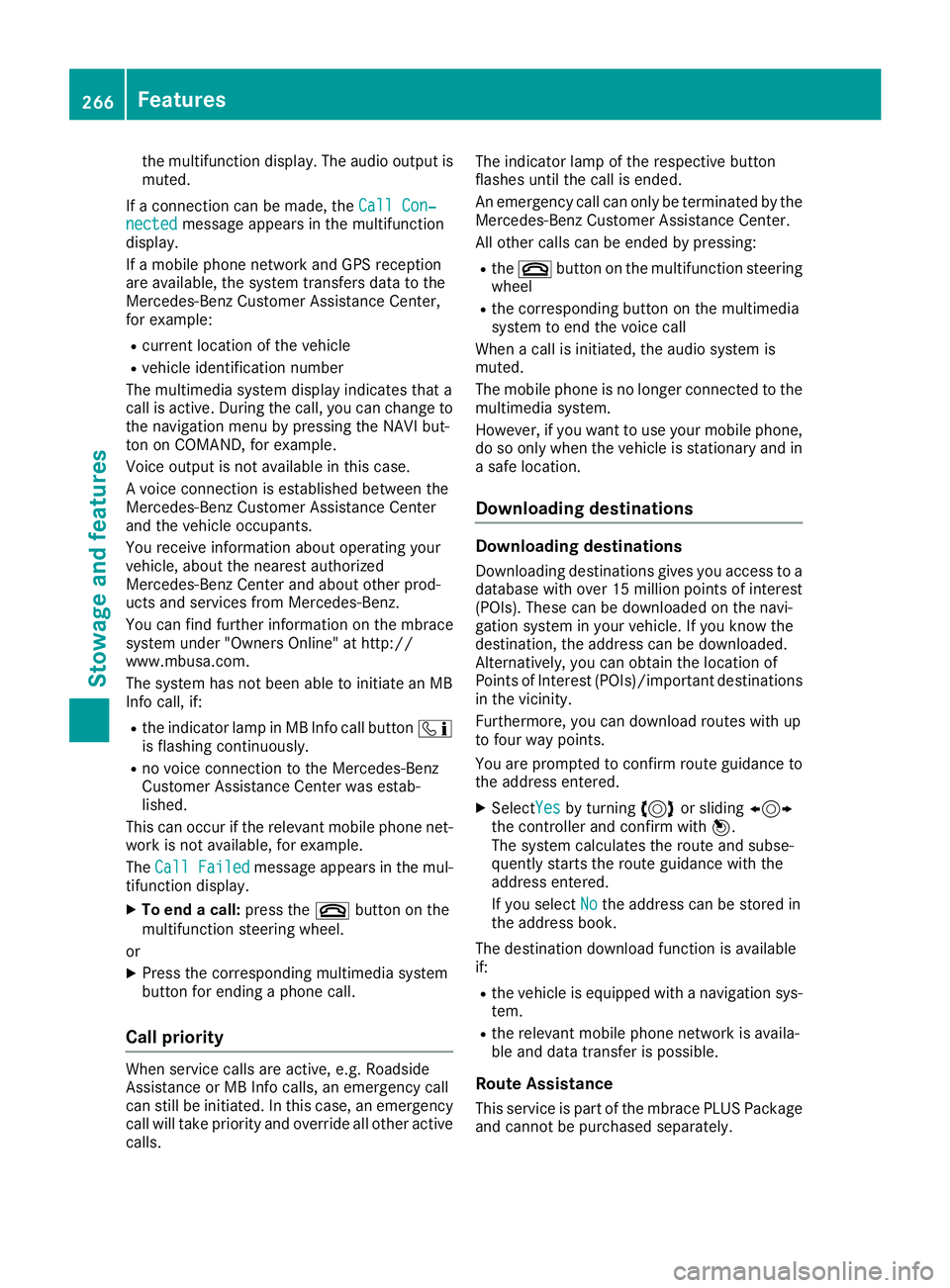
To call MB Info: press MB Info call button C .
This initiates a call to the Mercedes-Benz Cus-
tomer Assistance Center.
The indicator lamp in MB Info call button C
flashes while the connection is being made.
The Connecting Call message appears inFeatures 265
Stowage and features Z
Page 268 of 342
the multifunction display. The audio output is
muted.
If a connection can be made, the Call Con‐
nected message appears in the multifunction
display.
If a mobile phone network and GPS reception
are available, the system transfers data to the
Mercedes-Benz Customer Assistance Center,
for example: R
current location of the vehicle R
vehicle identification number
The multimedia system display indicates that a
call is active. During the call, you can change to
the navigation menu by pressing the NAVI but-
ton on COMAND, for example.
Voice output is not available in this case.
A voice connection is established between the
Mercedes-Benz Customer Assistance Center
and the vehicle occupants.
You receive information about operating your
vehicle, about the nearest authorized
Mercedes-Benz Center and about other prod-
ucts and services from Mercedes-Benz.
You can find further information on the mbrace
system under "Owners Online" at http://
www.mbusa.com.
The system has not been able to initiate an MB
Info call, if: R
the indicator lamp in MB Info call button
Page 295 of 342
Mercedes-Benz. These batteries provide
increased impact protection to prevent vehicle
occupants from suffering acid burns should the
battery be damaged in the event of an accident.
In order for the battery to achieve the maximum
possible service life, it must always be suffi-
ciently charged.
Like other batteries, the vehicle battery may
discharge over time if you do not use the vehicle.
In this case, have the battery disconnected at a
qualified specialist workshop. You can also
charge the battery with a charger recommended
by Mercedes-Benz. Contact a qualified special-
ist workshop for further information.
Have the battery condition of charge checked
more frequently if you use the vehicle mainly for
short trips or if you leave it standing idle for a
lengthy period. Consult a qualified specialist
workshop if you wish to leave your vehicle
parked for a long period of time.
Remove the SmartKey if you park the vehicle
and do not require any electrical consumers.
The vehicle will then use very little energy, thus
conserving battery power.
If the power supply has been interrupted, e.g. if
you reconnect the battery, you will have to: R
set the clock. Information on setting the clock
can be found in the Digital Operator's Manual
On vehicles with a multimedia system, the
time is set automatically. R
reset the function for folding the exterior mir-
rors in/out automatically, by folding the mir-
rors out once ( Y
page 104)
Charging the battery
G WARNING
During charging and jump-starting, explosive
gases can escape from the battery. There is a
risk of an explosion.
Particularly avoid fire, open flames, creating
sparks and smoking. Ensure there is sufficient
ventilation while charging and jump-starting.
Do not lean over a battery.
G WARNING
Battery acid is caustic. There is a risk of injury.
Avoid contact with skin, eyes or clothing. Do
not inhale any battery gases. Do not lean over the battery. Keep children away from batter-
ies. Wash away battery acid immediately with
plenty of clean water and seek medical atten-
tion.
G WARNING
A discharged battery can freeze at tempera-
tures below freezing point. When jump-start-
ing the vehicle or charging the battery, gases
can escape from the battery. There is a risk of
an explosion.
Allow the frozen battery to thaw out before
charging it or jump-starting.
! Only use battery chargers with a maximum
charging voltage of 14.8 V.
! Only charge the battery using the jump-
starting connection point.
The jump-starting connection point is in the
engine compartment ( Y
page 294).X
Open the hood. X
Connect the battery charger to the positive
terminal and ground point in the same order
as when connecting the donor battery in the
jump-starting procedure ( Y
page 294).
If the indicator/warning lamps do not light up at
low temperatures, it is very likely that the dis-
charged battery has frozen. In this case, you
may neither charge the battery nor jump-start
the vehicle. The service life of a thawed-out bat-
tery may be shorter. The starting characteristics
may be impaired, especially at low tempera-
tures. Have the thawed-out battery checked at a
qualified specialist workshop.
Never charge a battery still installed in the vehi-
cle unless a battery charger unit approved by
Mercedes-Benz is being used . A battery charger
unit specially adapted for Mercedes-Benz vehi-
cles and tested and approved by Mercedes-
Benz is available as an accessory. It permits the
charging of the battery in its installed position.
Contact an authorized Mercedes-Benz Center
for further information and availability. Read the
battery charger's operating instructions before
charging the battery.Battery (vehicle) 293
Breakdown assistance Z
Page 296 of 342
Jump-starting For the jump-starting procedure, use only the jump-starting connection point in the engine com-
partment, consisting of a positive terminal and a ground point.
G WARNING
Battery acid is caustic. There is a risk of injury.
Avoid contact with skin, eyes or clothing. Do not inhale any battery gases. Do not lean over the
battery. Keep children away from batteries. Wash away battery acid immediately with plenty of
clean water and seek medical attention.
G WARNING
During charging and jump-starting, explosive gases can escape from the battery. There is a risk
of an explosion.
Particularly avoid fire, open flames, creating sparks and smoking. Ensure there is sufficient ven-
tilation while charging and jump-starting. Do not lean over a battery.
G WARNING
During the charging process, a battery produces hydrogen gas. If a short circuit occurs or sparks
are created, the hydrogen gas can ignite. There is a risk of an explosion. R
Make sure that the positive terminal of a connected battery does not come into contact with
vehicle parts. R
Never place metal objects or tools on a battery. R
It is important that you observe the described order of the battery terminals when connecting
and disconnecting a battery. R
When jump-starting, make sure that the battery poles with identical polarity are connected. R
It is particularly important to observe the described order when connecting and disconnecting
the jumper cables. R
Never connect or disconnect the battery terminals while the engine is running.
G WARNING
A discharged battery can freeze at temperatures below freezing point. When jump-starting the
vehicle or charging the battery, gases can escape from the battery. There is a risk of an explosion.
Allow the frozen battery to thaw out before charging it or jump-starting.
! Avoid repeated and lengthy starting attempts. Otherwise, the catalytic converter could be
damaged by the non-combusted fuel.
If, at low temperatures, the indicator lamps/warning lamps in the instrument cluster do not light up,
it is highly likely that the discharged battery has frozen. In this case, you may neither charge the
battery nor jump-start the vehicle. The service life of a thawed-out battery may be shorter. The
starting characteristics can be impaired, particularly at low temperatures. Have the thawed-out
battery checked at a qualified specialist workshop.294
Jump-starting
Breakdown assistance
Page 310 of 342
same time cannot be detected by the tire pres-
sure loss warning system.
The tire pressure monitor is not able to warn you
of a sudden loss of pressure, e.g. if the tire is
penetrated by a foreign object. In the event of a
sudden loss of pressure, bring the vehicle to a
halt by braking carefully. Avoid abrupt steering
movements.
The function of the tire pressure loss warning
system is limited or delayed if: R
snow chains are mounted on your vehicle's
tires. R
road conditions are wintry. R
you are driving on sand or gravel. R
you adopt a very sporty driving style (corner-
ing at high speeds or driving with high rates of
acceleration). R
you are driving with a heavy load (in the vehi-
cle or on the roof).
Restarting the tire pressure loss warn-
ing system Restart the tire pressure loss warning system if
you have: R
changed the tire pressure R
changed the wheels or tires R
mounted new wheels or tires X
Before restarting, make sure that the tire
pressures are set properly on all four tires for
the respective operating conditions.
The recommended tire pressure can be found
on the Tire and Loading Information placard
on the B-pillar on the driver's side. Addition-
ally, a tire pressure table is attached to the
fuel filler flap. The tire pressure loss warning
system can only give reliable warnings if you
have set the correct tire pressure. If an incor-
rect tire pressure is set, these incorrect val-
ues will be monitored. X
Also observe the notes in the section on tire
pressures ( Y
page 304).X
Make sure that the SmartKey is in position 2
in the ignition lock ( Y
page 127).X
Press the Y or e button on the steering
wheel to select the Serv. menu. X
Press the c or d button on the steering
wheel to select the Tire Pressure menu.X
Press the v button.
The Run Flat Indicator Active Press
'OK' to Restart message appears in the
multifunction display.
If you wish to confirm the restart: X
Press the v button.
The Tire Pressure Now OK? message
appears in the multifunction display. X
Press the c or d button to select Yes .X
Press the v button.
The Run Flat Indicator Restarted mes-
sage appears in the multifunction display.
After a teach-in period, the tire pressure loss
warning system will monitor the set tire pres-
sures of all four tires.
If you wish to cancel the restart: X
Press the 8 button.
or X
When the Tire Pressure Now OK? message
appears, press the c or d button to
select Cancel . X
Press the v button.
The tire pressure values stored at the last
restart will continue to be monitored.
Tire pressure monitor
General notes If a tire pressure monitor is installed, the vehi-
cle's wheels have sensors that monitor the tire
pressures in all four tires. The tire pressure mon-
itor warns you if the pressure drops in one or
more of the tires. The tire pressure monitor only
functions if the corresponding sensors are
installed in all wheels.
Information on tire pressures is displayed in the
multifunction display. After a few minutes of
driving, the current tire pressure of each tire is
shown in the Service menu of the multifunction
display, see illustration (example).308
Tire pressure
Wheels and tires