trunk MERCEDES-BENZ CLS 2016 Owners Manual
[x] Cancel search | Manufacturer: MERCEDES-BENZ, Model Year: 2016, Model line: CLS, Model: MERCEDES-BENZ CLS 2016Pages: 342, PDF Size: 10.12 MB
Page 7 of 342

BAS PLUS with Cross-Traffic Assist
(Brake Assist PLUS with Cross-
Traffic Assist)
Important safety notes .................... 65
Battery (SmartKey)
Checking .......................................... 79
Important safety notes .................... 78
Replacing ......................................... 79
Battery (vehicle)
Charging ........................................ 293
Display message ............................ 223
Important safety notes .................. 291
Jump starting ................................. 294
Belt
see Seat belts
Blind Spot Assist
Activating/deactivating (on-
board computer) ............................ 205
Display message ............................ 226
Notes/function .............................. 187
see Active Blind Spot Assist
Bluetooth ®
Connecting another mobile
phone ............................................ 250
Searching for a mobile phone ........ 249
see also Digital Operator's Man-
ual .................................................. 245
Telephony ...................................... 248
Box (trunk) ......................................... 255
Brake Assist
see BAS (Brake Assist System)
Brake fluid
Display message ............................ 215
Notes ............................................. 334
Brake force distribution
see EBD (electronic brake force
distribution)
Brake lamps
Display message ............................ 221
Brakes
ABS .................................................. 64
Adaptive Brake Assist ...................... 68
BAS .................................................. 65
BAS PLUS with Cross-Traffic
Assist ............................................... 65
Brake fluid (notes) ......................... 334
Display message ............................ 213
High-performance brake system .... 151 HOLD function ............................... 164
Important safety notes .................. 150
Maintenance .................................. 151
Parking brake ................................ 147
Riding tips ...................................... 150
Warning lamp ................................. 237
Breakdown
Where will I find...? ........................ 286
see Flat tire
see Towing away
Brightness control (instrument
cluster lighting) ................................... 34
C California
Important notice for retail cus-
tomers and lessees .......................... 26
Calling up a malfunction
see Display messages
Car
see Vehicle
Care
360° camera ................................. 283
Car wash ........................................ 279
Carpets .......................................... 285
Display ........................................... 283
Exhaust pipe .................................. 283
Exterior lights ................................ 282
Gear or selector lever .................... 284
Interior ........................................... 283
Matte finish ................................... 281
Notes ............................................. 279
Paint .............................................. 280
Plastic trim .................................... 283
Power washer ................................ 280
Rear view camera .......................... 282
Roof lining ...................................... 285
Seat belt ........................................ 284
Seat cover ..................................... 284
Sensors ......................................... 282
Steering wheel ............................... 284
Trim pieces .................................... 284
Washing by hand ........................... 280
Wheels ........................................... 281
Windows ........................................ 281
Wiper blades .................................. 282
Wooden trim .................................. 284 Index 5
Page 11 of 342
E E10
see Fuel
EASY-ENTRY feature
Activating/deactivating ................ .2 08
Function/notes ............................ .1 02
EASY-EXIT feature
Crash-responsive ........................... 103
Function/notes ............................ .1 02
Switching on/off ........................... 208
EASY-PACK trunk box ....................... 255
EBD (electronic brake force distri-
bution)
Display message ............................ 214
Function/notes ................................ 72
ECO display
Function/notes ............................ .1 49
On-board computer ....................... 199
ECO start/stop function
Automatic engine start .................. 131
Automatic engine switch-off .......... 130
Deactivating/activating ................. 131
General information ....................... 130
Important safety notes .................. 130
Introduction ................................... 130
Electronic Stability Program
see ESP ®
(Electronic Stability Program)
Emergency
Automatic measures after an acci-
dent ................................................. 58
Emergency release
Driver's door ................................... .8 3
Fuel filler flap ................................. 145
Trunk ............................................... 86
Vehicle ............................................. 83
Emergency spare wheel
General notes ................................ 326
Important safety notes .................. 326
Removing ....................................... 326
Storage location ............................ 326
Stowing .......................................... 327
Technical data ............................... 326
Emergency Tensioning Devices
Activation ......................................... 53
Emissions control
Service and warranty information .... 26 Engine
Check Engine warning lamp ........... 241
Display message ............................ 222
ECO start/stop function ................ 130
Engine number ............................... 331
Irregular running ............................ 133
Jump-starting ................................. 294
Starting problems .......................... 133
Starting the engine with the
SmartKey ....................................... 129
Starting with KEYLESS-GO ............. 129
Switching off .................................. 147
Tow-starting (vehicle) ..................... 299
E n gine electronics
Problem (malfunction) ................... 133
Engine jump starting
see Jump starting (engine)
Engine oil
Adding ........................................... 276
Additives ........................................ 334
Checking the oil level ..................... 275
Checking the oil level using the
dipstick .......................................... 275
Display message ............................ 223
Filling capacity ............................... 334
Notes about oil grades ................... 333
Notes on oil level/consumption .... 275
Temperature (on-board computer,
Mercedes-AMG vehicles) ............... 209
Entering an address
see also Digital Operator's Man-
ual .................................................. 245
ESP ®
(Electronic Stability Pro-
gram)
AMG menu (on-board computer) ... 209
Characteristics ................................. 70
Deactivating/activating (button
in Mercedes-AMG vehicles) ............. 71
Deactivating/activating (except
Mercedes ‑ AMG vehicles) ................. 70
Deactivating/activating (on-
board computer, except
Mercedes-AMG vehicles) ............... 204
Display message ............................ 213
Function/notes ................................ 69
General notes .................................. 69
Important safety information ........... 69
Trailer stabilization ........................... 72 Index 9
Page 12 of 342
Warning lamp ................................. 238
ETS/4ETS (Electronic Traction Sys-
tem) ...................................................... 69
Exhaust check ................................... 149
Exhaust pipe (cleaning instruc-
tions) .................................................. 283
Exterior lighting
Setting options .............................. 107
see Lights
Exterior mirrors
Adjusting ....................................... 103
Dipping (automatic) ....................... 104
Folding in when locking (on-board
computer) ...................................... 208
Folding in/out (automatically) ...... .1 04
Folding in/out (electrically) ........... 104
Out of position (troubleshooting) ... 104
Setting .......................................... .1 04
Storing settings (memory func-
tion) ............................................... 105
Storing the parking position .......... 105
Eyeglasses compartment ................. 252
FFavorites
Overview ........................................ 247
Filler cap
see Refueling
Flat tire
MOExtended tires .......................... 287
Preparing the vehicle ..................... 287
TIREFIT kit ...................................... 288
see Emergency spare wheel
Floormats .......................................... .2 72
Frequencies
Mobile phone ................................. 329
Two-way radio ................................ 329
Fuel
Consumption statistics .................. 199
Displaying the current consump-
tion ................................................ 199
Displaying the range ..................... .1 99
Driving tips ................................... .1 49
Fuel gauge ....................................... 34
Grade (gasoline) ............................ 332
Important safety notes .................. 332
Problem (malfunction) ................... 146 Refueling ........................................ 143
Tank content/reserve fuel ............. 332
Fuel filler flap
Emergency release ........................ 145
Opening ......................................... 144
Fuel level
Calling up the range (on-board
computer) ...................................... 199
Fuel tank
Capacity ........................................ 332
Problem (malfunction) ................... 146
Fuse allocation chart (vehicle tool
kit) ...................................................... 286
Fuses
Allocation chart ............................ .2 99
Before changing ............................ .2 99
Fuse box in the engine compart-
ment .............................................. 300
Fuse box in the trunk ..................... 300
Important safety notes .................. 299
G Garage door opener
Clearing the memory ..................... 272
General notes ................................ 269
Important safety notes .................. 270
Opening/closing the garage door .. 272
Problems when programming ....... .2 72
Programming (button in the rear-
view mirror) ................................... 270
Synchronizing the rolling code ....... 271
Gasoline ............................................. 332
Gear indicator (on-board com-
puter, Mercedes-AMG vehicles) ....... 209
Genuine parts ...................................... 25
Glove box .......................................... .2 52
Google™ Local Search
see also Digital Operator's Man-
ual ................................................. .2 45
H
Handbrake
see Parking brake
Hazard warning lamps ..................... .1 09
Head bags
Display message ............................ 21810
Index
Page 18 of 342
Refuelin g process .......................... 14 4
see Fue l
Remote contro l
Garag e doo r opener ...................... .2 69
Programming (garage door
opener) .......................................... 270
Replacing bulbs
General notes ................................ 111
Reporting safety defects .................... 29
Rescue card ......................................... 30
Reserve (fuel tank)
see Fuel
Reserve fuel
Display message ............................ 224
Warning lamp ................................. 241
see Fuel
Residual heat (climate control) ....... .1 24
Restraint system
Display message ............................ 217
Introduction ..................................... 41
Problem (malfunction) ................... 240
Warning lamp (function) ................... 41
Reverse gear (selector lever) ........... 134
Reversing feature
Side windows ................................... 87
Sliding sunroof ................................. 91
Trunk lid .......................................... .8 3
Reversing lamps (display mes-
sage) ................................................... 221
Roadside Assistance (breakdown) .... 27
Roller sunblind
Rear window .................................. 260
Roof lining and carpets (cleaning
guidelines) ......................................... 285
Roof load (maximum) ........................ 336
Route guidance
see also Digital Operator's Man-
ual .................................................. 245
S
Safety
Children in the vehicle ..................... 58
see Occupant safety
Safety system
see Driving safety systems
SD memory card
Ejecting .......................................... 250 Inserting ........................................ 250
Inserting/removing ........................ 250
see also Digital Operator's Man-
ual .................................................. 245
Selecting ........................................ 201
Search & Send
see also Digital Operator's Man-
ual .................................................. 245
Seat belts
Adjusting the driver's and front-
passenger seat belt ......................... 45
Adjusting the height ......................... 44
Cleaning ......................................... 284
Correct usage .................................. 44
Fastening ......................................... 44
Important safety guidelines ............. 43
Introduction ..................................... 42
Releasing ......................................... 45
Switching belt adjustment on/off
(on-board computer) ...................... 208
Warning lamp ................................. 236
Warning lamp (function) ................... 45
Seats
Adjusting (electrically) ..................... 95
Adjusting the 4-way lumbar sup-
port .................................................. 98
Adjusting the active multicontour
seat .................................................. 98
Adjusting the head restraint ............ 96
Adjusting the multicontour seat ....... 97
Cleaning the cover ......................... 284
Correct driver's seat position ........... 94
Important safety notes .................... 94
Overview .......................................... 94
Seat heating .................................... 98
Seat heating problem .................... 100
Storing settings (memory func-
tion) ............................................... 105
Switching seat heating on/off ......... 98
Switching seat ventilation on/
off .................................................... 98
Section
Trunk ............................................... 83
Securing cargo .................................. 255
Selector lever
Cleaning ......................................... 284
Sensors (cleaning instructions) ....... 28216
Index
Page 20 of 342
Steering
Display message ........................... .2 34
Steering Assist and Stop&Go Pilot
(DISTRONIC PLUS)
Activating/deactivating ................. 204
Display message ............................ 229
Steering wheel
Adjusting (electrically) ................... 100
Button overview ............................... 35
Buttons (on-board computer) ......... 197
Cleaning ......................................... 284
Important safety notes .................. 100
Paddle shifters ............................... 139
Steering wheel heating .................. 100
Storing settings (memory func-
tion) ............................................... 105
Steering wheel heating
Problem (malfunction) ................... 102
Switching on/off ........................... 100
Steering wheel paddle shifters ....... .1 39
Stopwatch (RACETIMER) ................... 210
Stowage areas ................................... 251
Stowage compartments
Armrest (under) ............................ .2 53
Center console .............................. 252
Center console (rear) ..................... 253
Cup holders ................................... 257
Eyeglasses compartment .............. .2 52
Glove box ....................................... 252
Important safety information ......... 251
Rear ............................................... 253
Stowage net ................................... 254
Under driver's seat/front-
passenger seat .............................. 253
Stowage net ....................................... 254
Stowage well beneath the trunk
floor .................................................... 256
Summer tires ..................................... 303
Sun visor ............................................ 259
Surround lighting (on-board com-
puter) .................................................. 207
Suspension setting
AIRMATIC ...................................... 167
AMG adaptive sport suspension
system ........................................... 168
Suspension settings
SETUP (on-board computer) .......... 209 Switching air-recirculation mode
on/off ................................................. 124
Switching on media mode
Via the device list .......................... 250
T Tachometer ........................................ 196
Tail lamps
Display message ............................ 221
Tank
see Fuel tank
Tank content
Fuel gauge ....................................... 34
Technical data
Capacities ...................................... 331
Emergency spare wheel ................. 326
Information .................................... 329
Tires/wheels ................................. 325
Vehicle data ................................... 336
Telephone
Accepting a call (multifunction
steering wheel) .............................. 202
Authorizing a mobile phone (con-
necting) ......................................... 249
Connecting a mobile phone (gen-
eral information) ............................ 248
Display message ............................ 234
Menu (on-board computer) ............ 202
Number from the phone book ........ 203
Redialing ........................................ 203
Rejecting/ending a call ................. 203
see also Digital Operator's Man-
ual .................................................. 245
Switching between mobile
phones ........................................... 250
Temperature
Coolant .......................................... 196
Coolant (on-board computer,
Mercedes-AMG vehicles) ............... 209
Engine oil (on-board computer,
Mercedes-AMG vehicles) ............... 209
Outside temperature ...................... 196
Setting (climate control) ................ 121
Timing (RACETIMER) ......................... 210
Tire pressure
Calling up (on-board computer) ..... 308
Checking manually ........................ 30718
Index
Page 22 of 342
Uniform Tire Quality Grading
Standards (definition) .................... 319
Wear indicator (definition) ............ .3 20
Wheel and tire combination ........... 325
Wheel rim (definition) .................... 319
see Flat tire
Top Tether ............................................ 61
Tow-starting
Emergency engine starting ............ 299
Important safety notes .................. 296
Towing a trailer
ESP ®
(Electronic Stability Pro-
gram) ............................................... 72
Towing away
Important safety guidelines ........... 296
Installing the towing eye ................ 297
Removing the towing eye .............. .2 98
Transporting the vehicle ................ 298
With both axles on the ground ....... 298
With the rear axle raised ................ 298
Towing eye ......................................... 286
Traffic reports
see also Digital Operator's Man-
ual ................................................. .2 45
Traffic Sign Assist
Display message ............................ 225
Function/notes ............................ .1 86
Important safety notes .................. 186
Instrument cluster display ............. 186
Transmission
see Automatic transmission
Transmission position display ......... 135
Transmission position display
(DIRECT SELECT lever) ..................... .1 35
Transporting the vehicle .................. 298
Trim pieces (cleaning instruc-
tions) ................................................. .2 84
Trip computer (on-board com-
puter) ................................................. .1 99
Trip odometer
Calling up ....................................... 198
Resetting (on-board computer) ...... 199
Trunk
Emergency release .......................... 86
Important safety notes .................... 83
Opening/closing (automatically
from inside) ...................................... 85 Opening/closing (automatically
from outside) ................................... 84
Opening/closing (manually from
outside) ............................................ 84
Trunk lid
Displ ay message ............................ 233
Opening di me nsions ..................... .3 36
Trunk load (maximum) ..................... .3 36
Turn signals
Display message ............................ 221
Switching on/off ........................... 108
Two-way radio
Frequencies ................................... 329
Installation ..................................... 329
Transmission output (maximum) .... 329
Type identification plate
see Vehicle identification plate
U Unlocking
Emergency unlocking ....................... 83
From inside the vehicle (central
unlocking button) ............................ .8 2
Upshift indicator (on-board com-
puter, Mercedes-AMG vehicles) ...... .2 09
USB devices
Connecting to the Media Inter-
face ............................................... 250
V
Vanity mirror (in the sun visor) ....... .2 59
Vehicle
Correct use ...................................... 29
Data acquisition ............................... 30
Display message ............................ 232
Equipment ....................................... 26
Individual settings .......................... 205
Limited Warranty ............................ .3 0
Loading .......................................... 311
Locking (in an emergency) ............... 83
Locking (SmartKey) .......................... 76
Lowering ........................................ 324
Maintenance .................................... 27
Parking for a long period ................ 148
Pulling away ................................... 129
Raising ........................................... 32220
Index
Page 77 of 342
X
To activate with the SmartKey: remove the
SmartKey from the ignition lock. X
To activate with KEYLESS-GO: switch the
ignition off and open the driver's door. X
To deactivate: switch on the ignition.
When leaving the vehicle, always take the
SmartKey with you and lock the vehicle. Anyone
can start the engine if a valid SmartKey has been
left inside the vehicle.
i The immobilizer is always deactivated when
you start the engine.
In the event that the engine cannot be started
(yet the vehicle's battery is charged), the sys-
tem is not operational. Contact an authorized
Mercedes-Benz Center or call
1-800-FOR-MERCedes (in the USA) or
1-800-387-0100 (in Canada).
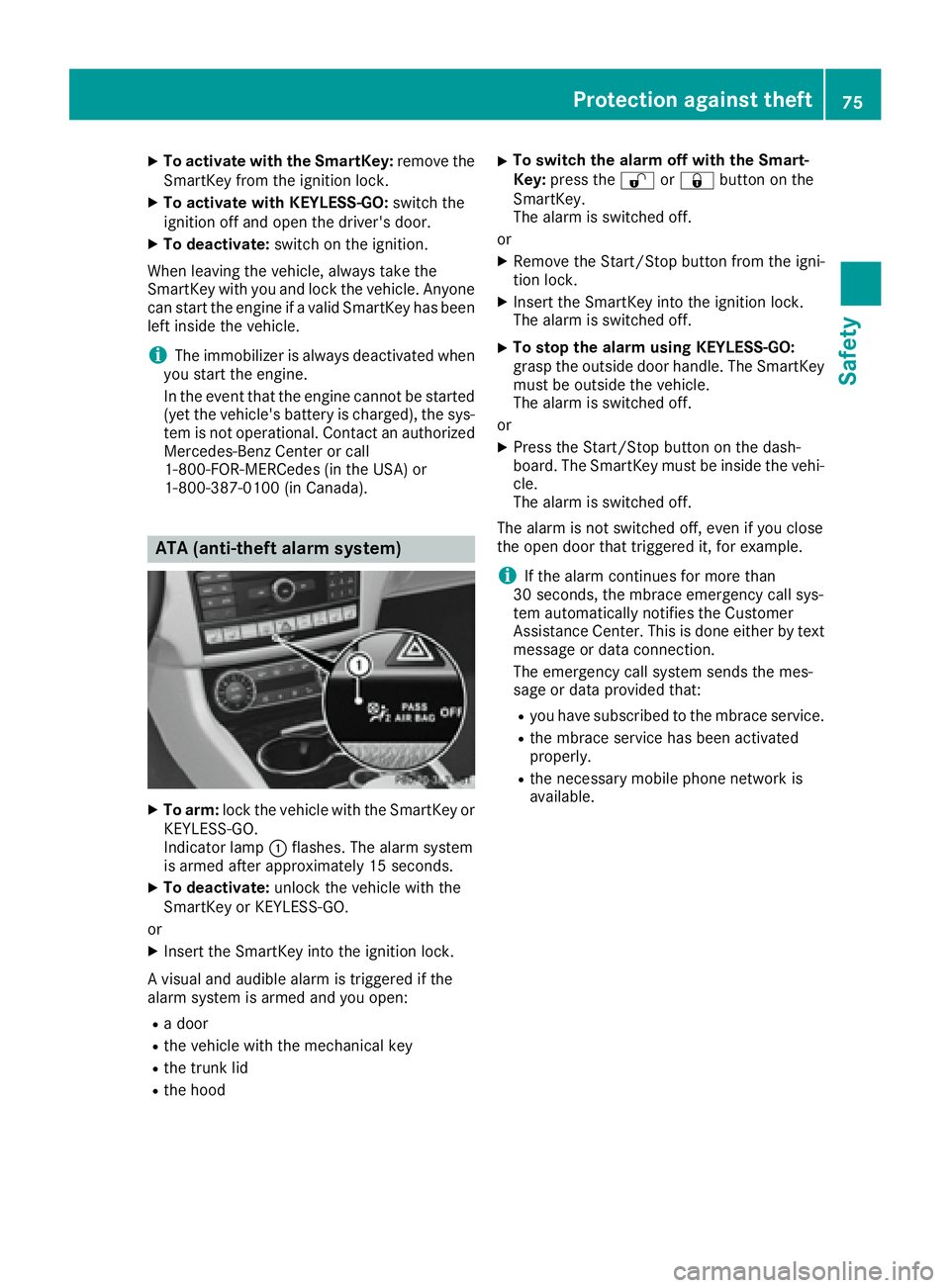
ATA (anti-theft alarm system)
X
To arm: lock the vehicle with the SmartKey or
KEYLESS-GO.
Indicator lamp C flashes. The alarm system
is armed after approximately 15 seconds. X
To deactivate: unlock the vehicle with the
SmartKey or KEYLESS-GO.
or X
Insert the SmartKey into the ignition lock.
A visual and audible alarm is triggered if the
alarm system is armed and you open: R
a door R
the vehicle with the mechanical key R
the trunk lid R
the hood X
To switch the alarm off with the Smart-
Key: press the 6 or 7 button on the
SmartKey.
The alarm is switched off.
or X
Remove the Start/Stop button from the igni-
tion lock. X
Insert the SmartKey into the ignition lock.
The alarm is switched off. X
To stop the alarm using KEYLESS-GO:
grasp the outside door handle. The SmartKey
must be outside the vehicle.
The alarm is switched off.
or X
Press the Start/Stop button on the dash-
board. The SmartKey must be inside the vehi-
cle.
The alarm is switched off.
The alarm is not switched off, even if you close
the open door that triggered it, for example.
i If the alarm continues for more than
30 seconds, the mbrace emergency call sys-
tem automatically notifies the Customer
Assistance Center. This is done either by text
message or data connection.
The emergency call system sends the mes-
sage or data provi ded that: R
you have subscribed to the mbrace service. R
the mbrace service has been activated
properly. R
the necessary mobile phone network is
available.Protection against theft 75
Safety Z
Page 78 of 342
SmartKey
Important safety notes
G WARNING
If children are left unsupervised in the vehicle,
they could: R
open the doors, thus endangering other
people or road users. R
get out and disrupt traffic. R
operate the vehicle's equipment.
Additionally, children could set the vehicle in
motion if, for example, they: R
release the parking brake. R
shifting the automatic transmission out of
park position PR
Start the engine.
There is a risk of an accident and injury.
When leaving the vehicle, always take the
SmartKey with you and lock the vehicle. Never
leave children or animals unattended in the
vehicle. Always keep the SmartKey out of
reach of children.
G WARNING
If you attach heavy or large objects to the
SmartKey, the SmartKey could be uninten-
tionally turned in the ignition lock. This could
cause the engine to be switched off. There is a
risk of an accident.
Do not attach any heavy or large objects to the
SmartKey. Remove any bulky key rings before
inserting the SmartKey into the ignition lock.
! Keep the SmartKey away from strong mag-
netic fields. Otherwise, the remote control
function could be affected.
Strong magnetic fields can occur in the vicin-
ity of powerful electrical installations.
Do not keep the SmartKey: R
with electronic devices, e.g. a mobile phone
or another SmartKey. R
with metallic objects, e.g. coins or metal foil. R
inside metallic objects, e.g. a metal case.
This can affect the functionality of the Smart-
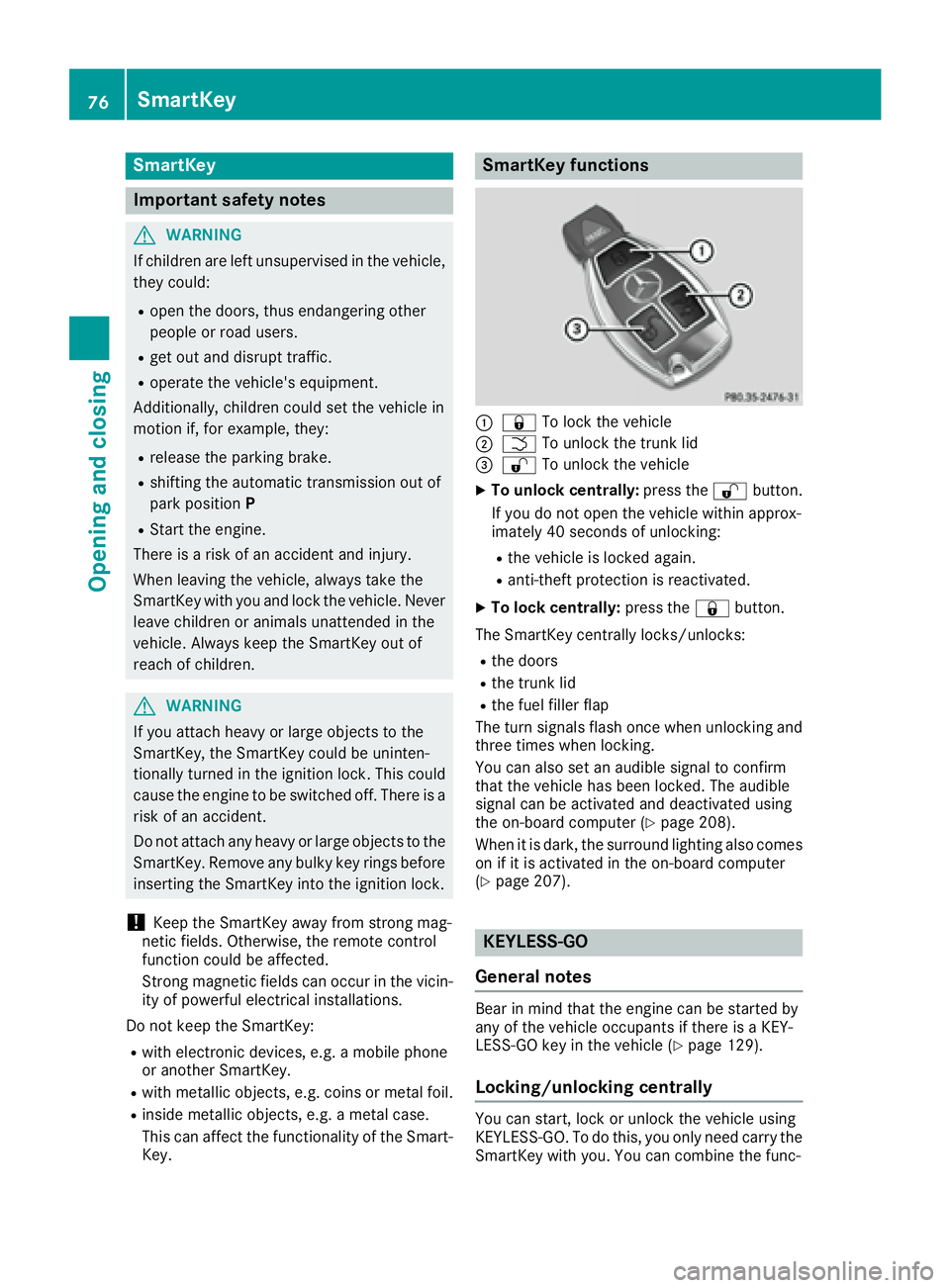
Key. SmartKey functions
C
7 To lock the vehicleD
T To unlock the trunk lid
Page 79 of 342
tions of KEYLESS-GO with those of a conven-
tional SmartKey. Unlock the vehicle by using
KEYLESS-GO, for instance, and lock it using the
7 button on the SmartKey.
When locking or unlocking with KEYLESS-GO,
the distance between the SmartKey and the cor-
responding door handle must not be greater
than 3 ft (1 m).
A check which periodically establishes a radio
connection between the vehicle and the Smart-
Key determines whether a valid SmartKey is in
the vehicle. This occurs, for example: R
when the external door handles are touched R
when starting the engine R
while the vehicle is in motion
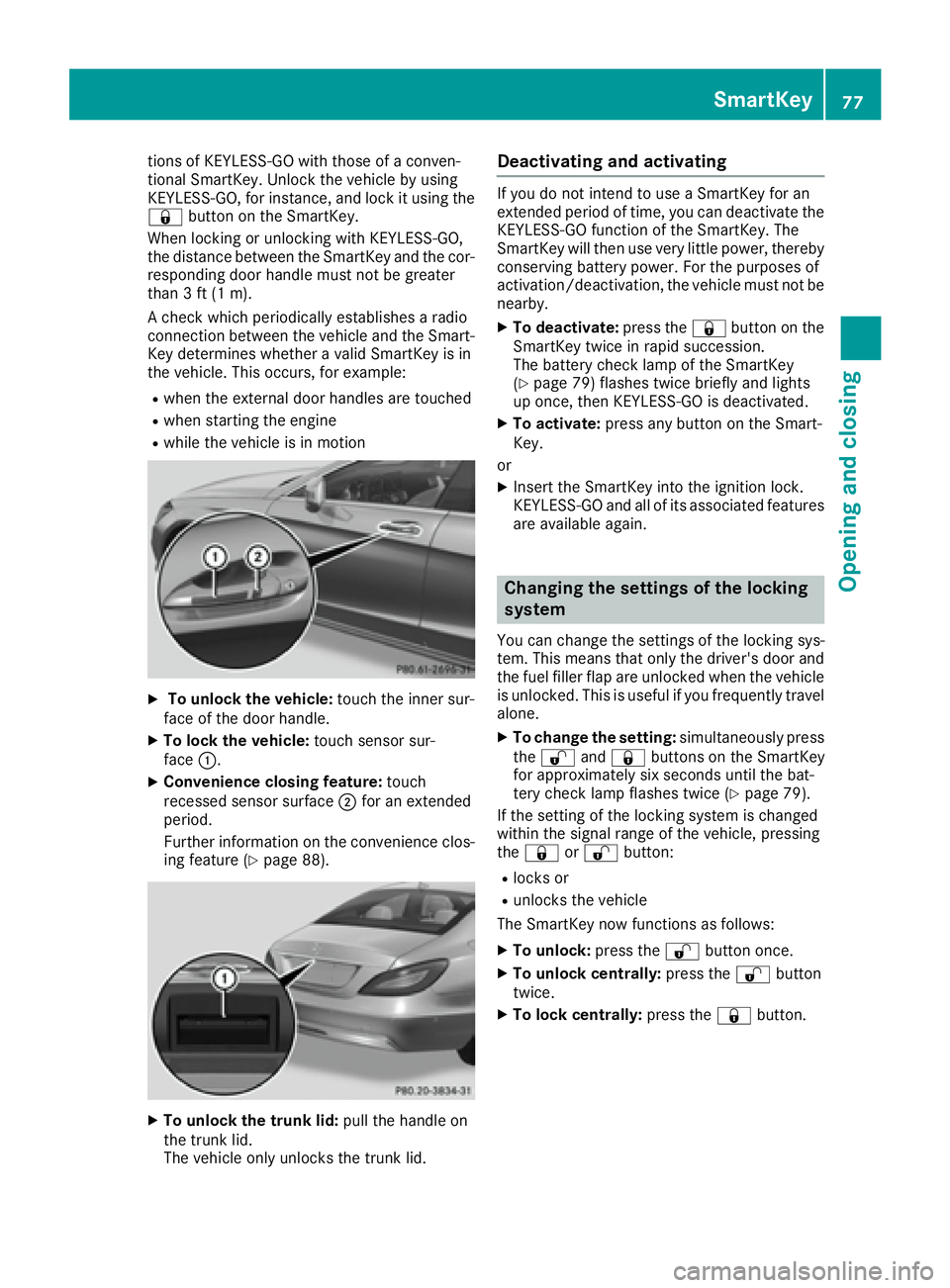
X
To unlock the vehicle: touch the inner sur-
face of the door handle. X
To lock the vehicle: touch sensor sur-
face C .X
Convenience closing feature: touch
recessed sensor surface D for an extended
period.
Further information on the convenience clos-
ing feature ( Y
page 88).
X
To unlock the trunk lid: pull the handle on
the trunk lid.
The vehicle only unlocks the trunk lid. Deactivating and activating If you do not intend to use a SmartKey for an
extended period of time, you can deactivate the
KEYLESS-GO function of the SmartKey. The
SmartKey will then use very little power, thereby
conserving battery power. For the purposes of
activation/deactivation, the vehicle must not be
nearby. X
To deactivate: press the 7 button on the
SmartKey twice in rapid succession.
The battery check lamp of the SmartKey
( Y
page 79) flashes twice briefly and lights
up once, then KEYLESS-GO is deactivated. X
To activate: press any button on the Smart-
Key.
or X
Insert the SmartKey into the ignition lock.
KEYLESS-GO and all of its associated features
are available again.
Changing the settings of the locking
system You can change the settings of the locking sys-
tem. This means that only the driver's door and
the fuel filler flap are unlocked when the vehicle
is unlocked. This is useful if you frequently travel
alone. X
To change the setting: simultaneously press
the 6 and 7 buttons on the SmartKey
for approximately six seconds until the bat-
tery check lamp flashes twice ( Y
page 79).
If the setting of the locking system is changed
within the signal range of the vehicle, pressing
the 7 or 6 button: R
locks or R
unlocks the vehicle
The SmartKey now functions as follows: X
To unlock: press the 6 button once.X
To unlock centrally: press the 6 button
twice. X
To lock centrally: press the 7 button.SmartKey 77
Opening and closing Z
Page 80 of 342
The KEYLESS-GO function is changed as fol-
lows: X
To unlock the driver's door: touch the inner
surface of the door handle on the driver's
door. X
To unlock centrally: touch the inner surface
of the door handle on the front-passenger
door or the rear door. X
To lock centrally: touch the outer sensor
surface on one of the door handles. X
To restore the factory settings: press and
hold down the 6 and 7 buttons simul-
taneously for approximately six seconds until
the battery check lamp flashes twice
( Y
page 79).
Mechanical key
General notes If the vehicle can no longer be locked or
unlocked with the SmartKey, use the mechani-
cal key.
If you use the mechanical key to unlock and
open the driver's door or the trunk lid, the anti-
theft alarm system will be triggered. Switch off
the alarm ( Y
page 75).
If you unlock the vehicle using the mechanical
key, the fuel filler flap will not be unlocked auto-
matically. X
To unlock the fuel filler flap: insert the
SmartKey into the ignition lock.
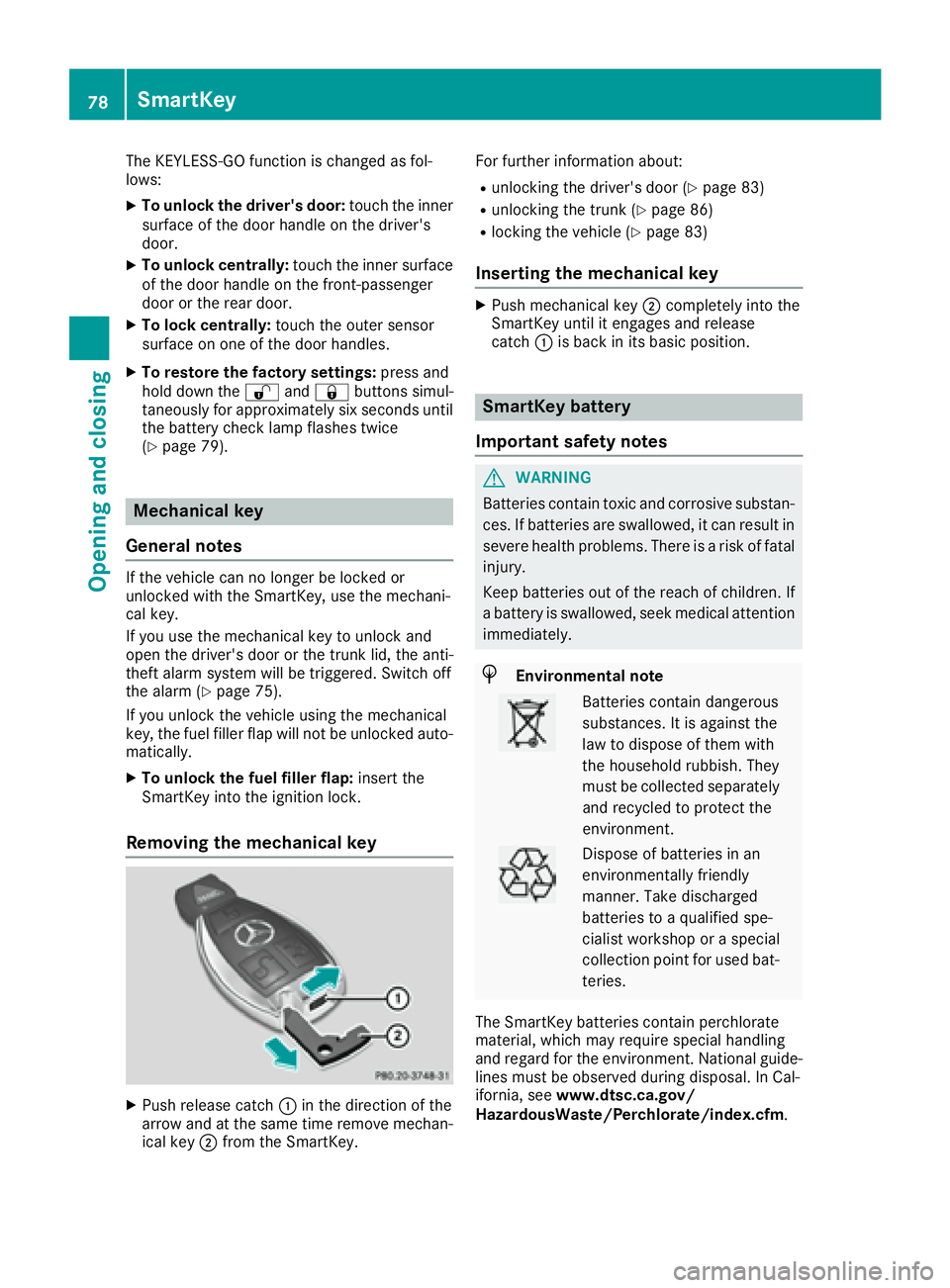
Removing the mechanical key
X
Push release catch C in the direction of the
arrow and at the same time remove mechan-
ical key D from the SmartKey. For further information about: R
unlocking the driver's door ( Y
page 83)R
unlocking the trunk ( Y
page 86)R
locking the vehicle ( Y
page 83)
Inserting the mechanical key X
Push mechanical key D completely into the
SmartKey until it engages and release
catch C is back in its basic position.
SmartKey battery
Important safety notes
G WARNING
Batteries contain toxic and corrosive substan-
ces. If batteries are swallowed, it can result in
severe health problems. There is a risk of fatal
injury.
Keep batteries out of the reach of children. If
a battery is swallowed, seek medical attention
immediately.
H Environmental note
Batteries contain dangerous
substances. It is against the
law to dispose of them with
the household rubbish. They
must be collected separately
and recycled to protect the
environment.
Dispose of batteries in an
environmentally friendly
manner. Take discharged
batteries to a qualified spe-
cialist workshop or a special
collection point for used bat-
teries.
The SmartKey batteries contain perchlorate
material, which may require special handling
and regard for the environment. National guide-
lines must be observed during disposal. In Cal-
ifornia, see www.dtsc.ca.gov/
HazardousWaste/Perchlorate/index.cfm .78
SmartKey
Opening and closing