phone MERCEDES-BENZ CLS 2017 User Guide
[x] Cancel search | Manufacturer: MERCEDES-BENZ, Model Year: 2017, Model line: CLS, Model: MERCEDES-BENZ CLS 2017Pages: 334, PDF Size: 10.18 MB
Page 125 of 334
boosting effect. You will require considerably
more effort to steer and brake. There is a risk
of an accident.
Do not switch off the ignition while driving.
G WARNING
If the parking brake has not been fully
released when driving, the parking brake can: R
overheat and cause a fire R
lose its hold function.
There is a risk of fire and an accident. Release
the parking brake fully before driving off.
! Do not warm up the engine with the vehicle
stationary. Drive off immediately. Avoid high
engine speeds and driving at full throttle until
the engine has reached its operating temper-
ature.
Only shift the automatic transmission to the
desired drive position when the vehicle is sta-
tionary.
Where possible, avoid spinning the drive
wheels when pulling away on slippery roads.
You could otherwise damage the drive train.
! Mercedes-AMG vehicles: at low engine oil
temperatures below 68 ‡ (+20 †), the max-
imum engine speed is restricted in order to
protect the engine. To protect the engine and
maintain smooth engine operation, avoid driv-
ing at full throttle when the engine is cold.
SmartKey positions
SmartKey
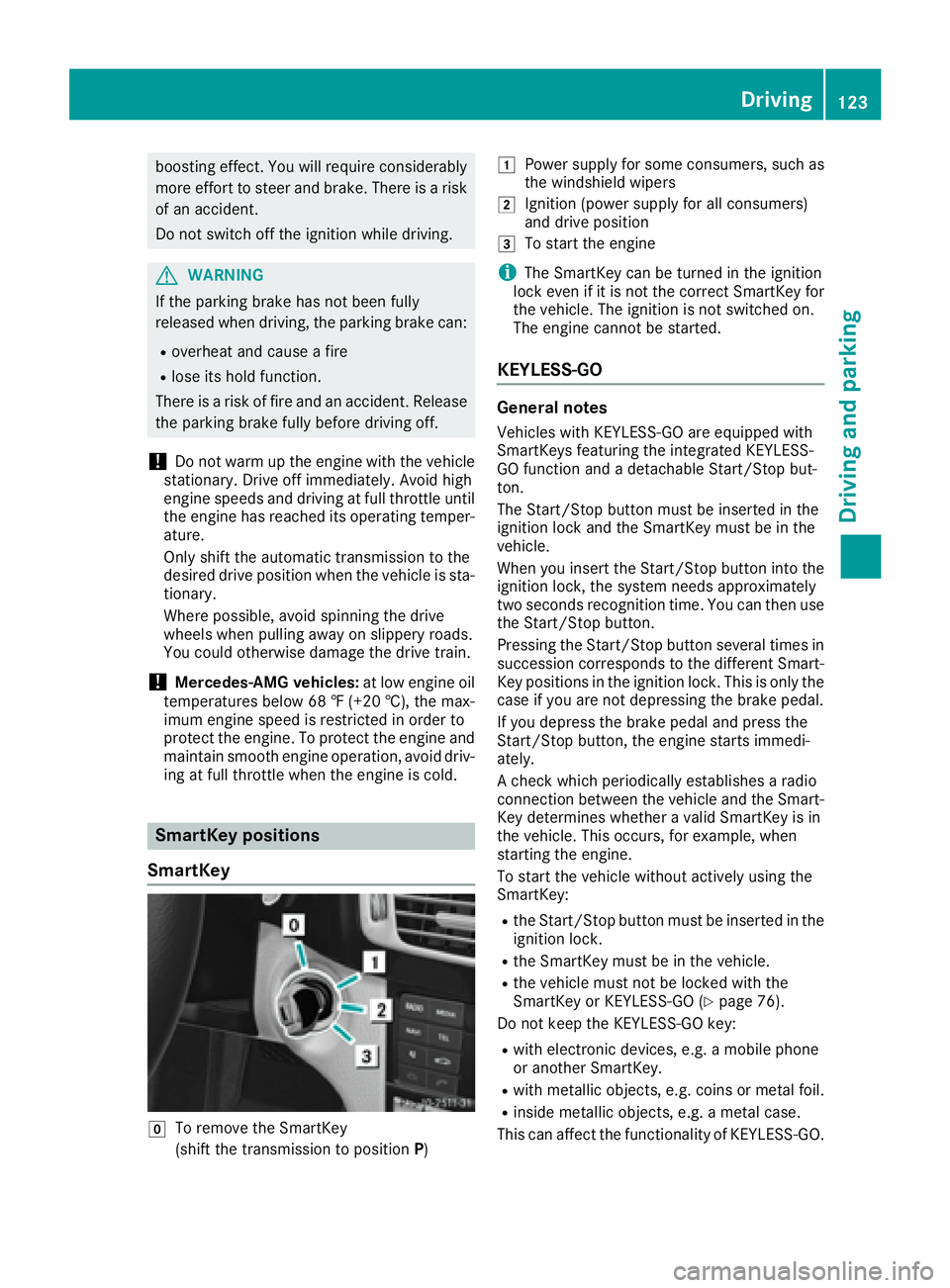
Z
To remove the SmartKey
(shift the transmission to position P ) G
Power supply for some consumers, such as
the windshield wipers H
Ignition (power supply for all consumers)
and drive position I
To start the engine
i The SmartKey can be turned in the ignition
lock even if it is not the correct SmartKey for
the vehicle. The ignition is not switched on.
The engine cannot be started.
KEYLESS-GO General notes Vehicles with KEYLESS-GO are equipped with
SmartKeys featuring the integrated KEYLESS-
GO function and a detachable Start/Stop but-
ton.
The Start/Stop button must be inserted in the
ignition lock and the SmartKey must be in the
vehicle.
When you insert the Start/Stop button into the
ignition lock, the system needs approximately
two seconds recognition time. You can then use
the Start/Stop button.
Pressing the Start/Stop button several times in
succession corresponds to the different Smart-
Key positions in the ignition lock. This is only the
case if you are not depressing the brake pedal.
If you depress the brake pedal and press the
Start/Stop button, the engine starts immedi-
ately.
A check which periodically establishes a radio
connection between the vehicle and the Smart-
Key determines whether a valid SmartKey is in
the vehicle. This occurs, for example, when
starting the engine.
To start the vehicle without actively using the
SmartKey: R
the Start/Stop button must be inserted in the
ignition lock. R
the SmartKey must be in the vehicle. R
the vehicle must not be locked with the
SmartKey or KEYLESS-GO ( Y
page 76).
Do not keep the KEYLESS-GO key: R
with electronic devices, e.g. a mobile phone
or another SmartKey. R
with metallic objects, e.g. coins or metal foil. R
inside metallic objects, e.g. a metal case.
This can affect the functionality of KEYLESS-GO. Driving 123
Driving and parking Z
Page 145 of 334
X
To apply: depress parking brake D firmly.
When the engine is running, the ' (USA
only) or M (Canada only) indicator lamp
lights up in the instrument cluster. X
To release: depress the brake pedal and keep
it depressed. X
Pull release handle C .
When the ignition is switched on or the engine
is running, the ' (USA only) or M (Can-
ada only) indicator lamp goes out in the instru-
ment cluster.
Parking the vehicle for a long period If you leave the vehicle parked for longer than
four weeks, the battery may be damaged by
exhaustive discharging.
If you leave the vehicle parked for longer than six
weeks, the vehicle may suffer damage as a
result of lack of use. X
Visit a qualified specialist workshop and seek
advice.
i You can obtain information about trickle
chargers from a qualified specialist work-
shop.
Driving tips
General notes
Important safety notes
G WARNING
If you switch off the ignition while driving,
safety-relevant functions are only available
with limitations, or not at all. This could affect,
for example, the power steering and the brake
boosting effect. You will require considerably
more effort to steer and brake. There is a risk
of an accident.
Do not switch off the ignition while driving.
G WARNING
If you operate mobile communication equip-
ment while driving, you will be distracted from
traffic conditions. You could also lose control
of the vehicle. There is a risk of an accident. Only operate this equipment when the vehicle
is stationary.
Observe the legal requirements for the country
in which you are driving. Some jurisdictions pro-
hibit the driver from using a mobile phone while
driving a vehicle.
If you make a call while driving, always use
hands-free mode. Only operate the telephone
when the traffic situation permits. If you are
unsure, pull over to a safe location and stop
before operating the telephone.
Bear in mind that at a speed of only 30 mph
(approximately 50 km/h), the vehicle covers a
distance of 44 ft (approximately 14 m) per sec-
ond.
Drive sensibly – save fuel Observe the following tips to save fuel: X
The tires should always be inflated to the rec-
ommended tire pressure. X
Remove unnecessary loads. X
Remove roof racks when they are not needed. X
Warm up the engine at low engine speeds. X
Avoid frequent acceleration or braking. X
Have all maintenance work carried out as
indicated by the service intervals in the Main-
tenance Booklet or by the service interval dis-
play.
Fuel consumption also increases when driving in
cold weather, in stop-start traffic and in hilly ter-
rain.
Drinking and driving
G WARNING
Drinking and driving and/or taking drugs and
driving are very dangerous combinations.
Even a small amount of alcohol or drugs can
affect your reflexes, perceptions and judg-
ment.
The possibility of a serious or even fatal acci-
dent is greatly increased when you drink or
take drugs and drive.
Do not drink or take drugs and drive or allow
anyone to drive who has been drinking or tak-
ing drugs. Driving tips 143
Driving and parking Z
Page 192 of 334
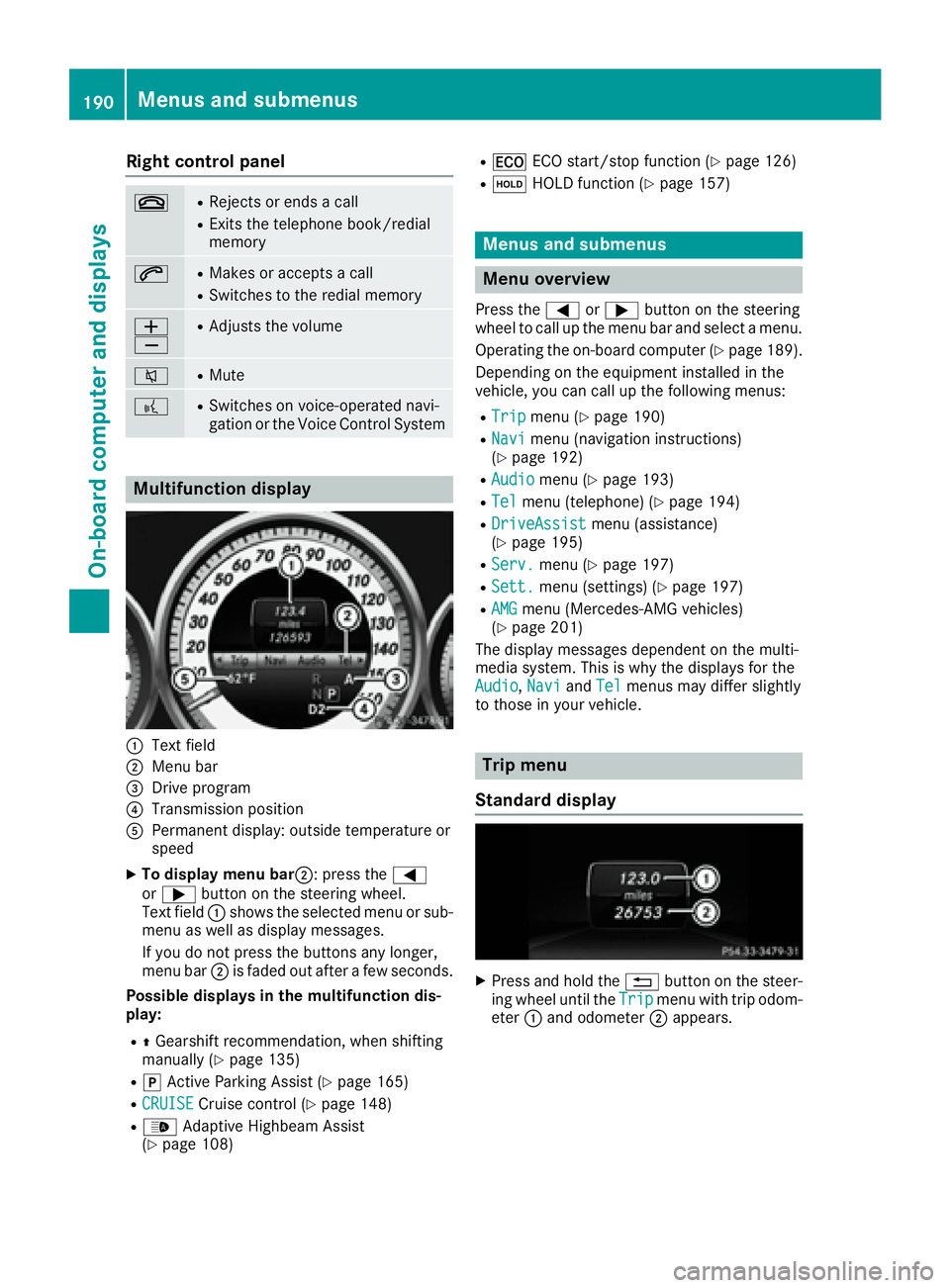
Right control panel v R
Rejects or ends a call R
Exits the telephone book/redial
memory
a R
Makes or accepts a call R
Switches to the redial memory
Page 196 of 334
Only for vehicles with a COMAND multimedia
system: you can use the Audio menu to play
video DVDs. X
Switch on the multimedia system and select
video DVD. X
Press the Y or e button on the steering
wheel to select the Audio menu.X
To select the next or previous scene:
briefly press the c or d button.X
To select a scene from the scene list
(rapid scrolling): press and hold the c
or d button until desired scene C
appears.
Telephone menu
Introduction
G WARNING
If you operate information systems and com-
munication equipment integrated in the vehi-
cle while driving, you will be distracted from
traffic conditions. You could also lose control
of the vehicle. There is a risk of an accident.
Only operate the equipment when the traffic
situation permits. If you are not sure that this
is possible, park the vehicle paying attention
to traffic conditions and operate the equip-
ment when the vehicle is stationary.
When telephoning, you must observe the legal
requirements for the country in which you are
currently driving. X
Switch on the mobile phone (see the manu-
facturer’s operating instructions). X
Switch on the multimedia system. X
Establish a Bluetooth ®
connection to the mul-
timedia system (see Digital Operator's Man-
ual). X
Press the Y or e button on the steering
wheel to select the Tel menu.
You will see one of the following display mes-
sages in the multifunction display: R
Phone READY or the name of the network
provider: the mobile phone has found a net-
work and is ready to receive. R
Phone No Service : there is no network
available or the mobile phone is searching for
a network. Accepting a call If someone calls you when you are in the Tel
menu, a display message appears in the multi-
function display.
You can accept a call at any time regardless of
the menu selected. X
Press the a button on the steering wheel
to accept an incoming call.
Rejecting or ending a call X
Press the v button on the steering wheel
to reject or end a call.
Selecting an entry in the phone book X
Press the Y or e button on the steering
wheel to select the Tel menu.X
Press the c , d or v button to
switch to the phone book. X
Authorize access to the phone book on the
phone. X
Press the c or d button to select the
desired name.
or X
To start rapid scrolling: press and hold d
or c for longer than one second.
The names in the phone book are displayed
quickly one after the other.
Rapid scrolling stops when you release the
button or reach the end of the list. X
If only one telephone number is stored for
a name: press the a or v button to
start dialing.
or X
If there is more than one number for a
particular name: press the a or v
button to display the numbers. X
Press the c or d button to select the
number you want to dial. X
Press the a or v button to start dialing.
or X
To exit the telephone book: press the v
or 8 button.194
Menus and submenus
On-board computer and displays
Page 227 of 334
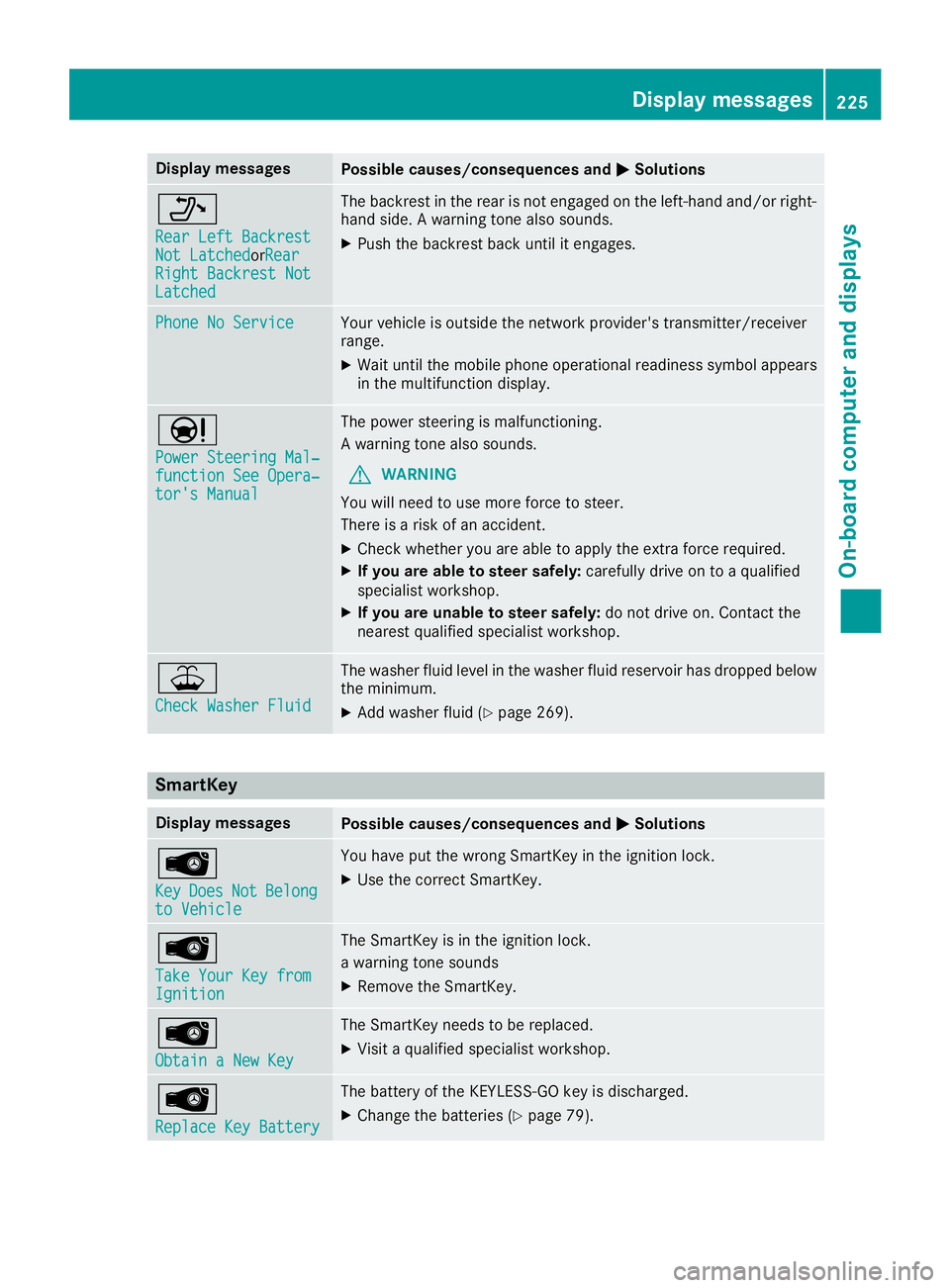
Display messages
Possible causes/consequences and P Solutions
o Rea r Lef t Backrest
Not Latche d or Rea r
Right Backrest Not
Latche d The backrest in th e rear is no t engage d on th e left-han d and/o r right -
han d side . A warning tone also sounds. X
Push th e backrest bac k until it engages.
Phone No Servic e Your vehicl e is outside th e network provider' s transmitter/receiver
range. X
Wait until th e mobile phone operational readiness symbol appear s
in th e multifunction display.
Page 239 of 334
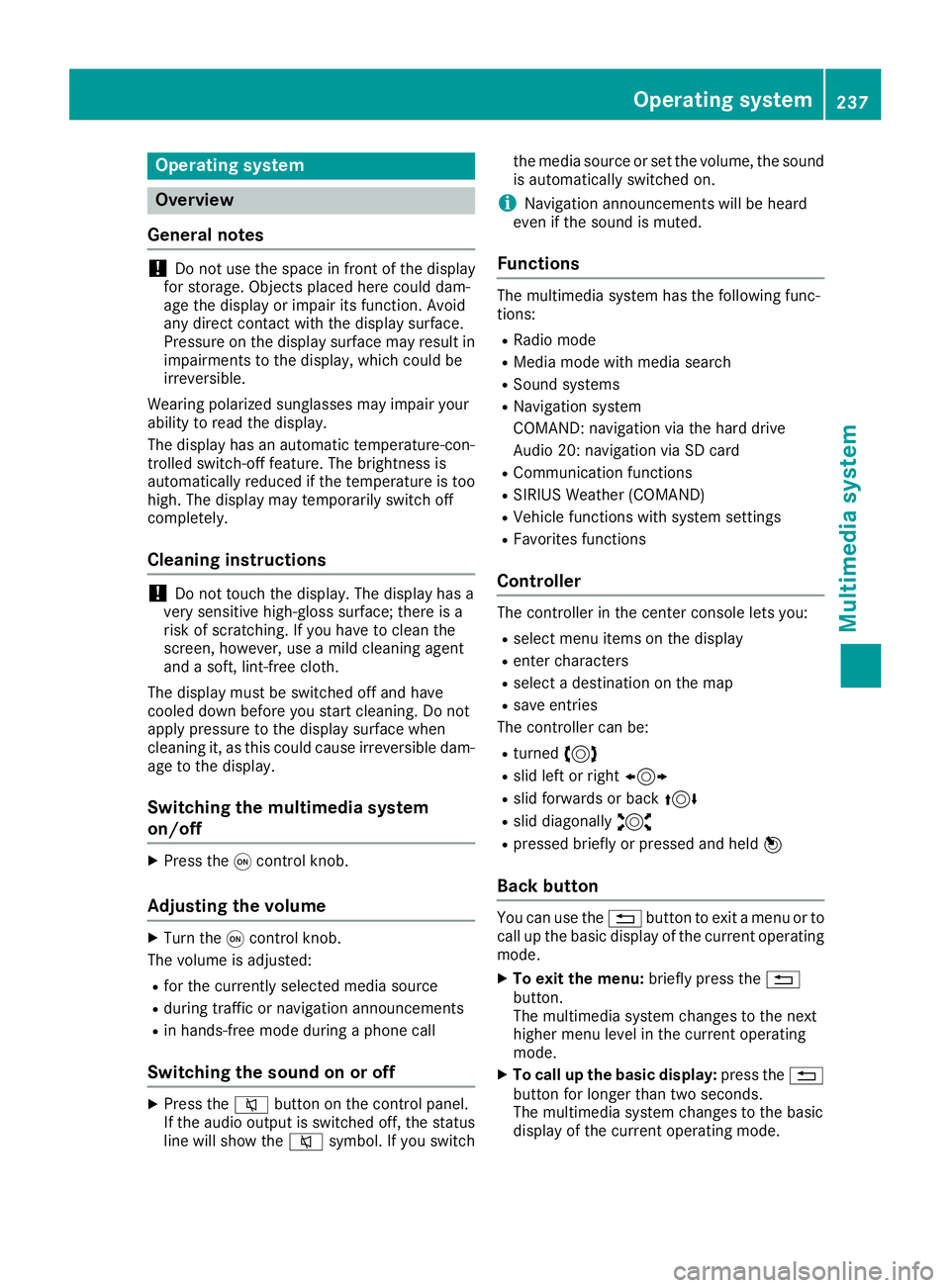
Operating system
Overview
General notes
! Do not use the space in front of the display
for storage. Objects placed here could dam-
age the display or impair its function. Avoid
any direct contact with the display surface.
Pressure on the display surface may result in
impairments to the display, which could be
irreversible.
Wearing polarized sunglasses may impair your
ability to read the display.
The display has an automatic temperature-con-
trolled switch-off feature. The brightness is
automatically reduced if the temperature is too
high. The display may temporarily switch off
completely.
Cleaning instructions
! Do not touch the display. The display has a
very sensitive high-gloss surface; there is a
risk of scratching. If you have to clean the
screen, however, use a mild cleaning agent
and a soft, lint-free cloth.
The display must be switched off and have
cooled down before you start cleaning. Do not
apply pressure to the display surface when
cleaning it, as this could cause irreversible dam-
age to the display.
Switching the multimedia system
on/off X
Press the C control knob.
Adjusting the volume X
Turn the C control knob.
The volume is adjusted: R
for the currently selected media source R
during traffic or navigation announcements R
in hands-free mode during a phone call
Switching the sound on or off X
Press the c button on the control panel.
If the audio output is switched off, the status
line will show the c symbol. If you switch the media source or set the volume, the sound
is automatically switched on.
i Navigation announcements will be heard
even if the sound is muted.
Functions The multimedia system has the following func-
tions: R
Radio mode R
Media mode with media search R
Sound systems R
Navigation system
COMAND: navigation via the hard drive
Audio 20: navigation via SD card R
Communication functions R
SIRIUS Weather (COMAND) R
Vehicle functions with system settings R
Favorites functions
Controller The controller in the center console lets you: R
select menu items on the display R
enter characters R
select a destination on the map R
save entries
The controller can be: R
turned 3 R
slid left or right 1 R
slid forwards or back 4R
slid diagonally 2 R
pressed briefly or pressed and held 7
Back button You can use the 8 button to exit a menu or to
call up the basic display of the current operating
mode. X
To exit the menu: briefly press the 8
button.
The multimedia system changes to the next
higher menu level in the current operating
mode. X
To call up the basic display: press the 8
button for longer than two seconds.
The multimedia system changes to the basic
display of the current operating mode.Operating system 237
Multimedia system Z
Page 241 of 334
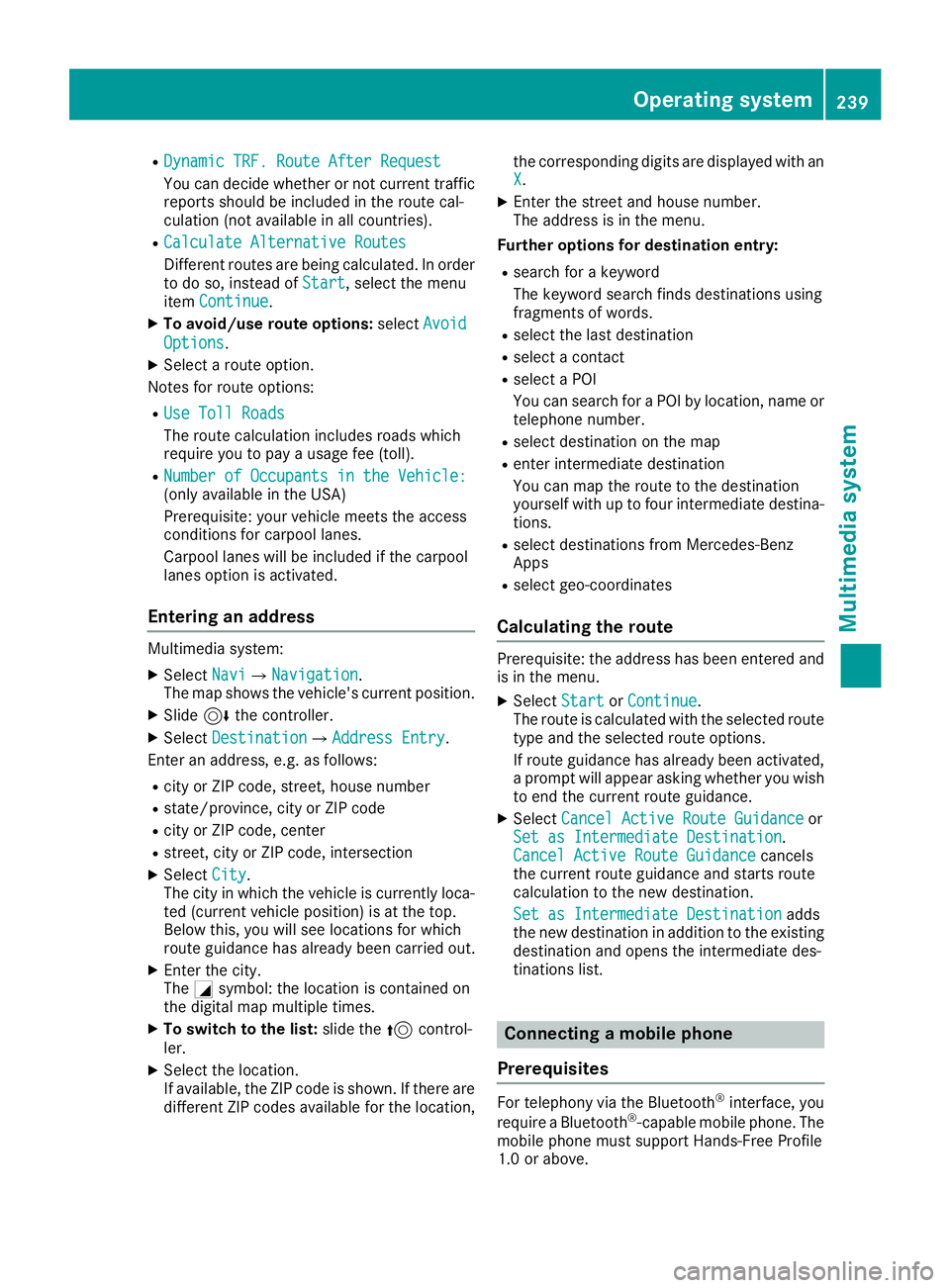
R
Dynamic TRF. Route After Request
You can decide whether or not current traffic
reports should be included in the route cal-
culation (not available in all countries). R
Calculate Alternative Routes
Different routes are being calculated. In order
to do so, instead of Start , select the menu
item Continue .X
To avoid/use route options: select Avoid
Options .X
Select a route option.
Notes for route options: R
Use Toll Roads
The route calculation includes roads which
require you to pay a usage fee (toll). R
Number of Occupants in the Vehicle:
(only available in the USA)
Prerequisite: your vehicle meets the access
conditions for carpool lanes.
Carpool lanes will be included if the carpool
lanes option is activated.
Entering an address Multimedia system: X
Select Navi { Navigation .
The map shows the vehicle's current position. X
Slide 6 the controller.X
Select Destination { Address Entry .
Enter an address, e.g. as follows: R
city or ZIP code, street, house number R
state/province, city or ZIP code R
city or ZIP code, center R
street, city or ZIP code, intersection X
Select City .
The city in which the vehicle is currently loca-
ted (current vehicle position) is at the top.
Below this, you will see locations for which
route guidance has already been carried out. X
Enter the city.
The C symbol: the location is contained on
the digital map multiple times. X
To switch to the list: slide the 5 control-
ler. X
Select the location.
If available, the ZIP code is shown. If there are
different ZIP codes available for the location, the corresponding digits are displayed with an
X . X
Enter the street and house number.
The address is in the menu.
Further options for destination entry: R
search for a keyword
The keyword search finds destinations using
fragments of words. R
select the last destination R
select a contact R
select a POI
You can search for a POI by location, name or
telephone number. R
select destination on the map R
enter intermediate destination
You can map the route to the destination
yourself with up to four intermediate destina-
tions. R
select destinations from Mercedes-Benz
Apps R
select geo-coordinates
Calculating the route Prerequisite: the address has been entered and
is in the menu. X
Select Start or Continue .
The route is calculated with the selected route
type and the selected route options.
If route guidance has already been activated,
a prompt will appear asking whether you wish
to end the current route guidance. X
Select Cancel Active Route Guidance or
Set as Intermediate Destination .
Cancel Active Route Guidance cancels
the current route guidance and starts route
calculation to the new destination.
Set as Intermediate Destination adds
the new destination in addition to the existing
destination and opens the intermediate des-
tinations list.
Connecting a mobile phone
Prerequisites
For telephony via the Bluetooth ®
interface, you
require a Bluetooth ®
-capable mobile phone. The
mobile phone must support Hands-Free Profile
1.0 or above.Operating system 239
Multimedia system Z
Page 242 of 334
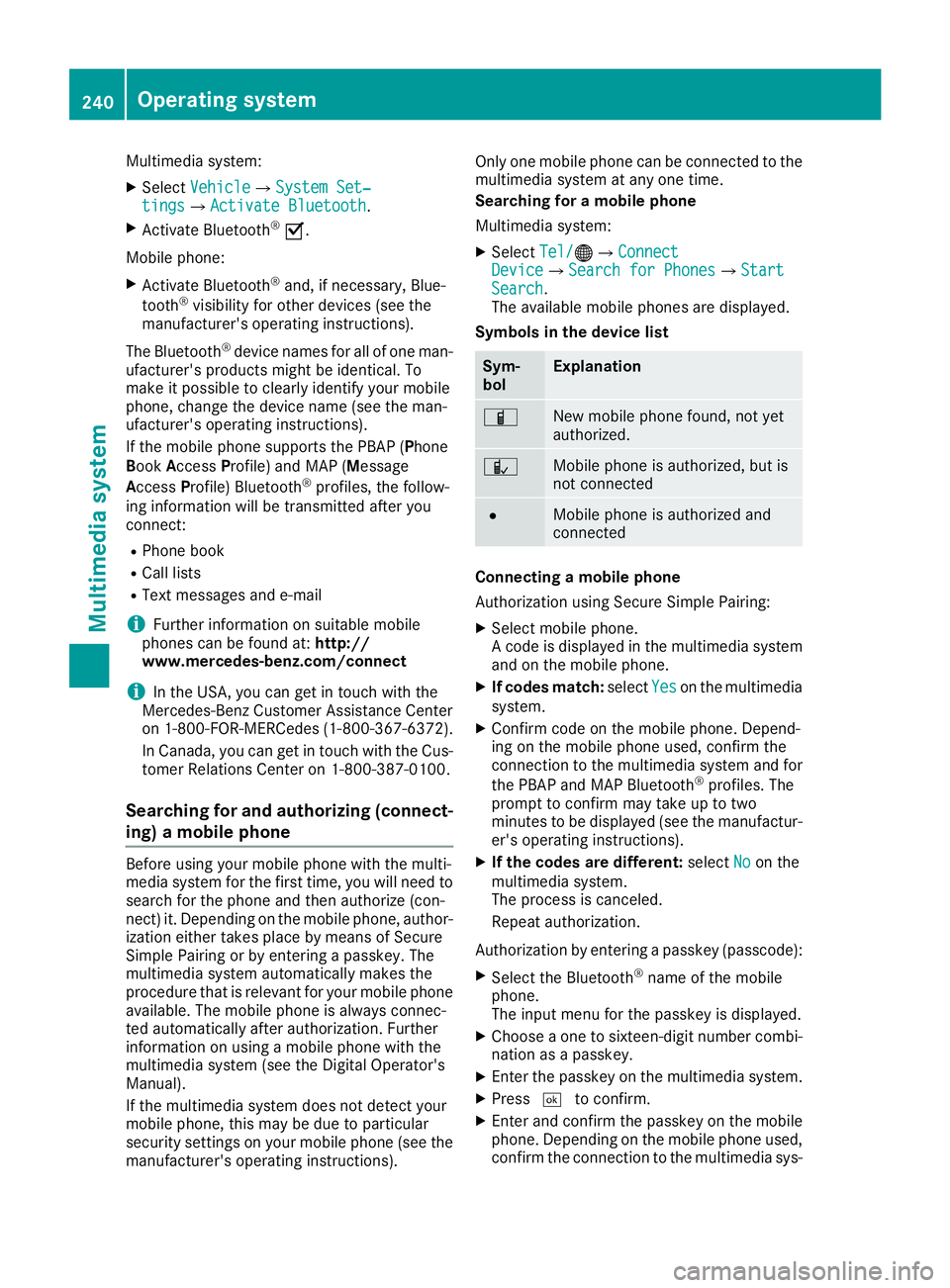
Multimedia system: X
Select Vehicle { System Set‐
tings { Activate Bluetooth .X
Activate Bluetooth ®
s .
Mobile phone: X
Activate Bluetooth ®
and, if necessary, Blue-
tooth ®
visibility for other devices (see the
manufacturer's operating instructions).
The Bluetooth ®
device names for all of one man-
ufacturer's products might be identical. To
make it possible to clearly identify your mobile
phone, change the device name (see the man-
ufacturer's operating instructions).
If the mobile phone supports the PBAP ( P hone
B ook A ccess P rofile) and MAP ( M essage
A ccess P rofile) Bluetooth ®
profiles, the follow-
ing information will be transmitted after you
connect: R
Phone book R
Call lists R
Text messages and e-mail
i Further information on suitable mobile
phones can be found at: http://
www.mercedes-benz.com/connect
i In the USA, you can get in touch with the
Mercedes-Benz Customer Assistance Center
on 1-800-FOR-MERCedes (1-800-367-6372).
In Canada, you can get in touch with the Cus-
tomer Relations Center on 1-800-387-0100.
Searching for and authorizing (connect-
ing) a mobile phone Before using your mobile phone with the multi-
media system for the first time, you will need to
search for the phone and then authorize (con-
nect) it. Depending on the mobile phone, author-
ization either takes place by means of Secure
Simple Pairing or by entering a passkey. The
multimedia system automatically makes the
procedure that is relevant for your mobile phone
available. The mobile phone is always connec-
ted automatically after authorization. Further
information on using a mobile phone with the
multimedia system (see the Digital Operator's
Manual).
If the multimedia system does not detect your
mobile phone, this may be due to particular
security settings on your mobile phone (see the
manufacturer's operating instructions). Only one mobile phone can be connected to the
multimedia system at any one time.
Searching for a mobile phone
Multimedia system: X
Select Tel/
Page 243 of 334
tem and for the PBAP and MAP Bluetooth ®
profiles. The prompt to confirm may take up
to two minutes to be displayed (see the man-
ufacturer's operating instructions).
Switching between mobile phones If you have authorized more than one mobile
phone, you can switch between the individual
phones.
Multimedia system: X
Select Connect Device .X
Select a mobile phone from the device list.
Media mode
General notes If you wish to play external media sources, the
default display must already be turned on. Fur-
ther information on media mode (see the Digital
Operator's Manual).
The following external media sources can be
used: R
Apple ®
devices (e.g. iPhone ®
)R
USB devices (e.g. USB stick, MP3 player)
( Y
page 241) R
CD R
DVD (COMAND) R
SD cards R
via devices connected by Bluetooth ®
i Information on single CD/DVD drive or DVD
changer (see the Digital Operator's Manual).
Using the device list Multimedia system: X
Select Media { Devices .
The available media sources will be shown.
The ; dot indicates the current setting.X
Select the media source.
Playable files are played. Inserting/removing an SD card Important safety notes
G WARNING
SD cards are small parts. They can be swal-
lowed and cause choking. This poses an
increased risk of injury or even fatal injury.
Keep the SD card out of the reach of children.
If a SD card is swallowed, seek medical atten-
tion immediately.
! If you are no longer using the SD card, you
should remove it and store it outside the vehi-
cle. High temperatures can damage the card.
Inserting an SD card The SD card slot is on the control panel. X
Insert the SD card into the SD card slot until
the SD card engages. The side with the con-
tacts must face downwards.
Removing an SD card X
Press the SD card.
The SD card is ejected. X
Remove the SD card.
Connecting USB devices
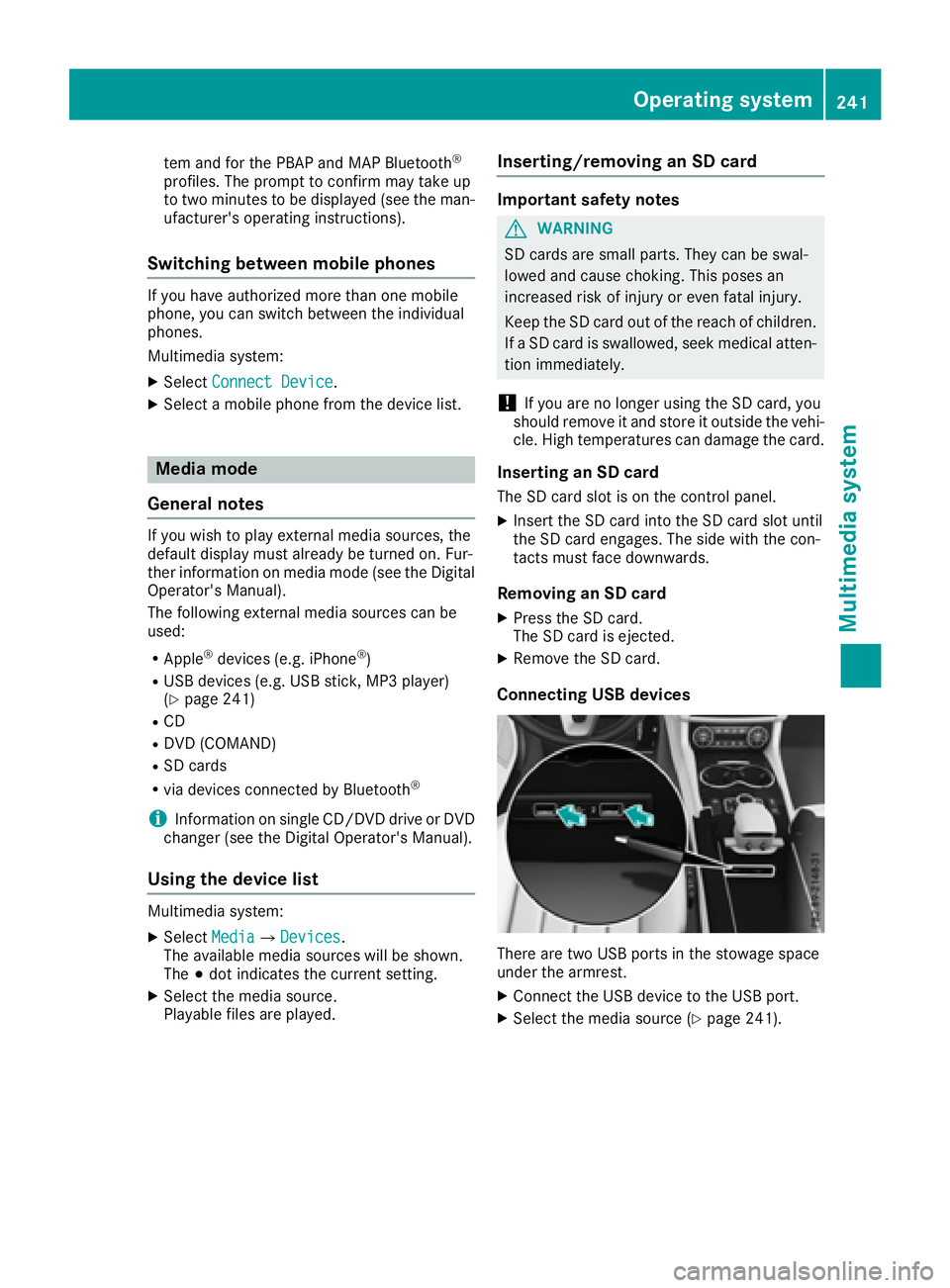
There are two USB ports in the stowage space
under the armrest. X
Connect the USB device to the USB port. X
Select the media source ( Y
page 241).Operating system 241
Multimedia system Z
Page 244 of 334
Stowage areas
Loading guidelines
G WARNING
If objects, luggage or loads are not secured or
not secured sufficiently, they could slip, tip
over or be flung around and thereby hit vehicle
occupants. There is a risk of injury, particu-
larly in the event of sudden braking or a sud-
den change in direction.
Always store objects so that they cannot be
flung around. Secure objects, luggage or
loads against slipping or tipping before the
journey.
G WARNING
Combustion engines emit poisonous exhaust
gases such as carbon monoxide. Exhaust
gases can enter the vehicle interior if the
trunk lid is open when the engine is running,
especially if the vehicle is in motion. There is a
risk of poisoning.
Always switch off the engine before opening
the trunk lid. Never drive with the trunk lid
open.
G WARNING
The exhaust tail pipe and tail pipe trim can
become very hot. If you come into contact
with these parts of the vehicle, you could burn
yourself. There is a risk of injury.
Always be particularly careful around the
exhaust tail pipe and the tail pipe trim. Allow
these components to cool down before touch-
ing them.
The handling characteristics of a laden vehicle
are dependent on the distribution of the load
within the vehicle. For this reason, you should
observe the following notes when transporting a
load: R
Never exceed the maximum permissible
gross vehicle mass or the gross axle weight
rating for the vehicle (including occupants).
The values are specified on the vehicle iden- tification plate on the B-pillar of the driver's
door. R
The trunk is the preferred place to carry
objects. R
Position heavy loads as far forwards as pos-
sible and as low down in the trunk as possible. R
The load must not protrude above the upper
edge of the seat backrests. R
Always place the load against the rear or front
seat backrests. Make sure that the seat
backrests are securely locked into place. R
Always place the load behind unoccupied
seats if possible. R
Use the cargo tie-down rings and the parcel
nets to transport loads and luggage. R
Use cargo tie-down rings and fastening mate-
rials appropriate for the weight and size of the
load. R
Secure the load with sufficiently strong and
wear-resistant tie-downs. Pad sharp edges for
protection.
Stowage spaces
Important safety notes
G WARNING
If objects in the passenger compartment are
stowed incorrectly, they can slide or be
thrown around and hit vehicle occupants. In
addition, cupholders, open stowage spaces
and mobile phone brackets cannot always
retain all objects they contain. There is a risk
of injury, particularly in the event of sudden
braking or a sudden change in direction. R
Always stow objects so that they cannot be
thrown around in such situations. R
Always make sure that objects do not pro-
trude from stowage spaces, parcel nets or
stowage nets. R
Close the lockable stowage spaces before
starting a journey. R
Always stow and secure heavy, hard, poin-
ted, sharp-edged, fragile or bulky objects in
the trunk.
Observe the loading guidelines ( Y
page 242).242
Stowage areas
Stowage and features