mirror MERCEDES-BENZ CLS 2017 Owner's Manual
[x] Cancel search | Manufacturer: MERCEDES-BENZ, Model Year: 2017, Model line: CLS, Model: MERCEDES-BENZ CLS 2017Pages: 334, PDF Size: 10.18 MB
Page 186 of 334
given when a vehicle enters the blind spot mon-
itoring range from behind or from the side. When
you overtake a vehicle, the warning only occurs
if the difference in speed is less than 7 mph
(12 km/h).
The yellow indicator lamp goes out if reverse
gear is engaged. Active Blind Spot Assist is not
operational.
The brightness of the warning lamps is auto-
matically adapted to the brightness of the sur-
roundings.
Visual and acoustic collision warning If you switch on the turn signals to change lanes
and a vehicle is detected in the side monitoring
range, you receive a visual and acoustic collision
warning. You then hear a double warning tone
and red warning lamp C flashes. If the turn sig-
nal remains on, detected vehicles are indicated
by the flashing of red warning lamp C . There are
no further warning tones.
Course-correcting brake application If Active Blind Spot Assist detects a risk of a lat-
eral collision in the monitoring range, a course-
correcting brake application is carried out. This
is meant to assist you in avoiding a collision.
G WARNING
A course-correcting brake application cannot
always prevent a collision. There is a risk of an
accident.
Always steer, brake or accelerate yourself,
especially if Active Blind Spot Assist warns
you or makes a course-correcting brake appli-
cation. Always maintain a safe distance at the
sides.
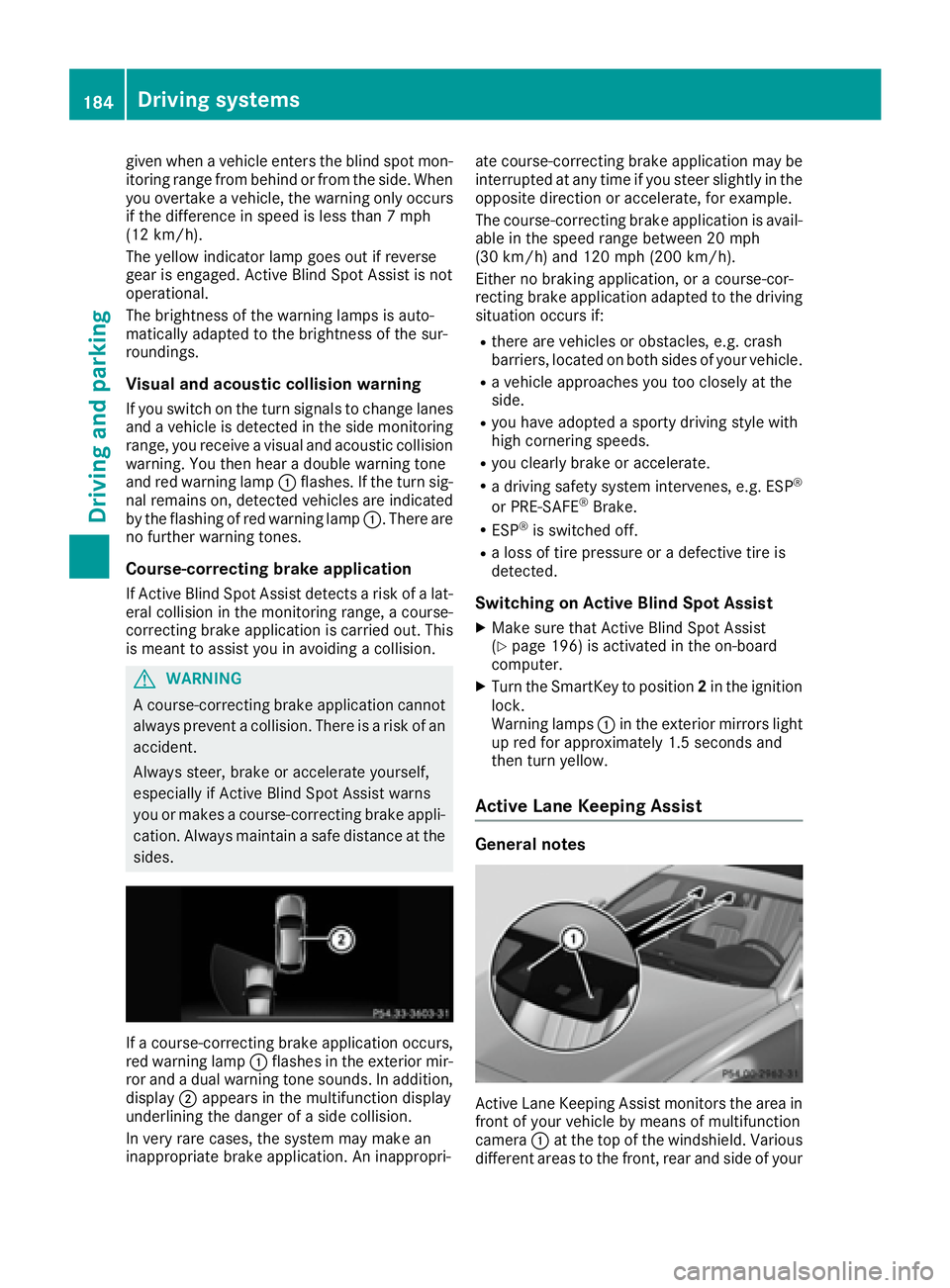
If a course-correcting brake application occurs,
red warning lamp C flashes in the exterior mir-
ror and a dual warning tone sounds. In addition,
display D appears in the multifunction display
underlining the danger of a side collision.
In very rare cases, the system may make an
inappropriate brake application. An inappropri- ate course-correcting brake application may be
interrupted at any time if you steer slightly in the
opposite direction or accelerate, for example.
The course-correcting brake application is avail-
able in the speed range between 20 mph
(30 km/h) and 120 mph (200 km/h).
Either no braking application, or a course-cor-
recting brake application adapted to the driving
situation occurs if: R
there are vehicles or obstacles, e.g. crash
barriers, located on both sides of your vehicle. R
a vehicle approaches you too closely at the
side. R
you have adopted a sporty driving style with
high cornering speeds. R
you clearly brake or accelerate. R
a driving safety system intervenes, e.g. ESP ®
or PRE-SAFE ®
Brake. R
ESP ®
is switched off. R
a loss of tire pressure or a defective tire is
detected.
Switching on Active Blind Spot Assist X
Make sure that Active Blind Spot Assist
( Y
page 196) is activated in the on-board
computer. X
Turn the SmartKey to position 2 in the ignition
lock.
Warning lamps C in the exterior mirrors light
up red for approximately 1.5 seconds and
then turn yellow.
Active Lane Keeping Assist
General notes
Active Lane Keeping Assist monitors the area in
front of your vehicle by means of multifunction
camera C at the top of the windshield. Various
different areas to the front, rear and side of your184
Driving systems
Driving and parking
Page 201 of 334
Deactivating delayed switch-off of the exterior
lighting temporarily: X
Before leaving the vehicle, turn the SmartKey
to position 0 in the ignition lock.X
Turn the SmartKey to position 2 in the ignition
lock.
The exterior lighting delayed switch-off is
deactivated.
Delayed switch-off of the exterior lighting is
reactivated the next time you start the engine.
If you have activated the Surround Lighting
function and the light switch is set to the X
position, the following functions are activated
when it is dark: R
surround lighting: the exterior lighting
remains lit for 40 seconds af ter unlocking
with the SmartKey. If you start the engine, the
surround lighting is switched off and auto-
matic headlamp mode is activated
( Y
page 105). R
exterior lighting delayed switch-off: the
exterior lighting remains lit for 60 seconds
after the engine is switched off. If you close all
the doors and the trunk lid/tailgate, the exte-
rior lighting goes off after 15 second s.
i Depending on your vehicle's equipment,
when the surround lighting and delayed
switch-off exterior lighting are on, the follow-
ing light up: R
Parking lamps R
Side marker lamps R
Surround lighting in the exterior mirrors
Activating/deactivating the interior light-
ing delayed switch-off
If you activate the Light. Delay function, the
interior lighting remains on for 20 second sa fter
you remove the SmartKey from the ignition lock. X
Press the Y or e button on the steering
wheel to select the Sett. menu.X
Press the d or c button to select the
Lights submenu.X
Press v to confirm.X
Press the d or c button to select the
Light. Delay function.
When the Light. Delay function is activa-
ted, the vehicle interior is displayed in orange
in the multifunction display. X
Press the v button to save the setting. Vehicle Activating/deactivating the automatic
door locking mechanism X
Press the Y or e button on the steering
wheel to select the Sett. menu.X
Press the d or c button to select the
Vehicle submenu. X
Press v to confirm. X
Press the d or c button to select the
Auto. Door Locks function.
If the Auto. Door Locks function is switched
on, the multifunction display shows the vehi-
cle's doors in orange. X
Press the v button to save the setting.
If you activate the Auto.
Door Locks function,
the vehicle is centrally locked above a speed of
around 9 mph (15 km/h).
For further information on the automatic locking
feature, see ( Y
page 82).
Activating/deactivating the acoustic
locking verification signal If you switch on the Acoustic Lock function, an
acoustic signal sounds when you lock the vehi-
cle. X
Press the Y or e button on the steering
wheel to select the Sett. menu.X
Press the d or c button to select the
Vehicle submenu. X
Press v to confirm. X
Press the d or c button to select the
Acoustic Lock function.
If the Acoustic Lock function is activated,
the 7 symbol in the multifunction display
lights up orange. X
Press the v button to save the setting.
Convenience
Activating/deactivating the EASY-
ENTRY/EXIT feature
G WARNING
When the EASY-ENTRY/EXIT feature adjusts
the steering wheel, you and other vehicle
occupants – particularly children – could
become trapped. There is a risk of injury.
While the EASY-ENTRY/EXIT feature is mak-
ing adjustments, make sure that no one hasMenus and submenus 199
On-board computer and displays Z
Page 202 of 334
any body parts in the sweep of the steering
wheel.
If somebody becomes trapped: R
press one of the memory function position
buttons, or R
move the switch for steering wheel adjust-
ment in the opposite direction to that in
which the steering wheel is moving.
The adjustment process is stopped. X
Press the Y or e button on the steering
wheel to select the Sett. menu.X
Press the d or c button to select the
Convenience submenu.X
Press v to confirm.X
Using d or c , select the Easy Entry/
Exit function.
If the Easy Entry/Exit function is activated,
the vehicle steering wheel is displayed in
orange in the multifunction display. X
Press the v button to save the setting.
Further information on the EASY-ENTRY/EXIT
feature ( Y
page 100).
Switching the seat belt adjustment on/off X
Press the Y or e button on the steering
wheel to select the Sett. menu.X
Press the d or c button to select the
Convenience submenu.X
Press v to confirm.X
Press the d or c button to select the
Belt Adjustment function.
When the Belt Adjustment function is acti-
vated, the seat belt is displayed in orange in
the multifunction display. X
Press the v button to save the setting.
For further information on belt adjustment, see
( Y
page 45).
Switching the fold-in mirrors when lock-
ing feature on/off
This function is only available when the vehicle is
equipped with the electrical fold-in function.
When you switch on the Auto. Mirror Fold‐
ing function, the exterior mirrors are folded in
when the vehicle is locked. If you unlock the
vehicle and then open the driver's or front-
passenger door, the exterior mirrors fold out
again. X
Press the Y or e button on the steering
wheel to select the Settings menu.X
Press the d or c button to select the
Convenience submenu. X
Press v to confirm. X
Press the d or c button to select the
Auto. Mirror Folding function.
If the Auto. Mirror Folding function is
switched on, the multifunction display shows
the vehicle's exterior mirror in orange. X
Press the v button to save the setting.
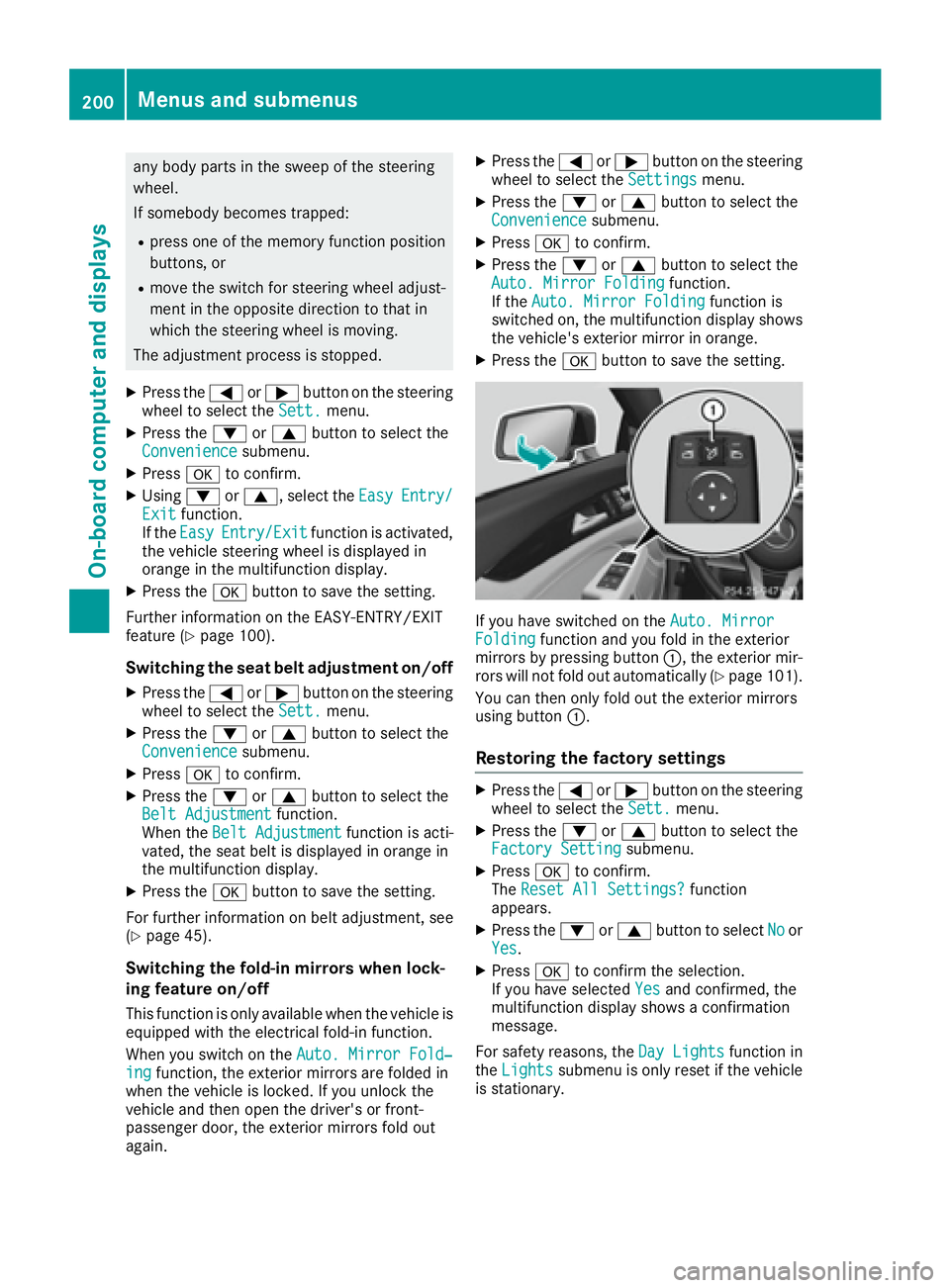
If you have switched on the Auto. Mirror
Folding function and you fold in the exterior
mirrors by pressing button C , the exterior mir-
rors will not fold out automatically ( Y
page 101).
You can then only fold out the exterior mirrors
using button C .
Restoring the factory settings X
Press the Y or e button on the steering
wheel to select the Sett. menu.X
Press the d or c button to select the
Factory Setting submenu.X
Press v to confirm.
The Reset All Settings? function
appears. X
Press the d or c button to select No or
Yes . X
Press v to confirm the selection.
If you have selected Yes and confirmed, the
multifunction display shows a confirmation
message.
For safety reasons, the Day Lights function in
the Lights submenu is only reset if the vehicle
is stationary.200
Menus and submenus
On-board computer and displays
Page 219 of 334
Display messages
Possible causes/consequences and P Solutions
Lan e Keepin g Assist
Currently Unavaila‐
ble See Operator' s
Manual or A ctive Lan e
Keepin g Assist Cur ‐
rently Unavailable
See Operator' s Man ‐
ual Lan e Keepin g Assis t or Active Lan e Keepin g Assis t is deactivated and
temporarily inoperative.
Possibl e causes are: R
th e windshield in th e camera' s field of vision is dirtyR
visibilit y is impaire d due to heav y rain , snow or fogR
there hav e been no lan e marking s for an extended periodR
th e lan e marking s are worn, dark or covered, e.g. by dir t or snow
Whe n th e causes state d abov e no longer apply, th e display message
disappears.
Lan e Keepin g Assis t or Active Lan e Keepin g Assis t is operational
again .
If th e display message does no t disappear :X
Pull ove r and stop th e vehicl e safely as soo n as possible, payin g
attention to roa d and traffic conditions.X
Secur e th e vehicl e against rollin g away ( Y
page 141).X
Clean th e windshield.
Lan e Keepin g Assist
Inoperative or A ctive
Lan e Keepin g Assist
Inoperative Lan e Keepin g Assis t or Active Lan e Keepin g Assis t is malfunctioning .X
Visit a qualified specialist workshop .
Blind Spo t Assist
Currently Unavaila‐
ble See Operator' s
Manual or A ctive
Blind Spo t Assist
Currently Unavaila‐
ble See Operator' s
Manual Blind Spot Assis t or Active Blind Spot Assis t is temporarily inoperative.
Possibl e causes are: R
th e radar sensor system is outside th e operating temperature rangeR
th e radar sensor system is temporarily inoperative, e.g. due to elec -
tromagneti c radiation emitted by nearby TV or radi o station s or
other source s of electromagneti c radiation
The yellow c indicator lamp s also ligh t up in th e exterio r mirrors.
Whe n th e causes state d abov e no longer apply, th e display message
disappears.
Blind Spot Assis t or Active Blind Spot Assis t is operational again .
If th e display message does no t disappear :X
Pull ove r and stop th e vehicl e safely as soo n as possible, payin g
attention to roa d and traffic conditions.X
Secur e th e vehicl e against rollin g away ( Y
page 141).X
Restart th e engine.
Blind Spo t Assist
Inoperative or A ctive
Blind Spo t Assist
Inoperative Blind Spot Assis t or Active Blind Spot Assis t is malfunctioning .
The yellow c indicator lamp s also ligh t up in th e exterio r mirrors.X
Visit a qualified specialist workshop .
Par k Assist Canceled The driver's door is open and th e driver's seat belt has no t been fas -
tened. X
Repeat th e parking process wit h th e seat belt fastene d and th e
driver's door closed .Display messages 21 7
On-board computer and displays Z
Page 252 of 334
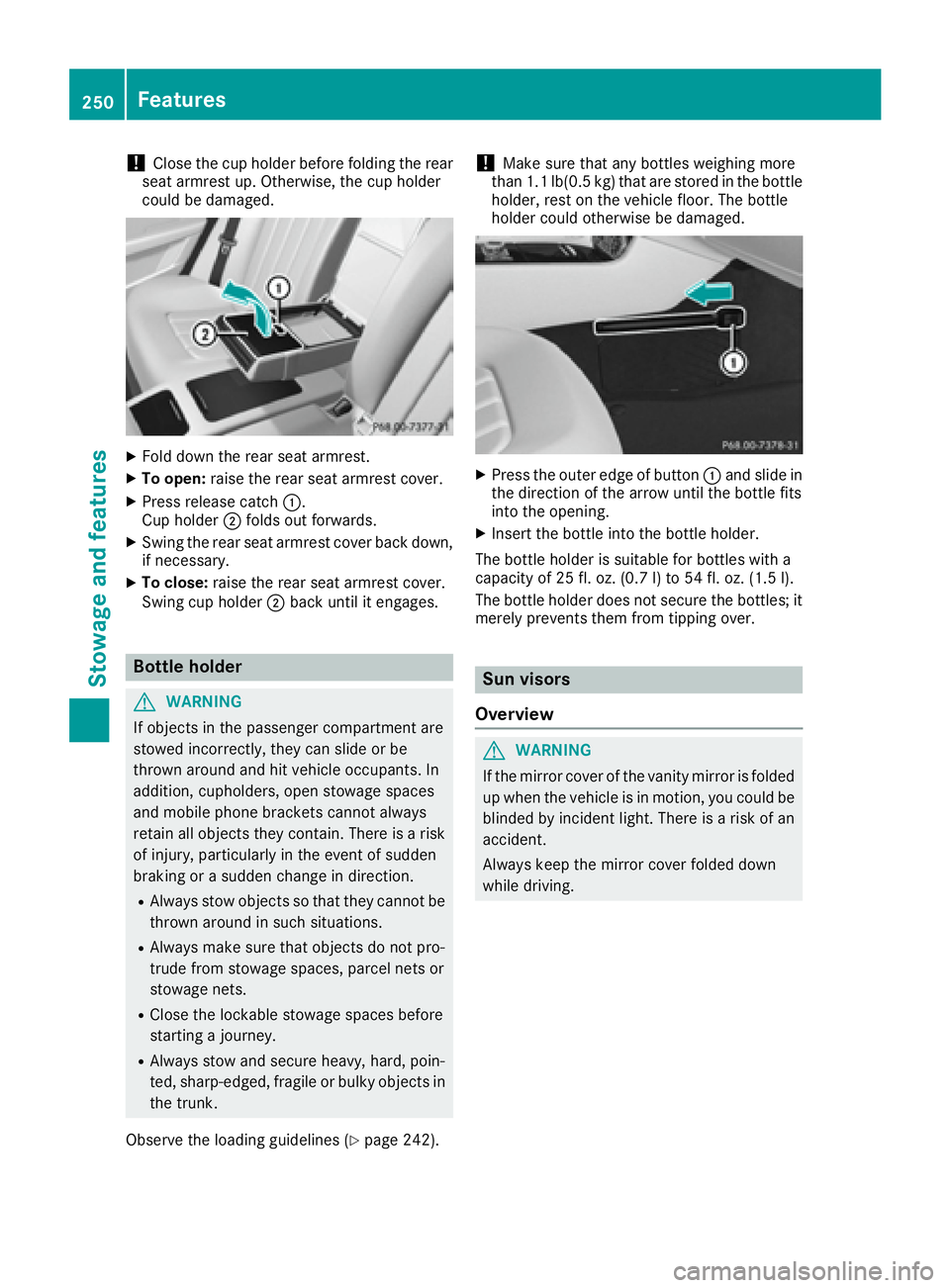
! Close the cup holder before folding the rear
seat armrest up. Otherwise, the cup holder
could be damaged.
X
Fold down the rear seat armrest. X
To open: raise the rear seat armrest cover.X
Press release catch C .
Cup holder D folds out forwards.X
Swing the rear seat armrest cover back down,
if necessary. X
To close: raise the rear seat armrest cover.
Swing cup holder D back until it engages.
Bottle holder
G WARNING
If objects in the passenger compartment are
stowed incorrectly, they can slide or be
thrown around and hit vehicle occupants. In
addition, cupholders, open stowage spaces
and mobile phone brackets cannot always
retain all objects they contain. There is a risk
of injury, particularly in the event of sudden
braking or a sudden change in direction. R
Always stow objects so that they cannot be
thrown around in such situations. R
Always make sure that objects do not pro-
trude from stowage spaces, parcel nets or
stowage nets. R
Close the lockable stowage spaces before
starting a journey. R
Always stow and secure heavy, hard, poin-
ted, sharp-edged, fragile or bulky objects in
the trunk.
Observe the loading guidelines ( Y
page 242). ! Make sure that any bottles weighing more
than 1.1 lb(0.5 kg) that are stored in the bottle
holder, rest on the vehicle floor. The bottle
holder could otherwise be damaged.
X
Press the outer edge of button C and slide in
the direction of the arrow until the bottle fits
into the opening. X
Insert the bottle into the bottle holder.
The bottle holder is suitable for bottles with a
capacity of 25 fl. oz. (0.7 l) to 54 fl. oz. (1.5 l).
The bottle holder does not secure the bottles; it
merely prevents them from tipping over.
Sun visors
Overview
G WARNING
If the mirror cover of the vanity mirror is folded
up when the vehicle is in motion, you could be
blinded by incident light. There is a risk of an
accident.
Always keep the mirror cover folded down
while driving.250
Features
Sto wag e an d features
Page 253 of 334
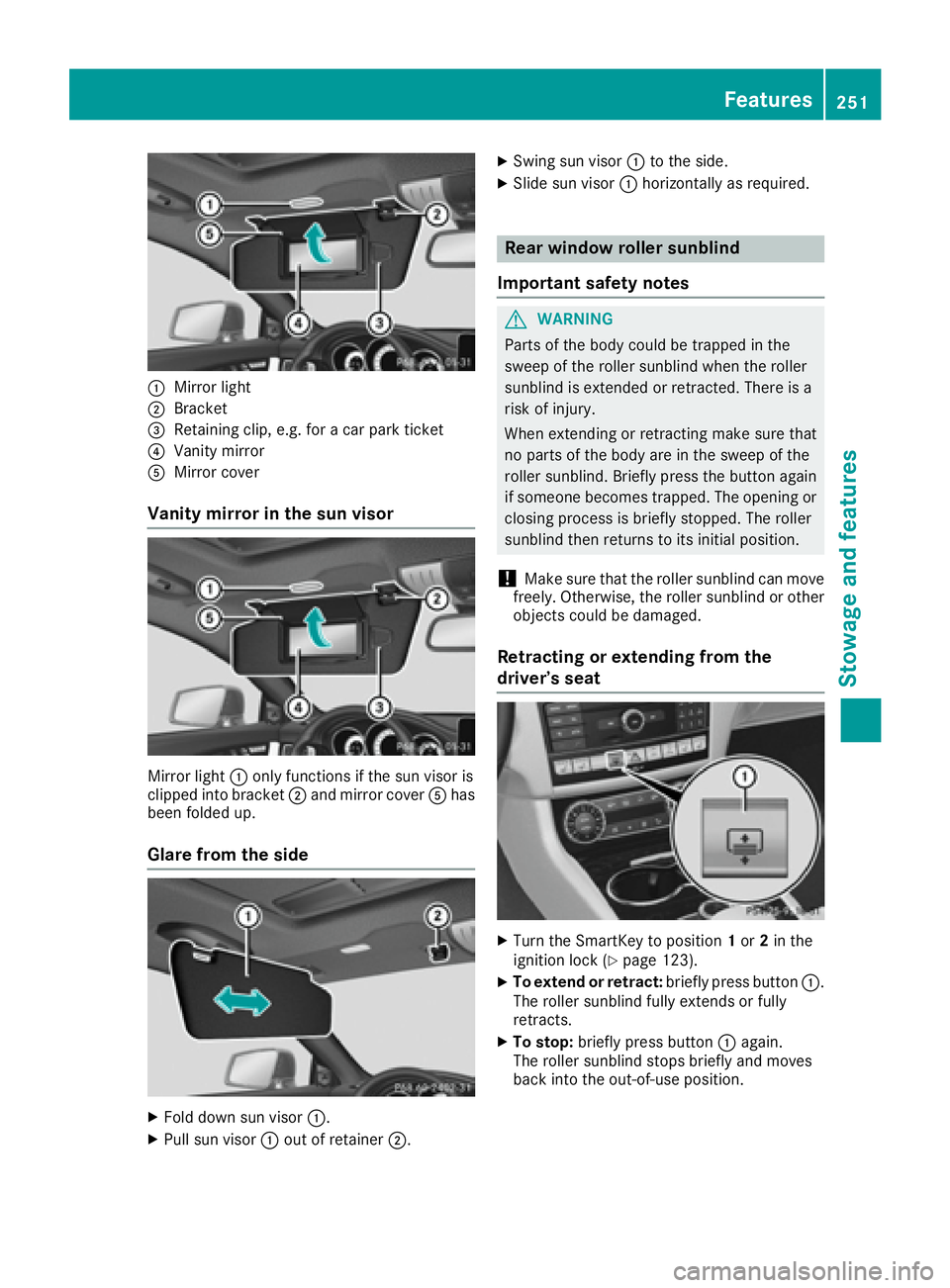
C
Mirror lightD
Bracket
Page 263 of 334
Geo fencing Geo fencing allows you to select areas which the
vehicle should not enter or leave. You will be
informed if the vehicle crosses the boundaries
of the selected areas. You can select the way in
which you receive this information beforehand.
Possible options include text message, e-mail or
an automated call.
The area can be determined as either a circle or
a polygon with a maximum of ten corners. You
can specify up to ten areas simultaneously. Dif-
ferent settings are possible for each area.
These settings can be called up under "Owners
Online" at http://www.mbusa.com.
Alternatively, you can trigger an MB Info call and
inform the customer service representative that
you wish to activate geo fencing.
Currently inactive areas can be activated by text
message.
Triggering the vehicle alarm With this function, you can trigger the vehicle's
panic alarm via text message. An alarm sounds
and the exterior lighting flashes. Depending on
the setting, the panic alarm lasts five or ten sec-
onds. Afterwards, the alarm switches off.
Garage door opener
General notes The HomeLink ®
garage door opener integrated
in the rear-view mirror allows you to operate up
to three different door and gate systems.
Use the integrated garage door opener only on
garage doors that: R
have safety stop and reverse features and R
meet current U.S. federal safety standards
Once programed, the integrated garage door
opener in the rear-view mirror will assume the
function of the garage door system's remote
control. Please also read the operating instruc-
tions for the garage door system.
When programming a garage door opener, park
the vehicle outside the garage. Do not run the
engine while programming.
Certain garage door drives are incompatible
with the integrated garage door opener. If you
have difficulty programing the integrated garage door opener, contact an authorized Mercedes-
Benz Center.
Alternatively, you can call the following tele-
phone assistance services: R
USA: Mercedes-Benz Customer Assistance
Center at 1-800-FOR-MERCedes R
Canada: Customer Service at
1-800-387-0100 R
HomeLink ®
hotline 1-800-355-3515 (free of
charge)
More information on HomeLink ®
and/or com-
patible products is also available online at
http://www.homelink.com.
Notes on the declaration of conformity
( Y
page 28).
USA: FCC ID: CB2HMIHL4
Canada: IC: 279B-HMIHL4
Important safety notes
G WARNING
When you operate or program the garage door
with the integrated garage door opener, per-
sons in the range of movement of the garage
door can become trapped or struck by the
garage door. There is a risk of injury.
When using the integrated garage door
opener, always make sure that nobody is
within the range of movement of the garage
door.
G WARNING
Combustion engines emit poisonous exhaust
gases such as carbon monoxide. Inhaling
these exhaust gases leads to poisoning. There
is a risk of fatal injury. Therefore never leave
the engine running in enclosed spaces with-
out sufficient ventilation.
Programming
Programming buttons
Pay attention to the "Important safety notes"
( Y
page 261). Features 261
Stowage and features Z
Page 276 of 334
Cleaning the mirror turn signals
! Only use cleaning agents or cleaning cloths
that are suitable for plastic lenses. Unsuitable
cleaning agents or cleaning cloths could
scratch or damage the plastic lenses of the
mirror turn signals. X
Clean the plastic lenses of the mirror turn sig-
nals in the exterior mirror housing using a wet
sponge and mild cleaning agent, e.g.
Mercedes-Benz car shampoo or cleaning
cloths.
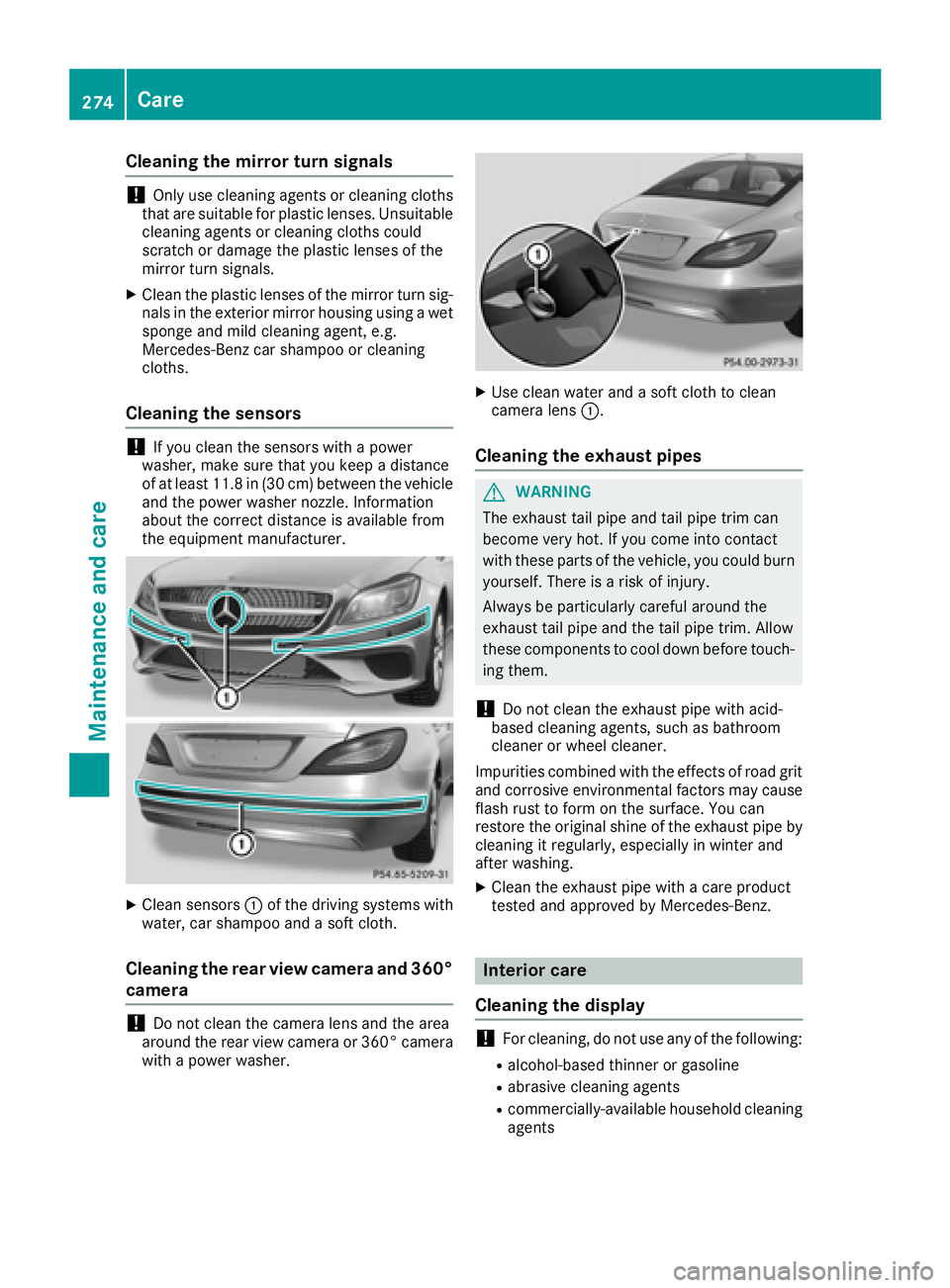
Cleaning the sensors
! If you clean the sensors with a power
washer, make sure that you keep a distance
of at least 11.8 in (30 cm ) betwee n the vehicl e
and the power washer nozzle. Information
about the correct distance is available from
the equipment manufacturer.
X
Clean sensors C of the driving systems with
water, car shampoo and a soft cloth.
Cleaning the rear view camera and 360°
camera
! Do not clean the camera lens and the area
around the rear view camera or 360° camera
with a power washer. X
Use clean water and a soft cloth to clean
camera lens C .
Cleaning the exhaust pipes
G WARNING
The exhaust tail pipe and tail pipe trim can
become very hot. If you come into contact
with these parts of the vehicle, you could burn
yourself. There is a risk of injury.
Always be particularly careful around the
exhaust tail pipe and the tail pipe trim. Allow
these components to cool down before touch-
ing them.
! Do not clean the exhaust pipe with acid-
based cleaning agents, such as bathroom
cleaner or wheel cleaner.
Impurities combined with the effects of road grit
and corrosive environmental factors may cause
flash rust to form on the surface. You can
restore the original shine of the exhaust pipe by
cleaning it regularly, especially in winter and
after washing. X
Clean the exhaust pipe with a care product
tested and approved by Mercedes-Benz.
Interior care
Cleaning the display
! For cleaning, do not use any of the following: R
alcohol-based thinner or gasoline R
abrasive cleaning agents R
commercially-available household cleaning
agents274
Care
Maintenance and care
Page 331 of 334
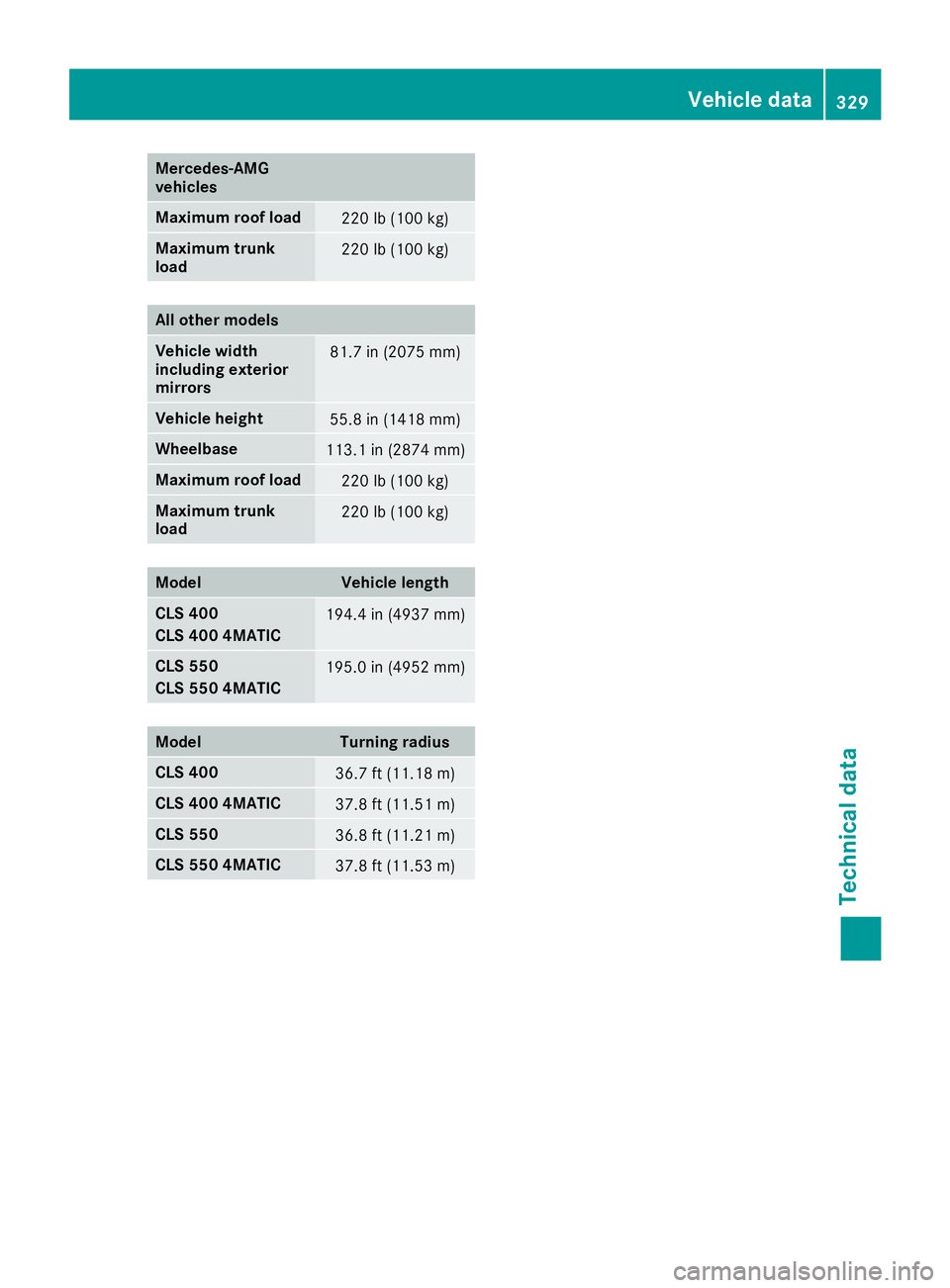
Mercedes ‑ AMG
vehicles
Maximum roof load
220 lb (100 kg)
Maximum trunk
load 220 lb (100 kg)
All other models
Vehicle width
including exterior
mirrors 81.7 in (2075 mm)
Vehicle height
55.8 in (1418 mm)
Wheelbase
113.1 in (2874 mm)
Maximum roof load
220 lb (100 kg)
Maximum trunk
load 220 lb (100 kg)
Model Vehicle length
CLS 400
CLS 400 4MATIC 194.4 in (4937 mm)
CLS 550
CLS 550 4MATIC 195.0 in (4952 mm)
Model Turning radius
CLS 400
36.7 ft (11.18 m)
CLS 400 4MATIC
37.8 ft (11.51 m)
CLS 550
36.8 ft (11.21 m)
CLS 550 4MATIC
37.8 ft (11.53 m) Vehicle data 329
Technical data Z