wheel MERCEDES-BENZ CLS 2017 Owner's Manual
[x] Cancel search | Manufacturer: MERCEDES-BENZ, Model Year: 2017, Model line: CLS, Model: MERCEDES-BENZ CLS 2017Pages: 334, PDF Size: 10.18 MB
Page 48 of 334
driver or front passenger have fastened their
seat belts.
If the driver or front passenger unfasten their
seat belts during the journey, the seat belt warn-
ing is activated again.
Air bags
Introduction The installation point of an air bag can be rec-
ognized by the AIR BAG symbol.
An air bag complements the correctly fastened
seat belt. It is no substitute for the seat belt. The
air bag provides additional protection in appli-
cable accident situations.
Not all air bags are deployed in an accident. The
different air bag systems function independ-
ently from one another ( Y
page 53).
However, no system available today can com-
pletely eliminate injuries and fatalities.
It is also not possible to rule out a risk of injury
caused by an air bag due to the high speed at
which the air bag must be deployed.
Important safety notes
G WARNING
If you do not sit in the correct seat position,
the air bag cannot protect as intended and
could even cause additional injury when
deployed. This poses an increased risk of
injury or even fatal injury.
To avoid hazardous situations, always make
sure that all of the vehicle's occupants: R
have fastened their seat belts correctly,
including pregnant women R
are sitting correctly and maintain the great-
est possible distance to the air bags R
follow the following instructions
Always make sure that there are no objects
between the air bag and the vehicle's occu-
pants. R
Adjust the seats properly before beginning
your journey. Always make sure that the seat
is in an almost upright position. The center of the head restraint must support the head at
about eye level. R
Move the driver's and front-passenger seats
as far back as possible. The driver's seat posi-
tion must allow the vehicle to be driven safely. R
Only hold the steering wheel on the outside.
This allows the air bag to be fully deployed. R
Always lean against the backrest while driv-
ing. Do not lean forwards or lean against the
door or side window. You may otherwise be in
the deployment area of the air bags. R
Always keep your feet in the footwell in front
of the seat. Do not put your feet on the dash-
board, for example. Your feet may otherwise
be in the deployment area of the air bag. R
For this reason, always secure persons less
than 5 ft (1.50 m) tall in suitable restraint sys-
tems. Up to this height, the seat belt cannot
be worn correctly.
If a child is traveling in your vehicle, also
observe the following notes: R
Always secure children under twelve years of
age and less than 5 ft (1.50 m) tall in suitable
child restraint systems. R
Child restraint systems should be installed on
the rear seats. R
Only secure a child in a rearward-facing child
re straint system on the front-passenger seat
when the front-passenger front air bag is
deactivated. If the PASSENGER AIR BAG OFF
indicator lamp is permanently lit, the front-
passenger front air bag is deactivated
( Y
page 42). R
Always observe the instructions and safety
notes on the "Occupant Classification System
(OCS)" ( Y
page 49) and on "Children in the
vehicle" ( Y
page 58 )i n addition to the child
restraint system manufacturer's installation
and operating instructions.
Objects in the vehicle interior may prevent
an air bag from functioning correctly. Before
starting your journey and to avoid risks resulting
from the speed of the air bag as it deploys, make
sure that: R
there are no people, animals or objects
between the vehicle occupants and an air
bag. R
there are no objects between the seat, door
and B-pillar. R
no hard objects, e.g. coat hangers, hang on
the grab handles or coat hooks.46
Occupant safety
Safety
Page 49 of 334
R
no accessories, such as cup holders, are
attached to the vehicle within the deployment
area of an air bag, e.g. to doors, side windows,
rear side trim or side walls. R
no heavy, sharp-edged or fragile objects are in
the pockets of your clothing. Store such
objects in a suitable place.
G WARNING
If you modify the air bag cover or affix objects
such as stickers to it, the air bag can no longer
function correctly. There is an increased risk
of injury.
Never modify an air bag cover or affix objects
to it.
G WARNING
Sensors to control the air bags are located in
the doors. Modifications or work not per-
formed correctly to the doors or door panel-
ing, as well as damaged doors, can lead to the
function of the sensors being impaired. The air
bags might therefore not function properly
anymore. Consequently, the air bags cannot
protect vehicle occupants as they are
designed to do. There is an increased risk of
injury.
Never modify the doors or parts of the doors.
Always have work on the doors or door pan-
eling carried out at a qualified specialist work-
shop.
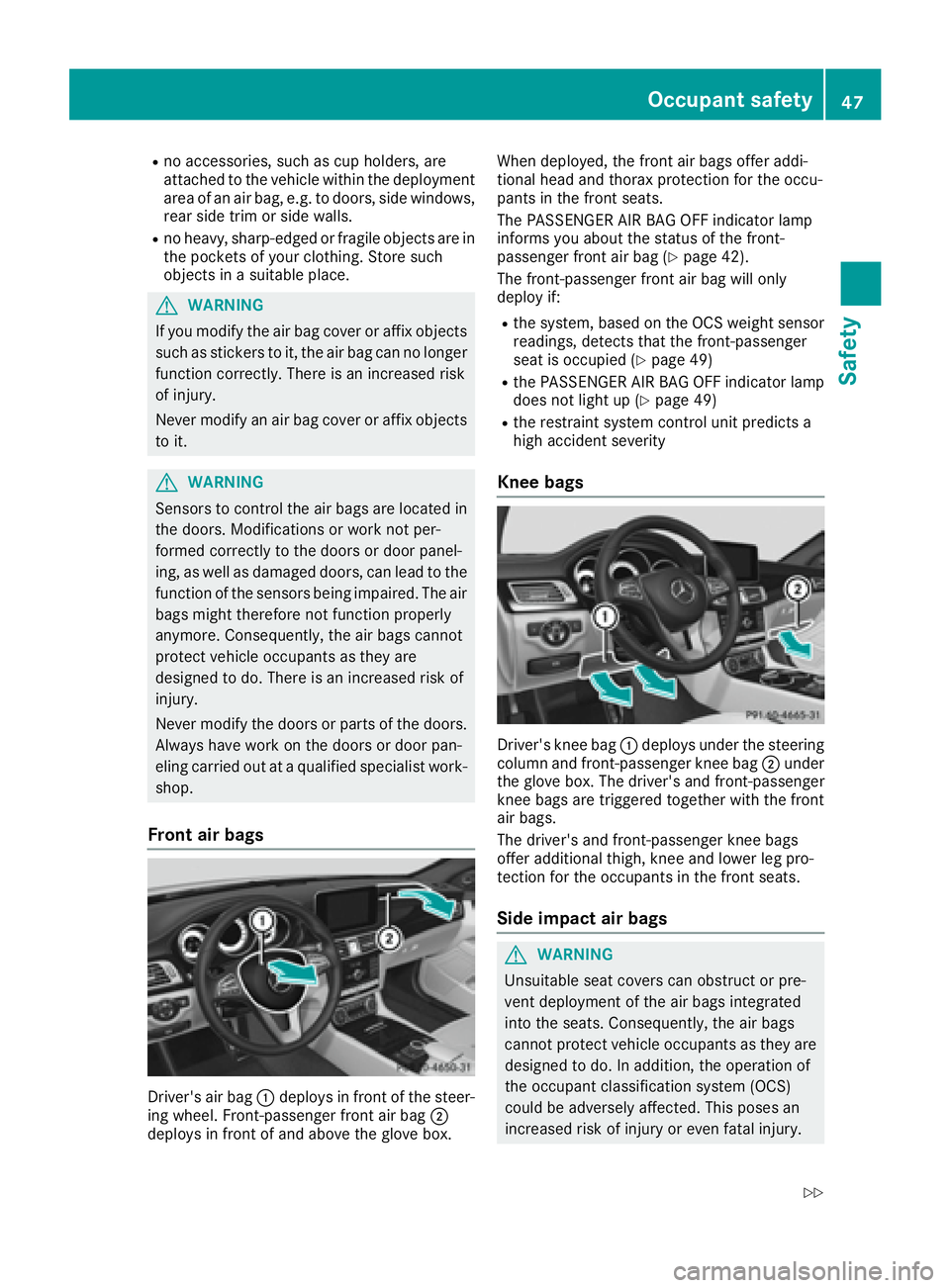
Front air bags
Driver's air bag C deploys in front of the steer-
ing wheel. Front-passenger front air bag D
deploys in front of and above the glove box. When deployed, the front air bags offer addi-
tional head and thorax protection for the occu-
pants in the front seats.
The PASSENGER AIR BAG OFF indicator lamp
informs you about the status of the front-
passenger front air bag ( Y
page 42).
The front-passenger front air bag will only
deploy if: R
the system, based on the OCS weight sensor
readings, detects that the front-passenger
seat is occupied ( Y
page 49)R
the PASSENGER AIR BAG OFF indicator lamp
does not light up ( Y
page 49)R
the restraint system control unit predicts a
high accident severity
Knee bags
Driver's knee bag C deploys under the steering
column and front-passenger knee bag D under
the glove box. The driver's and front-passenger
knee bags are triggered together with the front
air bags.
The driver's and front-passenger knee bags
offer additional thigh, knee and lower leg pro-
tection for the occupants in the front seats.
Side impact air bags
G WARNING
Unsuitable seat covers can obstruct or pre-
vent deployment of the air bags integrated
into the seats. Consequently, the air bags
cannot protect vehicle occupants as they are
designed to do. In addition, the operation of
the occupant classification system (OCS)
could be adversely affected. This poses an
increased risk of injury or even fatal injury.Occupant safety 47
Safety Z
Page 66 of 334
Drivin g safet y systems
Overview of drivin g safet y systemsIn this section , you will fin d information about
th e followin g drivin g safet y systems :R
AB S ( A n ti-loc k B rakin g S ystem)
( Y
page 64)R
BA S ( B rak e A ssist S ystem) ( Y
page 65)R
BA S PLU S ( B rake A s sis t S ystem PLUS) wit h
Cross-Traffic Assis t ( Y
page 65)R
COLLISION PREVENTION ASSIST PLU S
( Y
page 67 )R
ES P ®
( E lectronic S t ability P r ogram)
( Y
page 69)R
EB D ( E lectroni c B rak e forc e D istribution )
( Y
page 72 )R
ADAPTIV E BRAKE ( Y
page 72 )R
PRE-SAF E ®
Brak e ( Y
page 72 )
Important safet y notesIf you fail to adapt your drivin g style or if you are
inattentive , th e drivin g safet y systems can nei-
ther reduce th e ris k of an acciden t no r override
th e laws of physics. Driving safet y systems are
merely aids designed to assist driving. You are
responsible fo r maintainin g th e distanc e to th e
vehicle in front, fo r vehicle speed, fo r braking in
goo d time, and fo r stayin g in lane. Always adapt
your drivin g style to suit th e prevailin g road and
weather condition s and maintain a saf e distanc e
from th e vehicle in front. Drive carefully.
The drivin g safet y systems described only wor k
as effectively as possible when there is ade-
quat e contact between th e tires and th e road
surface. Pay particular attention to th e informa-
tion regardin g tires , recommended minimum
tire tread depths etc. in th e "Wheels and tires "
section ( Y
page 292).
In wintr y drivin g conditions, always use winte r
tires (M+ S tires )a nd if necessary, snow chains.
Only in this way will the driving safety systems
described in this section work as effectively as
possible. ABS (Anti-lock Braking System)
General information ABS regulates brake pressure in such a way that
the wheels do not lock when you brake. This
allows you to continue steering the vehicle when
braking.
The % ABS warning lamp in the instrument
cluster lights up when the ignition is switched
on. It goes out when the engine is running.
ABS works from a speed of about 5 mph
(8 km/h), regardless of road-surface conditions.
ABS works on slippery surfaces, even when you
only brake gently.
Important safety notes
i Observe the "Important safety notes" sec-
tion ( Y
page 64).
G WARNING
If ABS is faulty, the wheels could lock when
braking. The steerability and braking charac-
teristics may be severely impaired. Addition-
ally, further driving safety systems are deac-
tivated. There is an increased danger of skid-
ding and accidents.
Drive on carefully. Have ABS checked imme-
diately at a qualified specialist workshop.
When ABS is malfunctioning, other systems,
including driving safety systems, will also
become inoperative. Observe the information
on the ABS warning lamp ( Y
page 229) and dis-
play messages which may be shown in the
instrument cluster ( Y
page 204).
Braking X
If ABS intervenes: continue to depress the
brake pedal vigorously until the braking sit-
uation is over. X
To make a full brake application: depress
the brake pedal with full force.
If ABS intervenes when braking, you will feel a
pulsing in the brake pedal.
The pulsating brake pedal can be an indication
of hazardous road conditions, and functions as a
reminder to take extra care while driving.64
Driving safety systems
Safety
Page 67 of 334
BAS (Brake Assist System)
General information BAS operates in emergency braking situations.
If you depress the brake pedal quickly, BAS
automatically boosts the braking force, thus
shortening the stopping distance.
Important safety notes
i Observe the "Important safety notes" sec-
tion ( Y
page 64).
G WARNING
If BAS is malfunctioning, the braking distance
in an emergency braking situation is
increased. There is a risk of an accident.
In an emergency braking situation, depress
the brake pedal with full force. ABS prevents
the wheels from locking.
Braking X
Keep the brake pedal firmly depressed until
the emergency braking situation is over.
ABS prevents the wheels from locking.
The brakes will function as usual once you
release the brake pedal. BAS is deactivated.
BAS PLUS (Brake Assist PLUS) with
Cross-Traffic Assist
General information BAS PLUS can help you to minimize the risk of a
collision with a vehicle or a pedestrian and
reduce the effects of such a collision. If BAS
PLUS detects a danger of collision, you are
assisted when braking.
i Pay attention to the important safety notes
in the "Driving safety systems" section
( Y
page 64).
BAS PLUS is only available on vehicles with the
Driving Assistance package.
For BAS PLUS to assist you when driving, the
radar sensor system and the camera system
must be operational. With the help of a sensor system and a camera
system, BAS PLUS can detect obstacles: R
that are in the path of your vehicle for an
extended period of time R
that cross the path of your vehicle
In addition, pedestrians in the path of your vehi-
cle can be detected.
BAS PLUS detects pedestrians by using typical
characteristics such as the body contours and
posture of a person standing upright.
If the radar sensor system or the camera system
is malfunctioning, BAS PLUS functions are
restricted or no longer available. The brake sys-
tem is still available with complete brake boost-
ing effect and BAS.
i Observe the restrictions described in the
"Important safety notes" section
( Y
page 65).
Important safety notes
G WARNING
BAS PLUS cannot always clearly identify
objects and complex traffic situations.
In such cases, BAS PLUS may: R
intervene unnecessarily R
not intervene
There is a risk of an accident.
Always pay careful attention to the traffic sit-
uation and be ready to brake. Terminate the
intervention in a non-critical driving situation.
G WARNING
BAS PLUS cannot always clearly identify peo-
ple, this is especially the case if they are mov-
ing. BAS PLUS cannot intervene in these
cases. There is a risk of an accident.
Always pay careful attention to the traffic sit-
uation and be ready to brake.
G WARNING
BAS PLUS does not react: R
to small people, e.g. children R
to animals R
to oncoming vehicles R
when corneringDriving safety systems 65
Safety Z
Page 68 of 334
As a result, BAS PLUS may not intervene in all
critical situations. There is a risk of an acci-
dent.
Always pay careful attention to the traffic sit-
uation and be ready to brake.
In the event of snowfall or heavy rain, the rec-
ognition can be impaired.
Recognition by the radar sensor system is also
impaired if: R
there is dirt on the sensors or anything else
covering the sensors R
there is interference by other radar sources R
there are strong radar reflections, for exam-
ple in parking garages R
a narrow vehicle is traveling in front, e.g. a
motorbike R
a vehicle is traveling in front on a different line R
vehicles quickly move into the radar sensor
system detection range
Recognition by the camera system is also
impaired in the event of: R
dirt on the camera or if the camera is covered R
glare on the camera system, e.g. from the sun
being low in the sky R
darkness R
or if: -
pedestrians move quickly, e.g. into the path
of the vehicle -
the camera system no longer recognizes a
pedestrian as a person due to special cloth-
ing or other objects -
a pedestrian is concealed by other objects -
the typical outline of a person is not distin-
guishable from the background
Following damage to the fro nt end of the vehicle,
h
ave the configuration and operation of the
radar sensors checked at a qualified specialist
workshop. This also applies to collisions at slow
speeds where there is no visible damage to the
front of the vehicle.
Following damage to the windshield, have the
configuration and operation of the camera sys-
tem checked at a qualified specialist workshop. Function To avoid a collision, BAS PLUS calculates the
brake force necessary if: R
you approach an obstacle, and R
BAS PLUS has detected a risk of collision
At speeds of under20 mph(30 km/h) : if you
depress the brake pedal, BAS PLUS is activated.
The increase in brake pressure will be carried
out at the last possible moment.
At speeds of above20 mph(30 km/h) : if you
depress the brake pedal sharply, BAS PLUS
automatically increases the brake pressure to a
degree suited to the traffic situation.
BAS PLUS provides braking assistance in haz-
ardous situations with vehicles in front within a
speed range between 4 mph (7 km/h) and
155 mph (250 km/h).
Up to a speed of approximately 44 mph
(70 km/h), BAS PLUS may react to: R
stationary objects in the path of your vehicle,
e.g. stopped or parked vehicles R
pedestrians in the path of your vehicle R
obstacles crossing your path, which move in
the detection range of the sensors and are
recognized by them
i If BAS PLUS demands particularly high brak-
ing force, preventative passenger protection
measures (PRE-SAFE ®
) are activated simulta-
neously. X
Keep the brake pedal depressed until the
emergency braking situation is over.
ABS p re vents the wheels from locking.
BAS PLUS is deactivated and the brakes func-
tion as usual, if: R
you release the brake pedal. R
there is no longer a risk of collision. R
no obstacle is detected in front of your vehi-
cle. R
you depress the accelerator pedal. R
you activate kickdown.66
Driving safety systems
Safety
Page 71 of 334
In such cases, Adaptive Brake Assist can: R
intervene unnecessarily R
not intervene
There is a risk of an accident.
Always pay careful attention to the traffic sit-
uation and be ready to brake. Terminate the
intervention in a non-critical driving situation.
G WARNING
Adaptive Brake Assist does not react: R
to people or animals R
to oncoming vehicles R
to crossing traffic R
when cornering
As a result, the Adaptive Brake Assist may not
intervene in all critical conditions. There is a
risk of an accident.
Always pay careful attention to the traffic sit-
uation and be ready to brake.
Due to the nature of the system, particularly
complicated but non-critical driving conditions
may also cause Brake Assist to intervene.
If adaptive Brake Assist is not available due to a
malfunction in the radar sensor system, the
brake system remains available with full brake
boosting effect and BAS.
ESP ®
(Electronic Stability Program)
General notes
i Observe the "Important safety notes" sec-
tion ( Y
page 64).
ESP ®
monitors driving stability and traction, i.e.
power transmission between the tires and the
road surface.
If ESP ®
detects that the vehicle is deviating from
the direction desired by the driver, one or more
wheels are braked to stabilize the vehicle. The
engine output is also modified to keep the vehi-
cle on the desired course within physical limits.
ESP ®
assists the driver when pulling away on
wet or slippery roads. ESP ®
can also stabilize
the vehicle during braking. ETS/4ETS (Electronic Traction System) ETS traction control is part of ESP ®
. On vehicles
with 4MATIC, 4ETS is part of ESP ®
.
Traction control brakes the drive wheels indi-
vidually if they spin. This enables you to pull
away and accelerate on slippery surfaces, for
example if the road surface is slippery on one
side. In addition, more drive torque is transfer-
red to the wheel or wheels with traction.
Traction control remains active, even if you
deactivate ESP ®
.
Important safety notes
i Observe the "Important safety notes" sec-
tion ( Y
page 64).
G WARNING
If ESP ®
is malfunctioning, ESP ®
is unable to
stabilize the vehicle. Additionally, further driv-
ing safety systems are deactivated. This
increases the risk of skidding and an accident.
Drive on carefully. Have ESP ®
checked at a
qualified specialist workshop.
! Vehicles with 4MATIC: function or perform-
ance tests may only be carried out on a 2-axle
dynamometer. Before you operate the vehicle
on such a dynamometer, please consult a
qualified workshop. You could otherwise
damage the drive train or the brake system.
Vehicles without 4MATIC: observe the notes on
ESP ®
( Y
page 289) when towing the vehicle
with a raised rear axle.
If the
Page 73 of 334
Deactivating/activating ESP ®
(Mercedes ‑ AM G vehicles )Important safet y notes
i Observ e th e "Important safet y notes" sec -
tion ( Y
page 64).
You can selec t between th e followin g states of
ES P ®
: R
ES P ®
is activated.R
SPORT handlin g mode is activated.R
ES P ®
is deactivated.
G WARNING
Whe n SPORT handlin g mode is activated,
there is a greater ris k of skidding and acci-
dents .
Only activat e SPORT handlin g mode in th e sit -
uation s described in th e following.
G WARNING
If you deactivat e ES P ®
, ES P ®
no longer sta-
bilizes th e vehicle. There is an increase d ris k
of skidding and an accident.
Only deactivat e ES P ®
in th e situation s descri-
bed in th e following.
! Avoid spinnin g th e driven wheels fo r an
extended period wit h ES P ®
deactivated. You
could otherwise damage th e drivetrain .
In th e followin g situations, it may be bette r to
activat e SPORT handlin g mode or deactivat e
ES P ®
: R
when usin g snow chain sR
in dee p snowR
on san d or grave lR
on specially designated roads when th e vehi-
cle's own oversteering and understeering
characteristics are desire d
Spinning th e wheels result s in a cutting action
whic h provides bette r grip.
Driving in SPORT handlin g mode or without
ES P ®
require s an extremely qualified and expe-
rienced driver .
i Activat e ES P ®
as soo n as th e situation s
described abov e no longer apply . ES P ®
will
otherwise no t be able to stabilize th e vehicle if th e vehicle start s to skid or a whee l start s to
spin.
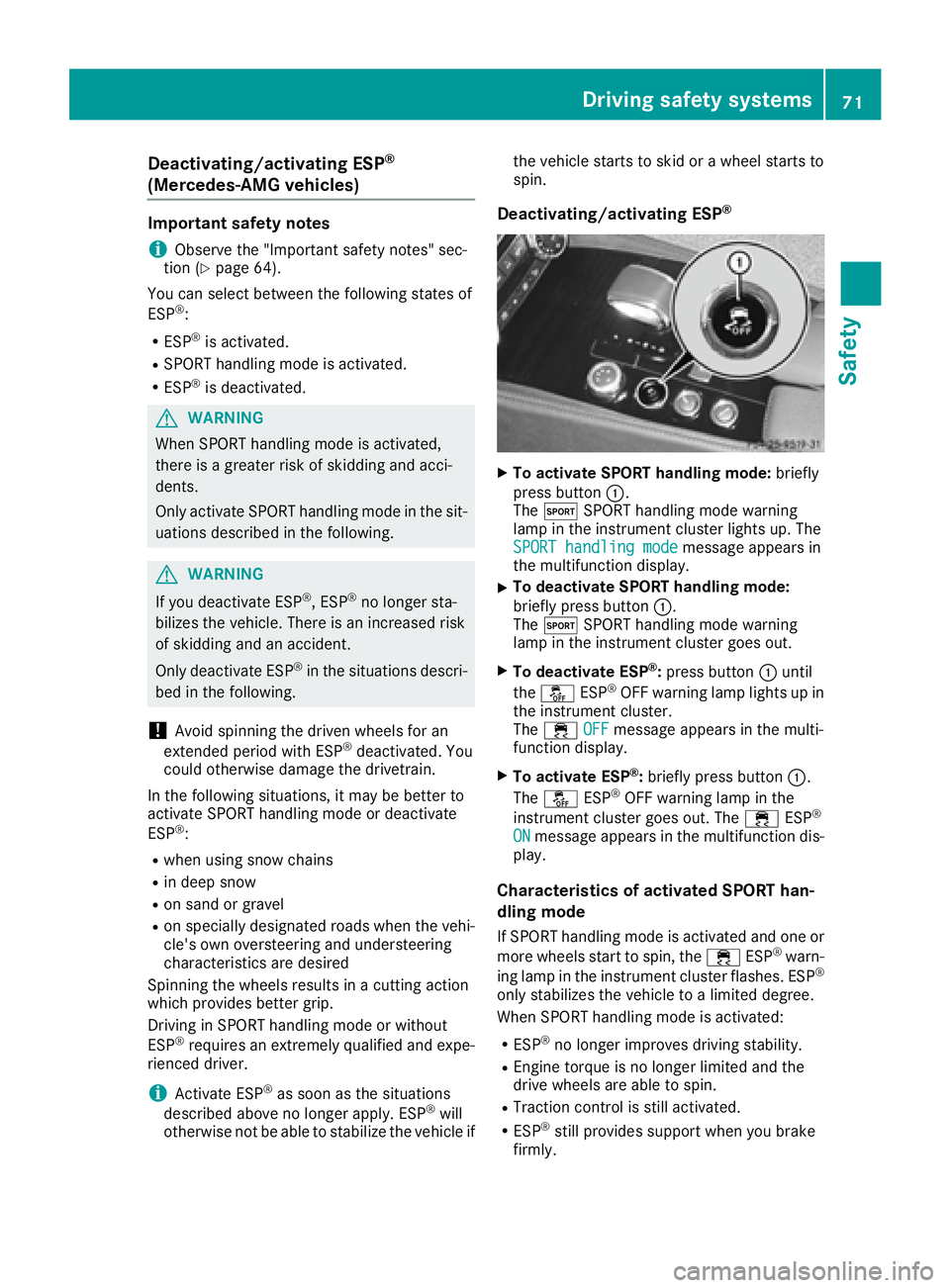
Deactivating/activating ESP ®
X
To activate SPORT handling mode: briefly
press butto n C .
The t SPORT handlin g mode warnin g
lamp in th e instrumen t cluster lights up. The
SPORT handling mod e
messag e appears in
th e multifunction display. X
To deactivate SPORT handling mode:
briefly press butto n C .
The t SPORT handlin g mode warnin g
lamp in th e instrumen t cluster goe s out .X
To deactivate ESP ®
: press butto n C until
th e
Page 74 of 334
Characteristics when ESP ®
is deactivatedIf ESP ®
is deactivated and one or more wheels
start to spin, the
Page 84 of 334
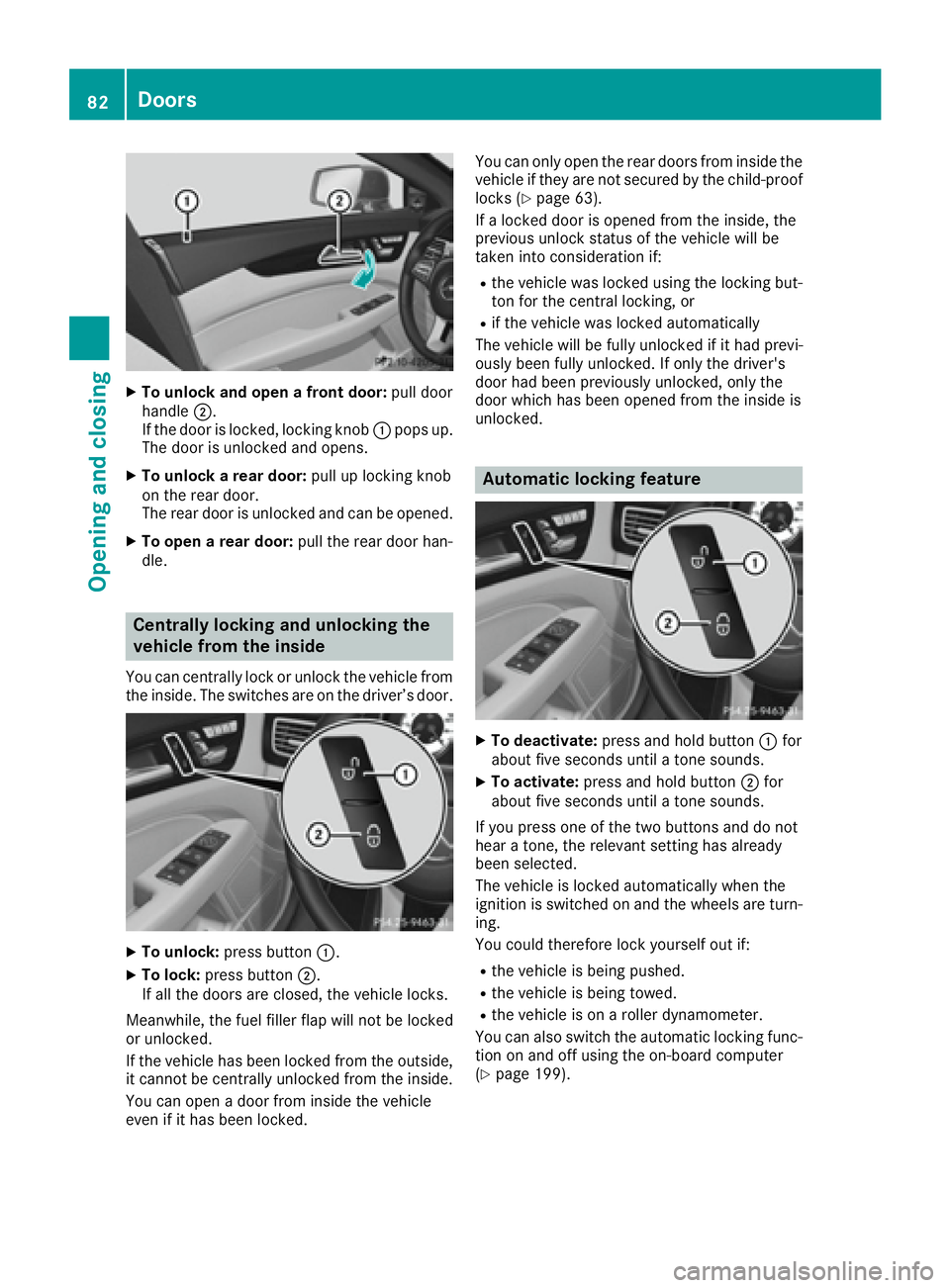
X
To unlock and open a front door: pull door
handle D .
If the door is locked, locking knob C pops up.
The door is unlocked and opens. X
To unlock a rear door: pull up locking knob
on the rear door.
The rear door is unlocked and can be opened. X
To open a rear door: pull the rear door han-
dle.
Centrally locking and unlocking the
vehicle from the inside You can centrally lock or unlock the vehicle from
the inside. The switches are on the driver’s door.
X
To unlock: press button C .X
To lock: press button D .
If all the doors are closed, the vehicle locks.
Meanwhile, the fuel filler flap will not be locked
or unlocked.
If the vehicle has been locked from the outside,
it cannot be centrally unlocked from the inside.
You can open a door from inside the vehicle
even if it has been locked. You can only open the rear doors from inside the
vehicle if they are not secured by the child-proof
locks ( Y
page 63).
If a locked door is opened from the inside, the
previous unlock status of the vehicle will be
taken into consideration if: R
the vehicle was locked using the locking but-
ton for the central locking, or R
if the vehicle was locked automatically
The vehicle will be fully unlocked if it had previ-
ously been fully unlocked. If only the driver's
door had been previously unlocked, only the
door which has been opened from the inside is
unlocked.
Automatic locking feature
X
To deactivate: press and hold button C for
about five seconds until a tone sounds. X
To activate: press and hold button D for
about five seconds until a tone sounds.
If you press one of the two buttons and do not
hear a tone, the relevant setting has already
been selected.
The vehicle is locked automatically when the
ignition is switched on and the wheels are turn-
ing.
You could therefore lock yourself out if: R
the vehicle is being pushed. R
the vehicle is being towed. R
the vehicle is on a roller dynamometer.
You can also switch the automatic locking func-
tion on and off using the on-board computer
( Y
page 199).82
Doors
Opening and closing
Page 95 of 334
Correct driver's seat position
G WARNING
You could lose control of your vehicle if you do
the following while driving: R
adjust the driver's seat, head restraint,
steering wheel or mirrors R
fasten the seat belt
There is a risk of an accident.
Adjust the driver's seat, head restraint, steer-
ing wheel and mirror and fasten your seat belt
before starting the engine.
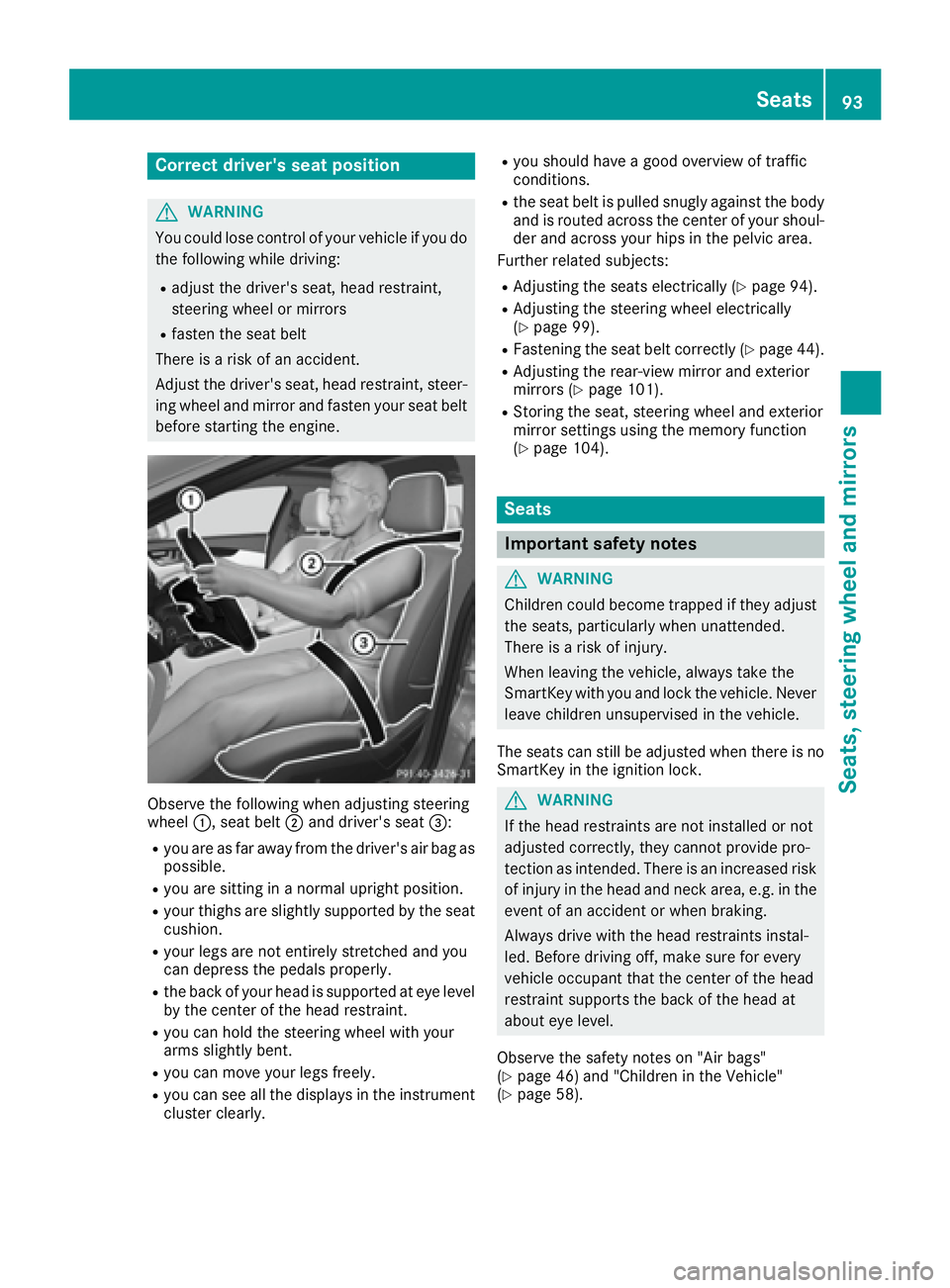
Observe the following when adjusting steering
wheel C , seat belt D and driver's seat