ESP MERCEDES-BENZ CLS 2017 Owner's Guide
[x] Cancel search | Manufacturer: MERCEDES-BENZ, Model Year: 2017, Model line: CLS, Model: MERCEDES-BENZ CLS 2017Pages: 334, PDF Size: 10.18 MB
Page 103 of 334
Mirrors
Exterior mirrors
Adjusting the exterior mirrors
G WARNING
You could lose control of your vehicle if you do
the following while driving: R
adjust the driver's seat, head restraint,
steering wheel or mirrors R
fasten the seat belt
There is a risk of an accident.
Adjust the driver's seat, head restraint, steer-
ing wheel and mirror and fasten your seat belt
before starting the engine.
G WARNING
The exterior mirror on the front-passenger
side reduces the size of the image. Visible
objects are actually closer than they appear.
This means that you could misjudge the dis-
tance from road users traveling behind, e.g.
when changing lane. There is a risk of an acci-
dent.
For this reason, always make sure of the
actual distance from the road users traveling
behind by glancing over your shoulder.
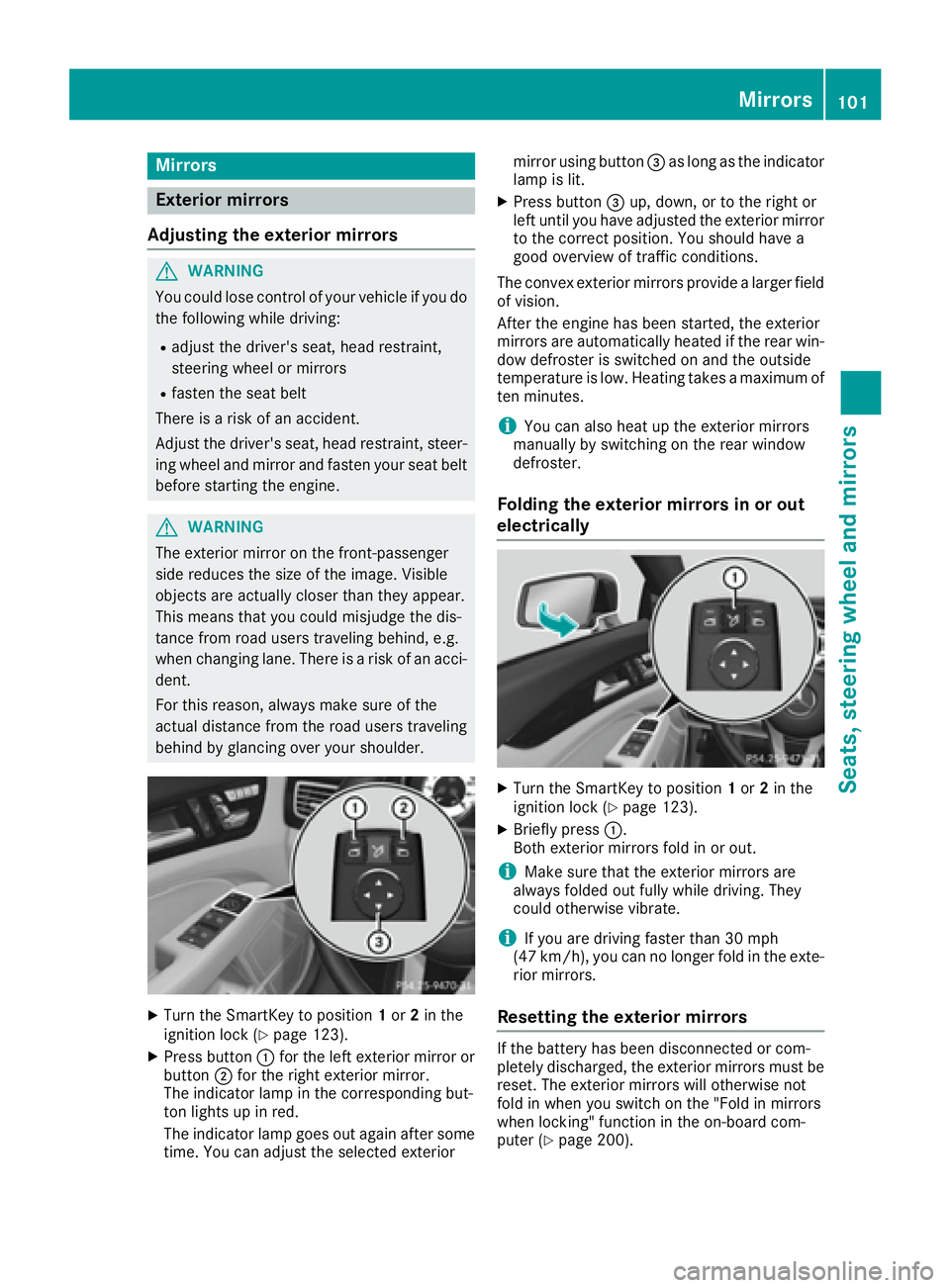
X
Turn the SmartKey to position 1 or 2 in the
ignition lock ( Y
page 123).X
Press button C for the left exterior mirror or
button D for the right exterior mirror.
The indicator lamp in the corresponding but-
ton lights up in red.
The indicator lamp goes out again after some
time. You can adjust the selected exterior mirror using button
Page 107 of 334
Exterior lighting
General notes USA only: if you wish to drive during the daytime
without lights, switch off the Daytime run‐
ning lamps function via the on-board computer
( Y
page 198).
Setting the exterior lighting
Setting options Exterior lighting can be set using: R
the light switch ( Y
page 105)R
the combination switch ( Y
page 106)R
the on-board computer ( Y
page 198)
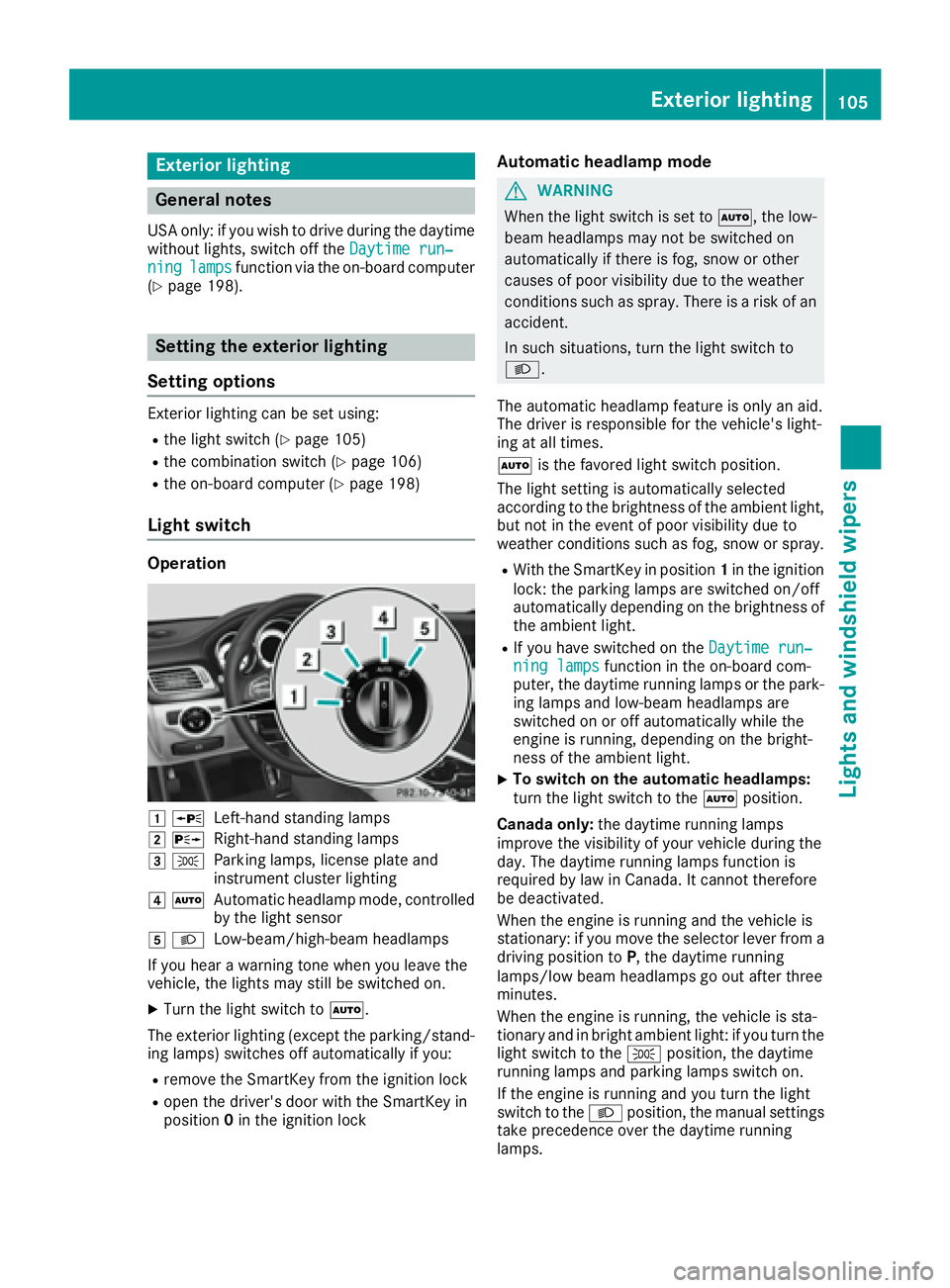
Light switch Operation
G c
Left-hand standing lampsH d
Right-hand standing lampsI `
Parking lamps, license plate and
instrument cluster lightingJ X
Automatic headlamp mode, controlled
by the light sensor
K X
Low-beam/high-beam headlamps
If you hear a warning tone when you leave the
vehicle, the lights may still be switched on. X
Turn the light switch to X .
The exterior lighting (except the parking/stand-
ing lamps) switches off automatically if you: R
remove the SmartKey from the ignition lock R
open the driver's door with the SmartKey in
position 0 in the ignition lock Automatic headlamp mode
G WARNING
When the light switch is set to X , the low-
beam headlamps may not be switched on
automatically if there is fog, snow or other
causes of poor visibility due to the weather
conditions such as spray. There is a risk of an
accident.
In such situations, turn the light switch to
X .
The automatic headlamp feature is only an aid.
The driver is responsible for the vehicle's light-
ing at all times.
X is the favored light switch position.
The light setting is automatically selected
according to the brightness of the ambient light,
but not in the event of poor visibility due to
weather conditions such as fog, snow or spray. R
With the SmartKey in position 1 in the ignition
lock: the parking lamps are switched on/off
automatically depending on the brightness of
the ambient light. R
If you have switched on the Daytime run‐
ning lamps function in the on-board com-
puter, the daytime running lamps or the park-
ing lamps and low-beam headlamps are
switched on or off automatically while the
engine is running, depending on the bright-
ness of the ambient light. X
To switch on the automatic headlamps:
turn the light switch to the X position.
Canada only: the daytime running lamps
improve the visibility of your vehicle during the
day. The daytime running lamps function is
required by law in Canada. It cannot therefore
be deactivated.
When the engine is running and the vehicle is
stationary: if you move the selector lever from a
driving position to P , the daytime running
lamps/low beam headlamps go out after three
minutes.
When the engine is running, the vehicle is sta-
tionary and in bright ambient light: if you turn the
light switch to the ` position, the daytime
running lamps and parking lamps switch on.
If the engine is running and you turn the light
switch to the X position, the manual settings
take precedence over the daytime running
lamps.Exterior lighting 105
Lights and windshield wipers Z
Page 108 of 334

USA only: the daytime running lamps improve
the visibility of your vehicle during the day. To do
this, the Daytime running lamps
function
must be switched on using the on-board com-
puter ( Y
page 198).
If the engine is running and you turn the light
switch to the ` or X position, the manual
settings take precedence over the daytime run-
ning lamps.
Low-beam headlamps
G WARNING
When the light switch is set to X , the low-
beam headlamps may not be switched on
automatically if there is fog, snow or other
causes of poor visibility due to the weather
conditions such as spray. There is a risk of an
accident.
In such situations, turn the light switch to
X .
Even if the light sensor does not detect that it is
dark, the parking lamps and low-beam head-
lamps switch on when the ignition is switched on
and the light switch is set to the X position.
This is a particularly useful function in the event
of rain and fog. X
To switch on the low beam headlamps:
turn the SmartKey in the ignition lock to posi-
tion 2 or start the engine.X
Turn the light switch to the X position.
The green X indicator lamp in the instru-
ment cluster lights up.
Parking lamps
! If the battery charge is very low, the parking
lamps or standing lamps are automatically
switched off to enable the next engine start.
Always park your vehicle safely and in a well lit
area, in accordance with the relevant legal
stipulations. Avoid using the ` parking
lamps over a period of several hours. If pos-
sible, switch on the right-hand d or left-
hand c standing lamps.X
To switch on the parking lamps: turn the
light switch to the ` position.
The green ` indicator lamp on the instru-
ment cluster lights up. Standing lamps Switching on the standing lamps ensures the
corresponding side of the vehicle is illuminated. X
To switch on the standing lamps: turn the
SmartKey to position 0 in the ignition lock or
remove the SmartKey. X
Turn the light switch to the c (left-hand
side of the vehicle) or d (right-hand side of
the vehicle) position.
Combination switch
C
High-beam headlamps D
Turn signal, right
Page 110 of 334
late. In this, or in similar situations, the auto-
matic high-beam headlamps will not be deac-
tivated or will be activated regardless. There is
a risk of an accident.
Always carefully observe the traffic conditions
and switch off the high-beam headlamps in
good time.
Adaptive Highbeam Assist cannot take into
account road, weather or traffic conditions.
Adaptive Highbeam Assist is only an aid. You are
responsible for adjusting the vehicle's lighting
to the prevailing light, visibility and traffic con-
ditions.
In particular, the detection of obstacles can be
impaired if: R
there is poor visibility, e.g. due to fog, heavy
rain or snow R
there is dirt on the sensors or anything else
covering the sensors
Switching Adaptive Highbeam Assist
on/off X
To switch on: turn the light switch to the
X position.X
Press the combination switch forwards
beyond the pressure point ( Y
page 106).
The
Page 125 of 334
boosting effect. You will require considerably
more effort to steer and brake. There is a risk
of an accident.
Do not switch off the ignition while driving.
G WARNING
If the parking brake has not been fully
released when driving, the parking brake can: R
overheat and cause a fire R
lose its hold function.
There is a risk of fire and an accident. Release
the parking brake fully before driving off.
! Do not warm up the engine with the vehicle
stationary. Drive off immediately. Avoid high
engine speeds and driving at full throttle until
the engine has reached its operating temper-
ature.
Only shift the automatic transmission to the
desired drive position when the vehicle is sta-
tionary.
Where possible, avoid spinning the drive
wheels when pulling away on slippery roads.
You could otherwise damage the drive train.
! Mercedes-AMG vehicles: at low engine oil
temperatures below 68 ‡ (+20 †), the max-
imum engine speed is restricted in order to
protect the engine. To protect the engine and
maintain smooth engine operation, avoid driv-
ing at full throttle when the engine is cold.
SmartKey positions
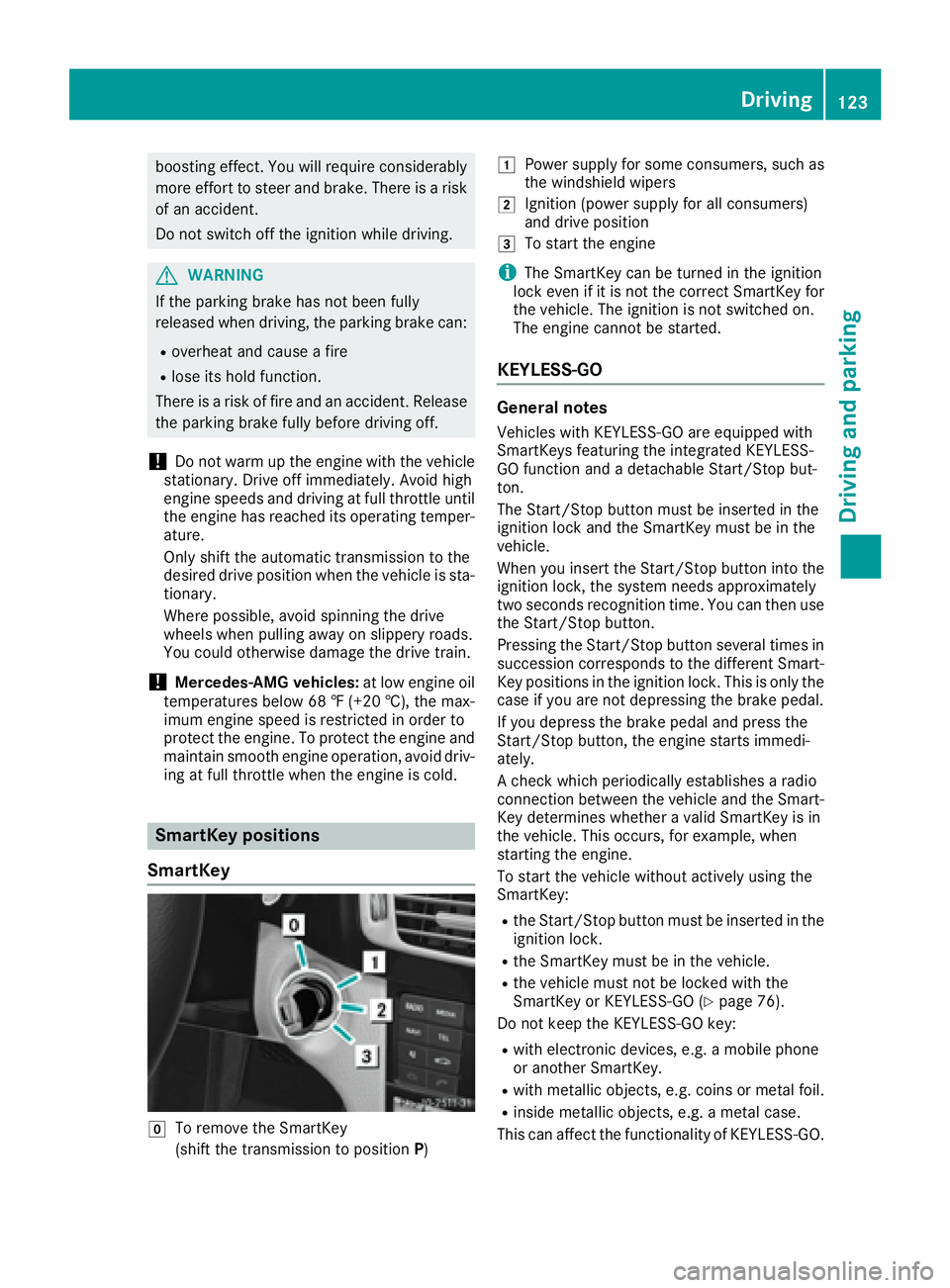
SmartKey
Z
To remove the SmartKey
(shift the transmission to position P ) G
Power supply for some consumers, such as
the windshield wipers H
Ignition (power supply for all consumers)
and drive position I
To start the engine
i The SmartKey can be turned in the ignition
lock even if it is not the correct SmartKey for
the vehicle. The ignition is not switched on.
The engine cannot be started.
KEYLESS-GO General notes Vehicles with KEYLESS-GO are equipped with
SmartKeys featuring the integrated KEYLESS-
GO function and a detachable Start/Stop but-
ton.
The Start/Stop button must be inserted in the
ignition lock and the SmartKey must be in the
vehicle.
When you insert the Start/Stop button into the
ignition lock, the system needs approximately
two seconds recognition time. You can then use
the Start/Stop button.
Pressing the Start/Stop button several times in
succession corresponds to the different Smart-
Key positions in the ignition lock. This is only the
case if you are not depressing the brake pedal.
If you depress the brake pedal and press the
Start/Stop button, the engine starts immedi-
ately.
A check which periodically establishes a radio
connection between the vehicle and the Smart-
Key determines whether a valid SmartKey is in
the vehicle. This occurs, for example, when
starting the engine.
To start the vehicle without actively using the
SmartKey: R
the Start/Stop button must be inserted in the
ignition lock. R
the SmartKey must be in the vehicle. R
the vehicle must not be locked with the
SmartKey or KEYLESS-GO ( Y
page 76).
Do not keep the KEYLESS-GO key: R
with electronic devices, e.g. a mobile phone
or another SmartKey. R
with metallic objects, e.g. coins or metal foil. R
inside metallic objects, e.g. a metal case.
This can affect the functionality of KEYLESS-GO. Driving 123
Driving and parking Z
Page 126 of 334
If you lock the vehicle with the SmartKey's
remote control or with KEYLESS-GO, after a
short time: R
you will not be able to switch on the ignition
with the Start/Stop button. R
you will not be able to start the engine with the
Start/Stop button until the vehicle is
unlocked again.
The engine can be switched off while the vehicle
is in motion by pressing and holding the Start/
Stop button for three seconds. This function
operates independently of the ECO start/stop
automatic engine switch-off function.
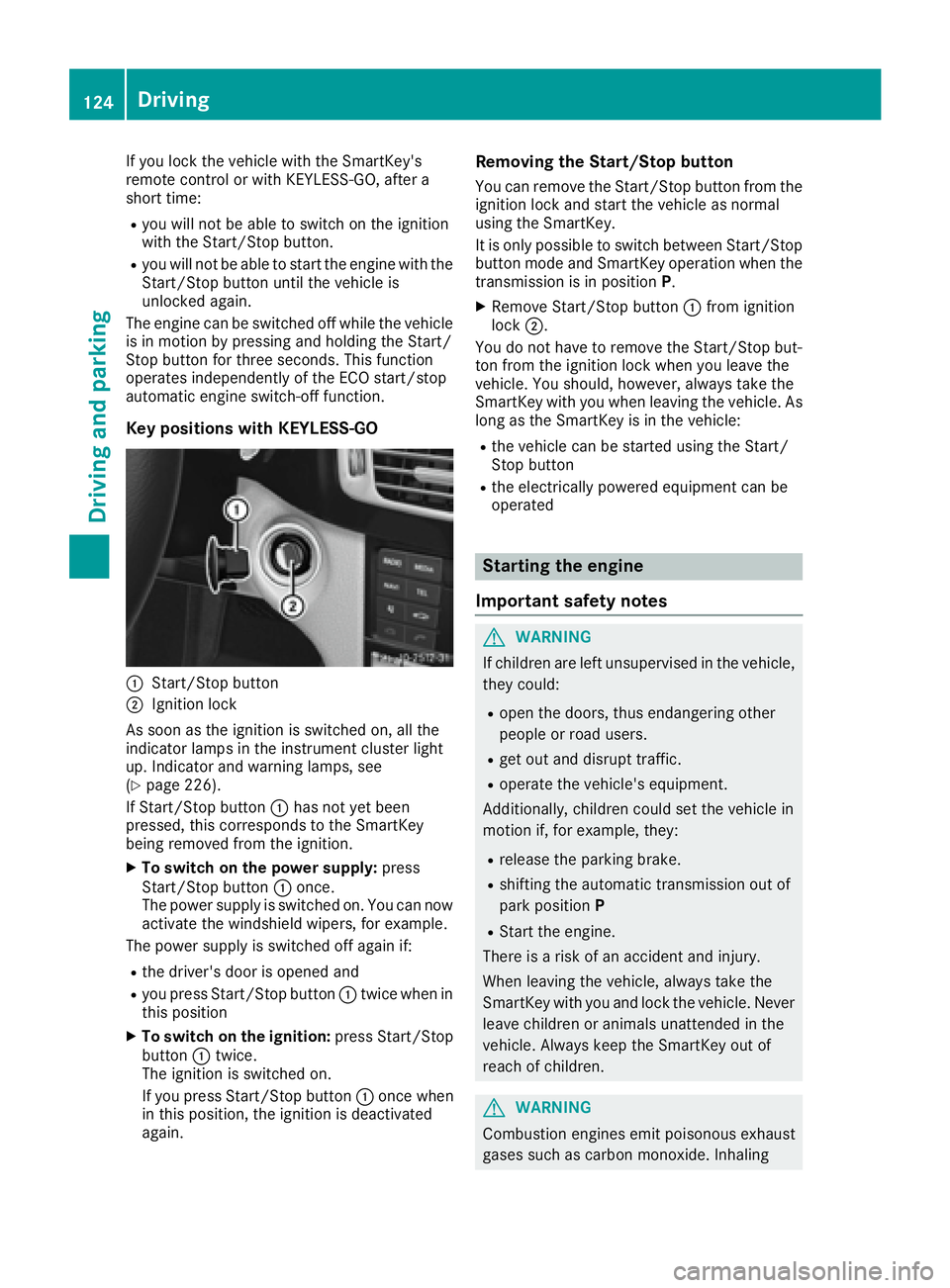
Key positions with KEYLESS-GO
C
Start/Stop buttonD
Ignition lock
As soon as the ignition is switched on, all the
indicator lamps in the instrument cluster light
up. Indicator and warning lamps, see
( Y
page 226).
If Start/Stop button C has not yet been
pressed, this corresponds to the SmartKey
being removed from the ignition. X
To switch on the power supply: press
Start/Stop button C once.
The power supply is switched on. You can now
activate the windshield wipers, for example.
The power supply is switched off again if: R
the driver's door is opened and R
you press Start/Stop button C twice when in
this position X
To switch on the ignition: press Start/Stop
button C twice.
The ignition is switched on.
If you press Start/Stop button C once when
in this position, the ignition is deactivated
again. Removing the Start/Stop button You can remove the Start/Stop button from the
ignition lock and start the vehicle as normal
using the SmartKey.
It is only possible to switch between Start/Stop
button mode and SmartKey operation when the
transmission is in position P .X
Remove Start/Stop button C from ignition
lock D .
You do not have to remove the Start/Stop but-
ton from the ignition lock when you leave the
vehicle. You should, however, always take the
SmartKey with you when leaving the vehicle. As
long as the SmartKey is in the vehicle: R
the vehicle can be started using the Start/
Stop button R
the electrically powered equipment can be
operated
Starting the engine
Important safety notes
G WARNING
If children are left unsupervised in the vehicle,
they could: R
open the doors, thus endangering other
people or road users. R
get out and disrupt traffic. R
operate the vehicle's equipment.
Additionally, children could set the vehicle in
motion if, for example, they: R
release the parking brake. R
shifting the automatic transmission out of
park position P R
Start the engine.
There is a risk of an accident and injury.
When leaving the vehicle, always take the
SmartKey with you and lock the vehicle. Never
leave children or animals unattended in the
vehicle. Always keep the SmartKey out of
reach of children.
G WARNING
Combustion engines emit poisonous exhaust
gases such as carbon monoxide. Inhaling124
Driving
Driving and parking
Page 128 of 334
G WARNING
After a short time, hill start assist will no lon-
ger brake your vehicle and it could roll away.
There is a risk of an accident and injury.
Therefore, quickly move your foot from the
brake pedal to the accelerator pedal. Never
leave the vehicle when it is held by hill start
assist.
Hill start assist is not active if: R
you are pulling away on a level road or on a
downhill gradient. R
the transmission is in position N .R
the parking brake is applied. R
ESP ®
is malfunctioning.
ECO start/stop function
Introduction The ECO start/stop function switches the
engine off automatically if the vehicle is stopped
under certain conditions.
The engine starts automatically when the driver
wants to pull away again. The ECO start/stop
function thereby helps you to reduce the fuel
consumption and emissions of your vehicle.
Important safety notes
G WARNING
If the engine is switched off automatically and
you exit the vehicle, the engine is restarted
automatically. The vehicle may begin moving.
There is a risk of accident and injury.
If you wish to exit the vehicle, always turn off
the ignition and secure the vehicle against
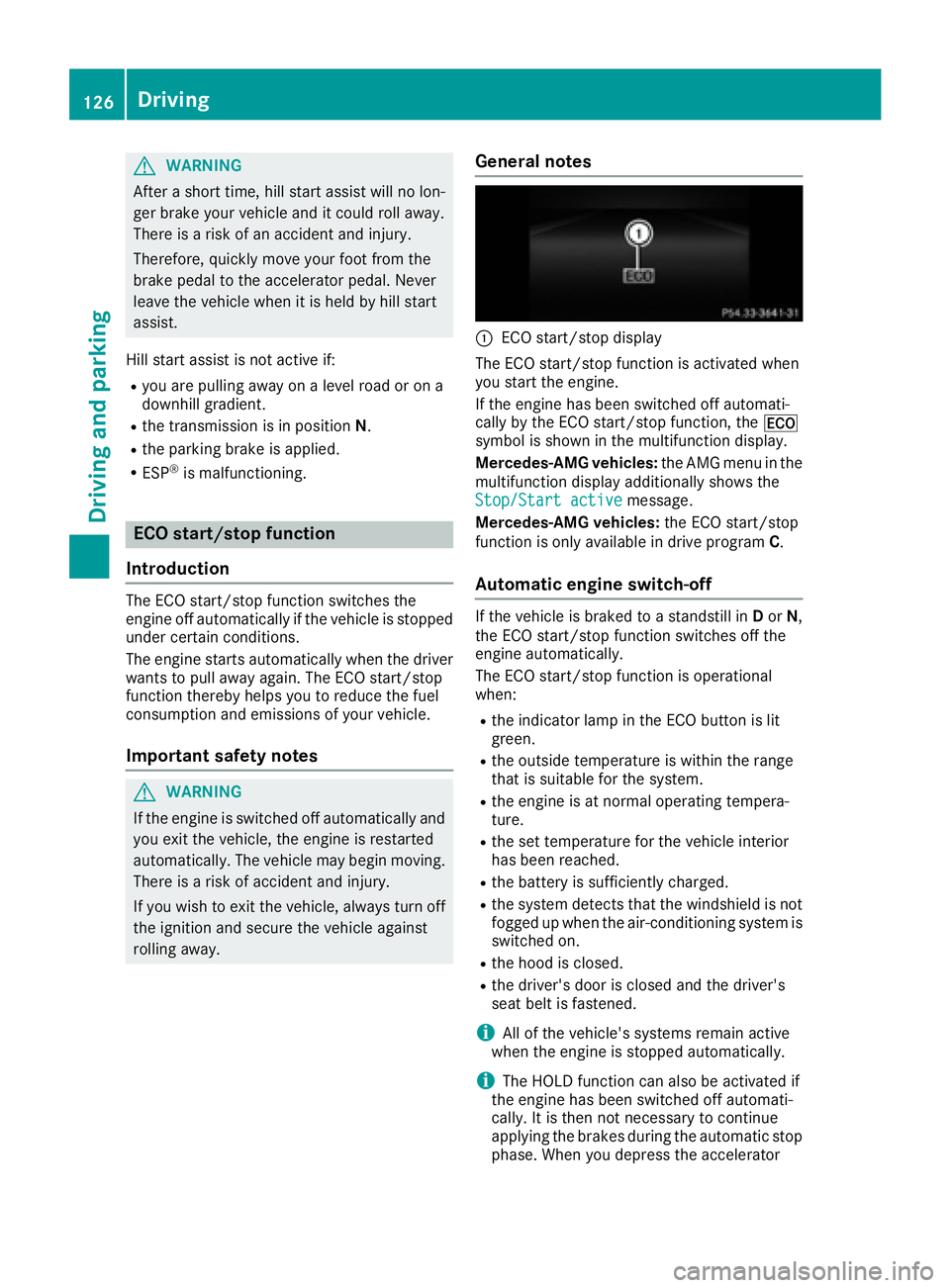
rolling away. General notes
C
ECO start/stop display
The ECO start/stop function is activated when
you start the engine.
If the engine has been switched off automati-
cally by the ECO start/stop function, the
Page 130 of 334
If indicator lamp D is off, the ECO start/stop
function has been deactivated manually or as
the result of a malfunction. The engine will then not be switched off automatically when the vehi-
cle stops.
Problems with the engine Problem
Possible causes/consequences and P Solutions
The engine does not
start. The HOLD function or DISTRONIC PLUS is activated. X
Deactivate the HOLD function ( Y
page 157) or DISTRONIC PLUS
( Y
page 155). X
Try to start the engine again.
The engine does not
start. The starter motor
can be heard. R
There is a malfunction in the engine electronics. R
There is a malfunction in the fuel supply.
Before attempting to start the engine again: X
Turn the SmartKey back to position 0 in the ignition lock.
or X
Press the Start/Stop button repeatedly until all indicator lamps in
the instrument cluster go out. X
Try to start the engine again ( Y
page 124). Avoid excessively long
and frequent attempts to start the engine as these will drain the
battery.
If the engine does not start after several attempts: X
Consult a qualified specialist workshop.
The engine does not
start. You cannot hear
the starter motor. The on-board voltage is too low because the battery is too weak or
discharged. X
Jump-start the vehicle ( Y
page 285).
If the engine does not start despite attempts to jump-start it: X
Consult a qualified specialist workshop.
The starter motor was exposed to a thermal load that was too high. X
Allow the starter motor to cool down for approximately two minutes. X
Try to start the engine again.
If the engine still does not start: X
Consult a qualified specialist workshop.128
Driving
Driving and parking
Page 135 of 334
D Neutral
Do not shift the transmission to N
while driving. Otherwise, the auto-
matic transmission could be dam-
aged.
No power is transmitted from the
engine to the drive wheels.
Releasing the brakes will allow you to
move the vehicle freely, e.g. to push
it or tow it.
If ESP ®
is deactivated or faulty: shift
the transmission only to position N if
the vehicle is in danger of skidding,
e.g. on icy roads.
If you switch the engine off with the
transmission in position R or D , the
automatic transmission shifts to N
automatically.
! Rolling in neutral N can damage
the drive train.
: Drive
The automatic transmission changes
gear automatically. All forward gears
are available.
Driving tips
Changing gear The automatic transmission shifts to the indi-
vidual gears automatically when it is in trans-
mission position D . This automatic gear shifting
behavior is determined by: R
the selected drive program R
the position of the accelerator pedal R
the road speed
Accelerator pedal position Your style of driving influences how the auto-
matic transmission shifts gear: R
little throttle: early upshifts R
more throttle: late upshifts
Mercedes-AMG vehicles
When shifting down, the double-clutch function
is active regardless of the currently selected
drive program. The double-clutch function reduces load change reactions and is conducive
to a sporty driving style. The sound generated by
the double-clutch function depends on the drive
program selected.
Kickdown Use kickdown for maximum acceleration: X
Depress the accelerator pedal beyond the
pressure point.
The automatic transmission shifts to a lower
gear depending on the engine speed. X
Ease off the accelerator pedal once the
desired speed is reached.
The automatic transmission shifts back up.
Rocking the vehicle free Rocking the vehicle free by shifting back and
forth between transmission positions D and R
can help to free a vehicle that has become stuck
in mud or snow. The vehicle's engine manage-
ment restricts switching between transmission
positions D and R to speeds up to a maximum of
5 mph (9 km/h). To shift back and forth between
transmission positions D and R , move the
DIRECT SELECT lever up and down past the
point of resistance.
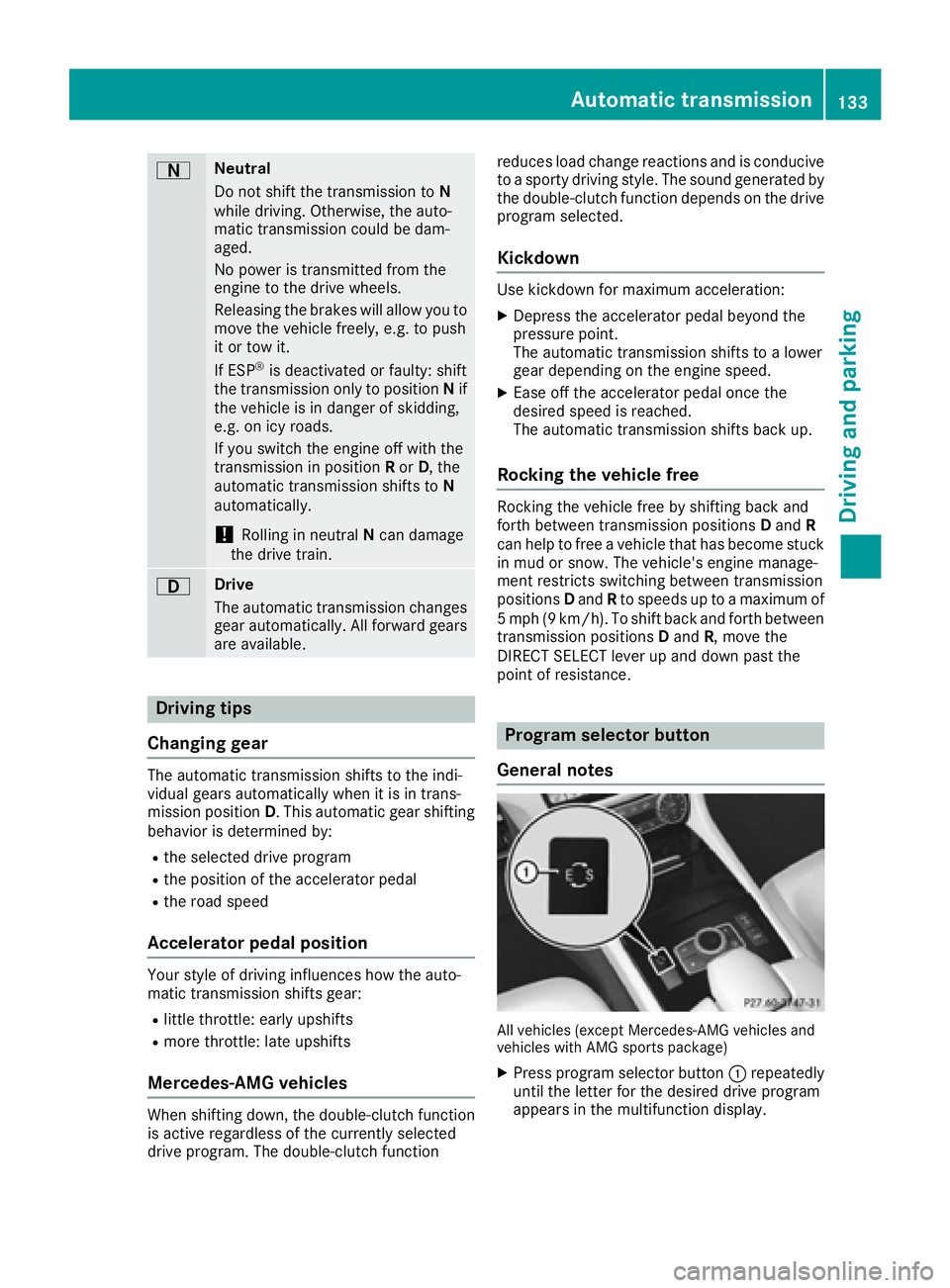
Program selector button
General notes
All vehicles (except Mercedes-AMG vehicles and
vehicles with AMG sports package) X
Press program selector button C repeatedly
until the letter for the desired drive program
appears in the multifunction display.Automatic transmission 133
Driving an d parking Z
Page 138 of 334
sion automatically shifts up in order to pre-
vent engine damage. X
To shift down: pull on the left-hand steering
wheel paddle shifter ( Y
page 135).
The automatic transmission shifts down to
the next gear.
If the engine exceeds the maximum engine
speed when shifting down, the automatic
transmission protects against engine damage
by not shifting down.
i Automatic down shifting occurs when
coasting.
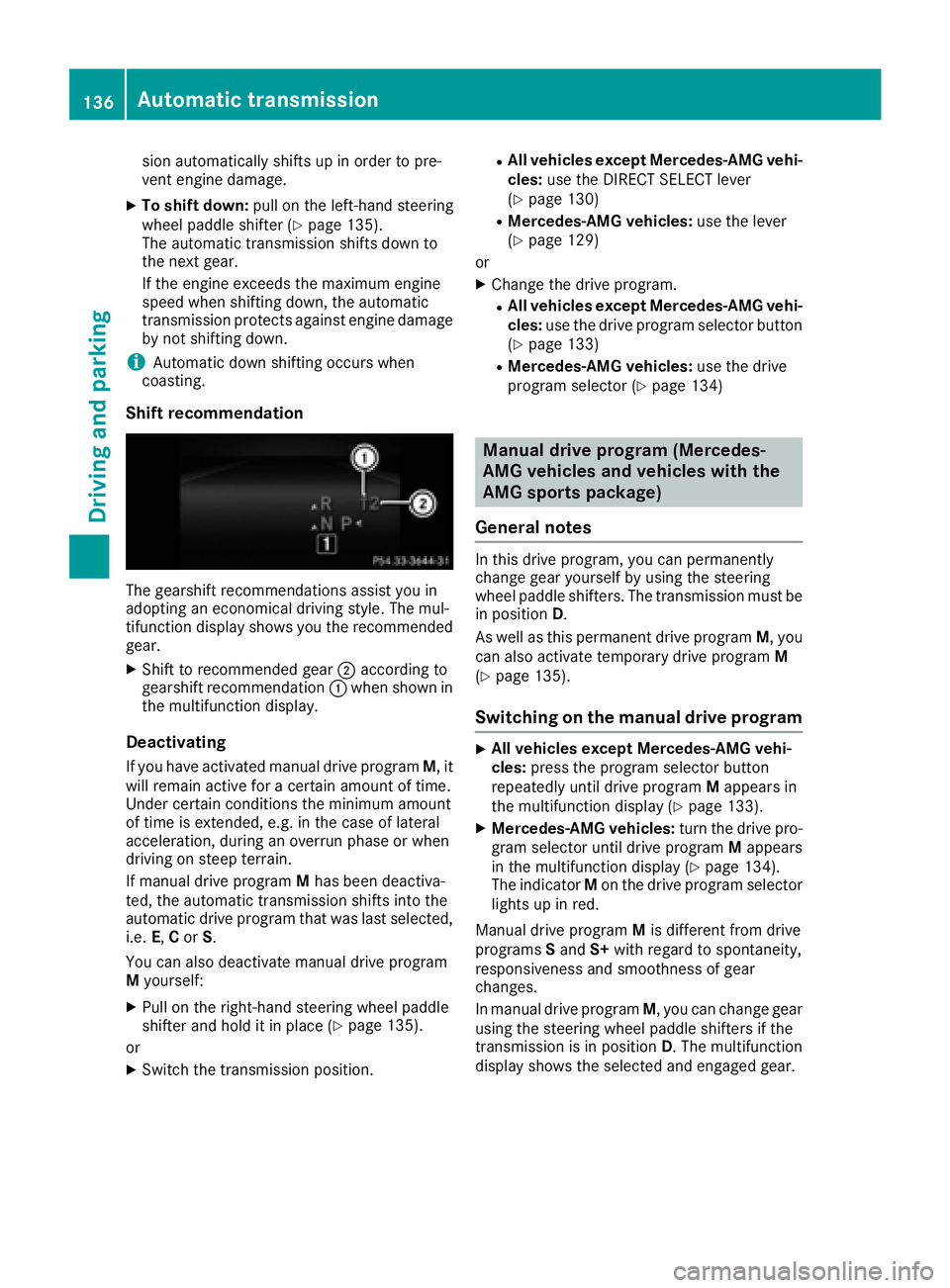
Shift recommendation
The gearshift recommendations assist you in
adopting an economical driving style. The mul-
tifunction display shows you the recommended
gear. X
Shift to recommended gear D according to
gearshift recommendation C when shown in
the multifunction display.
Deactivating If you have activated manual drive program M , it
will remain active for a certain amount of time.
Under certain conditions the minimum amount
of time is extended, e.g. in the case of lateral
acceleration, during an overrun phase or when
driving on steep terrain.
If manual drive program M has been deactiva-
ted, the automatic transmission shifts into the
automatic drive program that was last selected,
i.e. E , C or S .
You can also deactivate manual drive program
M yourself: X
Pull on the right-hand steering wheel paddle
shifter and hold it in place ( Y
page 135).
or X
Switch the transmission position. R
All vehicles except Mercedes-AMG vehi-
cles: use the DIRECT SELECT lever
( Y
page 130) R
Mercedes-AMG vehicles: use the lever
( Y
page 129)
or X
Change the drive program. R
All vehicles except Mercedes-AMG vehi-
cles: use the drive program selector button
( Y
page 133) R
Mercedes-AMG vehicles: use the drive
program selector ( Y
page 134)
Manual drive program (Mercedes-
AMG vehicles and vehicles with the
AMG sports package)
General notes In this drive program, you can permanently
change gear yourself by using the steering
wheel paddle shifters. The transmission must be
in position D .
As well as this permanent drive program M , you
can also activate temporary drive program M
( Y
page 135).
Switching on the manual drive program X
All vehicles except Mercedes-AMG vehi-
cles: press the program selector button
repeatedly until drive program M appears in
the multifunction display ( Y
page 133).X
Mercedes-AMG vehicles: turn the drive pro-
gram selector until drive program M appears
in the multifunction display ( Y
page 134).
The indicator M on the drive program selector
lights up in red.
Manual drive program M is different from drive
programs S and S+ with regard to spontaneity,
responsiveness and smoothness of gear
changes.
In manual drive program M , you can change gear
using the steering wheel paddle shifters if the
transmission is in position D . The multifunction
display shows the selected and engaged gear.136
Automatic transmission
Driving and parking