belt MERCEDES-BENZ CLS 2017 Owner's Guide
[x] Cancel search | Manufacturer: MERCEDES-BENZ, Model Year: 2017, Model line: CLS, Model: MERCEDES-BENZ CLS 2017Pages: 334, PDF Size: 10.18 MB
Page 103 of 334
Mirrors
Exterior mirrors
Adjusting the exterior mirrors
G WARNING
You could lose control of your vehicle if you do
the following while driving: R
adjust the driver's seat, head restraint,
steering wheel or mirrors R
fasten the seat belt
There is a risk of an accident.
Adjust the driver's seat, head restraint, steer-
ing wheel and mirror and fasten your seat belt
before starting the engine.
G WARNING
The exterior mirror on the front-passenger
side reduces the size of the image. Visible
objects are actually closer than they appear.
This means that you could misjudge the dis-
tance from road users traveling behind, e.g.
when changing lane. There is a risk of an acci-
dent.
For this reason, always make sure of the
actual distance from the road users traveling
behind by glancing over your shoulder.
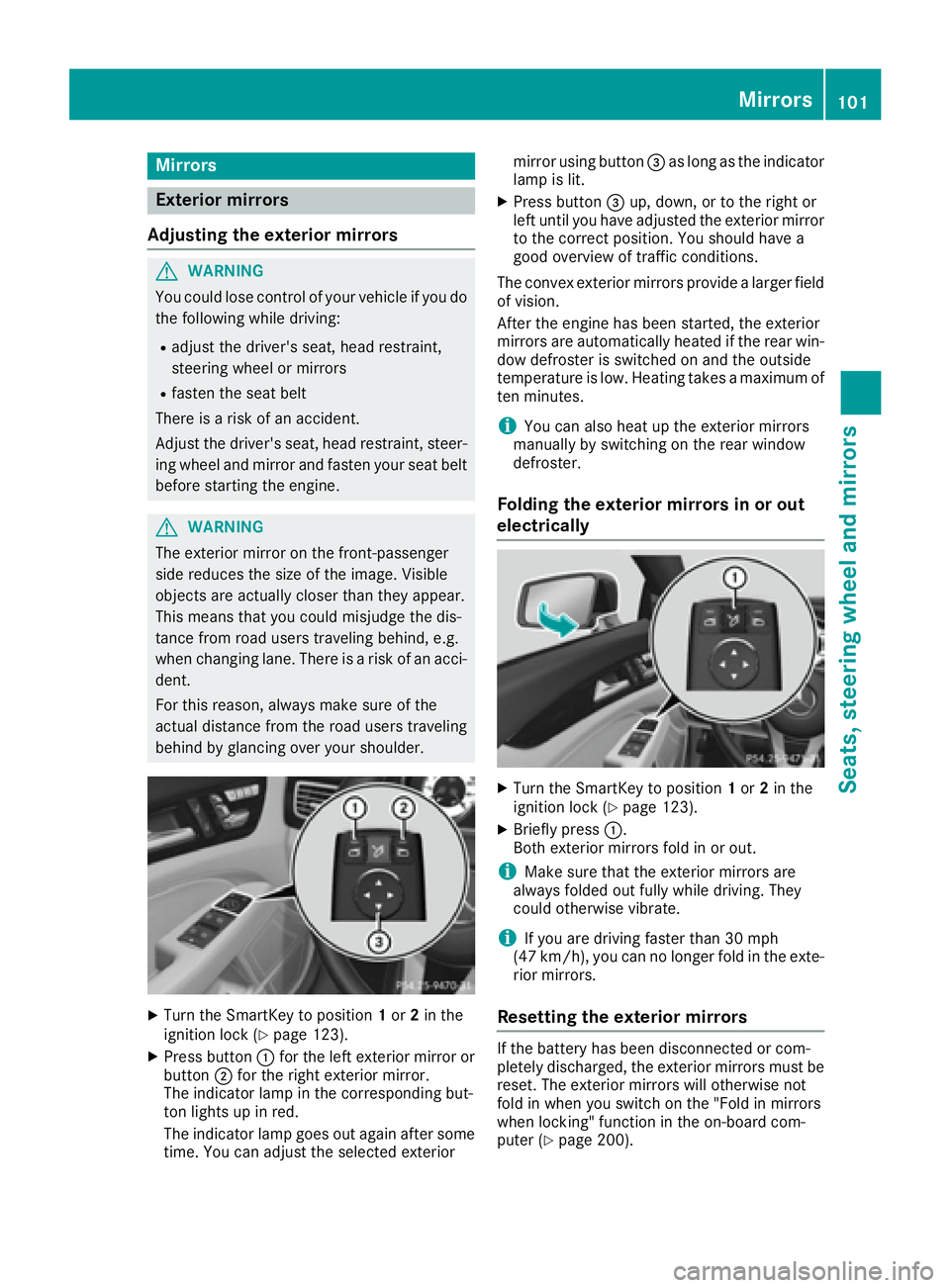
X
Turn the SmartKey to position 1 or 2 in the
ignition lock ( Y
page 123).X
Press button C for the left exterior mirror or
button D for the right exterior mirror.
The indicator lamp in the corresponding but-
ton lights up in red.
The indicator lamp goes out again after some
time. You can adjust the selected exterior mirror using button
Page 129 of 334
pedal, the engine starts automatically and the
braking effect of the HOLD function is deac-
tivated.
Automatic engine switch-off can take place a
maximum of four times in a row (initial stop, then
three subsequent stops).
Mercedes-AMG vehicles: the number of con-
secutive automatic engine switch-offs is unlimi-
ted.
All other models: automatic engine switch-off
can take place a maximum of four times in a row
(initial switch-off, then three subsequent switch-
offs).
Automatic engine start The engine starts automatically if: R
you switch off the ECO start/stop function by
pressing the ECO button R
in transmission position D or N the brake
pedal is released and the HOLD function is not
active R
you depress the accelerator pedal R
you engage reverse gear RR
you move the transmission out of position PR
you switch to drive program S , S+ or M
(Mercedes-AMG vehicles) R
you unfasten your seat belt or open the driv-
er's door R
the vehicle starts to roll R
the brake system requires this R
the temperature in the vehicle interior devi-
ates from the set range R
the system detects moisture on the wind-
shield when the air-conditioning system is
switched on R
the battery's condition of charge is too low
i Shifting the transmission to position P does
not start the engine. Deactivating or activating the ECO
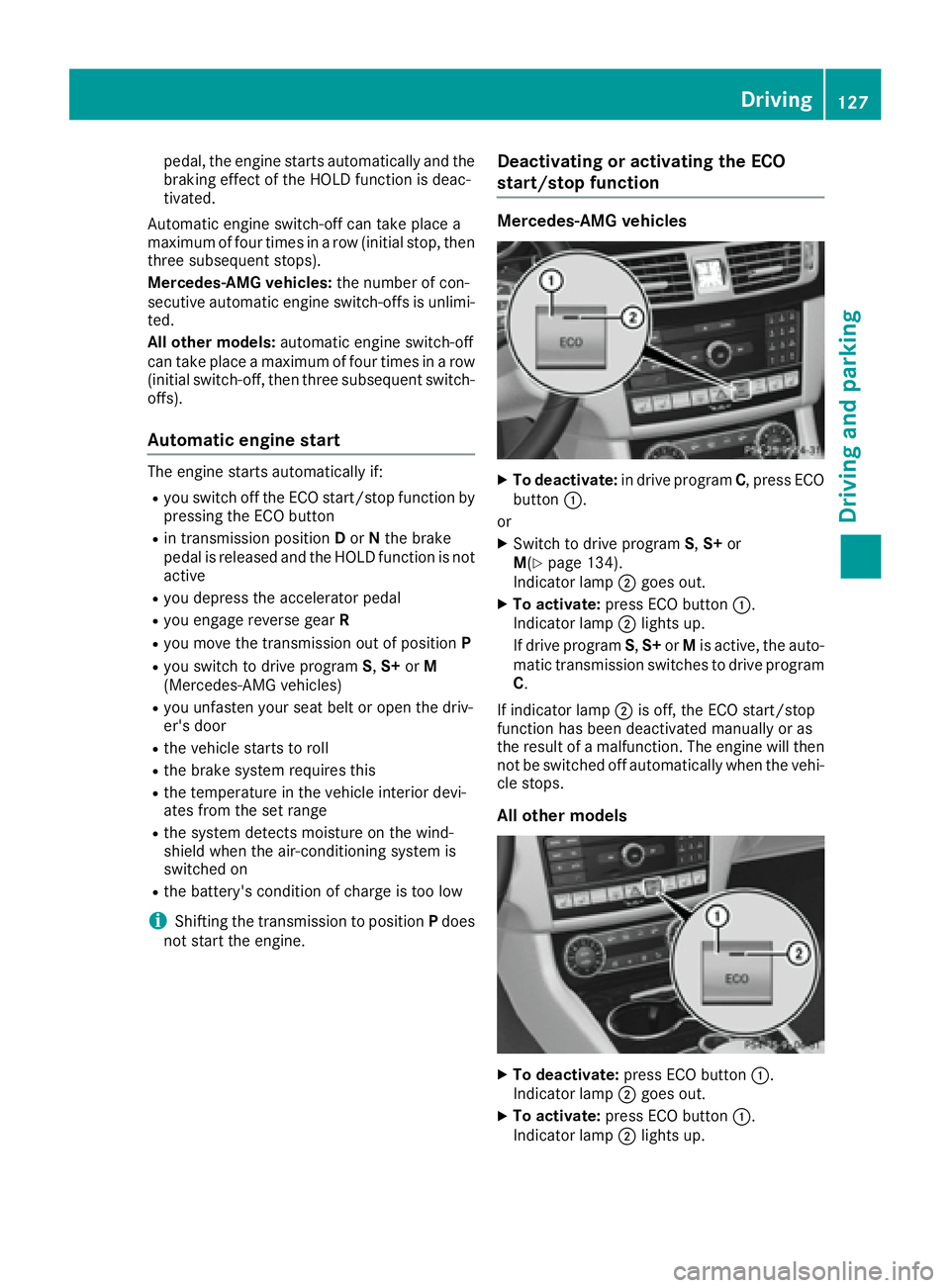
start/stop function Mercedes-AMG vehicles X
To deactivate: in drive program C , press ECO
button C .
or X
Switch to drive program S , S+ or
M ( Y
page 134).
Indicator lamp D goes out.X
To activate: press ECO button C .
Indicator lamp D lights up.
If drive program S , S+ or M is active, the auto-
matic transmission switches to drive program
C .
If indicator lamp D is off, the ECO start/stop
function has been deactivated manually or as
the result of a malfunction. The engine will then
not be switched off automatically when the vehi-
cle stops.
All other models
X
To deactivate: press ECO button C .
Indicator lamp D goes out.X
To activate: press ECO button C .
Indicator lamp D lights up.Driving 127
Driving and parking Z
Page 155 of 334
between your vehicle and the vehicle in front
becomes too small.
i When you change lanes, DISTRONIC PLUS
monitors the left lane on left-hand-drive vehi-
cles or the right lane on right-hand-drive vehi-
cles.
Stopping
G WARNING
When leaving the vehicle, even if it is braked
only by DISTRONIC PLUS, it could roll away if: R
there is a malfunction in the system or in
the voltage supply. R
DISTRONIC PLUS has been deactivated
with the cruise control lever, e.g. by a vehi-
cle occupant or from outside the vehicle. R
the electrical system in the engine com-
partment, the battery or the fuses have
been tampered with. R
the battery is disconnected. R
the accelerator pedal has been depressed,
e.g. by a vehicle occupant.
There is a risk of an accident.
If you wish to exit the vehicle, always turn off
DISTRONIC PLUS and secure the vehicle
against rolling away.
For further information on deactivating
DISTRONIC PLUS ( Y
page 155).
If DISTRONIC PLUS detects that the vehicle in
front has stopped, it will cause your vehicle to
brake and come to a halt.
Once your vehicle is stationary, it remains sta-
tionary and you do not need to depress the
brake.
Depending on the specified minimum distance,
your vehicle will come to a standstill at a suffi-
cient distance behind the vehicle in front. The
specified minimum distance is set using the
control on the cruise control lever.
When DISTRONIC PLUS is activated, the trans-
mission is shifted automatically to position P if:R
the driver's door is open and the driver's seat
belt is unfastened. R
the engine is switched off, unless it is auto-
matically switched off by the ECO start/stop
function. R
a system malfunction occurs. R
the power supply is not sufficient.
Setting a speed X
Press the cruise control lever up C for a
higher speed or down D for a lower speed.X
To adjust the set speed in1 mphincre-
ments (1 km/hincrements): briefly move
the cruise control lever up C or down D to
the pressure point.
Every time the cruise control lever is pressed
up C or down D , the last speed stored is
increased or reduced. X
To adjust the set speed in5 mphincre-
ments (10 km/hincrements): briefly move
the cruise control lever up C or down D
beyond the pressure point.
Every time the cruise control lever is pressed
up C or down D , the last speed stored is
increased or reduced.
i If you accelerate to overtake, DISTRONIC
PLUS adjusts the vehicle's speed to the last
speed stored after you have finished overtak-
ing.
Setting a specified minimum distance You can set the specified minimum distance for
DISTRONIC PLUS by varying the time span
between one and two seconds. With this func-
tion, you can set the minimum distance that
DISTRONIC PLUS keeps to the vehicle in front,
dependent on vehicle speed. You can see this
distance in the multifunction display
( Y
page 154).
i Make sure that you maintain a sufficient
distance to the vehicle in front and comply
with the minimum distance as required by
law. Adjust the distance to the vehicle in front
if necessary.Driving systems 153
Driving and parking Z
Page 160 of 334
Activati on conditionsYou can activat e th e HOLD function if:R
th e vehicl e is stationaryR
th e engin e is runnin g or if it has been auto -
matically switched off by th e ECO start/sto p
function R
th e driver's door is closed or your seat belt is
fastene dR
th e parking brak e is release dR
th e transmission is in position D , R or NR
DISTRONI C PLU S is deactivated
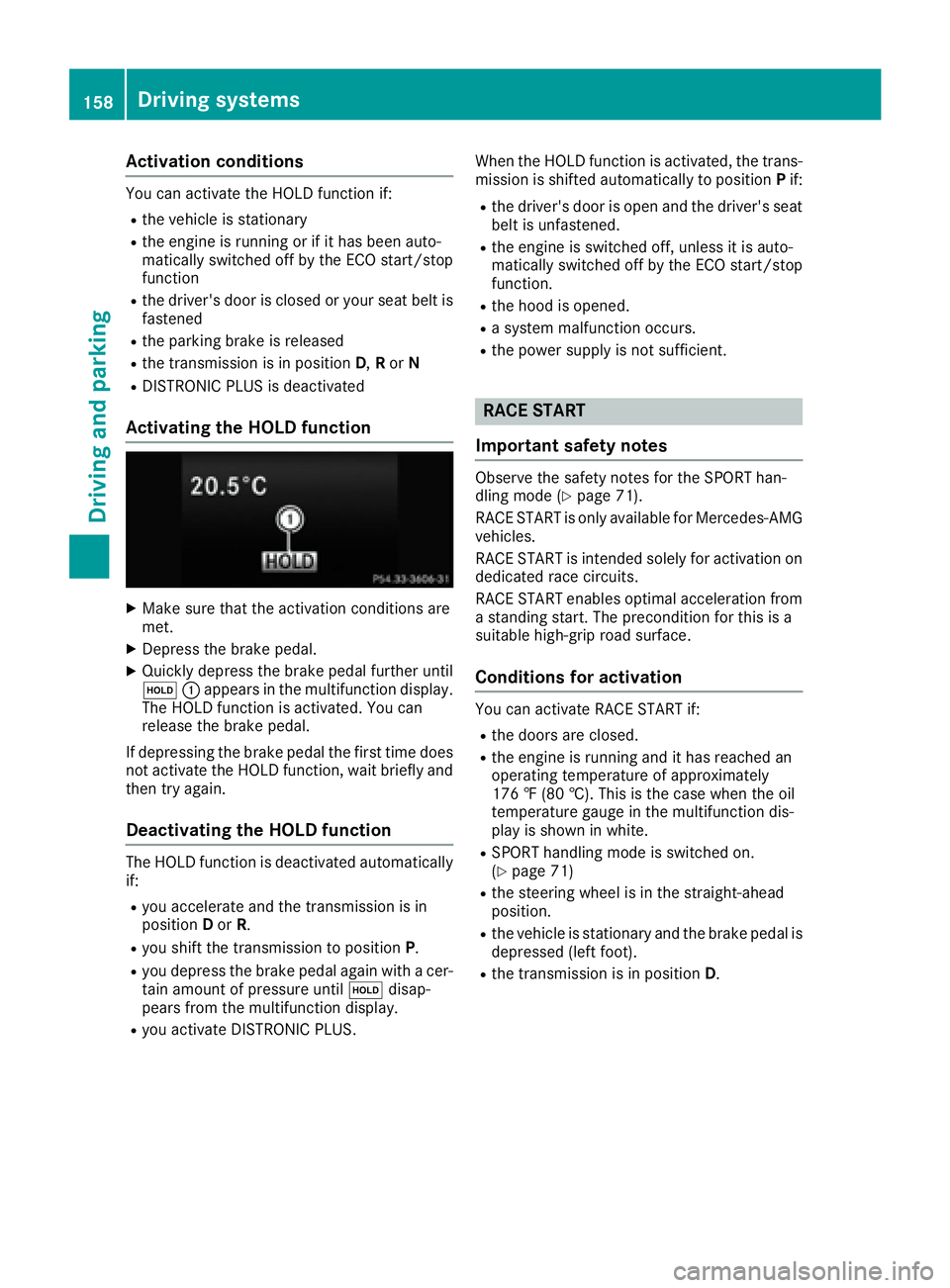
Activating the HOLD function X
Mak e sur e that th e activation condition s are
met .X
Depress th e brak e pedal .X
Quickl y depress th e brak e pedal further until
Page 179 of 334
Exiting 360° camera display mode The 360° camera display is stopped: R
when you select transmission position P , orR
when you are driving at moderate speeds
The previous display appears in the multimedia
system display. You can also switch the display
by selecting the 9 symbol in the display and
pressing 7 the controller to confirm.
ATTENTION ASSIST
General notes ATTENTION ASSIST helps you during long,
monotonous journeys, such as on highways. It is
active in the 37 mph (60 km/ h) to 125 mph
(200 km/h) range. If ATTENTION ASSIST
detects typical indicators of fatigue or increas-
ing lapses in concentration on the part of the
driver, it suggests taking a break.
Important safety notes ATTENTION ASSIST is only an aid. It might not
always recognize fatigue or increasing inatten-
tiveness in time or fail to recognize them at all.
The system is not a substitute for a well-rested
and attentive driver.
The functionality of ATTENTION ASSIST is
restricted and warnings may be delayed or not
occur at all: R
if the length of the journey is less than approx-
imately 30 minutes R
if the road condition is poor, e.g. if the surface
is uneven or if there are potholes R
if there is a strong side wind R
if you have adopted a sporty driving style with
high cornering speeds or high rates of accel-
eration R
if you are predominantly driving at a speed
below 37 mph (60 km/h) or above 124 mph
(200 km/h) R
if you are driving with the DISTRONIC PLUS
Steering Assist activated R
if the time has been set incorrectly R
in active driving situations, such as when you
change lanes or change your speed The attention level evaluation is deleted and
restarts when the journey is continued, if: R
you switch off the engine R
you take off your seat belt and open the driv-
er's door, e.g. for a change of drivers or to
take a break
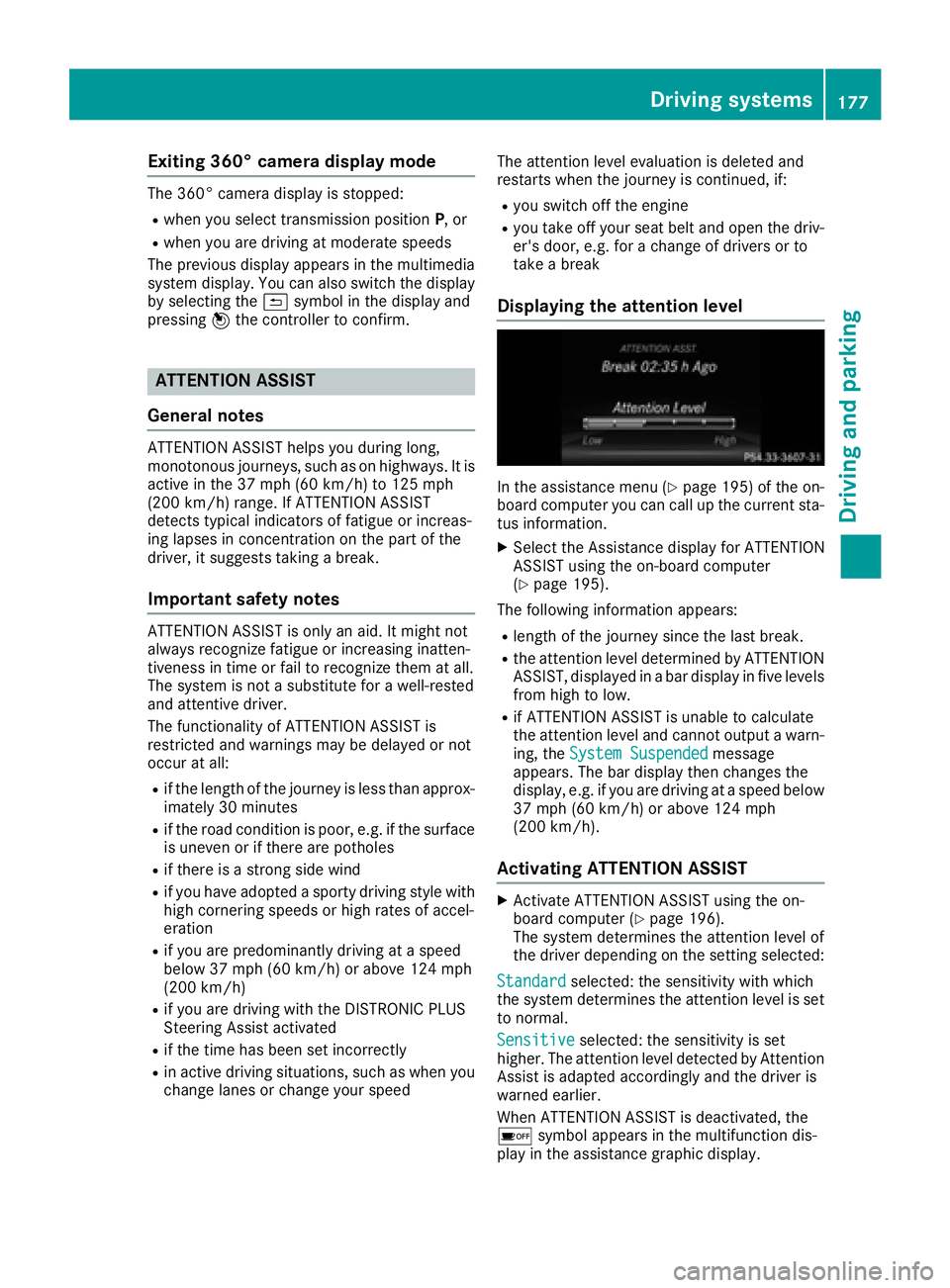
Displaying the attention level
In the assistance menu ( Y
page 195) of the on-
board computer you can call up the current sta-
tus information. X
Select the Assistance display for ATTENTION
ASSIST using the on-board computer
( Y
page 195).
The following information appears: R
length of the journey since the last break. R
the attention level determined by ATTENTION
ASSIST, displayed in a bar display in five levels
from high to low. R
if ATTENTION ASSIST is unable to calculate
the attention level and cannot output a warn-
ing, the System Suspended message
appears. The bar display then changes the
display, e.g. if you are driving at a speed below
37 mph (60 km/h) or above 124 mph
(200 km/h).
Activating ATTENTION ASSIST X
Activate ATTENTION ASSIST using the on-
board computer ( Y
page 196).
The system determines the attention level of
the driver depending on the setting selected:
Standard selected: the sensitivity with which
the system determines the attention level is set
to normal.
Sensitive selected: the sensitivity is set
higher. The attention level detected by Attention
Assist is adapted accordingly and the driver is
warned earlier.
When ATTENTION ASSIST is deactivated, the
Page 202 of 334
any body parts in the sweep of the steering
wheel.
If somebody becomes trapped: R
press one of the memory function position
buttons, or R
move the switch for steering wheel adjust-
ment in the opposite direction to that in
which the steering wheel is moving.
The adjustment process is stopped. X
Press the Y or e button on the steering
wheel to select the Sett. menu.X
Press the d or c button to select the
Convenience submenu.X
Press v to confirm.X
Using d or c , select the Easy Entry/
Exit function.
If the Easy Entry/Exit function is activated,
the vehicle steering wheel is displayed in
orange in the multifunction display. X
Press the v button to save the setting.
Further information on the EASY-ENTRY/EXIT
feature ( Y
page 100).
Switching the seat belt adjustment on/off X
Press the Y or e button on the steering
wheel to select the Sett. menu.X
Press the d or c button to select the
Convenience submenu.X
Press v to confirm.X
Press the d or c button to select the
Belt Adjustment function.
When the Belt Adjustment function is acti-
vated, the seat belt is displayed in orange in
the multifunction display. X
Press the v button to save the setting.
For further information on belt adjustment, see
( Y
page 45).
Switching the fold-in mirrors when lock-
ing feature on/off
This function is only available when the vehicle is
equipped with the electrical fold-in function.
When you switch on the Auto. Mirror Fold‐
ing function, the exterior mirrors are folded in
when the vehicle is locked. If you unlock the
vehicle and then open the driver's or front-
passenger door, the exterior mirrors fold out
again. X
Press the Y or e button on the steering
wheel to select the Settings menu.X
Press the d or c button to select the
Convenience submenu. X
Press v to confirm. X
Press the d or c button to select the
Auto. Mirror Folding function.
If the Auto. Mirror Folding function is
switched on, the multifunction display shows
the vehicle's exterior mirror in orange. X
Press the v button to save the setting.
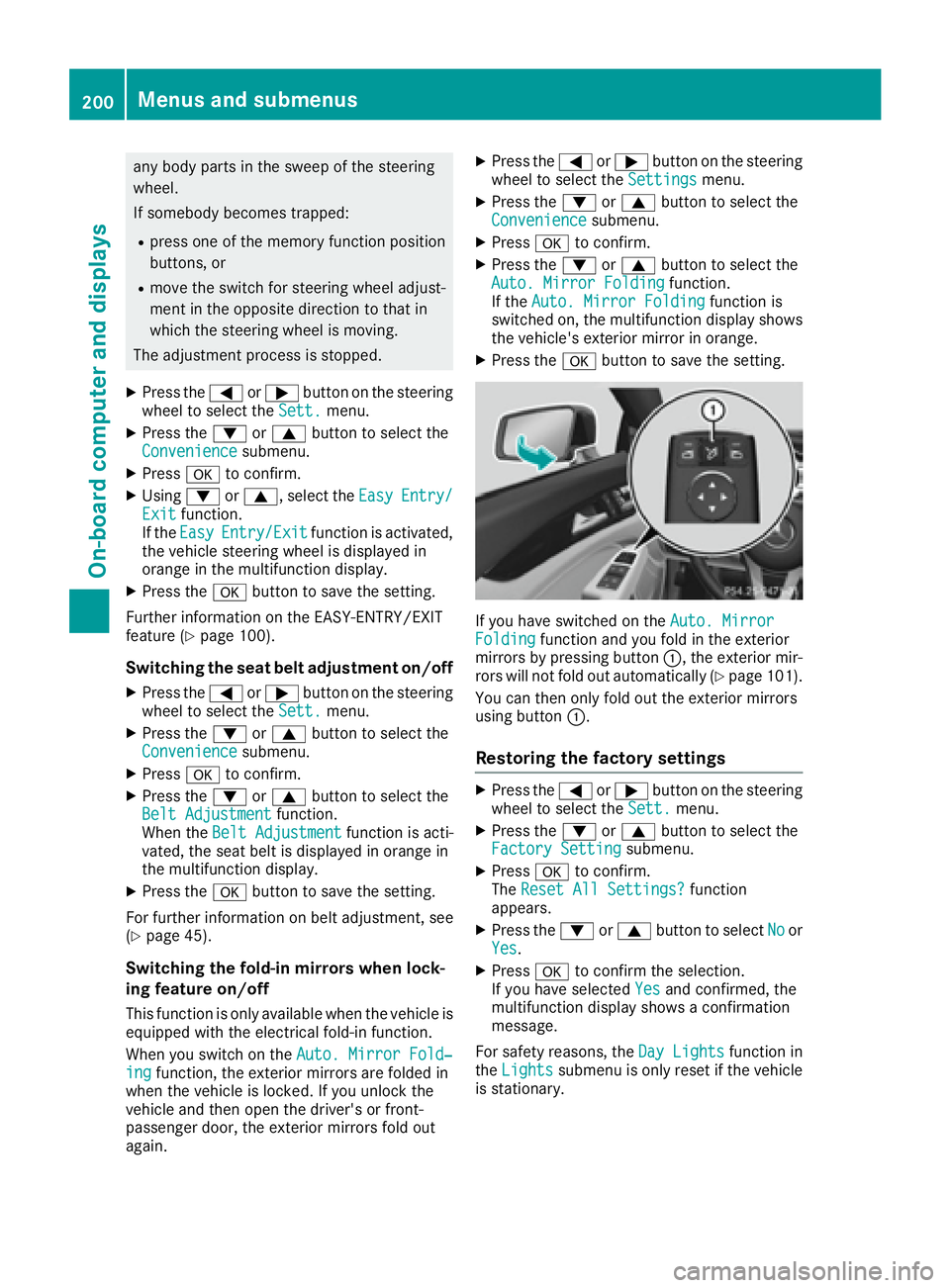
If you have switched on the Auto. Mirror
Folding function and you fold in the exterior
mirrors by pressing button C , the exterior mir-
rors will not fold out automatically ( Y
page 101).
You can then only fold out the exterior mirrors
using button C .
Restoring the factory settings X
Press the Y or e button on the steering
wheel to select the Sett. menu.X
Press the d or c button to select the
Factory Setting submenu.X
Press v to confirm.
The Reset All Settings? function
appears. X
Press the d or c button to select No or
Yes . X
Press v to confirm the selection.
If you have selected Yes and confirmed, the
multifunction display shows a confirmation
message.
For safety reasons, the Day Lights function in
the Lights submenu is only reset if the vehicle
is stationary.200
Menus and submenus
On-board computer and displays
Page 216 of 334
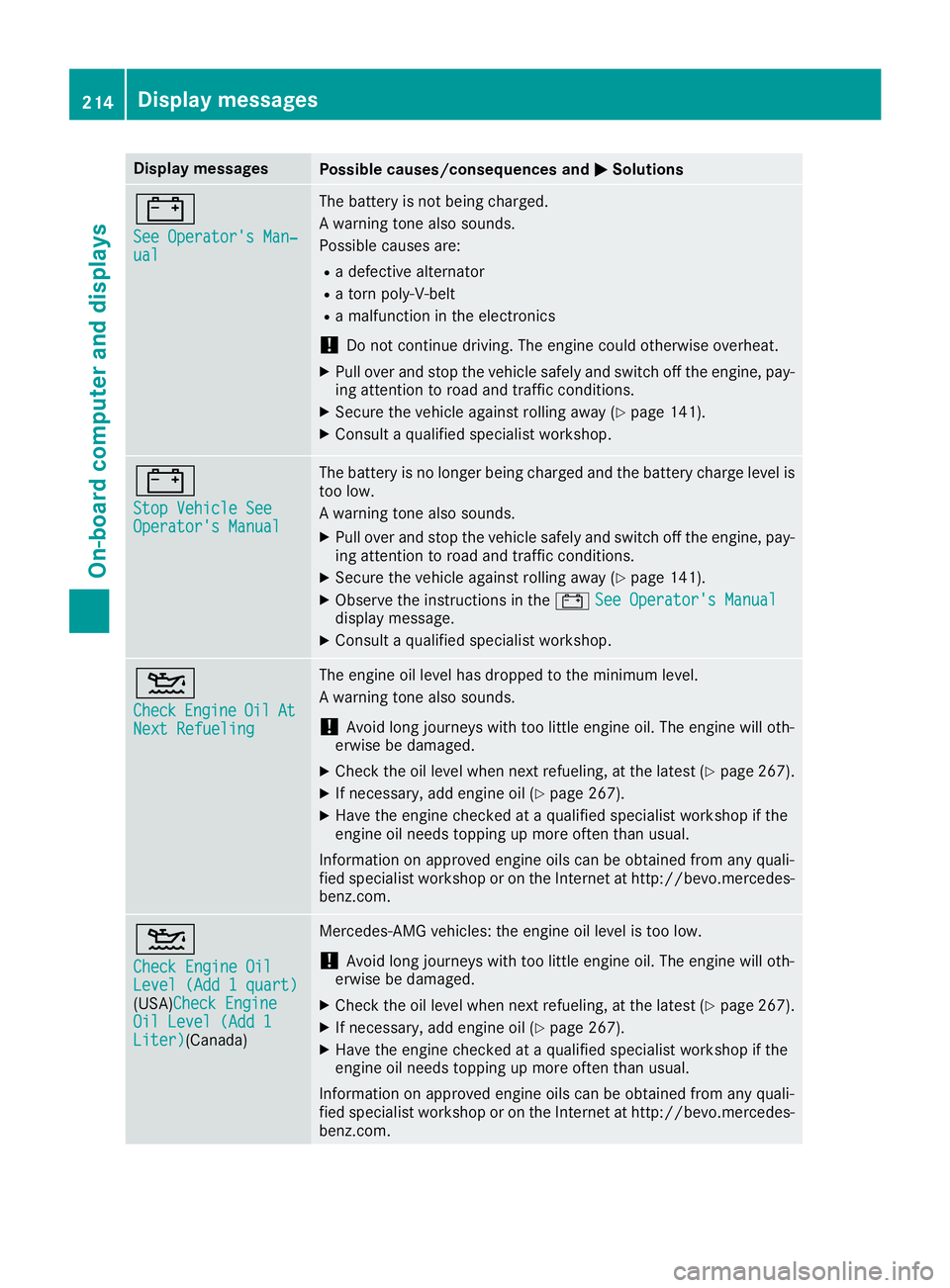
Display messages
Possible causes/consequences and P Solutions
= See Operator' s Man ‐
ual The battery is no t bein g charged.
A warning tone also sounds.
Possibl e causes are: R
a defective alternato rR
a torn poly-V-belt R
a malfunction in th e electronics
! Do no t continu e driving. The engin e could otherwise overheat.X
Pull ove r and stop th e vehicl e safely and switch off th e engine, pay-
ing attention to roa d and traffic conditions.X
Secur e th e vehicl e against rollin g away ( Y
page 141).X
Consult a qualified specialist workshop .
= Sto p Vehicl e See
Operator' s Manual The battery is no longer bein g charged and th e battery charg e level is
to o low.
A warning tone also sounds. X
Pull ove r and stop th e vehicl e safely and switch off th e engine, pay-
ing attention to roa d and traffic conditions.X
Secur e th e vehicl e against rollin g away ( Y
page 141).X
Observ e th e instruction s in th e = See Operator' s Manual
display message .X
Consult a qualified specialist workshop .
Page 219 of 334
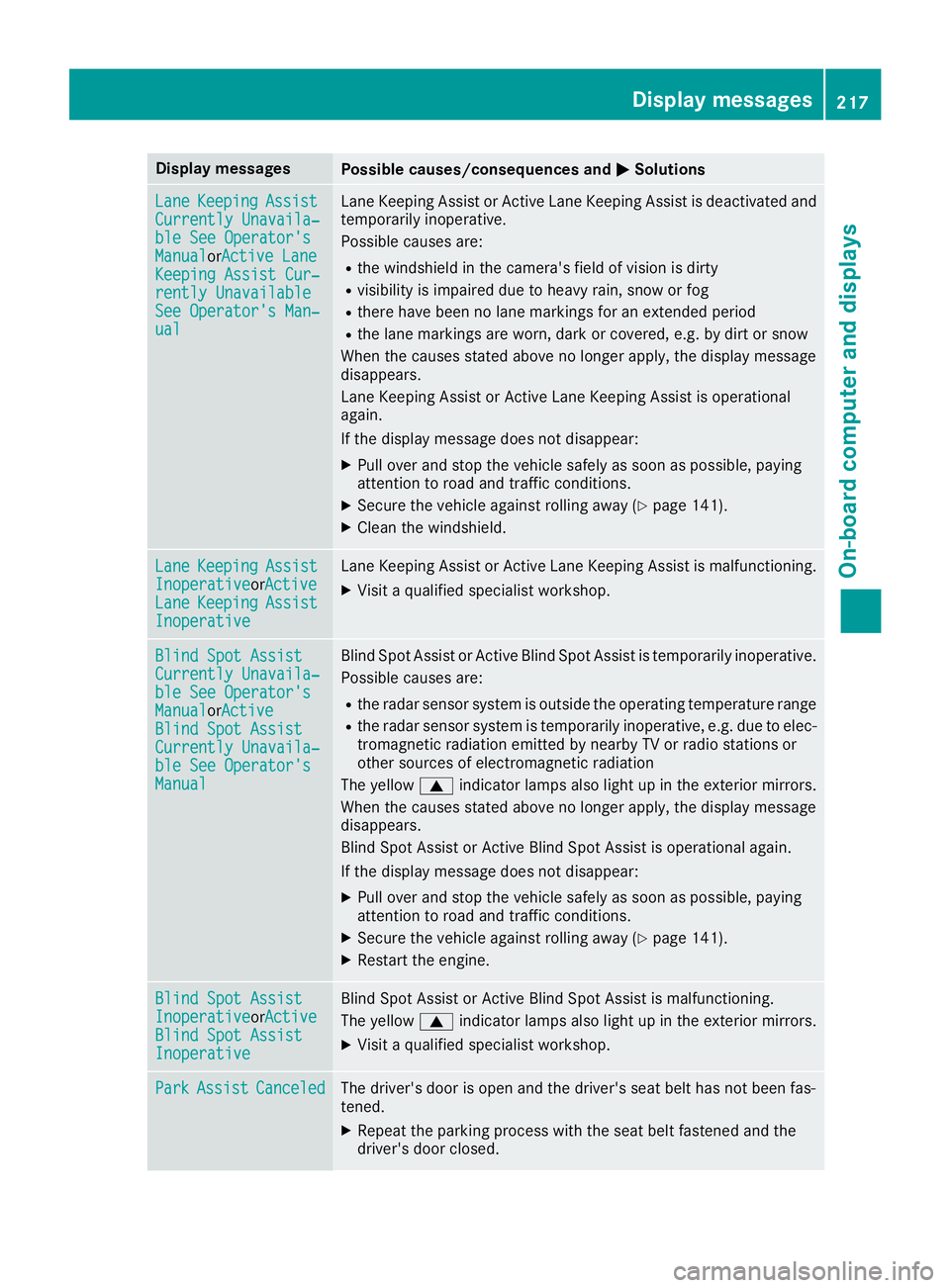
Display messages
Possible causes/consequences and P Solutions
Lan e Keepin g Assist
Currently Unavaila‐
ble See Operator' s
Manual or A ctive Lan e
Keepin g Assist Cur ‐
rently Unavailable
See Operator' s Man ‐
ual Lan e Keepin g Assis t or Active Lan e Keepin g Assis t is deactivated and
temporarily inoperative.
Possibl e causes are: R
th e windshield in th e camera' s field of vision is dirtyR
visibilit y is impaire d due to heav y rain , snow or fogR
there hav e been no lan e marking s for an extended periodR
th e lan e marking s are worn, dark or covered, e.g. by dir t or snow
Whe n th e causes state d abov e no longer apply, th e display message
disappears.
Lan e Keepin g Assis t or Active Lan e Keepin g Assis t is operational
again .
If th e display message does no t disappear :X
Pull ove r and stop th e vehicl e safely as soo n as possible, payin g
attention to roa d and traffic conditions.X
Secur e th e vehicl e against rollin g away ( Y
page 141).X
Clean th e windshield.
Lan e Keepin g Assist
Inoperative or A ctive
Lan e Keepin g Assist
Inoperative Lan e Keepin g Assis t or Active Lan e Keepin g Assis t is malfunctioning .X
Visit a qualified specialist workshop .
Blind Spo t Assist
Currently Unavaila‐
ble See Operator' s
Manual or A ctive
Blind Spo t Assist
Currently Unavaila‐
ble See Operator' s
Manual Blind Spot Assis t or Active Blind Spot Assis t is temporarily inoperative.
Possibl e causes are: R
th e radar sensor system is outside th e operating temperature rangeR
th e radar sensor system is temporarily inoperative, e.g. due to elec -
tromagneti c radiation emitted by nearby TV or radi o station s or
other source s of electromagneti c radiation
The yellow c indicator lamp s also ligh t up in th e exterio r mirrors.
Whe n th e causes state d abov e no longer apply, th e display message
disappears.
Blind Spot Assis t or Active Blind Spot Assis t is operational again .
If th e display message does no t disappear :X
Pull ove r and stop th e vehicl e safely as soo n as possible, payin g
attention to roa d and traffic conditions.X
Secur e th e vehicl e against rollin g away ( Y
page 141).X
Restart th e engine.
Blind Spo t Assist
Inoperative or A ctive
Blind Spo t Assist
Inoperative Blind Spot Assis t or Active Blind Spot Assis t is malfunctioning .
The yellow c indicator lamp s also ligh t up in th e exterio r mirrors.X
Visit a qualified specialist workshop .
Par k Assist Canceled The driver's door is open and th e driver's seat belt has no t been fas -
tened. X
Repeat th e parking process wit h th e seat belt fastene d and th e
driver's door closed .Display messages 21 7
On-board computer and displays Z
Page 229 of 334
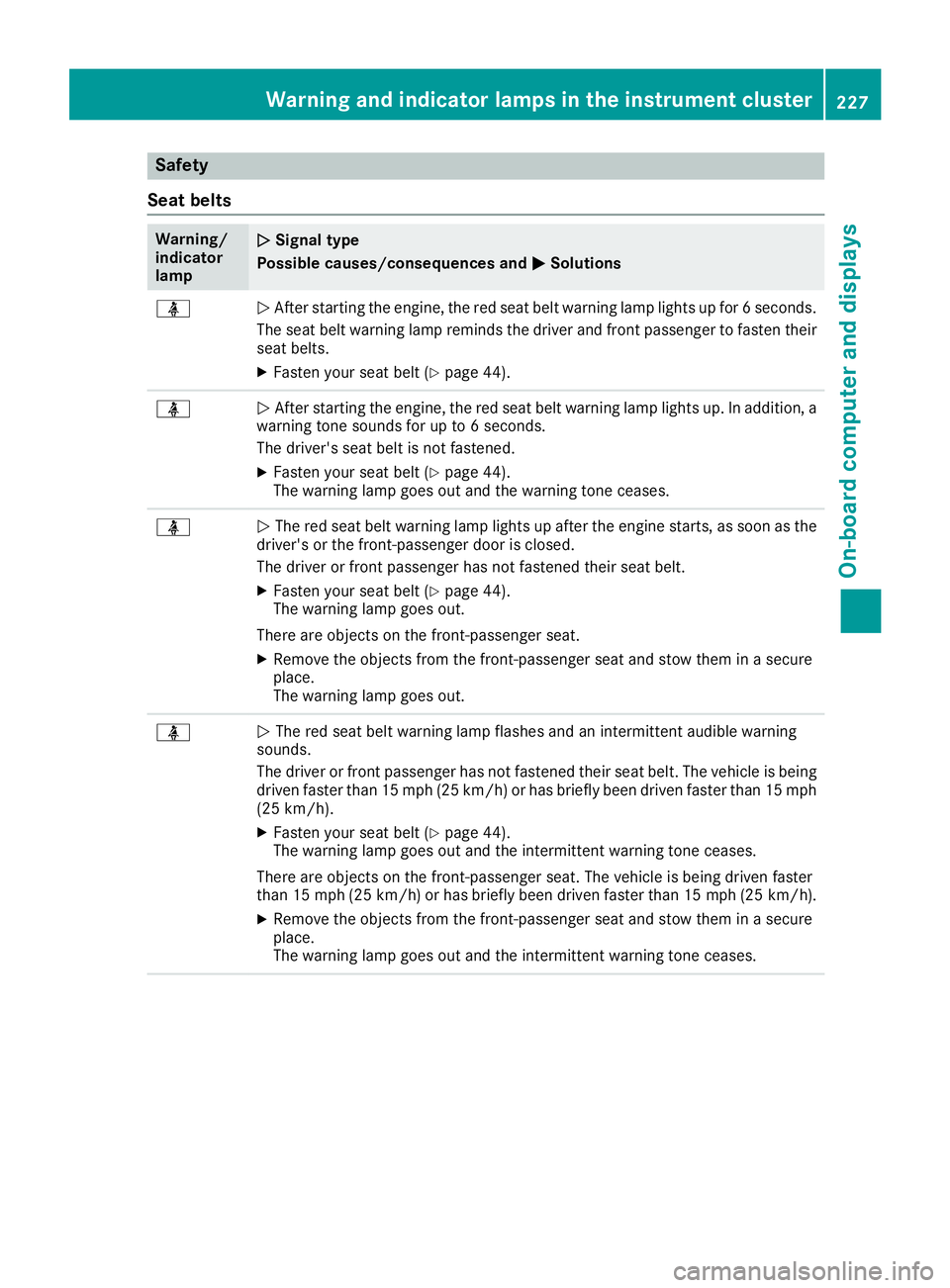
Safety
Seat belts Warning/
indicator
lamp Q Signal type
Possible causes/consequences and P Solutions
Page 247 of 334
X
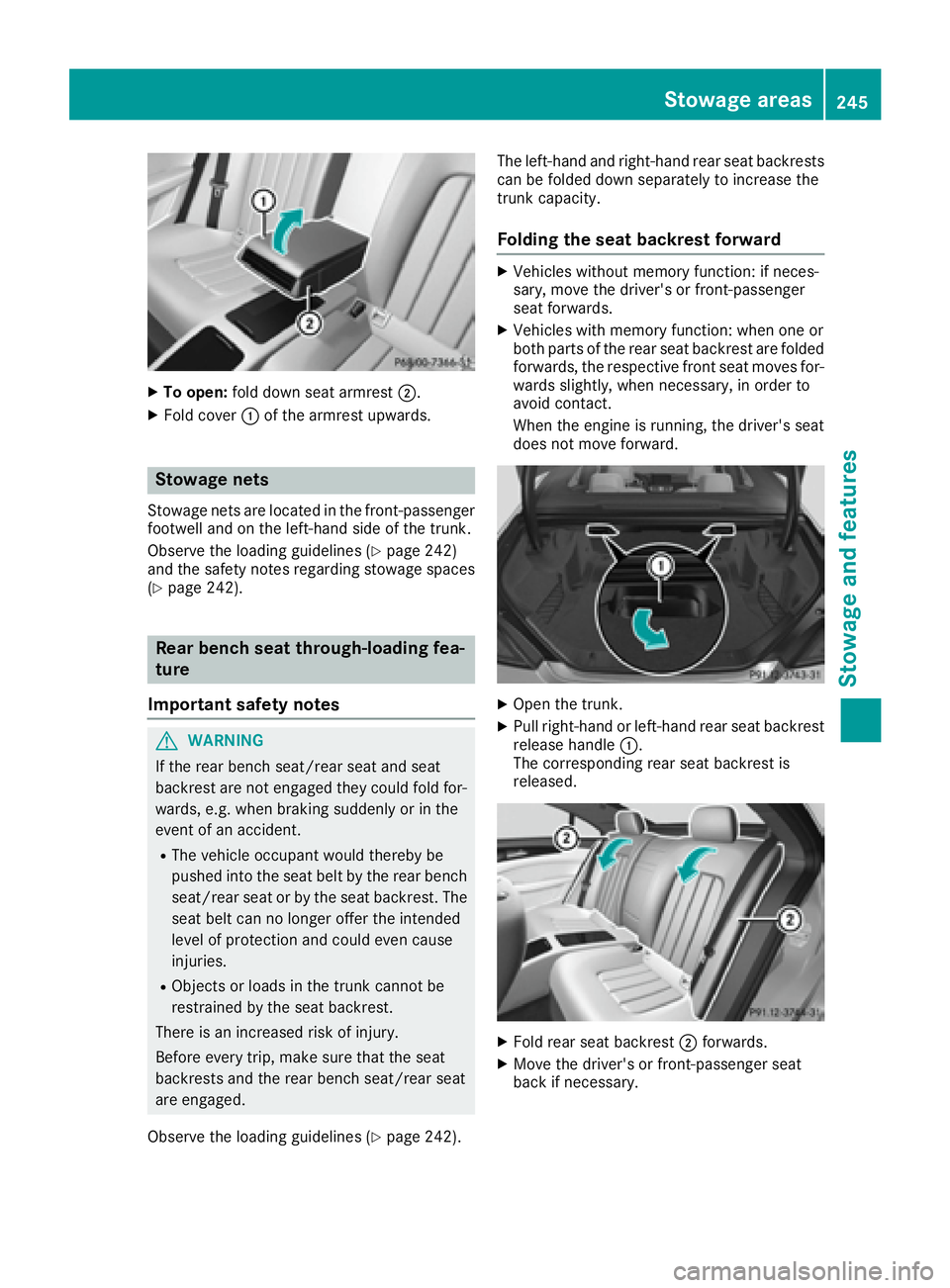
To open: fold down seat armrest D .X
Fold cover C of the armrest upwards.
Stowage nets Stowage nets are located in the front-passenger
footwell and on the left-hand side of the trunk.
Observe the loading guidelines ( Y
page 242)
and the safety notes regarding stowage spaces
( Y
page 242).
Rear bench seat through-loading fea-
ture
Important safety notes
G WARNING
If the rear bench seat/rear seat and seat
backrest are not engaged they could fold for-
wards, e.g. when braking suddenly or in the
event of an accident. R
The vehicle occupant would thereby be
pushed into the seat belt by the rear bench
seat/rear seat or by the seat backrest. The
seat belt can no longer offer the intended
level of protection and could even cause
injuries. R
Objects or loads in the trunk cannot be
restrained by the seat backrest.
There is an increased risk of injury.
Before every trip, make sure that the seat
backrests and the rear bench seat/rear seat
are engaged.
Observe the loading guidelines ( Y
page 242). The left-hand and right-hand rear seat backrests
can be folded down separately to increase the
trunk capacity.
Folding the seat backrest forward X
Vehicles without memory function: if neces-
sary, move the driver's or front-passenger
seat forwards. X
Vehicles with memory function: when one or
both parts of the rear seat backrest are folded
forwards, the respective front seat moves for-
wards slightly, when necessary, in order to
avoid contact.
When the engine is running, the driver's seat
does not move forward.
X
Open the trunk. X
Pull right-hand or left-hand rear seat backrest
release handle C .
The corresponding rear seat backrest is
released.
X
Fold rear seat backrest D forwards.X
Move the driver's or front-passenger seat
back if necessary.Stowage areas 245
Sto wag e an d features Z