USB MERCEDES-BENZ CLS 2017 Owners Manual
[x] Cancel search | Manufacturer: MERCEDES-BENZ, Model Year: 2017, Model line: CLS, Model: MERCEDES-BENZ CLS 2017Pages: 334, PDF Size: 10.18 MB
Page 9 of 334
Washing by hand ........................... 271
Wheels .......................................... .2 73
Windows ........................................ 273
Wiper blades .................................. 273
Wooden trim .................................. 275
Cargo tie down rings ......................... 246
CD
see also Digital Operator's Man-
ual ................................................. .2 36
CD player (on-board computer) ....... .1 93
Center console
Lower section .................................. 37
Lower section (AMG vehicles) .......... 38
Upper section .................................. 36
Central locking
Automatic locking (on-board com-
puter) ............................................. 199
Locking/unlocking (SmartKey) ....... .7 6
Child
Restraint system .............................. 59
Child seat
Forward-facing restraint system ...... 62
LATCH-type (ISOFIX) child seat
anchors ............................................ 60
On the front-passenger seat ............ 61
Rearward-facing restraint system .... 62
Top Tether ...................................... .6 0
Child-proof locks
Important safety notes .................... 62
Rear doors ...................................... .6 3
Children
Special seat belt retractor .............. .5 8
Cigarette lighter ................................ 252
Cleaning
Mirror turn signal .......................... .2 74
Climate control
Automatic climate control (3-
zone) .............................................. 114
C ontrol
ling automatically .............. .1 17
Cooling with air dehumidification .. 116
Defrosting the windows ................. 119
Defrosting the windshield .............. 118
Dual-zone automatic climate con-
trol ................................................. 112
General notes ................................ 112
Indicator lamp ................................ 117
Information about using auto-
matic climate control ..................... 115 Maximum cooling .......................... 119
Overview of systems ..................... .1 12
Problem with the rear window
defroster ........................................ 120
Problems with cooling with air
dehumidification ............................ 117
Rear control panel ......................... 114
Refrigerant ..................................... 327
Refrigerant filling capacity ............. 328
Setting the air distribution ............. 118
Setting the air vents ..................... .1 21
Setting the airflow ......................... 118
Setting the climate mode (AIR
FLOW) ............................................ 117
Setting the temperature ................ 117
Setting the temperature with 3-
zone automatic climate control ..... 117
Setting the temperature with dual-
zone automatic climate control ..... 117
Switching air-recirculation mode
on/off ............................................ 120
Switching on/off ........................... 116
Switching residual heat on/off ...... 120
Switching the rear window
defroster on/off ............................ 119
Switching the ZONE function on/
off ................................................. .1 18
Cockpit
Overview .......................................... 33
see Instrument cluster
Collapsible spare wheel
Inflating ......................................... 319
see Emergency spare wheel
COLLISION PREVENTION ASSIST
PLUS
Activating/deactivating ................. 196
Display message ............................ 206
Operation/notes .............. ................ 67
C OMA ND
Switching on/off ........................... 237
COMAND display
Cleaning ......................................... 274
Combination switch .......................... 106
Connecting a USB device
see also Digital Operator's Man-
ual ................................................. .2 36
Consumption statistics (on-board
computer) .......................................... 191 Index 7
Page 16 of 334
Search & Send ............................... 258
Self-test ......................................... 254
Speed alert .................................... 260
System .......................................... 254
Triggering the vehicle alarm ........... 261
Vehicle remote unlocking .............. 259
Mechanical key
Function/notes ................................ 78
General notes .................................. 78
Inserting .......................................... 78
Locking vehicle ................................ 83
Removing ......................................... 78
Unlocking the driver's door .............. 83
Media Interface
USB port in the armrest of the
center console ............................... 244
see Digital Operator's Manual
Memory card (audio) ......................... 193
Memory function ............................... 103
Mercedes-Benz Intelligent Drive
360°camera .................................. 173
Active Blind Spot Assist ................. 182
Active Lane Keeping Assist ............ 184
Active Parking Assist ..................... 165
ATTENTION ASSIST ........................ 177
Blind Spot Assist ............................ 179
Cruise control ................................ 148
DISTRONIC PLUS ........................... 149
DISTRONIC PLUS with Steering
Assist and Stop&Go Pilot ............... 155
General notes ................................ 147
Lane Keeping Assist ...................... 181
PARKTRONIC ................................. 163
PRE-SAFE ®
(anticipatory occu-
pant protection) ............................... 56
PRE-SAFE ®
PLUS (anticipatory
occupant protection PLUS) .............. 57
Rear view camera .......................... 169
Traffic Sign Assist .......................... 178
Message memory (on-board com-
puter) .................................................. 203
Messages
see Display messages
Mirrors
see Exterior mirrors
see Vanity mirror (in the sun visor) Mobile phone
Connecting (Bluetooth ®
inter-
face) .............................................. 239
Connecting another mobile
phone ............................................ 241
Frequencies ................................... 321
Installation ..................................... 321
Menu (on-board computer) ............ 194
Transmission output (maximum) .... 321
Modifying the programming
(SmartKey) ........................................... 77
MOExtended tires .............................. 278
Mo u nting wheels
Lowering the vehicle ...................... 316
Mounting a new wheel ................... 315
Preparing the vehicle ..................... 313
Raising the vehicle ......................... 313
Removing a wheel .......................... 315
Securing the vehicle against roll-
ing away ........................................ 313
MP3
Operation ....................................... 193
see also Digital Operator's Man-
ual .................................................. 236
Multicontour seat
Adjusting (on the seat) ..................... 96
Multifunction display
Function/notes ............................. 190
Permanent display ......................... 197
Multifunction steering wheel
Operating the on-board compute r. .1 89
Overview .......................................... 35
Multimedia system
see Separate operating instructions
Music files
see also Digital Operator's Man-
ual ................................................. .2 36
N
Navigation
Menu (on-board computer) ............ 192
see also Digital Operator's Man-
ual ................................................. .2 36
NECK-PRO head restraints
Operation ......................................... 55
Resetting triggered .......................... 5614
Index
Page 24 of 334
USB devices
Connecting to the Media Inter-
face .............................................. .2 41
VVanity mirror (in the sun visor) ....... .2 51
Vehicle
Correct use ...................................... 29
Data acquisition ............................... 30
Display message ............................ 223
Equipment ....................................... 26
Individual settings .......................... 197
Limited Warranty ............................ .3 0
Loading .......................................... 302
Locking (in an emergency) ............... 83
Locking (SmartKey) .......................... 76
Lowering ........................................ 316
Maintenance .................................... 27
Parking for a long period ................ 143
Pulling away ................................... 125
Raising ........................................... 313
Reporting problems ......................... 29
Securing from rolling away ............ 313
Towing away .................................. 287
Transporting .................................. 289
Unlocking (in an emergency) ........... 83
Unlocking (SmartKey) ...................... 76
Vehicle data ................................... 328
Vehicle data ....................................... 328
Vehicle dimensions ........................... 328
Vehicle emergency locking ................ 83
Vehicle identification number
see VIN
Vehicle identification plate .............. 322
Vehicle level
AIRMATIC ...................................... 159
Vehicle level (display message) ....... 215
Vehicle tool kit .................................. 277
Video
Operating the DVD ......................... 193
see also Digital Operator's Man-
ual .................................................. 236
VIN
Seat ............................................... 323
Type plate ...................................... 322
Voice Control System
see See also Digital Operator's Manual W Warning and indicator lamps
ABS ................................................ 229
Brakes ........................................... 228
Check Engine ................................. 232
Coolant .......................................... 232
Distance warning ........................... 234
ESP ®
.............................................. 229
ESP ®
OFF ....................................... 230
Fuel tank ........................................ 232
General notes ................................ 226
Overview .......................................... 34
PASSENGER AIR BAG OFF ............... 42
Reserve fuel ................................... 232
Restraint system ............................ 231
Seat belt ........................................ 227
SPORT handling mode ................... 231
Tire pressure monitor .................... 235
Warranty .............................................. 26
Washer fluid
Display message ............................ 225
Weather display (COMAND)
see also Digital Operator's Man-
ual .................................................. 236
Wheel and tire combinations
Tires ............................................... 317
Wheel bolt tightening torque ........... 316
Wheel chock ...................................... 313
Wheels
Changing a wheel .......................... 312
Checking ........................................ 292
Cleaning ......................................... 273
Emergency spare wheel ................. 317
Important safety notes .................. 292
Information on driving .................... 292
Interchanging/changing ................ 312
Mounting a new wheel ................... 315
Mounting a wheel .......................... 313
Removing a wheel .......................... 315
Storing ........................................... 313
Tightening torque ........................... 316
Wheel size/tire size ....................... 317
Window curtain air bag
Operation ......................................... 49
Windows
see Side windows22
Index
Page 243 of 334
tem and for the PBAP and MAP Bluetooth ®
profiles. The prompt to confirm may take up
to two minutes to be displayed (see the man-
ufacturer's operating instructions).
Switching between mobile phones If you have authorized more than one mobile
phone, you can switch between the individual
phones.
Multimedia system: X
Select Connect Device .X
Select a mobile phone from the device list.
Media mode
General notes If you wish to play external media sources, the
default display must already be turned on. Fur-
ther information on media mode (see the Digital
Operator's Manual).
The following external media sources can be
used: R
Apple ®
devices (e.g. iPhone ®
)R
USB devices (e.g. USB stick, MP3 player)
( Y
page 241) R
CD R
DVD (COMAND) R
SD cards R
via devices connected by Bluetooth ®
i Information on single CD/DVD drive or DVD
changer (see the Digital Operator's Manual).
Using the device list Multimedia system: X
Select Media { Devices .
The available media sources will be shown.
The ; dot indicates the current setting.X
Select the media source.
Playable files are played. Inserting/removing an SD card Important safety notes
G WARNING
SD cards are small parts. They can be swal-
lowed and cause choking. This poses an
increased risk of injury or even fatal injury.
Keep the SD card out of the reach of children.
If a SD card is swallowed, seek medical atten-
tion immediately.
! If you are no longer using the SD card, you
should remove it and store it outside the vehi-
cle. High temperatures can damage the card.
Inserting an SD card The SD card slot is on the control panel. X
Insert the SD card into the SD card slot until
the SD card engages. The side with the con-
tacts must face downwards.
Removing an SD card X
Press the SD card.
The SD card is ejected. X
Remove the SD card.
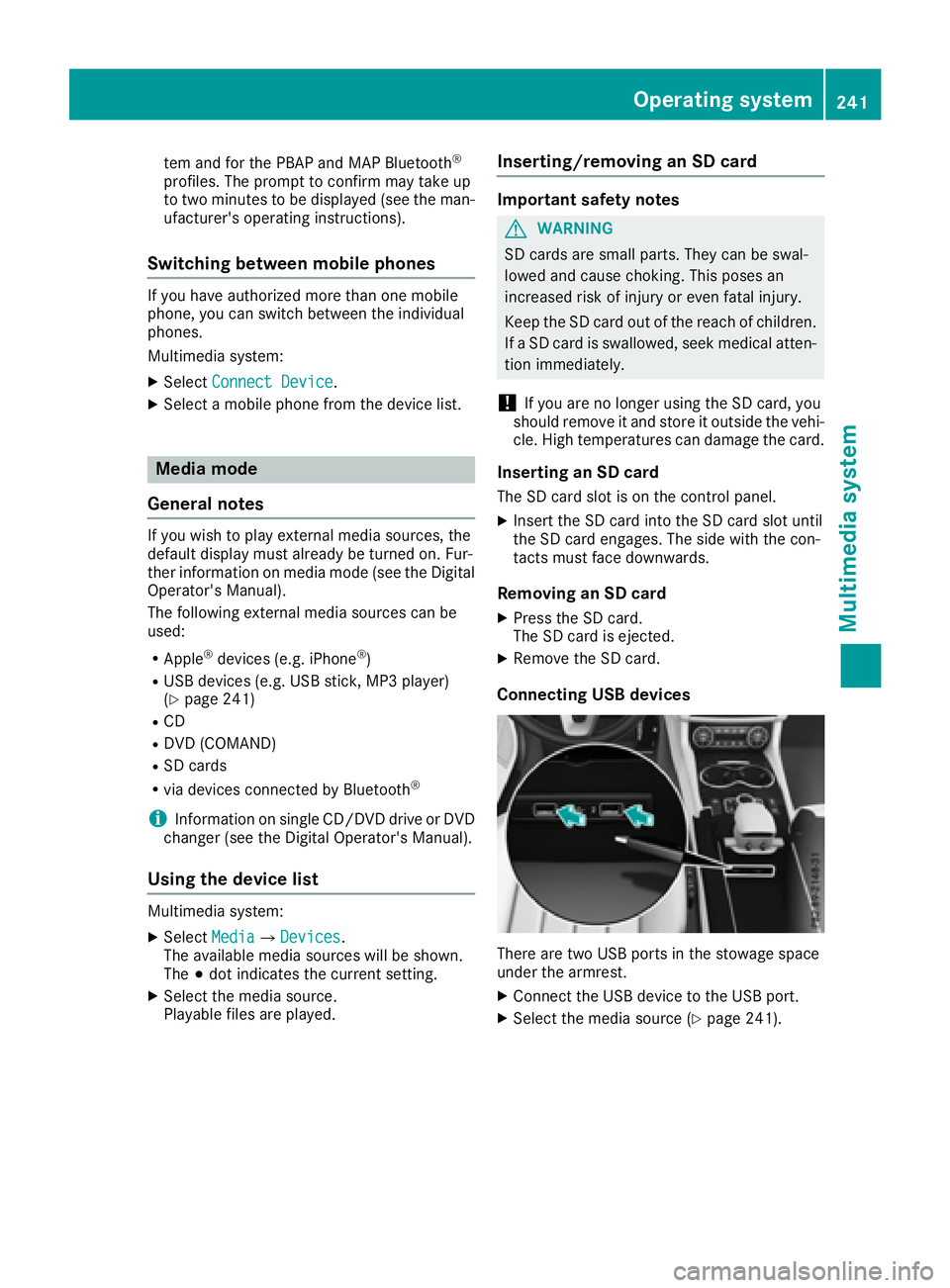
Connecting USB devices
There are two USB ports in the stowage space
under the armrest. X
Connect the USB device to the USB port. X
Select the media source ( Y
page 241).Operating system 241
Multimedia system Z
Page 246 of 334
X
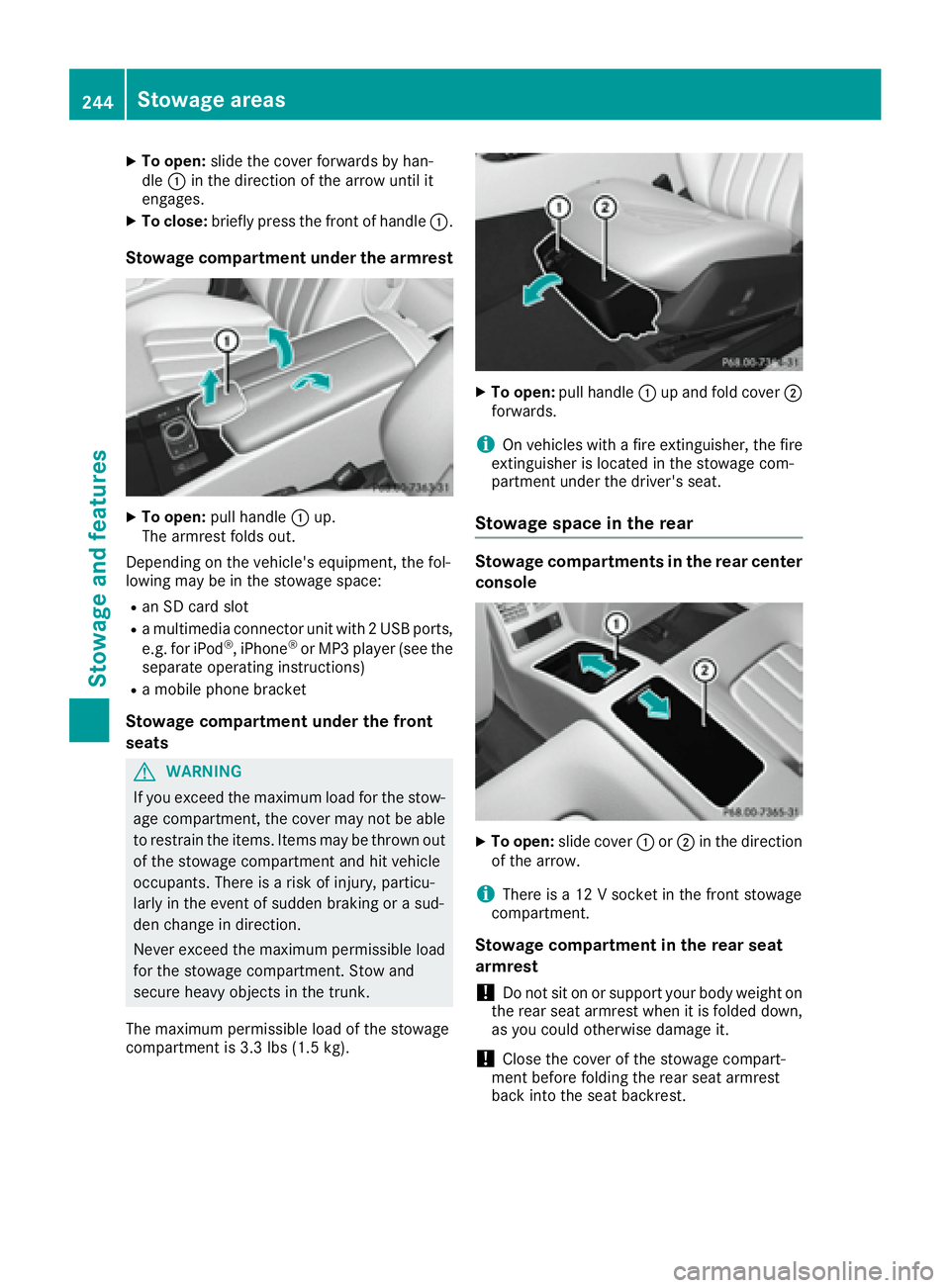
To open: slide the cover forwards by han-
dle C in the direction of the arrow until it
engages. X
To close: briefly press the front of handle C .
Stowage compartment under the armrest X
To open: pull handle C up.
The armrest folds out.
Depending on the vehicle's equipment, the fol-
lowing may be in the stowage space: R
an SD card slot R
a multimedia connector unit with 2 USB ports,
e.g. for iPod ®
, iPhone ®
or MP3 player (see the
separate operating instructions) R
a mobile phone bracket
Stowage compartment under the front
seats
G WARNING
If you exceed the maximum load for the stow-
age compartment, the cover may not be able
to restrain the items. Items may be thrown out
of the stowage compartment and hit vehicle
occupants. There is a risk of injury, particu-
larly in the event of sudden braking or a sud-
den change in direction.
Never exceed the maximum permissible load
for the stowage compartment. Stow and
secure heavy objects in the trunk.
The maximum permissible load of the stowage
compartment is 3.3 lbs (1.5 kg). X
To open: pull handle C up and fold cover D
forwards.
i On vehicles with a fire extinguisher, the fire
extinguisher is located in the stowage com-
partment under the driver's seat.
Stowage space in the rear Stowage compartments in the rear center
console
X
To open: slide cover C or D in the direction
of the arrow.
i There is a 12 V socket in the front stowage
compartment.
Stowage compartment in the rear seat
armrest
! Do not sit on or support your body weight on
the rear seat armrest when it is folded down,
as you could otherwise damage it.
! Close the cover of the stowage compart-
ment before folding the rear seat armrest
back into the seat backrest.244
Stowage areas
Sto wag e an d features