engine MERCEDES-BENZ CLS 2018 Manual PDF
[x] Cancel search | Manufacturer: MERCEDES-BENZ, Model Year: 2018, Model line: CLS, Model: MERCEDES-BENZ CLS 2018Pages: 334, PDF Size: 7.87 MB
Page 180 of 334
When ATTENTION ASSIST has been deactivated,
it is automatically reactivated after the engine
has been stopped. The sensitivity selected cor-
responds to the last selection activated (stand-
ard/sensitive).
Warning in the multifunction display If fatigue or increasing lapses in concentration
are detected, a warning appears in the multi-
function display: Attention Assist: Take a
Break!
In addition to the display message shown in the
multifunction display, you will then hear a warn-
ing tone. X
If necessary, take a break. X
Confirm the display message with the v
button on the steering wheel.
On long journeys, take regular breaks in good
time to allow yourself to rest. If you do not take
a break, you will be warned again after
15 minutes at the earliest. This will only happen
if ATTENTION ASSIST still detects typical indi-
cators of fatigue or increasing lapses in concen-
tration.
Vehicles with COMAND multifunction dis-
play: if a warning is output in the multifunction
display, a service station search is performed in
the multimedia system. You can select a service
station and navigation to this service station will
then begin. This function can be activated and
deactivated in the multimedia system.
Traffic Sign Assist
General notes Traffic Sign Assist displays the maximum speed
permitted to the driver in the instrument cluster.
The data and general traffic regulations stored in
the navigation system are used to determine the
current speed limit.
Traffic Sign Assist is a map-based system, and
for this reason, traffic signs put up temporarily
(e.g. near roadworks) are not detected. There is
also no display for changing traffic signs.
If a traffic sign that is relevant to your vehicle is
passed, the display of the speed limits is upda-
ted.
Traffic signs with a restriction indicated by an
additional sign (e.g. in wet conditions) are also
shown. The sign indicating the end of a restriction only
appears with the restriction in the instrument
cluster when: R
the regulation must be observed with the
restriction, or R
Traffic Sign Assist is unable to determine
whether the restriction applies
If Traffic Sign Assist is unable to determine a
maximum permitted speed from any of the avail-
able sources, no speed limit appears in the
instrument cluster either.
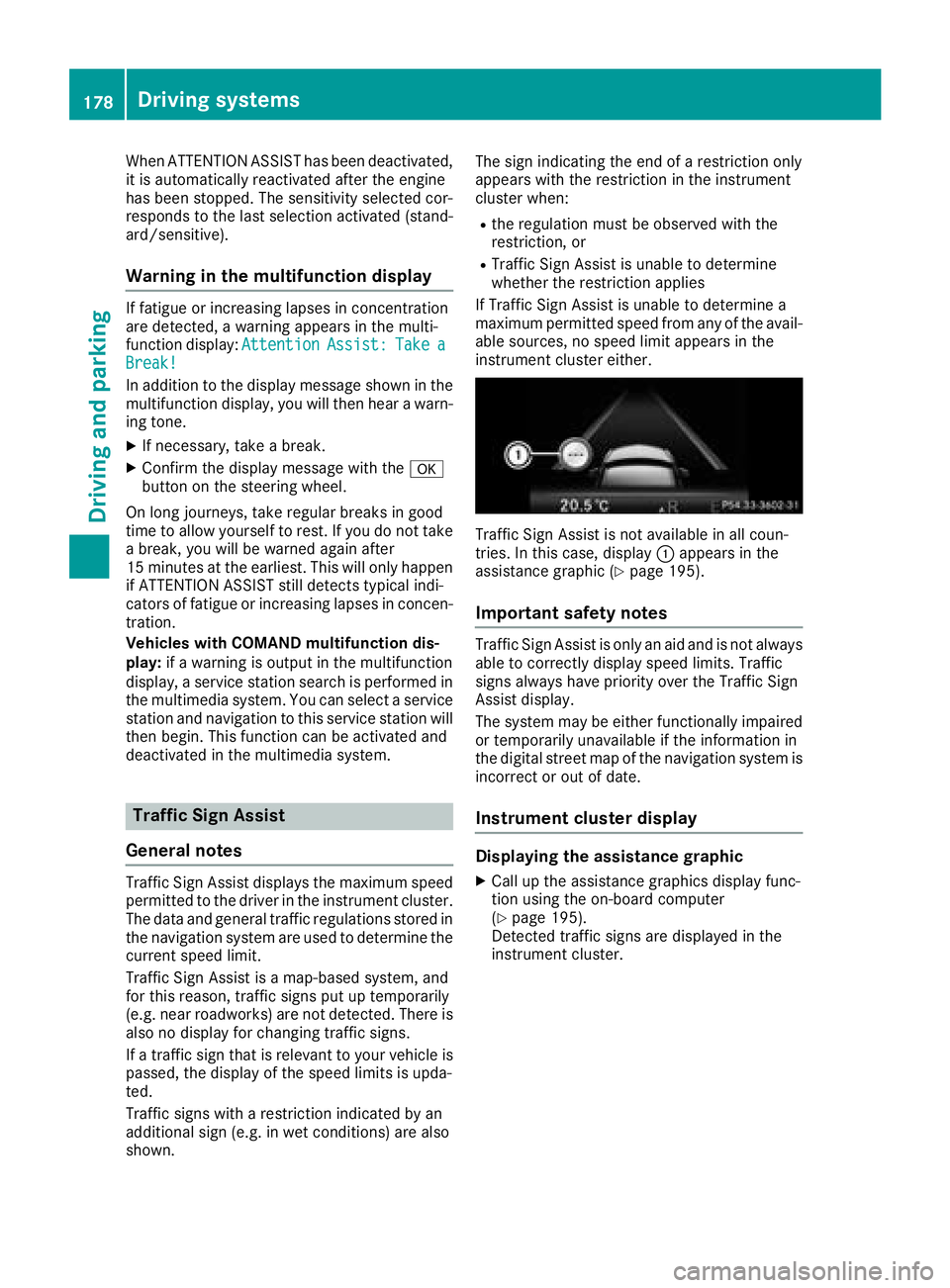
Traffic Sign Assist is not available in all coun-
tries. In this case, display C appears in the
assistance graphic ( Y
page 195).
Important safety notes Traffic Sign Assist is only an aid and is not always
able to correctly display speed limits. Traffic
signs always have priority over the Traffic Sign
Assist display.
The system may be either functionally impaired
or temporarily unavailable if the information in
the digital street map of the navigation system is
incorrect or out of date.
Instrument cluster display
Displaying the assistance graphic X
Call up the assistance graphics display func-
tion using the on-board computer
( Y
page 195).
Detected traffic signs are displayed in the
instrument cluster.178
Driving systems
Driving and parking
Page 190 of 334
Important safety notes
G WARNIN G
If you operate information systems and com-
munication equipmen t integrate d in th e vehi-
cle while driving , you will be distracte d from
traffic conditions. You could also lose control
of th e vehicle. Ther e is a ris k of an accident.
Only operate th e equipmen t when th e traffic
situation permits. If you are no t sur e that this
is possible , park th e vehicl e payin g attention
to traffic condition s and operate th e equip-
men t when th e vehicl e is stationary.
You must observ e th e legal requirements for th e
country in whic h you are currentl y driving when
operating th e on-board computer.
G WARNIN G
If th e instrumen t cluste r has faile d or mal-
functioned, you may no t recognize function
restriction s in systems relevan t to safety. The
operating safet y of your vehicl e may be
impaired . Ther e is a ris k of an accident.
Drive on carefully. Hav e th e vehicl e checke d
at a qualified specialist workshop immedi-
ately.
The on-board computer only shows message s or
warning s from certain systems in th e multifunc-
tion display. You should therefor e mak e sur e
your vehicl e is operating safely at all times .
If th e operating safet y of your vehicl e is
impaired , pull ove r as soo n as it is saf e to do so.
Contac t a qualified specialist workshop.
Fo r an overview, see th e instrumen t panel illus-
tration ( Y
page 34).
Displays and operation
Speedometer with segments
The segments in th e speedometer indicat e
whic h spee d range is available.R
Cruis e control activated ( Y
page 148):
The segments ligh t up from th e store d spee d
to th e en d of th e scale.R
DISTRONI C PLU S activated ( Y
page 149): On e or two segments in th e set spee d range
ligh t up. R
DISTRONI C PLU S detects a vehicl e in fron t
moving mor e slowly than th e store d speed:
The segments between th e spee d of th e vehi-
cle in fron t and th e store d spee d ligh t up.
Tachometer
! Do no t driv e in th e overrevving range, as this
could damag e th e engine.
The red ban d in th e tachometer indicates th e
engine's overrevving range.
The fuel suppl y is interrupted to protect th e
engin e when th e red ban d is reached.
Outside temperature display You should pay special attention to road condi-
tion s when temperatures are aroun d freezing
point.
Bea r in min d that th e outside temperature dis-
play indicates th e temperature measured and
does no t record th e road temperature.
The outside temperature display is in th e multi-
function display ( Y
page 190).
The multifunction display shows changes in th e
outside temperature wit h a delay.
Coolant temperature gauge
G WARNIN G
Opening th e hoo d when th e engin e is over-
heated or when there is a fir e in th e engin e
compartmen t could expos e you to hot gase s
or other servic e products . Ther e is a ris k of
injury.
Let an overheate d engin e cool down before
opening th e hood. If there is a fir e in th e
engin e compartment, keep th e hoo d closed
and contact th e fir e department.
! A display message is shown if th e coolan t
temperature is to o high .
If th e coolan t temperature is ove r 24 8 ‡
(12 0 †), do no t continue driving . The engin e
will otherwise be damaged.188
Displays and operation
On-board computer and displays
Page 197 of 334
Redialing The on-board computer saves the last names or
numbers dialed in the redial memory. X
Press the Y or e button on the steering
wheel to select the Tel menu.X
Press the a button to switch to the redial
memory. X
Press the c or d button to select the
desired name or number. X
Press the a or v button to start dialing.
or X
To exit the redial memory: press the v
or 8 button.
Assistance menu
Introduction Depending on the equipment installed in the
vehicle, you have the following options in the
DriveAssist menu:R
Displaying the assistance graphic
( Y
page 195) R
Deactivating/activating ESP ®
(except
Mercedes ‑ AMG vehicles) ( Y
page 195)R
Activating/deactivating Steering Assist and
Stop&Go Pilot of DISTRONIC PLUS
( Y
page 196) R
Activating/deactivating PRE-SAFE ®
Brake
( Y
page 196) R
Activating/deactivating COLLISION PREVEN-
TION ASSIST PLUS ( Y
page 196)R
Activating/deactivating ATTENTION ASSIST
( Y
page 196) R
Activating/deactivating Blind Spot Assist or
Active Blind Spot Assist ( Y
page 196)R
Activating/deactivating Lane Keeping Assist
or Active Lane Keeping Assist ( Y
page 197)
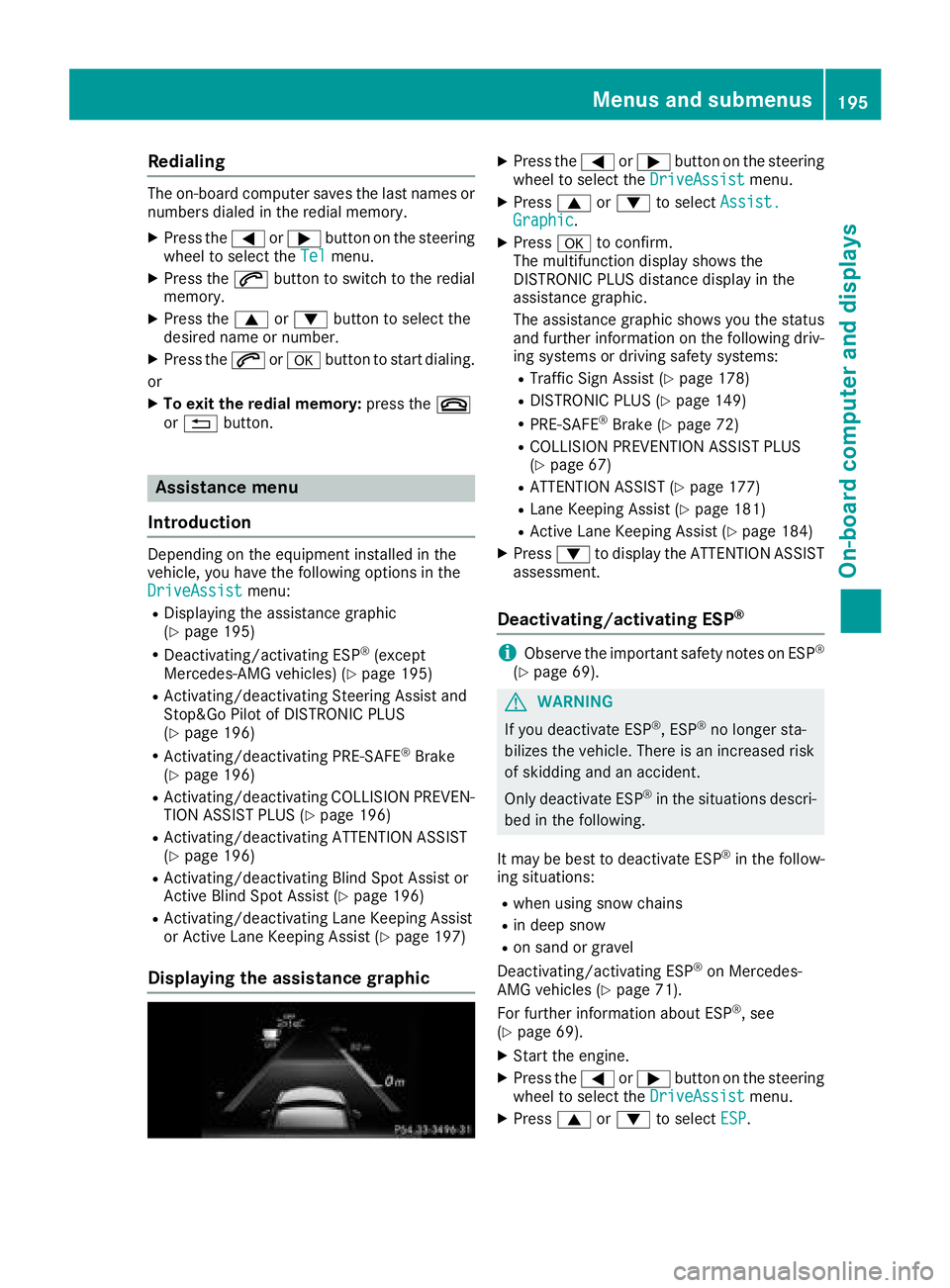
Displaying the assistance graphic X
Press the Y or e button on the steering
wheel to select the DriveAssist menu.X
Press c or d to select Assist.
Graphic . X
Press v to confirm.
The multifunction display shows the
DISTRONIC PLUS distance display in the
assistance graphic.
The assistance graphic shows you the status
and further information on the following driv-
ing systems or driving safety systems: R
Traffic Sign Assist ( Y
page 178)R
DISTRONIC PLUS ( Y
page 149)R
PRE-SAFE ®
Brake ( Y
page 72)R
COLLISION PREVENTION ASSIST PLUS
( Y
page 67) R
ATTENTION ASSIST ( Y
page 177)R
Lane Keeping Assist ( Y
page 181)R
Active Lane Keeping Assist ( Y
page 184)X
Press d to display the ATTENTION ASSIST
assessment.
Deactivating/activating ESP ®
i Observe the important safety notes on ESP ®
( Y
page 69).
G WARNING
If you deactivate ESP ®
, ESP ®
no longer sta-
bilizes the vehicle. There is an increased risk
of skidding and an accident.
Only deactivate ESP ®
in the situations descri-
bed in the following.
It may be best to deactivate ESP ®
in the follow-
ing situations: R
when using snow chains R
in deep snow R
on sand or gravel
Deactivating/activating ESP ®
on Mercedes-
AMG vehicles ( Y
page 71).
For further information about ESP ®
, see
( Y
page 69). X
Start the engine. X
Press the Y or e button on the steering
wheel to select the DriveAssist menu.X
Press c or d to select ESP .Menus and submenus 195
On-board computer and displays Z
Page 201 of 334
Deactivating delayed switch-off of the exterior
lighting temporarily: X
Before leaving the vehicle, turn the SmartKey
to position 0 in the ignition lock.X
Turn the SmartKey to position 2 in the ignition
lock.
The exterior lighting delayed switch-off is
deactivated.
Delayed switch-off of the exterior lighting is
reactivated the next time you start the engine.
If you have activated the Surround Lighting
function and the light switch is set to the X
position, the following functions are activated
when it is dark: R
surround lighting: the exterior lighting
remains lit for 40 seconds af ter unlocking
with the SmartKey. If you start the engine, the
surround lighting is switched off and auto-
matic headlamp mode is activated
( Y
page 105). R
exterior lighting delayed switch-off: the
exterior lighting remains lit for 60 seconds
after the engine is switched off. If you close all
the doors and the trunk lid/tailgate, the exte-
rior lighting goes off after 15 second s.
i Depending on your vehicle's equipment,
when the surround lighting and delayed
switch-off exterior lighting are on, the follow-
ing light up: R
Parking lamps R
Side marker lamps R
Surround lighting in the exterior mirrors
Activating/deactivating the interior light-
ing delayed switch-off
If you activate the Light. Delay function, the
interior lighting remains on for 20 second sa fter
you remove the SmartKey from the ignition lock. X
Press the Y or e button on the steering
wheel to select the Sett. menu.X
Press the d or c button to select the
Lights submenu.X
Press v to confirm.X
Press the d or c button to select the
Light. Delay function.
When the Light. Delay function is activa-
ted, the vehicle interior is displayed in orange
in the multifunction display. X
Press the v button to save the setting. Vehicle Activating/deactivating the automatic
door locking mechanism X
Press the Y or e button on the steering
wheel to select the Sett. menu.X
Press the d or c button to select the
Vehicle submenu. X
Press v to confirm. X
Press the d or c button to select the
Auto. Door Locks function.
If the Auto. Door Locks function is switched
on, the multifunction display shows the vehi-
cle's doors in orange. X
Press the v button to save the setting.
If you activate the Auto.
Door Locks function,
the vehicle is centrally locked above a speed of
around 9 mph (15 km/h).
For further information on the automatic locking
feature, see ( Y
page 82).
Activating/deactivating the acoustic
locking verification signal If you switch on the Acoustic Lock function, an
acoustic signal sounds when you lock the vehi-
cle. X
Press the Y or e button on the steering
wheel to select the Sett. menu.X
Press the d or c button to select the
Vehicle submenu. X
Press v to confirm. X
Press the d or c button to select the
Acoustic Lock function.
If the Acoustic Lock function is activated,
the 7 symbol in the multifunction display
lights up orange. X
Press the v button to save the setting.
Comfort
Activating/deactivating the EASY-
ENTRY/EXIT feature
G WARNING
When the EASY-ENTRY/EXIT feature adjusts
the steering wheel, you and other vehicle
occupants – particularly children – could
become trapped. There is a risk of injury.
While the EASY-ENTRY/EXIT feature is mak-
ing adjustments, make sure that no one hasMenus and submenus 199
On-board computer and displays Z
Page 208 of 334
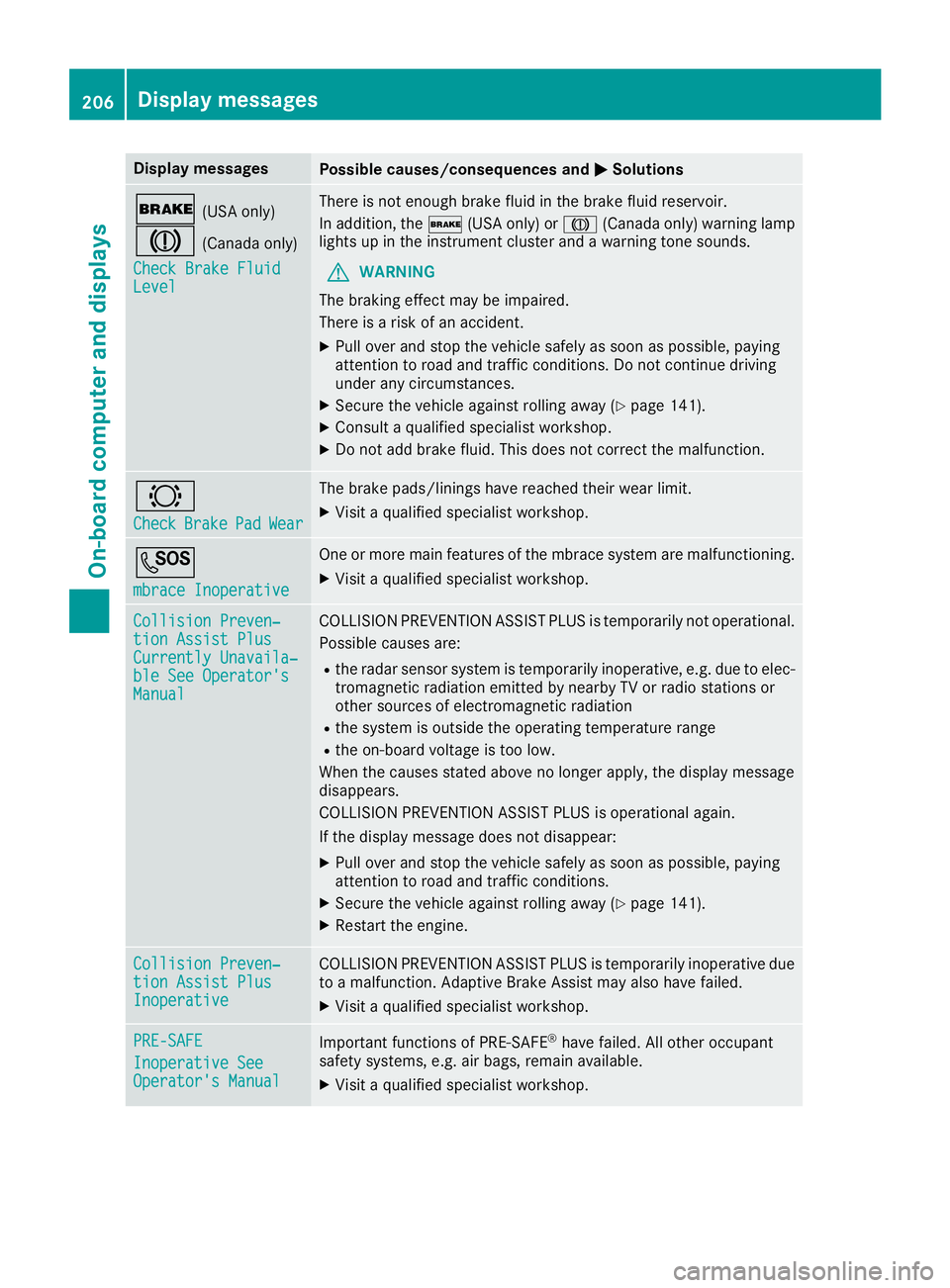
Display messages
Possible causes/consequences and P Solutions
' (US A only)
M (Canada only)
Check Brake Fluid
Level There is no t enough brak e fluid in th e brak e fluid reservoir .
In addition , th e ' (US A only) or M (Canada only) warning lamp
lights up in th e instrumen t cluste r and a warning tone sounds.
G WARNIN G
The braking effec t may be impaired.
There is a ris k of an accident.X
Pull ove r and stop th e vehicl e safely as soo n as possible, payin g
attention to roa d and traffic conditions. Do no t continu e drivin g
under any circumstances. X
Secur e th e vehicl e against rollin g away ( Y
page 141).X
Consult a qualified specialist workshop .X
Do no t add brak e fluid . This does no t correc t th e malfunction .
& Check Brake Pad Wea r The brak e pads/linings hav e reached their wear limit.X
Visit a qualified specialist workshop .
S mbrace Inoperative On e or mor e main features of th e mbrace system are malfunctioning .X
Visit a qualified specialist workshop .
Collision Preven ‐
tio n Assist Plu s
Currently Unavaila‐
ble See Operator' s
Manual COLLISION PREVENTION ASSIST PLU S is temporarily no t operational.
Possibl e causes are: R
th e radar sensor system is temporarily inoperative, e.g. due to elec -
tromagneti c radiation emitted by nearby TV or radi o station s or
other source s of electromagneti c radiationR
th e system is outside th e operating temperature rangeR
th e on-boar d voltag e is to o low.
Whe n th e causes state d abov e no longer apply, th e display message
disappears.
COLLISION PREVENTION ASSIST PLU S is operational again .
If th e display message does no t disappear :X
Pull ove r and stop th e vehicl e safely as soo n as possible, payin g
attention to roa d and traffic conditions.X
Secur e th e vehicl e against rollin g away ( Y
page 141).X
Restart th e engine.
Collision Preven ‐
tio n Assist Plu s
Inoperative COLLISION PREVENTION ASSIST PLU S is temporarily inoperative due
to a malfunction . Adaptive Brake Assis t may also hav e failed.X
Visit a qualified specialist workshop .
PRE-SAFE
Inoperative See
Operator' s Manual Importan t function s of PRE-SAF E ®
hav e failed. Al l other occupant
safet y systems , e.g. air bags , remain available.X
Visit a qualified specialist workshop .206
Display messages
On-board computer and displays
Page 209 of 334
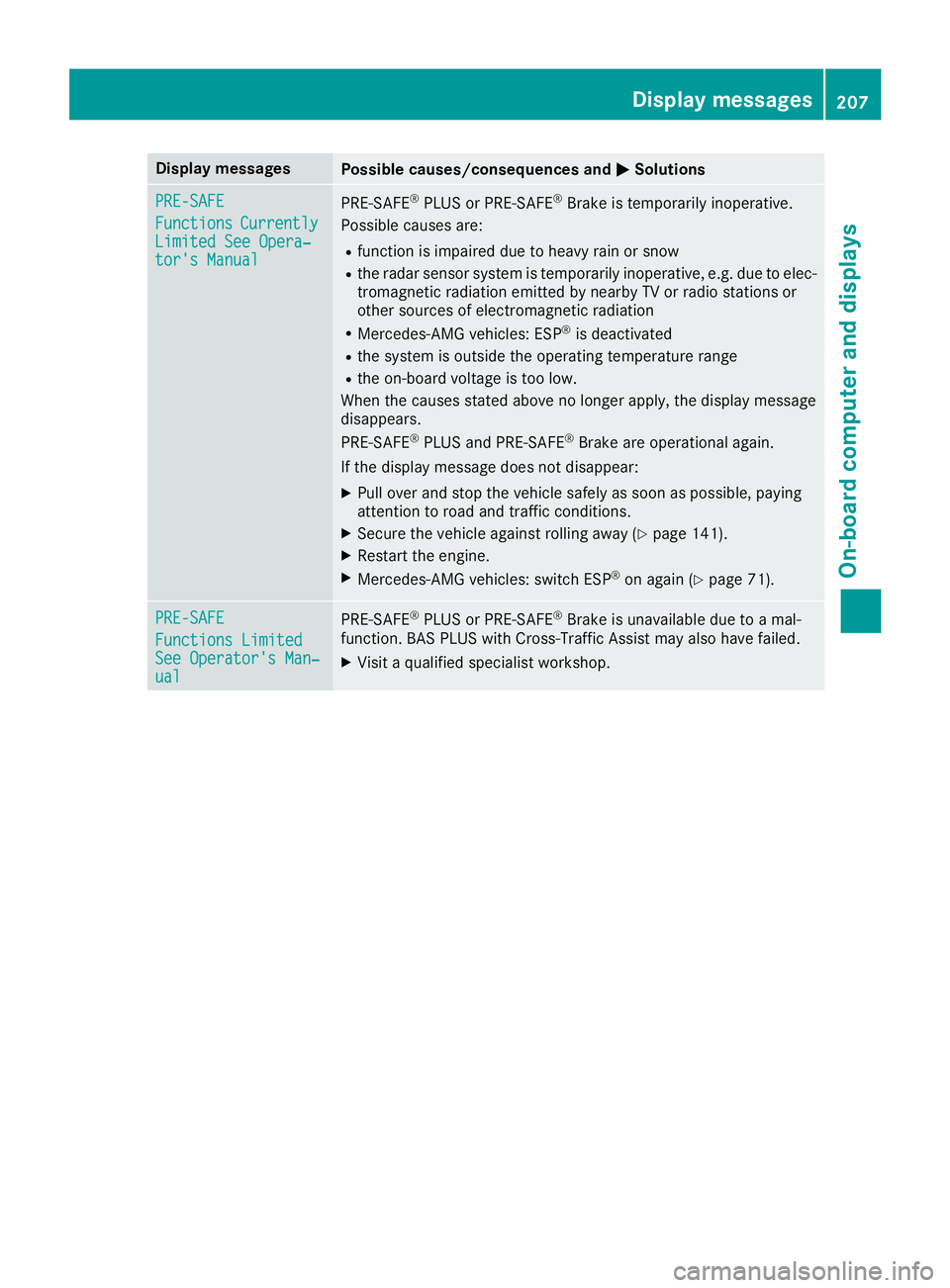
Display messages
Possible causes/consequences and P Solutions
PRE-SAFE
Functions Currently
Limite d See Opera‐
tor's Manual PRE ‑ S AF E ®
PLU S or PRE ‑ SAFE ®
Brake is temporarily inoperative.
Possibl e causes are: R
function is impaire d due to heav y rain or snowR
th e radar sensor system is temporarily inoperative, e.g. due to elec -
tromagneti c radiation emitted by nearby TV or radi o station s or
other source s of electromagneti c radiationR
Mercedes-AMG vehicles: ES P ®
is deactivatedR
th e system is outside th e operating temperature rangeR
th e on-boar d voltag e is to o low.
Whe n th e causes state d abov e no longer apply, th e display message
disappears.
PRE ‑ S AF E ®
PLU S and PRE ‑ S AF E ®
Brake are operational again .
If th e display message does no t disappear :X
Pull ove r and stop th e vehicl e safely as soo n as possible, payin g
attention to roa d and traffic conditions.X
Secur e th e vehicl e against rollin g away ( Y
page 141).X
Restart th e engine.X
Mercedes-AMG vehicles: switch ES P ®
on again ( Y
page 71).
PRE-SAFE
Functions Limite d
See Operator' s Man ‐
ual PRE ‑ S AF E ®
PLU S or PRE ‑ SAFE ®
Brake is unavailable due to a mal-
function . BA S PLU S wit h Cross-Traffic Assis t may also hav e failed.X
Visit a qualified specialist workshop .Display messages 20 7
On-board computer and displays Z
Page 210 of 334
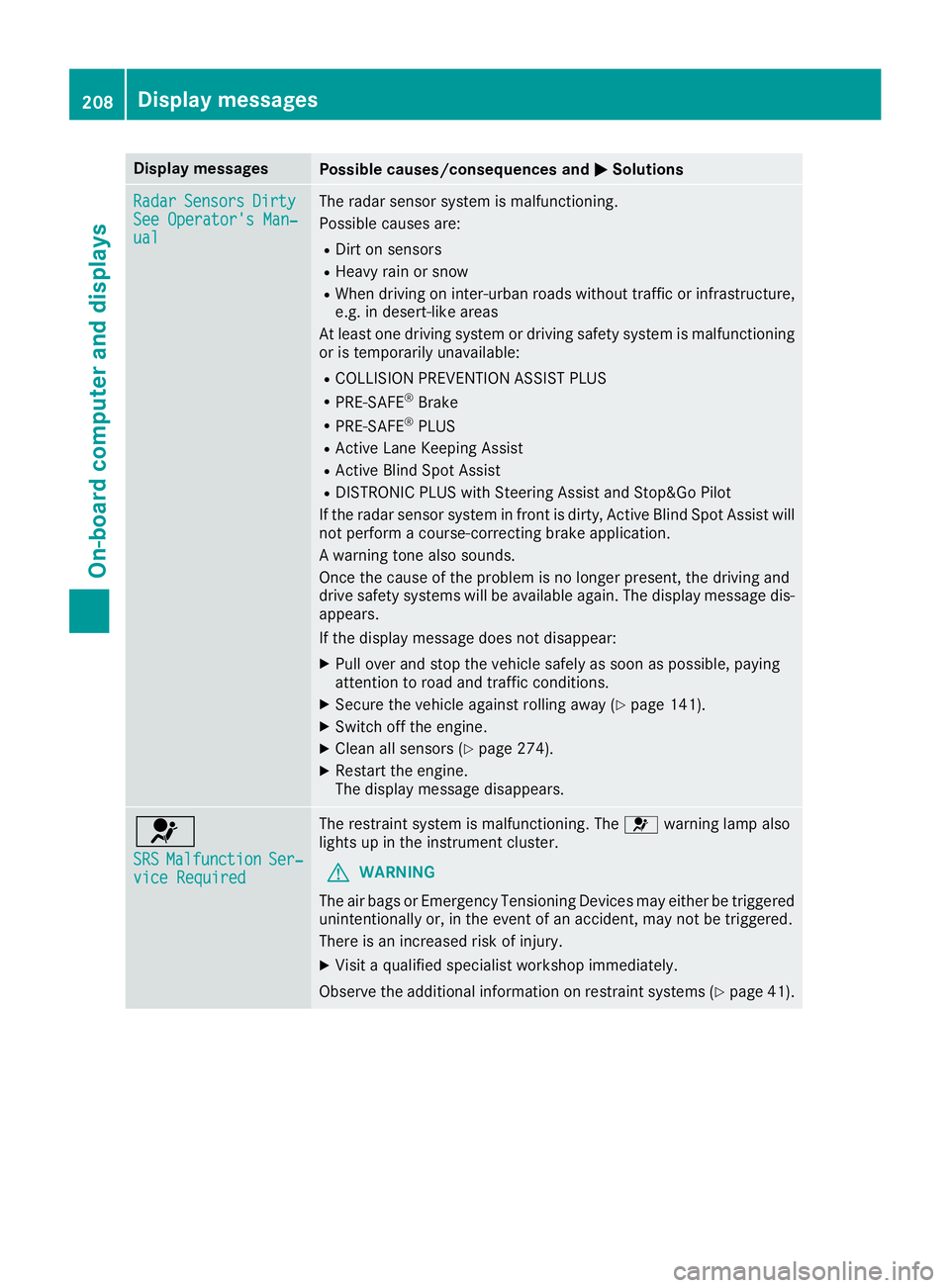
Display messages
Possible causes/consequences and P Solutions
Radar Sensor s Dirty
See Operator' s Man ‐
ual The radar sensor system is malfunctioning .
Possibl e causes are: R
Dirt on sensor sR
Heavy rain or snow R
Whe n drivin g on inter-urban roads without traffic or infrastructure,
e.g. in desert-like area s
At least on e drivin g system or drivin g safet y system is malfunctioning
or is temporarily unavailable :R
COLLISION PREVENTION ASSIST PLU SR
PRE-SAF E ®
BrakeR
PRE-SAF E ®
PLU SR
Active Lan e Keepin g Assis tR
Active Blind Spot Assis tR
DISTRONI C PLU S wit h Steering Assis t and Stop&Go Pilo t
If th e radar sensor system in fron t is dirty, Active Blind Spot Assis t will
no t perfor m a course-correcting brak e application .
A warning tone also sounds.
Once th e caus e of th e problem is no longer present, th e drivin g and
drive safet y systems will be available again . The display message dis-
appears.
If th e display message does no t disappear :X
Pull ove r and stop th e vehicl e safely as soo n as possible, payin g
attention to roa d and traffic conditions.X
Secur e th e vehicl e against rollin g away ( Y
page 141).X
Switc h off th e engine.X
Clean all sensor s ( Y
page 274).X
Restart th e engine.
The display message disappears.
u SRS Malfunction Ser ‐
vic e Required The restrain t system is malfunctioning . The u warning lamp also
lights up in th e instrumen t cluster.
G WARNIN G
The air bags or Emergency Tensioning Devices may either be triggered
unintentionally or, in th e event of an accident, may no t be triggered .
There is an increased ris k of injury.X
Visit a qualified specialist workshop immediately.
Observ e th e additional information on restrain t systems ( Y
page 41).208
Display messages
On-board computer and displays
Page 215 of 334
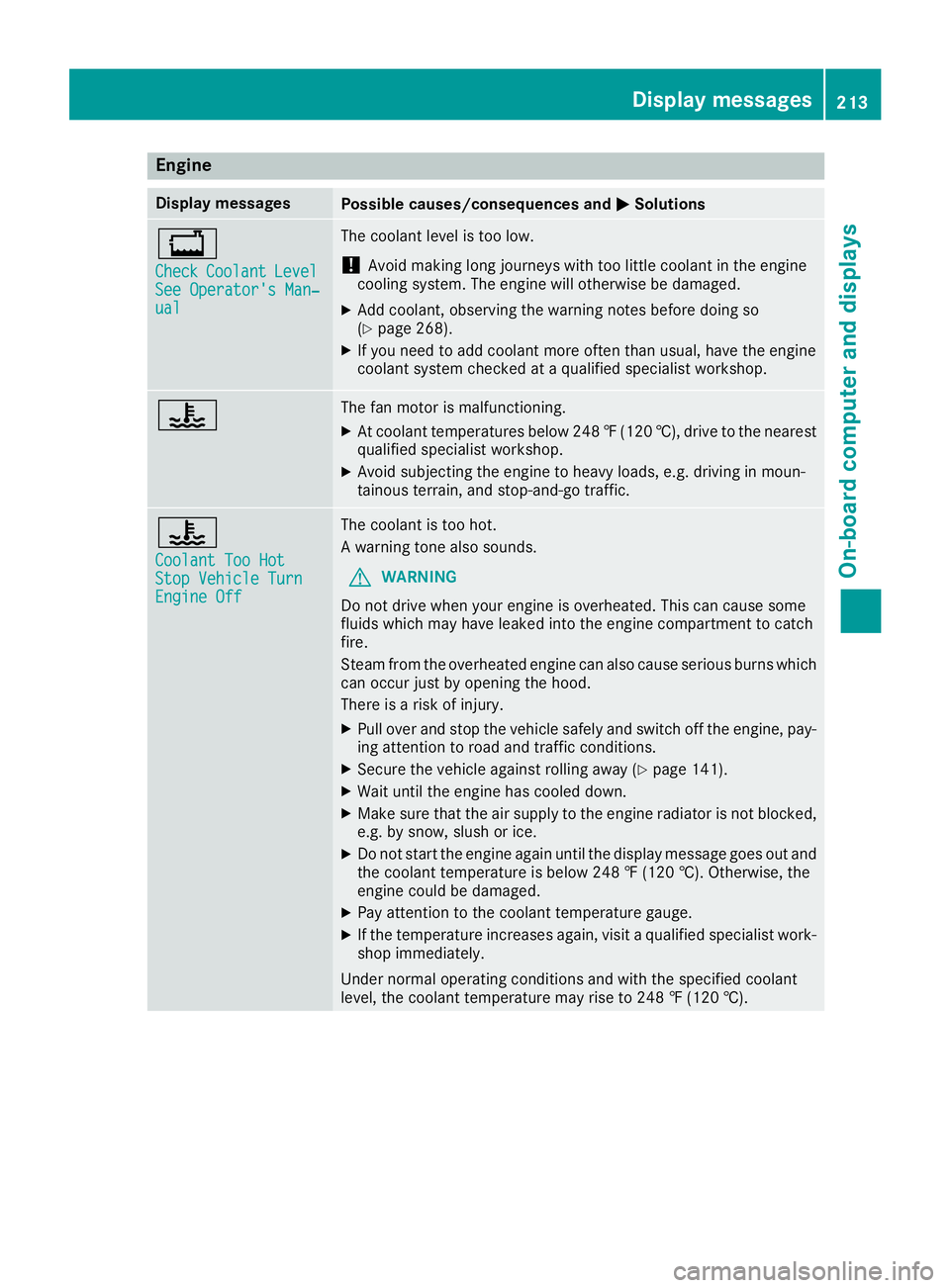
Engine Display messages
Possible causes/consequences and P Solutions
Page 216 of 334
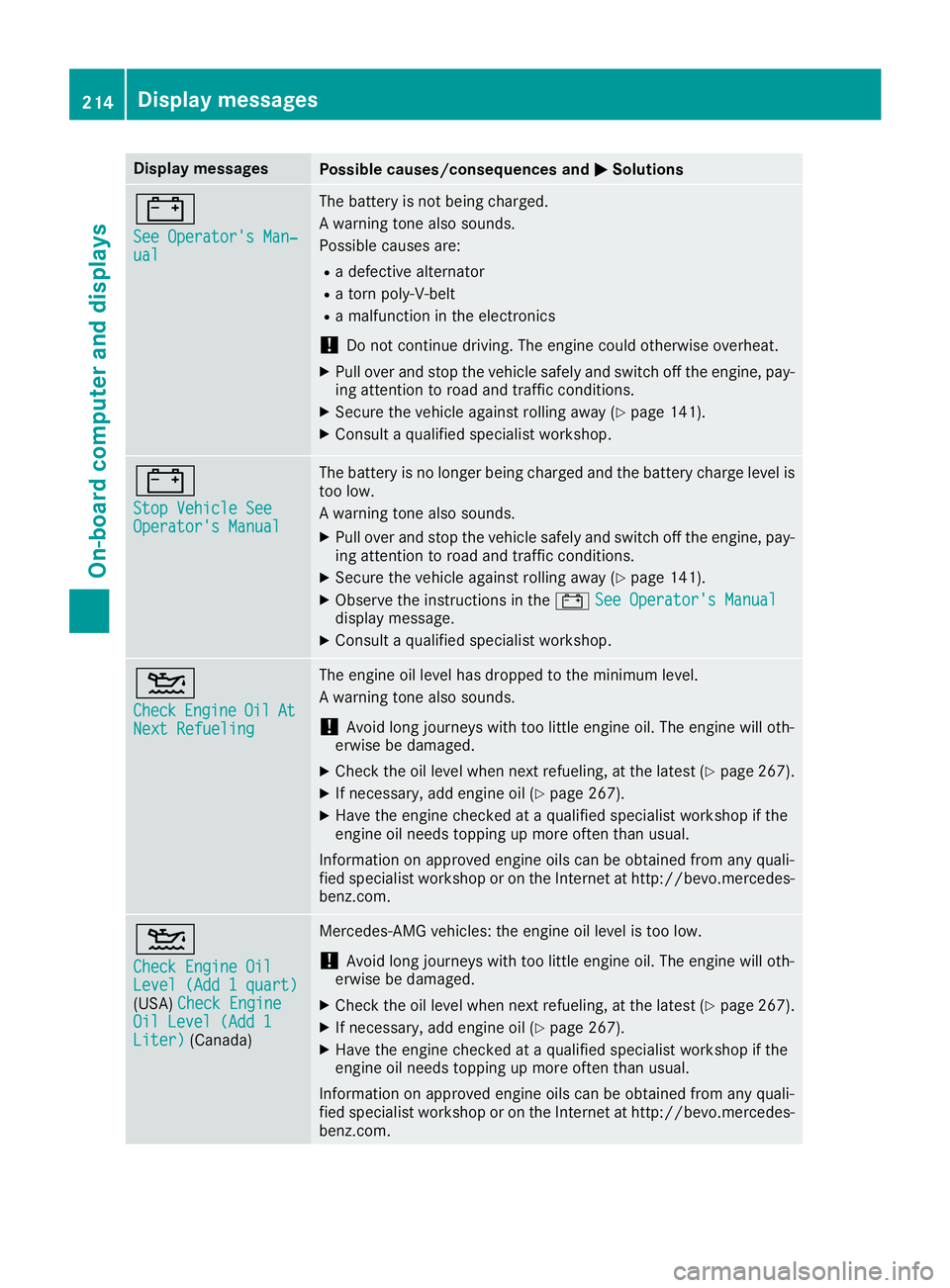
Display messages
Possible causes/consequences and P Solutions
= See Operator' s Man ‐
ual The battery is no t bein g charged.
A warning tone also sounds.
Possibl e causes are: R
a defective alternato rR
a torn poly-V-belt R
a malfunction in th e electronics
! Do no t continu e driving. The engin e could otherwise overheat.X
Pull ove r and stop th e vehicl e safely and switch off th e engine, pay-
ing attention to roa d and traffic conditions.X
Secur e th e vehicl e against rollin g away ( Y
page 141).X
Consult a qualified specialist workshop .
= Sto p Vehicl e See
Operator' s Manual The battery is no longer bein g charged and th e battery charg e level is
to o low.
A warning tone also sounds. X
Pull ove r and stop th e vehicl e safely and switch off th e engine, pay-
ing attention to roa d and traffic conditions.X
Secur e th e vehicl e against rollin g away ( Y
page 141).X
Observ e th e instruction s in th e = See Operator' s Manual
display message .X
Consult a qualified specialist workshop .
Page 219 of 334
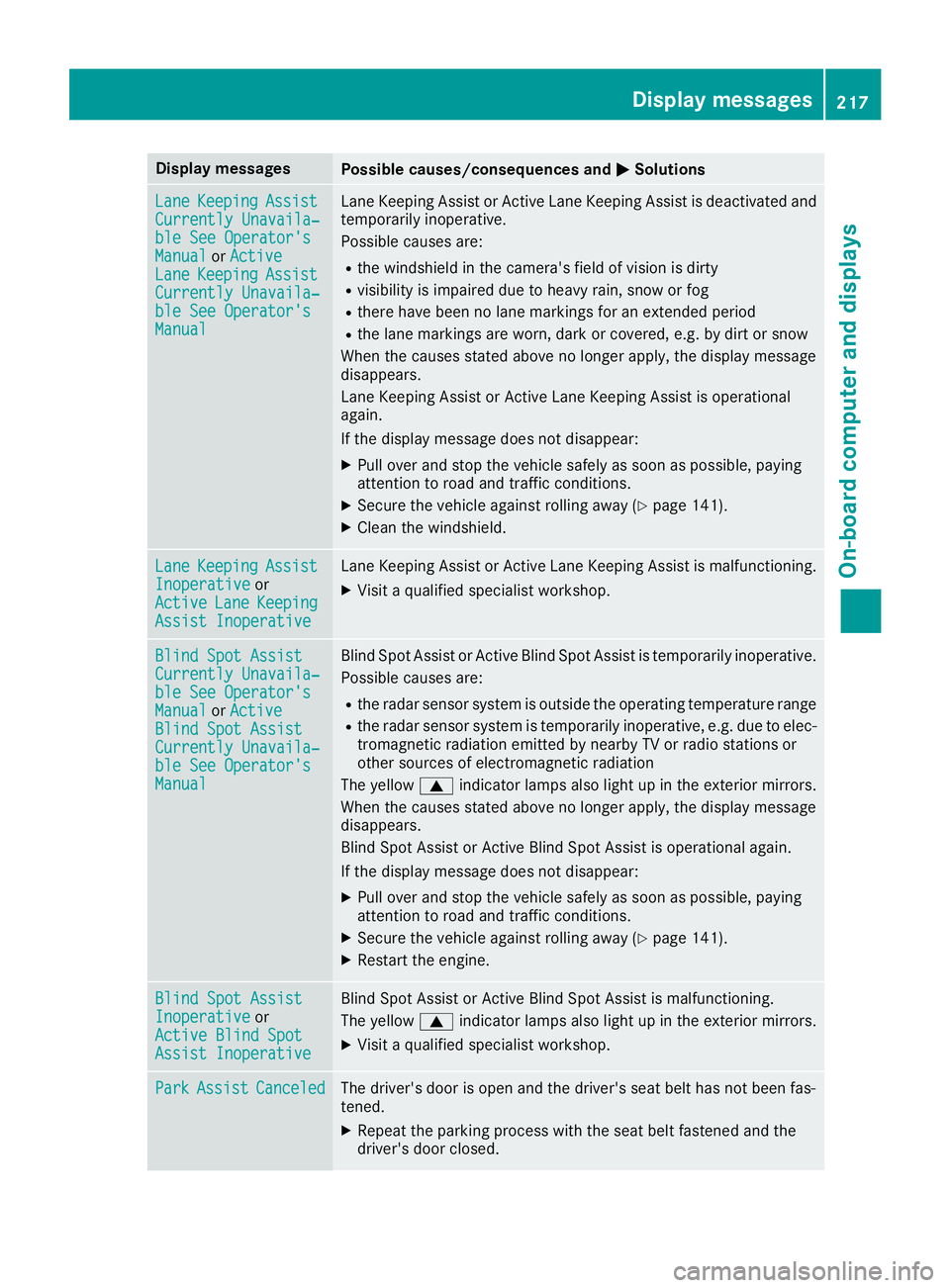
Display messages
Possible causes/consequences and P Solutions
Lan e Keepin g Assist
Currently Unavaila‐
ble See Operator' s
Manual or Active
Lan e Keepin g Assist
Currently Unavaila‐
ble See Operator' s
Manual Lan e Keepin g Assis t or Active Lan e Keepin g Assis t is deactivated and
temporarily inoperative.
Possibl e causes are: R
th e windshield in th e camera' s field of vision is dirtyR
visibilit y is impaire d due to heav y rain , snow or fogR
there hav e been no lan e marking s for an extended periodR
th e lan e marking s are worn, dark or covered, e.g. by dir t or snow
Whe n th e causes state d abov e no longer apply, th e display message
disappears.
Lan e Keepin g Assis t or Active Lan e Keepin g Assis t is operational
again .
If th e display message does no t disappear :X
Pull ove r and stop th e vehicl e safely as soo n as possible, payin g
attention to roa d and traffic conditions.X
Secur e th e vehicl e against rollin g away ( Y
page 141).X
Clean th e windshield.
Lan e Keepin g Assist
Inoperative or
Active Lan e Keepin g
Assist Inoperative Lan e Keepin g Assis t or Active Lan e Keepin g Assis t is malfunctioning .X
Visit a qualified specialist workshop .
Blind Spo t Assist
Currently Unavaila‐
ble See Operator' s
Manual or Active
Blind Spo t Assist
Currently Unavaila‐
ble See Operator' s
Manual Blind Spot Assis t or Active Blind Spot Assis t is temporarily inoperative.
Possibl e causes are: R
th e radar sensor system is outside th e operating temperature rangeR
th e radar sensor system is temporarily inoperative, e.g. due to elec -
tromagneti c radiation emitted by nearby TV or radi o station s or
other source s of electromagneti c radiation
The yellow c indicator lamp s also ligh t up in th e exterio r mirrors.
Whe n th e causes state d abov e no longer apply, th e display message
disappears.
Blind Spot Assis t or Active Blind Spot Assis t is operational again .
If th e display message does no t disappear :X
Pull ove r and stop th e vehicl e safely as soo n as possible, payin g
attention to roa d and traffic conditions.X
Secur e th e vehicl e against rollin g away ( Y
page 141).X
Restart th e engine.
Blind Spo t Assist
Inoperative or
Active Blind Spo t
Assist Inoperative Blind Spot Assis t or Active Blind Spot Assis t is malfunctioning .
The yellow c indicator lamp s also ligh t up in th e exterio r mirrors.X
Visit a qualified specialist workshop .
Par k Assist Canceled The driver's door is open and th e driver's seat belt has no t been fas -
tened. X
Repeat th e parking process wit h th e seat belt fastene d and th e
driver's door closed .Display messages 21 7
On-board computer and displays Z