ECU MERCEDES-BENZ CLS 2020 Owners Manual
[x] Cancel search | Manufacturer: MERCEDES-BENZ, Model Year: 2020, Model line: CLS, Model: MERCEDES-BENZ CLS 2020Pages: 546, PDF Size: 19.76 MB
Page 327 of 546
Ar
ranging aser vice appointment viaa
Mer cedes mecall
If yo uha ve act ivat ed themaint enanc emanag e‐
ment service, releva nt vehicle datais transf erred
aut omat icallyto theMer cedes- BenzCustomer
Cent er.Yo uwill then recei veindiv idual recom‐
mend ations rega rding themaint enanc eof your
ve hicle.
Re gardless ofwhe ther youha ve conse nted to
th emaint enanc emanag ement service, themulti‐
media system reminds youaf te ra cer tain
amount oftim eth at aser viceis due. Apr om pt
appear sask ing ifyo uwo uld liketo mak ean
app ointment. #
Toarra ng easer vice appointment :select
Call .
Af teryo ur agr eem entth eve hicle datais sent
and aMer cedes-Ben zCus tomer Cent er
em ployeedeals withyo ur appoin tment.The
inf ormat ionisthen sent toyour desir ed
ser viceout let.
This willcontact youto conf irm theappoint‐
ment andifneces sarycon sult about the
de tails. %
Ifyo usele ctLat erafte rth eser vice messag e
appear s,themessag eis hidden andreap‐
pear sat alat er tim e.
Givi ngconsent todata transf erdur ing a
Mer cedes mecall
Re quirement s:
R Aser vice callisact ive using themultimedia
sy stem ortheove rhead control panel .
If th ebr eakdo wnand Mercedes meconnect
Concier geser vices areno tactiv ated on
Mer cedes me,theDo you consent tothe tran s-
fer ofyour vehicle dataandthevehicle's posi-
tion tothe Mercedes- BenzCustomer Centerin
order toimprove theprocess ingofyour request?
messag eappear s. #
Select Yes.
The releva nt vehicle datais sent automati‐
call y.
Tr ansf erre ddata during aMer cedes mecall
The data trans ferred dur ing aMer cedes mecall
depends onwhic hser vice isselect edinthe
vo ice con trol system and whether Mer cedes me
con nect services areactiv ated. If
no Mer cedes meconnect services areactiv a‐
te dand thedat apr otect ion prom pthas been
conf irmed thefo llo wing datais transm itted:
R Vehicle identif ication number
R Mer cedes mecustomer identif icationnum‐
ber
R Reason forth einitiat ionofthecall
R Languag ese tin themultimedia system
R Conf irmation ofthedat apr otect ion prom pt
If acall ismade fora ser vice appointment via
th eser vice reminder ,th efo llo wing datama ybe
tr ansm itted:
R Cur rent mil eage and main tenance data
Tr ans feris possi bleassu ming there qu ired
dat atransf ertech nol ogy issu pp ortedby the
mobil eser vice operator and thequ alit yof
th emobile connect ionissuf ficie nt. Mu
ltimed iasystem 325
Page 328 of 546
If
Ac cid ent and Brea kdo wnManag eme ntis
cal led via thevo ice con trol system and no
ser vice hasbeen activated, but thedat apr otec‐
tion queryhas been confirm ed, thefo llo wing
dat acan also becalled upfrom theve hicle by
th eMer cedes- BenzCustomer Cent er:
R Current vehicle location
% Atthetime ofgoing topress, this func tion is
te ch nica llynotye tav ailable butcan besup‐
por tedin thefutur e.
If th edat apr otect ion prom pthas been reject ed
th efo llo wing datais transm itted:
R Reason forth einitiat ionofthecall
R Rejecti onofthedat apr otect ion prom pt Mer
cede sme connect No
teson Mer cedes meconnect
Mer cedes meconn ectprov ides thefo llo wing
ser vice s:
R Accid ent and brea kdo wnmana gement (me
butt on) R
Concierg eSer vice (whe nth eser vice isacti‐
va ted), appointm entrequ ests or similar (me
butt on)
R Mer cedes- Benzemergency callsy stem (aut o‐
matic emergency calland SOS button)
The Mercede s-BenzCustomer Centerand the
Mer cedes-Ben zemer gency callcent erare availa‐
ble foryo uar oun dth ecloc k.
The mebutt onand theSOS buttoncan befound
on theve hicle's overhead control panel
(/ page323).
Yo ucan also calltheMer cedes- BenzCustomer
Cent erusi ng themultimedia system
(/ page32 4).
Please note that Mer cedesme connectis a
Mer cedes-Ben zser vice.In emer gencie s,alwa ys
cal lth enation alemer gency service sfirs tus ing
th est andar dnat ionalemer gency service phone
num bers.In eme rgenci es,youcan also usethe
Mer cedes-Ben zemer gency callsy stem
(/ page32 7).
Obser vethecon ditions ofuse forMer cedes me
connect andother services. These canbe obt
ained intheMer cedes meportal:htt ps:/ /
me. secur e.mercedes -benz.com
Inf orma tion onMer cedes meconnect acci‐
dent andbreakd ownmana gemen t
The accident and brea kdo wnmanag eme ntcan
incl udeth efo llo wing functions:
R Supplem enttotheMer cedes- Benzemer‐
ge ncy callsy stem (/ page32 7)
If neces sary,thecon tact per son atthe
Mer cedes-Ben zemer gency callcent erfor‐
wa rdsth ecall toMer cedes meconn ect
br eakdo wnand accident management. For‐
wa rding thecall isho we verno tpossi bleinall
countr ies.
R Breakdo wnassi stanc eby amec hanicon
loc atio nand/ ortheto wing away oftheve hi‐
cle tothenear estaut hor ized Mercedes- Benz
Cent er
Yo uma ybe charge dfo rth ese services.
Mor einf ormation aboutMercedes meconnect
ser vices canbeobt ained intheMer cedes me
por tal:htt ps:/ /me .secure.m ercedes -benz.com 326
Multim ediasystem
Page 329 of 546
Data
trans ferre ddur ing Mer cedes mecon‐
ne ct cal lse rvices
The datatransf erreddur ing aMer cedes mecon‐
nec tcall depends onthere ason thecall wasini‐
tiat ed, whic hser vice isselect edinthevo ice
con trol system and whic hMer cedes meconnect
ser vices areactiv ated.
Whic hdat ais tra nsf erredfo rth eser vices canbe
ta ke nfrom thecur rently valid term sof use.
These canbeobt ained intheMer cedes mepor‐
ta l:htt ps:/ /me .secure.m ercedes -benz.com Mer
cedes-B enzemer gency callsystem Inf
orma tion ontheMer cedes- Benzemer‐
ge ncy callsystem
Yo ur vehicle iseq uipped withth eMer cedes- Benz
emer gency callsy stem ("eCall ").This featur ecan
help save lives intheev ent ofan acciden t.eCall
in no wayre places assistance prov ided from
dialing 911.
The Mercedes-B enzemer gency callsy stem is
av ailable forat lea sttenye arsst ar tin gfrom the
manuf acturingdate. Mer
cedes-Benz eCallonl yfunctions inareas
wher emobil ephone coverage isavailable from
th ewir eless service prov ider s.Ins ufficie ntnet‐
wo rkcoverage from thewir eless service prov id‐
er sma yre sult inan emerg encycallnotbeing
tr ansmitt ed.
eCal lis ast andar dfeatur ein your Mer cedes-
Ben zve hicle. Inorder tofunction asintended ,
th esy stem relies onthetransmission ofdat a
de tailed inthe"Mer cedes- Benzemergency call
sy stem datatra nsmiss ion"sectionthat follo ws
( / pag e329).
To disable eCall,acus tomer mustvisit an
au thor ized Mercedes-B enzService depar tment
to deactiv ateth eve hicle's communication mod‐
ule.
Deactiv ationofthis mod ulepreve nts the
act ivat ion ofanyand allMer cedes mecon‐
nect services. Afterthe deactivatio nof
eC all,aut omati ceme rgency calland manua l
emer gency callwill notbe availab le.
The igniti onmus tbe swi tched onbef orean auto‐
matic emergency callcan bemade.
% eCallis acti vatedat thefa ct or y. %
eCall canbedeactiv ated byan aut hor ized
Mer cedes-Ben zdealer .Please note that in
th eeve ntow ner shipof theve hicle istrans‐
fe rred toano ther ow ner inits deacti vated
st at e, eCall willremain deactivated unles s
th ene wow ner visits an author ized
Mer cedes-B enzdealer shiptoreact ivat eth e
sy stem.
Ov ervie wof theMer cedes- Benzemergency
call system
eCall canhelp toreduce thetime between an
acciden tand thear riva lof emer gency service s
at thesit eof theacciden t.Ithelps locatean
acciden tsit ein places that aredif ficul tto
acc ess. However,eve nif ave hicle iseq uipped
wit heCal l,th is does notmean thesy stem isON.
As suc h,eCall doesnotre place dialing 911in the
eve ntofan acci dent.
The eme rgency callcan bemade automatical ly
( / pag e328) ormanuall y(/ page328 ).Onl y
mak eemer gency callsifyo uor other sar ein
need ofrescue.
Onl ymak eemerg encycallsifyo uor other sar e
in need ofrescue. Donotmak ean emerg ency Multimedia
system 32
7
Page 332 of 546
#
Ifyo ucan notbe sur eof this, stop the
ve hicle whilstpa ying attention toroad
and traffic condi tions andoperate the
eq uipment withth eve hicle statio nary. Yo
umus tobse rveth eleg alrequ iremen tsforth e
cou ntryin whi chyouar ecur rentl ydr ivi ng when
op erati ng themultimedia system. &
WARNIN GRisk ofan acci dent from
ope rating mob ile comm unicati onequip ‐
ment while th eve hicle isin mo tion
Mobile communication sde vices distract the
dr iver from thetraf fic situ ation. Thiscou ld
al so cau sethedr iver tolose control of the
ve hicle. #
Asthedr iver ,onl yoper atemobile com‐
municat ionsdevices when theve hicle is
st atio nary. #
Asave hicle occupant, onlyuse mobile
communication sde vices inthear eas
int ended forth is pur pose, e.g.inthe
re ar passe nger com partment . Yo
umus tobse rveth eleg alrequ iremen tsforth e
cou ntryin whi chyouar ecur rentl ydr ivi ng when
op erati ng mob ile comm unicati onequip ment in
th eve hicle.
The Interne tfunct ionscanonlybe used toalimi‐
te ddeg reewhils tdr iving.
Fu nction ofthecomm unicationmodule
On vehicles withabuilt-in communication mod‐
ule, theInt erne tcon nect ionises tablished viaan
int egratedSIM card.
To use Inte rn et acc ess viathecomm unication
module thefo llo wing condition smus tbe met:
R The vehicle iseq uipped withaper manent ly
ins talled com munic ationmodule.
R Mer cedes meconnectis act ive and ready for
oper ation.
R Mer cedes meconn ectisactiv ated forInt er‐
ne taccess.
R Cou ntrydepe ndent :dat avo lume via
Mer cedes meconnectis available.
If th edat avo lume limitisreac hed, theav ailabil‐
ity ofMer cedesme connectser vices islimit ed. The
datavo lume mustbe pur chased via
Mer cedesme connect.
% Con tact an author ized Mercedes-B enzCen‐
te rto find outwh ether itis possible topur‐
ch ase datavo lume inyour count ry.
Es tablish inganInterne tconnect ion
Mult imedia system:
4 Connec t #
Forex am ple, selec tz Browser .
% The mult imed iasystem usually establishes
th eInt erne tcon nect ionautomatic ally.Ifth e
multime diasystem isno tcon nect edtothe
Int erne t,th eInt erne tcon nect ionises tab‐
lished whenanInterne tapplication isused.
% The availabilit yof we bbr ows ersis count ry-
dependen t. 330
Multimedia system
Page 334 of 546
We
bbr ow ser Calling
upawe bpag e &
WARNIN GRisk ofdist ra ction from infor‐
mati onsystems andcomm unication s
eq uipment
If yo uoper ateinf ormat ionand comm unic a‐
tio neq uipme ntintegratedin theve hicle
when driving, youwill bedistract ed from the
tr af fic situ ation. Thiscou ldalso cau seyouto
lose control of theve hicle. #
Onlyoper ateth is eq uipmen twhen the
tr af fic situ ation per mits. #
Ifyo ucan notbe sur eof this, stop the
ve hicle whilstpa ying attention toroad
and traffic condi tions andoperate the
eq uipment withth eve hicle statio nary. Yo
umus tobse rveth eleg alrequ iremen tsforth e
cou ntryin whi chyouar ecur rentl ydr ivi ng when
op erati ng themultimedia system. Multimedia
system:
4 Connec t5
z Browser
5 z Enter URL #
Entera we baddr ess.
% The func tion iscount ry-de pende nt. #
Tofinish theentr yand callupthewe b‐
sit e:select 0054.
Sho wing/hiding thewe bbr ows ermenu
If yo ucall upawe bsit eby selecting alink ,fo r
ex am ple, thewe bbr ows ermenu ishidden. #
Tosho w/hide: press the0038 button.
% The webbr ows ersuppor tsvideo playbac k.
% Nowebsit esorvideos aredispla yedwhile
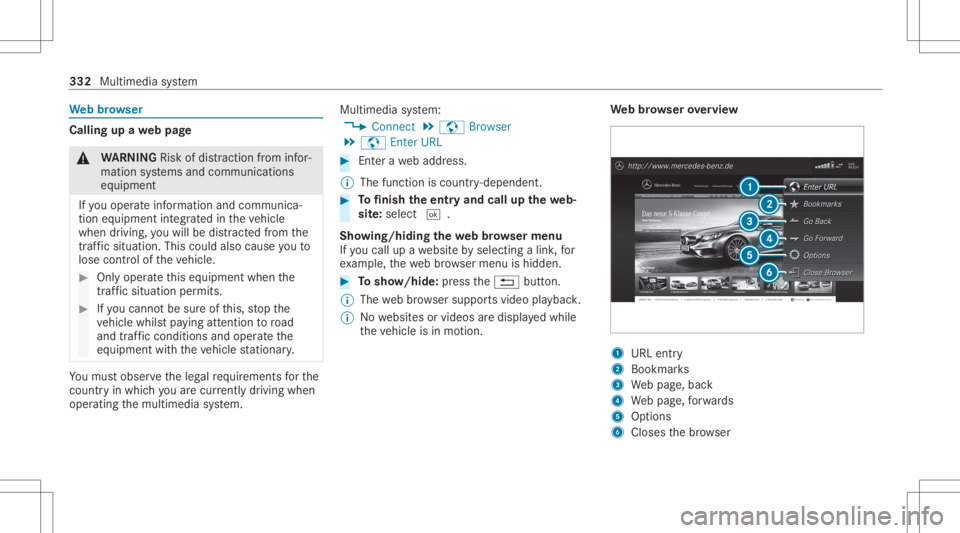
th eve hicle isin mo tion. We
bbr ow ser overview 1
URL entry
2 Bookma rks
3 Webpag e,bac k
4 Webpag e,forw ards
5 Options
6 Closes thebr ows er 332
Multimedia system
Page 336 of 546
Tu
neIn radio Cal
ling up Inte rn et Radio
Re quirement s:
R The Interne tRa dio service isactiv ated.
R The datavo lume isavailable.
De pen dingon thecount ry,dat avo lume may
need tobe pur chased.
R Afast Int erne tconnection fordat atransmis‐
sion free ofinterfere nce.
The service sar ecou ntry-dependen t.
Fo rmor einf ormation, consultanauthor ized
Mer cedes-B enzCent er.
Multimedia system:
4 Radio 5
Þ Radio Source #
Select TuneIn Radio.
The Interne tRa dio displa yappear s.The last
st atio nse tst ar ts pla ying .
% The connectionqu alit ydepen dson thelocal
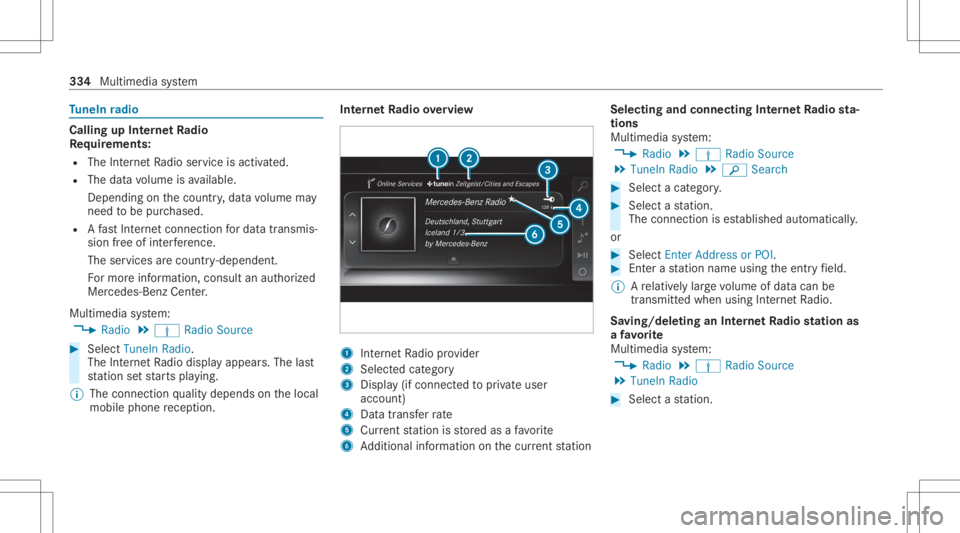
mobile phonerecep tion. In
te rn et Radio overview 1
Interne tRa dio prov ider
2 Selec tedcat egor y
3 Displa y(if con nectedto privat euser
accoun t)
4 Datatra nsf errate
5 Current statio nis stor ed asafa vo rite
6 Addition alinf ormation onthecur rent statio n Select
ingand connect ingInterne tRa dio sta‐
tion s
Mul timedi asy stem:
4 Radio 5
Þ Radio Source
5 TuneIn Radio5
00D3 Search #
Select acat egor y. #
Select ast atio n.
The connectionis es tablished automatic ally.
or #
Select EnterAddress orPOI . #
Enterast atio nnam eusin gth eent ryfield.
% Arelativ elylar ge volume ofdat acan be
transmit tedwhen usingInterne tRa dio.
Sa ving/dele tinganInterne tRa dio station as
a fa vo rite
Multimedia system:
4 Radio 5
Þ Radio Source
5 TuneIn Radio #
Select ast atio n. 33
4
Mult imed iasystem
Page 341 of 546
The
multimedia connection unitisfound inthe
st ow agecom partment unde rth ear mr estand
has twoUSB ports.
Depen dingontheve hicle's equipment, addi‐
tional USBportscan befound inthestow age
com partment ofthecent ercon sole andinthe
re ar passe nger com partment . #
Con nectth eUSB device totheUSB port.
Pla yable music files arepla yedbac konl yif
th ecor responding mediadisplayis activ ated.
% Use theUSB portidentif iedbyç touse
Ap ple CarPla y™and Android Auto.
% Dep endingontheve hicle equipment ther eis
an additional USBportin there ar passe nger
com partment .Po rts th at arelabeled witha
bat tery symbol canonly beused tocharge
USB devices.
Selec tingatrac kin themed iapla yba ck
Multimedia system:
4 Media
Selecting atrac kby skipping toatrac k #
Toskip backwards orforw ards toa
tr ac k: navig ateup ordown. Sel
ecting atrac kusin gth ecur rent trac klis t #
Select 00D3. #
Select Current TrackList. #
Select atra ck.
Selec tingplaybac kop tions
Multimedia system:
4 Media 5
Z Option s
Pla ying backsimilar trac ks #
Select Play Simi larTra cks.
A trac klist wit hsimilar trac ks iscreat edand
pla yedbac k.
Pla ybac kmode #
Select Random Mode-Current Playlist.
The current trac klist ispla yedin rando m
or de r. #
Select Random Mode-Cu rrent Medium.
All trac ks on theactiv edat ast or ag emedium
ar epla yedin rando morde r. #
Select Norm alTra ckSequ ence.
The current trac klist ispla yedin theor der it
appear son thedat ast or ag emedium. Contr
olling media playbac k
Multimedia system:
4 Media 5
Y Playback Control
A bar withpla ybac kcon trols issho wn. #
Topause playbac k:sel ect and conf irm
Y with thecent ralcon trol elemen t.
The 00CF symbol isdispla yed. #
Toresume playbac k:select andconf irm
Y again withth ecent ralcon trol elemen t.
The 00D0 symbol isdispla yed.
To fast forw ard/r ewind #
Move00CF onthetimelin e.
To hide theplaybac kco ntr ols #
Press the0038 button. Vi
deo mode Sw
itchin gto video mode
Multimedia system:
4 Media 5
à Media Sources #
Select adat ast or ag emedium. Multimedia
system 339
Page 352 of 546
#
Select Move Highlighte dStati on. #
Select amemo ryprese t.
Dele ting station s: #
Highl ightapr ese tentr yand navig ateto the
lef t. #
Selec tDelet eHighlig htedSt ation. #
Selec tYes. Ac
tiv atin g/deac tivatin gra dio text Multimedia
system:
4 Radio 5
Z Option s
5 Display RadioTextInformation #
Activate0073 ordeacti vate 0053 thefunc tion. Sat
ellit era dio In
fo rm ation onthesat ellit era dio
SIRI USXM®
sat ellite radio offers mor eth an 175
digit al-quality radio chann elsprov iding 100%
commer cial-free musi c,spor ts,news and enter‐
ta inm ent,fo rex am ple. SIRIUS XMsatellit era dio
em ploysaflee tof high-per form anc esat ellit esto br
oadcas tar ound thecloc kth ro ughout theUS A
and Canada. Thesatellit era dio progr am isavail‐
able fora mont hlyfe e. Inf ormation aboutthis
can beobt ained from aSir ius XM®
Ser vice Cen‐
te rand athttp://www .siriusxm.com (USA)or
http://www .siriusxm.ca (Canada ).
% Sirius ,XM and allrelat ed mar ksand logos
ar etrademar ksofSir ius XM Radio Inc.and
its subsidiar ies.Allother mar ks,ch ann el
nam esand logos areth epr oper tyof their
re spectiv eow ner s.All rights reser ved.
Sat ellit era dio restriction s
Sat ellit era dio mode maybe temp orarily una vail‐
able orinterru pte dfo ra va riet yof reason s.
Thes einc lude environ men talor topog raphical
con dition sbe yond thecon trol of Mer cedes- Benz
US A,LLC. Thus, operation atcer tain locat ions
ma yno tbe possible .
Re gis tering sat ellit era dio
Re quirement s:
R Satellit era dio equipment
R Regis tration withasat ellit era dio prov ider R
Ifre gis tration isno tincluded whenpurchas‐
ing thesy stem, your credit cardde tails will
be requ ired toact ivat eyo ur acc oun t
Mult imed iasystem:
4 Radio 5
Þ Radio Source
5 SiriusXM Radio5
Z Option s #
Select ServiceInformation.
The service information screen appear s
sho wing thera dio IDand thecur rent sub‐
scr iptio nstatus . #
Establish ate lephon econ nection . #
Followtheser vice staf f's instruct ions.
The activatio npr oce ssma yta ke up toten
minut es.
% Youcan also have thesat ellit eser vice acti‐
va tedonline. Todo so, please visithttp://
www .siriusxm. com(USA)orhtt p://
www .siriusxm. ca(Canada).
Switc hingonsat ellit era dio
Mu ltimed iasystem:
4 Radio 5
Þ Radio Source #
Select SiriusXM Radio. 350
Multimedia system
Page 355 of 546
R
Mark AllEnt ries
R Unmark AllEnt ries
R Delete ThisEntry
R Delete AllEnt ries #
Select anoption. #
Activate Artist &Song Alerts 0073.
The alertis setfo rth ecur rent artis tor trac k.
If amatc his found, apr om ptappear sask ing
whe ther youwish tochang eto thest atio n.
Se tting aspor taler t #
Select Add New Alert.
or #
Select Man ageSports Ale rts. #
Select Select New Alerts.
or #
Select EditAle rts. #
Select ate am from aleague. #
Activate Spo rts Ale rts 0073. Inf
orma tion onSm artFa vo rite sand Tune
St art
St atio nsinthest atio npr ese tscan beadded as
Sm artFa vorite s. Smar tFa vorite sst atio nsare
aut omat icallysa ve dto temp orar yst or ag ein the
bac kground .If yo uch ang eto aSm artFa vorite s
st atio n,youcan repla y,pause oractiv elyskip
fo rw ardor bac kto broadcas tswhic hyo uha ve
missed .If Tu ne Startis act ivat ed and youch ang e
to ano ther Smar tFa vorite sst atio n,themusic
tra ck cur rentl ypl ay ing onthest atio nis aut omat ‐
icall yre star tedfrom thebeginnin gof thetra ck.
Ad ding ach anne lto Smar tFa vo rite s
Multimedia system:
4 Radio 5
Þ Radio Source
5 SiriusXM Radio #
Select theactiv efreq uency band. #
Highlight anent ry. #
Select ¥. #
Select Add Highlighte dCh anne lto Smar t
Favo rites. Ac
tiv atin g/deac tivatin gTu neS tart
Multimedia system:
4 Radio 5
Z Option s5
TuneSt art #
Activate0073 ordeacti vate 0053 thefunc tion.
Contr olling playbac k
Multimedia system:
4 Radio 5
Y Playback Control
Yo ucan pause thepla ybac kof thecur rent sta‐
tio nor skip forw ardor bac kwardin thetimelin e.
This leavesliv emode toacc ess theint ernal tem‐
por aryst or ag e. #
Tofast forw ard/r ewind: turnth econ troller
count er-cloc kwise orcloc kwise/swipe leftor
ri ght ontheto uc hpad. #
Tojum pto thepr ev ious/ne xtsong: press
th econ troller leftor right/swipe leftor right
on theto uc hpad. #
Topause playbac k:sel ect 00CF. #
Toretur nto livemod e:navig ateto theend
of thetimeline. Multimedia
system 353
Page 377 of 546
juncti
onwith an act ivat ed tirepr essur eloss
wa rning system.
Ve hicl eswith tirepr ess uremonit oring sys‐
te m: MOExt endedtires ma yonly beused incon‐
junc tionwi th an act ivat ed tirepr essur emon itor‐
ing system.
If apr essur eloss warning mess ageappear sin
th emultifunc tiondispla y,proceed asfollo ws :
R Chec kth etir efo rdama ge.
R Ifdr iving on,obser vethefo llo wing notes.
Dr iving distance possible inemer gency
mode afte rthe pres sur elo ss wa rning: Load
condit ion Driving distance pos‐
sible inemer gency
mode
Pa rtiall yladen 50miles (80km)
Fu lly laden 19mile s(30 km) The
driving distance possi ble in eme rgency
mod ema yva ry dependin gon thedr iving style.
Obser vethemaximum permissible speedof
50 mph(80 km/h). If
atir ehas gone flat and cannotbe replaced
wit han MOEx tende dtir e, youcan useast and‐
ar dtir eas ate mp orarymeasur e. TIREFIT
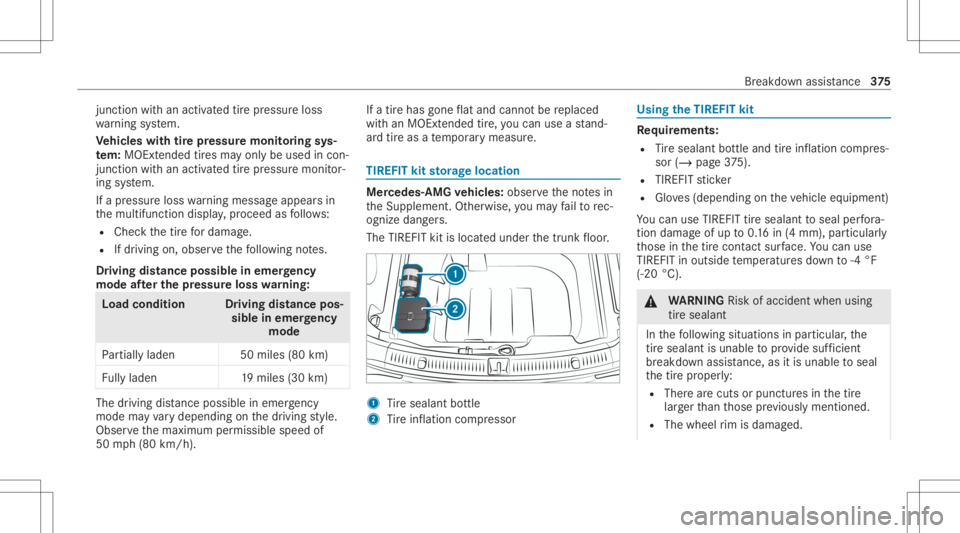
kitstorage location Mer
cedes- AMGvehicl es:obse rveth eno tesin
th eSupplement .Ot her wise, youma yfa ilto rec‐
ogni zedangers.
The TIREFIT kitisloca tedunder thetrunk floor . 1
Tire seala ntbottle
2 Tire inflation compressor Using
theTIR EFIT kit Re
quirement s:
R Tire seala ntbottle and tireinf lation compres‐
sor (/ page37 5).
R TIRE FITst icke r
R Gloves(depending ontheve hicle equipment)
Yo ucan useTIRE FITtir esealan tto seal perfora ‐
tio nda ma geofup to0.16 in(4 mm), particular ly
th ose inthetir econ tact surface. Youcan use
TIRE FITin out side temp eratur esdown to-4 °F
(-20 °C). &
WARNIN GRisk ofacci dent whenus ing
tir esea lant
In thefo llo wing situat ionsinpar ticular ,th e
tire sealant isuna ble to prov ide sufficie nt
br ea kdo wnassista nce, asitis una ble to seal
th etir epr oper ly:
R Ther ear ecuts orpunct ures inthetir e
lar gerth an those prev iousl ymen tioned.
R The wheel rim isdama ged. Br
eakdo wnassis tance 37
5