warning MERCEDES-BENZ CLS 2020 Owner's Manual
[x] Cancel search | Manufacturer: MERCEDES-BENZ, Model Year: 2020, Model line: CLS, Model: MERCEDES-BENZ CLS 2020Pages: 546, PDF Size: 19.76 MB
Page 194 of 546
Ac
tiv eSte ering Assis t Fu
nction ofActiv eSte ering Assis t
% The follo wing function iscoun try- dependen t
and onlyav ailable incon junction withth e
Dr iving Assi stanc ePa ckag e.
Ac tiveSt eer ing Assis tis onl yav ailable uptoa
speed of130mp h(210 km/h) .The system helps
yo uto stay inthecent erofthelane bymeans of
moder atesteer ing interve ntio ns.Dep endingon
th espeed driven, ActiveSt eer ing Assis tuses the
ve hicles ahead andlane markings asare fer‐
ence.
% Dependi ngon thecount ry,in thelowe r
speed rang eAc tiveSt eer ing Assis tcan use
th esur round ingtraf fic as are fere nce. Ifnec‐
ess ary, Ac tiveSt eer ing Assis tcan then also
pr ov ide assis tance when drivi ng outsid eth e
cent erofthelane toform are scue lane, for
ex am ple.
When thesy stem isactiv elysteer ing, theà
symbol issho wningreen inthemultifunc tion
displa y.
If th ede tection oflane mar kings andvehicles
ahead isim pair ed,ActiveSt eer ing Assis t switc
hestopassiv emode. Thesystem prov ides
no suppor tin this case. During thetra nsit ion
fr om activ eto passiv est atus ,th eà symbol is
sho wnasenlar gedand flashin g.On ce thesy s‐
te m ispass ive, theà symbol issho wnas
gr ay inthemultifunc tiondispla y.
Ste ering and touc hde tection
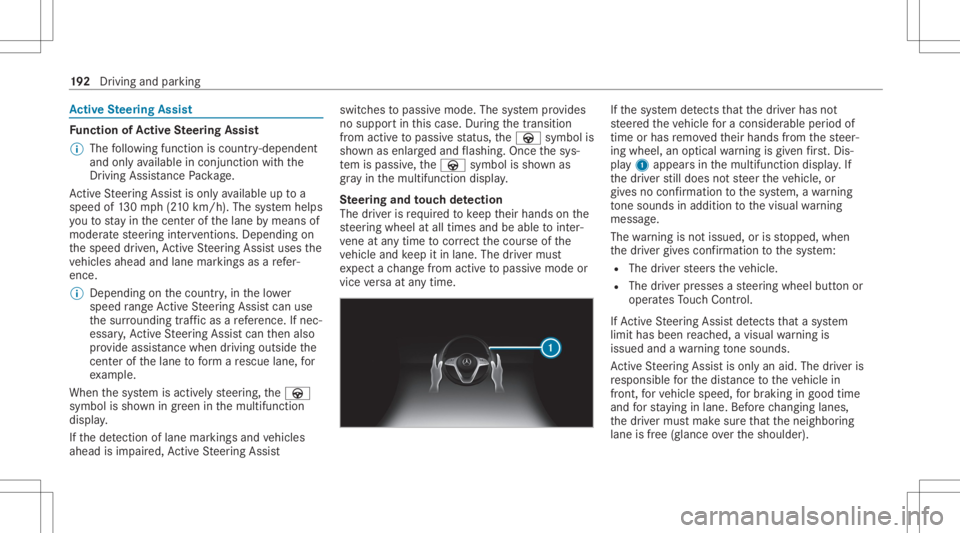
The driver isrequ ired tokeep their hands onthe
st eer ing wheel atall times andbeable tointer‐
ve ne atanytime tocor rect thecour seofthe
ve hicle andkeep itin lane. Thedriver mus t
ex pect ach ang efrom active to passiv emode or
vice versaat anytim e. If
th esy stem detects that thedr iver has not
st eer edtheve hicle fora consider ableper iod of
time orhas remo vedth eir hands from thesteer‐
ing wheel, anoptical warning isgiv en firs t. Dis ‐
pl ay 1 appear sin themultifunc tiondispla y.If
th edr iver still does notst eer theve hicle, or
giv es no conf irmation tothesy stem, awa rning
to ne sou nds inad ditio nto thevisual warning
mess age.
The warning isno tissued, orisstopped, when
th edr iver giv es con firm atio nto thesy stem:
R The driver steer sth eve hicle.
R The driver presses ast eer ing wheel buttonor
oper ates Touc hCon trol.
If Ac tiveSt eer ing Assis tde tects that asy stem
limit hasbeen reac hed, avisual warning is
issued andawa rning tone sou nds.
Ac tiveSt eer ing Assis tis onl yan aid. Thedriver is
re sponsible forth edis tance totheve hicle in
fr ont, forve hicle speed, forbr aking ingood time
and forst ay ing inlane. Beforech ang inglane s,
th edr iver mus tmak esur eth at theneighbor ing
lane isfree (glance overth eshoulder). 19
2
Driving and parking
Page 197 of 546
If
alane chang eis no tposs ible, thear row fades
out afte ra fe w sec ond sand ane wlane chang e
mus tbe init iated. Animm ediat elane chang eis
on lypo ssible on free wa ysec tion swit hout speed
limi ts.
If th esy stem isim pair ed,ActiveLa ne Chang e
Assi stma ybe canceled .If it is canceled ,th e
Lane Change Cancel edmessag eappe arsin the
multifu nctiondisplay and awa rning tone sou nds. &
WARNIN GRisk ofacci dent from chang ‐
ing lane toan occ upied adjacentlane
Lan eChan geAssi stcanno tal wa ys detect
cle arly ifth eadjacen tlane isfree.
The lane chang emigh tbe init iated although
th eadjacen tlane isno tfr ee. #
Beforech ang inglane s,mak esur eth at
th eneighbor inglane isfree and ther eis
no dang ertoother road user s. #
Mon itor thelane chang e. &
WARNIN GRisk ofacci dent ifLane
Ch ang eAssi stune xpectedl yst ops func‐
tionin g
If th esy stem limit ations forLane Change
Assis tha ve been reac hed, ther eis no guar‐
ant eethat thesy stem will remain active.
Lane ChangeAssis tcanno tth en assis tyo u
by appl ying steer ing torq ues . #
Alw aysmonit orthelane chang eand
ke ep your han dson thesteer ing wheel.
Obser vethetra ffic con dition sand steer
and/or brak eif neces sary. Sy
stem limit s
The system limit ations ofActiveSt eer ing Assis t
apply toActiveLa ne Chang eAssi st
( / pag e19 2).
Th esy stem mayalso beimpair edorma yno t
func tion inthefo llo wing situat ions:
R The sensorsin there ar bum peraredir ty,
damag edorcoveredby ast icke ror ice and
sno w,forex am ple.
R The exterior lighting ismalfunct ioning. %
The ActiveLa ne Chang eAssi stsensor s
adjus taut omaticall ywhile acer tain dis tance
is be ing driven afte rth eve hicle hasbeen
deliv ered. ActiveLa ne Chang eAssi stis
una vailable oronl ypar tiall yav ailable during
th is teac h-in per iod, noarrow appear sne xt
to theØ ActiveSt eer ing Assis tsymbol
when thetur nsignal indicat orisactiv ated.
Fu nction ofActiv eEme rgency Stop Assis t
If th edr iver con tinuall yignor esthevisual or
acous ticwarning toput their hands onthesteer‐
ing wheel, theBeginn ingEmer gencySt op mes‐
sag eappear sin themultifunc tiondispla y.Ifth e
dr iver still does notre spond, ActiveDis tance
Assi stDIS TRONI Creduces thespeed. Thevehi‐
cle isdeceler ated instag es toast ands till.
De pen dingon thecount ry,at speeds below
40 mph(60 km/h) thehazar dwa rning light s
switc hon aut omat ically.
When theve hicle isstatio nary,thefo llo wing
act ions arecar ried out :
R theve hicle issecur edwithth eelectr icpar k‐
ing brak e
R ActiveDis tance AssistDIS TRONI Cis end ed Dr
iving and parking 19
5
Page 209 of 546
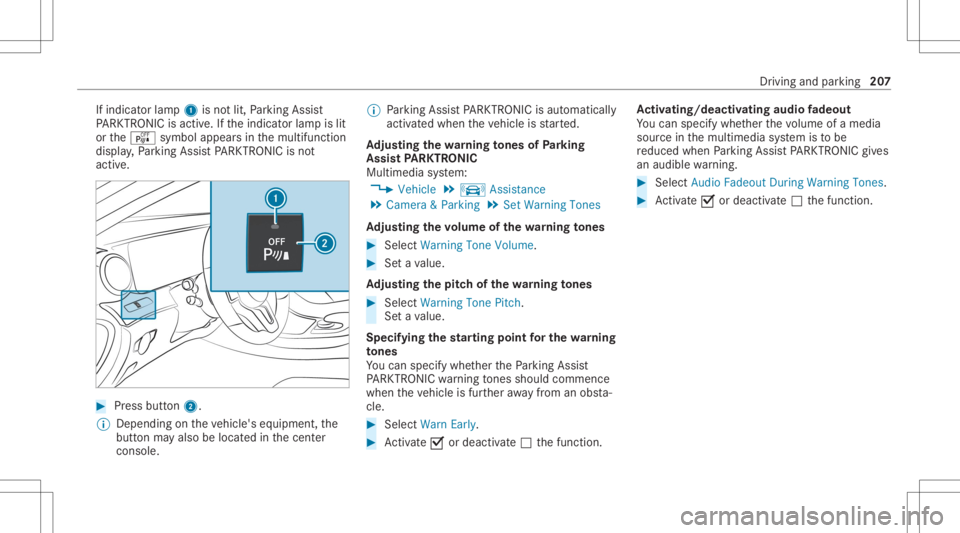
If
indicat orlam p1 isno tlit, Parking Assist
PA RK TRONI Cis act ive. Ifth eindicat orlam pis lit
or theé symbol appearsin themultifunc tion
displa y,Pa rking AssistPA RK TRONI Cis no t
act ive. #
Press button2.
% Dep endingontheve hicle's equipment, the
butt onmayalso belocat edinthecent er
con sole. %
Parking AssistPA RK TRONI Cis aut omat ically
act ivat ed when theve hicle isstar ted.
Ad jus tingthe warning tones ofParking
Assis tPA RK TRONI C
Mu ltimed iasystem:
4 Vehicle 5
k Assist ance
5 Camera &Parkin g5
Set Warning Tones
Ad jus tingthe volum eof thewa rning tones #
Select Warning ToneVolume. #
Seta va lue.
Ad jus tingthe pitchof the warning tones #
Select Warning TonePitch.
Se ta va lue.
Specif yingthest ar ting pointfo rthe warning
to nes
Yo ucan spec ifywhe ther thePa rking Assist
PA RK TRONI Cwa rning tones should comm ence
wh en theve hicle isfur ther aw ay from anobs ta‐
cle . #
Sele ctWa rnEarl y. #
Activate0073 ordeacti vate 0053 thefunc tion. Ac
tiv atin g/deac tivatin gaudi ofa deo ut
Yo ucan spec ifywhe ther thevo lume ofamedia
sour ceinthemultimedia system isto be
re duced whenParking AssistPA RK TRONI Cgiv es
an audible warning. #
Selec tAudio Fadeout DuringWarn ingTon es. #
Activate0073 ordeacti vate 0053 thefunc tion. Dr
iving andparking 20
7
Page 222 of 546
AT
TENTI ONASSIST Fu
nction ofATTENTI ONASSIST
AT TENTION ASSISTassis tsyouon long,mon oto‐
nous journeys,e.g. onhighw aysand trunk roads.
If AT TENTION ASSISTde tects indicatorsof fati‐
gu eor incr easing laps es inconce ntration onthe
par tof thedr iver ,it sugg ests taking abr ea k.
AT TENTION ASSISTis onl yan aid. Itcann ot
alw aysde tect fatig ue orlaps es inconce ntration
in tim e.The system isno ta subs titutefo ra we ll-
re sted and attent ive dr iver .On long journeys,
ta ke regular break sin good timethat allo wfor
adeq uatere cup erati on.
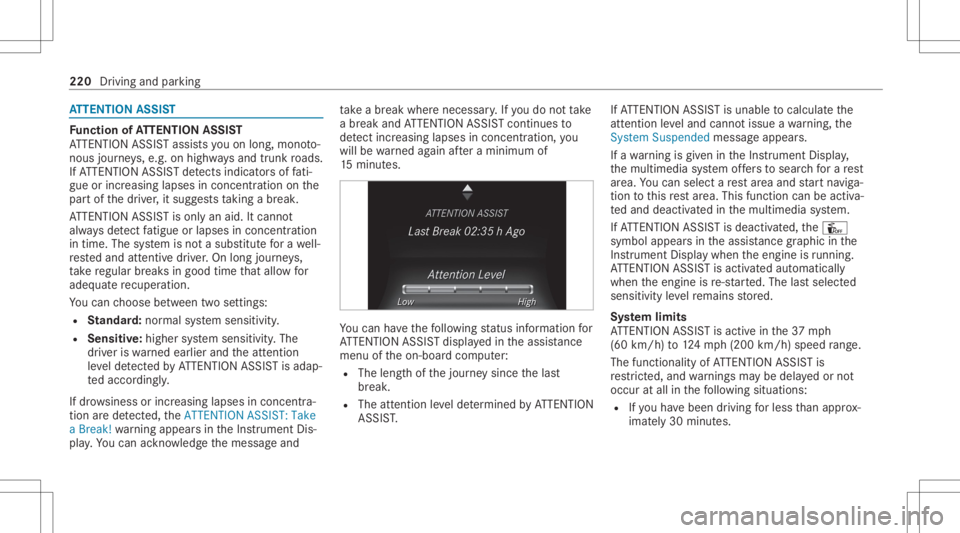
Yo ucan choose between twose ttings:
R Standar d:nor mal system sensit ivity.
R Sensitiv e:higher system sensit ivity.The
dr iver iswa rned ear lier and theatt ent ion
le ve lde tected byATTENTION ASSISTis adap‐
te daccor dingly.
If dr ow siness orincr easing lapsesinconcen tra‐
tion arede tected, theATTE NTION ASSIS T:Take
a Break !wa rning appear sin theIns trument Dis‐
pla y.Yo ucan ackn ow ledg eth emessag eand tak
eabr eak wher eneces sary.Ifyo udo notta ke
a br eak and ATTENTION ASSISTcont inues to
de tect incr easing lapse sin concentr ation, you
will bewarned again afte ra minimu mof
15 minut es. Yo
ucan have thefo llo wing status informat ionfor
AT TENTION ASSISTdispla yedin theassis tance
menu oftheon- boar dcom puter:
R The lengt hof thejour neysince thelas t
br eak .
R The attent ion leve lde term ined byATTENTION
ASS IST. If
AT TENTION ASSISTis unable tocal cul ateth e
att ent ion leve land cannotissue awa rning, the
Sys tem Suspend edmes sage appear s.
If awa rning isgiv en intheIns trument Display,
th emultimedia system offers to sear chfora re st
ar ea. Youcan selectare st area and star tna vig a‐
tio nto this rest area. This function can beact iva‐
te dand deactiv ated inthemultimedia system.
If AT TENTION ASSISTis deactiv ated, theÛ
symbol appearsin theassis tance grap hicin the
Ins trument Displaywhen theengine isrunning .
AT TENTION ASSISTis activ ated aut omaticall y
when theengine isre-sta rted. The lastselect ed
sensit ivityleve lre mains stor ed.
Sy stem limit s
AT TENTION ASSISTis activ ein the37 mph
(60 km/ h)to 124mp h(200 km/h) speedrang e.
The func tional ity ofATTENTION ASSISTis
re strict ed, and warnings maybe dela yedor not
occ uratall inthefo llo wing situat ions:
R Ifyo uha ve been driving forless than appr ox‐
imat ely30 min utes. 220
Drivin gand parking
Page 224 of 546
R
When avillag eor city boundar ywhic his
st or ed inthedigit almap ispassed.
The camer aalso detects traf fic sig ns with a
re striction indicated byan addit ionalsign (e.g.in
we tcond itions ).
Tr af fic Sign Assistisonl yan aid. Thedriver is
re sponsible forke eping asaf edis tance from the
ve hicle infront, forve hicle speed andforbr aking
in good time.
Wa rning when thema xim um permis sible
speed isexc eeded
The system can warnyouif yo uunin tentio nally
ex ceed themaximum permissible speed.Todo
th is, youcan spec ifyinthemultimedia system
by howmuc hth emaximum permissible speed
can beexceed edbef oreawa rning isissued. You
can specify whether thewa rning isto be justa
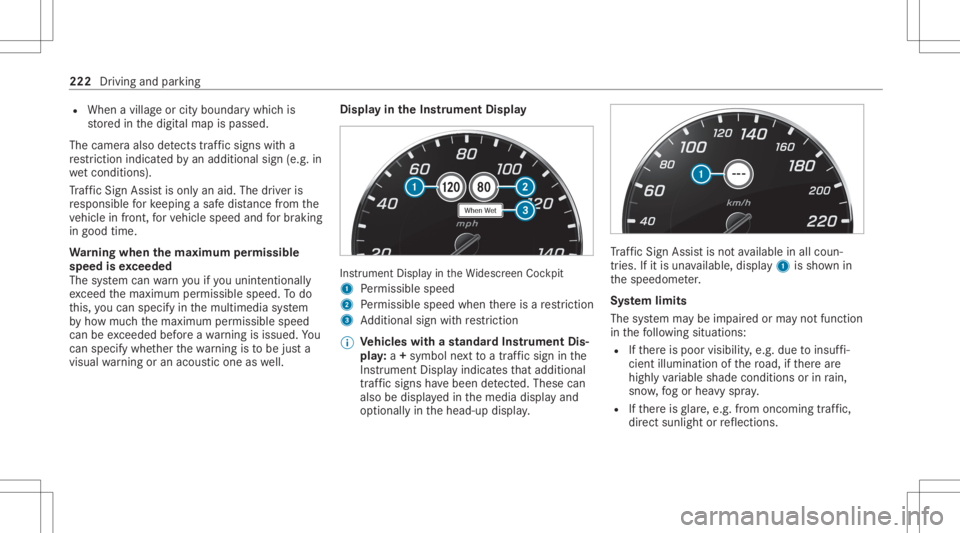
visual warning oran acous ticone aswell. Displa
yin theIns trum ent Displa y In
stru ment Displa yin theWi descr eenCockpit
1 Perm issible speed
2 Perm issible speedwhenther eis are striction
3 Addition alsign withre striction
% Ve
hicl eswith ast andar dIns trument Dis‐
pla y:a+ symbo lne xt to atraf fic sig nin the
Ins trument Displayindicat esthat addit ional
traf fic sig ns have been detected. Thesecan
al so be displ ayed inthemedia displayand
op tion ally inthehead-up display. Tr
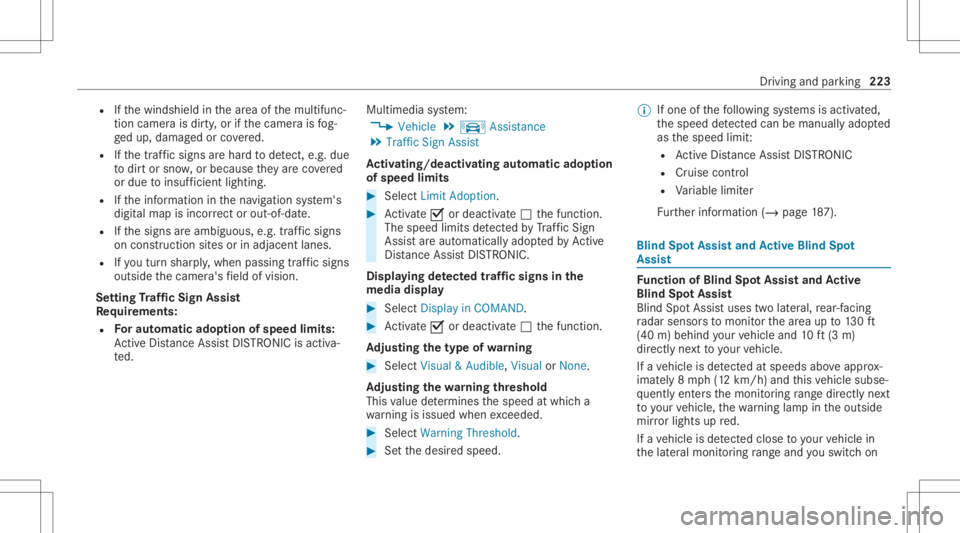
af fic Sign Assistisno tav ailable inall coun ‐
tr ies. Ifit is una vailable, display1 issho wnin
th espeedome ter.
Sy stem limit s
The system maybe impair edorma yno tfunc tion
in thefo llo wing situat ions:
R Ifth er eis poor visibility ,e.g. due toinsuf fi‐
cie ntillu mina tionofthero ad, ifth er ear e
highl yva riable shade condition sor inrain,
sno w,fogor hea vyspr ay.
R Ifth er eis glar e, e.g .fr om oncom ingtraf fic,
di re ct sunli ght orreflect ions. 222
Driving andparking
Page 225 of 546
R
Ifth ewindshield inthear ea ofthemultifunc ‐
tion camer ais dir ty,or ifth ecamer ais fog‐
ge dup, damag edorcovered.
R Ifth etraf fic sig ns areha rd todetect, e.g. due
to dir tor sno w,orbecause they areco vered
or due toinsuf ficie ntlighti ng.
R Ifth einf ormation inthena vig ation system's
digit almap isincor rect or out-of-da te.
R Ifth esigns areambiguous, e.g.traffic sign s
on con stru ction sites orinad jacent lanes.
R Ifyo utur nshar ply, when passin gtraf fic sig ns
ou tsid eth ecamer a'sfield ofvision.
Se tting Traf fic Sign Assis t
Re quirement s:
R Foraut omat icado ption ofspeed limits:
Ac tiveDis tance AssistDIS TRONI Cis acti va‐
te d. Multimedia
system:
4 Vehicle 5
k Assist ance
5 Traffic SignAssist
Ac tiv atin g/deac tivatin gaut omati cadop tion
of spe edlimits #
Select LimitAdo ption. #
Activate0073 ordeacti vate 0053 thefunc tion.
The speed limitsdetected byTraf fic Sign
Assi stareaut omat icallyadop tedby Active
Dis tance AssistDIS TRONI C.
Di spl aying detected traf fic signs inthe
med iadis pla y #
Select Display inCOMA ND. #
Activate0073 ordeacti vate 0053 thefunc tion.
Ad jus tingthe type ofwa rning #
Selec tVisual &Audible ,Visual orNon e.
Ad jus tingthe warning threshold
This value determ ines thespeed atwhic ha
wa rning isissued whenexceeded. #
Select Warning Threshold. #
Setth edesir edspeed. %
Ifone ofthefo llo wing systems isactiv ated,
th espeed detected can bemanu ally ad op ted
as thespeed limit:
R ActiveDis tance AssistDIS TRONI C
R Cruise contr ol
R Variable limiter
Fu rther information (/page18 7). Blind
SpotAss istand Activ eBli nd Spo t
As sist Fu
nction ofBlind SpotAssis tand Activ e
Bli nd Spo tAs sist
Bli nd Spo tAssi stuses twolat eral, rear-facin g
ra dar sensor sto monit orthear ea up to130ft
(40 m)behind your vehicle and10ft(3 m)
dir ect lyne xt to your vehicle.
If ave hicle isde tected atspe eds aboveappr ox‐
imat ely8 mp h(12 km/h) andthis vehicle subse‐
qu ent lyent ersth emonit oring rang edire ctly next
to your vehicle, thewa rning lam pin theoutside
mir rorlig hts upred.
If ave hicle isde tected clos eto your vehicle in
th elat eral monit oring rang eand youswit chon Dr
iving andparking 223
Page 226 of 546
th
etur nsignal indicat orinthecor responding
dir ection, awa rning tone sou nds once .The red
wa rning lam pin theoutside mirrorflashes .If th e
tur nsigna lind icatorre mains switchedon,all
ot her detected vehicles areindicat edonlyby the
fl ashin gof there dwa rning lam p.
If yo uove rtak eave hicle quickl y, no warning is
giv en. &
WARNIN GRisk ofacci dent despite Blind
Spo tAssi st
Bli nd Spo tAssi stdoes notre act tovehicles
appr oaching andovertakin gyo uat agr ea tly
di ffer ent speed.
As are sult, Blind SpotAssis tcanno twa rn
dr iver sin this situat ion. #
Alw ayspa ycar eful attention tothetra f‐
fi c situ ation and maintain asaf edis‐
ta nce attheside oftheve hicle. Blind
SpotAssis tand ActiveBli nd Spo tAssi st
ar eon lyaids. Theyma yfa ilto detect some vehi‐
cles andareno subs titutefo ratt entiv edr iving. Alw
aysensur eth at ther eis suf ficie ntdist anc eto
th eside forot her road user sand obstacle s.
Sy stem limita tions
The system maybe limit edinthefo llo wing situa‐
tion s:
R The sensorsar edir tyor covered.
R Poor visibility ,e.g. due tofog, hea vyrain,
sno wor spr ay.
R Narrow vehicles, e.g.bicycles, arewit hin the
monit oring rang e.
Wa rnings maybe issued inerro rwhen driving
close tocrash barrier sor similar solidlanebor‐
der s.Wa rnings maybe interru pte dwhen driving
alongside longvehicles, forex am ple truc ks,fo ra
pr olong edtime.
Blind SpotAssis tis no toper ationa lwhen reve rse
ge ar iseng aged.
Fu nction ofbrak eapp lication (Activ eBlind
Spo tAssis t)
% The brak eapplication functionisonl yav aila‐
ble forve hicles withaDr iving Assistance
Pa ckag e. If
Ac tiveBli nd Spo tAssi stdetects arisk ofaside
im pact inthemonit oring rang e, acou rse-co r‐
re cting brak eap plica tion iscar ried out. This is
designed tohelp youavo idacollis ion.
The cour se-cor recting brak eap plica tion isavaila‐
ble inthespeed rang ebe twee nap prox imat ely
20 mph(30 km/h) and125mp h(200 km/h). &
WARNIN GRisk ofacci dent despite
br ak eapplication ofActiveBli nd Spo t
Assi st
A cou rse-co rrect ing brak eapplication cannot
alw ayspr eve ntacol lisi on. #
Alw aysst eer ,br ak eor accelera teyour‐
self ,espe ciallyif Ac tiveBli nd Spo t
Assi stwa rnsyo uor mak esaco urse-
co rrect ing brak eapplication. #
Alw aysmaint ainasaf edis tance atthe
sides. 22
4
Driving andparking
Page 231 of 546
%
Dep endingonthecount ry,yo uma yha ve to
pr ess and hold thebutt ontodeactiv ate.
Se tting thesensit ivityof Activ eLan eKe ep‐
ing Assis t
Multi media system:
4 Vehicle 5
k Assist ance
5 Act .Lane Keep. Assist #
Select ase tting.
Ac tiv atin g/deac tivatin gthe warning #
Activate0073 ordeacti vate 0053 Lane Depart.
Warning.
Yo udo notre cei veanywa rning when leaving
a lane ifth elane keeping warning system is
deactiv ated. Ve
hicl eto wing instruct ions
The vehicle isno tsuit able forth euse oftow bar
sy stems that areused forflat towing ording hy
to wing, forex am ple. Attach ing and using tow bar
sy stems canlead todamag eon theve hicle.
When youar eto wing ave hicle withto w bar sys‐
te ms, safedr iving charact eristic scan notbe guar
anteed forth eto wing vehicle ortheto we d
ve hicle. Thevehicle-tr ailercombination may
sw erve from side toside. Complywithth eper‐
mitt edtowing methods (/page385) andthe
ins truct ions forto wing withbo th axle son the
gr ou nd (/ page 386). Dr
iving andparking 229
Page 237 of 546
Ad
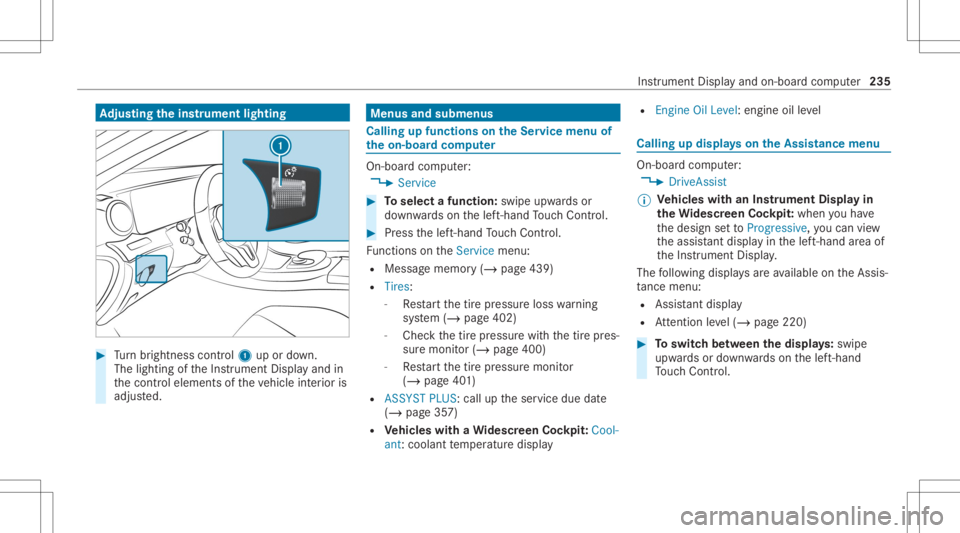
jus tingthe inst ru men tlighti ng #
Turn brightn esscontrol 1 upordown.
The lightin gof theIns trument Displayand in
th econ trol element sof theve hicle interior is
adjus ted. Menus
andsubmenu s Calling
upfunctions ontheSer vice menu of
th eon-boa rdcom puter On-boar
dcom puter:
4 Service #
Toselect afunction: swipeupwards or
do wn wardson thelef t-hand Touc hCon trol. #
Press thelef t-hand Touc hCon trol.
Fu nctio nson theServ icemenu:
R Messag ememor y(/ page439)
R Tires :
- Restar tth etir epr essur eloss warning
sy stem (/ page402)
- Chec kth etir epr essur ewit hth etir epr es‐
sur emonit or(/ page400)
- Restar tth etir epr essur emonit or
(/ page40 1)
R ASSYST PLUS: calluptheser vice duedate
(/ page35 7)
R Vehicl eswith aWi des cree nCo ckpit: Cool-
ant :cool anttemp eratur edispla y R
Engine OilLevel: engine oilleve l Callin
gup displa yson theAssis tance menu On
-bo ardcom puter:
4 DriveA ssist
% Ve
hicl eswith anIns trument Displayin
th eWi des cree nCo ckpit: whenyo uha ve
th edesign setto Progressive ,yo ucan view
th eassis tant displ ayinthelef t-hand area of
th eIns trument Display.
The follo wing displa ysareav ailable ontheAssis‐
ta nce menu :
R Assi stant displa y
R Attentio nleve l(/ page220) #
Toswitc hbe tw een thedisp lays :sw ipe
up wa rdsor down wardson thelef t-hand
To uc hCon trol. In
stru ment Displa yand on-boar dcom puter 235
Page 244 of 546
3
Traf fic Sign Assist
4 Navig ation displays Head-up
Display Fu
nction oftheHead -upDispla y Mer
cedes- AMGvehicl es:besur eto obser ve
th eno tesin theSupplement .Ot her wise, you
ma yfa ilto recogni zedangers.
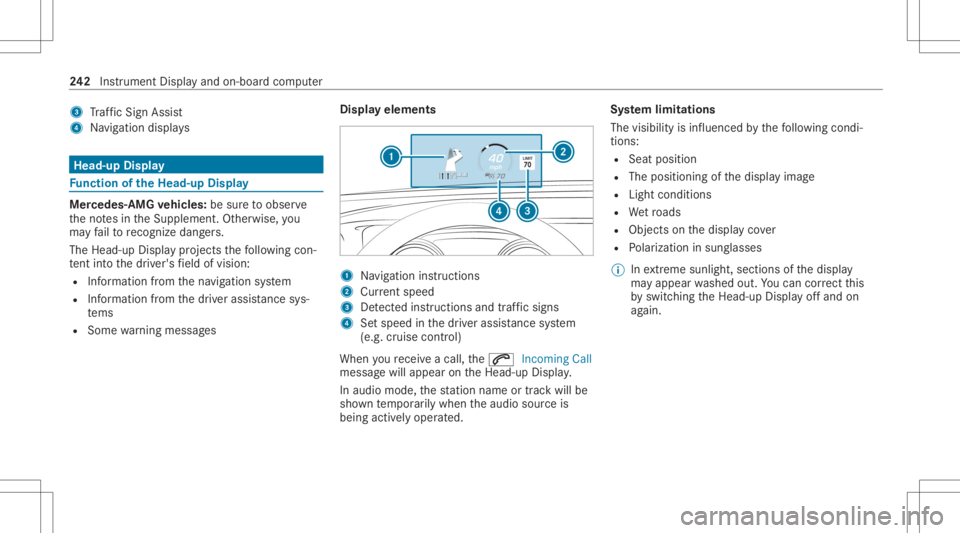
The Head-upDisp lay pr ojects thefo llo wing con‐
te nt intoth edr iver's field ofvision:
R Information from thena vig ation system
R Information from thedr iver assis tancesys‐
te ms
R Some warning mess ages Displa
yelement s 1
Navig ation instructions
2 Current speed
3 Detected instructi ons and traf fic sig ns
4 Setspe edinthedr iver assis tance system
(e.g. cruise control)
When youre cei veacall, the0061 Incoming Call
messag ewill appear ontheHead-up Display.
In aud iomode, thest atio nnam eor trac kwill be
sho wntemp orarily when theaudio sourceis
being activelyoper ated. Sy
stem limita tions
The visib ilityisinf luenc edbythefo llo wing condi‐
tion s:
R Seat position
R The posit ioningof thedispla yimag e
R Light conditions
R Wetro ads
R Objectson thedispla yco ver
R Polar izat ion insung lasses
% Inextreme sunli ght, sectio nsofthedispla y
ma yappear washed out.Youcan correct this
by switc hingtheHead-up Displayof fand on
ag ain. 24
2
Instrument Displayand on-boar dcom puter